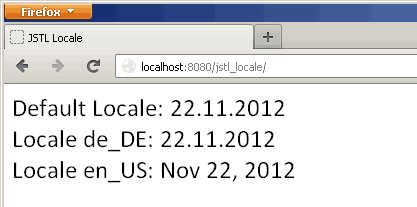
When you use JSTL format tag <fmt:formatDate> and <fmt:formatNumber>, JSTL automatically takes care of locale resolution. Depending on the browser’s locale setting JSTL will display the date and numbers. You may want to override this default behavior. For example in case where you want to display date format only in en_US locale irrespective of user locale setting of browser. Or you may want to store user locale settings in database and render the page accordingly. There are number of ways of overriding default JSTL locale at runtime.
1. Using <fmt:setLocale>
Use setLocale tag in format taglib to set a default locale. For example: Set locale to en_US on current JSP page:
<fmt:setLocale value="en_US"/> Code language: HTML, XML (xml)Set locale to en_US for all JSP page by saving the setting in session:
<fmt:setLocale value="en_US" scope="session"/> Code language: HTML, XML (xml)Use scope attribute to set the scope of the locale.
2. Programmatically using Config API
If you want to set the JSTL Locale programmatically within Servlet / Controller, use javax.servlet.jst.jstl.core.Config class to do so.
import javax.servlet.jst.jstl.core.Config;

Config.set( session, Config.FMT_LOCALE, new java.util.Locale("de","DE") )
Code language: Java (java)
You can read user preference from database and set locale programmatically as shown in above code. Each JSP rendered after this would show number/date format in given locale.
3. Global setting using Servlet Context param
Set locale at global level by passing a servlet content parameter:
<web-app>
   <context-param>
      <param-name>
         javax.servlet.jsp.jstl.fmt.locale
      </param-name>
      <param-value>
         en_US
      </param-value>
   </context-param>
   ...
</web-app>Code language: HTML, XML (xml)
This sets the locale at global level. If you are not overriding locale by any of above way (1 and 2), this locale will be used to render JSP.
Example
Here is a simple JSP which display date in default locale, de_DE and en_US:
<%@taglib prefix="fmt" uri="http://java.sun.com/jsp/jstl/fmt" %>
<html>
<body>
	<fmt:formatNumber>
	Default Locale:
	<fmt:formatDate value="<%= new java.util.Date() %>"/> <br>

	<fmt:setLocale value="de_DE"/>
	Locale de_DE:
	<fmt:formatDate value="<%= new java.util.Date() %>"/> <br>

	<fmt:setLocale value="en_US" scope="session"/>
	Locale en_US:
	<fmt:formatDate value="<%= new java.util.Date() %>"/> <br>

</body>
</html>
Code language: HTML, XML (xml)
Following is the output:

Thnx..
I think you meant ‘new java.util.Locale(“de”, “DE”)’ instead of ‘new java.util.Locale(“de_DE”)’…
@John, That’s correct :) I updated the code. Thanks.
thanks for giving, the example, i need some way to solve my problem.. i developing a application,
in tiles concept.header having the two buttons and one is English language and another having Hindi language , can i set the locale to the JSP when i click the English the the table has to show the English labels and when click the Hindi it has to show the Hindi labels.. is it possible?
Note: correcting my first post (code formatting issue)
What about defining custom date format pattern for each locale ?
ie. as user when in en_US locael, I want to be able to see the date such as “mm.dd.yyyy”, so something like “11.30.2014” instead of “Nov 30 2014”
I wonder if there is a best practice to implement this on a scalable level, not some quick & dirty hack such as:
This import is wrong:
javax.servlet.jst.jstl.core.Config
the correct one is:
javax.servlet.jsp.jstl.core.Config
Changed from jst to jsp
Thanks a lot, it was useful.