[ad name=”AD_INBETWEEN_POST”] Note: If you looking for tutorial “Create Struts2 Application in Eclipse” Click here. In this tutorial we will create a hello world Struts application in Eclipse editor.
We will implement a web application using Struts framework which will have a login screen. Once the user is authenticated, (s)he will be redirected to a welcome page. Let us start with our first struts based web application. First let us see what are the tools required to create our hello world Struts application.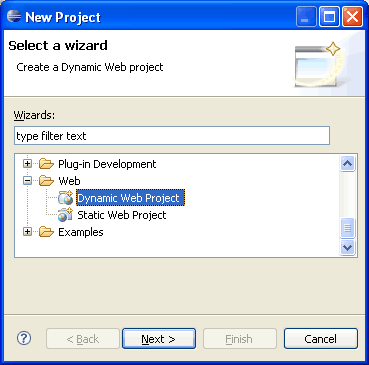 After selecting Dynamic Web Project, press Next.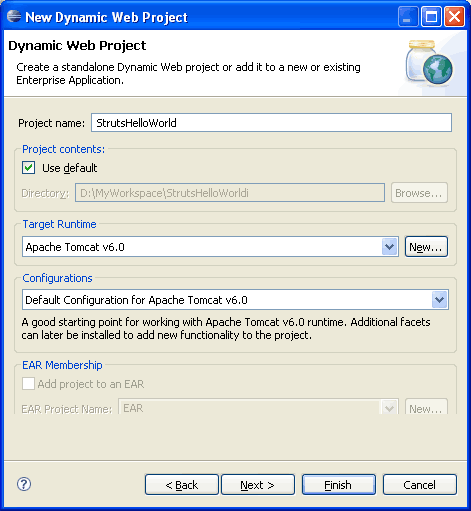
 Write the name of the project. For example StrutsHelloWorld. Once this is done, select the target runtime environment (e.g. Apache Tomcat v6.0). This is to run the project inside Eclipse environment. After this press Finish. Once the project is created, you can see its structure in Project Explorer.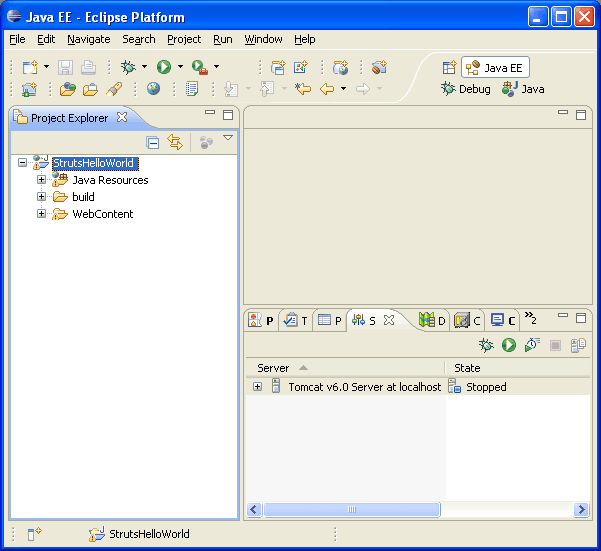
 Now copy all the required JAR files in WebContent -> WEB-INF -> lib folder. Create this folder if it does not exists.
[ad#blogs_content_inbetween]
Now copy all the required JAR files in WebContent -> WEB-INF -> lib folder. Create this folder if it does not exists.
[ad#blogs_content_inbetween] 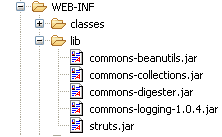
 Next step is to create a servlet entry in web.xml which points to org.apache.struts.action.ActionServlet class of struts framework. Open web.xml file which is there under WEB-INF folder and copy paste following code.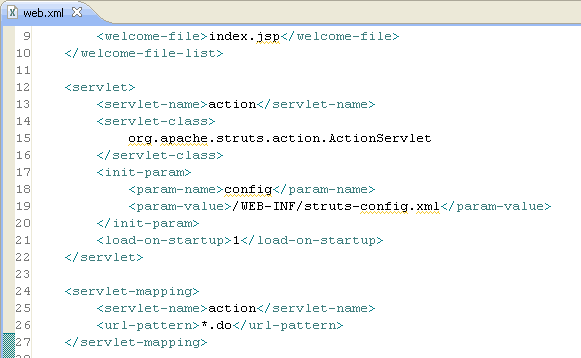
 Here we have mapped url *.do with the ActionServlet, hence all the requests from *.do url will be routed to ActionServlet; which will handle the flow of Struts after that. We will create package strutcures for your project source. Here we will create two packages, one for Action classes (net.viralpatel.struts.helloworld.action) and other for Form beans(net.viralpatel.struts.helloworld.action).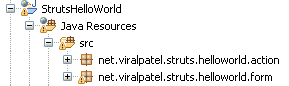
 Also create a class LoginForm in net.viralpatel.struts.helloworld.action with following content.
[ad#blogs_content_inbetween]
Also create a class LoginForm in net.viralpatel.struts.helloworld.action with following content.
[ad#blogs_content_inbetween]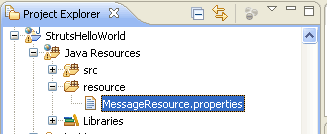
 Copy the following content in your Upadate:struts-config.xml MessageResource.properties file.
[ad#blogs_content_inbetween]
Copy the following content in your Upadate:struts-config.xml MessageResource.properties file.
[ad#blogs_content_inbetween]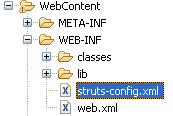
 Following will be the content of struts-config.xml file: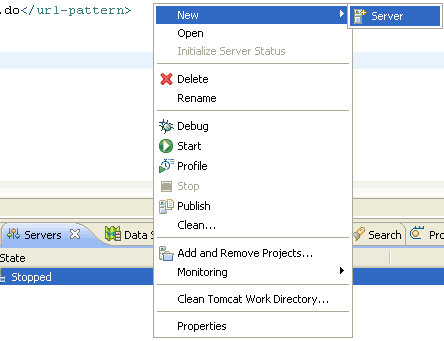
 Open Server view from Windows -> Show View -> Server. Right click in this view and select New -> Server and add your server details.
To run the project, right click on Project name from Project Explorer and select Run as -> Run on Server (Shortcut: Alt+Shift+X, R)
Open Server view from Windows -> Show View -> Server. Right click in this view and select New -> Server and add your server details.
To run the project, right click on Project name from Project Explorer and select Run as -> Run on Server (Shortcut: Alt+Shift+X, R) 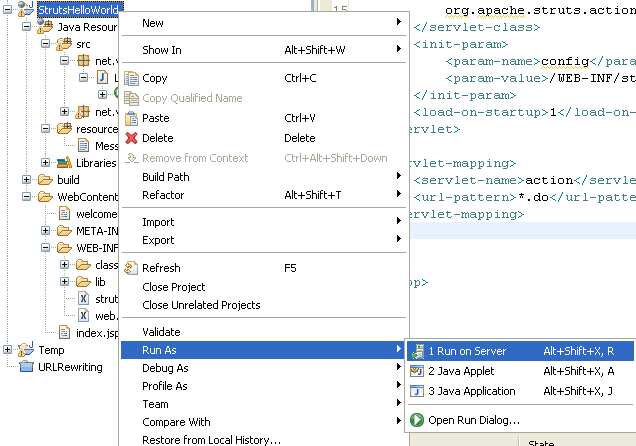
 Login Page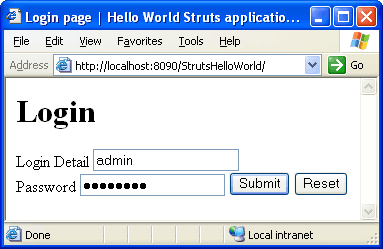
 Welcome Page
 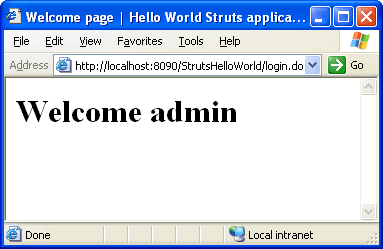 Related: Create Struts 2 Application in Eclipse [ad]
- JDK 1.5 above (download)
- Tomcat 5.x above or any other container (Glassfish, JBoss, Websphere, Weblogic etc) (download)
- Eclipse 3.2.x above (download)
- Apache Struts JAR files:(download). Following are the list of JAR files required for this application.
- struts.jar
- common-logging.jar
- common-beanutils.jar
- common-collections.jar
- common-digester.jar
 After selecting Dynamic Web Project, press Next.
  Write the name of the project. For example StrutsHelloWorld. Once this is done, select the target runtime environment (e.g. Apache Tomcat v6.0). This is to run the project inside Eclipse environment. After this press Finish. Once the project is created, you can see its structure in Project Explorer.
  Now copy all the required JAR files in WebContent -> WEB-INF -> lib folder. Create this folder if it does not exists.
[ad#blogs_content_inbetween]
Now copy all the required JAR files in WebContent -> WEB-INF -> lib folder. Create this folder if it does not exists.
[ad#blogs_content_inbetween]  Next step is to create a servlet entry in web.xml which points to org.apache.struts.action.ActionServlet class of struts framework. Open web.xml file which is there under WEB-INF folder and copy paste following code.
<servlet>
<servlet-name>action</servlet-name>
<servlet-class>
org.apache.struts.action.ActionServlet
</servlet-class>
<init-param>
<param-name>config</param-name>
<param-value>/WEB-INF/struts-config.xml</param-value>
</init-param>
<load-on-startup>1</load-on-startup>
</servlet>
<servlet-mapping>
<servlet-name>action</servlet-name>
<url-pattern>*.do</url-pattern>
</servlet-mapping>
Code language: HTML, XML (xml) Here we have mapped url *.do with the ActionServlet, hence all the requests from *.do url will be routed to ActionServlet; which will handle the flow of Struts after that. We will create package strutcures for your project source. Here we will create two packages, one for Action classes (net.viralpatel.struts.helloworld.action) and other for Form beans(net.viralpatel.struts.helloworld.action).
  Also create a class LoginForm in net.viralpatel.struts.helloworld.action with following content.
[ad#blogs_content_inbetween]
Also create a class LoginForm in net.viralpatel.struts.helloworld.action with following content.
[ad#blogs_content_inbetween]package net.viralpatel.struts.helloworld.form;
import javax.servlet.http.HttpServletRequest;
import org.apache.struts.action.ActionErrors;
import org.apache.struts.action.ActionForm;
import org.apache.struts.action.ActionMapping;
import org.apache.struts.action.ActionMessage;
public class LoginForm extends ActionForm {
private String userName;
private String password;
public ActionErrors validate(ActionMapping mapping,
HttpServletRequest request) {
ActionErrors actionErrors = new ActionErrors();
if(userName == null || userName.trim().equals("")) {
actionErrors.add("userName", new ActionMessage("error.username"));
}
try {
if(password == null || password.trim().equals("")) {
actionErrors.add("password", new ActionMessage("error.password"));
}
}catch(Exception e) {
e.printStackTrace();
}
return actionErrors ;
}
public String getUserName() {
return userName;
}
public void setUserName(String userName) {
this.userName = userName;
}
public String getPassword() {
return password;
}
public void setPassword(String password) {
this.password = password;
}
}
Code language: Java (java)package net.viralpatel.struts.helloworld.action;
import javax.servlet.http.HttpServletRequest;
import javax.servlet.http.HttpServletResponse;
import net.viralpatel.struts.helloworld.form.LoginForm;
import org.apache.struts.action.Action;
import org.apache.struts.action.ActionForm;
import org.apache.struts.action.ActionForward;
import org.apache.struts.action.ActionMapping;
public class LoginAction extends Action {
public ActionForward execute(ActionMapping mapping, ActionForm form,
HttpServletRequest request, HttpServletResponse response)
throws Exception {
String target = null;
LoginForm loginForm = (LoginForm)form;
if(loginForm.getUserName().equals("admin")
&& loginForm.getPassword().equals("admin123")) {
target = "success";
request.setAttribute("message", loginForm.getPassword());
}
else {
target = "failure";
}
return mapping.findForward(target);
}
}
Code language: Java (java) Copy the following content in your Upadate:struts-config.xml MessageResource.properties file.
[ad#blogs_content_inbetween]
Copy the following content in your Upadate:struts-config.xml MessageResource.properties file.
[ad#blogs_content_inbetween]label.username = Login Detail
label.password = Password
label.welcome = Welcome
error.username =Username is not entered.Code language: HTML, XML (xml)<%@taglib uri="http://jakarta.apache.org/struts/tags-html" prefix="html"%>
<%@taglib uri="http://jakarta.apache.org/struts/tags-bean" prefix="bean" %>
<html>
<head>
<meta http-equiv="Content-Type" content="text/html; charset=ISO-8859-1">
<title>Login page | Hello World Struts application in Eclipse</title>
</head>
<body>
<h1>Login</h1>
<html:form action="login">
<bean:message key="label.username" />
<html:text property="userName"></html:text>
<html:errors property="userName" />
<br/>
<bean:message key="label.password"/>
<html:password property="password"></html:password>
<html:errors property="password"/>
<html:submit/>
<html:reset/>
</html:form>
</body>
</html>Code language: HTML, XML (xml)<%@ page language="java" contentType="text/html; charset=ISO-8859-1"
pageEncoding="ISO-8859-1"%>
<!DOCTYPE html PUBLIC "-//W3C//DTD HTML 4.01 Transitional//EN" "http://www.w3.org/TR/html4/loose.dtd">
<html>
<head>
<meta http-equiv="Content-Type" content="text/html; charset=ISO-8859-1">
<title>Welcome page | Hello World Struts application in Eclipse</title>
</head>
<body>
<%
String message = (String)request.getAttribute("message");
%>
<h1>Welcome <%= message %></h1>
</body>
</html>Code language: HTML, XML (xml) Following will be the content of struts-config.xml file:
<?xml version="1.0" encoding="ISO-8859-1" ?>
<!DOCTYPE struts-config PUBLIC
"-//Apache Software Foundation//DTD Struts Configuration 1.2//EN"
"http://jakarta.apache.org/struts/dtds/struts-config_1_2.dtd">
<struts-config>
<form-beans>
<form-bean name="LoginForm"
type="net.viralpatel.struts.helloworld.form.LoginForm" />
</form-beans>
<global-exceptions>
</global-exceptions>
<global-forwards></global-forwards>
<action-mappings>
<action path="/login" name="LoginForm" validate="true" input="/index.jsp"
type="net.viralpatel.struts.helloworld.action.LoginAction">
<forward name="success" path="/welcome.jsp" />
<forward name="failure" path="/index.jsp" />
</action>
</action-mappings>
<message-resources parameter="resource.MessageResource"></message-resources>
</struts-config>Code language: HTML, XML (xml) Open Server view from Windows -> Show View -> Server. Right click in this view and select New -> Server and add your server details.
To run the project, right click on Project name from Project Explorer and select Run as -> Run on Server (Shortcut: Alt+Shift+X, R)
Open Server view from Windows -> Show View -> Server. Right click in this view and select New -> Server and add your server details.
To run the project, right click on Project name from Project Explorer and select Run as -> Run on Server (Shortcut: Alt+Shift+X, R)  Login Page
  Welcome Page
  Related: Create Struts 2 Application in Eclipse [ad]


Thanks Viral,
The explanation and information is very apt.
Very useful.
Informative post.
Here’s a similar tutorial, but for the latest version of struts 2 – Create Struts 2 – Hello World Application
If you’re (still) doing Struts, you should check out Oracle Workshop for WebLogic. It is the best Struts tool by far, includes many examples and can do much much more than Eclipse WTP. It is not WebLogic specific. And, it’s free.
Check out my post about it:
http://blog.zvikico.com/2008/08/the-best-jspstrutsjsf-development-tool-is-now-free.html
@Veera : Nice to see your Struts-2 tutorial. You will see more tutorials on similar line here on viralpatel.net
@Zviki : Thanks for your comment. Will definitely check Oracle Workshop for WebLogic.
Nice tutorial, good job :)
@Zviki I suggest having a look at IntelliJ IDEA’s support for Struts 2, in my opinion it is one of the best. It’s not free, though.
hi did anyone try this with WASCE server? iam doing in it and evrything looks fine except that when i clikc on submit it says that the resource/login is not found..
any ideas pls help
I am getting this exception while deploying this …. Can anyone help?
HTTP Status 500 –
——————————————————————————–
type Exception report
message
description The server encountered an internal error () that prevented it from fulfilling this request.
exception
org.apache.jasper.JasperException: Cannot find ActionMappings or ActionFormBeans collection
org.apache.jasper.servlet.JspServletWrapper.handleJspException(JspServletWrapper.java:460)
org.apache.jasper.servlet.JspServletWrapper.service(JspServletWrapper.java:355)
org.apache.jasper.servlet.JspServlet.serviceJspFile(JspServlet.java:329)
org.apache.jasper.servlet.JspServlet.service(JspServlet.java:265)
javax.servlet.http.HttpServlet.service(HttpServlet.java:803)
root cause
javax.servlet.ServletException: Cannot find ActionMappings or ActionFormBeans collection
org.apache.jasper.runtime.PageContextImpl.doHandlePageException(PageContextImpl.java:841)
org.apache.jasper.runtime.PageContextImpl.handlePageException(PageContextImpl.java:774)
org.apache.jsp.index_jsp._jspService(index_jsp.java:91)
org.apache.jasper.runtime.HttpJspBase.service(HttpJspBase.java:98)
javax.servlet.http.HttpServlet.service(HttpServlet.java:803)
org.apache.jasper.servlet.JspServletWrapper.service(JspServletWrapper.java:331)
org.apache.jasper.servlet.JspServlet.serviceJspFile(JspServlet.java:329)
org.apache.jasper.servlet.JspServlet.service(JspServlet.java:265)
javax.servlet.http.HttpServlet.service(HttpServlet.java:803)
root cause
javax.servlet.jsp.JspException: Cannot find ActionMappings or ActionFormBeans collection
org.apache.struts.taglib.html.FormTag.lookup(FormTag.java:798)
org.apache.struts.taglib.html.FormTag.doStartTag(FormTag.java:506)
org.apache.jsp.index_jsp._jspx_meth_html_005fform_005f0(index_jsp.java:107)
org.apache.jsp.index_jsp._jspService(index_jsp.java:81)
org.apache.jasper.runtime.HttpJspBase.service(HttpJspBase.java:98)
javax.servlet.http.HttpServlet.service(HttpServlet.java:803)
org.apache.jasper.servlet.JspServletWrapper.service(JspServletWrapper.java:331)
org.apache.jasper.servlet.JspServlet.serviceJspFile(JspServlet.java:329)
org.apache.jasper.servlet.JspServlet.service(JspServlet.java:265)
javax.servlet.http.HttpServlet.service(HttpServlet.java:803)
its very useful for beginners
i am getting this exception ..
HTTP Status 500 –
——————————————————————————–
type Exception report
message
description The server encountered an internal error () that prevented it from fulfilling this request.
exception
org.apache.jasper.JasperException: An exception occurred processing JSP page /index.jsp at line 12
9:
10: Login
11:
12:
13:
14:
15:
Stacktrace:
org.apache.jasper.servlet.JspServletWrapper.handleJspException(JspServletWrapper.java:524)
org.apache.jasper.servlet.JspServletWrapper.service(JspServletWrapper.java:417)
org.apache.jasper.servlet.JspServlet.serviceJspFile(JspServlet.java:320)
org.apache.jasper.servlet.JspServlet.service(JspServlet.java:266)
javax.servlet.http.HttpServlet.service(HttpServlet.java:803)
root cause
javax.servlet.ServletException: javax.servlet.jsp.JspException: Missing message for key “label.username”
org.apache.jasper.runtime.PageContextImpl.doHandlePageException(PageContextImpl.java:850)
org.apache.jasper.runtime.PageContextImpl.handlePageException(PageContextImpl.java:779)
org.apache.jsp.index_jsp._jspService(index_jsp.java:96)
org.apache.jasper.runtime.HttpJspBase.service(HttpJspBase.java:70)
javax.servlet.http.HttpServlet.service(HttpServlet.java:803)
org.apache.jasper.servlet.JspServletWrapper.service(JspServletWrapper.java:393)
org.apache.jasper.servlet.JspServlet.serviceJspFile(JspServlet.java:320)
org.apache.jasper.servlet.JspServlet.service(JspServlet.java:266)
javax.servlet.http.HttpServlet.service(HttpServlet.java:803)
root cause
javax.servlet.jsp.JspException: Missing message for key “label.username”
org.apache.struts.taglib.bean.MessageTag.doStartTag(MessageTag.java:233)
org.apache.jsp.index_jsp._jspx_meth_bean_005fmessage_005f0(index_jsp.java:174)
org.apache.jsp.index_jsp._jspx_meth_html_005fform_005f0(index_jsp.java:118)
org.apache.jsp.index_jsp._jspService(index_jsp.java:86)
org.apache.jasper.runtime.HttpJspBase.service(HttpJspBase.java:70)
javax.servlet.http.HttpServlet.service(HttpServlet.java:803)
org.apache.jasper.servlet.JspServletWrapper.service(JspServletWrapper.java:393)
org.apache.jasper.servlet.JspServlet.serviceJspFile(JspServlet.java:320)
org.apache.jasper.servlet.JspServlet.service(JspServlet.java:266)
javax.servlet.http.HttpServlet.service(HttpServlet.java:803)
note The full stack trace of the root cause is available in the Apache Tomcat/6.0.14 logs.
many thanks
mayank
Copy the following content in your struts-config.xml file.
label.username = Login Detail
label.password = Password
label.welcome = Welcome
error.username =Username is not entered.
did u mean that paste the above content in MessageResource.properties file? or struts-config.xml file?
Thanks Vivek,
I have updated the error in post.
You need to copy this in MessageResource.properties file.
Thanks again.
Hi
I am getting following error please help…
SEVERE: Servlet.service() for servlet jsp threw exception
javax.servlet.jsp.JspException: Cannot find ActionMappings or ActionFormBeans collection
at org.apache.struts.taglib.html.FormTag.lookup(FormTag.java:712)
at org.apache.struts.taglib.html.FormTag.doStartTag(FormTag.java:500)
at org.apache.jsp.index_jsp._jspx_meth_html_form_0(org.apache.jsp.index_jsp:132)
at org.apache.jsp.index_jsp._jspx_meth_html_html_0(org.apache.jsp.index_jsp:108)
at org.apache.jsp.index_jsp._jspService(org.apache.jsp.index_jsp:75)
at org.apache.jasper.runtime.HttpJspBase.service(HttpJspBase.java:97)
at javax.servlet.http.HttpServlet.service(HttpServlet.java:802)
at org.apache.jasper.servlet.JspServletWrapper.service(JspServletWrapper.java:322)
at org.apache.jasper.servlet.JspServlet.serviceJspFile(JspServlet.java:291)
at org.apache.jasper.servlet.JspServlet.service(JspServlet.java:241)
at javax.servlet.http.HttpServlet.service(HttpServlet.java:802)
at org.apache.catalina.core.ApplicationFilterChain.internalDoFilter(ApplicationFilterChain.java:252)
at org.apache.catalina.core.ApplicationFilterChain.doFilter(ApplicationFilterChain.java:173)
at org.apache.catalina.core.StandardWrapperValve.invoke(StandardWrapperValve.java:213)
at org.apache.catalina.core.StandardContextValve.invoke(StandardContextValve.java:178)
at org.apache.catalina.core.StandardHostValve.invoke(StandardHostValve.java:126)
at org.apache.catalina.valves.ErrorReportValve.invoke(ErrorReportValve.java:105)
at org.apache.catalina.core.StandardEngineValve.invoke(StandardEngineValve.java:107)
at org.apache.catalina.connector.CoyoteAdapter.service(CoyoteAdapter.java:148)
at org.apache.coyote.http11.Http11Processor.process(Http11Processor.java:856)
at org.apache.coyote.http11.Http11Protocol$Http11ConnectionHandler.processConnection(Http11Protocol.java:744)
at org.apache.tomcat.util.net.PoolTcpEndpoint.processSocket(PoolTcpEndpoint.java:527)
at org.apache.tomcat.util.net.LeaderFollowerWorkerThread.runIt(LeaderFollowerWorkerThread.java:80)
at org.apache.tomcat.util.threads.ThreadPool$ControlRunnable.run(ThreadPool.java:684)
at java.lang.Thread.run(Unknown Source)
Hi,
I am getting Error 404–Not Found From RFC 2068 Hypertext Transfer Protocol — HTTP/1.1:
10.4.5 404 Not Found . I have double checked web.xml and struts-config.xml. I would appreicate, if anyone can help me.
You should have take the time to make this tutorial with the latest version of struts 1 : v1.3.10
The version 1.2, on which is based this tutorial, has been released for more than 4 years ! The branch 1.3 which split struts.jar into multiple modules has been release in two years !
Excellent Material for the Beginners.
Follow the steps carefully, it should definitely work.
Thanks
Sample
Hi,
There is anice tutorial on how to use Struts2, a basic example at
http://www.interview-questions-tips-forum.net/index.php/Apache-Struts/Struts2-example-tutorial/My-First-example-using-Apache-Struts2
hai,,this ,,gr8,,,,help to intoduce the struts application
I m not able to find jar files u mentioned above.Can u provide me the exact path..
Greetings!
I found your post very educating. This is the first sample struts application I created using eclipse.
However, I kept getting the error saying the message was not found in the key bundle.
I tried many things but I got the same error. Finally I modified the entry in the struts-config.xml to
from what you mentioned. It did the trick.
I’m using struts 1.3, jdk 6 and eclipse ganymede.. hope that helps.
Hello There,
I am fairly new to Struts, I was wondering if anyone can post or preferably mail me some materila about how to handle database connectivity in Struts. I am working on JNDI but I guess this won\\\’t be helpful if I have a shared apache tomcat server as that won\\\’t let me access the server.xml file.
my id is baran.khan @ gmail.com
I am preety new to struts. I want to know how to remove the error Missing message for key \"label.username\"? I have created a package name resource in src and created a file in it with the name MessageResource.properties. What changes i need to make in my struts-config.xml?
Hi Payal,
I am not sure if I got your problem. What I understand is that you want to remove the error messages generated from keys that are missing in your bundle MessageResource file. If this is the case then you can use null attribute in <message-resources> tag in struts-config.xml file.
null attribute will control the messages, If true, references to non existing messages results in null and If false, references to non existing messages result in warning message like
???KeyName???
Hope this will solve your query.
Hey thanks for this great tut!!
But, I was having the same error “Missing message for key “label.username” and I moved the file MessageResource to the folder WEB-INF->classes->resource. That did the trick.
Can you explain why tis happened? Thanks again mate!
While providing the parameter attribute in <message-resource> tag we provide it as parameter=”resource.MessageResource”. Thus in this case, struts expects the MessageResource.properties file under resource folder. But if you have provided parameter=”MessageResource” then that means your MessageResource properties file is directly under classes folder.
Could anyone help me to solve the following error? I have checked the struts-config and web.xml . But I cannot find the error.please…
,Grace
The server encountered an internal error () that prevented it from fulfilling this request.
javax.servlet.ServletException: Exception creating bean of class net.viralpatel.struts.helloworld.form.LoginForm: {1}
org.apache.jasper.runtime.PageContextImpl.doHandlePageException(PageContextImpl.java:846)
org.apache.jasper.runtime.PageContextImpl.handlePageException(PageContextImpl.java:779)
org.apache.jsp.index_jsp._jspService(index_jsp.java:91)
org.apache.jasper.runtime.HttpJspBase.service(HttpJspBase.java:94)
javax.servlet.http.HttpServlet.service(HttpServlet.java:802)
org.apache.jasper.servlet.JspServletWrapper.service(JspServletWrapper.java:324)
org.apache.jasper.servlet.JspServlet.serviceJspFile(JspServlet.java:292)
org.apache.jasper.servlet.JspServlet.service(JspServlet.java:236)
javax.servlet.http.HttpServlet.service(HttpServlet.java:802)
javax.servlet.jsp.JspException: Exception creating bean of class net.viralpatel.struts.helloworld.form.LoginForm: {1}
org.apache.struts.taglib.html.FormTag.initFormBean(FormTag.java:563)
org.apache.struts.taglib.html.FormTag.doStartTag(FormTag.java:520)
org.apache.jsp.index_jsp._jspx_meth_html_form_0(index_jsp.java:107)
org.apache.jsp.index_jsp._jspService(index_jsp.java:81)
org.apache.jasper.runtime.HttpJspBase.service(HttpJspBase.java:94)
javax.servlet.http.HttpServlet.service(HttpServlet.java:802)
org.apache.jasper.servlet.JspServletWrapper.service(JspServletWrapper.java:324)
org.apache.jasper.servlet.JspServlet.serviceJspFile(JspServlet.java:292)
org.apache.jasper.servlet.JspServlet.service(JspServlet.java:236)
javax.servlet.http.HttpServlet.service(HttpServlet.java:802)
Hi..
To make this tutorial work:
1. also add servlet-api.jar.
2. make sure struts-config.xml is in web-inf folder or the folder u have specified in web.xml
3. make sure the messageresource file is in web-inf/classes folder.
4. Change the following line in LoginAction.java from
request.setAttribute(\"message\", loginForm.getPassword());
To
request.setAttribute(\"message\", loginForm.getUserName());
Kiran
I have done everything as told here.I am using SDE 3.1 and I am getting this exception on runing the application.Can anyone help?
SEVERE: Servlet.service() for servlet jsp threw exception
org.apache.jasper.JasperException: The absolute uri: http://jakarta.apache.org/struts/tags-html cannot be resolved in either web.xml or the jar files deployed with this application
at org.apache.jasper.compiler.DefaultErrorHandler.jspError(DefaultErrorHandler.java:50)
at org.apache.jasper.compiler.ErrorDispatcher.dispatch(ErrorDispatcher.java:407)
at org.apache.jasper.compiler.ErrorDispatcher.jspError(ErrorDispatcher.java:114)
at org.apache.jasper.compiler.TagLibraryInfoImpl.generateTLDLocation(TagLibraryInfoImpl.java:316)
at org.apache.jasper.compiler.TagLibraryInfoImpl.<init>(TagLibraryInfoImpl.java:147)
at org.apache.jasper.compiler.Parser.parseTaglibDirective(Parser.java:423)
at org.apache.jasper.compiler.Parser.parseDirective(Parser.java:492)
at org.apache.jasper.compiler.Parser.parseElements(Parser.java:1552)
at org.apache.jasper.compiler.Parser.parse(Parser.java:126)
at org.apache.jasper.compiler.ParserController.doParse(ParserController.java:211)
at org.apache.jasper.compiler.ParserController.parse(ParserController.java:100)
at org.apache.jasper.compiler.Compiler.generateJava(Compiler.java:155)
at org.apache.jasper.compiler.Compiler.compile(Compiler.java:295)
at org.apache.jasper.compiler.Compiler.compile(Compiler.java:276)
at org.apache.jasper.compiler.Compiler.compile(Compiler.java:264)
at org.apache.jasper.JspCompilationContext.compile(JspCompilationContext.java:563)
at org.apache.jasper.servlet.JspServletWrapper.service(JspServletWrapper.java:303)
at org.apache.jasper.servlet.JspServlet.serviceJspFile(JspServlet.java:314)
at org.apache.jasper.servlet.JspServlet.service(JspServlet.java:264)
at javax.servlet.http.HttpServlet.service(HttpServlet.java:802)
at org.apache.catalina.core.ApplicationFilterChain.internalDoFilter(ApplicationFilterChain.java:252)
at org.apache.catalina.core.ApplicationFilterChain.doFilter(ApplicationFilterChain.java:173)
at org.apache.catalina.core.StandardWrapperValve.invoke(StandardWrapperValve.java:213)
at org.apache.catalina.core.StandardContextValve.invoke(StandardContextValve.java:178)
at org.apache.catalina.core.StandardHostValve.invoke(StandardHostValve.java:126)
at org.apache.catalina.valves.ErrorReportValve.invoke(ErrorReportValve.java:105)
at org.apache.catalina.core.StandardEngineValve.invoke(StandardEngineValve.java:107)
at org.apache.catalina.connector.CoyoteAdapter.service(CoyoteAdapter.java:148)
at org.apache.coyote.http11.Http11Processor.process(Http11Processor.java:869)
at org.apache.coyote.http11.Http11BaseProtocol$Http11ConnectionHandler.processConnection(Http11BaseProtocol.java:664)
at org.apache.tomcat.util.net.PoolTcpEndpoint.processSocket(PoolTcpEndpoint.java:527)
at org.apache.tomcat.util.net.LeaderFollowerWorkerThread.runIt(LeaderFollowerWorkerThread.java:80)
at org.apache.tomcat.util.threads.ThreadPool$ControlRunnable.run(ThreadPool.java:684)
at java.lang.Thread.run(Thread.java:595)
help me,
I am beginner programmer, I got exception in ur tutorial as this
HTTP Status 500 –
——————————————————————————–
type Exception report
message
description The server encountered an internal error () that prevented it from fulfilling this request.
exception
org.apache.jasper.JasperException: Exception in JSP: /index.jsp:13
10: <body>
11: <h1>Login</h1>
12: <html:form action=\"login\">
13: <bean:message key=\"label.username\" />
14: <html:text property=\"userName\"></html:text>
15: <html:errors property=\"userName\"/>
16: <br/>
Stacktrace:
org.apache.jasper.servlet.JspServletWrapper.handleJspException(JspServletWrapper.java:451)
org.apache.jasper.servlet.JspServletWrapper.service(JspServletWrapper.java:355)
org.apache.jasper.servlet.JspServlet.serviceJspFile(JspServlet.java:329)
org.apache.jasper.servlet.JspServlet.service(JspServlet.java:265)
javax.servlet.http.HttpServlet.service(HttpServlet.java:729)
root cause
javax.servlet.ServletException: Missing message for key \"label.username\"
org.apache.jasper.runtime.PageContextImpl.doHandlePageException(PageContextImpl.java:841)
org.apache.jasper.runtime.PageContextImpl.handlePageException(PageContextImpl.java:774)
org.apache.jsp.index_jsp._jspService(index_jsp.java:89)
org.apache.jasper.runtime.HttpJspBase.service(HttpJspBase.java:98)
javax.servlet.http.HttpServlet.service(HttpServlet.java:729)
org.apache.jasper.servlet.JspServletWrapper.service(JspServletWrapper.java:331)
org.apache.jasper.servlet.JspServlet.serviceJspFile(JspServlet.java:329)
org.apache.jasper.servlet.JspServlet.service(JspServlet.java:265)
javax.servlet.http.HttpServlet.service(HttpServlet.java:729)
root cause
javax.servlet.jsp.JspException: Missing message for key \"label.username\"
org.apache.struts.taglib.bean.MessageTag.doStartTag(MessageTag.java:233)
org.apache.jsp.index_jsp._jspx_meth_bean_005fmessage_005f0(index_jsp.java:166)
org.apache.jsp.index_jsp._jspx_meth_html_005fform_005f0(index_jsp.java:110)
org.apache.jsp.index_jsp._jspService(index_jsp.java:79)
org.apache.jasper.runtime.HttpJspBase.service(HttpJspBase.java:98)
javax.servlet.http.HttpServlet.service(HttpServlet.java:729)
org.apache.jasper.servlet.JspServletWrapper.service(JspServletWrapper.java:331)
org.apache.jasper.servlet.JspServlet.serviceJspFile(JspServlet.java:329)
org.apache.jasper.servlet.JspServlet.service(JspServlet.java:265)
javax.servlet.http.HttpServlet.service(HttpServlet.java:729)
note The full stack trace of the root cause is available in the Apache Tomcat/5.5.27 logs.
——————————————————————————–
Apache Tomcat/5.5.27
please help me
I already copy
label.username = Login Detail
label.password = Password
label.welcome = Welcome
error.username =Username is not entered.
to the resource folder, but the exception still occured….
please help me
Hi Viral,
Did you mean create a class LoginForm in net.viralpatel.struts.helloworld.form and not in .action (I have created a class LoginForm in net.viralpatel.struts.helloworld.form )?
I have moved the resource folder under WebContent which got around with the key issues. I have only
index.jsp in web.xml. It warns that I do have index.jsp under WebContent but I do have it.
Upon starting the project in JBOSS 7. I got the following error message? Please can u sort this out for me?
javax.servlet.ServletException: javax.servlet.jsp.JspException: Exception creating bean of class net.viralpatel.struts.helloworld.form.LoginForm under form name LoginForm
org.apache.jasper.runtime.PageContextImpl.doHandlePageException(PageContextImpl.java:862)
org.apache.jasper.runtime.PageContextImpl.handlePageException(PageContextImpl.java:791)
org.apache.jsp.index_jsp._jspService(index_jsp.java:99)
org.apache.jasper.runtime.HttpJspBase.service(HttpJspBase.java:70)
javax.servlet.http.HttpServlet.service(HttpServlet.java:847)
org.apache.jasper.servlet.JspServletWrapper.service(JspServletWrapper.java:369)
org.apache.jasper.servlet.JspServlet.serviceJspFile(JspServlet.java:326)
org.apache.jasper.servlet.JspServlet.service(JspServlet.java:253)
javax.servlet.http.HttpServlet.service(HttpServlet.java:847)
root cause
javax.servlet.jsp.JspException: Exception creating bean of class net.viralpatel.struts.helloworld.form.LoginForm under form name LoginForm
org.apache.struts.taglib.html.FormTag.initFormBean(FormTag.java:536)
org.apache.struts.taglib.html.FormTag.doStartTag(FormTag.java:503)
org.apache.jsp.index_jsp._jspx_meth_html_005fform_005f0(index_jsp.java:116)
org.apache.jsp.index_jsp._jspService(index_jsp.java:89)
org.apache.jasper.runtime.HttpJspBase.service(HttpJspBase.java:70)
javax.servlet.http.HttpServlet.service(HttpServlet.java:847)
org.apache.jasper.servlet.JspServletWrapper.service(JspServletWrapper.java:369)
org.apache.jasper.servlet.JspServlet.serviceJspFile(JspServlet.java:326)
org.apache.jasper.servlet.JspServlet.service(JspServlet.java:253)
javax.servlet.http.HttpServlet.service(HttpServlet.java:847)
Ta
Hari
hey, thanks very much..
finally I can solve it…
@sarwo edi: nice to see that your problem got solved :) by the way. where was the problem exactly? I guess your properties file was not getting referred properly?
Hi Viral,
Did you mean create a class LoginForm in net.viralpatel.struts.helloworld.form and not in .action (I have created a class LoginForm in net.viralpatel.struts.helloworld.form )?
I have moved the resource folder under WebContent which got around with the key issues. I have only
index.jsp in web.xml. It warns that I do have index.jsp under WebContent but I do have it.
Upon starting the project in JBOSS 7. I got the following error message? Please can u sort this out for me?
javax.servlet.ServletException: javax.servlet.jsp.JspException: Exception creating bean of class net.viralpatel.struts.helloworld.form.LoginForm under form name LoginForm
org.apache.jasper.runtime.PageContextImpl.doHandlePageException(PageContextImpl.java:862)
org.apache.jasper.runtime.PageContextImpl.handlePageException(PageContextImpl.java:791)
org.apache.jsp.index_jsp._jspService(index_jsp.java:99)
org.apache.jasper.runtime.HttpJspBase.service(HttpJspBase.java:70)
javax.servlet.http.HttpServlet.service(HttpServlet.java:847)
org.apache.jasper.servlet.JspServletWrapper.service(JspServletWrapper.java:369)
org.apache.jasper.servlet.JspServlet.serviceJspFile(JspServlet.java:326)
org.apache.jasper.servlet.JspServlet.service(JspServlet.java:253)
javax.servlet.http.HttpServlet.service(HttpServlet.java:847)
root cause
javax.servlet.jsp.JspException: Exception creating bean of class net.viralpatel.struts.helloworld.form.LoginForm under form name LoginForm
org.apache.struts.taglib.html.FormTag.initFormBean(FormTag.java:536)
org.apache.struts.taglib.html.FormTag.doStartTag(FormTag.java:503)
org.apache.jsp.index_jsp._jspx_meth_html_005fform_005f0(index_jsp.java:116)
org.apache.jsp.index_jsp._jspService(index_jsp.java:89)
org.apache.jasper.runtime.HttpJspBase.service(HttpJspBase.java:70)
javax.servlet.http.HttpServlet.service(HttpServlet.java:847)
org.apache.jasper.servlet.JspServletWrapper.service(JspServletWrapper.java:369)
org.apache.jasper.servlet.JspServlet.serviceJspFile(JspServlet.java:326)
org.apache.jasper.servlet.JspServlet.service(JspServlet.java:253)
javax.servlet.http.HttpServlet.service(HttpServlet.java:847)
Ta
Hari
yeah, in struts-config, I only type <message-resources parameter=\"MessageResource\" null=\"true\"/>, it make its true…
btw, any another eclipse tutorial?
I want to be a good java programmer as you do..
txh
<message-resources parameter=\"resource.MessageResource\"></message-resources>
should be
<message-resources parameter=\"MessageResource\"></message-resources>
Muchas gracias!!! a Viral por el tutorial y también a Davinchi porque dió la solución al mismo problema que tenía yo!!!!
Davinchi wrote on 19 March, 2009, 11:31
Hey thanks for this great tut!!
But, I was having the same error “Missing message for key “label.username” and I moved the file MessageResource to the folder WEB-INF->classes->resource. That did the trick.
Can you explain why tis happened? Thanks again mate!
I have followed ur tutorial
i am getting error
VERE: Servlet.service() for servlet jsp threw exception
javax.servlet.jsp.JspException: Cannot find ActionMappings or ActionFormBeans collection
at org.apache.struts.taglib.html.FormTag.lookup(FormTag.java:798)
at org.apache.struts.taglib.html.FormTag.doStartTag(FormTag.java:506)
at org.apache.jsp.index_jsp._jspx_meth_html_005fform_005f0(index_jsp.java:115)
at org.apache.jsp.index_jsp._jspService(index_jsp.java:88)
at org.apache.jasper.runtime.HttpJspBase.service(HttpJspBase.java:98)
at javax.servlet.http.HttpServlet.service(HttpServlet.java:803)
at org.apache.jasper.servlet.JspServletWrapper.service(JspServletWrapper.java:390)
at org.apache.jasper.servlet.JspServlet.serviceJspFile(JspServlet.java:320)
at org.apache.jasper.servlet.JspServlet.service(JspServlet.java:266)
at javax.servlet.http.HttpServlet.service(HttpServlet.java:803)
at org.apache.catalina.core.ApplicationFilterChain.internalDoFilter(ApplicationFilterChain.java:290)
at org.apache.catalina.core.ApplicationFilterChain.doFilter(ApplicationFilterChain.java:206)
at org.apache.catalina.core.StandardWrapperValve.invoke(StandardWrapperValve.java:228)
at org.apache.catalina.core.StandardContextValve.invoke(StandardContextValve.java:175)
at org.apache.catalina.core.StandardHostValve.invoke(StandardHostValve.java:128)
at org.apache.catalina.valves.ErrorReportValve.invoke(ErrorReportValve.java:105)
at org.apache.catalina.core.StandardEngineValve.invoke(StandardEngineValve.java:109)
at org.apache.catalina.connector.CoyoteAdapter.service(CoyoteAdapter.java:212)
at org.apache.coyote.http11.Http11Processor.process(Http11Processor.java:818)
at org.apache.coyote.http11.Http11Protocol$Http11ConnectionHandler.process(Http11Protocol.java:624)
at org.apache.tomcat.util.net.JIoEndpoint$Worker.run(JIoEndpoint.java:445)
at java.lang.Thread.run(Unknown Source)
Jun 5, 2009 10:43:41 AM org.apache.catalina.core.StandardWrapperValve invoke
SEVERE: Servlet.service() for servlet jsp threw exception
javax.servlet.jsp.JspException: Cannot find ActionMappings or ActionFormBeans collection
at org.apache.struts.taglib.html.FormTag.lookup(FormTag.java:798)
at org.apache.struts.taglib.html.FormTag.doStartTag(FormTag.java:506)
at org.apache.jsp.index_jsp._jspx_meth_html_005fform_005f0(index_jsp.java:115)
at org.apache.jsp.index_jsp._jspService(index_jsp.java:88)
at org.apache.jasper.runtime.HttpJspBase.service(HttpJspBase.java:98)
at javax.servlet.http.HttpServlet.service(HttpServlet.java:803)
at org.apache.jasper.servlet.JspServletWrapper.service(JspServletWrapper.java:390)
at org.apache.jasper.servlet.JspServlet.serviceJspFile(JspServlet.java:320)
at org.apache.jasper.servlet.JspServlet.service(JspServlet.java:266)
at javax.servlet.http.HttpServlet.service(HttpServlet.java:803)
at org.apache.catalina.core.ApplicationFilterChain.internalDoFilter(ApplicationFilterChain.java:290)
at org.apache.catalina.core.ApplicationFilterChain.doFilter(ApplicationFilterChain.java:206)
at org.apache.catalina.core.StandardWrapperValve.invoke(StandardWrapperValve.java:228)
at org.apache.catalina.core.StandardContextValve.invoke(StandardContextValve.java:175)
at org.apache.catalina.core.StandardHostValve.invoke(StandardHostValve.java:128)
at org.apache.catalina.valves.ErrorReportValve.invoke(ErrorReportValve.java:105)
at org.apache.catalina.core.StandardEngineValve.invoke(StandardEngineValve.java:109)
at org.apache.catalina.connector.CoyoteAdapter.service(CoyoteAdapter.java:212)
at org.apache.coyote.http11.Http11Processor.process(Http11Processor.java:818)
at org.apache.coyote.http11.Http11Protocol$Http11ConnectionHandler.process(Http11Protocol.java:624)
at org.apache.tomcat.util.net.JIoEndpoint$Worker.run(JIoEndpoint.java:445)
at java.lang.Thread.run(Unknown Source)
can you tell me what can be cause of this.
Hi~
I have modified the line
<message-resources parameter=\\\"resource.MessageResource\\\"></message-resources>
to
<message-resources parameter=\\\"MessageResource\\\"></message-resources>
And I have followed all the instructions, I am now using Struts 1.3.10, but I got \"HTTP Status 404\" error,
\"The requested resource (/StrutsHelloWorld/) is not available.\"
Anyone may help? Thx!
More description abt my problem,
In Eclipse I got the following URI underlined in red!
\\"<%@taglib uri=\\"http://jakarta.apache.org/struts/tags-html\\" prefix=\\"html\\"%>
<%@taglib uri=\\"http://jakarta.apache.org/struts/tags-bean\\" prefix=\\"bean\\" %> \\"
Eclipse says \\"cannot find tag library descriptor\\"
How should I modify the \\"uri\\"? Thx so much!
Can any one help me…..
type Exception report
message
description The server encountered an internal error () that prevented it from fulfilling this request.
exception
org.apache.jasper.JasperException: Exception creating bean of class com.jamesholmes.minihr.SearchForm under form name searchForm
org.apache.jasper.servlet.JspServletWrapper.handleJspException(JspServletWrapper.java:460)
org.apache.jasper.servlet.JspServletWrapper.service(JspServletWrapper.java:355)
org.apache.jasper.servlet.JspServlet.serviceJspFile(JspServlet.java:329)
org.apache.jasper.servlet.JspServlet.service(JspServlet.java:265)
javax.servlet.http.HttpServlet.service(HttpServlet.java:729)
root cause
javax.servlet.ServletException: Exception creating bean of class com.jamesholmes.minihr.SearchForm under form name searchForm
org.apache.jasper.runtime.PageContextImpl.doHandlePageException(PageContextImpl.java:841)
org.apache.jasper.runtime.PageContextImpl.handlePageException(PageContextImpl.java:774)
org.apache.jsp.search_jsp._jspService(search_jsp.java:230)
org.apache.jasper.runtime.HttpJspBase.service(HttpJspBase.java:98)
javax.servlet.http.HttpServlet.service(HttpServlet.java:729)
org.apache.jasper.servlet.JspServletWrapper.service(JspServletWrapper.java:331)
org.apache.jasper.servlet.JspServlet.serviceJspFile(JspServlet.java:329)
org.apache.jasper.servlet.JspServlet.service(JspServlet.java:265)
javax.servlet.http.HttpServlet.service(HttpServlet.java:729)
root cause
javax.servlet.jsp.JspException: Exception creating bean of class com.jamesholmes.minihr.SearchForm under form name searchForm
org.apache.struts.taglib.html.FormTag.initFormBean(FormTag.java:536)
org.apache.struts.taglib.html.FormTag.doStartTag(FormTag.java:503)
org.apache.jsp.search_jsp._jspx_meth_html_005fform_005f0(search_jsp.java:263)
org.apache.jsp.search_jsp._jspService(search_jsp.java:101)
org.apache.jasper.runtime.HttpJspBase.service(HttpJspBase.java:98)
javax.servlet.http.HttpServlet.service(HttpServlet.java:729)
org.apache.jasper.servlet.JspServletWrapper.service(JspServletWrapper.java:331)
org.apache.jasper.servlet.JspServlet.serviceJspFile(JspServlet.java:329)
org.apache.jasper.servlet.JspServlet.service(JspServlet.java:265)
javax.servlet.http.HttpServlet.service(HttpServlet.java:729)
note The full stack trace of the root cause is available in the Apache Tomcat/5.5.27 logs.
can anyone help, i got the following exception while executing
type Exception report
message
description The server encountered an internal error () that prevented it from fulfilling this request.
exception
org.apache.jasper.JasperException: Module ‘null’ not found.
org.apache.jasper.servlet.JspServletWrapper.handleJspException(JspServletWrapper.java:460)
org.apache.jasper.servlet.JspServletWrapper.service(JspServletWrapper.java:373)
org.apache.jasper.servlet.JspServlet.serviceJspFile(JspServlet.java:329)
org.apache.jasper.servlet.JspServlet.service(JspServlet.java:265)
javax.servlet.http.HttpServlet.service(HttpServlet.java:729)
root cause
java.lang.NullPointerException: Module ‘null’ not found.
org.apache.struts.taglib.TagUtils.getModuleConfig(TagUtils.java:743)
org.apache.struts.taglib.TagUtils.getModuleConfig(TagUtils.java:723)
org.apache.struts.taglib.html.FormTag.lookup(FormTag.java:742)
org.apache.struts.taglib.html.FormTag.doStartTag(FormTag.java:417)
org.apache.jsp.index_jsp._jspx_meth_html_005fform_005f0(index_jsp.java:105)
org.apache.jsp.index_jsp._jspService(index_jsp.java:79)
org.apache.jasper.runtime.HttpJspBase.service(HttpJspBase.java:98)
javax.servlet.http.HttpServlet.service(HttpServlet.java:729)
org.apache.jasper.servlet.JspServletWrapper.service(JspServletWrapper.java:331)
org.apache.jasper.servlet.JspServlet.serviceJspFile(JspServlet.java:329)
org.apache.jasper.servlet.JspServlet.service(JspServlet.java:265)
javax.servlet.http.HttpServlet.service(HttpServlet.java:729)
Can you help on this error, it’s related to the tag libs which I’m still struggling to understand. the URI cannot be resolved.
Also eclipse shows warning “unknown tags” for entire index.jsp page
type Exception report
message
description The server encountered an internal error () that prevented it from fulfilling this request.
exception
org.apache.jasper.JasperException: The absolute uri: http://jakarta.apache.org/struts/tags-html cannot be resolved in either web.xml or the jar files deployed with this application
org.apache.jasper.compiler.DefaultErrorHandler.jspError(DefaultErrorHandler.java:51)
org.apache.jasper.compiler.ErrorDispatcher.dispatch(ErrorDispatcher.java:409)
org.apache.jasper.compiler.ErrorDispatcher.jspError(ErrorDispatcher.java:116)
org.apache.jasper.compiler.TagLibraryInfoImpl.generateTLDLocation(TagLibraryInfoImpl.java:315)
org.apache.jasper.compiler.TagLibraryInfoImpl.(TagLibraryInfoImpl.java:148)
org.apache.jasper.compiler.Parser.parseTaglibDirective(Parser.java:429)
org.apache.jasper.compiler.Parser.parseDirective(Parser.java:492)
org.apache.jasper.compiler.Parser.parseElements(Parser.java:1439)
org.apache.jasper.compiler.Parser.parse(Parser.java:137)
org.apache.jasper.compiler.ParserController.doParse(ParserController.java:255)
org.apache.jasper.compiler.ParserController.parse(ParserController.java:103)
org.apache.jasper.compiler.Compiler.generateJava(Compiler.java:170)
org.apache.jasper.compiler.Compiler.compile(Compiler.java:332)
org.apache.jasper.compiler.Compiler.compile(Compiler.java:312)
org.apache.jasper.compiler.Compiler.compile(Compiler.java:299)
org.apache.jasper.JspCompilationContext.compile(JspCompilationContext.java:586)
org.apache.jasper.servlet.JspServletWrapper.service(JspServletWrapper.java:317)
org.apache.jasper.servlet.JspServlet.serviceJspFile(JspServlet.java:342)
org.apache.jasper.servlet.JspServlet.service(JspServlet.java:267)
javax.servlet.http.HttpServlet.service(HttpServlet.java:717)
Hi.
To make this tutorial work then follow these steps:
1. also inlcude servlet-api.jar in lib folder.
2. make sure struts-config.xml is in web-inf folder or the folder u have specified in web.xml
3. make sure the MessageResource.properties file is in web-inf/classes/resource folder.
4. Change the following line in LoginAction.java from
request.setAttribute("message", loginForm.getPassword());
To
request.setAttribute("message", loginForm.getUserName());
Change the following line in struts-config.xml
from
<message-resources parameter="resource.MessageResource"></message-resources>
To
<message-resources parameter="resource.MessageResource" null="true"></message-resources>
i have make these changes and example working successfully.
Hello EveryBody ,
i tried to follow this tutorial but in My index.jsp my taglibs (bean and html) are unknown :(.
could you help?
thanx
Hi Salma,
The error you are getting is due to the difference in the struts jar file. Check which version of jar you using and add the appropriate taglib paths in your jsp. For example try following URIs in the path of taglib.
http://struts.apache.org/tags-html
http://struts.apache.org/tags-bean
Hi Viral,
I need help ,Regarding Connection with Struts-1.3.8 with MySql i am stuck to compile my struts test application .in Struts-Config.xml tag not recognized. when i put block of code like exactly this
A red circle is appear in eclipe id.
Can you tell me what config. need
antlr-2.7.2.jar,commons-beanutils-1.7.0.jar,commons-chain-1.1.jar,commons-dbcp-1.2.2.jar
commons-digester-1.8.jar,commons-logging-1.0.4.jar,commons-pool-1.4.jar,commons-resources.jar,commons-validator-1.3.1.jar,jdbc2_0-stdext.jar,mysql-connector-java-5.0.8-bin.jar,oro-2.0.8.jar,servlet-api.jar,struts-core-1.3.8.jar,struts-taglib-1.3.8.jar,struts-tiles-1.3.8.jar,tools.jar in my lib folder.
Gracias por el manual muy bueno
Encontre la solucion al problema:
1. create packge: net.viralpatel.struts.helloworld.form.Util
2. dentro package poner el archivo MessageResource.properties
3. Change the following line in struts-config.xml
from
<message-resources parameter=\"resource.MessageResource\"></message-resources>
To
<message-resources parameter=\"net.viralpatel.struts.helloworld.form.Util.MessageResource\"></message-resources>
Hi All,
I’m getting the following error report. KINDLY HELP!!
HTTP Status 500 –
——————————————————————————–
type Exception report
message
description The server encountered an internal error () that prevented it from fulfilling this request.
exception
org.apache.jasper.JasperException: java.lang.NullPointerException: Module ‘null’ not found.
org.apache.jasper.servlet.JspServletWrapper.handleJspException(JspServletWrapper.java:522)
org.apache.jasper.servlet.JspServletWrapper.service(JspServletWrapper.java:416)
org.apache.jasper.servlet.JspServlet.serviceJspFile(JspServlet.java:342)
org.apache.jasper.servlet.JspServlet.service(JspServlet.java:267)
javax.servlet.http.HttpServlet.service(HttpServlet.java:717)
root cause
java.lang.NullPointerException: Module ‘null’ not found.
org.apache.struts.taglib.TagUtils.getModuleConfig(TagUtils.java:755)
org.apache.struts.taglib.TagUtils.getModuleConfig(TagUtils.java:735)
org.apache.struts.taglib.html.FormTag.lookup(FormTag.java:818)
org.apache.struts.taglib.html.FormTag.doStartTag(FormTag.java:488)
org.apache.jsp.index_jsp._jspx_meth_html_005fform_005f0(index_jsp.java:118)
org.apache.jsp.index_jsp._jspService(index_jsp.java:91)
org.apache.jasper.runtime.HttpJspBase.service(HttpJspBase.java:70)
javax.servlet.http.HttpServlet.service(HttpServlet.java:717)
org.apache.jasper.servlet.JspServletWrapper.service(JspServletWrapper.java:374)
org.apache.jasper.servlet.JspServlet.serviceJspFile(JspServlet.java:342)
org.apache.jasper.servlet.JspServlet.service(JspServlet.java:267)
javax.servlet.http.HttpServlet.service(HttpServlet.java:717)
note The full stack trace of the root cause is available in the Apache Tomcat/6.0.20 logs.
——————————————————————————–
Apache Tomcat/6.0.20
hai viral
i am getting a struts 500 error please help me to decode this error
Hey Viral
Was a nice and short guide, very helpful
Thanks a lot !!!
Hi Virpal,
Am getting a diffrent kind of error :Several ports (8005, 8080, 8009) required by Tomcat v6.0 Server at localhost are already in use. The server may already be running in another process, or a system process may be using the port. To start this server you will need to stop the other process or change the port number(s).
I have stopped all the services and only one port num is using at a time..
Can you please help me in this regard.
Hi I do all the same procedure. I am using struts2.1.6. When I ran the application I successfully see the index.jsp page. But when I enter admin as username and admin123 as password I got error.
HTTP Status 404 – /StrutsHelloWorld/Welcome.jsp
——————————————————————————–
type Status report
message /StrutsHelloWorld/Welcome.jsp
description The requested resource (/StrutsHelloWorld/Welcome.jsp) is not available.
——————————————————————————–
Apache Tomcat/6.0.20
Please help me.
Hi All
HTTP Status 404 – /StrutsHelloWorld/Welcome.jsp has been resolved.
In the struts.config file please change this line
to
We have made welcome.jsp instead of Welcome.jsp.
Thanks
Viral for the nice basic application.
Hi, I did this tutorial with:
– Eclipse Galileo
– struts-2.1.6
– Tomcat 6.0
and I getting a error in index.jsp in tablib declarations
Error:
Can not find tag library descriptor for “http:://jakarta.apache.org/struts/tags-html”
Please help me
Struts 2 is very different from Struts 1. You must use a version of Struts 1.2.x for the tutorial to work (no, 1.3.x won’t work either). Also, make sure you change Welcome.jsp to welcome.jsp in strut-config.xml once you get it working with Struts 1.2.x or else you’ll get a 404 error.
Thank you very much, your way of approach is very good, i didn’t find anywhere like this.
The given screen are very useful. Since 15days i am searching this type of tutorial. Luckly today I find this and executed successfuly.
Very helpful!!!
i have the same problem with Venkat.
How can i solve this? Help us please
Hi Sue, It may be possible that an instance of Tomcat is already running when you are trying to run it from Eclipse. Try to change few port numbers in server.xml file and see if the problem gets resolved.
To know which ports to change see this article: Running multiple tomcat instances
Hİ Viral!
i examined your link,but at my machine only one tomcat is set now, fistly i used a different tomcat version,but i uninstalled it, what must i do about it? help please..thankss..
I have found the solution for below error ,
javax.servlet.jsp.JspException: Cannot find ActionMappings or ActionFormBeans collection
at org.apache.struts.taglib.html.FormTag.lookup(FormTag.java:798)
at org.apache.struts.taglib.html.FormTag.doStartTag(FormTag.java:506)
at org.apache.jsp.index_jsp._jspx_meth_html_005fform_005f0(index_jsp.java:115)
at org.apache.jsp.index_jsp._jspService(index_jsp.java:88)
solution:Add commons-digester.jar to WEB-INF/ lib folder
Hello-
I got the following exception stack trace:
HTTP Status 500 –
——————————————————————————–
type Exception report
message
description The server encountered an internal error () that prevented it from fulfilling this request.
exception
org.apache.jasper.JasperException: java.lang.NullPointerException: Module ‘null’ not found.
org.apache.jasper.servlet.JspServletWrapper.handleJspException(JspServletWrapper.java:522)
org.apache.jasper.servlet.JspServletWrapper.service(JspServletWrapper.java:416)
org.apache.jasper.servlet.JspServlet.serviceJspFile(JspServlet.java:342)
org.apache.jasper.servlet.JspServlet.service(JspServlet.java:267)
javax.servlet.http.HttpServlet.service(HttpServlet.java:717)
root cause
java.lang.NullPointerException: Module ‘null’ not found.
org.apache.struts.taglib.TagUtils.getModuleConfig(TagUtils.java:755)
org.apache.struts.taglib.TagUtils.getModuleConfig(TagUtils.java:735)
org.apache.struts.taglib.html.FormTag.lookup(FormTag.java:818)
org.apache.struts.taglib.html.FormTag.doStartTag(FormTag.java:488)
org.apache.jsp.index_jsp._jspx_meth_html_005fform_005f0(index_jsp.java:113)
org.apache.jsp.index_jsp._jspService(index_jsp.java:86)
org.apache.jasper.runtime.HttpJspBase.service(HttpJspBase.java:70)
javax.servlet.http.HttpServlet.service(HttpServlet.java:717)
org.apache.jasper.servlet.JspServletWrapper.service(JspServletWrapper.java:374)
org.apache.jasper.servlet.JspServlet.serviceJspFile(JspServlet.java:342)
org.apache.jasper.servlet.JspServlet.service(JspServlet.java:267)
javax.servlet.http.HttpServlet.service(HttpServlet.java:717)
note The full stack trace of the root cause is available in the Apache Tomcat/6.0.20 logs.
——————————————————————————–
Apache Tomcat/6.0.20
I have made the adjustment to the struts-config.xml file in WEB-INF:
Please Help.
Stephen
Hi,
Initially I encountered the same problem as many i.e my taglibs were not getting identified in the index.jsp file. I was using the struts2 jar files. I removed them and used the 1.2.7 version jar files and now the error message is different. It still gives a red-mark for the taglib uri in index.jsp but the error is like
exception
org.apache.jasper.JasperException: javax.servlet.ServletException: javax.servlet.jsp.JspException: Missing message for key “label.username”
org.apache.jasper.servlet.JspServletWrapper.handleJspException(JspServletWrapper.java:522)
org.apache.jasper.servlet.JspServletWrapper.service(JspServletWrapper.java:398)
org.apache.jasper.servlet.JspServlet.serviceJspFile(JspServlet.java:337)
org.apache.jasper.servlet.JspServlet.service(JspServlet.java:266)
javax.servlet.http.HttpServlet.service(HttpServlet.java:803)
root cause
javax.servlet.ServletException: javax.servlet.jsp.JspException: Missing message for key “label.username”
org.apache.jasper.runtime.PageContextImpl.doHandlePageException(PageContextImpl.java:850)
org.apache.jasper.runtime.PageContextImpl.handlePageException(PageContextImpl.java:779)
org.apache.jsp.index_jsp._jspService(index_jsp.java:96)
org.apache.jasper.runtime.HttpJspBase.service(HttpJspBase.java:70)
javax.servlet.http.HttpServlet.service(HttpServlet.java:803)
org.apache.jasper.servlet.JspServletWrapper.service(JspServletWrapper.java:374)
org.apache.jasper.servlet.JspServlet.serviceJspFile(JspServlet.java:337)
org.apache.jasper.servlet.JspServlet.service(JspServlet.java:266)
javax.servlet.http.HttpServlet.service(HttpServlet.java:803)
root cause
javax.servlet.jsp.JspException: Missing message for key “label.username”
org.apache.struts.taglib.bean.MessageTag.doStartTag(MessageTag.java:233)
org.apache.jsp.index_jsp._jspx_meth_bean_005fmessage_005f0(index_jsp.java:174)
org.apache.jsp.index_jsp._jspx_meth_html_005fform_005f0(index_jsp.java:118)
org.apache.jsp.index_jsp._jspService(index_jsp.java:86)
org.apache.jasper.runtime.HttpJspBase.service(HttpJspBase.java:70)
javax.servlet.http.HttpServlet.service(HttpServlet.java:803)
org.apache.jasper.servlet.JspServletWrapper.service(JspServletWrapper.java:374)
org.apache.jasper.servlet.JspServlet.serviceJspFile(JspServlet.java:337)
org.apache.jasper.servlet.JspServlet.service(JspServlet.java:266)
javax.servlet.http.HttpServlet.service(HttpServlet.java:803)
I am guessing all this has got to do with the taglib. The url u mentioned http://jakarta.apache.org/tags-html doesnot exist. Even when I use it on d browser, it says not found. Kindly help!!!
Hey,
I changed the path of the jar files and made it point to .tld files which solved the earlier problem. But, a new error has come.
org.apache.jasper.JasperException: An exception occurred processing JSP page /index.jsp at line 12
9:
10: Login
11:
12:
13:
14:
15:
Stacktrace:
org.apache.jasper.servlet.JspServletWrapper.handleJspException(JspServletWrapper.java:505)
org.apache.jasper.servlet.JspServletWrapper.service(JspServletWrapper.java:398)
org.apache.jasper.servlet.JspServlet.serviceJspFile(JspServlet.java:337)
org.apache.jasper.servlet.JspServlet.service(JspServlet.java:266)
javax.servlet.http.HttpServlet.service(HttpServlet.java:803)
root cause
javax.servlet.ServletException: javax.servlet.jsp.JspException: Missing message for key “label.username”
org.apache.jasper.runtime.PageContextImpl.doHandlePageException(PageContextImpl.java:850)
org.apache.jasper.runtime.PageContextImpl.handlePageException(PageContextImpl.java:779)
org.apache.jsp.index_jsp._jspService(index_jsp.java:102)
org.apache.jasper.runtime.HttpJspBase.service(HttpJspBase.java:70)
javax.servlet.http.HttpServlet.service(HttpServlet.java:803)
org.apache.jasper.servlet.JspServletWrapper.service(JspServletWrapper.java:374)
org.apache.jasper.servlet.JspServlet.serviceJspFile(JspServlet.java:337)
org.apache.jasper.servlet.JspServlet.service(JspServlet.java:266)
javax.servlet.http.HttpServlet.service(HttpServlet.java:803)
root cause
javax.servlet.jsp.JspException: Missing message for key “label.username”
org.apache.struts.taglib.bean.MessageTag.doStartTag(MessageTag.java:233)
org.apache.jsp.index_jsp._jspx_meth_bean_005fmessage_005f0(index_jsp.java:180)
org.apache.jsp.index_jsp._jspx_meth_html_005fform_005f0(index_jsp.java:124)
org.apache.jsp.index_jsp._jspService(index_jsp.java:92)
org.apache.jasper.runtime.HttpJspBase.service(HttpJspBase.java:70)
javax.servlet.http.HttpServlet.service(HttpServlet.java:803)
org.apache.jasper.servlet.JspServletWrapper.service(JspServletWrapper.java:374)
org.apache.jasper.servlet.JspServlet.serviceJspFile(JspServlet.java:337)
org.apache.jasper.servlet.JspServlet.service(JspServlet.java:266)
javax.servlet.http.HttpServlet.service(HttpServlet.java:803)
The bean:message thing is causing the error. I am lost here. Kindly help!
@Namrata, I can see the stacktrace is complaining about Missing message for key “label.username”. Can you check if your message properties file is included properly and it contains
label.usernamekey?Hello,
Pretty good article. I have followed it thru step by step but am getting the same error as Stephen Hathorne and Dev:
exception
org.apache.jasper.JasperException: java.lang.NullPointerException: Module ‘null’ not found.
org.apache.jasper.servlet.JspServletWrapper.handleJspException(JspServletWrapper.java:522)
org.apache.jasper.servlet.JspServletWrapper.service(JspServletWrapper.java:416)
org.apache.jasper.servlet.JspServlet.serviceJspFile(JspServlet.java:342)
org.apache.jasper.servlet.JspServlet.service(JspServlet.java:267)
javax.servlet.http.HttpServlet.service(HttpServlet.java:717)
root cause
java.lang.NullPointerException: Module ‘null’ not found.
org.apache.struts.taglib.TagUtils.getModuleConfig(TagUtils.java:755)
org.apache.struts.taglib.TagUtils.getModuleConfig(TagUtils.java:735)
org.apache.struts.taglib.html.FormTag.lookup(FormTag.java:818)
org.apache.struts.taglib.html.FormTag.doStartTag(FormTag.java:488)
org.apache.jsp.index_jsp._jspx_meth_html_005fform_005f0(index_jsp.java:113)
org.apache.jsp.index_jsp._jspService(index_jsp.java:86)
org.apache.jasper.runtime.HttpJspBase.service(HttpJspBase.java:70)
javax.servlet.http.HttpServlet.service(HttpServlet.java:717)
org.apache.jasper.servlet.JspServletWrapper.service(JspServletWrapper.java:374)
org.apache.jasper.servlet.JspServlet.serviceJspFile(JspServlet.java:342)
org.apache.jasper.servlet.JspServlet.service(JspServlet.java:267)
javax.servlet.http.HttpServlet.service(HttpServlet.java:717)
@Viral,
Will you help us out?
Thanks much,
TS
i have try this tutorial, but still found this exception
i’m using struts 2.1.8 and i’m newbie in struts
thank’s for your help…
type Exception report
message
description The server encountered an internal error () that prevented it from fulfilling this request.
exception
org.apache.jasper.JasperException: javax.servlet.ServletException: javax.servlet.jsp.JspException: Missing message for key “label.username”
org.apache.jasper.servlet.JspServletWrapper.handleJspException(JspServletWrapper.java:522)
org.apache.jasper.servlet.JspServletWrapper.service(JspServletWrapper.java:398)
org.apache.jasper.servlet.JspServlet.serviceJspFile(JspServlet.java:342)
org.apache.jasper.servlet.JspServlet.service(JspServlet.java:267)
javax.servlet.http.HttpServlet.service(HttpServlet.java:717)
root cause
javax.servlet.ServletException: javax.servlet.jsp.JspException: Missing message for key “label.username”
org.apache.jasper.runtime.PageContextImpl.doHandlePageException(PageContextImpl.java:852)
org.apache.jasper.runtime.PageContextImpl.handlePageException(PageContextImpl.java:781)
org.apache.jsp.index_jsp._jspService(index_jsp.java:96)
org.apache.jasper.runtime.HttpJspBase.service(HttpJspBase.java:70)
javax.servlet.http.HttpServlet.service(HttpServlet.java:717)
org.apache.jasper.servlet.JspServletWrapper.service(JspServletWrapper.java:374)
org.apache.jasper.servlet.JspServlet.serviceJspFile(JspServlet.java:342)
org.apache.jasper.servlet.JspServlet.service(JspServlet.java:267)
javax.servlet.http.HttpServlet.service(HttpServlet.java:717)
root cause
javax.servlet.jsp.JspException: Missing message for key “label.username”
org.apache.struts.taglib.bean.MessageTag.doStartTag(MessageTag.java:233)
org.apache.jsp.index_jsp._jspx_meth_bean_005fmessage_005f0(index_jsp.java:175)
org.apache.jsp.index_jsp._jspx_meth_html_005fform_005f0(index_jsp.java:118)
org.apache.jsp.index_jsp._jspService(index_jsp.java:86)
org.apache.jasper.runtime.HttpJspBase.service(HttpJspBase.java:70)
javax.servlet.http.HttpServlet.service(HttpServlet.java:717)
org.apache.jasper.servlet.JspServletWrapper.service(JspServletWrapper.java:374)
org.apache.jasper.servlet.JspServlet.serviceJspFile(JspServlet.java:342)
org.apache.jasper.servlet.JspServlet.service(JspServlet.java:267)
javax.servlet.http.HttpServlet.service(HttpServlet.java:717)
note The full stack trace of the root cause is available in the Apache Tomcat/6.0.18 logs.
——————————————————————————–
Apache Tomcat/6.0.18
nice tutorial
but i am getting same error as amit
index.jsp is not available.
can any one give me a solution.
@deepti, @amit: There was a small error in struts-config.xml file. I have changed the Welcome.jsp to welcome.jsp. Thanks for pointing out the error.
I canot set up the envirnment.After starting the server i got the exception like below mentioned.
Dec 14, 2009 4:25:20 PM org.apache.tomcat.util.digester.SetPropertiesRule begin
WARNING: [SetPropertiesRule]{Server/Service/Engine/Host/Context} Setting property ‘source’ to ‘org.eclipse.jst.jee.server:StrutsHelloWorld’ did not find a matching property.
Dec 14, 2009 4:25:20 PM org.apache.catalina.core.AprLifecycleListener init
INFO: The APR based Apache Tomcat Native library which allows optimal performance in production environments was not found on the java.library.path: C:\Program Files\Java\jre1.5.0_07\bin;.;C:\WINDOWS\system32;C:\WINDOWS;C:/Program Files/Java/jre1.5.0_07/bin/client;C:/Program Files/Java/jre1.5.0_07/bin;C:\Program Files\Java\jre1.5.0_07\bin;D:\oracle\product\10.1.0\db_1\bin;D:\oracle\product\10.1.0\db_1\jre\1.4.2\bin\client;C:\Program Files\Ant\apache-ant\bin;
Dec 14, 2009 4:25:20 PM org.apache.coyote.http11.Http11Protocol init
INFO: Initializing Coyote HTTP/1.1 on http-8090
Dec 14, 2009 4:25:20 PM org.apache.catalina.startup.Catalina load
INFO: Initialization processed in 1371 ms
Dec 14, 2009 4:25:20 PM org.apache.catalina.core.StandardService start
INFO: Starting service Catalina
Dec 14, 2009 4:25:20 PM org.apache.catalina.core.StandardEngine start
INFO: Starting Servlet Engine: Apache Tomcat/6.0.20
Dec 14, 2009 4:25:21 PM org.apache.struts.util.PropertyMessageResources
INFO: Initializing, config=’org.apache.struts.util.LocalStrings’, returnNull=true
Dec 14, 2009 4:25:21 PM org.apache.struts.util.PropertyMessageResources
INFO: Initializing, config=’org.apache.struts.action.ActionResources’, returnNull=true
Dec 14, 2009 4:25:24 PM org.apache.struts.util.PropertyMessageResources
INFO: Initializing, config=’resource.MessageResource’, returnNull=true
Dec 14, 2009 4:25:24 PM org.apache.coyote.http11.Http11Protocol start
INFO: Starting Coyote HTTP/1.1 on http-8090
Dec 14, 2009 4:25:25 PM org.apache.jk.common.ChannelSocket init
INFO: JK: ajp13 listening on /0.0.0.0:8010
Dec 14, 2009 4:25:25 PM org.apache.jk.server.JkMain start
INFO: Jk running ID=0 time=0/96 config=null
Dec 14, 2009 4:25:25 PM org.apache.catalina.startup.Catalina start
INFO: Server startup in 4734 ms
Plz help me to resolve this issue.Thanks
I am getting the error mentioned below.No class file is getting generated for the JSP.Please ressolve
org.apache.jasper.JasperException: Unable to compile class for JSP
No Java compiler was found to compile the generated source for the JSP.
This can usually be solved by copying manually $JAVA_HOME/lib/tools.jar from the JDK
to the common/lib directory of the Tomcat server, followed by a Tomcat restart.
If using an alternate Java compiler, please check its installation and access path.
org.apache.jasper.compiler.DefaultErrorHandler.javacError(DefaultErrorHandler.java:127)
org.apache.jasper.compiler.ErrorDispatcher.javacError(ErrorDispatcher.java:351)
org.apache.jasper.compiler.Compiler.generateClass(Compiler.java:415)
org.apache.jasper.compiler.Compiler.compile(Compiler.java:458)
org.apache.jasper.compiler.Compiler.compile(Compiler.java:439)
org.apache.jasper.JspCompilationContext.compile(JspCompilationContext.java:553)
org.apache.jasper.servlet.JspServletWrapper.service(JspServletWrapper.java:291)
org.apache.jasper.servlet.JspServlet.serviceJspFile(JspServlet.java:301)
org.apache.jasper.servlet.JspServlet.service(JspServlet.java:248)
javax.servlet.http.HttpServlet.service(HttpServlet.java:856)
Excellent tutorial for total beginners like me. Thanks!
“Now this EXCEPTION is coming”
type Exception report
message
description The server encountered an internal error () that prevented it from fulfilling this request.
exception
org.apache.jasper.JasperException: The absolute uri: http://jakarta.apache.org/struts/tags-html cannot be resolved in either web.xml or the jar files deployed with this application
org.apache.jasper.compiler.DefaultErrorHandler.jspError(DefaultErrorHandler.java:94)
org.apache.jasper.compiler.ErrorDispatcher.dispatch(ErrorDispatcher.java:404)
org.apache.jasper.compiler.ErrorDispatcher.jspError(ErrorDispatcher.java:154)
org.apache.jasper.compiler.TagLibraryInfoImpl.generateTLDLocation(TagLibraryInfoImpl.java:359)
org.apache.jasper.compiler.TagLibraryInfoImpl.(TagLibraryInfoImpl.java:190)
org.apache.jasper.compiler.Parser.parseTaglibDirective(Parser.java:458)
org.apache.jasper.compiler.Parser.parseDirective(Parser.java:523)
org.apache.jasper.compiler.Parser.parseElements(Parser.java:1577)
org.apache.jasper.compiler.Parser.parse(Parser.java:171)
org.apache.jasper.compiler.ParserController.doParse(ParserController.java:258)
org.apache.jasper.compiler.ParserController.parse(ParserController.java:139)
org.apache.jasper.compiler.Compiler.generateJava(Compiler.java:237)
org.apache.jasper.compiler.Compiler.compile(Compiler.java:456)
org.apache.jasper.compiler.Compiler.compile(Compiler.java:439)
org.apache.jasper.JspCompilationContext.compile(JspCompilationContext.java:553)
org.apache.jasper.servlet.JspServletWrapper.service(JspServletWrapper.java:291)
org.apache.jasper.servlet.JspServlet.serviceJspFile(JspServlet.java:301)
org.apache.jasper.servlet.JspServlet.service(JspServlet.java:248)
javax.servlet.http.HttpServlet.service(HttpServlet.java:856)
I changed the properties of struts-config as
even its not working:(
thanks !!Very good informative tutorial
hi
i found all ur articles very easy and simple to understand
its tooo good
thank u:-)
Hi,this tutorial is very helpul 4 me
Thanks
Hey
I am getting error o jsp pages for taglibs
I am tottally new to struts and am trying to learn . Is that url http://jakarta.apache.org/struts/tags-html valid? 404 not found is coming.
Can somebody please explain. I am stuck at this.
@Anna: Change taglib definitions to:
This work fine for me.
hi i have problem in index.jsp at line plz any help me..
at line here..
Solved this issue ‘Missing message for key “label.username”
in Struts-config.xml
use this one ”
instead of ”
@Bun: How did u solve the issue “Missing message for key “label.username”… If anyone else knows plz do let me know…
Thanks in advance…
i am computer engineering student.
I know about struts,but i can’t work in struts.
In my final sem. project i will use struts framework,
so, please ,give me link or tutorial & any thing related to struts in my mailid.
Thank you.
getting following error
org.apache.jasper.JasperException: javax.servlet.ServletException: javax.servlet.jsp.JspException: Missing message for key “label.username”
org.apache.jasper.servlet.JspServletWrapper.handleJspException(JspServletWrapper.java:522)
org.apache.jasper.servlet.JspServletWrapper.service(JspServletWrapper.java:398)
org.apache.jasper.servlet.JspServlet.serviceJspFile(JspServlet.java:337)
I am getting HTTP Status 500 –
type Exception report
message
description The server encountered an internal error () that prevented it from fulfilling this request.
exception
javax.servlet.ServletException: Cannot find ActionMappings or ActionFormBeans collection
org.apache.jasper.runtime.PageContextImpl.doHandlePageException(PageContextImpl.java:867)
org.apache.jasper.runtime.PageContextImpl.handlePageException(PageContextImpl.java:800)
org.apache.jsp.index_jsp._jspService(index_jsp.java:91)
org.apache.jasper.runtime.HttpJspBase.service(HttpJspBase.java:133)
javax.servlet.http.HttpServlet.service(HttpServlet.java:856)
org.apache.jasper.servlet.JspServletWrapper.service(JspServletWrapper.java:311)
org.apache.jasper.servlet.JspServlet.serviceJspFile(JspServlet.java:301)
org.apache.jasper.servlet.JspServlet.service(JspServlet.java:248)
javax.servlet.http.HttpServlet.service(HttpServlet.java:856)
root cause
javax.servlet.jsp.JspException: Cannot find ActionMappings or ActionFormBeans collection
org.apache.struts.taglib.html.FormTag.lookup(FormTag.java:747)
org.apache.struts.taglib.html.FormTag.doStartTag(FormTag.java:443)
org.apache.jsp.index_jsp._jspx_meth_html_form_0(index_jsp.java:106)
org.apache.jsp.index_jsp._jspService(index_jsp.java:81)
org.apache.jasper.runtime.HttpJspBase.service(HttpJspBase.java:133)
javax.servlet.http.HttpServlet.service(HttpServlet.java:856)
org.apache.jasper.servlet.JspServletWrapper.service(JspServletWrapper.java:311)
org.apache.jasper.servlet.JspServlet.serviceJspFile(JspServlet.java:301)
org.apache.jasper.servlet.JspServlet.service(JspServlet.java:248)
javax.servlet.http.HttpServlet.service(HttpServlet.java:856)
somebody help me .
exception
org.apache.jasper.JasperException: The absolute uri: http://jakarta.apache.org/struts/tags-html cannot be resolved in either web.xml or the jar files deployed with this application
org.apache.jasper.compiler.DefaultErrorHandler.jspError(DefaultErrorHandler.java:51)
org.apache.jasper.compiler.ErrorDispatcher.dispatch(ErrorDispatcher.java:409)
org.apache.jasper.compiler.ErrorDispatcher.jspError(ErrorDispatcher.java:116)
org.apache.jasper.compiler.TagLibraryInfoImpl.generateTLDLocation(TagLibraryInfoImpl.java:315)
org.apache.jasper.compiler.TagLibraryInfoImpl.(TagLibraryInfoImpl.java:148)
org.apache.jasper.compiler.Parser.parseTaglibDirective(Parser.java:382)
org.apache.jasper.compiler.Parser.parseDirective(Parser.java:445)
org.apache.jasper.compiler.Parser.parseElements(Parser.java:1392)
org.apache.jasper.compiler.Parser.parse(Parser.java:130)
org.apache.jasper.compiler.ParserController.doParse(ParserController.java:255)
org.apache.jasper.compiler.ParserController.parse(ParserController.java:103)
org.apache.jasper.compiler.Compiler.generateJava(Compiler.java:170)
org.apache.jasper.compiler.Compiler.compile(Compiler.java:332)
org.apache.jasper.compiler.Compiler.compile(Compiler.java:312)
org.apache.jasper.compiler.Compiler.compile(Compiler.java:299)
org.apache.jasper.JspCompilationContext.compile(JspCompilationContext.java:589)
org.apache.jasper.servlet.JspServletWrapper.service(JspServletWrapper.java:317)
org.apache.jasper.servlet.JspServlet.serviceJspFile(JspServlet.java:313)
org.apache.jasper.servlet.JspServlet.service(JspServlet.java:260)
javax.servlet.http.HttpServlet.service(HttpServlet.java:717)
note The full stack trace of the root cause is available in the Apache Tomcat/6.0.24 logs.
PLEASE HELP. How to solve this problem?
HTTP Status 500 –
——————————————————————————–
type Exception report
message
description The server encountered an internal error () that prevented it from fulfilling this request.
exception
org.apache.jasper.JasperException: Cannot find ActionMappings or ActionFormBeans collection
org.apache.jasper.servlet.JspServletWrapper.handleJspException(JspServletWrapper.java:510)
org.apache.jasper.servlet.JspServletWrapper.service(JspServletWrapper.java:375)
org.apache.jasper.servlet.JspServlet.serviceJspFile(JspServlet.java:314)
org.apache.jasper.servlet.JspServlet.service(JspServlet.java:264)
javax.servlet.http.HttpServlet.service(HttpServlet.java:802)
org.netbeans.modules.web.monitor.server.MonitorFilter.doFilter(MonitorFilter.java:368)
root cause
javax.servlet.ServletException: Cannot find ActionMappings or ActionFormBeans collection
org.apache.jasper.runtime.PageContextImpl.doHandlePageException(PageContextImpl.java:858)
org.apache.jasper.runtime.PageContextImpl.handlePageException(PageContextImpl.java:791)
org.apache.jsp.index_jsp._jspService(index_jsp.java:203)
org.apache.jasper.runtime.HttpJspBase.service(HttpJspBase.java:97)
javax.servlet.http.HttpServlet.service(HttpServlet.java:802)
org.apache.jasper.servlet.JspServletWrapper.service(JspServletWrapper.java:332)
org.apache.jasper.servlet.JspServlet.serviceJspFile(JspServlet.java:314)
org.apache.jasper.servlet.JspServlet.service(JspServlet.java:264)
javax.servlet.http.HttpServlet.service(HttpServlet.java:802)
org.netbeans.modules.web.monitor.server.MonitorFilter.doFilter(MonitorFilter.java:368)
root cause
javax.servlet.jsp.JspException: Cannot find ActionMappings or ActionFormBeans collection
org.apache.struts.taglib.html.FormTag.lookup(FormTag.java:747)
org.apache.struts.taglib.html.FormTag.doStartTag(FormTag.java:443)
org.apache.jsp.index_jsp._jspx_meth_c_form_0(index_jsp.java:220)
org.apache.jsp.index_jsp._jspService(index_jsp.java:159)
org.apache.jasper.runtime.HttpJspBase.service(HttpJspBase.java:97)
javax.servlet.http.HttpServlet.service(HttpServlet.java:802)
org.apache.jasper.servlet.JspServletWrapper.service(JspServletWrapper.java:332)
org.apache.jasper.servlet.JspServlet.serviceJspFile(JspServlet.java:314)
org.apache.jasper.servlet.JspServlet.service(JspServlet.java:264)
javax.servlet.http.HttpServlet.service(HttpServlet.java:802)
org.netbeans.modules.web.monitor.server.MonitorFilter.doFilter(MonitorFilter.java:368)
note The full stack trace of the root cause is available in the Apache Tomcat/5.5.17 logs.
please help me i am recieving this when i am using structs i cross checked structs.config file many times
In the LoginAction.java the statement should be as followed:
package net.vitalpatel.struts.helloworld.form;
import javax.servlet.http.HttpServletRequest;
import javax.servlet.http.HttpServletResponse;
import net.vitalpatel.struts.helloworld.action.LoginForm;
import org.apache.struts.action.Action;
import org.apache.struts.action.ActionForm;
import org.apache.struts.action.ActionForward;
import org.apache.struts.action.ActionMapping;
continued by the rest of the code.
I am getting the following error:
message
description The server encountered an internal error () that prevented it from fulfilling this request.
exception
org.apache.jasper.JasperException: An exception occurred processing JSP page /index.jsp at line 11
8:
9:
10: Login
11:
12:
13:
14:
Stacktrace:
org.apache.jasper.servlet.JspServletWrapper.handleJspException(JspServletWrapper.java:505)
org.apache.jasper.servlet.JspServletWrapper.service(JspServletWrapper.java:398)
org.apache.jasper.servlet.JspServlet.serviceJspFile(JspServlet.java:342)
org.apache.jasper.servlet.JspServlet.service(JspServlet.java:267)
javax.servlet.http.HttpServlet.service(HttpServlet.java:717)
root cause
javax.servlet.ServletException: javax.servlet.jsp.JspException: Exception creating bean of class net.vitalpatel.struts.helloworld.form.LoginForm: {1}
org.apache.jasper.runtime.PageContextImpl.doHandlePageException(PageContextImpl.java:862)
org.apache.jasper.runtime.PageContextImpl.handlePageException(PageContextImpl.java:791)
org.apache.jsp.index_jsp._jspService(index_jsp.java:96)
org.apache.jasper.runtime.HttpJspBase.service(HttpJspBase.java:70)
javax.servlet.http.HttpServlet.service(HttpServlet.java:717)
org.apache.jasper.servlet.JspServletWrapper.service(JspServletWrapper.java:374)
org.apache.jasper.servlet.JspServlet.serviceJspFile(JspServlet.java:342)
org.apache.jasper.servlet.JspServlet.service(JspServlet.java:267)
javax.servlet.http.HttpServlet.service(HttpServlet.java:717)
root cause
javax.servlet.jsp.JspException: Exception creating bean of class net.vitalpatel.struts.helloworld.form.LoginForm: {1}
org.apache.struts.taglib.html.FormTag.initFormBean(FormTag.java:487)
org.apache.struts.taglib.html.FormTag.doStartTag(FormTag.java:457)
org.apache.jsp.index_jsp._jspx_meth_html_005fform_005f0(index_jsp.java:113)
org.apache.jsp.index_jsp._jspService(index_jsp.java:86)
org.apache.jasper.runtime.HttpJspBase.service(HttpJspBase.java:70)
javax.servlet.http.HttpServlet.service(HttpServlet.java:717)
org.apache.jasper.servlet.JspServletWrapper.service(JspServletWrapper.java:374)
org.apache.jasper.servlet.JspServlet.serviceJspFile(JspServlet.java:342)
org.apache.jasper.servlet.JspServlet.service(JspServlet.java:267)
javax.servlet.http.HttpServlet.service(HttpServlet.java:717)
note The full stack trace of the root cause is available in the Apache Tomcat/6.0.20 logs.
Hi! could u tell me hw can i validate values in the fields wid the database and if not matched appropriate error message must b displayed in conjunction wid the struts validation franework?
hai viral …
m new to struts m getting an error in the java code pls help me ..
package net.viralpatel.struts.helloworld.form;
import javax.servlet.http.HttpServletRequest;
import org.apache.struts.action.ActionErrors;
import org.apache.struts.action.ActionForm;
import org.apache.struts.action.ActionMapping;
import org.apache.struts.action.ActionMessage;
public class LoginForm extends ActionForm {
private String userName;
private String password;
public ActionErrors validate(ActionMapping mapping,
HttpServletRequest request) {
ActionErrors actionErrors = new ActionErrors();
if(userName == null || userName.trim().equals(“”)) {
actionErrors.add(“userName”, new ActionMessage(“error.username”));
}
try {
if(password == null || password.trim().equals(“”)) {
actionErrors.add(“password”, new ActionMessage(“error.password”));
}
}catch(Exception e) {
e.printStackTrace();
}
return actionErrors ;
}
public String getUserName() {
return userName;
}
public void setUserName(String userName) {
this.userName = userName;
}
public String getPassword() {
return password;
}
public void setPassword(String password) {
this.password = password;
}
}
which lib file should i include … i tried a lot but not getting .. waiting for ur reply…
This is a wonderful sample. Thanks for the contribution.
Arun
Ok,
thanks for the tutorial, this was my first start in struts. I had to do some tweaks to get this tutorial running. I am using Ubuntu 10.04 and Eclipse 3.5.
1) Make sure that Ubuntu uses Suns Java Virtual Machine, more precisely sun-java6-jdk.
2) Maybe you have to set the environment variable JAVA_HOME. To achieve this, I modified the .bashrc-File on my machine.
3) I used Tomcat as my web-container, but not the Ubuntu-package! Grab Tomcat from the apache website. The Ubuntu-package is splitted and Eclipse will get problems to find ‘conf’-directory.
4) There are some conflicts in this tutorial, go for description in code/images, if you are in doubt. For example you should place class ‘LoginForm’ in package ..helloworld.form not ..helloworld.action as it is stated one line above written code.
5) My application runs as I placed the ResourceMessage.properties-file directly in the src-Folder, so I did not create a special resource-Folder.
6) I went through all files to make sure, all paths are set up correctly. Especially, you have to adjust struts-config.xml if you modified some package-names or the directory of ResourceMessage.properties.
After those steps – all went fine for me. Good luck.
HTTP Status 500 –
——————————————————————————–
type Exception report
message
description The server encountered an internal error () that prevented it from fulfilling this request.
exception
org.apache.jasper.JasperException: The absolute uri: http://jakarta.apache.org/struts/tags-html cannot be resolved in either web.xml or the jar files deployed with this application
org.apache.jasper.compiler.DefaultErrorHandler.jspError(DefaultErrorHandler.java:51)
org.apache.jasper.compiler.ErrorDispatcher.dispatch(ErrorDispatcher.java:409)
org.apache.jasper.compiler.ErrorDispatcher.jspError(ErrorDispatcher.java:116)
org.apache.jasper.compiler.TagLibraryInfoImpl.generateTLDLocation(TagLibraryInfoImpl.java:315)
org.apache.jasper.compiler.TagLibraryInfoImpl.(TagLibraryInfoImpl.java:148)
org.apache.jasper.compiler.Parser.parseTaglibDirective(Parser.java:383)
org.apache.jasper.compiler.Parser.parseDirective(Parser.java:446)
org.apache.jasper.compiler.Parser.parseElements(Parser.java:1393)
org.apache.jasper.compiler.Parser.parse(Parser.java:130)
org.apache.jasper.compiler.ParserController.doParse(ParserController.java:255)
org.apache.jasper.compiler.ParserController.parse(ParserController.java:103)
org.apache.jasper.compiler.Compiler.generateJava(Compiler.java:185)
org.apache.jasper.compiler.Compiler.compile(Compiler.java:347)
org.apache.jasper.compiler.Compiler.compile(Compiler.java:327)
org.apache.jasper.compiler.Compiler.compile(Compiler.java:314)
org.apache.jasper.JspCompilationContext.compile(JspCompilationContext.java:589)
org.apache.jasper.servlet.JspServletWrapper.service(JspServletWrapper.java:317)
org.apache.jasper.servlet.JspServlet.serviceJspFile(JspServlet.java:313)
org.apache.jasper.servlet.JspServlet.service(JspServlet.java:260)
javax.servlet.http.HttpServlet.service(HttpServlet.java:717)
note The full stack trace of the root cause is available in the Apache Tomcat/6.0.26 logs.
This line is not recognized in my index.jsp
it gives a error..
i m using struts 1.3..
please help..
The article is really great for a beginner on struts.I am getting the below error . Please help
org.apache.jasper.JasperException: Missing message for key “label.username”
org.apache.jasper.servlet.JspServletWrapper.handleJspException(JspServletWrapper.java:460)
org.apache.jasper.servlet.JspServletWrapper.service(JspServletWrapper.java:355)
org.apache.jasper.servlet.JspServlet.serviceJspFile(JspServlet.java:329)
org.apache.jasper.servlet.JspServlet.service(JspServlet.java:265)
javax.servlet.http.HttpServlet.service(HttpServlet.java:803)
hey the struts example given by you is very useful for basic understanding!!!Thanks!!
Hey!!
Thanks for the simple struts application …It was very useful …
It is working fine:)
hi dude! the article is really great for a beginner………..
i m having the following error
Missing message for key “label.username”
org.apache.struts.taglib.bean.MessageTag.doStartTag(MessageTag.java:233)
org.apache.jsp.index_jsp._jspx_meth_bean_005fmessage_005f0(index_jsp.java:175)
org.apache.jsp.index_jsp._jspx_meth_html_005fform_005f0(index_jsp.java:118)
org.apache.jsp.index_jsp._jspService(index_jsp.java:86)
org.apache.jasper.runtime.HttpJspBase.service(HttpJspBase.java:70)
javax.servlet.http.HttpServlet.service(HttpServlet.java:717)
org.apache.jasper.servlet.JspServletWrapper.service(JspServletWrapper.java:374)
org.apache.jasper.servlet.JspServlet.serviceJspFile(JspServlet.java:342)
org.apache.jasper.servlet.JspServlet.service(JspServlet.java:267)
javax.servlet.http.HttpServlet.service(HttpServlet.java:717)
can u please help me to sort out this problem…………………..
just create a package in src folder named “resource” and paste the property file in it as it is and your are done
hii,
Thank you very much it’s very useful to beginners…..
thanks for your article
but i thing shine Enterprise pattern in easyer than struts and more flexible and faster too.
refer:
http://sourceforge.net/projects/shine-enterpris/files/
Hey i m getting following error while deploying my application.
SEVERE: Servlet /TEST threw load() exception
javax.servlet.ServletException: Error instantiating servlet class org.apache.jasper.servlet.JspServlet
at org.apache.catalina.core.StandardWrapper.loadServlet(StandardWrapper.java:1127)
at org.apache.catalina.core.StandardWrapper.load(StandardWrapper.java:981)
at org.apache.catalina.core.StandardContext.loadOnStartup(StandardContext.java:4058)
at org.apache.catalina.core.StandardContext.start(StandardContext.java:4364)
at org.apache.catalina.core.ContainerBase.start(ContainerBase.java:1045)
at org.apache.catalina.core.StandardHost.start(StandardHost.java:719)
at org.apache.catalina.core.ContainerBase.start(ContainerBase.java:1045)
at org.apache.catalina.core.StandardEngine.start(StandardEngine.java:443)
at org.apache.catalina.core.StandardService.start(StandardService.java:516)
at org.apache.catalina.core.StandardServer.start(StandardServer.java:710)
at org.apache.catalina.startup.Catalina.start(Catalina.java:578)
at sun.reflect.NativeMethodAccessorImpl.invoke0(Native Method)
at sun.reflect.NativeMethodAccessorImpl.invoke(Unknown Source)
at sun.reflect.DelegatingMethodAccessorImpl.invoke(Unknown Source)
at java.lang.reflect.Method.invoke(Unknown Source)
at org.apache.catalina.startup.Bootstrap.start(Bootstrap.java:288)
at org.apache.catalina.startup.Bootstrap.main(Bootstrap.java:413)
Jul 10, 2010 11:55:43 AM org.apache.catalina.core.ApplicationContext log
INFO: Marking servlet jsp as unavailable
The jar files are there in lib dir and also the path is correct.
Hi Viral,
Thanks..Nice tutorial for Beginners!!!
After running the application.In the login page, I submit the page after entering the details.
No action is taking place after submit.
Please help me to solve.
Thanks!
Lingu
For the error Missing message for key “label.username” just give in struts config.xml instead of MessageResource.properties
that prob with “Missing message for key “label.username” ” .. there could be problem with Eclipse which doesn’t see folder resources … try to get file MessageResources.properties into some folder (package) INSIDE “src” folder. don’t forget to change the destination in the struts-config.xml. it worked for me.
Many thanks for ur comments… i got stuck for two day but now i got worked..
Thanks a lot….
Thank u very much ………it solved my problem…I Fought 3 days on this issue….Thanks again
Aug 26, 2010 2:20:55 PM org.apache.catalina.core.AprLifecycleListener init
INFO: The Apache Tomcat Native library which allows optimal performance in production environments was not found on the java.library.path: C:\Program Files\Genuitec\Common\binary\com.sun.java.jdk.win32.x86_1.6.0.013\bin;C:\Program Files\Genuitec\Common\plugins
..
javax.servlet.jsp.JspException: Missing message for key “label.username”
at org.apache.struts.taglib.bean.MessageTag.doStartTag(MessageTag.java:297)
hello thanks a lot for the tutorial
for me evety thin was nicely done but when i have run the application i got an error htttp 404
that told me the ressource HelloWordStruts is not available.
thanks in advance
problem was solved
but i han an error HTTP 500 (internal error )
can any one give me a clue
For those getting the Module ‘null’ not found exception. This is all you have to do.
Make sure the following jars are in the WEB-INF/lib directory.
commons-beanutils.jar
commons-chain.jar – this is the key jar file most people didn’t probably add
commons-digester.jar
commons-fileupload.jar
commons-io.jar
commons-logging.jar
jstl.jar
struts-core.jar
struts-taglib.jar
hello again
i starting to get some skills in struts and i want to say some words:
you forgoet to define error.password to Message.resource.properties.
and also i want to say that those messages doesn’t appear only if we remove validate=true from <action path /"login" in the Struts-config.xml file
thanks in advance
thank a lot. its working.
bt am gettin error msg “ActionMessage cannote be casted to ActionError” while leave any 1 of the field blank.
cany any1 help to find out this?
So who solve the the problem with
this work if i put file in build classes
1) The above code will work only if you change index.jsp taglib’s to
2) Crete a folder “tlds” under WEB-INF and put the files
struts-bean.tld and struts-html.tld. You can google to get the files!
hiiiiiiii viral its shows so many errors because og MassegeResource.properties
I GOT ERROR AS “CAN NOT FIND TAG LIBRARY DESCRIPTOR FOR http://jakarta.apache.org/struts/tags-html“…help me.,and i can’t run the application
the following error
org.apache.jasper.JasperException: The absolute uri: http://jakarta.apache.org/struts/tags-html cannot be resolved in either web.xml or the jar files deployed with this application
org.apache.jasper.compiler.DefaultErrorHandler.jspError(DefaultErrorHandler.java:51)
org.apache.jasper.compiler.ErrorDispatcher.dispatch(ErrorDispatcher.java:409)
org.apache.jasper.compiler.ErrorDispatcher.jspError(ErrorDispatcher.java:116)
org.apache.jasper.compiler.TagLibraryInfoImpl.generateTLDLocation(TagLibraryInfoImpl.java:317)
org.apache.jasper.compiler.TagLibraryInfoImpl.(TagLibraryInfoImpl.java:148)
org.apache.jasper.compiler.Parser.parseTaglibDirective(Parser.java:435)
org.apache.jasper.compiler.Parser.parseDirective(Parser.java:504)
org.apache.jasper.compiler.Parser.parseElements(Parser.java:1568)
org.apache.jasper.compiler.Parser.parse(Parser.java:132)
org.apache.jasper.compiler.ParserController.doParse(ParserController.java:212)
org.apache.jasper.compiler.ParserController.parse(ParserController.java:101)
org.apache.jasper.compiler.Compiler.generateJava(Compiler.java:156)
org.apache.jasper.compiler.Compiler.compile(Compiler.java:296)
org.apache.jasper.compiler.Compiler.compile(Compiler.java:277)
org.apache.jasper.compiler.Compiler.compile(Compiler.java:265)
org.apache.jasper.JspCompilationContext.compile(JspCompilationContext.java:564)
org.apache.jasper.servlet.JspServletWrapper.service(JspServletWrapper.java:302)
org.apache.jasper.servlet.JspServlet.serviceJspFile(JspServlet.java:329)
org.apache.jasper.servlet.JspServlet.service(JspServlet.java:265)
javax.servlet.http.HttpServlet.service(HttpServlet.java:729)
Hi Prakash,
please replace with below code in index.jsp to resolve the error
Thanks,
Daya
First of all thank u so much viral as u provided such great tutorial ,It is really useful when someone start struts from beginning
It is working fine but in the index page
???en_GB.username??? then text box
???en_GB.password??? then password box is coming.
it is not retriving label.username and label.password value in the index page.
my code is given below
—————
package net.viralpatel.struts.helloworld.form;
import javax.servlet.http.HttpServletRequest;
import org.apache.struts.action.ActionErrors;
import org.apache.struts.action.ActionForm;
import org.apache.struts.action.ActionMapping;
import org.apache.struts.action.ActionMessage;
public class LoginForm extends ActionForm {
private String userName;
private String password;
public ActionErrors validate(ActionMapping mapping, HttpServletRequest request) {
ActionErrors actionErrors = new ActionErrors();
if(userName == null || userName.trim().equals(“”))
{
actionErrors.add(“userName”, new ActionMessage(“error.username”));
}
try {
if(password == null || password.trim().equals(“”)) {
actionErrors.add(“password”, new ActionMessage(“error.password”));
}
}
catch(Exception e)
{
e.printStackTrace();
} return actionErrors ;
} public String getuserName()
{ return userName;
}
public String getUserName() {
return userName;
}
public void setuserName(String userName) {
this.userName = userName;
}
public String getPassword() {
return password;
}
public void setPassword(String password) {
this.password = password;
}
}
—————
package net.viralpatel.struts.helloworld.action;
import javax.servlet.http.HttpServletRequest;
import javax.servlet.http.HttpServletResponse;
import net.viralpatel.struts.helloworld.form.LoginForm;
import org.apache.struts.action.Action;
import org.apache.struts.action.ActionForm;
import org.apache.struts.action.ActionForward;
import org.apache.struts.action.ActionMapping;
public class LoginAction extends Action {
public ActionForward execute(ActionMapping mapping, ActionForm form, HttpServletRequest request, HttpServletResponse response)
throws Exception {
String target = null;
LoginForm loginForm = (LoginForm)form;
if(loginForm.getUserName().equals(“admin”) && loginForm.getPassword().equals(“admin123”))
{
target = “success”;
request.setAttribute(“message”, loginForm.getUserName());
}
else
{
target = “failure”;
}
return mapping.findForward(target);
}
}
—————
properties file
label.username = Login Detail
label.password = Password
label.welcome = Welcome
error.username =Username is not entered.
—————
index.jsp
Login page | Hello World Struts application in Eclipse
Login
—————–
welcome.jsp
Welcome page | Hello World Struts application in Eclipse
Welcome
———-
i have included properiies file into web-inf/classes folder
Can you please help out how to get properties value into index.jsp page
Thanks in advance
missing index nad welcome jsp files here its given below
index.jsp
Login page | Hello World Struts application in Eclipse
Login
———————–
welcome.jsp
Welcome page | Hello World Struts application in Eclipse
Welcome
IF YOU HAVE ERROR 500 >> JUST PUT ALL STRUTS JARS IN LIB
IF YOU HAVE ERROR 500 Missing message for key “label.username” >> CHANGE this
to
thanks viral thanks for your valuable information
i am unable to paste th content s into web.xml and struts.xml
i am doing save as option by copying it into another file
tell me
——————————————————————————–
i executed login page application i got an error like this
type Status report
message /StrutsHelloWorld/
description The requested resource (/StrutsHelloWorld/) is not available.
Thanks everybody for your help!
I’ve tried the above mentioned tutorial but I’m unable to execute it.
I’m using Struts 1.3, Eclipse 3.5.2, Tomcat 6.0, MySQL database. I got two issues those are mentioned below.
1) In index.jsp code page,
— Error message is “Can not find the tag library descriptor for “http://jakarta.apache.org/struts/tags-html”
2) When I try to execute the code, I got the error message “Several ports (8080, 8009) required by Tomcat v6.0 Server at localhost are already in use. The server may already be running in another process, or a system process may be using the port. To start this server you will need to stop the other process or change the port number(s).”
Please help me.
I’m totally beginner for this.
I don’t know how to resolve these issues.
Thanks in advance.
It is good for the beginners…..
Than you for Virapatel
Very effective and useful
Hi…
I am getting http://status 404.I think some resource is not there.can you tell the reason?
hi..
initially i got errors in eclipse saying “Can not find the tag library descriptor for “http://jakarta.apache.org/struts/tags-bean””
there after i read the post and solved by entering correct tags which are
http://struts.apache.org/tags-html
http://struts.apache.org/tags-bean
type Exception report
message
description The server encountered an internal error () that prevented it from fulfilling this request.
exception
org.apache.jasper.JasperException: An exception occurred processing JSP page /index.jsp at line 14
Stacktrace:
org.apache.jasper.servlet.JspServletWrapper.handleJspException(JspServletWrapper.java:515)
root cause
java.lang.NullPointerException: Module ‘null’ not found.
org.apache.struts.taglib.TagUtils.getModuleConfig(TagUtils.java:755)
hi.
it is very nice ….
thanks for the all the above posts….
Hi I am getting the folowing error i have followed the toturial
org.apache.jasper.JasperException: javax.servlet.ServletException: javax.servlet.jsp.JspException: Cannot find message resources under key org.apache.struts.action.MESSAGE
org.apache.jasper.servlet.JspServletWrapper.handleJspException(JspServletWrapper.java:500)
org.apache.jasper.servlet.JspServletWrapper.service(JspServletWrapper.java:410)
org.apache.jasper.servlet.JspServlet.serviceJspFile(JspServlet.java:313)
org.apache.jasper.servlet.JspServlet.service(JspServlet.java:260)
javax.servlet.http.HttpServlet.service(HttpServlet.java:717)
root cause
javax.servlet.ServletException: javax.servlet.jsp.JspException: Cannot find message resources under key org.apache.struts.action.MESSAGE
org.apache.jasper.runtime.PageContextImpl.doHandlePageException(PageContextImpl.java:865)
org.apache.jasper.runtime.PageContextImpl.handlePageException(PageContextImpl.java:794)
org.apache.jsp.index_jsp._jspService(index_jsp.java:102)
org.apache.jasper.runtime.HttpJspBase.service(HttpJspBase.java:70)
javax.servlet.http.HttpServlet.service(HttpServlet.java:717)
org.apache.jasper.servlet.JspServletWrapper.service(JspServletWrapper.java:386)
org.apache.jasper.servlet.JspServlet.serviceJspFile(JspServlet.java:313)
org.apache.jasper.servlet.JspServlet.service(JspServlet.java:260)
javax.servlet.http.HttpServlet.service(HttpServlet.java:717)
Thanks Viral… This is Really Helpful
I am getting this error
org.apache.jasper.JasperException: An exception occurred processing JSP page /index.jsp at line 11
8:
9: Login
14:
Stacktrace:
org.apache.jasper.servlet.JspServletWrapper.handleJspException(JspServletWrapper.java:505)
root cause
javax.servlet.ServletException: javax.servlet.jsp.JspException: Missing message for key “label.username”
org.apache.jasper.runtime.PageContextImpl.doHandlePageException(PageContextImpl.java:850)
javax.servlet.http.HttpServlet.service(HttpServlet.java:803)
root cause
javax.servlet.jsp.JspException: Missing message for key “label.username”
org.apache.struts.taglib.bean.MessageTag.doStartTag(MessageTag.java:233)
org.apache.jasper.servlet.JspServlet.service(JspServlet.java:266)
note The full stack trace of the root cause is available in the Apache Tomcat/6.0.16 logs.
——————————————————————————–
I tried all the above suggestions but they did not work.
Please help.
@Ria – Have you created the folder resource as a
resourcefolder in your source? This is very important as if you not make the resource folder as resource, at compile time eclipse will not put it into classpath. Also check by generating WAR file if theMessageResouce.propertiesfiles in under WEB-INF/classes.thanks for your suggestion
@ria just change this code in index.jsp
Login page | Hello World Struts application in Eclipse
Login
UserName
Password
Nice step by step tutorial. You configure this to Tomcat how about Jboss. I don’t have much experience with Jboss.
it shows error create Action class
how to connect MySql here for database application?
Thanks Viral. It works perfectly if you follow the instructions exactly as they are. There’s just one mistake. In the screen shot for placing the “MesseageResource.properties”, it looks like the folder “resource” is outside the “src” folder, whereas is should be inside.
Nice tutorial. But i m getting the following error in the jsp pages:
Can not find the tag library descriptor for “/struts-tags”
Update for:
Download tld file for your directory /WEB-INF/
Thank you for providing this application on net, it is very helpful for beginner.
Hi,
For all those who are hung up with HTTP 505/500 error here are few suggestions. I have tried running this sample in basic eclipse javaEE edition.(i.e one that does not support struts framework directly).
1) Check if your resource folder is properly placed (should be inside ‘src’ folder). I feel that following the author’s steps are better rather getting distracted. Wrong placement of this folder will be the probable reason behind 500 error.
2) I dont see any logic in this, but still, try avoiding blank spaces in between properties in the MessageResource file. (label.username=Login Detail). But surprisingly once the program works, reediting of this file to include spaces does not affect the output. If someone can clarify it.
3) If you are on eclipse then for every change try cleaning up your server and restarting the server before running the project. Especilally the version of eclipse that does not have struts capabilities, since you are responsible entirely for setting up proper configuration.
4) If its a 404 error then web.xml placement/contents are wrong.
Hope it helps.
hi,
thanx a lot, It was really helpful.I am pretty new to struts
but when i submit an incorrect username/password ,the index page is not dispalyed again..
please help
Hi how to perform easy loan distribution in hibernate and struts
Good example buddy.. but i want some more help i got the following error. Can u pls help me out.
exception
org.apache.jasper.JasperException: The absolute uri: http://jakarta.apache.org/struts/tags-html cannot be resolved in either web.xml or the jar files deployed with this application
org.apache.jasper.servlet.JspServletWrapper.handleJspException(JspServletWrapper.java:510)
root cause
org.apache.jasper.JasperException: The absolute uri: http://jakarta.apache.org/struts/tags-html cannot be resolved in either web.xml or the jar files deployed with this application
org.apache.jasper.compiler.DefaultErrorHandler.jspError(DefaultErrorHandler.java:50)
javax.servlet.http.HttpServlet.service(HttpServlet.java:802)
Hi Viral,
Please help i am getting classcastexception……. please help me to solve this.
.
WARNING: Unhandled exception
java.lang.ClassCastException: net.viralpatel.struts.helloworld.action.LoginAction cannot be cast to org.apache.struts.action.Action
at org.apache.struts.chain.commands.servlet.CreateAction.createAction(CreateAction.java:98)
at org.apache.catalina.core.ApplicationFilterChain.internalDoFilter(ApplicationFilterChain.java:290)
at java.lang.Thread.run(Unknown Source)
May 31, 2011 9:06:58 PM org.apache.struts.chain.commands.ExceptionCatcher postprocess
WARNING: Exception from exceptionCommand ‘servlet-exception’
java.lang.ClassCastException: net.viralpatel.struts.helloworld.action.LoginAction cannot be cast to org.apache.struts.action.Action
at org.apache.struts.chain.commands.servlet.CreateAction.createAction(CreateAction.java:98)
Hi Shreya, Can you check if your LoginAction is extending struts Action class? It seems that its not extending the Action and thus giving ClassCastException!
Hi Viral,
Thanks for giving such helpfull implementation process of Struts for us.I am facing below error :(,
org.apache.jasper.JasperException: javax.servlet.ServletException: javax.servlet.jsp.JspException: Missing message for key “label.username”
org.apache.jasper.servlet.JspServletWrapper.handleJspException(JspServletWrapper.java:541)
org.apache.jasper.servlet.JspServletWrapper.service(JspServletWrapper.java:417)
org.apache.jasper.servlet.JspServlet.serviceJspFile(JspServlet.java:320)
org.apache.jasper.servlet.JspServlet.service(JspServlet.java:266)
javax.servlet.http.HttpServlet.service(HttpServlet.java:803)
I had tried to place properties file in every directory ,also tried to enter the tag in both web.xml and struts-config.xml,but still I am unable to resolve the issue.Please can you post the the solution ASAP.Thanks in advance. :)
thnx for the help…the message key missing really worked after i changed the resource folder and put the properties file into a package.
superb,,, really nice,,,,,
Hi,
there is no code for login.jsp. but in index.jsp action=”login” has used.
What should be in the login.jsp,..?
so many people looking for integration with struts and hibernate in ecllipse,if it is possible please update
Hi Viral,
Thanks for the tutorial. I am getting the below error:
org.apache.jasper.JasperException: The absolute uri: http://jakarta.apache.org/struts/tags-html cannot be resolved in either web.xml or the jar files deployed with this application
org.apache.jasper.compiler.DefaultErrorHandler.jspError(DefaultErrorHandler.java:51)
Please help me..
@Sabar: Please check the Struts jar file version you using in your project. It seems the taglib is not correct and giving error. Check the jar version.
Tried with newer version of struts jar and it worked. Thanks a lot Viral !!
The html and bean taglib URI’s with http://jakarta.apache.org/struts/ seem to no longer be valid. I replaced with http://struts.apache.org/ and it worked.
Hi
Can give the exact download link for the Apache Struts JAR files:
struts.jar
common-logging.jar
common-beanutils.jar
common-collections.jar
common-digester.jar
As the problem i face, whenever i click on the download hyperlink, so it redirects to a page where i am unable to understand that where i may find these mentioned JAR files. Can you please help me sort this problem. I am sorry as i am total new to using eclipse with struts..
thank you
Hi naqi,please find the jars in docjar.com
can you provide me an example where i can display the data in a drop down list from the database using struts framework,that is nothing but making drop down list configurable or dyanmic
Hi Im trying to get the tutorial to work
I follow it at all sems well until running the project through tomcat within Eclipse
The the following error occurs:
Several ports (8005, 8080, 8009) required by Tomcat v7.0 Server at localhost are already in use. The server may already be running in another process, or a system process may be using the port. To start this server you will need to stop the other process or change the port number(s).
The message appears wheither or not the Tomcat server is up or down outside of eclipse
regards
S
thx a lot for this application, it run correctly in my machine.congratulations
type Exception report
message
description The server encountered an internal error () that prevented it from fulfilling this request.
exception
javax.servlet.ServletException: Missing message for key “label.username”
org.apache.jasper.runtime.PageContextImpl.doHandlePageException(PageContextImpl.java:825)
org.apache.jasper.runtime.PageContextImpl.handlePageException(PageContextImpl.java:758)
org.apache.jsp.index_jsp._jspService(index_jsp.java:91)
org.apache.jasper.runtime.HttpJspBase.service(HttpJspBase.java:94)
javax.servlet.http.HttpServlet.service(HttpServlet.java:802)
org.apache.jasper.servlet.JspServletWrapper.service(JspServletWrapper.java:324)
org.apache.jasper.servlet.JspServlet.serviceJspFile(JspServlet.java:292)
org.apache.jasper.servlet.JspServlet.service(JspServlet.java:236)
javax.servlet.http.HttpServlet.service(HttpServlet.java:802)
root cause
javax.servlet.jsp.JspException: Missing message for key “label.username”
org.apache.struts.taglib.bean.MessageTag.doStartTag(MessageTag.java:235)
org.apache.jsp.index_jsp._jspx_meth_bean_message_0(index_jsp.java:165)
org.apache.jsp.index_jsp._jspx_meth_html_form_0(index_jsp.java:112)
org.apache.jsp.index_jsp._jspService(index_jsp.java:81)
org.apache.jasper.runtime.HttpJspBase.service(HttpJspBase.java:94)
javax.servlet.http.HttpServlet.service(HttpServlet.java:802)
org.apache.jasper.servlet.JspServletWrapper.service(JspServletWrapper.java:324)
org.apache.jasper.servlet.JspServlet.serviceJspFile(JspServlet.java:292)
org.apache.jasper.servlet.JspServlet.service(JspServlet.java:236)
javax.servlet.http.HttpServlet.service(HttpServlet.java:802)
note The full stack trace of the root cause is available in the Apache Tomcat/5.0.28 logs.
@Arun – The messageresource.properties file seems to be not loaded. Check if the “resource” folder is added as source folder. Right click on project -> Properties -> Java Build Path -> Under source folder and path, Add Folder..
I used the jdk 1.5 and tomcat 5, Please guide me over this issue.
thanks in advance
Hey,
First off, thank you for making this tutorial.
Second I am having an error once I run the project. I know I copied all the code exactly into eclipse and have all the folders set up the same way but I don’t understand why I’m getting an error.
The error is below, has anyone gotten this error or know how to fix it?
javax.servlet.jsp.JspException: Missing message for key “label.username”
at org.apache.struts.taglib.bean.MessageTag.doStartTag(MessageTag.java:297)
at org.apache.jsp.index_jsp._jspx_meth_bean_005fmessage_005f0(index_jsp.java:167)
at org.apache.jsp.index_jsp._jspx_meth_html_005fform_005f0(index_jsp.java:111)
at org.apache.jsp.index_jsp._jspService(index_jsp.java:80)
at org.apache.jasper.runtime.HttpJspBase.service(HttpJspBase.java:98)
at javax.servlet.http.HttpServlet.service(HttpServlet.java:729)
at org.apache.jasper.servlet.JspServletWrapper.service(JspServletWrapper.java:369)
at org.apache.jasper.servlet.JspServlet.serviceJspFile(JspServlet.java:308)
at org.apache.jasper.servlet.JspServlet.service(JspServlet.java:259)
at javax.servlet.http.HttpServlet.service(HttpServlet.java:729)
at org.apache.catalina.core.ApplicationFilterChain.internalDoFilter(ApplicationFilterChain.java:269)
at org.apache.catalina.core.ApplicationFilterChain.doFilter(ApplicationFilterChain.java:188)
at org.apache.catalina.core.StandardWrapperValve.invoke(StandardWrapperValve.java:213)
at org.apache.catalina.core.StandardContextValve.invoke(StandardContextValve.java:172)
at org.apache.catalina.core.StandardHostValve.invoke(StandardHostValve.java:127)
at org.apache.catalina.valves.ErrorReportValve.invoke(ErrorReportValve.java:117)
at org.apache.catalina.core.StandardEngineValve.invoke(StandardEngineValve.java:108)
at org.apache.catalina.connector.CoyoteAdapter.service(CoyoteAdapter.java:174)
at org.apache.coyote.http11.Http11Processor.process(Http11Processor.java:879)
at org.apache.coyote.http11.Http11BaseProtocol$Http11ConnectionHandler.processConnection(Http11BaseProtocol.java:665)
at org.apache.tomcat.util.net.PoolTcpEndpoint.processSocket(PoolTcpEndpoint.java:528)
at org.apache.tomcat.util.net.LeaderFollowerWorkerThread.runIt(LeaderFollowerWorkerThread.java:81)
at org.apache.tomcat.util.threads.ThreadPool$ControlRunnable.run(ThreadPool.java:689)
at java.lang.Thread.run(Unknown Source)
Actually you can also check if you have clearly wiiten the param name for loading your ressource file MessageResource in your struts config or could be your resource file name does not match the one in your struts config..:-)
place MessageResources.properties file in “javaresources/src/resource/MessageResources.properties.
if u put messageresouces. properties file outside src folder it will not read.
Hi,
Good example.. I am able to run it successfully. Except I have to go in deep with more concentration in understanding the communication between various classes and config files.
:)
Thanks
I also received the same error “javax.servlet.jsp.JspException: Missing message for key “label.username””.
Adding the resource folder in to the java build path didnt resolve the error.
This is how I resolved the error.
I moved the ‘MessageResource.properties’ into src\resource folder and everything is working fine.
Thanks for making this tutorial
@Arun: How did you move resource folder under src folder..i’m not able to do it..plz help
Please make sure that the “resource” folder is created under “src” directory. Or you can create some other directory structure like package(net.struts.helloworld.resource) under “src” and put the resource file in there. That will resolve the issue.
Also, change <message-resources parameter=".MessageResources” /> in struts-config.xml
This tutorial is awesome. . . For the first time i have successfully run a struts application.
Many thanks ! ! ! !
VIRAL U ROCKzzzzzzz
I was finding it very hard to get a good tutorial on Struts.But this one is awesome.Initially I also got the label.username problem but as told by arun it eventually went when i moved resource folder inside src.Thank you Viral and Arun… :)
Good tutorial!!!!
Hi,
When I run it, im getting this exception. Can someone plz guide how to proceed. I have checked my struts.jar.. I see the classes Actionmappings and actionformbeans. Not sure why im still getting this.
exception
org.apache.jasper.JasperException: Cannot find ActionMappings or ActionFormBeans collection
root cause
javax.servlet.ServletException: Cannot find ActionMappings or ActionFormBeans collection
org.apache.jasper.runtime.PageContextImpl.doHandlePageException(PageContextImpl.java:841)
root cause
javax.servlet.jsp.JspException: Cannot find ActionMappings or ActionFormBeans collection
org.apache.struts.taglib.html.FormTag.lookup(FormTag.java:747)
Were u able to solve the exception u got. ‘Cannot find ActionMappings or ActionFormBeans collection’. I’ve also come across the same exception
Hi Viral,
I’m getting the same problem : (javax.servlet.ServletException: Missing message for key “label.username”).
I tried moving resource folder under src folder…but unable to move it.
Please help how can i move it under src folder.
Hi Deepika,
To add resources folder as src folder, In Eclipse right click on project > Properties > Java Build Path > Source > Add Folder… and select your resources folder.
best tutorial…… simple way for understand purpose for all little java programmers
Hi virul i m getting some errors
org.apache.jasper.JasperException: An exception occurred processing JSP page /login.jsp at line 12
javax.servlet.ServletException: javax.servlet.jsp.JspException: Cannot find ActionMappings or ActionFormBeans collection
org.apache.jasper.runtime.PageContextImpl.doHandlePageException(PageContextImpl.java:852)
i want struts jar file free download site please tell me any one……………………………………
help me please………….
http://www.findjar.com
hi viral
i have done exactly as you have mentioned in this tutorial
but the problem i m facing is pasing exception of struts-config.xml file
here is the full trace of errors:
SEVERE: Parsing error processing resource path /WEB-INF/struts-config.xml
java.net.ConnectException: Connection timed out: connect
at java.net.PlainSocketImpl.socketConnect(Native Method)
this occurs when i start the apache tomcat
and then when I execute index.jsp, following errors occur
org.apache.jasper.JasperException: javax.servlet.ServletException: javax.servlet.jsp.JspException: Cannot find ActionMappings or ActionFormBeans collection
org.apache.jasper.servlet.JspServletWrapper.handleJspException(JspServletWrapper.java:522)
Please help me in this issue
Thanks an advance
hi, thanks for the code..but i m having some trouble getting it to work–>
this is the error i got–> publishing to wasce2.1 failed
Publishing failed
java.lang.NoClassDefFoundError: Could not fully load class: org.apache.struts.taglib.html.JavascriptValidatorTag
due to:org/apache/commons/validator/ValidatorResources
in classLoader:
at java.util.concurrent.ThreadPoolExecutor$Worker.run(Unknown Source)
at java.lang.Thread.run(Unknown Source)
thsnks and regards
hitz
Hello
Viral Patel
Thanks for giving tutorilas,But
1. check once again that in snap shot resource folde is not show under the src folder
2. final screan shot also display wrong msg it show it will display Weclome admin but it will show welcome admin123 as we are setting password in request scope not user name
Thanks once again
Excellent work Viral..Bt y only reply to girl
@Lokesh – Thanks Mate
I ain’t gender biased :D
Hi Viral,
Thanks very much for tutorial and i hope it gets even better with a video tutorial on this. Good work Viral..!!
I am getting “Connection reset” problem in struts-config.xml for the use of
please help me
Hi i m getting some errors
org.apache.jasper.JasperException: An exception occurred processing JSP page /index.jsp at line 11
javax.servlet.ServletException: javax.servlet.jsp.JspException: Cannot find ActionMappings or ActionFormBeans collection
org.apache.jasper.runtime.PageContextImpl.doHandlePageException(PageContextImpl.java:862)
Thank you Based on you reference I successfully run the struts1 application. Thanks a lot.
@Surya – That’s Great! :-) Do check the Series on Struts2 Articles. They might be useful as well.
Hello All,
Greetings
While i was try to execute this I got following Exception, Please help me out, How can resolve this?
javax.servlet.ServletException: javax.servlet.jsp.JspException: Exception creating bean of class com.amit.form: {1}
org.apache.jasper.runtime.PageContextImpl.doHandlePageException(PageContextImpl.java:852)
org.apache.jasper.runtime.PageContextImpl.handlePageException(PageContextImpl.java:781)
org.apache.jsp.index_jsp._jspService(index_jsp.java:96)
org.apache.jasper.runtime.HttpJspBase.service(HttpJspBase.java:70)
javax.servlet.http.HttpServlet.service(HttpServlet.java:717)
org.apache.jasper.servlet.JspServletWrapper.service(JspServletWrapper.java:374)
org.apache.jasper.servlet.JspServlet.serviceJspFile(JspServlet.java:342)
org.apache.jasper.servlet.JspServlet.service(JspServlet.java:267)
javax.servlet.http.HttpServlet.service(HttpServlet.java:717
Thanks a lot. This is a very good tutorial.
@Viral Getting this error
HTTP Status 500 –
——————————————————————————–
type Exception report
message
description The server encountered an internal error () that prevented it from fulfilling this request.
exception
org.apache.jasper.JasperException: javax.servlet.ServletException: javax.servlet.jsp.JspException: Cannot find ActionMappings or ActionFormBeans collection
Thanks lot after investing lot of time finally i execute struts program…Thanks lot again…
Hi Viral,
I changed username and password in loginForm still on welcome page its showing welcome admin123 and also taking only admin and admin123 as username and password if i did changes in loginForm….plz guide for same
To resolve the missing message for key exception, copy the MessageResource properties file into the WEB-INF folder and in the struts-congig.xml file specify it as follows-
.
I got this error, plz show the proper solution,
11 Jan, 2012 3:38:38 PM org.apache.catalina.core.StandardWrapperValve invoke
SEVERE: Servlet.service() for servlet jsp threw exception
javax.servlet.jsp.JspException: No getter method for property UserName of bean org.apache.struts.taglib.html.BEAN
at org.apache.struts.taglib.TagUtils.lookup(TagUtils.java:1031)
@Sravan – Please check if you have used
UserNameinstead ofuserNamein JSP file.How can i resolve this?
org.apache.jasper.JasperException: javax.servlet.ServletException: javax.servlet.jsp.JspException: Cannot find ActionMappings or ActionFormBeans collection
root cause
javax.servlet.ServletException: javax.servlet.jsp.JspException: Cannot find ActionMappings or ActionFormBeans collection
org.apache.jasper.runtime.PageContextImpl.doHandlePageException(PageContextImpl.java:911)
@Kaushik – Please check if you have added action-mappings for
LoginFormin yourstruts-config.xml?Yes Viral, its added…
………………………..
This is caused by wrong jar version. Please replace your jar with commons-digester-1.6.jar. That resolved my issue.
Hi Viral,
Even i m facing the same problem javax.servlet.jsp.JspException: Cannot find ActionMappings or ActionFormBeans collection…I hv followed everything still I m unable to resolve… I am using RAD tool
Thanks in advance
guys, please help me…
I m not able to run any struts application, even the “struts2-blank” application which comes with Struts2.zip is also not running.
I have installed and uninstalled tomcat for 5 time.
Any help will be appreciated.
Hi Viral,
I m getting below error:
org.apache.jasper.JasperException: /index.jsp (line: 2, column: 74) File “/WEB-INF/struts-html.tld” not found
org.apache.jasper.compiler.DefaultErrorHandler.jspError(DefaultErrorHandler.java:42)
org.apache.jasper.compiler.ErrorDispatcher.dispatch(ErrorDispatcher.java:408)
org.apache.jasper.compiler.ErrorDispatcher.jspError(ErrorDispatcher.java:133)
org.apache.jasper.compiler.TagLibraryInfoImpl.(TagLibraryInfoImpl.java:166)
org.apache.jasper.compiler.Parser.parseTaglibDirective(Parser.java:410)
org.apache.jasper.compiler.Parser.parseDirective(Parser.java:475)
org.apache.jasper.compiler.Parser.parseElements(Parser.java:1425)
org.apache.jasper.compiler.Parser.parse(Parser.java:138)
org.apache.jasper.compiler.ParserController.doParse(ParserController.java:242)
org.apache.jasper.compiler.ParserController.parse(ParserController.java:102)
org.apache.jasper.compiler.Compiler.generateJava(Compiler.java:198)
org.apache.jasper.compiler.Compiler.compile(Compiler.java:373)
org.apache.jasper.compiler.Compiler.compile(Compiler.java:353)
org.apache.jasper.compiler.Compiler.compile(Compiler.java:340)
org.apache.jasper.JspCompilationContext.compile(JspCompilationContext.java:646)
org.apache.jasper.servlet.JspServletWrapper.service(JspServletWrapper.java:357)
org.apache.jasper.servlet.JspServlet.serviceJspFile(JspServlet.java:390)
org.apache.jasper.servlet.JspServlet.service(JspServlet.java:334)
javax.servlet.http.HttpServlet.service(HttpServlet.java:722)
in web.xml following declaration are:
http://jakarta.apache.org/struts/tags-html
/WEB-INF/struts-html.tld
http://jakarta.apache.org/struts/tags-bean
/WEB-INF/struts-bean.tld
taglib declaration in jsp are:
Please help to solve the error.
pls any body help me…………..i have some problem what is it that i am creating login page..in that login 3 types of users there..when click the login button it is identify the which type of user entered in this site..how it is recoginised..pls send me the code and explain it../……..
Nice Tutorial. Was able to successfully run the application.
@srinu
Modify execute in LoginAction Class for handling different targets for diff. users.
Also add relevant targets(forward) in struts-config.xml
Hope this helps.
hi viral the tutorial is really very helpful thanks for it.
but i have a doubt
“Now copy all the required JAR files in WebContent -> WEB-INF -> lib folder. Create this folder if it does not exists”
from where we can get this jar files.
Hai viral…
I am getting this error can u help me to resolve these…
javax.servlet.jsp.JspException: Cannot find ActionMappings or ActionFormBeans collection
The tutorial is good.
Better if a failure could redirect to a page that returns some feedback.
At the first time you try a wrong password, for instance, it gets confusing because it seems that no action happens.
So, I did the following:
1. switched
to
2. added the failed.jsp page which is a copy of index.jsp plus failure message.
For example, follow the snippet:
Failed – try again.
… etc
Thanks Viral.
Hi every body…
Thanks for the helpful tutorial. But i got a error as ” Missing message for key “label.username” ” . can any one help me to solve it.
Have u created MessagesResources properties in resource folder under src.
FYI… I just went through this tutorial and found that I had to update the tab libraries in the index.jsp file to the following:
Thanks for the great article!
Hi Viral,
I want to learn Java and i just know the basic can you help me out to learn it completely
Hi Virul,
I am new in Java and got your website very useful for me. It gives me knowledge about first Struts program.
Thanks
Umesh Kumar
Hello,
My have complete my setup and gone through the instructions which you have written here but unable to login through database validation. Can you please give some example.
Thank in advance
MWS
Hi,
I tried to run this example in eclipse. I got the following error. I’m new to struts. Can you pls guide what is going wrong.
exception
org.apache.jasper.JasperException: java.lang.NullPointerException: Module ‘null’ not found.
org.apache.jasper.servlet.JspServletWrapper.handleJspException(JspServletWrapper.java:502)
org.apache.jasper.servlet.JspServletWrapper.service(JspServletWrapper.java:430)
org.apache.jasper.servlet.JspServlet.serviceJspFile(JspServlet.java:313)
org.apache.jasper.servlet.JspServlet.service(JspServlet.java:260)
javax.servlet.http.HttpServlet.service(HttpServlet.java:717)
root cause
java.lang.NullPointerException: Module ‘null’ not found.
org.apache.struts.taglib.TagUtils.getModuleConfig(TagUtils.java:755)
org.apache.struts.taglib.TagUtils.getModuleConfig(TagUtils.java:735)
org.apache.struts.taglib.html.FormTag.lookup(FormTag.java:818)
org.apache.struts.taglib.html.FormTag.doStartTag(FormTag.java:488)
org.apache.jsp.index_jsp._jspx_meth_html_005fform_005f0(index_jsp.java:117)
org.apache.jsp.index_jsp._jspService(index_jsp.java:90)
org.apache.jasper.runtime.HttpJspBase.service(HttpJspBase.java:70)
javax.servlet.http.HttpServlet.service(HttpServlet.java:717)
org.apache.jasper.servlet.JspServletWrapper.service(JspServletWrapper.java:388)
org.apache.jasper.servlet.JspServlet.serviceJspFile(JspServlet.java:313)
org.apache.jasper.servlet.JspServlet.service(JspServlet.java:260)
javax.servlet.http.HttpServlet.service(HttpServlet.java:717)
Hi
Ur tutorial is really good and it works fine.
I’m able to get the concepts better now.
Thanks again for the detailed explanation
When I tried it after doing all above mentioned steps
http://localhost:8080/StrutsHelloWorld/
gives HTTP Status 404
The requested resource is unavailable .
Can somebody help me out :((
Amit try to stop the server(from task manager), and try to run it again. i also used to get same problem when i was developing an mvc architecture. At that time controller was not found. Even u can check your web.xml file there is possibility of error.
Any luck with 404 error.
I am also getting the same error. Did exactly as mentioned above.
Please help.
Thanks
Anuj
Getting error messages that org.apache.struts.helloworld can not be resolved type please tell me what to do
Hi! I did exactly what you did and imported the necessary libraries into my Eclipse. However, I am still getting this error: org.apache.jasper.JasperException: Failed to load or instantiate TagExtraInfo class: org.apache.struts.taglib.html.MessagesTei. Can somebody help me to see why this error exists?
Can you check if you have added all required JAR files in your project’s classpath.
Hi! I did exactly what you did and imported the necessary libraries into my Eclipse. However, I am still getting this error:
org.apache.jasper.JasperException: An exception occurred processing JSP page /index.jsp at line 15
12:
13: Login
14:
15:
16:
17:
18:
Can You please send me the source /WAR file of this sample application. It seems like it is nt able to find the properties file.
thats the mistake of your system configuration..just change it please..
Great example. Followed it and able to see the page. Good exaple for beginers. and also you explained it in detail.
Thanks
Ajay
Hi ,
While running my application using the above code, i’m getting 404 resource not found exception.Please help me to resolve this.
Any luck with 404 error.
I am also getting the same error. Did exactly as mentioned above.
Please help.
Thanks
Anuj
Reply
Awesome explanation!!!
very good explanation!
Superb, Thanks man
ya…its true good…………we can explain struts with Hibernate.if don’t mine give me
ur mail Id…..if any
Hi whatever i am running the struts application it raising the below mentioned Exception ,
I am Excepting help ,
Thanks.
org.apache.jasper.JasperException: The absolute uri: http://jakarta.apache.org/struts/tags-html cannot be resolved in either web.xml or the jar files deployed with this application
org.apache.jasper.compiler.DefaultErrorHandler.jspError(DefaultErrorHandler.java:50)
org.apache.jasper.compiler.ErrorDispatcher.dispatch(ErrorDispatcher.java:411)
org.apache.jasper.compiler.ErrorDispatcher.jspError(ErrorDispatcher.java:118)
org.apache.jasper.compiler.TagLibraryInfoImpl.generateTLDLocation(TagLibraryInfoImpl.java:316)
org.apache.jasper.compiler.TagLibraryInfoImpl.(TagLibraryInfoImpl.java:147)
org.apache.jasper.compiler.Parser.parseTaglibDirective(Parser.java:418)
org.apache.jasper.compiler.Parser.parseDirective(Parser.java:483)
org.apache.jasper.compiler.Parser.parseElements(Parser.java:1539)
org.apache.jasper.compiler.Parser.parse(Parser.java:126)
org.apache.jasper.compiler.ParserController.doParse(ParserController.java:220)
org.apache.jasper.compiler.ParserController.parse(ParserController.java:101)
org.apache.jasper.compiler.Compiler.generateJava(Compiler.java:203)
org.apache.jasper.compiler.Compiler.compile(Compiler.java:470)
org.apache.jasper.compiler.Compiler.compile(Compiler.java:451)
org.apache.jasper.compiler.Compiler.compile(Compiler.java:439)
org.apache.jasper.JspCompilationContext.compile(JspCompilationContext.java:511)
org.apache.jasper.servlet.JspServletWrapper.service(JspServletWrapper.java:295)
org.apache.jasper.servlet.JspServlet.serviceJspFile(JspServlet.java:292)
org.apache.jasper.servlet.JspServlet.service(JspServlet.java:236)
javax.servlet.http.HttpServlet.service(HttpServlet.java:802)
Check the version of Struts JAR you using for your application. It cannot find the TLD for struts taglib.
i also find the same problem that org.apache.jasper.JasperException: The absolute uri: http://jakarta.apache.org/struts/tags-bean cannot be resolved in either web.xml or the jar files deployed with this application.
pls help and give the link from that i can download the correct jar files.
waiting for ur reply.
u ca send me the link in my email id also.
thank u
put in debug mode..remove d jars..nd put d class..u will get else remove all nd ask som1
Its really good.it Much helpfull to me as a beginner.
bt here how should we connect with data base? I mean how we check username and password with the data base? i didnt find dat code
Thanks Sagar,
In this tutorial we are not connecting to database. The username/password is checked in
LoginActionclass. You may write JDBC code in LoginAction to connect to the Database and run queries like “select * from user_table where username = ? and password = ?” to check for authentication. I would recommend you to go through this tutorial: Struts2 + Hibernate exampleTnk u so much.
potteda…output kittiyathi chelavunde kto sajar
its great..plz tell me hw can i learn to dev more struts based appln…
where is welcome admin message in that program.how to get it that output(i.e WELCOME ADMIN)
It depends on ur input in pwd text box and the condition check in “LoginAction”
Good explanation,,,,thank you….
type Exception report
message
description The server encountered an internal error () that prevented it from fulfilling this request.
exception
org.apache.jasper.JasperException: /index.jsp(10,13) Attribute name invalid for tag form according to TLD
org.apache.jasper.compiler.DefaultErrorHandler.jspError(DefaultErrorHandler.java:40)
org.apache.jasper.compiler.ErrorDispatcher.dispatch(ErrorDispatcher.java:407)
org.apache.jasper.compiler.ErrorDispatcher.jspError(ErrorDispatcher.java:236)
org.apache.jasper.compiler.Validator$ValidateVisitor.checkXmlAttributes(Validator.java:1235)
org.apache.jasper.compiler.Validator$ValidateVisitor.visit(Validator.java:846)
org.apache.jasper.compiler.Node$CustomTag.accept(Node.java:1530)
org.apache.jasper.compiler.Node$Nodes.visit(Node.java:2361)
org.apache.jasper.compiler.Node$Visitor.visitBody(Node.java:2411)
org.apache.jasper.compiler.Node$Visitor.visit(Node.java:2417)
org.apache.jasper.compiler.Node$Root.accept(Node.java:495)
org.apache.jasper.compiler.Node$Nodes.visit(Node.java:2361)
org.apache.jasper.compiler.Validator.validateExDirectives(Validator.java:1763)
org.apache.jasper.compiler.Compiler.generateJava(Compiler.java:198)
org.apache.jasper.compiler.Compiler.compile(Compiler.java:347)
org.apache.jasper.compiler.Compiler.compile(Compiler.java:327)
org.apache.jasper.compiler.Compiler.compile(Compiler.java:314)
org.apache.jasper.JspCompilationContext.compile(JspCompilationContext.java:592)
org.apache.jasper.servlet.JspServletWrapper.service(JspServletWrapper.java:326)
org.apache.jasper.servlet.JspServlet.serviceJspFile(JspServlet.java:313)
org.apache.jasper.servlet.JspServlet.service(JspServlet.java:260)
javax.servlet.http.HttpServlet.service(HttpServlet.java:717)
note The full stack trace of the root cause is available in the Apache Tomcat/6.0.32 logs.
Hi i just tried above application but i got this type of error give me solution
hi Aparna send ur mail id i will explane that problem
worked very well ………
thank you for your efforts…………………
Hi,
Iam getting the foll error.
HTTP ERROR 500
Problem accessing /TridenWorld/. Reason:
java.lang.NoSuchMethodError: org.apache.struts.config.ModuleConfig.findActionConfigId(Ljava/lang/String;)Lorg/apache/struts/config/ActionConfig;
Caused by:
javax.servlet.ServletException: java.lang.NoSuchMethodError: org.apache.struts.config.ModuleConfig.findActionConfigId(Ljava/lang/String;)Lorg/apache/struts/config/ActionConfig;
at org.apache.jasper.runtime.PageContextImpl.doHandlePageException(PageContextImpl.java:858)
at org.apache.jasper.runtime.PageContextImpl.handlePageException(PageContextImpl.java:791)
at org.mortbay.thread.QueuedThreadPool$PoolThread.run(QueuedThreadPool.java:520)
Caused by: java.lang.NoSuchMethodError: org.apache.struts.config.ModuleConfig.findActionConfigId(Ljava/lang/String;)Lorg/apache/struts/config/ActionConfig;
at org.apache.struts.taglib.html.FormTag.lookup(FormTag.java:845)
Caused by:
java.lang.NoSuchMethodError: org.apache.struts.config.ModuleConfig.findActionConfigId(Ljava/lang/String;)Lorg/apache/struts/config/ActionConfig;
at org.apache.struts.taglib.html.FormTag.lookup(FormTag.java:845)
Hi Viral
Followed same step as mentioned but getting following error
HTTP Status 404 – /StrutsHelloWorld/
The requested resource (/StrutsHelloWorld/) is not available.
please help me how to resolve this error.
Thanks,
Nitin
Please provide a tutorial on how to perform crud operation using struts 2.Please help!!!!!!
Hi, Check this tutorial on Struts2 + Hibernate integration. It may help.
Please provide a tutorial on how to perform crud operation using struts 2
Thanks Yar ! Worked Well .
However i had to remove resource from , to make it work.
Good Work.Thanks
Is this struts1 or struts 2 please give details…. and please if you can mail me the difference between these two
Cannot find the tag library descriptor for http://jakarta.apache.org/struts/tags-bean error appeared when i run this application can anybody tell about this
you need to add struts.jar in your /lib folder ,you can get from here
http://www.java2s.com/Code/JarDownload/struts/struts.jar.zip
Hi Viral,
Plesae explain why 404 error is coming?
Need solution for this problem
thanx bro….. nice explanation…
HTTP Status 500 –
type Exception report
message
descriptionThe server encountered an internal error () that prevented it from fulfilling this request.
exception
javax.servlet.ServletException: javax.servlet.jsp.JspException: Exception creating bean of class java.sumit.struts.helloworld.form;.LoginForm under form name LoginForm
root cause
javax.servlet.jsp.JspException: Exception creating bean of class java.sumit.struts.helloworld.form;.LoginForm under form name LoginForm
note The full stack traces of the exception and its root causes are available in the GlassFish Server Open Source Edition 3.1.2 logs.
GlassFish Server Open Source Edition 3.1.2
thanks for teaching me how to write struts applcation
Thanks for the explanation.
I just want to ask a basic question, when the browser send the request for Action “hello”, what is the flow and how the URL becomes “login.do” after hitting the submit button.
As per my understanding after hitting the submit button , first it will read the web.xml file. in web.xml we have done a mapping for all *.do URL but while hitting the webapp the URL does not contain *. do, I am little bit confused, can anybody please explain.
Nice Example to understand :) Good Job
Hi Viralpatel,
Thanks for this page.
You have done a good job for people like me.
it s useful.
And When i try run this project, I have got the following error :
“type Exception report
message
description The server encountered an internal error () that prevented it from fulfilling this request.
exception
org.apache.jasper.JasperException: javax.servlet.ServletException: javax.servlet.jsp.JspException: Cannot find ActionMappings or ActionFormBeans collection
org.apache.jasper.servlet.JspServletWrapper.handleJspException(JspServletWrapper.java:500)
org.apache.jasper.servlet.JspServletWrapper.service(JspServletWrapper.java:410)
org.apache.jasper.servlet.JspServlet.serviceJspFile(JspServlet.java:313)
org.apache.jasper.servlet.JspServlet.service(JspServlet.java:260)
javax.servlet.http.HttpServlet.service(HttpServlet.java:717)
root cause
javax.servlet.ServletException: javax.servlet.jsp.JspException: Cannot find ActionMappings or ActionFormBeans collection
org.apache.jasper.runtime.PageContextImpl.doHandlePageException(PageContextImpl.java:865)
org.apache.jasper.runtime.PageContextImpl.handlePageException(PageContextImpl.java:794)
org.apache.jsp.index_jsp._jspService(index_jsp.java:97)
org.apache.jasper.runtime.HttpJspBase.service(HttpJspBase.java:70)
javax.servlet.http.HttpServlet.service(HttpServlet.java:717)
org.apache.jasper.servlet.JspServletWrapper.service(JspServletWrapper.java:386)
org.apache.jasper.servlet.JspServlet.serviceJspFile(JspServlet.java:313)
org.apache.jasper.servlet.JspServlet.service(JspServlet.java:260)
javax.servlet.http.HttpServlet.service(HttpServlet.java:717) ”
plz help me to resolve this…. :-)
Everything is perfectly explained.Yes!!! I also executed in same way and I got the result.Thank You so much for posting:)
Please help as getting error while running the above code…
org.apache.jasper.JasperException: An exception occurred processing JSP page /index.jsp at line 11
8:
9: Login
10:
11:
12:
13:
14:
Stacktrace:
org.apache.jasper.servlet.JspServletWrapper.handleJspException(JspServletWrapper.java:510)
org.apache.jasper.servlet.JspServletWrapper.service(JspServletWrapper.java:401)
org.apache.jasper.servlet.JspServlet.serviceJspFile(JspServlet.java:313)
org.apache.jasper.servlet.JspServlet.service(JspServlet.java:260)
javax.servlet.http.HttpServlet.service(HttpServlet.java:717)
I also faced the same problem! and I got the solution!
You have to place the MessageResource.properties file in to the WEB-INF/classes/resources/
Otherwise in put in to the WEB-INF/classes and change in the struts-config.xml
I thing it should be useful for you!:)
Getting the following error…. Plz help me.
type Exception report
message
description The server encountered an internal error () that prevented it from fulfilling this request.
exception
org.apache.jasper.JasperException: An exception occurred processing JSP page /index.jsp at line 12
9:
10: Login
11:
12:
13:
14:
15:
Stacktrace:
org.apache.jasper.servlet.JspServletWrapper.handleJspException(JspServletWrapper.java:510)
org.apache.jasper.servlet.JspServletWrapper.service(JspServletWrapper.java:401)
org.apache.jasper.servlet.JspServlet.serviceJspFile(JspServlet.java:313)
org.apache.jasper.servlet.JspServlet.service(JspServlet.java:260)
javax.servlet.http.HttpServlet.service(HttpServlet.java:717)
root cause
javax.servlet.ServletException: javax.servlet.jsp.JspException: Missing message for key “label.username” in bundle “(default bundle)” for locale en_US
org.apache.jasper.runtime.PageContextImpl.doHandlePageException(PageContextImpl.java:862)
org.apache.jasper.runtime.PageContextImpl.handlePageException(PageContextImpl.java:791)
org.apache.jsp.index_jsp._jspService(index_jsp.java:96)
org.apache.jasper.runtime.HttpJspBase.service(HttpJspBase.java:70)
javax.servlet.http.HttpServlet.service(HttpServlet.java:717)
org.apache.jasper.servlet.JspServletWrapper.service(JspServletWrapper.java:377)
org.apache.jasper.servlet.JspServlet.serviceJspFile(JspServlet.java:313)
org.apache.jasper.servlet.JspServlet.service(JspServlet.java:260)
javax.servlet.http.HttpServlet.service(HttpServlet.java:717)
root cause
javax.servlet.jsp.JspException: Missing message for key “label.username” in bundle “(default bundle)” for locale en_US
org.apache.struts.taglib.bean.MessageTag.doStartTag(MessageTag.java:233)
org.apache.jsp.index_jsp._jspx_meth_bean_005fmessage_005f0(index_jsp.java:174)
org.apache.jsp.index_jsp._jspx_meth_html_005fform_005f0(index_jsp.java:118)
org.apache.jsp.index_jsp._jspService(index_jsp.java:86)
org.apache.jasper.runtime.HttpJspBase.service(HttpJspBase.java:70)
javax.servlet.http.HttpServlet.service(HttpServlet.java:717)
org.apache.jasper.servlet.JspServletWrapper.service(JspServletWrapper.java:377)
org.apache.jasper.servlet.JspServlet.serviceJspFile(JspServlet.java:313)
org.apache.jasper.servlet.JspServlet.service(JspServlet.java:260)
javax.servlet.http.HttpServlet.service(HttpServlet.java:717)
note The full stack trace of the root cause is available in the Apache Tomcat/6.0.26 logs.
Hi Sadakar, Check if you have created
MessageResource.propertieswith required labels and values. And also that this file is present in a source folder calledresourcewhich is in your classpath.HI… I have given the below content in MessageResource.properties
label.username = Login Detail
label.password = Password
label.welcome = Welcome
error.username =Username is not entered.
AND
Yes, it is there under Java Resources->resource folder.
Plz help me… This is very urgent requirement for me in a project.
I’m looking forward for the replay.
Thank you in Advance.
I have used struts-1.3.10 library files. but I could not find any common-collections.jar file in the lib folder of it.
I got it with out error after replacing MessageResource.properties file name to ApplicationResources.properties
AND changed parameter in struts-config.xml file as
But I didn’t come to know why we have to do this .. It was a 4 day brain eaten problem .. just tried with the above changes and finally resolved…
Hey VP Can you please let us know why this happened in a brief ?
i’m facing the same issue, but if i change the property file name as ApplicationResources.properties also its showing “Missing message for key “label.username””
Can you give us the same example with DB Connection ?
If we enter username and password the values have to store in the table and sign up if the user is not existing ..
I’m requesting you to plz post the same demonstration tutorial with struts 1.3.10 and with Eclipse IDE with DB connection and storage and retrial
Replay would be highly appreciated.
Thank you for this nice tutorial for beginners like me.
I’d like to give border to the combination of username and password ?
Some html tags and properties(for instance width of the image) are not working with in the jsp file ? How can we over come this ?
Thank you in Advance :)
Hi Sadakar, You can apply CSS styles to your struts form. Read more about CSS: http://www.w3schools.com/css/
For instance, table already existed with user name and passwords…
From UI if we give uname and password then these values have to be compared with the values in DB then if match success then have to redirect to next web page ?
Please provide code for this one ?
Reply would be greatly appreciated.
thanks for this example.
when i run this example view in my project getting some what error with jar files.
please mention which jar files require to run this application in detail .
thanks;
ManjuNath
Viral How this is supposed to run when u haven’t configure web.xml for taglibs?
Ok not required to declare the tag-lib in web.xml but in the index.jsp while mentioning the tag lib,
first we shud mention prefix first then uri, else it shows error. for e.g.(the one worked for me)
I’m getting an error- Can not find the tag library descriptor for “http://jakarta.apache.org/struts/tags-bean”….Cannot get the reason behind it…
Hi Viral,
I am having an issue with the running of this application. I am getting the following error:
org.apache.jasper.JasperException: An exception occurred processing JSP page /index.jsp at line 13
Stacktrace:
org.apache.jasper.servlet.JspServletWrapper.handleJspException(JspServletWrapper.java:521)
org.apache.jasper.servlet.JspServletWrapper.service(JspServletWrapper.java:412)
org.apache.jasper.servlet.JspServlet.serviceJspFile(JspServlet.java:313)
org.apache.jasper.servlet.JspServlet.service(JspServlet.java:260)
javax.servlet.http.HttpServlet.service(HttpServlet.java:717)
root cause
javax.servlet.ServletException: javax.servlet.jsp.JspException: Cannot find ActionMappings or ActionFormBeans collection
org.apache.jasper.runtime.PageContextImpl.doHandlePageException(PageContextImpl.java:865)
org.apache.jasper.runtime.PageContextImpl.handlePageException(PageContextImpl.java:794)
org.apache.jsp.index_jsp._jspService(index_jsp.java:97)
org.apache.jasper.runtime.HttpJspBase.service(HttpJspBase.java:70)
javax.servlet.http.HttpServlet.service(HttpServlet.java:717)
org.apache.jasper.servlet.JspServletWrapper.service(JspServletWrapper.java:388)
org.apache.jasper.servlet.JspServlet.serviceJspFile(JspServlet.java:313)
org.apache.jasper.servlet.JspServlet.service(JspServlet.java:260)
javax.servlet.http.HttpServlet.service(HttpServlet.java:717)
root cause
javax.servlet.jsp.JspException: Cannot find ActionMappings or ActionFormBeans collection
org.apache.struts.taglib.html.FormTag.lookup(FormTag.java:747)
org.apache.struts.taglib.html.FormTag.doStartTag(FormTag.java:443)
org.apache.jsp.index_jsp._jspx_meth_html_005fform_005f0(index_jsp.java:115)
org.apache.jsp.index_jsp._jspService(index_jsp.java:87)
org.apache.jasper.runtime.HttpJspBase.service(HttpJspBase.java:70)
javax.servlet.http.HttpServlet.service(HttpServlet.java:717)
org.apache.jasper.servlet.JspServletWrapper.service(JspServletWrapper.java:388)
org.apache.jasper.servlet.JspServlet.serviceJspFile(JspServlet.java:313)
org.apache.jasper.servlet.JspServlet.service(JspServlet.java:260)
javax.servlet.http.HttpServlet.service(HttpServlet.java:717)
Kindly resolve the issue. Thanks.
Hi Viral
I could get the application running but whenevr i click on the submit button i get the below error message. Can you please provide a possible solution…
HTTP Status 500 – No action instance for path /login could be created
——————————————————————————–
type Status report
message No action instance for path /login could be created
description The server encountered an internal error (No action instance for path /login could be created) that prevented it from fulfilling this request.
Hi
I needed a freshen up on JSP and Struts.
Great work in explaining.
/M
Hi, Im getting the error ,HTTP Status 404 – /Login
type Status report
message /Login
description The requested resource (/Login) is not available.
Apache Tomcat/7.0.23
Please any one tell me..
have deployed in web application in netbeans ide but not work in structs_confing.xml and web.xml errors
please help me
Very good and running example for beginner.
Thanks
very good and help full tutorial…Thanks
Nice description…easy to learn. thanks a lot.
nicely, keep write tutorial much more heheh ., :)
Nice Description Very good….Thanks A lot !
Nice description for beginners. Thanks a lot…..
Hi Viral,
I am getting following error.
Can You help me getting out of it?plz..
description The server encountered an internal error () that prevented it from fulfilling this request.
javax.servlet.ServletException: Missing message for key “label.username” in bundle “(default bundle)” for locale en_US
org.apache.jasper.runtime.PageContextImpl.doHandlePageException(PageContextImpl.java:825)
org.apache.jasper.runtime.PageContextImpl.handlePageException(PageContextImpl.java:758)
org.apache.jsp.login_jsp._jspService(login_jsp.java:91)
org.apache.jasper.runtime.HttpJspBase.service(HttpJspBase.java:94)
javax.servlet.http.HttpServlet.service(HttpServlet.java:810)
org.apache.jasper.servlet.JspServletWrapper.service(JspServletWrapper.java:298)
org.apache.jasper.servlet.JspServlet.serviceJspFile(JspServlet.java:292)
org.apache.jasper.servlet.JspServlet.service(JspServlet.java:236)
javax.servlet.http.HttpServlet.service(HttpServlet.java:810)
Hi Sourav.
I had the same error and I solved it as follow.
in the file “strut-config.xml” change this code
for this
I hope this help you to solve your problem too.
greeting
and thank to Viral Patel for the tutorial (Y)
Missing message for key “label.username” in bundle
org.apache.jasper.JasperException: An exception occurred processing JSP page /index.jsp at line 12
9:
10: Login
11:
12:
13:
14:
15:
Stacktrace:
org.apache.jasper.servlet.JspServletWrapper.handleJspException(JspServletWrapper.java:524)
org.apache.jasper.servlet.JspServletWrapper.service(JspServletWrapper.java:417)
org.apache.jasper.servlet.JspServlet.serviceJspFile(JspServlet.java:320)
org.apache.jasper.servlet.JspServlet.service(JspServlet.java:266)
javax.servlet.http.HttpServlet.service(HttpServlet.java:803)
root cause
javax.servlet.ServletException: javax.servlet.jsp.JspException: Missing message for key “label.username”
org.apache.jasper.runtime.PageContextImpl.doHandlePageException(PageContextImpl.java:850)
org.apache.jasper.runtime.PageContextImpl.handlePageException(PageContextImpl.java:779)
org.apache.jsp.index_jsp._jspService(index_jsp.java:96)
org.apache.jasper.runtime.HttpJspBase.service(HttpJspBase.java:70)
javax.servlet.http.HttpServlet.service(HttpServlet.java:803)
org.apache.jasper.servlet.JspServletWrapper.service(JspServletWrapper.java:393)
org.apache.jasper.servlet.JspServlet.serviceJspFile(JspServlet.java:320)
org.apache.jasper.servlet.JspServlet.service(JspServlet.java:266)
javax.servlet.http.HttpServlet.service(HttpServlet.java:803)
root cause
javax.servlet.jsp.JspException: Missing message for key “label.username”
org.apache.struts.taglib.bean.MessageTag.doStartTag(MessageTag.java:233)
org.apache.jsp.index_jsp._jspx_meth_bean_005fmessage_005f0(index_jsp.java:174)
org.apache.jsp.index_jsp._jspx_meth_html_005fform_005f0(index_jsp.java:118)
org.apache.jsp.index_jsp._jspService(index_jsp.java:86)
org.apache.jasper.runtime.HttpJspBase.service(HttpJspBase.java:70)
javax.servlet.http.HttpServlet.service(HttpServlet.java:803)
org.apache.jasper.servlet.JspServletWrapper.service(JspServletWrapper.java:393)
org.apache.jasper.servlet.JspServlet.serviceJspFile(JspServlet.java:320)
org.apache.jasper.servlet.JspServlet.service(JspServlet.java:266)
javax.servlet.http.HttpServlet.service(HttpServlet.java:803)
I am getting this error plz help me with solution
Plz any one can solve my error.
it’s urgent for one of my project.
hi sourav
to solve ur error in ‘struct-config’ file change ”as” n run program u will get output
I got below error when I run the project :
any one can Please solve my problem ?
Thanks in advace
org.apache.jasper.JasperException: javax.servlet.ServletException: javax.servlet.jsp.JspException: Exception creating bean of class net.viralpatel.struts.helloworld.form.LoginForm: {1}
org.apache.jasper.servlet.JspServletWrapper.handleJspException(JspServletWrapper.java:515)
org.apache.jasper.servlet.JspServletWrapper.service(JspServletWrapper.java:393)
org.apache.jasper.servlet.JspServlet.serviceJspFile(JspServlet.java:322)
org.apache.jasper.servlet.JspServlet.service(JspServlet.java:249)
javax.servlet.http.HttpServlet.service(HttpServlet.java:717)
org.jboss.web.tomcat.filters.ReplyHeaderFilter.doFilter(ReplyHeaderFilter.java:96)
Hi Viral,
I am getting following error.
Can You help me getting out of it?plz..
description The server encountered an internal error () that prevented it from fulfilling this request.
javax.servlet.ServletException: Missing message for key “label.username” in bundle “(default bundle)” for locale en_US
org.apache.jasper.runtime.PageContextImpl.doHandlePageException(PageContextImpl.java:825)
org.apache.jasper.runtime.PageContextImpl.handlePageException(PageContextImpl.java:758)
org.apache.jsp.login_jsp._jspService(login_jsp.java:91)
org.apache.jasper.runtime.HttpJspBase.service(HttpJspBase.java:94)
javax.servlet.http.HttpServlet.service(HttpServlet.java:810)
org.apache.jasper.servlet.JspServletWrapper.service(JspServletWrapper.java:298)
org.apache.jasper.servlet.JspServlet.serviceJspFile(JspServlet.java:292)
org.apache.jasper.servlet.JspServlet.service(JspServlet.java:236)
javax.servlet.http.HttpServlet.service(HttpServlet.java:810)
Hii i m getting this error when i am running this code .plz help me as soon as possible
HTTP Status 500 – javax.servlet.ServletException: javax.servlet.jsp.JspException: Missing message for key “label.username”
type Exception report
message javax.servlet.ServletException: javax.servlet.jsp.JspException: Missing message for key “label.username”
description The server encountered an internal error that prevented it from fulfilling this request.
exception
org.apache.jasper.JasperException: javax.servlet.ServletException: javax.servlet.jsp.JspException: Missing message for key “label.username”
org.apache.jasper.servlet.JspServletWrapper.handleJspException(JspServletWrapper.java:549)
org.apache.jasper.servlet.JspServletWrapper.service(JspServletWrapper.java:455)
org.apache.jasper.servlet.JspServlet.serviceJspFile(JspServlet.java:390)
org.apache.jasper.servlet.JspServlet.service(JspServlet.java:334)
javax.servlet.http.HttpServlet.service(HttpServlet.java:728)
root cause
javax.servlet.ServletException: javax.servlet.jsp.JspException: Missing message for key “label.username”
org.apache.jasper.runtime.PageContextImpl.doHandlePageException(PageContextImpl.java:912)
org.apache.jasper.runtime.PageContextImpl.handlePageException(PageContextImpl.java:841)
org.apache.jsp.index_jsp._jspService(index_jsp.java:110)
org.apache.jasper.runtime.HttpJspBase.service(HttpJspBase.java:70)
javax.servlet.http.HttpServlet.service(HttpServlet.java:728)
org.apache.jasper.servlet.JspServletWrapper.service(JspServletWrapper.java:432)
org.apache.jasper.servlet.JspServlet.serviceJspFile(JspServlet.java:390)
org.apache.jasper.servlet.JspServlet.service(JspServlet.java:334)
javax.servlet.http.HttpServlet.service(HttpServlet.java:728)
root cause
javax.servlet.jsp.JspException: Missing message for key “label.username”
org.apache.struts.taglib.bean.MessageTag.doStartTag(MessageTag.java:233)
org.apache.jsp.index_jsp._jspx_meth_bean_005fmessage_005f0(index_jsp.java:189)
org.apache.jsp.index_jsp._jspx_meth_html_005fform_005f0(index_jsp.java:133)
org.apache.jsp.index_jsp._jspService(index_jsp.java:99)
org.apache.jasper.runtime.HttpJspBase.service(HttpJspBase.java:70)
javax.servlet.http.HttpServlet.service(HttpServlet.java:728)
org.apache.jasper.servlet.JspServletWrapper.service(JspServletWrapper.java:432)
org.apache.jasper.servlet.JspServlet.serviceJspFile(JspServlet.java:390)
org.apache.jasper.servlet.JspServlet.service(JspServlet.java:334)
javax.servlet.http.HttpServlet.service(HttpServlet.java:728)
note The full stack trace of the root cause is available in the Apache Tomcat/7.0.37 logs.
Apache Tomcat/7.0.37
javax.servlet.ServletException: javax.servlet.jsp.JspException: Missing message for key “label.username”
org.apache.jasper.runtime.PageContextImpl.doHandlePageException(PageContextImpl.java:912)
org.apache.jasper.runtime.PageContextImpl.handlePageException(PageContextImpl.java:841)
org.apache.jsp.index_jsp._jspService(index_jsp.java:105)
org.apache.jasper.runtime.HttpJspBase.service(HttpJspBase.java:70)
javax.servlet.http.HttpServlet.service(HttpServlet.java:728)
org.apache.jasper.servlet.JspServletWrapper.service(JspServletWrapper.java:432)
org.apache.jasper.servlet.JspServlet.serviceJspFile(JspServlet.java:390)
org.apache.jasper.servlet.JspServlet.service(JspServlet.java:334)
javax.servlet.http.HttpServlet.service(HttpServlet.java:728)
any one can provide the solution plz this is urgent
Can any one tell me how index.jsp knows which class to call? Based on theory I can see that it should call LoginForm but how will it know?
Hi guys –
Please update your struts-config.xml specifically on this line:
change this to:
This corrected the error. Hope this help!
Great!! it’s very useful for beginners. Thanks a lot
Hi Sourav, Sheelu, Prashant,
Instead of creating MessageResource.properties under resources, create it under the following path
WebContent/WEB-INF/classes
Create a folder “classes” under WEB-INF (Eclipse won’t do this)
And in the struts-config.xml change the following line
to
Regards,
Adarsh
Hi Sourav, Sheelu, Prashant,
Instead of creating MessageResource.properties under resources, create it under the following path
WebContent/WEB-INF/classes
Create a folder “classes” under WEB-INF (Eclipse won’t do this)
And in the struts-config.xml change the following line
to
Regards,
Adarsh
Dear Adarsh,
No need to change the location of the
. Only changing the code in struts-config.xml (the way you suggested) worked for me.
Hi All,
no need to create a new folder/package called “resources”..
Just go “struts-config.xml” and make changes like this
“Here we will create two packages, one for Action classes (net.viralpatel.struts.helloworld.action) and other for Form beans(net.viralpatel.struts.helloworld.action).”
The second package should be “net.viralpatel.struts.helloworld.form” not “net.viralpatel.struts.helloworld.action”
Cheers.
Thanks..this on help t me…!
Hi Viral,
Thank you for your posting. I have run this program successfully. I had a few problems initially. I had to download the right jars and the move the message.properties file and everything worked fine. Thank you for helping me write a struts application.
Thanks,
Akira
Hi,
I am getting the below error, kindly help me out to fix this
org.apache.jasper.JasperException: An exception occurred processing JSP page /index.jsp at line 15
12:
13:
14: Login
15:
16:
17:
18:
Stacktrace:
org.apache.jasper.servlet.JspServletWrapper.handleJspException(JspServletWrapper.java:510)
org.apache.jasper.servlet.JspServletWrapper.service(JspServletWrapper.java:401)
org.apache.jasper.servlet.JspServlet.serviceJspFile(JspServlet.java:313)
org.apache.jasper.servlet.JspServlet.service(JspServlet.java:260)
javax.servlet.http.HttpServlet.service(HttpServlet.java:717)
root cause
javax.servlet.ServletException: javax.servlet.jsp.JspException: Cannot find ActionMappings or ActionFormBeans collection
org.apache.jasper.runtime.PageContextImpl.doHandlePageException(PageContextImpl.java:862)
org.apache.jasper.runtime.PageContextImpl.handlePageException(PageContextImpl.java:791)
org.apache.jsp.index_jsp._jspService(index_jsp.java:106)
org.apache.jasper.runtime.HttpJspBase.service(HttpJspBase.java:70)
javax.servlet.http.HttpServlet.service(HttpServlet.java:717)
org.apache.jasper.servlet.JspServletWrapper.service(JspServletWrapper.java:377)
org.apache.jasper.servlet.JspServlet.serviceJspFile(JspServlet.java:313)
org.apache.jasper.servlet.JspServlet.service(JspServlet.java:260)
javax.servlet.http.HttpServlet.service(HttpServlet.java:717)
root cause
javax.servlet.jsp.JspException: Cannot find ActionMappings or ActionFormBeans collection
org.apache.struts.taglib.html.FormTag.lookup(FormTag.java:798)
org.apache.struts.taglib.html.FormTag.doStartTag(FormTag.java:506)
org.apache.jsp.index_jsp._jspx_meth_html_005fform_005f0(index_jsp.java:123)
org.apache.jsp.index_jsp._jspService(index_jsp.java:96)
org.apache.jasper.runtime.HttpJspBase.service(HttpJspBase.java:70)
javax.servlet.http.HttpServlet.service(HttpServlet.java:717)
org.apache.jasper.servlet.JspServletWrapper.service(JspServletWrapper.java:377)
org.apache.jasper.servlet.JspServlet.serviceJspFile(JspServlet.java:313)
org.apache.jasper.servlet.JspServlet.service(JspServlet.java:260)
javax.servlet.http.HttpServlet.service(HttpServlet.java:717)
Download exact of commons-digester jar, you can get it from here
http://www.java2s.com/Code/Jar/c/Downloadcommonsdigesterjar.htm
i m getting error in this line of index.jsp:
error:
org.apache.jasper.JasperException: An exception occurred processing JSP page /index.jsp at line 11
It works fine for correct username and password. But not working for wrong value or null. Can u pls help me?
Adarsh recommendation is correct. Edit the struts-config.xml to change from resource.MessageResource to just MessageResource and put the MessageResource.properties file in WebContent/Web-INF
I also had to change the taglib paths in index.jsp:
Anand
Your suggestions are more helpful to me to rectify my errors which i got in my applications.
super ra nuvu…
hi patel,
i have no error while executing the above program but the output page just display only word “Login”. username and password text boxes are not displayed in the output.
what to do?
i haven’t try this, but you could try changing the taglib path in index.jsp into “http://struts.apache.org/tags-bean” and “http://struts.apache.org/tags-html”
I created an validation applicatiion in struts1.3 and when run getting null value, please help me how to get my form value.
Thans for ur reply Meg, but cann’t run, this was the error after i change the path value of taglib in index.jsp “Can not “find the tag library descriptor for “http://struts.apache.org/tags-html”
have you already had struts-taglib-1.3.10.jar in the folder /WEB-INF/lib ?
what version of struts are you using?
if you are using struts 1.3.x, have you already had struts-taglib-1.3.x.jar in the folder /WEB-INF/lib ?
hi I am getting the below error, help me please
The absolute uri: http://jakarta.apache.org/struts/tags-html cannot be resolved in either web.xml or the jar files deployed with this application
in index.jsp use below instead that.
and make sure struts-taglib-*.jar file is exist in /WEB-INF/lib folder.
@taglib uri=”http://struts.apache.org/tags-bean” prefix=”bean”
@taglib uri=”http://struts.apache.org/tags-html” prefix=”html”
sorry, bad internet access, i thought the first two post were not sent…
Meg,r u successfully executed this program if yes means pls send me the project folder to my mail id.
Hi,
When i run the above application i am getting an error page like: HTTP Status 404 – /StrutsHelloWorld/.So please can any one help to me for this error .Is there any configuration required for this application or jar file is missing?
Thanks,
vijay
Parabéns pelo post, eu imaginava que Struts fosse algo muito difícil, mas você mostrou que é muito fácil.
Obrigado.
This is exacellent example for who have keen to know the struts.
very nice exmaple thanx a lot really
Hi,
when i run this code I am getting the following error. When I changed the location of properties file to WebContent/Web-Inf/classes/MessageResource.properties. Kindly help me out to fix this code :
HTTP Status 500 –
——————————————————————————–
type Exception report
message
description The server encountered an internal error () that prevented it from fulfilling this request.
exception
org.apache.jasper.JasperException: An exception occurred processing JSP page /index.jsp at line 11
8:
9:
10: Login
11:
12:
13:
14:
Stacktrace:
org.apache.jasper.servlet.JspServletWrapper.handleJspException(JspServletWrapper.java:511)
org.apache.jasper.servlet.JspServletWrapper.service(JspServletWrapper.java:407)
org.apache.jasper.servlet.JspServlet.serviceJspFile(JspServlet.java:320)
org.apache.jasper.servlet.JspServlet.service(JspServlet.java:265)
javax.servlet.http.HttpServlet.service(HttpServlet.java:722)
root cause
javax.servlet.ServletException: javax.servlet.jsp.JspException: Cannot find ActionMappings or ActionFormBeans collection
org.apache.jasper.runtime.PageContextImpl.doHandlePageException(PageContextImpl.java:898)
org.apache.jasper.runtime.PageContextImpl.handlePageException(PageContextImpl.java:827)
org.apache.jsp.index_jsp._jspService(index_jsp.java:96)
org.apache.jasper.runtime.HttpJspBase.service(HttpJspBase.java:68)
javax.servlet.http.HttpServlet.service(HttpServlet.java:722)
org.apache.jasper.servlet.JspServletWrapper.service(JspServletWrapper.java:376)
org.apache.jasper.servlet.JspServlet.serviceJspFile(JspServlet.java:320)
org.apache.jasper.servlet.JspServlet.service(JspServlet.java:265)
javax.servlet.http.HttpServlet.service(HttpServlet.java:722)
root cause
javax.servlet.jsp.JspException: Cannot find ActionMappings or ActionFormBeans collection
org.apache.struts.taglib.html.FormTag.lookup(FormTag.java:747)
org.apache.struts.taglib.html.FormTag.doStartTag(FormTag.java:443)
org.apache.jsp.index_jsp._jspx_meth_html_005fform_005f0(index_jsp.java:113)
org.apache.jsp.index_jsp._jspService(index_jsp.java:86)
org.apache.jasper.runtime.HttpJspBase.service(HttpJspBase.java:68)
javax.servlet.http.HttpServlet.service(HttpServlet.java:722)
org.apache.jasper.servlet.JspServletWrapper.service(JspServletWrapper.java:376)
org.apache.jasper.servlet.JspServlet.serviceJspFile(JspServlet.java:320)
org.apache.jasper.servlet.JspServlet.service(JspServlet.java:265)
javax.servlet.http.HttpServlet.service(HttpServlet.java:722)
note The full stack trace of the root cause is available in the Apache Tomcat/7.0.2 logs.
——————————————————————————–
Apache Tomcat/7.0.2
Thanks,
This tutorial starts me on my first Java project. Well done!
Try this … if taglib makes error..
Hi viral,
When i run above code am gettind error as “Directory listing for/” last modified time… what to do ..?
please help me
I observed the code in the action class , you set the message password, you should display the username.
java.lang.NullPointerException
org.apache.struts2.impl.StrutsActionProxy.getErrorMessage(StrutsActionProxy.java:69)
com.opensymphony.xwork2.DefaultActionProxy.prepare(DefaultActionProxy.java:185)
org.apache.struts2.impl.StrutsActionProxy.prepare(StrutsActionProxy.java:63)
org.apache.struts2.impl.StrutsActionProxyFactory.createActionProxy(StrutsActionProxyFactory.java:39)
com.opensymphony.xwork2.DefaultActionProxyFactory.createActionProxy(DefaultActionProxyFactory.java:58)
org.apache.struts2.dispatcher.Dispatcher.serviceAction(Dispatcher.java:500)
org.apache.struts2.dispatcher.FilterDispatcher.doFilter(FilterDispatcher.java:434)
Great Job !! Very well narrated in simple words for beginner.. It helped me alot in creating sample project. Definitely one of the best and recommended link.. Thanks a ton !!!!
Thank You… Nice example to understand the basic
Hi,
I could nt run the application…
I m getting javax.servlet.jsp.JspException: Missing message for key “label.username” this kind of error message….
pls help me out frm ths…
Hi to every one, i am new in struts so i want to know how to write code for select (condition) operation in struts….
Thanks for the Nice article.
I have one question…If someone uses simple html tags and want to map with struts Action form , then how its done.
struts 1.3.x will not work in this program. Use struts-1.2.7.jar instead. In some cases, you may need struts-taglib-1.3.10.jar
Nice……..tutorial
Plz send source code …
[email protected]
Hi,
I’m getting only Login as output but its not displaying the text boxes. Please can any one help me
Hi,
I’m getting the below mentioned error. Which Jar has to be imported?? Please help.
The import org.apache.struts cannot be resolved
good one
A nice explanation . I tried it but when I run it in Jsp textboxes and buttons are not visible . .
hi
I tried the above application in linux environment. I am getting below mentioned error, can anybody please help me.
type Exception report
message
description The server encountered an internal error () that prevented it from fulfilling this request.
exception
org.apache.jasper.JasperException: An exception occurred processing JSP page /index.jsp at line 16
13:
14:
15: Login
16:
17:
18:
19:
Stacktrace:
org.apache.jasper.servlet.JspServletWrapper.handleJspException(JspServletWrapper.java:498)
org.apache.jasper.servlet.JspServletWrapper.service(JspServletWrapper.java:393)
org.apache.jasper.servlet.JspServlet.serviceJspFile(JspServlet.java:322)
org.apache.jasper.servlet.JspServlet.service(JspServlet.java:249)
javax.servlet.http.HttpServlet.service(HttpServlet.java:803)
org.jboss.web.tomcat.filters.ReplyHeaderFilter.doFilter(ReplyHeaderFilter.java:96)
root cause
javax.servlet.ServletException: javax.servlet.jsp.JspException: Cannot find ActionMappings or ActionFormBeans collection
org.apache.jasper.runtime.PageContextImpl.doHandlePageException(PageContextImpl.java:852)
org.apache.jasper.runtime.PageContextImpl.handlePageException(PageContextImpl.java:781)
org.apache.jsp.index_jsp._jspService(index_jsp.java:107)
org.apache.jasper.runtime.HttpJspBase.service(HttpJspBase.java:70)
javax.servlet.http.HttpServlet.service(HttpServlet.java:803)
org.apache.jasper.servlet.JspServletWrapper.service(JspServletWrapper.java:369)
org.apache.jasper.servlet.JspServlet.serviceJspFile(JspServlet.java:322)
org.apache.jasper.servlet.JspServlet.service(JspServlet.java:249)
javax.servlet.http.HttpServlet.service(HttpServlet.java:803)
org.jboss.web.tomcat.filters.ReplyHeaderFilter.doFilter(ReplyHeaderFilter.java:96)
root cause
javax.servlet.jsp.JspException: Cannot find ActionMappings or ActionFormBeans collection
org.apache.struts.taglib.html.FormTag.lookup(FormTag.java:798)
org.apache.struts.taglib.html.FormTag.doStartTag(FormTag.java:506)
org.apache.jsp.index_jsp._jspx_meth_html_005fform_005f0(index_jsp.java:124)
org.apache.jsp.index_jsp._jspService(index_jsp.java:96)
org.apache.jasper.runtime.HttpJspBase.service(HttpJspBase.java:70)
javax.servlet.http.HttpServlet.service(HttpServlet.java:803)
org.apache.jasper.servlet.JspServletWrapper.service(JspServletWrapper.java:369)
org.apache.jasper.servlet.JspServlet.serviceJspFile(JspServlet.java:322)
org.apache.jasper.servlet.JspServlet.service(JspServlet.java:249)
javax.servlet.http.HttpServlet.service(HttpServlet.java:803)
org.jboss.web.tomcat.filters.ReplyHeaderFilter.doFilter(ReplyHeaderFilter.java:96)
note The full stack trace of the root cause is available in the JBoss Web/2.1.3.GA logs.
Hi..
I have tried the above application in linux environment, am getting the below mentioned error.
HTTP Status 500 –
type Exception report
message
description The server encountered an internal error () that prevented it from fulfilling this request.
exception
org.apache.jasper.JasperException: javax.servlet.ServletException: javax.servlet.jsp.JspException
org.apache.jasper.servlet.JspServletWrapper.handleJspException(JspServletWrapper.java:515)
org.apache.jasper.servlet.JspServletWrapper.service(JspServletWrapper.java:393)
org.apache.jasper.servlet.JspServlet.serviceJspFile(JspServlet.java:322)
org.apache.jasper.servlet.JspServlet.service(JspServlet.java:249)
javax.servlet.http.HttpServlet.service(HttpServlet.java:803)
org.jboss.web.tomcat.filters.ReplyHeaderFilter.doFilter(ReplyHeaderFilter.java:96)
root cause
javax.servlet.ServletException: javax.servlet.jsp.JspException
org.apache.jasper.runtime.PageContextImpl.doHandlePageException(PageContextImpl.java:852)
org.apache.jasper.runtime.PageContextImpl.handlePageException(PageContextImpl.java:781)
org.apache.jsp.index_jsp._jspService(index_jsp.java:104)
org.apache.jasper.runtime.HttpJspBase.service(HttpJspBase.java:70)
javax.servlet.http.HttpServlet.service(HttpServlet.java:803)
org.apache.jasper.servlet.JspServletWrapper.service(JspServletWrapper.java:369)
org.apache.jasper.servlet.JspServlet.serviceJspFile(JspServlet.java:322)
org.apache.jasper.servlet.JspServlet.service(JspServlet.java:249)
javax.servlet.http.HttpServlet.service(HttpServlet.java:803)
org.jboss.web.tomcat.filters.ReplyHeaderFilter.doFilter(ReplyHeaderFilter.java:96)
root cause
javax.servlet.jsp.JspException
org.apache.struts.util.RequestUtils.lookup(RequestUtils.java:968)
org.apache.struts.taglib.html.BaseFieldTag.doStartTag(BaseFieldTag.java:176)
org.apache.jsp.index_jsp._jspx_meth_html_005ftext_005f0(index_jsp.java:201)
org.apache.jsp.index_jsp._jspx_meth_html_005fform_005f0(index_jsp.java:130)
org.apache.jsp.index_jsp._jspService(index_jsp.java:93)
org.apache.jasper.runtime.HttpJspBase.service(HttpJspBase.java:70)
javax.servlet.http.HttpServlet.service(HttpServlet.java:803)
org.apache.jasper.servlet.JspServletWrapper.service(JspServletWrapper.java:369)
org.apache.jasper.servlet.JspServlet.serviceJspFile(JspServlet.java:322)
org.apache.jasper.servlet.JspServlet.service(JspServlet.java:249)
javax.servlet.http.HttpServlet.service(HttpServlet.java:803)
org.jboss.web.tomcat.filters.ReplyHeaderFilter.doFilter(ReplyHeaderFilter.java:96)
note The full stack trace of the root cause is available in the JBoss Web/2.1.3.GA logs.
JBoss Web/2.1.3.GA
in the LoginAction class you tried to set the message as the password.please change it to getUsername. Dont create confusions like this.Thank you….
Can not find the tag library descriptor for “http://jakarta.apache.org/struts/tags-bean”. Try increasing the version of the Dynamic Web Module project facet, as this
method of reference may not be supported by the current JSP version (1.1).
getting the above error while making the index .jsp at
”
”
can you please tell me the reason
Hi,
I’m getting Module not found error. I checked in couple of websites but none of them found to be helpful. Any help is much appreciated !
HTTP Status 500 – java.lang.NullPointerException: Module ‘null’ not found.
——————————————————————————–
type Exception report
message java.lang.NullPointerException: Module ‘null’ not found.
description The server encountered an internal error that prevented it from fulfilling this request.
exception
org.apache.jasper.JasperException: java.lang.NullPointerException: Module ‘null’ not found.
org.apache.jasper.servlet.JspServletWrapper.handleJspException(JspServletWrapper.java:549)
org.apache.jasper.servlet.JspServletWrapper.service(JspServletWrapper.java:470)
org.apache.jasper.servlet.JspServlet.serviceJspFile(JspServlet.java:390)
org.apache.jasper.servlet.JspServlet.service(JspServlet.java:334)
javax.servlet.http.HttpServlet.service(HttpServlet.java:728)
root cause
java.lang.NullPointerException: Module ‘null’ not found.
org.apache.struts.taglib.TagUtils.getModuleConfig(TagUtils.java:743)
org.apache.struts.taglib.TagUtils.getModuleConfig(TagUtils.java:723)
org.apache.struts.taglib.html.FormTag.lookup(FormTag.java:742)
org.apache.struts.taglib.html.FormTag.doStartTag(FormTag.java:417)
org.apache.jsp.index_jsp._jspx_meth_html_005fform_005f0(index_jsp.java:125)
org.apache.jsp.index_jsp._jspService(index_jsp.java:97)
org.apache.jasper.runtime.HttpJspBase.service(HttpJspBase.java:70)
javax.servlet.http.HttpServlet.service(HttpServlet.java:728)
org.apache.jasper.servlet.JspServletWrapper.service(JspServletWrapper.java:432)
org.apache.jasper.servlet.JspServlet.serviceJspFile(JspServlet.java:390)
org.apache.jasper.servlet.JspServlet.service(JspServlet.java:334)
javax.servlet.http.HttpServlet.service(HttpServlet.java:728)
for fields userName, password null Received in ActionForm class..Any Suggestions?
hi,gays,i ‘m a newer in structs ,i have a problem that i can’t find the truct.jar instruct 2.6.3,
have any suggestions for this problem?
Thanks for this great tutorial. I noticed one small discrepancy…
I assume it should be the loginForm username and not the password assigned as an “message” attribute to the request object in the the ActionForm.
request.setAttribute(“message”, loginForm.getUserName());
Should your receive the following error when running the server:
Then you probably need to fix the
. The server can’t find the MessageResource.properties file because you are pointing to the wrong place. Try removing the “resource”, since struts can find the message resource by itself. Modify it so you have the following:
[/code
I have tried the above example and its working fine. While I started reading struts from books I really got confused and i was about to stop reading. Then i thought that let’s start developing a small application using struts taking help from google. I searched in google and found this website and started implementing the above example now its working fine and also I have got few ideas how it works. Many thanks :)
Thanks Viral,
This is the clearest, and more accurate explanation I have seen in my life.
Luis
your sample project on Struts framework has really help me understand how to work with struts framework. i really appreciate your effort thanks alot. But i am have the follow error message
HTTP Status 500 – An exception occurred processing JSP page /index.jsp at line 11
type Exception report
message An exception occurred processing JSP page /index.jsp at line 11
description The server encountered an internal error that prevented it from fulfilling this request.
exception
org.apache.jasper.JasperException: An exception occurred processing JSP page /index.jsp at line 11
8:
9:
10: Login
11:
12:
13:
14:
Stacktrace:
org.apache.jasper.servlet.JspServletWrapper.handleJspException(JspServletWrapper.java:580)
org.apache.jasper.servlet.JspServletWrapper.service(JspServletWrapper.java:462)
org.apache.jasper.servlet.JspServlet.serviceJspFile(JspServlet.java:395)
org.apache.jasper.servlet.JspServlet.service(JspServlet.java:339)
javax.servlet.http.HttpServlet.service(HttpServlet.java:731)
org.apache.tomcat.websocket.server.WsFilter.doFilter(WsFilter.java:52)
root cause
javax.servlet.ServletException: javax.servlet.jsp.JspException: Exception creating bean of class net.viralpatel.struts.helloworld.form.LoginForm under form name {1}
org.apache.jasper.runtime.PageContextImpl.doHandlePageException(PageContextImpl.java:916)
org.apache.jasper.runtime.PageContextImpl.handlePageException(PageContextImpl.java:845)
org.apache.jsp.index_jsp._jspService(index_jsp.java:131)
org.apache.jasper.runtime.HttpJspBase.service(HttpJspBase.java:70)
javax.servlet.http.HttpServlet.service(HttpServlet.java:731)
org.apache.jasper.servlet.JspServletWrapper.service(JspServletWrapper.java:439)
org.apache.jasper.servlet.JspServlet.serviceJspFile(JspServlet.java:395)
org.apache.jasper.servlet.JspServlet.service(JspServlet.java:339)
javax.servlet.http.HttpServlet.service(HttpServlet.java:731)
org.apache.tomcat.websocket.server.WsFilter.doFilter(WsFilter.java:52)
root cause
javax.servlet.jsp.JspException: Exception creating bean of class net.viralpatel.struts.helloworld.form.LoginForm under form name {1}
org.apache.struts.taglib.html.FormTag.initFormBean(FormTag.java:487)
org.apache.struts.taglib.html.FormTag.doStartTag(FormTag.java:457)
org.apache.jsp.index_jsp._jspx_meth_html_005fform_005f0(index_jsp.java:150)
org.apache.jsp.index_jsp._jspService(index_jsp.java:115)
org.apache.jasper.runtime.HttpJspBase.service(HttpJspBase.java:70)
javax.servlet.http.HttpServlet.service(HttpServlet.java:731)
org.apache.jasper.servlet.JspServletWrapper.service(JspServletWrapper.java:439)
org.apache.jasper.servlet.JspServlet.serviceJspFile(JspServlet.java:395)
org.apache.jasper.servlet.JspServlet.service(JspServlet.java:339)
javax.servlet.http.HttpServlet.service(HttpServlet.java:731)
org.apache.tomcat.websocket.server.WsFilter.doFilter(WsFilter.java:52)
note The full stack trace of the root cause is available in the Apache Tomcat/7.0.73 logs.
Apache Tomcat/7.0.73