Autocomplete is a common feature available in lot of web tools and services. You will find lots of implementation of autocomplete features. Let us see how can we implement a simple Autocomplete feature for Country names in Java-JSP and jQuery. Related: Spring MVC – AutoComplete tutorial with JSON & JQuery We will use jQuery’s autocomplete plugin for our example. Just go to JQuery Autocomplete UI page and download JQuery UI JS and CSS files. I have used Eclipse for the development of this demo. Create a dymanic web project by clicking File -> New -> Project -> Dynamic Web Project and name it AutocompleteExample. 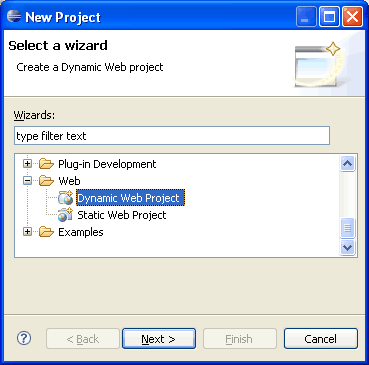 Once the project is created, create a package net.viralpatel.autocomplete and a Java class file DummyDB.java. DummyDB.java is the class that will simulate the database connection and it will provide the data for our example.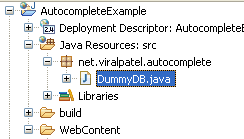
 Following is the content of DummyDB.java.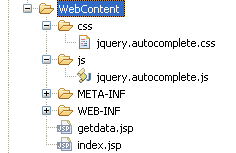
 Create index.jsp and paste following code into it.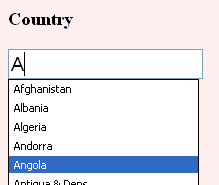

 Once the project is created, create a package net.viralpatel.autocomplete and a Java class file DummyDB.java. DummyDB.java is the class that will simulate the database connection and it will provide the data for our example.
  Following is the content of DummyDB.java.
package net.viralpatel.autocomplete;
import java.util.ArrayList;
import java.util.List;
import java.util.StringTokenizer;
public class DummyDB {
private int totalCountries;
private String data = "Afghanistan, Albania, Zimbabwe";
private List<String> countries;
public DummyDB() {
countries = new ArrayList<String>();
StringTokenizer st = new StringTokenizer(data, ",");
while(st.hasMoreTokens()) {
countries.add(st.nextToken().trim());
}
totalCountries = countries.size();
}
public List<String> getData(String query) {
String country = null;
query = query.toLowerCase();
List<String> matched = new ArrayList<String>();
for(int i=0; i<totalCountries; i++) {
country = countries.get(i).toLowerCase();
if(country.startsWith(query)) {
matched.add(countries.get(i));
}
}
return matched;
}
}
Code language: Java (java)getData () that will return the list of countries starting with the string query passed as argument to that method. Thus if we pass “IN” to this method, it will return as all the countries starting with IN. You may want to change this code and add the database implementation here. Just a simple “SELECT * FROM <table> WHERE country LIKE ” query will serve the purpose. Once this is done, we will create the JSP files that will be called by the autocomplete plugin to get the data. Download jquery.autocomplete.css and jquery.autocomplete.js as you will need it in our demo. Copy jquery.autocomplete.css into css folder in WebContent and jquery.autocomplete.js into js folder.  Create index.jsp and paste following code into it.
<!DOCTYPE html PUBLIC "-//W3C//DTD HTML 4.01 Transitional//EN"
"http://www.w3.org/TR/html4/loose.dtd">
<html>
<head>
<link rel="stylesheet" type="text/css" href="css/jquery.autocomplete.css" />
<script type="text/javascript"
src="http://ajax.googleapis.com/ajax/libs/jquery/1.3.2/jquery.min.js"></script>
<script src="js/jquery.autocomplete.js"></script>
<style>
input {
font-size: 120%;
}
</style>
</head>
<body>
<h3>Country</h3>
<input type="text" id="country" name="country"/>
<script>
$("#country").autocomplete("getdata.jsp");
</script>
</body>
</html>
Code language: HTML, XML (xml)$("#country").autocomplete("getdata.jsp");
Code language: JavaScript (javascript)<%@page import="java.util.Iterator"%>
<%@page import="java.util.List"%>
<%@page import="net.viralpatel.autocomplete.DummyDB"%>
<%
DummyDB db = new DummyDB();
String query = request.getParameter("q");
List<String> countries = db.getData(query);
Iterator<String> iterator = countries.iterator();
while(iterator.hasNext()) {
String country = (String)iterator.next();
out.println(country);
}
%>
Code language: Java (java)Denmark
Djibouti
Dominica
Dominican Republic
East Timor
Ecuador
Code language: CSS (css)


Hello,
This is really a nice piece of code and easy to use, but in my case when i implemented the same piece of code with my JSP its behaviour is changed now when we I open the JSP it showing alert message that \"Internet Explorer cannot open the site\" then my site name and in last \"Operation aborted\".
I am using IE7. Please help me on this.
Thnx
Hi Siddhartha,
I am not sure if this has something to do with browser. I have used jQuery and a plugin which generally are browser independent. I am not about your issue. Can you try running your code in some different browser?
I have not tested this code in IE 7 but I assume it should work. Also check your browsers security settings. In my code, I am trying to include jquery script from google scripts webisite: http://www.google.com/jsapi. You may want to change this piece of code and include your local jQuery javascript.
Hello Viral,
Thnx for your quick reply, I ran the war file which is available on this site, it is running fine. But when i use the same code snippet, some error comes and doesn’t allow to open my site.
Anysways, how can I implement my own jQuery javascript.
please guide me.
You can download jQuery javascript file at http://code.google.com/p/jqueryjs/downloads/detail?name=jquery-1.3.1.min.js and include it in your HTML file with <script> tag:
<script src=”jquery-1.3.1.min.js”></script>
Hope this will work for you.
Thnx viral for the support, I have done what u have written but now it is not finding the google.load() method and if I remove this no error comes but no suggestions come.
What should I use instead of google.load . Please see my code below and guide me what changes I need to do,
google.load(“jquery”, “1”);
input {
font-size: 120%;
}
Country
$(“#country”).autocomplete(“getdata.jsp”);
Try running following code and see if it is running fine. Note that the javascript file needs to be in same directory as your html file as we have included the js directly.
<!DOCTYPE html PUBLIC "-//W3C//DTD HTML 4.01 Transitional//EN" "http://www.w3.org/TR/html4/loose.dtd"> <html> <head> <link rel="stylesheet" type="text/css" href="css/jquery.autocomplete.css" /> <script src="jquery-1.3.1.min.js"></script> <script> $(document).ready(function(){ $("#country").autocomplete("getdata.jsp"); }) </script> <script src="js/jquery.autocomplete.js"></script> <style> input { font-size: 120%; } </style> </head> <body> <h3>Country</h3> <input type="text" id="country" name="country"/> </body> </html>hi…
i have used your countries search code but i have a requirement that when i press key down it should place that value in text field,please provide the solution its urgent.
Thanks and Regards
Santosh
Hi,
I run your war file successfully. But if I change the data string in DummyDB, I am not getting the output.. But U have specified that we can add a select query in DummyDB.java.
Whether the data string in DummyDB.java is changable or not? Please reply.
Yes Dhurai,
The data in DummyDB.java is just for the reference and can be changed. You may also implement your getData(String query) method that returns the matched data. This class is just to demonstrate the functionality. In reality the data will come from database.
Hi,
I am having trouble understanding
String query = request.getParameter(“q”);
How did name the parameter (q) ? Also, how can I add other parameters to send to the servlet?
Thanks
Andy
Hi Andrew, If you noticed, we have invoked the jquery plugin by
$("#country").autocomplete("getdata.jsp");
Thus, this plugin will call getdata.jsp using ajax, whenever user presses a key in textbox and pass the parameter using q as the name of parameter in request. Thus you can get the string entered by user in your script file (in this case getdata.jsp) using q request parameter.
If you want to pass some other argument to the script you do so as follow:
$("#country").autocomplete("getdata.jsp?xyz=123");
In short you have to pass the parameter to script file while calling plugin function.
Hi Viral,
Thanks for your response.
As I understand, “q” is the default parameter passed? All other parameters passed are named in the url string?
Do you recommend using a servlet or using a jsp to produce output? Currently, I’ve set up a javascript version using a servlet.
Thanks
Andy
hello
first, thank you for nice example, i was searching for this for a long time.
but i need a help with my problem. i use same solutions like in this tutorial, but in my jsp i use h:inputText
…
…
So when i want to call jquery autocomplete, id of my component is: $(“#newOrderForm:customer”).autocomplete(“getdata.jsp”);
However, this doesn’t work. It seems that “:” in id is problem.
Can you help me how to solve this?
Hi Matelo,
There seems to be some problem with your jquery selector code ”#newOrderForm:customer”. Try playing with this code and add some text in the DIV and see if it is working.
$(”#newOrderForm:customer”).text(“Hello World”);
If this works than I don’t see any problem why it should not work with autocomplete plugin code.
Yes, you are right, there is problem with selector, because when I try your example and rename “#country” with “#newOrderForm:country”, example doesn’t work.
But i need to address my inputText component, which is inside a h:form. This form has id newOrderForm, so id of my inputText is newOrderForm:customer.
When i don’t use jsf form, but classical html form which is used in example and my id is simple “customer”, everything works fine.
Hi Viral,
Nice tutorial, well explained, clear instructions and images to supplement. Thank you!
Hi Raj, Thanks for the comments.. Feel free to comment on any topic you like and also to subscribe for the feeds or daily articles by email.
Hi Viral Patel,
First I should thank you for such a good article on jquery autocomplete
I have question ,my question is
Is there a way to add name/value functionality to jquery autocomplete
I have recently added the JQuery autocomplete plug in and have a textbox that autocompletes a list of employees. It works great and I commend the authors of the plugin.
I think the textbox would be MUCH more useful though, when upon selecting, we can extract the StaffID (Ie. retreive the value of the selection). My code is below and you can see that I am simply adding the staff names, would be nice to associate IDs.
Does anyone know of any way to do this?
My JQuery:
$(document).ready(function() {
$(\"#tStaff\").autocomplete(\’stafflist.jsp\’);
});
My JSP page:
import=\"autocomplete.TestDB\"
String query = request.getParameter(\"q\");
List codelist= db.getData(query);
Iterator iterator = codelist.iterator();
while(iterator.hasNext()) {
String codeid= (String)iterator.next();
String code= (String)iterator.next();
out.println(code);
}
Here in the JSP code i am fetching staff names and staff id.how can i send staff id to main page.
could you explain with a sample program how to achive the selected value ID.it would great help to me.
Thanks
Continuation for my question
My JSP page:
Here in the JSP code i am fetching staff names and staff id.how can i send staff id to main page.
stafflist.jsp
——————-
page import=”autocomplete. StaffDB”;
StaffDB db = new StaffDB ();
String query = request.getParameter(“q”);
List Staff= db.getStaffData(query);
Iterator iterator = countries.iterator();
while(iterator.hasNext()) {
String staff= (String)iterator.next();
out.println(staff);
could you explain with a sample program how to achive the selected value ID.it would great help to me.
Thanks
hi viral…
nice tutorial… i have a problem when i running in the local server and request data from database…can u guide me to running this tutorial in the local server, please ..
thanks
Hi Eka, You can simply run the above example in your local server. I have used DummyDB class which simulates as if data is coming from DB. You can write your own getData method, fetch data from DB and send it back.
Hi Viral,
I want to send parameters to my servlet .I tried the approach you have suggested in your one of the replies.But that solution is not upto the mark.
For Ex:
To send the parameter-value i have added the code like this
$(“#country”).autocomplete(“servlet/dbFacade?paps=123”);
Now when I have put alert in the makeUrl function in the js to show the url it shows like this
servlet/dbFacade?paps=123?q=
If you see the makeurl has a for loop which loops around extraparams.I beleiev extraparams holds the name value pairs.But I am not sure how to pass them throug the jsp page.
Can you please suggest
Thanks
Annapurneswar
Hello Viral,
nice tutorial – great job.
One hint:
Please update the css code of “jquery.autocomplete.css” from the link “http://www.pengoworks.com/workshop/jquery/lib/jquery.autocomplete.css”. Because right now, the “body” class is missing (but it`s available in the war file).
Best regards,
Markus
Hello Viral ,
First of all thanx for posting such a nice tutorial…
i have a problem i want to display data in the textfield only after the user enters the first three charachters in the textfield as my string contains some 17000 words.
i am not getting where to exactly change in the autocomplete .js it would beb really nice if you could help me out with this
Thanx
Vishal
Hi Vishal, Ideally for such requirement, the code change should be done in autocomplete javascript, but as it is a plugin, we avoid any project specific change in such generic frameworks. What you can do is you can change the Java code or the server side script code that is getting called (in our case getdata.jsp). While retrieving the query, you can neglect the call if the query is less then three characters:
String query = request.getParameter("q"); if(q!=null && q.length() < 3) { return; }Hello Viral ,
thanx for your prompt reply …
but the way u suggested didnt work out properly so i just made a change in autocomplete js
as follows in the function onChange() i just changed the if clause as follows and it is working fine now
if (v == prev || v.length <= 2) return;
prev = v;
Thanx
Hi
This code is very useful to me but I an not able to download
the source code from this site . plz correct the link for download.
Thanks
Dharmendra
Hello Sir,
Even i faced the same issues as Siddharth did reg IE …made changes … but still the functionality is not working fine .. can u pls suggest
Too good.
Works nicely, but copy-pasting the code is pain in the ass since you manually have to delete the line numbers. Also, why is mail required to post a comment?
Hi,
You may want to use Copy option in the code box. Just hover your mouse on code you copy and select Copy option from right side.
Email is mandatory to check the spam :)
Great job! Keep going!
@Vishal Malavia: in the autocomplete plugin there is a predefined set of options, and for your case this might work: $(”#country”).autocomplete(”getData.jsp″,{minChars: 3});
and this should work for extra parameters:
$(”#country”).autocomplete(”getData.jsp″,{extraParams:{xzy:’something’}});
Hi Viral,
Very nice example.I have tried in my example. It is working fine but once i submit the form then it does not work…mean at first time when my html opens it works fine but after submitting the form it is not working…i think the script is not loading at second time. is it?
		$(document).ready(function(){
			$("#country").autocomplete("getdata.jsp");
		})
i am getting object expected at this point.
@Tapan: Check if the JavaScript library is properly included in your HTML page. This error will come only if the JS library is not properly included.
Hi Viral,
After submitting the form, I’m loading the same page and then the script is not working….when i load the page first time at that time it works fine but after wards it does not work…pls help.
Hi Viral,
Yes, it is working fine. Actually path of .js file was wrong in my case..
Thanks …
Hi Viral,
path of java script file was wrong in my example….now it is working fine…thanks..
@Mohit: Nice to see that your error got resolved! Hope you liked the article.
Hi Viral,
My path is correct
FollowUp Information
$(document).ready(function(){
$(“#country”).autocomplete(“getData.jsp”);
})
i have included the autocomplete css code in my css.
my jsp and js are same level. what should i check. Please advice
Great work Viral!
Im unable to get the result from my jsp page
Im calling this function on onkeyup event in my textbox but im not getting the data
function funcResult() {
$(“#userName”).autocomplete(“GetSearchResults.jsp”);
}
what could be the reason?
I cant call my jsp page like ur calling..
I have to put jQuery(document).ready(function(){}) only then my page is getting called..
but i dont need that onready functionality..I wud like to call the page only after i start typing in my textbox..
nice piece of code.
but having problem with the real datas from the database. if you can help plz, do.
Hi Viral,
I found following code in jquery.autocomplete.css file. what does it mean??
display:none;/*sorry for IE5*/
display/**/:block;/*sorry for IE5*/
Hi Viral….I have implemented this code in my application….excellent…Thanks…
how to filter data in jsp
Hey Viral,
tNice piece of code. Everything works great but can you give some pointers if I need to use this script with Map rather then List, as I want to show the name of the employee and fetch the employee Id based on that for further processing.
Any help on this will be great help to me… Thanks once Again….
Hi Viral,
I am not sure below issue in your code or I am doing anything wrong, Please advise on the same.
The code works fine, but if you notice when you type any country name, the first member of the drop down is the code e.g “” and then the name of the country start with the desire functionality.
I have deploy this code to bigger HTML and found that the complete HTML part comes as first Element and then the name of the country comes.
Is this the same issue every one else facing? if yes, what will be the work around of this.
Hi, Viral
Great tutorial for dummies.
The thing which made me confused is why we need google’s load method.
and please differentiate between
1. http://www.google.com/jsapi
2. jquery.autocomplete.js
Are they providing different functionality.
PLz rply
Thanx in advance
-Hardik
@hardik: I have removed the old code to include jquery library from google api using load() method. Check the content of index.jsp now. Also the jquery.autocomplete.js is required. This plugin will add the autocomplete feature to our example.
Hi Viral….excellent work…Thanks…,
How to call servlet url in autocomplete method instead of calling JSP .
$(“#country”).autocomplete(“getdata.jsp”);
Could you please give me suggestion to solve this issue.
My sample code
$(document).ready(function() {
$(“#country”).autocomplete({
url: ‘/WelcomeServlet’,
minChars: 1,
max: 10,
width: 10,
scroll: false
}
);
alert(“Ready Function “);
})
……………..
In web.xml
WelcomeServlet
com.cog.AutoServletExample
WelcomeServlet
/WelcomeServlet
It is not invoking the servlet.
Thanks in Advance.
Hi Viral….great code..Thanks,
Your code only show cases which start with the query.
Where should I change your code to accept all the cases which contain the query not just start with?
Thank you so much.
I second that question by Vishnu.
brilliant work. keep posting more.
I’ve tested it with Struts action class instead of calling jsp. It works fine. Simply pass the struts action class url. As stated in API, jquery would append parameter ‘q’ containing the current search value.
Thank you all.
Hi Viral,
Thanks for your great help. I have used your code and it is working successfully.
I am facing a problem like i am using onblur function of JSP on field for which i am using your script (autocomplete). In such case when i use up-down arrow of keyboard for selecting value (autocomplete list box) it works perfect but wheni use mouse arrow only the value which is written in text field passes to onblur function (not the complete value which i select from list box arising for autocomplete). please help for such case.
Hi Viral, I created a functionality of dynamic adding rows
using one of your other tutorial that uses for dynamic row adding in a table
var row = table.insertRow(rowCount);
so, I created a sample row of several textboxes and the add row function is working fine.
The question is how to trigger autocomplete for each of the row in one of the column of text boxes.
The id of the text box for the first row that I modeled was “itemNumber”.
Now for the rest of the rows i do not know what and how to trigger the autocomplete?
$(document).ready(function(){
$(“#itemNumber”).autocomplete(“someURL”);
});
This works for the first row’s text box only…
Could you please send how to get and pass the dynamic rowIDs and call autocomplete
a very good tutorial, which came to me in handy, i would like to know if we can change the parameter q to our desired one, if so where should i change the jquery script.
Any ideas?
Nice piece. I tried to run applicaiton but ended up with the following
‘jQuery’ is undefined
Any suggestions?
Many thanks
Hi Viral,
excellent work….!
Plz i need to retrieve data from mysql database can you help me with that.
i’m new to jsp.
Can you provide an example where the autocomplete works with a primary key and value combination. Only the value must be shown, but the primary key is returned to the web page when the value is chosen.
Thanks
very nice example,i appreciate it ,but can u just tell me where is the callback function?
hi sorry but
i find this error for your application
An error occurred at line: 8 in the generated java file
Only a type can be imported. net.viralpatel.autocomplete.DummyDB resolves to a package
Une erreur s’est produite à la ligne: 5 dans le fichier jsp: /getdata.jsp
DummyDB cannot be resolved to a type
2:
3:
4: <%
5: DummyDB db = new DummyDB();
6:
7: String query = request.getParameter("q");
8:
hi you are here can you help me !!!!
Nicework Viral, in my code, i have populated part description and I need to get the part num also for the same, how do I do it?
Thans for yr code , Nicework Viral, in my code, i have populated part description and I need to get the part num also for the same, how do I do it?
hi Viral
thank for your help
but i have a problem as same as @Vishnu had written earlier posts could u help me solve it?
best regards
hola querido amigo,buen dia. quisiera porfavor que me expliques la manera de hacer todo eso con acceso a base de datos mysql,soy principiante en eso.te agradezco mucho por tu valiosa ayuda. oscar
hello dear friend, good day. please would you tell me how to do all that with access to mysql database, I am beginner in eso.te thank very much for your valuable help. oscar
Hi Viral
Thanks for sharing such a excellent tutorial . It helped me a lot.
Had a small doubt/problem while implementation , The code is working fine the issue is while the data is retrieved from DataBase and displayed in the list I get extra rows as well as extra value “”http://www.w3.org/TR/html4/loose.dtd” which is not there in the DB .
Can you please guide me thru the same .
Thanks in advance.
Hi Viral,
Nice tutorial. But for some reason it’s not working from. Looks like it is not calling getdata.jsp. I am using jquery-1.4.2.min.js do you think that is causing the problem?
Thanks in advance!!
i don’t know much about how to implement this and how it works… could someone help me understand, my general understanding is quite gd, just not when it come to java. I’m using PHP, Mysql and Apache. i have an idea of what needs to be done just I know these things are finiky and if someone could walk me though the process i would be grateful
Hi Viral,
This is a nice article and helped in understanding autocomplete functionality.
I have a scenario that you can advise on.
I am searching users from the database by their name and once the user is selected from the autocomplete dropdown then the user’s name, id and email address are need to be saved upon user clicking the Save button.
My question is somewhat related to Sreenivas’s question but he didn’t get any answer on that.
Thanks in advance
How to implement the same in JSF?
Hi Viral,
Great piece of code. Works perfectly.
I have used this with a DB and want to disable caching so that updates are shown directly from DB as they might be changing.
Presently, the function to retrieve data from DB is only called once i.e. only the first one for every literal/query. I want it to happen everytime even when the same query is entered.
I tried noCache:true option and even tried removing all cache involving functions from the js but none of it works. Still the DB is queried only once for the same query.
Kindly help. Thanks in advance.
How to set limit in display record? pls describe syntax for below code
Hello sir,
i access record with around one lacs database in jsp struts2, in dojo it become very loaded so,i used jquery autocompleter ,thanxs but i want to limit it in showing record.pls help me
it is urgent
my code is below.
$(“#country”).autocomplete(“webpages/getdata.jsp”);
Hi Brajesh,
You may use this:
$(“#country”).autocomplete(“webpages/getdata.jsp”,{maxItemsToShow : 10});
@Rajat
Thank you very much for the help i will try this.
I m facing problem in this example. when i type anything in country textbox. It is not hitting the getdata.jsp. find no error also. please help me
Hi, Viral, thanks for the tut, but I don’t am not able to work with this. I have made some changes, like to the java file name and instead of using a static one I have used data from my database. When I am pressing a key on the index page, nothing is happening. I have also changed the text field name to security and correspondingly have used $(“#security.”).autocomplete(“getdata.jsp”).
I have added the js and css file to the location u asked us to keep them at.I have no clue why it is not working. Do I have to download a plugin ot something?
Hi Viral Patel Thanks
Iam using IE7 this auto complete script is not supporting in my browser .is it possible to do without using script code . we have some difficult to analyse script .so any simple java code is available? iam using struts2 tag but its not working it showing drowdown only. pls help me any simple way to implementation using java,jsp.
if u have any idea of struts2 tags is easy to me pls help me…………………….
How to call an action instead of getdata.jsp
Hi Viral,
Such a nice article. Thanks a lot. Keep it up.
I just want to know how can I call Ajax to retrieve data.
Regards,
Brij
Hi Viral,
Thanks for nice example on autcomplete functionality. For me code works fine in IE browser but same is not working in mozilla. When i enter a character in the text field I am getting “The ‘charCode’ property of a keydown event should not be used. The value is meaningless.’ warning message. Could you please suggest me how to resolve this issue?
I am working on Strus1.0, can u pls send the code to implement autocomplete in jsp
Hi..I am using struts2 and jsp for my project.I am able retrieve data from database onto the action class but I want to get the same onto the jsp page.I am using Mysql and eclipse IDE.Kindly help.Thanks in advance
Thanks for the information.
but when i deployed the war file in eclipse and i then run it on Jboss from index.jsp
it show me index file with a text box.
but when i press ‘A’ or any alphabet it does gives any information regarding country name’s starting with ‘A’ .
in eclipse it show following message
at java.lang.Thread.run(Unknown Source)
Hi Viral,
I am just beginning to learn autocomplete and jquery.
1. Can we use struts2 and jquery jar lib to accomplish this?
2. Can u point out some exam[ple?
Aditya
Hi Viral,
Such a nice article. Thanks a lot. Keep it up.
http://javamsmq.codeplex.com/
Hi Viral,
I am having problem during mouse click. I am not getting any data when I select on the dropdown using mouse click but it works fine using arrow keys. Please help. Thanks!
Hi Viral
Very Nice Plugin
Nice tutorial, but I have some problems here, I just have Copied and Pasted all things but when I type a letter nothing happens. I wonder why?
Good evening,
First I would like to congratulate the tutorial because you saved my life.
I am having trouble connecting using this example in a database.
I have a table with names of countries worldwide. Where should I put my query so I can get the countries in this table?
Great little tutorial. Easy to follow and understand for a java noob like myself.
Hi…can any one plz help me in integrating it with Struts2 application…what return type is expected in action class….
Thanks….
Hi
any idea how this work like GOOGLE search ,like name is “Hello” if user type “ello” it should display Hello in list
Hey,
This is a nice tutorial. I would add a note of caution however. Doing Java code in JSP is good for a quick demo, but is not a good long term approach. It is not easily unit testable (unless with Selenium) and is not compiled until runtime.
I am currently using DWR with Jquery autocomplete for this and it works perfect.
http://directwebremoting.org
Thanks
Can the returned list also be a String like:
String personList = null;
List ldapUsers = ldap.getUids();
for (int i=0;i<ldapUsers.size();i++) {
personList+=ldapUsers.get(i).getUid()+"\n";
}
Hi
This is very useful also business peoples like me who read from net can easily understand this.Htas of Viralpatel.
Viral this is good code for single textbox.But if i had 4 textbox and if i select a name from firsttext box i want to get datas for this from DB in balance three textbox.Is it possible.If so please help me.
yayaya, me also not working….
im not sure why it wasn’t worked.
Even tough mysql command already correct using LIKE statements,
and the jsp page already corrected to println (line by line).
Seems the plugin is not fully customized with jquery 1.4.2 version that i’m currently using on right now. Thus, if there’s any updates let me know ya? :D
Thanks dude!
Hi Viral,
Does the autocomplete feature work only in a dynamic web project in eclipse?
With Regard’s
Saranya Jayaram
I run this code in eclipse, it’s not working at all.
Nice. But only problem here is the machine needs to be in internet :-( Is there any way to resolve it?
it doesn’t work ;(
sorry but it doesnt work …
I think u would have not concentrated on js and css files, i too done the same mistake, then after rectifying it is working…..
Hey, can you explain what you did to make it work please?
Plain and simple :) it does work…thanks !
Hey is there an other solution then to out.println(country); ??
Maybe to return an array from an controller jsp or something else?
Hi
From where are we passing this value?
String query = request.getParameter(“q”);
Thanks
for some reason when I include
on my page, other css will break and is not visible the web site as I want it..
is there any solution for it? thank you
I meant when I enclude that script that calles jsapi of the google javascript..
for some reason when I include
on my page, other css will break and is not visible the web site as I want it..
is there any solution for it? thank you
is it possible to tell me how i can add a flag with the county name. :)
Fantastic. Thanks a million. Worked perfectly!
JAVA RULES!!!
hello viral, i has try your code, but not display data in textbox and no errors. how to solve??
Error: $(“#country”).autocomplete is not a function
Thanks …Works perfectly. Very simple.
Though simple app running on Tomcat 5.x but seems to be very slow.
This is not working , I m not getting what is q in getdata.jsp
It is not working to me, I tried changing getdata.jsp parameter to input name which is country. But still I can’t make it to work.
Its really……..simple but much effective…..
“object doesn’t support this property or method” occurs in
$(“#country”).autocomplete(“getdata.jsp”);
what is the problem, can anyone tell me…
@Mahesh – It seems the autocomplete plugin is not properly included in your html. Check if your local js directory has jquery.autocomplete.js file and that you have included it properly.
in my browser (firefox) the example does not work…
changing the order of the includes works!
First: include jquery
Then: include autocomplete
then it works. YMMV
It is not working for me. Not showing any error too. Please help.
Hello,
Great, it works here! But not with the HTML5 attribute “autofocus”…
thanks for the code its works fine…. but i want to know how to pass extra parameters
@Naveen – You can pass the extra parameters like this:
Hope that helps.
Hi
I’m newbie in jQuery,
autocomplete works fine getting employee names using this code
/* employeeData.jsp */
/* main page */
But I failed to get the employee id in hidden field, Please what the method I should use
to get the id in hidden field
Thanks in advance
@Rahman: I assume you have a requirement where user can select Employee name in autocomplete box and the selected employee’s emp_id should be stored in a hidden field.
To do this consider following code snippet:
Here in above code, your jsp generates output in JSon format [ {emp_name:’Employee A’, emp_id:’121′}, {emp_name:’Employee B’, emp_id: ‘345’} ]. Both emp_name and emp_id are present in the json output.
Also the hidden field id is “hidden_field” whose value we set in result() method.
Hope this helps you have solves your problem.
Thank you for your quick reply
Problem solved when I wrote the piece of code below where empIdTT is a hidden field
thanks for giving this example ….its realy so good try it once
Thanks Kishore :-)
Hi …Thanks alot ..This does work cool …
Could u please suggest how to generate an action when the user clicks on any suggestion disaplyed ..
say , For example : In the Example you illustrated i need to direct the user to ‘www.abc.com’ when he/she selects ‘Angola’ .
thanks a lot
Thankss a lot
good example…
I am a newbie to jquery. I copied the two file .css and .js file in two new created folders – css and js
But this program does not work for me…what could be the problem?
Hi there, I want to be able to type in as many things as I like, for example: “United Kingdom, Ireland, United States, Afghanistan” I thought this line may hold the key $(‘#country’).autocomplete(“getdata.jsp”, {extraParams: {bar: 4 }} ); but I cant seem to get the second country to pop up or any other. thanks!
I thought it would be $(‘#country’).autocomplete(“getdata.jsp”, {multiple: true, multipleSeparator: ‘,’});
Thanks Buddy .. Its safe to do >>
how can i pass parameter as variable ?
My code in Jsp :
$(“#searchBox”).autocomplete({source:’GetData.jsp’});
code in getdata.jsp:
String q=request.getParameter(“q”);
System.out.println(“Value of searchBox:”+q);// for this i’m getting only null value…
is there any solution…?
Hi…
This really helped me to implement the same in my application.
But when I am running the same in the tomcat local machine! its working fine! But when deployed into the weblogic(UNIX) Machine, the functionality is not working!
can you tell me why is it happening so???
Hi for me it’s not working.from where i can get jquery.custon.js
Hi, Use following JS in your project. You just need Jquery and Jquery Autocomplete plugin JS.
http://ajax.googleapis.com/ajax/libs/jquery/1.3.2/jquery.min.js
https://ajax.googleapis.com/ajax/libs/jqueryui/1.8.18/jquery-ui.min.js (jquery-ui.min.js wil have autocomplete plugin)
Hi Thanks,
This is working fine. I have another problem. when i am doing vertical scrollbar, it’s working find with. i am able to scroll with mouse. but when i am pressing down key , after last value, scrollbar not going down. is there any solution.
Thanks
Hi Thanks,
This is working fine. I have another problem. when i am doing vertical scrollbar, it’s working find with. i am able to scroll with mouse. but when i am pressing down key , after last value, scrollbar not going down. is there any solution.
Thanks
Plzz tell me how can we retrieve data from database (DB2) . plzz give me best solution for this problem it urgent . thanking you in advance .
I am getting exception An error occurred at line: 5 in the jsp file: /getdata.jsp
DummyDB cannot be resolved to a type
2:
3:
4: <%
5: DummyDB db = new DummyDB();
6:
7: String query = request.getParameter("q");
Check if
DummyData.javais included in your source code. Also check if you have changed the package for this class. Following entry must be present in yourgetdata.jspfile.I am getting exception An error occurred at line: 5 in the jsp file: /getdata.jsp
DummyDB cannot be resolved to a type
2:
3:
4: <%
5: DummyDB db = new DummyDB();
6:
7: String query = request.getParameter("q");
I have checked your reply to this but in my getData.jsp that import is there and also I have not changed the package for the class 'DummyDB' . Any idea what may be the possible cause of this error
3
down vote
It can be resolved as follows:
This is how I resolved this error (May be useful for some one who wasn’t able to resolve it):
I was getting the Syntax Error, parameterized types are only if source level is 1.5 & so found this stack overflow link:
http://stackoverflow.com/questions/2419226/eclipse-syntax-error-parameterized-types-are-only-if-source-level-is-1-5
And there I got this solution:
Go to Project properties.
Then ‘Java Compiler’ -> Check the box (‘Enable project specific settings’)
Change the compiler compliance level to ‘5.0’ & click ok.
Do rebuild. It will be resolved.
Now it works !!
Hi Viral,
I got another problem now. I have used this example as reference in another project. In that project I am providing auto complete in the similar way but when I type an alphabet in text box I am getting the items from my list after some blank lines. I have checked in my database also & there are no empty records in database. Any one having any idea why this issue is coming please let me know.
Thanks in advance.
Hi viral,
Thanks for the example..it really helps….I have some more requirement on top this.every country name will have an URL mapped to it.the moment user will select any of the keyword and hit enter/mouse click,it should take user to that page..eg:if user select “America” ,the http://abcd.america.com will open.
From the java class I am returning the list of bean called,AutoCompleteResultsBean.this bean will have two values,
1.country
2.the URL
Can you please tell me how can I handle the same with the above code example.
Thanks,
Sanjana
Hi viral,
If you see the search box in http://www.wallgreens.com,you can see every key word is mapped to an URL..I also ave to implement the same for my app…please help..
Thanks,
Sanjana
Hi,,
Can you tell me how to add scrollbar to the fetched values.
Excillent work ,can you help,how to generate that list from data base ,my table having keywords which i want them to be poppulated when i press any letter
This works like a charm. However it has issues when more than 10 records are returned by the query, and there could be more records…
For instance say I have data like:
Test10, Test11, Test12, Test13, Test14, Test15, Test16, Test17, Test18, Test19, Test20
Let’s say we make a query to fetch the records initially, and that returned the 1st 10 records from
Test10 to Test19, now when the user types Test20 we should query the backend again, but that is not happening for me…
I don’t have the choice of returning all the records because there could be millions of records, to I need to trim them down to top ten, but when there is a new character entered, we need to reach back to the backend, for the getData to be called. But that is not getting called when say you type Test2 in above example
As you are typing Test, it will show top 10 records correctly as Test10…Test19, but as soon as you type 2, it will go blank, and no further calls are made to backend.
Is there any way to work around this issue?
TIA!
amazing solution…It is working ……..
I think this is browser specific, not working with Internet Explorer 8
Hi viral., how can i use autocomplete with key value pair….your code is working well, i just want to select key from div and their value is displayed in textbox…..how it possible?
A simple and very nice tutorial. Thanks for posting it!
Hi Viral,
You did the great work. I integrated it successfully. But still i want more functionality with this auto complete is that i only initially want 3 items in auto complete and when there will be more than 3 items at that time auto scroll should be come and when user key down in that auto scroll box at that time scroll down should be work automatically.
Thanks in advance
this is working fine for static data,…
but how for dynamic ….. i mean i need to populate names in auto complete textbox and values should be retrieved from database…… how does it work?
It works, thanks,
But how to change background color? of the form where country is written?
If you want to change background color of country textbox then just apply this css.
Hello Viral,
Thank you for your example, I did the implementation and works very fine with JSPand mySql Server. but I have a question :
Sometimes I have more than 30 elements and I want to show a vertical scroll bar and limit the size of the list, for example : 15 elements.
I don’t know if you can help me.
I’m trying by myself.
Thank you.
Have a nice day.
sir i am new in java spring
will you gave me example where i am using table name trainer which have many field like name, email,phone etc
then tell me what is the code to make auto complete the trainer name in text field from mysql database in the spring mvc trhu hibernte
and if you give a complete code then i m very thank full to you
plz reply
& thanks in advance
Really nice works like a charm. Thank you
this is
very good example
please give example on struts2 hibernate
Thanks Malli, here is the Struts2+Hibernate example you looking for: http://viralpatel.net/tutorial-struts2-hibernate-example-eclipse/
i want structs2 with JSON auto complete off
Did you find the solution ?
Very nice explanation..working example..kudos..
Hi Viral,
I am using the above example with Spring Mvc and trying to load getdata.jsp but it is not showing any value inside index.jsp’s textbox. I am passing value from spring controller to jsp in a request object as an attribute. If u help me in this that wwould be really nice.
Where from this “q” comes? As there is no parameter whose name is q in index.jsp
String query = request.getParameter(“q”);
look at jquery.autocomplete.js, line 337:
really nice example understand easily for freshers:)
Hi… I am getting the following error… what i’ii do…
HTTP Status 500 –
——————————————————————————–
type Exception report
message
description The server encountered an internal error () that prevented it from fulfilling this request.
exception
org.apache.jasper.JasperException: An exception occurred processing JSP page /getdata.jsp at line 10
7:
8: String query = request.getParameter(“q”);
9:
10: List countries = db.getData(query);
11:
12: Iterator iterator = countries.iterator();
13: while(iterator.hasNext()) {
Stacktrace:
org.apache.jasper.servlet.JspServletWrapper.handleJspException(JspServletWrapper.java:521)
org.apache.jasper.servlet.JspServletWrapper.service(JspServletWrapper.java:430)
org.apache.jasper.servlet.JspServlet.serviceJspFile(JspServlet.java:313)
org.apache.jasper.servlet.JspServlet.service(JspServlet.java:260)
javax.servlet.http.HttpServlet.service(HttpServlet.java:717)
root cause
java.lang.NullPointerException
net.viralpatel.autocomplete.DummyDB.getData(DummyDB.java:23)
org.apache.jsp.getdata_jsp._jspService(getdata_jsp.java:65)
org.apache.jasper.runtime.HttpJspBase.service(HttpJspBase.java:70)
javax.servlet.http.HttpServlet.service(HttpServlet.java:717)
org.apache.jasper.servlet.JspServletWrapper.service(JspServletWrapper.java:388)
org.apache.jasper.servlet.JspServlet.serviceJspFile(JspServlet.java:313)
org.apache.jasper.servlet.JspServlet.service(JspServlet.java:260)
javax.servlet.http.HttpServlet.service(HttpServlet.java:717)
Try making it
As said Jatin,
 does anybody know where that
 String query = request.getParameter(“q”);
comes from ??
 if you remove or change the “q” in something else, it simply doesnt work anymore !!!
 That is driving me insane…
Hi Thomas,
If you use firebug to check the url which is generated after you enter the alphabet in text box, you can see that at the end of that url parameter is being added. Like if you type ‘w’ then at the end of generated url you get ?q=”w”. So, if we do request.getParameter(“q”) on getData.jsp then you get the alphabet which is entered on index.jsp on getData.jsp. Hope it helps.
above example is very nice and super.
hi viral. i want help form you if u wish to do.i m new to java. i want to view sub ordinate hierarchy in tree structure in jsp while i was using common table expression in java it give error. however if you any example in related to this can u send me [email protected] …Thanks in advance and hoping some good suggestion related same………it help me to complete my intern
Is there any specification is available to get hierachy or Ranking to display in tree structure in jsp.
Appreciate your help and also your blog is very useful to me.
Thanks a lot, Very nice example.
super example……..
hi viral sir, it was really a workable and good example, but if you dont mind can u explain its flow, i mean how values are coming inside textbox and how we are able to select them.Is it possible due to the jquery APIs??
also why we are getting “q” as a parameter here?Kindly explain
rest it is all ok i could meet my objective……..
Hi Viral,
First of all this is really a fantastic example. I have a question and its troubling a lot. the question is I am trying to use a method along with .autocomplete forexample select: function()
i.e. $(“#country”).autocomplete(“getdata.jsp”, {select: function(){alert(“hello”);}); I tried a lot but failed, please if you can tell me how can I use another method in this example would be great. My requirement is select multiple values in a text box. For example india, australia, austria
regards,
S
Hello sir, it is working fine but its working slow and some time it does not take the values and can we improve its UI…………….
thanks
Thanks a lot. This is a very good example. Could you please give me another example on how to add the database implementation as you mentioned?
I wanted to this script in the external javascript file. But it is not working .
Please help me out on this
$(“#country”).autocomplete(“getdata.jsp”);
Good one but according to Oracle need to change the StringTokenizer part to split.
“StringTokenizer is a legacy class that is retained for compatibility reasons although its use is discouraged in new code. It is recommended that anyone seeking this functionality use the split method of String or the java.util.regex package instead.”
All topics are really wonderful , Thanks for your valuable post!!
Hi Viral,
I got one problem now. I have used this example as reference in another project. In that project I am providing auto complete in the similar way but when I type an alphabet in text box I am getting the items from my list after some blank lines. I have checked in my database also & there are no empty records in database. Any one having any idea why this issue is coming please let me know.
Thanks in advance.
hi team,
i am requesting one parameter through request.getParameter(); in my servlet from on jsp. what will happend if i dont pass values to this parameter from that jsp.
will it cause Bad Request exception?
kindly give me the solution for this if yes.
Hi VP,
Nice Example and working fine. But Could you please explain how request.getParameter(“q”); gets populated?
can someone help me out
i am getting below meessage when i try to run above example
http://localhost:8080/AutocompleteExample/
type Status report
message /AutocompleteExample/
description The requested resource (/AutocompleteExample/) is not available.
hello sir,
this code is working fine,
this website helped me and my friends most.
thnxxxx
Thansk Virat!! nice example
Pls little help, I don’t know how to get this work with cyrillic letters… Thanks in advance
Hi,
Thanks for the tutorial. I was looking for some source which will get my work done really fast. After reading this tutorial, it appeared the parameter “q” seems to be haunting everyone. As suggested by Deepika, it is passed as a parameter by getData.jsp (host/app/getData.jsp?q=”in” ). It contains the letters you type in the country box.
The “q” can be traced in jquery.autocomplete.js in the function requestData(q).
JQuery uses this to pass the content of the selector $(#country) to autocomplete() ‘s requestData() function and then it is passed to the getData.jsp which is used above in the code. Hope this helps everyone who have been wondering where q comes from. Cheers! :).
Hey unfortunately it’s not working in my case :(..suggestions are not being shown after typing letter(s)..wat can b d possible reason(s)??
Thanks Viral, Its working for me…
@Poonam .. r u using db for fetching values?
Hey unfortunately it’s not working in my case .suggestions are not being shown after typing letter(s)..what can b d possible reason?
Hi , i m trying to generate autocomplete feature for dynamically generated text boxes
can u please help me out in attaining this feature
thanks in advance
thank you very much. Nice work!
Hey great tutorial !!!! Keep going !
Hi sir your code is working fine.. But i have a problem in date picker..
In 1.3.2 js date picker not working but if i attach 1.9.2 js ,date picker is working fine but auto complete is not working.. Please help me sir….
Hi Viral,
Can you please help me to integrate autocomplete feature with h:selectonemenu ?
Thanks,
Raghu
Hi Viral great exampe:
How can I set min character before bring the suggestions ?
Thank you !
Hi..I am getting one problem for the autocomplete example.I have added database connection in DummyDB.java file.In tomcat its working fine,but in JBoss its throwing Null Pointer Exception. I am using struts 1.2 framework and SQL server 2005.Please help me,its urgent..Thanks in advance.
Hi , How we can use jquery.autocomplete.js library in angularjs ? could you give any example
Looks nice and everything is working for me… The only question I have is: Is there any way not to reference http://www.google.com/jsapi? I am not allowed use out side references.
Thanks in advance…
Your Code helps alot !
Hi VIral,
Very clean tutorial. I was looking for just the same and it worked smooth.Thanks a lot.
When i tried the same script fr numbers, it is not working (eg. job Ids)
Please tell me how to make it work for numbers.
Thanks in advance.
Sorry Viral,
Its working for numbers as well.
Thansk a lot.
Hi thank you for such a wonderful tutorial,
I have a question i am creating Timesheet app using JSP and servlets. And i am trying to add all week 1 values and place them in totalweek1. i am using jquery but for some reason i am not able to acheive the reuslt
PLease help
very nice code must go for it….
Hello Viral
It’s amezing work but how we can fatch backhand list
like
auto_ad_tag_options = new ArrayList();
auto_ad_tag_options.add(1, “Kunal”);
auto_ad_tag_options.add(2, “Jitesh”);
In xhtml page.
First of all I cant download the sample code. Second thing I observed is this way of providing autocomplete is not much efficient as we need to make call to server everytime we change the character in text box or press submit button.
Is there any more efficient way to access the same in the way where we need to make list of all available data once and pass it to JSP side. So whenever we change the work in search box, it do not need to call server and it can show result promptly.
Lovely article – one of the best things I’ve recently read, and by far the most useful. I was searching for the same form some time ago and found a great service with a huge forms library. Filling out forms is super easy with PDFfiller. Try it on your own here DC SA1-2 Short Form and you’ll make sure how it’s simple.
Hello Viral
autocomplete is not much efficient as we need to make call
GOT AN EXCEPTION:
————————————————————————
org.apache.jasper.JasperException: An exception occurred processing JSP page [/getdata.jsp] at line [9]
6:
7: String query = request.getParameter(“q”);
8:
9: List countries = db.getData(query);
10:
11: Iterator iterator = countries.iterator();
12: while(iterator.hasNext()) {
Stacktrace:
org.apache.jasper.servlet.JspServletWrapper.handleJspException(JspServletWrapper.java:584)
org.apache.jasper.servlet.JspServletWrapper.service(JspServletWrapper.java:481)
org.apache.jasper.servlet.JspServlet.serviceJspFile(JspServlet.java:386)
org.apache.jasper.servlet.JspServlet.service(JspServlet.java:330)
javax.servlet.http.HttpServlet.service(HttpServlet.java:742)
org.apache.tomcat.websocket.server.WsFilter.doFilter(WsFilter.java:52)
Root Cause
java.lang.NullPointerException
net.viralpatel.autocomplete.DummyDB.getData(DummyDB.java:23)
org.apache.jsp.getdata_jsp._jspService(getdata_jsp.java:123)
org.apache.jasper.runtime.HttpJspBase.service(HttpJspBase.java:70)
javax.servlet.http.HttpServlet.service(HttpServlet.java:742)
org.apache.jasper.servlet.JspServletWrapper.service(JspServletWrapper.java:443)
org.apache.jasper.servlet.JspServlet.serviceJspFile(JspServlet.java:386)
org.apache.jasper.servlet.JspServlet.service(JspServlet.java:330)
javax.servlet.http.HttpServlet.service(HttpServlet.java:742)
org.apache.tomcat.websocket.server.WsFilter.doFilter(WsFilter.java:52)
Thanks for your great help Viral, I’ve tested it with Struts action class instead of calling jsp. I created a sample row of several textboxes and the add row function is working fine but there is an issue but when i do mouse arrow only the value which is written in text field passes to onblur function (not the complete value which i select from list box arising for autocomplete). please help me.