
Getting Started With Yeoman (Introduction to Yeoman)
Yeoman is a Node module to automate your front-end project build process, so that all we as a developer only need to worry about is to code and test. Think of it as a...
Yeoman is a Node module to automate your front-end project build process, so that all we as a developer only need to worry about is to code and test. Think of it as a...

JavaScript Singleton pattern ensure that only a single instance of the class may exits in application. Details of singleton design pattern can be found in the an existing post named Java Singleton Design Pattern...

Let us go through the basics of Javascript objects. How objects are maintained. What is inheritance in JS. Also lets check Javascript Functions.

JavaScript Module pattern provides a way to wrap public, private methods (and variable) into a single entity and exposing only the public members to the world outside of module. This allows faster namespace resolution,...

Welcome to the next tutorial of the ongoing series of tutorials on AngularJS. In previous tutorial we saw AngularJS Controllers and also created a Hello World example using Angular. In this article we will...
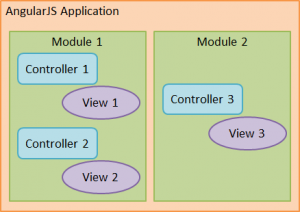
Let us talk about one of the AngularJS’s most useful feature which helps in making awesome single page applications in JavaScript – The Controller. This tutorial is part of series of tutorials on AngularJS...

AngularJS, a JavaScript framework developed by a Googler and supported by Google has become quite a buzz word in past few months. More and more developers are using it and thus the community has...

A webpage load time plays a very crucial role in SEO and impacts your website ranking significantly. Google has already incorporated site speed as one of the several signals that it uses to determine search ranking....

If you are doing lot of JavaScript programming, you might find below list of code snippets very useful. Keep it handy (bookmark it) and save it for future reference. Here are 20 very useful...
Let’s see a small code snippet in Javascript that converts JS arrays in Comma separated values. It is also possible to convert an array to delimited text where one can choose the separator. The toString() method...