Recently I had a requirement where using Spring MVC we had to take inputs multiple rows of data from user. The form had many rows which user can edit and submit. Spring MVC provides very simple yet elegant way of collecting data from multiple rows from HTML form and store them in List of Beans in Java.
Lets look at the requirement first. We have a screen where data for multiple Contacts is displayed. The Contact data is displayed in an HTML table. Each row in the table represents a single contact. Contact details consist of attributes such as Firstname, Lastname, Email and Phone number.
Related: Spring 3 MVC Tutorial Series (Must Read)
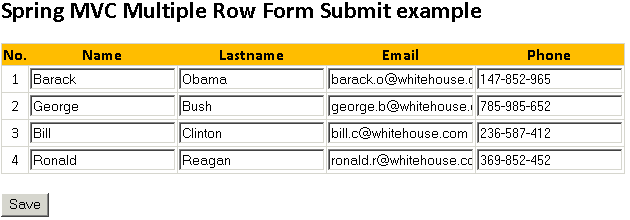
The Add Contact form would look like following:
Lets see the code behind this example.
Tools and Technologies used:
- Java 5 or above
- Eclipse 3.3 or above
- Spring MVC 3.0
Step 1: Create Project Structure
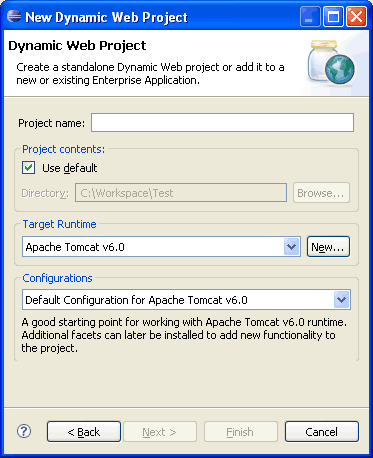
Open Eclipse and create a Dynamic Web Project.
Enter project name as SpringMVC_Multi_Row and press Finish.
Step 2: Copy Required JAR files
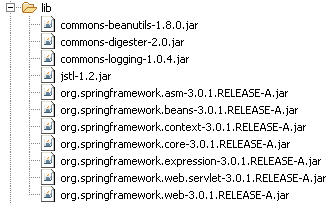
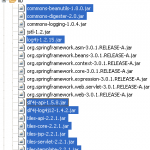
Once the Dynamic Web Project is created in Eclipse, copy the required JAR files under WEB-INF/lib folder. Following are the list of JAR files:
Step 3: Adding Spring MVC support
Once the basic project setup is done, we will add Spring 3 MVC support. For that first modify default web.xml and add springs DispatcherServlet.
File: /WebContent/WEB-INF/web.xml
<?xml version="1.0" encoding="UTF-8"?>
<web-app xmlns:xsi="http://www.w3.org/2001/XMLSchema-instance"
	xmlns="http://java.sun.com/xml/ns/javaee"
	xmlns:web="http://java.sun.com/xml/ns/javaee/web-app_2_5.xsd"
	xsi:schemaLocation="http://java.sun.com/xml/ns/javaee http://java.sun.com/xml/ns/javaee/web-app_2_5.xsd"
	id="WebApp_ID" version="2.5">
	<display-name>Spring3MVC-Multi-Row</display-name>
	<servlet>
		<servlet-name>spring</servlet-name>
		<servlet-class>org.springframework.web.servlet.DispatcherServlet</servlet-class>
		<load-on-startup>1</load-on-startup>
	</servlet>
	<servlet-mapping>
		<servlet-name>spring</servlet-name>
		<url-pattern>*.html</url-pattern>
	</servlet-mapping>
</web-app>
Code language: HTML, XML (xml)
Related: Tutorial: Learn Spring MVC Lifecycle
Now add spring-servlet.xml file under WEB-INF folder.
File: /WebContent/WEB-INF/spring-servlet.xml
<?xml  version="1.0" encoding="UTF-8"?>
<beans xmlns="http://www.springframework.org/schema/beans"
	xmlns:xsi="http://www.w3.org/2001/XMLSchema-instance"
	xmlns:context="http://www.springframework.org/schema/context"
	xmlns:mvc="http://www.springframework.org/schema/mvc"
	xsi:schemaLocation="http://www.springframework.org/schema/beans http://www.springframework.org/schema/beans/spring-beans.xsd
		http://www.springframework.org/schema/context http://www.springframework.org/schema/context/spring-context.xsd
		http://www.springframework.org/schema/mvc http://www.springframework.org/schema/mvc/spring-mvc.xsd">

	<context:annotation-config />
	<context:component-scan base-package="net.viralpatel.spring3.controller" />

	<bean id="jspViewResolver"
		class="org.springframework.web.servlet.view.InternalResourceViewResolver">
		<property name="viewClass"
			value="org.springframework.web.servlet.view.JstlView" />
		<property name="prefix" value="/WEB-INF/jsp/" />
		<property name="suffix" value=".jsp" />
	</bean>
</beans>
Code language: HTML, XML (xml)
Note that in above spring-servlet file, line 10, 11 defines context:annotation-config and component-scan tags. These tags let Spring MVC knows that the spring mvc annotations are used to map controllers and also the path from where the controller files needs to be loaded. All the files below package net.viralpatel.spring3.controller will be picked up and loaded by spring mvc.
Step 4: Add Spring Controller and Form classes
File: /src/net/viralpatel/spring3/form/Contact.java
package net.viralpatel.spring3.form;

public class Contact {
	private String firstname;
	private String lastname;
	private String email;
	private String phone;

	public Contact() {
	}

	public Contact(String firstname, String lastname, String email, String phone) {
		this.firstname = firstname;
		this.lastname = lastname;
		this.email = email;
		this.phone = phone;
	}

	// Getter and Setter methods
}
Code language: Java (java)
File: /src/net/viralpatel/spring3/form/ContactForm.java
package net.viralpatel.spring3.form;

import java.util.List;

public class ContactForm {

	private List<Contact> contacts;

	public List<Contact> getContacts() {
		return contacts;
	}

	public void setContacts(List<Contact> contacts) {
		this.contacts = contacts;
	}
}
Code language: Java (java)
Note line 7 in above code how we have defined a List of bean Contact which will hold the multi-row data for each Contact.
File: /src/net/viralpatel/spring3/controller/ContactController.java
package net.viralpatel.spring3.controller;

import java.util.ArrayList;
import java.util.List;

import net.viralpatel.spring3.form.Contact;
import net.viralpatel.spring3.form.ContactForm;

import org.springframework.stereotype.Controller;
import org.springframework.web.bind.annotation.ModelAttribute;
import org.springframework.web.bind.annotation.RequestMapping;
import org.springframework.web.bind.annotation.RequestMethod;
import org.springframework.web.servlet.ModelAndView;

@Controller
public class ContactController {


	private static List<Contact> contacts = new ArrayList<Contact>();

	static {
		contacts.add(new Contact("Barack", "Obama", "[email protected]", "147-852-965"));
		contacts.add(new Contact("George", "Bush", "[email protected]", "785-985-652"));
		contacts.add(new Contact("Bill", "Clinton", "[email protected]", "236-587-412"));
		contacts.add(new Contact("Ronald", "Reagan", "[email protected]", "369-852-452"));
	}

	@RequestMapping(value = "/get", method = RequestMethod.GET)
	public ModelAndView get() {

		ContactForm contactForm = new ContactForm();
		contactForm.setContacts(contacts);

		return new ModelAndView("add_contact" , "contactForm", contactForm);
	}

	@RequestMapping(value = "/save", method = RequestMethod.POST)
	public ModelAndView save(@ModelAttribute("contactForm") ContactForm contactForm) {
		System.out.println(contactForm);
		System.out.println(contactForm.getContacts());
		List<Contact> contacts = contactForm.getContacts();

		if(null != contacts && contacts.size() > 0) {
			ContactController.contacts = contacts;
			for (Contact contact : contacts) {
				System.out.printf("%s \t %s \n", contact.getFirstname(), contact.getLastname());
			}
		}

		return new ModelAndView("show_contact", "contactForm", contactForm);
	}
}
Code language: Java (java)
In above ContactController class, we have defile two methods: get() and save().
get() method: This method is used to display Contact form with pre-populated values. Note we added a list of contacts (Contacts are initialize in static block) in ContactForm bean object and set this inside a ModelAndView object. The add_contact.jsp is displayed which in turns display all contacts in tabular form to edit.
save() method: This method is used to fetch contact data from the form submitted and save it in the static array. Also it renders show_contact.jsp file to display contacts in tabular form.
Step 5: Add JSP View files
Add following files under WebContent/WEB-INF/jsp/ directory.
File: /WebContent/WEB-INF/jsp/add_contact.jsp
<%@taglib uri="http://www.springframework.org/tags" prefix="spring"%>
<%@taglib uri="http://www.springframework.org/tags/form" prefix="form"%>
<%@taglib uri="http://java.sun.com/jsp/jstl/core" prefix="c"%>
<html>
<head>
	<title>Spring 3 MVC Multipe Row Submit - viralpatel.net</title>
</head>
<body>

<h2>Spring MVC Multiple Row Form Submit example</h2>
<form:form method="post" action="save.html" modelAttribute="contactForm">
	<table>
	<tr>
		<th>No.</th>
		<th>Name</th>
		<th>Lastname</th>
		<th>Email</th>
		<th>Phone</th>
	</tr>
	<c:forEach items="${contactForm.contacts}" var="contact" varStatus="status">
		<tr>
			<td align="center">${status.count}</td>
			<td><input name="contacts[${status.index}].firstname" value="${contact.firstname}"/></td>
			<td><input name="contacts[${status.index}].lastname" value="${contact.lastname}"/></td>
			<td><input name="contacts[${status.index}].email" value="${contact.email}"/></td>
			<td><input name="contacts[${status.index}].phone" value="${contact.phone}"/></td>
		</tr>
	</c:forEach>
</table>
<br/>
<input type="submit" value="Save" />

</form:form>
</body>
</html>
Code language: HTML, XML (xml)
In above JSP file, we display contact details in a table. Also each attribute is displayed in a textbox. Note that modelAttribute=”contactForm” is defined in <form:form /> tag. This tag defines the modelAttribute name for Spring mapping. On form submission, Spring will parse the values from request and fill the ContactForm bean and pass it to the controller.
Also note how we defined textboxes name. It is in form contacts[i].a. Thus Spring knows that we want to display the List item with index i and its attribute a.
contacts[${status.index}].firstname will generate each rows as follows:
contacts[0].firstname // mapped to first item in contacts list
contacts[1].firstname // mapped to second item in contacts list
contacts[2].firstname // mapped to third item in contacts list
Spring 3 MVC and path attribute and square bracket
One thing here is worth noting that we haven’t used Spring’s tag to render textboxes. This is because Spring MVC 3 has a unique way of handling path attribute for tag. If we define the textbox as follows:
<form:input path="contacts[${status.index}].firstname" />Code language: HTML, XML (xml)Then instead of converting it to following HTML code:
<input name="contacts[0].firstname" />
<input name="contacts[1].firstname" />
<input name="contacts[2].firstname" />
Code language: HTML, XML (xml)
It converts it into following:
<input name="contacts0.firstname" />
<input name="contacts1.firstname" />
<input name="contacts2.firstname" />
Code language: HTML, XML (xml)
Note how it removed square brackets [ ] from name attribute. In previous versions of Spring (before 2.5) the square bracket were allowed in name attribute.
It seems w3c has later changed the HTML specification and removed [ ] from html input name.
Read the specification http://www.w3.org/TR/html4/types.html#type-name. It clearly says that:
ID and NAME tokens must begin with a letter ([A-Za-z]) and may be followed by any number of letters, digits ([0-9]), hyphens (“-“), underscores (“_”), colons (“:”), and periods (“.”).
Thus, square brackets aren’t allowed in name attribute! And thus Spring 3 onwards this was implemented.
So far I haven’t got any workaround to use springs <form:input /> tag instead of plain html <input /> to render and fetch data from multiple rows.
File: /WebContent/WEB-INF/jsp/show_contact.jsp
<%@taglib uri="http://www.springframework.org/tags" prefix="spring"%>
<%@taglib uri="http://www.springframework.org/tags/form" prefix="form"%>
<%@taglib uri="http://java.sun.com/jsp/jstl/core" prefix="c"%>
<html>
<head>
	<title>Spring 3 MVC Multipe Row Submit - viralpatel.net</title>
</head>
<body>
<h2>Show Contacts</h2>
<table width="50%">
	<tr>
		<th>Name</th>
		<th>Lastname</th>
		<th>Email</th>
		<th>Phone</th>
	</tr>
	<c:forEach items="${contactForm.contacts}" var="contact" varStatus="status">
		<tr>
			<td>${contact.firstname}</td>
			<td>${contact.lastname}</td>
			<td>${contact.email}</td>
			<td>${contact.phone}</td>
		</tr>
	</c:forEach>
</table>
<br/>
<input type="button" value="Back" onclick="javascript:history.back()"/>
</body>
</html>
Code language: HTML, XML (xml)
File: /WebContent/index.jsp
<jsp:forward page="get.html"></jsp:forward>
Code language: HTML, XML (xml)
Final Project Structure
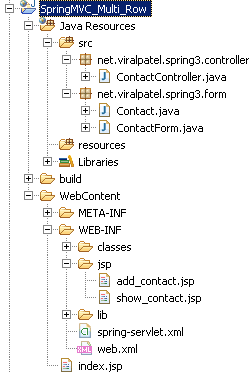
Once we have added all relevant source files and jar files, the project structure should look like following:
Step 6: Execute it
Execute the web application Right click on project > Run As > Run on Server.
Add Contact page
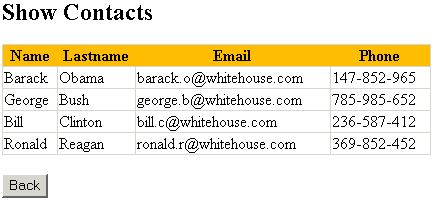
Show Contact page



Hi,
Nice article,
is there any way to add a new row in the table using Jquery ?
thanks
Hi Kamal, have anyone answered your question? I would like to see an example as well.
Viral,
You have done a Good Job here.
Can you do a tutorial on Apache Tiles to use with Spring MVC?
Thanks for your help.
Hi Ramesh, Thanks for the compliment. Here is the Spring MVC Apache Tiles Integration Tutorial. I hope this helps.
Hi Viral,
The tutorial is very helpful but is there anything similar without annotations? We are using an older version of Spring Web MVC.
Thanks
Sree
The filename associated with the last code block should be show_contact.jsp, not add_contact.jsp (it is repeated from the block above)
@Phil – Opps, well caught :-)
I’ve updated the typo in above tutorial.
Thanks
Hi Vishal,
Thanks for this great tutorial. I have similar kind of requirement but with one change.
I need to allow use to add row using script. So what i did is i generate the input text boxes as u specified in the tutorial but its not working.
Can you please guide me how should i achieve this?
Thanks a lot,
Ankur
Hi Viral.
Thanks for this article. I am able to do al these thing with normal HTTP request. But my requirement is to do this with the help of DOJO(AJAX). Can you point me to some tutorial or can provide some help.
Thanks
Hi Viral,
Thanks for this awesome article. I have a question related to this. When I want to do a form validation, how can I specify a filed name in the validation class. For example, in this error.rejectValue (“fieldName”, “errorMsgCode”, “errorMessage”) method, what is the right way to write the fieldName part? Thanks for your help in advance.
Hi Viral,
Thanks very much for this article. It is well done and was quite helpful. I use a whitelist in my controllers to initialize the binder and found that I needed to use a wildcard to get the list to bind properly. As in “contacts*” in the following code:
hi viral,
thanks very much,this good article,detail explained for all concept and easily understand for all people include beginner.
hi i am only new to programing plus new to use a frame work i have choosen spring mvc as my first i have installed it sucessfully …though i think so…can any one tell me where will i get those step 2 jar files from….? and in my server its showing the vmware one….. do i have to install apache or vmware one is ok….
hello, nice tuto!
i have this error in this line
Multiple annotations found at this line:
– Can not find the tag library descriptor for “http://java.sun.com/jsp/
jstl/core”
someone can help me please
Hi Viral,
Can you give me any information about Java Reflection API?
Thanks in advance
hi
I tried to aplly your example. but what I found that the reterived List object is coming null. Any clus why it is happening?
When I set form tag as enctype=”multipart/form-data”
I’m getting list as null. Can you suggest me what should I do
Hi Sir,
I would like to thank you for teaching me spring through your blog. Now I am seeing you as GURU as far as Spring is concerned.
thank you
Sreekumar
when i run the above application,I found the error in jsp page
The error is:-cannot find the tag library descriptor for http://java.sun.com/jsp/jstl/core
will any one help me to resolve this problem.
Thanks
Hi Viral,
Thanks for such a nice article along with the source code. Could you please provide another article on Struts 2 (with commons validator & Tile frameworks) and Spring 3.1 Integretaion.
Thanks,
In the tutorial, you showed how to edit pre-populated form.
Any tutorial on how to collect multiple row form.
Thanks so much for this great tutorial!
Now it’s much clearer for me!
That’s what I was looking for!
Hi Viral Patel,
I have a requirement where I display contact list in the jsp page and have edit link. When you click edit link it opens up another div (dialog style div) for you to update the contact list and save. Here I am trying to create a reusable jsp in which I have code to display a form of contacts and which can be saved. I use jQuery load function to load this editcontacts.jsp with tag with modelAttribute(command)=”contacts”. I can access the modelAttribute without the path value but I cannot use the modelAttribute to load form field using path in each form:input field.
Can you please tell me how can I use the modelAttribute set by controller in form to set form field?
Thanks,
Krunal
Hi :)
Thanks very much for this article :) I need a help , I search the way that makes me passing a array list to javascript .
I’m looking forward for your response :)
Excellent examples with details. Appreciate your help. Your site is one stop shop.
I stumbled upon this page while looking for solution to my problem. I have the exact same requirement but have to use it in earlier version of Spring. Would you be able to help? Here is the issue I have – http://stackoverflow.com/questions/10577104/bind-collection-to-form-why-is-it-not-working
I have upgraded to Spring 3, but don’t see the change with square brackets like you described. I am using tags, but the output still has square brackets in the name attribute.
Do you have any references on this change? I can’t seem to find any on the net.
The closest I have found is this:
https://jira.springsource.org/browse/SPR-4698
but it is only the ID attribute that has changed, not the name attr.
The spring form:input (and form:hidden) tags put the square brackets correctly in the input name attrib in Spring 3.1. The id is as you describe. Seems to work.
I tried the code provided by Viral. But its not putting the square brackets in the name attribute. Can you provide the code snippet you are using. Does this work in Spring 3.1 and not in Spring 3.0?
Hi,
I have a similar requirement where I need to export search results into excel. In my search results JSP I have made the input tag style as disabled=”disabled” because user must not change the results data. In this scenerio spring will not parse the values from request and fill the ContactForm bean and pass it to the controller. Any help appreciated.
Hi Viral, thanks a ton.. this is exactly what i was looking for.
Keep up the good work :-)
Thanks for writing such excellent articles.
Great article!! Helped me solve my issue..Was’nt using form tag lib to build list, updated were not binding back. After adding below index, it WORKED!! Thanks!
<input name="contacts[${status.index}].firstname"…
Spring is binding updates for form input type text
<input name="contacts.firstName" type="text"
But, NOT not binding the updates for check box back to controller , Any HELP is appreciated !!!
<input name="contacts[0].active" type="checkbox"
This is a really interesting article, but I would like to know if there’s a way of using combobox loaded with a list from database.
can you tell me that i have 4 textboxes that like A,B,C,D i have to take the values for previous year ,present year and current year ie multiple columns we can take can u tell me how to do,THANKS IN ADVANCE
In the above example Spring MVC: Multiple Row Form Submit using List of Beans, how do you implement the pagination and save button should send changes back to servlet. I implemented the pageListHolder from spring I am able to display the data but not able to get the changes back in the ModelAttribute which I set a list. thanks
Just change name to path for spring 3.1.0 i.e . Thanks a bunch for the article the info on your site is really valuable stuff.
Hello,
thank you for your article!
The following code works for me with spring 3.1.2:
Hi Viral,
All of your posts were very helpful to go on while i am stuck with any issue.But now i am in the middle of one issue that i couldn’t found any solution from your post.i wish to do “Multiple Row Form Submit using struts 2”.hope you can help me in this.
Hi
Can you please tell me if we search one record in search page, then if it exist it will be printed like grid view in the same page……
The example was good, but I am facing a problem with passing date in list to controller
The init binder I am using as
@InitBinder
public void initBinder(WebDataBinder binder) {
SimpleDateFormat dateFormat = new SimpleDateFormat(“MM/dd/yy”);
dateFormat.setLenient(false);
binder.registerCustomEditor(Date.class, new CustomDateEditor(dateFormat, true));
}
The exception is
Caused by: java.lang.NumberFormatException: For input string: “”
Hi good simple application , i have small doubt here, when i run this application , how add_contact.jsp is getting displayed , u did not mention index.jsp any where , how it is directly forwarding to add_contact .jsp , is this the behaviour of the Dispatcher Servlet .
Can any one reply to this.
Hi, add_contact.jsp is displayed via Spring controller. The get() method of ContactController renders add_contact page as you can see it in source code. I strongly recommend you to go through Spring MVC tutorial series to understand these concepts.
In the same example if u try to create a FormValidator and had to put error messages for all fileds what path value will u mention.
suppose for the below field
Please reply.Thanks.
What ever u said is true, but my doubt is how the controller is detecting index.jsp which contains “get.html” , which takes to Controller and results to add_contact.jsp ,
How controller detects index.jsp which is not even declared as welcome file in web.xml
By default, tomcat (or other JEE Containers) renders index.jsp from WebContent folder. Although we havn’t defined index.jsp as welcome file, still by default it takes as welcome file. Read more
Hey,
Thanks Viral..
It helped me a lot…
Great job . keep it up…
Hi Viral,
I am new to this SPRING MVC framework. I referred your example and created all the files like .java, .jsp etc. When i tried executing it i get an error as “WARNING: No mapping found for HTTP request with URI [/SpringMVC_Multi_Row/get.html] in DispatcherServlet with name ‘spring'”. Please help me to resolve this error. Thanks in Advance.
I too facing same problem…
Hi Gireesh,
I was using eclipse IDE. We need to clean the project before we execute the application when using tomcat. When i cleaned the project and executed it was working fine for me.
Please try “Project -> clean”. and execute the application.
Regards,
Raja
Hi,
nice tutorial… your tutorials are always a great source of help. I have a requirement to create dynamic forms. our requirement is like , if the user clicks on a add button, dynamically the fields should be displayed for him to enter his details like his experiences in various companies. could you please guide me where to start with? i am using spring mvc and hibernate annotations.
Hi Viral,
Nice tutorial. I need your help. I want to generate a table of records dynamically based on given input fields.
Hi Viral,
Thanks for providing such a good tutorial. It really helps beginners to start with this application and is easy to understand the flow. Keep posting. Thanks once again.
Regards,
Raja
Can I get the similar code for struts 1.3
I was wondering if you ran into any ConcurrentModificationException problems with this? I get this when rendering the multi row form.
Hi H,
I’m having same problem and resolved it.
I’m using the ‘count’ variable badly :(, the ‘count’ starts 1, and the List get method use 0 based system.
I replace this tag
with
and resolve the problem.
The tags:
< form:input path=”xxx[${status.count}].yyy” id=”xxx[${status.count}].yyy” / >
< form:input path=”xxx[${status.count-1}].yyy” id=”xxx[${status.count-1}].yyy” / >
Could you please suggest what changes required in controller/jsp if i have used LinkedHashMap instead of List collection object.
Mahesh
Very nice articals, helped me many times. Thanks
Viral,
Nice article. I have a problem around the same dynamic binding.
I have a table with dynamically created rows using javascript.
Read it in many sites that if the name is proper the binding will happen automatically.
For example:
In my case i’m doing the exact thing and it works for 1 row created statically like above.
But if i add another row dynamically like this (array index 1) using javascript
it doesn’t work. On the server side because of the lazy list i see the size is 2 but field itself is null. Please help. I’m almost going mad.
-Ganesh
Viral,
Nice article. I have a problem around the same dynamic binding.
I have a table with dynamically created rows using javascript.
Read it in many sites that if the name is proper the binding will happen automatically.
For example:
“”
In my case i’m doing the exact thing and it works for 1 row created statically like above.
But if i add another row dynamically like this (array index 1) using javascript
“”
it doesn’t work. On the server side because of the lazy list i see the size is 2 but field itself is null. Please help. I’m almost going mad.
sorry my html elment does’t show up in my example post above
Viral,
Nice article. I have a problem around the same dynamic binding.
I have a table with dynamically created rows using javascript.
Read it in many sites that if the name is proper the binding will happen automatically.
For example:
In my case i’m doing the exact thing and it works for 1 row created statically like above.
But if i add another row dynamically like this (array index 1) using javascript
it doesn’t work. On the server side because of the lazy list i see the size is 2 but field itself is null. Please help. I’m almost going mad.
I have a form that dynamically add text boxes and that are binded to list object in command object.
The same form is used to retrieve the value form list.The form enable us to delete the textboxes ,which is binded to list in command object,but the list in command object is not reinitialized .What is the solution for this?
Any solution for this? I am facing the same problem
I have same problem…please help)
Hello Viral
I always appreciate your tutorial and work,for most of java framework i have followed your tutorials at starting phase to accelerate my learning.Now i am working with one US Client project (confidential) .I stuck with spring MVC binding with some complex forms.
The forms are getting populated with data and binding but when i submit the form its showing exception like contacts[0] invalid property of form bean….root : spring autogrow nested property path.
i followed this tutorial to make every complex forms(multiple list.multiple radio,multiple checkbox)
Please Reply
Do you found any solution?? I m facing the same issue
Excellent explanation
Thanks a lot, very nice example.
With the newer release of Spring MVC (I am using 3.1.1) you can use the
{/code] way of expressing the input boxes (on the JSP page).
Spring has apparently corrected the value generated in the name=”…” parameter so that it conforms to the w3c spec!
Woo hoo!
Hmm looks like the commenting did not come across properly.
You can you use
as was a way to express the input fields…Spring MVC has updated their code to be w3c compliant
Hey, Please can you provide the example of webflow example with multiple controller
Hi,
Here you populated the list before viewing it on “add_contact.jsp”. I have a requirement where user can add n number of objects at runtime from view layer.
Please suggest.
Thanks!!
That should’nt be a problem. You can define a method in
ContactControllerto add new users inList contacts . Map this new method using @RequestMapping(“/adduser”). Hope you got whats to be done here.IMPORTANT
Actually w3c spec is not saying “name” attribute in “input” element can’t have square bracket. The “NAME” is just its internal term to categorize attribute. See this and find “name” attribute for “input” element:
http://www.w3.org/TR/html4/index/attributes.html
The attribute type is CDATA! There is little restriction for CDATA type, see
http://www.w3.org/TR/html4/types.html#type-cdata
Nice example…btw, Spring 3.2.2 form:input works and will create the same hand-coded input.
However, I noticed that on submission, Spring creates new instances of Contact and does not reuse the Contact instances that were populated in the ContactForm at form get time…
I wonder if I set something up incorrectly.
Following up on my observation: if I use @SessionAttribute(“myFormObject”) then it works fine…Spring 3.2.2
Can you please tell me how to validate the multiple input values in validate method since I am using xml based spring framework
I had an array of elements How to pass this data to spring 3.0.
Model
String stuName;
Int time;
String sub;
Stu Time subject Time subject Time subject
Stu1 9 Maths 10 Sci 11 Eng
Stu2 9 Maths 10 Sci 11 Eng
Stu3 9 Maths 10 Sci 11 Eng
Stu4 9 Maths 10 Sci 11 Eng
Here you pass list of data.It really helpful.
But i try to pass list of list data. How to pass this data? Thank you in advance
Hi,
Create new domain class like studentList.class. Declare the following variable.
.
In front end :
. its exactly like matrix .
thank so much viralpatel ..this Example is very help to me..u did a great job
Hi, I have implemented the multiple rows with editable and its not working for bulk records. In my case I have more than 3000 records(all are editable) in a page. When I submit the page the list object is coming null. If tried with 250 records its working fine. Please help on this.
Thanks Viral, this one workes correctly, without doing any change in code.
What will be the REST request for this service?
IS THERE ANY NECCISITY OF USING A GENRIC LIST ,
STILL I AM GETTING ARRAY OUT OF BOND EXCEPTION , AS MY LIST IS NOT GENRIC
we can map list by spring tag also. Please update in your site. Thax
Example:
What if you dont know contacts size already, how do you do, in my case I don’t know the table size which is going to be enter, it’s dynamic, it has add row button.
can you please suggest how should I do?
Hi Viral,
Nice explaination. But I need to save multi rows of table where no. of columns in table is not fixed it is also dynamic or user configuration value that can be fetched from DB at time of form load. Hence, bean structure is not fixed, so no bean like contact can be defined. Only info to relate with is header-name, row-value and row-no. Hence row-values for all header-names corresponding to single row-no. form a single row of table.
Do you have any idea of implementing Save for this kind of scenerio.
In this case you might want to create a HashMap in your bean and map multiple values within the map. Check this tutorial for more info: Using HashMap in Spring MVC Forms.
Thanks a lot Viral.., good example and excellent explanation! :)
Many many thanks
I really elated to the way you demonstrated the complex concepts in an elegant manner. it’s simply super.
Hi,
Anybody would help me. I’m string to bind String array. I’m getting the below error
com.ibm.ws.webcontainer.servlet.ServletWrapper service SRVE0014E: Uncaught service() exception root cause useradmin: com.ibm.ws.jsp.webcontainerext.JSPErrorReport: JSPG0036E:
Form contains two String arrays
String[] parameterkeys;
String[] parametervalues;
JSP
looping thru for each..
i tried the code, the problem is the attribute is not getting updated to the save page and it has null value. What can be the problem?
Hi, i tried this code and i m trying to render the same page instead of new page but i m not able to update the attribute and instead it comes to null. can some one help me with this problem?
can you let me know how to perform spring validation on this example
do u got the solution for the validation part.
Excellent Article!!!
Can you give a example how to validate the multiple rows
Hi viral Patel,
Good article dude. i have situation to submit more than 255 objects from jsp page.
Spring MVC throws index out of bound excetion, when the list exceeds 255. Is there any to set auto grow collection. Thanks dude.
In add jsp page name=”contacts[${status.index}].firstname”.how do u write validation for this.
Excellent explanation :)
Hi Viral,
It is such a nice tutorial. But I am stuck in validation part. I am using Spring annotation validation. In above scenario how do valid input field using annotation. For eg : name cannot be blank how to @NotBlank for name.
hi
i am getting above error need ur help i have downloaded your application(Multiple Row Form Submit Using List Of Beans) and running in eclipse its giving below errror
org.springframework.beans.factory.BeanDefinitionStoreException: IOException parsing XML document from ServletContext resource [/WEB-INF/spring-servlet.xml]; nested exception is java.io.FileNotFoundException: Could not open ServletContext resource [/WEB-INF/spring-servlet.xml]
thanks in advance
Rahul
you rock man, good one
Hi Viral,
I have a same situation but one of the attribute of the list object is an object i.e. ithis case :
public class Contact {
private String firstname;
private String lastname;
private String email;
private String phone;
private ClassName obj_name;
….
}
I creating an object of ClassName and assing to every Contact object of list but on form submit I am getting the value of object obj_nmae as null.
What could be the reason for this???
its sending null over post request and model attribute coming null at controller . Not able to figure out?
Very nice article. I had to create a similar page and this tutorial provided me overview of how to go about it.
Thanks and keep up the good work.
Very good article.
I have tried with a checkbox instead of textbox (used in this sample) and binding it with a boolean variable. The textbox changes are reflecting but the checkbox changes are not getting updated in the pojo.
I finally got the solution ,
form:checkbox path=”contacts[${status.index}].delete”
This thing is not going to work. Try start with two browsers and enter different data, play around see what hapened. it is going to corrupt each other. The reason the controller is stateless, should not have field ‘Contacts’.
Nice Explanation. But I have a situation where I dont have list of beans initially. User can add and deleter rows on form. Initially row will be empty and user will fill the data and submit the form. Do you have any suggestion for this?
Hi in my case when i am submitting the form after editing i am getting an exception like…
org.springframework.beans.NullValueInNestedPathException: Invalid property ‘contacts[0]’ of bean class [com.merck.uk.web.to.ContactForm]: Cannot access indexed value of property referenced in indexed property path ‘contacts[0]’: returned null
Hi,
It would help me, I am stuck in this situation
Did you find any solution?
Thanks.
I know its too late to answer this but it may help someone. I also faced the same issue and the solution to this is in case you forgot to add the blank constructor in Contact.java do add this as below:
public Contact(){
}
Also make sure you have all the getters and setters in the Contact.java file.
Hi ! Very usefull article !
In your example you use only a list of contact.
Byt what if the Bean Contact get a list too. How do you process to display the information ?
Like that ?
Thank you ! :)
Hello, Check my answer here for an alternate solution without creating wrapper class.
http://stackoverflow.com/a/42478349/4598590
The download link is broken, any chance to update?
Hi,
How to update deleted records? Because if i delete the row on JSP using JavaScript, it’s not updating on controller. but changing the value is updating on controller.
thank you
TABLE id=”dataTable” width=”350px” border=”2px” style=”margin:5px;”>
Option
project_id
isMaster
Y
N
Hi:
I really appreciated if you can posted the code above.
The link doesn’t work anymore to download the code.
Greatly need your help!!
its not multiple rows! its static 4 rows!!!
Hi,
I have tried this but contactForm’s contacts list is showing as empty.
No. Name Lastname Email Phone
${status.count}
${contact.firstname}
${contact.lastname}
${contact.email}
${contact.phone}
hi,
resolved after using
You done great job…Thank you so much!!!
Can i ask you one query…How to edit/update the multiple row?
As per above example, i am storing the information in two tables… now i am also display at the time edit but not get way to update the list of row in table who has stored with some id.(at the time of adding).
Hi,I want to ask one question.Can I validate above example of inputs using spring validator.I need a help to solve that problem.Somebody help me.Please!
Dear This is the very nice tutorial ,
can any one say how do i pass some user input and display item to spring controller.?
just user input is master and display item is detail.
Hi Guys,
I have implemented same code in my project.
But I am getting two values like duplicate separated by comma.
Ex: For Name Barack, in controller I am getting as Name: Barack,Barack.
Any idea what is the mistake
Can you please help with Update method in SpingBoot multiple arrays
I am using Apache Freemarker (.ftl) instead of jsp. So can i know how to handle the below list in (.ftl). I tried , but its throwing error..