Spring MVC provides a powerful mechanism to intercept an http request. Similar to Servlet Filter concept, Spring MVC provides a way to define special classes called Interceptors that gets called before and after a request is served.
Quick Overview
Each interceptor you define must implement org.springframework.web.servlet.HandlerInterceptor interface. There are three methods that need to be implemented. preHandle(..) is called before the actual handler is executed; The preHandle(..) method returns a boolean value. You can use this method to break or continue the processing of the execution chain. When this method returns true, the handler execution chain will continue; when it returns false, the DispatcherServlet assumes the interceptor itself has taken care of requests (and, for example, rendered an appropriate view) and does not continue executing the other interceptors and the actual handler in the execution chain. postHandle(..) is called after the handler is executed; afterCompletion(..) is called after the complete request has finished. These three methods should provide enough flexibility to do all kinds of preprocessing and postprocessing. You can define an interceptor class as follow:
import javax.servlet.http.HttpServletRequest;
import javax.servlet.http.HttpServletResponse;

import org.springframework.web.servlet.HandlerInterceptor;
import org.springframework.web.servlet.ModelAndView;

public class HelloWorldInterceptor implements HandlerInterceptor  {
	@Override
	public boolean preHandle(HttpServletRequest request,
			HttpServletResponse response, Object handler) throws Exception {

		System.out.println("Pre-handle");

		return true;
	}
	//override postHandle() and afterCompletion()
}
Code language: Java (java)
Once the interceptor is defined, you can ask Spring MVC to configure it via <mvc:interceptors> tag within spring-servlet.xml file.
<mvc:interceptors>
   <bean class="net.viralpatel.spring3.interceptor.HelloWorldInterceptor" />
</mvc:interceptors>Code language: HTML, XML (xml)
Let us start with the complete Demo application. We will create a demo Interceptor that logs each request. Tools and technologies:
- Java 5 (or above)
- Spring MVC 3.0 (or above)
- Eclipse 3.2 (or above)
We will need following JAR files in order to execute this project.
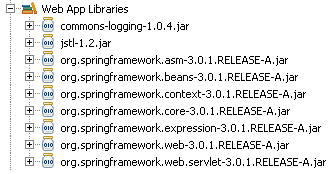
If you are using Apache Maven as dependency management, add following dependencies to pom.xml.
pom.xml
<dependencies>
   <dependency>
      <groupId>org.springframework</groupId>
      <artifactId>spring-webmvc</artifactId>
      <version>3.0.1.RELEASE</version>
   </dependency>
   <dependency>
      <groupId>jstl</groupId>
      <artifactId>jstl</artifactId>
      <version>1.2</version>
   </dependency>
</dependencies>Code language: HTML, XML (xml)
Let us create a simple Spring MVC Interceptor class that logs each request.
Step 1: The Controller – Create new Spring MVC Controller
We create a simple Spring MVC controller that displays a plain JSP view.
HelloWorldController.java
package net.viralpatel.spring3.controller;

import org.springframework.stereotype.Controller;
import org.springframework.web.bind.annotation.RequestMapping;
import org.springframework.web.bind.annotation.RequestMethod;

@Controller
public class HelloWorldController {


    @RequestMapping(value = "/hello", method = RequestMethod.GET)
    public String sayHello() {
        return "hello";
    }
}Code language: Java (java)
The controller has one method sayHello() which is mapped to URL /hello using @RequestMapping. This simply paints the hello.jsp view.
Step 2: The View – Create new JSPs
Create two JSPs, hello.jsp that displays hello message and index.jsp that simply redirects first request to /hello.html.
/WEB-INF/jsp/hello.jsp
<html>
<head>
	<title>Spring MVC Interceptor example</title>
</head>
<body>
	<h1>Hello!!</h1>
</body>
</html>Code language: HTML, XML (xml)
WebContent/index.jsp
<jsp:forward page="hello.html"></jsp:forward>Code language: HTML, XML (xml)The index.jsp simply redirects to hello.html which calls the HelloWorldController.
Step 3: The Interceptor – Spring MVC HandlerInterceptor
Let’s create the Spring based Handler Interceptor which will intercept the request and print a message.
HelloWorldInterceptor.java
package net.viralpatel.spring3.interceptor;

import javax.servlet.http.HttpServletRequest;
import javax.servlet.http.HttpServletResponse;

import org.springframework.web.servlet.HandlerInterceptor;
import org.springframework.web.servlet.ModelAndView;

public class HelloWorldInterceptor implements HandlerInterceptor  {
	@Override
	public boolean preHandle(HttpServletRequest request,
			HttpServletResponse response, Object handler) throws Exception {

		System.out.println("Pre-handle");

		return true;
	}

	@Override
	public void postHandle(HttpServletRequest request,
			HttpServletResponse response, Object handler,
			ModelAndView modelAndView) throws Exception {
		System.out.println("Post-handle");
	}

	@Override
	public void afterCompletion(HttpServletRequest request,
			HttpServletResponse response, Object handler, Exception ex)
			throws Exception {
		System.out.println("After completion handle");
	}
}
Code language: Java (java)
Thus in each of the method preHandle, postHandle and afterCompletion we print a message on console.
Step 4: Spring Configuration
Now lets glue up the source code and configure Spring. Note how we declared the interceptor in spring-servlet.xml using <mvc:interceptors> tag.
spring-servlet.xml
<beans xmlns="http://www.springframework.org/schema/beans"
	xmlns:xsi="http://www.w3.org/2001/XMLSchema-instance"
	xmlns:context="http://www.springframework.org/schema/context"
	xmlns:mvc="http://www.springframework.org/schema/mvc"
	xsi:schemaLocation="http://www.springframework.org/schema/beans	http://www.springframework.org/schema/beans/spring-beans.xsd http://www.springframework.org/schema/context	http://www.springframework.org/schema/context/spring-context.xsd http://www.springframework.org/schema/mvc http://www.springframework.org/schema/mvc/spring-mvc.xsd">

	<context:annotation-config />
	<context:component-scan base-package="net.viralpatel.spring3.controller"/>

	<mvc:interceptors>
      <bean class="net.viralpatel.spring3.interceptor.HelloWorldInterceptor" />
	</mvc:interceptors>

  <bean id="jspViewResolver"
	class="org.springframework.web.servlet.view.InternalResourceViewResolver">
		<property name="viewClass"
			value="org.springframework.web.servlet.view.JstlView" />
		<property name="prefix" value="/WEB-INF/jsp/" />
		<property name="suffix" value=".jsp" />
  </bean>
</beans>
Code language: HTML, XML (xml)
Also configure the spring’s DispatcherServlet in web.xml file.
web.xml
<?xml version="1.0" encoding="UTF-8"?>
<web-app xmlns:xsi="http://www.w3.org/2001/XMLSchema-instance"
	xmlns="http://java.sun.com/xml/ns/javaee"
	xmlns:web="http://java.sun.com/xml/ns/javaee/web-app_2_5.xsd"
	xsi:schemaLocation="http://java.sun.com/xml/ns/javaee
		http://java.sun.com/xml/ns/javaee/web-app_2_5.xsd"
	id="WebApp_ID" version="2.5">

	<display-name>Spring3MVC-Interceptor example</display-name>
	<servlet>
		<servlet-name>spring</servlet-name>
		<servlet-class>
			org.springframework.web.servlet.DispatcherServlet
		</servlet-class>
		<load-on-startup>1</load-on-startup>
	</servlet>
	<servlet-mapping>
		<servlet-name>spring</servlet-name>
		<url-pattern>*.html</url-pattern>
	</servlet-mapping>
</web-app>
Code language: HTML, XML (xml)
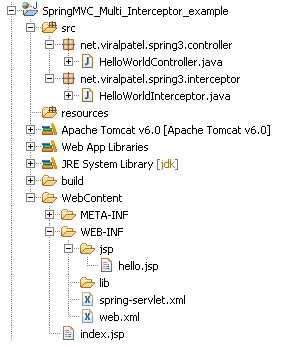
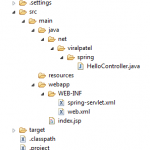
Final Project Structure
Once all the source files and configuration files are in place, your project should look like below:
Demo
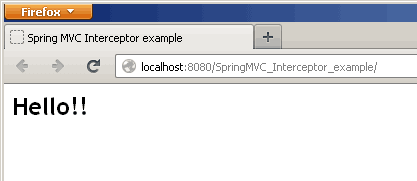
Compile and execute the project in Eclipse. Open below URL in browser. URL: http://localhost:8080/SpringMVC_Interceptor_example/
Check the server console logs. You must see following:
Pre-handle
Post-handle
After completion handle

Nice Tutorial.
i love you viral without you m nothing in this industry ……….. ;)
Download source code downloading some other project source code. Please advise
I added following dependencies but getting compilation error with these two imports in controller class
Viral, Java 6 will be required for Annotations that you have used like @Override..
Thanks!
This description solved my problem nicely!!
I want to develop a complte web applicationn in spring frame work where I can connect to oracle DB and I have front end and data validation done
Please help me
I encounterd error blow. why??? Please help me ^^;;
Caused By: org.xml.sax.SAXParseException: cvc-complex-type.2.4.c: The matching wildcard is strict, but no declaration can be found for element ‘mvc:interceptors’.
——————————
xmlns:mvc=”http://www.springframework.org/schema/mvc”
@eugene
add xmlns:mvc=”http://www.springframework.org/schema/mvc” @ header
Thanks very much
Thank you very much!!!
thank you so much for your post, a sensible example which i’ve seen after searching about 50 sites… cheers :)
Can anyone help me how to configure maven in eclipse?
@Ravi: Follow these steps to configure maven plugin in eclipse: http://stackoverflow.com/a/8722910/113418
In eclipse go to
help -> eclipse marketplace -> search for m2e and install it
Hi Viral,
My functionality is when i click on link of my application page, it will open xml in another window.
i want to hide or change url of that window, how can i achive using above interceptor ?
Please help
Thanks
Can you please tell me the real time applications where we will use interceptors most..? What is use of pre handling, or post handling the requests. Please Explain me with any real time scenarios. Thanks in advance.
I can tell you what I use a HandlerInterceptor for. In my application, which is an e-commerce engine, I use a HandlerInterceptor to resolve certain things that all controllers will need to have at their disposal before they can render a response. I initialize certain things like the particular store they’re accessing, the user’s shopping cart, navigation UI, robots rules, client timezone, etc. If I didn’t do those things inside an interceptor, then I would have to do repeat all of those initializations inside of each controller method, which would make my code a lot more redundant and less readable. Whatever you find yourself repeating a lot in controller methods can be factored out and handled inside an interceptor. I hope that gives you some more insight.
Hi,
These ‘interceptors’ are useful to validate requests from client.
For Eg:
It is useful to avoid spam requests By Validating the request according to Your app Requirements(You allow the request to Process Furthur only it has perticuls credentials).
And you can Provide Secirity by Restricting the invalid requests to access the resources of your App.
Thanks & Regards
raju.
we will interceptors used for setMaxAgeForSession, checkIfRequestIsAllowedWithoutLogIn some other purposes…
Do you know of a way to intercept requests BEFORE a handler has been chosen? The reason I want to know is because some parts of my application have dynamic URLs (neither in XML nor in @RequestMapping annotations) that are stored in a database and updated via a web front-end. As such, static URL-to-controller mappings won’t work in my case (think of an app like a CMS where end users can choose their own URL for a particular page). Any ideas?
If you don’t know the complete URL then ServletFilters are way to go these work similar to interceptors this can be used on any java based web application.
Read more at http://docs.oracle.com/cd/B14099_19/web.1012/b14017/filters.htm
Great tutorial! Really simple and easy to follow. Thanks!! Using this to put a CorsFilter in.
i have an error above code:
HTTP Status 500 – An exception occurred processing JSP page /index.jsp at line 1
Stacktrace:
org.apache.jasper.servlet.JspServletWrapper.handleJspException(JspServletWrapper.java:568)
org.apache.jasper.servlet.JspServletWrapper.service(JspServletWrapper.java:455)
org.apache.jasper.servlet.JspServlet.serviceJspFile(JspServlet.java:390)
org.apache.jasper.servlet.JspServlet.service(JspServlet.java:334)
javax.servlet.http.HttpServlet.service(HttpServlet.java:728)
write ur jsp code here,error in line1 of ur jsp, you hv written smthig that is nt accepted
any one is help 2 me above http status…
Any tell me how to close a session when browser tab closeed i am usin Spring ,Jsf 1.8 Icefaces
hi patel
Great tutorial! Really simple and easy to follow. Thanks!!
i need gosu technology sample project with source code
please send me viralpatel very urjent …..
What if I want to inject interceptor logic for a certain method on a certain controller? Is there an easy to to achieve that? Literally I am looking for something like @Before or @After annotation in PlayFramework (see http://www.playframework.com/documentation/1.2/controllers#interceptions) in spring
Hi,
Really nice tutorial. I understood the whole concept. I only dont understand where have we linked the interceptor to handler. I mean how does the framework know that the HelloWorldInterceptor is to be called for request to HelloWorldController controller
This example doesnt work on JBoss 7.1.1
Example doesnt work on Jboss.
This line gives error
xmlns:mvc=”http://www.springframework.org/schema/mvc”
Nice article Viral.
Sometime back I implemented a timestamp ‘Filter’ which would take start timestamp when user enters the filter and another end timestamp just before returning the response. Since these timestamps were in the same method, I calculated the time taken to complete the request and was able to log it to file along with the request parameter.
How can I achieve it using interceptors ? (Since pre and post are separate methods, the local variable values are lost). I am relatively new to Spring so if there’s another way ..please point me to it.
Regards, Rajesh
hi viral,
The spring helloworld example code demo is very useful to me.
Thank you friend…
where can i get pom file for this
Is it possible to use a parameter sent by an ajax post inside the preHandle method?
Nice tutorial, though by just using Sysout doesn’t solve problems. You could have included usage of Handler / ModelAndView during postHandle etc. Without those, this is mere the most basic one