Welcome to Part 5 for Spring 3.0 MVC Series. In previous article we saw how to configure Tiles framework with Spring 3 MVC application. We used 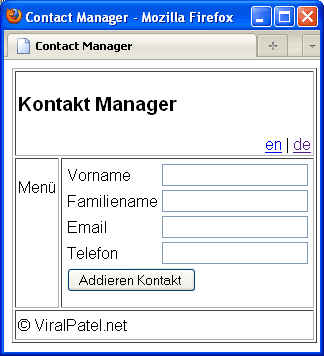 We will add two languages support to our application: English and German. Depending on the locale setting of users browser, the appropriate language will be selected. Also user will be able to select the language from top-right corner of the application.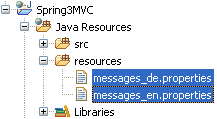
 Create two files
 will be used in this application.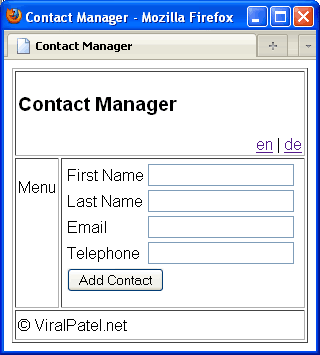

org.springframework.web.servlet.view.tiles2.TilesConfigurer class in bean definition to define the tiles configuration file. This divided our HelloWorld Spring MVC application in sections such as header, footer etc. In this part we will discuss about Internationalization (I18N) and Localization (L10N) in Spring 3.0 MVC. We will add i18n support followed by l10n to our HelloWorld Spring application that we created in previous tutorials in this series. I strongly recommend you to go through previous articles and download the source code of our sample application. [sc:SpringMVC_Tutorials]What is i18n and L10n?
In computing, internationalization and localization are means of adapting computer software to different languages and regional differences. Internationalization is the process of designing a software application so that it can be adapted to various languages and regions without engineering changes. Localization is the process of adapting internationalized software for a specific region or language by adding locale-specific components and translating text. The terms are frequently abbreviated to the numeronyms i18n (where 18 stands for the number of letters between the first i and last n in internationalization) and L10n respectively, due to the length of the words. The capital L in L10n helps to distinguish it from the lowercase i in i18n.Our Goal
Our goal is to add Internationalization and Localization support to our Spring MVC application. Once finished our app will look like. We will add two languages support to our application: English and German. Depending on the locale setting of users browser, the appropriate language will be selected. Also user will be able to select the language from top-right corner of the application.
Message Resouces File
We will create two properties file which will contain all the messages to be displayed in the application. These files are kept in a source folder called “resources”. Create a source folder in your project by Right click on Project name > New > Source Folder and name it resources. Create two files
 messages_en.properties and messages_de.properties in this folder and copy following content into it. File: resources/messages_en.propertieslabel.firstname=First Name
label.lastname=Last Name
label.email=Email
label.telephone=Telephone
label.addcontact=Add Contact
label.menu=Menu
label.title=Contact Manager
label.footer=© ViralPatel.net
Code language: HTML, XML (xml)label.firstname=Vorname
label.lastname=Familiename
label.email=Email
label.telephone=Telefon
label.addcontact=Addieren Kontakt
label.title=Kontakt Manager
label.menu=Menü
label.footer=© ViralPatel.net
Code language: HTML, XML (xml)Configuring Internationalization (i18n) / Localization (L10n) in Spring MVC
Now we have created message resource properties for our application. We need to declare these files in spring configuration file. We will use classorg.springframework.context.support.ReloadableResourceBundleMessageSource to define the message resources. Also, note that we will provide a feature where user will be able to select language for the application. This is implemented by using org.springframework.web.servlet.i18n.LocaleChangeInterceptor class. The LocaleChangeInterceptor class will intercept any changes in the locale. These changes are then saved in cookies for future request. org.springframework.web.servlet.i18n.CookieLocaleResolver class will be used to store the locale changes in cookies. Add following code in the spring-servlet.xml file. File:WebContent/WEB-INF/spring-servlet.xml<bean id="messageSource"
class="org.springframework.context.support.ReloadableResourceBundleMessageSource">
<property name="basename" value="classpath:messages" />
<property name="defaultEncoding" value="UTF-8"/>
</bean>
<bean id="localeChangeInterceptor"
class="org.springframework.web.servlet.i18n.LocaleChangeInterceptor">
<property name="paramName" value="lang" />
</bean>
<bean id="localeResolver"
	class="org.springframework.web.servlet.i18n.CookieLocaleResolver">
	<property name="defaultLocale" value="en"/>
</bean>
<bean id="handlerMapping"
class="org.springframework.web.servlet.mvc.annotation.DefaultAnnotationHandlerMapping">
<property name="interceptors">
<ref bean="localeChangeInterceptor" />
</property>
</bean>
Code language: HTML, XML (xml)Change the View – The JSPs
Now as we have created two message resources files and configured it in Spring MVC, we will use these messages in the JSP files. Open all the JSP files of our demo application and update with following code. File:WebContent/WEB-INF/jsp/header.jsp<%@taglib uri="http://www.springframework.org/tags" prefix="spring"%>
<h3><spring:message code="label.title"/></h3>
<span style="float: right">
<a href="?lang=en">en</a>
|
<a href="?lang=de">de</a>
</span>
Code language: HTML, XML (xml)<%@taglib uri="http://www.springframework.org/tags" prefix="spring"%>
<p><spring:message code="label.menu"/></p>
Code language: HTML, XML (xml)<%@taglib uri="http://www.springframework.org/tags" prefix="spring"%>
<spring:message code="label.footer"/>
Code language: HTML, XML (xml)<%@taglib uri="http://www.springframework.org/tags" prefix="spring"%>
<%@taglib uri="http://www.springframework.org/tags/form" prefix="form"%>
<html>
<head>
<title>Spring 3 MVC Series - Contact Manager</title>
</head>
<body>
<form:form method="post" action="addContact.html">
<table>
<tr>
<td><form:label path="firstname"><spring:message code="label.firstname"/></form:label></td>
<td><form:input path="firstname" /></td>
</tr>
<tr>
<td><form:label path="lastname"><spring:message code="label.lastname"/></form:label></td>
<td><form:input path="lastname" /></td>
</tr>
<tr>
<td><form:label path="lastname"><spring:message code="label.email"/></form:label></td>
<td><form:input path="email" /></td>
</tr>
<tr>
<td><form:label path="lastname"><spring:message code="label.telephone"/></form:label></td>
<td><form:input path="telephone" /></td>
</tr>
<tr>
<td colspan="2">
<input type="submit" value="<spring:message code="label.addcontact"/>"/>
</td>
</tr>
</table>
</form:form>
</body>
</html>
Code language: HTML, XML (xml)<spring:message> tag to display the message from resource bundle. One thing that we must note here is that in header.jsp file, we have specified two links to select language. The link sets a request parameter ?lang=LocaleChangeInterceptor interceptor and change the local accordingly. Also note that while configuring LocaleChangeInterceptor in spring-servlet.xml file, we have specified property “paramName” with value “lang”<property name="paramName" value="lang" />
Code language: HTML, XML (xml)That’s All Folks
That’s pretty much it :) We just added Internationalization and Localization support to our demo Spring 3.0 MVC application. All you have to do is just execute the app in Eclipse. Press Alt + Shift + X, R.
Download Source Code
Click here to download Source Code (10.2kb)Moving On
Today we saw how to add Internationalization i18n and Localization L10n support to Spring 3.0 based web application. We usedLocaleChangeInterceptor to intercept the change in locale and ReloadableResourceBundleMessageSource class to add message resources properties. In the next part we will discuss Themes in Spring MVC and how to implement it. I hope you liked this article. Feel free to post your queries and comments in comment section.
I have a queston. You defined two languages, and de. What if a visitor comes who is from let’s say Canada. Which locale will be chosen for him as default? Is there a way to specify a default locale at all?
@mateusz f. nice question. There is a way in spring to define default local. This can be done by passing parameter defaultLocale to CookieLocaleResolver bean.
Thank you for your blog, much appreciated.
Thanks very much for the sample.
Only question so far is that when I run mvn tomcat:redeploy it looks for mvc-basic-1.0.0-SNAPSHOT.war rather than mvc-basic.war that the install actually builds
Please SWF tutorial! Great Job
gr8 job done
Can you show security cache in spring 3
Hi Viral, nice tutorial.
I am experiencing problems. I have followed your example and used two languajes, spanish and english. If I set the defaultLocale to ‘en’ all the page is visible on english no matter the spanish accept of the navigator. It is as if it setted how the page should be viewed as default unless the user specifies something different. Do you know if it can be used so the page is viewed in spanish if the navigator is set to spanish and to english otherwise?
Setting the defaultLocale solved the problem of other navigators with another languaje setted.
Thank
Hi Viral, I finally managed to solve the problem by extending the SessionLocaleResolver, overriding the determineDefaultLocale and injecting the supported languajes to the new resolver. It may sound a little complicated but it was not too much and now works like a charm.
Thank you for the basis.
Hi Can you please post your code…
Thanks
it is very nice website for spring, it is very useful to me.
Thanks for your tutorial…. its really helpful…..
Hi Viral, good work man…
Latest tech stuff…
Great tutorial, finally I’m making some stuff with spring, thanks man.
Thanks ! Keep up the good work.
place can u give another tutorial in netbeans
if u can give me same ref:
thank u
Hi,
Very nice introduction, however it is possible to make it even with less config:
remove the handlerMapping from the xml, and replace the LocaleChangeInterceptor with the following:
than in the header user ?locale=de instead of ?lang=de.
Thanks.
hi Luponiano
can u post ur session local resolver example?
thanks much
Hi,
Thanks very much … it was really helpful. But I stuck in problem. In case I already have a parameter in my url in tht case ?lang=en breaks
eg. I hv a url
http://hostname/path/index.html?id=1
Now if click on lang English, it will append the ?lang=en to it which is creating problem. Can you suggest some solution to this.
Thanks Again
Hriday
Nice work man.. really appreciate this… helped me to quickly learn the basics of spring.
Great stuff. Thanks a lot!
PS:
There are two little mistakes in the German translations. It’s „Kontakt-Manager“ not „Kontakt Manager“, the hyphen is obligatory on compounds (you could also translate it fully into german and write it as one word: „Kontaktverwaltung“). And you can’t say/write „Addieren Kontakt“. „Kontakt addieren“ would be O.K., but „addieren“ is commonly related to a mathematical context, so „Kontakt hinzufügen“ would be much better.
Nice Tutorial Viral. Have a question though related to the following:
“”
In the above, the messages.properties and related files need to be present in the classpath of the application. Can I give a relative path with respect to the classpath? Basically, my problem is that I have all my messages.properties related files in the JBoss Server config location and not in the created WAR file. So, how should I configure the messageSource Bean.
Thanks!
Hi Viral,
thanks a lot for example. Localisation in the context of your tutorials means, user has to tell us where he comes from(or what language he/she speaks), right? Is there any way in spring, to check where he comes from… also to be able to give user a suggestion of his language. Example, if user accessing my webpage from chinese (or russian) server… Maybe I can already display contact form in chinese (or in russian).
Thanks and Best Regards,
Diman
Hi,
I have implemented localization the same way you have described.
I am getting an exception
ERROR 2011-02-25 12:27:01,448 [http-8080-1] org.springframework.web.servlet.tags
.MessageTag: No message found under code ‘title.xxx’ for locale ‘en_US’.
javax.servlet.jsp.JspTagException: No message found under code ‘title.xxx
for locale ‘en_US’.
Any ideas
Hi Suma, Check your JSPs and see if you are using any message key “title.xxx”? I think there is a mismatch in the values defined in message resource properties and the JSPs.
Hi Viral, I have exactly implement what you have mentioned in this tutorial. yet i seem to be getting the above error,
message found under code ‘xxx’ for locale ‘en_GB’.
I have triple checked the spelling in my properties file as well s the JSPs, I need urgent help on this.
I also raised a stackoverflow, but am not able to get any response.
https://stackoverflow.com/questions/53127174/spring-no-message-found-under-code-mystring-test-for-locale-en-gb
Hi Suma, I had the same issue. Just make sure you create the ‘resources’ folder as a ‘Source Folder’ as Viral indicated. If you create the ‘resources’ folder as a ‘Folder’ the 2 messages property files does not get copy to your war file.
ricky
Thanks for your suggestion. I was getting the same issue which suma was getting and your suggestion has resolved my issue. But please let me know what is the difference between folder and source folder.
Thanks
Very nice, and precisely build example. keep it up guys.
hmm.. ok this tutorial can be used for internationalisation, but it just describes a way to replace some text by submitting a request parameter. Real locale switching would matter in different outputs e.g. on DateFormats like en=01/31/1970 de=31.01.1970 or currency outputs.. How about extending this example to show, that switching locale by using LocaleChangeInterceptor and LocaleResolver would also effect these points?
Hi , nice tutorial,However i have a prob here. Clicking on the en|de i am not getting tge diff locale..
I have added the following in my own xml:
And my messages.properties are in place for both the languages.
And my header has the following :
en |
de |
My ?lang=de as well as ?lang=en is displaying the same text even though text in both the properties is different. I am not able to change my local. I ve added this my XML :
In case you’re using Spring 3.0.5, please be aware of the conflict between and DefaultAnnotationHandlerMapping (http://forum.springsource.org/showthread.php?81238-Conflict-between-lt-mvc-annotation-driven-gt-and-DefaultAnnotationHandlerMapping).
I.e.instead of defining the interceptor by creating, as in the example, the bean localeChangeInterceptor and then putting it in bean handlerMapping, you would just need to define it inside the tag, like this:
Hi I am getting error saying
No context loader listner found
Dear Viral,
Unfortunately, the necessary amended spring-servlet.xml definition for Spring 3.0.5 by Sara (last comment) did not come out (as it appears that xml tags are automatically omitted when posting). Would you happen to know how to define it inside the tag as there is a conflict when using the standard spring-servlet.xml file for Spring 3.0.5, which includes the xmlns:mvc=”http://www.springframework.org/schema/mvc tag in the header, which thereby enforces the declaration of the mvc:annotation-driven tag.
Many thanks.
Kind regards,
Bolat
Dear Viral,
Just to be clear regarding my post a few minutes ago, if I remove the xmlns:mvc=”http://www.springframework.org/schema/mvc tag in the header and also the mvc:annotation-driven tag, the language switching from English to German works very well, but I prefer to have these tags as they recommended in the latest release of Spring, which is 3.0.5. The strange thing is, that with these tags, it reads the messages_en.properties file and naturally displays the form in English, but does not do the switching to German upon clicking ‘de’, it remains as English.
Any help or directions will be most appreciated.
Many thanks,
Bolat
Hi Bolat,
how did you solve it?
Dear Viral,
I have one Final question and would appreciate a reply: I noticed that you have put HTML decimal ü to display the dotted u. Is there way of doing this directly by Typing the actual letter in the editor instead of giving numerical codes, especial for the dotless i (code ı) as when I put the dotless i directly (via Notepad using Windows 7 language for Tukish, mapped to keyboard key I), upon running the application, it comes out as ‘?’.
Many thanks.
Kind regards,
Bolat
REVISED: Dear Viral,
I have one Final & quick question and would really appreciate a reply: I noticed that you have put the html decimal code 252 to display the dotted u / ü. Is there way of doing this directly without Typing the the codes, but rather type the actual letters in the Editor, especial for the Turkish dotless i / ı letter (html decimal code 305) as when I put the dotless i directly via an Editor using Windows 7 language for Turkish (mapped to keyboard key letter i), it comes out as ‘?’ when running this tutorial on the browser. This is IMPORTANT as I may have lots of translations to do and to put html decimal codes for each special character opens up room for potential errors and of course it is very time consuming. Any guidance on this matter will be much appreciated.
Many thanks.
Kind regards,
Bolat
Hello Bolat, Since you have faced the same reply as me, and the solution is not clear from Sara’s or our post, can you please share the same. Problem is the same: using stops the locale change functionality. And I do need to use the mvc annotation, fr the Ajax to work.
Hi,
Great article, i have a question, Anyone know if can i access to messages with an expression like $message[‘code’] or something similar instead use spring:message tag?
Regards.
CAD
@Bolat properties files can only be in ASCII therefore any character thats is not ASCII must presented in \u notation. native2ascii, which comes with java, used to convert the file e.g. “native2ascii -encoding utf-8 input.txt messages_tr.properties”
Its really very useful. I really appreciate it. Thanks folks.
Thanks, very useful. Do you have idea how to setup language switch in url like
http://domain/en/…. (english)
http://domain/… (english)
http://fomain/de/… (german)
etc.
so that website in english can be indexed by google bots
I’m not getting different language when I’m clicking on the link “de”.
Even When I’m using by default other than english same ,english language is only coming…
Can anyone help me to know what misake I’m doing…….????
Doesn’t work?
Try:
mvc:interceptors
bean id=”localeChangeInterceptor”
class=”org.springframework.web.servlet.i18n.LocaleChangeInterceptor”
property name=”paramName” value=”lang” /
/bean
/mvc:interceptors
And remove the bean “handlerMapping”.
Excellent tutorial. If you are working in IDE and not bothered about deployment, make sure that you declare your resource folder as Source folder so that the messages*.properties files are automatically deployed in /WEB-INF/classes folder.
Hi! Thak You for great tutorial! :-)
I had to add:
to my servlet-context.xml to applikaction work.
Best regards
K.B.
javax.servlet.jsp.JspTagException: No message found under code ‘label.title’ for locale ‘en’.
After different experiments I defined my messageSource bean like this and it worked:
/WEB-INF/text/messages
After different experiments I defined my messageSource bean like this and it worked:
beans:bean id=”messageSource” class=”org.springframework.context.support.ReloadableResourceBundleMessageSource”
beans:property name=”basenames”
beans:list
beans:value>/WEB-INF/text/messages/beans:value
/beans:list
/beans:property
beans:property name=”defaultEncoding” value=”ISO-8859-1″ /
beans:property name=”cacheSeconds” value=”1″ /
/beans:bean
Sorry about the format…
How to stop it from going to RequestMapped method. Because I tried, and it was taken by the Controller method when I tried to change the language. Although lang request parameter is there, as it is coming from a URL which mapped to a RequestMapping in Controller class, it does not give me the intended result. Am I missing a piece of puzzle here? :(
I added chinese characters to the example (messages_zh.properties), but my chinese characters are not displayed properly (instead of actual characters there were shown as ?).
I tested by reverting to not using tiles2 and it will display the chinese characters correctly. How can chinese characters works with tiles2 ?
Try converting the Chinese characters to html encoded text first and then copy this into message_zh.properties. Use this http://www.unicodetools.com/unicode/convert-to-html.php tool for conversion.
i need code without using those links en & de. Because in system itself we can select lang.. which we want.
Hi
I need the locale checking in js , ie I need to check the locale in document on ready for setting the message .But I couldn’t get the locale in js .
I used above method and my jsp is:
English
|
Arabic
this is working fine .
But in that pages a message came from document onload function , so i need to check the code
Hi,
Thanks for the nice tutorial. But I have a problem while doing the same configuration using spring framework 3.1 without any xml.
I have created one application that uses no xml files for the web application using Spring Framework 3.1. I have done the above mentioned configuration for Internationalization in a java file that works exactly same way spring-servlet.xml works.
But I am not able to successfully implement internationalization.
Have you tried this??
Do you have any solution in this context.
Thanks.
Thanks for the tutorial – having an issue though (XML configuration is obviously not my string suit, and frankly driving me a little nuts).
I’ve placed my messages_en_US.properties file in ./src/main/webapp/resources/international, but haven’t found a way to resolve the location. Every time it runs, it’s throwing an error “Can’t find bundle for base name messages, locale en_US”, no matter how I prefix the location in the bean. I would have thought the mapping for /resources/ would have handled this, but if so, I’m stuck.
Secondary issue is that the “defaultEncoding” property name in messageSource bean fails with “No setter found for property ‘defaultEncoding'”. Less critical, but would like to know what’s up with that, too.
Running STS 2.9.1.RELEASE and using SpringFramework 3.1.0.RELEASE.
Hoping one of the brilliant developers who read this can help. Here’s my WEB-INF/spring/appServlet/servlet-context.xml file:
<!– –>
Yeah! final i can do it.
Thanks for the tutorial …
I’m using Spring 3.1.0 and configured in the same way but it is always taking value from default locale
My application is running on tomcat7. But this loads only the ‘en_US’ property file. After clicking on ‘de’ link, it does not load the relevant property files. Please help me.
I’ve been having the same problem. No errors, nothing!
I came across this (http://stackoverflow.com/questions/9400806/springs-localization-doesnt-switch-languages) which is identical to the problem we are having. Turns did the trick!
PS. in case you don’t need to store the preferred locale in a cookie you can always use SessionLocaleResolver.
Hope this helps!
Hello
I have got problem i need to have got my properties file in external folder (not in war file)
so what i need to do ?
example my file example_en.properties is on /usr/local/websites/example/properties/example_en.properits ??
I think that i must extends class : org.springframework.context.support.ReloadableResourceBundleMessages
but i havent got any idea how to do it :(
Thx @Matthew Cachia for your answer:
with
we can fix the problem
Hi,
Since you have a really great blog and I too found some of the most interesting starting points here itself, I would recommend you to also help people to solve the problem which they face while practicing out your tutorials. I dont see any reply to the above messages and I am also suffering with the same problem. Please suggest a fix for the above. I know its not a forum but some help would be appreciated.
Hi, I solved it replacing in the web.xml this two beans:
By this other subsection,
An to do it, you need add xmlns:mvc to the beans section. My beans sections it this:
Hi
I have same problem like many of you. After 2 hours found this link which help me.
For all of you who are using mvc:annotaion-driven … try this
http://stackoverflow.com/questions/8738680/how-to-change-multi-languages-with-spring-on-project-egovframework
… or who don’t lile long texts like me … there is a code for application-context.xml
Hello everyone!
Thank you, very good explanation!
But I have one question, can you imagine that our site has a lot of articles and we want to have translation for two languages. I think, text of all articles storing in messages_de.properties and messages_en.properties it’s very bad idea. So my question is, how is it possible to handle it in Spring MVC?
Thank you!
Doesn’t work for me
org.springframework.web.util.NestedServletException: Request processing failed; nested exception is org.apache.tiles.impl.CannotRenderException: ServletException including path ‘/WEB-INF/template/layout.jsp’.
It’s brilliant article.
Thanks a lot.
I would like to add just one more thing in order to make it happens:
Without this piece of code, it does not work for me.
Hello every one.
Even I got into same problem and tried every one’s approach. I am very new to spring framework.
Matthew Cachia: I could not find where i can fit servlet-context.xml in this demonstration.
Vadim Lotar: when i put this line into my spring-servlet.xml it just show error into configuration over tag.
Help required.
Hy,
thank you for the explanation
I have a question : how can i put this message into a confirmation box ? or alert ?
Hi, I have encountered problem with mapping to the controller when using
, since it can’t map to my controller with localjost:8080/Spot.
However, if this bean is commented, my
forwards properly to the controller
Ok, I guess I should read more carefully. I’va found a solution that adding
to the dispatcher-servlet.xml fixes the problem :)
how can i use springs internationalisation from a javascript..?
or is there a way to access .properties file contents from a javascript??
please help
Thankyou, Its working fine.but my requirement is I have to load the values in two hashMap variables from database table. How can we configure in the dispatcher servlet. Please help me
How can I specify the message_en.properties in a specific path?
The folder structure is as below:
Jboss
|-message_en.properties
|-webapps
|-Spring3MVC.war
Jboss
“|-message_en.properties
“|-webapps
““““|-Spring3MVC.war
Changing the bean as below worked. Also add messages.properties file
messages
<!– –>
How can we do multiple form based application in spring3
hi ,
I have my path esternal of web application and using Jboss as AS.
In my *-servlet.xml i’m using a variable to define a folder for *propeties :
how can i use your code :
many thanks for your article.
kings regard Massimo
Hello everyone
what do you think , if users cookies are disabled, will cookielocaleresolver do it’s work?
nice tutorial
what is better way to use cookielocaleresolver or sessionlocaleresolver?
cookies may be turned off…
No message found under code ‘label.title’ for locale ‘en’
ths is the error message
can anyone tell whats going wrong
Probably you miss typed the label.title in the properties file (or in the jsp file).
Thanks! This tutorial works right away for my setup: IntelliJ + Spring.
Thanks Viral. All your tutorials works like a charm without any issue. Very helpful…….
Hi,
I want to access sprinig messages in javascript how can i do this?
pls provide tutorial.
Thanks
The DefaultAnnotationHandlerMapping is depricated.
Solution for this is the following:
The DefaultAnnotationHandlerMapping is depricated.
Solution for this is the following:
Just a small hint: The german translation of “Add contacts” is wrong ;)
You translated it with an “mathematical addition” which doesn’t make sense here. Instead “Kontakt hinzufügen” is the appropriate translation and used in most of the applications out there :)
Thanks for that MM :) I will update the post.
Hi Viral
Thanks for your nice tutorial, but am struck with this example…am getting “No message found under code ‘label.title’ for locale ‘en’”. can you tell whats going wrong, I have the resource folder with name “resources” under src folder as suggested by you. following is the file path…
Spring3MVC1\src\resources\messages_en.properties.
The content of the messages_en.properties is as follows :
label.firstname=First Name
label.lastname=Last Name
label.email=Email
label.telephone=Telephone
label.addcontact=Add Contact
label.menu=Menu
label.title=Contact Manager
label.footer=© test.net
Thanks for your valuable articles.
Yuva
Hi Yuva Kumar R
I have the same problem in this project. how to solve this problem? if you solve it,can you tell me?
Thanks!
Dragonbaby
Very nice example. works fine
Thanks a lot viral….
really its nice…….thanku so much….
Can you please share multi language font used in web application ? Browser needs to show different language fonts…
its a great blog. learnt a lot from this.
this blog explains very well that how can we change the contents of labels on the base of selected languages.
but can you please explain how can we do this for the contents that is selected at run time. like the error messages
overall its great.
How to do it, if my site dont allow GET requests, but only POST?
Hi this is very nice tutorial and worked perfectly, but i need same thing without refreshing the page,
if we use anchor tag then page will get refresh and previously entered values will be loss, so i dont want to do refresh but it should change the language, please help me on this.
thanks in advance.
Viral, you write great articles, this one included. I would love to see it expanded to cover i18n and L10n for validation (error messages).
Thanks Sarah.. sure will try to cover those topics in future articles.
suppose if need to support 30 different regional language. Will we creating 30 properites file ? Please advice how will design the application.
Hi Viral
I have a requirement wherein a form textarea should accept data in different languages, like names (in French, German, etc.). Now when I try to submit the for, the data in the foreign languages gets changed to some garbage values. Can you suggest how can this be handled and as such, allow me to input data in the textarea in different languages?