[ad name=”AD_INBETWEEN_POST”] Welcome to the Part 3 of Spring 3.0 MVC Series. In previous article we created a Hello World application in Spring MVC. We leaned how to configure Spring MVC in web.xml and how to use different annotations like @Controller, @RequestMapping etc. In this article let us see how to handle forms in Spring 3.0 MVC. We will use the framework that we created in previous article as a base reference and add up the functionality of form in it. Also the application that we create will be a Contact Manager application. Related: Spring 3 MVC: Multiple Row Form Submit using List of Beans [sc:SpringMVC_Tutorials]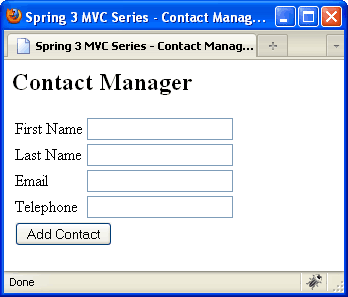
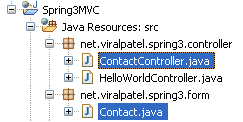
 File: net.viralpatel.spring3.form.Contact
Our Goal
Our goal is to create basic Contact Manager application. This app will have a form to take contact details from user. For now we will just print the details in logs. We will learn how to capture the form data in Spring 3 MVC.
Getting Started
Let us add the contact form to our Spring 3 MVC Hello World application. Open the index.jsp file and change it to following: File: WebContent/index.jsp<jsp:forward page="contacts.html"></jsp:forward>
Code language: HTML, XML (xml)The View- contact.jsp
Create a JSP file that will display Contact form to our users. File: /WebContent/WEB-INF/jsp/contact.jsp<%@taglib uri="http://www.springframework.org/tags/form" prefix="form"%>
<html>
<head>
<title>Spring 3 MVC Series - Contact Manager</title>
</head>
<body>
<h2>Contact Manager</h2>
<form:form method="post" action="addContact.html">
<table>
<tr>
<td><form:label path="firstname">First Name</form:label></td>
<td><form:input path="firstname" /></td>
</tr>
<tr>
<td><form:label path="lastname">Last Name</form:label></td>
<td><form:input path="lastname" /></td>
</tr>
<tr>
<td><form:label path="lastname">Email</form:label></td>
<td><form:input path="email" /></td>
</tr>
<tr>
<td><form:label path="lastname">Telephone</form:label></td>
<td><form:input path="telephone" /></td>
</tr>
<tr>
<td colspan="2">
<input type="submit" value="Add Contact"/>
</td>
</tr>
</table>
</form:form>
</body>
</html>
Code language: HTML, XML (xml)Adding Form and Controller in Spring 3
We will now add the logic in Spring 3 to display the form and fetch the values from it. For that we will create two java files. First theContact.java which is nothing but the form to display/retrieve data from screen and second the ContactController.java which is the spring controller class.  File: net.viralpatel.spring3.form.Contact
package net.viralpatel.spring3.form;
public class Contact {
private String firstname;
private String lastname;
private String email;
private String telephone;
//.. getter and setter for all above fields.
}
Code language: Java (java)package net.viralpatel.spring3.controller;
import net.viralpatel.spring3.form.Contact;
import org.springframework.stereotype.Controller;
import org.springframework.validation.BindingResult;
import org.springframework.web.bind.annotation.ModelAttribute;
import org.springframework.web.bind.annotation.RequestMapping;
import org.springframework.web.bind.annotation.RequestMethod;
import org.springframework.web.bind.annotation.SessionAttributes;
import org.springframework.web.servlet.ModelAndView;
@Controller
@SessionAttributes
public class ContactController {
@RequestMapping(value = "/addContact", method = RequestMethod.POST)
public String addContact(@ModelAttribute("contact")
Contact contact, BindingResult result) {
System.out.println("First Name:" + contact.getFirstname() +
"Last Name:" + contact.getLastname());
return "redirect:contacts.html";
}
@RequestMapping("/contacts")
public ModelAndView showContacts() {
return new ModelAndView("contact", "command", new Contact());
}
}
Code language: Java (java)showContacts() will be called when user request for a url contacts.html. This method will render a model with name “contact”. Note that in the ModelAndView object we have passed a blank Contact object with name “command”. The spring framework expects an object with name command if you are using <form:form> in your JSP file. Also note that in method addContact() we have annotated this method with RequestMapping and passed an attribute method=”RequestMethod.POST”. Thus the method will be called only when user generates a POST method request to the url /addContact.html. We have annotated the argument Contact with annotation @ModelAttribute. This will binds the data from request to the object Contact. In this method we just have printed values of Firstname and Lastname and redirected the view to cotnacts.html.That’s all folks
The form is completed now. Just run the application in eclipse by pression Alt + Shift + X, R. It will show the contact form. Just enter view values and press Add button. Once you press the button, it will print the firstname and lastname in sysout logs.
Thanks for that spring3.0 applications. Can u provide the spring3.0 Group authorization example
thanks, can you provide the same thing with internationalization?
Very nice tutorials, etc.
I also think it’d be nice if you show a “List View” of the contacts. After you submit the new contact form, you are taken back to the list of contacts, with a status message of “New contact added”.
No need to use tomcat. Spring providing the one of the tool is like SpringSourceTool. We can download this tool use it. Its very easy.
Can you please explain why do we need to use the annotation @SessionAttributes here?
the @SessionAttributes typically list the names of contact attributes which should be transparently stored in the session or some conversational storage, serving as form-backing beans.
This tutorials have made it very easy for me to learn spring 3.They are really good…..I haven’t found better ones on line.Thank you!!!
Thank you.
so useful tutorial.
It’s little bit different to develop with different IDE but in deed it’s Okay.
Thank you.
Great job !!!
Thanks man…! Awesome help you did
This is one of the great series of Spring MVC 3 tutorials. Thanks for putting it up.
Hi this example is cool. It is possible to list all .jar list which is require to run this example.
Would you please show an example of CRUD controller?
A have a problem with UPDATE of entity.
Please, have you make CRUD controller ? for UPDATE. I cannot do it. Can you explain me ?
good for beginners! thanks a lot
How to display the properties of two entities in a single form using form tags?
How to get the value of a specific attribute using form tag?
Please Help.
Its urgent
Regards,
Sristi
excellent ……work by your team….
Getting following error, please help?
No WebApplicationContext found: no ContextLoaderListener registered?
Simple and precise example. Good work.
Hi,
I am getting the following exception while trying to open the form:
java.lang.IllegalStateException: Neither BindingResult nor plain target object for bean name ‘example’ available as request attribute
Any idea on how to bind commandName using Spring web mvc 3?
Thanks
Ramanath
Nice tutorial. Question. Trying to get a better understanding of the SpringMVC plumbing: I changed index.jsp from
to
Say Hello
Contact Form
Clicking on hello link works. But when I click on the contacts link I get some error about spring servlet having no mapping for it. I don’t understand why, it looks like the defs defined in the XML should handle this. Could someone explain why this doesn’t work?
Arg! Blog not showing my code, trying again:
Changed index.jsp from
>jsp:forward page=”contact.html”$LT;>/jsp:forward<
>a href=”hello.html”<Say Hello>/a<
>br/<
This doesn’t work, WHY???
>a href=”contacts.html”<Contact Form>/a<
Hi- nice series. Just one minor comment. I would encourage making the most of the flexible method signature. So rather than:
@RequestMapping(“/contacts”)
public ModelAndView showContacts() {
return new ModelAndView(“contact”, “command”, new Contact());
}
Have this:
@RequestMapping(“/contacts”)
public String showContacts(Model model) {
model.addAttribute(“command”, new Contact());
return “contact”;
}
Further, you could rely on built-in naming conventions. If the JSP was called “contacts.jsp” and the form had model=”contact” then your method would be even shorter:
@RequestMapping(“/contacts”)
public void showContacts(Model model) {
model.addAttribute(new Contact());
}
Small point but certainly readability counts!
Cheers!
Hi.. Is it possible to configure multiple forms (each having different command object) on the same page .?
Hi
i am facing the some problem with the simple hello world application. The problem is that when i am returing the ModelAndView object from my controller servlet, it is not picking the view name from that. But if return him simple file name rather then ModelAndView Object it will directly take me to that file name.
eg
@RequestMapping(“/RequestComing”)
public ModelAndView sayHello(){
String msg=”test”;
return new ModelAndView(“responseGoing”,”message”,msg);
}
if i use the above code then it will search for RequestComing.htm rather then responseGoing.jsp
the xml file contain
please help me to come out from this
Dear Gourav, my post didn’t come out properly, hence, I am re-posting it with slight amendments:
check your xml configurations. I assume that your web.xml has:
*.htm in the servlet-mapping section
This is the mapping to controllers. That is, all requests from the browser ending .htm will be forwarded to the appropriate conroller. In your case, it should be sayHello() as you have defined the mapping of @RequestMapping(“/RequestComing”). The point made here is that the extension *.htm, searches for the controller, NOT jsps.
And I assume in your spring-context.xml it has something like:
… property name=”suffix” value=”.jsp”
which means that the returned sring name from the controllers, in your case, upon sayHello() returnining the ModelAndView(“responseGoing”,”message”,msg) will appended the .jsp (as defined in spring-context.xml) to “responseGoing”, that is, it will then look for responseGoing.jsp.
Hence, from what you have written it appears that it is not searching for the jsp in question, but rather, it is actually searching for the controller sayHello() as you have mapped it with @RequestMapping(“/RequestComing”). Solution: is to make sure all the configurations are correct and the controllers (java files) and the jsps are stored in the correct directory structure.
Cutting and pasting that does not work in MVC3. To get the extension to work, I had to create a class file:
using System;
using System.Collections.Generic;
using System.Linq;
using System.Web;
using System.Web.Mvc;
namespace incMvcSite.Classes {
public static class HtmlPrefixScopeExtensions {
public static IDisposable BeginHtmlFieldPrefixScope(this HtmlHelper html, string htmlFieldPrefix) {
return new HtmlFieldPrefixScope(html.ViewData.TemplateInfo, htmlFieldPrefix);
}
private class HtmlFieldPrefixScope : IDisposable {
private readonly TemplateInfo templateInfo;
private readonly string previousHtmlFieldPrefix;
public HtmlFieldPrefixScope(TemplateInfo templateInfo, string htmlFieldPrefix) {
this.templateInfo = templateInfo;
previousHtmlFieldPrefix = templateInfo.HtmlFieldPrefix;
templateInfo.HtmlFieldPrefix = htmlFieldPrefix;
}
public void Dispose() {
templateInfo.HtmlFieldPrefix = previousHtmlFieldPrefix;
}
}
}
}
In the Razor (.cshtml) file, I added the following:
@using incMvcSite.Classes
@using(Html.BeginHtmlFieldPrefixScope(“Permission”)) {
Permission
// The Html.EditorFor’s would go here…
}
Notice the using to bring me extension class into scope. That allows the second using line to work.
Now the problem is that when posting back, the object is not updated. In my controller, I used a second parameter to specify my prefix:
TryUpdateModel(modelUser.Permission, “Permission”);
This added the prefix to all field in the HTML, and the TryUpdateModel loaded the object with prefixed control names. Now you can properly namespace your controls for embedded edit lists, and for partial views of models with the same property names.
Shawn Zernik
Internetwork Consulting
thanks for posting this article. it gave me an idea on how spring works! but before making it work i really had to understand first how and why the codes are made.
may i just ask. what is this parameter for? “BindingResult result”
thatz very nice! please provide some example on use spring framework tags on name space sf for example and etc..
thANKS AGAIN
You give me start of Spring……You are my first spring boss…Thanks
wowwww….i cant tell how happy im.. thank u for ur great tutorial.. i went a step further to deploy this spring mvc app in google app engine.. yay.. thank u..keep up ur good work..itz coz of programmers like u who can share the knowledge and that too in an easy way..that budding developers like me can learn things fast and easy.
I am currently facing difficulty in running the tutorials even the previous one “Hello World”. Everytime when i try to run, i keep getting this error “The requested resource (/Spring3MVC/contacts) is not available.” and for the previous hello world program i get this “The requested service (Servlet spring is currently unavailable) is not currently available.” as an error.
Can someone throw in some light into this…I am very much stuck and new to Web Development…
Hey Francis…
Have you copied all the jar’s file into lib folder of WEB-INF? and just add jstl.jar an standard.jar
just try this two things…
very elaborate tutorial keep up the good work, its inspiring indeed , thanks a ton !
good job
New to Java EE and these are some great tutorials.
Had an issue with “//.. getter and setter for all above fields.” as I had no idea I had to do anything but download file gives working code.
Cheers
Great tuts.
This is just awesome!
Thanks.
hi, nice tuto, thank’s
i try to execute this sample and i have this msg error on server tomcat7.0
description La ressource demandée (/Spring3MVC/contacts.html) n’est pas disponible.
someone ca help me please??!!!
thank’s!!!
Great tutorial! I’ve followed this and the previous one in NetBeans. I’ve got the “getter an setter” part by looking for “Encapsulating a Field” in IDE’s help.
Regards
Hi all..
It is very nice tutorial. But i am facing one problem. i am not getting the significances of command in “return new ModelAndView(“contact”, “command”, new Contact())”. Where we can use this command?
And next thing if i want to display the data inserted in form how can i display?
Please help me regarding these two things..
Its urgent
Thanks
Regards
Pankaj
i can’t understand why “” in index.jsp, there is no
the “contacts.jsp” file, only “contact.jsp”. how can servlet map this?
@airyym – because index .jsp maps contacts.html and redirects…
check the code for index.jsp
When i run my project on Tomcat using eclipse, i get the following error
java.lang.ClassNotFoundException: com.spring.jdbc.example.controller.MainController
am unable to resolve it. Please help.
Can you please post the project structure? Also where i can find the class files?
A wonderful tutorial, especially for a newbie like me it’s a great learner. Thanks for taking your time out and writing these tutorials.
btw,
When I run this project on Spring IDE I get the following error.
SEVERE: Servlet /TestProject threw load() exception
java.lang.ClassNotFoundException: org.springframework.core.NestedRuntimeException
at org.apache.catalina.loader.WebappClassLoader.loadClass(WebappClassLoader.java:1680)
at org.apache.catalina.loader.WebappClassLoader.loadClass(WebappClassLoader.java:1526)
at java.lang.ClassLoader.loadClassInternal(ClassLoader.java:336)
when I click on submit button it showing 404 error. with url http://localhost/test/addcontact.html
and displaying the message:-The requested resource () is not available.
How can i handle the jsp with multiple forms in spring MVC 3.x programming.
Using Eclipse SpringSource Tool Suite 2.9.2/Tomcat 6/JDK 1.7…
Getting: No mapping found for HTTP request with URI [/myspringprj/contacts.html] in DispatcherServlet with name ‘spring’
This resolves fine: http://localhost:8080/myspringprj/hello.html
What could that be?
Thanks
I am having the same issue with STS. Don’t know if this is a strictly STS issue or some general one… :/
WARNING: No mapping found for HTTP request with URI [/Spring3MVC/contacts.html] in DispatcherServlet with name ‘spring’
Missing word?
“The spring framework expects an object with name command if you are using ______
in your JSP file.”
Ops.. well caught.. the brackets < > where not escaped. So the form:form tag got rendered as html :) Fixed now..
Thanks. Your tutorials are helping me learn.
ive got some errors
/HandlingForm/contacts.html
description The requested resource (/HandlingForm/contacts.html) is not available
and ive tried copy standar.jar and jstl, it’s doesn’t work anything… very confusing :D
can anyone help me T_T..
Really U guy’s r amazing .u do all these things without any charge, Salute to all of u .this tutorial help me lot encourage
You are a Star :)!!!
Really so sweetly explained, Great Job Bro!!
COoooooooool
Very simply explained every step
I have become your fan brother :)
This did not work when I tried it using Spring tool suite. The best I got was “resource unavailable”
The source code downloaded was incomplete. It looks like the .xml files are not right.
If I had been coding a servlet I would have been finished ten minutes after I started.
I wonder why Spring make things so hard. But then no one made money from simplicity.
For using this application,first make sure you are using the Exact jar files which are given there in hello world example.even the version no. and A.jar and jar files have some difference.moreover in eclipse i think you should go to build path and there click on”Add External jars” and select “servlet api.jar”.I think it will be helpful..
I am getting resource not found error. i want to know if thr is something wrong in writing the code or is this some tomcat issue?
and what can be the resolution to this problem?
im sure of putting all the files whereever necessary only. but still im facing this issue. please help ASAP>
Thanks ….
wrong post
This is working fine. I was executed this example
Change the form action path currently it is as follows
Change this to following n my case it worked
Thanks for the post.
But, have you tested this?
I am getting the following problem.
“java.lang.IllegalStateException: Neither BindingResult nor plain target object for bean name ‘command’ available as request attribute” and spring3
Hi, Check if you are getting to JSP page from Spring Controller’s showContacts() method. This method set the “command” object in ModelAndView object. Check if your implementation is same as above example.
This also breaks!
Stacktrace:] with root cause
java.lang.IllegalStateException: Neither BindingResult nor plain target object for bean name ‘contact’ available as request attribute
Thanks for the post.
But, have you tested this?
I am getting the following problem.
“java.lang.IllegalStateException: Neither BindingResult nor plain target object for bean name ‘command’ available as request attribute” and spring3
fed up with this. Moving for another tutorial.
ooooops
Extemely sorry. it was my mistake. It works now.
in which xml files the Contact is defined
Contact is not defined in an xml file. It is a POJO that Spring wires as a bean.
Hi, I have a doubt regarding multiple beans. If I have a two beans and from view page i want to add the details in the two models of those beans. Then how can I do that please ……………give me a suggestion.
I have 6 fields and 4 of one bean and 2 of another bean in a JSP. I want to add them with single action.
Thanks… it is to learn….
This tutorial has been great so far. I followed it step by step and everything is working. I had some issues from inside of Eclipse initially – but I stopped and restarted the server and everything is working so far.
Hi i just downladed the code and its not working.
ia m getting this as warning in console
No mapping found for HTTP request with URI [/spring/contacts.html] in DispatcherServlet with name ‘spring’
and getting 404 in my web page
Hi Sachin,
i also faced same issue, but now its works.
make sure that you are specified “” in the spring-servlet.xml ——here org.training.web.controllers in you controller location. This is the one which tell the servlet where to look for annotated methods.
Try it, Wishes
Sreenivas Nair
Hi Sachin,
i also faced same issue, but now its works.
make sure that you are specified
in the spring-servlet.xml ——here org.training.web.controllers in you controller location. This is the one which tell the servlet where to look for annotated methods.
Try it, Wishes
Sreenivas Nair
This works perfectly for me. I been new to Spring but your tutorial approach is very clear.
I have questions though, how you know what RequestMapping params e.g. POST to use. Like you learn the syntax.. is it just by experience ? I find it difficult to learn all the viewResolver, I went into the package but found there are so many different classes in spring, do we have to learn all these by doing one by one ??// i hope you understood my question. I m trying to looking for something which is less cramming but more logical. In core java javap command use to do that for me.
Hi Neeraj, You can go through Spring MVC documentation to learn all nitty gritty about it: http://static.springsource.org/spring/docs/current/spring-framework-reference/html/mvc.html
And you learn by practice. The more you’ll code, the more you would understand the APIs. Just read the documentation, its quite comprehensive.
I downloaded the source, But while importing in eclipse It is saying “should convert maven legasy project”. I clicked “yes”. Even pom.xml is showing errors and not able to compile the code because dependencies not getting downloaded.
Please help me.
HI,
Please help me its urgent basis, and new to spring 3.0,when i was running the code in ecilpse IDE,error will code (WARNING: Servlet spring is currently unavailable) is come???????
Hi navi,
If you can give little more details about the error. It will be easier to solve ur problem.\
your articles is awesome!
thank you so much!
i’m getting error while executing this application
the error is java.lang.ClassNotFoundException: org.springframework.web.servlet.DispatcherServlet
i have added the following jar files to libraries
commons-logging.jar
jstl.jar
org.springframework.asm-3.0.0.RELEASE.jar
org.springframework.beans-3.0.0.RELEASE.jar
org.springframework.context-3.0.0.RELEASE.jar
org.springframework.core-3.0.0.RELEASE.jar
org.springframework.expression-3.0.0.RELEASE.jar
org.springframework.web-3.0.0.RELEASE.jar
org.springframework.web.servlet-3.0.0.RELEASE.jar
spring.jar
jstl-1.2.jar
spring-webmvc-1.0.1.jar
org.springframework.web.servlet-3.0.0.M3.jar
can anybody tel me the solution to this
post here or mail me @ [email protected]
I would like to suggest you that any difference in jar files makes difference.In google all jars with all versions are available.You use exactly the same jars which are given there in the hello world example.they will surely work for you.
doesn’t work with 3.0.5 jars
i am passing a map thru modeAndView. That map contains 2 strings and a object I need to set attributes in only that object in jsp. How to do that.
Thank you very much comrade
You need to mention the component scan in *-servlet.xml… Please mention the package which includes your bean and controller.
Wow!! I didn’t know that Alt + shift + S, R command creates very amazing code!
Thank you for the eclipse tip!!
Hi, The tutorial looks perfect, it worked fine with me, however I have a question:
Why does the line forwards to contacts if our jsp is named “contact.html” ??
Using this approach everything is working while you specify all the fields, i.e. when you never leave a blank field. What happens when you leave a field blank. The whole data doesn’t get updated to DB. In my case I have attachement to be uploaded with a form. Which is not mandatory. If the user specifies a attachment the data is saved the file gets uploaded. And when the User doesn’t give any attachement and only need the data to be uploaded, the whole data doesn’t even get uploaded. Can you help?
very good tutorial
thank you
Hello
I dont find the way to export the css code into a .css file an link it from the .jsp. Could you help me?
Thanks
works fine no issue….
thanks a lot i was searching for a good tutorial to learn. i think i found one.
this is great post,,,helped me a lot.
thanks Viral
the only change i did to resolve is
@RequestMapping(“/contact.html”)
public ModelAndView showContacts() {
return new ModelAndView(“contact”, “command”, new Contact());
}
and removed all contacts to contact so my request mapping is /contact.html
it worked great
Many thanks
Thank you for the good How-To Viral. I too have had few issues, mainly with ContactController. In your code you are saying to have “contact.jsp” file but have the @RequestMapping set to /contacts. I think it would be best to just have “contacts.jsp” and change the new ModelAndView to use “contacts” as well to avoid confusion. Though it does help understand that the jsp name can be different from URL used by request. I also had to update ContactController to handle RequestMapping for “/”. I had to remove welcome-file-list from web.xml and add an index() method to my controller which will redirect to contacts.html. I was getting many errors when trying to call root of application.
List of changes I did:
In web.xml:
In ContactController.java:
Remove welcome-file-list from web.xml
Remove index.jsp
Update showContacts() method to direct to contacts page:
I will continue on to the Spring 3 MVC with Hibernate blog post. Thank you for your work!
You should test this with Spring 3 — i have imported your code into an IntelliJ MVC project — and this throws all kinds of exceptions — why the hell does Spring make submitting form data so difficul;t – Java servlets — piece of cake.
thanks Viral. this is a very good tutorial for the beginner. I started from the Helloworld application and everything is just going on smoothly. I appreciate. God bless in Jesus name!
Can you tell how I can set default value in above forms???
You can pass the default value to form in the controller method showContacts() in ContactController class. We are setting a new Contact() object as command object. Instead of that you can pass Contact object having default values. Something like below:
Hi…
this program run successfully.but i have some doubt..like @ModelAttribute(“contact….)
what is the necessity for that..
great tutorial , thanks
Plz post tutorial/example of “Form validations and different data conversion methods in Spring 3 MVC”, I couldn’t find it on your site.
Thanks.
I had an array of elements How to pass this data to spring 3.0.
Model
String stuName;
Int time;
String sub;
Stu Time subject Time subject Time subject
Stu1 9 Maths 10 Sci 11 Eng
Stu2 9 Maths 10 Sci 11 Eng
Stu3 9 Maths 10 Sci 11 Eng
Stu4 9 Maths 10 Sci 11 Eng
Here you pass list of data.It really helpful.
But i try to pass list of list data. How to pass this data? Thank you in advance
I can’t get this to work. I’m getting the error No mapping found for HTTP request with URI [/Spring3MVC2/contact.html] in DispatcherServlet with name ‘spring’
I get an 404 error when trying to run this, anyone have any ideas why
Please make sure that the jsp file name ‘contact.jsp’ and the mapping in ModelAndView(“contact”, “command”, new Contact()) are same.
Here the action given like ‘contacts’ and the file name given like ‘contact’. But it won’t make any problem anyway but be ensure that the mapping is correct.
Hi Viral,
Very nice tutorial i got. Hello world application worked for me. Really thanks for this application also. I changed the Request mapping url as
and acordingly i changed jsp name to ‘contacts.jsp’
But i am facing some issue while running the project. I am getting the error again n again.SEVERE: Servlet.service() for servlet jsp threw exception
java.lang.ClassNotFoundException: org.springframework.web.util.ExpressionEvaluationUtils.
Please help to resolve the thing. Thanks.
have a question, i have 2 tabs and have corresponding VOs, in both tab, there is a link summary that will display the data from both VO (summary is readonly screen, no inputs required).
In my controller i have placed a method as
But in summary screen, fields remain null. summary.jsp
ProductVO has both screen’s VO and all are in session in spring-servlet.xml.
Can you please help me with this?
i m creating an application. the 1st pag of my app is a login pg. When i give the usernam n pwd and give submit , i get
” 404 The requested resource (/Project1/connectionDetail) is not available.”
Its not getting navigated to the nxt pg .
This is my controller class:
Please help ASAP.
I think “method will render a model with name “contact”. Note that in the ModelAndView object we have passed” … this confused me at first. Did you mean to say “render a view” ?
Fix the issue that “java.lang.IllegalStateException: Neither BindingResult nor plain target object for bean name”
Hope the solution is helpful.
In Contact.jsp file
1. Add commandName
2. Add
Awsome Tutorial….Cannot miss a Thing….!! and the Best part is you have Part -by part Download….Keep it up…
hai viral
can we use plain HTML form instead of JSP ?
Hello,
I hope you will see my reply.
There is an error (not critical) on this page in contact.jsp file.
You have 4 input forms there and three of them have the same path = “lastname”. It’s not causing an error because you never use them, but it will be good to fix that (well, basic example shouldn’t have such error).
Best,
Bartek
@Viral Patel
Very good website.
What about authentication and authorization in MVC? Any good books on MVC you can recommend?
Tx for your tutorials, they r really helpful!
Iv found some minor errors:
Email
Telephone
Using session when every request… Not correct.
Is this a kind of miss-use?
Thanks a lot for these wonderfulllllllll examples !!
The type java.lang.Object cannot be resolved. It is indirectly referenced from
required .class files.get this error when i download the source code.
This example is fine. But I am facing some problem. When I leave the browser IE8 ideal for sometime and then try to get form values in controller it is giving me null.
Can you advise what can be done here?
But where is the addContact.html file??
there is no addContact.html
you use the mapping in the controller class as follow:
@RequestMapping(value = “/addContact”
How do you solve if you have entity one to many relationship form such as User and Addresses.
Lets say user enter firstname, lastname and address fields. But as per user entity address is set or list. do you have some tutorial?
WOW! very useful, thanks
The post is useful Viral Thanks, but I was getting resaurce not available error when I used to click on ‘Add Contact’ button. My application was not root application. When I change the form action to //addContact.html then I could see first name and last name on the console.
correction in the above post I changed to /springmvc/addContact.html then It worked
This tutorial is great, but it lacks some information. I do not know if it was about my Spring version, but I had to add some code in order to avoid the following code:
java.lang.IllegalStateException: Neither BindingResult nor plain target object for bean name ‘Contact’ available as request attribute
It happened because if the modelAttribute of <form:form is not available while the form is rendering. then the exception will raise. In order to fix it, just add the following code to the ContactControll class:
@ModelAttribute("Contact")
public Contact loadEmptyModelBean(){
return new Contact();
}
Hopefully it will be useful to someone : )
What if I want to bind two objects ?
Here in this example you are binding form values to contact object , what if I want to bind two objects ?
I tried exeuting your code but —–http 404 error contacts.html not found…..I replaced contacts.html by contact.jsp still the same http 404 error
I have the same trouble)) Had you solved this problem? I am sorry for my English(
In the addContact method you are redirecting to /contacts. What if I want to show some success OR error message once addContact method id executed.
rg.apache.jasper.JasperException: An exception occurred processing JSP page /Contact.jsp at line 16
i need multiple recors saved into db at a time pls give one help me
sorry guys working sorry again…