Recently while running Tomcat under Eclipse for one of the web application I was getting Java Heap memory related error java.lang.OutOfMemoryError.
What needs to be done here basically is to increase the jvm heap size. So for increasing the JVM Heap Size of Tomcat in Eclipse we have to set few VM arguments of the tomcat. Follow the simple steps to change the Heap Size of Tomcat under Eclipse.
1. Open the Server tab in Eclipse and double click the Tomcat server to open Server Configuration. 2. In Server Configuration, click on the Launch Configuration link under General Information. 3. Under Arguments tab, add following values in VM arguments.
Hi, Thx for the tip ;) Is there a way to persist this change in an external config file (or other) to avoid edit launch configuration each time eclipse is restarted ? Thx in advance.
Hi, Could any one explain the advantage of initializing the instance variables inside a constructor, the same thing we can do after the object has been initialized and calling the respective setters method.
Max Limitations of heap space is depends on your Server capacity & Ram. For 1Gb there wont be problem . if you have 8 gb ram there wont be problem to keep you Heap size limited to 2 Gb
Setting vmargs in Eclipse.ini to the below and then making the above change in tomcat worked for me.:) -vmargs -Xms256m -Xmx1024m -XX:PermSize=64m -Xss1M -server -XX:+DoEscapeAnalysis

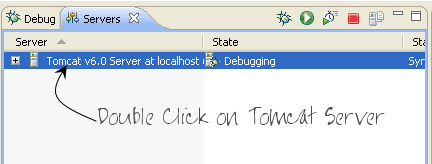 2. In Server Configuration, click on the Launch Configuration link under General Information.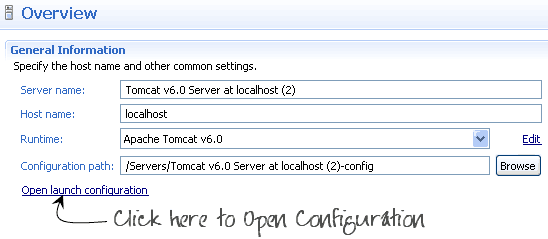
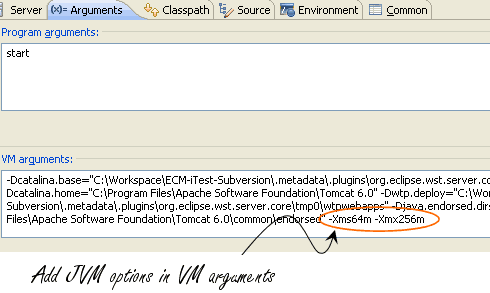




hi,
thanks so much for this great and helpful blog post!!! it helped me such much, thanks!!!!
jens
Thank you very much for the screen shots..!
thanks, for this briliant article,!!
Hi,
Thx for the tip ;)
Is there a way to persist this change in an external config file (or other) to avoid edit launch configuration each time eclipse is restarted ?
Thx in advance.
tnx
¡Great post! Thanks from Mx
Awesome – love succinct articles that get to the point AND are spot on.
Thanks, This helped me.
thanks its really helpfull
Thanks mate, it is very helpful
bang on the target! thanks :)
awesome…to the point..thanks
Hi,
Could any one explain the advantage of initializing the instance variables inside a constructor, the same thing we can do after the object has been initialized and calling the respective setters method.
You are the man. I looked for this so bad. Thanks.
How do we set VM arguments in tomcat running outside of eclipse like from dos prompt ?
JAVA_OPTS ?
This helped me.. Thank you so much!!
You really helped me to save a lot of time, thank you so much!!!
This is really helpful. Thank you very much!
thank u for u r answer
its working well when we read a large size article first time, if you read the second time that file, it shows Same heap space problem
It is really great, thanks :)
Thanks! That works fine! :-)
Man, your solution is the only one that has worked for me, thanks a lot, keep up the good work
Fantastic man….
Can you tell me the max Limitation for JVM Heap Space.My requirement is to increase the heap size more than 1 GB…Can you suggest me an idae…..
Max Limitations of heap space is depends on your Server capacity & Ram. For 1Gb there wont be problem . if you have 8 gb ram there wont be problem to keep you Heap size limited to 2 Gb
Thnx viral i was finding solution from last nyte i found it here in very easy way….
Thnx
really a good information …
bt i want to increase permgen memory ….
do you know how to ?
then do let mi know..
Setting vmargs in Eclipse.ini to the below and then making the above change in tomcat worked for me.:)
-vmargs
-Xms256m
-Xmx1024m
-XX:PermSize=64m
-Xss1M
-server
-XX:+DoEscapeAnalysis
But Still my problem is not solved. It is saying that,”java.lang.OutOfMemoryError: PermGen space”
How to monitor tc server heap size with the help of servlet
I should be having enough size for my homebased unit.