Since few days I am working on an Android app and learning all the nitty gritty of its APIs. I will share few How-to stuffs that we frequently require in Android.
To start with let us see how to integrate Image Gallery with your App. Consider a requirement, you want your app user to select Image from the Gallery and use that image to do some stuff. For example, in Facebook app you can select Picture from your phone and upload directly to your profile.
Let us create an example with following requirement:
- First screen shows user with and Image view and a button to loan Picture.
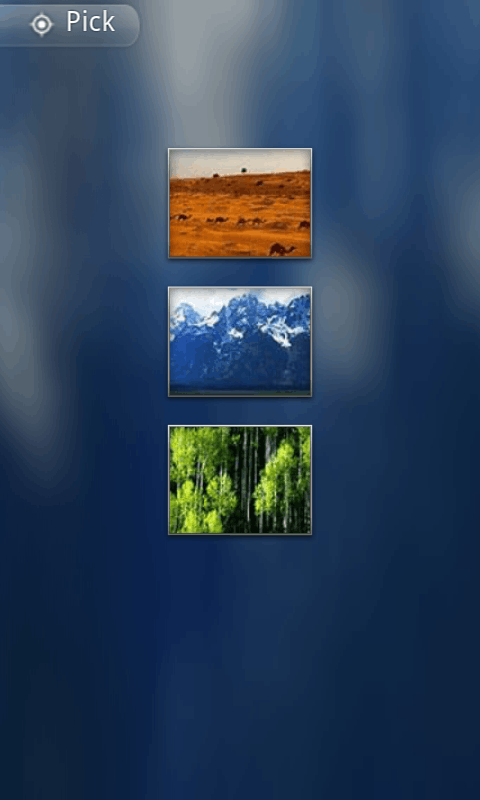
- On click of “Load Picture” button, user will be redirected to Android’s Image Gallery where she can select one image.
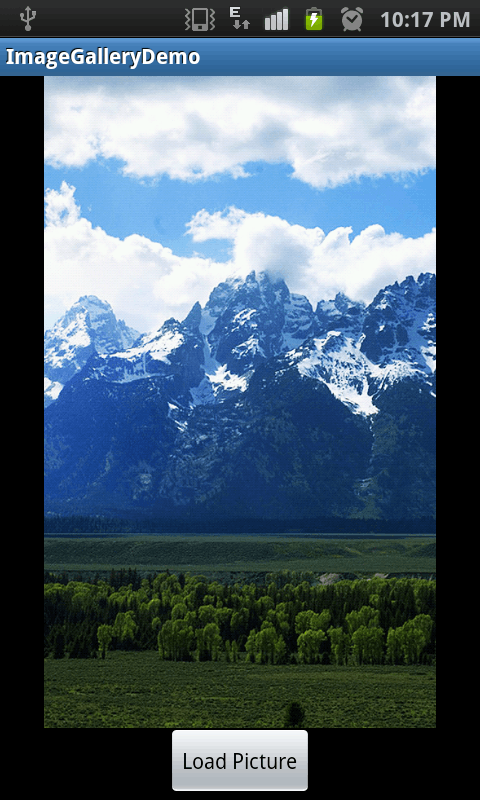
- Once the image is selected, the image will be loaded in Image view on main screen.
So lets start.
Step 1: Create Basic Android Project in Eclipse
Create a Hello World Android project in Eclipse. Go to New > Project > Android Project. Give the project name as ImageGalleryDemo and select Android Runtime 2.1 or sdk 7.
Once you are done with above steps, you will have a basic hello world Android App.
Step 2: Change the Layout
For our demo, we need simple layout. One Image view to display user selected image and one button to trigger Image gallery.
Open layout/main.xml in your android project and replace its content with following:
File: res/layout/main.xml
<?xml version="1.0" encoding="utf-8"?>
<LinearLayout xmlns:android="http://schemas.android.com/apk/res/android"
    android:orientation="vertical"
    android:layout_width="fill_parent"
    android:layout_height="fill_parent">
	<ImageView
		android:id="@+id/imgView"
		android:layout_width="fill_parent"
		android:layout_height="wrap_content"
		android:layout_weight="1"></ImageView>
	<Button
		android:id="@+id/buttonLoadPicture"
		android:layout_width="wrap_content"
		android:layout_height="wrap_content"
		android:layout_weight="0"
		android:text="Load Picture"
		android:layout_gravity="center"></Button>
</LinearLayout>
Code language: HTML, XML (xml)
So our Android’s app UI is very simple, One LinearLayout to organize Image view and Button linearly. Note that the id of Image view is imgView and that of Button is buttonLoadPicture.
Step 3: Android Java Code to trigger Image Gallery Intent
We now need to write some Java code to actually handle the button click. On click of buttonLoadPicture button, we need to trigger the intent for Image Gallery.
Thus, on click of button we will trigger following code:
Intent i = new Intent(
	Intent.ACTION_PICK, android.provider.MediaStore.Images.Media.EXTERNAL_CONTENT_URI);
	startActivityForResult(i, RESULT_LOAD_IMAGE);
Code language: Java (java)
Note how we passed an integer RESULT_LOAD_IMAGE to startActivityForResult() method. This is to handle the result back when an image is selected from Image Gallery.
So the above code will trigger Image Gallery. But how to retrieve back the image selected by user in our main activity?
Step 4: Getting back selected Image details in Main Activity
Once user will select an image, the method onActivityResult() of our main activity will be called. We need to handle the data in this method as follows:
@Override
    protected void onActivityResult(int requestCode, int resultCode, Intent data) {
    	super.onActivityResult(requestCode, resultCode, data);
		if (requestCode == RESULT_LOAD_IMAGE && resultCode == RESULT_OK && null != data) {
			Uri selectedImage = data.getData();
			String[] filePathColumn = { MediaStore.Images.Media.DATA };
			Cursor cursor = getContentResolver().query(selectedImage,
					filePathColumn, null, null, null);
			cursor.moveToFirst();
			int columnIndex = cursor.getColumnIndex(filePathColumn[0]);
			String picturePath = cursor.getString(columnIndex);
			cursor.close();
			// String picturePath contains the path of selected Image
		}Code language: Java (java)
Note that method onActivityResult gets called once an Image is selected. In this method, we check if the activity that was triggered was indeed Image Gallery (It is common to trigger different intents from the same activity and expects result from each). For this we used RESULT_LOAD_IMAGE integer that we passed previously to startActivityForResult() method.
Final Code
Below is the final code of ImageGalleryDemoActivity class.
package net.viralpatel.android.imagegalleray;
import android.app.Activity;
import android.content.Intent;
import android.database.Cursor;
import android.graphics.BitmapFactory;
import android.net.Uri;
import android.os.Bundle;
import android.provider.MediaStore;
import android.view.View;
import android.widget.Button;
import android.widget.ImageView;
public class ImageGalleryDemoActivity extends Activity {
	private static int RESULT_LOAD_IMAGE = 1;
    @Override
    public void onCreate(Bundle savedInstanceState) {
        super.onCreate(savedInstanceState);
        setContentView(R.layout.main);
        Button buttonLoadImage = (Button) findViewById(R.id.buttonLoadPicture);
        buttonLoadImage.setOnClickListener(new View.OnClickListener() {
			@Override
			public void onClick(View arg0) {
				Intent i = new Intent(
						Intent.ACTION_PICK,
						android.provider.MediaStore.Images.Media.EXTERNAL_CONTENT_URI);
				startActivityForResult(i, RESULT_LOAD_IMAGE);
			}
		});
    }
    @Override
    protected void onActivityResult(int requestCode, int resultCode, Intent data) {
    	super.onActivityResult(requestCode, resultCode, data);
		if (requestCode == RESULT_LOAD_IMAGE && resultCode == RESULT_OK && null != data) {
			Uri selectedImage = data.getData();
			String[] filePathColumn = { MediaStore.Images.Media.DATA };
			Cursor cursor = getContentResolver().query(selectedImage,
					filePathColumn, null, null, null);
			cursor.moveToFirst();
			int columnIndex = cursor.getColumnIndex(filePathColumn[0]);
			String picturePath = cursor.getString(columnIndex);
			cursor.close();
			ImageView imageView = (ImageView) findViewById(R.id.imgView);
			imageView.setImageBitmap(BitmapFactory.decodeFile(picturePath));
		}
    }
}
Code language: Java (java)
Screen shots of Android app
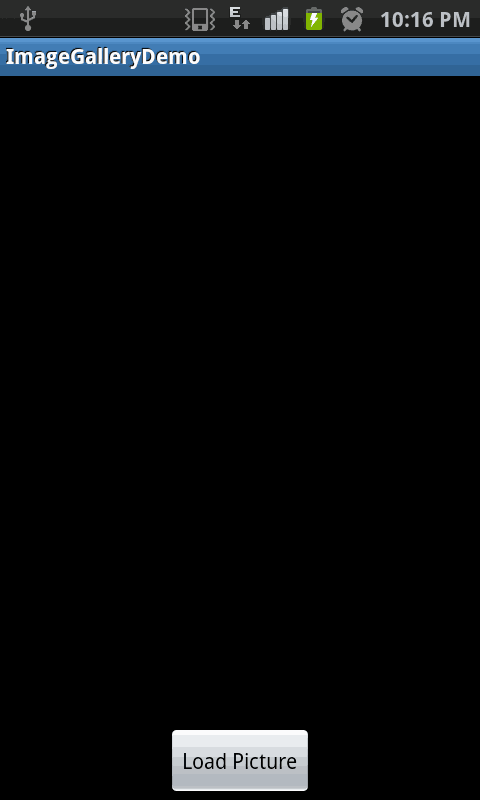
First screen: Lets user to trigger Image Gallery
User can select an image from Image Gallery
Once user selects an image, the same will be displayed on our main activity

05-25 23:00:57.952: E/AndroidRuntime(2157): java.lang.RuntimeException: Failure delivering result ResultInfo{who=null, request=1, result=-1, data=Intent { dat=content://media/external/images/media/23 }} to activity {com.frux.base64/com.frux.base64.galley}: java.lang.NullPointerException
error dude
Hi, In which Line you getting NullPointerException? Also try the demo app that I have attached in your device. Check if you getting same error.
at the setting the imageview setImageBitmap,
Heres my code hope that you can help me thx in advance!
Kevin, the way you are triggering Image Gallery is different from what I specified. I am using Intent.ACTION_PICK intent. Can you use the exact code snippet given in above example to trigger the Image Picker.
still got an error
hey viral can u please send me a code for access images from sqlite db store in sdcard….???
Hi Viral, Your code is working perfectly, thank you. but i wondered if there is anyway to redirect the image to a different xml layout. I want to access the gallery from main.xml but load it into main2.xml. Thanks
Hi Dendrox, I am not sure if I got your requirement clear. I would create an Activity that loads main2.xml and triggers that via Intent from Mainactivity. Also you can pass the image path as extra in intent. Not sure if this would help you.
can you pls identify the error.. thx a lot
I cannot figure out the issue with the given data :( Could you check if the Demo project is working in your android device? Also try to add few Logcat (Log.d();) statements in your code. You might be able to figure out where exactly you getting null object.
hi, this tutorial is working! i have problems in storing the loaded image into sqlite. i browsed through net and found it need to be stored in bitmap or blob? hope u will give a helping hand. Appreciate.
Been searching for this for a long time.Works perfectly.Thanks a lot.
so useful Tutorial.it works fine.
Thanks
Dear Viral,
Please pos the tutorial which guides how to get started with Android application means from how to add plugins where from we get plugins etc.
Thanx in advance
hi Viral, actually i got error that Resource not found Exception, at line where we are converting columnIndex to string and get path of that gallery image, i can open gallery and when i select image force close is pop up, and got error, can u help why its happen
Thanks. works cool. But when I do the following xml code, it doesn’t work as expected. Can you please let me know why?
the method captureImg is not called. To verify, I have a toast to display when the method is called.
Can be some information if you can help me here.
I use android:onClick on the ImageView and not on the button I want user to click on the Image to choose an image. I have defined it clickable, it is being clicked, but the method is not being called. Can you help me here>?
xml code
Hey this code is pretty cool
But the only problem I have is
“The images I take from camera of my application does not display by this image picker”
What I’m going to achieve is snap a photo from my application and let user to brows the image folder through your code but it won’t display any of my newly taken images and worst of all it wont display that specific folder I saved those images (/sdcard/DCIM/myFolder)
but all files display in eclipse file explorer
Even i remove the device and checked the images or folder is not there
Hi Jayanga
I have same problem as is yours. Have you found a solution yet? Please let me know if you have found a solution.
Many thanks
Thx for the code, it works. however when I convert the image to byte[] using theImage.compress(Bitmap.CompressFormat.JPEG, 10, baos) and store in sqllite db. Later when i read and display I see lot of space – on top and botton of the image. Why is this extra space coming?
I imported n ran the sample but on clickijng the load buttin it tells no media Found.. how do i load images into the media?????????can sm 1 teme quicky????????
I have only one error in:
public void onClick(View arg0) {
The method onClick(View) of type new View.OnClickListener(){} must override a superclass method
How to resolve ?
when i am clicking load picture button it showing that (No Media Found)
i want code for android that save the images in sqlite database
If I want to choose the picture from only one folder. How can I specific the path or uri of folder to get images.
my application failed when my device rotate… the imageview disappears …. Pls someone can help me!!!
Thanks
excellent!! it helped me for my way…… than q…
the same problem than Jorge, the application failed when my device rotate !
imageView disappears and the load button come back and the activity start again…
Any advices for fixing that bug ? (I’m testing it on Xperia mini Pro)
Pb solved:
U have to write – android:configChanges=”orientation” – in the Manifest of your activity
Gallery opens but Image is not being displayed. No error as well. Just the main activity page is displayed.
Check your error log, maybe you are geting something on the lines of
03-16 13:48:28.861 11253-11253/com.example.ch330232.openmybook E/BitmapFactory: Unable to decode stream: java.io.FileNotFoundException: /storage/emulated/0/DCIM/Camera/20170305_180717.jpg: open failed: EACCES (Permission denied)
Are you solve this problem ? I have same problem.
when i pick an image,
it shows “browser history is empty”
will you please help me with it?
Hi Viral, I have added below to my apps manifest file
this helps me goto Gallery , selet an image and my app name would be shown in Share
but I am unable to send this selected image to my app. Can you please help me
Note:I am not opening Gallery from my app but open Gallery and send an image to my open
Hi Viral,
Your Code Works perfectly fine. :D
Can you tell me how to assign that image picked to be an xml layout’s-background?
I tried converting the bitmap to drawable but got null pointer exception or sometimes even memory out of bounds exception. Can you tell me how to do that?
Please tell me how can we save the image(from Gallery) on the server.
I will right away seize your rss as I can’t to find your e-mail subscription hyperlink or e-newsletter service. Do you’ve any? Please permit me recognize so that I could subscribe. Thanks.
Viral, good tutorial. Any idea if there is a way to understand the camera capacity in Android devices?
Perfect piece of code. Thanks.
i wan’t to show specific folder, why cannot be show?
Please someone can help me!!! Thankssss…
I follow this tutorial. How can i get image size. I want to select the image of 300 X 300. where should i put this condition so that user should be restricted to select only the images having 300X300 dimensions? reply plz.
Regards
Qadir Hussain
Thank u so much .this tutorial is very helpful.
But ,Can you plz tell me ,that how i can create gallery programitically and how i can store all images in that gallery.
Thank you so much! Great tutorial! Ciao :)
As I can make it work in a file that is not principal activity?
Thank you for such good tutorial.That tutorial is helpfull for me ………
hai… how to import image in gallary
Very Useful Post…
Can u have example for capture photo or select from existing or use avatar
Actually i am developing user profile apps so i want it…
hi… Thanks for article. Really helpful :)
Hi,
Thanks for posting the tutorial. It helped me a lot in my current project. However, I believe I have spotted an error. My native gallery collects images from the camera, downloaded applications and other applications that allow one to take images. If I tried to display an image from the camera gallery, it works perfectly. If I try to use an image from other application (eg Twitter) I get NullPointerExpception error (bummer). I logged out the location of the file(s)
working image –
not working image –
Any suggestions? Can we amend the code above so it could be used with any image regardless of its location?
Thank you in advance
The same problem. Need to find a universal solution for any path of images.
Apparantely, this code works if you try to pick the photos from camera. If the user has a picasa account and if you try to pick the photo from picasa albums (which also shows up in gallery), it throws a null pointer exception in im.setImageBitmap(image); because your filepath is null.the path of the picasa album is different from the path of camera (local) pictures. So, for people who are searching for it in future,here is the link which might be useful to you.
http://dimitar.me/how-to-get-picasa-images-using-the-image-picker-on-android-devices-running-any-os-version/
i run this app on my pc emulator nexux and when i click on the load image button it show tha NO MEDIA FILE FOUND. So get me with the solution
hi ,i am very very new to android so please help me .I am developing an app where user has to select image from sdcard and path of it has to be stored in database and retrieve it in another activity in app
Are yar…. 1st replay how and where to save images…. Its showing no media files found…
thank you
Great !!! keep on your way of sharing knowledge, you are doing a great work!
thankew thankew vvvv much
Hi
I am developing a android app for my website where I need such functionality.
Now I will use this code and modify according to need.
Thanks
your website is so helpfull.
really
Yes! It’s working. Image has been loaded. But now i want to perform some processing function on it. Bitmap processing. How to do that?
Hello,
My question is not directly pertaining to this segment but I want to capture the image by camera from the app and then display the saved image in one end of the screen kind of how they do it in Whatsapp or Viber.
Can you help me out regarding that?
Regards
I am opening an image in gallery app for Android 4.1.The gallery opens but it returns only that particular image. I am unable to scroll the images in gallery. I want my gallery to function similiar to how myfiles works when we open an image from Myfiles
Hello,
if i load many image from my server?
Regards.
hi i face an error…………………when i select the image it can show force close msg on screen
Thanks… For this use full code …
using your code i am try to pick image from gallary but when i select an image then my activity is shows me “Unfortunately, my photo effect has stopped” .
give me solution for it as soon as possible .
The app needs permission to use storage so add this permission in AndroidManifest.xml.
uses-permission android:name=”android.permission.WRITE_EXTERNAL_STORAGE”
Hi, if I have the button before the image view then it doesn’t work it just forces close. I was just wondering why this was?
plz send code how to pic from image view
your code is good but you can simply use setImageURI(uri) to set to image to imageview then why you use cursor ?
can you please explain this….
I am using Robotium and I want to pick image from library/gallery. How should I achieve it. I have read-write permission to sdcard.
Hey.
Thanks for the tutorial. I just wanted to offer a suggestion for you in the future. I would add javadoc comments to the code you are developing. It makes it a lot easier for “us” to understand the code in the tutorial, and it offers you some insight into your code when you come back to it after an extended period of time.
Also, it’s just good practice to document your code.
Just a suggestion ;)
Thanks for this tutorial though. If I wanted to use this with an application I would use a database column to save the image so that it is there whenever the user loads the app. What would be the best practice for this? Would it be just a matter of storing the string with the path directory?
Hi…plz help i wana do profile form on android whic s similar in whtsapp.so plz hel me….
thank you very much!!! it worked like a blast
Thank you! Very good, very simple!
great app! simple and useful…thank u!!
how to load more then one images from the server.
When i load image from gallery it result an image rotated at 180 degree in canvas
Thanks for the excellent tutorial! I didn’t know that doing this thing is so easy in Android.
Hi Sir, Thanks for u’r tutorial while i am executing this one on my tablet this giving the following exception can you please help to me to resolve the error
07-23 12:29:01.305: E/AndroidRuntime(15844): FATAL EXCEPTION: main
07-23 12:29:01.305: E/AndroidRuntime(15844): Process: net.viralpatel.android.imagegalleray, PID: 15844
07-23 12:29:01.305: E/AndroidRuntime(15844): java.lang.RuntimeException: Failure delivering result ResultInfo{who=null, request=1, result=-1, data=Intent { dat=content://media/external/images/media/676 (has extras) }} to activity {net.viralpatel.android.imagegalleray/net.viralpatel.android.imagegalleray.ImageGalleryDemoActivity}: java.lang.SecurityException: Permission Denial: reading com.android.providers.media.MediaProvider uri content://media/external/images/media/676 from pid=15844, uid=10286 requires android.permission.READ_EXTERNAL_STORAGE, or grantUriPermission()
07-23 12:29:01.305: E/AndroidRuntime(15844): at android.app.ActivityThread.deliverResults(ActivityThread.java:3681)
07-23 12:29:01.305: E/AndroidRuntime(15844): at android.app.ActivityThread.handleSendResult(ActivityThread.java:3724)
07-23 12:29:01.305: E/AndroidRuntime(15844): at android.app.ActivityThread.access$1400(ActivityThread.java:175)
07-23 12:29:01.305: E/AndroidRuntime(15844): at android.app.ActivityThread$H.handleMessage(ActivityThread.java:1356)
07-23 12:29:01.305: E/AndroidRuntime(15844): at android.os.Handler.dispatchMessage(Handler.java:102)
07-23 12:29:01.305: E/AndroidRuntime(15844): at android.os.Looper.loop(Looper.java:146)
07-23 12:29:01.305: E/AndroidRuntime(15844): at android.app.ActivityThread.main(ActivityThread.java:5603)
07-23 12:29:01.305: E/AndroidRuntime(15844): at java.lang.reflect.Method.invokeNative(Native Method)
07-23 12:29:01.305: E/AndroidRuntime(15844): at java.lang.reflect.Method.invoke(Method.java:515)
07-23 12:29:01.305: E/AndroidRuntime(15844): at com.android.internal.os.ZygoteInit$MethodAndArgsCaller.run(ZygoteInit.java:1283)
07-23 12:29:01.305: E/AndroidRuntime(15844): at com.android.internal.os.ZygoteInit.main(ZygoteInit.java:1099)
07-23 12:29:01.305: E/AndroidRuntime(15844): at dalvik.system.NativeStart.main(Native Method)
07-23 12:29:01.305: E/AndroidRuntime(15844): Caused by: java.lang.SecurityException: Permission Denial: reading com.android.providers.media.MediaProvider uri content://media/external/images/media/676 from pid=15844, uid=10286 requires android.permission.READ_EXTERNAL_STORAGE, or grantUriPermission()
07-23 12:29:01.305: E/AndroidRuntime(15844): at android.os.Parcel.readException(Parcel.java:1465)
I am getting these errors Can any one help me to resolve the errors.
I want to select image from my folder which i created with name “Raw” in res and i want to display image from that folder in gallery than which code i have to right instead of this “android.provider.MediaStore.Images.Media.EXTERNAL_CONTENT_URI”…..?
Ply reply…
really useful!!! awesome!
thanks sir
Thank you, looking like sending a selected photo from the gallery to a web server, and I served a few lines of your code.
how to display multiple images from gallery??
Hi,
This code does not show the picture in the imageview if you have
android:targetSdkVersion=”16″ in the android manifest. That’s only thing I changed in your project….I did a lot testing and that’s the only change.
Why is that?
Thanks,
Something I need it today.Thank god I landed here.
i tried this code, it worked, but i am not able to make it work for document. i want to select only doc file.
working fine thanks…:)
Thank you very much for this code. It is very useful. can you tell me how can convert images into 480*320 size?
user may upload image of any size. but i want to take it in 480*320 size only.
Thanks a lot! Worked like a charm :)
The photo is not displaying in the imageview. Please help!
To show the image you can change the method onActivityResult in this way:
@Override
public void onActivityResult(int requestCode, int resultCode, Intent data) {
super.onActivityResult(requestCode, resultCode, data);
if (requestCode == RESULT_LOAD_IMAGE && resultCode == getActivity().RESULT_OK && null != data) {
Uri selectedImage = data.getData();
String[] filePathColumn = { MediaStore.Images.Media.DATA };
ImageView imageView = (ImageView) getView().findViewById(R.id.imgView);
try {
Bitmap bm = MediaStore.Images.Media.getBitmap(getActivity().getContentResolver(), selectedImage);
imageView.setImageBitmap(bm);
} catch (FileNotFoundException e) {
} catch (IOException e) {
}
}
}
Hi Miro, it is not working for me. I have problem with getActivity where errors like “Cannot resolve method getActivity() ” and “Cannot resolve method getView()” are shown.
Can you help me?
estefan please help these erros
i don’t fix this :(
awasome work
Really helpful.Thanks!
Very well writtern, Good work Viral!
Hi..very useful tutorial and it worked for me!!Thanks a lot..
How to create a function which will return bitmap from loading image using intent or using any other thing….
so tht using oject i will tht function wen ever i req it…
How to create a function which will return bitmap from loading image using intent or using any other thing….
so tht using oject i will cll tht function wen ever i req it…
Very Good, thanks.
plz any one explain me how to do trigger operation in android using parse.
Image is not loading
thanks for viralpatel.net i am successfully for this tutorial
ADD THESE LINES IN MANIFEST FILE :
<uses-permission android:name="android.permission.WRITE_EXTERNAL_STORAGE"
Hi
my Image is not displayed give me some suggestions to rectified that problm
if i want to take two imageView.. than plz send me code
you have to add user permission on manifest file READ_EXTERNAL_STORAGE
hi
images are not display on the imageview
Image is not appearing in ImageView.
Hi..
When I click on any image on gallery .
Messages shows that application has stopped
Open app again..
Fix solve this
how can i view the image in another activity? as i want to pick the image from the gallery by a click button and view the photo in another activity ? Thanks.
I just downloaded my document from the mobile phone to my mobile company but we did not want to upload the document just for the live camera to open the document and I have to click on live images.
But I can pick images from my mobile phone. Without in changes in my app. Please help
Hi Viral,
can you help me plz?
I have a problem on dot buton in android calculator.mean I want to put ceheck on that it would not react like that 2…43 but it must be 2.43. it doesn’t matter that it was press how many time..
Thank you so much!
Its working cool. thanks patel.
its working cool. i tried your code this like
@Override
protected void onActivityResult(int requestCode, int resultCode, Intent data) {
/* if (requestCode == REQUEST_IMAGE_CAPTURE && resultCode == RESULT_OK) {
Bundle extras = data.getExtras();
Bitmap imageBitmap = (Bitmap) extras.get(“data”);
imageview.setImageBitmap(imageBitmap);
}*/
if (requestCode == RESULT_LOAD_IMAGE && resultCode == RESULT_OK && null != data) {
Uri selectedImage = data.getData();
try {
Bitmap img = MediaStore.Images.Media.getBitmap(this.getContentResolver(),selectedImage);
imageview.setImageBitmap(img);
} catch (IOException e) {
e.printStackTrace();
}
}
}
code is not run in sdk 15…
how get date and time of an image capture from camera or uploaded from gallery