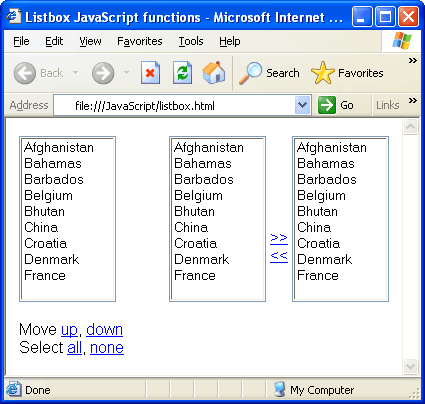
While working with Listboxes I had to write few small JavaScript snippets to perform certain tasks like selecting all options / seselecting all options or moving options up and down or swapping the options between two listboxes. I thought of sharing the JavaScript functions with you so that you can bookmark the article and use the code whenever you need them.
Listbox Select All / Deselect All JavaScript
Following is the JavaScript function for implementing select all, deselect all options in listbox.
function listbox_selectall(listID, isSelect) {
		var listbox = document.getElementById(listID);
		for(var count=0; count < listbox.options.length; count++) {
			listbox.options[count].selected = isSelect;
	}
}
Code language: JavaScript (javascript)
The above javascript code is very straight forward. All you have to do it to pass the ID of listbox you need to perform select all/deselect all and a boolean value for select/deselect.
For example if a listbox has an id “countryList” following can be the function call.
listbox_selectall('countryList', true);
listbox_selectall('countryList', false);
Code language: JavaScript (javascript)
Listbox Move up/down options JavaScript
Following is the javascript function that you can use to add move up/down options functionality. User can select any option and move it up in the list or down.
function listbox_move(listID, direction) {

	var listbox = document.getElementById(listID);
	var selIndex = listbox.selectedIndex;

	if(-1 == selIndex) {
		alert("Please select an option to move.");
		return;
	}

	var increment = -1;
	if(direction == 'up')
		increment = -1;
	else
		increment = 1;

	if((selIndex + increment) < 0 ||
		(selIndex + increment) > (listbox.options.length-1)) {
		return;
	}

	var selValue = listbox.options[selIndex].value;
	var selText = listbox.options[selIndex].text;
	listbox.options[selIndex].value = listbox.options[selIndex + increment].value
	listbox.options[selIndex].text = listbox.options[selIndex + increment].text

	listbox.options[selIndex + increment].value = selValue;
	listbox.options[selIndex + increment].text = selText;

	listbox.selectedIndex = selIndex + increment;
}
Code language: JavaScript (javascript)
Thus, you can call this function with first argument as list id and second argument a string value ‘up’ or ‘down’ depending on where you want to move the selected option.
listbox_move('countryList', 'up');
listbox_move('countryList', 'down');
Code language: JavaScript (javascript)
Listbox swap/move left-right options JavaScript
Following is the javascript code for moving selected options from one listbox to another.
function listbox_moveacross(sourceID, destID) {
var src = document.getElementById(sourceID);
var dest = document.getElementById(destID);
for(var count=0; count < src.options.length; count++) {
if(src.options[count].selected == true) {
var option = src.options[count];
var newOption = document.createElement("option");
newOption.value = option.value;
newOption.text = option.text;
newOption.selected = true;
try {
dest.add(newOption, null);
src.remove(count, null);
}catch(error) {
dest.add(newOption);
src.remove(count);
}
count--;
}
}
}
Code language: JavaScript (javascript)
Just call the function with two arguments, first is the source listbox id and second is the destination listbox id.
listbox_moveacross('countryList', 'selectedCountryList');
Code language: JavaScript (javascript)
Online Demo
Click here for the online demo. Getting Values in Server side script
When you submit the form with Listbox, by default browser will submit only selected values from that selectbox. Thus if you want to submit values from right hand side select box, you first needs to select all those before form gets submitted. You can do this like below:
<script>
function submit() {
     listbox_selectall('righthand_side_listbox_id', true);
     return true;
}

<form onsubmit="return submit()">
...
</form>
Code language: JavaScript (javascript)
This would select all the options before form gets submitted. Now you can retrieve options in your server side script from request as request parameter.
 While working with Listboxes I had to write few small JavaScript snippets to perform certain tasks like selecting all options / seselecting all options or moving options up and down or swapping the options between two listboxes. I thought of sharing the JavaScript functions with you so that you can bookmark the article and use the code whenever you need them.


Thanks a lot.
How can i get right side list when i submit
Nice article, I am searching for the same using jQuery….
And coming to the question which Agniraj has mentioned, Agniraj here is your answer, just check out the length of right list box and loop through the options, you will get all the options which are there in right list box.
Hope this might :)
Thanks,
Vivek
when i am trying it is giving me error as The function add(___newOption0, null) is undefined for the type Element
Gracias… no sabes del lio en que me sacaste…. te lo agradezco mucho.
Thanks for the script, it helped me in right time to finish the project.
Please email me on how could i select all the values on the listbox if my listbox name is like this
this is my javascript for selecting all the listbox items:
Nice article..
May be this wil help full but i need add,remove, add all, and remove all otion i the list
Thank you very much just what i needed
I noticed a few things while implementing this in PHP I’d like to share:
1) If you provide a name property to the destination list box, the “name=” property has to be appended with ‘[]’ at the end, to return an array of items, otherwise it only returns the first item in the destination list box. For example
Use: …
Not: …
2) In the script function “listbox_moveacross(sourceID, destID)”, the value of src.options.length needs to reflect the current sizeof src.options.length thru each iteration. In my implementation, I captured src.options.length into a local var ahead of the loop, in hopes of gaining some tick ecomony.
So I did:
var maxx = src.options.length;
for(var count=0; count < maxx; count++)
{
…
}
versus the example:
for(var count=0; count < src.options.length; count++)
{
…
}
I found out the hard way, I had to decrement var maxx along with the var count– decrement. So the code line after count–; became maxx–;
if(src.options[count].selected == true)
{
…
count–;
maxx–;
}
Just a lesson learned.
Hi Darla,
I have only just started programing and can not get the code you changed working for the select box more right. Can you post or e-mail me the javascript?
How do I get the variables in PHP??
$rightselect = mysql_real_escape_string($_POST[‘rightselect’]);
? My seclect id and name are rightselect
Many thanks for your help!
Hi ,
This code work fine in browsers except IE6.
Let me explain. There is a bug that an empty entry is displayed if you do that following:-
1. On the Online demo section, in the two list boxes on the right, select all the values from the extreme right listbox and move them to the left Listbox.
2. You would see that a scroll bar is displyed.
3. select say ‘Bhutan’ and scroll down until the selected ‘Bhutan’ is not visible.
4. Click on the right arrows to move the value to the Extreme right Listbox.
5. You would see a blank value in the Left Listbox when ‘Bhutan’ was originally there.
6. Click on the Blank value and the value just below it is written on the blank giving duplicate values to the listbox.
7. If you go on selecting the countries in the list, you would notice that all the value at the current position in the list would take the value of the next position and so on and os forth.
I am experiencing the same in my code as well. It would be helpful if somebody could give pointers to resolve this issue.
Hi, great script.
Does anyone know of a similar script that can handle images? What I want is for the user to be able to choose image priority that will later be displayed in an image scroller. Since option values dont allow for image tags my question is if something simliar to the above can be done perhaps with divs or something? Any help or suggestions are greatly appreciated.
Tx,
Victor.
Hi….
Does anyone know how to delete multiple checked options using struts?I am able to delete single checked option.If i check multiple boxes,it deletes only 1.Any help or suggestions are greatly appreciated.
Thanks,
Ashwini
Hi,
Thank you very for script.i think it s awesome..I have checked the script in ie,firefox and chrome and i have not got errors. but when i have checked in opera 10.54, i came across an error..For example when you select items more than one and click move across button you will see just the first item is swapped so the others are not swapped..how can i fix this problem..
thanks for your help
Best Regards
Hi there,
Thanks so much for this script. You saved a lot of my time.thanks again.
all the best :)
I used some other code for this in the past. But this is the best one with a very clean design.
Thanks.
As i feel there is an enhancement required.
On the double click event on any item from one select box it should be automatically passed to the other select box or vice versa.
thank you for thr fabulous code .
thanks… simple amazing…
save my time to code it.
Superb Solution. The one thing i am only confused is what is
“listbox_moveacross('s', 'd')”
“listbox_moveacross('d', 's')
“'s', 'd'”
var listbox = document.getElementById(listID);
var src = document.getElementById(sourceID);
var dest = document.getElementById(destID);
getting listbox , src ,dest null, although listID,sourceID,destID getting values.
@vissu – See if your HTML page has select boxes with the appropriate IDs. It could be the only reason why getElementById method is unable to retrieve a DOM object.
How can i add limitation from right to left ? Please send me the solution.
@Ashraf: To add list items from right selectbox to left all you need to do is to call function listbox_moveacross() with argument first right listbox id and then left listbox id.
e.g
Hope that works.
It’s nice. Thanks!!!
how can i get “selectedCountryList” value from php files
i can not get i t using following codes
foreach($_POST as $a => $b)
echo $a.” – “.$b.””;
how can i send data in right selectbox to php file
This is very helpful. Thanks!
This script runs correctly in google chrome ,but not in firefox !!!. Any solutions to solve this problem??
can somebody help me how to save the data that is entered in the text boxes/checkboxex/radio button/listboxes in the html to excel sheet. I wanted to use these excel values to retrieve again from html to excel and vice versa.
Could you help me on how i can move my record from one table to another using checkbox?..thank you for the big help
I don’t know if I need these codes in order to move my record
thank you for the help/
Awesome code, but I am confused as to how:
var src = document.getElementById(sourceID);
var dest = document.getElementById(destID);
get associated when the tag ID’s are “s” and “d”.
I’m not making the connection?
Thanks patel… your articles was helped me
Thanks Sir.
Hi Viralpatel,
In my webform i have taken two list boxes and two buttons to swap items from one list box to another list box.
listbox_moveacross(‘countryList’, ‘selectedCountryList’);can you please tell the event name to call this in listboxes.
i have used onclick event iam calling this function its working but i have swap items in in button click event can you please help me in which events i have to call this function listbox_moveacross(‘countryList’, ‘selectedCountryList’);
Thanks,
karthik
This code is working in my local browser, but once i depoy it in server started showing error:
“dest.add(newOption, null); //Standard”
Nice article but check this issue too.
this issue ate one day time of mine.
Firstly its a very good piece of code..kudos to the attempt.
But,I’m afraid to say that there is a logical error in the code..
we cannot move up or down 2 or more options at a time.Only the first selected option comes up.
If you can make it for the issue..will be very helpful…
Thank you in advance…. :)
Really useful snippets. Thanks
Nice Article, i was looking for the same and saved a lot of time.
Hi there
You saved me a couple of hours.
Great work, Keep it up
Very nice Article, i was looking for the same.
Can you please send me the full html code for CountryList Selection…I am new to html so please help me with this..
Hi, Can you please tel me how to open QTP using javascript code…
Thanks! Very useful. did some changes and arranged according to my needs.
Any please give a solution to load listbox value dyanamically? please provide the code
Branch*
>>
<<
javascript function
Hi anyone can explain the problem in this code
i am geeting exception like my web page is getting expired while adding the values from first list box to next list box in IE8
any one please give me a solution with code
Hi
Any one please tell me how to avoid duplicate records while moving left combo box to right combo box in javascript?
Hi
Any one provide a solution to avoid duplicate records while moving records from left list box to right list box in javascript
Your code saved a lot of time for me…
Keep up the good work..
For Listbox swap/move left-right options JavaScript
I am getting below error while adding the record to destination .
htmlfile:Invalid argument .
Thank you, Thank you, Thank you, Thank you very much…
here is my code but that move all time main category loop forward
function selectItems(fromID,toID)
{
var from = document.getElementById(fromID);
var to = document.getElementById(toID);
if(from.selectedIndex == -1)
{
return (false);
}
//if(parentNode.label == selectedIndex )
for(var i=0; i = 0; i–)
{
var o=from.options[i];
if(o.selected)
{
from.options[i]=null;
}
}
from.selectedIndex=-1;
to.selectedIndex=-1;
}
function find(val,idx) {
var sel=document.getElementById(‘lstboxItems’);
var s=val+’ : ‘+sel.options[idx].parentNode.label;
//alert(s.label);
}
<?php
/*$fisrstlbox=$_POST['lstboxItems'];
$secondlbox=$_POST['lstboxSelectedItems'];*/
$str2="Select * from list_task where pid=0";
$res2=mysql_query($str2) or die(mysql_error());
if($res2)
{
while($row=mysql_fetch_row($res2))
{
echo "”;
$str3=”select * from list_task where pid='”.$row[0].”‘”;
$res3=mysql_query($str3) or die(mysql_error());
while($row2=mysql_fetch_row($res3))
{
echo “$row2[2]”;
}
}
echo “”;
}
please help ma fast
How to move all values in one button click? I tried calling the add function in select all function but it didnt work. I need add all and remove all buttons along with these functionality. Kindly help!
Very nice code and clever ideas.
Here is a variation (just for the heck of it)
Thanks for the code. It works fine on IE9, however it doesn’t work on IE11.
Use case:
1. Select any option
2. Move up or down
3. Try selecting other option in same box, you will not be able to select other option.
I am facing similar issue while migrating to IE11. Please help! Thanks in advance.
The code snippet which Ron has posted doesn’t work on IE11. Can someone please reply with the fix. I am facing similar issue while migrating to IE11.
Use case:
In IE11:
1. Select one option and move up or down
2. Select other option to move, however the option can’t be selected.
Any help would be appreciated. Thanks.
Thank You so much
Hi everyone,
This is a great script! Does anyone have a fix for IE7 and IE6? I am getting JavaScript error and this is rather urgent.
Much appreciated,
Mojgan Nemati
[email protected]
Hi Viral
Can you help me the same logic to be inserted as a javascript in cognos report
Hi,
I have a lot of items in my listbox and so I added a link ‘TOP’ that uses your up-function to place the selected item to the top of the listbox
so how do you submit selected items to database
hola no me funciona el selected index , no hay forma de que despues de llenar el list box se me marque el primer item , solo si voy con el mouse , pero en automatico no hay vida , nada de lo que esta publicado en internet sirve , quizas le sirva a otros porque tendran alguna magia que no han publicado o algun truco que no quieren decir
Up and Down listbox got hanged in IE11 after up and down item very fast (Can’t select any item manually in first lsitbox in your demo). Any idea how to resolve
A Move Version that works:
Very useful article. Thanx a lot.
I’m doing a HTML/javascript project and there’s a list box called ‘newlist’.
list box items are coming from the database.
Can you please let me know, how can I delete only the first item and the last item from this list box?
Thanx.
Hi,
In IE11:
1. Select any one option and move up or down very fastly.
2. Select other option to move, however the option can’t be selected
Solution:
Add the below code in move up and down function
listbox.multiple=false;
setTimeout(function(){listbox.multiple=true},0);
Thanks for the solution
Hi,
I am new to javascript. i have created one page using php and javascript. my requirement is i have a csv file, it’s having bunch of name and mail id’s. for eg:
cat list.csv.
name1,[email protected]
name2,[email protected]
name3, [email protected]
…..
in my php page having 4 fields,
company code
employee id
name
mailid
In “name” field I can display the first field of csv contents as it’s having name. (please note that name field is a multiselect drop down box). If I select “name1” immideately name1 mail id ([email protected]) should appear in “mailid” column without any submit button. If I select both “name1” and “name2” immediately [email protected] and [email protected] mailid’s should appear in “mailid” field.
I used “relaod(this.form)” option for name field, but it will be reload the page immediately once I select single name. it’s not allowing me to select multiple names.
I used “relaod(this)” option for name field, only name values I can get after rload the page “company code” and “employee id” values will be disappear.
Could anyone please help me on this.
Thanks in advance,
Br,
Mahadev
Great code! Thanks for posting. In the move across code, is there a way place the item on the TOP of the list instead of the bottom?
Answered my own question, just needed to set the dest.add newOption to 0 and not null.
Thank you for the code. Superb
Hi,
With the single list, if I select a value and click on up/down, the selected element is getting moved but getting freezes in Internet Explorer. Hence, not able to select another element in the list. Can you pls resolve and let us know??
Can I create a kind of list on which If I click on any item (in the left list) it automatically moves to right side?
If I click on any item (in the Right list) it automatically moves to Left side?