Ever wanted to hide all those closed projects in eclipse? Well, here is a simple trick that you may not know already.
Imagine your Eclipse workspace is filled with many projects that you created in past just to test some small functionality. Now you are done with these projects and hence you have closed it. Eclipse by default show all the closed projects in Project Explorer. Hence your project explorer may look like following where only two projects are open and rest competing for your attention although they are closed!
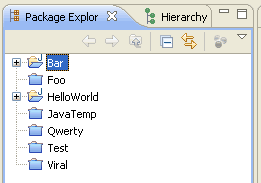
Eclipse comes with a cool tiny feature that many of us not know. You may want to Hide all those closed projects from your workspace in Project Explorer tab. Simply follow following steps and do this is few seconds!
Step 1: Click on right corner of Project Explorer tab and open context menu. Select Filters option from menu.
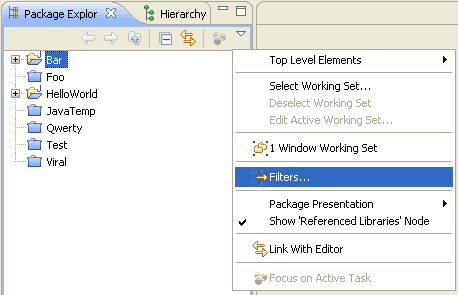
Step 2: Check Closed Projects option from Filter and press Ok
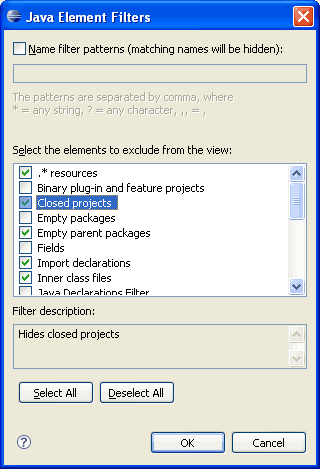
Now check your project explorer tab, all the closed projects are gone! Doesn’t it looks more clean :)
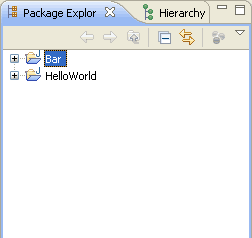
We used Filters option to remove closed projects from Project Explorer tab. Filters provides more options to select and remove from displaying it from explorer view.



Useful One!
@Sivasubramaniam: Thanks for comment
Thanks for the tip! Very useful.
@Jaran: you welcome :)
It is really nice tip…………thanks alot
Yay! It’s really the best tip EVER !
Thanks for sharing !
Cooool one.
If one needs to reopen a closed project you’ll need to remove the filter. Instead I like to use the working set feature and just drag closed projects into this working set. When I need to reopen them, I have easy access to it.
Hi
Mr. Viral its nice and gud things . Becoz. all the java developer hav need it.
Thanks.
Handy.
Thanks, very usefull
Thanks… Very useful tips.
Two years later, this post has saved yet another user’s sanity…
Very good and usefull tip. Thx!
Ditto Bobby’s comment.. thanks
Ah thanks, this has been annoying me for a while now
Thanks dude this was a big problem for me since a long time……
great tip
Thanks……..
Just the thing I was looking for. Thanks a lot! :)
Useful info..Thank you.
very cool. much more generic than creating working sets for each complicated project(set).
Thank you! This is exactly what I need.
Nice one! The default view was driving me nuts, this saved my day :)
Cool, thanks!
Worked!! Thanks!!
very nice tips……….
Hide is ok, but how look for closed project
My Eclipse (Luna 4.4.2) doesn’t have ‘Filters’. What can I do?
Instead of filters you have to select “Customise view…”
to Nam Phan
Select Customize View… option from menu.
Thanks!
Thanks, this is the option exactly I needed.
Thankyou for this useful information.
Thanks.
Thank you!