In our previous tutorial Introduction to FreeMarker Template, we saw basics and overview of FTL. Also some of its features and comparison with other view technologies such as Velocity and JSP. Today we will create our first Hello World FreeMarker application. To start with our app will be very basic. We define one ftl template and load it in Java using freemarker api. In Java, we create data and pass it to freemarker to render the output. So all in all we get output as a text file as well as on standard output (console). So lets get started.
Things We Need
Before getting started, I would like to highlight tools and technologies used in this project. We’ll need:
- JDK 1.5 or above (download)
- Eclipse IDE 3.2.x or above (download)
- Freemarker 2.2.8 or above (download)
Ok, we have all what we need. So lets get started.
Hello World FreeMaker
In eclipse create a Java project. Go to File > New > Project… > Java Project. Enter project name as Freemarker_Hello_World and click Finish. The basic Java Project is created. Now we create a freemarker template file (.ftl) as our base template. We will use this in our hello world example. Create a file helloworld.ftl under src folder. Following is the content:
File: src/helloworld.ftl
FreeMarker Template example: ${message}

=======================
===  County List   ====
=======================
<#list countries as country>
	${country_index + 1}. ${country}
</#list>
Code language: HTML, XML (xml)
Now create FTLHelloWorld.java class inside source folder. I have created a package net.viralpatel.freemarker and create this class inside it.
File: src/net/viralpatel/freemarker/FTLHelloWorld.java
package net.viralpatel.freemarker;

import java.io.File;
import java.io.FileWriter;
import java.io.IOException;
import java.io.OutputStreamWriter;
import java.io.Writer;
import java.util.ArrayList;
import java.util.HashMap;
import java.util.List;
import java.util.Map;

import freemarker.template.Configuration;
import freemarker.template.Template;
import freemarker.template.TemplateException;

public class FTLHelloWorld {

	public static void main(String[] args) {

		//Freemarker configuration object
		Configuration cfg = new Configuration();
		try {
			//Load template from source folder
			Template template = cfg.getTemplate("src/helloworld.ftl");

			// Build the data-model
			Map<String, Object> data = new HashMap<String, Object>();
			data.put("message", "Hello World!");

			//List parsing
			List<String> countries = new ArrayList<String>();
			countries.add("India");
			countries.add("United States");
			countries.add("Germany");
			countries.add("France");

			data.put("countries", countries);


			// Console output
			Writer out = new OutputStreamWriter(System.out);
			template.process(data, out);
			out.flush();

			// File output
			Writer file = new FileWriter (new File("C:\\FTL_helloworld.txt"));
			template.process(data, file);
			file.flush();
			file.close();

		} catch (IOException e) {
			e.printStackTrace();
		} catch (TemplateException e) {
			e.printStackTrace();
		}
	}
}
Code language: Java (java)
You might get error in Eclipse because of the classpath issue. Add freemarker.jar in lib folder (create a lib folder if it doesn’t exists). Once you have added freemarker.jar and included in your classpath, the error should go. Below is the project structure once we add all source code files.
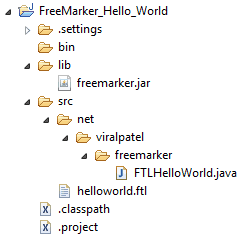
Execute the FTLHelloWorld.java class (eclipse shortcut Alt+Shift X, J). Following output will be generated in Console.
FreeMarker Template example: Hello World!

========================
===   Country List =====
========================
	1. India
	2. United States
	3. Germany
	4. France
Code language: PHP (php)
Also a file will be generated C:\FTL_helloworld.txt with the same output.
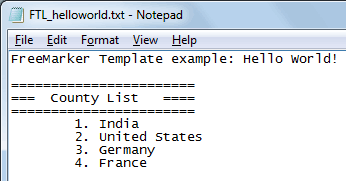
Thus note how we passed data from Java to FTL and the same get painted. The ${message} got replaced with the message that we populated in Java. Also notice how we passed a country List<String> through Java and inside FTL we used <#list> </#list> to display its values.


Thanks, that got me started. Now I can replace my own template engine with FreeMaker.
Ohhhh god.. Lars Vogel’s comment on my blog!! Feels awesomee :) Am glad it helped.
REALLLYYYYYY AWESOMEEE
I am getting the following exception.
Exception in thread “main” java.lang.NoClassDefFoundError: com/google/common/collect/MapMaker
at freemarker.core.Environment.(Environment.java:93)
at freemarker.template.Template.createProcessingEnvironment(Template.java:367)
at freemarker.template.Template.process(Template.java:237)
at com.infy.freemaker.FTLHelloWorld.main(FTLHelloWorld.java:28)
Please help me out.
We need to add google-collections-1.0-rc2.jar along with the freemaker.jar in the build path.
Hi Viral Patel,
Can you show me how to use StringTemplateLoader?
I have 3 to 4 values which i need to put it in Map in the same string
@Viral: :-)
it helped a lot…
thanx
I have problem like this java.io.FileNotFoundException: Template src/main/java/helloworld.ftl not found.
at freemarker.template.Configuration.getTemplate(Configuration.java:580)
at freemarker.template.Configuration.getTemplate(Configuration.java:543)
Can you help me?
Thanks
Very easy to understand. thanks
Hi,
it would be preferable to add “throws IOException, TemplateException”
exemple:
public static void main(String[] args) throws IOException, TemplateException
{
}
thank you
Could anybody tell me how to send the ftl contents in the email body. I have a requirement where user submits the timesheets and then his Manager should get an email. I have done this with Reading the generated ftl file but want to avoid this reading step and send direct ftl content in email.
Appreciate your help !
Thanks …
Hi Deepesh,
Not sure I get your point. But probably, you can do like something like below:
You also may want to read more in javadoc of StringTemplateLoader
Does country_index just get init to 0 by default?
I think so.
Very clear.
Thanks a lot.
Viral Can You explain step by step process to generate pdf report using xslt-fo
that’s great effort and its quick start up guide…………
very nice!
shouldn’t the TemplateLoader be set in Configuration, otherwise it give FileNotFoundException.
I develop an application to generate files using freemarker engine. In some case, if there is an exception, even if I catch it, freemarker generate a file that contains this exception. How can I avoid the generation of the file in that case?
Can some one help me?
Thanks. It worked. I like Freemarker a lot.
I can’t get it to output the file in C: drive.
I am using Eclipse/SuiteCloude IDE
thanx. this is very easy. can you please provide more examples?
this is the first time I use freemarker, so i have a question, i have a tree so there is a parent and a children and also the children have there own children, so can i use this code to extract parent and there children.
${key.name}
${key1.name}
${key2.name}
BIG THANKS TO YOU MAN! THE BEST TUTORIAL FOR FREEMARKER EVER SEEN!
Thanks a lot !
Hi,
Can i have this code to write to a html file ?
Hi, I’m newbie using the templates, I want to show images, but if one code has more than one images I don’t know how to do it, I use this
Code:
${feature.code.value}
Mat:
${feature.mat.value}
Obj:
${feature.obj.value}
Sorry, this is my code:
Great example.
there are some problems.
FreeMarker Template example: ${message}
=======================
=== County List ====
=======================
${country_index + 1}. ${country}
package net.viralpatel.freemarker;
import java.io.File;
import java.io.FileWriter;
import java.io.IOException;
import java.io.OutputStreamWriter;
import java.io.Writer;
import java.util.ArrayList;
import java.util.HashMap;
import java.util.List;
import java.util.Map;
import freemarker.template.Configuration;
import freemarker.template.Template;
import freemarker.template.TemplateException;
public class FTLHelloWorld {
public static void main(String[] args) {
//Freemarker configuration object
Configuration cfg = new Configuration();
try {
//Load template from source folder
Template template = cfg.getTemplate("src/helloworld.ftl");
// Build the data-model
Map data = new HashMap();
data.put("message", "Hello World!");
//List parsing
List countries = new ArrayList();
countries.add("India");
countries.add("United States");
countries.add("Germany");
countries.add("France");
data.put("countries", countries);
// Console output
Writer out = new OutputStreamWriter(System.out);
template.process(data, out);
out.flush();
// File output
Writer file = new FileWriter (new File("src/FTL_helloworld.txt"));
template.process(data, file);
file.flush();
file.close();
} catch (IOException e) {
e.printStackTrace();
} catch (TemplateException e) {
e.printStackTrace();
}
}
}
Since nobody knit-picked yet, let me be the first one. The text file is generated from the output, but not the console. Because the ftl file and the txt file have typos “county” instead of “country” but not the console :)
Thanks a lot.. Only few edit … :)
Correct template must be
Hello,
could you please demonstrate how to generate pdf from ftl.?
I tried following code (I just replace .txt extension with .pdf. ) but there is error in generated PDF.
data.put(“message”, “Hello World!”);
//List parsing
List countries = new ArrayList();
countries.add(“India”);
countries.add(“United States”);
countries.add(“Germany”);
countries.add(“France”);
data.put(“countries”, countries);
Configuration cfg = new Configuration();
Template template = cfg.getTemplate(“htmltopdf/src/freemake.ftl”);
// Console output
Writer out = new OutputStreamWriter(System.out);
template.process(data, out);
out.flush();
// File output
Writer file = new FileWriter (new File(“D:\\helloworld.pdf”));
template.process(data, file);
file.flush();
file.close();
Thank you so much!
Merci beaucoup pour ce tuto ! Thanx so much for your tutorial ! Great help !
Good content
IN FTL , i’m passing String value which has HTML data ex. txt = “welcomeUSER….” something like that , so when the PDF is generated it is displayed has it is which is in the txt value ,rather is there any way to Parse data . like in angularjs we have ng-bind-html ?
all suggestions are welcome and appreciated