By default when you create an Android Virtual Devices (AVD) in Android, the Camera is disabled. So if your application uses Camera API, it might not work properly in Android Emulator. Also SDCard must be defined in emulator in order to use Camera.
To enable Camera in your Android Emulator, just add following highlighted code in your AVD’s config.ini file. You can find the config.ini file under your user directory/.android folder.
File: ~/.android/config.ini
hw.lcd.density=160
skin.name=HVGA
skin.path=platforms\android-9\skins\HVGA
hw.cpu.arch=arm
abi.type=armeabi
vm.heapSize=24
image.sysdir.1=platforms\android-9\images\
hw.camera=yes
sdcard.size=64M
...
...
In case you don’t find the config.ini file or want to enable Camera support through Android SDK and AVD Manager, follow below simple steps.
Open Android SDK and AVD Manager:
Step 1: Add SD Card in AVD
In the SD Card setting, set the value for Size. To enable camera, the SD Card must be enabled in Emulator.
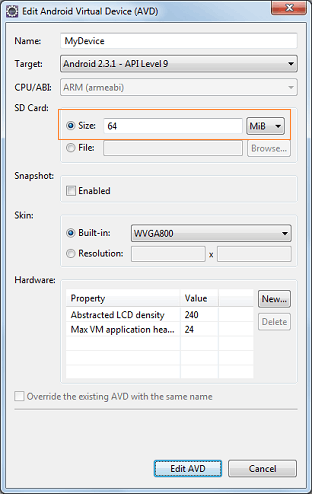
Step 2: Add Camera Support in Hardware under AVD
Now under Hardware section, click New button to add Camera hardware. It will open following Dialog box. Select Camera support from the Property dropdown and click Ok.
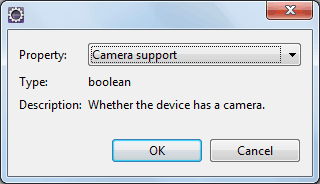
Step 3: Enable Camera Support in Hardware
The new hardware: Camera support is visible under Hardware section. Set its value to yes and save changes by pressing Edit AVD.
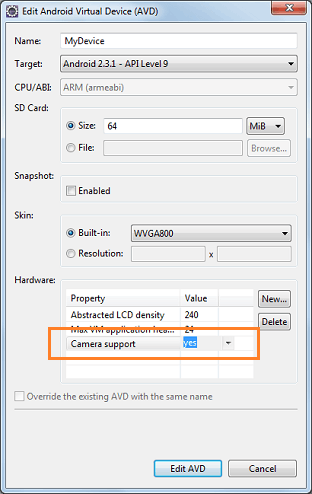
And that’s all. Just save the changes and launch the emulator. You’ll be able to start Camera application and take snaps (Default android pic) through it.



Thank you for this post :-) Regards, Bart
Is there any technique to close the android emulator properly. Every time it get hanged.
there isn’t any camera support on my avd
camera support is not visible under hardware
Hi, Which version of API you using for your AVD?
me too. i can’t see camera supprot.
use the notebook(import camera) . I use eclipse version juno. And using AVD API7~API10.
help me. T.T
Thanks for thise, quite useful!
Thanks for these, it is useful
Hi Viral Patel ,
you post really helps me alot…… A special thanks to you
Hi Guys,
Where is the code for the camera that AVD will be using ? Does it show live image or just a generated stuff ?
Prayas.
Hi Viral Patel,Thanks for the wonderful Post.Please posting these wonderful posts in the future.ALL THE BEST.MAY GOD BLESS YOU… :-)
Thank you so much for this post. It is very helpful!
hardware option is not showing under avd manager..i am using adt-bundle-windows-x86_64-20140321.reply asap
usb camera is connected mypc. And camera example is running. But video disappear, and cross stripes appear!!! How to do ?!
Hi Viral,
I am also facing problem of camera on android emulator. There is no such hardware option as you have described. Please reply me ASAP.
Thanks