If you are a regular Eclipse user than you might have got this error many times. The error simply says, “you’ve made changes in files in your workspace from outside eclipse”. The simplest solution would be to select the project and press F5 (Right click -> Refresh). This will re-sync any external changes to the file system and eclipse would now know what exactly is in your workspace. But it is cumbersome to do this every time any of your file changes due to external agent.
The best way would be to let Eclipse automatically handle any external changes in file system. So that when you compile the code it never gives the error “resource is out of sync with the filesystem”.
Do do this, select following option:
Window -> Preferences -> General -> Workspace
Now depending on your version of Eclipse you will get either of following options in workspace window.
- Refresh Automatically
- Refresh using native hooks or pooling
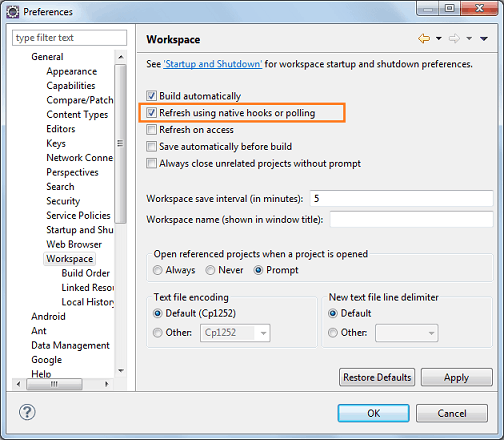
One thing we should highlight here is that Eclipse uses polling mechanism to check whether there was any change in the filesystem. This might have a performance impact. So choose wisely. Frankly I am using this feature for quite sometime now and I don’t see that much of impact.




Thanx a lot :) It helped me.. I like all ur posts.. It’s very useful.. I am a frequent visitor to ur site.. Thanq so much!
Thanks :)
Do you have some practice while running an additional compiler like the CoffeeScript oder SASS/Compass Watchdog? We’ve noticed that especially on windows (7), the refreshing won’t work — with the both options enabled. Refreshing on “Refresh” or “on access” works.
Thanks man, your site is really helping me a lot with all these tools weird problems.
TANKS!!!!
thanks this helped
thank you very much!!!! you helped me, i didnt know how to resolve it :)
Thanks Very much !!
Hi, thanks man, it worked….
thanks viral,it worked
Thanks a lot , Very Helpful..you saved me lot of time……
good tutorial bro :)
Thanks, it helped me.
Thanks, it works
Thanks, very helpful
Thank you man ;)
good solution. just to add if it does not work even after above solution, please restart the eclipse. That may load the files correctly.
Many many many thanks!
one million of thanks ^^
Many many many thanks!
Thanks a lot Viral ! Your site has helped me a lot many times! Cheers. Love your crisp writing style.
Add more a lot of thanks.
Thanks a lot it worked for me.