[ad name=”AD_INBETWEEN_POST”] Adding Elements like textbox, button, radio button etc in a html form using JavaScript is very simple. JavaScript’s document object has a method called createElement() which can be used to create html elements dynamically. We had used this function in our tutorial: Dynamic combobox-listbox-drop-down using javascript to add dynamic options to a combo box-listbox. Let us use this function to create textboxes, radio buttons, buttons etc dynamically and add them in our page. 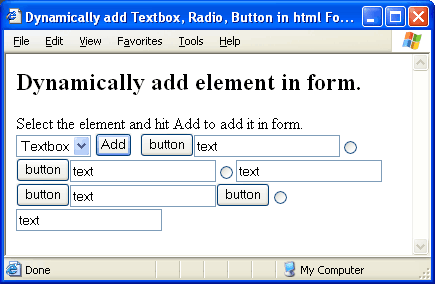 Following is the source code of our example.
 Following is the source code of our example.
<HTML>
<HEAD>
<TITLE>Dynamically add Textbox, Radio, Button in html Form using JavaScript</TITLE>
<SCRIPT language="javascript">
function add(type) {
//Create an input type dynamically.
var element = document.createElement("input");
//Assign different attributes to the element.
element.setAttribute("type", type);
element.setAttribute("value", type);
element.setAttribute("name", type);
var foo = document.getElementById("fooBar");
//Append the element in page (in span).
foo.appendChild(element);
}
</SCRIPT>
</HEAD>
<BODY>
<FORM>
<H2>Dynamically add element in form.</H2>
Select the element and hit Add to add it in form.
<BR/>
<SELECT name="element">
<OPTION value="button">Button</OPTION>
<OPTION value="text">Textbox</OPTION>
<OPTION value="radio">Radio</OPTION>
</SELECT>
<INPUT type="button" value="Add" onclick="add(document.forms[0].element.value)"/>
<span id="fooBar"> </span>
</FORM>
</BODY>
</HTML>
Code language: HTML, XML (xml)


This works fine but it is important to note that the setting of the “name” attribute will fail in IE. It sets the name for the form submission, but does NOT set it in terms of javascript access (you won’t be able to access it by name).
http://webbugtrack.blogspot.com/2008/03/bug-240-setattribute-name-is-half.html
Thanks Harold for the information. I din’t knew that.
How can use the added text box value in php?
description:
the text box will be dynamically added by user and then the added text box value posted to php file.
Hi Saran,
Use normal html form to post the textbox value in PHP script. The dynamically created textbox’s value can be access in PHP using normal $_GET[“textboxname”] variable in PHP.
Hi Viral,
How to label those text boxes,buttons and radio buttons?
Hi Angeline,
To add labels to textboxes, buttons etc you can add text to the parent attribute.
For example:
//Create lable var lab = document.createElement("span"); lab.innerHTML = "This is button label"; var foo = document.getElementById("fooBar"); foo.appendChild(lab); //Now add button .. foo.appendChild(element);hi…
I have text box A1, B1, C1. I click ADD and the table will append and text box A2, B2, B3 appeared…. and the next row appear when i click ADD again. but i have a button name SUM, when i click SUM, how can i make it to be A1+B1 and the result appear in C1 and also to A2, B2, B3 and below…
Hi jAi,
For implementing such a functionality, you may have to use javascript dom manipulation heavily.
First you may iterate through all the rows of table, get pointer to textboxes Ax and Bx, where x is the row id. Then sum it and update Cx. If I implement such code, my code would be:
var table = document.getElementById("table_id");
var totalrows = table.rows.length;
for(var x=0; x < totalrows; x++) {
	var row = table.rows[x];
	var textboxA = row.cells[0].childNodes[0];
	var textboxB = row.cells[1].childNodes[0];
	var textboxC = row.cells[2].childNodes[0];

	textboxC.value = textboxA.value + textboxB.value;
}
You may want to look at similar tutorial: Adding Rows Dynamically in Table.
How to select and deselect the radio elsement created by your code????????????//
@Chirag,
I think you are using Internet Explorer to view the example.
IE has a known bug (http://webbugtrack.blogspot.com/2008/03/bug-240-setattribute-name-is-half.html) where setAttribute (name) does not works.!! You can try running this code in Firefox.
that is the worst piece of code ever
Hello viral. Quick question, I hope you can help, I used your code to dynamically create inputs, which works great. However, I had to edit your code so that the variable passed is the id, and not the type. Unfortunately, this makes the created inputs have and id and name as ‘undefined’. I need them to be defined, as they each need a specific name which I’ll give them. I’ll post my code for you, I hope you can help me! Thanks, I appreciate it!
function add(ids) {
//Create an input type dynamically.
var element = document.createElement(“input”);
//Assign different attributes to the element.
element.setAttribute(“type”, “text”);
element.setAttribute(“name”, ids);
element.setAttribute(“id”, ids);
element.setAttribute(“size”, “50”);
element.setAttribute(“maxlength”, “74”);
//Create break
var br = document.createElement(“span”);
br.innerHTML = “”;
//grab span
var span = document.getElementById(“first”);
//Append the element in page (in span).
span.appendChild(element);
//append innerhtml at end
span.appendChild(br);
}
First Aid Kit:
I have a submit button for my form using the dynamic add row, i need to append unique $_POST values so that every value in every row added can be captured,eg text_1 for the 1st row, text_2 and so on. how can i do that,very new to javascript :-)
thanks
Thanks lot.
Same tutorials available in the many sites.
But here were very user friendly.
Got the correct answer for my pointed question.
Thanks
hi ,
I want to create a button (yes and no) on the form. I have a text that is displayed after the user clicks yes and then i want the button to appear which is again yes and no. when the user selects the yes or not again another question is displayed with yes and no buttons again. i am unable to do that. do we need to have span id ?
may i know how to position the html elements you wish to add. and may i know also how to save the numerical inputs in the added textbox be summed up and saved in the mysql database using php.
thanks
hello viral,
i think i got the solution from your link about php.
i made a invoice program out of it. i added 3 more input text fields that will get the multiplier, the other one the product. and the last one the sum of the products.
how can i compute for the product while add button is pressed.and this will also sum up the products.
thanks
Excellent pieces of code but still one problem:
I have a table with a text input box with an id of , for example, text1
The table is in a form which will be submitted to a mysql database and the id will go to a specific column for that id value
The database table is set up to receive data from text boxes with specific id’s
If I add another row dynamically, how can I assure that the next text box will have the correct id, and the next one and so on …
This is critical to the use of this script !!!!!
thats bin very useful. thnx bydy!
hey viral tell me dude how to add data from form to SQL with demo…
plzzzz i need a demo for commiting data to SQL thru SQL insert command and button submit in HTML form!!!!!
Hi,
I want to show a textbox Dynamical when i press add more button. How can i do it please give me the soluton.
Thanks
Mahfuz
hi,
i’m searching to add elements in my form , i using symfony framework
Can we add any event with any newly created textbox or button? if yes then please suggest the method.
Thanks
Dude, how can we set runat=”server” attribute to textbox in javascript. This is because i am trying to access the value of it in code behind. Very very urgent requirement. Please answer.
Hi Viral My problem is
I want my column heading configurable i.e those values also come from database ((Ajax call) depending on types of user.Can I use Jquery.Just let me know what is best Idea
Thanks a lot!
This is just the jumping off point I needed to add rows and fields on demand to an input form.
I put the function in an onClick event of a “Add New Item” button and then use a hidden field to keep track of the current number of rows for when the form is submitted.
This way the user can add just as many items as they need and store those in the DB… rather than using a flat and wasteful schema.
This is a good toturial site
i need help. tell me any body that where i can get a script that add group of html controls dynamically e.g (3 textfield,combobox,) at a time on one click. i dont need to add one control at a time . plz help me any body
I m a new user please anyone can help me?how can i create this website dynamically
I need a code following informations
ASP.net and MSSQL server, CSS,Javascript.
1. Create a registration form with the following details
– First Name
– Last Name
– Username
– Password
– Date of Birth (Calender) and
– Nationality
a) The details should be stored in the database.
b) After registration a message should display with a unique customer number.
2. Fetch product details from the database and display it in a grid view.
There should be an option to edit the details.
Thanks a lot.
It’s really a good tutorial.
I want to assign my own id and label to each element how can i do that.
please reply me
Thank you
Kirtikumar Panchal
But how will u access the values of all the new fields????
And how abt if i want labels to the fields???
Hi,I m using a for loop to create textboxes.I dont know how they will come in different lines…
My code is
for (i = 1; i <= count; i++){
var location=["Street Address1","Street Address2","Street Address3","City","State/Province/Territory","Zip","County","Installation Country"];
var textBoxId = "text_" + i;
var element1 = document.createElement("input");
element1.setAttribute("type","text");
element1.setAttribute("id",textBoxId);
element1.setAttribute("name",location[i]);
foo.appendChild(element1);
}
Hi, thx for the code. It works great.
But for the new textfield, how i want to insert into database?
how to get values from textbox
creating element is good
but problem is,
once you create the radio button, you can not select the radio button in ie6 & ie7
i want to create a form that retrieve the data from the MySQL database to display in the form to be easier in updating the data to the database (such as textbox, or textarea). I try to use textarea but it didn’t show the data. I tried to use textboxes but it couldn’t wrap the line.
hi viral
this is useful… am in need of this.
But the radiobutton which we create here doesnt work. We are unable to select any radio button there. why is it so. ITS VERY URGENT.. pPLS LET ME KNOW
here the radiobutton doesnot work in runtime. even if you click the radio button its not getting checked..
check this please
hello guys really nice code..
But how can I pass all the three values of the new created textboxes?Whatever I tried so far I only receive in my mailbox the value of the latest created input box..Can you provide me with the wright php code so that I can receive all of them? please guys I am new in programming and its really an emergency..
thank you in advance
how can I add names to the different elements to the inputs
I need to add input type = file to upload images
this is the modifications i did:
function add(type) {
//Create an input type dynamically.
var element = document.createElement(“input”);
//Assign different attributes to the element.
element.setAttribute(“type”, type);
element.setAttribute(“file1”, type);
element.setAttribute(“img1”, type);
var foo = document.getElementById(“fooBar”);
//Append the element in page (in span).
foo.appendChild(element);
}
Dynamically add element in form.
Select the element and hit Add to add it in form.
hi viral patel.
how to add/insert dynamically generated Form fields into MySql Database,,,,,PHP,,,
like creating fields for each dynamically created form fields and savethem to mySql…….
can u fix this………………..
can html be embedded in java core concepts???
am using java forms to do my printer project! can i implement “HTML” in java core? or do u have anywayz of implementing this?? plzz help me!!:( plzzzzzzzzzzzzz
How to get the dynamically added text box value in php????
Please help
i found a solution to ur problems….
use array to the name of controls and then in second page do this….in this upload is this array in which i m storing alll data….
<?php
foreach($_POST['upload'] as $value )
{echo "”;
echo $i+1;
echo “”.$value.””;
$i++;
}
?>
njoy…
Hi bro, please help me?? How to get value from textfield if i add and more add textfield..
with like this bro??
– – – – – – – – – – – – – – – – – – – – – – – – – – – – – –
in action php ??
what variable to post ?
$a= ??? how ??
please brotha.. help me…
ASAP T_T
Nice, but when we chose the radio button, we can’t select any element in IE7 browser.
This solutions doesn’t work in IE 7. Lets try to check the radio in this browsers. It does’nt support by Internet Explorer 7.
Now that you show u how to add test box dynamically….can you please tell me how will i generate the sql statement that can take both the text box value and insert into my database.
hi Viral, i have 3 combo box…
all i want is “how to sum every content in combo box?” while combo box has a Text element, and i want to convert it to integer, so i can use switch command for each combo box….when user switch first combo box then it loads a value, when user switch second combo box, it loads a value
and within form there is a button SUM, when user click SUM it will sum all values from combo boxes and shows into textbox
could u help me…i already done this with php, but i have to do this with Javascript…help me please
Useful tutorial.
Thanks!
Hai Viral,
How can i create a struts2 tag dynamically?
could you help me
Hi im using ajax in my application,after ajax call is executed i wil get new textfields.
now wats my problem is when iam reading the values from new textfields im not getting
wats the problem in this..?
waiting for reply…
i have the same problem issue page type,what to do know for getting
adsense.
thanks good post… u blog very nice… i share post…
Hi Viral,
With the help of above demo i created radio buttons, problem which i m facing is i m not able to select any radio button.
thanx got dis in frst hit ur blog is gona b hit!
Hai Viral,
How can i create a struts2 tag dynamically?
could you help me
Useful tutorial.
Thanks!
Can i ask a favor?
btw this tutorial is great :) just what i was looking for.
Anyway, i have a form.. it’s like:
Button <— when clicked it adds a skill field,
FIELD 01
FIELD 02
FIELD 03
Okay it add a field. Now how am i gonna insert the added value fields on mysql tables/database.
can you please do a tutorial since i loved and understand this one :)
Please please please. gonna wait for your reply.
Thanks!
Doesn’t seem to work anymore in firefox 5 nor IE8 : the name attribute of the inputs is not kept when the input is appended inside the form. Therefor the field cannot be transmitted into the server query.
Thanks for the code :)
thanksssss
I want to dynamic button for booking the in the airlines ticket.
so how can i create 9*9 button
please give me suggestion becoz i want use in my project
I want to dynamic button for booking the in the airlines ticket.
so how can i create 9*9 button
please give me suggestion becoz i want use in my project
so handy and great
nice example, i am trying to create a form where i need to give access to website admins to be able to create forms easily that means the label name as well, any idea how to do that?
Hi Patel,
This is good to see when the dynamic creation of controls.
“name” property is created for the input element in IE6…. plz can you have solution for that….
thanks,
Gnanavel
nice code, but its not easy to understand , if you explain these element.
(setAttribute
document.createElement(“input”);
foo.appendChild(element);
)
then ist working is easy to understand……..
How can i create a struts2 tag dynamically?
could you help me
@Harry – Sturts2 tag cannot be created here as this is client side code. The rows are dynamically created in Javascript and added to HTML DOM.
How to insert element after input?
I have figured out my function part of my javascript code but am having trouble putting it all together for the output text boxes. this if for a tip calculator. I basically need to be able to put a $ amount in and have it come out as a 15% tip with a total box. I know I am making this way more complicated than it needs to be. If there is anyone that can help I would appreciate it! Thank you!!!
Tip Calculator
function figureTip()
{
var bill = document.forms[1].bill.value;
var tipPercent = document.forms[1].tip_percent.value;
var numPeople = document.forms[1].num_people.value;
var tipAmount = bill * (“.” + tipPercent);
var total = bill * (1 + “.” + tipPercent);
totalPerPerson = total / numPeople;
document.forms[1].tip_amount.value = tipAmount.toFixed(2);
document.forms[1].total.value = total.toFixed(2);
document.forms[1].total_person.value = totalPerPerson.toFixed(2);
}
Tip Calculator
Enter the check amount: $
Tip percentage: 15%
how to retrive data inserted in that text box
Dear Viral,
I would like to add a input text field to a form automatically after entering 2 or 3 characters in the input text field.
Input field 1 (after entering 2 or 3 charcters here it will get the field content from a mysql database and after pressing ENTER it should create additional input text field.
Finally after pressing 2 times ENTER form should get submitted.
I know this is possible but I am no Javascript expert, any help is appreciated.
Thanks
Regards
Prasad
Hai everybody..
how to validate the dynamically created text box using java script or jquery..
if u know pls help…
@Harry – Sturts2 tag cannot be created here as this is client side code. The rows are dynamically created in Javascript and added to
Hey, this really works…Thanks a lot… But tell me, if I want to display the name of the radio button besides the button, how do I do that…
I tried using -> document.getElementByName(‘value’).value(value); also document.write();
Please help me asap…!!!
hi
nice post i learn a lot..
Hey Nice Example Viral. But I have a problem. When I reload the page the added fields are not shown on the web page. Even when the page gets reloaded for validations that time also the extra fields added are lost. Can you please tell me how solve this problem??
hi viral
nice tutorial
My problem is i want to create label with text box which generated by js function
label like menu, first name, last name elc
can you please help me
can you get the program for this question
on select create input field .its not working on please help
Hi Viral, may I know how to create a new textbox / textarea using a button? as in a textbox / textarea will be created once u hit the “add” button. Please reply me as I need help desperately. Thank you!
This is exactly what I am doing in above example. Just call a method
add()onclick of Add button. Inside this method usevar element = document.createElement("input");to create new element.good practice
After creating text boxes dynamically how can we get that data using either servlet,jsp,struts.
Please help me.
advance thanks.
Hi Viral, I use this code in one of my forms like this.
addElement:
This code adds a hidden input box named ‘finaltons” it also holds the value from another input box called ‘totaltotal”. this is done when the user clicks the update button on the html form. Mu problem is if the user hits the update button multiple times I get multiple ‘finaltons” input boxes created and I don’t that. I want 1, what do I change to prevent a second input box from being added if one already exists? Any help would be appreciated. Thanks
Hi Larry, One way of doing this would be to check if element with id=”finaltons” exists. If it not, then create one. Fox example:
Hope this helps :)
still no answer on the retrieval questions..
.How can you retrieve (or reset) the text a user enter in the input field?
example:
function F(){
divId = “editorInputFields”;
document.getElementById(divId).innerHTML =””;
T = document.createElement(“input”);
//Assign different attributes to the element.
T.setAttribute(“type”, “text”);
T.setAttribute(“value”, “old text”);
T.setAttribute(“name”, “Tname”);
T.setAttribute(“id”, “Ti”);
var foo = document.getElementById(“formsinhere”);
//Append the element in page (in span).
foo.appendChild(T);
}
function S(){
oFormObject.elements[“Tname”].value=”new text”;
}
but its not working.
thanks buddy..it is very helpful for me..really appreciated work.
great …help me much :)
Hi Viral ! I have a question !
This code create dynamic input tags but the same Attributes , and now , I want to create dynamic input tags with other Attributes then What do I do ?
Ex :
Note : Attributes name with different value (txt_1 , txt_2)
Hi nice post.. I have been searching for this for past three years. Nice .. Thank you very much…
HI,
Nice post this is really helpful article.
helpful for freshers in js..
hi viral,
i m using this code
it is working in mozilla fine…….. but in google chrome the dynamically created buttons and other fields also are not shown, please help
Reply as soon as possible….
How can we take value on php page?if we use ajax post method to take values?if we create two txt boxes now i want to retrive value on next page?how can i do?
ok u above code is working perfectly nice… but give me one solution for this….how to post this text field values……how to post this textfield(auto generated dynamically generated) values to database… please help me. please send that solution to my mail id
hi sir viral i just want to ask if how to put labels in the code for example:
(This is a label)[This is a textbox]
and also i would like to know is it possible that the elements can go down one line to arrange the elements you have entered please give me guidelines I am very new to this thanks :)
and can i save the elements that i added for example as a default form?
function addfil(elem,tagName,idval,html)
{
var p=document.getElementById(elem);
var newElement = document.createElement(tagName);
newElement.setAttribute(‘id’,idval);
newElement.innerHTML=html;
p.appendChild(newElement);
}
var fileId=0;
function addcall()
{
fileId++;
var remove=”;
var html = ”+
”+
”+
”+
‘ ‘+
”+
”+
”+
”+
”+
”+
‘Upload your certificate ‘+fileId+”+
‘:’+
‘Remove‘+
”+
” ;
addfil(‘file’,’p’,fileId,html);
}
function rem_fil(elementId)
{
var element = document.getElementById(elementId);
element.parentNode.removeChild(element);
fileId–;
}
Untitled Document
Add New
if i want to add a button dynamically on an image when the mouse comes over it, how could i do that??? and after the button is shown , by clicking on it, it a menu box should be displayed. How can do this??? Will u give me some suggestions????
How to add multiple radio button dynamically using java script. with a title in front of each
kep sharing ji
Very useful
Spent an hour googling for an example for dynamically generated forms. Thanks for the read and info.
how to save them if you have created and used a couple of textboxes?
Thanks for your help. This was the clearest example I found.
hello, i am trying to create a dynamic website to works in a google chrome com document.write but i know that code doesn’t work in chrome . so i would like to use a document.createElement. but i don’t know how. The original code is :
If you can send me the solution by e-mail i will be grateful . Regards.
very useful. thanks a lot…. keep sharing your knowledge
how to get values of all dynamically created textboxes in php and display it in php??
Hi,
Does anyone know to how to hide/display a button based on another field dynamically?
Thanks,
Hii . . .i have a requirement. i want to display and also text box and select box at a time by only clicking one hyper link.
Plz help me out
Hii . . .i have a requirement. i want to display and also delete text box and select box at a time by only clicking one hyper link for adding and another for deleting.
Plz help me out
nice Post,
Keep sharing pal!
its useful but after refress all element disappear……
please help…
how to create dynamic db
how to add them vertically??
i have a table which i am creating dynamically using javascript without using table tag, my problem is when i click on any text in a table, that text should be get appended in another new textbox using javascript, i want code for that i don’t know the logic, pls help me
good post dear
HI, I NEED TO CODE FOR SAVE DATA FROM NEW TEXT ADDED IN DATABASE.
PLS HLP ME,
TNKS.
cool..nice code.But this create same id and names.How to make it different?
Could you please tel me how to set a limit to the number of text boxes created, say i just want to add upto 5 textboxex! Thanks in advance :)
nice tutorial thanks you there is another good tutorial to add and remove textbox dynamically using javascript
Hi, Patel. This is an excellent article you have shared here on various html codes. Here this createElement() method is really good to create html elements dynamically. Thanks for your nice writing.
will you plzz tell me how to declear the id(name) of dynamicly added button txtbox etc….
how to save the selected radio button database i have two radio button cash and cheque when i click on cheque the corresponding textboxes will appear,how to store this corresponding textboxes into databse using java please help me out
hello..i want to take value from dropdown and display in the table dynamically..hw can we do…
hello..i want to take value from dropdown and display in the table dynamically..