[ad name=”AD_INBETWEEN_POST”] Let us create a simple Accordion Menu using jQuery. Accordion Menu are the menu with some animation effect. It has few top line menu items which when clicked toggles to open sub menu options. When another top level menu is selected, other open menu will automatically collapse and save useful screen area. We will use jQuery effects to animate the accordion menu. jQuery provides Fade In/Fade Out effect, but accordion menu looks more realistic if we use Slide In / Slide Out effect.
Related: 20 jQuery Tips & Tricks 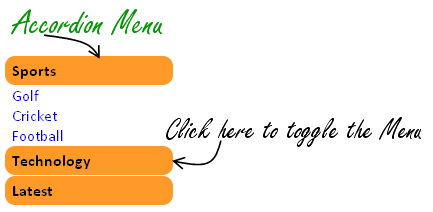




Step 1: Create HTML for your Menu
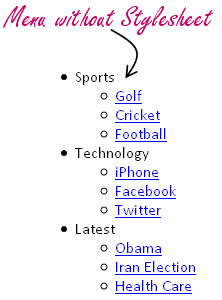
First we will create HTML for displaying out Menu. We will use List in HTML to render the menu and then we will use CSS to apply some style. Following will be our Menu code:<ul id="accordion">
<li><div>Sports</div>
<ul>
<li><a href="#">Golf</a></li>
<li><a href="#">Cricket</a></li>
<li><a href="#">Football</a></li>
</ul>
</li>
<li><div>Technology</div>
<ul>
<li><a href="#">iPhone</a></li>
<li><a href="#">Facebook</a></li>
<li><a href="#">Twitter</a></li>
</ul>
</li>
<li><div>Latest</div>
<ul>
<li><a href="#">Obama</a></li>
<li><a href="#">Iran Election</a></li>
<li><a href="#">Health Care</a></li>
</ul>
</li>
</ul>
Code language: HTML, XML (xml)
Step 2: Apply some style to your Menu using CSS
Lets apply some stylesheet to our menu. Copy following CSS code in your HTML file:#accordion {
list-style: none;
padding: 0 0 0 0;
width: 170px;
}
#accordion div {
display: block;
background-color: #FF9927;
font-weight: bold;
margin: 1px;
cursor: pointer;
padding: 5 5 5 7px;
list-style: circle;
-moz-border-radius: 10px;
-webkit-border-radius: 10px;
border-radius: 10px;
}
#accordion ul {
list-style: none;
padding: 0 0 0 0;
}
#accordion ul{
display: none;
}
#accordion ul li {
font-weight: normal;
cursor: auto;
background-color: #fff;
padding: 0 0 0 7px;
}
#accordion a {
text-decoration: none;
}
#accordion a:hover {
text-decoration: underline;
}
Code language: CSS (css)
Step 3: Give life to your Menu using jQuery
So our basic skeleton is complete. We have used HTML code to display the Accordion menu content and then have applied CSS stylesheet to improve the usability. Let us add life to this accordion menu using jQuery. Copy following jQuery code to the HTML page:$("#accordion > li > div").click(function(){
if(false == $(this).next().is(':visible')) {
$('#accordion ul').slideUp(300);
}
$(this).next().slideToggle(300);
});
$('#accordion ul:eq(0)').show();
Code language: JavaScript (javascript)$('#accordion ul:eq(0)').show();
Code language: JavaScript (javascript)eq(0) in above code.

NIce post , i will try to work it out
This is cool! Thanks for sharing
Nice menu, but it would be better if the html code was valid (whether it is html or xhtml).
The “level-two” list blocks (ul) should be nested in the inherent item, like explained in the third example there : http://reference.sitepoint.com/html/ul
@Cilia – I have modified the source and made it valid HTML. Have a look. Now the sub
<UL>is part of main accordion<LI>. This should not break the HTML validation now.your site is very helpful
him
very nice post …
tested in IE6,7,8- it doesn’t work..
why do you ven us IE7 some people went in prison because they used it
Thanks, nice and in ul li great
If you use valid HTML (as cilia pointed out above), then this worked for me:
$(“#accordion > li”).click(function(){
if(false == $(this).children().is(‘:visible’)) {
$(‘#accordion > li > ul’).slideUp(300);
}
$(this).children().slideToggle(300);
});
$(‘#accordion > li > ul:eq(0)’).show();
You may want to modify the css as the rounded corners don’t look good as the ul is now inside the li.
… and if you have a menu where some items do not have submenus, then add the ‘ul’ filter:
$(this).children(‘ul’).slideToggle(300);
otherwise it will roll up itself.
thats awsome for a biginner ….
Hi,
This is not work on IE 6/7. Please anybody can tell me how it can be possible??
Thanks,
Pravin.
nice tutorial, I have also wrtten a simple on on my blog here:
http://ranacseruet.blogspot.com/2009/12/simple-accordion-using-jquery.html
The reason this does not to work in IE is due to the fact that the HTML used is invalid, and ot a problem with IE (for a change).
You can’t put a UL directly inside another UL. The sub menu UL needs to go inside the LI but that requires a rewite of the css and javascript.
When I’ve worked it out I’ll post a solution. Unless someone beats me to it.
Apologies, I just noticed someone already pointed out the invalid HTML in an earlier comment
Love This!
Awesome tutorial on Jquery. I was looking for such an article. Thanks dude!
Awesome tutorial on Jquery.
I have implemented this code works fine for me.
I had a question.
How can we modify this menu id submenu is menu and there is submenu below it.
In other words if we have tree like menu.
Hi,
I love this menu, firstly is it okay to use on a website for a charity?
Secondly, Do you have a workaround so that it works okay in IE6/IE7???
Any help would be much appreciated!
Keep up the great work,
Chris
@Chris: Ofcourse you can use this on any website. This tutorial is to just demonstrate in simple way how to create an accordion menu. Feel free to use and if possible link back to this tutorial so that others can find this.
Regarding the workaround, I will suggest you to take a look at jQuery UI Accordion: http://jqueryui.com/demos/accordion/
Hope this will help.
Most of your codes are not cross platform,like this one doesnt work in the internet explorer so a waste for us as not cross platform…
great ……….
nice sliding :D
Beautiful, great, nice!!! But it won’t work in IE! Stupid browser….
Thanks, nice and in ul li great
Thanks for useful example, but XianWare solution was quite good for me. I’ve got valid html in my wordpress blog
Nice tutorial… thanks for sharing
here an another jQuery menu link:
http://www.bijusubhash.com/blog/redbrown-drop-down-menu-using-jquery-and-css
This is great but you made some mistakes and in the end your site won’t validate with that.
for example, your lists aren’t organized correctly, they should be (note, the lists within the lists are actually put inside the top buttons list item, so Sports hockey
Sports
Golf
Lacrosse
Hockey
I just like valid code, otherwise this is cool!
Cool stuff you solved my problem
Hi,
First of all thanks for the tutorial. It really helped me out for an important site.
But there is one more thing I’d like to do.
I want menu title color to be changed when clicked on it.
I can do that when you go to the page with a simple class=”active” solution but when you’re viewing submenus without opening any pages, how to do that?
hi
thanks for the tutorial.as successfully completed my accordion menu..
but now i need a struts2 jquery horizontal menu..
can any body help me out please..
Thanks,
This is very easy and nice tutorial to understand and use accordian.
What if you have more levels?
With this solution only the first level will open and collapse.
Hi,
Very simple and stylish!
Unfortunately oval background don’t work in IE9, do you know how to fix it?
thanks
how can i change the code for the menu to respond on mouseover instead of onclick?..can any1 help plz
Hello, I would like to ask: where I should put the Step 3: Give live to your menu…? I would like to integrate this menu to my Blogger templates. Thank you for your kindly help. Vasek
On #accordion div, I think you forgot to put px after the three 5… (5 5 5 7px).. thanks for the article!
Hi, this is quite a nice script. I was wondering how I could have the submenu to drop down on mouse over and how to add horizontal slide out to the right of the submenu items when you mouse over them.
Awesome!
As valid today as it was when you created this tutorial.
Jquery UI is such a pain, especially with such an elegantly simple solution such as yours!
(Although, if you are using Jquery, why not use the “$(document).ready(function() {});”)
hai it’s nice but this radius is not work in explorer
could i choose default .show() to be number 3 like “latest” in an example
To show third category by default and hide rest, you can use following code. Note that
eq(2)selects the third list which in this case is “Latest”.Hi,
Yes, very nice little accordion, but. I do not want the first sub menu to show when the page loads. when i comment out that line, the accordion closes when I click on a child of that menu. I want that menu to stay open while on those child menu choices. I only want it to close wen they click on a different parent. does that make sense? look my client site on the ‘events’ page. the accordions are on the 2nd & 3rd buttons. I am still cleaning up the templates so only the 2nd accordion has live links. the links with a # href, hold their position just fine.
Thank you
All I get is a text box with the 3 categories and their children listed. New to this coding thing, so maybe I need to add something in the HTML part.
I have used this in web user control, and register that in an .aspx form, but it is not working,
If i click the menu it does not displays anything.
Note: I include all the code that u have posted here!
I have run this in Google chrome but it is not working, help me!
@Ganesh – I am using Chrome. Its working perfectly for me. Check this demo in Chrome – http://viralpatel.net/demo/jquery-accordion-menu-example/
hey thanks for Viral Patel actualy i am searching for solution in ie for more than 24 hrs this is awesome thanks
How can i use this for bind data from database in asp.net c#
,
Thanks you so much… no words… stunning script!
Excellent script.. Thanks a LOT for sharing…!!!
nice post!!!!!!!!!!!!!!
Cute accordion.
It works in IE too (at least it does in my computer) :)
Thanks.
i try to use this menu in mvc-3, but i don’t understand because jQuery code is not working, can everyone help me?
please which of the section should i paste the J query code
please which part of my html should i paste the jquery code, its not working for me.
Nice tutorials, Thanks
Thanks, how to create one more ul inside the ul. this code support one more level and how to do ?
Thank you very much for the tutorial! It’s easy and useful.
:D
Hi there, i wonder, instead of clicking in the menu and the categorys dropdown, it is possible to rollover whit the mouse in the menu button and the subcategrys slide down automatacly?
Sure, just replace
.clickwith.mouseoverin the javascript.Here’s a live demo: http://jsbin.com/axasuq/edit#html,live
Thanks, how to create one more ul inside the ul. this code support one more level and how to do ?
Hi. Is there a way to highlight the tab which is opened, eg, when sports is clicked, it is black with orange text?
Hi David,
Did you find solution for your question. If you have solution can you please share with me.
Currently I’m in the same situation. Your immediate reply is appreciated.
Thanks
the menu is not compatible with Internet Explore! it can run in IE ?
It does appear to be broken in IE v9. Not on the iframed version running on this page, but if you click on the VIEW DEMO version it is.
I have checked your menu, but it is not working in internet explorer 7. Is there any solution to make it work in ie 7
It seems that it is quirks mode that is breaking it. You will need to force the browser out of quirks mode with the doc type. Also the rounded borders wont show in ie6-8 as it doesnt support it.
How do u switch to horizontal mode? Thanks!
HELP! I’ve tried this and every single Accordion Menu tutorial I can find and always come up with the same result! The demos work fine on the website, but even when I copy and paste into my own files, it won’t work! The menus will NOT expand!
Hi, Check if JQuery is properly included in your html. Also the javascript is invoked. If still doesn’t work, send me the code and I’ll have a look.
It’s a great solution and help me so much. really thank you. Salute
Thanks, for the nice tutorial. It helps me a lot! :-))
Thank you so much!!! Days of searching, multiple cups of coffee later I have found this and can finally move forward! I am new to web design and am grateful for your tut!
In your tutorial you have the “Sports”, “Technology” and “Latest” surrounded by a div.
But then, in your running demo the divs are not there. I do need the divs but when I put them in my code then the example does not work.
Hi,
Thanks for the nice tutorial.
Can I gave the the submenu for an image click which is placed on right of a main category?
Hi, thanks for ur menu tutorial.. working good.. and i hav one question.. how to write position for menu..
if i hav 50 links in the menu.. and i click on 40th menu, position is not working.. pls help..
great job, but seems to have problems with IE, is there any update?? to work with IE
Very nice tutorial, great job…
Thanks a lot! And thumbs up for your support on this site!
Hi, thank you for the easy to use Accordion menu. By the way, how do I create the stylesheet into a css file and refer to it. Regards, Andrew Goh
Hi, I’ve found this little tutorial very useful but I have an issue. When I am trying to aply the stylesheet nothing happens. I linked the stylesheet from the html file and I also tried to modify the parameters like the border color or background color, but nothing happens. Would you be kind and guide me to fix or solve this problem, please?
Hi there and thanks for the tutorial!!
My code looks like this, and the accordion effect works perfectly!:
Series
China
Klima Knud
Reportage
Avantgarde world music from the toilet
Portraits
Raske Penge
Due to the fact that i have a visible background in my menu and that my ‘s are wider than the ‘s they remain within, i would like to know if there is any way that the menu width can be set to adjust to the ‘s width, as long as the ‘s are hidden?
sorry, i forgot the code field, here’s my code:
Due to the fact that i have a visible background in my menu and that my div‘s are wider than the li‘s they remain within, i would like to know if there is any way that the menu width can be set to adjust to the div‘s width, as long as the li‘s are hidden?
Thanks for a great plugin. But this is not working in IE7. I wan to make this compatable with IE 7+, Can you help me?
Thank your tutorial.
but my menu can’t expand.
it will close very fast.
can you help me?
i refresh and it’ work.
it’s fine :D
I cannot get this to work in iE. I was reading through the thread, but not clear as to the solution. Can someone assist? Thank you.
First Thank you for the great tutorial
It works in I.E 9 : may be upgrade your browser.
Plus ,
1) these are not working in IE. So, comment them and try again
2) Make sure you added the Jquery after style ( just safeguarding)
….
3) write in complete format
Thank your tutorial
How to get the current index value
Is there a way to make the menu fully expand if a user has javascript disabled?
hi…warm greetings!
please can u let me know how to fetch the menus from the database…
the codings are below:
hi!! it posible to add Active state in these accordion? reply is great help.
I applied everything as it is but its not executing… why? my code as follows
$(document).ready(function () {
$(“#accordion > li”).click(function(){
if(false == $(this).next().is(‘:visible’)) {
$(‘#accordion > ul’).slideUp(300);
}
$(this).next().slideToggle(300);
});
$(‘#accordion > ul:eq(0)’).show();
});
Home
About Us
Price Plan
Portfolio
Contact Us
Thank you. Nice accordion menu.
Btw I’m having a problem with this. Whenever I click on any menu item, it slides down and then it slightly slide up a little bit, like jerking. I don’t want this. How to sort out this problem?
Wow ! Simple yet effective. Thanks man !
Would you have an example of multi-level displays? i.e. one menu with accordion and one of the options in this accordion having another menu, which in turn is an accordion menu with options. – i.e. 3 levels?
Really use full ,,,
Thank you..
Very nice. Is there a way that after clicking on one of the URL’s from the accordion menu that in the next page the same tab is opened unfolded which contains the URL instead of the first as default.
How to add up down arrow
I will also enjoy to see that!
Thanks! really useful to beginners :)
Super example and very easy to implement, thanks very much indeed.
I wonder if there’s something that needs to be added for the accordion to appear ‘closed’ when first loaded please? The top item always seems to be open when I load it.
Answered my own question – I removed the line
Now works perfectly – again my thanks for this superb file which I’m using as a mobile version of my website (currently a work in progress – but the navigation now works OK with this accordion)
Is there a way that after clicking on one of the URL’s from the accordion menu that in the next page the same tab is opened unfolded which contains the URL instead of the first as default.
I also have the same question as above. Anyone can help?
this is Great!! thanku :)
This is fantastic! I am a graphic design student and creating a webpage for an assignment. I removed the line:
as someone suggested above but the accordian tab is still open on the page. I’d like all of them to be closed and only open on clicking. Have done a big long search for the answer to no avail. Anyone got a tip?
Once again, wonderful to find this accordion, it looks great and am rapt was so simple to follow! Yay. Thankyou!
Thanks so much for your instruction. Could you please show me how to add it to the Google Site.
Thank You!
Thankx for this usefully code
Thanx man… great work
Viral,
It was nice tutorial. Is there a way to highlight the tab which is opened, eg, when sports is clicked, it is black with orange text?
Thanks
Gokhale
nice and easy example
The second level UL should be inside the LI tags for valid HTML. If you make the HTML valid then it doesn’t work
My version [
]
Hello Pleas help me out….
instead of this :
I want to open a ul whoes li having a class=’active’
Ex:
here i want make “Technology” menu visible
Thanks, it work Gr8 for me
Hi, thanks for the tip – the accordian works, but my entire screen scrolls, when an item in my menu is clicked. Please tell me how I can prevent this.
Thanks in advance.
I am really thankful to the owner of this web site who
has shared this impressive article at here.
It works fantastic… it’s a great tutorial BUT — It won’t validate in HTML Validator.
The error is in the layout of my menu
“Element ul not allowed as child of element ul in this context. ”
Any advice?
Thanks,
Rick
Thanks, but this is not valid because if you watch source you will find:
HTML want
Thanks, and sorry for this comment.
Regards.
Great tutorial but I have one question. I want to make it so no menu items show when the page first loads. I took out this line:
$(‘#accordion ul:eq(0)’).show();
but the first menu item still shows by default. Can you help me please?
this accordion is stupid, because it will not work an li does not have any ul. or subcategory.
Nice work! Can I keep open categories when I click on another one? Because like this, every time you click on a closed category when another one is open, that one is closed.
I love your work but I have a question as to the title of the main menus are at the center
Hello everyone,
I’ve a problem with the menu in firefox.
This is how I see it: http://www.itattitude.com/wp-content/uploads/2015/03/menu.jpg
Please anyone know why?
The menu is perfect in Chrome and IE.
Thank you!
It’s nice. What I searched , got it here.
Thanks