In this tutorial we will write a CRUD application in Hibernate using Java 5 Annotation. For this we will use our previous tutorial Hibernate Maven MySQL hello world example (XML Mapping) as base and convert it from XML Mapping to Annotation.
[sc name=”Hibernate_Tutorials”] Tools and Technologies used:

- Java JDK 5 or above
- Eclipse IDE 3.2 or above
- Maven 3.0 or above
- Hibernate 3.0 or above
- MySQL 5.0 or above
1. Database Creation
For this tutorial, we will create a simple table “employee” in MySQL. Use following script to create the table.CREATE TABLE `employee` (
`id` BIGINT(10) NOT NULL AUTO_INCREMENT,
`firstname` VARCHAR(50) NULL DEFAULT NULL,
`lastname` VARCHAR(50) NULL DEFAULT NULL,
`birth_date` DATE NOT NULL,
`cell_phone` VARCHAR(15) NOT NULL,
PRIMARY KEY (`id`)
)
COLLATE='latin1_swedish_ci'
ENGINE=InnoDB
ROW_FORMAT=DEFAULT
AUTO_INCREMENT=606
Code language: SQL (Structured Query Language) (sql)2. Create Project Structure
Follow the steps in Hibernate Maven MySQL hello world example (XML Mapping) to create project structure. Or you can directly download the source code from above tutorial in Eclipse. Download: HibernateHelloWorldXML.zip (8 kb)3. Update Hibernate dependency in Maven pom.xml
We are going to use Annotation mapping in Hibernate. Update the maven’s pom.xml file and add following dependencies.<?xml version="1.0" encoding="UTF-8"?><project>
<modelVersion>4.0.0</modelVersion>
<groupId>HibernateCache</groupId>
<artifactId>HibernateCache</artifactId>
<version>0.0.1-SNAPSHOT</version>
<description></description>
<dependencies>
<dependency>
<groupId>org.hibernate</groupId>
<artifactId>ejb3-persistence</artifactId>
<version>1.0.1.GA</version>
</dependency>
<dependency>
<groupId>org.hibernate</groupId>
<artifactId>hibernate-annotations</artifactId>
<version>3.3.1.GA</version>
</dependency>
<dependency>
<groupId>mysql</groupId>
<artifactId>mysql-connector-java</artifactId>
<version>5.1.10</version>
</dependency>
</dependencies>
</project>
Code language: HTML, XML (xml)Code language: HTML, XML (xml)mvn eclipse:eclipse
4. Delete unused Employee.hbm.xml
The Employee.hbm.xml file under /src/main/java/net/viralpatel/hibernate is no more required. Delete this file from project.5. Update Employee entity
The Employee class is simple POJO. We will add Annotations in this class. Update it as follows:package net.viralpatel.hibernate;
import java.sql.Date;
import javax.persistence.Column;
import javax.persistence.Entity;
import javax.persistence.GeneratedValue;
import javax.persistence.Id;
import javax.persistence.Table;
@Entity
@Table(name="EMPLOYEE")
public class Employee {
@Id
@GeneratedValue
private Long id;
@Column(name="firstname")
private String firstname;
@Column(name="lastname")
private String lastname;
@Column(name="birth_date")
private Date birthDate;
@Column(name="cell_phone")
private String cellphone;
public Employee() {
}
public Employee(String firstname, String lastname, Date birthdate, String phone) {
this.firstname = firstname;
this.lastname = lastname;
this.birthDate = birthdate;
this.cellphone = phone;
}
// Getter and Setter methods
}
Code language: Java (java)6. Update Hibernate Utility
In our previous example, we were using Configuration class to generate SessionFactory object. In HibernateUtil we had following line of code:return new Configuration()
.configure()
.buildSessionFactory();
Code language: Java (java)// import org.hibernate.cfg.AnnotationConfiguration;
return new AnnotationConfiguration()
.configure()
.buildSessionFactory();
Code language: Java (java)7. Update Hibernate Configuration file
The hibernate.cfg.xml configuration file needs to be changed to add the new Annotation based entity class Employee.java instead of old XML Mapping Employee.hbm.xml. Open /src/main/resources/hibernate.cfg.xml and replace following line:<mapping resource="net/viralpatel/hibernate/Employee.hbm.xml"/>
Code language: HTML, XML (xml)<mapping class="net.viralpatel.hibernate.Employee"/>
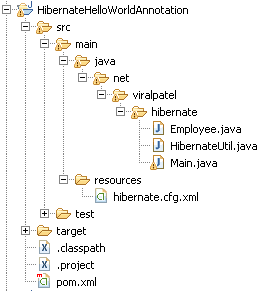
Code language: HTML, XML (xml)8. Review Final Project Structure
Review your project structure. It should be like:
9. Execute project
Execute the Main.java class and see output.******* READ *******
Total Employees: 200
******* WRITE *******
201 Jack Bauer
******* UPDATE *******
Name Before Update:Paula
Name Aftere Update:James
******* DELETE *******
Object:null
Code language: Java (java)


Awesome Tutorial.
In pom.xml, currently, the annotations, JPA etc.. are part of hibernate-core dependency.
Please do update Dependencies in pom.xml to:
(Remove extra “”). Some issues with posting comment here
 <>
 <>mysql<>
 <>mysql-connector-java<>
 <>5.1.18<>
 <>
<>
<>org.hibernate<>
<>hibernate-core<>
<>4.0.0.Final<>
<>
<>
<>junit<>
<>junit<>
<>3.8.1<>
<>test<>
<>
thanks VP…thanks for a wonderful food .
Thanks
Zaks
How to connect with oracle………
how to connect with oracle 10g
Hi Sam, To connect with Oracle database use following settings in hibernate configuration file.
Im not able to work with Hibernate annotations when i tried to run the project im getting Unable to instantiate default tuplizer [org.hibernate.tuple.entity.PojoEntityTuplizer]
Exception in thread “main” java.lang.ExceptionInInitializerError error
Can anyone share the JARS for Hibernates along with annotations hibernate official site is blocked for us in office
Source download link doesn’t work.
Hi Swen, Download link is working. Please check if download is not blocked in your browser.
This is very good tutorial for beginner but only problem at adding supported jar file. otherwise will run this example by a new comer. Thank u bhaava…..
Hi viral…
Thanks for your wonderful blog.
I am trying to integrate hibernate with JSF. Do you any example for this. I tried to google for this but did not find any useful example.
Awesome tutorial, I looked for Hibernate project with maven on Youtube, google and finally got your blog.
I worked perfectly.
Thank you so much!!!!!!
Hi,
I am using annotations instead of hdm files.
Database is created properly,but whenever i hit to db server for fetching data sometime data is not getting fetched.
Can you suggest any solutions ?
I have also removed fetchType eager for Onetomany mappings.
You must add core hibernate on pom.xml file.
yani
org.hibernate
hibernate-core
4.3.7.Final
and you will check your dependency versions. don’t skip that ;)
@Paritus
Hi,
Is their a way so that i can add @Table annotation dynamically at run time.
Value of Name attribute in Table annotation must be dynamic.
I tried Javassist but it didn’t satisfied me. I’m losing fuctionality of hibernate in auto genertion of table if table doesn;t exist in DB.
Pls help me.
Thank you.
How to run that plz tell me once.
Thank you so much for your clear explanation. I have got so many knowledge from your website.
i am using Netbeans 8.0.2 but
// import org.hibernate.cfg.AnnotationConfiguration;
return new AnnotationConfiguration()
.configure()
.buildSessionFactory();
does not work how can i solve it?
i am using netbeans 8.0.2 but
// import org.hibernate.cfg.AnnotationConfiguration;
return new AnnotationConfiguration()
.configure()
.buildSessionFactory();
does not work how can i solve it?