[ad name=”AD_INBETWEEN_POST”] Let us make a complete end-to-end application using Spring 3.0 MVC as front end technology and Hibernate as backend ORM technology. For this application we will also use Maven for build and dependency management and MySQL as database to persist the data. The application will be a simple Contact Manager app which will allow user to add new contacts. The list of contacts will be displayed and user will be able to delete existing contacts.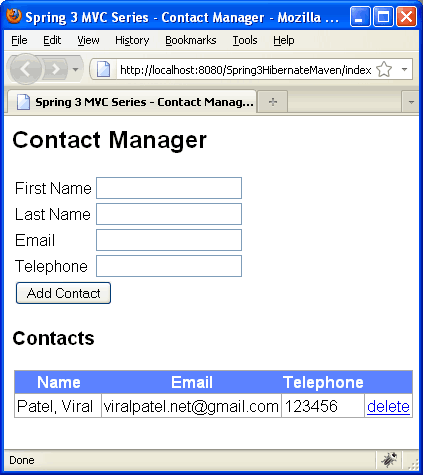


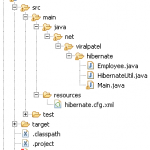
 Unzip the source code to your hard drive and import the project in Eclipse. Once the project is imported in Eclipse, we will create package structure for Java source. Create following packages under src/main/java folder. If you read this far, you should follow me on twitter here.
Our Goal
As describe above, our goal is to create a contact manager application which will allow the user to add a contact or remove it. The basic requirement of the Contact Manager app will be:- Add new contact in the contact list.
- Display all contacts from contact list.
- Delete a contact from contact list.

Application Architecture
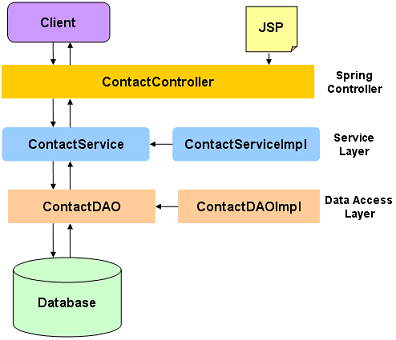
We will have a layered architecture for our demo application. The database will be accessed by a Data Access layer popularly called as DAO Layer. This layer will use Hibernate API to interact with database. The DAO layer will be invoked by a service layer. In our application we will have a Service interface called ContactService.
Getting Started
For our Contact Manager example, we will use MySQL database. Create a table contacts in any MySQL database. This is very preliminary example and thus we have minimum columns to represent a contact. Feel free to extend this example and create a more complex application.CREATE TABLE CONTACTS
(
id INT PRIMARY KEY AUTO_INCREMENT,
firstname VARCHAR(30),
lastname VARCHAR(30),
telephone VARCHAR(15),
email VARCHAR(30),
created TIMESTAMP DEFAULT NOW()
);
Code language: SQL (Structured Query Language) (sql)Creating Project in Eclipse
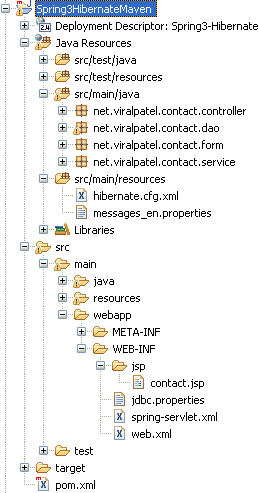
The contact manager application will use Maven for build and dependency management. For this we will use the Maven Dynamic Web Project in Eclipse as the base architecture of our application. Download the below source code: Maven Dynamic Web Project (6.7 KB) Unzip the source code to your hard drive and import the project in Eclipse. Once the project is imported in Eclipse, we will create package structure for Java source. Create following packages under src/main/java folder.
- net.viralpatel.contact.controller – This package will contain Spring Controller classes for Contact Manager application.
- net.viralpatel.contact.form – This package will contain form object for Contact manager application. Contact form will be a simple POJO class with different attributes such as firstname, lastname etc.
- net.viralpatel.contact.service – This package will contain code for service layer for our Contact manager application. The service layer will have one ContactService interface and its corresponding implementation class
- net.viralpatel.contact.dao – This is the DAO layer of Contact manager application. It consists of ContactDAO interface and its corresponding implementation class. The DAO layer will use Hibernate API to interact with database.
Entity Class – The Hibernate domain class
Let us start with the coding of Contact manager application. First we will create a form object or hibernate POJO class to store contact information. Also this class will be an Entity class and will be linked with CONTACTS table in database. Create a java class Contact.java under net.viralpatel.contact.form package and copy following code into it. File: src/main/java/net/viralpatel/contact/form/Contact.javapackage net.viralpatel.contact.form;
import javax.persistence.Column;
import javax.persistence.Entity;
import javax.persistence.GeneratedValue;
import javax.persistence.Id;
import javax.persistence.Table;
@Entity
@Table(name="CONTACTS")
public class Contact {
@Id
@Column(name="ID")
@GeneratedValue
private Integer id;
@Column(name="FIRSTNAME")
private String firstname;
@Column(name="LASTNAME")
private String lastname;
@Column(name="EMAIL")
private String email;
@Column(name="TELEPHONE")
private String telephone;
public String getEmail() {
return email;
}
public String getTelephone() {
return telephone;
}
public void setEmail(String email) {
this.email = email;
}
public void setTelephone(String telephone) {
this.telephone = telephone;
}
public String getFirstname() {
return firstname;
}
public String getLastname() {
return lastname;
}
public void setFirstname(String firstname) {
this.firstname = firstname;
}
public void setLastname(String lastname) {
this.lastname = lastname;
}
public Integer getId() {
return id;
}
public void setId(Integer id) {
this.id = id;
}
}
Code language: Java (java)- First we’ve annotated the class with
@Entitywhich tells Hibernate that this class represents an object that we can persist. - The
@Table(name = "CONTACTS")annotation tells Hibernate which table to map properties in this class to. The first property in this class on line 16 is our object ID which will be unique for all events persisted. This is why we’ve annotated it with@Id. - The
@GeneratedValueannotation says that this value will be determined by the datasource, not by the code. - The
@Column(name = "FIRSTNAME")annotation is used to map this property to the FIRSTNAME column in the CONTACTS table.
The Data Access (DAO) Layer
The DAO layer of Contact Manager application consist of an interfaceContactDAO and its corresponding implementation class ContactDAOImpl. Create following Java files in net.viralpatel.contact.dao package. File: src/main/java/net/viralpatel/contact/dao/ContactDAO.javapackage net.viralpatel.contact.dao;
import java.util.List;
import net.viralpatel.contact.form.Contact;
public interface ContactDAO {
public void addContact(Contact contact);
public List<Contact> listContact();
public void removeContact(Integer id);
}
Code language: Java (java)package net.viralpatel.contact.dao;
import java.util.List;
import net.viralpatel.contact.form.Contact;
import org.hibernate.SessionFactory;
import org.springframework.beans.factory.annotation.Autowired;
import org.springframework.stereotype.Repository;
@Repository
public class ContactDAOImpl implements ContactDAO {
@Autowired
private SessionFactory sessionFactory;
public void addContact(Contact contact) {
sessionFactory.getCurrentSession().save(contact);
}
public List<Contact> listContact() {
return sessionFactory.getCurrentSession().createQuery("from Contact")
.list();
}
public void removeContact(Integer id) {
Contact contact = (Contact) sessionFactory.getCurrentSession().load(
Contact.class, id);
if (null != contact) {
sessionFactory.getCurrentSession().delete(contact);
}
}
}
Code language: Java (java)ContactDAOImpl implements the data access interface ContactDAO which defines methods such as listContact(), addContact() etc to access data from database. Note that we have used two Spring annotations @Repository and @Autowired. Classes marked with annotations are candidates for auto-detection by Spring when using annotation-based configuration and classpath scanning. The @Component annotation is the main stereotype that indicates that an annotated class is a “component”. The @Repository annotation is yet another stereotype that was introduced in Spring 2.0. This annotation is used to indicate that a class functions as a repository and needs to have exception translation applied transparently on it. The benefit of exception translation is that the service layer only has to deal with exceptions from Spring’s DataAccessException hierarchy, even when using plain JPA in the DAO classes. Another annotation used in ContactDAOImpl is @Autowired. This is used to autowire the dependency of the ContactDAOImpl on the SessionFactory.The Service Layer
The Service layer of Contact Manager application consist of an interface ContactService and its corresponding implementation class ContactServiceImpl. Create following Java files innet.viralpatel.contact.service package. File: src/main/java/net/viralpatel/contact/service/ContactService.javapackage net.viralpatel.contact.service;
import java.util.List;
import net.viralpatel.contact.form.Contact;
public interface ContactService {
public void addContact(Contact contact);
public List<Contact> listContact();
public void removeContact(Integer id);
}
Code language: Java (java)package net.viralpatel.contact.service;
import java.util.List;
import org.springframework.beans.factory.annotation.Autowired;
import org.springframework.stereotype.Service;
import org.springframework.transaction.annotation.Transactional;
import net.viralpatel.contact.dao.ContactDAO;
import net.viralpatel.contact.form.Contact;
@Service
public class ContactServiceImpl implements ContactService {
@Autowired
private ContactDAO contactDAO;
@Transactional
public void addContact(Contact contact) {
contactDAO.addContact(contact);
}
@Transactional
public List<Contact> listContact() {
return contactDAO.listContact();
}
@Transactional
public void removeContact(Integer id) {
contactDAO.removeContact(id);
}
}
Code language: Java (java)ContactService and implemented it in class ContactServiceImpl. Note that we used few Spring annotations such as @Service, @Autowired and @Transactional in our code. These annotations are called Spring stereotype annotations. The @Service stereotype annotation used to decorate the ContactServiceImpl class is a specialized form of the @Component annotation. It is appropriate to annotate the service-layer classes with @Service to facilitate processing by tools or anticipating any future service-specific capabilities that may be added to this annotation.Adding Spring MVC Support
Let us add Spring MVC support to our web application. Update the web.xml file and add servlet mapping for org.springframework.web.servlet.DispatcherServlet. Also note that we have mapped url / with springServlet so all the request are handled by spring. File: /src/webapp/WEB-INF/web.xml<?xml version="1.0" encoding="UTF-8"?>
<web-app xmlns:xsi="http://www.w3.org/2001/XMLSchema-instance"
xmlns="http://java.sun.com/xml/ns/javaee"
xmlns:web="http://java.sun.com/xml/ns/javaee/web-app_2_5.xsd"
xsi:schemaLocation="http://java.sun.com/xml/ns/javaee http://java.sun.com/xml/ns/javaee/web-app_2_5.xsd"
id="WebApp_ID" version="2.5">
<display-name>Spring3-Hibernate</display-name>
<welcome-file-list>
<welcome-file>index.html</welcome-file>
</welcome-file-list>
<servlet>
<servlet-name>spring</servlet-name>
<servlet-class>
org.springframework.web.servlet.DispatcherServlet
</servlet-class>
<load-on-startup>1</load-on-startup>
</servlet>
<servlet-mapping>
<servlet-name>spring</servlet-name>
<url-pattern>/</url-pattern>
</servlet-mapping>
</web-app>
Code language: HTML, XML (xml)The jdbc.properties file contains database connection information such as database url, username, password, driver class. You may want to edit the driverclass and dialect to other DB if you are not using MySQL.Code language: HTML, XML (xml)jdbc.driverClassName= com.mysql.jdbc.Driver jdbc.dialect=org.hibernate.dialect.MySQLDialect jdbc.databaseurl=jdbc:mysql://localhost:3306/ContactManager jdbc.username=root jdbc.password=testpass
Oracle Properties
In case you are using Oracle database, you can modify the jdbc properties and have oracle related dialect and other properties:File: /src/main/webapp/WEB-INF/spring-servlet.xmlCode language: HTML, XML (xml)jdbc.driverClassName=oracle.jdbc.driver.OracleDriver jdbc.dialect=org.hibernate.dialect.OracleDialect jdbc.databaseurl=jdbc:oracle:thin:@127.0.0.1:1525:CustomerDB jdbc.username=scott jdbc.password=tiger
<?xml  version="1.0" encoding="UTF-8"?>
<beans xmlns="http://www.springframework.org/schema/beans"
	xmlns:xsi="http://www.w3.org/2001/XMLSchema-instance"
	xmlns:aop="http://www.springframework.org/schema/aop"
	xmlns:context="http://www.springframework.org/schema/context"
	xmlns:jee="http://www.springframework.org/schema/jee"
	xmlns:lang="http://www.springframework.org/schema/lang"
	xmlns:p="http://www.springframework.org/schema/p"
	xmlns:tx="http://www.springframework.org/schema/tx"
	xmlns:util="http://www.springframework.org/schema/util"
	xsi:schemaLocation="http://www.springframework.org/schema/beans http://www.springframework.org/schema/beans/spring-beans.xsd
		http://www.springframework.org/schema/aop http://www.springframework.org/schema/aop/spring-aop.xsd
		http://www.springframework.org/schema/context http://www.springframework.org/schema/context/spring-context.xsd
		http://www.springframework.org/schema/jee http://www.springframework.org/schema/jee/spring-jee.xsd
		http://www.springframework.org/schema/lang http://www.springframework.org/schema/lang/spring-lang.xsd
		http://www.springframework.org/schema/tx http://www.springframework.org/schema/tx/spring-tx.xsd
		http://www.springframework.org/schema/util http://www.springframework.org/schema/util/spring-util.xsd">

	<context:annotation-config />
	<context:component-scan base-package="net.viralpatel.contact" />

	<bean id="jspViewResolver"
		class="org.springframework.web.servlet.view.InternalResourceViewResolver">
		<property name="viewClass"
			value="org.springframework.web.servlet.view.JstlView" />
		<property name="prefix" value="/WEB-INF/jsp/" />
		<property name="suffix" value=".jsp" />
	</bean>

	<bean id="messageSource"
		class="org.springframework.context.support.ReloadableResourceBundleMessageSource">
		<property name="basename" value="classpath:messages" />
		<property name="defaultEncoding" value="UTF-8" />
	</bean>
	<bean id="propertyConfigurer"
		class="org.springframework.beans.factory.config.PropertyPlaceholderConfigurer"
		p:location="/WEB-INF/jdbc.properties" />

	<bean id="dataSource"
		class="org.apache.commons.dbcp.BasicDataSource" destroy-method="close"
		p:driverClassName="${jdbc.driverClassName}"
		p:url="${jdbc.databaseurl}" p:username="${jdbc.username}"
		p:password="${jdbc.password}" />


	<bean id="sessionFactory"
		class="org.springframework.orm.hibernate3.LocalSessionFactoryBean">
		<property name="dataSource" ref="dataSource" />
		<property name="configLocation">
			<value>classpath:hibernate.cfg.xml</value>
		</property>
		<property name="configurationClass">
			<value>org.hibernate.cfg.AnnotationConfiguration</value>
		</property>
		<property name="hibernateProperties">
			<props>
				<prop key="hibernate.dialect">${jdbc.dialect}</prop>
				<prop key="hibernate.show_sql">true</prop>
			</props>
		</property>
	</bean>

	<tx:annotation-driven />
	<bean id="transactionManager"
		class="org.springframework.orm.hibernate3.HibernateTransactionManager">
		<property name="sessionFactory" ref="sessionFactory" />
	</bean>
</beans>
Code language: HTML, XML (xml)- jspViewResolver bean – This bean defined view resolver for spring mvc. For this bean we also set prefix as “/WEB-INF/jsp/” and suffix as “.jsp”. Thus spring automatically resolves the JSP from WEB-INF/jsp folder and assigned suffix .jsp to it.
- messageSource bean – To provide Internationalization to our demo application, we defined bundle resource property file called messages.properties in classpath.
Related: Internationalization in Spring MVC - propertyConfigurer bean – This bean is used to load database property file jdbc.properties. The database connection details are stored in this file which is used in hibernate connection settings.
- dataSource bean – This is the java datasource used to connect to contact manager database. We provide jdbc driver class, username, password etc in configuration.
- sessionFactory bean – This is Hibernate configuration where we define different hibernate settings. hibernate.cfg.xml is set a config file which contains entity class mappings
- transactionManager bean – We use hibernate transaction manager to manage the transactions of our contact manager application.
<?xml version='1.0' encoding='utf-8'?>
<!DOCTYPE hibernate-configuration PUBLIC
    "-//Hibernate/Hibernate Configuration DTD//EN"
    "http://hibernate.sourceforge.net/hibernate-configuration-3.0.dtd">

<hibernate-configuration>
    <session-factory>
        <mapping class="net.viralpatel.contact.form.Contact" />
    </session-factory>

</hibernate-configuration>
Code language: HTML, XML (xml)label.firstname=First Name
label.lastname=Last Name
label.email=Email
label.telephone=Telephone
label.addcontact=Add Contact
label.menu=Menu
label.title=Contact Manager
label.footer=&copy; ViralPatel.net
Code language: HTML, XML (xml)Spring MVC Controller
We are almost done with our application. Just add following Spring controller class ContactController.java to net.viralpatel.contact.controller package. File: /src/main/java/net/viralpatel/contact/controller/ContactController.javapackage net.viralpatel.contact.controller;
import java.util.Map;
import net.viralpatel.contact.form.Contact;
import net.viralpatel.contact.service.ContactService;
import org.springframework.beans.factory.annotation.Autowired;
import org.springframework.stereotype.Controller;
import org.springframework.validation.BindingResult;
import org.springframework.web.bind.annotation.ModelAttribute;
import org.springframework.web.bind.annotation.PathVariable;
import org.springframework.web.bind.annotation.RequestMapping;
import org.springframework.web.bind.annotation.RequestMethod;
@Controller
public class ContactController {
@Autowired
private ContactService contactService;
@RequestMapping("/index")
public String listContacts(Map<String, Object> map) {
map.put("contact", new Contact());
map.put("contactList", contactService.listContact());
return "contact";
}
@RequestMapping(value = "/add", method = RequestMethod.POST)
public String addContact(@ModelAttribute("contact")
Contact contact, BindingResult result) {
contactService.addContact(contact);
return "redirect:/index";
}
@RequestMapping("/delete/{contactId}")
public String deleteContact(@PathVariable("contactId")
Integer contactId) {
contactService.removeContact(contactId);
return "redirect:/index";
}
}
Code language: Java (java)- listContacts method – This method uses Service interface ContactServer to fetch all the contact details in our application. It returns an array of contacts. Note that we have mapped request “/index” to this method. Thus Spring will automatically calls this method whenever it encounters this url in request.
- addContact method – This method adds a new contact to contact list. The contact details are fetched in
Contactobject using@ModelAttributeannotation. Also note that the request “/add” is mapped with this method. The request method should also be POST. Once the contact is added in contact list usingContactService, we redirect to /index page which in turn callslistContacts()method to display contact list to user.
Related: Forms in Spring MVC - deleteContact method – This methods removes a contact from the contact list. Similar to
addContactthis method also redirects user to /index page once the contact is removed. One this to note in this method is the way we have mapped request url using @RequestMapping annotation. The url “/delete/{contactId}” is mapped thus whenever user send a request /delete/12, the deleteCotact method will try to delete contact with ID:12.
<%@taglib uri="http://www.springframework.org/tags" prefix="spring"%>
<%@taglib uri="http://www.springframework.org/tags/form" prefix="form"%>
<%@taglib uri="http://java.sun.com/jsp/jstl/core" prefix="c"%>
<html>
<head>
<title>Spring 3 MVC Series - Contact Manager | viralpatel.net</title>
</head>
<body>
<h2>Contact Manager</h2>
<form:form method="post" action="add.html" commandName="contact">
<table>
<tr>
<td><form:label path="firstname"><spring:message code="label.firstname"/></form:label></td>
<td><form:input path="firstname" /></td>
</tr>
<tr>
<td><form:label path="lastname"><spring:message code="label.lastname"/></form:label></td>
<td><form:input path="lastname" /></td>
</tr>
<tr>
<td><form:label path="email"><spring:message code="label.email"/></form:label></td>
<td><form:input path="email" /></td>
</tr>
<tr>
<td><form:label path="telephone"><spring:message code="label.telephone"/></form:label></td>
<td><form:input path="telephone" /></td>
</tr>
<tr>
<td colspan="2">
<input type="submit" value="<spring:message code="label.addcontact"/>"/>
</td>
</tr>
</table>
</form:form>
<h3>Contacts</h3>
<c:if test="${!empty contactList}">
<table class="data">
<tr>
<th>Name</th>
<th>Email</th>
<th>Telephone</th>
<th>&nbsp;</th>
</tr>
<c:forEach items="${contactList}" var="contact">
<tr>
<td>${contact.lastname}, ${contact.firstname} </td>
<td>${contact.email}</td>
<td>${contact.telephone}</td>
<td><a href="delete/${contact.id}">delete</a></td>
</tr>
</c:forEach>
</table>
</c:if>
</body>
</html>
Code language: HTML, XML (xml)Download Source code
Spring3MVC_Hibernate_Maven.zip (16 KB)That’s All folks
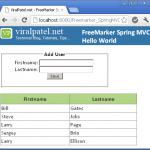
Compile and execute the Contact manager application in Eclipse. If you read this far, you should follow me on twitter here.

It’d be better if your example used bean validator also.
Viral,
Great job! I am newer to Spring/Hibernate but can created 1st project by following your example. There is one question:
You created ContactDAO.java and its implementation ContactDAOImpl.java, but ContactService.java and ContactServiceImpl.java are almost copies of ContactDAO.java and ContactDAOImpl.java. Could you explain? I found another sample doesn’t have ContactService.java/CntactServiceImpl.java.
Thanks very much
James
Dear Viral,
Firstly, i just want to say thank you. Great post, save me lots of time, but i still got a question below :
I tried to run your project, it work properly, but when i tried to use Maven test command to run unit test cases which are based on AbstractTransactionalJUnit4SpringContextTests, it failed. the test case only pass If i run the test case individually.
I did lots of googling on the internet, someone suggest this is probabaly caused by duplicate copies in Maven Dependencies. I guess it may be caused by conflict between spring-asm-3.0.2.jar and hibernate’s asm-3.1.jar, my question is how to exclude one of the duplicate asm jar from the maven dependencies.
I tried to add following into my pom.xml
org.hibernate
asm-all
but dosn’t work
can you give me any idea and help me out, thank you very much in advance.
Good article for a spring learner.
To James Chen – In this particular Example ContactService and ContactServiceImpl are almost same but ContactDAO and ContactDAOImpl actually present Data Access specific code and methods, which may be implemented using hibernate, toplink or pure jdbc etc.
What ContactService and ContactServiceImpl present is methods to access data To/from Data Access Layer (i.e. ContactDAO) which is actually independent of data access implementation. There may be a method like addAndListContact() which may be different than in ContactDAO and may call two of ContactDAO’s method.
I think u got my point.
Thanks
good Example!.
I want to make simple MVC web
this example used [action, service, dao] 3steps.
I want to only [action + dao] except service layer
because my web is so simple never want service layer
I just want call dao method in action Controller
sadly I can’t find [action +dao] sample in google..
how can I that? thank’s any answer.
Hi,
Thanks for this tutorial. I made this as basis for my first spring-hibernate annotations project. However, I have encountered an error when I deployed it on Tomcat. The error is:
Could not initialize class org.hibernate.cfg.AnnotationConfiguration
I have the following jar files on my WEB-INF/lib, but still the error persist.
dom4j-1.6.1.jar
hibernate-annotations-3.4.0.GA.jar
hibernate-core-3.3.1.GA.jar
hibernate-commons-annotations-3.1.0.GA.jar
log4j-1.2.15.jar
slf4j-api-1.5.6.jar
slf4j-log4j12-1.5.6.jar
Did I miss some jar or configuration files?
Your help will be greatly appreciated.
Thanks
I have tried with with eclipse but I am getting the following error:
org.springframework.beans.factory.BeanDefinitionStoreException: Unexpected exception parsing XML document from ServletContext resource [/WEB-INF/spring-servlet.xml]; nested exception is java.lang.NoClassDefFoundError: org/aopalliance/intercept/MethodInterceptor
Is there anything specific that I am supposed to do? I can send you the files but they are exactly as you have in your download part.
Great tutorial, great app. Well, except for the fact that the source code does not compile and does not run (even after adding missing dependencies) under Tomcat 6 :-(
I have this error:
nested exception is org.springframework.beans.factory.BeanCreationException: Could not autowire field: private springapp.dao.ContactService springapp.web.ContactController.contactService; nested exception is org.springframework.beans.factory.NoSuchBeanDefinitionException: No matching bean of type [springapp.dao.ContactService] found for dependency: expected at least 1 bean which qualifies as autowire candidate for this dependency. Dependency annotations: {@org.springframework.beans.factory.annotation.Autowired(required=true)}
any ideas?
very nice example Thanks alot.,
@Selvan – Thanks :)
Great Tutorial Viral. Helped me to revise my knowledge on spring and hibernate.
Can you also have a tutorial with table associations (e.g: One-to-One and One-to-Many etc..)
@Venu – thanks for the kind words. I will do write about Hibernate table associations in future tutorials.
Part 7: Create Spring 3 MVC Hibernate 3 Example using Maven in Eclipse
link found to be broken. Can you update me once it fixed.
@Naveen – the link is working for me.. please check again. Here is direct link for part7 – Spring3 MVC Hibernate example
Download Source code links at the bottom of your post is redirecting to 404. Could you please check it once.
I am running your application in tomcat 7 , I am getting the following error. Any help will be apprecciated
SEVERE: Servlet /Spring3HibernateMaven threw load() exception
java.lang.ClassNotFoundException: org.springframework.web.servlet.DispatcherServlet
at org.apache.catalina.loader.WebappClassLoader.loadClass(WebappClassLoader.java:1671)
at org.apache.catalina.startup.Bootstrap.main(Bootstrap.java:431)
Dec 28, 2010 8:45:50 AM org.apache.coyote.http11.Http11Protocol start
INFO: Server startup in 613 ms
Dec 28, 2010 8:46:59 AM org.apache.catalina.core.StandardWrapperValve invoke
INFO: Servlet spring is currently unavailable
@Tertes – From the error it seems that the server runtime library is not included. Include the server runtime library in classpath and try.
Hi Viral,
Could you please elaborate on sunver run time. I am newbie , which libraries should I add to class path and from where.
Thanks
First and foremost thanks for such a well written example.to solve the problem, I added index.html to the WEB-INF directory, and when I pointed my browser to http://localhost:8080/Spring3HibernateMaven-0.0.1-SNAPSHOT/index
it worked.
I need to point out that I had to change the hibernate-entity from version 3.3.1.ga to version 3.2.1.ga. With the version 3.3.1.ga since I was getting the following hibernate error only when I was trying to add a contact:
org.springframework.web.util.NestedServletException: Request processing failed; nested exception is org.hibernate.exception.SQLGrammarException
org.hibernate
hibernate-entitymanager
3.2.1.ga
<!– 3.3.1.ga –>
I found this related problem
http://opensource.atlassian.com/projects/hibernate/browse/HHH-4154
Here is my environments:
MySQL 5.5, Hibernate EntityManager 3.2.1.ga,
Test run with Tomcat Apache Tomcat/7.0.5 (java version “1.6.0_23”
Java(TM) SE Runtime Environment (build 1.6.0_23-b05)) and Spring Framework 2.5.3.
I just downloaded the example and it doesn’t even seem to compile… I imported it in an Eclipse STS as a maven project and there are some big dependency problems. I manually installed the hibernate-entitymanager-3.3.2.GA.jar from http://mvnrepository.com/artifact/org.hibernate/hibernate-entitymanager/3.3.2.GA
The SessionFactory is nowhere to be found and the @Entity annotation does not even seem to exist.
Here are some jars that definitely are missing from your pom: hibernate-core-3.5.2-Final.jar , hibernate-jpa-2.0-api-1.0.0.Final.jar.
Could you please tell me where i could find the working version of your example, or what should i do to make it work?
Great Example. Thank you! But I want to edit the contact. Could you please post the edit functionality also?
Yes, the edit example would be perfect sample!
Great Tutorial. Good start point to understand Spring Stack.
great tutorial! and thanks a lot for sharing.
i tried it in STS 2.5 and the following exception occur.
please tell me what should i do?
org.springframework.beans.factory.BeanCreationException: Error creating bean with name ‘contactController’: Injection of autowired dependencies failed; nested exception is org.springframework.beans.factory.BeanCreationException: Could not autowire field: private net.viralpatel.contact.service.ContactService net.viralpatel.contact.controller.ContactController.contactService; nested exception is org.springframework.beans.factory.BeanCreationException: Error creating bean with name ‘contactServiceImpl’: Injection of autowired dependencies failed; nested exception is org.springframework.beans.factory.BeanCreationException: Could not autowire field: private net.viralpatel.contact.dao.ContactDAO net.viralpatel.contact.service.ContactServiceImpl.contactDAO; nested exception is org.springframework.beans.factory.BeanCreationException: Error creating bean with name ‘contactDAOImpl’: Injection of autowired dependencies failed; nested exception is org.springframework.beans.factory.BeanCreationException: Could not autowire field: private org.hibernate.SessionFactory net.viralpatel.contact.dao.ContactDAOImpl.sessionFactory; nested exception is java.lang.NoClassDefFoundError: Ljavax/transaction/TransactionManager;
thanks anyway
I experienced the same error. Does anyone have any clue as to how to solve this?
i am facing the same problem.
Same problem for me… Please share your solution if any…
I’m facing the same pb too… thanks for sharing your solution
Hi, Please check if you have jta.1.1.jar in your classpath. Add following in your pom.xml.
To those who are having trouble getting the tutorial to run, the following may help:
I was able to run the example after making the following changes to pom.xml. First, I added the hibernate repositories. The instruction for this can be found here:
http://community.jboss.org/wiki/MavenGettingStarted-Users
Second, I changed the hibernate version from 3.3.2.ga to 3.3.2.GA. (change ga to uppercase)
Third, I erased the .m2 maven repository directory, so that the local repository was rebuilt.
I discovered that after changing 3.3.2.ga to 3.3.2.GA, i had to erase the .m2 directory or the project would not compile.
I also discovered that if another project that used the hibernate libraries had successfully compiled, the tutorial would run without changing the pom. This may explain why some people have had success, while others have had problems.
Yes, when you change 3.3.2.ga to 3.3.2.GA project would not compile, bur you dont have to erase whole .m2 directory. Erasing hibernate directory in repository is enough “.m2\repository\org\hibernate”.
org.hibernate.HibernateException: No Hibernate Session bound to thread, and configuration does not allow creation of non-transactional one here
at org.springframework.orm.hibernate3.SpringSessionContext.currentSession(SpringSessionContext.java:63)
at org.hibernate.impl.SessionFactoryImpl.getCurrentSession(SessionFactoryImpl.java:685)
at edu.mnscu.institutionsearch.dao.InstitutionSearchDAOImpl.listInstitution(InstitutionSearchDAOImpl.java:15)
at edu.mnscu.institutionsearch.service.InstitutionSearchServiceImpl.listInstitution(InstitutionSearchServiceImpl.java:16)
at edu.mnscu.institutionsearch.controller.InstitutionSearchController.getAllInstitutions(InstitutionSearchController.java:29)
at sun.reflect.NativeMethodAccessorImpl.invoke0(Native Method)
at sun.reflect.NativeMethodAccessorImpl.invoke(NativeMethodAccessorImpl.java:39)
at sun.reflect.DelegatingMethodAccessorImpl.invoke(DelegatingMethodAccessorImpl.java:25)
at java.lang.reflect.Method.invoke(Method.java:597)
at org.springframework.web.bind.annotation.support.HandlerMethodInvoker.invokeHandlerMethod(HandlerMethodInvoker.java:176)
at org.springframework.web.servlet.mvc.annotation.AnnotationMethodHandlerAdapter.invokeHandlerMethod(AnnotationMethodHandlerAdapter.java:426)
at org.springframework.web.servlet.mvc.annotation.AnnotationMethodHandlerAdapter.handle(AnnotationMethodHandlerAdapter.java:414)
at org.springframework.web.servlet.DispatcherServlet.doDispatch(DispatcherServlet.java:790)
at org.springframework.web.servlet.DispatcherServlet.doService(DispatcherServlet.java:719)
at org.springframework.web.servlet.FrameworkServlet.processRequest(FrameworkServlet.java:644)
at org.springframework.web.servlet.FrameworkServlet.doGet(FrameworkServlet.java:549)
at javax.servlet.http.HttpServlet.service(HttpServlet.java:690)
at javax.servlet.http.HttpServlet.service(HttpServlet.java:803)
at org.apache.catalina.core.ApplicationFilterChain.internalDoFilter(ApplicationFilterChain.java:290)
at org.apache.catalina.core.ApplicationFilterChain.doFilter(ApplicationFilterChain.java:206)
at org.jboss.web.tomcat.filters.ReplyHeaderFilter.doFilter(ReplyHeaderFilter.java:96)
at org.apache.catalina.core.ApplicationFilterChain.internalDoFilter(ApplicationFilterChain.java:235)
at org.apache.catalina.core.ApplicationFilterChain.doFilter(ApplicationFilterChain.java:206)
at org.apache.catalina.core.StandardWrapperValve.invoke(StandardWrapperValve.java:230)
at org.apache.catalina.core.StandardContextValve.invoke(StandardContextValve.java:175)
at org.jboss.web.tomcat.security.SecurityAssociationValve.invoke(SecurityAssociationValve.java:179)
at org.jboss.web.tomcat.security.JaccContextValve.invoke(JaccContextValve.java:84)
at org.apache.catalina.core.StandardHostValve.invoke(StandardHostValve.java:127)
at org.apache.catalina.valves.ErrorReportValve.invoke(ErrorReportValve.java:102)
at org.jboss.web.tomcat.service.jca.CachedConnectionValve.invoke(CachedConnectionValve.java:157)
at org.apache.catalina.core.StandardEngineValve.invoke(StandardEngineValve.java:109)
at org.apache.catalina.connector.CoyoteAdapter.service(CoyoteAdapter.java:262)
at org.apache.coyote.http11.Http11Processor.process(Http11Processor.java:844)
at org.apache.coyote.http11.Http11Protocol$Http11ConnectionHandler.process(Http11Protocol.java:583)
at org.apache.tomcat.util.net.JIoEndpoint$Worker.run(JIoEndpoint.java:446)
at java.lang.Thread.run(Thread.java:662)
Excellent tutorial. Thanks for posting it.
Can’t get the project to run. I am having the 3.3.1.ga problem. If I change it to 3.3.1.GA it does not work and if I change it to 3.2.1.ga I get pass that error and I get .m2\repository\javax\transaction\jta\1.0.1B\jta-1.0.1B.jar’ Spring3HibernateMaven Build path Build Path Problem
Please advise
Thanks
Great tutorial.. EXACTLY what you should read to learn basics of Spring/Hibernate MVC. Very clean layout and presentation of the data and important facts.
thnx for tutorial ..
but Where is the index file..?
is web.xml correct.? ?
not worked to me.it said that “The requested resource () is not available.”
Hi Priyanka,
I experience the same problem. Have you solved the problem yet? Please share your solution.
Thanks
I have the same problem, i folow all the steps and doesn’t work. I downloaded the full source code and neither.
I use the same full source code, I have to correct some in the pom.xml.
And change “3.3.2.ga” to “3.3.2.GA” in “hibernate-entitymanager” dependency artifact.
But simply doesn’t work.
The downloaded zip file with code does not even begin to compile,
the pom dependencies don’t exist and/or are missing.
The spring config files are simply rehashing of spring 3 documentation.
Please, do other people a favor and stop posting non-working examples in order to simply attract traffic to your website!
@Vash – you need to check if Maven is installed and configured properly in your machine. Also check if the required dependencies are present in your local maven repository. This project is fully compilable. From your comment I can say that your m2eclipse or maven is not configured properly. Also, lot of people have already downloaded and successfully executed this code so something is definitely wrong at your end.
@vash68 People like you dont want to put effort and like spoon feeding. This blog is a very good example for starters, I myself faced issues running this project but I did some research work and i was able to run it. I learned some good stuff not like you starting complaining on the blogs.
Hi
I tried running this project. But i am getting following exception. Can anyone help me ?
SEVERE: No WebApplicationContext found: no ContextLoaderListener registered?
java.lang.IllegalStateException: No WebApplicationContext found: no ContextLoaderListener registered?
at org.springframework.web.context.support.WebApplicationContextUtils.getRequiredWebApplicationContext(WebApplicationContextUtils.java:84)
at org.apache.tomcat.util.net.JIoEndpoint$Worker.run(JIoEndpoint.java:489)
at java.lang.Thread.run(Unknown Source)
Feb 2, 2011 2:26:39 PM org.apache.catalina.core.ApplicationDispatcher invoke
This certainly is a great tutorial but after two days trying to fix all the missing maven dependencies I just give up. Is there a chance that somebody reworks this into a plain Eclipse project with a reference of needed jars? Again, i’m grateful for the tutorial but it might be more useful without the dependency on major Maven knowledge on the readers side ;-)
Mark.
This tutorial is pretty nice and easy for hibernate and spring3 beginners.
However, I found some issues on its implementation. Those were related to maven and hibernate configuration. Anyway, I share the solution..
If maven is not be able to download ‘jta-1.0.1B.jar’ file, you should download it manually and install into your local maven repository.
You can download the file at this link -> http://download.java.net/maven/2/javax/transaction/jta/1.0.1B/
Once download it, install it into your local maven repository ->
mvn install:install-file -Dfile=./jta-1.0.1B.jar -DgroupId=javax.transaction -DartifactId=jta -Dversion=1.0.1B -Dpackaging=jar
Then, add following dependency in your ‘pom.xml’ file.
\
\org.hibernate\
\hibernate-entitymanager\
\3.2.1.ga\
\
If you encounter a SQL error related to an existence of database table during its execution, you probably need to add following option in a ‘hibernate.cfg.xml’ to create/update database table automatically.
\update\
Hope this solution would be useful…
Joonyong.
Hi, in first place i want to thank for greate tutorials
and second i want to share my experience:
1) i cannot run this tutorial on jboss, i tried 5.0.1, 5.1.0, 6.0.0, so now i am running this example on tomcat 6
2) index file is not neccesary, its working without them, just open your browser with http://localhost:8080/Spring3HibernateMaven/index
3) problem with jta-1.0.1B.jar – as wrote Joonyong Jang, this error was not showing to me in first place so i noticed later
4) problem with locale – for me was neccesary to add messages_cs.properties to resources
5) hibernate-entitymanager 3.3.2.GA, other hibernate jars was non neccesary
Iam using spring 3.0.5, eclipse helios , java jdk1.5.0_22 x64
rizler
@Tertes I also encountered the same problem. Go down and look for the root cause exception. I had an exception saying table not found ‘test.CONTACTS’.
The table and database names are case sensitive in MySQL on Linux . I mistakenly created contacts instead of CONTACTS. After changing it, the demo worked like charm.
Maven dependencies are not a problem, if I do mvn compile it tells me what is missing/wrong.
Thanks for this example. This is well written and very useful. Can you release another version without autowiring and annotations?
Viral – What an incredible set of tutorials! I finally understand the way HTTP requests can be linked to POJOs and java methods via Spring, and adding the mysql back-end was a piece of cake.
Right now I’m in the middle of writing something kind of similar to this. A company wants me to write a restful server that will fill in expense reports, but they can’t even give me access to the server’s database because they have some other company that handles their payroll. They want me to “screen-scrape” that company’s website instead of having a real Data Access Layer.
The reason they want REST is because I will also be creating an Android mobile client that can interface and send the HTTP requests to my rest server, which will then screenscrape their payroll website.
In short — I really needed to learn spring and maven fast and you have helped me out a great deal.
Thank you very much!
@Mike – Thanks a lot.. I am glad these examples helped you. Also feel free to share your experience with Spring MVC with us.
@ko min,
BeanCreationException happened to me because of missing slf4j. I added the following to the pom.xml and the problem went away.
org.slf4j
slf4j-api
1.6.1
Thank you – this is just what I was after! You are better than the Spring MVC docs :-)
@Chris – Thanks a lot :)
[ERROR] BUILD ERROR
[INFO] ————————————————————————
[INFO] Internal error in the plugin manager executing goal ‘org.apache.maven.plu
gins:maven-war-plugin:2.0:war’: Unable to load the mojo ‘org.apache.maven.plugin
s:maven-war-plugin:2.0:war’ in the plugin ‘org.apache.maven.plugins:maven-war-pl
ugin’. A required class is missing: org/codehaus/plexus/archiver/ArchiverExcepti
on
org.codehaus.plexus.archiver.ArchiverException
[INFO] ————————————————————————
[INFO] For more information, run Maven with the -e switch
[INFO] ————————————————————————
[INFO] Total time: 3 seconds
[INFO] Finished at: Mon Mar 07 11:10:57 IST 2011
[INFO] Final Memory: 14M/34M
[INFO] ————————————————————————
Nice Tutorial…!
Can you please assist me that I am going to implment the internationalization in my application and loading the templates depends on the user data(regional) from the database, how would I set that value in user’s session. Tell me the best way to do it. I started doing now.
Very nice tutorial, is good !
But how to update data. I see, create, delete, display. I don’t find how to update. if someone can help me.
This is a great example. I have solved all the dependencies but I am stuck at runtime error. Please help
”
Mar 20, 2011 10:34:45 AM org.apache.catalina.core.ApplicationContext log
INFO: Marking servlet spring as unavailable
Mar 20, 2011 10:34:45 AM org.apache.catalina.core.ApplicationContext log
SEVERE: Error loading WebappClassLoader
delegate: false
repositories:
/WEB-INF/classes/
———-> Parent Classloader:
org.apache.catalina.loader.StandardClassLoader@4a0c68c3
org.springframework.web.servlet.DispatcherServlet
java.lang.ClassNotFoundException: org.springframework.web.servlet.DispatcherServlet
at org.apache.catalina.loader.WebappClassLoader.loadClass(WebappClassLoader.java:1484)
Mar 20, 2011 10:34:45 AM org.apache.catalina.core.StandardContext loadOnStartup
SEVERE: Servlet /MavenWeb threw load() exception
java.lang.ClassNotFoundException: org.springframework.web.servlet.DispatcherServlet
at org.apache.catalina.loader.WebappClassLoader.loadClass(WebappClassLoader.java:1484)
spatel, I have the same probleme, but I don’t find the solution. If you find something …
Many thanks for examples, really usefull for me.
An essier way to debug, deploy. I convertted the Maven project to Dynamic Web Project by the ways
1. Build success mavent project (fix error jta-1.0.1B.jar at Joonyong Jang’s comment )
2.Create new Dynamic Web project with name: Spring3Hibernate
3.Copy files from mavent project to new project as follow:
– lib (target\%projectname%\WEB-INF), add new JARs
– jsp
– java
– config file
4. Fix 2 error:
Add default.jsp as WebContent
——————————————-
default.jsp
Spring 3.0 MVC Series: Index – ViralPatel.net
——————————————————-
Change welcome-file in web.xml:
————————
default.jsp
————————
Well done.
Howdy Viral,
I read all seven parts of your tutorial, and I found it to be absolutely amazing!
Your step by step augmentation of a Contacts Manager is ingenious, organized in a logical manner, and covers the fundamentals of a web application. The tutorial covers material for almost every case in which I was asking myself, “How does one accomplish X when using Spring, and why can’t I find a good explanation of how to do so online?”
I will begin developing with Spring because of this tutorial.
Kudos x 1000
Many thanks from a Spring newbie!
thanks viral…….
but i got this error.how to solve that..?
org.springframework.beans.factory.parsing.BeanDefinitionParsingException: Configuration problem: Unable to locate Spring NamespaceHandler for XML schema namespace [http://www.springframework.org/schema/context]
Offending resource: ServletContext resource [/WEB-INF/spring-servlet.xml]
I solved all the error but I am stuck at the following error for weeks, please help.
http://localhost:18080/MavenWeb/
HTTP Status 404 –
type Status report
message
description The requested resource () is not available.
Apache Tomcat/6.0.24
Thanks
hi spatel,
I experience the same problem. Have you solved the problem yet? Please share your solution.
Thanks
spatel, jcc
I was getting 404 error also the way I made it work is
a) In contacts.jsp the button line should be (it should be ‘ after value instead of “)
<input type="submit" value='’/>
b) The first page you should hit is if you follow example
http://localhost:8080/Spring3HibernateMaven/index
remember to put /index if you miss, it will try to load index.jsp or welcome list file
GREART VIRAL..
There was mistakes were occured.but they are my IDE prob’Z
now i figured and Your Tutorial WORKED Perfectly……
there was some adjustment have to do ONLY for pom.xml
if anyone want it., send me a mail [email protected]
Thanks You & All the Best…!!!
excellent tutorial. One minor niggle – in order to get a clean compile you might wish to add a version property after line 85 the pom.xml
2.0
Just perfect tutorials!! Really helpfull and easy to understand, thanks Viral.
The problems i had to get the application running were very minor.
I just needed to add following to pom.xml:
repository.jboss.org-public
JBoss repository
https://repository.jboss.org/nexus/content/groups/public
and
org.hibernate
hibernate-entitymanager
3.3.2.GA
Then i struggeled littlebit because,
instead of
http://localhost:8080/Spring3HibernateMaven/index
i reffered to
http://localhost:8080/Spring3HibernateMaven/
And since i had postgresql 9.0.3 64x installed i decided to use it.
And managed to get it running with driver:
http://jdbc.postgresql.org/download/postgresql-9.0-801.jdbc4.jar
Next i’ll try to drop maven support and use gradle instead.
Any help, suggestions building gradle build script is welcome. Thanks.
It is very useful for the trainees.
Thanks for a lot.
Can’t figure out how to deal with maven depedencies
First let me say that this is a great tutorial and has really helped me to gain a better understanding of spring mvc 3 and hibernate integration.
I have encountered the error below and would like to know if you knew what would cause it and how I would go about resolving it.
java.lang.NoClassDefFoundError: org/springframework/transaction/interceptor/TransactionInterceptor
Hi,
Please I am new here, I need a step by step help if you don’t mind :
1)I downloaded : Maven Dynamic Web Project (6.7 KB).
2) unziped it.
3) Went to Eclipse :
File –> Import –> General–>Existing Projects into WorkSpace
4) I created the packages and files,but all java codes have errors.
Where is the lib? where are the jars ?
It looks I am not doing it the right way, Plz your help is appreciated.
Thanks
Kamal
Very good and thank you!
thanks for sharing this piece of info and demonstrating the best integration of spring and hibernate using direct injection of sessionFactory into your DAO.
:)
Thanks for creating these Spring tutorials. It’s helped me get up to speed with the technologies. This creates a nice foundation I can build on. You must have put a lot of work into it. In every case, I was able to get the examples to work. However, I think the last tutorial, while great, assumes you already have a Maven background. But I eventually got it working. Thanks again for your generous work.
I ran into some issues on the last tutorial with Spring/Maven/Hibernate. I choose to use postgresql instead of mysql. I just find it a more full-featured database. So in order to get the hibernate examples to work, I had to make a few refinements. Postgresql uses sequences to generate incremental numbers, so you have to account for that in your hibernate mapping file. Initially, hibernate was looking for a sequence called hibernate_sequence. I modified the mapping file in order to reference the proper sequence name.
–jdbc.properties
jdbc.driverClassName= org.postgresql.Driver
jdbc.dialect=org.hibernate.dialect.PostgreSQLDialect
–hibernate.cfg.xml
–contacts.hbm.xml
contacts_id_seq
Looks like some of my code is missing….
–jdbc.properties
–hibernate.cfg.xml
–contacts.hbm.xml
Since the example uses Annotation (without hbm files).. you can use Sequence annotation on Contact class as follows:-
@SequenceGenerator(name = “contacts_id_seq”, initialValue = 1001)
–jdbc.properties
jdbc.driverClassName= org.postgresql.Driver
jdbc.dialect=org.hibernate.dialect.PostgreSQLDialect
–hibernate.cfg.xml
–contacts.hbm.xml
contacts_id_seq
How do you submit a comment that has code with html elements? It appears that the code is being truncated. I didn’t know if there was a special
or pre tag we’re supposed to use.
Hi all
Thanks for the tut
I’m not familar with MAVEN so i encountred many dependency problem
it’s possible de to do run this tutorial without using maven?
Can i just import the needed jars ?
Could some give me the list of the jars to be imported (if possible with the exact virsion number)
Thank you for your help
Hi, i am trying same application , But it is giving this error
The requested resource (/SpringAppliaction/delete/3) is not available.
even in addcontact() also if i give redirect:/index
shwing error like resource is not available
I am thinking that my application is not supporting RESTFull URLs.
IS that the problem?
could you pleas e reslove my problem.
Hi, I am trying out this tutorial as well, however, I got the error msg at the end of this post when I open “https://localhost:8443/Spring3Hibernate/index” in my browser (FF).
My AP server is WASCE 2.1 (geronimo-like), and I put “-Xms512m -Xmx512m -XX:PermSize=128m -XX:MaxPermSize=512m -XX:+UseConcMarkSweepGC -XX:+CMSClassUnloadingEnabled” into geronimo.bat as follows:
%_EXECJAVA% %JAVA_OPTS% -Xms512m -Xmx512m -XX:PermSize=128m -XX:MaxPermSize=512m -XX:+UseConcMarkSweepGC -XX:+CMSClassUnloadingEnabled %GERONIMO_OPTS% -sourcepath “%JDB_SRCPATH%” -Djava.endorsed.dirs=”%GERONIMO_HOME%\lib\endorsed;%JRE_HOME%\lib\endorsed” -Djava.ext.dirs=”%GERONIMO_HOME%\lib\ext;%JRE_HOME%\lib\ext” -Dorg.apache.geronimo.home.dir=”%GERONIMO_HOME%” -Djava.io.tmpdir=”%GERONIMO_TMPDIR%” -classpath %_JARFILE% %MAINCLASS% %CMD_LINE_ARGS%
type Exception report
message
description The server encountered an internal error () that prevented it from fulfilling this request.
exception
javax.servlet.ServletException: java.lang.OutOfMemoryError: PermGen space
org.apache.jasper.servlet.JspServlet.service(JspServlet.java:268)
javax.servlet.http.HttpServlet.service(HttpServlet.java:806)
org.springframework.web.servlet.view.InternalResourceView.renderMergedOutputModel(InternalResourceView.java:238)
org.springframework.web.servlet.view.AbstractView.render(AbstractView.java:250)
javax.servlet.http.HttpServlet.service(HttpServlet.java:806)
root cause
java.lang.OutOfMemoryError: PermGen space
org.eclipse.jdt.internal.compiler.parser.Parser.createJavadocParser(Parser.java:7827)
org.eclipse.jdt.internal.compiler.parser.Parser.(Parser.java:886)
javax.servlet.http.HttpServlet.service(HttpServlet.java:806)
note The full stack trace of the root cause is available in the Apache Geronimo(Embedded Tomcat/6.0.29) logs.
excellent …….thnx
i am getting 404 error i am trying for long time i am new to spring and maven i am also trying to solve it but i cant i hav added al lib its coming as resources not found could any one help me out
please view my comments given in this blog for resolution.
Thanks
Hi
I get an stange error. I get to the point where I am supposed to add contact…after filling out the textboxes and pressing “Add Contact” I get the following error:
com.mysql.jdbc.JDBC4PreparedStatement@b8fba5: insert into CONTACTS (EMAIL, FIRST
NAME, LASTNAME, TELEPHONE, ID) values (‘[email protected]’, ‘Frank’, ‘Sorensen’, ‘90185
975’, ** NOT SPECIFIED **)
21.jul.2011 15:40:32 org.hibernate.util.JDBCExceptionReporter logExceptions
WARNING: SQL Error: 0, SQLState: 07001
21.jul.2011 15:40:32 org.hibernate.util.JDBCExceptionReporter logExceptions
SEVERE: No value specified for parameter 5
Any ideas?
Br
Frank
@Frank – Check if the created column in table CONTACTS has default value now(). You may want to remove this column for testing your code.
when i copy the codes importing javax, it is not found by my IDE. i use spring source tool suite. what should i do?
Add depedency using maven
in the jsp files, are these lines really necessary?
as well as these tlines? which are located inside the spring-servlet.xml
hey… i tried this example. but getting 404 not found error.
Excellent …
I got 404 also, why is welcome file list.html, when we do not have that file, nor we have mapping for it in controller? How to fix?
good tutorial , thx..please add , how to deploy the project in application server ( tomcat , jboss ,,etc )
Note that when running as server application from eclipse the web browser will point to
http://localhost:8080/Spring3HibernateMaven/
and not
http://localhost:8080/Spring3HibernateMaven/index
I am getting a Hibernate mapping exception as follows.
java.lang.Throwable: Substituted for missing class org.hibernate.MappingException – An AnnotationConfiguration instance is required to use
I am not able to fix it.
Hi,
1) When you said :
Unzip the source code to your hard drive and import the project in Eclipse.
Did you mean :
File–> Import–>Maven–>Existing Maven Projects ?
Where are the jars ? the pom.xml has only one dependency :
javax.servlet
servlet-api
2.5
where are the others (spring, hibernate,….) ?
Thanks, your help is appreciated.
Can you please share the list of JARs used for the above “Tutorial:Create Spring 3 MVC Hibernate 3 Example using Maven in Eclipse”. I tried the above tutorial, but getting a number of ClassNotFound exception. I am using spring-framework-3.0.6.RELEASE & hibernate-search-3.4.0.Final-dist
Hi,
I got following error once i had run on tomcat 6.0/java6.1
Please let me know whats could be the causes.
org.springframework.beans.factory.BeanCreationException: Error creating bean with name ‘contactController’: Injection of autowired dependencies failed; nested exception is bean with name ‘contactDAOImpl’: Injection of autowired dependencies failed; nested exception is org.springframework.beans.factory.BeanCreationException: Could not autowire field: private org.hibernate.SessionFactory net.viralpatel.contact.dao.ContactDAOImpl.sessionFactory; nested exception is java.lang.NoClassDefFoundError: Ljavax/transaction/TransactionManager;
org.springframework.beans.factory.annotation.AutowiredAnnotationBeanPostProcessor.postProcessPropertyValues(AutowiredAnnotationBeanPostProcessor.java:286)
java.lang.Thread.run(Unknown Source)
Thanks,
Dipak.
@Deepak: It seems to be a classpath or missing jar file issue. The error says “NoClassDefFound: Ljavax/transaction/TransactionManager;”. Check if you have all the required jar file mentioned in this article in your classpath.
Hi!
How can i resolve such a problem:
Description Resource Path Location Type
The container ‘Maven Dependencies’ references non existing library ‘C:\…..\.m2\repository\org\hibernate\hibernate-entitymanager\3.3.2.ga\hibernate-entitymanager-3.3.2.ga.jar’ Spring3HibernateMaven Build path Build Path Problem
Hi Viral,
Thanks For your reply.
But i didn’t find lib jar file list for this project.
can you provide me all required jar file list.
THanks,
Dipak.
@Dipak, download the source code from above tutorial. The dependencies are managed using Maven. Check the pom.xml in the downloaded source.
Hi!
I resolved the problem with entitymanager-3.3.2.ga by just adding this jar into repository file, but I still have HTTP Status 500 – error:
org.springframework.beans.factory.BeanCreationException: Error creating bean with name ‘contactController’: Injection of autowired dependencies failed; nested exception is org.springframework.beans.factory.BeanCreationException: Could not autowire field: private net.viralpatel.contact.service.ContactService net.viralpatel.contact.controller.ContactController.contactService;
Caused by: java.lang.NoSuchMethodError: org.slf4j.impl.StaticLoggerBinder.getSingleton()Lorg/slf4j/impl/StaticLoggerBinder;
java.lang.NoClassDefFoundError: Could not initialize class org.hibernate.cfg.AnnotationConfiguration
I have added all possible jar. files into WEB-INF/lib
Thanks,
Eugen
Does anybody know how to fix it?
@Eugen – From the error log it seems that the slf4j jar is not available in classpath.. Check the dependencies again, see if the correct version of this jar is available in your classpath.
Hi Viral!
Thanks for your answer. The problem was in slf4j libraries. I used two libraries with different slf4j versions. Now the applications is working on eclipse local tomcat server, but i cannot deploy on the real internet server by build.xml . I ve got these errors after deploying on server:
[javac] Compiling 6 source files to C:\eclipseprojects2\Spring3HibernateMaven\WEB-INF\classes
[javac] C:\eclipseprojects2\Spring3HibernateMaven\src\main\java\net\viralpatel\contact\controller\ContactController.java:8: package org.springframework.beans.factory.annotation does not exist
[javac] import org.springframework.beans.factory.annotation.Autowired;
[javac] ^
[javac] C:\eclipseprojects2\Spring3HibernateMaven\src\main\java\net\viralpatel\contact\controller\ContactController.java:9: package org.springframework.stereotype does not exist
[javac] import org.springframework.stereotype.Controller;
[javac] ^
[javac] C:\eclipseprojects2\Spring3HibernateMaven\src\main\java\net\viralpatel\contact\controller\ContactController.java:10: package org.springframework.validation does not exist
[javac] import org.springframework.validation.BindingResult;
[javac] ^
[javac] C:\eclipseprojects2\Spring3HibernateMaven\src\main\java\net\viralpatel\contact\controller\ContactController.java:11: package org.springframework.web.bind.annotation does not exist
[javac] import org.springframework.web.bind.annotation.ModelAttribute;
[javac] ^
[javac] C:\eclipseprojects2\Spring3HibernateMaven\src\main\java\net\viralpatel\contact\controller\ContactController.java:12: package org.springframework.web.bind.annotation does not exist
[javac] import org.springframework.web.bind.annotation.PathVariable;
[javac] ^
[javac] C:\eclipseprojects2\Spring3HibernateMaven\src\main\java\net\viralpatel\contact\controller\ContactController.java:13: package org.springframework.web.bind.annotation does not exist
[javac] import org.springframework.web.bind.annotation.RequestMapping;
[javac] ^
[javac] C:\eclipseprojects2\Spring3HibernateMaven\src\main\java\net\viralpatel\contact\controller\ContactController.java:14: package org.springframework.web.bind.annotation does not exist
[javac] import org.springframework.web.bind.annotation.RequestMethod;
[javac] ^
[javac] C:\eclipseprojects2\Spring3HibernateMaven\src\main\java\net\viralpatel\contact\controller\ContactController.java:16: cannot find symbol
[javac] symbol: class Controller
[javac] @Controller
It seems that application cannot find libraries added in WEB-INF/lib file. Can you tell me how to fix this problem.
Hi Viral,
Thanks for the excellent tutorial…
After the creation of WAR file, I want to deploy it on WAS in RAD7.5 ,,,
But not able to … Can you pls guide how
Nik
Thanks a lot for providing a very good illustration of Annotation Driven Spring Hibernate integration.
Hi Viral!
Can you tell me, why can’t i add another jsp file to my project by creating new request mapping in Controller and adding a link on the first jsp file?
Admin page
@RequestMapping(“/admin”)
public String listAdmins(Map map) {
map.put(“admin”, new Post());
map.put(“adminList”, adminService.listPost());
return “admin”;
I get always 404 response
The requested resource (/admin) is not available.
@Eugen – there can be several reasons why you getting 404 error. Check your web.xml and see which URi have you mapped DispatcherServlet with. Mostly we map *.html. So next try to call /admin.html instead of /admin. Let me know if that helps.
list.html
spring
org.springframework.web.servlet.DispatcherServlet
1
spring
/
Hi Viral,
thank you for the excellent tutorial.
I finally made it work after tweaking the maven pom file little bit ( for some reason hibernate-entititymagere3.2.0.GA was not pulling the transitive dependencies). So just added those missing jars manually to pom file. Any ways, it is working now.
However, Please help me in understanding one thing I can not understand. To run the project I had to give the URL as
http://localhost:8080/Spring3HibernateMaven/index.
But I do not see any where we have created index.html . So, my question is how does that URL drives the application ?
-Kiran
Hi Kiran, Check the web.xml in your project. The Spring’s DispatcherServlet is mapped with URi *.html. Thus any user request with .html will be forwarded to Spring servlet which in turns map “ïndex” with appropriate controller’s method.
I would recommend you this article: Introduction to Spring 3 MVC
Thanks Viral. But the web.xml has this content not quite the way you answered. Am I missing something ?
list.html
spring
org.springframework.web.servlet.DispatcherServlet
1
spring
/
Hi Viral,
The confusion is coming here ( I see couple of other people experienced the same issues as me ) because In your finished code zip file, index.jsp file is NOT defined.
I followed these steps to make it work.
1) created webapp/list.jsp file with the following content
“”
2) And then added these lines in the web.xml file.
“list.jsp”
With these changes’ one can use the following URL to drive the application.
http://localhost:8080/Spring3HibernateMaven/
No need to add index to the URL.
-Kiran
servlet-mapping
servlet-name>spring
url-pattern>/</url-pattern
servlet-mapping
Great article! I have one complaint however. It would be nice if you listed all of the jars required to get it to run. It took me a bit to gather them all and get them running. But overall this is nice. I learned a lot.
One more comment for those struggling with the tutorial. I kept running into maven dependency issues with the Hibernate jars. So I edited the pom.xml file as follows:
Replace this entry:
org.hibernate
hibernate-entitymanager
3.3.2.ga
With this:
org.hibernate
hibernate-core
3.3.1.GA
org.hibernate
hibernate-annotations
3.4.0.GA
javassist
javassist
3.4.GA
org.slf4j
slf4j-log4j12
1.5.2
In case this doesn’t show properly you can read about this fix here:
https://forum.hibernate.org/viewtopic.php?p=2395418
All of your Maven problems should go away. Also don’t forget to name your MySQL database “ContactManager” or change jdbc.properties to point to the name of the one you create.
Hello:
I’m some what of a newbie with this, but I’m having problems getting your example:
http://viralpatel.net/spring3-mvc-hibernate-maven-tutorial-eclipse-example/
to work with multiple domain entities. I keep getting this in the log at the end of the error stack:
Caused by: org.springframework.beans.factory.NoSuchBeanDefinitionException: No matching bean of type [com.frannet.franinfo.service.MarketService] found for dependency: expected at least 1 bean which qualifies as autowire candidate for this dependency. Dependency annotations: {@org.springframework.beans.factory.annotation.Autowired(required=true)}
at org.springframework.beans.factory.support.DefaultListableBeanFactory.raiseNoSuchBeanDefinitionException(DefaultListableBeanFactory.java:920)
at org.springframework.beans.factory.support.DefaultListableBeanFactory.doResolveDependency(DefaultListableBeanFactory.java:789)
at org.springframework.beans.factory.support.DefaultListableBeanFactory.resolveDependency(DefaultListableBeanFactory.java:703)
at org.springframework.beans.factory.annotation.AutowiredAnnotationBeanPostProcessor$AutowiredFieldElement.inject(AutowiredAnnotationBeanPostProcessor.java:474)
I have two domain entiity objects: State and Market.
I suspect that the hibernate file needs another session-factory created?
thanks,
Ken
if you want access to http://localhost:8080/Spring3HibernateMaven/ without “index”
you need to change “/index” with this “/” (remove index) in ContactController.java file
Excellent tutorial! Thanks!
Excellent Tutorial. Thank you :)
I have a little problem when I run the project:
ATTENTION: No mapping found for HTTP request with URI [/Spring3HibernateMaven/list.html] in DispatcherServlet with name ‘spring’
j’ai un petit caniche
Thank you for your help :)
This is a very informative article. Thank you!
I do have a question:
I am implementing a project on the similar lines as your example. However, I am stuck with this error:
org.springframework.transaction.IllegalTransactionStateException: No existing transaction found for transaction marked with propagation ‘mandatory’
I am using Spring 3 with Hibernate 3.x. I have a Service class (in the processors package) which gets the Autowired DAO. The Service class has a save method that is marked as @Transactional, but somehow it seems like Spring is not able to initiate the transaction and hence the DAO marked with @Transactional(Mandatory) blows up.
Here is my root-context.xml file:
profile.hbm.xml
hibernate.dialect=org.hibernate.dialect.HSQLDialect
hibernate.show_sql=true
@Gurmeet. Does you @Transaction(Propagation.REQUIRED) works? I guess it does not, because in my case both works. I think you have not injected sessionFactory to transactionManager bean. Add these to the place where you have added your dataSource (Of course add tx and aop in beans section of configuration).
And classes where you add @Transaction should be scanned for @Repository using
You can add this is yourservlet-servlet.xml file.
Short and good article
Please list the jars atleast in comments section
configure the project in eclipse and try to build.It will give all the missing jars.
Loved the tutorial. Would be great to see a follow up to this where you add a couple of extra tables/objects with some one-to-many relationships in the database and bring them all together to display and submit in a form.
I haven’t had much luck myself trying to merge this tutorial with the Hibernate One To Many Annotation tutorial.
Have any of you guys tried this using Hibernate 4? It appears that the “configurationClass” property of org.springframework.orm.hibernate4.LocalSessionFactoryBean no longer exists and is causing my version of the tutorial to not work.
Hibernate3: http://static.springsource.org/spring/docs/1.2.9/api/org/springframework/orm/hibernate3/LocalSessionFactoryBean.html
Hibernate4:
http://static.springsource.org/spring/docs/3.1.0.RC1/javadoc-api/org/springframework/orm/hibernate4/LocalSessionFactoryBean.html
Does anybody know how to get passed this? Thanks so much!
org.springframework.beans.factory.BeanCreationException: Error creating bean with name ‘sessionFactory’ defined in ServletContext resource [/WEB-INF/spring-servlet.xml]: Error setting property values; nested exception is org.springframework.beans.NotWritablePropertyException: Invalid property ‘configurationClass’ of bean class [org.springframework.orm.hibernate4.LocalSessionFactoryBean]: Bean property ‘configurationClass’ is not writable or has an invalid setter method. Does the parameter type of the setter match the return type of the getter?
Did anybody reply to this issue. Because I’m also facing the same issue. Viral, can u please look into this and provide a resolution.
I am trying to run this tutorial and getting the following error at run time.
Can someone help?
java.lang.NoSuchMethodError: org/springframework/web/bind/annotation/support/HandlerMethodResolver.(Ljava/lang/Class;)V
at org.springframework.web.servlet.mvc.annotation.AnnotationMethodHandlerAdapter$ServletHandlerMethodResolver.(AnnotationMethodHandlerAdapter.java:399)
Thank you
Sam
@Sam – Please check the version of Spring framework included in your web project. It seems the jar file version isn’t correct.
Thanks Viral,
I am using Spring 2.5.6. Is this compatible with this tutorial?
Hi Sam, You need to use Spring 3.0 for this tutorial. Download the source code and check the maven’s pom.xml.
Viral I updated my lib to 3.0.7 and all the dependency now I am getting following error during the deploy in to web logic 10.3.3.
[exec] Caused by: weblogic.deploy.api.tools.deployer.DeployerException: Task 82 failed: [Deployer:149026]deploy application springapp on AdminServer.
[exec] Target state: deploy failed on Server AdminServer
[exec] java.lang.reflect.MalformedParameterizedTypeException
[exec] at sun.reflect.generics.reflectiveObjects.ParameterizedTypeImpl.validateConstructorArguments(ParameterizedTypeImpl.java:42)
when i deploy the project, it comes 404 error, how to fix this problem
Hi Viralpatel,
i m new in eclipse IDE
how to add jar files in eclipse(spring & hibernate)
Hi !
Using your exemple, I have the same error as GM WIgginton :
org.springframework.beans.factory.NoSuchBeanDefinitionException: No matching bean of type [fr.exchangeit.service.ConsoleService] found for dependency: expected at least 1 bean which qualifies as autowire candidate for this dependency. Dependency annotations: {@org.springframework.beans.factory.annotation.Autowired(required=true)}
Someone know how to fix it ?
@Rolandl – It seems that you changed the package of services to
fr.exchangeit.service. Did you also updated the component-scan attribute in spring-servlet.xml?If not then update your spring-servlet and add following entry:
Thk you !
Thanks for the great tutorial. Instead of using Eclipse for deployment, I just managed to get this deployed on a standalone JBoss 6.1.0 server. If anyone’s interested I had to jump through the following hoops:
1. Don’t include Hibernate in the WAR file. Set the Maven scope in the dependency to “provided”. This is avoid some errors when deploying (as JBoss already has Hibernate jars included).
2. Had to upgrade to Spring version 3.1.0.RELEASE due to a change in JBoss 6 vfs. The latest version of Spring handles this (actually it may have been fixed in 3.0.3). Either way 3.1.0 works.
3. You can get Hibernate to automatically create the database table by adding:
create-drop
to the hibernateProperties in the SessionFactory configuration in spring-servlet.xml
4. To actually access the application in my browser, I had to point it to:
http://localhost:8080/Spring3HibernateMaven-0.0.1-SNAPSHOT/index
because I didn’t specify a context root for the webapp, and it defaults to the name of the WAR file.
just noticed the bit about the hibernate config left out the property name due to angle-brackets. the property you need to set is: hibernate.hbm2ddl.auto=create-drop
Tim
Hi,
can u explain me the url part bcoz i am using build.xml, when i gave war name as url is giving me error “[PageNotFound] No mapping found for HTTP request with URI [/SpringHibernate] in DispatcherServlet with name ‘spring'”. Please Help me.
i am getting this error could any one help me out plssssssssssssss
HTTP Status 500 –
——————————————————————————–
type Exception report
message
description The server encountered an internal error () that prevented it from fulfilling this request.
exception
javax.servlet.ServletException: Servlet.init() for servlet spring threw exception
root cause
org.springframework.beans.factory.BeanCreationException: Error creating bean with name ‘contactController’: Injection of autowired dependencies failed; nested exception is org.springframework.beans.factory.BeanCreationException: Could not autowire field: private net.viralpatel.contact.service.ContactService net.viralpatel.contact.controller.ContactController.contactService; nested exception is org.springframework.beans.factory.BeanCreationException: Error creating bean with name ‘contactServiceImpl’: Injection of autowired dependencies failed; nested exception is org.springframework.beans.factory.BeanCreationException: Could not autowire field: private net.viralpatel.contact.dao.ContactDAO net.viralpatel.contact.service.ContactServiceImpl.contactDAO; nested exception is org.springframework.beans.factory.BeanCreationException: Error creating bean with name ‘contactDAOImpl’: Injection of autowired dependencies failed; nested exception is org.springframework.beans.factory.BeanCreationException: Could not autowire field: private org.hibernate.SessionFactory net.viralpatel.contact.dao.ContactDAOImpl.sessionFactory; nested exception is org.springframework.beans.factory.BeanCreationException: Error creating bean with name ‘sessionFactory’ defined in ServletContext resource [/WEB-INF/spring-servlet.xml]: Invocation of init method failed; nested exception is java.lang.NoClassDefFoundError: Could not initialize class org.hibernate.cfg.AnnotationConfiguration
org.springframework.beans.factory.annotation.AutowiredAnnotationBeanPostProcessor.postProcessPropertyValues(AutowiredAnnotationBeanPostProcessor.java:286)
root cause
org.springframework.beans.factory.BeanCreationException: Could not autowire field: private net.viralpatel.contact.service.ContactService net.viralpatel.contact.controller.ContactController.contactService; nested exception is org.springframework.beans.factory.BeanCreationException: Error creating bean with name ‘contactServiceImpl’: Injection of autowired dependencies failed; nested exception is org.springframework.beans.factory.BeanCreationException: Could not autowire field: private net.viralpatel.contact.dao.ContactDAO net.viralpatel.contact.service.ContactServiceImpl.contactDAO; nested exception is org.springframework.beans.factory.BeanCreationException: Error creating bean with name ‘contactDAOImpl’: Injection of autowired dependencies failed; nested exception is org.springframework.beans.factory.BeanCreationException: Could not autowire field: private org.hibernate.SessionFactory net.viralpatel.contact.dao.ContactDAOImpl.sessionFactory; nested exception is org.springframework.beans.factory.BeanCreationException: Error creating bean with name ‘sessionFactory’ defined in ServletContext resource [/WEB-INF/spring-servlet.xml]: Invocation of init method failed; nested exception is java.lang.NoClassDefFoundError: Could not initialize class org.hibernate.cfg.AnnotationConfiguration
org.springframework.beans.factory.annotation.AutowiredAnnotationBeanPostProcessor$AutowiredFieldElement.inject(AutowiredAnnotationBeanPostProcessor.java:507)
root cause
org.springframework.beans.factory.BeanCreationException: Error creating bean with name ‘contactServiceImpl’: Injection of autowired dependencies failed; nested exception is org.springframework.beans.factory.BeanCreationException: Could not autowire field: private net.viralpatel.contact.dao.ContactDAO net.viralpatel.contact.service.ContactServiceImpl.contactDAO; nested exception is org.springframework.beans.factory.BeanCreationException: Error creating bean with name ‘contactDAOImpl’: Injection of autowired dependencies failed; nested exception is org.springframework.beans.factory.BeanCreationException: Could not autowire field: private org.hibernate.SessionFactory net.viralpatel.contact.dao.ContactDAOImpl.sessionFactory; nested exception is org.springframework.beans.factory.BeanCreationException: Error creating bean with name ‘sessionFactory’ defined in ServletContext resource [/WEB-INF/spring-servlet.xml]: Invocation of init method failed; nested exception is java.lang.NoClassDefFoundError: Could not initialize class org.hibernate.cfg.AnnotationConfiguration
org.springframework.beans.factory.annotation.AutowiredAnnotationBeanPostProcessor.postProcessPropertyValues(AutowiredAnnotationBeanPostProcessor.java:286)
root cause
org.springframework.beans.factory.BeanCreationException: Could not autowire field: private net.viralpatel.contact.dao.ContactDAO net.viralpatel.contact.service.ContactServiceImpl.contactDAO; nested exception is org.springframework.beans.factory.BeanCreationException: Error creating bean with name ‘contactDAOImpl’: Injection of autowired dependencies failed; nested exception is org.springframework.beans.factory.BeanCreationException: Could not autowire field: private org.hibernate.SessionFactory net.viralpatel.contact.dao.ContactDAOImpl.sessionFactory; nested exception is org.springframework.beans.factory.BeanCreationException: Error creating bean with name ‘sessionFactory’ defined in ServletContext resource [/WEB-INF/spring-servlet.xml]: Invocation of init method failed; nested exception is java.lang.NoClassDefFoundError: Could not initialize class org.hibernate.cfg.AnnotationConfiguration
org.springframework.beans.factory.annotation.AutowiredAnnotationBeanPostProcessor$AutowiredFieldElement.inject(AutowiredAnnotationBeanPostProcessor.java:507)
root cause
org.springframework.beans.factory.BeanCreationException: Error creating bean with name ‘contactDAOImpl’: Injection of autowired dependencies failed; nested exception is org.springframework.beans.factory.BeanCreationException: Could not autowire field: private org.hibernate.SessionFactory net.viralpatel.contact.dao.ContactDAOImpl.sessionFactory; nested exception is org.springframework.beans.factory.BeanCreationException: Error creating bean with name ‘sessionFactory’ defined in ServletContext resource [/WEB-INF/spring-servlet.xml]: Invocation of init method failed; nested exception is java.lang.NoClassDefFoundError: Could not initialize class org.hibernate.cfg.AnnotationConfiguration
java.lang.Thread.run(Thread.java:619)
root cause
org.springframework.beans.factory.BeanCreationException: Error creating bean with name ‘sessionFactory’ defined in ServletContext resource [/WEB-INF/spring-servlet.xml]: Invocation of init method failed; nested exception is java.lang.NoClassDefFoundError: Could not initialize class org.hibernate.cfg.AnnotationConfiguration
root cause
java.lang.NoClassDefFoundError: Could not initialize class org.hibernate.cfg.AnnotationConfiguration
sun.reflect.NativeConstructorAccessorImpl.newInstance0(Native Method)
@Subair: Please check if all the JAR files are in your project’s classpath. And also if all the classes like Controller, Service, DAO have Getter and Setter methods.
This is really well written. But I also couldn’t get it running. Which Hibernate version is used for this? I tried 3.6.9, it always fails:
Error creating bean with name ‘contactController’: Injection of autowired dependencies failed
Hi Virat,
I tried to build and run this application, I am always getting 404.. I tried the changes you metioned above like changing /index to /index.html.. but no luck.. could you please let me me if I am missing something
Hi Viral, first of all: thanks for this tutorial!
But I keep getting the same error as subair – every class has getter and setter methods, but it still won’t work…
Great tutorial. It heped me a lot. Thank you
Thanks Marty :)
I am getting compilation errors wherever i used annotations like @Table, @Column, @Entity etc.(as if jar files are missing).. Please help me with a detailed description of what 2 do…
Please check if Maven is resolving all the dependencies properly. In this case it seems that jar file like ejb3-persistence.jar is not present in your classpath.
This is an excellent tutorial. It helped me so much.
Congratulations!
great tutorial … thanks
can you post the tutorial for how to intergrate JSF , Spring and Hibranet like a this tutorial.
thanks a lot ….
I am trying to try the same.. In your sample it says list.html in the web.xml welcomefile list
I don’t see that file in your example.
Hw does it go to contacts.jsp page. if you give the url as http://localhost:8080/Appname/index.jsp
??
in list.html write
but since index.jsp is not there it will give bean not found exception..so give contact.jsp inside
hope this helps!!
Sorry,but i did not get the list.html part you explained.
Can you please elaborate a bit.It would be helpful for me.
Great job on the tutorial helped me alot thanks.
awesome!!!
learned alot!!
Really I should thank you a lot for this great tutorial. Few months back, I was afraid to start with Spring thinking that it would be difficult. After reading your blog, I have gained the confidence. Thank you so much :-)
Guys, I was able to successfully build but when I run the server I get a http 404 status and I see the following in the console:
log4j:WARN No appenders could be found for logger (org.springframework.web.servlet.DispatcherServlet).
log4j:WARN Please initialize the log4j system properly.
can anyone please help!
Thanks!
Guys, I downloaded the code and when I build and run it I get a bunch of errors as below, can anyone please help?
javax.servlet.ServletException: Servlet.init() for servlet spring threw exception
root cause
org.springframework.beans.factory.BeanCreationException: Error creating bean with name ‘contactController’: Injection of autowired dependencies failed; nested exception is org.springframework.beans.factory.BeanCreationException: Could not autowire field: private net.viralpatel.contact.service.ContactService net.viralpatel.contact.controller.ContactController.contactService; nested exception is org.springframework.beans.factory.BeanCreationException: Error creating bean with name ‘contactServiceImpl’: Injection of autowired dependencies failed; nested exception is org.springframework.beans.factory.BeanCreationException: Could not autowire field: private net.viralpatel.contact.dao.ContactDAO net.viralpatel.contact.service.ContactServiceImpl.contactDAO; nested exception is org.springframework.beans.factory.annotation.AutowiredAnnotationBeanPostProcessor.postProcessPropertyValues(AutowiredAnnotationBeanPostProcessor.java:286)
org.springframework.beans.factory.support.AbstractAutowireCapableBeanFactory.populateBean(AbstractAutowireCapableBeanFactory.java:1064)
same here, i’m looking right now for an answer
Hi, The autowiring may fails in case you have not define Getter/Setter methods. Please check if you have defined getter/setter for ContactDAO.
thanks for the tutorial…eventually it worked by adding jar files….
What is the purpose of “BindingResult result” in the “addContact” method in ContactController?
Is it needed?
Hi Ben,
Could you please state which jars you downloaded for the bean exception that you were getting?
I am also getting the same exceptions.
Thank you
Hey Ben..could you please mention the jars
Another question is the method listContacts(Map map) in ContactController.java can be void right? the return “contacts” is not necessary??
Sorry I am new to this so all these questions!
Hi,
Need to change hibernate entity manager dependency version from “3.3.2.ga” to “3.3.2.GA”
Maven throws exception if version is “3.3.2.ga”
Thanks,
Ganesh
which application selected in this code.
I am trying to run it using jetty plugin and getting 404 error when access the url
http://localhost:8080/coolapp/index.jsp
Any idea on what can be missing. I am seeing in the logs that controller is created.(I put a sysout in constructor)
Does anyone know the maven dependencies for this project?
I downloaded this example then i added the necessary jars but when i run the project got this problem:
Does anyone got the same error?
HIi Guys,
This sounds like a great work by Viral. Thanks for this.
I am a novice too for spring3 and hibernate. When I run the project with this pom file
4.0.0
Spring3HibernateMaven
Spring3HibernateMaven
war
0.0.1-SNAPSHOT
maven-compiler-plugin
1.5
1.5
maven-war-plugin
2.0
javax.servlet
servlet-api
2.5
org.springframework
spring-beans
${org.springframework.version}
org.springframework
spring-jdbc
${org.springframework.version}
org.springframework
spring-web
${org.springframework.version}
org.springframework
spring-webmvc
${org.springframework.version}
org.springframework
spring-core
${org.springframework.version}
org.springframework
spring-expression
${org.springframework.version}
org.springframework
spring-tx
${org.springframework.version}
org.springframework
spring-orm
${org.springframework.version}
org.hibernate
hibernate-entitymanager
3.6.0.Final
<!–
org.slf4j
slf4j-log4j12
1.4.2
–>
taglibs
standard
1.1.2
javax.servlet
jstl
1.1.2
mysql
mysql-connector-java
5.1.11
commons-dbcp
commons-dbcp
20030825.184428
commons-pool
commons-pool
20030825.183949
3.0.2.RELEASE
UTF-8
Please note that I had to add more of spring dependency to make it run, also mysql dependency to match my database.
I am using tomcat7, eclipse Helios 3.7, java 6 with m2e plugins.
This works fine but when I try to run I get error saying’
org.hibernate.MappingException: Unable to load class [ net.viralpatel.contact.form.Contact] declared in Hibernate configuration entry
Coud any on help me please?
sham
I Got the Below mentioned Error wen i run the program…. Can Any one Help me to get out of this prob????
SEVERE: Context initialization failed
org.springframework.beans.factory.parsing.BeanDefinitionParsingException: Configuration problem: Unable to locate Spring NamespaceHandler for XML schema namespace [http://www.springframework.org/schema/tx]
Offending resource: ServletContext resource [/WEB-INF/spring-servlet.xml]
at org.springframework.beans.factory.parsing.FailFastProblemReporter.error(FailFastProblemReporter.java:68)
at org.springframework.beans.factory.parsing.ReaderContext.error(ReaderContext.java:85)
at org.springframework.beans.factory.parsing.ReaderContext.error(ReaderContext.java:80)
at org.springframework.beans.factory.xml.BeanDefinitionParserDelegate.error(BeanDefinitionParserDelegate.java:284)
Can anyone tell me where to add jars?
We are using Maven as dependency management. So it will take care of JAR files required for the project. In case you want to manually manage the dependencies, simply add all required JAR files under WEB-INF/lib.
Hi,
Thanks for the simple but great tutorial. I have, however, put up a slightly modified version which works as well (as of Feb 2012 that is :) here:
http://iamtrishulpani.wordpress.com/2012/02/12/springmvc-hibernate-maven-glassfish-netbeans-sample-project/
so that others can download a more recent version.
Thanks again,
Trishul
This is a great tutorial. However, since it was done in 2010, the dependencies in pom.xml file are a bit out of date. Thanks to Trishul. His version works well right now (Feb 2010) except the web.xml in his version caused an error when I ran the app under tomcat 7:
File “/WEB-INF/spring-form.tld” not found
I had to remove the following lines from web.xml and all worked.
http://www.springframework.org/tags/form
spring-form.tld
Why?
because the container ( at least tomcat 7) will only look for WEB-INF/spring-form.tld and will not find the tld in the jar file if the jsp-config is in the web.xml file.
sorry type: “Feb 2010” should be “Feb 2012”
Hey
great tutorial
one small question – what tool have you used to create architrectural diagram?
Thanks Alex. I’ve use just the MS Word to create the architectural dia :)
Thanks to Viral for his great work and also thanks to Trishul for his help here.
Trishul’s POM worked for me.
Hi Viral and all,
I had to come back here for a silly (!) reason. It may sound trivial. Apology for that.
Could you help me please on CSS? I seem to unable to access CSS at all. I tried to put the CSS (themes folder) as part 6 Theme tutorial. But I can not see the CSS. I tried put it everywhere even in the WEB-INF and that not work either. JSP pages are fine as I checked form web browser, it can show the css name in head tag but can not access it.
I also exported the project as war then looked that ‘theme’ folder is under contactmgmt ( Webapp.)
Hence I can not get the Theme in my maven project.. Does it has naything to do with maven?
My web folder structure is
-webapp
—–themes.
—-WEB-INF
—-classes
—–jsp
—–lib
—–jdbsc.propertise
—–spring-servlet.xml
—-tiles.xml
—–web.xml
—-index.jsp
Could any one upload a sample maven project where css is accessible, please?
Many Thanks in advance.
Sham
sorry, the structure did not show well in the last post
webapp
—-index.jsp
—–themes.
—-WEB-INF
———–—-classes
———–—-jsp
———–—-lib
———–—-jdbsc.propertise
———–—-spring-servlet.xml
———–—–tiles.xml
———–—-web.xml
it is alas , but your examples simple dont work !
I’m sorry that I have to say, but it seems that you are an web designer who has stolen from his colleagues their works, and has nothing to do with development or at least not at this level. Shame on you. Everything is wrong, a lot of dependency missing. Who are you ?
Hi viral
your example is not working,i am getting this exception.
Caused by: org.springframework.beans.factory.BeanCreationException: Could not autowire field: private org.hibernate.SessionFactory com.manam.contact.dao.ContactDAOImpl.sessionFactory; nested exception is java.lang.NoClassDefFoundError: Ljavax/transaction/TransactionManager;
………………………………………………..
for this you said contactDAO has setters and getters but i dont have setters and getters but still i am getting this exception,please help me
hi viral after 2 hours work at last i got this exception ,i searched a lot but i didn’t find any answer for this,please help me to find where i did mistake
java.lang.IllegalStateException: Neither BindingResult nor plain target object for bean name ‘contact’ available as request attribute
Really helpful tutorial. Thanks Buddy, you give a right track to NOOBs
Thanks a lot.. keep posting and sharing
Hi,
I was wondering if anyone can help me with Creating Project in Eclipse part:
when I download source code from the linke “Maven Dynamic Web Project” I only
see HelloWorld structure there. There’s no Spring3-Hibernate files there. Am I doing something wrong here or is the download link incorrect?
Thanks!
Alex: The Maven Dynamic Web Project is just a skeleton project that we used for getting started. Just unzip this project and follow the steps provided in tutorial to add Spring 3 and Hibernate support in it.
Nice tutorial..Everthing is working fyn from myside..but the problem is ,i am unable to send the contact id to the controller for removing the record..Please help me to solve this issue
Thank you for taking time out to share this tutorial. I got it to work after a few tweaks here and there..Mainly maven dependencies and STS setup..Thanks gain!!!
Hello folks, I did this example but this will be giving an error that you guys know what might be?
org.springframework.beans.factory.BeanCreationException: Error creating bean with name ‘contactController’: Injection of autowired dependencies failed;
org.springframework.beans.factory.annotation.AutowiredAnnotationBeanPostProcessor$AutowiredFieldElement.inject(AutowiredAnnotationBeanPostProcessor.java:478)
… 36 more
Caused by: org.springframework.beans.factory.BeanCreationException: Could not autowire field: private br.com.cadastracontatos.dao.ContactDAO
Caused by: org.springframework.beans.factory.NoSuchBeanDefinitionException: No matching bean of type [br.com.cadastracontatos.dao.ContactDAO] found for dependency: expected at least 1 bean which qualifies as autowire candidate for this dependency. Dependency annotations: org.springframework.beans.factory.support.DefaultListableBeanFactory.raiseNoSuchBeanDefinitionException(DefaultListableBeanFactory.java:924)
at org.springframework.beans.factory.support.DefaultListableBeanFactory.doResolveDependency(DefaultListableBeanFactory.java:793)
i have a question.
is true that i extends interface ContactService from ContactDao
because all method in ContactDao is in ContactService or this is anti pattern
plz help me
Not a good idea. Today its fine as all the methods in DAO are present in Service. But what if tomorrow you want to add more methods in DAO. So this isnt good idea. :)
Hi, I downloaded the project and I am trying to run it under Indigo. I get the following exception. Could you please guide me in this matter ?
SEVERE: Context initialization failed
org.springframework.beans.factory.BeanCreationException: Error creating bean with name ‘contactController’: Injection of autowired dependencies failed; nested exception is org.springframework.beans.factory.BeanCreationException: Could not autowire field: private net.viralpatel.contact.service.ContactService net.viralpatel.contact.controller.ContactController.contactService; nested exception is org.springframework.beans.factory.BeanCreationException: Error creating bean with name ‘contactServiceImpl’: Injection of autowired dependencies failed; nested exception is org.springframework.beans.factory.BeanCreationException: Could not autowire field: private net.viralpatel.contact.dao.ContactDAO net.viralpatel.contact.service.ContactServiceImpl.contactDAO; nested exception is org.springframework.beans.factory.BeanCreationException: Error creating bean with name ‘contactDAOImpl’: Injection of autowired dependencies failed; nested exception is org.springframework.beans.factory.BeanCreationException: Could not autowire field: private org.hibernate.SessionFactory net.viralpatel.contact.dao.ContactDAOImpl.sessionFactory; nested exception is org.springframework.beans.factory.NoSuchBeanDefinitionException: No matching bean of type [org.hibernate.SessionFactory] found for dependency: expected at least 1 bean which qualifies as autowire candidate for this dependency. Dependency annotations: {@org.springframework.beans.factory.annotation.Autowired(required=true)}
you to add
1.
in your spring-servlet.xml
or
2. You need to scan component
Hi Tarique,
I am referring to your response regarding the Spring MVC test by Viral Patel
I am getting the error:
Error creating bean with name ‘contactController’: Injection of autowired dependencies failed
and how were you able to solve this.
Can you please respond
Thanjs
finally . got it working!
Hi Dmitry, could you plz answer how you resolved the error.
Got it to work! I needed version Hibernate 3.2. Search and download hibernate-3.2.6.ga.zip. When you unzip it, include the bin directory in your project path. It includes all the various jar files needed to make it work.
Dmitry, I got same error as you. How did you fix. thx.
Such a nice article , faced few issues with the dependencies , replaced pom.xml from Tirushul and everything started working fine !! Thanks a lot
Hi Viral
I am not satisfied with it all…maven doesnot have jar information related to hibernated…….some or other jar are missing……….It is Just not running.I will appreciate if you could upload this example with jars so that beginers can learn……….PLEASE do the needfull
HTTP Status 404 – Servlet spring is not available
its very nice example for understand spring annotation with hibernate and also for dao ,servic e. so these example will help forsher for spring and hiber nate..
very preety exmple
Thanks!
Hi Viral
I am getting this error.
javax.servlet.ServletException: Servlet.init() for servlet spring threw exception
root cause
org.springframework.beans.factory.BeanCreationException: Error creating bean with name ‘contactController’: Injection of autowired dependencies failed; nested exception is org.springframework.beans.factory.BeanCreationException: Could not autowire field: private net.viralpatel.contact.service.ContactService net.viralpatel.contact.controller.ContactController.contactService; nested exception is org.springframework.beans.factory.BeanCreationException: Error creating bean with name ‘contactServiceImpl’: Injection of autowired dependencies failed; nested exception is org.springframework.beans.factory.BeanCreationException: Could not autowire field: private net.viralpatel.contact.dao.ContactDAO net.viralpatel.contact.service.ContactServiceImpl.contactDAO; nested exception is org.springframework.beans.factory.annotation.AutowiredAnnotationBeanPostProcessor.postProcessPropertyValues(AutowiredAnnotationBeanPostProcessor.java:286)
org.springframework.beans.factory.support.AbstractAutowireCapableBeanFactory.populateBean(AbstractAutowireCapableBeanFactory.java:1064)
You told to add getters & setters in th ContactDAO.But in your tutorial you have noty added setters and getters in contactDAO.And there are no fields in ContactDAO.So how to add setters and getters in ContactDAO.
Thanks
Hi Viral
You told to add getters and setters in ContactDAO.
But there is no field in ContactDAO.So how to add setters and getters in ContactDAO.
Thanks & Regards
Hi when i run the application i am getting an Http Status 500. Can someone please help me with this error. Under is the error msg;
Viral Thanks for this great tutorial.
I had the same problem with Rajesh. I solved it with removing @Autowired annotation from ContactController class and it works.
Great tutorial sir, Thanks a lot….
Works fine after some modifications. I tried on tomcat 6 works ok, but not on jboss, need to try.
thank you so much . vero good
Really nice tutorial. However I am unable to use static resources with this project. I intent to use jquery and to do so I added following lines in spring-servlet.xml file:
Now this has caused following error while index page gets loaded:
WARNING: No mapping found for HTTP request with URI [/Spring3HibernateMaven/index] in DispatcherServlet with name ‘spring’
If I remove this line, pages loads correctly. Could you please tell how can I use static files in jsp.
Thanks.
Hi, can u pls send me some sample code on creating dynamic controls to a controller in spring mvc in java.
Thanks in advance
Have you receive the sample code,would you please send me a copy? Thanks in advance too..
: )
I am a newbie. I downloaded the zip and was able to compile and execute. I am able to add contact and also delete. But my problem is I am not seeing the list of contacts. I am pointing my browser to http://localhost:8080/Spring3HibernateMaven/index.
Contact Controller
I tried to print the contactList map and it woks fine
Contact.jsp
I removed the empty check for the contactList and it just displays ${contact.lastname} as it is and not the name.
Any advice!!!
Great tutorial.
when im trying to run in browser im getting the error org.springframework.beans.factory.BeanDefinitionStoreException: Unexpected exception parsing XML document from ServletContext resource [/WEB-INF/spring-servlet.xml]; nested exception is java.lang.NoClassDefFoundError: org/springframework/aop/config/AopNamespaceUtils
Please help anyone, im not able to resolve the bugs .. im keep on adding jars file still it showing error org.springframework.beans.factory.BeanCreationException: Error creating bean with name ‘contactDAOImpl’: Injection of autowired dependencies failed; nested exception is org.springframework.beans.factory.BeanCreationException: Could not autowire field: private org.hibernate.SessionFactory com.thinkbeyond.sample.springhibe.dao.ContactDAOImpl.sessionFactory; nested exception is org.springframework.beans.factory.BeanCreationException: Error creating bean with name ‘sessionFactory’ defined in ServletContext resource [/WEB-INF/spring-servlet.xml]: Error setting property values; nested exception is org.springframework.beans.PropertyBatchUpdateException; nested PropertyAccessExceptions (1) are:
PropertyAccessException 1: org.springframework.beans.MethodInvocationException: Property ‘configurationClass’ threw exception; nested exception is java.lang.
Hi Im getting the same stack trace. Error creating bean with name ‘contactDAOImpl’: Injection of autowired dependencies failed
Did you manage to resolve it? I think it’s related to the hibernate-entitymanager
Hi,
Excellent tutorial for beginners, i’m getting 404 error, even the log im given also not displaying, plz help me.
I’m a new in spring mvc. And this helped a lot. thanks for you time in making this tutorial, i’m goning to try with spring mvc and jsf
Hi Viral,
I want to know why we are using context:annotation-config with component scan as all the functionality of context:annotation-config is offered by component scan?
well explained, good, carry on..
my jsp page is this >>
SpringMVC+Hibernate Page
Accounts Group Name Entry Form
table2 Name :
Under :
Hi,
I am able to deploy this one successfully. But i am getting the error ‘[PageNotFound] No mapping found for HTTP request with URI [/SpringHibernate/spring] in DispatcherServlet with name ‘spring”. I am not using pom, i am deploying war by writing build.xml.
Please help me
is there anybody can solve this issue. Please help me
Please copy log here
i am getting some other kind of error
Hey, great write-up. Everything worked smoothly once I retrieved all the appropriate JARs. I wrote a quick follow-up to this article describing some of the error messages I received, and the POM modifications I made to get everything up and running: http://www.tuanleaded.com/blog/2012/07/using-maven-with-spring-3-hibernate/
Hi, firstly thank you for the tutorial it helped me very much. And i have som question: i want to create dynamic menu for my website using tiles, but i can’t load data to the menu part of the tiles. How can i to intercept requests from parts of the tiles by the controller.
p.s. sorry for my english if something wrong.
unfortunately this tutorial is deprecated.
It’s a big problem of Spring. New Version requires new tutorial.
where is my comment?
thanks, it works at last. i think we’d better check our jdk and tomcat version. and my verison is jdk1.6 and tomcat 7.0.29. You can download my worked code from here http://kevon.iteye.com/blog/1606298
Hi Kevon I am not able to download your project I should log in but I can’t.
Initially when I imported the tutorial and tried to run it on my Jboss Server I got a HTTP Status 500
with the following error: Unexpected exception parsing XML document from ServletContext resource [/WEB-INF/spring-servlet.xml]; nested exception is java.lang.NoClassDefFoundError: org/jboss/virtual/VirtualFileVisitor.
To fix the problem you must ass the following dependency to the pom
org.jboss
jboss-vfs
3.1.0.Final
and then use the url: http://localhost:8080/Spring3HibernateMaven/index
After I resolved all Maven dependencies problem by downloading the jar to .m2 repository and specified in pom.xml. I built the war file […Spring3HibernateMaven\target\Spring3HibernateMaven-0.0.1-SNAPSHOT.war] with the command “mvn package”. I run it in the Tomcat v7 with the URL http://localhost:8080/Spring3HibernateMaven/. I got the following errors:-
INFO: Starting Servlet Engine: Apache Tomcat/7.0.29
org.apache.catalina.core.ApplicationContext log
INFO: Marking servlet spring as unavailable
org.apache.catalina.core.StandardContext loadOnStartup
SEVERE: Servlet /Spring3HibernateMaven threw load() exception
java.lang.ClassNotFoundException: org.springframework.web.servlet.DispatcherServlet
I found somebody encountered the similar problem before. I tried their suggestions but they don’t work for me. Please help.
Hi,
Thanks very much for this tutorial. Very well explained, helped me a lot.
Sir,
Can you please tell me that if i go through all the 7 parts of “Spring 3.0 MVC Series” then can mention in my resume that i have knowledge of spring or need to learn more
please reply
thank you
I am getting this error
Unexpected exception parsing XML document from ServletContext resource [/WEB-INF/dispatcher-servlet.xml]; nested exception is java.lang.NoClassDefFoundError: org/springframework/transaction/interceptor/TransactionInterceptor
hi this is excellent tutorial
Thanks a lot
This article helped me a lot keep posting these stuffs.
Thanks for basic Guidance.
I have configured Spring 3.0.6 and Hibernate 3.6.. But Configuration time I got various Error.
1st -> for aopAlliance1.jar
2nd -> for Commons-pool1.6.jar file and common-dhcp jar
3rd -> for need to add Service and Dao package into Component – Scan
Code..
really…helpfull for me.!
Thanx alot !!!
Guys…that Delete is not working for me….I get 404 error
/MavenWeb/delete/1 resource is not available…am feeling that the request is not finding its match in the controller
HI.. I am getting below errors. could you plaese help to resolve this.
I have run on Tomcat 5.5 server. javax.servlet.ServletException: Servlet.init() for servlet spring threw exception
org.apache.catalina.valves.ErrorReportValve.invoke(ErrorReportValve.java:117)
org.apache.catalina.connector.CoyoteAdapter.service(CoyoteAdapter.java:174)
root cause
java.lang.NoSuchMethodError: org.springframework.beans.factory.annotation.InjectionMetadata.(Ljava/lang/Class;)V
org.springframework.orm.jpa.support.PersistenceAnnotationBeanPostProcessor.findPersistenceMetadata(PersistenceAnnotationBeanPostProcessor.java:350)
org.springframework.orm.jpa.support.PersistenceAnnotationBeanPostProcessor.postProcessMergedBeanDefinition(PersistenceAnnotationBeanPostProcessor.java:296)
org.apache.tomcat.util.net.LeaderFollowerWorkerThread.runIt(LeaderFollowerWorkerThread.java:81)
org.apache.tomcat.util.threads.ThreadPool$ControlRunnable.run(ThreadPool.java:689)
java.lang.Thread.run(Unknown Source)
The program has started , but i had the below error information when i accessed page contact.jsp. please reply! thanks.
error information:
org.apache.jasper.JasperException: java.lang.IllegalStateException: No WebApplicationContext found: no ContextLoaderListener registered?
org.apache.jasper.servlet.JspServletWrapper.handleJspException(JspServletWrapper.java:491)
org.apache.jasper.servlet.JspServletWrapper.service(JspServletWrapper.java:413)
org.apache.jasper.servlet.JspServlet.serviceJspFile(JspServlet.java:313)
org.apache.jasper.servlet.JspServlet.service(JspServlet.java:260)
javax.servlet.http.HttpServlet.service(HttpServlet.java:717)
Any solution for 404 error? Thanks
Hello. I also got error 404 but i made it work!.
You should download zipped code (check pom.xml).
Then complete the missing dependencies as you need from this blog (already commented) http://www.tuanleaded.com/blog/2012/07/using-maven-with-spring-3-hibernate/
If you reach to 404 then run it using this URL:
http://localhost:8080/Spring3HibernateMaven/index
note the /index at the end, this is the key of all the problem. Also make sure of the port you use. This solution worked smooth for me and it was mentioned in page 1 of comments.
I dont’ know how to give this full URL as default, maybe editing web.xml, but thats another story…
i download the Spring3MVC_Hibernate_Maven.zip (16 KB) and added in the eclipse.and run as application in jboss .i the contact.jsp i am getting the problems.and i don’t know how to build the application using the maven.please guide me .content and concept is excellent.
Hi franjo,
Thanks for the solution. But I changed the POM and still persists the error.
Great tutorial. Tip: install maven , include jar file missing in lib, need jboss, and mysql.
external: add dependency log4j
ehcache-1.1jar,hibernate-3.2.5.ga.jar,hibernate-annotation-3.3.0.ga.jar,hibernate-entitymanager-3.3.2.ga.jar,javax.persistence.jar,jta.jar
Basicly this toturial should not given any error. if error occur are more to configuration during setup the project.
I’m having a but of trouble in the last and final step, “Compile and execute the Contact manager application in Eclipse”
Seems simple enough, but how do I do that? I am trying to run as a Maven build, but don’t know what “Goals” to use.
Any ideas?
Hi Kevin,
Goals: clean, install.
The steps in Eclipse are:
1.- Maven clean (first time)
2.- Maven install (first time)
3.- Run as -> Run on Server (Tomcat 5.5)
That’s all.
Solution for error 404.
Eclipse lost Maven dependencies. The solution is:
1.- Right Button in project -> Deployment Assembly -> Add Java Build Path Entries -> Maven Dependencies
Run the aplication in http://localhost:8080/Spring3HibernateMaven/index.
2.- Configure correctly the tag webXml in the POM
4.0.0
Spring3HibernateMaven
Spring3HibernateMaven
0.0.1-SNAPSHOT
war
Spring3HibernateMaven
junit
junit
4.8.1
jar
compile
org.springframework
spring-web
3.0.5.RELEASE
jar
compile
org.springframework
spring-core
3.0.5.RELEASE
jar
compile
commons-logging
commons-logging
log4j
log4j
1.2.14
jar
compile
org.springframework
spring-tx
3.0.5.RELEASE
jar
compile
org.springframework
spring-webmvc
3.0.5.RELEASE
jar
compile
org.springframework
spring-aop
3.0.5.RELEASE
jar
compile
org.springframework
spring-orm
3.0.5.RELEASE
jar
compile
jstl
jstl
1.1.2
jar
compile
taglibs
standard
1.1.2
jar
compile
commons-digester
commons-digester
2.1
jar
compile
commons-collections
commons-collections
3.2.1
jar
compile
javax.persistence
persistence-api
1.0
jar
compile
c3p0
c3p0
0.9.1.2
jar
compile
org.slf4j
slf4j-api
1.6.1
jar
compile
org.slf4j
slf4j-log4j12
1.6.1
jar
compile
cglib
cglib-nodep
2.2
jar
compile
org.hibernate
hibernate-annotations
3.4.0.GA
jar
compile
org.hibernate
hibernate-core
3.3.2.GA
jar
compile
jboss
javassist
3.7.ga
jar
compile
mysql
mysql-connector-java
5.1.14
jar
compile
javax.servlet
servlet-api
2.5
org.springframework
spring-beans
3.0.5.RELEASE
org.springframework
spring-jdbc
3.0.5.RELEASE
commons-dbcp
commons-dbcp
20030825.184428
commons-pool
commons-pool
20030825.183949
org.hibernate
hibernate-entitymanager
3.3.2.GA
src
Spring3HibernateMaven
org.apache.maven.plugins
maven-compiler-plugin
1.5
1.5
org.apache.maven.plugins
maven-war-plugin
src\main\webapp\WEB-INF\web.xml
FYI, IF using jboss 4.2.3 with this project will throw error related to annotations jar which means bean cannot create to the particular package. Need to improve web server which can support Hibernate or simplest way remove hibernate3.jar, hibernate-annotations.jar and hibernate-entitymanager.jar in folder jboss….\server\default\lib.This step very dangerous because it will effect project which using EJB. or u also maybe can add
false
false
in the hibernate configuration..
Hope this will help some issue.
add in hibernate configuration if still got error annotations
hibernate.validator.apply_to_ddl=false
hibernate.validator.autoregister_listeners=false
Hi i have created a project with same structure.i am getting the below error at startup
class path resource [hibernate.cfg.xml] cannot be resolved to URL because it does not exist
at org.springframework.core.io.ClassPathResource.getURL(ClassPathResource.java:179)
at org.springframework.orm.hibernate3.LocalSessionFactoryBean.buildSessionFactory(LocalSessionFactoryBean.java:642)
Hi can anyone help me with this issue
2012 11:25:17 AM org.apache.catalina.core.StandardContext loadOnStartup
SEVERE: Servlet /EMRFINAL threw load() exception
java.lang.ClassNotFoundException: com.emr.patient.form.Patient
at org.apache.catalina.loader.WebappClassLoader.loadClass(WebappClassLoader.java:1680)
at org.apache.catalina.loader.WebappClassLoader.loadClass(WebappClassLoader.java:1526)
at java.lang.Class.forName0(Native Method)
at java.lang.Class.forName(Unknown Source)
I came into rhe same problem java.lang.ClassNotFoundException: org.springframework.web.servlet.DispatcherServlet. Did you solve it?
24-set-2012 0.39.25 org.apache.coyote.http11.Http11Protocol start
INFO: Starting Coyote HTTP/1.1 on http-8080
24-set-2012 0.39.25 org.apache.jk.common.ChannelSocket init
INFO: JK: ajp13 listening on /0.0.0.0:8009
24-set-2012 0.39.25 org.apache.jk.server.JkMain start
INFO: Jk running ID=0 time=0/40 config=null
24-set-2012 0.39.25 org.apache.catalina.startup.Catalina start
INFO: Server startup in 4144 ms
WARN [http-8080-2] (DispatcherServlet.java:1108) – No mapping found for HTTP request with URI [/Spring3MVC/] in DispatcherServlet with name ‘spring’
Hi, Can someone please provide list of required jars with versions. I am using ant to build this project but getting 500 error while running on tomcat 6. Error message javax.servlet.ServletException: Servlet.init() for servlet spring threw exception
If someone has faced similar sort of problem and being able to resolve the problem, any help would be greatly appricable.
Thanks a lot viral patel. At last this works for me, using maven
why it didnt work for me.. :(
Below jar required for the above example
antlr-2.7.6.jar
antlr-runtime-3.1.1.jar
aopalliance.jar
commons-beanutils-1.8.0.jar
commons-beanutils-core-1.8.2.jar
commons-collections-3.2.jar
commons-dbcp-1.2.jar
commons-digester-2.0.jar
commons-logging-1.1.1.jar
commons-pool-1.2.jar
dom4j-1.6.1.jar
hibernate3.jar
hibernate-annotations.jar
hibernate-commons-annotations.jar
hibernate-core-3.3.0.SP1.jar
hibernate-entitymanager.jar
jackson-core-lgpl-1.7.7.jar
jackson-mapper-lgpl-1.7.7.jar
javassist-3.4.GA.jar
jstl-1.2.jar
jta-1.0.1b.jar
mysql-connector-java-3.1.13.jar
org.springframework.aop-3.0.5.RELEASE.jar
org.springframework.asm-3.0.5.RELEASE.jar
org.springframework.beans-3.0.5.RELEASE.jar
org.springframework.context-3.0.5.RELEASE.jar
org.springframework.core-3.0.5.RELEASE.jar
org.springframework.expression-3.0.5.RELEASE.jar
org.springframework.jdbc-3.0.5.RELEASE.jar
org.springframework.orm-3.0.5.RELEASE.jar
org.springframework.transaction-3.0.5.RELEASE.jar
org.springframework.web.servlet-3.0.5.RELEASE.jar
org.springframework.web-3.0.5.RELEASE.jar
persistence-api-1.0.jar
slf4j-api-1.5.6.jar
slf4j-jdk14-1.5.2.jar
slf4j-log4j12-1.5.0.jar
Hey All,
After download project and import into my work space. I got following error:
SEVERE: Servlet /Spring3HibernateMaven threw load() exception
java.lang.ClassNotFoundException: org.springframework.web.servlet.DispatcherServlet
at org.apache.catalina.loader.WebappClassLoader.loadClass(WebappClassLoader.java:1714)
at org.apache.catalina.loader.WebappClassLoader.loadClass(WebappClassLoader.java:1559)
at org.apache.catalina.core.DefaultInstanceManager.loadClass(DefaultInstanceManager.java:532)
at org.apache.catalina.core.DefaultInstanceManager.loadClassMaybePrivileged(DefaultInstanceManager.java:514)
at org.apache.catalina.core.DefaultInstanceManager.newInstance(DefaultInstanceManager.java:133)
at org.apache.catalina.core.StandardWrapper.loadServlet(StandardWrapper.java:1136)
at org.apache.catalina.core.StandardWrapper.load(StandardWrapper.java:1080)
at org.apache.catalina.core.StandardContext.loadOnStartup(StandardContext.java:5027)
at org.apache.catalina.core.StandardContext.startInternal(StandardContext.java:5314)
at org.apache.catalina.util.LifecycleBase.start(LifecycleBase.java:150)
at org.apache.catalina.core.ContainerBase$StartChild.call(ContainerBase.java:1559)
at org.apache.catalina.core.ContainerBase$StartChild.call(ContainerBase.java:1549)
at java.util.concurrent.FutureTask$Sync.innerRun(FutureTask.java:334)
at java.util.concurrent.FutureTask.run(FutureTask.java:166)
at java.util.concurrent.ThreadPoolExecutor.runWorker(ThreadPoolExecutor.java:1110)
at java.util.concurrent.ThreadPoolExecutor$Worker.run(ThreadPoolExecutor.java:603)
at java.lang.Thread.run(Thread.java:679)
May i know why i got this error? Help me please
Check Jar version, incompatible jar version can cause problem, pom for me that works
4.0.0
Spring3HibernateMaven
Spring3HibernateMaven
war
0.0.1-SNAPSHOT
maven-compiler-plugin
2.3.2
maven-war-plugin
2.0
javax.servlet
servlet-api
2.5
org.springframework
spring-beans
${org.springframework.version}
org.springframework
spring-jdbc
${org.springframework.version}
org.springframework
spring-web
${org.springframework.version}
org.springframework
spring-webmvc
${org.springframework.version}
org.springframework
spring-orm
${org.springframework.version}
org.hibernate
hibernate-core
3.6.3.Final
org.hibernate
hibernate-entitymanager
3.3.2.GA
org.hibernate
hibernate-annotations
3.4.0.GA
jar
compile
org.slf4j
slf4j-log4j12
1.4.2
taglibs
standard
1.1.2
javax.servlet
jstl
1.1.2
mysql
mysql-connector-java
5.1.10
commons-dbcp
commons-dbcp
20030825.184428
commons-pool
commons-pool
20030825.183949
3.0.2.RELEASE
UTF-8
Please explain me why don’t you use applicationcontext.xml, and how can I use it in your example? And should I use it? I really need to understand.
[INFO] ————————————————————————
[INFO] For more information, run Maven with the -e switch
[INFO] ————————————————————————
[INFO] Total time: 2 seconds
[INFO] Finished at: Mon Oct 15 16:12:35 BST 2012
[INFO] Final Memory: 7M/18M
[INFO] ————————————————————————
D:\workplace\Spring3HibernateMaven>c:\apache-maven-2.2.1\bin\mvn.bat package
[INFO] Scanning for projects…
[INFO] ————————————————————————
[INFO] Building Unnamed – Spring3HibernateMaven:Spring3HibernateMaven:war:0.0.1-
SNAPSHOT
[INFO] task-segment: [package]
[INFO] ————————————————————————
[INFO] [resources:resources {execution: default-resources}]
[INFO] Using ‘UTF-8’ encoding to copy filtered resources.
[INFO] Copying 2 resources
Downloading: http://repo1.maven.org/maven2/javax/transaction/jta/1.0.1B/jta-1.0.
1B.jar
[INFO] Unable to find resource ‘javax.transaction:jta:jar:1.0.1B’ in repository
central (http://repo1.maven.org/maven2)
[INFO] ————————————————————————
[ERROR] BUILD ERROR
[INFO] ————————————————————————
[INFO] Failed to resolve artifact.
Missing:
———-
1) javax.transaction:jta:jar:1.0.1B
Try downloading the file manually from:
http://java.sun.com/products/jta
Then, install it using the command:
mvn install:install-file -DgroupId=javax.transaction -DartifactId=jta -Dve
rsion=1.0.1B -Dpackaging=jar -Dfile=/path/to/file
Alternatively, if you host your own repository you can deploy the file there:
mvn deploy:deploy-file -DgroupId=javax.transaction -DartifactId=jta -Dvers
ion=1.0.1B -Dpackaging=jar -Dfile=/path/to/file -Durl=[url] -DrepositoryId=[id]
Path to dependency:
1) Spring3HibernateMaven:Spring3HibernateMaven:war:0.0.1-SNAPSHOT
2) org.hibernate:hibernate-entitymanager:jar:3.3.2.GA
3) org.hibernate:hibernate:jar:3.2.6.ga
4) javax.transaction:jta:jar:1.0.1B
———-
1 required artifact is missing.
for artifact:
Spring3HibernateMaven:Spring3HibernateMaven:war:0.0.1-SNAPSHOT
from the specified remote repositories:
central (http://repo1.maven.org/maven2)
[INFO] ————————————————————————
[INFO] For more information, run Maven with the -e switch
[INFO] ————————————————————————
[INFO] Total time: 3 seconds
[INFO] Finished at: Mon Oct 15 16:13:32 BST 2012
[INFO] Final Memory: 7M/18M
[INFO] ————————————————————————
Still looking at it
I have done modifications to the pom.xml to make this example work. Email me if you want the latest pom.xml
Rajesh
Hi Rajesh.
I’m testing on ‘Tutorial:Create Spring 3 MVC Hibernate 3 Example using Maven in Eclipse’.
Could you pls send me a pom.xml file to my email.
I like to get your latest pom.xml, thank you very much.
[email protected]
pliz send me the latest pom.xml too
thx
Please, could send me the last pom.xml?
[email protected]
I would like want the pom.xml too
Can you send it to me??
email: [email protected]
Thanks
Could you send me your latest pom file please.
Could you send me the latest pom.xml. thx
my email is [email protected]
this tutorial is so important to me
but when run it , i found error “Servlet spring is currently unavailabe”
anyone can elp me plz
thx
I am running into a problem. I have reviewed the spring-servlet.xml again and again but I am not finding the problem.
SEVERE: StandardWrapper.Throwable
org.springframework.beans.factory.BeanDefinitionStoreException: Unexpected exception parsing XML document from ServletContext resource [/WEB-INF/spring-servlet.xml]; nested exception is java.lang.NoClassDefFoundError: org/springframework/aop/config/AopNamespaceUtils
at org.springframework.beans.factory.xml.XmlBeanDefinitionReader.doLoadBeanDefinitions(XmlBeanDefinitionReader.java:412)
Thanks a lot for the wonderful article. Its very well written. I downloaded the final zip but couldnt get it to work. After a few hours of hit and trials, I was able to modify it to work with the following pom (no other changes). Posting it if some is having the same dependency issues as me:
Thanks to share this Spring3MVC_Hibernate example , but wat i thought if u add the validation also along with this example then it would be very good for us .
If it possible pls add the validation also(along with Date validation).
I have tried for 3 solid days to get this example to work and I’m beginning to feel like the village idiot. Could someone post the POM that they are using? I’m using Java6, Tomcat 7.29 and Eclipse Java EE – Indingo.
Much appreciated!
Johann
Good One for refreshing the SpringMVC with hibernate
I am getting the following:-
HTTP Status 500 –
——————————————————————————–
type Exception report
message
description The server encountered an internal error () that prevented it from fulfilling this request.
exception
javax.servlet.ServletException: Servlet.init() for servlet spring threw exception
org.apache.catalina.authenticator.AuthenticatorBase.invoke(AuthenticatorBase.java:462)
org.apache.catalina.valves.ErrorReportValve.invoke(ErrorReportValve.java:100)
org.apache.catalina.valves.AccessLogValve.invoke(AccessLogValve.java:562)
org.apache.catalina.connector.CoyoteAdapter.service(CoyoteAdapter.java:395)
org.apache.coyote.http11.Http11Processor.process(Http11Processor.java:250)
org.apache.coyote.http11.Http11Protocol$Http11ConnectionHandler.process(Http11Protocol.java:188)
org.apache.coyote.http11.Http11Protocol$Http11ConnectionHandler.process(Http11Protocol.java:166)
org.apache.tomcat.util.net.JIoEndpoint$SocketProcessor.run(JIoEndpoint.java:302)
java.util.concurrent.ThreadPoolExecutor.runWorker(ThreadPoolExecutor.java:1110)
java.util.concurrent.ThreadPoolExecutor$Worker.run(ThreadPoolExecutor.java:603)
java.lang.Thread.run(Thread.java:722)
root cause
org.springframework.beans.factory.BeanCreationException: Error creating bean with name ‘contactController’: Injection of autowired dependencies failed; nested exception is org.springframework.beans.factory.BeanCreationException: Could not autowire field: private net.viralpatel.contact.service.ContactService net.viralpatel.contact.controller.ContactController.contactService; nested exception is org.springframework.beans.factory.NoSuchBeanDefinitionException: No matching bean of type [net.viralpatel.contact.service.ContactService] found for dependency: expected at least 1 bean which qualifies as autowire candidate for this dependency. Dependency annotations: {@org.springframework.beans.factory.annotation.Autowired(required=true)}
org.springframework.beans.factory.annotation.AutowiredAnnotationBeanPostProcessor.postProcessPropertyValues(AutowiredAnnotationBeanPostProcessor.java:286)
org.springframework.beans.factory.support.AbstractAutowireCapableBeanFactory.populateBean(AbstractAutowireCapableBeanFactory.java:1064)
org.springframework.beans.factory.support.AbstractAutowireCapableBeanFactory.doCreateBean(AbstractAutowireCapableBeanFactory.java:517)
org.springframework.beans.factory.support.AbstractAutowireCapableBeanFactory.createBean(AbstractAutowireCapableBeanFactory.java:456)
org.springframework.beans.factory.support.AbstractBeanFactory$1.getObject(AbstractBeanFactory.java:291)
org.springframework.beans.factory.support.DefaultSingletonBeanRegistry.getSingleton(DefaultSingletonBeanRegistry.java:222)
org.springframework.beans.factory.support.AbstractBeanFactory.doGetBean(AbstractBeanFactory.java:288)
org.springframework.beans.factory.support.AbstractBeanFactory.getBean(AbstractBeanFactory.java:190)
org.springframework.beans.factory.support.DefaultListableBeanFactory.preInstantiateSingletons(DefaultListableBeanFactory.java:563)
org.springframework.context.support.AbstractApplicationContext.finishBeanFactoryInitialization(AbstractApplicationContext.java:872)
org.springframework.context.support.AbstractApplicationContext.refresh(AbstractApplicationContext.java:423)
org.springframework.web.servlet.FrameworkServlet.createWebApplicationContext(FrameworkServlet.java:442)
org.springframework.web.servlet.FrameworkServlet.createWebApplicationContext(FrameworkServlet.java:458)
org.springframework.web.servlet.FrameworkServlet.initWebApplicationContext(FrameworkServlet.java:339)
org.springframework.web.servlet.FrameworkServlet.initServletBean(FrameworkServlet.java:306)
org.springframework.web.servlet.HttpServletBean.init(HttpServletBean.java:127)
javax.servlet.GenericServlet.init(GenericServlet.java:160)
org.apache.catalina.authenticator.AuthenticatorBase.invoke(AuthenticatorBase.java:462)
org.apache.catalina.valves.ErrorReportValve.invoke(ErrorReportValve.java:100)
org.apache.catalina.valves.AccessLogValve.invoke(AccessLogValve.java:562)
org.apache.catalina.connector.CoyoteAdapter.service(CoyoteAdapter.java:395)
org.apache.coyote.http11.Http11Processor.process(Http11Processor.java:250)
org.apache.coyote.http11.Http11Protocol$Http11ConnectionHandler.process(Http11Protocol.java:188)
org.apache.coyote.http11.Http11Protocol$Http11ConnectionHandler.process(Http11Protocol.java:166)
org.apache.tomcat.util.net.JIoEndpoint$SocketProcessor.run(JIoEndpoint.java:302)
java.util.concurrent.ThreadPoolExecutor.runWorker(ThreadPoolExecutor.java:1110)
java.util.concurrent.ThreadPoolExecutor$Worker.run(ThreadPoolExecutor.java:603)
java.lang.Thread.run(Thread.java:722)
root cause
org.springframework.beans.factory.BeanCreationException: Could not autowire field: private net.viralpatel.contact.service.ContactService net.viralpatel.contact.controller.ContactController.contactService; nested exception is org.springframework.beans.factory.NoSuchBeanDefinitionException: No matching bean of type [net.viralpatel.contact.service.ContactService] found for dependency: expected at least 1 bean which qualifies as autowire candidate for this dependency. Dependency annotations: {@org.springframework.beans.factory.annotation.Autowired(required=true)}
org.springframework.beans.factory.annotation.AutowiredAnnotationBeanPostProcessor$AutowiredFieldElement.inject(AutowiredAnnotationBeanPostProcessor.java:507)
org.springframework.beans.factory.annotation.InjectionMetadata.inject(InjectionMetadata.java:84)
org.springframework.beans.factory.annotation.AutowiredAnnotationBeanPostProcessor.postProcessPropertyValues(AutowiredAnnotationBeanPostProcessor.java:283)
org.springframework.beans.factory.support.AbstractAutowireCapableBeanFactory.populateBean(AbstractAutowireCapableBeanFactory.java:1064)
org.springframework.beans.factory.support.AbstractAutowireCapableBeanFactory.doCreateBean(AbstractAutowireCapableBeanFactory.java:517)
org.springframework.beans.factory.support.AbstractAutowireCapableBeanFactory.createBean(AbstractAutowireCapableBeanFactory.java:456)
org.springframework.beans.factory.support.AbstractBeanFactory$1.getObject(AbstractBeanFactory.java:291)
org.springframework.beans.factory.support.DefaultSingletonBeanRegistry.getSingleton(DefaultSingletonBeanRegistry.java:222)
org.springframework.beans.factory.support.AbstractBeanFactory.doGetBean(AbstractBeanFactory.java:288)
org.springframework.beans.factory.support.AbstractBeanFactory.getBean(AbstractBeanFactory.java:190)
org.springframework.beans.factory.support.DefaultListableBeanFactory.preInstantiateSingletons(DefaultListableBeanFactory.java:563)
org.springframework.context.support.AbstractApplicationContext.finishBeanFactoryInitialization(AbstractApplicationContext.java:872)
org.springframework.context.support.AbstractApplicationContext.refresh(AbstractApplicationContext.java:423)
org.springframework.web.servlet.FrameworkServlet.createWebApplicationContext(FrameworkServlet.java:442)
org.springframework.web.servlet.FrameworkServlet.createWebApplicationContext(FrameworkServlet.java:458)
org.springframework.web.servlet.FrameworkServlet.initWebApplicationContext(FrameworkServlet.java:339)
org.springframework.web.servlet.FrameworkServlet.initServletBean(FrameworkServlet.java:306)
org.springframework.web.servlet.HttpServletBean.init(HttpServletBean.java:127)
javax.servlet.GenericServlet.init(GenericServlet.java:160)
org.apache.catalina.authenticator.AuthenticatorBase.invoke(AuthenticatorBase.java:462)
org.apache.catalina.valves.ErrorReportValve.invoke(ErrorReportValve.java:100)
org.apache.catalina.valves.AccessLogValve.invoke(AccessLogValve.java:562)
org.apache.catalina.connector.CoyoteAdapter.service(CoyoteAdapter.java:395)
org.apache.coyote.http11.Http11Processor.process(Http11Processor.java:250)
org.apache.coyote.http11.Http11Protocol$Http11ConnectionHandler.process(Http11Protocol.java:188)
org.apache.coyote.http11.Http11Protocol$Http11ConnectionHandler.process(Http11Protocol.java:166)
org.apache.tomcat.util.net.JIoEndpoint$SocketProcessor.run(JIoEndpoint.java:302)
java.util.concurrent.ThreadPoolExecutor.runWorker(ThreadPoolExecutor.java:1110)
java.util.concurrent.ThreadPoolExecutor$Worker.run(ThreadPoolExecutor.java:603)
java.lang.Thread.run(Thread.java:722)
root cause
org.springframework.beans.factory.NoSuchBeanDefinitionException: No matching bean of type [net.viralpatel.contact.service.ContactService] found for dependency: expected at least 1 bean which qualifies as autowire candidate for this dependency. Dependency annotations: {@org.springframework.beans.factory.annotation.Autowired(required=true)}
org.springframework.beans.factory.support.DefaultListableBeanFactory.raiseNoSuchBeanDefinitionException(DefaultListableBeanFactory.java:903)
org.springframework.beans.factory.support.DefaultListableBeanFactory.doResolveDependency(DefaultListableBeanFactory.java:772)
org.springframework.beans.factory.support.DefaultListableBeanFactory.resolveDependency(DefaultListableBeanFactory.java:686)
org.springframework.beans.factory.annotation.AutowiredAnnotationBeanPostProcessor$AutowiredFieldElement.inject(AutowiredAnnotationBeanPostProcessor.java:478)
org.springframework.beans.factory.annotation.InjectionMetadata.inject(InjectionMetadata.java:84)
org.springframework.beans.factory.annotation.AutowiredAnnotationBeanPostProcessor.postProcessPropertyValues(AutowiredAnnotationBeanPostProcessor.java:283)
org.springframework.beans.factory.support.AbstractAutowireCapableBeanFactory.populateBean(AbstractAutowireCapableBeanFactory.java:1064)
org.springframework.beans.factory.support.AbstractAutowireCapableBeanFactory.doCreateBean(AbstractAutowireCapableBeanFactory.java:517)
org.springframework.beans.factory.support.AbstractAutowireCapableBeanFactory.createBean(AbstractAutowireCapableBeanFactory.java:456)
org.springframework.beans.factory.support.AbstractBeanFactory$1.getObject(AbstractBeanFactory.java:291)
org.springframework.beans.factory.support.DefaultSingletonBeanRegistry.getSingleton(DefaultSingletonBeanRegistry.java:222)
org.springframework.beans.factory.support.AbstractBeanFactory.doGetBean(AbstractBeanFactory.java:288)
org.springframework.beans.factory.support.AbstractBeanFactory.getBean(AbstractBeanFactory.java:190)
org.springframework.beans.factory.support.DefaultListableBeanFactory.preInstantiateSingletons(DefaultListableBeanFactory.java:563)
org.springframework.context.support.AbstractApplicationContext.finishBeanFactoryInitialization(AbstractApplicationContext.java:872)
org.springframework.context.support.AbstractApplicationContext.refresh(AbstractApplicationContext.java:423)
org.springframework.web.servlet.FrameworkServlet.createWebApplicationContext(FrameworkServlet.java:442)
org.springframework.web.servlet.FrameworkServlet.createWebApplicationContext(FrameworkServlet.java:458)
org.springframework.web.servlet.FrameworkServlet.initWebApplicationContext(FrameworkServlet.java:339)
org.springframework.web.servlet.FrameworkServlet.initServletBean(FrameworkServlet.java:306)
org.springframework.web.servlet.HttpServletBean.init(HttpServletBean.java:127)
javax.servlet.GenericServlet.init(GenericServlet.java:160)
org.apache.catalina.authenticator.AuthenticatorBase.invoke(AuthenticatorBase.java:462)
org.apache.catalina.valves.ErrorReportValve.invoke(ErrorReportValve.java:100)
org.apache.catalina.valves.AccessLogValve.invoke(AccessLogValve.java:562)
org.apache.catalina.connector.CoyoteAdapter.service(CoyoteAdapter.java:395)
org.apache.coyote.http11.Http11Processor.process(Http11Processor.java:250)
org.apache.coyote.http11.Http11Protocol$Http11ConnectionHandler.process(Http11Protocol.java:188)
org.apache.coyote.http11.Http11Protocol$Http11ConnectionHandler.process(Http11Protocol.java:166)
org.apache.tomcat.util.net.JIoEndpoint$SocketProcessor.run(JIoEndpoint.java:302)
java.util.concurrent.ThreadPoolExecutor.runWorker(ThreadPoolExecutor.java:1110)
java.util.concurrent.ThreadPoolExecutor$Worker.run(ThreadPoolExecutor.java:603)
java.lang.Thread.run(Thread.java:722)
note The full stack trace of the root cause is available in the Apache Tomcat/7.0.12 logs.
ALSO HAVE ADDED THE GETTER AND SETTER METHOD IN THE FOLLOWING:-
ContactServiceImpl.java,ContactDAOImpl.java,Contact.java,ContactController.java
PLEASE HELP MEOUT
Yes! Made it work! I am using using POSTGRESQL for Database stuff here and Tomcat. Those who are getting the above error may try the following:
1)In spring-servlet.xml add
2.After that type in Run the app(Run on server) and enter http://localhost:8080/Spring3HibernateMaven/index as URL
3.After that if you get the error saying (org.postgresql.util.PSQLException: ERROR: relation “contacts” does not exist) its because we need give in a different format specific to Posegresql. So add the following:-
@SequenceGenerator(name = “seq_text”, sequenceName = “\”CONTACTS_id_seq\””)
@Table(name=”\”CONTACTS\””) after the @Entity annotation in Contact.java
Also add @GeneratedValue(strategy=GenerationType.SEQUENCE, generator = “seq_text”) before private Integer id;
4. Please check if you have created a Sequence in Database or not, I have created a sequence called CONTACTS_id_seq int he Postgresql Database. If you have not created simply click on Postgresql->Databses->(you database name)->Schemas->Sequences. Right click on Sequences and create a new Sequence give it the name CONTACTS_id_seq(or any name you prefer) If you havent created Sequence do Step4 and then proceed to Step 3
5.Thats! all folks!Sorry for any typos
did i need add an index,jsp ?
Great article, very well demonstrated.
Thanks
Fantastic article mate…thanks a lot :) it worked like a charm although had to adjust teeny tiny parameters here and there…
Cheers..
Hey Vishwas, As u said you were able to run it with Teeny Tiny correction, Can you please post source code of the same in Zip file. Also Can you please tell the D/b uyou have used. It will be a great help.
Can you please let us know what are teeny /tiny fixes.
I found one: I was getting the “Resource not found” message… and then I realized that Since there is no list.html file (the welcome file specified in web.xml) the server will look at path “/” by default… so I solved it in two ways:
First Solution:
You could make a list.html in the WebContent folder with a link to
The advantaje of this apprach is that you don’t have to change anything
The liability is that following the link seems not-ellegant
Second Solution:
Change the paths in “ContactController.java” in order to address requests going to “/” like so:
Hope it helps :)
of course ou could always make a list.html
Thank you for this great article. Please carry on…
Another excellent article. Thank you.
I have a question about the sessionFactory. I’ve seen many other examples on the web using the session factory in the same way you have used it in this example but I cannot get that to work in my own example. I’ve configured the sessionFactory bean about the same way as you have. When the application tries to get the current session from the sessionFactory bean (sessionFactory().getCurrentSession(); ) this error is thrown:
“org.hibernate.HibernateException: No Hibernate Session bound to thread, and configuration does not allow creation of non-transactional one here”
I’ve googled around to find out why this happens and there are a few explanations (which I’ve tried and didnt work). The most common explanation is “add the annotation @Transactional ” which I currently have. But that still doesn’t solve the problem.
However if I avoid getting the current session from the session factory and instead instantiate a HibernateTemplate passing the sessionFactory in the constructor that seems to work and I can then proceed to perform DB operations using the HibernateTemplate.
Here’s some of the code:
And a snippest from the abstract dao class:
Any ideas what I’m doing wrong?
Thanks for your assistance.
Hi, Can you confirm if you have
<tx:annotation-driven />tag in spring-servlet.xml file. If you are using Spring based transaction by defining tx:annotation-driven in spring-servlet.xml and @Transactional annotation on your service method, then you don’t have to explicit manage transaction.Just have below code in spring-servlet.xml
Hi again
Thanks for the response. I did not have in my applicationContext.xml file.
I have added that in and tested but unfortunately the same error was thrown. Would it make a difference if the @Transactional annotation is in the abstract class or the implementation class? And if that @Transactional is at class level or method level? I currently have it at method level in the implementation class. Could location of @Transactional be the cause of the error?
Apologies for the text formatting. I added line spaces but the upload seems to have removed them so it’s looking a bit cluttered.
hi viralpate… your tutorials are great… but one thing i am very confused… is it possible to connect database in spring MVC through JDBC.. please help me.. i need some examples for spring MVC with JDBC connection
thank a lot
Hi,
I m getting following error message.
The module has not been deployed.
See the server log for details.
at org.netbeans.modules.j2ee.deployment.devmodules.api.Deployment.deploy(Deployment.java:210)
at org.netbeans.modules.maven.j2ee.ExecutionChecker.performDeploy(ExecutionChecker.java:178)
at org.netbeans.modules.maven.j2ee.ExecutionChecker.executionResult(ExecutionChecker.java:130)
at org.netbeans.modules.maven.execute.MavenCommandLineExecutor.run(MavenCommandLineExecutor.java:212)
at org.netbeans.core.execution.RunClassThread.run(RunClassThread.java:153)
May i know what pacakge do i need to install to fix this pblm.
Regards
Hi Viral Patel,
Thanks a lot for this article, when am trying to run the above code its throwing the below error.I have also added a hibernate3.jar in the build path apart from whatever is there in pom.xml as ContactDaoImpl was not compiling. Could you please help
org.hibernate.hql.ast.QuerySyntaxException: Contact is not mapped [from Contact]
org.hibernate.hql.ast.util.SessionFactoryHelper.requireClassPersister(SessionFactoryHelper.java:181)
org.hibernate.hql.ast.tree.FromElementFactory.addFromElement(FromElementFactory.java:110)
org.hibernate.hql.ast.tree.FromClause.addFromElement(FromClause.java:93)
org.hibernate.hql.ast.HqlSqlWalker.createFromElement(HqlSqlWalker.java:277)
org.hibernate.hql.antlr.HqlSqlBaseWalker.fromElement(HqlSqlBaseWalker.java:3056)
org.hibernate.hql.antlr.HqlSqlBaseWalker.fromElementList(HqlSqlBaseWalker.java:2945)
org.hibernate.hql.antlr.HqlSqlBaseWalker.fromClause(HqlSqlBaseWalker.java:688)
org.hibernate.hql.antlr.HqlSqlBaseWalker.query(HqlSqlBaseWalker.java:544)
org.hibernate.hql.antlr.HqlSqlBaseWalker.selectStatement(HqlSqlBaseWalker.java:281)
org.hibernate.hql.antlr.HqlSqlBaseWalker.statement(HqlSqlBaseWalker.java:229)
org.hibernate.hql.ast.QueryTranslatorImpl.analyze(QueryTranslatorImpl.java:251)
org.hibernate.hql.ast.QueryTranslatorImpl.doCompile(QueryTranslatorImpl.java:183)
i have follow all steps , but the jsp still cannot find the tag library. Did anyone know how to solve this problem ?
solved when open ths eclipse again
cannot find the tag library in jsp again in.
can anyone help me solve this problem?
Arthur,try adding jstl 1.2 jar in build path
old problem is solved…and new problem come out
error message HTTP Status 500
description :
The server encountered an internal error () that prevented it from fulfilling this request.
in pom.xml file show error message ,
Missing artifact org.hibernate:hibernate-entitymanager:jar:3.3.2.ga
why will have this error ? also how how can i solve it?
How did u resolve your error?
Hi,
I found this error when execute at eclipse and please help to resolve the problem. Thanks
錯誤: 找不到或無法載入主要類別 org.apache.catalina.startup.Bootstrap
hi all,
I found the following error when I run the apache tomcat server 7.0 with jre7. Please advise how to resolve this problem. Thanks
Error: Cannot find the main class: org.apache.catalina.startup.Bootstrap
Hello. I followed your example but when I deploy the app to Tomcat and try to run it it shows me an error:
HTTP Status 404 – /Spring3HibernateMaven-0.0.1-SNAPSHOT/
type Status report
message /Spring3HibernateMaven-0.0.1-SNAPSHOT/
description The requested resource (/Spring3HibernateMaven-0.0.1-SNAPSHOT/) is not available.
can anyone tell me what is wrong?
Ah … I have the same problem with Karlis, any one could tell as please
After downloading the code do we need to change he pom file? if so, what are the changes.Please explain
Thnxs in advance
Hi Viral,
I am getting the following error:
HTTP Status 500 –
——————————————————————————–
type Exception report
message
description The server encountered an internal error () that prevented it from fulfilling this request.
exception
javax.servlet.ServletException: Servlet.init() for servlet spring threw exception
org.apache.catalina.authenticator.AuthenticatorBase.invoke(AuthenticatorBase.java:472)
org.apache.catalina.valves.ErrorReportValve.invoke(ErrorReportValve.java:98)
org.apache.catalina.valves.AccessLogValve.invoke(AccessLogValve.java:927)
org.apache.catalina.connector.CoyoteAdapter.service(CoyoteAdapter.java:407)
org.apache.coyote.http11.AbstractHttp11Processor.process(AbstractHttp11Processor.java:999)
org.apache.coyote.AbstractProtocol$AbstractConnectionHandler.process(AbstractProtocol.java:565)
org.apache.tomcat.util.net.JIoEndpoint$SocketProcessor.run(JIoEndpoint.java:307)
java.util.concurrent.ThreadPoolExecutor$Worker.runTask(Unknown Source)
java.util.concurrent.ThreadPoolExecutor$Worker.run(Unknown Source)
java.lang.Thread.run(Unknown Source)
root cause
org.springframework.beans.factory.parsing.BeanDefinitionParsingException: Configuration problem: Unable to locate Spring NamespaceHandler for XML schema namespace [http://www.springframework.org/schema/tx]
Offending resource: ServletContext resource [/WEB-INF/spring-servlet.xml]
This error came after solving all the errors eclipse showed in the code
C:\java\ejb3-persistence-3.3.2.Beta1.jar ——for javax.persistence errors
C:\java\hibernate-release-4.1.9.Final\hibernate-release-4.1.9.Final\lib\required\hibernate-core-4.1.9.Final.jar —for org.hibernate errors
C:\java\spring-framework-3.0.0.RELEASE-with-docs\spring-framework-3.0.0.RELEASE\dist\org.springframework.transaction-3.0.0.RELEASE.jar — for transaction error
I added jars for the errors it kept showing.Now my project does not show errors,but neither i am geting the output.Instead i am geting the above mentioned error.
Please help me resolve my errors.Thanks in advance
it worked fine. Thank you for great article, example. Please keep posing more similar to this and help developers like me who keep on updating skills all the time. As posted in the comments I have to change the ContactController and used the pom posted above in the comment. I have to make one other change to that pom by changing version to 2.0.1 instead of 2.0
Hope this helps others.
Final POM.xml I am posting that worked for me
Thanks a lot about the tutorial, great job!!!!
thanks about your corrections in the pom.xml, with this new configuration everything is fine.
I am getting following error in spring and hibernate integration.
org.springframework.beans.factory.BeanDefinitionStoreException: Unexpected exception parsing XML document from ServletContext resource [/WEB-INF/dispatch-servlet.xml]; nested exception is java.lang.NoClassDefFoundError: org/springframework/transaction/interceptor/TransactionInterceptor
wow, new version of spring is out. tutorial is deprecated. nice.
Thanks a lot. It’s really very good. But I have a problem . I have to submit a form which contains ten text fields. These data will be send to three different tables of TWO DATABASES . In such case how I can done it ? Please help me.
org.springframework.beans.factory.BeanCreationException: Error creating bean with name ‘contactController’: Injection of autowired dependencies failed; nested exception is org.springframework.beans.factory.BeanCreationException: Could not autowire field: private com.Archetypes.ContactService com.Archetypes.ContactController.contactService; nested exception is org.springframework.beans.factory.BeanCreationException: Error creating bean with name ‘contactServiceImpl’: Injection of autowired dependencies failed; nested exception is org.springframework.beans.factory.BeanCreationException: Could not autowire field: private com.Archetypes.ContactDAO com.Archetypes.ContactServiceImpl.contactDAO; nested exception is org.springframework.beans.factory.BeanCreationException: Error creating bean with name ‘contactDAOImpl’: Injection of autowired dependencies failed; nested exception is org.springframework.beans.factory.BeanCreationException: Could not autowire field: private org.hibernate.SessionFactory com.Archetypes.ContactDAOImpl.sessionFactory; nested exception is org.springframework.beans.factory.BeanCreationException: Error creating bean with name ‘sessionFactory’ defined in ServletContext resource [/WEB-INF/spring-servlet.xml]: Invocation of init method failed; nested exception is org.hibernate.HibernateException: Dialect class not found: org.hibernate.dialect.MySQLDialect
pls anyone help me to slive this error..
post the changes to do for running this project sucessfully pls,it ll be very helpful for the leaners like me..
Cool :) Viral Patel
i liked the way you have explained Spring FrameWork 3.0 with Examples
Great :) & Thanks :)
Thanks for such a great tutorial. While running this program in Netbeans, am getting the error:
Error occurred during deployment: Exception while loading the app : java.lang.IllegalStateException: ContainerBase.addChild: start: org.apache.catalina.LifecycleException: org.apache.catalina.LifecycleException: java.lang.AbstractMethodError: org.springframework.aop.framework.autoproxy.AbstractAdvisorAutoProxyCreator.findCandidateAdvisors().
Please help to resolve this issue…
Finally got it to compile with the (mutilated) pom posted here by Amarsh.
However, when I run the app in my eclipse tomcat, it gives a “404 – Servlet spring is not available” on the http:||localhost:8080/Spring3HibernateMaven/ url, as well as on http:||localhost:8080/Spring3HibernateMaven/index, tried Lugutori’s second solution to no avail…
Lugutori, could you please enlighten where this WebContent folder is you speak about? I see it in a non-maven project here, but where do I place it in this maven project?
and Viralpatel I see you still answer once in a while in the comments… Could you maybe please post some updates to your projects in the comments? It would be much appreciated!
Thanks, Mr P
Wow this just costed me hours and hours of my life! But with result :)
some help for who’s next:
1. In the very first paragraph Viralpatel says “For this application we will also use Maven for build and dependency management and MySQL as database to persist the data”. There he means a MySQL database with N.O. root password.
2. In ‘Getting Started’ he misleads: ‘Create a table contacts in any MySQL database.'”
Actually, he means “Create a table contacts in a MySQL database called ‘contactmanager'”
3. A hopefully less mutilated, (currently) correct POM file:
In that XML, replace all pipelines ( | ) with forward slashes ( / )
4. Lastly, if you when you get an error message like:
“No message found under code ‘label.firstname’ for locale xx_YY”,
duplicate the ‘messages_en.properties’ file in directory ‘src/main/resources’ and rename the duplicate to ‘messages_xx_YY.properties’
my issue solved my problem was in jdbc.properties,great tutorial keep writng………..
For the above code I am getting follwing exception
java.lang.ClassCastException: org.springframework.web.servlet.DispatcherServlet cannot be cast to javax.servlet.Servlet
at org.apache.catalina.core.StandardWrapper.loadServlet(StandardWrapper.java:1116)
at org.apache.catalina.core.StandardWrapper.load(StandardWrapper.java:993)
at org.apache.catalina.core.StandardContext.loadOnStartup(StandardContext.java:4350)
at org.apache.catalina.core.StandardContext.start(StandardContext.java:4659)
at org.apache.catalina.core.ContainerBase.start(ContainerBase.java:1045)
at org.apache.catalina.core.StandardHost.start(StandardHost.java:785)
at org.apache.catalina.core.ContainerBase.start(ContainerBase.java:1045)
at org.apache.catalina.core.StandardEngine.start(StandardEngine.java:445)
at org.apache.catalina.startup.Embedded.start(Embedded.java:825)
at org.codehaus.mojo.tomcat.AbstractRunMojo.startContainer(AbstractRunMojo.java:558)
at org.codehaus.mojo.tomcat.AbstractRunMojo.execute(AbstractRunMojo.java:255)
at org.apache.maven.plugin.DefaultBuildPluginManager.executeMojo(DefaultBuildPluginManager.java:101)
at org.apache.maven.lifecycle.internal.MojoExecutor.execute(MojoExecutor.java:209)
at org.apache.maven.lifecycle.internal.MojoExecutor.execute(MojoExecutor.java:153)
at org.apache.maven.lifecycle.internal.MojoExecutor.execute(MojoExecutor.java:145)
at org.apache.maven.lifecycle.internal.LifecycleModuleBuilder.buildProject(LifecycleModuleBuilder.java:84)
at org.apache.maven.lifecycle.internal.LifecycleModuleBuilder.buildProject(LifecycleModuleBuilder.java:59)
at org.apache.maven.lifecycle.internal.LifecycleStarter.singleThreadedBuild(LifecycleStarter.java:183)
at org.apache.maven.lifecycle.internal.LifecycleStarter.execute(LifecycleStarter.java:161)
at org.apache.maven.DefaultMaven.doExecute(DefaultMaven.java:320)
at org.apache.maven.DefaultMaven.execute(DefaultMaven.java:156)
at org.apache.maven.cli.MavenCli.execute(MavenCli.java:537)
at org.apache.maven.cli.MavenCli.doMain(MavenCli.java:196)
at org.apache.maven.cli.MavenCli.main(MavenCli.java:141)
at sun.reflect.NativeMethodAccessorImpl.invoke0(Native Method)
at sun.reflect.NativeMethodAccessorImpl.invoke(NativeMethodAccessorImpl.java:57)
at sun.reflect.DelegatingMethodAccessorImpl.invoke(DelegatingMethodAccessorImpl.java:43)
at java.lang.reflect.Method.invoke(Method.java:616)
at org.codehaus.plexus.classworlds.launcher.Launcher.launchEnhanced(Launcher.java:290)
at org.codehaus.plexus.classworlds.launcher.Launcher.launch(Launcher.java:230)
at org.codehaus.plexus.classworlds.launcher.Launcher.mainWithExitCode(Launcher.java:409)
at org.codehaus.plexus.classworlds.launcher.Launcher.main(Launcher.java:352)
How to resolve it?
I tried but I got an error
javax.servlet.ServletException: Servlet.init() for servlet springmvc threw exception
org.apache.catalina.valves.ErrorReportValve.invoke(ErrorReportValve.java:117)
org.apache.catalina.connector.CoyoteAdapter.service(CoyoteAdapter.java:174)
org.apache.coyote.http11.Http11Processor.process(Http11Processor.java:879)
org.apache.coyote.http11.Http11BaseProtocol$Http11ConnectionHandler.processConnection(Http11BaseProtocol.java:665)
org.apache.tomcat.util.net.PoolTcpEndpoint.processSocket(PoolTcpEndpoint.java:528)
org.apache.tomcat.util.net.LeaderFollowerWorkerThread.runIt(LeaderFollowerWorkerThread.java:81)
org.apache.tomcat.util.threads.ThreadPool$ControlRunnable.run(ThreadPool.java:689)
java.lang.Thread.run(Unknown Source)
root cause
org.springframework.beans.factory.BeanCreationException: Error creating bean with name ‘contactDAOImpl’: Injection of autowired dependencies failed; nested exception is org.springframework.beans.factory.BeanCreationException: Could not autowire field: private org.hibernate.SessionFactory com.ramontabo.spring3.dao.ContactDAOImpl.sessionFactory; nested exception is java.lang.NoClassDefFoundError: Ljavax/transaction/TransactionManager;
org.springframework.beans.factory.annotation.AutowiredAnnotationBeanPostProcessor.postProcessPropertyValues(AutowiredAnnotationBeanPostProcessor.java:286)
org.springframework.beans.factory.support.AbstractAutowireCapableBeanFactory.populateBean(AbstractAutowireCapableBeanFactory.java:1064)
org.springframework.beans.factory.support.AbstractAutowireCapableBeanFactory.doCreateBean(AbstractAutowireCapableBeanFactory.java:517)
org.springframework.beans.factory.support.AbstractAutowireCapableBeanFactory.createBean(AbstractAutowireCapableBeanFactory.java:456)
org.springframework.beans.factory.support.AbstractBeanFactory$1.getObject(AbstractBeanFactory.java:291)
org.springframework.beans.factory.support.DefaultSingletonBeanRegistry.getSingleton(DefaultSingletonBeanRegistry.java:222)
org.springframework.beans.factory.support.AbstractBeanFactory.doGetBean(AbstractBeanFactory.java:288)
org.springframework.beans.factory.support.AbstractBeanFactory.getBean(AbstractBeanFactory.java:190)
org.springframework.beans.factory.support.DefaultListableBeanFactory.preInstantiateSingletons(DefaultListableBeanFactory.java:563)
org.springframework.context.support.AbstractApplicationContext.finishBeanFactoryInitialization(AbstractApplicationContext.java:872)
org.springframework.context.support.AbstractApplicationContext.refresh(AbstractApplicationContext.java:423)
org.springframework.web.servlet.FrameworkServlet.createWebApplicationContext(FrameworkServlet.java:442)
org.springframework.web.servlet.FrameworkServlet.createWebApplicationContext(FrameworkServlet.java:458)
org.springframework.web.servlet.FrameworkServlet.initWebApplicationContext(FrameworkServlet.java:339)
org.springframework.web.servlet.FrameworkServlet.initServletBean(FrameworkServlet.java:306)
org.springframework.web.servlet.HttpServletBean.init(HttpServletBean.java:127)
javax.servlet.GenericServlet.init(GenericServlet.java:212)
org.apache.catalina.valves.ErrorReportValve.invoke(ErrorReportValve.java:117)
org.apache.catalina.connector.CoyoteAdapter.service(CoyoteAdapter.java:174)
org.apache.coyote.http11.Http11Processor.process(Http11Processor.java:879)
org.apache.coyote.http11.Http11BaseProtocol$Http11ConnectionHandler.processConnection(Http11BaseProtocol.java:665)
org.apache.tomcat.util.net.PoolTcpEndpoint.processSocket(PoolTcpEndpoint.java:528)
org.apache.tomcat.util.net.LeaderFollowerWorkerThread.runIt(LeaderFollowerWorkerThread.java:81)
org.apache.tomcat.util.threads.ThreadPool$ControlRunnable.run(ThreadPool.java:689)
java.lang.Thread.run(Unknown Source)
Hope some could post what is the real issue. I don’t use maven but i downloaded all the needed jars in my classpath.
SEVERE: Exception while loading the app : java.lang.IllegalStateException: ContainerBase.addChild: start: org.apache.catalina.LifecycleException: org.springframework.beans.factory.BeanDefinitionStoreException: Unexpected exception parsing XML document from ServletContext resource [/WEB-INF/applicationContext.xml]; nested exception is java.lang.NoClassDefFoundError: org/aopalliance/intercept/MethodInterceptor
Hey viral, it is a really good tutorial. BUT PLEASE CORRECT THE
Hey viral, it is a really good tutorial. BUT PLEASE CORRECT THE PART AS “Lugutori 13 December, 2012, 22:03” HAS CORRECTLY IDENTIFIED.
Thanks
I have download the code but in contact.jsp it shows this 3 taglib r not found…plzz help me out
Should i download dis jar..IF yes then where shd we put this jar..!!
I am blocked at compiling with maven: all the spring annotations are not recognized.
such as:
net/viralpatel/contact/service/ContactServiceImpl.java:11: error: cannot find symbol @Autowired
I tried many ways, made sure the pom.xml has the right dependencies (as pasted above and tried some paste given by followers) but no luck.
I’m using Java 1.7, maven 2.
Hi,
I am new to maven and its my first time I am doing this.
I have done each step mentioned to create but my all classes using annotation are showing compile time error and i know this is due to there is no spring and hibernate jars are availabe. so i want to know whether all dependency jars need to be manually introduced or can be incorporated using maven and how maven to run to get all dependencies.
Any kind of help is really appreciated.
Chandan K
Nice tutorial virat. But i stuck with jars. Can you specify all the jars that are used in that application?
I thought this book amazing! Congratulations and thanks to your fellow members for their help! I only had to change the file properties ‘Messages_en.properties’ a ‘messages_es_ES.properties’
this for servlet
this is the hibernate.cfg.xml
hibenrate util
I dont understand what is “add.html.Can you explain me please?
getting error ……….
java.lang.IncompatibleClassChangeError: Implementing class
at java.lang.ClassLoader.defineClass1(Native Method)
at java.lang.ClassLoader.defineClassCond(ClassLoader.java:632)
at java.lang.ClassLoader.defineClass(ClassLoader.java:616)
at java.security.SecureClassLoader.defineClass(SecureClassLoader.java:141)
at org.apache.catalina.loader.WebappClassLoader.findClassInternal(WebappClassLoader.java:2331)
at org.apache.catalina.loader.WebappClassLoader.findClass(WebappClassLoader.java:976)
at org.apache.catalina.loader.WebappClassLoader.loadClass(WebappClassLoader.java:1451)
at org.apache.catalina.loader.WebappClassLoader.loadClass(WebappClassLoader.java:1329)
at java.lang.Class.getDeclaredConstructors0(Native Method)
at java.lang.Class.privateGetDeclaredConstructors(Class.java:2389)
at java.lang.Class.getConstructor0(Class.java:2699)
at java.lang.Class.getDeclaredConstructor(Class.java:1985)
at org.springframework.beans.BeanUtils.instantiateClass(BeanUtils.java:104)
at org.springframework.orm.hibernate3.LocalSessionFactoryBean.newConfiguration(LocalSessionFactoryBean.java:818)
at org.springframework.orm.hibernate3.LocalSessionFactoryBean.buildSessionFactory(LocalSessionFactoryBean.java:549)
at org.springframework.orm.hibernate3.AbstractSessionFactoryBean.afterPropertiesSet(AbstractSessionFactoryBean.java:211)
at org.springframework.beans.factory.support.AbstractAutowireCapableBeanFactory.invokeInitMethods(AbstractAutowireCapableBeanFactory.java:1460)
at org.springframework.beans.factory.support.AbstractAutowireCapableBeanFactory.initializeBean(AbstractAutowireCapableBeanFactory.java:1400)
at org.springframework.beans.factory.support.AbstractAutowireCapableBeanFactory.doCreateBean(AbstractAutowireCapableBeanFactory.java:513)
at org.springframework.beans.factory.support.AbstractAutowireCapableBeanFactory.createBean(AbstractAutowireCapableBeanFactory.java:450)
at org.springframework.beans.factory.support.AbstractBeanFactory$1.getObject(AbstractBeanFactory.java:290)
at org.springframework.beans.factory.support.DefaultSingletonBeanRegistry.getSingleton(DefaultSingletonBeanRegistry.java:222)
at org.springframework.beans.factory.support.AbstractBeanFactory.doGetBean(AbstractBeanFactory.java:287)
at org.springframework.beans.factory.support.AbstractBeanFactory.getBean(AbstractBeanFactory.java:189)
at org.springframework.beans.factory.support.DefaultListableBeanFactory.findAutowireCandidates(DefaultListableBeanFactory.java:825)
at org.springframework.beans.factory.support.DefaultListableBeanFactory.doResolveDependency(DefaultListableBeanFactory.java:767)
at org.springframework.beans.factory.support.DefaultListableBeanFactory.resolveDependency(DefaultListableBeanFactory.java:685)
at org.springframework.beans.factory.annotation.AutowiredAnnotationBeanPostProcessor$AutowiredFieldElement.inject(AutowiredAnnotationBeanPostProcessor.java:478)
at org.springframework.beans.factory.annotation.InjectionMetadata.inject(InjectionMetadata.java:84)
at org.springframework.beans.factory.annotation.AutowiredAnnotationBeanPostProcessor.postProcessPropertyValues(AutowiredAnnotationBeanPostProcessor.java:283)
at org.springframework.beans.factory.support.AbstractAutowireCapableBeanFactory.populateBean(AbstractAutowireCapableBeanFactory.java:1055)
at org.springframework.beans.factory.support.AbstractAutowireCapableBeanFactory.doCreateBean(AbstractAutowireCapableBeanFactory.java:511)
at org.springframework.beans.factory.support.AbstractAutowireCapableBeanFactory.createBean(AbstractAutowireCapableBeanFactory.java:450)
at org.springframework.beans.factory.support.AbstractBeanFactory$1.getObject(AbstractBeanFactory.java:290)
at org.springframework.beans.factory.support.DefaultSingletonBeanRegistry.getSingleton(DefaultSingletonBeanRegistry.java:222)
at org.springframework.beans.factory.support.AbstractBeanFactory.doGetBean(AbstractBeanFactory.java:287)
at org.springframework.beans.factory.support.AbstractBeanFactory.getBean(AbstractBeanFactory.java:189)
at org.springframework.beans.factory.support.DefaultListableBeanFactory.findAutowireCandidates(DefaultListableBeanFactory.java:825)
at org.springframework.beans.factory.support.DefaultListableBeanFactory.doResolveDependency(DefaultListableBeanFactory.java:767)
at org.springframework.beans.factory.support.DefaultListableBeanFactory.resolveDependency(DefaultListableBeanFactory.java:685)
at org.springframework.beans.factory.annotation.AutowiredAnnotationBeanPostProcessor$AutowiredFieldElement.inject(AutowiredAnnotationBeanPostProcessor.java:478)
at org.springframework.beans.factory.annotation.InjectionMetadata.inject(InjectionMetadata.java:84)
at org.springframework.beans.factory.annotation.AutowiredAnnotationBeanPostProcessor.postProcessPropertyValues(AutowiredAnnotationBeanPostProcessor.java:283)
at org.springframework.beans.factory.support.AbstractAutowireCapableBeanFactory.populateBean(AbstractAutowireCapableBeanFactory.java:1055)
at org.springframework.beans.factory.support.AbstractAutowireCapableBeanFactory.doCreateBean(AbstractAutowireCapableBeanFactory.java:511)
at org.springframework.beans.factory.support.AbstractAutowireCapableBeanFactory.createBean(AbstractAutowireCapableBeanFactory.java:450)
at org.springframework.beans.factory.support.AbstractBeanFactory$1.getObject(AbstractBeanFactory.java:290)
at org.springframework.beans.factory.support.DefaultSingletonBeanRegistry.getSingleton(DefaultSingletonBeanRegistry.java:222)
at org.springframework.beans.factory.support.AbstractBeanFactory.doGetBean(AbstractBeanFactory.java:287)
at org.springframework.beans.factory.support.AbstractBeanFactory.getBean(AbstractBeanFactory.java:189)
at org.springframework.beans.factory.support.DefaultListableBeanFactory.findAutowireCandidates(DefaultListableBeanFactory.java:825)
at org.springframework.beans.factory.support.DefaultListableBeanFactory.doResolveDependency(DefaultListableBeanFactory.java:767)
at org.springframework.beans.factory.support.DefaultListableBeanFactory.resolveDependency(DefaultListableBeanFactory.java:685)
at org.springframework.beans.factory.annotation.AutowiredAnnotationBeanPostProcessor$AutowiredFieldElement.inject(AutowiredAnnotationBeanPostProcessor.java:478)
at org.springframework.beans.factory.annotation.InjectionMetadata.inject(InjectionMetadata.java:84)
at org.springframework.beans.factory.annotation.AutowiredAnnotationBeanPostProcessor.postProcessPropertyValues(AutowiredAnnotationBeanPostProcessor.java:283)
at org.springframework.beans.factory.support.AbstractAutowireCapableBeanFactory.populateBean(AbstractAutowireCapableBeanFactory.java:1055)
at org.springframework.beans.factory.support.AbstractAutowireCapableBeanFactory.doCreateBean(AbstractAutowireCapableBeanFactory.java:511)
at org.springframework.beans.factory.support.AbstractAutowireCapableBeanFactory.createBean(AbstractAutowireCapableBeanFactory.java:450)
at org.springframework.beans.factory.support.AbstractBeanFactory$1.getObject(AbstractBeanFactory.java:290)
at org.springframework.beans.factory.support.DefaultSingletonBeanRegistry.getSingleton(DefaultSingletonBeanRegistry.java:222)
at org.springframework.beans.factory.support.AbstractBeanFactory.doGetBean(AbstractBeanFactory.java:287)
at org.springframework.beans.factory.support.AbstractBeanFactory.getBean(AbstractBeanFactory.java:189)
at org.springframework.beans.factory.support.DefaultListableBeanFactory.preInstantiateSingletons(DefaultListableBeanFactory.java:562)
at org.springframework.context.support.AbstractApplicationContext.finishBeanFactoryInitialization(AbstractApplicationContext.java:871)
at org.springframework.context.support.AbstractApplicationContext.refresh(AbstractApplicationContext.java:423)
at org.springframework.web.servlet.FrameworkServlet.createWebApplicationContext(FrameworkServlet.java:443)
at org.springframework.web.servlet.FrameworkServlet.createWebApplicationContext(FrameworkServlet.java:459)
at org.springframework.web.servlet.FrameworkServlet.initWebApplicationContext(FrameworkServlet.java:340)
at org.springframework.web.servlet.FrameworkServlet.initServletBean(FrameworkServlet.java:307)
at org.springframework.web.servlet.HttpServletBean.init(HttpServletBean.java:127)
at javax.servlet.GenericServlet.init(GenericServlet.java:212)
at org.apache.catalina.core.StandardWrapper.loadServlet(StandardWrapper.java:1173)
at org.apache.catalina.core.StandardWrapper.allocate(StandardWrapper.java:809)
at org.apache.catalina.core.StandardWrapperValve.invoke(StandardWrapperValve.java:129)
at org.apache.catalina.core.StandardContextValve.invoke(StandardContextValve.java:191)
at org.apache.catalina.core.StandardHostValve.invoke(StandardHostValve.java:127)
at org.apache.catalina.valves.ErrorReportValve.invoke(ErrorReportValve.java:102)
at org.apache.catalina.core.StandardEngineValve.invoke(StandardEngineValve.java:109)
at org.apache.catalina.connector.CoyoteAdapter.service(CoyoteAdapter.java:298)
at org.apache.coyote.http11.Http11Processor.process(Http11Processor.java:852)
at org.apache.coyote.http11.Http11Protocol$Http11ConnectionHandler.process(Http11Protocol.java:588)
at org.apache.tomcat.util.net.JIoEndpoint$Worker.run(JIoEndpoint.java:489)
at java.lang.Thread.run(Thread.java:619)
It took me a week to realize all the stupid errors in my code was due to incompatible jars…
Simple solution… Download spring 3 jars(All of the same version).. .Download hibernate3 jars(again all jars of same version)…….. now try to run…
Hi
I am not using maven architecture.
Just ia m using Springs+hibernate
wheni run the application with ” http://localhost:8080/SpringWebMVC/index ”
the warning i am getting as
WARNING: No mapping found for HTTP request with URI [/SpringWebMVC/WEB-INF/jsp/contact.jsp] in DispatcherServlet with name ‘spring’
Please help me
thanks in advance
I’m getting the same warning. Did you find out how get it to work? Thanks!
I just founf out. In the web.xml I replaced the url pattern from ‘/*’ to only ‘/’ keeping like this:
Before
Now
The ‘/*’ process all the requests while the ‘/’ process only the requests that have not been processed by other way. In this case, the jsp is processed first in other place, so it does not arrive to this point. And the problem is solved.
org.hibernate.HibernateException: No Hibernate Session bound to thread, and configuration does not allow creation of non-transactional one here
at org.springframework.orm.hibernate3.SpringSessionContext.currentSession(SpringSessionContext.java:64)
in web.xml,I write EC.jsp instead of writing add.html
EC.jsp
web.xml
I am getting REQUESTED RESOURCE NOT AVAILABLE error.pls suggest
hey in the contact.jsp,there is written action=add.html,but add.html is written nowhere.where Should I write this??
this is where add.htmlis referenced: @RequestMapping(value = “/add”, method = RequestMethod.POST)
r u able to solve your issue I am also getting the similar issue.
I need to know how should i configure this proj in eclipse and how to run this proj?
Download the eclipse plugin m2e-wtp, when installed, eclipse restarted, right click on project and choose from the menu Configure -> Convert to maven project. Give it a few seconds and it will download necessary jars… Right click again on project and pick from menu “run on server” assuming u have tomcat installed and configured in eclipse. Also assumes u got mysql server installed, running and the created the table which is needed in this case. Hope it helps!
i used u r code to learn spring but it showing exception in jar files even am having jars still it showing exception please try to help here and i didn’t follow the maven i copied all jars and pasted under web-inf/lib folder
please find below the exception details:
it’s working fine…. actually annonation problem i fixed it thanks
how did you fix that problem?
i am trying to run ..but did not find the path index.jsp in web.xml
as well as i created index.jsp not finding the path ..
Can anyone please help me !!!
Man, it doesn’t work,include your project available to download ;(.
Actually there is jar problem in contact project.I have solved the jar issue if you require my soved project then mail me on [email protected]
Hello admin,
What about list.html
The list.html specified in
web.xmlwas not correct. I changed it to index.html. Now index.html is mapped tolistContactsusing@RequestMapping("/index").you have mentioned index.html at the start of the web.xml but you dont have that page
I dont see any index.html or add.html in your project . how u r mapping than?
just one jsp page…..
I am using sping=3.2.2.RELEASE hibernate = 4.2.0.Final and getting exceptin at runtime
SEVERE: Allocate exception for servlet spring
java.lang.ClassCastException: org.springframework.orm.hibernate3.LocalDataSourceConnectionProvider cannot be cast to org.hibernate.service.jdbc.connections.spi.ConnectionProvider
at org.hibernate.service.jdbc.connections.internal.ConnectionProviderInitiator.instantiateExplicitConnectionProvider(ConnectionProviderInitiator.java:189)
at org.hibernate.service.jdbc.connections.internal.ConnectionProviderInitiator.initiateService(ConnectionProviderInitiator.java:114)
at org.hibernate.service.jdbc.connections.internal.ConnectionProviderInitiator.initiateService(ConnectionProviderInitiator.java:54)
at org.hibernate.service.internal.StandardServiceRegistryImpl.initiateService(StandardServiceRegistryImpl.java:69)
at org.hibernate.service.internal.AbstractServiceRegistryImpl.createService(AbstractServiceRegistryImpl.java:176)
at org.hibernate.service.internal.AbstractServiceRegistryImpl.initializeService(AbstractServiceRegistryImpl.java:150)
type Exception report
message An exception occurred processing JSP page /contact.jsp at line 36
description The server encountered an internal error that prevented it from fulfilling this request.
exception
org.apache.jasper.JasperException: An exception occurred processing JSP page /contact.jsp at line 36
33:
34:
35:
36:
37:
38:
39:
Stacktrace:
org.apache.jasper.servlet.JspServletWrapper.handleJspException(JspServletWrapper.java:568)
org.apache.jasper.servlet.JspServletWrapper.service(JspServletWrapper.java:465)
org.apache.jasper.servlet.JspServlet.serviceJspFile(JspServlet.java:390)
org.apache.jasper.servlet.JspServlet.service(JspServlet.java:334)
javax.servlet.http.HttpServlet.service(HttpServlet.java:728)
root cause
java.lang.IllegalStateException: Neither BindingResult nor plain target object for bean name ‘contact’ available as request attribute
org.springframework.web.servlet.support.BindStatus.(BindStatus.java:141)
org.springframework.web.servlet.tags.form.AbstractDataBoundFormElementTag.getBindStatus(AbstractDataBoundFormElementTag.java:174)
org.springframework.web.servlet.tags.form.AbstractDataBoundFormElementTag.getPropertyPath(AbstractDataBoundFormElementTag.java:194)
org.springframework.web.servlet.tags.form.LabelTag.autogenerateFor(LabelTag.java:129)
org.springframework.web.servlet.tags.form.LabelTag.resolveFor(LabelTag.java:119)
org.springframework.web.servlet.tags.form.LabelTag.writeTagContent(LabelTag.java:89)
org.springframework.web.servlet.tags.form.AbstractFormTag.doStartTagInternal(AbstractFormTag.java:102)
org.springframework.web.servlet.tags.RequestContextAwareTag.doStartTag(RequestContextAwareTag.java:79)
org.apache.jsp.contact_jsp._jspx_meth_form_005flabel_005f0(contact_jsp.java:261)
org.apache.jsp.contact_jsp._jspx_meth_form_005fform_005f0(contact_jsp.java:172)
org.apache.jsp.contact_jsp._jspService(contact_jsp.java:122)
org.apache.jasper.runtime.HttpJspBase.service(HttpJspBase.java:70)
javax.servlet.http.HttpServlet.service(HttpServlet.java:728)
org.apache.jasper.servlet.JspServletWrapper.service(JspServletWrapper.java:432)
org.apache.jasper.servlet.JspServlet.serviceJspFile(JspServlet.java:390)
org.apache.jasper.servlet.JspServlet.service(JspServlet.java:334)
javax.servlet.http.HttpServlet.service(HttpServlet.java:728)
My controller class-
package org.subham.contact.controller;
import java.util.List;
import java.util.Map;
import org.subham.contact.model.Contact;
import org.subham.contact.service.ContactService;
import org.springframework.beans.factory.annotation.Autowired;
import org.springframework.stereotype.Controller;
import org.springframework.ui.Model;
import org.springframework.validation.BindingResult;
import org.springframework.web.bind.annotation.ModelAttribute;
import org.springframework.web.bind.annotation.PathVariable;
import org.springframework.web.bind.annotation.RequestMapping;
import org.springframework.web.bind.annotation.RequestMethod;
import org.springframework.web.servlet.ModelAndView;
@Controller
public class ContactController {
@Autowired
private ContactService contactService;
@RequestMapping(“/SpringHibernateMaven1/index”)
public String listContacts(Map map) {
Contact contact=new Contact();
map.put(“contact”, contact);
map.put(“contactList”, contactService.listContact());
return “contact”;
}
@RequestMapping(value = “/add”, method = RequestMethod.POST)
public String addContact(@ModelAttribute(“contact”)Contact contact, BindingResult result) {
contactService.addContact(contact);
return “redirect:/index”;
}
@RequestMapping(“/delete/{contactId}”)
public String deleteContact(@PathVariable(“contactId”)Integer contactId)
{
contactService.removeContact(contactId);
return “redirect:/index”;
}
}
I change only in web.xml
index.jsp
Others class and contact.jsp is same as example.
Please help me.
Please help me about above problem.
what are the jar required to run this appliaction . I’m unable to downaod application . can you please publish pom.xml
it’s not working it’s giving an error
HI Frd,
I am getting below.Kindly help me somebody….
I change some code in this project and it work perfect.
You can download it follow this link :
http://www.mediafire.com/download/5okkxmep6dx7gd1/Spring3HibernateMaven.zip
http://localhost:8080/Spring3HibernateMaven/index not http://localhost:8080/SpringHibernateMaven/index , thanks for the code.
Add the dependency:
javax.persistence
persistence-api
1.0
and change hibernate-dependencies to hibernate-core
I changed the pom.xml file as follows:
Just confirming this updated POM worked for me.
I take that back, it does not work completely.
I have just changed the POM file and it worked.Please use below pom.xml file.
4.0.0
Spring3HibernateMaven
Spring3HibernateMaven
war
0.0.1-SNAPSHOT
Spring3HibernateMaven
Spring3HibernateMaven
org.apache.maven.plugins
maven-compiler-plugin
1.5
1.5
junit
junit
4.8.1
jar
compile
javax.servlet
servlet-api
2.5
org.springframework
spring-beans
${org.springframework.version}
org.springframework
spring-jdbc
${org.springframework.version}
org.springframework
spring-web
3.0.5.RELEASE
jar
compile
org.springframework
spring-core
3.0.5.RELEASE
jar
compile
commons-logging
commons-logging
log4j
log4j
1.2.14
jar
compile
org.springframework
spring-tx
3.0.5.RELEASE
jar
compile
javax.servlet
jstl
1.1.2
jar
compile
taglibs
standard
1.1.2
jar
compile
org.springframework
spring-webmvc
3.0.5.RELEASE
jar
compile
org.springframework
spring-webmvc-portlet
3.0.5.RELEASE
jar
compile
org.springframework
spring-aop
3.0.5.RELEASE
jar
compile
commons-digester
commons-digester
2.1
jar
compile
commons-collections
commons-collections
3.2.1
jar
compile
org.hibernate
hibernate-core
3.3.2.GA
jar
compile
javax.persistence
persistence-api
1.0
jar
compile
c3p0
c3p0
0.9.1.2
jar
compile
org.springframework
spring-orm
3.0.5.RELEASE
jar
compile
org.slf4j
slf4j-api
1.6.1
jar
compile
org.slf4j
slf4j-log4j12
1.6.1
jar
compile
cglib
cglib-nodep
2.2
jar
compile
org.hibernate
hibernate-annotations
3.4.0.GA
jar
compile
org.hibernate
hibernate-entitymanager
3.4.0.GA
jboss
javassist
3.7.ga
jar
compile
mysql
mysql-connector-java
5.1.14
jar
compile
commons-dbcp
commons-dbcp
1.4
commons-pool
commons-pool
1.6
3.0.2.RELEASE
UTF-8
Hi Vijay,
I have tried everything listed in here in the past 3 days now , including the dependencies as youhave said in pom.xml but I am getting all exceptions and the project does not work.I am using weblogic and eclipse.
Since you got this working…Can you pls send your project as zipped folder so I can see what I am doing wrong, since admin wont reply ??
My email id is here . I would appreciate.
Thanks
Payal
hi Payal
Have u got it?
i miss error same to you.
if you got it, could you share me?
Hi payal…can you plz send me the zip file…my email id is [email protected]…thk u
I think Admin has no interest in replying ..
@Kamini: Apologies.. Although I try to reply as much as I can but as there are so many articles and each one gets so many comments everyday, it is difficult to cater all of them. I will try my best though. :)
I completed and deployed the application in weblogic server, but I am getting the Error: 403 Forbidden when I try to run the app. Can anyone guide what I am doing wrong ????
I would be so thankful !!!
where is the list.html n whr shud i write that plzzz helpand from contact .jsp how it goes tyo add.html plz explain i m new to this so plzzz help anyone i would really be thankful..
wat if i dont use maven???
i really want to run this prob just tell me whr to keep the list. html ands add.html files
HI ViralPatil,
I am Getting This error.How to resolve this problem please help me
In controller class, how the service object is injected ? can you please explain ? as there is no entry in servlet.xml file for service ? How its wired ?
Nice tut. Thanks a lot!!!
Hi, can anyone explain how to add validation to this form using JSR 303 or Hibernate Validator?
Very Nicely Explained. Great!! Thanks!!
Corrected one for 1.6
4.0.0
Spring3HibernateMaven
Spring3HibernateMaven
war
0.0.1-SNAPSHOT
maven-compiler-plugin
1.6
1.6
maven-war-plugin
2.0
javax
javaee-api
6.0
javax.transaction
jta
1.1
javax.servlet
servlet-api
2.5
javax.persistence
persistence-api
1.0
org.springframework
spring-beans
${org.springframework.version}
org.springframework
spring-jdbc
${org.springframework.version}
org.springframework
spring-web
${org.springframework.version}
org.springframework
spring-webmvc
${org.springframework.version}
org.springframework
spring-orm
${org.springframework.version}
org.hibernate
hibernate-core
3.3.2.ga
org.hibernate
hibernate-commons-annotations
3.3.0.ga
org.hibernate
hibernate-annotations
3.3.0.ga
org.slf4j
slf4j-log4j12
1.4.2
taglibs
standard
1.1.2
javax.servlet
jstl
1.1.2
mysql
mysql-connector-java
5.1.10
commons-dbcp
commons-dbcp
20030825.184428
commons-pool
commons-pool
20030825.183949
3.0.2.RELEASE
UTF-8
Please, answer how to run project?
where to write index.jsp !!!
how to run this project!!!
Can anyone please help me !!
Thank you. It is very nice article who is looking to create Maven based Spring Hibernate Project. Again Thanks..
Jul 06, 2013 4:41:25 PM org.apache.catalina.core.StandardContext loadOnStartup
SEVERE: Servlet /Spring3HibernateMaven threw load() exception
java.lang.ClassNotFoundException: org.springframework.web.servlet.DispatcherServlet
at org.apache.catalina.loader.WebappClassLoader.loadClass(WebappClassLoader.java:1714)
at org.apache.catalina.loader.WebappClassLoader.loadClass(WebappClassLoader.java:1559)
at org.apache.catalina.core.DefaultInstanceManager.loadClass(DefaultInstanceManager.java:527)
at org.apache.catalina.core.DefaultInstanceManager.loadClassMaybePrivileged(DefaultInstanceManager.java:509)
at org.apache.catalina.core.DefaultInstanceManager.newInstance(DefaultInstanceManager.java:137)
at org.apache.catalina.core.StandardWrapper.loadServlet(StandardWrapper.java:1144)
at org.apache.catalina.core.StandardWrapper.load(StandardWrapper.java:1088)
at org.apache.catalina.core.StandardContext.loadOnStartup(StandardContext.java:5176)
at org.apache.catalina.core.StandardContext.startInternal(StandardContext.java:5460)
at org.apache.catalina.util.LifecycleBase.start(LifecycleBase.java:150)
at org.apache.catalina.core.ContainerBase$StartChild.call(ContainerBase.java:1559)
at org.apache.catalina.core.ContainerBase$StartChild.call(ContainerBase.java:1549)
at java.util.concurrent.FutureTask$Sync.innerRun(FutureTask.java:334)
at java.util.concurrent.FutureTask.run(FutureTask.java:166)
at java.util.concurrent.ThreadPoolExecutor.runWorker(ThreadPoolExecutor.java:1145)
at java.util.concurrent.ThreadPoolExecutor$Worker.run(ThreadPoolExecutor.java:615)
at java.lang.Thread.run(Thread.java:722)
Jul 06, 2013 4:41:25 PM org.apache.coyote.AbstractProtocol start
INFO: Starting ProtocolHandler [“http-bio-8686”]
Jul 06, 2013 4:41:25 PM org.apache.coyote.AbstractProtocol start
INFO: Starting ProtocolHandler [“ajp-bio-8009”]
Jul 06, 2013 4:41:25 PM org.apache.catalina.startup.Catalina start
INFO: Server startup in 244 ms
hi plz give me solution i have got one error given below
Hi every one me and my friend solve the all the issue of this project,
If you want to get this code mail me on my mail id
[email protected]
I am a beginner and came to this page and was very happy looking at the title. Thats exactly what I was looking for. Spent a lot of time setting up the project and its not working. If I use Java 1.6, it brings lot of errors also jsp tags showing errors. Seems like I am missing a lot of library files. I also see lots of comments about the errors. It would have helped if this tutorial had all the necessary information including the libraries. I feel like a wasted time here in this incomplete tutorial.
HI….
This project concept is so nice but one problem is there are lots of library issues
But i have solve are some modify in this please send your mail id i will send you list of jars required for this project
hi my email id is [email protected]
plz..send me the jar files required for this…
plz..send that to my mail [email protected]
wowow..super…thank you! this project resolved my hibernate and jboss eap issues
POM is not configured for spring dependencies….
Worked for me, Add this to you pom.xml:
Hi Viral, How to do this project without Maven. In the office firewall is not allowing to use Maven.
I am newer to web. But I have exp in core java. It’s a nice example of mvc. The code is working for me. Need to modify the pom.xml
——————————–
4.0.0
Spring3HibernateMaven
Spring3HibernateMaven
war
0.0.1-SNAPSHOT
${project.artifactId}
maven-compiler-plugin
1.5
1.5
maven-war-plugin
2.0.1
javax.servlet
servlet-api
2.5
org.springframework
spring-beans
${org.springframework.version}
org.springframework
spring-jdbc
${org.springframework.version}
org.springframework
spring-web
${org.springframework.version}
org.springframework
spring-webmvc
${org.springframework.version}
org.springframework
spring-orm
${org.springframework.version}
org.hibernate
hibernate-entitymanager
3.3.2.GA
javax.transaction
jta
1.1
org.slf4j slf4j-log4j12
1.4.2
taglibs
standard
1.1.2
javax.servlet
jstl
1.1.2
mysql
mysql-connector-java
5.1.10
commons-dbcp
commons-dbcp
20030825.184428
commons-pool
commons-pool
20030825.183949
3.0.2.RELEASE
UTF-8
and need to change the web.xml
How to add test under src folder , I never did that.
Regards
Ashish.
it gets me always an error:
org.springframework.beans.factory.BeanCreationException: Error creating bean with name ‘contactController’: Injection of autowired dependencies failed; nested exception is org.springframework.beans.factory.BeanCreationException: Could not autowire field: private net.viralpatel.contact.service.ContactService net.viralpatel.contact.controller.ContactController.contactService; nested exception is org.springframework.beans.factory.BeanCreationException: Error creating bean with name ‘contactServiceImpl’: Injection of autowired dependencies failed; nested exception is org.springframework.beans.factory.BeanCreationException: Could not autowire field: private net.viralpatel.contact.dao.ContactDAO net.viralpatel.contact.service.ContactServiceImpl.contactDAO; nested exception is org.springframework.beans.factory.BeanCreationException: Error creating bean with name ‘contactDAOImpl’: Injection of autowired dependencies failed; nested exception is org.springframework.beans.factory.BeanCreationException: Could not autowire field: private org.hibernate.SessionFactory net.viralpatel.contact.dao.ContactDAOImpl.sessionFactory; nested exception is org.springframework.beans.factory.BeanCreationException: Error creating bean with name ‘sessionFactory’ defined in ServletContext resource [/WEB-INF/spring-servlet.xml]: Invocation of init method failed; nested exception is org.springframework.beans.BeanInstantiationException: Could not instantiate bean class [org.hibernate.cfg.AnnotationConfiguration]: Constructor threw exception; nested exception is java.lang.ClassCastException: org.hibernate.annotations.common.reflection.java.JavaReflectionManager cannot be cast to org.hibernate.annotations.common.reflection.MetadataProviderInjector
can anybody help me out?
thanks in advance…
fabian
Hi Viral,
Please let me know ALL the jar files required for this project. There is some serious issue in the jar files and the project is not getting deployed. I have already wasted 3 days of mine. Please help.
it gets me always an error:
org.springframework.beans.factory.BeanCreationException: Error creating bean with name ‘contactController’: Injection of autowired dependencies failed; nested exception is org.springframework.beans.factory.BeanCreationException: Could not autowire field: private net.viralpatel.contact.service.ContactService net.viralpatel.contact.controller.ContactController.contactService; nested exception is org.springframework.beans.factory.BeanCreationException: Error creating bean with name ‘contactServiceImpl’: Injection of autowired dependencies failed; nested exception is org.springframework.beans.factory.BeanCreationException: Could not autowire field: private net.viralpatel.contact.dao.ContactDAO net.viralpatel.contact.service.ContactServiceImpl.contactDAO; nested exception is org.springframework.beans.factory.BeanCreationException: Error creating bean with name ‘contactDAOImpl’: Injection of autowired dependencies failed; nested exception is org.springframework.beans.factory.BeanCreationException: Could not autowire field: private org.hibernate.SessionFactory net.viralpatel.contact.dao.ContactDAOImpl.sessionFactory; nested exception is org.springframework.beans.factory.BeanCreationException: Error creating bean with name ‘sessionFactory’ defined in ServletContext resource [/WEB-INF/spring-servlet.xml]: Invocation of init method failed; nested exception is org.springframework.beans.BeanInstantiationException: Could not instantiate bean class [org.hibernate.cfg.AnnotationConfiguration]: Constructor threw exception; nested exception is java.lang.ClassCastException: org.hibernate.annotations.common.reflection.java.JavaReflectionManager cannot be cast to org.hibernate.annotations.common.reflection.MetadataProviderInjector
can anybody help me out?
i am facing this same error in all projects please sir solve this problem as soon as possible i am very thankful 2 you in advance
I am also getting same exception that @Gourav facing. Please provide some information on the same.
hi plz give me solution for this error
javax.servlet.ServletException: Servlet.init() for servlet spring threw exception
org.apache.catalina.valves.ErrorReportValve.invoke(ErrorReportValve.java:102)
org.apache.catalina.connector.CoyoteAdapter.service(CoyoteAdapter.java:293)
org.apache.coyote.http11.Http11Processor.process(Http11Processor.java:849)
org.apache.coyote.http11.Http11Protocol$Http11ConnectionHandler.process(Http11Protocol.java:583)
org.apache.tomcat.util.net.JIoEndpoint$Worker.run(JIoEndpoint.java:454)
java.lang.Thread.run(Unknown Source)
java.lang.NoClassDefFoundError: org/apache/commons/pool/impl/GenericObjectPool
java.lang.Class.getDeclaredConstructors0(Native Method)
java.lang.Class.privateGetDeclaredConstructors(Unknown Source)
java.lang.Class.getDeclaredConstructors(Unknown Source)
org.springframework.beans.factory.annotation.AutowiredAnnotationBeanPostProcessor.determineCandidateConstructors(AutowiredAnnotationBeanPostProcessor.java:228)
org.springframework.beans.factory.support.AbstractAutowireCapableBeanFactory.determineConstructorsFromBeanPostProcessors(AbstractAutowireCapableBeanFactory.java:911)
org.springframework.beans.factory.support.AbstractAutowireCapableBeanFactory.createBeanInstance(AbstractAutowireCapableBeanFactory.java:884)
org.springframework.beans.factory.support.AbstractAutowireCapableBeanFactory.doCreateBean(AbstractAutowireCapableBeanFactory.java:479)
org.springframework.beans.factory.support.AbstractAutowireCapableBeanFactory.createBean(AbstractAutowireCapableBeanFactory.java:450)
org.springframework.beans.factory.support.AbstractBeanFactory$1.getObject(AbstractBeanFactory.java:290)
org.springframework.beans.factory.support.DefaultSingletonBeanRegistry.getSingleton(DefaultSingletonBeanRegistry.java:222)
org.springframework.beans.factory.support.AbstractBeanFactory.doGetBean(AbstractBeanFactory.java:287)
org.springframework.beans.factory.support.AbstractBeanFactory.getBean(AbstractBeanFactory.java:189)
org.springframework.beans.factory.support.DefaultListableBeanFactory.preInstantiateSingletons(DefaultListableBeanFactory.java:562)
org.springframework.context.support.AbstractApplicationContext.finishBeanFactoryInitialization(AbstractApplicationContext.java:871)
org.springframework.context.support.AbstractApplicationContext.refresh(AbstractApplicationContext.java:423)
org.springframework.web.servlet.FrameworkServlet.createWebApplicationContext(FrameworkServlet.java:443)
org.springframework.web.servlet.FrameworkServlet.createWebApplicationContext(FrameworkServlet.java:459)
org.springframework.web.servlet.FrameworkServlet.initWebApplicationContext(FrameworkServlet.java:340)
org.springframework.web.servlet.FrameworkServlet.initServletBean(FrameworkServlet.java:307)
org.springframework.web.servlet.HttpServletBean.init(HttpServletBean.java:127)
javax.servlet.GenericServlet.init(GenericServlet.java:212)
org.apache.catalina.valves.ErrorReportValve.invoke(ErrorReportValve.java:102)
org.apache.catalina.connector.CoyoteAdapter.service(CoyoteAdapter.java:293)
org.apache.coyote.http11.Http11Processor.process(Http11Processor.java:849)
org.apache.coyote.http11.Http11Protocol$Http11ConnectionHandler.process(Http11Protocol.java:583)
org.apache.tomcat.util.net.JIoEndpoint$Worker.run(JIoEndpoint.java:454)
java.lang.Thread.run(Unknown Source)
I’m getting this error message…..type Status report
message /spring_hb_web_annotn/
description The requested resource is not available.
How to validate the above form such as user has entered the valid values in the form? Please assist me. I have no clue for this. After clicking the add button empty values are being inserted into database.
this code works perfect :)
http://www.mediafire.com/download/s930c5voiloh9r7/Spring3HibernateMaven3.rar
Thanks Viral. It is useful.
in contact.jsp, i dont understand the use of form:label tags used…
I removed and just used only
. I got the same view.
Could you please explain why form:label is required… IS THERE A SPECIFIC PURPOSE.???
PLEASE REPLY….
Why do we need the dao layer and service layer? They are the same.
HTTP Status 500 – Servlet.init() for servlet spring threw exception
Please specify how you have resolved the dependencies step by step because I am getting an error while importing
Can you please tell me the dependence jar need to add in class path. I am getting error
please help me i am getting this error
I had same issue while development as given in above step.
This error related to hibernate,i found the error was due to the missing below jar files.
hibernate-annotations.jar
hibernate-commons-annotations.jar
i placed above jar files and issue was resolved.
Enjoy have a happy coding
Regards
DJ
Hi viral,
I am imported this example in my system,while running the project it showing some errors .
can u plz , tell me how to resolve this errors?
Hi Jana
I had same issue while development as given in above step.
This error is related to hibernate,i found the error was due to the missing below jar files.
hibernate-annotations.jar
hibernate-commons-annotations.jar
i placed above jar files and issue was resolved.
Enjoy have a happy coding
Regards
DJ
Hi Dhananjay,
After adding these two jars ,hibernate-annotations.jar,hibernate-commons-annotations.jar.
Still am getting the same errors.
Same problem for me. Did you solve the problem ?
hii viral it has helped me a lot.
viral u hav shown only deleting the row. can u tell how can we eit and update again. pls tell me it will help me a lot
Why this source code don’t work. normally you must import the project in eclipse and all should work.
someone have a version that works well??
thks
first thank for ths topic
i have same probleme about line
Error occured processing XML ‘org/springframework/transaction/interceptor/TransactionInterceptor’.
ans yes i have the jar
spring-tx-3.2.5.RELEASE.jar
@Jana and others
for probleme of
org/springframework/transaction/interceptor/TransactionInterceptor’.
you should add the librairie AOPAlliance.jar
read this article
http://javaprogrammingtips4u.blogspot.com/2010/04/resolve-javalangnoclassdeffounderror.html
Thanks man !! This demo had been a great help.
hi viral,
i am getting error ::::::::
java.lang.reflect.MalformedParameterizedTypeException.
Everything runs fine. But my browser displays only the message:
“Hello World from Servlet”
Hi,
I am not getting the table displayed for “contactList” List in JSP?. In the apache console i am getting the SELECT statement, but the records in the Contact table in Database are not displayed in JSP. Please help me
Regards
Siva
Thanks. great tutorial
What are all the requisite jar files for this project?
WHY WE USE THIS IN OUR FORM
The service layer is completely useless, just abstraction heavy cruft. It would probably ONLY be useful for complicated writes, but you should do reads straight from the ORM and not wrap the ORM into a 90s stored procedure style wrapping.
What about all the jars? How all those jars gets resolved. Please give the details of POM.xml as well? I am new to Maven and I have no idea how to put jars using Maven.
I followed exactly the same steps as mentioned above. But spring,hibernate jars are missing. Please explain about that as well.
thanks in advance.
I am getting the following error please help me
HTTP Status 500 – Servlet.init() for servlet appServlet threw exception
your program shows error in pom.xml and in taglibs it also shows an error that is “Can not find the tag library descriptor for “http://www.springframework.org/tags”…
plz send me the simple program of mvc with hibernate.
Hi Guys,
This application is working fine. Please look your complete error log in console, you can find some ClassNotFound exceptions. If so, please look for those missing class’s jars in internet and keep it in class path.
There are almost 5 to 6 jars I have downloaded externally apart from spring provided and Hibernate provided.
List of downloaded jars(even more need to be downloaded if you still face issue – check ur log and download requried jar – sure it will work):
———————————
org-apache-commons-logging.jar
aopalliance-1.0.jar
com.springsource.org.hibernate.annotations-3.3.0.ga.jar
com.springsource.org.hibernate.annotations.common-3.3.0.ga.jar
hibernate-jpa-2.0-api-1.0.0.Final.jar
Thanks to Viral patel for this simple example.
Regards,
Karthik
hii karthik,
can you post your pom.xml ? please help me.
Thanks buddy,you have give be great help
This is a almost perfect tutorial. I had to give up on it because it wont give the pom.xml and its very hard to figure out all the jars that you have to add as dependencies. Project keeps breaking in lots of exceptions and will never build :(
its working fine but i added following mavan dependency.
mysql
mysql-connector-java
5.1.29
javax.persistence
persistence-api
1.0-rev-1
org.springframework
spring-tx
${org.springframework-version}
org.hibernate
hibernate-core
3.3.0.SP1
org.hibernate
hibernate-annotations
3.4.0.CR2
org.springframework
spring-orm
${org.springframework-version}
com.kenai.nbpwr
org-apache-commons-dbcp
1.2.2-201002241055
javassist
javassist
3.12.1.GA
I am getting the following error please help me
org.springframework.beans.factory.BeanCreationException: Error creating bean with name ‘userController’: Injection of autowired dependencies failed; nested exception is org.springframework.beans.factory.BeanCreationException: Could not autowire field: private com.accent.service.Userservice com.accent.controller.UserController.u; nested exception is org.springframework.beans.factory.NoSuchBeanDefinitionException: No qualifying bean of type [com.accent.service.Userservice] found for dependency: expected at least 1 bean which qualifies as autowire candidate for this dependency. Dependency annotations: {@org.springframework.beans.factory.annotation.Autowired(required=true)}
org.springframework.beans.factory.annotation.AutowiredAnnotationBeanPostProcessor.postProcessPropertyValues(AutowiredAnnotationBeanPostProcessor.java:289)
org.springframework.beans.factory.support.AbstractAutowireCapableBeanFactory.populateBean(AbstractAutowireCapableBeanFactory.java:1146)
org.springframework.beans.factory.support.AbstractAutowireCapableBeanFactory.doCreateBean(AbstractAutowireCapableBeanFactory.java:519)
org.springframework.beans.factory.support.AbstractAutowireCapableBeanFactory.createBean(AbstractAutowireCapableBeanFactory.java:458)
org.springframework.beans.factory.support.AbstractBeanFactory$1.getObject(AbstractBeanFactory.java:296)
org.springframework.beans.factory.support.DefaultSingletonBeanRegistry.getSingleton(DefaultSingletonBeanRegistry.java:223)
org.springframework.beans.factory.support.AbstractBeanFactory.doGetBean(AbstractBeanFactory.java:293)
org.springframework.beans.factory.support.AbstractBeanFactory.getBean(AbstractBeanFactory.java:194)
org.springframework.beans.factory.support.DefaultListableBeanFactory.preInstantiateSingletons(DefaultListableBeanFactory.java:628)
org.springframework.context.support.AbstractApplicationContext.finishBeanFactoryInitialization(AbstractApplicationContext.java:932)
org.springframework.context.support.AbstractApplicationContext.refresh(AbstractApplicationContext.java:479)
org.springframework.web.servlet.FrameworkServlet.configureAndRefreshWebApplicationContext(FrameworkServlet.java:651)
org.springframework.web.servlet.FrameworkServlet.createWebApplicationContext(FrameworkServlet.java:599)
org.springframework.web.servlet.FrameworkServlet.createWebApplicationContext(FrameworkServlet.java:665)
org.springframework.web.servlet.FrameworkServlet.initWebApplicationContext(FrameworkServlet.java:518)
org.springframework.web.servlet.FrameworkServlet.initServletBean(FrameworkServlet.java:459)
org.springframework.web.servlet.HttpServletBean.init(HttpServletBean.java:136)
javax.servlet.GenericServlet.init(GenericServlet.java:160)
org.apache.catalina.authenticator.AuthenticatorBase.invoke(AuthenticatorBase.java:502)
org.apache.catalina.valves.ErrorReportValve.invoke(ErrorReportValve.java:99)
org.apache.catalina.valves.AccessLogValve.invoke(AccessLogValve.java:953)
org.apache.catalina.connector.CoyoteAdapter.service(CoyoteAdapter.java:408)
org.apache.coyote.http11.AbstractHttp11Processor.process(AbstractHttp11Processor.java:1023)
org.apache.coyote.AbstractProtocol$AbstractConnectionHandler.process(AbstractProtocol.java:589)
org.apache.tomcat.util.net.JIoEndpoint$SocketProcessor.run(JIoEndpoint.java:310)
java.util.concurrent.ThreadPoolExecutor.runWorker(Unknown Source)
java.util.concurrent.ThreadPoolExecutor$Worker.run(Unknown Source)
java.lang.Thread.run(Unknown Source)
Hi i too have the same error as posted by the above commentor Vijay.
I included all possible maven dependencies but i still get the followinf error.
Caused by: org.springframework.beans.factory.BeanCreationException: Could not autowire field: private com.example.spring.dao.ContactDAO com.example.spring.service.ContactServiceImpl.contactDAO; nested exception is org.springframework.beans.factory.NoSuchBeanDefinitionException: No qualifying bean of type [com.example.spring.dao.ContactDAO] found for dependency: expected at least 1 bean which qualifies as autowire candidate for this dependency. Dependency annotations: {@org.springframework.beans.factory.annotation.Autowired(required=true)}
Dear sir, please solve my problem, I m facing such type error-
org.springframework.beans.factory.BeanCreationException: Error creating bean with name ‘contactController’: Injection of autowired dependencies failed; nested exception is org.springframework.beans.factory.BeanCreationException: Could not autowire field: private net.viralpatel.contact.service.ContactService org.springframework.beans.factory.BeanCreationException: Could not autowire field: private net.viralpatel.contact.service.ContactService net.viralpatel.contact.controller.ContactController.contactService; nested exception is org.springframework.beans.factory.BeanCreationException: Error
org.springframework.beans.BeanInstantiationException: Could not instantiate bean class [org.springframework.orm.hibernate3.LocalSessionFactoryBean]: Constructor threw exception; nested exception is java.lang.NoClassDefFoundError: org/hibernate/cfg/Configuration
org.springframework.beans.BeanUtils.instantiateClass(BeanUtils.java:141)
org.springframework.beans.factory.support.SimpleInstantiationStrategy.instantiate(SimpleInstantiationStrategy.java:72)
java.lang.NoClassDefFoundError: org/hibernate/cfg/Configuration
org.springframework.orm.hibernate3.LocalSessionFactoryBean.(LocalSessionFactoryBean.java:189)
dear sir, I m getting such types error-
javax.servlet.ServletException: Servlet.init() for servlet spring threw exception
org.apache.catalina.authenticator.AuthenticatorBase.invoke(AuthenticatorBase.java:462)
org.apache.catalina.valves.ErrorReportValve.invoke(ErrorReportValve.java:100)
org.apache.catalina.valves.AccessLogValve.invoke(AccessLogValve.java:562)
org.apache.catalina.connector.CoyoteAdapter.service(CoyoteAdapter.java:395)
org.apache.coyote.http11.Http11Processor.process(Http11Processor.java:250)
org.apache.coyote.http11.Http11Protocol$Http11ConnectionHandler.process(Http11Protocol.java:188)
org.apache.coyote.http11.Http11Protocol$Http11ConnectionHandler.process(Http11Protocol.java:166)
org.apache.tomcat.util.net.JIoEndpoint$SocketProcessor.run(JIoEndpoint.java:302)
java.util.concurrent.ThreadPoolExecutor.runWorker(Unknown Source)
java.util.concurrent.ThreadPoolExecutor$Worker.run(Unknown Source)
java.lang.Thread.run(Unknown Source)
root cause
org.springframework.beans.factory.BeanCreationException: Error creating bean with name ‘sessionFactory’ defined in ServletContext resource [/WEB-INF/spring-servlet.xml]: Instantiation of bean failed; nested exception is org.springframework.beans.BeanInstantiationException: Could not instantiate bean class [org.springframework.orm.hibernate3.LocalSessionFactoryBean]: Constructor threw exception; nested exception is java.lang.NoClassDefFoundError: org/hibernate/cfg/Configuration
org.springframework.beans.factory.support.AbstractAutowireCapableBeanFactory.instantiateBean(AbstractAutowireCapableBeanFactory.java:955)
org.springframework.beans.factory.support.AbstractAutowireCapableBeanFactory.createBeanInstance(AbstractAutowireCapableBeanFactory.java:901)
org.springframework.beans.factory.support.AbstractAutowireCapableBeanFactory.doCreateBean(AbstractAutowireCapableBeanFactory.java:485)
org.springframework.beans.factory.support.AbstractAutowireCapableBeanFactory.createBean(AbstractAutowireCapableBeanFactory.java:456)
org.springframework.beans.factory.support.AbstractBeanFactory$1.getObject(AbstractBeanFactory.java:291)
org.springframework.beans.factory.support.DefaultSingletonBeanRegistry.getSingleton(DefaultSingletonBeanRegistry.java:222)
org.springframework.beans.factory.support.AbstractBeanFactory.doGetBean(AbstractBeanFactory.java:288)
org.springframework.beans.factory.support.AbstractBeanFactory.getBean(AbstractBeanFactory.java:190)
org.springframework.beans.factory.support.DefaultListableBeanFactory.preInstantiateSingletons(DefaultListableBeanFactory.java:546)
org.springframework.context.support.AbstractApplicationContext.finishBeanFactoryInitialization(AbstractApplicationContext.java:872)
org.springframework.context.support.AbstractApplicationContext.refresh(AbstractApplicationContext.java:423)
org.springframework.web.servlet.FrameworkServlet.createWebApplicationContext(FrameworkServlet.java:442)
org.springframework.web.servlet.FrameworkServlet.createWebApplicationContext(FrameworkServlet.java:458)
org.springframework.web.servlet.FrameworkServlet.initWebApplicationContext(FrameworkServlet.java:339)
org.springframework.web.servlet.FrameworkServlet.initServletBean(FrameworkServlet.java:306)
org.springframework.web.servlet.HttpServletBean.init(HttpServletBean.java:127)
javax.servlet.GenericServlet.init(GenericServlet.java:160)
org.apache.catalina.authenticator.AuthenticatorBase.invoke(AuthenticatorBase.java:462)
org.apache.catalina.valves.ErrorReportValve.invoke(ErrorReportValve.java:100)
org.apache.catalina.valves.AccessLogValve.invoke(AccessLogValve.java:562)
org.apache.catalina.connector.CoyoteAdapter.service(CoyoteAdapter.java:395)
org.apache.coyote.http11.Http11Processor.process(Http11Processor.java:250)
org.apache.coyote.http11.Http11Protocol$Http11ConnectionHandler.process(Http11Protocol.java:188)
org.apache.coyote.http11.Http11Protocol$Http11ConnectionHandler.process(Http11Protocol.java:166)
org.apache.tomcat.util.net.JIoEndpoint$SocketProcessor.run(JIoEndpoint.java:302)
java.util.concurrent.ThreadPoolExecutor.runWorker(Unknown Source)
java.util.concurrent.ThreadPoolExecutor$Worker.run(Unknown Source)
java.lang.Thread.run(Unknown Source)
Dear sir, please solve my problem, I m facing such type error-
org.springframework.beans.factory.BeanCreationException: Error creating bean with name ‘sessionFactory’ defined in ServletContext resource [/WEB-INF/spring-servlet.xml]: Invocation of init method failed; nested exception is org.hibernate.MappingException: Unable to load class declared as in the configuration:
at org.springframework.beans.factory.support.AbstractAutowireCapableBeanFactory.initializeBean(AbstractAutowireCapableBeanFactory.java:1412)
at org.springframework.beans.factory.support.AbstractAutowireCapableBeanFactory.doCreateBean(AbstractAutowireCapableBeanFactory.java:519)
at org.springframework.beans.factory.support.AbstractAutowireCapableBeanFactory.createBean(AbstractAutowireCapableBeanFactory.java:456)
Grande tutorial, só tenho uma dúvida, onde tem delete você chama o método delete com via GET, isso é muito perigoso, pois get só deve ser usado quando não houver alteração de estado, existe como remover utilizando ou delete ou post? e para navegar para um registro utilizar PUT?
Parabéns pelo trabalho!
Great tutorial, I have only one question, which has
you call the delete method with GET, this is very dangerous because you only get to be used when there is no change of state, exists as using remove or delete or post? and navigate to a record using PUT?
Congratulations for the work!
Which part of the tutorial shows that we are using Maven?
Hi Viral,
I have import this project in my system and i have run it as u have shown here. i have tried many time but every time i got 404 error. i have checked all path.. everything is up to date. but still i getting this error.. if u have some time then can u help me please….?
download the attached completed tutorial and do a diff with any programm of you choice. Go through all files which you have created and you will see the failure. This helped me.
Hello Patel,
I am currently using STS.So,in this case do I have to add “Spring MVC support” part with my project.If yes,then where do I have to add these files?My last question is how to create jdbc.properties file?
Thank you,
Nishi
Thanks, works fine.
A point : If you are doing this under Linux the hibernate dependency version has to be with capital ‘GA’ instead of ‘ga’ :
3.3.2.GA
Please I want to know why in my my object classes, “import javax.persistence.*” and “import org.springframework.transaction.*” cannot be resolved.
Pls post ur pom.xml. getting error in pom.xml.
A nice example to consolidate some learnings on Spring and Hibernate. My learnings while recreating this project.
* Always use the “SAME VERSION” Spring/Hibernate/Other Framework jars from the same release only. Not following this may lead to xsd: schema cannot be read type of errors.
* The errors in console may be appearing from another already open project. Make sure you are following errors from the very project you are working on.
* If any issue is faced of type “No mapping found for HTTP request with URI [/SpringMVC-Contact_Manager/] in DispatcherServlet with name ‘spring'”
THEN you are most likely hitting a wrong URL. OR check and correct your controller file, closely observing the patterns.
* for a Dynamic Web Project like this, the needed jars are not required in the class path, as long as they are available in the lib folder.
* Make sure the queries are being fired with the SAME NAME AS THE CLASS NAME for everything related with Hibernate.
* If there is any doubt about If A Particular File Is NOT Read/Picked From the mentioned Path, place that file directly in the scr folder and test.
org.hibernate
hibernate-entitymanager
3.3.2.GA
changed the above ga to GA worked well like thank you viral
Hi I download this project and I import this project into my ecplise but I am getting follwing error any one can reslove my problem..plz
00:29:16,535 ERROR [DispatcherServlet] Context initialization failed
org.springframework.beans.factory.BeanCreationException: Error creating bean with name ‘contactController’: Injection of autowired dependencies failed; nested exception is org.springframework.beans.factory.BeanCreationException: Could not autowire field: private net.viralpatel.contact.service.ContactService net.viralpatel.contact.controller.ContactController.contactService; nested exception is org.springframework.beans.factory.NoSuchBeanDefinitionException: No qualifying bean of type [net.viralpatel.contact.service.ContactService] found for dependency: expected at least 1 bean which qualifies as autowire candidate for this dependency. Dependency annotations: {@org.springframework.beans.factory.annotation.Autowired(required=true)}
at org.springframework.beans.factory.annotation.AutowiredAnnotationBeanPostProcessor.postProcessPropertyValues(AutowiredAnnotationBeanPostProcessor.java:288)
at org.springframework.beans.factory.support.AbstractAutowireCapableBeanFactory.populateBean(AbstractAutowireCapableBeanFactory.java:1122)
at org.springframework.beans.factory.support.AbstractAutowireCapableBeanFactory.doCreateBean(AbstractAutowireCapableBeanFactory.java:522)
at org.springframework.beans.factory.support.AbstractAutowireCapableBeanFactory.createBean(AbstractAutowireCapableBeanFactory.java:461)
at org.springframework.beans.factory.support.AbstractBeanFactory$1.getObject(AbstractBeanFactory.java:295)
at org.springframework.beans.factory.support.DefaultSingletonBeanRegistry.getSingleton(DefaultSingletonBeanRegistry.java:223)
at org.springframework.beans.factory.support.AbstractBeanFactory.doGetBean(AbstractBeanFactory.java:292)
at org.springframework.beans.factory.support.AbstractBeanFactory.getBean(AbstractBeanFactory.java:194)
at org.springframework.beans.factory.support.DefaultListableBeanFactory.preInstantiateSingletons(DefaultListableBeanFactory.java:626)
at org.springframework.context.support.AbstractApplicationContext.finishBeanFactoryInitialization(AbstractApplicationContext.java:932)
at org.springframework.context.support.AbstractApplicationContext.refresh(AbstractApplicationContext.java:479)
at org.springframework.web.servlet.FrameworkServlet.configureAndRefreshWebApplicationContext(FrameworkServlet.java:651)
at org.springframework.web.servlet.FrameworkServlet.createWebApplicationContext(FrameworkServlet.java:599)
Hey Did you get a solution for this error ? If yes please let me know.
Thank you :)
anyone tried update method please help
why ppl like you make tutorials without testing it, this not working
It works perfectly you have to correct the pom file.Thanks viral for providing this tutorials..
Please paste the exceptions whichs you are facing
The prefix “p” for attribute “p:location” associated with an element type “bean” is not bound.
xmlns:p=”http://www.springframework.org/schema/p”
include this in your dispatcher.xml file
any have solution ????
Hello, very helpful in learning. please list dependency because i face many problem in attaching compatible dependency with its correct version.
org.springframework.beans.factory.BeanCreationException: Error creating bean with name ‘sessionFactory’ defined in ServletContext resource [/WEB-INF/applicationContext.xml]: Invocation of init method failed; nested exception is org.hibernate.MappingException: Unable to load class declared as in the configuration:
Unable to load class declared as in the configuration:
at org.springframework.beans.factory.support.AbstractAutowireCapableBeanFactory.initializeBean(AbstractAutowireCapableBeanFactory.java:1420)
Hi.
in controller breaks all.
I have used the mvc spring project created by STS 3. Just added the java classes and interface.
Any idea?
Thanks
hello i cant make this work, anyone have the list of jar files?
The extra jar files that I used in this code to run:
1. aopalliance.jar
2. commons-dbcp-1.4.jar
3. commons-pool-1.6.jar
Thanks.
Thanks a lot. Very nice tutorial. It helped me a lot.
Thanks a lot .nice tutorial
when i am deploying this project i am getting below exception:
15:03:44,717 ERROR [org.jboss.msc.service.fail] (MSC service thread 1-8) MSC00001: Failed to start service jboss.deployment.unit.”Spring3HibernateMaven.war”.PARSE: org.jboss.msc.service.StartException in service jboss.deployment.unit.”Spring3HibernateMaven.war”.PARSE: Failed to process phase PARSE of deployment “Spring3HibernateMaven.war”
at org.jboss.as.server.deployment.DeploymentUnitPhaseService.start(DeploymentUnitPhaseService.java:121)
at org.jboss.msc.service.ServiceControllerImpl$StartTask.startService(ServiceControllerImpl.java:1824)
at org.jboss.msc.service.ServiceControllerImpl$StartTask.run(ServiceControllerImpl.java:1759)
at java.util.concurrent.ThreadPoolExecutor.runWorker(ThreadPoolExecutor.java:1110) [:1.7.0_05]
at java.util.concurrent.ThreadPoolExecutor$Worker.run(ThreadPoolExecutor.java:603) [:1.7.0_05]
at java.lang.Thread.run(Thread.java:722) [:1.7.0_05]
Caused by: org.jboss.as.server.deployment.DeploymentUnitProcessingException: Failed to parse POJO xml [“/C:/jboss-as-web-7.0.2.Final/jboss-as-web-7.0.2.Final/standalone/deployments/Spring3HibernateMaven.war/WEB-INF/lib/netty-3.2.1.Final.jar/META-INF/jboss-beans.xml”]
at org.jboss.as.pojo.KernelDeploymentParsingProcessor.parseDescriptor(KernelDeploymentParsingProcessor.java:130)
at org.jboss.as.pojo.KernelDeploymentParsingProcessor.parseDescriptors(KernelDeploymentParsingProcessor.java:104)
at org.jboss.as.pojo.KernelDeploymentParsingProcessor.deploy(KernelDeploymentParsingProcessor.java:76)
at org.jboss.as.server.deployment.DeploymentUnitPhaseService.start(DeploymentUnitPhaseService.java:115)
… 5 more
Caused by: javax.xml.stream.XMLStreamException: ParseError at [row,col]:[17,1]
Message: Unexpected element ‘{urn:jboss:bean-deployer:2.0}deployment’
at org.jboss.staxmapper.XMLMapperImpl.processNested(XMLMapperImpl.java:98)
at org.jboss.staxmapper.XMLMapperImpl.parseDocument(XMLMapperImpl.java:59)
at org.jboss.as.pojo.KernelDeploymentParsingProcessor.parseDescriptor(KernelDeploymentParsingProcessor.java:123)
… 8 more
15:03:44,721 INFO [org.jboss.as.server.controller] (DeploymentScanner-threads – 2) Deployment of “Spring3HibernateMaven.war” was rolled back with failure message {“Failed services” => {“jboss.deployment.unit.\”Spring3HibernateMaven.war\”.PARSE” => “org.jboss.msc.service.StartException in service jboss.deployment.unit.\”Spring3HibernateMaven.war\”.PARSE: Failed to process phase PARSE of deployment \”Spring3HibernateMaven.war\””}}
15:03:44,721 INFO [org.jboss.as.controller] (DeploymentScanner-threads – 2) Service status report
Services which failed to start:
service jboss.deployment.unit.”Spring3HibernateMaven.war”.PARSE: org.jboss.msc.service.StartException in service jboss.deployment.unit.”Spring3HibernateMaven.war”.PARSE: Failed to process phase PARSE of deployment “Spring3HibernateMaven.war”
15:03:44,722 ERROR [org.jboss.as.deployment] (DeploymentScanner-threads – 1) {“Composite operation failed and was rolled back. Steps that failed:” => {“Operation step-2” => {“Failed services” => {“jboss.deployment.unit.\”Spring3HibernateMaven.war\”.PARSE” => “org.jboss.msc.service.StartException in service jboss.deployment.unit.\”Spring3HibernateMaven.war\”.PARSE: Failed to process phase PARSE of deployment \”Spring3HibernateMaven.war\””}}}}
15:03:44,844 INFO [org.jboss.as.server.deployment] (MSC service thread 1-8) Stopped deployment Spring3HibernateMaven.war in 119ms
Thanks for the informative tutorial.
I am getting java.lang.ClassNotFoundException: src.main.java.com.mugdha.entity.User
at java.lang.Class.forName(Unknown Source)
i do not see classes folder under target in project explorer but it is present in navigator view.
Am i doing something wrong? Please help
Hy Viral,
I got this problem,
Aug 07, 2014 1:34:24 PM org.apache.catalina.core.StandardContext loadOnStartup
SEVERE: Servlet /local threw load() exception
java.lang.ClassNotFoundException: org.springframework.aop.config.AopNamespaceUtils
at org.apache.catalina.loader.WebappClassLoader.loadClass(WebappClassLoader.java:1676)
at org.apache.catalina.loader.WebappClassLoader.loadClass(WebappClassLoader.java:1521)
at org.springframework.transaction.config.AnnotationDrivenBeanDefinitionParser$AopAutoProxyConfigurer.configureAutoProxyCreator(AnnotationDrivenBeanDefinitionParser.java:113)
at org.springframework.transaction.config.AnnotationDrivenBeanDefinitionParser.parse(AnnotationDrivenBeanDefinitionParser.java:84)
at org.springframework.beans.factory.xml.NamespaceHandlerSupport.parse(NamespaceHandlerSupport.java:73)
at org.springframework.beans.factory.xml.BeanDefinitionParserDelegate.parseCustomElement(BeanDefinitionParserDelegate.java:1335)
at org.springframework.beans.factory.xml.BeanDefinitionParserDelegate.parseCustomElement(BeanDefinitionParserDelegate.java:1325)
at org.springframework.beans.factory.xml.DefaultBeanDefinitionDocumentReader.parseBeanDefinitions(DefaultBeanDefinitionDocumentReader.java:136)
at org.springframework.beans.factory.xml.DefaultBeanDefinitionDocumentReader.registerBeanDefinitions(DefaultBeanDefinitionDocumentReader.java:93)
at org.springframework.beans.factory.xml.XmlBeanDefinitionReader.registerBeanDefinitions(XmlBeanDefinitionReader.java:493)
at org.springframework.beans.factory.xml.XmlBeanDefinitionReader.doLoadBeanDefinitions(XmlBeanDefinitionReader.java:390)
at org.springframework.beans.factory.xml.XmlBeanDefinitionReader.loadBeanDefinitions(XmlBeanDefinitionReader.java:334)
at org.springframework.beans.factory.xml.XmlBeanDefinitionReader.loadBeanDefinitions(XmlBeanDefinitionReader.java:302)
at org
just add Springframework’s AOP related jar related to the release/version that you are using
i get the below error
Aug 27, 2014 2:36:36 PM org.apache.catalina.core.StandardWrapperValve invoke
SEVERE: Servlet.service() for servlet [jsp] in context with path [/Spring3] threw exception [java 1=”Neither” 2=”BindingResult” 3=”nor” 4=”plain” 5=”target” 6=”object” 7=”for” 8=”bean” 9=”name” 10=”'contact'” 11=”available” 12=”as” 13=”request” 14=”attribute” language=”.lang.IllegalStateException:”][/java] with root cause
java.lang.IllegalStateException: Neither BindingResult nor plain target object for bean name ‘contact’ available as request attribute
at org.springframework.web.servlet.support.BindStatus.(BindStatus.java:144)
at org.springframework.web.servlet.tags.form.AbstractDataBoundFormElementTag.getBindStatus(AbstractDataBoundFormElementTag.java:179)
at org.springframework.web.servlet.tags.form.AbstractDataBoundFormElementTag.getPropertyPath(AbstractDataBoundFormElementTag.java:199)
at org.springframework.web.servlet.tags.form.LabelTag.autogenerateFor(LabelTag.java:130)
at org.springframework.web.servlet.tags.form.LabelTag.resolveFor(LabelTag.java:120)
at org.springframework.web.servlet.tags.form.LabelTag.writeTagContent(LabelTag.java:90)
at org.springframework.web.servlet.tags.form.AbstractFormTag.doStartTagInternal(AbstractFormTag.java:103)
at org.springframework.web.servlet.tags.RequestContextAwareTag.doStartTag(RequestContextAwareTag.java:80)
at org.apache.jsp.jsp.contact_jsp._jspx_meth_form_005flabel_005f0(contact_jsp.java:226)
at org.apache.jsp.jsp.contact_jsp._jspx_meth_form_005fform_005f0(contact_jsp.java:147)
at org.apache.jsp.jsp.contact_jsp._jspService(contact_jsp.java:92)
at org.apache.jasper.runtime.HttpJspBase.service(HttpJspBase.java:70)
at javax.servlet.http.HttpServlet.service(HttpServlet.java:727)
at org.apache.jasper.servlet.JspServletWrapper.service(JspServletWrapper.java:432)
at org.apache.jasper.servlet.JspServlet.serviceJspFile(JspServlet.java:390)
at org.apache.jasper.servlet.JspServlet.service(JspServlet.java:334)
at javax.servlet.http.HttpServlet.service(HttpServlet.java:727)
at org.apache.catalina.core.ApplicationFilterChain.internalDoFilter(ApplicationFilterChain.java:303)
at org.apache.catalina.core.ApplicationFilterChain.doFilter(ApplicationFilterChain.java:208)
at org.apache.tomcat.websocket.server.WsFilter.doFilter(WsFilter.java:52)
at org.apache.catalina.core.ApplicationFilterChain.internalDoFilter(ApplicationFilterChain.java:241)
at org.apache.catalina.core.ApplicationFilterChain.doFilter(ApplicationFilterChain.java:208)
at org.apache.catalina.core.StandardWrapperValve.invoke(StandardWrapperValve.java:220)
at org.apache.catalina.core.StandardContextValve.invoke(StandardContextValve.java:122)
at org.apache.catalina.authenticator.AuthenticatorBase.invoke(AuthenticatorBase.java:501)
at org.apache.catalina.core.StandardHostValve.invoke(StandardHostValve.java:171)
at org.apache.catalina.valves.ErrorReportValve.invoke(ErrorReportValve.java:103)
at org.apache.catalina.valves.AccessLogValve.invoke(AccessLogValve.java:950)
at org.apache.catalina.core.StandardEngineValve.invoke(StandardEngineValve.java:116)
at org.apache.catalina.connector.CoyoteAdapter.service(CoyoteAdapter.java:408)
at org.apache.coyote.http11.AbstractHttp11Processor.process(AbstractHttp11Processor.java:1070)
at org.apache.coyote.AbstractProtocol$AbstractConnectionHandler.process(AbstractProtocol.java:611)
at org.apache.tomcat.util.net.JIoEndpoint$SocketProcessor.run(JIoEndpoint.java:314)
at java.util.concurrent.ThreadPoolExecutor.runWorker(ThreadPoolExecutor.java:1110)
at java.util.concurrent.ThreadPoolExecutor$Worker.run(ThreadPoolExecutor.java:603)
at org.apache.tomcat.util.threads.TaskThread$WrappingRunnable.run(TaskThread.java:61)
at java.lang.Thread.run(Thread.java:722)
hi in the web.xml
you have added this
list.html
but in the source code that i downloaded this file is missing
Is anyone getting load() exception. When I am running the code, I get error loadexception and Servlet spring cannot be found. If anyone knows the solution, email me on kernelfreak at gmail.com
Awsome article !!!!! great work ….
I’m getting following error when running the webserver,
Nov 9, 2014 10:48:57 PM org.springframework.web.servlet.DispatcherServlet noHandlerFound
WARNING: No mapping found for HTTP request with URI [/Spring3HibernateMaven/] in DispatcherServlet with name ‘spring’
I found the solution from internet. I have modified your code like below.
your code in ContactController.java
@RequestMapping(“/index”)
I have modified as @RequestMapping(value=”/”)
It worked now.
Other than this your article is very good and great work. Keep coming!!!
I have got this error when run this project
12:09:19 PM org.apache.catalina.core.StandardContext loadOnStartup
SEVERE: Servlet /Spring3HibernateMaven threw load() exception
java.lang.ClassCastException: org.springframework.web.servlet.DispatcherServlet cannot be cast to javax.servlet.Servlet
at org.apache.catalina.core.StandardWrapper.loadServlet(StandardWrapper.java:1116)
at org.apache.catalina.core.StandardWrapper.load(StandardWrapper.java:993)
at org.apache.catalina.core.StandardContext.loadOnStartup(StandardContext.java:4350)
at org.apache.catalina.core.StandardContext.start(StandardContext.java:4659)
at org.apache.catalina.core.ContainerBase.start(ContainerBase.java:1045)
at org.apache.catalina.core.StandardHost.start(StandardHost.java:785)
at org.apache.catalina.core.ContainerBase.start(ContainerBase.java:1045)
at org.apache.catalina.core.StandardEngine.start(StandardEngine.java:445)
at org.apache.catalina.startup.Embedded.start(Embedded.java:825)
at org.codehaus.mojo.tomcat.AbstractRunMojo.startContainer(AbstractRunMojo.java:558)
at org.codehaus.mojo.tomcat.AbstractRunMojo.execute(AbstractRunMojo.java:255)
at org.apache.maven.plugin.DefaultBuildPluginManager.executeMojo(DefaultBuildPluginManager.java:105)
at org.apache.maven.lifecycle.DefaultLifecycleExecutor.execute(DefaultLifecycleExecutor.java:577)
at org.apache.maven.lifecycle.DefaultLifecycleExecutor.execute(DefaultLifecycleExecutor.java:324)
at org.apache.maven.DefaultMaven.doExecute(DefaultMaven.java:247)
at org.apache.maven.DefaultMaven.execute(DefaultMaven.java:104)
at org.apache.maven.cli.MavenCli.execute(MavenCli.java:427)
at org.apache.maven.cli.MavenCli.doMain(MavenCli.java:157)
at org.apache.maven.cli.MavenCli.main(MavenCli.java:121)
at sun.reflect.NativeMethodAccessorImpl.invoke0(Native Method)
at sun.reflect.NativeMethodAccessorImpl.invoke(NativeMethodAccessorImpl.java:39)
at sun.reflect.DelegatingMethodAccessorImpl.invoke(DelegatingMethodAccessorImpl.java:25)
at java.lang.reflect.Method.invoke(Method.java:597)
at org.codehaus.plexus.classworlds.launcher.Launcher.launchEnhanced(Launcher.java:290)
at org.codehaus.plexus.classworlds.launcher.Launcher.launch(Launcher.java:230)
at org.codehaus.plexus.classworlds.launcher.Launcher.mainWithExitCode(Launcher.java:409)
at org.codehaus.plexus.classworlds.launcher.Launcher.main(Launcher.java:352)
Nov 11, 2014 12:09:19 PM org.apache.coyote.http11.Http11Protocol init
INFO: Initializing Coyote HTTP/1.1 on http-8080
Nov 11, 2014 12:09:19 PM org.apache.coyote.http11.Http11Protocol start
INFO: Starting Coyote HTTP/1.1 on http-8080
org.springframework.beans.factory.BeanInitializationException: Could not load properties; nested exception is java.io.FileNotFoundException: Could not open ServletContext resource [/WEB-INF/jdbc.properties]
org.springframework.beans.factory.config.PropertyResourceConfigurer.postProcessBeanFactory(PropertyResourceConfigurer.java:87)
org.springframework.context.support.AbstractApplicationContext.invokeBeanFactoryPostProcessors(AbstractApplicationContext.java:681)
org.springframework.context.support.AbstractApplicationContext.invokeBeanFactoryPostProcessors(AbstractApplicationContext.java:656)
org.springframework.context.support.AbstractApplicationContext.refresh(AbstractApplicationContext.java:446)
org.springframework.web.servlet.FrameworkServlet.configureAndRefreshWebApplicationContext(FrameworkServlet.java:631)
org.springframework.web.servlet.FrameworkServlet.createWebApplicationContext(FrameworkServlet.java:588)
org.springframework.web.servlet.FrameworkServlet.createWebApplicationContext(FrameworkServlet.java:645)
org.springframework.web.servlet.FrameworkServlet.initWebApplicationContext(FrameworkServlet.java:508)
org.springframework.web.servlet.FrameworkServlet.initServletBean(FrameworkServlet.java:449)
org.springframework.web.servlet.HttpServletBean.init(HttpServletBean.java:133)
javax.servlet.GenericServlet.init(GenericServlet.java:158)
org.apache.catalina.authenticator.AuthenticatorBase.invoke(AuthenticatorBase.java:501)
org.apache.catalina.valves.ErrorReportValve.invoke(ErrorReportValve.java:103)
org.apache.catalina.valves.AccessLogValve.invoke(AccessLogValve.java:950)
org.apache.catalina.connector.CoyoteAdapter.service(CoyoteAdapter.java:408)
org.apache.coyote.http11.AbstractHttp11Processor.process(AbstractHttp11Processor.java:1070)
org.apache.coyote.AbstractProtocol$AbstractConnectionHandler.process(AbstractProtocol.java:611)
org.apache.tomcat.util.net.JIoEndpoint$SocketProcessor.run(JIoEndpoint.java:314)
java.util.concurrent.ThreadPoolExecutor.runWorker(ThreadPoolExecutor.java:1145)
java.util.concurrent.ThreadPoolExecutor$Worker.run(ThreadPoolExecutor.java:615)
org.apache.tomcat.util.threads.TaskThread$WrappingRunnable.run(TaskThread.java:61)
java.lang.Thread.run(Thread.java:744)
Works perfect. Thanks Viral. We use your blog posts for training junior engineers. Very helpful!
I’m getting 404 error when I click on Add Contacts or delete link.. anybody can help me.
I imported this project but i am receiving errors
HTTP Status 500 –
type Exception report
message
description The server encountered an internal error () that prevented it from fulfilling this request.
exception
javax.servlet.ServletException: Servlet.init() for servlet spring threw exception
org.jboss.as.web.security.SecurityContextAssociationValve.invoke(SecurityContextAssociationValve.java:153)
org.apache.catalina.valves.ErrorReportValve.invoke(ErrorReportValve.java:102)
org.apache.catalina.connector.CoyoteAdapter.service(CoyoteAdapter.java:368)
org.apache.coyote.http11.Http11Processor.process(Http11Processor.java:877)
org.apache.coyote.http11.Http11Protocol$Http11ConnectionHandler.process(Http11Protocol.java:671)
org.apache.tomcat.util.net.JIoEndpoint$Worker.run(JIoEndpoint.java:930)
java.lang.Thread.run(Thread.java:745)
root cause
org.springframework.beans.factory.BeanDefinitionStoreException: Unexpected exception parsing XML document from ServletContext resource [/WEB-INF/spring-servlet.xml]; nested exception is java.lang.NoClassDefFoundError: org/jboss/virtual/VirtualFileVisitor
org.springframework.beans.factory.xml.XmlBeanDefinitionReader.doLoadBeanDefinitions(XmlBeanDefinitionReader.java:412)
org.springframework.beans.factory.xml.XmlBeanDefinitionReader.loadBeanDefinitions(XmlBeanDefinitionReader.java:334)
org.springframework.beans.factory.xml.XmlBeanDefinitionReader.loadBeanDefinitions(XmlBeanDefinitionReader.java:302)
org.springframework.beans.factory.support.AbstractBeanDefinitionReader.loadBeanDefinitions(AbstractBeanDefinitionReader.java:143)
org.springframework.beans.factory.support.AbstractBeanDefinitionReader.loadBeanDefinitions(AbstractBeanDefinitionReader.java:178)
org.springframework.beans.factory.support.AbstractBeanDefinitionReader.loadBeanDefinitions(AbstractBeanDefinitionReader.java:149)
org.springframework.web.context.support.XmlWebApplicationContext.loadBeanDefinitions(XmlWebApplicationContext.java:124)
org.springframework.web.context.support.XmlWebApplicationContext.loadBeanDefinitions(XmlWebApplicationContext.java:93)
org.springframework.context.support.AbstractRefreshableApplicationContext.refreshBeanFactory(AbstractRefreshableApplicationContext.java:130)
org.springframework.context.support.AbstractApplicationContext.obtainFreshBeanFactory(AbstractApplicationContext.java:465)
org.springframework.context.support.AbstractApplicationContext.refresh(AbstractApplicationContext.java:395)
org.springframework.web.servlet.FrameworkServlet.createWebApplicationContext(FrameworkServlet.java:442)
org.springframework.web.servlet.FrameworkServlet.createWebApplicationContext(FrameworkServlet.java:458)
org.springframework.web.servlet.FrameworkServlet.initWebApplicationContext(FrameworkServlet.java:339)
org.springframework.web.servlet.FrameworkServlet.initServletBean(FrameworkServlet.java:306)
org.springframework.web.servlet.HttpServletBean.init(HttpServletBean.java:127)
javax.servlet.GenericServlet.init(GenericServlet.java:242)
org.jboss.as.web.security.SecurityContextAssociationValve.invoke(SecurityContextAssociationValve.java:153)
org.apache.catalina.valves.ErrorReportValve.invoke(ErrorReportValve.java:102)
org.apache.catalina.connector.CoyoteAdapter.service(CoyoteAdapter.java:368)
org.apache.coyote.http11.Http11Processor.process(Http11Processor.java:877)
org.apache.coyote.http11.Http11Protocol$Http11ConnectionHandler.process(Http11Protocol.java:671)
org.apache.tomcat.util.net.JIoEndpoint$Worker.run(JIoEndpoint.java:930)
java.lang.Thread.run(Thread.java:745)
root cause
java.lang.NoClassDefFoundError: org/jboss/virtual/VirtualFileVisitor
org.springframework.core.io.support.PathMatchingResourcePatternResolver.findPathMatchingResources(PathMatchingResourcePatternResolver.java:348)
org.springframework.core.io.support.PathMatchingResourcePatternResolver.getResources(PathMatchingResourcePatternResolver.java:269)
org.springframework.context.support.AbstractApplicationContext.getResources(AbstractApplicationContext.java:1197)
org.springframework.context.annotation.ClassPathScanningCandidateComponentProvider.findCandidateComponents(ClassPathScanningCandidateComponentProvider.java:204)
org.springframework.context.annotation.ClassPathBeanDefinitionScanner.doScan(ClassPathBeanDefinitionScanner.java:204)
org.springframework.context.annotation.ComponentScanBeanDefinitionParser.parse(ComponentScanBeanDefinitionParser.java:84)
org.springframework.beans.factory.xml.NamespaceHandlerSupport.parse(NamespaceHandlerSupport.java:73)
org.springframework.beans.factory.xml.BeanDefinitionParserDelegate.parseCustomElement(BeanDefinitionParserDelegate.java:1335)
org.springframework.beans.factory.xml.BeanDefinitionParserDelegate.parseCustomElement(BeanDefinitionParserDelegate.java:1325)
org.springframework.beans.factory.xml.DefaultBeanDefinitionDocumentReader.parseBeanDefinitions(DefaultBeanDefinitionDocumentReader.java:136)
org.springframework.beans.factory.xml.DefaultBeanDefinitionDocumentReader.registerBeanDefinitions(DefaultBeanDefinitionDocumentReader.java:93)
org.springframework.beans.factory.xml.XmlBeanDefinitionReader.registerBeanDefinitions(XmlBeanDefinitionReader.java:493)
org.springframework.beans.factory.xml.XmlBeanDefinitionReader.doLoadBeanDefinitions(XmlBeanDefinitionReader.java:390)
org.springframework.beans.factory.xml.XmlBeanDefinitionReader.loadBeanDefinitions(XmlBeanDefinitionReader.java:334)
org.springframework.beans.factory.xml.XmlBeanDefinitionReader.loadBeanDefinitions(XmlBeanDefinitionReader.java:302)
org.springframework.beans.factory.support.AbstractBeanDefinitionReader.loadBeanDefinitions(AbstractBeanDefinitionReader.java:143)
org.springframework.beans.factory.support.AbstractBeanDefinitionReader.loadBeanDefinitions(AbstractBeanDefinitionReader.java:178)
org.springframework.beans.factory.support.AbstractBeanDefinitionReader.loadBeanDefinitions(AbstractBeanDefinitionReader.java:149)
org.springframework.web.context.support.XmlWebApplicationContext.loadBeanDefinitions(XmlWebApplicationContext.java:124)
org.springframework.web.context.support.XmlWebApplicationContext.loadBeanDefinitions(XmlWebApplicationContext.java:93)
org.springframework.context.support.AbstractRefreshableApplicationContext.refreshBeanFactory(AbstractRefreshableApplicationContext.java:130)
org.springframework.context.support.AbstractApplicationContext.obtainFreshBeanFactory(AbstractApplicationContext.java:465)
org.springframework.context.support.AbstractApplicationContext.refresh(AbstractApplicationContext.java:395)
org.springframework.web.servlet.FrameworkServlet.createWebApplicationContext(FrameworkServlet.java:442)
org.springframework.web.servlet.FrameworkServlet.createWebApplicationContext(FrameworkServlet.java:458)
org.springframework.web.servlet.FrameworkServlet.initWebApplicationContext(FrameworkServlet.java:339)
org.springframework.web.servlet.FrameworkServlet.initServletBean(FrameworkServlet.java:306)
org.springframework.web.servlet.HttpServletBean.init(HttpServletBean.java:127)
javax.servlet.GenericServlet.init(GenericServlet.java:242)
org.jboss.as.web.security.SecurityContextAssociationValve.invoke(SecurityContextAssociationValve.java:153)
org.apache.catalina.valves.ErrorReportValve.invoke(ErrorReportValve.java:102)
org.apache.catalina.connector.CoyoteAdapter.service(CoyoteAdapter.java:368)
org.apache.coyote.http11.Http11Processor.process(Http11Processor.java:877)
org.apache.coyote.http11.Http11Protocol$Http11ConnectionHandler.process(Http11Protocol.java:671)
org.apache.tomcat.util.net.JIoEndpoint$Worker.run(JIoEndpoint.java:930)
java.lang.Thread.run(Thread.java:745)
root cause
java.lang.ClassNotFoundException: org.jboss.virtual.VirtualFileVisitor from [Module “deployment.Spring3HibernateMaven.war:main” from Service Module Loader]
org.jboss.modules.ModuleClassLoader.findClass(ModuleClassLoader.java:190)
org.jboss.modules.ConcurrentClassLoader.performLoadClassUnchecked(ConcurrentClassLoader.java:468)
org.jboss.modules.ConcurrentClassLoader.performLoadClassChecked(ConcurrentClassLoader.java:456)
org.jboss.modules.ConcurrentClassLoader.performLoadClass(ConcurrentClassLoader.java:398)
org.jboss.modules.ConcurrentClassLoader.loadClass(ConcurrentClassLoader.java:120)
org.springframework.core.io.support.PathMatchingResourcePatternResolver.findPathMatchingResources(PathMatchingResourcePatternResolver.java:348)
org.springframework.core.io.support.PathMatchingResourcePatternResolver.getResources(PathMatchingResourcePatternResolver.java:269)
org.springframework.context.support.AbstractApplicationContext.getResources(AbstractApplicationContext.java:1197)
org.springframework.context.annotation.ClassPathScanningCandidateComponentProvider.findCandidateComponents(ClassPathScanningCandidateComponentProvider.java:204)
org.springframework.context.annotation.ClassPathBeanDefinitionScanner.doScan(ClassPathBeanDefinitionScanner.java:204)
org.springframework.context.annotation.ComponentScanBeanDefinitionParser.parse(ComponentScanBeanDefinitionParser.java:84)
org.springframework.beans.factory.xml.NamespaceHandlerSupport.parse(NamespaceHandlerSupport.java:73)
org.springframework.beans.factory.xml.BeanDefinitionParserDelegate.parseCustomElement(BeanDefinitionParserDelegate.java:1335)
org.springframework.beans.factory.xml.BeanDefinitionParserDelegate.parseCustomElement(BeanDefinitionParserDelegate.java:1325)
org.springframework.beans.factory.xml.DefaultBeanDefinitionDocumentReader.parseBeanDefinitions(DefaultBeanDefinitionDocumentReader.java:136)
org.springframework.beans.factory.xml.DefaultBeanDefinitionDocumentReader.registerBeanDefinitions(DefaultBeanDefinitionDocumentReader.java:93)
org.springframework.beans.factory.xml.XmlBeanDefinitionReader.registerBeanDefinitions(XmlBeanDefinitionReader.java:493)
org.springframework.beans.factory.xml.XmlBeanDefinitionReader.doLoadBeanDefinitions(XmlBeanDefinitionReader.java:390)
org.springframework.beans.factory.xml.XmlBeanDefinitionReader.loadBeanDefinitions(XmlBeanDefinitionReader.java:334)
org.springframework.beans.factory.xml.XmlBeanDefinitionReader.loadBeanDefinitions(XmlBeanDefinitionReader.java:302)
org.springframework.beans.factory.support.AbstractBeanDefinitionReader.loadBeanDefinitions(AbstractBeanDefinitionReader.java:143)
org.springframework.beans.factory.support.AbstractBeanDefinitionReader.loadBeanDefinitions(AbstractBeanDefinitionReader.java:178)
org.springframework.beans.factory.support.AbstractBeanDefinitionReader.loadBeanDefinitions(AbstractBeanDefinitionReader.java:149)
org.springframework.web.context.support.XmlWebApplicationContext.loadBeanDefinitions(XmlWebApplicationContext.java:124)
org.springframework.web.context.support.XmlWebApplicationContext.loadBeanDefinitions(XmlWebApplicationContext.java:93)
org.springframework.context.support.AbstractRefreshableApplicationContext.refreshBeanFactory(AbstractRefreshableApplicationContext.java:130)
org.springframework.context.support.AbstractApplicationContext.obtainFreshBeanFactory(AbstractApplicationContext.java:465)
org.springframework.context.support.AbstractApplicationContext.refresh(AbstractApplicationContext.java:395)
org.springframework.web.servlet.FrameworkServlet.createWebApplicationContext(FrameworkServlet.java:442)
org.springframework.web.servlet.FrameworkServlet.createWebApplicationContext(FrameworkServlet.java:458)
org.springframework.web.servlet.FrameworkServlet.initWebApplicationContext(FrameworkServlet.java:339)
org.springframework.web.servlet.FrameworkServlet.initServletBean(FrameworkServlet.java:306)
org.springframework.web.servlet.HttpServletBean.init(HttpServletBean.java:127)
javax.servlet.GenericServlet.init(GenericServlet.java:242)
org.jboss.as.web.security.SecurityContextAssociationValve.invoke(SecurityContextAssociationValve.java:153)
org.apache.catalina.valves.ErrorReportValve.invoke(ErrorReportValve.java:102)
org.apache.catalina.connector.CoyoteAdapter.service(CoyoteAdapter.java:368)
org.apache.coyote.http11.Http11Processor.process(Http11Processor.java:877)
org.apache.coyote.http11.Http11Protocol$Http11ConnectionHandler.process(Http11Protocol.java:671)
org.apache.tomcat.util.net.JIoEndpoint$Worker.run(JIoEndpoint.java:930)
java.lang.Thread.run(Thread.java:745)
note The full stack trace of the root cause is available in the JBoss Web/7.0.13.Final logs.
it is a error for jsp page or servlet page error
Can not find the tag library descriptor for ”
Error on those line
Can not find the tag library descriptor for ”
Error on those line
@ Neelesh – Download JSTL1.2.jar under /WEB-INF/lib/
Any Solution for this exception..Thanks in Adavance
org.springframework.beans.factory.BeanCreationException: Error creating bean with name ‘contactController’: Injection of autowired dependencies failed; nested exception is org.springframework.beans.factory.BeanCreationException: Could not autowire field: private net.viralpatel.contact.service.ContactService net.viralpatel.contact.controller.ContactController.contactService; nested exception is org.springframework.beans.factory.NoSuchBeanDefinitionException: No matching bean of type [net.viralpatel.contact.service.ContactService] found for dependency: expected at least 1 bean which qualifies as autowire candidate for this dependency. Dependency annotations: {@org.springframework.beans.factory.annotation.Autowired(required=true)}
at org.springframework.beans.factory.annotation.AutowiredAnnotationBeanPostProcessor.postProcessPropertyValues(AutowiredAnnotationBeanPostProcessor.java:285)
at org.springframework.beans.factory.support.AbstractAutowireCapableBeanFactory.populateBean(AbstractAutowireCapableBeanFactory.java:1074)
at org.springframework.beans.factory.support.AbstractAutowireCapableBeanFactory.doCreateBean(AbstractAutowireCapableBeanFactory.java:517)
at org.springframework.beans.factory.support.AbstractAutowireCapableBeanFactory.createBean(AbstractAutowireCapableBeanFactory.java:456)
at org.springframework.beans.factory.support.AbstractBeanFactory$1.getObject(AbstractBeanFactory.java:291)
at org.springframework.beans.factory.support.DefaultSingletonBeanRegistry.getSingleton(DefaultSingletonBeanRegistry.java:222)
at org.springframework.beans.factory.support.AbstractBeanFactory.doGetBean(AbstractBeanFactory.java:288)
at org.springframework.beans.factory.support.AbstractBeanFactory.getBean(AbstractBeanFactory.java:190)
at org.springframework.beans.factory.support.DefaultListableBeanFactory.preInstantiateSingletons(DefaultListableBeanFactory.java:580)
at org.springframework.context.support.AbstractApplicationContext.finishBeanFactoryInitialization(AbstractApplicationContext.java:895)
at org.springframework.context.support.AbstractApplicationContext.refresh(AbstractApplicationContext.java:425)
at org.springframework.web.context.ContextLoader.createWebApplicationContext(ContextLoader.java:276)
at org.springframework.web.context.ContextLoader.initWebApplicationContext(ContextLoader.java:197)
at org.springframework.web.context.ContextLoaderListener.contextInitialized(ContextLoaderListener.java:47)
at org.apache.catalina.core.StandardContext.listenerStart(StandardContext.java:4994)
at org.apache.catalina.core.StandardContext.startInternal(StandardContext.java:5492)
at org.apache.catalina.util.LifecycleBase.start(LifecycleBase.java:150)
at org.apache.catalina.core.ContainerBase$StartChild.call(ContainerBase.java:1575)
at org.apache.catalina.core.ContainerBase$StartChild.call(ContainerBase.java:1565)
at java.util.concurrent.FutureTask.run(Unknown Source)
at java.util.concurrent.ThreadPoolExecutor.runWorker(Unknown Source)
at java.util.concurrent.ThreadPoolExecutor$Worker.run(Unknown Source)
at java.lang.Thread.run(Unknown Source)
Caused by: org.springframework.beans.factory.BeanCreationException: Could not autowire field: private net.viralpatel.contact.service.ContactService net.viralpatel.contact.controller.ContactController.contactService; nested exception is org.springframework.beans.factory.NoSuchBeanDefinitionException: No matching bean of type [net.viralpatel.contact.service.ContactService] found for dependency: expected at least 1 bean which qualifies as autowire candidate for this dependency. Dependency annotations: {@org.springframework.beans.factory.annotation.Autowired(required=true)}
at org.springframework.beans.factory.annotation.AutowiredAnnotationBeanPostProcessor$AutowiredFieldElement.inject(AutowiredAnnotationBeanPostProcessor.java:502)
at org.springframework.beans.factory.annotation.InjectionMetadata.inject(InjectionMetadata.java:84)
at org.springframework.beans.factory.annotation.AutowiredAnnotationBeanPostProcessor.postProcessPropertyValues(AutowiredAnnotationBeanPostProcessor.java:282)
… 22 more
Caused by: org.springframework.beans.factory.NoSuchBeanDefinitionException: No matching bean of type [net.viralpatel.contact.service.ContactService] found for dependency: expected at least 1 bean which qualifies as autowire candidate for this dependency. Dependency annotations: {@org.springframework.beans.factory.annotation.Autowired(required=true)}
at org.springframework.beans.factory.support.DefaultListableBeanFactory.raiseNoSuchBeanDefinitionException(DefaultListableBeanFactory.java:920)
at org.springframework.beans.factory.support.DefaultListableBeanFactory.doResolveDependency(DefaultListableBeanFactory.java:789)
at org.springframework.beans.factory.support.DefaultListableBeanFactory.resolveDependency(DefaultListableBeanFactory.java:703)
at org.springframework.beans.factory.annotation.AutowiredAnnotationBeanPostProcessor$AutowiredFieldElement.inject(AutowiredAnnotationBeanPostProcessor.java:474)
… 24 more
As we are using declarative transaction management provided by Spring using @Transactional. Do we need a bean defined in spring-servlet.xml for org.springframework.orm.hibernate3.HibernateTransactionManager?
Viren, please help me to understand? Please answer my doubt.
Hi ,
Please chk following error and suggest me the solution ,already add the maven dependency in deployment assembly of project properties.
Mar 11, 2015 4:30:22 PM org.apache.catalina.core.StandardEngine startInternal
INFO: Starting Servlet Engine: Apache Tomcat/7.0.27
Mar 11, 2015 4:30:22 PM org.apache.catalina.core.StandardContext listenerStart
SEVERE: Error configuring application listener of class org.springframework.web.context.ContextLoaderListener
java.lang.NoClassDefFoundError: javax/servlet/ServletContextListener
at java.lang.ClassLoader.findBootstrapClass(Native Method)
at java.lang.ClassLoader.findBootstrapClassOrNull(ClassLoader.java:1061)
at java.lang.ClassLoader.loadClass(ClassLoader.java:412)
at java.lang.ClassLoader.loadClass(ClassLoader.java:410)
at sun.misc.Launcher$AppClassLoader.loadClass(Launcher.java:308)
at java.lang.ClassLoader.loadClass(ClassLoader.java:356)
at org.apache.catalina.loader.WebappClassLoader.loadClass(WebappClassLoader.java:1626)
at org.apache.catalina.loader.WebappClassLoader.loadClass(WebappClassLoader.java:1556)
at org.apache.catalina.core.DefaultInstanceManager.loadClass(DefaultInstanceManager.java:525)
at org.apache.catalina.core.DefaultInstanceManager.loadClassMaybePrivileged(DefaultInstanceManager.java:507)
at org.apache.catalina.core.DefaultInstanceManager.newInstance(DefaultInstanceManager.java:124)
at org.apache.catalina.core.StandardContext.listenerStart(StandardContext.java:4715)
at org.apache.catalina.core.StandardContext.startInternal(StandardContext.java:5273)
at org.apache.catalina.util.LifecycleBase.start(LifecycleBase.java:150)
at org.apache.catalina.core.ContainerBase$StartChild.call(ContainerBase.java:1566)
at org.apache.catalina.core.ContainerBase$StartChild.call(ContainerBase.java:1556)
at java.util.concurrent.FutureTask$Sync.innerRun(FutureTask.java:334)
at java.util.concurrent.FutureTask.run(FutureTask.java:166)
at java.util.concurrent.ThreadPoolExecutor.runWorker(ThreadPoolExecutor.java:1145)
at java.util.concurrent.ThreadPoolExecutor$Worker.run(ThreadPoolExecutor.java:615)
at java.lang.Thread.run(Thread.java:722)
Mar 11, 2015 4:30:22 PM org.apache.catalina.core.StandardContext listenerStart
SEVERE: Skipped installing application listeners due to previous error(s)
Mar 11, 2015 4:30:22 PM org.apache.catalina.core.StandardContext startInternal
SEVERE: Error listenerStart
Mar 11, 2015 4:30:22 PM org.apache.catalina.core.StandardContext startInternal
SEVERE: Context [/SpringMVC] startup failed due to previous errors
Mar 11, 2015 4:30:22 PM org.apache.catalina.startup.HostConfig deployDirectory
INFO: Deploying web application directory E:\apache-tomcat-7.0.27\webapps\docs
Mar 11, 2015 4:30:22 PM org.apache.catalina.startup.HostConfig deployDirectory
INFO: Deploying web application directory E:\apache-tomcat-7.0.27\webapps\examples
Mar 11, 2015 4:30:22 PM org.apache.catalina.core.ApplicationContext log
INFO: ContextListener: contextInitialized()
Mar 11, 2015 4:30:22 PM org.apache.catalina.core.ApplicationContext log
INFO: SessionListener: contextInitialized()
Mar 11, 2015 4:30:22 PM org.apache.catalina.core.ApplicationContext log
INFO: ContextListener: attributeAdded(‘org.apache.jasper.compiler.TldLocationsCache’, ‘org.apache.jasper.compiler.TldLocationsCache@7da07162’)
Mar 11, 2015 4:30:22 PM org.apache.catalina.startup.HostConfig deployDirectory
INFO: Deploying web application directory E:\apache-tomcat-7.0.27\webapps\First
Mar 11, 2015 4:30:23 PM org.apache.catalina.core.ApplicationContext log
INFO: No Spring WebApplicationInitializer types detected on classpath
Mar 11, 2015 4:30:23 PM org.apache.catalina.startup.HostConfig deployDirectory
INFO: Deploying web application directory E:\apache-tomcat-7.0.27\webapps\host-manager
Mar 11, 2015 4:30:23 PM org.apache.catalina.startup.HostConfig deployDirectory
INFO: Deploying web application directory E:\apache-tomcat-7.0.27\webapps\manager
Mar 11, 2015 4:30:23 PM org.apache.catalina.startup.HostConfig deployDirectory
INFO: Deploying web application directory E:\apache-tomcat-7.0.27\webapps\ROOT
Mar 11, 2015 4:30:23 PM org.apache.coyote.AbstractProtocol start
INFO: Starting ProtocolHandler [“http-bio-8080”]
Mar 11, 2015 4:30:23 PM org.apache.coyote.AbstractProtocol start
INFO: Starting ProtocolHandler [“ajp-bio-8009”]
Mar 11, 2015 4:30:23 PM org.apache.catalina.startup.Catalina start
INFO: Server startup in 1389 ms
[INFO] Scanning for projects…
[WARNING]
[WARNING] Some problems were encountered while building the effective model for Spring3HibernateMaven:Spring3HibernateMaven:war:0.0.1-SNAPSHOT
[WARNING] ‘build.plugins.plugin.version’ for org.apache.maven.plugins:maven-compiler-plugin is missing. @ line 10, column 15
[WARNING]
[WARNING] It is highly recommended to fix these problems because they threaten the stability of your build.
[WARNING]
[WARNING] For this reason, future Maven versions might no longer support building such malformed projects.
[WARNING]
[INFO] Downloading: http://repo.maven.apache.org/maven2/org/codehaus/mojo/maven-metadata.xml
[INFO] Downloading: http://repo.maven.apache.org/maven2/org/apache/maven/plugins/maven-metadata.xml
[WARNING] Could not transfer metadata org.apache.maven.plugins/maven-metadata.xml from/to central (http://repo.maven.apache.org/maven2): connect timed out
[WARNING] Could not transfer metadata org.codehaus.mojo/maven-metadata.xml from/to central (http://repo.maven.apache.org/maven2): connect timed out
[INFO] ————————————————————————
[INFO] BUILD FAILURE
[INFO] ————————————————————————
[INFO] Total time: 15.690 s
[INFO] Finished at: 2015-04-05T15:29:38+05:30
[INFO] Final Memory: 8M/179M
[INFO] ————————————————————————
[ERROR] No plugin found for prefix ‘appengine’ in the current project and in the plugin groups [org.apache.maven.plugins, org.codehaus.mojo] available from the repositories [local (C:\Users\rn016\.m2\repository), central (http://repo.maven.apache.org/maven2)] -> [Help 1]
[ERROR]
[ERROR] To see the full stack trace of the errors, re-run Maven with the -e switch.
[ERROR] Re-run Maven using the -X switch to enable full debug logging.
[ERROR]
[ERROR] For more information about the errors and possible solutions, please read the following articles:
[ERROR] [Help 1] http://cwiki.apache.org/confluence/display/MAVEN/NoPluginFoundForPrefixException
reply
Add hibernate dependency in your pom.xml
thanks viral…a gud starter for me .. it worked for me instantly with only few changes ..
Man, I hate annotations. They are the lazy mans way of programming. If your going to hardcode with annotations use cgi scripting instead. Annotations are completely destroying great frameworks because of lazy programmers not wanting to do things the proper way and going the short way.
Plus, how the h3ll can one keep track of all the annotations. It’s poor programming practices getting out of control
If they consider this MVC, they have no idea about MVC. The entire reason JSF was created was to remove the none MVC properties of JSP. You are still combining logic into your JSP files. If spring is to survive, they need a tag library like JSF.
That plus annotation hard coding makes this a failed framework.
Great ………… (y) (y)
Hi, I am getting following error…
Jul 5, 2015 6:13:14 PM org.springframework.web.servlet.FrameworkServlet initServletBean
SEVERE: Context initialization failed
org.springframework.beans.factory.BeanCreationException: Error creating bean with name ‘contactController’: Injection of autowired dependencies failed; nested exception is org.springframework.beans.factory.BeanCreationException: Could not autowire field: private net.viralpatel.contact.service.ContactService net.viralpatel.contact.controller.ContactController.contactService; nested exception is org.springframework.beans.factory.BeanCreationException: Error creating bean with name ‘contactServiceImpl’: Injection of autowired dependencies failed; nested exception is org.springframework.beans.factory.BeanCreationException: Could not autowire field: private net.viralpatel.contact.dao.ContactDAO net.viralpatel.contact.service.ContactServiceImpl.contactDAO; nested exception is org.springframework.beans.factory.BeanCreationException: Error creating bean with name ‘contactDAOImpl’: Injection of autowired dependencies failed; nested exception is org.springframework.beans.factory.BeanCreationException: Could not autowire field: private org.hibernate.SessionFactory net.viralpatel.contact.dao.ContactDAOImpl.sessionFactory; nested exception is org.springframework.beans.factory.BeanCreationException: Error creating bean with name ‘sessionFactory’ defined in ServletContext resource [/WEB-INF/spring-servlet.xml]: Invocation of init method failed; nested exception is org.hibernate.HibernateException: Unable to instantiate default tuplizer [org.hibernate.tuple.entity.PojoEntityTuplizer]
at org.springframework.beans.factory.annotation.AutowiredAnnotationBeanPostProcessor.postProcessPropertyValues(AutowiredAnnotationBeanPostProcessor.java:288)
at org.springframework.beans.factory.support.AbstractAutowireCapableBeanFactory.populateBean(AbstractAutowireCapableBeanFactory.java:1122)
at org.springframework.beans.factory.support.AbstractAutowireCapableBeanFactory.doCreateBean(AbstractAutowireCapableBeanFactory.java:522)
at org.springframework.beans.factory.support.AbstractAutowireCapableBeanFactory.createBean(AbstractAutowireCapableBeanFactory.java:461)
at org.springframework.beans.factory.support.AbstractBeanFactory$1.getObject(AbstractBeanFactory.java:295)
at org.springframework.beans.factory.support.DefaultSingletonBeanRegistry.getSingleton(DefaultSingletonBeanRegistry.java:223)
at org.springframework.beans.factory.support.AbstractBeanFactory.doGetBean(AbstractBeanFactory.java:292)
at org.springframework.beans.factory.support.AbstractBeanFactory.getBean(AbstractBeanFactory.java:194)
at org.springframework.beans.factory.support.DefaultListableBeanFactory.preInstantiateSingletons(DefaultListableBeanFactory.java:626)
at org.springframework.context.support.AbstractApplicationContext.finishBeanFactoryInitialization(AbstractApplicationContext.java:932)
at org.springframework.context.support.AbstractApplicationContex
how to run this project?? there’s no main function in this
GREAT!!!!!!!!!!!!! WORK
Please can anybody give me list of all jar files needed for this.THANKS..
Hi, nice article, i jsut follow your tutorial. I’m using Wildfly8 and i use download your eclipse project (MavenWeb). When i run it in wildfly, i got this error : Not installing optional component org.springframework.web.servlet.DispatcherServlet due to an exception. What does it mean? may be you have experience with Wildfly and Spring before?
Thanks in advance.
Hello Viral, I follow your programming technique.
But in this program so many Issue. Could you check this program once again?
Hi Viral, I have read all the articles under Spring MVC 3.0 series. The concepts are written in such a way that the explanation is straightforward, simple and easy to understand.
Hi,
People who are facing the 404 error..
1)Please replace /index with / in contact controller.
To make changes in pom add following dependencies:
1)Added version property for the maven compiler plugin
maven-compiler-plugin
2.3.2
2)Added following hibernate dependencies:
org.hibernate
hibernate-core
3.6.8.Final
org.hibernate
hibernate-entitymanager
3.3.2.ga
org.hibernate.javax.persistence
hibernate-jpa-2.0-api
1.0.0.Final
3)Added following dependency
And it worked.
Thanks
Shivdeep
javax.transaction
jta
1.1
Hi,
To Make your code working after clicking on add contact button ,replace”/index” to “/” in contact controller return url. example:
@RequestMapping(“/”)
public String listContacts(Map map) {
map.put(“contact”, new Contact());
map.put(“contactList”, contactService.listContact());
return “contact”;
}
@RequestMapping(value = “/add”, method = RequestMethod.POST)
public String addContact(@ModelAttribute(“contact”)
Contact contact, BindingResult result) {
contactService.addContact(contact);
return “redirect:/”;
}
I want to learn Java/jsp/hibernate/j2ee for that what I install in my PC
org.springframework.beans.factory.BeanCreationException: Error creating bean with name ‘contactController’: Injection of autowired dependencies failed; nested exception is org.springframework.beans.factory.BeanCreationException: Could not autowire field: public net.viralpatel.spring3.Service.LoginService net.viralpatel.spring3.controller.ContactController.loginser; nested exception is org.springframework.beans.factory.NoSuchBeanDefinitionException: No matching bean of type [net.viralpatel.spring3.Service.LoginService] found for dependency: expected at least 1 bean which qualifies as autowire candidate for this dependency. Dependency annotations: {@org.springframework.beans.factory.annotation.Autowired(required=true)}
at org.springframework.beans.factory.annotation.AutowiredAnnotationBeanPostProcessor.postProcessPropertyValues(AutowiredAnnotationBeanPostProcessor.java:286)
at org.springframework.beans.factory.support.AbstractAutowireCapableBeanFactory.populateBean(AbstractAutowireCapableBeanFactory.java:1064)
at org.springframework.beans.factory.support.AbstractAutowireCapableBeanFactory.doCreateBean(AbstractAutowireCapableBeanFactory.java:517)
at org.springframework.beans.factory.support.AbstractAutowireCapableBeanFactory.createBean(AbstractAutowireCapableBeanFactory.java:456)
at org.springframework.beans.factory.support.AbstractBeanFactory$1.getObject(AbstractBeanFactory.java:291)
at org.springframework.beans.factory.support.DefaultSingletonBeanRegistry.getSingleton(DefaultSingletonBeanRegistry.java:222)
at org.springframework.beans.factory.support.AbstractBeanFactory.doGetBean(AbstractBeanFactory.java:288)
at org.springframework.beans.factory.support.AbstractBeanFactory.getBean(AbstractBeanFactory.java:190)
at org.springframework.beans.factory.support.DefaultListableBeanFactory.preInstantiateSingletons(DefaultListableBeanFactory.java:563)
at org.springframework.context.support.AbstractApplicationContext.finishBeanFactoryInitialization(AbstractApplicationContext.java:872)
at org.springframework.context.support.AbstractApplicationContext.refresh(AbstractApplicationContext.java:423)
at org.springframework.web.servlet.FrameworkServlet.createWebApplicationContext(FrameworkServlet.java:442)
at org.springframework.web.servlet.FrameworkServlet.createWebApplicationContext(FrameworkServlet.java:458)
at org.springframework.web.servlet.FrameworkServlet.initWebApplicationContext(FrameworkServlet.java:339)
at org.springframework.web.servlet.FrameworkServlet.initServletBean(FrameworkServlet.java:306)
at org.springframework.web.servlet.HttpServletBean.init(HttpServletBean.java:127)
at javax.servlet.GenericServlet.init(GenericServlet.java:160)
at org.apache.catalina.core.StandardWrapper.initServlet(StandardWrapper.java:1133)
at org.apache.catalina.core.StandardWrapper.loadServlet(StandardWrapper.java:1087)
at org.apache.catalina.core.StandardWrapper.allocate(StandardWrapper.java:799)
at org.apache.catalina.core.ApplicationDispatcher.invoke(ApplicationDispatcher.java:645)
at org.apache.catalina.core.ApplicationDispatcher.processRequest(ApplicationDispatcher.java:463)
at org.apache.catalina.core.ApplicationDispatcher.doForward(ApplicationDispatcher.java:402)
at org.apache.catalina.core.ApplicationDispatcher.forward(ApplicationDispatcher.java:329)
at org.apache.jasper.runtime.PageContextImpl.doForward(PageContextImpl.java:749)
at org.apache.jasper.runtime.PageContextImpl.forward(PageContextImpl.java:720)
at org.apache.jsp.index_jsp._jspService(index_jsp.java:57)
at org.apache.jasper.runtime.HttpJspBase.service(HttpJspBase.java:70)
at javax.servlet.http.HttpServlet.service(HttpServlet.java:722)
at org.apache.jasper.servlet.JspServletWrapper.service(JspServletWrapper.java:417)
at org.apache.jasper.servlet.JspServlet.serviceJspFile(JspServlet.java:391)
at org.apache.jasper.servlet.JspServlet.service(JspServlet.java:334)
at javax.servlet.http.HttpServlet.service(HttpServlet.java:722)
at org.apache.catalina.core.ApplicationFilterChain.internalDoFilter(ApplicationFilterChain.java:306)
at org.apache.catalina.core.ApplicationFilterChain.doFilter(ApplicationFilterChain.java:210)
at org.apache.catalina.core.StandardWrapperValve.invoke(StandardWrapperValve.java:240)
at org.apache.catalina.core.StandardContextValve.invoke(StandardContextValve.java:161)
at org.apache.catalina.core.StandardHostValve.invoke(StandardHostValve.java:164)
at org.apache.catalina.valves.ErrorReportValve.invoke(ErrorReportValve.java:100)
at org.apache.catalina.valves.AccessLogValve.invoke(AccessLogValve.java:541)
at org.apache.catalina.core.StandardEngineValve.invoke(StandardEngineValve.java:118)
at org.apache.catalina.connector.CoyoteAdapter.service(CoyoteAdapter.java:383)
at org.apache.coyote.http11.Http11Processor.process(Http11Processor.java:243)
at org.apache.coyote.http11.Http11Protocol$Http11ConnectionHandler.process(Http11Protocol.java:188)
at org.apache.coyote.http11.Http11Protocol$Http11ConnectionHandler.process(Http11Protocol.java:166)
at org.apache.tomcat.util.net.JIoEndpoint$SocketProcessor.run(JIoEndpoint.java:288)
at java.util.concurrent.ThreadPoolExecutor.runWorker(Unknown Source)
at java.util.concurrent.ThreadPoolExecutor$Worker.run(Unknown Source)
at java.lang.Thread.run(Unknown Source)
Caused by: org.springframework.beans.factory.BeanCreationException: Could not autowire field: public net.viralpatel.spring3.Service.LoginService net.viralpatel.spring3.controller.ContactController.loginser; nested exception is org.springframework.beans.factory.NoSuchBeanDefinitionException: No matching bean of type [net.viralpatel.spring3.Service.LoginService] found for dependency: expected at least 1 bean which qualifies as autowire candidate for this dependency. Dependency annotations: {@org.springframework.beans.factory.annotation.Autowired(required=true)}
at org.springframework.beans.factory.annotation.AutowiredAnnotationBeanPostProcessor$AutowiredFieldElement.inject(AutowiredAnnotationBeanPostProcessor.java:507)
at org.springframework.beans.factory.annotation.InjectionMetadata.inject(InjectionMetadata.java:84)
at org.springframework.beans.factory.annotation.AutowiredAnnotationBeanPostProcessor.postProcessPropertyValues(AutowiredAnnotationBeanPostProcessor.java:283)
… 48 more
Caused by: org.springframework.beans.factory.NoSuchBeanDefinitionException: No matching bean of type [net.viralpatel.spring3.Service.LoginService] found for dependency: expected at least 1 bean which qualifies as autowire candidate for this dependency. Dependency annotations: {@org.springframework.beans.factory.annotation.Autowired(required=true)}
at org.springframework.beans.factory.support.DefaultListableBeanFactory.raiseNoSuchBeanDefinitionException(DefaultListableBeanFactory.java:903)
at org.springframework.beans.factory.support.DefaultListableBeanFactory.doResolveDependency(DefaultListableBeanFactory.java:772)
at org.springframework.beans.factory.support.DefaultListableBeanFactory.resolveDependency(DefaultListableBeanFactory.java:686)
at org.springframework.beans.factory.annotation.AutowiredAnnotationBeanPostProcessor$AutowiredFieldElement.inject(AutowiredAnnotationBeanPostProcessor.java:478)
… 50 more
May 23, 2016 10:16:14 PM org.apache.catalina.core.ApplicationDispatcher invoke
SEVERE: Allocate exception for servlet spring
org.springframework.beans.factory.NoSuchBeanDefinitionException: No matching bean of type [net.viralpatel.spring3.Service.LoginService] found for dependency: expected at least 1 bean which qualifies as autowire candidate for this dependency. Dependency annotations: {@org.springframework.beans.factory.annotation.Autowired(required=true)}
at org.springframework.beans.factory.support.DefaultListableBeanFactory.raiseNoSuchBeanDefinitionException(DefaultListableBeanFactory.java:903)
at org.springframework.beans.factory.support.DefaultListableBeanFactory.doResolveDependency(DefaultListableBeanFactory.java:772)
at org.springframework.beans.factory.support.DefaultListableBeanFactory.resolveDependency(DefaultListableBeanFactory.java:686)
at org.springframework.beans.factory.annotation.AutowiredAnnotationBeanPostProcessor$AutowiredFieldElement.inject(AutowiredAnnotationBeanPostProcessor.java:478)
at org.springframework.beans.factory.annotation.InjectionMetadata.inject(InjectionMetadata.java:84)
at org.springframework.beans.factory.annotation.AutowiredAnnotationBeanPostProcessor.postProcessPropertyValues(AutowiredAnnotationBeanPostProcessor.java:283)
at org.springframework.beans.factory.support.AbstractAutowireCapableBeanFactory.populateBean(AbstractAutowireCapableBeanFactory.java:1064)
at org.springframework.beans.factory.support.AbstractAutowireCapableBeanFactory.doCreateBean(AbstractAutowireCapableBeanFactory.java:517)
at org.springframework.beans.factory.support.AbstractAutowireCapableBeanFactory.createBean(AbstractAutowireCapableBeanFactory.java:456)
at org.springframework.beans.factory.support.AbstractBeanFactory$1.getObject(AbstractBeanFactory.java:291)
at org.springframework.beans.factory.support.DefaultSingletonBeanRegistry.getSingleton(DefaultSingletonBeanRegistry.java:222)
at org.springframework.beans.factory.support.AbstractBeanFactory.doGetBean(AbstractBeanFactory.java:288)
at org.springframework.beans.factory.support.AbstractBeanFactory.getBean(AbstractBeanFactory.java:190)
at org.springframework.beans.factory.support.DefaultListableBeanFactory.preInstantiateSingletons(DefaultListableBeanFactory.java:563)
at org.springframework.context.support.AbstractApplicationContext.finishBeanFactoryInitialization(AbstractApplicationContext.java:872)
at org.springframework.context.support.AbstractApplicationContext.refresh(AbstractApplicationContext.java:423)
at org.springframework.web.servlet.FrameworkServlet.createWebApplicationContext(FrameworkServlet.java:442)
at org.springframework.web.servlet.FrameworkServlet.createWebApplicationContext(FrameworkServlet.java:458)
at org.springframework.web.servlet.FrameworkServlet.initWebApplicationContext(FrameworkServlet.java:339)
at org.springframework.web.servlet.FrameworkServlet.initServletBean(FrameworkServlet.java:306)
at org.springframework.web.servlet.HttpServletBean.init(HttpServletBean.java:127)
at javax.servlet.GenericServlet.init(GenericServlet.java:160)
at org.apache.catalina.core.StandardWrapper.initServlet(StandardWrapper.java:1133)
at org.apache.catalina.core.StandardWrapper.loadServlet(StandardWrapper.java:1087)
at org.apache.catalina.core.StandardWrapper.allocate(StandardWrapper.java:799)
at org.apache.catalina.core.ApplicationDispatcher.invoke(ApplicationDispatcher.java:645)
at org.apache.catalina.core.ApplicationDispatcher.processRequest(ApplicationDispatcher.java:463)
at org.apache.catalina.core.ApplicationDispatcher.doForward(ApplicationDispatcher.java:402)
at org.apache.catalina.core.ApplicationDispatcher.forward(ApplicationDispatcher.java:329)
at org.apache.jasper.runtime.PageContextImpl.doForward(PageContextImpl.java:749)
at org.apache.jasper.runtime.PageContextImpl.forward(PageContextImpl.java:720)
at org.apache.jsp.index_jsp._jspService(index_jsp.java:57)
at org.apache.jasper.runtime.HttpJspBase.service(HttpJspBase.java:70)
at javax.servlet.http.HttpServlet.service(HttpServlet.java:722)
at org.apache.jasper.servlet.JspServletWrapper.service(JspServletWrapper.java:417)
at org.apache.jasper.servlet.JspServlet.serviceJspFile(JspServlet.java:391)
at org.apache.jasper.servlet.JspServlet.service(JspServlet.java:334)
at javax.servlet.http.HttpServlet.service(HttpServlet.java:722)
at org.apache.catalina.core.ApplicationFilterChain.internalDoFilter(ApplicationFilterChain.java:306)
at org.apache.catalina.core.ApplicationFilterChain.doFilter(ApplicationFilterChain.java:210)
at org.apache.catalina.core.StandardWrapperValve.invoke(StandardWrapperValve.java:240)
at org.apache.catalina.core.StandardContextValve.invoke(StandardContextValve.java:161)
at org.apache.catalina.core.StandardHostValve.invoke(StandardHostValve.java:164)
at org.apache.catalina.valves.ErrorReportValve.invoke(ErrorReportValve.java:100)
at org.apache.catalina.valves.AccessLogValve.invoke(AccessLogValve.java:541)
at org.apache.catalina.core.StandardEngineValve.invoke(StandardEngineValve.java:118)
at org.apache.catalina.connector.CoyoteAdapter.service(CoyoteAdapter.java:383)
at org.apache.coyote.http11.Http11Processor.process(Http11Processor.java:243)
at org.apache.coyote.http11.Http11Protocol$Http11ConnectionHandler.process(Http11Protocol.java:188)
at org.apache.coyote.http11.Http11Protocol$Http11ConnectionHandler.process(Http11Protocol.java:166)
at org.apache.tomcat.util.net.JIoEndpoint$SocketProcessor.run(JIoEndpoint.java:288)
at java.util.concurrent.ThreadPoolExecutor.runWorker(Unknown Source)
at java.util.concurrent.ThreadPoolExecutor$Worker.run(Unknown Source)
at java.lang.Thread.run(Unknown Source)
May 23, 2016 10:16:14 PM org.apache.catalina.core.StandardWrapperValve invoke
SEVERE: Servlet.service() for servlet [jsp] in context with path [/Spring_Project_web] threw exception [javax.servlet.ServletException: Servlet.init() for servlet spring threw exception] with root cause
org.springframework.beans.factory.NoSuchBeanDefinitionException: No matching bean of type [net.viralpatel.spring3.Service.LoginService] found for dependency: expected at least 1 bean which qualifies as autowire candidate for this dependency. Dependency annotations: {@org.springframework.beans.factory.annotation.Autowired(required=true)}
at org.springframework.beans.factory.support.DefaultListableBeanFactory.raiseNoSuchBeanDefinitionException(DefaultListableBeanFactory.java:903)
at org.springframework.beans.factory.support.DefaultListableBeanFactory.doResolveDependency(DefaultListableBeanFactory.java:772)
at org.springframework.beans.factory.support.DefaultListableBeanFactory.resolveDependency(DefaultListableBeanFactory.java:686)
at org.springframework.beans.factory.annotation.AutowiredAnnotationBeanPostProcessor$AutowiredFieldElement.inject(AutowiredAnnotationBeanPostProcessor.java:478)
at org.springframework.beans.factory.annotation.InjectionMetadata.inject(InjectionMetadata.java:84)
at org.springframework.beans.factory.annotation.AutowiredAnnotationBeanPostProcessor.postProcessPropertyValues(AutowiredAnnotationBeanPostProcessor.java:283)
at org.springframework.beans.factory.support.AbstractAutowireCapableBeanFactory.populateBean(AbstractAutowireCapableBeanFactory.java:1064)
at org.springframework.beans.factory.support.AbstractAutowireCapableBeanFactory.doCreateBean(AbstractAutowireCapableBeanFactory.java:517)
at org.springframework.beans.factory.support.AbstractAutowireCapableBeanFactory.createBean(AbstractAutowireCapableBeanFactory.java:456)
at org.springframework.beans.factory.support.AbstractBeanFactory$1.getObject(AbstractBeanFactory.java:291)
at org.springframework.beans.factory.support.DefaultSingletonBeanRegistry.getSingleton(DefaultSingletonBeanRegistry.java:222)
at org.springframework.beans.factory.support.AbstractBeanFactory.doGetBean(AbstractBeanFactory.java:288)
at org.springframework.beans.factory.support.AbstractBeanFactory.getBean(AbstractBeanFactory.java:190)
at org.springframework.beans.factory.support.DefaultListableBeanFactory.preInstantiateSingletons(DefaultListableBeanFactory.java:563)
at org.springframework.context.support.AbstractApplicationContext.finishBeanFactoryInitialization(AbstractApplicationContext.java:872)
at org.springframework.context.support.AbstractApplicationContext.refresh(AbstractApplicationContext.java:423)
at org.springframework.web.servlet.FrameworkServlet.createWebApplicationContext(FrameworkServlet.java:442)
at org.springframework.web.servlet.FrameworkServlet.createWebApplicationContext(FrameworkServlet.java:458)
at org.springframework.web.servlet.FrameworkServlet.initWebApplicationContext(FrameworkServlet.java:339)
at org.springframework.web.servlet.FrameworkServlet.initServletBean(FrameworkServlet.java:306)
at org.springframework.web.servlet.HttpServletBean.init(HttpServletBean.java:127)
at javax.servlet.GenericServlet.init(GenericServlet.java:160)
at org.apache.catalina.core.StandardWrapper.initServlet(StandardWrapper.java:1133)
at org.apache.catalina.core.StandardWrapper.loadServlet(StandardWrapper.java:1087)
at org.apache.catalina.core.StandardWrapper.allocate(StandardWrapper.java:799)
at org.apache.catalina.core.ApplicationDispatcher.invoke(ApplicationDispatcher.java:645)
at org.apache.catalina.core.ApplicationDispatcher.processRequest(ApplicationDispatcher.java:463)
at org.apache.catalina.core.ApplicationDispatcher.doForward(ApplicationDispatcher.java:402)
at org.apache.catalina.core.ApplicationDispatcher.forward(ApplicationDispatcher.java:329)
at org.apache.jasper.runtime.PageContextImpl.doForward(PageContextImpl.java:749)
at org.apache.jasper.runtime.PageContextImpl.forward(PageContextImpl.java:720)
at org.apache.jsp.index_jsp._jspService(index_jsp.java:57)
at org.apache.jasper.runtime.HttpJspBase.service(HttpJspBase.java:70)
at javax.servlet.http.HttpServlet.service(HttpServlet.java:722)
at org.apache.jasper.servlet.JspServletWrapper.service(JspServletWrapper.java:417)
at org.apache.jasper.servlet.JspServlet.serviceJspFile(JspServlet.java:391)
at org.apache.jasper.servlet.JspServlet.service(JspServlet.java:334)
at javax.servlet.http.HttpServlet.service(HttpServlet.java:722)
at org.apache.catalina.core.ApplicationFilterChain.internalDoFilter(ApplicationFilterChain.java:306)
at org.apache.catalina.core.ApplicationFilterChain.doFilter(ApplicationFilterChain.java:210)
at org.apache.catalina.core.StandardWrapperValve.invoke(StandardWrapperValve.java:240)
at org.apache.catalina.core.StandardContextValve.invoke(StandardContextValve.java:161)
at org.apache.catalina.core.StandardHostValve.invoke(StandardHostValve.java:164)
at org.apache.catalina.valves.ErrorReportValve.invoke(ErrorReportValve.java:100)
at org.apache.catalina.valves.AccessLogValve.invoke(AccessLogValve.java:541)
at org.apache.catalina.core.StandardEngineValve.invoke(StandardEngineValve.java:118)
at org.apache.catalina.connector.CoyoteAdapter.service(CoyoteAdapter.java:383)
at org.apache.coyote.http11.Http11Processor.process(Http11Processor.java:243)
at org.apache.coyote.http11.Http11Protocol$Http11ConnectionHandler.process(Http11Protocol.java:188)
at org.apache.coyote.http11.Http11Protocol$Http11ConnectionHandler.process(Http11Protocol.java:166)
at org.apache.tomcat.util.net.JIoEndpoint$SocketProcessor.run(JIoEndpoint.java:288)
at java.util.concurrent.ThreadPoolExecutor.runWorker(Unknown Source)
at java.util.concurrent.ThreadPoolExecutor$Worker.run(Unknown Source)
at java.lang.Thread.run(Unknown Source)
while running your code i get in above exception could you please give me right suggestion
Unable to download the project source code. Its navigating to 404 page not found. Kindly revert with working link. Thanks a lot in advance
I have downloaded the zip file but it is showing as empty. Can u provide the link to the correct zip file. Thanx