Welcome to Part 4 for Spring 3.0 MVC Series. In previous article we saw how to create a form using Spring 3 MVC and display it in JSP. Also we learn about annotation 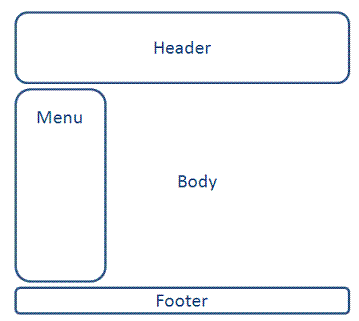

 The highlighted jar files in above list are the new jars to be added in project for Tiles integration.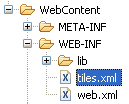
 File: WebContent/WEB-INF/tiles.xml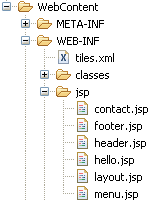
 We will define the template for our webapplication in a JSP file called layout.jsp. This template will contain different segments of web page (Header, Footer, Menu etc). Create four new JSP files layout.jsp, header.jsp, menu.jsp and footer.jsp and copy following content in each of them. File: WebContent/WEB-INF/jsp/layout.jsp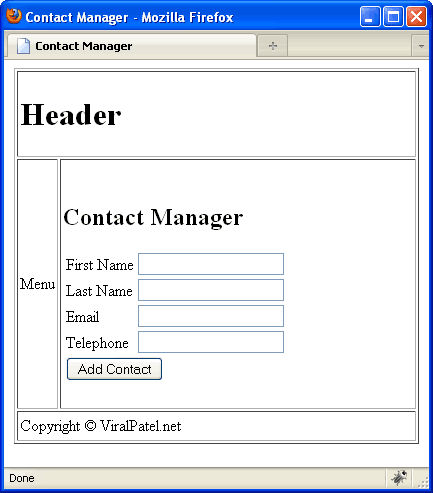

@ModelAttribute. In this part we will discuss about Tiles Framework and its Integration with Spring 3.0 MVC. We will add Tiles support to our HelloWorld Spring application that we created in previous parts. I strongly recommend you to go through previous articles and download the source code of our sample application. [sc:SpringMVC_Tutorials]Introduction to Tiles 2
Nowadays, website are generally divided into pieces of reusable template that are being rendered among different web pages. For example a site containing header, footer, menu etc. This items remains same through out the website and give it a common look and feel. It is very difficult to hard code this in each and every webpage and if later a change is needed than all the pages needs to be modified. Hence we use templatization mechanism. We create a common Header, Footer, Menu page and include this in each page. Tiles Plugin allow both templating and componentization. In fact, both mechanisms are similar: you define parts of page (a “Tile”) that you assemble to build another part or a full page. A part can take parameters, allowing dynamic content, and can be seen as a method in JAVA language. Tiles is a templating system used to maintain a consistent look and feel across all the web pages of a web application. It increase the reusability of template and reduce code duplication. A common layout of website is defined in a central configuration file and this layout can be extended across all the webpages of the web application.Our Application Layout
Our goal is to add Header, Footer and Menu to our Spring 3 HelloWorld application. Following will be the layout of the same.
Required JAR files
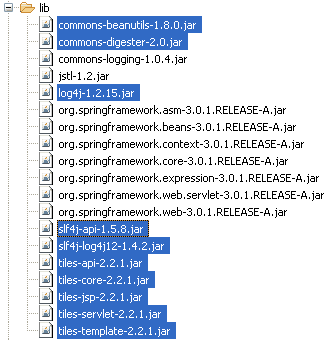
In order to add Tiles support to our Spring3 application, we will need few jar files. Following is the list of JARs in our example. Add these JARs in WEB-INF/lib folder. The highlighted jar files in above list are the new jars to be added in project for Tiles integration.
Configuring Tiles framework in Spring MVC
To configure Tiles, an entry for beanTilesConfigure has to be made in spring-servlet.xml. Open the spring-servlet.xml from WEB-INF folder and add following code between <beans> </beans> tag. File: /WebContent/WEB-INF/spring-servlet.xml<bean id="viewResolver"
class="org.springframework.web.servlet.view.UrlBasedViewResolver">
<property name="viewClass">
<value>
org.springframework.web.servlet.view.tiles2.TilesView
</value>
</property>
</bean>
<bean id="tilesConfigurer"
class="org.springframework.web.servlet.view.tiles2.TilesConfigurer">
<property name="definitions">
<list>
<value>/WEB-INF/tiles.xml</value>
</list>
</property>
</bean>
Code language: HTML, XML (xml) File: WebContent/WEB-INF/tiles.xml
<?xml version="1.0" encoding="UTF-8" ?>
<!DOCTYPE tiles-definitions PUBLIC
"-//Apache Software Foundation//DTD Tiles Configuration 2.0//EN"
"http://tiles.apache.org/dtds/tiles-config_2_0.dtd">
<tiles-definitions>
<definition name="base.definition"
template="/WEB-INF/jsp/layout.jsp">
<put-attribute name="title" value="" />
<put-attribute name="header" value="/WEB-INF/jsp/header.jsp" />
<put-attribute name="menu" value="/WEB-INF/jsp/menu.jsp" />
<put-attribute name="body" value="" />
<put-attribute name="footer" value="/WEB-INF/jsp/footer.jsp" />
</definition>
<definition name="contact" extends="base.definition">
<put-attribute name="title" value="Contact Manager" />
<put-attribute name="body" value="/WEB-INF/jsp/contact.jsp" />
</definition>
</tiles-definitions>
Code language: HTML, XML (xml)Creating View – The JSPs
 We will define the template for our webapplication in a JSP file called layout.jsp. This template will contain different segments of web page (Header, Footer, Menu etc). Create four new JSP files layout.jsp, header.jsp, menu.jsp and footer.jsp and copy following content in each of them. File: WebContent/WEB-INF/jsp/layout.jsp
<%@ taglib uri="http://tiles.apache.org/tags-tiles" prefix="tiles"%>
<!DOCTYPE HTML PUBLIC "-//W3C//DTD HTML 4.01 Transitional//EN"
"http://www.w3.org/TR/html4/loose.dtd">
<html>
<head>
<meta http-equiv="Content-Type" content="text/html; charset=UTF-8">
<title><tiles:insertAttribute name="title" ignore="true" /></title>
</head>
<body>
<table border="1" cellpadding="2" cellspacing="2" align="center">
<tr>
<td height="30" colspan="2"><tiles:insertAttribute name="header" />
</td>
</tr>
<tr>
<td height="250"><tiles:insertAttribute name="menu" /></td>
<td width="350"><tiles:insertAttribute name="body" /></td>
</tr>
<tr>
<td height="30" colspan="2"><tiles:insertAttribute name="footer" />
</td>
</tr>
</table>
</body>
</html>
Code language: HTML, XML (xml)<h1>Header</h1>
Code language: HTML, XML (xml)<p>Menu</p>
Code language: HTML, XML (xml)<p>Copyright © ViralPatel.net</p>
Code language: HTML, XML (xml)That’s All Folks
Compile and Execute the application in Eclipse and see that the header, menu and footer are properly applied.

Thanks Viral! :)
Thanks for all these tutorials =)
Perfect. Went very smooth.
Thanks Viral.
Sorry, doesn’t work for me.
When I enter http://localhost/layout.html in my browser it gives me a 404. Even when I use the code you provided.
(configured tomcat to listen on port 80, and not 8080, so the url is correct)
For me it’s give following exception :
org.springframework.beans.factory.BeanCreationException: Error creating bean with name ’tilesConfigurer’ defined in ServletContext resource [/WEB-INF/spring-servlet.xml]: Invocation of init method failed; nested exception is java.lang.NoSuchMethodError: org.apache.tiles.access.TilesAccess.setContainer(Lorg/apache/tiles/TilesApplicationContext;Lorg/apache/tiles/TilesContainer;Ljava/lang/String;)V
Good and simple: twice good.
Thanks !
Thanks for sharing your knowledge, great demo
I think here
must be
I’m wrong?
hi Viral,
completed all the things and have all the jars in palce but on starting server, getting below error
org.springframework.beans.factory.CannotLoadBeanClassException: Cannot find class [org.springframework.web.servlet.view.tile2.TilesConfigurer] for bean with name ’tilesConfigurer’ defined in ServletContext resource [/WEB-INF/spring-servlet.xml]; nested exception is java.lang.ClassNotFoundException: org.springframework.web.servlet.view.tile2.TilesConfigurer
org.springframework.beans.factory.support.AbstractBeanFactory.resolveBeanClass(AbstractBeanFactory.java:1250)
org.springframework.beans.factory.support.AbstractAutowireCapableBeanFactory.predictBeanType(AbstractAutowireCapableBeanFactory.java:576)
org.springframework.beans.factory.support.AbstractBeanFactory.isFactoryBean(AbstractBeanFactory.java:1319)
org.springframework.beans.factory.support.AbstractBeanFactory.isFactoryBean(AbstractBeanFactory.java:885)
org.springframework.beans.factory.support.DefaultListableBeanFactory.preInstantiateSingletons(DefaultListableBeanFactory.java:562)
@Sepp
There is no Handler for “layout.html”. In tiles.xml we just configured how to build the v i e w “contact”. So the request is still the same as in the previous article of this Spring series (in my environment it’s “http://localhost:8080/Spring3MVC/” or “…/Spring3MVC/contacts.html”).
Hi Viral and all,
I am getting following error:
org.apache.tiles.template.NoSuchAttributeException: Attribute ‘header’ not found.
I have changed the ContactController to return layout instead of contacts
@RequestMapping(“/contacts”)
public ModelAndView showContacts() {
return new ModelAndView(“contact”, “command”, new Contact());
}
If I don’t change it gives me no error but without the template efffects.
I appreciate your help very much
Joy
im having this same issue – did you manage to solve it?
same issue as you, did you resolve it finally?
sorry there was a typo in my previous post. I have changed the Controller like this :
return new ModelAndView(“layout”, “command”, new Contact());
Thanks,
Sorry, there was a typo in my previous post. I have changed the Controller to:
return new ModelAndView(“layout”, “command”, new Contact());
Thanks
Howdy,
I have experienced with the “Dec 15, 2010 11:36:51 AM org.springframework.web.servlet.DispatcherServlet noHandlerFound
WARNING: No mapping found for HTTP request with URI [/tdse/contacts.html] in DispatcherServlet with name ‘tdse'”, if I used this tutorial as it is but no luck.
Appreciate your help.
Hi,
When I implemented same thing, while running the application I get the error like,
java.lang.NullPointerException at org.apache.commons.digester.Digester.getXMLReader(Digester.java:1058) at org.apache.commons.digester.Digester.parse(Digester.java:1887) at org.apache.tiles.definition.digester.DigesterDefinitionsReader.read(DigesterDefinitionsReader.java:329) at org.apache.tiles.definition.dao.BaseLocaleUrlDefinitionDAO.loadDefinitionsFromURL(BaseLocaleUrlDefinitionDAO.java:276) at org.apache.tiles.definition.dao.CachingLocaleUrlDefinitionDAO.loadDefinitionsFromURLs(CachingLocaleUrlDefinitionDAO.java:251) at org.apache.tiles.definition.dao.ResolvingLocaleUrlDefinitionDAO.loadDefinitionsFromURLs(ResolvingLocaleUrlDefinitionDAO.java:65) at org.springframework.web.servlet.view.tiles2.TilesView.checkResource(TilesView.java:92) at org.springframework.web.servlet.view.UrlBasedViewResolver.loadView(UrlBasedViewResolver.java:421) at org.springframework.web.servlet.FrameworkServlet.doGet(FrameworkServlet.java:549) at javax.servlet.http.HttpServlet.service(HttpServlet.java:743) at javax.servlet.http.HttpServlet.service(HttpServlet.java:856) at com.evermind[Oracle Containers for J2EE 10g (10.1.3.4.0) ].server.http.HttpRequestHandler.run(HttpRequestHandler.java:122) at com.evermind[Oracle Containers for J2EE 10g (10.1.3.4.0) ].server.http.HttpRequestHandler.run(HttpRequestHandler.java:111) at oracle.oc4j.network.ServerSocketReadHandler$SafeRunnable.run(ServerSocketReadHandler.java:260) at com.evermind[Oracle Containers for J2EE 10g (10.1.3.4.0) ].util.ReleasableResourcePooledExecutor$MyWorker.run(ReleasableResourcePooledExecutor.java:303) at java.lang.Thread.run(Thread.java:619)
I am not able to solve it….if anyone knows what is the possible solution for that please let me know. This is driving me crazy…Any solution or workaround will do…thanks in advance.
Hi
When I enter http://localhost:8080/Spring3MVC in my browser it gives me HTTP Status 404 – /Spring3MVC/
but it works whene i enter http://localhost:8080/Spring3MVC/contacts.html
plz can u help me ?
@Pandel – you may want to add welcome-page in your web.xml to redirect request automatically to /Spring3MVC/contacts.html when user request for /Spring3MVC/. Add following to your web.xml:
Hi Viral Patel
I have the exact same problem as pandel (wrote on 24 December, 2010, 22:39)
And even if I add the following to web.xml:
contacts.html
I still have the save error 404 when I enter the adress in my browser
http://localhost:9090/Spring3_MVC_ViralPatel/
Thanks for help
Thank you but it works except when I replace it with index.jsp
thank you for this tutorial ;)
Thank for a really nice tutorial. I did followed the steps mentioned above. But not sure why i am getting this error
org.apache.tiles.jsp.taglib.NoSuchAttributeExcepti on: Attribute ‘header’ not found.
I googled around a lot but was not able to find a solution.
Appreciate your help :)
I am getting this kind of error please help me where i will get the jar files for tiles in spring 3
org.springframework.beans.factory.BeanCreationException: Error creating bean with name ’tilesConfigurer’ defined in ServletContext resource [/WEB-INF/spring-servlet.xml]: Instantiation of bean failed; nested exception is java.lang.NoClassDefFoundError: org.apache.tiles.startup.TilesInitializer
org.springframework.beans.factory.support.AbstractAutowireCapableBeanFactory.instantiateBean(AbstractAutowireCapableBeanFactory.java:946)
org.springframework.beans.factory.support.AbstractAutowireCapableBeanFactory.createBeanInstance(AbstractAutowireCapableBeanFactory.java:892)
org.springframework.beans.factory.support.AbstractAutowireCapableBeanFactory.doCreateBean(AbstractAutowireCapableBeanFactory.java:479)
org.springframework.beans.factory.support.AbstractAutowireCapableBeanFactory.createBean(AbstractAutowireCapableBeanFactory
Hi Viral,
Thanks for the great tutorials…
I tried the above – with the latest tiles but I am not getting any effects whatever…
Also while following this tutorial in sequence, I think there is some typo (contact – contact(s) ) – I fixed that but somehow no effect –
Will check up – and update here…
— cheerio atul
My mistake – I had not changed the viewResolver entry ;-)
Things work fine – as expected – moving to the next entry ;-)
— cheerio atul
I have experienced hard time to make it work:
Here is what changes I have made:
1. In web.xml file, I added this as Viral suggested. Question, there is no contacts.jsp (with s) file?
contacts.html
2. In sping-servlet.xml, I added this in the viewResolver tag:
/WEB-INF/jsp/
.jsp
When I run, I got the error
The requested resource (/spring3Tile/) is not available. spring3Title is my project name, also servlet name.
What else I need to do?
Thanks.
Oops, all tags are gone
Excelente, al principio no funcionaba, pero tenia mal el nombre del archivo tiles-defs.xml n.n
Saludos
Nice viral…Great work
100% works
My whole IT Project done with the help of your examples in this page..
are there anyone need the pom.xml
mail me
[email protected]
little error in layout.jsp
should be
Can you also provide tutorial for using Struts2 + Spring3 + Tiles2 together. I tried using your tutorial “http://viralpatel.net/struts-2-tiles-plugin-tutorial-with-example-in-eclipse/” but it throws me error:
Unable to load configuration. – action – file:/C:/Tomcat6/webapps/marketing/WEB-INF/classes/struts.xml:16:60
at com.opensymphony.xwork2.config.ConfigurationManager.getConfiguration(ConfigurationManager.java:69)
at org.apache.struts2.dispatcher.Dispatcher.init_PreloadConfiguration(Dispatcher.java:371)
at org.apache.catalina.startup.Bootstrap.main(Bootstrap.java:413)
Caused by: Error building results for action welcome in namespace – action – file:/C:/Tomcat6/webapps/marketing/WEB-INF/classes/struts.xml:16:60
at com.opensymphony.xwork2.config.ConfigurationManager.getConfiguration(ConfigurationManager.java:66)
… 31 more
Caused by: There is no result type defined for type ’tiles’ mapped with name ‘success’. Did you mean ’tiles’? – result – file:/C:/Tomcat6/webapps/marketing/WEB-INF/classes/struts.xml:17:25
Hi,
I got the same issue, have you found the fix for this yet?
in the file spring-servlet.xml i add the tag that you say to add, but i have already a tag with the same id=”viewResolver”. so i remove the old one & it’s work.
but i don’t understand how it work without the tags :
can any one explain me …..
in the file spring-servlet.xml i add the tag that you say to add, but i have already a tag with the same id=”viewResolver”. so i remove the old one & it’s work.
but i don’t understand how it work without the tags :
-property name=”prefix” value=”/WEB-INF/jsp/”
-property name=”suffix” value=”.jsp”
can any one explain me …..
Hi Zouhayr, Viral and All,
I spent a longtime to get this example work, because I amended the previous step’s spring-context.xml configuration file by just changing the implementation class for the viewResolver from “org.springframework.web.servlet.view.JstlView” to “org.springframework.web.servlet.view.tiles2.TilesView” with attributes for prefix and suffix still remaining. I didn’t realise that these 2 attributes (prefix & suffix) must be removed. Upon, removing them it work, but it took time to realise that when adopting Tiles, the way that normal plain Spring MVC works, changes slightly. That is, in the normal case upon the Controller returning a String name for the View to be called, it will prefix the view name with prefix attribute and append the view name with suffix attribute as defined in the spring-context.xml configuration file to make up the full jsp name, e.g. /WEB-INF/jsp/contact.jsp. However, with Tiles, springframework will match the return String name from the Controller to the definition name as defined by tiles.xml configuation file, and then the Tiles implementation class will look up the matching definition name, e.g. ‘contact’ in that file, and then it looks at the body value to find the fully qualified jsp name, in our example here, it is /WEB-INF/jsp/contact.jsp. Dear Viral, I want to say that your tutorial is excellent, and if you could add my main points here to the tutorial, I’m sure many readers will benefit. Regards, Bolat
To clarify here, by stating that you are using tiles spring will look in tiles.xml for your views and won’t resolve them automatically to jsps as per the previous tutorial (because those two properties have to be removed).
So in tiles.xml, add:
where can i download those jars? i am currently using spring tool suite
leon, you can download all jars from maven repository: http://mvnrepository.com
can u show me one example of spring 3.0 web mvc which use 3 jsp
1)index
2)login
3) registration
and all this be done using xml..i dont want to use annotation..plz
i search a lot but not found any help..
I got this error:
Stacktrace:
org.apache.jasper.servlet.JspServletWrapper.handleJspException(JspServletWrapper.java:519)
org.apache.jasper.servlet.JspServletWrapper.service(JspServletWrapper.java:428)
org.apache.jasper.servlet.JspServlet.serviceJspFile(JspServlet.java:313)
org.apache.jasper.servlet.JspServlet.service(JspServlet.java:260)
javax.servlet.http.HttpServlet.service(HttpServlet.java:717)
org.apache.tiles.template.NoSuchAttributeException: Attribute ‘header’ not found.
org.apache.tiles.template.DefaultAttributeResolver.computeAttribute(DefaultAttributeResolver.java:49)
org.apache.tiles.template.InsertAttributeModel.resolveAttribute(InsertAttributeModel.java:187)
org.apache.tiles.template.InsertAttributeModel.start(InsertAttributeModel.java:107)
org.apache.tiles.jsp.taglib.InsertAttributeTag.doTag(InsertAttributeTag.java:306)
org.apache.jsp.layout_jsp._jspx_meth_tiles_005finsertAttribute_005f0(layout_jsp.java:104)
org.apache.jsp.layout_jsp._jspService(layout_jsp.java:59)
org.apache.jasper.runtime.HttpJspBase.service(HttpJspBase.java:70)
javax.servlet.http.HttpServlet.service(HttpServlet.java:717)
org.apache.jasper.servlet.JspServletWrapper.service(JspServletWrapper.java:386)
org.apache.jasper.servlet.JspServlet.serviceJspFile(JspServlet.java:313)
org.apache.jasper.servlet.JspServlet.service(JspServlet.java:260)
javax.servlet.http.HttpServlet.service(HttpServlet.java:717)
Hey , nice guide , but there are still some questions that remains unclear ,
* what about the Controler?
*A control which has a model(“aString,”demo”) and sending us to a template-view , all the jsp in that template share information? all have access to aString?
*Can/How Menu “talk” to Body for example?
*You didn’t mention that jspViewResolver is no needed anymore
Waiitng for you reply , thanks
I have found another amazing exmaple
http://krams915.blogspot.com/2010/12/spring-mvc-3-tiles-2-integration.html
I just tested the example using the latest available jar files.
1. Do not use commons-digester3-3.0.jar with tiles-…-2.2.2.jar
You will have an error:
java.lang.NoClassDefFoundError: org/apache/commons/digester/Rule
Use instead commons-digester-2.1.jar
2. The lastest Tomcat version contents jstl.jar under Tomcat/lib/
So there is no need to add jstl-api-1.2.jar and jstl-impl-1.2.jar
Hi,
In the previous example
Part 3: Handling Forms in Spring 3.0 MVC :
in spring-servlet.xml you put :
Now in spring-servlet.xml you put :
org.springframework.web.servlet.view.tiles2.TilesView
My question please is :
How if I want to use the handling a form inside Tiles ?
Thanks, your help is appreciated.
It’s better to add Jar named “tiles-jsp-2.1.2.jar” also.
BTW, thanks for this wonderful tutorial. It helped me a lot.
Simple and clear… Could the contents be dynamic? Can we make tiles – parameterised?
Hello I got this error!!
Schwerwiegend: StandardWrapper.Throwable
org.springframework.beans.factory.BeanCreationException: Error creating bean with name ’tilesConfigurer’ defined in ServletContext resource [/WEB-INF/spring-servlet.xml]: Invocation of init method failed; nested exception is java.lang.NoClassDefFoundError: org/apache/commons/digester/Rule
at org.springframework.beans.factory.support.AbstractAutowireCapableBeanFactory.initializeBean(AbstractAutowireCapableBeanFactory.java:1420)
—-
Solution to this error: replace commons-digester3-3.0.jar with commons-digester-2.1.jar. Download from:
http://mirror.candidhosting.com/pub/apache//commons/digester/binaries/commons-digester-2.1-bin.zip
Thanks
It doesn’t work for me. I got this exception :-
SEVERE: StandardWrapper.Throwable
org.springframework.beans.factory.BeanCreationException: Error creating bean with name ’tilesConfigurer’ defined in ServletContext resource [/WEB-INF/spring-servlet.xml]: Invocation of init method failed; nested exception is java.lang.UnsupportedOperationException: Class org.apache.tiles.web.util.ServletContextAdapter not recognized a TilesApplicationContext
at org.springframework.beans.factory.support.AbstractAutowireCapableBeanFactory.initializeBean(AbstractAutowireCapableBeanFactory.java:1337)
at java.lang.Thread.run(Unknown Source)
Caused by: java.lang.UnsupportedOperationException: Class org.apache.tiles.web.util.ServletContextAdapter not recognized a TilesApplicationContext
at org.apache.tomcat.util.net.JIoEndpoint$Worker.run(JIoEndpoint.java:454)
at java.lang.Thread.run(Unknown Source)
Hi Viral,
excellent tuto!!
may I suggest to complete the project with a source-folder called configuration and write in it
lod4j.xml :
this will avoid Warning in the console
Excellent tutorial. I found various issues with this part of the tutorial, but primarily it was my fault. For others, I will recommend please ensure that you have correct version of tiles*.jar file and tiles-jsp.tld file. I put in the latest versions or incompatible versions and got into lot of issues. Finally, getting the correct versions as specified in tutorial got it right.
contacts.html
Very good tutorial. Easy to understand….Thanks :)
I have been trying to work it out for sometime now but its not working Jars everything aligned as given in example)
(error:- Its not able to find contracts.html)
I will really appreciate your help if you could .send me some working sample.
Thanks in Advance
thank u
Thanks Buddy.
Please try to include Socialmedia(facebook,google+) link in every page.
All friends who visit this site.
:-) This developer will get fund by Ads.
Got following error. Can someone please post the solution?
org.springframework.beans.factory.BeanCreationException: Error creating bean with name ’tilesConfigurer’ defined in ServletContext resource [/WEB-INF/spring-servlet.xml]: Invocation of init method failed; nested exception is java.lang.NoClassDefFoundError: org/apache/tiles/servlet/context/ServletTilesApplicationContext
at org.springframework.beans.factory.support.AbstractAutowireCapableBeanFactory.initializeBean(AbstractAutowireCapableBeanFactory.java:1455)
at
I got the same error, it appears that Tiles is not compatible with the latest version of Spring, I tried with Tiles 2.1.2 and 2.2.2 but I always got the same problem, this seems to be a solution (http://richardbarabe.wordpress.com/2009/02/23/apache-tiles-2-integration-with-spring-mvc/) but it is not working for me.
The tiles n Spring MVC integration has been explained so neatly. I could understand easily.. Thank you!
Really excellent …
Hi how to be a excellent java progrmmer,could you please advise me..
Thanks,
Sanjay
nic explanation
I want to validate my form using JSR hibernate validator @valid annotation.
My application is configured with spring mvc 3 and tiles 2.
But when i submit the form to validate it given the following error
when submitting the form in createresource.jsp action=”submitCreateResource.do”
Ideally it should go to “jspCreateResource” tiles definition and show error messages on createresource.jsp (form page)
But it is giving the following error.
Please help me to validate this from properly.
error
javax.servlet.ServletException: Could not resolve view with name ‘error’ in servlet with name ‘spring’
org.springframework.web.servlet.DispatcherServlet. render(DispatcherServlet.java:1139)
org.springframework.web.servlet.DispatcherServlet. doDispatch(DispatcherServlet.java:927)
org.springframework.web.servlet.DispatcherServlet. doService(DispatcherServlet.java:827)
**spring-servlet.xml**
org.springframework.web.servlet.view.tiles2.TilesV iew
/WEB-INF/tiles.xml
**tiles.xml**
—————
Resourcepojo
—————
public class ResourcePojo {
@NotNull
@NotEmpty (message = “Employee Id can not be blank.”)
private int empid;
@NotNull
@NotEmpty (message = “First Name can not be blank.”)
@Size(max = 10 , message=”First name should be between 1 to 50 Characters”)
private String firstname;
@NotEmpty (message = “Last Name can not be blank.”)
**Resourcecontroller.java**
@Controller
public class ResourceController {
@RequestMapping(value = “/createresource”, method = RequestMethod.GET)
public ModelAndView createResource() {
Map model = new HashMap();
model.put(“resource”, new ResourcePojo());
return new ModelAndView(“jspCreateResource”, model);
}
@RequestMapping(value= “/submitCreateResource”,method = RequestMethod.POST)
public String processForm(@ModelAttribute(value=”resource”) @Valid ResourcePojo resource
,BindingResult result,ModelMap model ,HttpSession session){
System.out.println(“in processForm line 45”);
if(result.hasErrors()){
System.out.println(“ERROR”);
return “jspCreateResource”;
}
return null;
}
}
—————————
**createresource.jsp**
—————————-
Insert title here
Create Resource
Employee Id
First Name
Last Name
Full Name
Date of Birth
Company DOJ
Project DOJ
Where do you get the JAR files from? I would like to get the most updated version of the JAR files available since this tutorial was written almost 2 years ago.
use maven
Use this website to find the jars.
http://www.findjar.com/
Hope it to be useful!
I am getting this exception “Cannot find a factory to create the request context”
Did i am missing any jars to include in the classpath
I faced same problem. I found the error cause was jar version. I got it worked with following maven dependency…
org.apache.tiles
tiles-core
2.2.1
org.apache.tiles
tiles-jsp
2.1.1
org.apache.tiles
tiles-servlet
2.2.2
Cheers !!
Nice Example !!!
The problem solve with your suggestion tq
Where do you download the JAR files you used in this example?
cannot Deploy TilesMVC
Pls help. I have done the Tiles tutorial as explained in this blog.But I am getting the following error
Deployment Error for module: TilesMVC: Error occurred during deployment: Exception while loading the app : java.lang.IllegalStateException: ContainerBase.addChild: start: org.apache.catalina.LifecycleException: org.apache.catalina.LifecycleException: java.io.FileNotFoundException: ServletContext resource [/ /WEB-INF/tiles.xml ] cannot be resolved to URL because it does not exist. Please see server.log for more details.
I dont get the use of this. I rather use jsp:include to include the different parts of the page I need because anyways I am defining the tiles in an xml AND also using the tiles tags to include the appropriate pages on the jsp. With jsp:include I avoid the overhead of the xml file.
First of all thanks for the tutorial. I’m having problems with Apache Tiles when I try to run the app:
java.lang.NoClassDefFoundError: org/slf4j/LoggerFactory
org.apache.tiles.startup.AbstractTilesInitializer.(AbstractTilesInitializer.java:45)
org.apache.tiles.startup.BasicTilesInitializer.(BasicTilesInitializer.java:37)
I have tried using different versions of the slf4j jars, and they are in the build path and in the classpath.
Can anybody help me?
could you plaese explain ? why you mentioned contacts.html ?forward in index.jsp .
and how to i get screen ?
Hi viral ,
I hv downloaded the mvc examples .I tried with HelloWord example but when I request the page I dont get the view . I get 404 page not found exception.
I dont find any exception in the console . but I find the following –
WARNING: [SetContextPropertiesRule]{Context} Setting property ‘source’ to ‘org.eclipse.jst.jee.server:HelloWorld’ did not find a matching property.
27 Jul, 2012 5:28:59 PM org.apache.catalina.startup.TaglibUriRule body
INFO: TLD skipped. URI: http://java.sun.com/jstl/core_rt is already defined
27 Jul, 2012 5:28:59 PM org.apache.catalina.startup.TaglibUriRule body
INFO: Loading XML bean definitions from ServletContext resource [/WEB-INF/HelloWorld-servlet.xml]
27 Jul, 2012 5:29:00 PM org.springframework.context.support.AbstractApplicationContext obtainFreshBeanFactory
INFO: Bean factory for application context [org.springframework.web.context.support.XmlWebApplicationContext@21fb3211]: org.springframework.beans.factory.support.DefaultListableBeanFactory@1531164
27 Jul, 2012 5:29:00 PM org.springframework.beans.factory.support.DefaultListableBeanFactory preInstantiateSingletons
INFO: Pre-instantiating singletons in org.springframework.beans.factory.support.DefaultListableBeanFactory@1531164: defining beans [helloWorldController,org.springframework.context.annotation.internalCommonAnnotationProcessor,org.springframework.context.annotation.internalAutowiredAnnotationProcessor,org.springframework.context.annotation.internalRequiredAnnotationProcessor,defaultHandlerMapping,/hello/hello.jsp,org.springframework.web.servlet.view.InternalResourceViewResolver#0]; root of factory hierarchy
27 Jul, 2012 5:29:00 PM org.springframework.web.servlet.FrameworkServlet initServletBean
INFO: FrameworkServlet ‘HelloWorld’: initialization completed in 377 ms
It is a good exercise to learn the process :) ( process only *.html throu the web-inf file. )
Say welcome
I downloaded the source code. After integrating Spring and Tiles. I am getting the exception, The exception details is given below.
java.lang.UnsupportedOperationException: Class org.apache.tiles.web.util.ServletContextAdapter not recognized a TilesApplicationContext
org.apache.tiles.factory.TilesContainerFactory.createContainer(TilesContainerFactory.java:225)
org.springframework.web.servlet.view.tiles2.TilesConfigurer.createTilesContainer(TilesConfigurer.java:214)
org.springframework.web.servlet.view.tiles2.TilesConfigurer.afterPropertiesSet(TilesConfigurer.java:201)
org.springframework.beans.factory.support.AbstractAutowireCapableBeanFactory.invokeInitMethods(AbstractAutowireCapableBeanFactory.java:1368)
org.springframework.beans.factory.support.AbstractAutowireCapableBeanFactory.initializeBean(AbstractAutowireCapableBeanFactory.java:1334)
org.springframework.beans.factory.support.AbstractAutowireCapableBeanFactory.doCreateBean(AbstractAutowireCapableBeanFactory.java:476)
org.springframework.beans.factory.support.AbstractAutowireCapableBeanFactory$1.run(AbstractAutowireCapableBeanFactory.java:412)
java.security.AccessController.doPrivileged(Native Method)
org.springframework.beans.factory.support.AbstractAutowireCapableBeanFactory.createBean(AbstractAutowireCapableBeanFactory.java:383)
org.springframework.beans.factory.support.AbstractBeanFactory$1.getObject(AbstractBeanFactory.java:276)
org.springframework.beans.factory.support.DefaultSingletonBeanRegistry.getSingleton(DefaultSingletonBeanRegistry.java:222)
org.springframework.beans.factory.support.AbstractBeanFactory.doGetBean(AbstractBeanFactory.java:273)
org.springframework.beans.factory.support.AbstractBeanFactory.getBean(AbstractBeanFactory.java:175)
org.springframework.beans.factory.support.DefaultListableBeanFactory.preInstantiateSingletons(DefaultListableBeanFactory.java:485)
org.springframework.context.support.AbstractApplicationContext.finishBeanFactoryInitialization(AbstractApplicationContext.java:716)
org.springframework.context.support.AbstractApplicationContext.refresh(AbstractApplicationContext.java:377)
org.springframework.web.servlet.FrameworkServlet.createWebApplicationContext(FrameworkServlet.java:427)
org.springframework.web.servlet.FrameworkServlet.initWebApplicationContext(FrameworkServlet.java:341)
org.springframework.web.servlet.FrameworkServlet.initServletBean(FrameworkServlet.java:307)
org.springframework.web.servlet.HttpServletBean.init(HttpServletBean.java:127)
javax.servlet.GenericServlet.init(GenericServlet.java:212)
org.apache.catalina.valves.ErrorReportValve.invoke(ErrorReportValve.java:102)
org.apache.catalina.connector.CoyoteAdapter.service(CoyoteAdapter.java:298)
org.apache.coyote.http11.Http11Processor.process(Http11Processor.java:859)
org.apache.coyote.http11.Http11Protocol$Http11ConnectionHandler.process(Http11Protocol.java:588)
org.apache.tomcat.util.net.JIoEndpoint$Worker.run(JIoEndpoint.java:489)
java.lang.Thread.run(Thread.java:662)
Please solve my problem.
I had the same problem. I saw that my libs of springframework are 3.0.0 version, so i dowloaded 3.0.1-A as it is in example and it worked just fine. I hope it helps for you.
thanks u example, very good example, but for me getting this error.
java.lang.NoClassDefFoundError: org/apache/tiles/startup/BasicTilesInitializer
at java.lang.ClassLoader.defineClass1(Native Method)
at java.lang.ClassLoader.defineClass(ClassLoader.java:620)
at java.security.SecureClassLoader.defineClass(SecureClassLoader.java:124)
at org.apache.catalina.loader.WebappClassLoader.findClassInternal(WebappClassLoader.java:2901)
at org.apache.catalina.loader.WebappClassLoader.findClass(WebappClassLoader.java:1170)
at org.apache.catalina.loader.WebappClassLoader.loadClass(WebappClassLoader.java:1678)
at org.apache.catalina.loader.WebappClassLoader.loadClass(WebappClassLoader.java:1556)
at java.lang.ClassLoader.loadClassInternal(ClassLoader.java:319)
at java.lang.Class.getDeclaredConstructors0(Native Method)
at java.lang.Class.privateGetDeclaredConstructors(Class.java:2389)
at java.lang.Class.getDeclaredConstructors(Class.java:1836)
at org.springframework.beans.factory.annotation.AutowiredAnnotationBeanPostProcessor.determineCandidateConstructors(AutowiredAnnotationBeanPostProcessor.java:228)
at org.springframework.beans.factory.support.AbstractAutowireCapableBeanFactory.determineConstructorsFromBeanPostProcessors(AbstractAutowireCapableBeanFactory.java:911)
at org.springframework.beans.factory.support.AbstractAutowireCapableBeanFactory.createBeanInstance(AbstractAutowireCapableBeanFactory.java:884)
at org.springframework.beans.factory.support.AbstractAutowireCapableBeanFactory.doCreateBean(AbstractAutowireCapableBeanFactory.java:479)
at org.springframework.beans.factory.support.AbstractAutowireCapableBeanFactory.createBean(AbstractAutowireCapableBeanFactory.java:450)
at org.springframework.beans.factory.support.AbstractBeanFactory$1.getObject(AbstractBeanFactory.java:290)
at org.springframework.beans.factory.support.DefaultSingletonBeanRegistry.getSingleton(DefaultSingletonBeanRegistry.java:222)
at org.springframework.beans.factory.support.AbstractBeanFactory.doGetBean(AbstractBeanFactory.java:287)
at org.springframework.beans.factory.support.AbstractBeanFactory.getBean(AbstractBeanFactory.java:189)
at org.springframework.beans.factory.support.DefaultListableBeanFactory.preInstantiateSingletons(DefaultListableBeanFactory.java:562)
at org.springframework.context.support.AbstractApplicationContext.finishBeanFactoryInitialization(AbstractApplicationContext.java:871)
at org.springframework.context.support.AbstractApplicationContext.refresh(AbstractApplicationContext.java:423)
at org.springframework.web.servlet.FrameworkServlet.createWebApplicationContext(FrameworkServlet.java:443)
at org.springframework.web.servlet.FrameworkServlet.createWebApplicationContext(FrameworkServlet.java:459)
at org.springframework.web.servlet.FrameworkServlet.initWebApplicationContext(FrameworkServlet.java:340)
at org.springframework.web.servlet.FrameworkServlet.initServletBean(FrameworkServlet.java:307)
at org.springframework.web.servlet.HttpServletBean.init(HttpServletBean.java:127)
at javax.servlet.GenericServlet.init(GenericServlet.java:160)
at org.apache.catalina.core.StandardWrapper.initServlet(StandardWrapper.java:1266)
at org.apache.catalina.core.StandardWrapper.loadServlet(StandardWrapper.java:1185)
at org.apache.catalina.core.StandardWrapper.allocate(StandardWrapper.java:857)
at org.apache.catalina.core.ApplicationDispatcher.invoke(ApplicationDispatcher.java:663)
at org.apache.catalina.core.ApplicationDispatcher.processRequest(ApplicationDispatcher.java:477)
at org.apache.catalina.core.ApplicationDispatcher.doForward(ApplicationDispatcher.java:402)
at org.apache.catalina.core.ApplicationDispatcher.forward(ApplicationDispatcher.java:329)
at org.apache.jasper.runtime.PageContextImpl.doForward(PageContextImpl.java:745)
at org.apache.jasper.runtime.PageContextImpl.forward(PageContextImpl.java:716)
at org.apache.jsp.index_jsp._jspService(index_jsp.java:68)
at org.apache.jasper.runtime.HttpJspBase.service(HttpJspBase.java:70)
at javax.servlet.http.HttpServlet.service(HttpServlet.java:722)
at org.apache.jasper.servlet.JspServletWrapper.service(JspServletWrapper.java:432)
at org.apache.jasper.servlet.JspServlet.serviceJspFile(JspServlet.java:390)
at org.apache.jasper.servlet.JspServlet.service(JspServlet.java:334)
at javax.servlet.http.HttpServlet.service(HttpServlet.java:722)
at org.apache.catalina.core.ApplicationFilterChain.internalDoFilter(ApplicationFilterChain.java:305)
at org.apache.catalina.core.ApplicationFilterChain.doFilter(ApplicationFilterChain.java:210)
at org.apache.catalina.core.StandardWrapperValve.invoke(StandardWrapperValve.java:225)
at org.apache.catalina.core.StandardContextValve.invoke(StandardContextValve.java:123)
at org.apache.catalina.authenticator.AuthenticatorBase.invoke(AuthenticatorBase.java:472)
at org.apache.catalina.core.StandardHostValve.invoke(StandardHostValve.java:168)
at org.apache.catalina.valves.ErrorReportValve.invoke(ErrorReportValve.java:98)
at org.apache.catalina.valves.AccessLogValve.invoke(AccessLogValve.java:927)
at org.apache.catalina.core.StandardEngineValve.invoke(StandardEngineValve.java:118)
at org.apache.catalina.connector.CoyoteAdapter.service(CoyoteAdapter.java:407)
at org.apache.coyote.http11.AbstractHttp11Processor.process(AbstractHttp11Processor.java:1001)
at org.apache.coyote.AbstractProtocol$AbstractConnectionHandler.process(AbstractProtocol.java:579)
at org.apache.tomcat.util.net.JIoEndpoint$SocketProcessor.run(JIoEndpoint.java:310)
at java.util.concurrent.ThreadPoolExecutor$Worker.runTask(ThreadPoolExecutor.java:885)
at java.util.concurrent.ThreadPoolExecutor$Worker.run(ThreadPoolExecutor.java:907)
at java.lang.Thread.run(Thread.java:619)
Hi ,
I am using tiles 222 with Spring 305 . I defined the following tile configuration in my context.
org.springframework.web.servlet.view.tiles2.TilesView
/WEB-INF/views/views.xml
Then in views.xml I defined following definitions
BUT THE PROBLEM is that when I return the “home” logical name from my controller , only the main_template.jsp is rendered , not the main_template and home.jsp both. WHAT COULD BE THE POSSIBLE REASON. PLEASE HELP ME OUT
you could download the Tiles from http://www.apache.org/dyn/closer.cgi/tiles/v3.0.1/tiles-3.0.1-bin.zip
Hey Morgan, try to download the same jar versions as posted here. Doesn’t matter if they are old versions, they will work for this example. I downloaded tiles-2.2.2-bin.zip and the remaining files just got them one by one from Google!.
Error creating bean with name ’tilesConfigurer’ defined in ServletContext resource [/WEB-INF/spring-servlet.xml]: Invocation of init method failed; nested exception is java.lang.NoClassDefFoundError: org/apache/commons/digester/Rule
……
About java.lang.NoClassDefFoundError: org/apache/commons/digester/Rule, I got the same error while using any of the commons-digester-3.x.x.jar, I changed it to commons-digester-2.1.jar and worked fine
Still it is going to be old contacts.html page. no change and no errors spotted. Can you pls tell me how to check if tiles got loaded properly?
I’ve added a log4j.xml to see the debug logs. I could see the following problem. Any ideas?
INFO TilesConfigurer – TilesConfigurer: adding definitions [/WEB-INF/tiles.xml]
DEBUG DefaultListableBeanFactory – Invoking afterPropertiesSet() on bean with name ’tilesConfigurer’
INFO TilesConfigurer – Found JSP 2.1 ExpressionFactory
INFO AbstractTilesApplicationContextFactory – Initializing Tiles2 application context. . .
INFO AbstractTilesApplicationContextFactory – Finished initializing Tiles2 application context.
DEBUG BasicTilesContainerFactory – Not available feature exception during instantiation of class ‘org.apache.tiles.portlet.context.PortletTilesRequestContextFactory’, ignoring problem
org.apache.tiles.portlet.context.NotAPortletEnvironmentException: Cannot access portlet classes
at org.apache.tiles.portlet.context.PortletTilesRequestContextFactory.(PortletTilesRequestContextFactory.java:68)
at sun.reflect.NativeConstructorAccessorImpl.newInstance0(Native Method)
at sun.reflect.NativeConstructorAccessorImpl.newInstance(NativeConstructorAccessorImpl.java:39)
at sun.reflect.DelegatingConstructorAccessorImpl.newInstance(DelegatingConstructorAccessorImpl.java:27)
at java.lang.reflect.Constructor.newInstance(Constructor.java:513)
at java.lang.Class.newInstance0(Class.java:355)
at java.lang.Class.newInstance(Class.java:308)
at org.apache.tiles.factory.BasicTilesContainerFactory.registerRequestContextFactory(BasicTilesContainerFactory.java:196)
at org.apache.tiles.factory.BasicTilesContainerFactory.getTilesRequestContextFactoriesToBeChained(BasicTilesContainerFactory.java:170)
at org.apache.tiles.factory.BasicTilesContainerFactory.registerChainedRequestContextFactories(BasicTilesContainerFactory.java:152)
at org.apache.tiles.factory.BasicTilesContainerFactory.createRequestContextFactory(BasicTilesContainerFactory.java:139)
at org.apache.tiles.factory.BasicTilesContainerFactory.createContainer(BasicTilesContainerFactory.java:98)
at org.apache.tiles.startup.AbstractTilesInitializer.createContainer(AbstractTilesInitializer.java:124)
at org.apache.tiles.startup.AbstractTilesInitializer.initialize(AbstractTilesInitializer.java:70)
at org.springframework.web.servlet.view.tiles2.TilesConfigurer.afterPropertiesSet(TilesConfigurer.java:305)
at org.springframework.beans.factory.support.AbstractAutowireCapableBeanFactory.invokeInitMethods(AbstractAutowireCapableBeanFactory.java:1460)
at org.springframework.beans.factory.support.AbstractAutowireCapableBeanFactory.initializeBean(AbstractAutowireCapableBeanFactory.java:1400)
at org.springframework.beans.factory.support.AbstractAutowireCapableBeanFactory.doCreateBean(AbstractAutowireCapableBeanFactory.java:513)
at org.springframework.beans.factory.support.AbstractAutowireCapableBeanFactory.createBean(AbstractAutowireCapableBeanFactory.java:450)
at org.springframework.beans.factory.support.AbstractBeanFactory$1.getObject(AbstractBeanFactory.java:290)
at org.springframework.beans.factory.support.DefaultSingletonBeanRegistry.getSingleton(DefaultSingletonBeanRegistry.java:222)
at org.springframework.beans.factory.support.AbstractBeanFactory.doGetBean(AbstractBeanFactory.java:287)
at org.springframework.beans.factory.support.AbstractBeanFactory.getBean(AbstractBeanFactory.java:189)
at org.springframework.beans.factory.support.DefaultListableBeanFactory.preInstantiateSingletons(DefaultListableBeanFactory.java:562)
at org.springframework.context.support.AbstractApplicationContext.finishBeanFactoryInitialization(AbstractApplicationContext.java:871)
at org.springframework.context.support.AbstractApplicationContext.refresh(AbstractApplicationContext.java:423)
at org.springframework.web.servlet.FrameworkServlet.createWebApplicationContext(FrameworkServlet.java:443)
at org.springframework.web.servlet.FrameworkServlet.createWebApplicationContext(FrameworkServlet.java:459)
at org.springframework.web.servlet.FrameworkServlet.initWebApplicationContext(FrameworkServlet.java:340)
at org.springframework.web.servlet.FrameworkServlet.initServletBean(FrameworkServlet.java:307)
at org.springframework.web.servlet.HttpServletBean.init(HttpServletBean.java:127)
at javax.servlet.GenericServlet.init(GenericServlet.java:160)
at org.apache.catalina.core.StandardWrapper.initServlet(StandardWrapper.java:1228)
at org.apache.catalina.core.StandardWrapper.loadServlet(StandardWrapper.java:1147)
at org.apache.catalina.core.StandardWrapper.load(StandardWrapper.java:1043)
at org.apache.catalina.core.StandardContext.loadOnStartup(StandardContext.java:4957)
at org.apache.catalina.core.StandardContext$3.call(StandardContext.java:5284)
at org.apache.catalina.core.StandardContext$3.call(StandardContext.java:5279)
at java.util.concurrent.FutureTask$Sync.innerRun(FutureTask.java:303)
at java.util.concurrent.FutureTask.run(FutureTask.java:138)
at java.util.concurrent.ThreadPoolExecutor$Worker.runTask(ThreadPoolExecutor.java:886)
at java.util.concurrent.ThreadPoolExecutor$Worker.run(ThreadPoolExecutor.java:908)
at java.lang.Thread.run(Thread.java:662)
Caused by: java.lang.NoClassDefFoundError: javax/portlet/PortletRequest
at org.apache.tiles.portlet.context.PortletTilesRequestContextFactory.(PortletTilesRequestContextFactory.java:65)
… 42 more
Caused by: java.lang.ClassNotFoundException: javax.portlet.PortletRequest
at org.apache.catalina.loader.WebappClassLoader.loadClass(WebappClassLoader.java:1678)
at org.apache.catalina.loader.WebappClassLoader.loadClass(WebappClassLoader.java:1523)
… 43 more
Again it is my fault, ignore plz
Don’t work with tiles.3.0.1
Latha use the tiles-2.2.2-bin.zip version
With the 3.x version don´t work
Nice,
Spring doesn’t work with Tiles 3.0 – so you have to download Tiles 2.2.
That is the cause of the org.apache.tiles.startup.BasicTilesInitializer error.
Dennis
Hi Dennis Stevens :)
Could you please guide me i am getting the following error
Even after i have added the following Jars from
The org/apache/tiles/startup/BasicTilesInitializer file is there in the jar but still shows the following error :(
for NoClassdefnFoundError:org.apache.tiles.startup.BasicTilesInitializer
Add spring related jars to /WEB-INF/lib directory
Where can I find the jars file that I need to use tiles inside my Spring MVC project? I don’t fint it into Spring framework…
Hi Andrea, Apache tiles can be downloaded from http://tiles.apache.org/download.html
I tried it bu it gives me: Undeployed application at context path /
I experienced struts2-tiles-plugin-2.1.6.jar and higher versions and nothing has changed
Please help
Help me please I get the following error
type Exception report
message
description The server encountered an internal error () that prevented it from fulfilling this request.
exception
org.apache.jasper.JasperException: javax.servlet.ServletException: Servlet.init() for servlet spring threw exception
org.apache.jasper.servlet.JspServletWrapper.handleJspException(JspServletWrapper.java:548)
org.apache.jasper.servlet.JspServletWrapper.service(JspServletWrapper.java:456)
org.apache.jasper.servlet.JspServlet.serviceJspFile(JspServlet.java:389)
org.apache.jasper.servlet.JspServlet.service(JspServlet.java:333)
javax.servlet.http.HttpServlet.service(HttpServlet.java:722)
root cause
javax.servlet.ServletException: Servlet.init() for servlet spring threw exception
org.apache.jasper.runtime.PageContextImpl.doForward(PageContextImpl.java:745)
org.apache.jasper.runtime.PageContextImpl.forward(PageContextImpl.java:716)
org.apache.jsp.index_jsp._jspService(index_jsp.java:71)
org.apache.jasper.runtime.HttpJspBase.service(HttpJspBase.java:70)
javax.servlet.http.HttpServlet.service(HttpServlet.java:722)
org.apache.jasper.servlet.JspServletWrapper.service(JspServletWrapper.java:433)
org.apache.jasper.servlet.JspServlet.serviceJspFile(JspServlet.java:389)
org.apache.jasper.servlet.JspServlet.service(JspServlet.java:333)
javax.servlet.http.HttpServlet.service(HttpServlet.java:722)
root cause
org.springframework.beans.factory.BeanCreationException: Error creating bean with name ’tilesConfigurer’ defined in ServletContext resource [/WEB-INF/spring-servlet.xml]: Invocation of init method failed; nested exception is org.apache.tiles.definition.DefinitionsFactoryException: Cannot load definition URLs
org.springframework.beans.factory.support.AbstractAutowireCapableBeanFactory.initializeBean(AbstractAutowireCapableBeanFactory.java:1403)
org.springframework.beans.factory.support.AbstractAutowireCapableBeanFactory.doCreateBean(AbstractAutowireCapableBeanFactory.java:513)
org.springframework.beans.factory.support.AbstractAutowireCapableBeanFactory.createBean(AbstractAutowireCapableBeanFactory.java:450)
org.springframework.beans.factory.support.AbstractBeanFactory$1.getObject(AbstractBeanFactory.java:290)
org.springframework.beans.factory.support.DefaultSingletonBeanRegistry.getSingleton(DefaultSingletonBeanRegistry.java:222)
org.springframework.beans.factory.support.AbstractBeanFactory.doGetBean(AbstractBeanFactory.java:287)
org.springframework.beans.factory.support.AbstractBeanFactory.getBean(AbstractBeanFactory.java:189)
org.springframework.beans.factory.support.DefaultListableBeanFactory.preInstantiateSingletons(DefaultListableBeanFactory.java:562)
org.springframework.context.support.AbstractApplicationContext.finishBeanFactoryInitialization(AbstractApplicationContext.java:871)
org.springframework.context.support.AbstractApplicationContext.refresh(AbstractApplicationContext.java:423)
org.springframework.web.servlet.FrameworkServlet.createWebApplicationContext(FrameworkServlet.java:443)
org.springframework.web.servlet.FrameworkServlet.createWebApplicationContext(FrameworkServlet.java:459)
org.springframework.web.servlet.FrameworkServlet.initWebApplicationContext(FrameworkServlet.java:340)
org.springframework.web.servlet.FrameworkServlet.initServletBean(FrameworkServlet.java:307)
org.springframework.web.servlet.HttpServletBean.init(HttpServletBean.java:127)
javax.servlet.GenericServlet.init(GenericServlet.java:160)
org.apache.jasper.runtime.PageContextImpl.doForward(PageContextImpl.java:745)
org.apache.jasper.runtime.PageContextImpl.forward(PageContextImpl.java:716)
org.apache.jsp.index_jsp._jspService(index_jsp.java:71)
org.apache.jasper.runtime.HttpJspBase.service(HttpJspBase.java:70)
javax.servlet.http.HttpServlet.service(HttpServlet.java:722)
org.apache.jasper.servlet.JspServletWrapper.service(JspServletWrapper.java:433)
org.apache.jasper.servlet.JspServlet.serviceJspFile(JspServlet.java:389)
org.apache.jasper.servlet.JspServlet.service(JspServlet.java:333)
javax.servlet.http.HttpServlet.service(HttpServlet.java:722)
root cause
org.apache.tiles.definition.DefinitionsFactoryException: Cannot load definition URLs
org.springframework.web.servlet.view.tiles2.TilesConfigurer$SpringTilesContainerFactory.getSourceURLs(TilesConfigurer.java:385)
org.apache.tiles.factory.BasicTilesContainerFactory.createLocaleDefinitionDao(BasicTilesContainerFactory.java:298)
org.apache.tiles.factory.BasicTilesContainerFactory.createDefinitionsFactory(BasicTilesContainerFactory.java:242)
org.springframework.web.servlet.view.tiles2.TilesConfigurer$SpringTilesContainerFactory.createDefinitionsFactory(TilesConfigurer.java:418)
org.apache.tiles.factory.BasicTilesContainerFactory.createContainer(BasicTilesContainerFactory.java:104)
org.apache.tiles.startup.AbstractTilesInitializer.createContainer(AbstractTilesInitializer.java:124)
org.apache.tiles.startup.AbstractTilesInitializer.initialize(AbstractTilesInitializer.java:70)
org.springframework.web.servlet.view.tiles2.TilesConfigurer.afterPropertiesSet(TilesConfigurer.java:305)
org.springframework.beans.factory.support.AbstractAutowireCapableBeanFactory.invokeInitMethods(AbstractAutowireCapableBeanFactory.java:1460)
org.springframework.beans.factory.support.AbstractAutowireCapableBeanFactory.initializeBean(AbstractAutowireCapableBeanFactory.java:1400)
org.springframework.beans.factory.support.AbstractAutowireCapableBeanFactory.doCreateBean(AbstractAutowireCapableBeanFactory.java:513)
org.springframework.beans.factory.support.AbstractAutowireCapableBeanFactory.createBean(AbstractAutowireCapableBeanFactory.java:450)
org.springframework.beans.factory.support.AbstractBeanFactory$1.getObject(AbstractBeanFactory.java:290)
org.springframework.beans.factory.support.DefaultSingletonBeanRegistry.getSingleton(DefaultSingletonBeanRegistry.java:222)
org.springframework.beans.factory.support.AbstractBeanFactory.doGetBean(AbstractBeanFactory.java:287)
org.springframework.beans.factory.support.AbstractBeanFactory.getBean(AbstractBeanFactory.java:189)
org.springframework.beans.factory.support.DefaultListableBeanFactory.preInstantiateSingletons(DefaultListableBeanFactory.java:562)
org.springframework.context.support.AbstractApplicationContext.finishBeanFactoryInitialization(AbstractApplicationContext.java:871)
org.springframework.context.support.AbstractApplicationContext.refresh(AbstractApplicationContext.java:423)
org.springframework.web.servlet.FrameworkServlet.createWebApplicationContext(FrameworkServlet.java:443)
org.springframework.web.servlet.FrameworkServlet.createWebApplicationContext(FrameworkServlet.java:459)
org.springframework.web.servlet.FrameworkServlet.initWebApplicationContext(FrameworkServlet.java:340)
org.springframework.web.servlet.FrameworkServlet.initServletBean(FrameworkServlet.java:307)
org.springframework.web.servlet.HttpServletBean.init(HttpServletBean.java:127)
javax.servlet.GenericServlet.init(GenericServlet.java:160)
org.apache.jasper.runtime.PageContextImpl.doForward(PageContextImpl.java:745)
org.apache.jasper.runtime.PageContextImpl.forward(PageContextImpl.java:716)
org.apache.jsp.index_jsp._jspService(index_jsp.java:71)
org.apache.jasper.runtime.HttpJspBase.service(HttpJspBase.java:70)
javax.servlet.http.HttpServlet.service(HttpServlet.java:722)
org.apache.jasper.servlet.JspServletWrapper.service(JspServletWrapper.java:433)
org.apache.jasper.servlet.JspServlet.serviceJspFile(JspServlet.java:389)
org.apache.jasper.servlet.JspServlet.service(JspServlet.java:333)
javax.servlet.http.HttpServlet.service(HttpServlet.java:722)
root cause
java.io.FileNotFoundException: ServletContext resource [/WEB-INF/tiles.xml
] cannot be resolved to URL because it does not exist
org.springframework.web.context.support.ServletContextResource.getURL(ServletContextResource.java:132)
org.springframework.web.servlet.view.tiles2.SpringTilesApplicationContextFactory$SpringWildcardServletTilesApplicationContext.getResources(SpringTilesApplicationContextFactory.java:105)
org.springframework.web.servlet.view.tiles2.TilesConfigurer$SpringTilesContainerFactory.getSourceURLs(TilesConfigurer.java:380)
org.apache.tiles.factory.BasicTilesContainerFactory.createLocaleDefinitionDao(BasicTilesContainerFactory.java:298)
org.apache.tiles.factory.BasicTilesContainerFactory.createDefinitionsFactory(BasicTilesContainerFactory.java:242)
org.springframework.web.servlet.view.tiles2.TilesConfigurer$SpringTilesContainerFactory.createDefinitionsFactory(TilesConfigurer.java:418)
org.apache.tiles.factory.BasicTilesContainerFactory.createContainer(BasicTilesContainerFactory.java:104)
org.apache.tiles.startup.AbstractTilesInitializer.createContainer(AbstractTilesInitializer.java:124)
org.apache.tiles.startup.AbstractTilesInitializer.initialize(AbstractTilesInitializer.java:70)
org.springframework.web.servlet.view.tiles2.TilesConfigurer.afterPropertiesSet(TilesConfigurer.java:305)
org.springframework.beans.factory.support.AbstractAutowireCapableBeanFactory.invokeInitMethods(AbstractAutowireCapableBeanFactory.java:1460)
org.springframework.beans.factory.support.AbstractAutowireCapableBeanFactory.initializeBean(AbstractAutowireCapableBeanFactory.java:1400)
org.springframework.beans.factory.support.AbstractAutowireCapableBeanFactory.doCreateBean(AbstractAutowireCapableBeanFactory.java:513)
org.springframework.beans.factory.support.AbstractAutowireCapableBeanFactory.createBean(AbstractAutowireCapableBeanFactory.java:450)
org.springframework.beans.factory.support.AbstractBeanFactory$1.getObject(AbstractBeanFactory.java:290)
org.springframework.beans.factory.support.DefaultSingletonBeanRegistry.getSingleton(DefaultSingletonBeanRegistry.java:222)
org.springframework.beans.factory.support.AbstractBeanFactory.doGetBean(AbstractBeanFactory.java:287)
org.springframework.beans.factory.support.AbstractBeanFactory.getBean(AbstractBeanFactory.java:189)
org.springframework.beans.factory.support.DefaultListableBeanFactory.preInstantiateSingletons(DefaultListableBeanFactory.java:562)
org.springframework.context.support.AbstractApplicationContext.finishBeanFactoryInitialization(AbstractApplicationContext.java:871)
org.springframework.context.support.AbstractApplicationContext.refresh(AbstractApplicationContext.java:423)
org.springframework.web.servlet.FrameworkServlet.createWebApplicationContext(FrameworkServlet.java:443)
org.springframework.web.servlet.FrameworkServlet.createWebApplicationContext(FrameworkServlet.java:459)
org.springframework.web.servlet.FrameworkServlet.initWebApplicationContext(FrameworkServlet.java:340)
org.springframework.web.servlet.FrameworkServlet.initServletBean(FrameworkServlet.java:307)
org.springframework.web.servlet.HttpServletBean.init(HttpServletBean.java:127)
javax.servlet.GenericServlet.init(GenericServlet.java:160)
org.apache.jasper.runtime.PageContextImpl.doForward(PageContextImpl.java:745)
org.apache.jasper.runtime.PageContextImpl.forward(PageContextImpl.java:716)
org.apache.jsp.index_jsp._jspService(index_jsp.java:71)
org.apache.jasper.runtime.HttpJspBase.service(HttpJspBase.java:70)
javax.servlet.http.HttpServlet.service(HttpServlet.java:722)
org.apache.jasper.servlet.JspServletWrapper.service(JspServletWrapper.java:433)
org.apache.jasper.servlet.JspServlet.serviceJspFile(JspServlet.java:389)
org.apache.jasper.servlet.JspServlet.service(JspServlet.java:333)
javax.servlet.http.HttpServlet.service(HttpServlet.java:722)
note The full stack trace of the root cause is available in the Apache Tomcat/7.0.19 logs.
this is gud one
Hi all!
Thanks for the post. It is works for me very well.
But How can I display dynamic data in a head/footer? For example I would like to display the user’s unread message number, and some information whick come from the database in the Head tile?
It is a bad design that assign in every controller this information, because in every controller I must do that, and this is not manageable!
Is there any way for the ReversePresenter Pattern (Like in GoogleWebToolkit – every view known there own presenter, and can ask data from it)?
Or how other way can I assign dynamic information in a tile, which always show?
Thanks
Barney
Hi Barney, You can create your own custom Spring MVC Interceptor which gets called before each request and in it you can set values to request as you want.
Thanks Viral, Your tutorial is very helpfull :D
The tiles n Spring MVC integration has been explained so neatly. I could understand easily.. Thank you!
Hi every one, i follow the exemple, i have a problem in the file
/WebContent/WEB-INF/spring-servlet.xml
i start from HelloWorldApp so i have oready the tag
How can i add the tag:
org.springframework.web.servlet.view.tiles2.TilesView
help me please
Very nice example
Hi Viral Patel :)
Nice example on Spring Tiles :)
but i am getting the following problem
Could you please help me :)
Is it me or is this tutorial missing contact.jsp?
For those who are interested in the maven support, you can use these dependencies to load needed jars:
org.springframework
spring-webmvc
3.1.4.RELEASE
javax.servlet
jstl
1.2
org.apache.tiles
tiles-jsp
2.2.2
jar
compile
org.slf4j
slf4j-log4j12
1.5.8
jar
compile
Dear Viral,
Thanks for the great tutorial as always,
i have doubt regarding contacts.html file why do we need such file.
Sorry please ignore my last post, i figured out :)
Thanks a lot. I followed this and it worked v.well. However, i do have a problem when trying to use put-list-attribute. The put-list-attributes won’t show up in jsp. I just added the put-list-attribute modifications to your code.
Modifed layout.jsp
I am not able to understand what is wrong here. Why the css do not get populated.
Great explanation. Thanks a lot.
dear Viral,
i setup your sample code in work space but i am getting blank title page only…..
i did not changed anything in your sample code.
Thanks! very simple and Quickly to implement, I’m using NetBeans,Spring 3 and propierties and work without problems. Thank you!
Hi plz suggest .
Here tiles doesn’t work and I get following message when I deploye it…
org.apache.jasper.compiler.TldLocationsCache tldScanJar
INFO: At least one JAR was scanned for TLDs yet contained no TLDs. Enable debug logging for this logger for a complete list of JARs that were scanned where no TLDs were found. Skipping JAR scanning can improve startup time and JSP compilation time.
Thanks
Hi Viral,
Need your help in Spring MVC, Tiles and GWT, app Engine integration.
I am getting the following exception because the page contains tiles tags. Can you please let me know if you seen this exception before.
java.lang.NoClassDefFoundError: org/apache/tiles/autotag/core/runtime/AutotagRuntime
at java.lang.Class.getDeclaredMethods0(Native Method)
at java.lang.Class.privateGetDeclaredMethods(Class.java:2427)
at java.lang.Class.privateGetPublicMethods(Class.java:2547)
at java.lang.Class.getMethods(Class.java:1410)
at java.beans.Introspector.getPublicDeclaredMethods(Introspector.java:1284)
at java.beans.Introspector.getTargetMethodInfo(Introspector.java:1158)
at java.beans.Introspector.getBeanInfo(Introspector.java:408)
Hi,
Thanks for these tutorials.
I’ve followed all these steps from Part1 to Part4
The application was ok, everthing working till I started with tiles. I’m getting this error:
org.apache.jasper.JasperException: javax.servlet.ServletException: Could not resolve view with name ‘add_contact’ in servlet with name ‘spring’
what can I do?
Thanks, Amine
I failed this sample at apache-tomcat-6.0.32, but suceeded with apache-tomcat-5.5.36. Anyone who runs in troubles should try this with apache-tomcat-5.5.36.
Everything is fine.. but web.xml is missing.. it is hard for freshers(who are new to spring-tiles) to understand without web.xml… can yu provide it… ??
thanks in advance.. :)
Hi Achyuth, You can download the source code from the link given at the end of article. You’ll find web.xml in there.
i want to use tiles and json together. Is it possible to use viewresolvers for json and tiles together
Tiles example is working fine with the given set of jars only.
Missed to attached tiles.xml code
tiles.xml:
Hello…I get thiS tutorial but I need to Show the Selected menu highlighted So pleaSe do poSt it and leave a mail alSo….I tried many jquery css n js but it doesnt worked…-_-
So do Some help
Thanks & reagards,
SantoSh Tambe
This tutorial is in need of significant work. The code supplied via the link works, but trying to follow the instructions as printed does not produce a working example. First, this was built on the hello world example in previous pages. Following these instructions breaks the hello world example, because the instruction to add lines to the spring-servlet.xml does not say to eliminate the bean definition from the hello world example (duplicate view resolver). Once that is fixed, the index.jsp will not successfully invoke hello anymore, so there should be an instruction to eliminate the link to hello world and to add in a link to contract. There is no instructions to add the java files or jsp for contract. Here’s what I had to do in addition to following the supplied instructions to have a working tiles example of hello and contract:
1. added section to tiles.xml
2. had to comment out <bean id="viewResolver" section in spring-servlet.xml
3. added put up contact form section to index.jsp
4. had to add ContractController.java
5. had to add Contact.java
6. had to add contact.jsp
Hey,It is working.If not please read below code:
/WEB-INF/tiles.xml
and check the docktype in tles.xml and org.apache.tiles.resources(tiles-config) version.
Still you are not satisfied visit my url:www.hmmbari.blogspot.com
Do not use Tiles API 3.0.3 for this exercise. Use Tiles 2.2.2 instead. In spring-servlet.xml, remove the previous version of viewResolver
example in this tutorial is working absolutely fine. No need to comment bean id viewResolver. Only value of property viewClass to be changed to org.springframework.web.servlet.view.tiles2.TilesView and comment out prefix, suffix properties
Can I render a .HTML page in place of .JSP for the body.
Tiles is not recognizing the .HTML file (says mapping not found). I have tried using a jsp with a jsp:include page=”path to .HTML” to no avail.
Thanks a lot
Thanks Viraf for publishing the tutorial. Are you planning to publish same tutorial with Title3?
Cheers
Nice tutorial.This is helping me a lot in learning spring.
Thanks
I tried this example of spring mvc tiles application it is running fine but I have one doubt regarding the “command ” which you have used in showContacts() of the ContactController class what is the use of this? As tried without this “command” it is giving error.
See the previous tutorial: http://viralpatel.net/spring-3-mvc-handling-forms/
In above controller class, note that we have created two methods with Request Mapping /contacts and /addContact. The method showContacts() will be called when user request for a url contacts.html. This method will render a model with name “contact”. Note that in the ModelAndView object we have passed a blank Contact object with name “command”. The spring framework expects an object with name command if you are using in your JSP file.
Short and concise article that explains tiles well. Thanks.
Can you release a tutorial with tiles 3 and struts 2?
Really help me to understand spring MVC with tiles.
Great help…… :) :) :)
Hi Viral,
Thanks a lot for the post on Spring & Tiles integration!
I am a beginner with Spring MVC. I wonder how to configure page views after adding few menu items in the menu. In the post there was nothing in the menu.jsp except a word “Menu”. I hope you could guide me to add few menu items and corresponding controller, model and view configuration.
Thanks,
Maria Sebastian
How can i download extra library?
while executing codes I got error : org.apache.jasper.JasperException: An exception occurred processing JSP page /WEB-INF/jsp/layout.jsp at line 12
9:
10:
11:
12:
13:
14:
15:
org.apache.tiles.template.NoSuchAttributeException: Attribute ‘header’ not found.
org.apache.tiles.template.DefaultAttributeResolver.computeAttribute(DefaultAttributeResolver.java:49)
org.apache.tiles.template.InsertAttributeModel.resolveAttribute(InsertAttributeModel.java:187)
org.apache.tiles.template.InsertAttributeModel.start(InsertAttributeModel.java:107)
org.apache.tiles.jsp.taglib.InsertAttributeTag.doTag(InsertAttributeTag.java:306)
org.apache.jsp.WEB_002dINF.jsp.layout_jsp._jspx_meth_tiles_005finsertAttribute_005f1(layout_jsp.java:133)
org.apache.jsp.WEB_002dINF.jsp.layout_jsp._jspService(layout_jsp.java:69)
org.apache.jasper.runtime.HttpJspBase.service(HttpJspBase.java:70)
javax.servlet.http.HttpServlet.service(HttpServlet.java:722)
org.apache.jasper.servlet.JspServletWrapper.service(JspServletWrapper.java:419)
org.apache.jasper.servlet.JspServlet.serviceJspFile(JspServlet.java:391)
org.apache.jasper.servlet.JspServlet.service(JspServlet.java:334)
javax.servlet.http.HttpServlet.service(HttpServlet.java:722)
org.springframework.web.servlet.view.InternalResourceView.renderMergedOutputModel(InternalResourceView.java:209)
org.springframework.web.servlet.view.AbstractView.render(AbstractView.java:267)
org.springframework.web.servlet.DispatcherServlet.render(DispatcherServlet.java:1225)
org.springframework.web.servlet.DispatcherServlet.processDispatchResult(DispatcherServlet.java:1012)
org.springframework.web.servlet.DispatcherServlet.doDispatch(DispatcherServlet.java:959)
org.springframework.web.servlet.DispatcherServlet.doService(DispatcherServlet.java:876)
org.springframework.web.servlet.FrameworkServlet.processRequest(FrameworkServlet.java:961)
org.springframework.web.servlet.FrameworkServlet.doGet(FrameworkServlet.java:852)
javax.servlet.http.HttpServlet.service(HttpServlet.java:621)
org.springframework.web.servlet.FrameworkServlet.service(FrameworkServlet.java:837)
javax.servlet.http.HttpServlet.service(HttpServlet.java:722)
please help me for the same
Thanks for this tutorial. It worked like a charm. I used Spring 4 and Tiles 3 with maven.
Question:
Is there a way to keep the folowing properties in the viewer?
I almost got it working (it could find everything except the contact [contact.jsp]).
The Controller was giving the contact view back but this it could not map to the contact.jsp
When I removed the properties above I needed to add the full path to the jps files.
Hi Viral,
Thanks a lot for the post on Spring & Tiles integration!
I am a beginner with Spring MVC. I wonder how to configure page views after adding few menu items in the menu. In the post there was nothing in the menu.jsp except a word “Menu”. I hope you could guide me to add few menu items and corresponding controller, model and view configuration, with hibernate / db CRUD operations, etc.
Thanks,
Yuva
good one for beginners
Great article. works fine for me. thanks man
Hi i am getting below error can any one help ?
org.springframework.beans.factory.BeanCreationException: Error creating bean with name ’tilesConfigurer’ defined in ServletContext resource [/WEB-INF/TISS_Dispatcher-servlet.xml]: Invocation of init method failed; nested exception is java.lang.UnsupportedOperationException: Class org.apache.tiles.web.util.ServletContextAdapter not recognized a TilesApplicationContext
Caused by: java.lang.UnsupportedOperationException: Class org.apache.tiles.web.util.ServletContextAdapter not recognized a TilesApplicationContext
Why I am getting error for Logger:
INFO: Starting Servlet Engine: Apache Tomcat/6.0.36
log4j:WARN No appenders could be found for logger (org.springframework.web.servlet.DispatcherServlet).
log4j:WARN Please initialize the log4j system properly.
Feb 4, 2015 8:26:42 PM org.apache.catalina.core.ApplicationContext log
Hi , i have problem . i want build system with 3rd . Client -> Controller -> RestAPI . Help me
I am getting below error, please suggest, I am just started learning
org.springframework.beans.factory.BeanCreationException: Error creating bean with name ’tilesConfigurer’ defined in ServletContext resource [/WEB-INF/spring-servlet.xml]: Invocation of init method failed; nested exception is java.lang.NoClassDefFoundError: net/sf/retrotranslator/runtime/java/lang/_Boolean
at org.springframework.beans.factory.support.AbstractAutowireCapableBeanFactory.initializeBean(AbstractAutowireCapableBeanFactory.java:1420)
at org.springframework.beans.factory.support.AbstractAutowireCapableBeanFactory.doCreateBean(AbstractAutowireCapableBeanFactory.java:519)
Thanks a lot for this example… its work perfect with spring3.1 or spring4.1 with tiles2.2…but i wonder if i could use both resolver UrlBasedViewResolver, InternalResourceViewResolver because some time we may not use template in some .jsp files .
Please give me a Spring + Hibernate + Maven + Oracle11g + jsp example
Still useful, Thanks