[ad name=”AD_INBETWEEN_POST”] While using Maven as build tool in our project, I found it very difficult to create a Dynamic Web Project which supports Maven dependencies and can execute in Eclipse! I have seen lot of people using Maven just as build tool and for local setup uses jar files in some /lib directory. I wanted to remove this dependencies on local /lib for jar files and resolve everything with Maven. My project should be a Dynamic web project with Maven dependencies enabled. Here is a simple tutorial which you can go through to create Dynamic Web Project having Maven enabled in Eclipse. This project can be used as base project and can be easily converted to most kind of project like Struts based, Spring MVC based etc.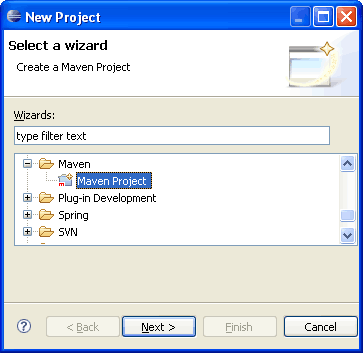
 Enter “MavenWeb” as Project name and click Next. On Configuration screen, select war in Packaging and also check the checkbox for src/main/webapp.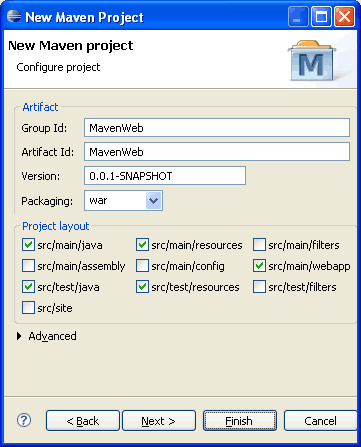
 Once done, click Finish. This will create a Maven project in Eclipse.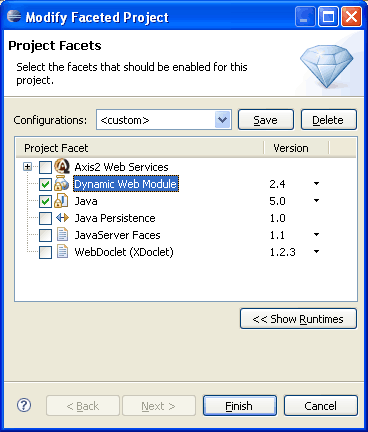



Required Tools
For this tutorial, I assume you have following setup in your machine. 1. JDK 1.5 or above (download) 2. Eclipse 3.2 or above (download) 3. Maven 2.0 or above (download) 4. M2Eclipse Plugin (download)Step 1: Create Maven Project in Eclipse
Create a new project in Eclipse. Goto File > New > Project.. and select Maven Project from the list. Click Next. Enter “MavenWeb” as Project name and click Next. On Configuration screen, select war in Packaging and also check the checkbox for src/main/webapp.
  Once done, click Finish. This will create a Maven project in Eclipse.
Step 2: Generate Eclipse Project with WTP
Let us convert the Maven project to Dynamic Web Project for Eclipse. For this we will use following maven command.Goto the folder where the new project is created and execute above command.Code language: HTML, XML (xml)mvn eclipse:eclipse -Dwtpversion=1.5
C:\Workspace\Test\MavenWeb>mvn eclipse:eclipse -Dwtpversion=1.5

[INFO] Scanning for projects...
[INFO] Searching repository for plugin with prefix: 'eclipse'.
[INFO] ------------------------------------------------------------------------
[INFO] Building Unnamed - MavenWeb:MavenWeb:war:0.0.1-SNAPSHOT
[INFO]    task-segment: [eclipse:eclipse]
[INFO] ------------------------------------------------------------------------
[INFO] Preparing eclipse:eclipse
[INFO] No goals needed for project - skipping
[INFO] [eclipse:eclipse]
[INFO] Adding support for WTP version 1.5.
[INFO] Using Eclipse Workspace: C:\Workspace\Test
[INFO] no substring wtp server match.
[INFO] Using as WTP server : Apache Tomcat v5.5
[INFO] Adding default classpath container: org.eclipse.jdt.launching.JRE_CONTAINER
[INFO] Not writing settings - defaults suffice
[INFO] Wrote Eclipse project for "MavenWeb" to C:\Workspace\Test\MavenWeb.
[INFO]
[INFO] ------------------------------------------------------------------------
[INFO] BUILD SUCCESSFUL
[INFO] ------------------------------------------------------------------------
[INFO] Total time: 4 seconds
[INFO] Finished at: Wed Jul 28 13:55:09 CEST 2010
[INFO] Final Memory: 7M/30M
[INFO] ------------------------------------------------------------------------
That’s it. We just created Dynamic Web Project from Maven project. Now refresh the project in Eclipse.
Step 3: Change Project Facet
The above step by default set the project facet to JDK 1.4. We need to modify this and set project facet to JDK 5. Right click on MavenWeb project and select Properties (shortcut: Alt+Enter). From the Properties dialog box, select Project Facets. Now click on “Modify Project…” button and change the project facet to Java 5.0
Step 4: Setting Build Path
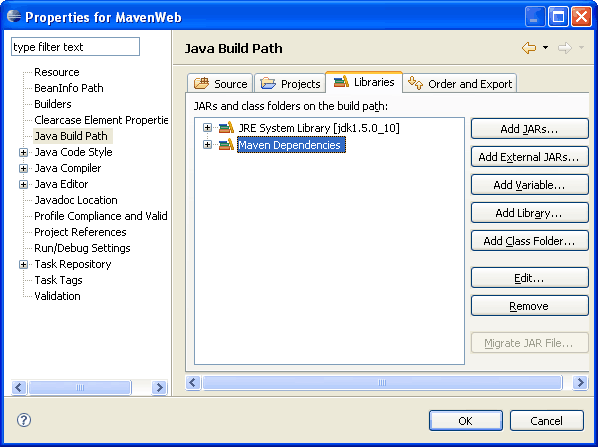
We need to specify the Maven jar dependencies in Java Build Path of our MavenWeb project. Open Properties.. dialog box (Alt+Enter) and select Java Build Path. Click “Add Library..” button and select “Maven Managed Dependencies” and click Finish.
Step 5: Hello World Servlet
Our dynamic web project with maven support is done now. Let us add a small Hello World servlet to this project and see how it works. Open pom.xml from root folder and copy following content into it. File: pom.xml<?xml version="1.0" encoding="UTF-8"?>
<project>
<modelVersion>4.0.0</modelVersion>
<groupId>MavenWeb</groupId>
<artifactId>MavenWeb</artifactId>
<packaging>war</packaging>
<version>0.0.1-SNAPSHOT</version>
<description></description>
<build>
<plugins>
<plugin>
<artifactId>maven-compiler-plugin</artifactId>
<configuration>
<source>1.5</source>
<target>1.5</target>
</configuration>
</plugin>
<plugin>
<artifactId>maven-war-plugin</artifactId>
<version>2.0</version>
</plugin>
</plugins>
</build>
<dependencies>
<dependency>
<groupId>javax.servlet</groupId>
<artifactId>servlet-api</artifactId>
<version>2.5</version>
</dependency>
</dependencies>
</project>
Code language: HTML, XML (xml)package net.viralpatel.maven;
import java.io.IOException;
import java.io.PrintWriter;
import javax.servlet.ServletException;
import javax.servlet.http.HttpServlet;
import javax.servlet.http.HttpServletRequest;
import javax.servlet.http.HttpServletResponse;
public class HelloWorldServlet extends HttpServlet {
private static final long serialVersionUID = 1031422249396784970L;
public void doGet(HttpServletRequest req, HttpServletResponse resp)
throws ServletException, IOException {
resp.setContentType("text/html");
PrintWriter out = resp.getWriter();
out.print("Hello World from Servlet");
out.flush();
out.close();
}
}
Code language: Java (java)<?xml version="1.0" encoding="UTF-8"?>
<web-app xmlns:xsi="http://www.w3.org/2001/XMLSchema-instance"
xmlns="http://java.sun.com/xml/ns/javaee"
xmlns:web="http://java.sun.com/xml/ns/javaee/web-app_2_5.xsd"
xsi:schemaLocation="http://java.sun.com/xml/ns/javaee http://java.sun.com/xml/ns/javaee/web-app_2_5.xsd"
id="WebApp_ID" version="2.5">
<display-name>HelloWorldServlet</display-name>
<welcome-file-list>
<welcome-file>hello-world</welcome-file>
</welcome-file-list>
<servlet>
<servlet-name>HelloWorldServlet</servlet-name>
<servlet-class>
net.viralpatel.maven.HelloWorldServlet
</servlet-class>
<load-on-startup>1</load-on-startup>
</servlet>
<servlet-mapping>
<servlet-name>HelloWorldServlet</servlet-name>
<url-pattern>/hello-world</url-pattern>
</servlet-mapping>
</web-app>
Code language: HTML, XML (xml)That’s All Folks
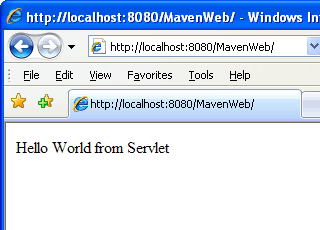
Our dynamic web project with Maven support in Eclipse is completed. Run the web project in eclipse (Alt+Shirt+X, R)



All you had to do is to install “Maven Integration for WTP”.
Some time ago I created a similar post on how to create dynamic web project with Eclipse 3.5. See http://blog.goyello.com/2010/06/15/how-to-create-java-web-application-with-eclipse-wtp-and-m2eclipse/. The project can be downloaded here: http://blog.goyello.com/wp-content/uploads/2010/06/wtp-m2eclipse-demo.zip
Recently I found out that with Eclipse 3.6 and m2eclipse you could use webapp-jee5 archetype that works perfectly with WTP and Eclipse 3.6. Of course, Maven integration for WTP is required (available via m2eclipse extras update site)
thanks for sharing ;)
Thanks for sharing :) Really amazing !
how can I configure Eclipse 3.2, Maven 2.0, and M2Eclipse Plugin together? sorry im just beginner. thanks.
and how to integrate it to spring mvc3 framework?
For integrating maven + eclipse you need to download and install the m2eclipse plugin from your Eclipse IDE (help -> update software, or eclipse marketplace). AND you HAVE TO download the Maven from the link provided in the beginning of this tutorial – Required software – 3. Maven 2.0 or above. Once you have it, scroll down the maven download page and check installation instructions for you system. That should all work together.
thanks for your tutorial, but I want to notice that the version of hibernate-entitymanager is not well as far to lanch example, so to resolve this, I replace this :
org.hibernate
hibernate-entitymanager
3.3.2.ga
by this :
org.hibernate
hibernate-annotations
3.3.1.GA
Hi,
First of all i want to thank you I’ve learned a lot.
Can you please help me with this
Error creating bean with name ‘sessionFactory’ defined in ServletContext resource [/WEB-INF/spring-servlet.xml]: Invocation of init method failed; nested exception is java.io.FileNotFoundException: class path resource [hibernate.cfg.xml] cannot be resolved to URL because it does not exist
Thank you my friend for writing this tutorial! Very very helpful.
Thanks..Its helpful…
Thanks it was really helpful
That’s one really useful and easy to follow tutorial. Thanks a lot for making it!
Thanks man, great tutorial. :D
Really very helpful…..:) :) :)
HTTP Status 404 – Servlet HelloWorldServlet is not available
:(
Very useful article.Thanks for sharing
Thank you. It’s awesome.
Thanks very much man, but I have some question, When I compile the project its say:
no web.xml present
How can i solve it?
Thanks :D
sir i want how create my-eclipse basic strut plz send me mail id
How to get The Maven dependencies(the lib u are adding above) and what it will do. please guide me
A quick update (2012):
Creating Dynamic Web Project using Maven in Eclipse Indigo Service Release 2 (Build id: 20120216-1857)
1. Tools I had during this config
Note: depending on what version of Eclipse and/or M2E plugin you have, these steps may change
a. JDK 1.7
b. Eclipse, Version: Indigo Service Release 2, Build id: 20120216-1857
c. Maven 3
d. M2E Plugin installed
2. Create a new project in Eclipse
File > New > Project.. and select Maven Project from the list (webapp-javaee6). Click Next.
Enter “com.maveneclipseweb.test” as GroupId, ArtifactId “MavenEclipseWeb”, & Package “com.maveneclipseweb.test”. Click Finish.
3. Change Project Facet
From the Properties dialog box, select Project Facets. Now click on “Convert to Faceted form..” button.
Then tick Dynamic Web Module, below click on the box saying “Further configuration available” & put in Content directory “/src/main/webapp”.
Click on OK.
5. Modify the index.jsp
Add some custom text so you can verify this is your web app…
6. Run the Web App on Tomcat through Eclipse
In Eclipse, Window >> Show View >> Servers
Note: we assumed you have downloaded & installed Tomcat here
Option 1: If there is no server, Click right anywhere in that window >> New >> Server >> Tomcat 7.0 >> Next, then Select your project >> Add >> Finish
Option 2: If there is already a server, Click right >> Add/Remove, then Select your project >> Add >> Finish
Finally, Click right >> Start
7. Check this is working in your browser
Go to http://localhost:8080/MavenEclipseWeb/
You should see the custom text you entered earlier in your index.jsp page
Hi,
I am using Rational Application Developer 8 and I have followed the above steps and able to convert the Dynamic Web Project from Maven project. But I am not able to add created ear file to Web Sphere Application server. If possible could you please tell me the process.
Thanks
Hi Viral,
I am new to Maven, can you plz share a web project build in struts 1.2 using Maven.
I tried the above proj and it works fine for me but I am not able to convert it into struts 1.2 flow.
Thanks,
Bharat
i am getting Error in custom provider, java.lang.TypeNotPresentException: Type javax.enterprise.inject.Typed not present
pls help me…..thanks in advance
Thanks. It worked for me.
Do you know for, how to publish automatically for ear deployment for a Maven project.
Many thans for you. Good article :)
Thanks man ! it really helpful !
Getting the below error: any help will be appreciated.
==========================================
Description Resource Path Location Type
Could not calculate build plan: Missing:
———-
1) org.apache.maven.plugins:maven-resources-plugin:maven-plugin:2.4.1
Try downloading the file manually from the project website.
Then, install it using the command:
mvn install:install-file -DgroupId=org.apache.maven.plugins -DartifactId=maven-resources-plugin -Dversion=2.4.1 -Dpackaging=maven-plugin -Dfile=/path/to/file
Alternatively, if you host your own repository you can deploy the file there:
mvn deploy:deploy-file -DgroupId=org.apache.maven.plugins -DartifactId=maven-resources-plugin -Dversion=2.4.1 -Dpackaging=maven-plugin -Dfile=/path/to/file -Durl=[url] -DrepositoryId=[id]
———-
1 required artifact is missing.
for artifact:
org.apache.maven.plugins:maven-resources-plugin:maven-plugin:2.4.1
from the specified remote repositories:
central (http://repo1.maven.org/maven2, releases=true, snapshots=false)
MavenWeb Unknown Maven Problem
Refer http://harikrushnav.blogspot.com/2013/07/cannot-complete-install-because-one-or.html
Can we have the Change Project Facet step automated though pom file or maven command directly?
Can you please explain how to add the libraries wanted and required jars for this application.
I meant that spring and hibernate jars.
I deployed the project in Tomcat 6.0 and getting below error
Throwable occurred: java.lang.ClassNotFoundException: net.viralpatel.maven.HelloWorldServlet
I found that class file is getting created in target folder, but seems server is trying to locate in WEB-INF/classes folder. Any suggestions if am missing out something.
Hi i am trying to download the m2eclipse . i logged in sonatype but it shows a message
“You do not have access to this page. Please contact the account owner of this Zendesk for further help.”
why i am getting this message..
Thank you!!!!!!!
What you have used vesions are quite old……….but still it is helpfull.If you will upgrade the versions like working with eclipse kepler is different then this bcoz plugin is already there , and some of the different things we have to do..
This was very helpful.thank you.
I feel the article is quite incomplete, however helpful till some extent for theoretic knowledge.
Hi.
I’m trying to use this example.
My requeriments is to use tomcat 5.0.18 and jdk1.5_11, so I have been testing your example.
Right now I’m using Eclipse Juno Service Release 2.
Everythings ok until I try to run on server. If I select tomcat 5.0 or tomcat 5.5 everything is unselected, but with tomcat 6.0 and above everythings ok.
Is there something in the configuration files which prevent to use this servers?
Thanks for your tutorials.
Dear All,
This is manjunath, i took SRC folder, i am getting an error message as below
maven-war-plugin prior to 2.0.1 is not supported by m2e-wtp. Use maven-war-plugin version 2.0.1 or later