iText is a wonderful library if you want to generate PDFs in Java. It comes with a huge set of API to create/manage a PDF file. We already saw in our previous tutorial how to generate a pdf file in itext and also how to merge two pdf files using itext. In this tutorial we will see how to generate Pie charts and Bar charts in Java using iText and jFreeChart library. First a brief note about jFreeChart. JFreeChart is a free 100% Java chart library that makes it easy for developers to display professional quality charts in their applications. It gives a wide range of API to generate charts and graphs in Java.
Step 1: Download required Jar files
For this example we will need following jar files.
In above code, we have created two methods that returns JFreeChart object. These methods creates charts using jFreeChart API. Note that we have used dummy data. In real example these values must be dynamically fetched from database or other data source. Also note that the main method is still empty. We haven’t added yet the code to generate actual PDF file using iText API.
Step 3: Generate PDF with Charts/Graphs in Java using iText
Now its time to generate the actual PDF files. For this we will use iText library and pass it the graphs generated by jFreeChart library. Add following code in your java class.
In above code we have created a method writeChartToPDF() which take few arguments like jFreeChart object, width, height and filename and write a PDF files in that file. This is ofcourse very preliminary example of adding pie charts in PDF using Java iText/jFreeChart. But atleast it gives basic idea of how to achieve this. Feel free to modify the above code and play around to generate different charts/graphs in PDF.
I am facing a technical problem and I wonder if you will be able to help me out. I am using iText 2.1.5 (I know a newer version exists) to generate pdf files. I am picking up text from database and putting it in the pdf file. The database text however has tags like “Bold” instead of good old “<b>Bold</b>“.
Despite using HTMLWorker.parseToList, the text Bold” is printed as it is in the generated pdf. I see that tags are not in the tagsSupported list of HTMLWorker.
I have googled and checked many sites but nothing seems to be working so far. If I don’t find any solution, I will have to resort to parsing the strings by myself and replacing tags with appropriate html tags like <b>, etc. I am hoping I don’t have to do that as it somehow feels inelegant.
Am I doing something wrong? Can you please help me out here? Thanks a lot once again! Swapna
I am using iText and JFreeChart. I have generated a chart and am using iText to save the chart as PDF. When I save the PDF to filesystem, the file saves correctly, then when opened, shows chart without any problems.
But when I try to serve the pdf as response to request, it gives me error file does not start with %pdf-.
My code is below.
Can you help me out in resolving this problem, where I might have made any mistake?
Thanks.
Regards, Venkata.
Appreciate your help.
 response.setContentType("application/pdf");
 Rectangle pagesize = new Rectangle(width, height);
 Document document = new Document(pagesize, 50, 50, 50, 50);
can anyone help me for creating dynamic graph(live trading) x axis shoul be current time and y axis value is to get from database…….. I have done x axis part in that i used thread and timeseries now i want to connect with database on y axis………… plzzzzzzzz help Thank u :)
good work. Its really suited my requirement…..with partial changes like, instead using pdf html display and getting data from db to replace the hardcoded dataset values
Hi all, Can any one send me simple source code for generating a chart using database. and generating pdf using Database. plz help me out bcz the itext is very new for me
Hey, helped a lot, thx! But i still got one question: the legend on my pieChart is to big in the PDF, so that the names of the pie parts are above each other and dont scale down, although this doesnt happen when i paint them with jPanel. Maybe any1 got a tip? **Excuse my english ;
hi… we are in the process of making the online student feedback system application we had prepared the front end web pages now we are facing problems in generating code for obtaining the correct selected radio button directed to the database and to make an average of all the forms of one class… please help us regarding this…
when i download the jar files form the website http://sourceforge.net/projects/jfreechart/files/, i get all zip files like this, jcommon-1.0.16.zip , should i be changing that to .jar or shoud i find .jar from the .zip file and place in my WEB-INF/lib dir.
I am using your tutorial, but PdfTemplate.createGraphics(int, int, DefaultFontMapper) is deprecated. can you pls tell how to replace that part of the code? I tried replacing with PdfPrinterGraphics2D but not getting any success.
hey viral …. actually i included all the jar in project as you said above but when i copy ur code in my project its showing some errors at these following lines… Document document = new Document(); writer = PdfWriter.getInstance(document, new FileOutputStream(fileName)); document.open(); Graphics2D graphics2d = template.createGraphics(width, height,new DefaultFontMapper()); document.close(); can u just ell me what to do now….plz reply surjeet
However, I am facing an issue that whenever I generate pdf congaing bar chart, I get half page white space & after that it shows bar chart graph. Can you please tell me how can I fix this issue?
down vote favorite I have a list of entity where each entity object has 5 attributes- plant name,plant id, reached count,within time count,exceeded time count.I want to create a stacked barchart which has the plant id on x axis and no of vehicles on y axis and three stacks shows the 3 different counts for that particular plant.

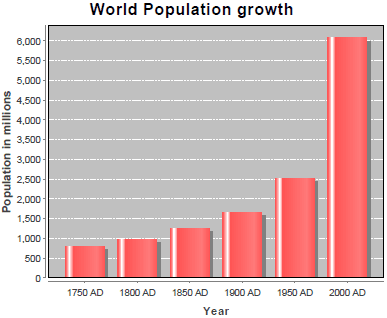
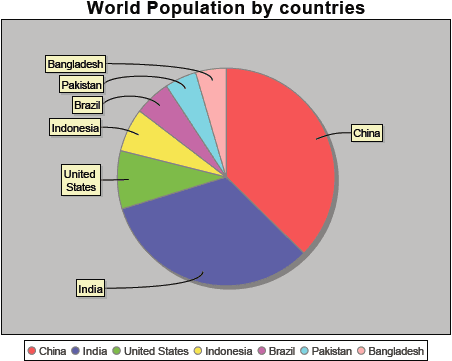 This is ofcourse very preliminary example of adding pie charts in PDF using Java iText/jFreeChart. But atleast it gives basic idea of how to achieve this. Feel free to modify the above code and play around to generate different charts/graphs in PDF.



Excellent Tutorial. It’s Matches with my requirement. Very Very Thanks for Providing This tutorial
can u provide me a code to handle multiple edit button for each row of table .
i am using dispatch action of struts 1 , but not been able to set the hidden varibale dynamically to send it to next action.
Hi Viral,
A very useful article! Thanks a bunch. :-)
I am facing a technical problem and I wonder if you will be able to help me out. I am using iText 2.1.5 (I know a newer version exists) to generate pdf files. I am picking up text from database and putting it in the pdf file. The database text however has tags like “Bold” instead of good old “
<b>Bold</b>“.Despite using HTMLWorker.parseToList, the text Bold” is printed as it is in the generated pdf. I see that tags are not in the tagsSupported list of HTMLWorker.
I have googled and checked many sites but nothing seems to be working so far. If I don’t find any solution, I will have to resort to parsing the strings by myself and replacing tags with appropriate html tags like
<b>, etc. I am hoping I don’t have to do that as it somehow feels inelegant.Am I doing something wrong? Can you please help me out here?
Thanks a lot once again!
Swapna
I am sorry Viral. I didn’t realize the site will format my text as per the html tags I mentioned. I will post the relevant part once again.
The database text has tags like “span” with “style” set to “font-weight:bold;” or “font-style:italic” instead of using b, u or i like tags.
Hi Viral,
I am using iText and JFreeChart.
I have generated a chart and am using iText to save the chart as PDF.
When I save the PDF to filesystem, the file saves correctly, then when opened, shows chart without any problems.
But when I try to serve the pdf as response to request, it gives me error file does not start with %pdf-.
My code is below.
Can you help me out in resolving this problem, where I might have made any mistake?
Thanks.
Regards,
Venkata.
Appreciate your help.
response.setContentType("application/pdf");
Rectangle pagesize = new Rectangle(width, height);
Document document = new Document(pagesize, 50, 50, 50, 50);
try {
PdfWriter writer = PdfWriter.getInstance(document, response.getOutputStream());
document.addTitle("Test PDF");
document.addAuthor("research");
document.addSubject("Demo");
document.open();
PdfContentByte cb = writer.getDirectContent();
PdfTemplate tp = cb.createTemplate(width, height);
Graphics2D g2 = tp.createGraphics(width, height, mapper);
Rectangle2D r2D = new Rectangle2D.Double(0, 0, width, height);
chart.draw(g2, r2D);
g2.dispose();
cb.addTemplate(tp, 0, 0);
} catch (DocumentException de) {
System.err.println(de.getMessage());
}
document.close();
Thanks a lot for the tutorial. A small addition, you could replace the document line by the following to set the pdf size :
Document document = new Document(new Rectangle(width,height));
Hey can u tell me where i save this jar file??????
plz repli fast.
@pradeep, it doesn’t matter where you put the jar files, just make sure you add them to the classpath/buildpath. http://www.perfectknowledgedb.com/H2R/java.htm#buildpath
@donc_oe
Thank u :)
can anyone help me for creating dynamic graph(live trading)
x axis shoul be current time and y axis value is to get from database……..
I have done x axis part in that i used thread and timeseries now i want to connect with database on y axis…………
plzzzzzzzz help
Thank u :)
good work.
Its really suited my requirement…..with partial changes like, instead using pdf html display and getting data from db to replace the hardcoded dataset values
Super Cool code man.Working perfect .Thanks.Keep it up.
Hello,
I want to Generate Pie Chart/Bar Graph in JSF;plz anybody help me!!!
Document document = new Document(PageSize.A4_LANDSCAPE, 10, 10, 10,
10);
ByteArrayOutputStream baos = new ByteArrayOutputStream();
writer = PdfWriter.getInstance(document, baos);
document.open();
FacesContext facesContext = FacesContext.getCurrentInstance();
ExternalContext externalContext = facesContext.getExternalContext();
HttpServletResponse response = (HttpServletResponse) externalContext.getResponse(); document.add(new Paragraph(“Report:”, FontFactory.getFont(FontFactory.COURIER, 10, Font.BOLD,new CMYKColor(255, 255, 255, 255))));
Paragraph paragraph1 = new Paragraph();
paragraph1.setSpacingBefore(4);
document.add(paragraph1);
/*like wise content will be added to pdf document*/
document.close();
Date date = new Date();
SimpleDateFormat format = new SimpleDateFormat(“dd_MM_yyyy_HH.mm.ss”);
response.setContentType(“application/pdf”);
response.setHeader(“Content-disposition”,”attachment; filename=Batch_Report” + format.format(date)+ “.pdf”);
ServletOutputStream out;
try {
out = response.getOutputStream();
baos.writeTo(out);
out.flush();
out.close();
facesContext.responseComplete();
} catch (IOException e) {
// TODO Auto-generated catch block
e.printStackTrace();
}
By using the above iam able to create pdf file in jsf
Hi all, Can any one send me simple source code for generating a chart using database. and generating pdf using Database.
plz help me out bcz the itext is very new for me
thanks..
mail me @ [email protected]
May I also have a copy?
Great working code for JFreeChart + iText. Thanks a lot!
cannot compile it , teach me please !
i am downloading this program and jar files but it shows error.. at
chart.draw(graphics2d, rectangle2d);
wt we do…? pls help?
Hi Viral… Your article really helped me a lot.. ‘BIG’ thanks… :)
Thanks a lot for this great tutoria!!!
can you give me a software that build in c language with their source code. its important to me
plzzz i am waiting for ur reply…
hi , thanks for the tutes.. but can u plz elaborate that what is the use of of comparable rowkeys
comparable column keys in creating bar chart
Thansk alot .. for a wonderful contribution :)
Thanks a lot for it :D
hi…
i used this code but for me its getting just blank page can anyone help in this
thanx bro…!!!
Hey, helped a lot, thx!
But i still got one question: the legend on my pieChart is to big in the PDF, so that the names of the pie parts are above each other and dont scale down, although this doesnt happen when i paint them with jPanel. Maybe any1 got a tip?
**Excuse my english ;
hi ! viral your blog help me alot … thank u very much..:)
we are doing feedback project…. please give me the code how to summarize the results. which we are getting from the students..
please give me an idea
hi…
we are in the process of making the online student feedback system application
we had prepared the front end web pages now we are facing problems in generating code for obtaining the correct selected radio button directed to the database and to make an average of all the forms of one class… please help us regarding this…
please contact: [email protected]
Can i get the souce code please…getting error when placing in eclipse ..thanks
Hi Viral,
This tutorial helped me a lot..thankyou very much.
Hi Viral,
when i download the jar files form the website http://sourceforge.net/projects/jfreechart/files/, i get all zip files like this, jcommon-1.0.16.zip , should i be changing that to .jar or shoud i find .jar from the .zip file and place in my WEB-INF/lib dir.
Please advice.
thanks
Hi Viral,
I am using your tutorial, but PdfTemplate.createGraphics(int, int, DefaultFontMapper) is deprecated. can you pls tell how to replace that part of the code?
I tried replacing with PdfPrinterGraphics2D but not getting any success.
thanks
hey viral ….
actually i included all the jar in project as you said above but when i copy ur code in my project its showing some errors at these following lines…
Document document = new Document();
writer = PdfWriter.getInstance(document, new FileOutputStream(fileName));
document.open();
Graphics2D graphics2d = template.createGraphics(width, height,new DefaultFontMapper());
document.close();
can u just ell me what to do now….plz reply
surjeet
Thanks for sharing such a wonderful tutorial.
However, I am facing an issue that whenever I generate pdf congaing bar chart, I get half page white space & after that it shows bar chart graph. Can you please tell me how can I fix this issue?
the code is not running it has error stated :” could not find or load main class”.. pls suggest me what should i do ?
It helped me a lot. thank you for nice post
Can anybody give me a simple source code. The Tutorial isn’t working all errors occur after the try{} part.
Chart is getting plotted at the end of the page. How to position the chart at the start of the page?
x and y coordinates in the following two lines are already set to zero, still the chart comes at the end of the page.
Rectangle2D rectangle2d = new Rectangle2D.Double(0, 0, width,height);
contentByte.addTemplate(template, 0, 0);
Any help?
down vote
favorite
I have a list of entity where each entity object has 5 attributes- plant name,plant id, reached count,within time count,exceeded time count.I want to create a stacked barchart which has the plant id on x axis and no of vehicles on y axis and three stacks shows the 3 different counts for that particular plant.
I have seen example from the following link https://www.roseindia.net/chartgraphs/stacked-bar-chart1.shtml but I am not getting the group concept . Please can anyone tell a simpler code considering only one product in above example
Please help
Good thread, I update for itext 5
final int widthA4 = (int) PageSize.A4.getWidth();
final int heightA4 = (int) PageSize.A4.getHeight();
PdfWriter writer = null;
Document document = new Document(PageSize.A4);
document.addTitle(“Test PDF”);
document.addAuthor(“VirtualTrader4FX”);
document.addSubject(“Demo”);
try {
writer = PdfWriter.getInstance(document, new FileOutputStream(fileName));
document.open();
PdfContentByte contentByte = writer.getDirectContent();
Graphics2D graphics2d = new PdfGraphics2D(contentByte, widthA4-10, heightA4-10, new DefaultFontMapper());
Rectangle2D rectangle2d = new Rectangle2D.Double(0, 0, width, height);
chart.draw(graphics2d, rectangle2d);
graphics2d.dispose();
} catch (Exception e) {
e.printStackTrace();
}
finally {
document.close();
}
Hi…
Anyone have the sample source code for have table and chart in same PDF file , Kindly help me or Share here..
Thanks in advance..