This is a demo Contact Manager application that we will create using Struts2 and Hibernate framework. In this article we will see how we can use Hibernate to perform Insert / Delete operations in Struts2 framework.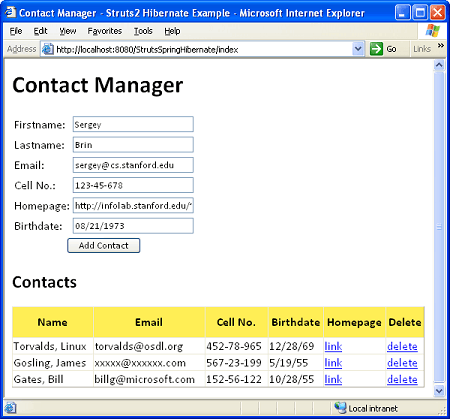

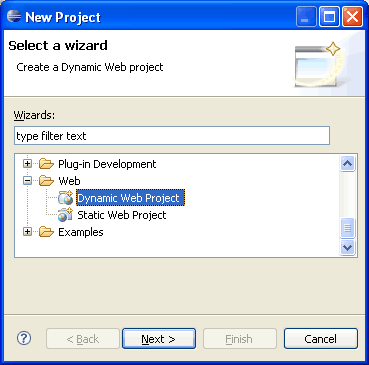
 After selecting Dynamic Web Project, press Next.
  Write the name of the project. For example ContactManager. Once this is done, select the target runtime environment (e.g. Apache Tomcat v6.0). This is to run the project inside Eclipse environment. After this press Finish. We will need a source folder called resources. Right click on Project in project explorer and select New -> Source Folder and create a folder with name resources. Also we will create Java packages for our application. As we will use Struts2, we will follow MVC architecture. Create 4 packages in the sources.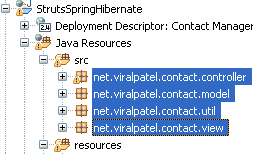
 We created 4 new packages. The net.viralpatel.contact.controller will hold the Java class that will act as controller and will fetch the data from database and pass it to view. The net.viralpatel.contact.model package will hold the Hibernate persistent model class. The net.viralpatel.contact.view will contain the struts2 action class. And finally the net.viralpatel.contact.util will have some hibernate related util file that will be see shortly.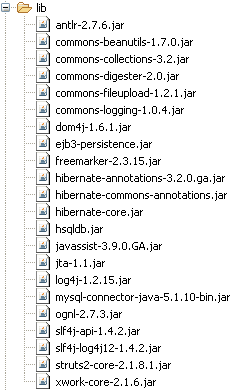
 Fill the contact form and hit enter and the new contact will be persisted in database and will be shown in below table. Similarly, click on delete link next to a record. It will delete the record from database. Let me know your input about this application.
Cheers.
Fill the contact form and hit enter and the new contact will be persisted in database and will be shown in below table. Similarly, click on delete link next to a record. It will delete the record from database. Let me know your input about this application.
Cheers.
Our Goal
Our goal will be to demonstrate the use of Struts2 with Hibernate framework and to create a demo application “Contact Manager”. The basic requirement of the Contact Manager app will be:- Add new contact in the contact list.
- Display all contacts from contact list.
- Delete a contact from contact list.

Getting Started
For our Contact Manager example, we will use MySQL database. Create a table contacts in any MySQL database. This is very preliminary example and thus we have minimum columns to represent a contact. Feel free to extend this example and create a more complex application.CREATE TABLE CONTACTS
(
id INT PRIMARY KEY AUTO_INCREMENT,
firstname VARCHAR(30),
lastname VARCHAR(30),
cell_no VARCHAR(15),
email_id VARCHAR(30),
website VARCHAR(150),
birthdate DATE,
created TIMESTAMP DEFAULT NOW()
);
Code language: SQL (Structured Query Language) (sql)Creating Project in Eclipse
Open Eclipse and goto File -> New -> Project and select Dynamic Web Project in the New Project wizard screen. After selecting Dynamic Web Project, press Next.
 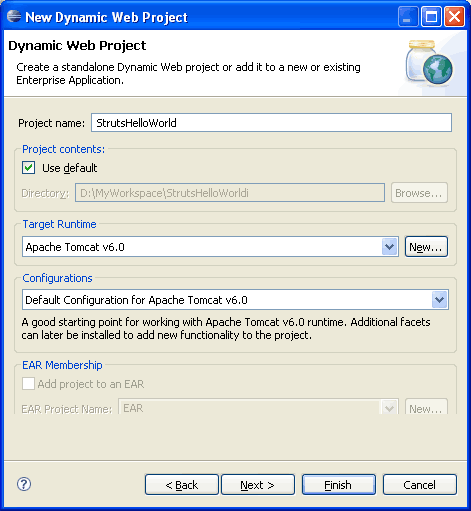 Write the name of the project. For example ContactManager. Once this is done, select the target runtime environment (e.g. Apache Tomcat v6.0). This is to run the project inside Eclipse environment. After this press Finish. We will need a source folder called resources. Right click on Project in project explorer and select New -> Source Folder and create a folder with name resources. Also we will create Java packages for our application. As we will use Struts2, we will follow MVC architecture. Create 4 packages in the sources.
  We created 4 new packages. The net.viralpatel.contact.controller will hold the Java class that will act as controller and will fetch the data from database and pass it to view. The net.viralpatel.contact.model package will hold the Hibernate persistent model class. The net.viralpatel.contact.view will contain the struts2 action class. And finally the net.viralpatel.contact.util will have some hibernate related util file that will be see shortly.
Required JAR Files
Now copy all the required JAR files in WebContent -> WEB-INF -> lib folder. Create this folder if it does not exists.
Create JSP for Contact Manager
We will need only one JSP file for this tutorial. The JSP will include a form to add new contact as well as will list the contacts at the end. Create a JSP file index.jsp in WebContent folder and copy following content into it. WebContent/index.jsp<%@ page contentType="text/html; charset=UTF-8"%>
<%@ taglib prefix="s" uri="/struts-tags"%>
<html>
<head>
<title>Contact Manager - Struts2 Hibernate Example</title>
</head>
<body>
<h1>Contact Manager</h1>
<s:actionerror/>
<s:form action="add" method="post">
<s:textfield name="contact.firstName" label="Firstname"/>
<s:textfield name="contact.lastName" label="Lastname"/>
<s:textfield name="contact.emailId" label="Email"/>
<s:textfield name="contact.cellNo" label="Cell No."/>
<s:textfield name="contact.website" label="Homepage"/>
<s:textfield name="contact.birthDate" label="Birthdate"/>
<s:submit value="Add Contact" align="center"/>
</s:form>
<h2>Contacts</h2>
<table>
<tr>
<th>Name</th>
<th>Email</th>
<th>Cell No.</th>
<th>Birthdate</th>
<th>Homepage</th>
<th>Delete</th>
</tr>
<s:iterator value="contactList" var="contact">
<tr>
<td><s:property value="lastName"/>, <s:property value="firstName"/> </td>
<td><s:property value="emailId"/></td>
<td><s:property value="cellNo"/></td>
<td><s:property value="birthDate"/></td>
<td><a href="<s:property value="website"/>">link</a></td>
<td><a href="delete?id=<s:property value="id"/>">delete</a></td>
</tr>
</s:iterator>
</table>
</body>
</html>
Code language: HTML, XML (xml)Adding Hibernate Support
For adding hibernate support, we will add following source code in Contact Manager application. hibernate.cfg.xml – This is the Hibernate configuration file. This file will contain configurations such as database connection information, persistence class info etc. Create hibernate.cfg.xml under resources folder and copy following content into it.<?xml version='1.0' encoding='utf-8'?>
<!DOCTYPE hibernate-configuration PUBLIC
"-//Hibernate/Hibernate Configuration DTD 3.0//EN"
"http://hibernate.sourceforge.net/hibernate-configuration-3.0.dtd">
<hibernate-configuration>
<session-factory>
<property name="connection.driver_class">
com.mysql.jdbc.Driver
</property>
<property name="connection.url">
jdbc:mysql://localhost:3306/ContactManager
</property>
<property name="connection.username">root</property>
<property name="connection.password">root</property>
<property name="connection.pool_size">1</property>
<property name="dialect">
org.hibernate.dialect.MySQLDialect
</property>
<property name="current_session_context_class">thread</property>
<property name="cache.provider_class">
org.hibernate.cache.NoCacheProvider
</property>
<property name="show_sql">true</property>
<property name="hbm2ddl.auto">update</property>
<mapping class="net.viralpatel.contact.model.Contact" />
</session-factory>
</hibernate-configuration>
Code language: HTML, XML (xml)package net.viralpatel.contact.util;
import org.hibernate.SessionFactory;
import org.hibernate.cfg.AnnotationConfiguration;
public class HibernateUtil {
private static final SessionFactory sessionFactory = buildSessionFactory();
private static SessionFactory buildSessionFactory() {
try {
// Create the SessionFactory from hibernate.cfg.xml
return new AnnotationConfiguration().configure()
.buildSessionFactory();
} catch (Throwable ex) {
System.err.println("Initial SessionFactory creation failed." + ex);
throw new ExceptionInInitializerError(ex);
}
}
public static SessionFactory getSessionFactory() {
return sessionFactory;
}
}
Code language: Java (java)package net.viralpatel.contact.model;
import java.io.Serializable;
import java.sql.Date;
import javax.persistence.Column;
import javax.persistence.Entity;
import javax.persistence.GeneratedValue;
import javax.persistence.Id;
import javax.persistence.Table;
@Entity
@Table(name="Contacts")
public class Contact implements Serializable{
private static final long serialVersionUID = -8767337896773261247L;
private Long id;
private String firstName;
private String lastName;
private String emailId;
private String cellNo;
private Date birthDate;
private String website;
private Date created;
@Id
@GeneratedValue
@Column(name="id")
public Long getId() {
return id;
}
@Column(name="firstname")
public String getFirstName() {
return firstName;
}
@Column(name="lastname")
public String getLastName() {
return lastName;
}
@Column(name="email_id")
public String getEmailId() {
return emailId;
}
@Column(name="cell_no")
public String getCellNo() {
return cellNo;
}
@Column(name="birthdate")
public Date getBirthDate() {
return birthDate;
}
@Column(name="website")
public String getWebsite() {
return website;
}
@Column(name="created")
public Date getCreated() {
return created;
}
public void setId(Long id) {
this.id = id;
}
public void setFirstName(String firstName) {
this.firstName = firstName;
}
public void setLastName(String lastName) {
this.lastName = lastName;
}
public void setEmailId(String emailId) {
this.emailId = emailId;
}
public void setCellNo(String cellNo) {
this.cellNo = cellNo;
}
public void setBirthDate(Date birthDate) {
this.birthDate = birthDate;
}
public void setCreated(Date created) {
this.created = created;
}
public void setWebsite(String website) {
this.website = website;
}
}
Code language: Java (java)Adding Controller to access data
We will add a controller class in Contact Manager application which will be used to get/save data from hibernate. This controller will be invoked from Struts action class. Create a file ContactManager.java under net.viralpatel.contact.controller package and copy following content into it.package net.viralpatel.contact.controller;
import java.util.List;
import org.hibernate.HibernateException;
import org.hibernate.classic.Session;
import net.viralpatel.contact.model.Contact;
import net.viralpatel.contact.util.HibernateUtil;
public class ContactManager extends HibernateUtil {
public Contact add(Contact contact) {
Session session = HibernateUtil.getSessionFactory().getCurrentSession();
session.beginTransaction();
session.save(contact);
session.getTransaction().commit();
return contact;
}
public Contact delete(Long id) {
Session session = HibernateUtil.getSessionFactory().getCurrentSession();
session.beginTransaction();
Contact contact = (Contact) session.load(Contact.class, id);
if(null != contact) {
session.delete(contact);
}
session.getTransaction().commit();
return contact;
}
public List<Contact> list() {
Session session = HibernateUtil.getSessionFactory().getCurrentSession();
session.beginTransaction();
List<Contact> contacts = null;
try {
contacts = (List<Contact>)session.createQuery("from Contact").list();
} catch (HibernateException e) {
e.printStackTrace();
session.getTransaction().rollback();
}
session.getTransaction().commit();
return contacts;
}
}
Code language: Java (java)Adding Struts2 Support
Let us add Struts2 support to our web application. For that, will add following entry in deployment descriptor (WEB-INF/web.xml).Add Struts2 Filter in web.xml
<filter>
	<filter-name>struts2</filter-name>
	<filter-class>
		org.apache.struts2.dispatcher.FilterDispatcher
	</filter-class>
</filter>
<filter-mapping>
	<filter-name>struts2</filter-name>
	<url-pattern>/*</url-pattern>
</filter-mapping>
Code language: HTML, XML (xml)
Creating struts.xml
We will need to create struts.xml file that will hold the action mapping for our example. Create a file struts.xml in resources folder and add following content into it. struts.xml<?xml version="1.0" encoding="UTF-8" ?>
<!DOCTYPE struts PUBLIC
"-//Apache Software Foundation//DTD Struts Configuration 2.0//EN"
"http://struts.apache.org/dtds/struts-2.0.dtd">
<struts>
<constant name="struts.enable.DynamicMethodInvocation"
value="false" />
<constant name="struts.devMode" value="false" />
<package name="default" extends="struts-default" namespace="/">
<action name="add"
class="net.viralpatel.contact.view.ContactAction" method="add">
<result name="success" type="chain">index</result>
<result name="input" type="chain">index</result>
</action>
<action name="delete"
class="net.viralpatel.contact.view.ContactAction" method="delete">
<result name="success" type="chain">index</result>
</action>
<action name="index"
class="net.viralpatel.contact.view.ContactAction">
<result name="success">index.jsp</result>
</action>
</package>
</struts>
Code language: HTML, XML (xml)Create Action class
Up-till now we have almost completed our Contact Manager application in Struts2 and Hibernate. Only task left is to add Struts Action class. Create a class ContactAction.java under net.viralpatel.contact.view package and copy following content into it.package net.viralpatel.contact.view;
import java.util.List;
import net.viralpatel.contact.controller.ContactManager;
import net.viralpatel.contact.model.Contact;
import com.opensymphony.xwork2.ActionSupport;
public class ContactAction extends ActionSupport {
private static final long serialVersionUID = 9149826260758390091L;
private Contact contact;
private List<Contact> contactList;
private Long id;
private ContactManager contactManager;
public ContactAction() {
contactManager = new ContactManager();
}
public String execute() {
this.contactList = contactManager.list();
System.out.println("execute called");
return SUCCESS;
}
public String add() {
System.out.println(getContact());
try {
contactManager.add(getContact());
} catch (Exception e) {
e.printStackTrace();
}
this.contactList = contactManager.list();
return SUCCESS;
}
public String delete() {
contactManager.delete(getId());
return SUCCESS;
}
public Contact getContact() {
return contact;
}
public List<Contact> getContactList() {
return contactList;
}
public void setContact(Contact contact) {
this.contact = contact;
}
public void setContactList(List<Contact> contactsList) {
this.contactList = contactsList;
}
public Long getId() {
return id;
}
public void setId(Long id) {
		this.id = id;
	}
}
Code language: Java (java)ContactAction class contains different methods that gets called by Struts2. The execute() method is the default method which gets called when we call /index action from browser. It fetches the list of contacts and display it in index.jsp. Similarly, when a new contact is added, add() method is called. If you check the action mapping entry in struts.xml for add() method, the <result> is mapped with /index action and the type is chain. This is because we want to display the list of contact once we add a new one. Hence we have done Action chaining and called /index action after /add action.The Contact Manager App
That’s it. The app is ready, just compile and run the project in Eclipse Run -> Run As -> Run on Server. Set the URL to: http://localhost:<port>/<project name>/index Fill the contact form and hit enter and the new contact will be persisted in database and will be shown in below table. Similarly, click on delete link next to a record. It will delete the record from database. Let me know your input about this application.
Cheers.
First of all, thanks for the struts2 tutorials.
All the other examples worked well but in this one I seem to get two identical inserts every time I post the form. What might cause this? I’ll try to dig into it this evening, but just in case I can’t figure it out…
I have the same problem with two identical inserts.
@Antti, @GelbeTT: Have you tried to download the source code at the end of article. I think there is some prob with configuration.
hi viral patel,
Thanks for your tutorials. and i have one question. can you please tell me how can you load the hibernate.cfg.xml file in the HibernateUtil.java. we have to give the path to that file or it gets automatically. thanks for your help.
Hi Rajasekhar,
The hibernate.cfg.xml file will be automatically loaded by Hibernate. It must be present in classpath. This is why we have added this file in /resources folder which is a source folder.
Once the project is compiled, the hibernate.cfg.xml file will be available in WEB-INF/classes folder of webapp.
thankyou viral.
Hello Viral,
nice job, I enjoy your tutorials. Pretty straight forward. Thank you and keep on like this.
I have some inputs that can save hours to some like me:
1° The database created in MySQL must have the same name as specified in hibernate.cfg.xml at line 12(in your example ContactManager). Initially I put the table in other database (you said “in any database”) and obviously the program didn’t find it.
2° Concerning the double “add” to database, it’s because theres a first “add”: —linkController.add(getContact());— in ContactAction.java line 35, the add() method
and there’s another one at line 24, in the execute() method.
I just commented the second one and is working just fine.
3° At the first access of the page, the table was not populated with data, even if in the DB it exist. I saw you tried to force the execution of “index.action” (which is in fact the execute() method of ContactAction class) by not declaring any parameter in web.xml
For some reason it doesn’t work and I wonder if is fault of my configuration?
For me, the solution was to:
a) rename the index.jsp –> display.jsp
b)in struts.xml redirect the action “index” towards this new page
c)create a new index.html pretty empty with in the header
d) eventually indicate in web.xml the index.html
ok, hoping that this will help somenone
@dani: Thanks for the suggestions. I appreciate your effort to share your inputs. This will be definitely helpful for others. I will also try to modify the post and include your suggestions.
Thanks again.
3° At the first access of the page, the table was not populated with data, even if in the DB it exist.
How you solved this problem. I am also having same requirement. Please suggest.
Hi Sidd, How are you accessing the page first time?//index.jsp//index
http://localhost:
or
http://localhost:
If you are accessing it with 2nd URL, it will populate the data in table.
Thanks for your reply and yes when i am typing the URL “http://localhost:8080/ContactManager/index” data is getting populated. but it is showing “Nothing found to display” on the Top.
and when i am trying with URL “http://localhost:8080/ContactManager/” no data gets populated and the message “Nothing found to display” on the Top is coming any Guess.
Thanks
Sidd
Oh Sorry, I wrongly added the display tag in my JSP. When I remove that the message is gone.
Thanks.
One thing more Cant we populate the data by just hitting URL “http://localhost:8080/ContactManager/” if yes do i need to make some changes in my configuration.
i mean suppose that i have uploaded my site and user is hitting “www.contactmanager.com” then is it possible to get data populated.
Thanks in advance.
well, my previous comment didn’t save the HTML tag so there are 2 lines that should look like this:
c)create a new index.html pretty empty with (META HTTP-EQUIV=”Refresh” CONTENT=”0;URL=index.action” ) in the header
and
d)eventually indicate in web.xml the (welcome-file) index.html (/welcome-file)
obviously all with brackets instead of parenthesis;
I tried the tutorial twice, did everything as you said, but I got: status 404 The requested resource (/Borra/) is not available. If you have any sugestions I would apreciate them. Tnks.
I got 404 The requested resource (/Borra/) is not available.
what can I do?
tnks
Hi Viral, Thanks for the KISS ( keep it short & sweet ) tutorial.
1. do i have to download each jar files separately or is there any RAR file that contains all the required jar files ? Is there any specific RAR file available by the apache org to make the struts2 appl compatible with Hibernate ?
thanks dear…….
thank u so so so much………………………
hi thanks for this demo i appreciate you…………….very much keep giving us more complex example of struts and hibernate with eclipse…..
hi. i am also getting error message404 The requested resource (/helloworld/) is not available.
@ viral please help
please respond viral
@harna: Check the logs when you starting Tomcat server. There must be error in the log which is causing the issue. Also see if /helloworld/ is the correct name of project. Best way is to start Tomcat inside eclipse only to avoid such issues in development.
Thanks a lot viral…i could solve that problem.but there is one hibernate annotation problem now.
Initial SessionFactory creation failed.java.lang.NoSuchFieldError: tableNameBinding
@hasna: There must be version conflict in the jar files. Check the jars you have included in your project.
Hi Viral,
Thanks for the Very Use full application. I am new to Hibernate. Could you please explain the flow of the application.
Thanks
Suman
I am unable to run the this example can you please tell which Jars required other than these. Because i am getting following errors.
java.lang.IllegalAccessError at net.sf.cglib.core.ClassEmitter.setTarget(ClassEmitter.java:47)
Hi Viral Patel,
I got a problem with ur project. When i click the Add Contacts, it show an error states that
The requested resource (/HibeStr/add) is not available.
But i do checked struts.xml and everything. I d/led the source file you’ve given. Please let me know whats the problem. I added all needed jar files.
Hi Viral,
This tutorial is an ladder and makes struts look easy for beginner, you have done nice work by providing the abstract details of each step.
But where is the Contact.hbm.xml file. You haven’t give it.
Mr. Vital I have following error when click the add contact buttob
org.hibernate.HibernateException: No CurrentSessionContext configured!
org.hibernate.impl.SessionFactoryImpl.getCurrentSession(SessionFactoryImpl.java:572)
contact.controller.ContactManager.add(ContactManager.java:15)
contact.view.ContactAction.execute(ContactAction.java:24)
sun.reflect.NativeMethodAccessorImpl.invoke0(Native Method)
sun.reflect.NativeMethodAccessorImpl.invoke(Unknown Source)
sun.reflect.DelegatingMethodAccessorImpl.invoke(Unknown Source)
java.lang.reflect.Method.invoke(Unknown Source)
com.opensymphony.xwork2.DefaultActionInvocation.invokeAction(DefaultActionInvocation.java:441)
com.opensymphony.xwork2.DefaultActionInvocation.invokeActionOnly(DefaultActionInvocation.java:280)
com.opensymphony.xwork2.DefaultActionInvocation.invoke(DefaultActionInvocation.java:243)
com.opensymphony.xwork2.interceptor.DefaultWorkflowInterceptor.doIntercept(DefaultWorkflowInterceptor.java:165)
com.opensymphony.xwork2.interceptor.MethodFilterInterceptor.intercept(MethodFilterInterceptor.java:87)
com.opensymphony.xwork2.DefaultActionInvocation.invoke(DefaultActionInvocation.java:237)
com.opensymphony.xwork2.validator.ValidationInterceptor.doIntercept(ValidationInterceptor.java:252)
org.apache.struts2.interceptor.validation
and still more.
please can you help me to get ride of that.
Thanks in advance
Viji.
Thanks buddy. You Tutorial Is really awesome. Thanks Once again.
Thanks Viral for a very nice tutorials on Struts2, and this one with Struts2 + hibernate and also Danny helped to solve the couple of problems…
Viral…. Please Continue posting this kind of blog…. It really helps a lot for beginner’s…
Thank you dear once again..
Slight change to point 3 mentioned by dani on accesing index.jsp for the first the data is not populted becoz u get the contact list only when u execute methos of action class is executed. since it does not get executed until and unless u click on add button data will not be populated. awork around this u call the add.action class first which will populate the data in the index.jsp.
secondly in index.jsp the action needs to be changed to add.action and delete.action ,
and the delete action link should be changed to
<a href="delete.action?id=”>delete
also the struts.xml needs to be modified for this example to run smoothly.
index
index.jsp
Rest all is fine
Hi Angelina,
I’am relly happy finding this site of Viral.
But I got the same error like some other : “HTTP Status 404 – There is no Action mapped for namespace / and action name add.” And the list of contacts is always empty.
It seems to me, that you solved the problem, but I wasn’t able to follow you suggestions.
Could you please give me a detailed information about the content of the struts.xml, web.xml and index.jsp/display.jsp? And how should I run the add.action from startup?
Thank’s a lot for your reply
Dirk
Hi,
I got this error when tryying to add a contact :
No result defined for action net.viralpatel.contact.view.ContactAction and result input
description The requested resource (No result defined for action net.viralpatel.contact.view.ContactAction and result input) is not available.
Please help
thanks
Hey,
I also got same error as..
type Status report
message No result defined for action net.viralpatel.contact.view.ContactAction and result input
description The requested resource (No result defined for action
net.viralpatel.contact.view.ContactAction and result input) is not available.
Viral, Can you please help me for this error.
Thanks.
the example is very simple yet illustrative but i m getting the following error.
java.lang.NoClassDefFoundError: javax/ejb/Column
i need help
Hey,
I also got same error as..
type Status report
message No result defined for action net.viralpatel.contact.view.ContactAction and result input
description The requested resource (No result defined for action
net.viralpatel.contact.view.ContactAction and result input) is not available.
Viral, Can you please help me for this error.
Thanks.
@deepak::hey that is a validation error.You are passing value of some other type in the form and receiving it in the class in some other data type..
Welll i solved my problem.it was due to a jar file conflict.
@deepak:hey that is a validation error.You are submitting value of some type in your form and recieving it in the class in some other form.
well i solved my problem.It was a jar file conflict problem
Please send jar file with source code
I downloaded hibernate zip file (last version). I cannot find some jars. I know I can look for them just using google, but I though just downloading struts2 and hibernate would have all I need. Can anyone clarify where to download all needed jars? Thanks.
hey.. thanks for the step by step example..
one small thing i thought would be needed is “a confirmation of delete action to be made”.
a small javascript could make it more smarter. i mean, if u add it here, no one need to look around for this small thing.
anyways things here are really useful.. keep up the good work
Cheers
i have a problem to deploy the web application
Hi all,
i am getting errors as below
type Status report
message There is no Action mapped for namespace / and action name add.
description The requested resource (There is no Action mapped for namespace / and action name add.) is not available.
——————————————————————————–
Apache Tomcat/6.0.18
olease suggest me what i have to do
Hi, instead of using MySQL, I’m trying the sample with an Oracle DB.
I managed to retrieve data from the DB, but as I try to insert data I get errors !
Any advice ? thanks
java.lang.IllegalArgumentException: attempt to create saveOrUpdate event with null entity
at org.hibernate.event.SaveOrUpdateEvent.(SaveOrUpdateEvent.java:63)
at org.hibernate.event.SaveOrUpdateEvent.(SaveOrUpdateEvent.java:46)
at org.hibernate.impl.SessionImpl.save(SessionImpl.java:550)
at org.hibernate.impl.SessionImpl.save(SessionImpl.java:546)
at sun.reflect.NativeMethodAccessorImpl.invoke0(Native Method)
at sun.reflect.NativeMethodAccessorImpl.invoke(NativeMethodAccessorImpl.java:39)
at sun.reflect.DelegatingMethodAccessorImpl.invoke(DelegatingMethodAccessorImpl.java:25)
at java.lang.reflect.Method.invoke(Method.java:597)
at org.hibernate.context.ThreadLocalSessionContext$TransactionProtectionWrapper.invoke(ThreadLocalSessionContext.java:342)
at $Proxy6.save(Unknown Source)
at net.lupo.contact.controller.CategorieManager.add(Unknown Source)
at net.lupo.contact.view.CategorieAction.add(Unknown Source)
at sun.reflect.NativeMethodAccessorImpl.invoke0(Native Method)
at sun.reflect.NativeMethodAccessorImpl.invoke(NativeMethodAccessorImpl.java:39)
at sun.reflect.DelegatingMethodAccessorImpl.invoke(DelegatingMethodAccessorImpl.java:25)
at java.lang.reflect.Method.invoke(Method.java:597)
at com.opensymphony.xwork2.DefaultActionInvocation.invokeAction(DefaultActionInvocation.java:441)
……
…….
……
Hi, I have a problem that file is not in library so I dont run my project. Please one respond to my problem.
@venkat:make sure u hv defined ‘add’ action in ur struts.xml file
APor:try this-www.findjar.com
Please one help to me. I try to prepare a estate program. I want to add house information delete this and I want to add foto of these house but I cant make this application. My application doesnt run. always make error. and I dont know how I add foto
use shine enterprise pattern to make some thing like this
refer to http://www.megaupload.com/?d=ALY55F8F to learn more
thanks you !!! this application is very good …. !!!
greetings from Perú
hello viral,i follow ur tutorial its nice to learn.i try the same example in my pc for practice which is u given here.but i got some problem which i can’t able to understand.so can u please help me to soleve these proble.i send the error message with these comment ok.so please give me a reply as soon as possible.following is the error:
======================================================================
org.hibernate.MappingException: Unknown entity: src.model.Contact
Viral;
Thanks for another great tutorial…
A note for anyone downloading the latest hibernate….
The list of jars mentioned in the tutorial are different. It was recommended to just search the net for the jars. Bad news if you blindly replace the jars, especially if you download hibernate 3.5 or greater.
I’m trying to get this running with hibernate 3.5.3 with postgreSQL and jboss. I’m down to a sequence error; however, it appears jboss included hibernate with the server so I was getting tons of vague conflicts. What I have learned is that a vague error might be a conflict with a jboss supplied jar.
I finally figured this out by replacing the hibernate libs with what jboss/common/lib was providing and got past many errors. I spent a day+ rewriting the code to find this out. Hey, at least I learned a lot! Now, I need to get jboss to ignore the commons lib and figure out the sequence problem and I will be great.
Again, thanks Viral, because you have really jumpstarted my understanding of struts2. And now hibernate!
HI VIRAL I HAVE DONE STEP BY STEP OF THIS APPLICATION. THE APPLICATION GETS COMPILED SUCCESSFULLY BUT AFTER CLICKING THE SUBMIT BUTTON ON THE INDEX PAGE PAGENOT FOUND ERROR COMES HTTP Status 404 – /ContactManager/add
PLEASE GIVE THE REPLY SO THAT I CAN PROCEED
THANKS
why ContactManager is extending HibernateUtil ?
Hi Viral i get an error There is no Action mapped for namespace / and action name add. – [unknown location]
when i click on submit button. I am usinh oracke 10g as a database.Kindly help me on this
i m getting following error while running will u please solve this Mr. viral here it goes……………………………
HTTP Status 404 – There is no Action mapped for namespace / and action name add.
——————————————————————————–
type Status report
message There is no Action mapped for namespace / and action name add.
description The requested resource (There is no Action mapped for namespace / and action name add.) is not available.
——————————————————————————–
Apache Tomcat/6.0.24
Hi Thanks for the well written tutorial. But where do I get the tag lib. . The latest struts download does not have the tag lib. Could one of you help me with it
Hi Viral
Could you please explain me the need for having a separate Contact class as a Pojo ?
Shouldn’t ContactAction class itself acts like a POJO ? so why create an overhead ?
would appreciate if you could reply me back.
I am using jboss and getting the error
There is no Action mapped for namespace / and action name add. – [unknown location]
at com.opensymphony.xwork2.DefaultActionProxy.prepare(DefaultActionProxy.java:178)
at org.apache.struts2.impl.StrutsActionProxy.prepare(StrutsActionProxy.java:61)
at org.apache.struts2.impl.StrutsActionProxyFactory.createActionProxy(StrutsActionProxyFactory.java:39)
at com.opensymphony.xwork2.DefaultActionProxyFactory.createActionProxy(DefaultActionProxyFactory.java:47)
at org.apache.struts2.dispatcher.Dispatcher.serviceAction(Dispatcher.java:478)
at org.apache.struts2.dispatcher.FilterDispatcher.doFilter(FilterDispatcher.java:395)
at org.apache.catalina.core.ApplicationFilterChain.int
hey first in index.jsp set add.action wich is only add.and also in the struts.xml has the only index notification so do it as the index.jsp and then map the actions in the java
Great step by step feeding. I like your article.
I’m try to do step by step but i’m worker with netbean 6.9 and i have a problem , can you help me plz !
HTTP Status 500 –
type Exception report
message
description The server encountered an internal error () that prevented it from fulfilling this request.
exception
javax.servlet.ServletException: Filter execution threw an exception
org.jboss.web.tomcat.filters.ReplyHeaderFilter.doFilter(ReplyHeaderFilter.java:96)
root cause
java.lang.NoClassDefFoundError: Could not initialize class net.viralpatel.contact.controller.ContactManager
net.viralpatel.contact.view.ContactAction.(ContactAction.java:20)
sun.reflect.NativeConstructorAccessorImpl.newInstance0(Native Method)
sun.reflect.NativeConstructorAccessorImpl.newInstance(NativeConstructorAccessorImpl.java:39)
sun.reflect.DelegatingConstructorAccessorImpl.newInstance(DelegatingConstructorAccessorImpl.java:27)
java.lang.reflect.Constructor.newInstance(Constructor.java:513)
java.lang.Class.newInstance0(Class.java:355)
java.lang.Class.newInstance(Class.java:308)
com.opensymphony.xwork2.ObjectFactory.buildBean(ObjectFactory.java:119)
com.opensymphony.xwork2.ObjectFactory.buildBean(ObjectFactory.java:150)
com.opensymphony.xwork2.ObjectFactory.buildBean(ObjectFactory.java:139)
com.opensymphony.xwork2.ObjectFactory.buildAction(ObjectFactory.java:109)
com.opensymphony.xwork2.DefaultActionInvocation.createAction(DefaultActionInvocation.java:288)
com.opensymphony.xwork2.DefaultActionInvocation.init(DefaultActionInvocation.java:388)
com.opensymphony.xwork2.DefaultActionProxy.prepare(DefaultActionProxy.java:187)
org.apache.struts2.impl.StrutsActionProxy.prepare(StrutsActionProxy.java:61)
org.apache.struts2.impl.StrutsActionProxyFactory.createActionProxy(StrutsActionProxyFactory.java:39)
com.opensymphony.xwork2.DefaultActionProxyFactory.createActionProxy(DefaultActionProxyFactory.java:47)
org.apache.struts2.dispatcher.Dispatcher.serviceAction(Dispatcher.java:478)
org.apache.struts2.dispatcher.FilterDispatcher.doFilter(FilterDispatcher.java:395)
org.jboss.web.tomcat.filters.ReplyHeaderFilter.doFilter(ReplyHeaderFilter.java:96)
note The full stack trace of the root cause is available in the JBoss Web/2.1.2.GA logs.
Simple and understandable example. However, I also had to jump through hoops to get the right library files, build file, etc. to get it working. But I guess that’s part of the learning exercise. You learn better when you falter :)
Great job. Keep it up.
a very good article and understandable… :)
My eclipse ide has this logged after i submit the form – SessionFactory creation failed.org.hibernate.HibernateException: /hibernate.cfg.xml not found
Any ideas?
first u can check coding,sessionFactory fail means.u r not create session factory.crete session facrory and sessionfactory(hibernate.cfg.xml).the code is cretae database table row and ganerate primarykay and pojo class object vicevarsa.
Thank u viral this is very good blog for information of hibernate and sturts.
Good One….
@Dani
Many thanks for the comments on double add.
Thank you for the straightforward tutorial. Found the solution to my hibernate-cfg.xml error. I placed it in the src folder instead of the resources folder and it worked fine.
On the issue of the the list not being populated at the first run of the application, one could follow the suggestions pointed out.
However, it may not always be the desired in a real application esp. if there are plenty of records already. One could just add a button for the user to initiate the listing or allowing a search for records.
I need help, please! when I run the application with a jboss server, getting the error:
18:41:58,305 ERROR [[jsp]] Servlet.service() para servlet jsp lanzó excepción
java.lang.NoSuchMethodError: com.opensymphony.xwork2.util.ValueStack.findValue(Ljava/lang/String;Z)Ljava/lang/Object;
at org.apache.struts2.components.Component.findValue(Component.java:255)
at org.apache.struts2.components.ActionError.evaluateExtraParams(ActionError.java:75)
@Viral & @lupo– I am also facing the same error
“java.lang.IllegalArgumentException: attempt to create saveOrUpdate event with null entity”
when i tried to switch the application to oracle database. Please tell the solution.
in my app add a contact run well, but don’t show the contact list below the form. I add all the jars, and i don’t know why don’t appears the LIST!! there are anybody who know this ??
Thanks Viral for this nice tutorial… It’s short, simple and precisely cover every aspect required. I did face quite a few issues in the beginning (config issues etc…) but finally got it up and running. Thanks once again and appreciate your efforts :)
when i run with Tomcat it has error:
org.apache.jasper.JasperException: /index.jsp(12,0) The s:form tag declares that it accepts dynamic attributes but does not implement the required interface
org.apache.jasper.compiler.DefaultErrorHandler.jspError(DefaultErrorHandler.java:40)
org.apache.jasper.compiler.ErrorDispatcher.dispatch(ErrorDispatcher.java:407)
org.apache.jasper.compiler.ErrorDispatcher.jspError(ErrorDispatcher.java:148)
org.apache.jasper.compiler.Validator$ValidateVisitor.visit(Validator.java:777)
org.apache.jasper.compiler.Node$CustomTag.accept(Node.java:1512)
org.apache.jasper.compiler.Node$Nodes.visit(Node.java:2343)
org.apache.jasper.compiler.Node$Visitor.visitBody(Node.java:2393)
org.apache.jasper.compiler.Node$Visitor.visit(Node.java:2399)
org.apache.jasper.compiler.Node$Root.accept(Node.java:489)
org.apache.jasper.compiler.Node$Nodes.visit(Node.java:2343)
org.apache.jasper.compiler.Validator.validate(Validator.java:1739)
org.apache.jasper.compiler.Compiler.generateJava(Compiler.java:166)
org.apache.jasper.compiler.Compiler.compile(Compiler.java:315)
org.apache.jasper.compiler.Compiler.compile(Compiler.java:295)
org.apache.jasper.compiler.Compiler.compile(Compiler.java:282)
org.apache.jasper.JspCompilationContext.compile(JspCompilationContext.java:586)
org.apache.jasper.servlet.JspServletWrapper.service(JspServletWrapper.java:317)
org.apache.jasper.servlet.JspServlet.serviceJspFile(JspServlet.java:342)
org.apache.jasper.servlet.JspServlet.service(JspServlet.java:267)
javax.servlet.http.HttpServlet.service(HttpServlet.java:717)
org.apache.struts2.dispatcher.FilterDispatcher.doFilter(FilterDispatcher.java:389)
Help me please!
thanks
can u telll how to integrate Struts +hibernate with spring
Hi,
I face this problem. Can anyone tell me how to solve this?
I have checked the database name, username and password. They are correct.
00:39:33,762 WARN [SettingsFactory] Could not obtain connection metadata
java.sql.SQLException: No suitable driver found for jdbc:mysql://localhost:3306/test
at java.sql.DriverManager.getConnection(Unknown Source)
at java.sql.DriverManager.getConnection(Unknown Source)
Thanks for your help.
Regards,
Teo.
Hi
u can change dileact name.and once check pojo class object name and data base table id.
I guess you have not included the mysql-connector jar. Check the lib directory. Also cross-check the values of the various properties in hibernate.cfg.xml
Nice Post. Well I would like to add one point.
The class files are using annotations and while running the webapp for the first time it will generate an error “java.lang.NoClassDefFoundError: javax.persistence.Cacheable “. You have to add “hibernate-jpa-2.0-api-1.0.0.Final.jar” into the lib folder which will be available under “/lib/jpa directory in Hibernate distribution.”
Hi,
Can you please let me know how to add validation to above example.
Thanks
Kaushik
Hi All,
When i run this one i got an error like There is no Action mapped for namespace / and action name index. any help pls………..
Hi Viral,
I’m getting following exception. Could you please correct me.
Please reply me.
Regards,
Naveen
javax.servlet.ServletException: Filter execution threw an exception
root cause
java.lang.NoClassDefFoundError: Could not initialize class net.viralpatel.contact.controller.ContactManager
net.viralpatel.contact.view.ContactAction.(ContactAction.java:20)
sun.reflect.NativeConstructorAccessorImpl.newInstance0(Native Method)
sun.reflect.NativeConstructorAccessorImpl.newInstance(NativeConstructorAccessorImpl.java:39)
sun.reflect.DelegatingConstructorAccessorImpl.newInstance(DelegatingConstructorAccessorImpl.java:27)
java.lang.reflect.Constructor.newInstance(Constructor.java:513)
java.lang.Class.newInstance0(Class.java:355)
java.lang.Class.newInstance(Class.java:308)
com.opensymphony.xwork2.ObjectFactory.buildBean(ObjectFactory.java:119)
com.opensymphony.xwork2.ObjectFactory.buildBean(ObjectFactory.java:150)
com.opensymphony.xwork2.ObjectFactory.buildBean(ObjectFactory.java:139)
com.opensymphony.xwork2.ObjectFactory.buildAction(ObjectFactory.java:109)
com.opensymphony.xwork2.DefaultActionInvocation.createAction(DefaultActionInvocation.java:288)
com.opensymphony.xwork2.DefaultActionInvocation.init(DefaultActionInvocation.java:388)
com.opensymphony.xwork2.DefaultActionProxy.prepare(DefaultActionProxy.java:187)
org.apache.struts2.impl.StrutsActionProxy.prepare(StrutsActionProxy.java:61)
org.apache.struts2.impl.StrutsActionProxyFactory.createActionProxy(StrutsActionProxyFactory.java:39)
com.opensymphony.xwork2.DefaultActionProxyFactory.createActionProxy(DefaultActionProxyFactory.java:47)
org.apache.struts2.dispatcher.Dispatcher.serviceAction(Dispatcher.java:478)
org.apache.struts2.dispatcher.FilterDispatcher.doFilter(FilterDispatcher.java:395)
Viral,
Thanks for taking the time and effort to post this example. I, like most here am new to j2ee development and found your example very helpful in understanding the struts2-Spring-Hibernate MVC flow. On a side note, I ran into a few minor issues while setting it up and have tackled each other than the double add which I hope to solve by before calling it a day. I’ll (re)post with my findings maybe someone will find it useful.
Much appreciated!
David Jensen
Minnesota, USA
Here’s what I did to prevent the double add action. Hope this helps.
Filename: ContactAction.java
public String execute() {
/*if(null != contact) {
linkController.add(getContact());
}*/
this.contactList = linkController.list();
System.out.println(contactList);
System.out.println(contactList.size());
return SUCCESS;
}
Regards,
David Jensen
@David – Thanks for the code to avoid double add action invocation.
Viral,
(My post turned out to be longer than i even expected, sorry in advance.)
I’m hoping you can point me in the right direction with an error i’m getting. I’m reworking your example code for my log in page. Not sure if it matters but i created a new struts 2 Dynamic Web Project with Tomcat 7 and am using all the same jars i used in your Contact Manager tutorial. Basically i replaced 2 existing string fields with username & password and removed all others then reassigned the Long delete with a String delete, renamed package and jsp/java filenames with a variation of Login*. As a fist step i wanted to simply use a login to add, delete then figure out just a select which would validate username and password against MySQL 5.1.
Here’s a snipit of the error log.
Initial SessionFactory creation failed.org.hibernate.AnnotationException: No identifier specified for entity: com.crowriverheights.struts2.welcome.Login
Feb 2, 2011 12:26:35 AM org.apache.catalina.core.StandardWrapperValve invoke
SEVERE: Servlet.service() for servlet [default] in context with path [/crowriverheights] threw exception [Filter execution threw an exception] with root cause
org.hibernate.AnnotationException: No identifier specified for entity: com.crowriverheights.struts2.welcome.Login
HibernateUtil.java
package com.crowriverheights.struts2.welcome;
import org.hibernate.SessionFactory;
import org.hibernate.cfg.AnnotationConfiguration;
public class HibernateUtil {
private static final SessionFactory sessionFactory = buildSessionFactory();
private static SessionFactory buildSessionFactory() {
try {
// Create the SessionFactory from hibernate.cfg.xml
return new AnnotationConfiguration().configure().buildSessionFactory();
} catch (Throwable ex) {
System.err.println(“Initial SessionFactory creation failed. ” + ex);
throw new ExceptionInInitializerError(ex);
}
}
public static SessionFactory getSessionFactory() {
return sessionFactory;
}
}
Is the error saying it can’t find my hibernate.cfg.xml file or that it found it but can’t read it?
Again, sorry for the length of this post and any thoughts are very much appreciated.
Thanks,
David Jensen
Viral,
I did a lot of reading (on your site and a book) and a lot of tinkering with the code and got it working. If i figure out how i did it I will post my results, maybe it will be helpful to others.
Thanks again,
David Jensen
Hi Viral,
Thansks for the example.
When i run with http://localhost:8082/StrutsHelloWorld/ it is displaying index page but when click on add button it giving me an error no resource found and when I run with http://localhost:8082/StrutsHelloWorld/index also i am getting same error
could you please suggest where I am going wrong.
Thanks
Smitha
thanx a lot for the grate example…
it helps me too..
in the development of Struts2+hibernate3 application….
thanx
Rajesh
@Rajeshvimal – Thanks a lot for the kind words :)
Thanks Viral!! I liked the format you presented this example in. Very clear and concise. I had a fair amount of problems getting the right library versions to work together (that was the cause of the Filter error) but finally did (nothing new to using multiple frameworks :) ). I also used the code from David, thanks bud!
Thank a lotttt for detailed explanation, very clear and concise……gr8 work….useful for hibernate beginners….
Nice work !
Thanks
Hi, I have some problems. I not find the libraries ejb3-persistence.jar, hibernate-annotations-3.2.0.ga.jar, hibernate-commons-annotations.jar, hibernate-core.jar, hsql.jar, log4j-1.2.15.jar,sfl4j-log12-1.4.2.jar.
I download struts-2.2.1.1 and hibernate-distribution-3.6.3.Final-dist. But there are not this libraries.
Can you help me? Where can i download this libraries? Thanks
I am trying to run this example in my tomcat 6.0, but It shows 404 exception at the start.
Hai Viral,
Thanks for your simple application and detailed example .
But when I am trying to run the application in tomcat 5.5 I got some errors like
log4j:WARN No appenders could be found for logger (org.apache.commons.digester.Digester.sax).
log4j:WARN Please initialize the log4j system properly.
Can you help me please…
i tried the above example . but i add new contact that time i get this erroe
type Exception report
message
description The server encountered an internal error () that prevented it from fulfilling this request.
exception
java.lang.NullPointerException
com.contact.action.ContactAction.add(ContactAction.java:34)
nice article..very understandable and helpful…
It really a great artical to help initial working on Struts.
Hi, I have some problems.i got following problem.
No result defined for action cms.UserAction and result input – action – file:/D:/eclipse-jee-galileo-M7-win32/eclipse/workspace/.metadata/.plugins/org.eclipse.wst.server.core/tmp0/wtpwebapps/Cms/WEB-INF/classes/struts.xml:54:73
at com.opensymphony.xwork2.DefaultActionInvocation.executeResult(DefaultActionInvocation.java:350)
at java.lang.Thread.run(Unknown Source)
plz any body help me.
thanks in advance.
Hi Viral,
This is a excellent example for a starter like me.
I have successfully implemented hibernate to my struts 2 app following the same.
However,I have faced few issues like
1) After I enter the contact details thru my form and submit. The database is inserted with a new record but if I refresh the page again somehow the data is reinserted again,Since the same action is invoked.Kindly suggest some tips for handling such scenarios.
2) How do I edit my data using the above example?
appreciate your quick response.
Regards,
Jijo
Hi,
I am getting this error as mentioned below,could some one help me out.There are no errors in my entire program.
HTTP Status 404 – /ContactManager/add
——————————————————————————–
type Status report
message /ContactManager/add
description The requested resource (/ContactManager/add) is not available.
——————————————————————————–
Apache Tomcat/6.0.32
Thanks for the example. It is very good. I have two questions. 1 how to delete a row based on some keys or where clause (no index id)? 2. How to select/update/delete joint table entries? Thanks.
it’s really great article . plz specify from netbean.. i am using netbean 6.8 ..
Very good and easily understandable artical.
Hi viral,
Thanks for this simple and nice tutoial. I tried your tutorial,bt m not getting list below..
so in add method, i called list.
Now,
when i add any contact then and then only m able to see list..
bt i want it to remain stable.
wot to do?
@Prachi – Well I think I do not understand your issue! Do you mean that when the page is loaded first, you do not see any list of contacts in below table? And you see only when you add a contact?
Hi Viral,
I am using your example as the base of my project. It is almost complete and working perfectly. I am not using spring framework.
Now, I have to implement Web Services in my project so that my resources can be accessed by outside world. I guess REST plugin is there for this purpose, but all the tutorials on net are based on Spring framework. Can you forward me to right direction to implement this.
And thanks a lot for this example.
Hi,
i have problems in the modification of the “index.jsp” , in the textfield i don’t undestand how important is the contact of name=contact.firstname in this exemple. I try to change it but it’s doesn’t work. I changed the name of my model class form contact to another name but still work. And if i change the terme “contact” in the jsp, i have compile problem..
Please help..
what this contact means? thx u again
hi.. the below error i got while m running in the tomcat server.. plz tel me the solutions. i have tried all the possibilities and paths.. but it is showing same error..,,
thanks with regards..
HTTP Status 404 – There is no Action mapped for namespace / and action name .
type Status report
message There is no Action mapped for namespace / and action name .
description The requested resource (There is no Action mapped for namespace / and action name .) is not available.
i also got the same error. can any body help me
thanks
Hi Viral,
The Tutorial is really cool. In my project I am using EJB3.0 integration with Hibernate and we are planning to publish it as a web Service. We are making use of Oracle Database. Can you please help me with this.
This article has helped me immensely! Just what I needed to learn Struts 2 and Hibernate with MySQL. Thanks! :)
hey, this article is really very good, but can any body help me, After completing the project i am getting no errors but while run : http://localhost:8080/ContactManager/index
i am getting an error 404- /ContactManager/index resourse is not available
please reply me any body.
I used Jboss 6 and I got this issue. Any helps, pls
12:37:37,787 ERROR [org.jboss.kernel.plugins.dependency.AbstractKernelController] Error installing to Parse: name=vfs:///D:/Development/workspace/.metadata/.plugins/org.jboss.ide.eclipse.as.core/JBoss_6.0_Runtime_Server1319692714911/deploy/StrutsHelloWorld.war state=PreParse mode=Manual requiredState=Parse: org.jboss.deployers.spi.DeploymentException: Error creating managed object for vfs:///D:/Development/workspace/.metadata/.plugins/org.jboss.ide.eclipse.as.core/JBoss_6.0_Runtime_Server1319692714911/deploy/StrutsHelloWorld.war
at org.jboss.deployers.spi.DeploymentException.rethrowAsDeploymentException(DeploymentException.java:49) [:2.2.2.GA]
Caused by: org.jboss.xb.binding.JBossXBException: Failed to parse source: Caused by: org.xml.sax.SAXException: cvc-datatype-valid.1.2.1: ‘2.2.3’ is not a valid value for ‘decimal’. @ vfs:///D:/Development/workspace/.metadata/.plugins/org.jboss.ide.eclipse.as.core/JBoss_6.0_Runtime_Server1319692714911/deploy/StrutsHelloWorld.war/WEB-INF/lib/struts2-dojo-plugin-2.2.3.1.jar/META-INF/struts-dojo-tags.tld[6,37]
at org.jboss.xb.binding.parser.sax.SaxJBossXBParser.error(SaxJBossXBParser.java:416) [jbossxb.jar:2.0.3.GA]
DEPLOYMENTS IN ERROR:
Deployment “vfs:///D:/Development/workspace/.metadata/.plugins/org.jboss.ide.eclipse.as.core/JBoss_6.0_Runtime_Server1319692714911/deploy/StrutsHelloWorld.war” is in error due to the following reason(s): org.xml.sax.SAXException: cvc-datatype-valid.1.2.1: ‘2.2.3’ is not a valid value for ‘decimal’. @ vfs:///D:/Development/workspace/.metadata/.plugins/org.jboss.ide.eclipse.as.core/JBoss_6.0_Runtime_Server1319692714911/deploy/StrutsHelloWorld.war/WEB-INF/lib/struts2-dojo-plugin-2.2.3.1.jar/META-INF/struts-dojo-tags.tld[6,37]
Look interesting, but i never can run it. It lacks more information about basic configuration, libraries, etc…remember it’s targeted to newbies. By example, i allways get http://localhost/StrutsHibernate/ errors, “required resource not available” 404 error page.
I am newbie in Struts2, but this tutorial is very simple to understand. I have no problems with running, but in my realization when I push Add Contact I get two singular notices in base. Maybe it is my own bag. Thank you for tutorial!
after created model,view,contact.class
while running project the index page is coming after fill-up data it’s show..
java.lang.NoClassDefFoundError: org/hibernate/HibernateException
net.viralpatel.contact.view.ContactAction.(ContactAction.java:20)
please guide me..
thanks in advance
@Uttam – The error says that the class org.hibenate.HibernateException was not found. Check the version of Hibernate you using. You must use latest version.
hello sir i could not undrstand the concepts of hibernate …….and i am not able to create a hibernate program in eclipse please understood me via my email address …………Thank You……
I try run this code, but return these errors:
HTTP Status 404 – No result defined for action net.viralpatel.contact.view.ContactAction and result input
——————————————————————————–
type Status report
message No result defined for action net.viralpatel.contact.view.ContactAction and result input
description The requested resource (No result defined for action net.viralpatel.contact.view.ContactAction and result input) is not available.
Why this happens? Where are the bugs?!!!!
Thx a lots Viral !!!!
please refer this link to fix the error 404
http://stackoverflow.com/questions/5814036/java-lang-classnotfoundexception-org-apache-struts2-dispatcher-filterdispatcher
when i tried to run this application I got the error like this. pls help me out.
Caused by: java.lang.NoClassDefFoundError: javax/faces/lifecycle/Lifecycle
at java.lang.Class.getDeclaredMethods0(Native Method)
… 31 more
Caused by: java.lang.ClassNotFoundException: javax.faces.lifecycle.Lifecycle
at org.apache.catalina.loader.WebappClassLoader.loadClass(WebappClassLoader.java:1680)
@Saikat – Not sure why your project tries to load
javax.faces.lifecycle.Lifecycleclass. This class comes with jsf-api.jar and is used if we want to integrate JSF framework. Check your struts.xml file and see if you following steps as mentioned in above tutorial.Viral pls give me the possible reasons why my application is not finding out the action add. I have created the struts.xml inside the source folder. The error is as follows.
WARNING: No configuration found for the specified action: ‘add’ in namespace: ”. Form action defaulting to ‘action’ attribute’s literal value.
Dec 02, 2011 8:45:31 PM org.apache.struts2.components.Form evaluateExtraParamsServletRequest
WARNING: No configuration found for the specified action: ‘add’ in namespace: ”. Form action defaulting to ‘action’ attribute’s literal value.
Even i’m also getting the same issue.In webspehere it’s coming like
[12/16/11 15:22:05:143 GMT] 0000002d WebApp A SRVE0180I: [ContactUsers_war#ContactUsers.war] [/ContactUsers] [Servlet.LOG]: Error page exception The server cannot use the error page specified for your application because of the exception printed below.
[12/16/11 15:22:05:147 GMT] 0000002d WebApp A SRVE0181I: [ContactUsers_war#ContactUsers.war] [/ContactUsers] [Servlet.LOG]: Error Page Exception: : com.ibm.websphere.servlet.error.ServletErrorReport: SRVE0190E: File not found: /add
—-Dont’ kno why..bangin my head from past 2 days.It’s not going the ContactAction itself.I think struts.xml we are doing some mistake.
Hi Viral
Can u please send me contact manager program by using
Struts 1.3 , Hibernate 3 and eclipse , thanks in advance.
Please Mr.Patel, could you post (or send to me by email) all JAR files used in this project?
I have the same problem that Jury. When I push the “ADD Contact” button two insert entries are made in the database. I don’t know why!
Nice website, thX a lot Viral.
Hi.
Can you show us the folder structure..
Hi Rajkumar,
You can check the folder structure in the source code itself. Here is the link to download the source code. Struts2_Hibernate.zip (19.2 KB)
You`ve got a problem with your hierarchy of directories. Try to create your project using two source directories with Eclipse called java and sources or whatever you want.Then observe if ,when you introduce a new archive on the directories, the Eclipse IDE actualize “its own directories”, its to say, the view of the directories that the IDE creates. If the last one doesn’t happend is cause of the configuration of the hierarchy is wrong.
Hi,
plz could u send jar file ..of your application .
Hi Neeraj,
I have included the source code with jar files at the end of article. Hope that helps.
-Viral Patel
not able to find out struts.tld. giving the error message: cannnot find the tag library descriptor for “/struts-tags” . I think the struts.tld is required. Please give me the tld file..
hi,
why i kept getting The Struts dispatcher cannot be found error ?
help plizzz
check out your struts.xml configuration file and see that FilterDispatcher must be initialized properly.
Hi Viral, the previous issue has been resolved. Now a new issue has been occurred. ITs giving “HTTP Status 404 – No result defined for action net.viralpatel.contact.view.ContactAction and result input” and “java.lang.NoSuchMethodException: setBirthDate([Ljava.lang.String;)” and “ognl.MethodFailedException: Method “setBirthDate” failed for object net.viralpatel.contact.model.Contact@1096cd8 [java 1=”setBirthDate([Ljava.lang.String;)” language=”.lang.NoSuchMethodException:”][/java]” exceptions.. Please help in resolving these issues. Thanks in advance//..
Regards,
Anirban
Issue is resolved… !!! :) Thanks…
Excellent,Great work working fine except Date.
Unable to store Date of birth as Date.It’s refer’s Java.util.Strilng even the HBM file I mentioned Date and auto genetrated code by jboss tools. if I set’s as string type in Date column. It work’s perfectly. Thanks. thanks a lot..
Hi anriban,
how you resolved the date problem please share with us.
Still I’m using BirthDate as String…
Hi Arjun,
The error you were receiving for the date field, how you resolved that one.Could you please explain me. Thanks in Advance.
The bug still exist here.
The eclipse returns after push “ADD Contact” button:
net.viralpatel.contact.model.Contact@66ae66
Hibernate: insert into Contacts (birthdate, cell_no, created, email_id, firstname, lastname, website) values (?, ?, ?, ?, ?, ?, ?)
Hibernate: insert into Contacts (birthdate, cell_no, created, email_id, firstname, lastname, website) values (?, ?, ?, ?, ?, ?, ?)
Hibernate: select contact0_.id as id0_, contact0_.birthdate as birthdate0_, contact0_.cell_no as cell3_0_, contact0_.created as created0_, contact0_.email_id as email5_0_, contact0_.firstname as firstname0_, contact0_.lastname as lastname0_, contact0_.website as website0_ from Contacts contact0_
[net.viralpatel.contact.model.Contact@d35cb2, net.viralpatel.contact.model.Contact@33048b, net.viralpatel.contact.model.Contact@16f67bb, net.viralpatel.contact.model.Contact@1fa739a, net.viralpatel.contact.model.Contact@1bb8cae, net.viralpatel.contact.model.Contact@111d6d, net.viralpatel.contact.model.Contact@1a31895]
76
Do you could post the complete project (with all JARs)?
Thanks Viral
Its a great tutorial.. i used it was very useful… thanks a lot for such a awsum tutorial..
But I’m getting a problem of that when I add a record it is added twice.. I’m not able to recognize it that why this happening . while I had used the same code after downloading source code.
Thanks , any help.
BR-DasKhatri
@DasKhatri – Thanks for the kind words :-)
Regarding problem record getting added twice, check the
execute()method ofContactActionclass. Make sure it doesn’t have call tocontactManager.add()method.yes thanks , there was if statement at wrong place for that reason it was adding twice a record, perhaps some where this mistake is done by me. But caught it. :) thank u so much Mr.Viral
HI, thanks for such a nice tutorial, gave a big support to start struts2 and hibernate :). actually I required now the same application functionality but with one to one and one to many and many to many hibernate xml mapping files. As I did google but couldn’t find any helpful link to develop a crud application with hbm files support with struts2.
So any hint or example if you could provide me, i will be very thankful to you :)
BR
Das Khatri
Software engineer
from Sindh
I’ve been trying to run the application but keeps me on displaying the errors. I don’t know why but I tried a lot to find out what’s go on with the error message:
HTTP Status 404 – No result defined for action net.viralpatel.contact.view.ContactAction and result input
description The requested resource (No result defined for action net.viralpatel.contact.view.ContactAction and result input) is not available.
Could you please help me. Your help will be greatly appreciated. By the my gratitude for your effort in helping New J2EE learners. This is indeed a very good and kind help. Thanks for your benevolence.
Thanks again :-)
Sushil
I have the same problem, did you fix it???
HTTP Status 404 – No result defined for action net.viralpatel.contact.view.ContactAction and result input
type Status report
message No result defined for action net.viralpatel.contact.view.ContactAction and result input
description The requested resource (No result defined for action net.viralpatel.contact.view.ContactAction and result input) is not available.
______________________________________________________________
I am having the same problem as Sushil..no idea whats wrong.Will greatly appreciate your help.
um,I found my reasons its because I filled birthdate dd/mm/yyyy , but mysql convention is mm/dd/yyyy.
@Sushil – check this..maybe you doing the same
yes that was the problem I already found but I appreciate your time Ansh thanks.
Thanks :)
Hi..I took help from this tutorial. It worked for me. Really very nice it it..:) thanks.
Thanks Aatif!
Thanks Viral ..
Hi Viral,
am getting below error message :
HTTP Status 404 – No result defined for action net.viralpatel.contact.view.ContactAction and result input
Thanks
Suresh
Hello Viral….Thanks 4 such an application.
I am a beginner & it worked…….but i got a problem in inserting firstname,lastname & birthdate.
I dont know why……… can u please tell me that why these are not going to database????else everything is fine…..
please help me out……
Thanks & Regards
Hi Viral, thanks for the good tutorials, I am one among them who got benefited. Have a question for you; is it possible to change an entry in hibernate.cfg.xml file? or to rewrite this file at runtime? my requirement is to have a primary and secondary datasource connectivity for an application and to change the primary and secondary values at runtime. Is this something doable with hibernate?
Hi, i am getting this error..SQL Error: 1045, SQLState: 28000
Access denied for user ‘root’@’localhost’ (using password: YES).
I am giving the correct username and password for my DB but still getting this error. Can you please help.
i found your ever blog very very helpful and usable ..your brilliant
I use postgresql, so I change the
org.postgresql.Driver
jdbc:postgresql://localhost:5432/test
but it looks like I got nothing insert into the table. and get an error 404 – No result defined for action net.viralpatel.contact.view.ContactAction and result input. does anyone know what is wrong???
look like I have problem with the birthday field, I just comment it out for testing. it works ok. but why the hibernate can’t parse the date?
Hi Team ,
Thanks for posting the example. I tried this but not able to run the application.I am getting the error
The requested resource (There is no Action mapped for namespace / and action name add.) is not available” .
Appreciated if you could help me ASAP.
anyone know what is going on:
16:57:23,921 DEBUG XWorkConverter:57 – falling back to default type converter [com.opensymphony.xwork2.conversion.impl.XWorkBasicConverter@1dcc4cd]
16:57:23,921 DEBUG XWorkConverter:61 – unable to convert value using type converter [com.opensymphony.xwork2.conversion.impl.XWorkBasicConverter]
Could not parse date – [unknown location]
at com.opensymphony.xwork2.conversion.impl.XWorkBasicConverter.doConvertToDate(XWorkBasicConverter.java:366)
at org.apache.tomcat.util.net.AprEndpoint$Worker.run(AprEndpoint.java:1675)
at java.lang.Thread.run(Unknown Source)
Caused by: java.text.ParseException: Unparseable date: “1966-01-01”
give me a hand please~~~~~
Hi Viral,
Thanks for the tutorial. I always refer your tutorial. Here i have a problem while displaying the data. I am able to insert the records but i am not able to display it somehow. I tried session.CreateSQL instead of session.CreateQuery and it worked (at least i was able to display 1 column of one record) but i am not able to display list of items.
I would like to ask what is the significance of var=”contact” in your jsp code. Is that the DomainObject class that you are refering here or its of no use bcz i dont see any use of contact any where else.
Thanks
Sandeep
Viral,
I put the debug while running the application and i saw contactList was returning correct number of records. so that means i am having problem somewhere in my jsp rght ?
I am really stuck here…. any help in this regard would be a great help.
Thanks
hi
I finally fix the problem (unparseable date). I just set the language to english in the control panel->region and language options, then it work. thanks for this tutorial.
hiii ykShipp…i am also using the postgresql database…can you please send me your class files having the database codes..its urget!!
hope to get a reply from you…
Thanks!!!!
Dear viral,
when i run this application i get this error. how can i solve it. please tell me soon.
HTTP Status 404 –
——————————————————————————–
type Status report
message
description The requested resource () is not available.
——————————————————————————–
Apache Tomcat/7.0.25
regards
isarivelan m
hi viral,
i was wrote this application in Eclipse Helios and i use all the jar your given the download folder. When i run this application i got below error. tell me how to solve this error.give me solution viral.
ERROR:
HTTP Status 404 –
——————————————————————————–
type Status report
message
description The requested resource () is not available.
——————————————————————————–
Apache Tomcat/7.0.25
regards
isarivelan m
hi viral,
i solved last problem now i got below Error
hi Isarivelan…did you solve your problem…i have the same kinda problem “session is closed”…if you have sorted it out..do let me know…
thanks!!!
Hi frnd,
I am having the same problems as yours. if you have solved it, pls let me know. Will be appreciated.
Thanks,
plz,if u find solution of this error.mail me this id………..agently
hi viral,
thanks to u. this code was run successfully and also insert data but can’t retrive datas. when i clicked add contact button data will be stored in contacts table. .http://localhost:8080/ContactManager/add this page was displayed in blank page.
Please can anyone tell me what changes i have to make in my code as i am using Postgresql..name of my database is “emp” and table is “person.contactdetails”
please help..its urgent!!
nice work viral sir!!!
Is it possible to display the contact details which already exists in the database before executing ADD CONTACT action?? For example.. I have two records in the database that has been added previously. I close the browser and open it again to add records. Before that I want the list to be displayed as it does after the ADD CONTACT action. Please suggest.
Dear Viral Patel,
Please let me know the possibility. Since I have searched and done more trials to invoke an action on page load and became unsuccessful.
Thank you
goood tuto
Its an excellent tutorial …..Was struggling from past 2 days ….it helped me a lot .
Thank u very much …
please provide me more links of this kind tutorial of Struts2 and hibernate 3 if possible.. ia m new to hibernate ….
hey nice tutorial was able to learn a lot from it. but can u pls help me here…i want to populate select list from db using struts2…can u pls show me one example???
thanks
i’ve tried this example and it is giving an exception ..
org.hibernate.HibernateException: No CurrentSessionContext configured!
org.hibernate.impl.SessionFactoryImpl.getCurrentSession(SessionFactoryImpl.java:542)
Hi Viral,
I do not my sql backup. Can I use Oracle Sql Developer for this code.. If I use then how to change or create connection in hibernate.cfg.xml file..?
hi viral..
i m working on project named batch scheduler..
i have problem in delete and updating data..
for exemple i have one module named user info in which i want to do that if i have enter only user id then particuler user will be shown and then i can update or delete on it..
plz send me answer as soon as possible..with related class and methods for update and delete query.
reply on my mail id..
Hello Sir
Struts2
How to display all record from mysql database to jsp page using struts2
help me…………..
hello sir
thats project not running.
after typying url 404 error occurs .
please give me sugg
Very good tutorials. Excellent website. Keep up the good work. Keep sharing knowledge!
Hi Sir,
Thanks for such a nice tutorial. This is very descriptive for the programmers. One Question I have. If i want to show the data from database initially on the JSP page when it loads, what changes di i need to make.
Above code is not working.if i run the file it will throws the error like…
Error: There is no Action mapped for namespace / and action name add
je sais pas pk je tombre toujours sur l’erreur ,quelqu’un peut m’aider s’il vous plais “No result defined for action view.ContactAction and result input
je sais pas pourquoi je tombre toujours sur l’erreur apres avoir saisir les donnes sur l formulaire,s’il vous plais,quelqu’un peut m’aider? (No result defined for action view.ContactAction and result input)
quel est ton probleme exactement, mon cher ami?
Hello Sir,
After inserting I can not find the data in the data bese is what I had to add some Librerie. Jar
Best regards
i am getting following error
HTTP Status 404 – No result defined for action net.viralpatel.contact.view.ContactAction and result input
hi viral
i am also getting the same problem plz giv me solution
@bhausaheb
@kalasagar
@wasif,
May be its too late for this answer but It can be useful for the people who are searching the solution currently. As I also suffered with this problem and finally after investing 2 days of debugging; found the route cause:-
Cause:- it may be happening because of
1. jar version mismatch (hibernet 3, struts2)
2 . jdbc driver jar for your particular database is not attached in lib folder.
3. Connection fail because of some TCP/IP related issue
Solution:-
1. Download latest Hibernet, Struts and jdbc driver.
2. Use only related jar files for all .
3. if you are getting some TCP/IP related issue then check in your database configuration manager–> protocols for ur server or IP–> TCP/IP–>ip addresses–> IP all–> check what no is written, either change it the required port no or use this port no in your hibernate.cfg.xml for connection.
4. and last don’t forget to place your driver jar into lib.
And the problem is resolved :-)
Well Thanx a ton to Viral for helpful post!
Thanks pooja! . i am able fix the issue . This is because of ojdbc14 jar file i have changed the db to oracle but not copied the jar into lib . Thanks a lot.
this issue will occuer if you pass some invalid data to the fields ex : in phone number field if you pass string data it will show the same error
nice tutorial
I modified the code to struts1 and i executed, but am getting the exception as below,
javax.servlet.ServletException: javax.servlet.jsp.JspException
Hi, it very good tutorial,
but when i replace MySQL with MSSQL 2008 , driver and url, it can not working correctly,
Thank so anyway :)
plz help me
I am getting this type of problem
message No result defined for action net.viralpatel.contact.view.ContactAction and result input
description The requested resource (No result defined for action net.viralpatel.contact.view.ContactAction and result input) is not available.
there is an error in this code.i think you shud put .action when u call delete method. so ideal line shud be. “<a href="delete.action?id=”>delete“
i need some help. i am new to spring and hibernate. so i would like to know that how exaclty it works. Some example related to fetching and displayed data from database and some how to pass parameter in spring . Plz guide
hi sir….i have tired this its working , Nice Lesson….Thanks…it is helpful for beginner like me
type Status report
message No result defined for action net.viralpatel.contact.view.ContactAction and result input
description The requested resource (No result defined for action net.viralpatel.contact.view.ContactAction and result input) is not available.
hello sir
it is really good tutorial
sir i want to search data from database what should i do
great tutorial sir……..thanks sir…`!!!
Sir please help me when i made an insertion to any record i found below error
HTTP Status 404 – No result defined for action net.viralpatel.contact.view.ContactAction and result input
insert date in the format mm/dd/yyyy
how can we resolve below error ,I m able to retrieve data by sql scarp book
org.hibernate.exception.GenericJDBCException: Cannot open connection
org.hibernate.exception.SQLStateConverter.handledNonSpecificException(SQLStateConverter.java:126)
org.hibernate.exception.SQLStateConverter.convert(SQLStateConverter.java:114)
org.hibernate.exception.JDBCExceptionHelper.convert(JDBCExceptionHelper.java:66)
org.hibernate.exception.JDBCExceptionHelper.convert(JDBCExceptionHelper.java:52)
org.hibernate.jdbc.ConnectionManager.openConnection(ConnectionManager.java:449)
org.hibernate.jdbc.ConnectionManager.getConnection(ConnectionManager.java:167)
org.hibernate.jdbc.JDBCContext.connection(JDBCContext.java:142)
org.hibernate.transaction.JDBCTransaction.begin(JDBCTransaction.java:85)
org.hibernate.impl.SessionImpl.beginTransaction(SessionImpl.java:1353)
sun.reflect.NativeMethodAccessorImpl.invoke0(Native Method)
sun.reflect.NativeMethodAccessorImpl.invoke(Unknown Source)
sun.reflect.DelegatingMethodAccessorImpl.invoke(Unknown Source)
java.lang.reflect.Method.invoke(Unknown Source)
org.hibernate.context.ThreadLocalSessionContext$TransactionProtectionWrapper.invoke(ThreadLocalSessionContext.java:342)
$Proxy13.beginTransaction(Unknown Source)
net.viralpatel.contact.controller.ContactManager.list(ContactManager.java:36)
net.viralpatel.contact.view.ContactAction.add(ContactAction.java:36)
sun.reflect.NativeMethodAccessorImpl.invoke0(Native Method)
sun.reflect.NativeMethodAccessorImpl.invoke(Unknown Source)
sun.reflect.DelegatingMethodAccessorImpl.invoke(Unknown Source)
java.lang.reflect.Method.invoke(Unknown Source)
com.opensymphony.xwork2.DefaultActionInvocation.invokeAction(DefaultActionInvocation.java:441)
com.opensymphony.xwork2.DefaultActionInvocation.invokeActionOnly(DefaultActionInvocation.java:280)
com.opensymphony.xwork2.DefaultActionInvocation.invoke(DefaultActionInvocation.java:243)
com.opensymphony.xwork2.interceptor.DefaultWorkflowInterceptor.doIntercept(DefaultWorkflowInterceptor.java:165)
com.opensymphony.xwork2.interceptor.MethodFilterInterceptor.intercept(MethodFilterInterceptor.java:87)
com.opensymphony.xwork2.DefaultActionInvocation.invoke(DefaultActionInvocation.java:237)
com.opensymphony.xwork2.validator.ValidationInterceptor.doIntercept(ValidationInterceptor.java:252)
org.apache.struts2.interceptor.validation.AnnotationValidationInterceptor.doIntercept(AnnotationValidationInterceptor.java:68)
com.opensymphony.xwork2.interceptor.MethodFilterInterceptor.intercept(MethodFilterInterceptor.java:87)
com.opensymphony.xwork2.DefaultActionInvocation.invoke(DefaultActionInvocation.java:237)
com.opensymphony.xwork2.interceptor.ConversionErrorInterceptor.intercept(ConversionErrorInterceptor.java:122)
com.opensymphony.xwork2.DefaultActionInvocation.invoke(DefaultActionInvocation.java:237)
com.opensymphony.xwork2.interceptor.ParametersInterceptor.doIntercept(ParametersInterceptor.java:195)
com.opensymphony.xwork2.interceptor.MethodFilterInterceptor.intercept(MethodFilterInterceptor.java:87)
com.opensymphony.xwork2.DefaultActionInvocation.invoke(DefaultActionInvocation.java:237)
com.opensymphony.xwork2.interceptor.ParametersInterceptor.doIntercept(ParametersInterceptor.java:195)
com.opensymphony.xwork2.interceptor.MethodFilterInterceptor.intercept(MethodFilterInterceptor.java:87)
com.opensymphony.xwork2.DefaultActionInvocation.invoke(DefaultActionInvocation.java:237)
com.opensymphony.xwork2.interceptor.StaticParametersInterceptor.intercept(StaticParametersInterceptor.java:179)
com.opensymphony.xwork2.DefaultActionInvocation.invoke(DefaultActionInvocation.java:237)
org.apache.struts2.interceptor.MultiselectInterceptor.intercept(MultiselectInterceptor.java:75)
com.opensymphony.xwork2.DefaultActionInvocation.invoke(DefaultActionInvocation.java:237)
org.apache.struts2.interceptor.CheckboxInterceptor.intercept(CheckboxInterceptor.java:94)
com.opensymphony.xwork2.DefaultActionInvocation.invoke(DefaultActionInvocation.java:237)
org.apache.struts2.interceptor.FileUploadInterceptor.intercept(FileUploadInterceptor.java:235)
com.opensymphony.xwork2.DefaultActionInvocation.invoke(DefaultActionInvocation.java:237)
com.opensymphony.xwork2.interceptor.ModelDrivenInterceptor.intercept(ModelDrivenInterceptor.java:89)
com.opensymphony.xwork2.DefaultActionInvocation.invoke(DefaultActionInvocation.java:237)
com.opensymphony.xwork2.interceptor.ScopedModelDrivenInterceptor.intercept(ScopedModelDrivenInterceptor.java:130)
com.opensymphony.xwork2.DefaultActionInvocation.invoke(DefaultActionInvocation.java:237)
org.apache.struts2.interceptor.debugging.DebuggingInterceptor.intercept(DebuggingInterceptor.java:267)
com.opensymphony.xwork2.DefaultActionInvocation.invoke(DefaultActionInvocation.java:237)
com.opensymphony.xwork2.interceptor.ChainingInterceptor.intercept(ChainingInterceptor.java:126)
com.opensymphony.xwork2.DefaultActionInvocation.invoke(DefaultActionInvocation.java:237)
com.opensymphony.xwork2.interceptor.PrepareInterceptor.doIntercept(PrepareInterceptor.java:138)
com.opensymphony.xwork2.interceptor.MethodFilterInterceptor.intercept(MethodFilterInterceptor.java:87)
com.opensymphony.xwork2.DefaultActionInvocation.invoke(DefaultActionInvocation.java:237)
com.opensymphony.xwork2.interceptor.I18nInterceptor.intercept(I18nInterceptor.java:165)
com.opensymphony.xwork2.DefaultActionInvocation.invoke(DefaultActionInvocation.java:237)
org.apache.struts2.interceptor.ServletConfigInterceptor.intercept(ServletConfigInterceptor.java:164)
com.opensymphony.xwork2.DefaultActionInvocation.invoke(DefaultActionInvocation.java:237)
com.opensymphony.xwork2.interceptor.AliasInterceptor.intercept(AliasInterceptor.java:179)
com.opensymphony.xwork2.DefaultActionInvocation.invoke(DefaultActionInvocation.java:237)
com.opensymphony.xwork2.interceptor.ExceptionMappingInterceptor.intercept(ExceptionMappingInterceptor.java:176)
com.opensymphony.xwork2.DefaultActionInvocation.invoke(DefaultActionInvocation.java:237)
org.apache.struts2.impl.StrutsActionProxy.execute(StrutsActionProxy.java:52)
org.apache.struts2.dispatcher.Dispatcher.serviceAction(Dispatcher.java:488)
org.apache.struts2.dispatcher.FilterDispatcher.doFilter(FilterDispatcher.java:395)
root cause
java.sql.SQLException: Access denied for user ‘root’@’localhost’ (using password: NO)
com.mysql.jdbc.SQLError.createSQLException(SQLError.java:1055)
com.mysql.jdbc.SQLError.createSQLException(SQLError.java:956)
com.mysql.jdbc.MysqlIO.checkErrorPacket(MysqlIO.java:3558)
com.mysql.jdbc.MysqlIO.checkErrorPacket(MysqlIO.java:3490)
com.mysql.jdbc.MysqlIO.checkErrorPacket(MysqlIO.java:919)
com.mysql.jdbc.MysqlIO.secureAuth411(MysqlIO.java:3996)
com.mysql.jdbc.MysqlIO.doHandshake(MysqlIO.java:1284)
com.mysql.jdbc.ConnectionImpl.createNewIO(ConnectionImpl.java:2142)
com.mysql.jdbc.ConnectionImpl.(ConnectionImpl.java:781)
com.mysql.jdbc.JDBC4Connection.(JDBC4Connection.java:46)
sun.reflect.NativeConstructorAccessorImpl.newInstance0(Native Method)
sun.reflect.NativeConstructorAccessorImpl.newInstance(Unknown Source)
sun.reflect.DelegatingConstructorAccessorImpl.newInstance(Unknown Source)
java.lang.reflect.Constructor.newInstance(Unknown Source)
com.mysql.jdbc.Util.handleNewInstance(Util.java:406)
com.mysql.jdbc.ConnectionImpl.getInstance(ConnectionImpl.java:352)
com.mysql.jdbc.NonRegisteringDriver.connect(NonRegisteringDriver.java:284)
java.sql.DriverManager.getConnection(Unknown Source)
java.sql.DriverManager.getConnection(Unknown Source)
org.hibernate.connection.DriverManagerConnectionProvider.getConnection(DriverManagerConnectionProvider.java:133)
org.hibernate.jdbc.ConnectionManager.openConnection(ConnectionManager.java:446)
org.hibernate.jdbc.ConnectionManager.getConnection(ConnectionManager.java:167)
org.hibernate.jdbc.JDBCContext.connection(JDBCContext.java:142)
org.hibernate.transaction.JDBCTransaction.begin(JDBCTransaction.java:85)
org.hibernate.impl.SessionImpl.beginTransaction(SessionImpl.java:1353)
sun.reflect.NativeMethodAccessorImpl.invoke0(Native Method)
sun.reflect.NativeMethodAccessorImpl.invoke(Unknown Source)
sun.reflect.DelegatingMethodAccessorImpl.invoke(Unknown Source)
java.lang.reflect.Method.invoke(Unknown Source)
org.hibernate.context.ThreadLocalSessionContext$TransactionProtectionWrapper.invoke(ThreadLocalSessionContext.java:342)
$Proxy13.beginTransaction(Unknown Source)
net.viralpatel.contact.controller.ContactManager.list(ContactManager.java:36)
net.viralpatel.contact.view.ContactAction.add(ContactAction.java:36)
sun.reflect.NativeMethodAccessorImpl.invoke0(Native Method)
sun.reflect.NativeMethodAccessorImpl.invoke(Unknown Source)
sun.reflect.DelegatingMethodAccessorImpl.invoke(Unknown Source)
java.lang.reflect.Method.invoke(Unknown Source)
com.opensymphony.xwork2.DefaultActionInvocation.invokeAction(DefaultActionInvocation.java:441)
com.opensymphony.xwork2.DefaultActionInvocation.invokeActionOnly(DefaultActionInvocation.java:280)
com.opensymphony.xwork2.DefaultActionInvocation.invoke(DefaultActionInvocation.java:243)
com.opensymphony.xwork2.interceptor.DefaultWorkflowInterceptor.doIntercept(DefaultWorkflowInterceptor.java:165)
com.opensymphony.xwork2.interceptor.MethodFilterInterceptor.intercept(MethodFilterInterceptor.java:87)
com.opensymphony.xwork2.DefaultActionInvocation.invoke(DefaultActionInvocation.java:237)
com.opensymphony.xwork2.validator.ValidationInterceptor.doIntercept(ValidationInterceptor.java:252)
org.apache.struts2.interceptor.validation.AnnotationValidationInterceptor.doIntercept(AnnotationValidationInterceptor.java:68)
com.opensymphony.xwork2.interceptor.MethodFilterInterceptor.intercept(MethodFilterInterceptor.java:87)
com.opensymphony.xwork2.DefaultActionInvocation.invoke(DefaultActionInvocation.java:237)
com.opensymphony.xwork2.interceptor.ConversionErrorInterceptor.intercept(ConversionErrorInterceptor.java:122)
com.opensymphony.xwork2.DefaultActionInvocation.invoke(DefaultActionInvocation.java:237)
com.opensymphony.xwork2.interceptor.ParametersInterceptor.doIntercept(ParametersInterceptor.java:195)
com.opensymphony.xwork2.interceptor.MethodFilterInterceptor.intercept(MethodFilterInterceptor.java:87)
com.opensymphony.xwork2.DefaultActionInvocation.invoke(DefaultActionInvocation.java:237)
com.opensymphony.xwork2.interceptor.ParametersInterceptor.doIntercept(ParametersInterceptor.java:195)
com.opensymphony.xwork2.interceptor.MethodFilterInterceptor.intercept(MethodFilterInterceptor.java:87)
com.opensymphony.xwork2.DefaultActionInvocation.invoke(DefaultActionInvocation.java:237)
com.opensymphony.xwork2.interceptor.StaticParametersInterceptor.intercept(StaticParametersInterceptor.java:179)
com.opensymphony.xwork2.DefaultActionInvocation.invoke(DefaultActionInvocation.java:237)
org.apache.struts2.interceptor.MultiselectInterceptor.intercept(MultiselectInterceptor.java:75)
com.opensymphony.xwork2.DefaultActionInvocation.invoke(DefaultActionInvocation.java:237)
org.apache.struts2.interceptor.CheckboxInterceptor.intercept(CheckboxInterceptor.java:94)
com.opensymphony.xwork2.DefaultActionInvocation.invoke(DefaultActionInvocation.java:237)
org.apache.struts2.interceptor.FileUploadInterceptor.intercept(FileUploadInterceptor.java:235)
com.opensymphony.xwork2.DefaultActionInvocation.invoke(DefaultActionInvocation.java:237)
com.opensymphony.xwork2.interceptor.ModelDrivenInterceptor.intercept(ModelDrivenInterceptor.java:89)
com.opensymphony.xwork2.DefaultActionInvocation.invoke(DefaultActionInvocation.java:237)
com.opensymphony.xwork2.interceptor.ScopedModelDrivenInterceptor.intercept(ScopedModelDrivenInterceptor.java:130)
com.opensymphony.xwork2.DefaultActionInvocation.invoke(DefaultActionInvocation.java:237)
org.apache.struts2.interceptor.debugging.DebuggingInterceptor.intercept(DebuggingInterceptor.java:267)
com.opensymphony.xwork2.DefaultActionInvocation.invoke(DefaultActionInvocation.java:237)
com.opensymphony.xwork2.interceptor.ChainingInterceptor.intercept(ChainingInterceptor.java:126)
com.opensymphony.xwork2.DefaultActionInvocation.invoke(DefaultActionInvocation.java:237)
com.opensymphony.xwork2.interceptor.PrepareInterceptor.doIntercept(PrepareInterceptor.java:138)
com.opensymphony.xwork2.interceptor.MethodFilterInterceptor.intercept(MethodFilterInterceptor.java:87)
com.opensymphony.xwork2.DefaultActionInvocation.invoke(DefaultActionInvocation.java:237)
com.opensymphony.xwork2.interceptor.I18nInterceptor.intercept(I18nInterceptor.java:165)
com.opensymphony.xwork2.DefaultActionInvocation.invoke(DefaultActionInvocation.java:237)
org.apache.struts2.interceptor.ServletConfigInterceptor.intercept(ServletConfigInterceptor.java:164)
com.opensymphony.xwork2.DefaultActionInvocation.invoke(DefaultActionInvocation.java:237)
com.opensymphony.xwork2.interceptor.AliasInterceptor.intercept(AliasInterceptor.java:179)
com.opensymphony.xwork2.DefaultActionInvocation.invoke(DefaultActionInvocation.java:237)
com.opensymphony.xwork2.interceptor.ExceptionMappingInterceptor.intercept(ExceptionMappingInterceptor.java:176)
com.opensymphony.xwork2.DefaultActionInvocation.invoke(DefaultActionInvocation.java:237)
org.apache.struts2.impl.StrutsActionProxy.execute(StrutsActionProxy.java:52)
org.apache.struts2.dispatcher.Dispatcher.serviceAction(Dispatcher.java:488)
org.apache.struts2.dispatcher.FilterDispatcher.doFilter(FilterDispatcher.java:395)
open your struts.xml file
write this line :
index.jsp
in action index.
final look will be:
index.jsp
index.jsp
Sql is not connecting
This code is not working properly
One solution for the 404 Error is put the struts.xml in the src folder.
src ->
index
index
index
index.jsp
Please put the screen shot of the soluation
Hi…I have been looking for a way to redirect to another action like in this example.
I have previously tried with full plugin hibernate where in in struts.xml in place of result type =”redirect”,it works well and displays the values in rows on same jsp using Iteration
but here without the plugin when I manually create session using the util class and giving result type=” redirect ” in struts.xml,it doesn’t work, but works for type “chain”.I believe the type=”redirect” doesn’t fetch the request object.
for which I get , a “no result type “input” defined for action class” error.Am also using struts 2’s validation using xml.so according to me once I pass through the validations errors there should be a display of the result which is not happening
.I believe type=”chain” is not a recommended approach…so really wondering…help appreciated…
thanks for the tutorial, it works fine to me..
I had some problems with the configuration. This solved it for me:
– Change the database URL in hibernate.cfg to the name of the database you are using
jdbc:mysql://localhost:3306/
– Remember to update the username and password for your database.
– And when using the example use the format dd/mm/yyyy for the birthdate
Thanks a lot for the tutorial viral :)
jdbc:mysql://localhost:3306/”add database name where you created the table”
i am getting following error what i have to do,
very good tutorial help me a lot to build struct with hibernate……. thank you very much sir!!!!
I am getting the following error if i give values to birthdate field or else everything is fine i tried checking the code but the logic seems correct but dont why anybody help plzzz
HTTP Status 404 – No result defined for action net.viralpatel.contact.view.ContactAction and
result input
type Status report
message No result defined for action net.viralpatel.contact.view.ContactAction and result input
description The requested resource (No result defined for action net.viralpatel.contact.view.ContactAction and result input) is not available.
Apache Tomcat/7.0.20
Hi viral
i got HTTP-Status 500 Error..
SO what to do i dont know please tell me
HI viral i m getting the solution slowly and great dually but still facing following error
net.viralpatel.contact.model.Contact@1f808e6
Hibernate: insert into Contacts (firstname, lastname, email_id, cell_no, birthdate, website, created) values (?, ?, ?, ?, ?, ?, ?)
Hibernate: select contact0_.id as id0_, contact0_.firstname as firstname0_, contact0_.lastname as lastname0_, contact0_.email_id as email4_0_, contact0_.cell_no as cell5_0_, contact0_.birthdate as birthdate0_, contact0_.website as website0_, contact0_.created as created0_ from Contacts contact0_
Hibernate: select contact0_.id as id0_, contact0_.firstname as firstname0_, contact0_.lastname as lastname0_, contact0_.email_id as email4_0_, contact0_.cell_no as cell5_0_, contact0_.birthdate as birthdate0_, contact0_.website as website0_, contact0_.created as created0_ from Contacts contact0_
hi Viral, You provided excellent examples on you blog….
in this post ia have a confusion
in this code your use ”contact.firstName” , “contact.lastName” etc.
why u used “contact” before property name. and how it is identified in model class where propery names are just like “firstName”, “lastName” etc.
Please Explain….
@Kuldeep: The
contactis defined as an attribute in classContactAction. Thus when we define HTML elements, we give them name as<action_attribute>.<attribute_property>. For examplecontact.firstnamewould be mapped tofirstnameproperty incontactattribute ofContactAction. Hope this is clear.Server Tomcat v6.0 Server at localhost was unable to start within 45 seconds. If the server requires more time, try increasing the timeout in the server editor.
how to resolve this?
How Can I validate the operataions of hibernate? cathc the exceptions and stablish the transaction and the sessions, because y have problems when an a row is duplicated or when the type o date is incorrect. Thnaks
HI bro.
i get this error..
How to configure build path?
I am getting this error Saying like this
mapping file not Found
ExceptionInInitializerError
@bhausaheb
@kalasagar
@wasif,
@VenkateshReddy
@Prashanta
May be its too late for this answer but It can be useful for the people who are searching the solution currently. As I also suffered with this problem and finally after investing 2 days of debugging; found the route cause:-
Cause:- it may be happening because of
1. jar version mismatch (hibernet 3, struts2)
2 . jdbc driver jar for your particular database is not attached in lib folder.
3. Connection fail because of some TCP/IP related issue
Solution:-
1. Download latest Hibernet, Struts and jdbc driver.
2. Use only related jar files for all .
3. if you are getting some TCP/IP related issue then check in your database configuration manager–> protocols for ur server or IP–> TCP/IP–>ip addresses–> IP all–> check what no is written, either change it the required port no or use this port no in your hibernate.cfg.xml for connection.
4. and last don’t forget to place your driver jar into lib.
And the problem is resolved :-)
Well Thanx a ton to Viral for helpful post!
excellent work. really appreciate
NEED URGENT HELP..how can i retrieve the form values in action class?
I am unable to access the data entered in the form when submit button is clicked.
Thanks in advance for the help.
Hi i am getting 404 The requested resource (/StrutsHibernate/) is not available.
I can see the following in the Tomcat console.
Oct 16, 2012 5:17:35 PM org.apache.tomcat.util.digester.SetPropertiesRule begin
WARNING: [SetPropertiesRule]{Server/Service/Engine/Host/Context} Setting property ‘source’ to ‘org.eclipse.jst.j2ee.server:StrutsHibernate’ did not find a matching property.
Oct 16, 2012 5:17:35 PM org.apache.catalina.core.AprLifecycleListener init
INFO: The APR based Apache Tomcat Native library which allows optimal performance in production environments was not found on the java.library.path: C:\Program Files (x86)\Java\jdk1.6.0_10\bin;.;C:\windows\Sun\Java\bin;C:\windows\system32;C:\windows;D:\My Labs\Web Server\PHP\;C:\Program Files\Common Files\Microsoft Shared\Windows Live;C:\Program Files (x86)\Common Files\Microsoft Shared\Windows Live;C:\Program Files (x86)\PC Connectivity Solution\;C:\windows\system32;C:\windows;C:\windows\System32\Wbem;C:\windows\System32\WindowsPowerShell\v1.0\;C:\Program Files (x86)\Windows Live\Shared;C:\Program Files (x86)\FalconStor\IPStor\Console 6.50;C:\Program Files (x86)\Perforce;.;%JAVA_HOME%\bin;C:\Program Files (x86)\MySQL\MySQL Server 5.1\bin; D:\My Labs\Web Server\PHP
Oct 16, 2012 5:17:35 PM org.apache.coyote.http11.Http11Protocol init
SEVERE: Error initializing endpoint
java.net.SocketException: Unrecognized Windows Sockets error: 0: JVM_Bind
at java.net.PlainSocketImpl.socketBind(Native Method)
at java.net.PlainSocketImpl.bind(PlainSocketImpl.java:359)
at java.net.ServerSocket.bind(ServerSocket.java:319)
at java.net.ServerSocket.(ServerSocket.java:185)
at java.net.ServerSocket.(ServerSocket.java:141)
at org.apache.tomcat.util.net.DefaultServerSocketFactory.createSocket(DefaultServerSocketFactory.java:50)
at org.apache.tomcat.util.net.JIoEndpoint.init(JIoEndpoint.java:496)
at org.apache.coyote.http11.Http11Protocol.init(Http11Protocol.java:176)
at org.apache.catalina.connector.Connector.initialize(Connector.java:1058)
at org.apache.catalina.core.StandardService.initialize(StandardService.java:677)
at org.apache.catalina.core.StandardServer.initialize(StandardServer.java:795)
at org.apache.catalina.startup.Catalina.load(Catalina.java:530)
at org.apache.catalina.startup.Catalina.load(Catalina.java:550)
at sun.reflect.NativeMethodAccessorImpl.invoke0(Native Method)
at sun.reflect.NativeMethodAccessorImpl.invoke(NativeMethodAccessorImpl.java:39)
at sun.reflect.DelegatingMethodAccessorImpl.invoke(DelegatingMethodAccessorImpl.java:25)
at java.lang.reflect.Method.invoke(Method.java:597)
at org.apache.catalina.startup.Bootstrap.load(Bootstrap.java:260)
at org.apache.catalina.startup.Bootstrap.main(Bootstrap.java:412)
Oct 16, 2012 5:17:35 PM org.apache.catalina.startup.Catalina load
SEVERE: Catalina.start
LifecycleException: Protocol handler initialization failed: java.net.SocketException: Unrecognized Windows Sockets error: 0: JVM_Bind
at org.apache.catalina.connector.Connector.initialize(Connector.java:1060)
at org.apache.catalina.core.StandardService.initialize(StandardService.java:677)
at org.apache.catalina.core.StandardServer.initialize(StandardServer.java:795)
at org.apache.catalina.startup.Catalina.load(Catalina.java:530)
at org.apache.catalina.startup.Catalina.load(Catalina.java:550)
at sun.reflect.NativeMethodAccessorImpl.invoke0(Native Method)
at sun.reflect.NativeMethodAccessorImpl.invoke(NativeMethodAccessorImpl.java:39)
at sun.reflect.DelegatingMethodAccessorImpl.invoke(DelegatingMethodAccessorImpl.java:25)
at java.lang.reflect.Method.invoke(Method.java:597)
at org.apache.catalina.startup.Bootstrap.load(Bootstrap.java:260)
at org.apache.catalina.startup.Bootstrap.main(Bootstrap.java:412)
Oct 16, 2012 5:17:35 PM org.apache.catalina.startup.Catalina load
INFO: Initialization processed in 519 ms
Oct 16, 2012 5:17:35 PM org.apache.catalina.core.StandardService start
INFO: Starting service Catalina
Oct 16, 2012 5:17:35 PM org.apache.catalina.core.StandardEngine start
INFO: Starting Servlet Engine: Apache Tomcat/6.0.18
log4j:WARN No appenders could be found for logger (com.opensymphony.xwork2.config.providers.XmlConfigurationProvider).
log4j:WARN Please initialize the log4j system properly.
Oct 16, 2012 5:17:36 PM org.apache.coyote.http11.Http11Protocol start
SEVERE: Error starting endpoint
java.net.SocketException: Unrecognized Windows Sockets error: 0: JVM_Bind
at java.net.PlainSocketImpl.socketBind(Native Method)
at java.net.PlainSocketImpl.bind(PlainSocketImpl.java:359)
at java.net.ServerSocket.bind(ServerSocket.java:319)
at java.net.ServerSocket.(ServerSocket.java:185)
at java.net.ServerSocket.(ServerSocket.java:141)
at org.apache.tomcat.util.net.DefaultServerSocketFactory.createSocket(DefaultServerSocketFactory.java:50)
at org.apache.tomcat.util.net.JIoEndpoint.init(JIoEndpoint.java:496)
at org.apache.tomcat.util.net.JIoEndpoint.start(JIoEndpoint.java:519)
at org.apache.coyote.http11.Http11Protocol.start(Http11Protocol.java:203)
at org.apache.catalina.connector.Connector.start(Connector.java:1131)
at org.apache.catalina.core.StandardService.start(StandardService.java:531)
at org.apache.catalina.core.StandardServer.start(StandardServer.java:710)
at org.apache.catalina.startup.Catalina.start(Catalina.java:578)
at sun.reflect.NativeMethodAccessorImpl.invoke0(Native Method)
at sun.reflect.NativeMethodAccessorImpl.invoke(NativeMethodAccessorImpl.java:39)
at sun.reflect.DelegatingMethodAccessorImpl.invoke(DelegatingMethodAccessorImpl.java:25)
at java.lang.reflect.Method.invoke(Method.java:597)
at org.apache.catalina.startup.Bootstrap.start(Bootstrap.java:288)
at org.apache.catalina.startup.Bootstrap.main(Bootstrap.java:413)
Oct 16, 2012 5:17:36 PM org.apache.catalina.startup.Catalina start
SEVERE: Catalina.start:
LifecycleException: service.getName(): “Catalina”; Protocol handler start failed: java.net.SocketException: Unrecognized Windows Sockets error: 0: JVM_Bind
at org.apache.catalina.connector.Connector.start(Connector.java:1138)
at org.apache.catalina.core.StandardService.start(StandardService.java:531)
at org.apache.catalina.core.StandardServer.start(StandardServer.java:710)
at org.apache.catalina.startup.Catalina.start(Catalina.java:578)
at sun.reflect.NativeMethodAccessorImpl.invoke0(Native Method)
at sun.reflect.NativeMethodAccessorImpl.invoke(NativeMethodAccessorImpl.java:39)
at sun.reflect.DelegatingMethodAccessorImpl.invoke(DelegatingMethodAccessorImpl.java:25)
at java.lang.reflect.Method.invoke(Method.java:597)
at org.apache.catalina.startup.Bootstrap.start(Bootstrap.java:288)
at org.apache.catalina.startup.Bootstrap.main(Bootstrap.java:413)
Oct 16, 2012 5:17:36 PM org.apache.catalina.startup.Catalina start
INFO: Server startup in 936 ms
Oct 16, 2012 5:17:36 PM org.apache.catalina.core.StandardServer await
SEVERE: StandardServer.await: create[8005]:
java.net.BindException: Address already in use: JVM_Bind
at java.net.PlainSocketImpl.socketBind(Native Method)
at java.net.PlainSocketImpl.bind(PlainSocketImpl.java:359)
at java.net.ServerSocket.bind(ServerSocket.java:319)
at java.net.ServerSocket.(ServerSocket.java:185)
at org.apache.catalina.core.StandardServer.await(StandardServer.java:373)
at org.apache.catalina.startup.Catalina.await(Catalina.java:642)
at org.apache.catalina.startup.Catalina.start(Catalina.java:602)
at sun.reflect.NativeMethodAccessorImpl.invoke0(Native Method)
at sun.reflect.NativeMethodAccessorImpl.invoke(NativeMethodAccessorImpl.java:39)
at sun.reflect.DelegatingMethodAccessorImpl.invoke(DelegatingMethodAccessorImpl.java:25)
at java.lang.reflect.Method.invoke(Method.java:597)
at org.apache.catalina.startup.Bootstrap.start(Bootstrap.java:288)
at org.apache.catalina.startup.Bootstrap.main(Bootstrap.java:413)
log4j:ERROR LogMananger.repositorySelector was null likely due to error in class reloading, using NOPLoggerRepository.
@bhausaheb
@kalasagar
@wasif,
May be its too late for this answer but It can be useful for the people who are searching the solution currently. As I also suffered with this problem and finally after investing 2 days of debugging; found the route cause:-
Cause:- it may be happening because of
1. jar version mismatch (hibernet 3, struts2)
2 . jdbc driver jar for your particular database is not attached in lib folder.
3. Connection fail because of some TCP/IP related issue
Solution:-
1. Download latest Hibernet, Struts and jdbc driver.
2. Use only related jar files for all .
3. if you are getting some TCP/IP related issue then check in your database configuration manager–> protocols for ur server or IP–> TCP/IP–>ip addresses–> IP all–> check what no is written, either change it the required port no or use this port no in your hibernate.cfg.xml for connection.
4. and last don’t forget to place your driver jar into lib.
And the problem is resolved :-)
Well Thanx to Viral for helpful post!
this application is not working
sir…
when i run the program everything is ok.but after submitting the button 2 records are display as same …plzz help me sir
Hi friend,
Just comment the line : linkController.add(getStudent()) ; in ContactAction.java
It will resolve the duplicate record entry in table.
I had the same issue and its solved for me
ContactAction.java:
public String execute() {
if(null != student) {
//linkController.add(getStudent());
}
this.studentList = linkController.list();
System.out.println(studentList);
System.out.println(studentList.size());
return SUCCESS;
}
Cheers,
This source code working fine for me. Its good start for beginners in Struts2. Thanks a lot.
I faced some struts config issue and I had to put my struts.xml and hibernet.cfg.xml under web-inf/classes dir. Then only it worked for me.
Please send me jasper report complete example on struts hibernate in eclipse
Or
Send me war file of example.
HTTP Status 404 – No result defined for action net.viralpatel.contact.view.ContactAction and result input
solve this issue…..
@Gireesh, Use birthdate (mm/dd/yyyy) format while entering in the form.
Nice tutorial viral thanks a lot…. thanks vivek..date should be in dd/mm/yyyy format…otherwise you will get ….No result defined for action net.viralpatel.contact.view.ContactAction…error…..
while working with eclipse by using struts2 and hibernate am getting this Exception could u please tell me any one………………..
Jan 1, 2013 12:59:16 PM org.apache.catalina.core.AprLifecycleListener init
INFO: The APR based Apache Tomcat Native library which allows optimal performance in production environments was not found on the java.library.path: C:\Program Files\Java\jre1.6.0\bin;.;C:\Windows\Sun\Java\bin;C:\Windows\system32;C:\Windows;C:/Program Files/Java/jre1.6.0/bin/client;C:/Program Files/Java/jre1.6.0/bin;C:/Program Files/Java/jre1.6.0/lib/i386;D:\app\oracle\product\10.2.0\server\bin;C:\Program Files\PC Connectivity Solution\;C:\Windows\system32;C:\Windows;C:\Windows\System32\Wbem;C:\Windows\System32\WindowsPowerShell\v1.0\;C:\Program Files\Java\jdk1.6.0\bin;D:\oraclexe\app\oracle\product\10.2.0\server\BIN;.;D:\Softwares\eclipse;
Jan 1, 2013 12:59:17 PM org.apache.tomcat.util.digester.SetPropertiesRule begin
WARNING: [SetPropertiesRule]{Server/Service/Engine/Host/Context} Setting property ‘source’ to ‘org.eclipse.jst.jee.server:Struts2HbApp2’ did not find a matching property.
Jan 1, 2013 12:59:17 PM org.apache.tomcat.util.digester.SetPropertiesRule begin
WARNING: [SetPropertiesRule]{Server/Service/Engine/Host/Context} Setting property ‘source’ to ‘org.eclipse.jst.jee.server:Struts2HbApp3’ did not find a matching property.
Jan 1, 2013 12:59:17 PM org.apache.tomcat.util.digester.SetPropertiesRule begin
WARNING: [SetPropertiesRule]{Server/Service/Engine/Host/Context} Setting property ‘source’ to ‘org.eclipse.jst.jee.server:Struts2HbAnnoApp4’ did not find a matching property.
Jan 1, 2013 12:59:17 PM org.apache.tomcat.util.digester.SetPropertiesRule begin
WARNING: [SetPropertiesRule]{Server/Service/Engine/Host/Context} Setting property ‘source’ to ‘org.eclipse.jst.jee.server:StrutsHbApp5’ did not find a matching property.
Jan 1, 2013 12:59:17 PM org.apache.catalina.startup.Catalina load
INFO: Initialization processed in 630 ms
Jan 1, 2013 12:59:17 PM org.apache.catalina.core.StandardService startInternal
INFO: Starting service Catalina
Jan 1, 2013 12:59:17 PM org.apache.catalina.core.StandardEngine startInternal
INFO: Starting Servlet Engine: Apache Tomcat/7.0.0
Jan 1, 2013 12:59:18 PM com.opensymphony.xwork2.config.providers.XmlConfigurationProvider register
INFO: Parsing configuration file [struts-default.xml]
Jan 1, 2013 12:59:18 PM com.opensymphony.xwork2.config.providers.XmlConfigurationProvider register
INFO: Parsing configuration file [struts-plugin.xml]
Jan 1, 2013 12:59:18 PM com.opensymphony.xwork2.config.providers.XmlConfigurationProvider register
INFO: Parsing configuration file [struts.xml]
Jan 1, 2013 12:59:18 PM org.apache.struts2.config.Settings getLocale
WARNING: Settings: Could not parse struts.locale setting, substituting default VM locale
Jan 1, 2013 12:59:18 PM com.opensymphony.xwork2.util.ObjectTypeDeterminerFactory
INFO: Setting DefaultObjectTypeDeterminer as default …
Jan 1, 2013 12:59:19 PM com.opensymphony.xwork2.config.providers.XmlConfigurationProvider register
INFO: Parsing configuration file [struts-default.xml]
Jan 1, 2013 12:59:19 PM com.opensymphony.xwork2.config.providers.XmlConfigurationProvider register
INFO: Parsing configuration file [struts-plugin.xml]
Jan 1, 2013 12:59:19 PM com.opensymphony.xwork2.config.providers.XmlConfigurationProvider register
INFO: Parsing configuration file [struts.xml]
Jan 1, 2013 12:59:19 PM org.apache.struts2.config.Settings getLocale
WARNING: Settings: Could not parse struts.locale setting, substituting default VM locale
Jan 1, 2013 12:59:19 PM org.apache.struts2.config.BeanSelectionProvider register
INFO: Loading global messages from ApplicationResources
Jan 1, 2013 12:59:19 PM com.opensymphony.xwork2.util.ObjectTypeDeterminerFactory
INFO: Setting DefaultObjectTypeDeterminer as default …
Jan 1, 2013 12:59:21 PM com.opensymphony.xwork2.config.providers.XmlConfigurationProvider register
INFO: Parsing configuration file [struts-default.xml]
Jan 1, 2013 12:59:21 PM com.opensymphony.xwork2.config.providers.XmlConfigurationProvider register
INFO: Parsing configuration file [struts-plugin.xml]
Jan 1, 2013 12:59:21 PM com.opensymphony.xwork2.config.providers.XmlConfigurationProvider register
INFO: Parsing configuration file [struts.xml]
Jan 1, 2013 12:59:21 PM org.apache.struts2.config.Settings getLocale
WARNING: Settings: Could not parse struts.locale setting, substituting default VM locale
Jan 1, 2013 12:59:21 PM org.apache.struts2.config.BeanSelectionProvider register
INFO: Loading global messages from nats.ApplicationResources
Jan 1, 2013 12:59:22 PM com.opensymphony.xwork2.util.ObjectTypeDeterminerFactory
INFO: Setting DefaultObjectTypeDeterminer as default …
Jan 1, 2013 12:59:22 PM org.apache.coyote.http11.Http11Protocol init
INFO: Initializing Coyote HTTP/1.1 on http-8081
Jan 1, 2013 12:59:22 PM org.apache.coyote.http11.Http11Protocol start
INFO: Starting Coyote HTTP/1.1 on http-8081
Jan 1, 2013 12:59:22 PM org.apache.coyote.ajp.AjpProtocol init
INFO: Initializing Coyote AJP/1.3 on ajp-8009
Jan 1, 2013 12:59:22 PM org.apache.coyote.ajp.AjpProtocol start
INFO: Starting Coyote AJP/1.3 on ajp-8009
Jan 1, 2013 12:59:22 PM org.apache.catalina.startup.Catalina start
INFO: Server startup in 4721 ms
Jan 1, 2013 1:00:29 PM com.opensymphony.xwork2.validator.ActionValidatorManagerFactory
INFO: Detected AnnotationActionValidatorManager, initializing it…
Jan 1, 2013 1:00:29 PM org.hibernate.cfg.Environment
INFO: Hibernate 3.2.5
Jan 1, 2013 1:00:29 PM org.hibernate.cfg.Environment
INFO: hibernate.properties not found
Jan 1, 2013 1:00:29 PM org.hibernate.cfg.Environment buildBytecodeProvider
INFO: Bytecode provider name : cglib
Jan 1, 2013 1:00:29 PM org.hibernate.cfg.Environment
INFO: using JDK 1.4 java.sql.Timestamp handling
Jan 1, 2013 1:00:29 PM org.hibernate.cfg.Configuration configure
INFO: configuring from resource: /hibernate.cfg.xml
Jan 1, 2013 1:00:29 PM org.hibernate.cfg.Configuration getConfigurationInputStream
INFO: Configuration resource: /hibernate.cfg.xml
Jan 1, 2013 1:00:30 PM org.hibernate.cfg.Configuration addResource
INFO: Reading mappings from resource : user.hbm.xml
Jan 1, 2013 1:00:30 PM org.hibernate.cfg.HbmBinder bindRootPersistentClassCommonValues
INFO: Mapping class: user -> ramana
Initial SessionFactory creation failed.org.hibernate.InvalidMappingException: Could not parse mapping document from resource user.hbm.xml
Jan 1, 2013 1:00:30 PM org.apache.catalina.core.StandardWrapperValve invoke
SEVERE: Servlet.service() for servlet default threw exception
java.lang.NullPointerException
at nats.LoginAction.execute(LoginAction.java:103)
at sun.reflect.NativeMethodAccessorImpl.invoke0(Native Method)
at sun.reflect.NativeMethodAccessorImpl.invoke(Unknown Source)
at sun.reflect.DelegatingMethodAccessorImpl.invoke(Unknown Source)
at java.lang.reflect.Method.invoke(Unknown Source)
at com.opensymphony.xwork2.DefaultActionInvocation.invokeAction(DefaultActionInvocation.java:404)
at com.opensymphony.xwork2.DefaultActionInvocation.invokeActionOnly(DefaultActionInvocation.java:267)
at com.opensymphony.xwork2.DefaultActionInvocation.invoke(DefaultActionInvocation.java:229)
at com.opensymphony.xwork2.interceptor.DefaultWorkflowInterceptor.doIntercept(DefaultWorkflowInterceptor.java:221)
at com.opensymphony.xwork2.interceptor.MethodFilterInterceptor.intercept(MethodFilterInterceptor.java:86)
at com.opensymphony.xwork2.DefaultActionInvocation$2.doProfiling(DefaultActionInvocation.java:224)
at com.opensymphony.xwork2.DefaultActionInvocation$2.doProfiling(DefaultActionInvocation.java:223)
at com.opensymphony.xwork2.util.profiling.UtilTimerStack.profile(UtilTimerStack.java:455)
at com.opensymphony.xwork2.DefaultActionInvocation.invoke(DefaultActionInvocation.java:221)
at com.opensymphony.xwork2.validator.ValidationInterceptor.doIntercept(ValidationInterceptor.java:150)
at org.apache.struts2.interceptor.validation.AnnotationValidationInterceptor.doIntercept(AnnotationValidationInterceptor.java:48)
at com.opensymphony.xwork2.interceptor.MethodFilterInterceptor.intercept(MethodFilterInterceptor.java:86)
at com.opensymphony.xwork2.DefaultActionInvocation$2.doProfiling(DefaultActionInvocation.java:224)
at com.opensymphony.xwork2.DefaultActionInvocation$2.doProfiling(DefaultActionInvocation.java:223)
at com.opensymphony.xwork2.util.profiling.UtilTimerStack.profile(UtilTimerStack.java:455)
at com.opensymphony.xwork2.DefaultActionInvocation.invoke(DefaultActionInvocation.java:221)
at com.opensymphony.xwork2.interceptor.ConversionErrorInterceptor.intercept(ConversionErrorInterceptor.java:123)
at com.opensymphony.xwork2.DefaultActionInvocation$2.doProfiling(DefaultActionInvocation.java:224)
at com.opensymphony.xwork2.DefaultActionInvocation$2.doProfiling(DefaultActionInvocation.java:223)
at com.opensymphony.xwork2.util.profiling.UtilTimerStack.profile(UtilTimerStack.java:455)
at com.opensymphony.xwork2.DefaultActionInvocation.invoke(DefaultActionInvocation.java:221)
at com.opensymphony.xwork2.interceptor.ParametersInterceptor.doIntercept(ParametersInterceptor.java:167)
at com.opensymphony.xwork2.interceptor.MethodFilterInterceptor.intercept(MethodFilterInterceptor.java:86)
at com.opensymphony.xwork2.DefaultActionInvocation$2.doProfiling(DefaultActionInvocation.java:224)
at com.opensymphony.xwork2.DefaultActionInvocation$2.doProfiling(DefaultActionInvocation.java:223)
at com.opensymphony.xwork2.util.profiling.UtilTimerStack.profile(UtilTimerStack.java:455)
at com.opensymphony.xwork2.DefaultActionInvocation.invoke(DefaultActionInvocation.java:221)
at com.opensymphony.xwork2.interceptor.StaticParametersInterceptor.intercept(StaticParametersInterceptor.java:105)
at com.opensymphony.xwork2.DefaultActionInvocation$2.doProfiling(DefaultActionInvocation.java:224)
at com.opensymphony.xwork2.DefaultActionInvocation$2.doProfiling(DefaultActionInvocation.java:223)
at com.opensymphony.xwork2.util.profiling.UtilTimerStack.profile(UtilTimerStack.java:455)
at com.opensymphony.xwork2.DefaultActionInvocation.invoke(DefaultActionInvocation.java:221)
at org.apache.struts2.interceptor.CheckboxInterceptor.intercept(CheckboxInterceptor.java:83)
at com.opensymphony.xwork2.DefaultActionInvocation$2.doProfiling(DefaultActionInvocation.java:224)
at com.opensymphony.xwork2.DefaultActionInvocation$2.doProfiling(DefaultActionInvocation.java:223)
at com.opensymphony.xwork2.util.profiling.UtilTimerStack.profile(UtilTimerStack.java:455)
at com.opensymphony.xwork2.DefaultActionInvocation.invoke(DefaultActionInvocation.java:221)
at org.apache.struts2.interceptor.FileUploadInterceptor.intercept(FileUploadInterceptor.java:207)
at com.opensymphony.xwork2.DefaultActionInvocation$2.doProfiling(DefaultActionInvocation.java:224)
at com.opensymphony.xwork2.DefaultActionInvocation$2.doProfiling(DefaultActionInvocation.java:223)
at com.opensymphony.xwork2.util.profiling.UtilTimerStack.profile(UtilTimerStack.java:455)
at com.opensymphony.xwork2.DefaultActionInvocation.invoke(DefaultActionInvocation.java:221)
at com.opensymphony.xwork2.interceptor.ModelDrivenInterceptor.intercept(ModelDrivenInterceptor.java:74)
at com.opensymphony.xwork2.DefaultActionInvocation$2.doProfiling(DefaultActionInvocation.java:224)
at com.opensymphony.xwork2.DefaultActionInvocation$2.doProfiling(DefaultActionInvocation.java:223)
at com.opensymphony.xwork2.util.profiling.UtilTimerStack.profile(UtilTimerStack.java:455)
at com.opensymphony.xwork2.DefaultActionInvocation.invoke(DefaultActionInvocation.java:221)
at com.opensymphony.xwork2.interceptor.ScopedModelDrivenInterceptor.intercept(ScopedModelDrivenInterceptor.java:127)
at com.opensymphony.xwork2.DefaultActionInvocation$2.doProfiling(DefaultActionInvocation.java:224)
at com.opensymphony.xwork2.DefaultActionInvocation$2.doProfiling(DefaultActionInvocation.java:223)
at com.opensymphony.xwork2.util.profiling.UtilTimerStack.profile(UtilTimerStack.java:455)
at com.opensymphony.xwork2.DefaultActionInvocation.invoke(DefaultActionInvocation.java:221)
at org.apache.struts2.interceptor.ProfilingActivationInterceptor.intercept(ProfilingActivationInterceptor.java:107)
at com.opensymphony.xwork2.DefaultActionInvocation$2.doProfiling(DefaultActionInvocation.java:224)
at com.opensymphony.xwork2.DefaultActionInvocation$2.doProfiling(DefaultActionInvocation.java:223)
at com.opensymphony.xwork2.util.profiling.UtilTimerStack.profile(UtilTimerStack.java:455)
at com.opensymphony.xwork2.DefaultActionInvocation.invoke(DefaultActionInvocation.java:221)
at org.apache.struts2.interceptor.debugging.DebuggingInterceptor.intercept(DebuggingInterceptor.java:206)
at com.opensymphony.xwork2.DefaultActionInvocation$2.doProfiling(DefaultActionInvocation.java:224)
at com.opensymphony.xwork2.DefaultActionInvocation$2.doProfiling(DefaultActionInvocation.java:223)
at com.opensymphony.xwork2.util.profiling.UtilTimerStack.profile(UtilTimerStack.java:455)
at com.opensymphony.xwork2.DefaultActionInvocation.invoke(DefaultActionInvocation.java:221)
at com.opensymphony.xwork2.interceptor.ChainingInterceptor.intercept(ChainingInterceptor.java:115)
at com.opensymphony.xwork2.DefaultActionInvocation$2.doProfiling(DefaultActionInvocation.java:224)
at com.opensymphony.xwork2.DefaultActionInvocation$2.doProfiling(DefaultActionInvocation.java:223)
at com.opensymphony.xwork2.util.profiling.UtilTimerStack.profile(UtilTimerStack.java:455)
at com.opensymphony.xwork2.DefaultActionInvocation.invoke(DefaultActionInvocation.java:221)
at com.opensymphony.xwork2.interceptor.I18nInterceptor.intercept(I18nInterceptor.java:143)
at com.opensymphony.xwork2.DefaultActionInvocation$2.doProfiling(DefaultActionInvocation.java:224)
at com.opensymphony.xwork2.DefaultActionInvocation$2.doProfiling(DefaultActionInvocation.java:223)
at com.opensymphony.xwork2.util.profiling.UtilTimerStack.profile(UtilTimerStack.java:455)
at com.opensymphony.xwork2.DefaultActionInvocation.invoke(DefaultActionInvocation.java:221)
at com.opensymphony.xwork2.interceptor.PrepareInterceptor.doIntercept(PrepareInterceptor.java:121)
at com.opensymphony.xwork2.interceptor.MethodFilterInterceptor.intercept(MethodFilterInterceptor.java:86)
at com.opensymphony.xwork2.DefaultActionInvocation$2.doProfiling(DefaultActionInvocation.java:224)
at com.opensymphony.xwork2.DefaultActionInvocation$2.doProfiling(DefaultActionInvocation.java:223)
at com.opensymphony.xwork2.util.profiling.UtilTimerStack.profile(UtilTimerStack.java:455)
at com.opensymphony.xwork2.DefaultActionInvocation.invoke(DefaultActionInvocation.java:221)
at org.apache.struts2.interceptor.ServletConfigInterceptor.intercept(ServletConfigInterceptor.java:170)
at com.opensymphony.xwork2.DefaultActionInvocation$2.doProfiling(DefaultActionInvocation.java:224)
at com.opensymphony.xwork2.DefaultActionInvocation$2.doProfiling(DefaultActionInvocation.java:223)
at com.opensymphony.xwork2.util.profiling.UtilTimerStack.profile(UtilTimerStack.java:455)
at com.opensymphony.xwork2.DefaultActionInvocation.invoke(DefaultActionInvocation.java:221)
at com.opensymphony.xwork2.interceptor.AliasInterceptor.intercept(AliasInterceptor.java:123)
at com.opensymphony.xwork2.DefaultActionInvocation$2.doProfiling(DefaultActionInvocation.java:224)
at com.opensymphony.xwork2.DefaultActionInvocation$2.doProfiling(DefaultActionInvocation.java:223)
at com.opensymphony.xwork2.util.profiling.UtilTimerStack.profile(UtilTimerStack.java:455)
at com.opensymphony.xwork2.DefaultActionInvocation.invoke(DefaultActionInvocation.java:221)
at com.opensymphony.xwork2.interceptor.ExceptionMappingInterceptor.intercept(ExceptionMappingInterceptor.java:176)
at com.opensymphony.xwork2.DefaultActionInvocation$2.doProfiling(DefaultActionInvocation.java:224)
at com.opensymphony.xwork2.DefaultActionInvocation$2.doProfiling(DefaultActionInvocation.java:223)
at com.opensymphony.xwork2.util.profiling.UtilTimerStack.profile(UtilTimerStack.java:455)
at com.opensymphony.xwork2.DefaultActionInvocation.invoke(DefaultActionInvocation.java:221)
at org.apache.struts2.impl.StrutsActionProxy.execute(StrutsActionProxy.java:50)
at org.apache.struts2.dispatcher.Dispatcher.serviceAction(Dispatcher.java:504)
at org.apache.struts2.dispatcher.FilterDispatcher.doFilter(FilterDispatcher.java:419)
at org.apache.catalina.core.ApplicationFilterChain.internalDoFilter(ApplicationFilterChain.java:242)
at org.apache.catalina.core.ApplicationFilterChain.doFilter(ApplicationFilterChain.java:208)
at org.apache.catalina.core.StandardWrapperValve.invoke(StandardWrapperValve.java:243)
at org.apache.catalina.core.StandardContextValve.invoke(StandardContextValve.java:201)
at org.apache.catalina.core.StandardHostValve.invoke(StandardHostValve.java:163)
at org.apache.catalina.valves.ErrorReportValve.invoke(ErrorReportValve.java:108)
at org.apache.catalina.core.StandardEngineValve.invoke(StandardEngineValve.java:118)
at org.apache.catalina.connector.CoyoteAdapter.service(CoyoteAdapter.java:402)
at org.apache.coyote.http11.Http11Processor.process(Http11Processor.java:249)
at org.apache.coyote.http11.Http11Protocol$Http11ConnectionHandler.process(Http11Protocol.java:267)
at org.apache.coyote.http11.Http11Protocol$Http11ConnectionHandler.process(Http11Protocol.java:245)
at org.apache.tomcat.util.net.JIoEndpoint$SocketProcessor.run(JIoEndpoint.java:260)
at java.util.concurrent.ThreadPoolExecutor$Worker.runTask(Unknown Source)
at java.util.concurrent.ThreadPoolExecutor$Worker.run(Unknown Source)
at java.lang.Thread.run(Unknown Source)
while working with struts2 based app in eclipse am getting following error
HTTP Status 404 – /StrutsApp6/login;jsessionid=B1DB74380B554644E33A4B740014B213
——————————————————————————–
type Status report
message /StrutsApp6/login;jsessionid=B1DB74380B554644E33A4B740014B213
description The requested resource (/StrutsApp6/login;jsessionid=B1DB74380B554644E33A4B740014B213) is not available.
Now it is working fine..But while adding contact,it is adding twice..i ran in debug mode..but coudnt find any call to add twice…
Really nice !!!!!!!!!!!!!!!!!!!!!!!!!!!!!!!!!!!!!!!!!
How can we get list of the contacts displayed in jsp?
Please explain the mechanism of the action to get list of the contacts.
HI Viral,
I am very very thanks for this post. It is very helpful for me to struts 2 integration with hibernate.
editting functionality not working
Hello VP, and thank u for this tutorial,
if i want to add to this code an update, like update next to the delete link with update methods in action and manager.
i get this record with a new method called fetchRecord(long id) ..
how i get the result of this method if i dnt wanna use the request.setParameter in JSP and the action.
thank you in advanced for your reply.
Hello, I’m new to the world of web development, and this tutorial was very useful for me, thanks.
hi, i am confused here please explaine form me in below code
what is “contact” here
thanks in advance
Santosh Srivastava
hi,
i am confuse here what is “contact” in “contact.firstName” in jsp.
thanks in advance
Santosh Srivastava
Hallo, I was brought to this web site, because I thought I could see jquery.autocomplete in action. from http://viralpatel.net/tutorial-create-autocomplete-feature-with-java-jsp-jquery/ where is the autocomplete ?!?
j’ai remplacé Mysql par oracle mais mais j’ai quelque erreurs je me demande s’il y a quelqu’un qui peut m’aider MERCI BIEN
java.lang.ExceptionInInitializerError
net.viralpatel.contact.util.HibernateUtil.buildSessionFactory(HibernateUtil.java:17)
net.viralpatel.contact.util.HibernateUtil.(HibernateUtil.java:8)
net.viralpatel.contact.view.ContactAction.(ContactAction.java:20)
sun.reflect.NativeConstructorAccessorImpl.newInstance0(Native Method)
sun.reflect.NativeConstructorAccessorImpl.newInstance(Unknown Source)
sun.reflect.DelegatingConstructorAccessorImpl.newInstance(Unknown Source)
java.lang.reflect.Constructor.newInstance(Unknown Source)
java.lang.Class.newInstance0(Unknown Source)
java.lang.Class.newInstance(Unknown Source)
com.opensymphony.xwork2.ObjectFactory.buildBean(ObjectFactory.java:119)
com.opensymphony.xwork2.ObjectFactory.buildBean(ObjectFactory.java:150)
com.opensymphony.xwork2.ObjectFactory.buildBean(ObjectFactory.java:139)
com.opensymphony.xwork2.ObjectFactory.buildAction(ObjectFactory.java:109)
com.opensymphony.xwork2.DefaultActionInvocation.createAction(DefaultActionInvocation.java:288)
com.opensymphony.xwork2.DefaultActionInvocation.init(DefaultActionInvocation.java:388)
com.opensymphony.xwork2.DefaultActionProxy.prepare(DefaultActionProxy.java:187)
org.apache.struts2.impl.StrutsActionProxy.prepare(StrutsActionProxy.java:61)
org.apache.struts2.impl.StrutsActionProxyFactory.createActionProxy(StrutsActionProxyFactory.java:39)
com.opensymphony.xwork2.DefaultActionProxyFactory.createActionProxy(DefaultActionProxyFactory.java:47)
org.apache.struts2.dispatcher.Dispatcher.serviceAction(Dispatcher.java:478)
org.apache.struts2.dispatcher.FilterDispatcher.doFilter(FilterDispatcher.java:395)
Salut j’ai remplacer Mysql par ORACLE mais j’ai quelque erreur j’espère qu’il y a quelqu’un qui peut m’aider MERCIII
java.lang.ExceptionInInitializerError
net.viralpatel.contact.util.HibernateUtil.buildSessionFactory(HibernateUtil.java:17)
net.viralpatel.contact.util.HibernateUtil.(HibernateUtil.java:8)
net.viralpatel.contact.view.ContactAction.(ContactAction.java:20)
sun.reflect.NativeConstructorAccessorImpl.newInstance0(Native Method)
sun.reflect.NativeConstructorAccessorImpl.newInstance(Unknown Source)
sun.reflect.DelegatingConstructorAccessorImpl.newInstance(Unknown Source)
java.lang.reflect.Constructor.newInstance(Unknown Source)
java.lang.Class.newInstance0(Unknown Source)
java.lang.Class.newInstance(Unknown Source)
com.opensymphony.xwork2.ObjectFactory.buildBean(ObjectFactory.java:119)
com.opensymphony.xwork2.ObjectFactory.buildBean(ObjectFactory.java:150)
com.opensymphony.xwork2.ObjectFactory.buildBean(ObjectFactory.java:139)
com.opensymphony.xwork2.ObjectFactory.buildAction(ObjectFactory.java:109)
com.opensymphony.xwork2.DefaultActionInvocation.createAction(DefaultActionInvocation.java:288)
com.opensymphony.xwork2.DefaultActionInvocation.init(DefaultActionInvocation.java:388)
com.opensymphony.xwork2.DefaultActionProxy.prepare(DefaultActionProxy.java:187)
org.apache.struts2.impl.StrutsActionProxy.prepare(StrutsActionProxy.java:61)
org.apache.struts2.impl.StrutsActionProxyFactory.createActionProxy(StrutsActionProxyFactory.java:39)
com.opensymphony.xwork2.DefaultActionProxyFactory.createActionProxy(DefaultActionProxyFactory.java:47)
org.apache.struts2.dispatcher.Dispatcher.serviceAction(Dispatcher.java:478)
org.apache.struts2.dispatcher.FilterDispatcher.doFilter(FilterDispatcher.java:395)
j’ai remplacé Mysql par oracle mais j’ai quelque erreurs j’espère que vous m’aider
java.lang.reflect.InvocationTargetException
sun.reflect.NativeMethodAccessorImpl.invoke0(Native Method)
sun.reflect.NativeMethodAccessorImpl.invoke(Unknown Source)
sun.reflect.DelegatingMethodAccessorImpl.invoke(Unknown Source)
java.lang.reflect.Method.invoke(Unknown Source)
com.opensymphony.xwork2.DefaultActionInvocation.invokeAction(DefaultActionInvocation.java:441)
com.opensymphony.xwork2.DefaultActionInvocation.invokeActionOnly(DefaultActionInvocation.java:280)
com.opensymphony.xwork2.DefaultActionInvocation.invoke(DefaultActionInvocation.java:243)
com.opensymphony.xwork2.interceptor.DefaultWorkflowInterceptor.doIntercept(DefaultWorkflowInterceptor.java:165)
com.opensymphony.xwork2.interceptor.MethodFilterInterceptor.intercept(MethodFilterInterceptor.java:87)
com.opensymphony.xwork2.DefaultActionInvocation.invoke(DefaultActionInvocation.java:237)
com.opensymphony.xwork2.validator.ValidationInterceptor.doIntercept(ValidationInterceptor.java:252)
org.apache.struts2.interceptor.validation.AnnotationValidationInterceptor.doIntercept(AnnotationValidationInterceptor.java:68)
com.opensymphony.xwork2.interceptor.MethodFilterInterceptor.intercept(MethodFilterInterceptor.java:87)
com.opensymphony.xwork2.DefaultActionInvocation.invoke(DefaultActionInvocation.java:237)
com.opensymphony.xwork2.interceptor.ConversionErrorInterceptor.intercept(ConversionErrorInterceptor.java:122)
com.opensymphony.xwork2.DefaultActionInvocation.invoke(DefaultActionInvocation.java:237)
com.opensymphony.xwork2.interceptor.ParametersInterceptor.doIntercept(ParametersInterceptor.java:195)
com.opensymphony.xwork2.interceptor.MethodFilterInterceptor.intercept(MethodFilterInterceptor.java:87)
com.opensymphony.xwork2.DefaultActionInvocation.invoke(DefaultActionInvocation.java:237)
com.opensymphony.xwork2.interceptor.ParametersInterceptor.doIntercept(ParametersInterceptor.java:195)
com.opensymphony.xwork2.interceptor.MethodFilterInterceptor.intercept(MethodFilterInterceptor.java:87)
com.opensymphony.xwork2.DefaultActionInvocation.invoke(DefaultActionInvocation.java:237)
com.opensymphony.xwork2.interceptor.StaticParametersInterceptor.intercept(StaticParametersInterceptor.java:179)
com.opensymphony.xwork2.DefaultActionInvocation.invoke(DefaultActionInvocation.java:237)
org.apache.struts2.interceptor.MultiselectInterceptor.intercept(MultiselectInterceptor.java:75)
com.opensymphony.xwork2.DefaultActionInvocation.invoke(DefaultActionInvocation.java:237)
org.apache.struts2.interceptor.CheckboxInterceptor.intercept(CheckboxInterceptor.java:94)
com.opensymphony.xwork2.DefaultActionInvocation.invoke(DefaultActionInvocation.java:237)
org.apache.struts2.interceptor.FileUploadInterceptor.intercept(FileUploadInterceptor.java:235)
com.opensymphony.xwork2.DefaultActionInvocation.invoke(DefaultActionInvocation.java:237)
com.opensymphony.xwork2.interceptor.ModelDrivenInterceptor.intercept(ModelDrivenInterceptor.java:89)
com.opensymphony.xwork2.DefaultActionInvocation.invoke(DefaultActionInvocation.java:237)
com.opensymphony.xwork2.interceptor.ScopedModelDrivenInterceptor.intercept(ScopedModelDrivenInterceptor.java:130)
com.opensymphony.xwork2.DefaultActionInvocation.invoke(DefaultActionInvocation.java:237)
org.apache.struts2.interceptor.debugging.DebuggingInterceptor.intercept(DebuggingInterceptor.java:267)
com.opensymphony.xwork2.DefaultActionInvocation.invoke(DefaultActionInvocation.java:237)
com.opensymphony.xwork2.interceptor.ChainingInterceptor.intercept(ChainingInterceptor.java:126)
com.opensymphony.xwork2.DefaultActionInvocation.invoke(DefaultActionInvocation.java:237)
com.opensymphony.xwork2.interceptor.PrepareInterceptor.doIntercept(PrepareInterceptor.java:138)
com.opensymphony.xwork2.interceptor.MethodFilterInterceptor.intercept(MethodFilterInterceptor.java:87)
com.opensymphony.xwork2.DefaultActionInvocation.invoke(DefaultActionInvocation.java:237)
com.opensymphony.xwork2.interceptor.I18nInterceptor.intercept(I18nInterceptor.java:165)
com.opensymphony.xwork2.DefaultActionInvocation.invoke(DefaultActionInvocation.java:237)
org.apache.struts2.interceptor.ServletConfigInterceptor.intercept(ServletConfigInterceptor.java:164)
com.opensymphony.xwork2.DefaultActionInvocation.invoke(DefaultActionInvocation.java:237)
com.opensymphony.xwork2.interceptor.AliasInterceptor.intercept(AliasInterceptor.java:179)
com.opensymphony.xwork2.DefaultActionInvocation.invoke(DefaultActionInvocation.java:237)
com.opensymphony.xwork2.interceptor.ExceptionMappingInterceptor.intercept(ExceptionMappingInterceptor.java:176)
com.opensymphony.xwork2.DefaultActionInvocation.invoke(DefaultActionInvocation.java:237)
org.apache.struts2.impl.StrutsActionProxy.execute(StrutsActionProxy.java:52)
org.apache.struts2.dispatcher.Dispatcher.serviceAction(Dispatcher.java:488)
org.apache.struts2.dispatcher.FilterDispatcher.doFilter(FilterDispatcher.java:395)
cause mère
java.lang.StackOverflowError
java.security.AccessController.doPrivileged(Native Method)
com.sun.naming.internal.VersionHelper12.getContextClassLoader(Unknown Source)
com.sun.naming.internal.VersionHelper12.loadClass(Unknown Source)
javax.naming.spi.NamingManager.getObjectFactoryFromReference(Unknown Source)
javax.naming.spi.NamingManager.getObjectInstance(Unknown Source)
org.apache.naming.NamingContext.lookup(NamingContext.java:793)
org.apache.naming.NamingContext.lookup(NamingContext.java:140)
org.apache.naming.NamingContext.lookup(NamingContext.java:781)
org.apache.naming.NamingContext.lookup(NamingContext.java:153)
org.apache.naming.SelectorContext.lookup(SelectorContext.java:152)
javax.naming.InitialContext.lookup(Unknown Source)
org.hibernate.transaction.JTATransactionFactory.getUserTransaction(JTATransactionFactory.java:162)
org.hibernate.transaction.JTATransactionFactory.getUserTransaction(JTATransactionFactory.java:172)
Hi All,
I’m getting a “Cannot open connection” error.
Has this happened to anyone else?
Best,
A
Hi,Arden,
I guess you need to change the file ‘hibernate.cfg.xml’ as the connection parameters is incorrect,e.g. please confirm the username or password is right ,wish can help to you:)
hi, just checj ur’s database name along with username and password of database.\
in hibernate.cfg.xml file.
com.mysql.jdbc.Driver
jdbc:mysql://localhost:3306/test
root
root
Got it working, I was missing project libraries.
Thank you for the great tutorial
It would be nice to add an edit feature.
Sir!.. I just need to know,how can I create this in netbeans… I have never worked on Eclipse.. It would be very kind of you,if you wud tell me…
Netbeans is crap. Use another IDE xD
HTTP Status 404 – No result defined for action net.viralpatel.contact.view.ContactAction and result input
——————————————————————————–
type Status report
message No result defined for action net.viralpatel.contact.view.ContactAction and result input
description The requested resource (No result defined for action net.viralpatel.contact.view.ContactAction and result input) is not available.
——————————————————————————–
Apache Tomcat/7.0.29
am finding this error can you tell me
I also encountered with the same problem.
Actually it happens because of wrong input .
just add two line in struts.xml file
/error.jsp
/index.jsp
This is good sample.. as I am a beginner for struts.. All the steps are very clearly mentioned…
Hi Viral,
I had one quick question for you? How can I create Update records functionality in this example.. I want to try and make some more modification to it but I am not getting any source to do soo.. it would be great help if you can explain me how to achieve this..
Hi
I am trying a login form with struts ui tags. but my login page is not opening using tomcat
here is the jsp file
Customer Registration
Customer Registration
any help appreciated
HTTP Status 500 – Filter execution threw an exception
type Exception report
message Filter execution threw an exception
description The server encountered an internal error that prevented it from fulfilling this request.
exception
javax.servlet.ServletException: Filter execution threw an exception
root cause
java.lang.ExceptionInInitializerError
net.sajed.contact.util.HibernateUtil.buildSessionFactory(HibernateUtil.java:16)
net.sajed.contact.util.HibernateUtil.(HibernateUtil.java:8)
net.sajed.contact.view.ContactAction.(ContactAction.java:21)
sun.reflect.NativeConstructorAccessorImpl.newInstance0(Native Method)
sun.reflect.NativeConstructorAccessorImpl.newInstance(NativeConstructorAccessorImpl.java:39)
sun.reflect.DelegatingConstructorAccessorImpl.newInstance(DelegatingConstructorAccessorImpl.java:27)
java.lang.reflect.Constructor.newInstance(Constructor.java:513)
java.lang.Class.newInstance0(Class.java:355)
java.lang.Class.newInstance(Class.java:308)
com.opensymphony.xwork2.ObjectFactory.buildBean(ObjectFactory.java:119)
com.opensymphony.xwork2.ObjectFactory.buildBean(ObjectFactory.java:150)
com.opensymphony.xwork2.ObjectFactory.buildBean(ObjectFactory.java:139)
com.opensymphony.xwork2.ObjectFactory.buildAction(ObjectFactory.java:109)
com.opensymphony.xwork2.DefaultActionInvocation.createAction(DefaultActionInvocation.java:288)
com.opensymphony.xwork2.DefaultActionInvocation.init(DefaultActionInvocation.java:388)
com.opensymphony.xwork2.DefaultActionProxy.prepare(DefaultActionProxy.java:187)
org.apache.struts2.impl.StrutsActionProxy.prepare(StrutsActionProxy.java:61)
org.apache.struts2.impl.StrutsActionProxyFactory.createActionProxy(StrutsActionProxyFactory.java:39)
com.opensymphony.xwork2.DefaultActionProxyFactory.createActionProxy(DefaultActionProxyFactory.java:47)
org.apache.struts2.dispatcher.Dispatcher.serviceAction(Dispatcher.java:478)
org.apache.struts2.dispatcher.FilterDispatcher.doFilter(FilterDispatcher.java:395)
root cause
org.hibernate.HibernateException: /hibernate.cfg.xml not found
org.hibernate.util.ConfigHelper.getResourceAsStream(ConfigHelper.java:170)
org.hibernate.cfg.Configuration.getConfigurationInputStream(Configuration.java:1439)
org.hibernate.cfg.Configuration.configure(Configuration.java:1461)
org.hibernate.cfg.Configuration.configure(Configuration.java:1448)
net.sajed.contact.util.HibernateUtil.buildSessionFactory(HibernateUtil.java:13)
net.sajed.contact.util.HibernateUtil.(HibernateUtil.java:8)
net.sajed.contact.view.ContactAction.(ContactAction.java:21)
sun.reflect.NativeConstructorAccessorImpl.newInstance0(Native Method)
sun.reflect.NativeConstructorAccessorImpl.newInstance(NativeConstructorAccessorImpl.java:39)
sun.reflect.DelegatingConstructorAccessorImpl.newInstance(DelegatingConstructorAccessorImpl.java:27)
java.lang.reflect.Constructor.newInstance(Constructor.java:513)
java.lang.Class.newInstance0(Class.java:355)
java.lang.Class.newInstance(Class.java:308)
com.opensymphony.xwork2.ObjectFactory.buildBean(ObjectFactory.java:119)
com.opensymphony.xwork2.ObjectFactory.buildBean(ObjectFactory.java:150)
com.opensymphony.xwork2.ObjectFactory.buildBean(ObjectFactory.java:139)
com.opensymphony.xwork2.ObjectFactory.buildAction(ObjectFactory.java:109)
com.opensymphony.xwork2.DefaultActionInvocation.createAction(DefaultActionInvocation.java:288)
com.opensymphony.xwork2.DefaultActionInvocation.init(DefaultActionInvocation.java:388)
com.opensymphony.xwork2.DefaultActionProxy.prepare(DefaultActionProxy.java:187)
org.apache.struts2.impl.StrutsActionProxy.prepare(StrutsActionProxy.java:61)
org.apache.struts2.impl.StrutsActionProxyFactory.createActionProxy(StrutsActionProxyFactory.java:39)
com.opensymphony.xwork2.DefaultActionProxyFactory.createActionProxy(DefaultActionProxyFactory.java:47)
org.apache.struts2.dispatcher.Dispatcher.serviceAction(Dispatcher.java:478)
org.apache.struts2.dispatcher.FilterDispatcher.doFilter(FilterDispatcher.java:395)
note The full stack trace of the root cause is available in the Apache Tomcat/7.0.32 logs.
Apache Tomcat/7.0.32
[feedly mini]
Hi
can some one help me ..getting no actopn mapped error cross checked all the jar in lib & buildpath but still getting it .
e Status report
There is no Action mapped for namespace / and action name index.
thanks
-pallavi
Hi
can some one help me ..getting no actopn mapped error cross checked all the jar in lib & buildpath but still getting it .
e Status report
There is no Action mapped for namespace / and action name index.
same for me I think:”There is no Action mapped for namespace / and action name add.”
works like a boss
thanks man
Thank you for your project ! It is very useful for a learner.
I have download, deployed and run the project.
But I have find a BUG in this project, that is:
when I insert the contact, I get two repeated contacts every time.
I checked the code, and find in the execute() method of ContactAction.java,
there is not consistent with this weblog.
So I commented it and the problem disappears.
Awesome coding…. Thanx dear frnd…
sir there is no mapping for viewing the add contact
please help me…….
Nice yaar !
very helpful.
executed well !!!
Thank u….
Hi there just wanted to give you a quick heads up. The words in your post seem to be running off the screen in Opera.
I’m not sure if this is a format issue or something to do with internet browser compatibility but I thought I’d post to let you know.
The layout look great though! Hope you get the problem fixed
soon. Many thanks
Hi, is possible to run it with H2 or other db?
– I changed hibernate.cfg.xml pointing to new db e new driver,
– deleted old db driver and copied the new one.
– Redeployed
but still have such error:
11:05:27,855 ERROR [org.apache.catalina.core.ContainerBase.[jboss.web].[localhost].[/StrutsHibernate].[default]] Servlet.service() for servlet default threw exception:
Why? Miss to do some other changes?
You are getting this error because MySQL driver jar is not present in your classpath. I assume you dont want to run this example with MySQL. In that case you need to change the connection.driver_class and dialect properties in hibernate.cfg.xml file to appropriate driver class. Also the username/password and connection string needs to be modified accordingly. Only hibernate.cfg.xml file will be changed.
hi,
i am gettingNPE when i try to add contact and in console {log4j:WARN No appenders could be found for logger (com.opensymphony.xwork2.config.providers.XmlConfigurationProvider).
log4j:WARN Please initialize the log4j system properly.}
Somebody please help,thanks in advance
java.lang.NullPointerException
org.apache.struts2.impl.StrutsActionProxy.getErrorMessage(StrutsActionProxy.java:69)
com.opensymphony.xwork2.DefaultActionProxy.prepare(DefaultActionProxy.java:185)
org.apache.struts2.impl.StrutsActionProxy.prepare(StrutsActionProxy.java:63)
org.apache.struts2.impl.StrutsActionProxyFactory.createActionProxy(StrutsActionProxyFactory.java:39)
com.opensymphony.xwork2.DefaultActionProxyFactory.createActionProxy(DefaultActionProxyFactory.java:58)
org.apache.struts2.dispatcher.Dispatcher.serviceAction(Dispatcher.java:500)
org.apache.struts2.dispatcher.FilterDispatcher.doFilter(FilterDispatcher.java:434)
Hi Viral
I am using this application , but i made some changes in database section,, i am using oracle 10g XE , i already changed the hibernate.cfg.xml, also added required library. but i am getting the exception
HTTP Status 404 – No result defined for action net.viralpatel.contact.view.ContactAction and result input
——————————————————————————–
type Status report
message No result defined for action net.viralpatel.contact.view.ContactAction and result input
description The requested resource is not available.
——————————————————————————–
Apache Tomcat/6.0.37
Waiting for ur reply
Thanks,
Amit
Hi Viral,
Finally i executed this tutorial with oracle 10g .
Thanks for a nice tutorial.
I have a question that what is the difference b/w ActionSupport and ActionServlet ?
I checked on google its saying just ActionSupport is used in Struts2.0 and ActionServlet is used for struts1.x ,, but i am not satisfied can u please help me on this.
Thanks,
Amit
Hi VP,
I am also getting the same “Cannot Open Connection” issue. I am using mysql 5.2 server. I have my mysql up and running. Even then, I get this error. Can you please guide me to fix this problem?
Hi,
Thats an awesome tutorial. Im doing it with PostgreSQL (yes, i’ve changed the configuration file, is that the only file that needed to be changed?). But as i run the project on server, i got the issue below:
type Status report
message /HelloStruts/
description The requested resource is not available.
Waiting for answers.
Tks
“HTTP Status 404 – /HelloStruts/
——————————————————————————–
type Status report
message /HelloStruts/
description The requested resource is not available.
”
The whole error messagem. Well, im new in web development, can it be some mistake into web.xml file?
hi all!
am getting the 404 error while running this project.
can anyone tell me the solution?
/error.jsp
/login.jsp
add these two lines because “input” is the default result returned by Struts 2 whenever there is a problem with validating the parameters passed to an action.
hi all…
Am not able to put all the jars under web content->web inf->lib folder.i have created a folder called
lib under webINF. and right clicked on the lib folder and selected build path->configure build path.
there i was select libraries tab and then add external jars.then i added all the mentioned jars.but the pblm is the jars did not have stored under lib folder but under Libraries folder which has located under java resources folder.what can i do to get rid of this issue?
hi susi. u copy the external jars and paste into lib folder. its working.. no configure for add external jaw method.. just copy all jars and paste in lib folder that shall..
type Exception report
message Cannot open connection
description The server encountered an internal error that prevented it from fulfilling this request.
exception
org.hibernate.exception.GenericJDBCException: Cannot open connection
org.hibernate.exception.SQLStateConverter.handledNonSpecificException(SQLStateConverter.java:126)
org.hibernate.exception.SQLStateConverter.convert(SQLStateConverter.java:114)
org.hibernate.exception.JDBCExceptionHelper.convert(JDBCExceptionHelper.java:66)
org.hibernate.exception.JDBCExceptionHelper.convert(JDBCExceptionHelper.java:52)
root cause
java.sql.SQLException: Access denied for user ‘root’@’localhost’ (using password: NO)
com.mysql.jdbc.SQLError.createSQLException(SQLError.java:1055)
com.mysql.jdbc.SQLError.createSQLException(SQLError.java:956)
Please HElp
Hi VP,
I am getting the following error.
org.hibernate.exception.GenericJDBCException: Cannot open connection
but the same database configuration for a standalone app, i getting the data stored in DB sucessfully.
Exception thrown at this line -session.beginTransaction();
please note- I have changed DB to oracle 10G.
Please help :-)
Add ojdbc6.jar file
change in hibernate.cfg.xml file
oracle.jdbc.driver.OracleDriver
jdbc:oracle:thin:@10.13.231.58:1110:Student
scott
tiger
1
org.hibernate.dialect.Oracle10gDialect
thread
org.hibernate.cache.NoCacheProvider
true
update
i’m getting error something like this… pls anyone help .i can’t figure out this….
Status report
message No result defined for action net.viralpatel.contact.view.ContactAction and result input
description The requested resource is not available.
Hi VP,
Thanks a lot, very apt and brief tutorial for learners…
HTTP Status 404 – /Struts_Hibernate_Viral/index.jsp
type Status report
message /Struts_Hibernate_Viral/index.jsp
description The requested resource (/Struts_Hibernate_Viral/index.jsp) is not available.
Apache Tomcat/7.0.28
hi viral… tis is a nice example.. bt i got a error like tis. plz tel sol for tis error.
javax.servlet.ServletException: Filter execution threw an exception
root cause
Can I run this application on Tomcat ??
Hi,
Thanks for the nice tutorial… I am able to insert properly into database. But while listing it is displaying same records.
INFO: HHH000232: Schema update complete
net.joby.contact.model.Contact@bc22eb
Hibernate: insert into Contacts (birthdate, cell_no, created, email_id, firstname, lastname, website) values (?, ?, ?, ?, ?, ?, ?)
Hibernate: select contact0_.id as id1_0_, contact0_.birthdate as birthdat2_0_, contact0_.cell_no as cell_no3_0_, contact0_.created as created4_0_, contact0_.email_id as email_id5_0_, contact0_.firstname as firstnam6_0_, contact0_.lastname as lastname7_0_, contact0_.website as website8_0_ from Contacts contact0_
Contacts :[net.joby.contact.model.Contact@104bce3,
net.joby.contact.model.Contact@84fdbc,
net.joby.contact.model.Contact@84fdbc,
net.joby.contact.model.Contact@84fdbc,
net.joby.contact.model.Contact@84fdbc,
net.joby.contact.model.Contact@84fdbc,
net.joby.contact.model.Contact@84fdbc,
net.joby.contact.model.Contact@84fdbc,
net.joby.contact.model.Contact@84fdbc]
See all listing objects are same.
Please hepl me to resolve this.
Regards,
Joby
i am getting this error.
Hi Viral,
how this issue will be resolved , could you please tell me?
Thanks in Advance.
Anirban 13 December, 2011, 22:05
Hi Viral, the previous issue has been resolved. Now a new issue has been occurred. ITs giving “HTTP Status 404 – No result defined for action net.viralpatel.contact.view.ContactAction and result input” and “java.lang.NoSuchMethodException: setBirthDate([Ljava.lang.String;)” and “ognl.MethodFailedException: Method “setBirthDate” failed for object net.viralpatel.contact.model.Contact@1096cd8 ” exceptions.. Please help in resolving these issues. Thanks in advance//..
Regards,
Anirban
hi everyone!can any one give reply to my doubt?any reply will be accepted!
In single contactmanager class can we do many operations like save /get /delete (of many actions classes)………………….
will it be overloaded and raises any performance issues, i want to know! because in my application i need many operations to do for many actions ! is it good approach to create another contactmanager1 class and get connection as same in the above and perform some operations in this! i want suggestion please! little urgent
thanks
archana
Hello,
Can u please tell me how “id” value is loading for each iteration.
In the Action class no one is setting the value of “id” .but in index.jsp you used the id in the intertaion. which class is setting value for the “id”?
Thank you.
Hi Viral,
I have tried using your example connecting to Oracle 10g server.
Made necessary changes and ran the application.
Worked as expected.
Continuing implementations for further related learnings.
Thanks so much for such material.
Marshal.
I am getting this error after clicking on add contact
There is no Action mapped for namespace / and action name add.
what is the issue??????? please sir tell me…
thnk you so much sir its wrking …
hello sir…. cn i get the login demo also how , in which page will have two option one for
registration and another for login and it should check the value from database using
hibernate can anybody send me demo like dat m trying over net
not able to find it….so plz help me…
I am getting this error after clicking on add contact
There is no Action mapped for namespace / and action name add.
what is the issue??????? please sir tell me…
Hello saurabh
there is an error in your struts.xml
i think you have to add namespace=”/” in your balise package
and/or you have to verify the name attribute of your action if it is name=”add” like this
I am facing the issue…if u knw the solution then let me know….
it is showing 404: No result defined for action net.viralpatel.contact.view.ContactAction and result input
HTTP Status 404 – No result defined for action net.viralpatel.contact.view.ContactAction and result input
i am facing above issue in this coding
hello manju did u solve the problem ?
I am also facing the same issue…if u knw the solution then let me know….
it is showing 404: No result defined for action net.viralpatel.contact.view.ContactAction and result input
Hi ,
Have u resolved the error???
i’m facing same error:
HTTP Status 404 – No result defined for action net.viralpatel.contact.view.ContactAction and result input.
Hi Sir,
Nice example but can you tell me for my knowledge base how
got the request parameter id when i click on delete link of any record?
I am new in hibernate. Thanks in advance….
Thanks Sir…………..
hi viral
i m getting this error
HTTP Status 404 – There is no Action mapped for namespace / and action name add.
type Status report
message There is no Action mapped for namespace / and action name add.
description The requested resource is not available.
Apache Tomcat/7.0.40
pls tell me how to remove this
Hi
When i click on Add Contact Button, Am getting the below error all the time can anyone help !!!!!!
There is a wrong db name in hibernate.cfg.xml in the downloaded file change it as “ContactManager” from test
There is a wrong db name in hibernate.cfg.xml in the downloaded file change DB name from “test” to “ContactManager” in the connection stmt.
Hi,
I’m getting below error:
HTTP Status 404 – No result defined for action net.viralpatel.contact.view.ContactAction and result input
Please provide me solution
SessionFactory is shown as deprecated . Do you have some example with the latest method ,using annotations
Hi,
I am getting this error after clicking on add contact
There is no Action mapped for namespace / and action name add.
I have used the same code but it shows the following error
HTTP Status 404 – There is no Action mapped for namespace / and action name add.
can any body resolve this error
my struts.xml is
index
index
index
index.jsp
I am getting error as
HTTP Status 404 – No result defined for action net.viralpatel.contact.view.ContactAction and result input
can anybody help me ?????
Those who are getting the error as HTTP Status 404 – No result defined for action net.viralpatel.contact.view.ContactAction and result input.
Two Changes needs to be done.
Change in struts.xml
and also change appropriate methods in the Action class.
The action name and the method name cannot be the same.
Thanks viral for sharing this tutorial.
Because you forgot to add this in between xml header and struts.
I am getting error as
HTTP Status 404 – No result defined for action net.viralpatel.contact.view.ContactAction and result input
please make sure that return page in struts page and action page should be case sentitive
Olá, está dando erro HTTP Status 404
a Mensagem é:
The requested resource (There is no Action mapped for namespace / and action name add.) is not available.
Voce poderia ajudar??
When i click the add contact, the error page showing that is There is no Action mapped for namespace / and action name index.jsp.
How can i solve it. help me.
Change your struts.xml
“package name=”blah blah” extends=”hibernate-default”>
hello sir,i cant not understand the Flow of Execution.Can u Explain me in detail.who does every file is liked together??
Whooo!!!.. Amazing!…. Hi Viral Patel thank you for this amazing step by step tutorial you made… It works everything in my Eclipse. Thank you very much.
——–
For those who will not run their code, Just try to check his download source files, this will help a lot in your learning progress…
HI
I am getting error like : java.lang.ClassNotFoundException: org.apache.struts2.dispatcher.FilterDispatcher
hi hemanth please check your web.xml file and check your struts2 version.
Hello sir i have got a error java.lang.IllegalArgumentException: attempt to create saveOrUpdate event with null entity ..so please can you suggest.
org.hibernate.exception.JDBCConnectionException: Cannot open connection
at org.hibernate.exception.SQLStateConverter.convert(SQLStateConverter.java:97)
at org.hibernate.exception.JDBCExceptionHelper.convert(JDBCExceptionHelper.java:66)
at org.hibernate.exception.JDBCExceptionHelper.convert(JDBCExceptionHelper.java:52)
at org.hibernate.jdbc.ConnectionManager.openConnection(ConnectionManager.java:449)
at org.hibernate.jdbc.ConnectionManager.getConnection(ConnectionManager.java:167)
at org.hibernate.jdbc.JDBCContext.connection(JDBCContext.java:142)
at org.hibernate.transaction.JDBCTransaction.begin(JDBCTransaction.java:85)
at org.hibernate.impl.SessionImpl.beginTransaction(SessionImpl.java:1353)
at sun.reflect.NativeMethodAccessorImpl.invoke0(Native Method)
at sun.reflect.NativeMethodAccessorImpl.invoke(Unknown Source)
at sun.reflect.DelegatingMethodAccessorImpl.invoke(Unknown Source)
at java.lang.reflect.Method.invoke(Unknown Source)
at org.hibernate.context.ThreadLocalSessionContext$TransactionProtectionWrapper.invoke(ThreadLocalSessionContext.java:342)
at com.sun.proxy.$Proxy12.beginTransaction(Unknown Source)
at net.viralpatel.contact.controller.ContactManager.add(ContactManager.java:17)
at net.viralpatel.contact.view.ContactAction.add(ContactAction.java:32)
at sun.reflect.NativeMethodAccessorImpl.invoke0(Native Method)
at sun.reflect.NativeMethodAccessorImpl.invoke(Unknown Source)
at sun.reflect.DelegatingMethodAccessorImpl.invoke(Unknown Source)
at java.lang.reflect.Method.invoke(Unknown Source)
at com.opensymphony.xwork2.DefaultActionInvocation.invokeAction(DefaultActionInvocation.java:441)
at com.opensymphony.xwork2.DefaultActionInvocation.invokeActionOnly(DefaultActionInvocation.java:280)
at com.opensymphony.xwork2.DefaultActionInvocation.invoke(DefaultActionInvocation.java:243)
at com.opensymphony.xwork2.interceptor.DefaultWorkflowInterceptor.doIntercept(DefaultWorkflowInterceptor.java:165)
at com.opensymphony.xwork2.interceptor.MethodFilterInterceptor.intercept(MethodFilterInterceptor.java:87)
at com.opensymphony.xwork2.DefaultActionInvocation.invoke(DefaultActionInvocation.java:237)
at com.opensymphony.xwork2.validator.ValidationInterceptor.doIntercept(ValidationInterceptor.java:252)
at org.apache.struts2.interceptor.validation.AnnotationValidationInterceptor.doIntercept(AnnotationValidationInterceptor.java:68)
at com.opensymphony.xwork2.interceptor.MethodFilterInterceptor.intercept(MethodFilterInterceptor.java:87)
at com.opensymphony.xwork2.DefaultActionInvocation.invoke(DefaultActionInvocation.java:237)
at com.opensymphony.xwork2.interceptor.ConversionErrorInterceptor.intercept(ConversionErrorInterceptor.java:122)
at com.opensymphony.xwork2.DefaultActionInvocation.invoke(DefaultActionInvocation.java:237)
at com.opensymphony.xwork2.interceptor.ParametersInterceptor.doIntercept(ParametersInterceptor.java:195)
at com.opensymphony.xwork2.interceptor.MethodFilterInterceptor.intercept(MethodFilterInterceptor.java:87)
at com.opensymphony.xwork2.DefaultActionInvocation.invoke(DefaultActionInvocation.java:237)
at com.opensymphony.xwork2.interceptor.ParametersInterceptor.doIntercept(ParametersInterceptor.java:195)
at com.opensymphony.xwork2.interceptor.MethodFilterInterceptor.intercept(MethodFilterInterceptor.java:87)
at com.opensymphony.xwork2.DefaultActionInvocation.invoke(DefaultActionInvocation.java:237)
at com.opensymphony.xwork2.interceptor.StaticParametersInterceptor.intercept(StaticParametersInterceptor.java:179)
at com.opensymphony.xwork2.DefaultActionInvocation.invoke(DefaultActionInvocation.java:237)
at org.apache.struts2.interceptor.MultiselectInterceptor.intercept(MultiselectInterceptor.java:75)
at com.opensymphony.xwork2.DefaultActionInvocation.invoke(DefaultActionInvocation.java:237)
at org.apache.struts2.interceptor.CheckboxInterceptor.intercept(CheckboxInterceptor.java:94)
at com.opensymphony.xwork2.DefaultActionInvocation.invoke(DefaultActionInvocation.java:237)
at org.apache.struts2.interceptor.FileUploadInterceptor.intercept(FileUploadInterceptor.java:235)
at com.opensymphony.xwork2.DefaultActionInvocation.invoke(DefaultActionInvocation.java:237)
at com.opensymphony.xwork2.interceptor.ModelDrivenInterceptor.intercept(ModelDrivenInterceptor.java:89)
at com.opensymphony.xwork2.DefaultActionInvocation.invoke(DefaultActionInvocation.java:237)
at com.opensymphony.xwork2.interceptor.ScopedModelDrivenInterceptor.intercept(ScopedModelDrivenInterceptor.java:130)
at com.opensymphony.xwork2.DefaultActionInvocation.invoke(DefaultActionInvocation.java:237)
at org.apache.struts2.interceptor.debugging.DebuggingInterceptor.intercept(DebuggingInterceptor.java:267)
at com.opensymphony.xwork2.DefaultActionInvocation.invoke(DefaultActionInvocation.java:237)
at com.opensymphony.xwork2.interceptor.ChainingInterceptor.intercept(ChainingInterceptor.java:126)
at com.opensymphony.xwork2.DefaultActionInvocation.invoke(DefaultActionInvocation.java:237)
at com.opensymphony.xwork2.interceptor.PrepareInterceptor.doIntercept(PrepareInterceptor.java:138)
at com.opensymphony.xwork2.interceptor.MethodFilterInterceptor.intercept(MethodFilterInterceptor.java:87)
at com.opensymphony.xwork2.DefaultActionInvocation.invoke(DefaultActionInvocation.java:237)
at com.opensymphony.xwork2.interceptor.I18nInterceptor.intercept(I18nInterceptor.java:165)
at com.opensymphony.xwork2.DefaultActionInvocation.invoke(DefaultActionInvocation.java:237)
at org.apache.struts2.interceptor.ServletConfigInterceptor.intercept(ServletConfigInterceptor.java:164)
at com.opensymphony.xwork2.DefaultActionInvocation.invoke(DefaultActionInvocation.java:237)
at com.opensymphony.xwork2.interceptor.AliasInterceptor.intercept(AliasInterceptor.java:179)
at com.opensymphony.xwork2.DefaultActionInvocation.invoke(DefaultActionInvocation.java:237)
at com.opensymphony.xwork2.interceptor.ExceptionMappingInterceptor.intercept(ExceptionMappingInterceptor.java:176)
at com.opensymphony.xwork2.DefaultActionInvocation.invoke(DefaultActionInvocation.java:237)
at org.apache.struts2.impl.StrutsActionProxy.execute(StrutsActionProxy.java:52)
at org.apache.struts2.dispatcher.Dispatcher.serviceAction(Dispatcher.java:488)
at org.apache.struts2.dispatcher.FilterDispatcher.doFilter(FilterDispatcher.java:395)
at org.apache.catalina.core.ApplicationFilterChain.internalDoFilter(ApplicationFilterChain.java:235)
at org.apache.catalina.core.ApplicationFilterChain.doFilter(ApplicationFilterChain.java:206)
at org.apache.catalina.core.StandardWrapperValve.invoke(StandardWrapperValve.java:233)
at org.apache.catalina.core.StandardContextValve.invoke(StandardContextValve.java:191)
at org.apache.catalina.core.StandardHostValve.invoke(StandardHostValve.java:127)
at org.apache.catalina.valves.ErrorReportValve.invoke(ErrorReportValve.java:103)
at org.apache.catalina.core.StandardEngineValve.invoke(StandardEngineValve.java:109)
at org.apache.catalina.connector.CoyoteAdapter.service(CoyoteAdapter.java:293)
at org.apache.coyote.http11.Http11Processor.process(Http11Processor.java:861)
at org.apache.coyote.http11.Http11Protocol$Http11ConnectionHandler.process(Http11Protocol.java:620)
at org.apache.tomcat.util.net.JIoEndpoint$Worker.run(JIoEndpoint.java:489)
at java.lang.Thread.run(Unknown Source)
Caused by: com.mysql.jdbc.CommunicationsException: Communications link failure due to underlying exception:
** BEGIN NESTED EXCEPTION **
java.net.ConnectException
MESSAGE: Connection refused: connect
STACKTRACE:
java.net.ConnectException: Connection refused: connect
at java.net.DualStackPlainSocketImpl.connect0(Native Method)
at java.net.DualStackPlainSocketImpl.socketConnect(Unknown Source)
at java.net.AbstractPlainSocketImpl.doConnect(Unknown Source)
at java.net.AbstractPlainSocketImpl.connectToAddress(Unknown Source)
at java.net.AbstractPlainSocketImpl.connect(Unknown Source)
at java.net.PlainSocketImpl.connect(Unknown Source)
at java.net.SocksSocketImpl.connect(Unknown Source)
at java.net.Socket.connect(Unknown Source)
at java.net.Socket.connect(Unknown Source)
at java.net.Socket.(Unknown Source)
at java.net.Socket.(Unknown Source)
at com.mysql.jdbc.StandardSocketFactory.connect(StandardSocketFactory.java:256)
at com.mysql.jdbc.MysqlIO.(MysqlIO.java:271)
at com.mysql.jdbc.Connection.createNewIO(Connection.java:2771)
at com.mysql.jdbc.Connection.(Connection.java:1555)
at com.mysql.jdbc.NonRegisteringDriver.connect(NonRegisteringDriver.java:285)
at java.sql.DriverManager.getConnection(Unknown Source)
at java.sql.DriverManager.getConnection(Unknown Source)
at org.hibernate.connection.DriverManagerConnectionProvider.getConnection(DriverManagerConnectionProvider.java:133)
at org.hibernate.jdbc.ConnectionManager.openConnection(ConnectionManager.java:446)
at org.hibernate.jdbc.ConnectionManager.getConnection(ConnectionManager.java:167)
at org.hibernate.jdbc.JDBCContext.connection(JDBCContext.java:142)
at org.hibernate.transaction.JDBCTransaction.begin(JDBCTransaction.java:85)
at org.hibernate.impl.SessionImpl.beginTransaction(SessionImpl.java:1353)
at sun.reflect.NativeMethodAccessorImpl.invoke0(Native Method)
at sun.reflect.NativeMethodAccessorImpl.invoke(Unknown Source)
at sun.reflect.DelegatingMethodAccessorImpl.invoke(Unknown Source)
at java.lang.reflect.Method.invoke(Unknown Source)
at org.hibernate.context.ThreadLocalSessionContext$TransactionProtectionWrapper.invoke(ThreadLocalSessionContext.java:342)
at com.sun.proxy.$Proxy12.beginTransaction(Unknown Source)
at net.viralpatel.contact.controller.ContactManager.add(ContactManager.java:17)
at net.viralpatel.contact.view.ContactAction.add(ContactAction.java:32)
at sun.reflect.NativeMethodAccessorImpl.invoke0(Native Method)
at sun.reflect.NativeMethodAccessorImpl.invoke(Unknown Source)
at sun.reflect.DelegatingMethodAccessorImpl.invoke(Unknown Source)
at java.lang.reflect.Method.invoke(Unknown Source)
at com.opensymphony.xwork2.DefaultActionInvocation.invokeAction(DefaultActionInvocation.java:441)
at com.opensymphony.xwork2.DefaultActionInvocation.invokeActionOnly(DefaultActionInvocation.java:280)
at com.opensymphony.xwork2.DefaultActionInvocation.invoke(DefaultActionInvocation.java:243)
at com.opensymphony.xwork2.interceptor.DefaultWorkflowInterceptor.doIntercept(DefaultWorkflowInterceptor.java:165)
at com.opensymphony.xwork2.interceptor.MethodFilterInterceptor.intercept(MethodFilterInterceptor.java:87)
at com.opensymphony.xwork2.DefaultActionInvocation.invoke(DefaultActionInvocation.java:237)
at com.opensymphony.xwork2.validator.ValidationInterceptor.doIntercept(ValidationInterceptor.java:252)
at org.apache.struts2.interceptor.validation.AnnotationValidationInterceptor.doIntercept(AnnotationValidationInterceptor.java:68)
at com.opensymphony.xwork2.interceptor.MethodFilterInterceptor.intercept(MethodFilterInterceptor.java:87)
at com.opensymphony.xwork2.DefaultActionInvocation.invoke(DefaultActionInvocation.java:237)
at com.opensymphony.xwork2.interceptor.ConversionErrorInterceptor.intercept(ConversionErrorInterceptor.java:122)
at com.opensymphony.xwork2.DefaultActionInvocation.invoke(DefaultActionInvocation.java:237)
at com.opensymphony.xwork2.interceptor.ParametersInterceptor.doIntercept(ParametersInterceptor.java:195)
at com.opensymphony.xwork2.interceptor.MethodFilterInterceptor.intercept(MethodFilterInterceptor.java:87)
at com.opensymphony.xwork2.DefaultActionInvocation.invoke(DefaultActionInvocation.java:237)
at com.opensymphony.xwork2.interceptor.ParametersInterceptor.doIntercept(ParametersInterceptor.java:195)
at com.opensymphony.xwork2.interceptor.MethodFilterInterceptor.intercept(MethodFilterInterceptor.java:87)
at com.opensymphony.xwork2.DefaultActionInvocation.invoke(DefaultActionInvocation.java:237)
at com.opensymphony.xwork2.interceptor.StaticParametersInterceptor.intercept(StaticParametersInterceptor.java:179)
at com.opensymphony.xwork2.DefaultActionInvocation.invoke(DefaultActionInvocation.java:237)
at org.apache.struts2.interceptor.MultiselectInterceptor.intercept(MultiselectInterceptor.java:75)
at com.opensymphony.xwork2.DefaultActionInvocation.invoke(DefaultActionInvocation.java:237)
at org.apache.struts2.interceptor.CheckboxInterceptor.intercept(CheckboxInterceptor.java:94)
at com.opensymphony.xwork2.DefaultActionInvocation.invoke(DefaultActionInvocation.java:237)
at org.apache.struts2.interceptor.FileUploadInterceptor.intercept(FileUploadInterceptor.java:235)
at com.opensymphony.xwork2.DefaultActionInvocation.invoke(DefaultActionInvocation.java:237)
at com.opensymphony.xwork2.interceptor.ModelDrivenInterceptor.intercept(ModelDrivenInterceptor.java:89)
at com.opensymphony.xwork2.DefaultActionInvocation.invoke(DefaultActionInvocation.java:237)
at com.opensymphony.xwork2.interceptor.ScopedModelDrivenInterceptor.intercept(ScopedModelDrivenInterceptor.java:130)
at com.opensymphony.xwork2.DefaultActionInvocation.invoke(DefaultActionInvocation.java:237)
at org.apache.struts2.interceptor.debugging.DebuggingInterceptor.intercept(DebuggingInterceptor.java:267)
at com.opensymphony.xwork2.DefaultActionInvocation.invoke(DefaultActionInvocation.java:237)
at com.opensymphony.xwork2.interceptor.ChainingInterceptor.intercept(ChainingInterceptor.java:126)
at com.opensymphony.xwork2.DefaultActionInvocation.invoke(DefaultActionInvocation.java:237)
at com.opensymphony.xwork2.interceptor.PrepareInterceptor.doIntercept(PrepareInterceptor.java:138)
at com.opensymphony.xwork2.interceptor.MethodFilterInterceptor.intercept(MethodFilterInterceptor.java:87)
at com.opensymphony.xwork2.DefaultActionInvocation.invoke(DefaultActionInvocation.java:237)
at com.opensymphony.xwork2.interceptor.I18nInterceptor.intercept(I18nInterceptor.java:165)
at com.opensymphony.xwork2.DefaultActionInvocation.invoke(DefaultActionInvocation.java:237)
at org.apache.struts2.interceptor.ServletConfigInterceptor.intercept(ServletConfigInterceptor.java:164)
at com.opensymphony.xwork2.DefaultActionInvocation.invoke(DefaultActionInvocation.java:237)
at com.opensymphony.xwork2.interceptor.AliasInterceptor.intercept(AliasInterceptor.java:179)
at com.opensymphony.xwork2.DefaultActionInvocation.invoke(DefaultActionInvocation.java:237)
at com.opensymphony.xwork2.interceptor.ExceptionMappingInterceptor.intercept(ExceptionMappingInterceptor.java:176)
at com.opensymphony.xwork2.DefaultActionInvocation.invoke(DefaultActionInvocation.java:237)
at org.apache.struts2.impl.StrutsActionProxy.execute(StrutsActionProxy.java:52)
at org.apache.struts2.dispatcher.Dispatcher.serviceAction(Dispatcher.java:488)
at org.apache.struts2.dispatcher.FilterDispatcher.doFilter(FilterDispatcher.java:395)
at org.apache.catalina.core.ApplicationFilterChain.internalDoFilter(ApplicationFilterChain.java:235)
at org.apache.catalina.core.ApplicationFilterChain.doFilter(ApplicationFilterChain.java:206)
at org.apache.catalina.core.StandardWrapperValve.invoke(StandardWrapperValve.java:233)
at org.apache.catalina.core.StandardContextValve.invoke(StandardContextValve.java:191)
at org.apache.catalina.core.StandardHostValve.invoke(StandardHostValve.java:127)
at org.apache.catalina.valves.ErrorReportValve.invoke(ErrorReportValve.java:103)
at org.apache.catalina.core.StandardEngineValve.invoke(StandardEngineValve.java:109)
at org.apache.catalina.connector.CoyoteAdapter.service(CoyoteAdapter.java:293)
at org.apache.coyote.http11.Http11Processor.process(Http11Processor.java:861)
at org.apache.coyote.http11.Http11Protocol$Http11ConnectionHandler.process(Http11Protocol.java:620)
at org.apache.tomcat.util.net.JIoEndpoint$Worker.run(JIoEndpoint.java:489)
at java.lang.Thread.run(Unknown Source)
** END NESTED EXCEPTION **
Last packet sent to the server was 1 ms ago.
at com.mysql.jdbc.Connection.createNewIO(Connection.java:2847)
at com.mysql.jdbc.Connection.(Connection.java:1555)
at com.mysql.jdbc.NonRegisteringDriver.connect(NonRegisteringDriver.java:285)
at java.sql.DriverManager.getConnection(Unknown Source)
at java.sql.DriverManager.getConnection(Unknown Source)
at org.hibernate.connection.DriverManagerConnectionProvider.getConnection(DriverManagerConnectionProvider.java:133)
at org.hibernate.jdbc.ConnectionManager.openConnection(ConnectionManager.java:446)
… 76 more
I know this is just a getting started tutorial and it’s an old one, but it’s not a good practice to use a link for delete. Any action that will persist should be a POST operation and not a GET operation. So ideally we should have a delete button that submits a form or redirect to a confirm delete page that has a form.
I’d really appreciate it if you would update the article or at least add a note to let your users know about this.
Also, I really like the article and it’s helping me learn struts and hibernate. Thanks!
Very Useful :) thank youu
I m fettchin error : 404 The requested resource is not available.
Hello everyone. I am getting the following errors: plz resolve as early as possibly….
Unable to load configuration. – action – file:/C:/Users/jilania/workspace/.metadata/.plugins/org.eclipse.wst.server.core/tmp3/wtpwebapps/struts2DB/WEB-INF/classes/struts.xml:14:65
Caused by: Unable to load configuration. – action – file:/C:/Users/jilania/workspace/.metadata/.plugins/org.eclipse.wst.server.core/tmp3/wtpwebapps/struts2DB/WEB-INF/classes/struts.xml:14:65
Action class [com.struts2.view.ContactAction] not found – action – file:/C:/Users/jilania/workspace/.metadata/.plugins/org.eclipse.wst.server.core/tmp3/wtpwebapps/struts2DB/WEB-INF/classes/struts.xml:14:65
thanks for the help.. after entering values in the first page following error appears:
Servlet.service() for servlet default threw exception
java.lang.NoSuchMethodError: org.slf4j.impl.StaticLoggerBinder.getSingleton()Lorg/slf4j/impl/StaticLoggerBinder;
Resolved : HTTP Status 404 – No result defined for action net.viralpatel.contact.view.ContactAction and result input.
Resolution : Just replace index action wirh below line of code , It was the default struts validation which was giving an error
index.jsp
index.jsp
it shows an error of struts dispatcher not found…what should i do
Im getting error like this:
org.hibernate.hql.ast.QuerySyntaxException: contacts is not mapped [from contacts]
at org.hibernate.hql.ast.util.SessionFactoryHelper.requireClassPersister(SessionFactoryHelper.java:181)
at org.hibernate.hql.ast.tree.FromElementFactory.addFromElement(FromElementFactory.java:110)
at org.hibernate.hql.ast.tree.FromClause.addFromElement(FromClause.java:93)
at org.hibernate.hql.ast.HqlSqlWalker.createFromElement(HqlSqlWalker.java:277)
at org.hibernate.hql.antlr.HqlSqlBaseWalker.fromElement(HqlSqlBaseWalker.java:3056)
at org.hibernate.hql.antlr.HqlSqlBaseWalker.fromElementList(HqlSqlBaseWalker.java:2945)
at org.hibernate.hql.antlr.HqlSqlBaseWalker.fromClause(HqlSqlBaseWalker.java:688)
at org.hibernate.hql.antlr.HqlSqlBaseWalker.query(HqlSqlBaseWalker.java:544)
at org.hibernate.hql.antlr.HqlSqlBaseWalker.selectStatement(HqlSqlBaseWalker.java:281)
at org.hibernate.hql.antlr.HqlSqlBaseWalker.statement(HqlSqlBaseWalker.java:229)
at org.hibernate.hql.ast.QueryTranslatorImpl.analyze(QueryTranslatorImpl.java:251)
at org.hibernate.hql.ast.QueryTranslatorImpl.doCompile(QueryTranslatorImpl.java:183)
at org.hibernate.hql.ast.QueryTranslatorImpl.compile(QueryTranslatorImpl.java:134)
at org.hibernate.engine.query.HQLQueryPlan.(HQLQueryPlan.java:101)
at org.hibernate.engine.query.HQLQueryPlan.(HQLQueryPlan.java:80)
at org.hibernate.engine.query.QueryPlanCache.getHQLQueryPlan(QueryPlanCache.java:94)
at org.hibernate.impl.AbstractSessionImpl.getHQLQueryPlan(AbstractSessionImpl.java:156)
at org.hibernate.impl.AbstractSessionImpl.createQuery(AbstractSessionImpl.java:135)
at org.hibernate.impl.SessionImpl.createQuery(SessionImpl.java:1650)
at sun.reflect.NativeMethodAccessorImpl.invoke0(Native Method)
at sun.reflect.NativeMethodAccessorImpl.invoke(Unknown Source)
at sun.reflect.DelegatingMethodAccessorImpl.invoke(Unknown Source)
at java.lang.reflect.Method.invoke(Unknown Source)
at org.hibernate.context.ThreadLocalSessionContext$TransactionProtectionWrapper.invoke(ThreadLocalSessionContext.java:342)
at com.sun.proxy.$Proxy12.createQuery(Unknown Source)
at dhel.com.controller.ContactManager.list(ContactManager.java:35)
at dhel.com.view.ContactAction.add(ContactAction.java:37)
at sun.reflect.NativeMethodAccessorImpl.invoke0(Native Method)
at sun.reflect.NativeMethodAccessorImpl.invoke(Unknown Source)
at sun.reflect.DelegatingMethodAccessorImpl.invoke(Unknown Source)
at java.lang.reflect.Method.invoke(Unknown Source)
at com.opensymphony.xwork2.DefaultActionInvocation.invokeAction(DefaultActionInvocation.java:441)
at com.opensymphony.xwork2.DefaultActionInvocation.invokeActionOnly(DefaultActionInvocation.java:280)
at com.opensymphony.xwork2.DefaultActionInvocation.invoke(DefaultActionInvocation.java:243)
at com.opensymphony.xwork2.interceptor.DefaultWorkflowInterceptor.doIntercept(DefaultWorkflowInterceptor.java:165)
at com.opensymphony.xwork2.interceptor.MethodFilterInterceptor.intercept(MethodFilterInterceptor.java:87)
at com.opensymphony.xwork2.DefaultActionInvocation.invoke(DefaultActionInvocation.java:237)
at com.opensymphony.xwork2.validator.ValidationInterceptor.doIntercept(ValidationInterceptor.java:252)
at org.apache.struts2.interceptor.validation.AnnotationValidationInterceptor.doIntercept(AnnotationValidationInterceptor.java:68)
at com.opensymphony.xwork2.interceptor.MethodFilterInterceptor.intercept(MethodFilterInterceptor.java:87)
at com.opensymphony.xwork2.DefaultActionInvocation.invoke(DefaultActionInvocation.java:237)
at com.opensymphony.xwork2.interceptor.ConversionErrorInterceptor.intercept(ConversionErrorInterceptor.java:122)
at com.opensymphony.xwork2.DefaultActionInvocation.invoke(DefaultActionInvocation.java:237)
at com.opensymphony.xwork2.interceptor.ParametersInterceptor.doIntercept(ParametersInterceptor.java:195)
at com.opensymphony.xwork2.interceptor.MethodFilterInterceptor.intercept(MethodFilterInterceptor.java:87)
at com.opensymphony.xwork2.DefaultActionInvocation.invoke(DefaultActionInvocation.java:237)
at com.opensymphony.xwork2.interceptor.ParametersInterceptor.doIntercept(ParametersInterceptor.java:195)
at com.opensymphony.xwork2.interceptor.MethodFilterInterceptor.intercept(MethodFilterInterceptor.java:87)
at com.opensymphony.xwork2.DefaultActionInvocation.invoke(DefaultActionInvocation.java:237)
at com.opensymphony.xwork2.interceptor.StaticParametersInterceptor.intercept(StaticParametersInterceptor.java:179)
at com.opensymphony.xwork2.DefaultActionInvocation.invoke(DefaultActionInvocation.java:237)
at org.apache.struts2.interceptor.MultiselectInterceptor.intercept(MultiselectInterceptor.java:75)
at com.opensymphony.xwork2.DefaultActionInvocation.invoke(DefaultActionInvocation.java:237)
at org.apache.struts2.interceptor.CheckboxInterceptor.intercept(CheckboxInterceptor.java:94)
at com.opensymphony.xwork2.DefaultActionInvocation.invoke(DefaultActionInvocation.java:237)
at org.apache.struts2.interceptor.FileUploadInterceptor.intercept(FileUploadInterceptor.java:235)
at com.opensymphony.xwork2.DefaultActionInvocation.invoke(DefaultActionInvocation.java:237)
at com.opensymphony.xwork2.interceptor.ModelDrivenInterceptor.intercept(ModelDrivenInterceptor.java:89)
at com.opensymphony.xwork2.DefaultActionInvocation.invoke(DefaultActionInvocation.java:237)
at com.opensymphony.xwork2.interceptor.ScopedModelDrivenInterceptor.intercept(ScopedModelDrivenInterceptor.java:130)
at com.opensymphony.xwork2.DefaultActionInvocation.invoke(DefaultActionInvocation.java:237)
at org.apache.struts2.interceptor.debugging.DebuggingInterceptor.intercept(DebuggingInterceptor.java:267)
at com.opensymphony.xwork2.DefaultActionInvocation.invoke(DefaultActionInvocation.java:237)
at com.opensymphony.xwork2.interceptor.ChainingInterceptor.intercept(ChainingInterceptor.java:126)
at com.opensymphony.xwork2.DefaultActionInvocation.invoke(DefaultActionInvocation.java:237)
at com.opensymphony.xwork2.interceptor.PrepareInterceptor.doIntercept(PrepareInterceptor.java:138)
at com.opensymphony.xwork2.interceptor.MethodFilterInterceptor.intercept(MethodFilterInterceptor.java:87)
at com.opensymphony.xwork2.DefaultActionInvocation.invoke(DefaultActionInvocation.java:237)
at com.opensymphony.xwork2.interceptor.I18nInterceptor.intercept(I18nInterceptor.java:165)
at com.opensymphony.xwork2.DefaultActionInvocation.invoke(DefaultActionInvocation.java:237)
at org.apache.struts2.interceptor.ServletConfigInterceptor.intercept(ServletConfigInterceptor.java:164)
at com.opensymphony.xwork2.DefaultActionInvocation.invoke(DefaultActionInvocation.java:237)
at com.opensymphony.xwork2.interceptor.AliasInterceptor.intercept(AliasInterceptor.java:179)
at com.opensymphony.xwork2.DefaultActionInvocation.invoke(DefaultActionInvocation.java:237)
at com.opensymphony.xwork2.interceptor.ExceptionMappingInterceptor.intercept(ExceptionMappingInterceptor.java:176)
at com.opensymphony.xwork2.DefaultActionInvocation.invoke(DefaultActionInvocation.java:237)
at org.apache.struts2.impl.StrutsActionProxy.execute(StrutsActionProxy.java:52)
at org.apache.struts2.dispatcher.Dispatcher.serviceAction(Dispatcher.java:488)
at org.apache.struts2.dispatcher.ng.ExecuteOperations.executeAction(ExecuteOperations.java:77)
at org.apache.struts2.dispatcher.ng.filter.StrutsPrepareAndExecuteFilter.doFilter(StrutsPrepareAndExecuteFilter.java:91)
at org.apache.catalina.core.ApplicationFilterChain.internalDoFilter(ApplicationFilterChain.java:243)
at org.apache.catalina.core.ApplicationFilterChain.doFilter(ApplicationFilterChain.java:210)
at org.apache.catalina.core.StandardWrapperValve.invoke(StandardWrapperValve.java:222)
at org.apache.catalina.core.StandardContextValve.invoke(StandardContextValve.java:123)
at org.apache.catalina.authenticator.AuthenticatorBase.invoke(AuthenticatorBase.java:472)
at org.apache.catalina.core.StandardHostValve.invoke(StandardHostValve.java:171)
at org.apache.catalina.valves.ErrorReportValve.invoke(ErrorReportValve.java:99)
at org.apache.catalina.valves.AccessLogValve.invoke(AccessLogValve.java:953)
at org.apache.cERROR MESSAGE contacts is not mapped [from contacts]
HTTP Status 404 – No result defined for action net.viralpatel.contact.view.ContactAction and result input
type Status report
message No result defined for action net.viralpatel.contact.view.ContactAction and result input
description The requested resource is not available.
HTTP Status 404 – There is no Action mapped for namespace / and action name index.
What should i do on this type of problem
Hello
i want to make a quiz page using struts and hibernate,jsp ….page will contain 1 question at a time and question will come from database and refresh ony question part only
how to do updation in struts2 and hibernate