Welcome to the Part 2 of 7-part series where we will explore the world of Struts 2 Framework. In previous article we went through the basics of Struts2, its Architecture diagram, the request processing lifecycle and a brief comparison of Struts1 and Struts2. If you have not gone through the previous article, I highly recommend you to do that before starting hands-on today. [sc:Struts2_Tutorials]
Things We Need
Before we starts with our first Hello World Struts 2 Example, we will need few tools.
Apache Struts2 JAR files:(download). Following are the list of JAR files required for this application.
commons-logging-1.0.4.jar
freemarker-2.3.8.jar
ognl-2.6.11.jar
struts2-core-2.0.12.jar
xwork-2.0.6.jar
Note that depending on the current version of Struts2, the version number of above jar files may change.
Our Goal
Our goal is to create a basic Struts2 application with a Login page. User will enter login credential and if authenticated successfully she will be redirected to a Welcome page which will display message ” Howdy, <username>…!“. If user is not authenticated, she will be redirected back to the login page.
Getting Started
Let us start with our first Struts2 based application.
Open Eclipse and goto File -> New -> Project and select Dynamic Web Project in the New Project wizard screen. After selecting Dynamic Web Project, press Next. Write the name of the project. For example StrutsHelloWorld. Once this is done, select the target runtime environment (e.g. Apache Tomcat v6.0). This is to run the project inside Eclipse environment. After this press Finish. Once the project is created, you can see its structure in Project Explorer. Now copy all the required JAR files in WebContent -> WEB-INF -> lib folder. Create this folder if it does not exists.
Mapping Struts2 in WEB.xml
As discussed in the previous article (Introduction to Struts2), the entry point of Struts2 application will be the Filter define in deployment descriptor (web.xml). Hence we will define an entry of org.apache.struts2.dispatcher.FilterDispatcher class in web.xml. Open web.xml file which is under WEB-INF folder and copy paste following code.
The above code in web.xml will map Struts2 filter with url /*. The default url mapping for struts2 application will be /*.action. Also note that we have define Login.jsp as welcome file. Note: The FilterDispatcher filter is deprecated since Struts version 2.1.3. If you are using latest version of Struts2 ( > 2.1.3) use StrutsPrepareAndExecuteFilter class instead.
We will need an Action class that will authenticate our user and holds the value for username and password. For this we will create a package net.viralpatel.struts2 in the source folder. This package will contain the action file. Create a class called LoginAction in net.viralpatel.struts2 package with following content.
Note that, above action class contains two fields, username and password which will hold the values from form and also contains an execute() method that will authenticate the user. In this simple example, we are checking if username is admin and password is admin123. Also note that unlike Action class in Struts1, Struts2 action class is a simple POJO class with required attributes and method. The execute() method returns a String value which will determine the result page. Also, in Struts2 the name of the method is not fixed. In this example we have define method execute(). You may want to define a method authenticate() instead.
The ResourceBundle
ResourceBundle is very useful Java entity that helps in putting the static content away from the source file. Most of the application define a resource bundle file such as ApplicationResources.properties file which contains static messages such as Username or Password and include this with the application. ResourceBundle comes handy when we want to add Internationalization (I18N) support to an application. We will define an ApplicationResources.properties file for our application. This property file should be present in WEB-INF/classes folders when the source is compiled. Thus we will create a source folder called resources and put the ApplicationResources.properties file in it. To create a source folder, right click on your project in Project Explorer and select New -> Source Folder. Specify folder name resources and press Finish. Create a file ApplicationResources.properties under resources folder. Copy following content in ApplicationResources.properties.
We will create two JSP files to render the output to user. Login.jsp will be the starting point of our application which will contain a simple login form with username and password. On successful authentication, user will be redirected to Welcome.jsp which will display a simple welcome message. Create two JSP files Login.jsp and Welcome.jsp in WebContent folder of your project. Copy following content into it.
Note that we have used struts2 <s:> tag to render the textboxes and labels. Struts2 comes with a powerful built-in tag library to render UI elements more efficiently.
The struts.xml file
Struts2 reads the configuration and class definition from an xml file called struts.xml. This file is loaded from the classpath of the project. We will define struts.xml file in the resources folder. Create file struts.xml in resources folder. Copy following content into struts.xml.
Note that in above configuration file, we have defined Login action of our application. Two result paths are mapped with LoginAction depending on the outcome of execute() method. If execute() method returns success, user will be redirected to Welcome.jsp else to Login.jsp. Also note that a constant is specified with name struts.custom.i18n.resources. This constant specify the resource bundle file that we created in above steps. We just have to specify name of resource bundle file without extension (ApplicationResources without .properties). Our LoginAction contains the method execute() which is the default method getting called by Sturts2. If the name of method is different, e.g. authenticate(); then we should specify the method name in <action> tag.
We are almost done with the application. You may want to run the application now and see the result yourself. I assume you have already configured Tomcat in eclipse. All you need to do:
Open Server view from Windows -> Show View -> Server. Right click in this view and select New -> Server and add your server details.
To run the project, right click on Project name from Project Explorer and select Run as -> Run on Server (Shortcut: Alt+Shift+X, R) But there is one small problem. Our application runs perfectly fine at this point. But when user enters wrong credential, she is redirected to Login page. But no error message is displayed. User does not know what just happened. A good application always show proper error messages to user. So we must display an error message Invalid Username/Password. Please try again when user authentication is failed.
Final Touch
To add this functionality first we will add the error message in our ResourceBundle file.
Open ApplicationResources.properties and add an entry for error.login in it. The final ApplicationResources.properties will look like:
Also we need to add logic in LoginAction to add error message if user is not authenticated. But there is one problem. Our error message is specified in ApplicationResources.properties file. We must specify key error.login in LoginAction and the message should be displayed on JSP page. For this we must implement com.opensymphony.xwork2.TextProvider interface which provides method getText(). This method returns String value from resource bundle file. We just have to pass the key value as argument to getText() method. The TextProvider interface defines several method that we must implement in order to get hold on getText() method. But we don’t want to spoil our code by adding all those methods which we do not intend to use. There is a good way of dealing with this problem. Struts2 comes with a very useful class com.opensymphony.xwork2.ActionSupport. We just have to extend our LoginAction class with this class and directly use methods such as getText(), addActionErrors() etc. Thus we will extend the LoginAction class with ActionSupport class and add the logic for error reporting into it. The final code in LoginAction must look like:
Now that we have created our first webapp using Struts2 framework, we know how the request flows in Struts2. We also know the use of struts.xml and properties file. In this application we implemented a preliminary form of validation. In next part we will learn more about Validation Framework in Struts2 and implement it in our example. If you read this far, you should follow me on twitter here.
@jawahar – I will suggest you to check the source code properly. Download the source code of above tutorial and try to run it and see if everything is working well.
i have one doubt viral the following code in Login.jsp ……… y we put login.action …..y i m asking this ? means in struts.xml we mentioned name as “login” only thats y.
I downloaded the project & trying to run but I am having the same error which jawahar & ali were having. How can I remove that error & run the project successfully?
@Sadia – Check the server logs when the server starts. There must be some exception coming in there. Once reason I can think of is that some required jar file is missing or due to version difference there must be a ClassNotFound exception.
SEVERE: End event threw exception java.lang.reflect.InvocationTargetException at sun.reflect.NativeMethodAccessorImpl.invoke0(Native Method) at sun.reflect.NativeMethodAccessorImpl.invoke(NativeMethodAccessorImpl.java:39) at sun.reflect.DelegatingMethodAccessorImpl.invoke(DelegatingMethodAccessorImpl.java:25) at java.lang.reflect.Method.invoke(Method.java:592) at org.apache.tomcat.util.IntrospectionUtils.callMethod1(IntrospectionUtils.java:928) at org.apache.tomcat.util.digester.SetNextRule.end(SetNextRule.java:193) at org.apache.tomcat.util.digester.Rule.end(Rule.java:229) at org.apache.tomcat.util.digester.Digester.endElement(Digester.java:1138) at com.sun.org.apache.xerces.internal.parsers.AbstractSAXParser.endElement(AbstractSAXParser.java:633) at com.sun.org.apache.xerces.internal.impl.XMLDocumentFragmentScannerImpl.scanEndElement(XMLDocumentFragmentScannerImpl.java:1241) at com.sun.org.apache.xerces.internal.impl.XMLDocumentFragmentScannerImpl$FragmentContentDispatcher.dispatch(XMLDocumentFragmentScannerImpl.java:1685) at com.sun.org.apache.xerces.internal.impl.XMLDocumentFragmentScannerImpl.scanDocument(XMLDocumentFragmentScannerImpl.java:368) at com.sun.org.apache.xerces.internal.parsers.XML11Configuration.parse(XML11Configuration.java:834) at com.sun.org.apache.xerces.internal.parsers.XML11Configuration.parse(XML11Configuration.java:764) at com.sun.org.apache.xerces.internal.parsers.XMLParser.parse(XMLParser.java:148) at com.sun.org.apache.xerces.internal.parsers.AbstractSAXParser.parse(AbstractSAXParser.java:1242) at org.apache.tomcat.util.digester.Digester.parse(Digester.java:1642) at org.apache.catalina.startup.ContextConfig.applicationWebConfig(ContextConfig.java:365) at org.apache.catalina.startup.ContextConfig.start(ContextConfig.java:1072) at org.apache.catalina.startup.ContextConfig.lifecycleEvent(ContextConfig.java:261) at org.apache.catalina.util.LifecycleSupport.fireLifecycleEvent(LifecycleSupport.java:119) at org.apache.catalina.core.StandardContext.start(StandardContext.java:4377) at org.apache.catalina.core.ContainerBase.start(ContainerBase.java:1045) at org.apache.catalina.core.StandardHost.start(StandardHost.java:722) at org.apache.catalina.core.ContainerBase.start(ContainerBase.java:1045) at org.apache.catalina.core.StandardEngine.start(StandardEngine.java:443) at org.apache.catalina.core.StandardService.start(StandardService.java:516) at org.apache.catalina.core.StandardServer.start(StandardServer.java:710) at org.apache.catalina.startup.Catalina.start(Catalina.java:593) at sun.reflect.NativeMethodAccessorImpl.invoke0(Native Method) at sun.reflect.NativeMethodAccessorImpl.invoke(NativeMethodAccessorImpl.java:39) at sun.reflect.DelegatingMethodAccessorImpl.invoke(DelegatingMethodAccessorImpl.java:25) at java.lang.reflect.Method.invoke(Method.java:592) at org.apache.catalina.startup.Bootstrap.start(Bootstrap.java:289) at org.apache.catalina.startup.Bootstrap.main(Bootstrap.java:414) Caused by: java.lang.IllegalArgumentException: Filter mapping specifies an unknown filter name struts at org.apache.catalina.core.StandardContext.addFilterMap(StandardContext.java:2275) … 35 more Feb 11, 2010 4:07:40 PM org.apache.catalina.startup.ContextConfig applicationWebConfig SEVERE: Parse error in application web.xml file at jndi:/localhost/StrutsWebApp/WEB-INF/web.xml java.lang.IllegalArgumentException: Filter mapping specifies an unknown filter name struts at org.apache.tomcat.util.digester.Digester.createSAXException(Digester.java:2806) at org.apache.tomcat.util.digester.Digester.createSAXException(Digester.java:2832) at org.apache.tomcat.util.digester.Digester.endElement(Digester.java:1141) at com.sun.org.apache.xerces.internal.parsers.AbstractSAXParser.endElement(AbstractSAXParser.java:633) at com.sun.org.apache.xerces.internal.impl.XMLDocumentFragmentScannerImpl.scanEndElement(XMLDocumentFragmentScannerImpl.java:1241) at com.sun.org.apache.xerces.internal.impl.XMLDocumentFragmentScannerImpl$FragmentContentDispatcher.dispatch(XMLDocumentFragmentScannerImpl.java:1685) at com.sun.org.apache.xerces.internal.impl.XMLDocumentFragmentScannerImpl.scanDocument(XMLDocumentFragmentScannerImpl.java:368) at com.sun.org.apache.xerces.internal.parsers.XML11Configuration.parse(XML11Configuration.java:834) at com.sun.org.apache.xerces.internal.parsers.XML11Configuration.parse(XML11Configuration.java:764) at com.sun.org.apache.xerces.internal.parsers.XMLParser.parse(XMLParser.java:148) at com.sun.org.apache.xerces.internal.parsers.AbstractSAXParser.parse(AbstractSAXParser.java:1242) at org.apache.tomcat.util.digester.Digester.parse(Digester.java:1642) at org.apache.catalina.startup.ContextConfig.applicationWebConfig(ContextConfig.java:365) at org.apache.catalina.startup.ContextConfig.start(ContextConfig.java:1072) at org.apache.catalina.startup.ContextConfig.lifecycleEvent(ContextConfig.java:261) at org.apache.catalina.util.LifecycleSupport.fireLifecycleEvent(LifecycleSupport.java:119) at org.apache.catalina.core.StandardContext.start(StandardContext.java:4377) at org.apache.catalina.core.ContainerBase.start(ContainerBase.java:1045) at org.apache.catalina.core.StandardHost.start(StandardHost.java:722) at org.apache.catalina.core.ContainerBase.start(ContainerBase.java:1045) at org.apache.catalina.core.StandardEngine.start(StandardEngine.java:443) at org.apache.catalina.core.StandardService.start(StandardService.java:516) at org.apache.catalina.core.StandardServer.start(StandardServer.java:710) at org.apache.catalina.startup.Catalina.start(Catalina.java:593) at sun.reflect.NativeMethodAccessorImpl.invoke0(Native Method) at sun.reflect.NativeMethodAccessorImpl.invoke(NativeMethodAccessorImpl.java:39) at sun.reflect.DelegatingMethodAccessorImpl.invoke(DelegatingMethodAccessorImpl.java:25) at java.lang.reflect.Method.invoke(Method.java:592) at org.apache.catalina.startup.Bootstrap.start(Bootstrap.java:289) at org.apache.catalina.startup.Bootstrap.main(Bootstrap.java:414) Caused by: java.lang.IllegalArgumentException: Filter mapping specifies an unknown filter name struts at org.apache.catalina.core.StandardContext.addFilterMap(StandardContext.java:2275) at sun.reflect.NativeMethodAccessorImpl.invoke0(Native Method) at sun.reflect.NativeMethodAccessorImpl.invoke(NativeMethodAccessorImpl.java:39) at sun.reflect.DelegatingMethodAccessorImpl.invoke(DelegatingMethodAccessorImpl.java:25) at java.lang.reflect.Method.invoke(Method.java:592) at org.apache.tomcat.util.IntrospectionUtils.callMethod1(IntrospectionUtils.java:928) at org.apache.tomcat.util.digester.SetNextRule.end(SetNextRule.java:193) at org.apache.tomcat.util.digester.Rule.end(Rule.java:229) at org.apache.tomcat.util.digester.Digester.endElement(Digester.java:1138) … 27 more
It gives a Parse error in application web.xml file at jndi:/localhost/StrutsWebApp/WEB-INF/web.xml java.lang.IllegalArgumentException: Filter mapping specifies an unknown filter name struts2
Hi I just used your source file to recreate the project. But whatever I do I am getting some errors like, SEVERE: Dispatcher initialization failed and SEVERE: Exception starting filter struts2 I have used these jars from strtus 2.1.8.1 zip commons-fileupload-1.2.1.jar commons-io-1.3.2.jar commons-logging-1.0.4.jar freemarker-2.3.15.jar ognl-2.7.3.jar struts2-core-2.1.8.1.jar xwork-2.0.7.jar
hi viral can u please help me out initially my struts2 project was running fine but now such an error comes up in eclipse: Classpath entry E:/My_Folders/MyProj/eclipse/HelloWorld/WebContent/WEB-INF/lib/commons-logging-1.0.4.jar will not be exported or published. Runtime ClassNotFoundExceptions may result.
Hi Viral, does it matter what lib package of struts2 are you importing to this project ? I mean theoratically the latest version of struts2 – lib should work if I import. But as you mentioned I am getting error log saying – no class found filterdispatcher. I am sure this is due to version mismatch of jar files of struts2., But logically the latest version should be good right ?
I copied u r code and tried i got 404 exception. Then i tried by downloading the source code what u have given. Then also I got 404 exception.
This is the log what i got, can u please guess whats the problem i made.
Mar 12, 2010 11:32:48 AM org.apache.catalina.core.AprLifecycleListener lifecycle Event INFO: The Apache Portable Runtime which allows optimal performance in production environments was not found on the java.library.path: D:\Tomcat 5.5\bin;.;C:\WIN DOWS\system32;C:\WINDOWS;C:\WINDOWS\system32;C:\WINDOWS;C:\WINDOWS\System32\Wbem ;C:\Program Files\MySQL\MySQL Server 5.0\bin;C:\Program Files\Common Files\Telec a Shared;C:\Program Files\Microsoft SQL Server\80\Tools\BINN;C:\Program Files\Mi crosoft SQL Server\80\Tools\Binn\;C:\Program Files\Microsoft SQL Server\90\Tools \binn\ Mar 12, 2010 11:32:48 AM org.apache.coyote.http11.Http11BaseProtocol init INFO: Initializing Coyote HTTP/1.1 on http-8080 Mar 12, 2010 11:32:48 AM org.apache.catalina.startup.Catalina load INFO: Initialization processed in 531 ms Mar 12, 2010 11:32:48 AM org.apache.catalina.core.StandardService start INFO: Starting service Catalina Mar 12, 2010 11:32:48 AM org.apache.catalina.core.StandardEngine start INFO: Starting Servlet Engine: Apache Tomcat/5.5.12 Mar 12, 2010 11:32:48 AM org.apache.catalina.core.StandardHost start INFO: XML validation disabled Mar 12, 2010 11:32:49 AM com.opensymphony.xwork2.util.logging.commons.CommonsLog ger info INFO: Parsing configuration file [struts-default.xml] Mar 12, 2010 11:32:49 AM org.apache.catalina.core.StandardContext start SEVERE: Error filterStart Mar 12, 2010 11:32:49 AM org.apache.catalina.core.StandardContext start SEVERE: Context [/helloworld] startup failed due to previous errors Mar 12, 2010 11:32:49 AM org.apache.coyote.http11.Http11BaseProtocol start INFO: Starting Coyote HTTP/1.1 on http-8080 Mar 12, 2010 11:32:49 AM org.apache.jk.common.ChannelSocket init INFO: JK: ajp13 listening on /0.0.0.0:8009 Mar 12, 2010 11:32:49 AM org.apache.jk.server.JkMain start INFO: Jk running ID=0 time=0/15 config=null Mar 12, 2010 11:32:49 AM org.apache.catalina.storeconfig.StoreLoader load INFO: Find registry server-registry.xml at classpath resource Mar 12, 2010 11:32:49 AM org.apache.catalina.startup.Catalina start INFO: Server startup in 1437 ms Mar 12, 2010 11:33:22 AM com.opensymphony.xwork2.util.logging.commons.CommonsLog ger info INFO: Parsing configuration file [struts-default.xml] Mar 12, 2010 11:33:23 AM org.apache.catalina.core.StandardContext start SEVERE: Error filterStart Mar 12, 2010 11:33:23 AM org.apache.catalina.core.StandardContext start SEVERE: Context [/helloworld] startup failed due to previous errors
Is your tutorial on Struts 1.*, Creating Struts application in Eclipse finished or does it missing some pages? If yes, do you plan to finish it or should I look somewhere else, and in that case do you have any tips for me? I’m interested in tutorials about Struts 1.2.9 with Eclipse
Hi Viral, Thanks for the tutorial, however I’m running into two issues.
1.) Eclipse is showing the error “Can not find the tab library descriptor for “/struts-tags” The error appears in both Login.jsp and Welcome.jsp. My WEB-INF/lib contains the following jars; commons-collections-2.1.jar, commons-logging.1.0.4.jar, commons.logging-api-1.1.jar, freemarker-2.3.8.jar, spring-core-2.0.5.jar, and xwork-2.0.7.jar
2.) When I start the app, I receive the following stack trace: java.lang.ClassNotFoundException: org.apache.struts2.dispatcher.FilterDispatcher at org.apache.catalina.loader.WebappClassLoader.loadClass(WebappClassLoader.java:1387) at org.apache.catalina.loader.WebappClassLoader.loadClass(WebappClassLoader.java:1233) at org.apache.catalina.core.ApplicationFilterConfig.getFilter(ApplicationFilterConfig.java:249) at org.apache.catalina.core.ApplicationFilterConfig.setFilterDef(ApplicationFilterConfig.java:397) at org.apache.catalina.core.ApplicationFilterConfig.(ApplicationFilterConfig.java:108) at org.apache.catalina.core.StandardContext.filterStart(StandardContext.java:3800) at org.apache.catalina.core.StandardContext.start(StandardContext.java:4450) at org.apache.catalina.core.ContainerBase.start(ContainerBase.java:1045) at org.apache.catalina.core.StandardHost.start(StandardHost.java:722) at org.apache.catalina.core.ContainerBase.start(ContainerBase.java:1045) at org.apache.catalina.core.StandardEngine.start(StandardEngine.java:443) at org.apache.catalina.core.StandardService.start(StandardService.java:516) at org.apache.catalina.core.StandardServer.start(StandardServer.java:710) at org.apache.catalina.startup.Catalina.start(Catalina.java:583) at sun.reflect.NativeMethodAccessorImpl.invoke0(Native Method) at sun.reflect.NativeMethodAccessorImpl.invoke(Unknown Source) at sun.reflect.DelegatingMethodAccessorImpl.invoke(Unknown Source) at java.lang.reflect.Method.invoke(Unknown Source) at org.apache.catalina.startup.Bootstrap.start(Bootstrap.java:288) at org.apache.catalina.startup.Bootstrap.main(Bootstrap.java:413)
I followed the tutorial step-by-step to ensure I was doing everything right, and then decided to give your code a try (in case I missed something) and that didn’t work either.
Thanks, and I really appreciate your efforts! Chris
the jar files which you have added in the folder is not right., plz check: 1.Commons-logging-1.0.4.jar 2.freemarker-2.3.15.jar 3.ognl-2.7.3.jar 4.struts2-core-2.1.8.1.jar 5.xwork-core-2.1.6.jar
I am getting the following error. I have checked that i have all the jar files as required in the application.
May 13, 2010 4:34:51 PM org.apache.catalina.core.AprLifecycleListener init INFO: The APR based Apache Tomcat Native library which allows optimal performance in production environments was not found on the java.library.path: C:\Program Files\Java\jre6\bin;.;C:\WINDOWS\Sun\Java\bin;C:\WINDOWS\system32;C:\WINDOWS;C:/Program Files/Java/jre6/bin/client;C:/Program Files/Java/jre6/bin;C:\oracle\ora92\bin\;C:\Program Files\Oracle\jre\1.1.8\bin\;C:\WINDOWS\system32;C:\WINDOWS;C:\WINDOWS\System32\Wbem;C:\Program Files\Microsoft SQL Server\80\Tools\BINN;D:\JDK\bin;D:\apache-maven-2.1.0\bin;C:\Program Files\Windows Imaging\ May 13, 2010 4:34:51 PM org.apache.coyote.http11.Http11Protocol init INFO: Initializing Coyote HTTP/1.1 on http-8080 May 13, 2010 4:34:51 PM org.apache.catalina.startup.Catalina load INFO: Initialization processed in 346 ms May 13, 2010 4:34:51 PM org.apache.catalina.core.StandardService start INFO: Starting service Catalina May 13, 2010 4:34:51 PM org.apache.catalina.core.StandardEngine start INFO: Starting Servlet Engine: Apache Tomcat/6.0.26 May 13, 2010 4:34:51 PM org.apache.catalina.startup.HostConfig deployDescriptor INFO: Deploying configuration descriptor host-manager.xml May 13, 2010 4:34:51 PM org.apache.catalina.startup.HostConfig deployDescriptor INFO: Deploying configuration descriptor manager.xml May 13, 2010 4:34:51 PM org.apache.catalina.startup.HostConfig deployWAR INFO: Deploying web application archive StrutsHelloWorld.war May 13, 2010 4:34:52 PM com.opensymphony.xwork2.config.providers.XmlConfigurationProvider register INFO: Parsing configuration file [struts-default.xml] May 13, 2010 4:34:52 PM com.opensymphony.xwork2.config.providers.XmlConfigurationProvider register INFO: Parsing configuration file [struts-plugin.xml] May 13, 2010 4:34:52 PM com.opensymphony.xwork2.config.providers.XmlConfigurationProvider register INFO: Parsing configuration file [struts.xml] May 13, 2010 4:34:52 PM org.apache.struts2.config.Settings getLocale WARNING: Settings: Could not parse struts.locale setting, substituting default VM locale May 13, 2010 4:34:52 PM org.apache.struts2.config.BeanSelectionProvider register INFO: Loading global messages from ApplicationResources May 13, 2010 4:34:52 PM org.apache.struts2.spring.StrutsSpringObjectFactory INFO: Initializing Struts-Spring integration… May 13, 2010 4:34:52 PM org.apache.struts2.spring.StrutsSpringObjectFactory SEVERE: ********** FATAL ERROR STARTING UP STRUTS-SPRING INTEGRATION ********** Looks like the Spring listener was not configured for your web app! Nothing will work until WebApplicationContextUtils returns a valid ApplicationContext. You might need to add the following to web.xml:
May 13, 2010 4:34:52 PM org.apache.catalina.core.StandardContext filterStart SEVERE: Exception starting filter struts2 java.lang.NullPointerException at com.opensymphony.xwork2.spring.SpringObjectFactory.getClassInstance(SpringObjectFactory.java:189) at com.opensymphony.xwork2.config.providers.XmlConfigurationProvider.verifyResultType(XmlConfigurationProvider.java:479) at com.opensymphony.xwork2.config.providers.XmlConfigurationProvider.addResultTypes(XmlConfigurationProvider.java:450) at com.opensymphony.xwork2.config.providers.XmlConfigurationProvider.addPackage(XmlConfigurationProvider.java:407) at com.opensymphony.xwork2.config.providers.XmlConfigurationProvider.loadPackages(XmlConfigurationProvider.java:239) at org.apache.struts2.config.StrutsXmlConfigurationProvider.loadPackages(StrutsXmlConfigurationProvider.java:111) at com.opensymphony.xwork2.config.impl.DefaultConfiguration.reload(DefaultConfiguration.java:152) at com.opensymphony.xwork2.config.ConfigurationManager.getConfiguration(ConfigurationManager.java:52) at org.apache.struts2.dispatcher.Dispatcher.init_PreloadConfiguration(Dispatcher.java:395) at org.apache.struts2.dispatcher.Dispatcher.init(Dispatcher.java:452) at org.apache.struts2.dispatcher.FilterDispatcher.init(FilterDispatcher.java:205) at org.apache.catalina.core.ApplicationFilterConfig.getFilter(ApplicationFilterConfig.java:295) at org.apache.catalina.core.ApplicationFilterConfig.setFilterDef(ApplicationFilterConfig.java:422) at org.apache.catalina.core.ApplicationFilterConfig.(ApplicationFilterConfig.java:115) at org.apache.catalina.core.StandardContext.filterStart(StandardContext.java:3838) at org.apache.catalina.core.StandardContext.start(StandardContext.java:4488) at org.apache.catalina.core.ContainerBase.addChildInternal(ContainerBase.java:791) at org.apache.catalina.core.ContainerBase.addChild(ContainerBase.java:771) at org.apache.catalina.core.StandardHost.addChild(StandardHost.java:546) at org.apache.catalina.startup.HostConfig.deployWAR(HostConfig.java:905) at org.apache.catalina.startup.HostConfig.deployWARs(HostConfig.java:740) at org.apache.catalina.startup.HostConfig.deployApps(HostConfig.java:500) at org.apache.catalina.startup.HostConfig.start(HostConfig.java:1277) at org.apache.catalina.startup.HostConfig.lifecycleEvent(HostConfig.java:321) at org.apache.catalina.util.LifecycleSupport.fireLifecycleEvent(LifecycleSupport.java:119) at org.apache.catalina.core.ContainerBase.start(ContainerBase.java:1053) at org.apache.catalina.core.StandardHost.start(StandardHost.java:785) at org.apache.catalina.core.ContainerBase.start(ContainerBase.java:1045) at org.apache.catalina.core.StandardEngine.start(StandardEngine.java:443) at org.apache.catalina.core.StandardService.start(StandardService.java:519) at org.apache.catalina.core.StandardServer.start(StandardServer.java:710) at org.apache.catalina.startup.Catalina.start(Catalina.java:581) at sun.reflect.NativeMethodAccessorImpl.invoke0(Native Method) at sun.reflect.NativeMethodAccessorImpl.invoke(Unknown Source) at sun.reflect.DelegatingMethodAccessorImpl.invoke(Unknown Source) at java.lang.reflect.Method.invoke(Unknown Source) at org.apache.catalina.startup.Bootstrap.start(Bootstrap.java:289) at org.apache.catalina.startup.Bootstrap.main(Bootstrap.java:414) May 13, 2010 4:34:52 PM org.apache.catalina.core.StandardContext start SEVERE: Error filterStart May 13, 2010 4:34:52 PM org.apache.catalina.core.StandardContext start SEVERE: Context [/StrutsHelloWorld] startup failed due to previous errors May 13, 2010 4:34:52 PM org.apache.catalina.loader.WebappClassLoader clearThreadLocalMap SEVERE: A web application created a ThreadLocal with key of type [com.opensymphony.xwork2.ActionContext.ActionContextThreadLocal] (value [com.opensymphony.xwork2.ActionContext$ActionContextThreadLocal@6355dc]) and a value of type [com.opensymphony.xwork2.ActionContext] (value [com.opensymphony.xwork2.ActionContext@19a029e]) but failed to remove it when the web application was stopped. To prevent a memory leak, the ThreadLocal has been forcibly removed. May 13, 2010 4:34:52 PM org.apache.catalina.loader.WebappClassLoader clearThreadLocalMap SEVERE: A web application created a ThreadLocal with key of type [null] (value [com.opensymphony.xwork2.inject.ContainerImpl$10@126f827]) and a value of type [com.opensymphony.xwork2.inject.InternalContext[]] (value [[Lcom.opensymphony.xwork2.inject.InternalContext;@16dfa45]) but failed to remove it when the web application was stopped. To prevent a memory leak, the ThreadLocal has been forcibly removed.
Pls help me in this regard
Thanks a lot. quick response will be highly appreciated.
The tutorial seems nice and simple. However, something is missing – I am getting 404 when running this application.
I use Eclipse. All files in the places described in this tutorial and all files contain what described in this tutorial. So Eclipse does not show any error in the code, or missing file. The server is working just fine for other appications (projects) that I had created in Eclipse, including some projects on Spring.
The error is about being unable to load some files from particular jar file:
Unable to load configuration…. blah-blah-blah… …/workspace/.metadata/.plugins/org.eclipse.wst.server.core/tmp0/wtpwebapps/StrutsHelloWorld/WEB-INF/lib/struts2-core-2.1.8.1.jar!/struts-default.xml
This code works perfect unlike other tutorials where half of the instructions are missing. Thanks for an elaborate one. I too got an error on resource not found which was solved by adding commons-fileupload-1.2.1.jar and commons-io-1.3.2.jar to the WEB-INF/lib. Thanks Viral again.
Thanks to Viral Patel. I learned a lot about Struts. As Shrinivasan Neelamegam saidl, I also got an error “The requested resource (/StrutsHelloWorld) is not available.” But after adding commons-fileupload-1.2.1.jar and commons-io-1.3.2.jar to the WEB-INF –> lib folder I overcame that. Thanks a lot Viral. Cheers!!! :)
For people getting the 404 error. I was getting this same error and when I checked the tomcat logs I realized I had an exception on loading spring classes when I didn’t even use spring. If found out that this happened because I got lazy including ONLY the mentioned .jars and included them all on the /lib folder.
When the above procedure is done, the server will automatically search for files used to configure those jars and since they don’t exist because we haven’t defined them you will probably get a nullpointer exception. Bottom line, erase all jars you don’t need from WebContent/WEB-INF/lib/ and only leave the ones Viral mentioned (this solved the problem for me): – commons-logging-1.0.4.jar – freemarker-2.3.8.jar – ognl-2.6.11.jar – struts2-core-2.0.12.jar – xwork-2.0.6.jar
Great tutorial, thenx!! I had the same problem, you have to include: commons-fileupload-1.2.1.jar commons-io-1.3.2.jar files to the WEB-INF/lib for application to run :)
I was using Tomcat6.0 and JDK1.6. There are some errors like jar file are missing. Please make sure below jars are present in WEB-INF/lib of your application: commons-collections-3.1.jar commons-fileupload-1.2.2.jar commons-io-2.0.1.jar commons-lang-2.5.jar commons-logging-1.1.1.jar freemarker-2.3.16.jar javassist-3.11.0.GA.jar ognl-3.0.1.jar struts2-core-2.2.3.1.jar xwork-core-2.2.3.1.jar
Also, I was getting below exception: java.lang.NoSuchMethodException: net.viralpatel.struts2.LoginAction.authenticate()
Reason behind this is, there is no authenticate() method in LoginAction. So in struts.xml instead of authenticate, it should be execute. execute method is present in LoginAction.
I found one more error in Login.jsp in below line:
action mentioned in above line should match entries in struts.xml. In struts.xml, action is mentioned as login. so better change action=”login.action” to action=”login” in Login.jsp
All above steps will clear of the errors you face and you can run app with smile :-)
hiiiiiiiii please make the statement as public class loginAction extends ActionSupport reply me urgently ask me any problem if you have about struts2.0
when i am deploy and run it in browser at that time when click on button, the button action name is “LoginAssi1.action” but in url it will show the folder name after Project name. like in this way “http://localhost:15789/MF_SSOWEB/Login/LogAssi1.action” how to remove “/Login” from the url………i want “http://localhost:15789/MF_SSOWEB/LogAssi1.action” in this only for in this what i can do……… if u know plz reply me…………….. my mail id is “[email protected]”
ya, i can try for it, but no use. in the url again “http://localhost:15789/MF_SSOWEB/Login/LogAssi1.action” came in this way. if remove “/Login” from the url it will came. now it will came, what is the problem in my code.
deploy?path=/home/varaprasads/NetBeansProjects/MF_SSOWEB/build/web&name=MF_SSOWEB&force=true failed on GlassFish v3 (2) /home/varaprasads/NetBeansProjects/MF_SSOWEB/nbproject/build-impl.xml:695: The module has not been deployed.
i got the above error at the time of deploy………….what i can do for remove the error………….
I am very new to Struts and Just have Idea of MVC. I was trying to develop the sturts application you have explained here. But unfortunately I m getting some exceptions here. Please look into it and help me.
Now I am facing new problem. Once I clicked the “Login” button in the Login.jsp page after entering the username and password, it does not redirect the page to either Welcome.jsp or Login.jsp. it does not show me the warning either, if at all I am entering the wrong username and password.
Here is the exception stack trace,
18 Jul, 2010 11:38:58 AM org.apache.tomcat.util.digester.SetPropertiesRule begin WARNING: [SetPropertiesRule]{Server/Service/Engine/Host/Context} Setting property ‘source’ to ‘org.eclipse.jst.jee.server:StrutsHelloWorld’ did not find a matching property. 18 Jul, 2010 11:38:58 AM org.apache.coyote.http11.Http11Protocol init INFO: Initializing Coyote HTTP/1.1 on http-8080 18 Jul, 2010 11:38:58 AM org.apache.catalina.startup.Catalina load INFO: Initialization processed in 801 ms 18 Jul, 2010 11:38:58 AM org.apache.catalina.core.StandardService start INFO: Starting service Catalina 18 Jul, 2010 11:38:58 AM org.apache.catalina.core.StandardEngine start INFO: Starting Servlet Engine: Apache Tomcat/6.0.28 18 Jul, 2010 11:38:59 AM com.opensymphony.xwork2.util.logging.commons.CommonsLogger info INFO: Parsing configuration file [struts-default.xml] 18 Jul, 2010 11:38:59 AM com.opensymphony.xwork2.util.logging.commons.CommonsLogger info INFO: Unable to locate configuration files of the name struts-plugin.xml, skipping 18 Jul, 2010 11:38:59 AM com.opensymphony.xwork2.util.logging.commons.CommonsLogger info INFO: Parsing configuration file [struts-plugin.xml] 18 Jul, 2010 11:38:59 AM com.opensymphony.xwork2.util.logging.commons.CommonsLogger info INFO: Parsing configuration file [struts.xml] 18 Jul, 2010 11:38:59 AM com.opensymphony.xwork2.util.logging.commons.CommonsLogger info INFO: Loading global messages from ApplicationResources 18 Jul, 2010 11:38:59 AM org.apache.coyote.http11.Http11Protocol start INFO: Starting Coyote HTTP/1.1 on http-8080 18 Jul, 2010 11:38:59 AM org.apache.jk.common.ChannelSocket init INFO: JK: ajp13 listening on /0.0.0.0:8009 18 Jul, 2010 11:38:59 AM org.apache.jk.server.JkMain start INFO: Jk running ID=0 time=0/26 config=null 18 Jul, 2010 11:38:59 AM org.apache.catalina.startup.Catalina start INFO: Server startup in 1608 ms
Can anyone please help me out in this case.. I cant sort it out this time.
awesome awesome… Thanks to Viral and Sas… M a lazy fellow, I added all the jar files.. and was dealing wd the errors as ppl abve nice tutorial Me Likes…
Hello Viral, I am trying same tut in eclipse. I’ve included the .jar files you have said. But m still getting the same problem as that of ‘Chris’ – “Can not find the tab library descriptor for “/struts-tags” in both Login.jsp and Welcome.jsp. I’ve included ‘servlet-2.3.jar’ extra. Please help…. Thanks.
Status report message There is no Action mapped for namespace / and action name login. description The requested resource (There is no Action mapped for namespace / and action name login.) is not available.
Thx for the tutorial. It would be even greater if i could run it ;) I have the exactly same problem using Tomcat 7. Is there a solution to this? Can anyone tell me?
hi patel i can’t understand the u have given name in struts.xml ,”login” and “form action=”login.action” method=”post”” in login.jsp. i m little bit confused to understand this naming convention. pls help me.
the title that read from applicationresources cannot shown and when i click the submit button it doesn’t go to the welcome.jsp page. it gives the following error message.
type Status report
message There is no Action mapped for namespace / and action name login.
my folder structure is same as above.
description The requested resource (There is no Action mapped for namespace / and action name login.) is not available.
I cannot run it. Here’s what I get why I try to run it on server
Oct 8, 2010 10:34:02 AM org.apache.catalina.core.AprLifecycleListener init INFO: The APR based Apache Tomcat Native library which allows optimal performance in production environments was not found on the java.library.path: C:\Program Files\Java\jre6\bin;.;C:\WINDOWS\Sun\Java\bin;C:\WINDOWS\system32;C:\WINDOWS;C:/Program Files/Java/jre6/bin/client;C:/Program Files/Java/jre6/bin;C:\WINDOWS\system32;C:\WINDOWS;C:\WINDOWS\System32\Wbem;C:\Program Files\Intel\DMIX;C:\Program Files\Java\jdk1.6.0_20\bin;C:\Program Files\Liquid Technologies\Liquid XML Studio 2010\XmlDataBinder8\Redist8\cpp\win32\bin;C:\Program Files\CVSNT\ Oct 8, 2010 10:34:02 AM org.apache.tomcat.util.digester.SetPropertiesRule begin WARNING: [SetPropertiesRule]{Server/Service/Engine/Host/Context} Setting property ‘source’ to ‘org.eclipse.jst.jee.server:StrutsJatra’ did not find a matching property. Oct 8, 2010 10:34:02 AM org.apache.coyote.http11.Http11Protocol init INFO: Initializing Coyote HTTP/1.1 on http-8080 Oct 8, 2010 10:34:02 AM org.apache.catalina.startup.Catalina load INFO: Initialization processed in 429 ms Oct 8, 2010 10:34:02 AM org.apache.catalina.core.StandardService start INFO: Starting service Catalina Oct 8, 2010 10:34:02 AM org.apache.catalina.core.StandardEngine start INFO: Starting Servlet Engine: Apache Tomcat/6.0.29 Oct 8, 2010 10:34:02 AM org.apache.catalina.core.StandardContext filterStart SEVERE: Exception starting filter struts2 java.lang.ClassNotFoundException: org.apache.struts2.dispatcher.FilterDispatcher at org.apache.catalina.loader.WebappClassLoader.loadClass(WebappClassLoader.java:1645) at org.apache.catalina.loader.WebappClassLoader.loadClass(WebappClassLoader.java:1491) at org.apache.catalina.core.ApplicationFilterConfig.getFilter(ApplicationFilterConfig.java:269) at org.apache.catalina.core.ApplicationFilterConfig.setFilterDef(ApplicationFilterConfig.java:422) at org.apache.catalina.core.ApplicationFilterConfig.(ApplicationFilterConfig.java:115) at org.apache.catalina.core.StandardContext.filterStart(StandardContext.java:4001) at org.apache.catalina.core.StandardContext.start(StandardContext.java:4651) at org.apache.catalina.core.ContainerBase.start(ContainerBase.java:1045) at org.apache.catalina.core.StandardHost.start(StandardHost.java:785) at org.apache.catalina.core.ContainerBase.start(ContainerBase.java:1045) at org.apache.catalina.core.StandardEngine.start(StandardEngine.java:445) at org.apache.catalina.core.StandardService.start(StandardService.java:519) at org.apache.catalina.core.StandardServer.start(StandardServer.java:710) at org.apache.catalina.startup.Catalina.start(Catalina.java:581) at sun.reflect.NativeMethodAccessorImpl.invoke0(Native Method) at sun.reflect.NativeMethodAccessorImpl.invoke(Unknown Source) at sun.reflect.DelegatingMethodAccessorImpl.invoke(Unknown Source) at java.lang.reflect.Method.invoke(Unknown Source) at org.apache.catalina.startup.Bootstrap.start(Bootstrap.java:289) at org.apache.catalina.startup.Bootstrap.main(Bootstrap.java:414) Oct 8, 2010 10:34:02 AM org.apache.catalina.core.StandardContext start SEVERE: Error filterStart Oct 8, 2010 10:34:02 AM org.apache.catalina.core.StandardContext start SEVERE: Context [/StrutsJatra] startup failed due to previous errors
hi viral ur tutorial is very simple and understandaable .. i exactly folowed ur steps but am getting the following error.. plz any1 help WARNING: No configuration found for the specified action: ‘login.action’ in namespace: ”. Form action defaulting to ‘action’ attribute’s literal value. Oct 21, 2010 5:20:15 PM org.apache.struts2.components.Form evaluateExtraParamsServletRequest WARNING: No configuration found for the specified action: ‘login.action’ in namespace: ”. Form action defaulting to ‘action’ attribute’s literal value. Oct 21, 2010 5:20:24 PM org.apache.struts2.dispatcher.Dispatcher serviceAction SEVERE: Could not find action or result There is no Action mapped for namespace / and action name login. – [unknown location] at com.opensymphony.xwork2.DefaultActionProxy.prepare(DefaultActionProxy.java:186) at org.apache.struts2.impl.StrutsActionProxyFactory.createActionProxy(StrutsActionProxyFactory.java:41) at java.lang.Thread.run(Thread.java:595) Oct 21, 2010 5:21:46 PM org.apache.struts2.components.Form evaluateExtraParamsServletRequest WARNING: No configuration found for the specified action: ‘login.action’ in namespace: ”. Form action defaulting to ‘action’ attribute’s literal value. Oct 21, 2010 5:21:46 PM org.apache.struts2.components.Form evaluateExtraParamsServletRequest WARNING: No configuration found for the specified action: ‘login.action’ in namespace: ”. Form action defaulting to ‘action’ attribute’s literal value. Oct 21, 2010 5:21:54 PM org.apache.struts2.dispatcher.Dispatcher serviceAction SEVERE: Could not find action or result There is no Action mapped for namespace / and action name login. – [unknown location] at com.opensymphony.xwork2.DefaultActionProxy.prepare(DefaultActionProxy.java:186) at org.apache.struts2.impl.StrutsActionProxyFactory.createActionProxy(StrutsActionProxyFactory.java:41) at java.lang.Thread.run(Thread.java:595)
I am kind of stuck here, I have tried first following your instructions and then even tried downloading and running your code. I am using following JARs: commons-fileupload-1.2.1 commons-io-1.3.2 commons-logging-1.0.4 freemarker-2.3.16 ognl-3.0 struts2-core-2.2.1 xwork-core-2.2.1
and running on Tomacat6 server using JDK1.6.0_20
I am getting following exception
SEVERE: Dispatcher initialization failed java.lang.RuntimeException: java.lang.reflect.InvocationTargetException at org.apache.catalina.startup.Bootstrap.main(Bootstrap.java:413) Caused by: java.lang.reflect.InvocationTargetException Caused by: java.lang.ExceptionInInitializerError … 46 more Caused by: java.lang.IllegalArgumentException: Javassist library is missing in classpath! Please add missed dependency! … 47 more Caused by: java.lang.ClassNotFoundException: javassist.ClassPool … 47 more can you please help on the same.
Very very ve……..ry useful doccument. I have been fighting since long time to get my sample struts2 application working through Eclipse. Searched number of pages, tried, copy-pasted number of demos but didn’t find anything as useful as this one. Thanks a lot man! Just followed the steps (truely clear and complete description… you get one more point for that) and wo…… my (??? :P ) demo started working!!!
i just followed these steps a to z ,but still i m getting error like the requested resource(StrutshelloWorld) is not available………i checked all the jars also……pls help me……..
The 404 error happens when you have missing .jar files… specifically, commons-fileupload-1.2.2.jar and commons-io-1.3.jar (The version number may vary) This differs depending on the apache tomcat installation you have. Some will not get an error. If using the specific Windows 32 bit Tomcat, then you will need to drop these two jars into your WEB-INF directory, they are not automatically included with the Windows Tomcat download.
About the 404 error. I needed to add javassist.jar. Then it went fine. But the console of tomcat startup has lot of errors. I don’t really understand what they mean? But here are they: a) WARNING: Could not create JarEntryRevision for [jar:file:/C:/Environment/Workspace/.metadata/.plugins/org.eclipse.wst.server.core/tmp0/wtpwebapps/StrutsHelloWorld/WEB-INF/lib/struts2-core-2.2.1.1.jar]!
b) WARNING: No configuration found for the specified action: ‘login’ in namespace: ”. Form action defaulting to ‘action’ attribute’s literal value. : On this, Does it have to do with , because in struts.xml it is different,->login.action
Hi viral sir,i use netbeans 6.9.1 to run this example but applicationresources.properties file values is not getting into the application.so plz clarify my doubt.
@Sriram – The IDE doesn’t have to do anything with the application flow. Check if you have properly define constant struts.custom.i18n.resources in your struts.xml as discussed in above example.
@Vishnu – Please check if there is some other exception in error log. 404 error comes only when all the Struts library are not loaded properly due to issues such as missing jar files, incompatible class files, configuration issues etc.
Hi i m very new to Struts i did everything as per ur instruction but now i m getting the below error can u plz suggest me how i ll overcome from this error
this is my folder structure –
HTTP Status 404 – /StrutsHelloWorld/Login.jsp
——————————————————————————–
type Status report
message /StrutsHelloWorld/Login.jsp
description The requested resource (/StrutsHelloWorld/Login.jsp) is not available.
Hi All. First of all a good introduction to Struts2 and a simple app. I was facing some issues which was resolved as below. 1. LabelNames not Appearing properly: Keep your struts.xml in WEB-INF/Classes folder. Create a folder called classes in WEB-INF and put your struts.xml there. Keep your ApplicationResources.properties in resources folder as mentioned. The labels will default. 2. Namespace error: Just enter your package name as created in the src folder, no need of namespace tag.
Plz help me, i tried everything but always get error code 404 requested Resource not available. i am stuck with it, wheneve i import other’s struts wars ,they run fine but not able to run any newly created struts projects thanks.
Hi, I have the same error: HTTP Status 404 – ——————————————————————————– type Status report message description The requested resource () is not available. ——————————————————————————– Apache Tomcat/7.0.11 I don’t understand, where is the problem, thank you!
Hi Viral, Many thanks for this great tutorial. Btw, the source code which you posted has an error. In “struts.xml” file, you specified method as “authenticate()”
but in LoginAction.java you set default method “execute()” which causes a problem if user clicks “Login” button.
When I followed the procedure mentioned above, I got the 404 error. I’m using Tomcat 6 and had added all the jars from struts 2.2.3.
Below are the problems I faced :-
1. I removed all the jars and added only the 5 jars mentioned above but got the same error again. After going through the server log, I started adding the missing jar mentioned in the log and finally ran the program successfully.
Below is the list of jars besides the 5 mentioned above I had to add :- 1. commons-fileupload-1.2.2 2.commons-io-2.0.1 3.commons-lang-2.5 4.javassist-3.11.0.GA
2] Also the above screen doesn’t show our action class extending ActionSupport and importing the related package for it though it is mentioned in the source code.
3] I was bit confused regarding the position of struts.xml file as to whether I should put it under WebContent. But the above mapping works fine.
And thank you so much for posting this fabulous tutorial.
this is why i hate java web development. so many exceptions for proper configuration( not for a real coding – – +). horrible configuration. and not working ..not working.. because of whatever mistake or something wrong in a configuration!
I followed this tutorial and I’m getting the following error:
SEVERE: Exception sending context initialized event to listener instance of class org.springframework.web.context.ContextLoaderListener org.springframework.beans.factory.BeanDefinitionStoreException: IOException parsing XML document from ServletContext resource [/WEB-INF/applicationContext.xml]; nested exception is java.io.FileNotFoundException: Could not open ServletContext resource [/WEB-INF/applicationContext.xml] Caused by: java.io.FileNotFoundException: Could not open ServletContext resource [/WEB-INF/applicationContext.xml] at org.springframework.web.context.support.ServletContextResource.getInputStreamWhy is it asking for a applicationContext.xml??? Please help..
While copying jar files to your lib folder just copy only following jar files.. commons-logging-1.0.4.jar freemarker-2.3.8.jar ognl-2.6.11.jar struts2-core-2.0.12.jar xwork-2.0.6.jar Don’t copy entire lib folder that you have downloaded from Apache Struts2 JAR files
Was this page hacked yesterday. I was following this tutorial and yesterday when i opened up this page, it gave a page with a message and then redirected to youtube. Thanks for bringing back the page. Its unfortunate there are losers out there who have nothing better to do than hack a tutorial page. Your tutorial is quite good. Thanks for the effort and keep up the good work
@naveen – Check the server logs and see if you getting any other exception. Generally this error is due to problem in dependencies (correct jar files and version). Check the server logs.
description The server encountered an internal error () that prevented it from fulfilling this request.
exception
org.apache.jasper.JasperException: /Login.jsp(4,1) Page directive: illegal to have multiple occurrences of contentType with different values (old: text/html; charset=ISO-8859-1, new: text/html; charset=UTF-8) org.apache.jasper.compiler.DefaultErrorHandler.jspError(DefaultErrorHandler.java:40) org.apache.jasper.compiler.ErrorDispatcher.dispatch(ErrorDispatcher.java:407) org.apache.jasper.compiler.ErrorDispatcher.jspError(ErrorDispatcher.java:236) org.apache.jasper.compiler.Validator$DirectiveVisitor.visit(Validator.java:132) org.apache.jasper.compiler.Node$PageDirective.accept(Node.java:608) org.apache.jasper.compiler.Node$Nodes.visit(Node.java:2361) org.apache.jasper.compiler.Node$Visitor.visitBody(Node.java:2411) org.apache.jasper.compiler.Node$Visitor.visit(Node.java:2417) org.apache.jasper.compiler.Node$Root.accept(Node.java:495) org.apache.jasper.compiler.Node$Nodes.visit(Node.java:2361) org.apache.jasper.compiler.Validator.validateDirectives(Validator.java:1723) org.apache.jasper.compiler.Compiler.generateJava(Compiler.java:182) org.apache.jasper.compiler.Compiler.compile(Compiler.java:347) org.apache.jasper.compiler.Compiler.compile(Compiler.java:327) org.apache.jasper.compiler.Compiler.compile(Compiler.java:314) org.apache.jasper.JspCompilationContext.compile(JspCompilationContext.java:592) org.apache.jasper.servlet.JspServletWrapper.service(JspServletWrapper.java:317) org.apache.jasper.servlet.JspServlet.serviceJspFile(JspServlet.java:313) org.apache.jasper.servlet.JspServlet.service(JspServlet.java:260) javax.servlet.http.HttpServlet.service(HttpServlet.java:717) org.apache.struts2.dispatcher.FilterDispatcher.doFilter(FilterDispatcher.java:415) note The full stack trace of the root cause is available in the Apache Tomcat/6.0.29 logs.
I am new to Struts2, and tried to make this tutorial work using MyEclipse 9.1. I set up a Web app, then added Struts2 to it. I am also using Maven2, which I added via the wizard.
I am getting a compile error in Login.jsp for line2, which is the taglib for /struts-tags.
I am missing something basic as far as how the Eclipse setup with Maven differs from how the tutorial is laid out. For example, under WebRoot – WEB-INF is an empty directory ‘lib’ and the files struts-bean.tld, struts-config.xml, struts-html,tld, struts-logic.tld, struts-nested.tld, struts-tiles.tld, validator-rules.xml, and web.xml.
Any help for a Java Web newbie would be greatly appreciated.
Hello, I read your Struts 2 post and I like it. I already know Struts1. In that I follow same method. Then,my question is that, What is the difference between Struts1 and Struts 2 ?
Hi Viral, Its nice blog to start with. I am getting following error.
I am using Eclipse Indigo, Tomcat 7.0.23, Struts 2.3.1.
Please let me know if you have any solution. Regards.
HTTP Status 500 – ——————————————————————————– type Exception report message description The server encountered an internal error () that prevented it from fulfilling this request. exception java.lang.NullPointerException org.apache.struts2.impl.StrutsActionProxy.getErrorMessage(StrutsActionProxy.java:69) com.opensymphony.xwork2.DefaultActionProxy.prepare(DefaultActionProxy.java:185) org.apache.struts2.impl.StrutsActionProxy.prepare(StrutsActionProxy.java:63)
note The full stack trace of the root cause is available in the Apache Tomcat/7.0.23 logs. ——————————————————————————– Apache Tomcat/7.0.23
Sorry I forgot to mention that, Application runs fine and show the Login page, but I cant see the “Login” written on the button on Login.jsp page, first. And second, when I click on the button, in both the cases i.e. wrong credentials and correct credentials, I am getting the above mentioned error message i.e. HTTP Status 500 –.
coz ur class LoginAction do not have any method named authenticate() and u are trying to call such method. Check the method name. Try exactly the same approach as described above.It will work fine!
I have not created such a method. I just deployed the sources attached to this article. But such a method is defined in struts.xml. Pls help me to sort out out this issue
Buddy if u have done exactly the same as mentioned in this article, then u just need to remove “method=”authenticate” only this line from which is present in the Struts.xml. Cos the thing is execute() method is the default method which will get executed, and u have mentioned explicitly “authenticate” even tough the method in the Action Class is execute. Else, u can make the method in the Action Class as authenticate. Anything will work for sure:) … Lemme know if this resolve ur problem …
Thanks a lot for building this wonderful tutorial – great work……
I am new to struts2, i tried the above example, I am able to get the login page succesfully running when i enter the user id and pwd I get the below error
And in the server startup I get warnigns WARNING: No configuration found for the specified action: ‘login.action’ in namespace: ‘/’. Form action defaulting to ‘action’ attribute’s literal value.
Note: I verified struts.xml Welcome.jsp Login.jsp Login.jsp
Pls let me know where i am missing out…. thnx in advance…
I am getting 404 error If I remove the web.xml file and rename login.jsp as index.jsp than porject is excuting and generating error list related to absence of filter dispatcher but with web.xml file in WEB-INF when I run the project it says resource not found 404 error um what should I do ? I am using struts 2.3.1 and tomcat 6
Hi, i am trying to run my first project in struts, but its not running. Everytime i get the 404 error. I have the welcome page in my web.xml file. But still not working
Hi Bhaskar, the 404 error comes when the server is running fine, but the code is not able to find the page which was requested. If this error you are getting @ the startup then there is some problem with your login.jsp page. Have a check if in your web.xml page the is login.jsp or in that case the page which u want to get called. Thanks, Ashish
This shouldn’t happen if you had done exactly the same as mentioned in this tutorial. please check if your tomacat server is in running mode/ configured properly
I am getting this error SEVERE: Exception starting filter struts2 java.lang.ClassNotFoundException: org.apache.struts2.dispatcher.FilterDispatcher at org.apache.catalina.loader.WebappClassLoader.loadClass(WebappClassLoader.java:1358) Jan 26, 2012 6:46:21 PM org.apache.catalina.core.StandardContext start INFO: Server startup in 734 ms
Hi all! I made the tutorial but when I run the application ( http://localhost:8080/StrutsHelloWorld/ ) I see the message “The requested resource (/StrutsHelloWorld/) is not available.”:
Estado HTTP 404 – /StrutsHelloWorld/ ——————————————————————————– type Informe de estado mensaje /StrutsHelloWorld/ descripción El recurso requerido (/StrutsHelloWorld/) no está disponible. ——————————————————————————– Apache Tomcat/7.0.25
hi viral, Thanks for this tutorial . I am getting the error:
HTTP Error Code: 500
Error Message:JSPG0047E: Unable to locate tag library for uri /struts-tags
Root Cause:com.ibm.ws.jsp.JspCoreException: JSPG0047E: Unable to locate tag library for uri /struts-tags at com.ibm.ws.jsp.translator.visitor.tagfiledep.TagFileDependencyVisitor.visitCustomTagStart(TagFileDependencyVisitor.java:74) at com.ibm.ws.jsp.translator.visitor.JspVisitor.processJspElement(JspVisitor.java:267) at
Now, I have imported your project in eclipse and i have tryed with same libraries that use you in the project but when start apache of Eclipse, i get this Exception:
20-feb-2012 19.41.03 org.apache.catalina.core.AprLifecycleListener init INFO: The APR based Apache Tomcat Native library which allows optimal performance in production environments was not found on the java.library.path: /usr/lib/jvm/java-6-sun-1.6.0.26/jre/lib/i386/client:/usr/lib/jvm/java-6-sun-1.6.0.26/jre/lib/i386:/usr/lib/jvm/java-6-sun-1.6.0.26/jre/../lib/i386:/usr/lib/jvm/java-6-sun-1.6.0.26/jre/lib/i386/client:/usr/lib/jvm/java-6-sun-1.6.0.26/jre/lib/i386::/usr/java/packages/lib/i386:/lib:/usr/lib 20-feb-2012 19.41.04 org.apache.tomcat.util.digester.SetPropertiesRule begin AVVERTENZA: [SetPropertiesRule]{Server/Service/Engine/Host/Context} Setting property ‘source’ to ‘org.eclipse.jst.jee.server:StrutsHelloWorld’ did not find a matching property. 20-feb-2012 19.41.04 org.apache.coyote.http11.Http11Protocol init INFO: Initializing Coyote HTTP/1.1 on http-8080 20-feb-2012 19.41.04 org.apache.catalina.startup.Catalina load INFO: Initialization processed in 1222 ms 20-feb-2012 19.41.04 org.apache.catalina.core.StandardService start INFO: Starting service Catalina 20-feb-2012 19.41.04 org.apache.catalina.core.StandardEngine start INFO: Starting Servlet Engine: Apache Tomcat/6.0.35 20-feb-2012 19.41.05 org.apache.catalina.core.StandardContext filterStart GRAVE: Exception starting filter struts2 java.lang.NoClassDefFoundError: javax/servlet/Filter at java.lang.ClassLoader.defineClass1(Native Method) at java.lang.ClassLoader.defineClassCond(ClassLoader.java:631) at java.lang.ClassLoader.defineClass(ClassLoader.java:615) ……………….. ………………..
Eclipse just keep crashing when I created the resources folder. Here is the logs:
Problems occurred while refreshing local changes Problems occurred while refreshing local changes Errors occurred while refreshing resources with the local file system. The project description file (.project) for ‘ENTJAVA_PROJ’ is missing. This file contains important information about the project. The project will not function properly until this file is restored.
Feb 29, 2012 12:05:14 AM org.apache.catalina.core.AprLifecycleListener init INFO: The APR based Apache Tomcat Native library which allows optimal performance in production environments was not found on the at java.util.concurrent.ThreadPoolExecutor$Worker.runTask(ThreadPoolExecutor.java:886) at java.util.concurrent.ThreadPoolExecutor$Worker.run(ThreadPoolExecutor.java:908) at java.lang.Thread.run(Thread.java:662)
Caused by: java.lang.IllegalArgumentException: Javassist library is missing in classpath! Please add missed dependency! at ognl.OgnlRuntime.(OgnlRuntime.java:168) … 32 more Caused by: java.lang.ClassNotFoundException: javassist.ClassPool at org.apache.catalina.loader.WebappClassLoader.loadClass(WebappClassLoader.java:1676)
I have checked i copied commons-logging-1.1.1.jar freemarker-2.3.18.jar ognl-3.0.4.jar struts2-core-2.3.1.2.jar xwork-2.0.4.jar files and i set the class path also. but still iam getting same error HTTP Status 404 –
——————————————————————————–
type Status report
message
description The requested resource () is not available.
iam using tomcat 6.0,java jdk1.6.0_23, eclipse 3.1
Hi, You need to copy few more jars to make it work. Ensure that u got the below libs in ur class path. commons-fileupload-1.2.1.jar commons-io-1.3.2.jar commons-logging-1.0.4.jar commons-lang-2.3.jar ognl-3.0.jar commons-logging-api-1.1.jar struts2-core-2.2.1.1.jar freemarker-2.3.16.jar xwork-core-2.2.1.1.jar javassist-3.14.0-GA.jar log4j-1.2.16.jar
For those having problems with the – 404 Not Found error – or the ”resource not available’.
Go to your web.xml file and check that the path for each of your files (.jsp,.html,.xml…) is complete.
For example i had his in my web.xml and sruts.xml:
Struts2 Application
struts2
org.apache.struts2.dispatcher.FilterDispatcher
struts2 /*
Login.jsp <—Here is the error
struts.xml
Welcome.jsp Login.jsp<—Here is another error
————————
The source path for the files is ‘WebContent’, but my files are actually inside “WebContent/WEB-INF/” so I had to prefix /WEB-INF/ before each file, this way:
Even i got the same error… But it got resolved after i added the 5 jar files(you can get them seperately at findjar.com) mentioned in things we need. See if you have these jar files in the lib folder under WEB-INF, or else add these files by selecting them, drag and drop it on to the lib folder in the eclipse and give copy these files in the dialog box that appears. This should make it work.
Hello, Sir we are working on some project. that project requirement of SOAP and Rest webservices. So we dont know how to use and consume . this webservices of wiziq website in java. So can you pls helps us. and send me code with video or tutorial
I tried to run this example with Struts v2.3.1.2 and got lots of exceptions (some of which were mentioned here already), until I had added a few more jar files so my lib folder looks like this:
Hello friend above code run successfully but when i submitted wrong username or password it doesn’t display error message in login.jsp page please tell me the reason and if possible please send more example on my email -id on which i develop struts application thankin you regards rahul
If possible then create new error page and in that write that error message….also in struts.xml give reference that error page it should work properly…..
This example works fine. But it has some errors when i run it on RAD WAS 6.1 Its loads the login page fine. but on submitting it shows Error: File not found /loginAction.
When i coorected the few things in struts.xml, removing the namespace in package, and correcting the action name it worked fine.
hi, I also get the same problem from the rest. I get “the requested resource is not available”. I added all the jar files needed and still the same. been like this since 3 days ago.
I tried implementing the example but got resource not found error, included the above mentioned jars but still the resource not found error is not going. The Login.jsp page is also located in the webContent folder. Cannot figure out what is the issue. Any help will be greatly appreciated.
Hello, I’m new in struts2. I follows this tutorial and i have errors.
First of all i use: -struts-2.0.14-lib -eclipse indigo 3.7.2
When i try to start Tomcat v7.0 server i recived the error:
SEVERE: Exception starting filter struts2 Unable to load bean: type: class:com.opensymphony.xwork2.ObjectFactory – bean – jar:file:/D:/_java2/.metadata/.plugins/org.eclipse.wst.server.core/tmp0/wtpwebapps/Struts2Test/WEB-INF/lib/struts2-core-2.0.14.jar!/struts-default.xml:30:72 at com.opensymphony.xwork2.config.providers.XmlConfigurationProvider.register(XmlConfigurationProvider.java:208) at org.apache.struts2.config.StrutsXmlConfigurationProvider.register(StrutsXmlConfigurationProvider.java:101) at com.opensymphony.xwork2.config.impl.DefaultConfiguration.reload(DefaultConfiguration.java:131) at com.opensymphony.xwork2.config.ConfigurationManager.getConfiguration(ConfigurationManager.java:52) at org.apache.struts2.dispatcher.Dispatcher.init_PreloadConfiguration(Dispatcher.java:395) at org.apache.struts2.dispatcher.Dispatcher.init(Dispatcher.java:452) at org.apache.struts2.dispatcher.FilterDispatcher.init(FilterDispatcher.java:203) at org.apache.catalina.core.ApplicationFilterConfig.initFilter(ApplicationFilterConfig.java:273) at org.apache.catalina.core.ApplicationFilterConfig.getFilter(ApplicationFilterConfig.java:254) at org.apache.catalina.core.ApplicationFilterConfig.setFilterDef(ApplicationFilterConfig.java:372) at org.apache.catalina.core.ApplicationFilterConfig.(ApplicationFilterConfig.java:98) at org.apache.catalina.core.StandardContext.filterStart(StandardContext.java:4584) at org.apache.catalina.core.StandardContext$2.call(StandardContext.java:5262) at org.apache.catalina.core.StandardContext$2.call(StandardContext.java:5257) at java.util.concurrent.FutureTask$Sync.innerRun(FutureTask.java:303) at java.util.concurrent.FutureTask.run(FutureTask.java:138) at java.util.concurrent.ThreadPoolExecutor$Worker.runTask(ThreadPoolExecutor.java:886) at java.util.concurrent.ThreadPoolExecutor$Worker.run(ThreadPoolExecutor.java:908) at java.lang.Thread.run(Thread.java:662) Caused by: Bean type class com.opensymphony.xwork2.ObjectFactory with the name xwork has already been loaded by bean – jar:file:/D:/_java2/.metadata/.plugins/org.eclipse.wst.server.core/tmp0/wtpwebapps/Struts2Test/WEB-INF/lib/struts2-core-2.0.12.jar!/struts-default.xml:30:72 – bean – jar:file:/D:/_java2/.metadata/.plugins/org.eclipse.wst.server.core/tmp0/wtpwebapps/Struts2Test/WEB-INF/lib/struts2-core-2.0.14.jar!/struts-default.xml:30:72 at com.opensymphony.xwork2.config.providers.XmlConfigurationProvider.register(XmlConfigurationProvider.java:193)
I have the 5 jars described in the tutorial and all the jars that are indicated in replays.
If i try to deploy in GlassFish 3.1 almost the same error when i try to start server. After all the server start but when i try to execute application i recived .. resource not found … i supose that problem appear because the server not start properly.
Hey Sor, are you sure you have added struts2-core?
I suggest you remove all the jar files and put these once again commons-fileupload commons-lang commons-lang3 commons-logging commons-logging-api freemarker javaassist ognl struts2-core xwork-core
I also needed to create a vanilla applicationContext.xml and download the velocity engine to get this to work in WebSphere 8 on RAD http://velocity.apache.org/download.cgi
From where do i get the jar files? I downloaded struts 2.3.4 files archive from apache. I am really new to struts please can you guide me?i have to do a project in struts in two weeks.
Oh thanks! Got the files! Btw i am using eclipse 32 bit and Oracle 9i. While i was setting up the project i was unable to proceed ahead with the apache server , i had to click on create server checkbox and then i was able to proceed ahead. I have another folder calledJavaScript resources also. Some foldfer called Server had also come up intially but then i deleted it to start with a fresh project again.
hi… i would like to thank you very much for the tutorial, it is good for beginners and now i understand struts clearly and have sight of what MVC is all about. thank you so much for the tutorial… you are the best!!!
hey guys, need guidance :- I have a table in my database with fields(2 text boxes and 2 dropdown). And my jsp renders them correctly with respective values. Now What I want is whenever I add any field manually in my database how dynamically I can render it on my jsp using Struts2. Or simply You can say : the moment I add fields in my database ,it should get reflected in my UI(jsp)…. Do I need to use ajax???? or How should I proceed
I have written a struts2 application which I have to merge with other struts1 application, which is doing the authentication and tries to open my application with .do url. Can u please help me I have my web.xml as follows
FAIL – Deployed application at context path /StrutsApp but context failed to start F:\JSPDOVELOPMENTS\StrutsApp\nbproject\build-impl.xml:686: The module has not been deployed.
Can you run this project on a Tomcat 5.5 server? Because when I ran your solution on a Tomcat 6 server at home it worked. But at work 5.5 is what I have to work it and it does not work.
Thanks for the help guys!! I think that this tutorial is of great help for the beginners, however, it should be updated to include all the necessary jar files at one go only so that the beginners do not face problems.
Unable to load configuration. – bean – jar:file:/G:/MYPROJECT1/.metadata/.plugins/org.eclipse.wst.server.core/tmp0/wtpwebapps/MyFirstPjt/WEB-INF/lib/struts2-gxp-plugin-2.3.4.1.jar!/struts-plugin.xml:8:162 at com.opensymphony.xwork2.config.ConfigurationManager.getConfiguration(ConfigurationManager.java:69) at org.apache.struts2.dispatcher.Dispatcher.init_PreloadConfiguration(Dispatcher.java:390) at org.apache.struts2.dispatcher.Dispatcher.init(Dispatcher.java:437) at org.apache.struts2.dispatcher.FilterDispatcher.init(FilterDispatcher.java:193) at org.apache.catalina.core.ApplicationFilterConfig.getFilter(ApplicationFilterConfig.java:221) at org.apache.catalina.core.ApplicationFilterConfig.setFilterDef(ApplicationFilterConfig.java:302) at org.apache.catalina.core.ApplicationFilterConfig.(ApplicationFilterConfig.java:78) at org.apache.catalina.core.StandardContext.filterStart(StandardContext.java:3666) at org.apache.catalina.core.StandardContext.start(StandardContext.java:4258) at org.apache.catalina.core.ContainerBase.start(ContainerBase.java:1014) at org.apache.catalina.core.StandardHost.start(StandardHost.java:736) at org.apache.catalina.core.ContainerBase.start(ContainerBase.java:1014) at org.apache.catalina.core.StandardEngine.start(StandardEngine.java:443) at org.apache.catalina.core.StandardService.start(StandardService.java:448) at org.apache.catalina.core.StandardServer.start(StandardServer.java:700) at org.apache.catalina.startup.Catalina.start(Catalina.java:552) at sun.reflect.NativeMethodAccessorImpl.invoke0(Native Method) at sun.reflect.NativeMethodAccessorImpl.invoke(Unknown Source) at sun.reflect.DelegatingMethodAccessorImpl.invoke(Unknown Source) at java.lang.reflect.Method.invoke(Unknown Source) at org.apache.catalina.startup.Bootstrap.start(Bootstrap.java:295) at org.apache.catalina.startup.Bootstrap.main(Bootstrap.java:433) Caused by: Unable to load bean: type:org.apache.struts2.views.gxp.inject.InjectedObjectContainer class:org.apache.struts2.views.gxp.inject.InjectedObjectContainer – bean – jar:file:/G:/MYPROJECT1/.metadata/.plugins/org.eclipse.wst.server.core/tmp0/wtpwebapps/MyFirstPjt/WEB-INF/lib/struts2-gxp-plugin-2.3.4.1.jar!/struts-plugin.xml:8:162 at com.opensymphony.xwork2.config.providers.XmlConfigurationProvider.register(XmlConfigurationProvider.java:243) at org.apache.struts2.config.StrutsXmlConfigurationProvider.register(StrutsXmlConfigurationProvider.java:102) at com.opensymphony.xwork2.config.impl.DefaultConfiguration.reloadContainer(DefaultConfiguration.java:210) at com.opensymphony.xwork2.config.ConfigurationManager.getConfiguration(ConfigurationManager.java:66) … 21 more Caused by: java.lang.ClassNotFoundException: org.apache.struts2.views.gxp.inject.InjectedObjectContainer at org.apache.catalina.loader.WebappClassLoader.loadClass(WebappClassLoader.java:1438) at org.apache.catalina.loader.WebappClassLoader.loadClass(WebappClassLoader.java:1284) at com.opensymphony.xwork2.util.ClassLoaderUtil.loadClass(ClassLoaderUtil.java:152) at com.opensymphony.xwork2.config.providers.XmlConfigurationProvider.register(XmlConfigurationProvider.java:214) … 24 more Sep 19, 2012 10:37:03 PM org.apache.catalina.core.StandardContext filterStart SEVERE: Exception starting filter struts2 Unable to load configuration. – bean – jar:file:/G:/MYPROJECT1/.metadata/.plugins/org.eclipse.wst.server.core/tmp0/wtpwebapps/MyFirstPjt/WEB-INF/lib/struts2-gxp-plugin-2.3.4.1.jar!/struts-plugin.xml:8:162 at org.apache.struts2.dispatcher.Dispatcher.init(Dispatcher.java:450) at org.apache.struts2.dispatcher.FilterDispatcher.init(FilterDispatcher.java:193) at org.apache.catalina.core.ApplicationFilterConfig.getFilter(ApplicationFilterConfig.java:221) at org.apache.catalina.core.ApplicationFilterConfig.setFilterDef(ApplicationFilterConfig.java:302) at org.apache.catalina.core.ApplicationFilterConfig.(ApplicationFilterConfig.java:78) at org.apache.catalina.core.StandardContext.filterStart(StandardContext.java:3666) at org.apache.catalina.core.StandardContext.start(StandardContext.java:4258) at org.apache.catalina.core.ContainerBase.start(ContainerBase.java:1014) at org.apache.catalina.core.StandardHost.start(StandardHost.java:736) at org.apache.catalina.core.ContainerBase.start(ContainerBase.java:1014) at org.apache.catalina.core.StandardEngine.start(StandardEngine.java:443) at org.apache.catalina.core.StandardService.start(StandardService.java:448) at org.apache.catalina.core.StandardServer.start(StandardServer.java:700) at org.apache.catalina.startup.Catalina.start(Catalina.java:552) at sun.reflect.NativeMethodAccessorImpl.invoke0(Native Method)
This tutorial is absolutely working fine. if you get an error message like ”resource not available’ then remove —namespace=”/”— from struts.xml. file. and try it. working fine. Thanks Viral Patel….
I am getting this error after extending LoginAction from ActionSupport
WARNING: No configuration found for the specified action: ‘login.action’ in namespace: ‘/’. Form action defaulting to ‘action’ attribute’s literal value.
hi , am new to struts . i want to know that the usage of “struts.xml” . because we are configuring all in the “struts.config.xml”. so what is the use of that struts.xml file ????
I am trying this application from long time but getting 404 with the following description error please help me
java.lang.NoClassDefFoundError: org/apache/commons/lang3/StringUtils at com.opensymphony.xwork2.config.providers.XmlConfigurationProvider.register(XmlConfigurationProvider.java:209) at org.apache.struts2.config.StrutsXmlConfigurationProvider.register(StrutsXmlConfigurationProvider.java:102) at com.opensymphony.xwork2.config.impl.DefaultConfiguration.reloadContainer(DefaultConfiguration.java:210) at com.opensymphony.xwork2.config.ConfigurationManager.getConfiguration(ConfigurationManager.java:66) at org.apache.struts2.dispatcher.Dispatcher.init_PreloadConfiguration(Dispatcher.java:390) at org.apache.struts2.dispatcher.Dispatcher.init(Dispatcher.java:437) at org.apache.struts2.dispatcher.ng.InitOperations.initDispatcher(InitOperations.java:74) at org.apache.struts2.dispatcher.ng.filter.StrutsPrepareAndExecuteFilter.init(StrutsPrepareAndExecuteFilter.java:51) at org.apache.catalina.core.ApplicationFilterConfig.initFilter(ApplicationFilterConfig.java:277) at org.apache.catalina.core.ApplicationFilterConfig.getFilter(ApplicationFilterConfig.java:258) at org.apache.catalina.core.ApplicationFilterConfig.setFilterDef(ApplicationFilterConfig.java:382) at org.apache.catalina.core.ApplicationFilterConfig.(ApplicationFilterConfig.java:103) at org.apache.catalina.core.StandardContext.filterStart(StandardContext.java:4650) at org.apache.catalina.core.StandardContext.startInternal(StandardContext.java:5306) at org.apache.catalina.util.LifecycleBase.start(LifecycleBase.java:150) at org.apache.catalina.core.ContainerBase$StartChild.call(ContainerBase.java:1559) at org.apache.catalina.core.ContainerBase$StartChild.call(ContainerBase.java:1549) at java.util.concurrent.FutureTask$Sync.innerRun(Unknown Source) at java.util.concurrent.FutureTask.run(Unknown Source) at java.util.concurrent.ThreadPoolExecutor.runWorker(Unknown Source) at java.util.concurrent.ThreadPoolExecutor$Worker.run(Unknown Source) at java.lang.Thread.run(Unknown Source) Caused by: java.lang.ClassNotFoundException: org.apache.commons.lang3.StringUtils at org.apache.catalina.loader.WebappClassLoader.loadClass(WebappClassLoader.java:1711) at org.apache.catalina.loader.WebappClassLoader.loadClass(WebappClassLoader.java:1556) … 22 more
i am getting the below error —HTTP Status 404 – There is no Action mapped for namespace / and action name login.
and also the Username and passwors labels were not displayed on the login.jsp welcome page..
There is no Action mapped for namespace / and action name login. – [unknown location] at com.opensymphony.xwork2.DefaultActionProxy.prepare(DefaultActionProxy.java:186) at org.apache.struts2.impl.StrutsActionProxyFactory.createActionProxy(StrutsActionProxyFactory.java:41) at org.apache.struts2.dispatcher.Dispatcher.serviceAction(Dispatcher.java:494) at org.apache.struts2.dispatcher.FilterDispatcher.doFilter(FilterDispatcher.java:421) at org.apache.catalina.core.ApplicationFilterChain.internalDoFilter(ApplicationFilterChain.java:235) at org.apache.catalina.core.ApplicationFilterChain.doFilter(ApplicationFilterChain.java:206) at org.apache.catalina.core.StandardWrapperValve.invoke(StandardWrapperValve.java:233) at org.apache.catalina.core.StandardContextValve.invoke(StandardContextValve.java:191) at org.apache.catalina.core.StandardHostValve.invoke(StandardHostValve.java:127) at org.apache.catalina.valves.ErrorReportValve.invoke(ErrorReportValve.java:102) at org.apache.catalina.core.StandardEngineValve.invoke(StandardEngineValve.java:109) at org.apache.catalina.connector.CoyoteAdapter.service(CoyoteAdapter.java:293) at org.apache.coyote.http11.Http11Processor.process(Http11Processor.java:859) at org.apache.coyote.http11.Http11Protocol$Http11ConnectionHandler.process(Http11Protocol.java:602) at org.apache.tomcat.util.net.JIoEndpoint$Worker.run(JIoEndpoint.java:489) at java.lang.Thread.run(Thread.java:722)
But how about another page in my application(which is secured & need user login as compulsory) , how can we restrict or redirect user if any user request with random action url or any secured url from our app ?
Hello, I tried to do your very detailed tutorial but the project don’t run because of this error: “Error 500–Internal Server Error. The Struts dispatcher cannot be found. This is usually caused by using Struts tags without the associated filter. Struts tags are only usable when the request has passed through its servlet filter, which initializes the Struts dispatcher needed for this tag. – [unknown location] at org.apache.struts2.views.jsp.TagUtils.getStack(TagUtils.java:60)” I’m looking for file web.xml but is in the correct directory, and I’m think that is correct:
Hi VP, I just wanted to check with you as to how i remove struts 1 and then start using struts 2…i tried the steps given but its not working..I have Java 6, i donno if i have installed it correctly..however when i type localhost:8080/ i am getting the tomcal welcome page.. please let me know how to identify if struts, and tomcat is installed correctly..please help me.
seems like you have missed couple of jars I’m using struts2.3.x its asking for common-fileupload / io/ util /lang java assist…. to add I’m using tomcat 7
I have uploaded all these .jar files in the application .. commons-fileupload-1.2.1.jar commons-io-1.3.2.jar commons-logging-1.0.4.jar commons-lang-2.3.jar ognl-3.0.jar commons-logging-api-1.1.jar struts2-core-2.2.1.1.jar freemarker-2.3.16.jar xwork-core-2.2.1.1.jar javassist-3.14.0-GA.jar log4j-1.2.16.jar
but still I am getting the 404 error.. the requested resource is not available..
Please see to it that you have exactly same jar versions mentioned above in the tutorial. Higher versions do not work as the dispatcher fails to initialize. Keep only mentioned jars in Lib directory of your eclipse.
Little gloomy for beginner without downloading the jar files from sample download. If the jars and the fixes mentioned by the comrades are used the application works fine.
i worked with this example but am getting these errors
1.Can not find the tag library descriptor for “/struts-tags” 2.Element type “action” must be followed by either attribute specifications, “>” or “/ >”.
i tried with this app but am getting 404 error that is given below.may be am thinking that some additional jars or plug ins are missed…please help wt are that files
ec 28, 2012 4:28:39 PM org.apache.catalina.core.AprLifecycleListener init INFO: The APR based Apache Tomcat Native library which allows optimal performance in production environments was not found on the java.library.path: C:\Program Files\Java\jre1.6.0\bin;.;C:\Windows\Sun\Java\bin;C:\Windows\system32;C:\Windows;C:/Program Files/Java/jre1.6.0/bin/client;C:/Program Files/Java/jre1.6.0/bin;C:/Program Files/Java/jre1.6.0/lib/i386;D:\app\oracle\product\10.2.0\server\bin;C:\Program Files\PC Connectivity Solution\;C:\Windows\system32;C:\Windows;C:\Windows\System32\Wbem;C:\Windows\System32\WindowsPowerShell\v1.0\;C:\Program Files\Java\jdk1.6.0\bin;D:\oraclexe\app\oracle\product\10.2.0\server\BIN;.;D:\Softwares\eclipse; Dec 28, 2012 4:28:39 PM org.apache.tomcat.util.digester.SetPropertiesRule begin WARNING: [SetPropertiesRule]{Server/Service/Engine/Host/Context} Setting property ‘source’ to ‘org.eclipse.jst.jee.server:Struts2HbApp2’ did not find a matching property. Dec 28, 2012 4:28:39 PM org.apache.tomcat.util.digester.SetPropertiesRule begin WARNING: [SetPropertiesRule]{Server/Service/Engine/Host/Context} Setting property ‘source’ to ‘org.eclipse.jst.jee.server:Struts2HbApp3’ did not find a matching property. Dec 28, 2012 4:28:39 PM org.apache.catalina.startup.Catalina load INFO: Initialization processed in 493 ms Dec 28, 2012 4:28:39 PM org.apache.catalina.core.StandardService startInternal INFO: Starting service Catalina Dec 28, 2012 4:28:39 PM org.apache.catalina.core.StandardEngine startInternal INFO: Starting Servlet Engine: Apache Tomcat/7.0.0 Dec 28, 2012 4:28:39 PM org.apache.catalina.core.StandardContext filterStart SEVERE: Exception starting filter Struts2 java.lang.ClassNotFoundException: org.apache.struts2.dispatcher.FilterDispatcher at org.apache.catalina.loader.WebappClassLoader.loadClass(WebappClassLoader.java:1664) at org.apache.catalina.loader.WebappClassLoader.loadClass(WebappClassLoader.java:1509) at org.apache.catalina.core.DefaultInstanceManager.loadClass(DefaultInstanceManager.java:406) at org.apache.catalina.core.DefaultInstanceManager.loadClassMaybePrivileged(DefaultInstanceManager.java:388) at org.apache.catalina.core.DefaultInstanceManager.newInstance(DefaultInstanceManager.java:117) at org.apache.catalina.core.ApplicationFilterConfig.getFilter(ApplicationFilterConfig.java:248) at org.apache.catalina.core.ApplicationFilterConfig.setFilterDef(ApplicationFilterConfig.java:368) at org.apache.catalina.core.ApplicationFilterConfig.(ApplicationFilterConfig.java:98) at org.apache.catalina.core.StandardContext.filterStart(StandardContext.java:4193) at org.apache.catalina.core.StandardContext.startInternal(StandardContext.java:4792) at org.apache.catalina.util.LifecycleBase.start(LifecycleBase.java:138) at org.apache.catalina.core.ContainerBase.startInternal(ContainerBase.java:990) at org.apache.catalina.core.StandardHost.startInternal(StandardHost.java:772) at org.apache.catalina.util.LifecycleBase.start(LifecycleBase.java:138) at org.apache.catalina.core.ContainerBase.startInternal(ContainerBase.java:990) at org.apache.catalina.core.StandardEngine.startInternal(StandardEngine.java:275) at org.apache.catalina.util.LifecycleBase.start(LifecycleBase.java:138) at org.apache.catalina.core.StandardService.startInternal(StandardService.java:424) at org.apache.catalina.util.LifecycleBase.start(LifecycleBase.java:138) at org.apache.catalina.core.StandardServer.startInternal(StandardServer.java:648) at org.apache.catalina.util.LifecycleBase.start(LifecycleBase.java:138) at org.apache.catalina.startup.Catalina.start(Catalina.java:576) at sun.reflect.NativeMethodAccessorImpl.invoke0(Native Method) at sun.reflect.NativeMethodAccessorImpl.invoke(Unknown Source) at sun.reflect.DelegatingMethodAccessorImpl.invoke(Unknown Source) at java.lang.reflect.Method.invoke(Unknown Source) at org.apache.catalina.startup.Bootstrap.start(Bootstrap.java:288) at org.apache.catalina.startup.Bootstrap.main(Bootstrap.java:415) Dec 28, 2012 4:28:39 PM org.apache.catalina.core.StandardContext startInternal SEVERE: Error filterStart Dec 28, 2012 4:28:39 PM org.apache.catalina.core.StandardContext startInternal SEVERE: Context [/Struts2HbApp3] startup failed due to previous errors
Unable to load bean: type:com.opensymphony.xwork2.util.ValueStackFactory class:com.opensymphony.xwork2.ognl.OgnlValueStackFactory – bean – jar:file:/F:/My%20java%20files/StrutsWorkspace/.metadata/.plugins/org.eclipse.wst.server.core/tmp0/wtpwebapps/Struts2exam2/WEB-INF/lib/struts2-core-2.1.6.jar!/struts-default.xml:68:140 at com.opensymphony.xwork2.config.providers.XmlConfigurationProvider.register(XmlConfigurationProvider.java:208) at org.apache.struts2.config.StrutsXmlConfigurationProvider.register(StrutsXmlConfigurationProvider.java:101) at com.opensymphony.xwork2.config.impl.DefaultConfiguration.reload(DefaultConfiguration.java:131) at com.opensymphony.xwork2.config.ConfigurationManager.getConfiguration(ConfigurationManager.java:52) at org.apache.struts2.dispatcher.Dispatcher.init_PreloadConfiguration(Dispatcher.java:360) at org.apache.struts2.dispatcher.Dispatcher.init(Dispatcher.java:403) at org.apache.struts2.dispatcher.ng.InitOperations.initDispatcher(InitOperations.java:69) at org.apache.struts2.dispatcher.ng.filter.StrutsPrepareAndExecuteFilter.init(StrutsPrepareAndExecuteFilter.java:48) at org.apache.catalina.core.ApplicationFilterConfig.getFilter(ApplicationFilterConfig.java:295) at org.apache.catalina.core.ApplicationFilterConfig.setFilterDef(ApplicationFilterConfig.java:422) at org.apache.catalina.core.ApplicationFilterConfig.(ApplicationFilterConfig.java:115) at org.apache.catalina.core.StandardContext.filterStart(StandardContext.java:4001) at org.apache.catalina.core.StandardContext.start(StandardContext.java:4651) at org.apache.catalina.core.ContainerBase.start(ContainerBase.java:1045) at org.apache.catalina.core.StandardHost.start(StandardHost.java:785) at org.apache.catalina.core.ContainerBase.start(ContainerBase.java:1045) at org.apache.catalina.core.StandardEngine.start(StandardEngine.java:445) at org.apache.catalina.core.StandardService.start(StandardService.java:519) at org.apache.catalina.core.StandardServer.start(StandardServer.java:710) at org.apache.catalina.startup.Catalina.start(Catalina.java:581) at sun.reflect.NativeMethodAccessorImpl.invoke0(Native Method) at sun.reflect.NativeMethodAccessorImpl.invoke(Unknown Source) at sun.reflect.DelegatingMethodAccessorImpl.invoke(Unknown Source) at java.lang.reflect.Method.invoke(Unknown Source) at org.apache.catalina.startup.Bootstrap.start(Bootstrap.java:289) at org.apache.catalina.startup.Bootstrap.main(Bootstrap.java:414) Caused by: java.lang.IncompatibleClassChangeError: Implementing class at java.lang.ClassLoader.defineClass1(Native Method) at java.lang.ClassLoader.defineClass(Unknown Source) at java.security.SecureClassLoader.defineClass(Unknown Source) at org.apache.catalina.loader.WebappClassLoader.findClassInternal(WebappClassLoader.java:2733) at org.apache.catalina.loader.WebappClassLoader.findClass(WebappClassLoader.java:1124) at org.apache.catalina.loader.WebappClassLoader.loadClass(WebappClassLoader.java:1612) at org.apache.catalina.loader.WebappClassLoader.loadClass(WebappClassLoader.java:1491) at com.opensymphony.xwork2.util.ClassLoaderUtil.loadClass(ClassLoaderUtil.java:139) at com.opensymphony.xwork2.config.providers.XmlConfigurationProvider.register(XmlConfigurationProvider.java:180) … 25 more
can’t find jar files online please help getting this msg:- Not Found The requested URL /mirror/apache/dist/struts/library/struts-2.0.14-lib.zip was not found on this server.
very good, but it will be more usefull if explained how the validations.xml elements and parameters works, which jar is responsible for which task in this example so that it will be more easily for beginners to understand.
Very Nice tutorial… Thanks a lot. And one more thing is Some case this will produce some error like invocaion exceptions at that tym we have to add commons-lang3-3.1.jar file and xwork-core-2.1.6.jar.
thanks a lot for the tutorial…but i would like to say it would be much nicer if you have provided a better explanation for dependencies and classpath issues which people keep getting endless errors because of those…
SEVERE: Could not find action or result /HelloWorldStruts2/action?name=y There is no Action mapped for namespace [/] and action name [action] associated with context path [/HelloWorldStruts2]. – [unknown location] at com.opensymphony.xwork2.DefaultActionProxy.prepare(DefaultActionProxy.java:185) at org.apache.struts2.impl.StrutsActionProxy.prepare(StrutsActionProxy.java:63) at org.apache.struts2.impl.StrutsActionProxyFactory.createActionProxy(StrutsActionProxyFactory.java:39) at com.opensymphony.xwork2.DefaultActionProxyFactory.createActionProxy(DefaultActionProxyFactory.java:58) at org.apache.struts2.dispatcher.Dispatcher.serviceAction(Dispatcher.java:534) at org.apache.struts2.dispatcher.ng.ExecuteOperations.executeAction(ExecuteOperations.java:77) at org.apache.struts2.dispatcher.ng.filter.StrutsPrepareAndExecuteFilter.doFilter(StrutsPrepareAndExecuteFilter.java:91) at org.apache.catalina.core.ApplicationFilterChain.internalDoFilter(ApplicationFilterChain.java:243) at org.apache.catalina.core.ApplicationFilterChain.doFilter(ApplicationFilterChain.java:210) at org.apache.catalina.core.StandardWrapperValve.invoke(StandardWrapperValve.java:222) at org.apache.catalina.core.StandardContextValve.invoke(StandardContextValve.java:123) at org.apache.catalina.authenticator.AuthenticatorBase.invoke(AuthenticatorBase.java:472) at org.apache.catalina.core.StandardHostValve.invoke(StandardHostValve.java:171) at org.apache.catalina.valves.ErrorReportValve.invoke(ErrorReportValve.java:99) at org.apache.catalina.valves.AccessLogValve.invoke(AccessLogValve.java:931) at org.apache.catalina.core.StandardEngineValve.invoke(StandardEngineValve.java:118) at org.apache.catalina.connector.CoyoteAdapter.service(CoyoteAdapter.java:407) at org.apache.coyote.http11.AbstractHttp11Processor.process(AbstractHttp11Processor.java:1004) at org.apache.coyote.AbstractProtocol$AbstractConnectionHandler.process(AbstractProtocol.java:589) at org.apache.tomcat.util.net.JIoEndpoint$SocketProcessor.run(JIoEndpoint.java:310) at java.util.concurrent.ThreadPoolExecutor$Worker.runTask(Unknown Source) at java.util.concurrent.ThreadPoolExecutor$Worker.run(Unknown Source) at java.lang.Thread.run(Unknown Source)
Nice tutorial. Clear and precise. But i think you have missed some of the jars that need to be added for this tutorial to work. Seeing the replies most of them are getting errors because of missing jars.
The jars that should be added are: asm-3.3.jar asm-commons-3.3.jar asm-tree-3.3.jar commons-fileupload-1.2.2.jar commons-io-2.0.1.jar commons-lang-2.4.jar commons-lang3-3.1.jar freemarker-2.3.19.jar javassist-3.11.0.GA.jar ognl-3.0.6.jar struts2-core-2.3.12.jar xwork-core-2.3.12.jar
Had some problems, but adding the correct libs according to Priyesh did the trick. I was first so naive to put all the libraries from struts2 into the lib directory but that caused conflicts.
SEVERE: Dispatcher initialization failed com.opensymphony.xwork2.inject.DependencyException: Security manager in use, could not access constructor: org.apache.struts2.util.fs.JBossFileManager(org.apache.struts2.util.fs.JBossFileManager) at com.opensymphony.xwork2.inject.ContainerImpl$ConstructorInjector.(ContainerImpl.java:334) at com.opensymphony.xwork2.inject.ContainerImpl$5.create(ContainerImpl.java:311) at com.opensymphony.xwork2.inject.ContainerImpl$5.create(ContainerImpl.java:307) at com.opensymphony.xwork2.inject.util.ReferenceCache$CallableCreate.call(ReferenceCache.java:150) at java.util.concurrent.FutureTask$Sync.innerRun(FutureTask.java:334) at java.util.concurrent.FutureTask.run(FutureTask.java:166) at com.opensymphony.xwork2.inject.util.ReferenceCache.internalCreate(ReferenceCache.java:76) at com.opensymphony.xwork2.inject.util.ReferenceCache.get(ReferenceCache.java:116) at com.opensymphony.xwork2.inject.ContainerImpl.getConstructor(ContainerImpl.java:607) at com.opensymphony.xwork2.inject.ContainerBuilder$5.create(ContainerBuilder.java:204) at com.opensymphony.xwork2.inject.Scope$2$1.create(Scope.java:51) at com.opensymphony.xwork2.inject.ContainerBuilder$3.create(ContainerBuilder.java:93) at com.opensymphony.xwork2.inject.ContainerBuilder$7.call(ContainerBuilder.java:487) at com.opensymphony.xwork2.inject.ContainerBuilder$7.call(ContainerBuilder.java:484) at com.opensymphony.xwork2.inject.ContainerImpl.callInContext(ContainerImpl.java:584) at com.opensymphony.xwork2.inject.ContainerBuilder.create(ContainerBuilder.java:484) at com.opensymphony.xwork2.config.impl.DefaultConfiguration.createBootstrapContainer(DefaultConfiguration.java:323) at com.opensymphony.xwork2.config.impl.DefaultConfiguration.reloadContainer(DefaultConfiguration.java:221) at com.opensymphony.xwork2.config.ConfigurationManager.getConfiguration(ConfigurationManager.java:67) at org.apache.struts2.dispatcher.Dispatcher.init_PreloadConfiguration(Dispatcher.java:429) at org.apache.struts2.dispatcher.Dispatcher.init(Dispatcher.java:473) at org.apache.struts2.dispatcher.FilterDispatcher.init(FilterDispatcher.java:193) at org.apache.catalina.core.ApplicationFilterConfig.initFilter(ApplicationFilterConfig.java:281) at org.apache.catalina.core.ApplicationFilterConfig.getFilter(ApplicationFilterConfig.java:262) at org.apache.catalina.core.ApplicationFilterConfig.(ApplicationFilterConfig.java:107) at org.apache.catalina.core.StandardContext.filterStart(StandardContext.java:4746) at org.apache.catalina.core.StandardContext.startInternal(StandardContext.java:5399) at org.apache.catalina.util.LifecycleBase.start(LifecycleBase.java:150) at org.apache.catalina.core.ContainerBase.addChildInternal(ContainerBase.java:901) at org.apache.catalina.core.ContainerBase.access$000(ContainerBase.java:133) at org.apache.catalina.core.ContainerBase$PrivilegedAddChild.run(ContainerBase.java:156) at org.apache.catalina.core.ContainerBase$PrivilegedAddChild.run(ContainerBase.java:145) at java.security.AccessController.doPrivileged(Native Method) at org.apache.catalina.core.ContainerBase.addChild(ContainerBase.java:875) at org.apache.catalina.core.StandardHost.addChild(StandardHost.java:633) at org.apache.catalina.startup.HostConfig.deployDescriptor(HostConfig.java:657) at org.apache.catalina.startup.HostConfig$DeployDescriptor.run(HostConfig.java:1637) at java.util.concurrent.Executors$RunnableAdapter.call(Executors.java:471) at java.util.concurrent.FutureTask$Sync.innerRun(FutureTask.java:334) at java.util.concurrent.FutureTask.run(FutureTask.java:166) at java.util.concurrent.ThreadPoolExecutor.runWorker(ThreadPoolExecutor.java:1110) at java.util.concurrent.ThreadPoolExecutor$Worker.run(ThreadPoolExecutor.java:603) at java.lang.Thread.run(Thread.java:722) Caused by: java.security.AccessControlException: access denied (“java.lang.reflect.ReflectPermission” “suppressAccessChecks”) at java.security.AccessControlContext.checkPermission(AccessControlContext.java:366) at java.security.AccessController.checkPermission(AccessController.java:555) at java.lang.SecurityManager.checkPermission(SecurityManager.java:549) at com.opensymphony.xwork2.inject.ContainerImpl$ConstructorInjector.(ContainerImpl.java:330) … 42 more
Apr 24, 2013 11:50:44 AM org.apache.catalina.core.StandardContext filterStart SEVERE: Exception starting filter struts2 Security manager in use, could not access constructor: org.apache.struts2.util.fs.JBossFileManager(org.apache.struts2.util.fs.JBossFileManager) – Class: com.opensymphony.xwork2.inject.ContainerImpl$ConstructorInjector File: ContainerImpl.java Method:
help me 404 error find
adding this jar files asm-3.3.jar asm-commons-3.3.jar asm-tree-3.3.jar commons-fileupload-1.2.2.jar commons-io-2.0.1.jar commons-lang-2.4.jar commons-lang3-3.1.jar commons-logging-1.1.1.jar freemarker-2.3.19.jar javassist-3.11.0.GA.jar ognl-3.0.6.jar struts2-core-2.3.12.jar xwork-core-2.3.12.jar
I am facing an error, while I tried to run the above example. I have eclipse-jee-juno-SR1-win32, tomcat 6.0.20, getting following error….
2 May, 2013 9:32:06 AM org.apache.tomcat.util.digester.SetPropertiesRule begin
WARNING: [SetPropertiesRule]{Server/Service/Engine/Host/Context} Setting property 'source' to 'org.eclipse.jst.jee.server:LoginStruts' did not find a matching property.
2 May, 2013 9:32:06 AM org.apache.catalina.core.AprLifecycleListener init
INFO: The APR based Apache Tomcat Native library which allows optimal performance in production environments was not found on the java.library.path: C:\Program Files\Java\jdk1.7.0\bin;.;C:\Windows\Sun\Java\bin;C:\Windows\system32;C:\Windows;C:/Program Files/Java/jdk1.7.0/bin/../jre/bin/client;C:/Program Files/Java/jdk1.7.0/bin/../jre/bin;C:/Program Files/Java/jdk1.7.0/bin/../jre/lib/i386;C:\TC\BIN;;C:\Program Files\Broadcom\Broadcom 802.11\Driver;C:\Program Files\Java\jdk1.7.0\bin;.;C:\TCWIN45\BIN;C:\Program Files\Java\jdk1.7.0\bin;.;;C:\Aniket\eclipse jee juno;
2 May, 2013 9:32:06 AM org.apache.coyote.http11.Http11Protocol init
INFO: Initializing Coyote HTTP/1.1 on http-9090
2 May, 2013 9:32:06 AM org.apache.catalina.startup.Catalina load
INFO: Initialization processed in 475 ms
2 May, 2013 9:32:06 AM org.apache.catalina.core.StandardService start
INFO: Starting service Catalina
2 May, 2013 9:32:06 AM org.apache.catalina.core.StandardEngine start
INFO: Starting Servlet Engine: Apache Tomcat/6.0.20
2 May, 2013 9:32:07 AM com.opensymphony.xwork2.util.logging.commons.CommonsLogger info
INFO: Parsing configuration file [struts-default.xml]
2 May, 2013 9:32:07 AM com.opensymphony.xwork2.util.logging.commons.CommonsLogger info
INFO: Unable to locate configuration files of the name struts-plugin.xml, skipping
2 May, 2013 9:32:07 AM com.opensymphony.xwork2.util.logging.commons.CommonsLogger info
INFO: Parsing configuration file [struts-plugin.xml]
2 May, 2013 9:32:07 AM com.opensymphony.xwork2.util.logging.commons.CommonsLogger error
SEVERE: Document is invalid: no grammar found. at (null:2:8)
org.xml.sax.SAXParseException: Document is invalid: no grammar found.
at com.sun.org.apache.xerces.internal.util.ErrorHandlerWrapper.createSAXParseException(Unknown Source)
at com.sun.org.apache.xerces.internal.util.ErrorHandlerWrapper.error(Unknown Source)
at com.sun.org.apache.xerces.internal.impl.XMLErrorReporter.reportError(Unknown Source)
at com.sun.org.apache.xerces.internal.impl.XMLErrorReporter.reportError(Unknown Source)
at com.sun.org.apache.xerces.internal.impl.XMLNSDocumentScannerImpl.scanStartElement(Unknown Source)
at com.sun.org.apache.xerces.internal.impl.XMLNSDocumentScannerImpl$NSContentDriver.scanRootElementHook(Unknown Source)
at com.sun.org.apache.xerces.internal.impl.XMLDocumentFragmentScannerImpl$FragmentContentDriver.next(Unknown Source)
at com.sun.org.apache.xerces.internal.impl.XMLDocumentScannerImpl$PrologDriver.next(Unknown Source)
at com.sun.org.apache.xerces.internal.impl.XMLDocumentScannerImpl.next(Unknown Source)
at com.sun.org.apache.xerces.internal.impl.XMLNSDocumentScannerImpl.next(Unknown Source)
at com.sun.org.apache.xerces.internal.impl.XMLDocumentFragmentScannerImpl.scanDocument(Unknown Source)
at com.sun.org.apache.xerces.internal.parsers.XML11Configuration.parse(Unknown Source)
at com.sun.org.apache.xerces.internal.parsers.XML11Configuration.parse(Unknown Source)
at com.sun.org.apache.xerces.internal.parsers.XMLParser.parse(Unknown Source)
at com.sun.org.apache.xerces.internal.parsers.AbstractSAXParser.parse(Unknown Source)
at com.sun.org.apache.xerces.internal.jaxp.SAXParserImpl$JAXPSAXParser.parse(Unknown Source)
at javax.xml.parsers.SAXParser.parse(Unknown Source)
at com.opensymphony.xwork2.util.DomHelper.parse(DomHelper.java:113)
at com.opensymphony.xwork2.config.providers.XmlConfigurationProvider.loadConfigurationFiles(XmlConfigurationProvider.java:941)
at com.opensymphony.xwork2.config.providers.XmlConfigurationProvider.loadDocuments(XmlConfigurationProvider.java:155)
at com.opensymphony.xwork2.config.providers.XmlConfigurationProvider.init(XmlConfigurationProvider.java:122)
at com.opensymphony.xwork2.config.impl.DefaultConfiguration.reloadContainer(DefaultConfiguration.java:179)
at com.opensymphony.xwork2.config.ConfigurationManager.getConfiguration(ConfigurationManager.java:66)
at org.apache.struts2.dispatcher.Dispatcher.init_PreloadConfiguration(Dispatcher.java:390)
at org.apache.struts2.dispatcher.Dispatcher.init(Dispatcher.java:436)
at org.apache.struts2.dispatcher.FilterDispatcher.init(FilterDispatcher.java:195)
at org.apache.catalina.core.ApplicationFilterConfig.getFilter(ApplicationFilterConfig.java:275)
at org.apache.catalina.core.ApplicationFilterConfig.setFilterDef(ApplicationFilterConfig.java:397)
at org.apache.catalina.core.ApplicationFilterConfig.<init>(ApplicationFilterConfig.java:108)
at org.apache.catalina.core.StandardContext.filterStart(StandardContext.java:3800)
at org.apache.catalina.core.StandardContext.start(StandardContext.java:4450)
at org.apache.catalina.core.ContainerBase.start(ContainerBase.java:1045)
at org.apache.catalina.core.StandardHost.start(StandardHost.java:722)
at org.apache.catalina.core.ContainerBase.start(ContainerBase.java:1045)
at org.apache.catalina.core.StandardEngine.start(StandardEngine.java:443)
at org.apache.catalina.core.StandardService.start(StandardService.java:516)
at org.apache.catalina.core.StandardServer.start(StandardServer.java:710)
at org.apache.catalina.startup.Catalina.start(Catalina.java:583)
at sun.reflect.NativeMethodAccessorImpl.invoke0(Native Method)
at sun.reflect.NativeMethodAccessorImpl.invoke(NativeMethodAccessorImpl.java:57)
at sun.reflect.DelegatingMethodAccessorImpl.invoke(DelegatingMethodAccessorImpl.java:43)
at java.lang.reflect.Method.invoke(Method.java:623)
at org.apache.catalina.startup.Bootstrap.start(Bootstrap.java:288)
at org.apache.catalina.startup.Bootstrap.main(Bootstrap.java:413)
2 May, 2013 9:32:07 AM com.opensymphony.xwork2.util.logging.commons.CommonsLogger error
SEVERE: Dispatcher initialization failed
Unable to load configuration. - file:/G:/aniket%20progs/Struts%20Workspace%20for%20eclipse/.metadata/.plugins/org.eclipse.wst.server.core/tmp0/wtpwebapps/LoginStruts/WEB-INF/classes/struts.xml:2:8
at com.opensymphony.xwork2.config.ConfigurationManager.getConfiguration(ConfigurationManager.java:69)
at org.apache.struts2.dispatcher.Dispatcher.init_PreloadConfiguration(Dispatcher.java:390)
at org.apache.struts2.dispatcher.Dispatcher.init(Dispatcher.java:436)
at org.apache.struts2.dispatcher.FilterDispatcher.init(FilterDispatcher.java:195)
at org.apache.catalina.core.ApplicationFilterConfig.getFilter(ApplicationFilterConfig.java:275)
at org.apache.catalina.core.ApplicationFilterConfig.setFilterDef(ApplicationFilterConfig.java:397)
at org.apache.catalina.core.ApplicationFilterConfig.<init>(ApplicationFilterConfig.java:108)
at org.apache.catalina.core.StandardContext.filterStart(StandardContext.java:3800)
at org.apache.catalina.core.StandardContext.start(StandardContext.java:4450)
at org.apache.catalina.core.ContainerBase.start(ContainerBase.java:1045)
at org.apache.catalina.core.StandardHost.start(StandardHost.java:722)
at org.apache.catalina.core.ContainerBase.start(ContainerBase.java:1045)
at org.apache.catalina.core.StandardEngine.start(StandardEngine.java:443)
at org.apache.catalina.core.StandardService.start(StandardService.java:516)
at org.apache.catalina.core.StandardServer.start(StandardServer.java:710)
at org.apache.catalina.startup.Catalina.start(Catalina.java:583)
at sun.reflect.NativeMethodAccessorImpl.invoke0(Native Method)
at sun.reflect.NativeMethodAccessorImpl.invoke(NativeMethodAccessorImpl.java:57)
at sun.reflect.DelegatingMethodAccessorImpl.invoke(DelegatingMethodAccessorImpl.java:43)
at java.lang.reflect.Method.invoke(Method.java:623)
at org.apache.catalina.startup.Bootstrap.start(Bootstrap.java:288)
at org.apache.catalina.startup.Bootstrap.main(Bootstrap.java:413)
Caused by: Unable to load file:/G:/aniket%20progs/Struts%20Workspace%20for%20eclipse/.metadata/.plugins/org.eclipse.wst.server.core/tmp0/wtpwebapps/LoginStruts/WEB-INF/classes/struts.xml - file:/G:/aniket%20progs/Struts%20Workspace%20for%20eclipse/.metadata/.plugins/org.eclipse.wst.server.core/tmp0/wtpwebapps/LoginStruts/WEB-INF/classes/struts.xml:2:8
at com.opensymphony.xwork2.config.providers.XmlConfigurationProvider.loadConfigurationFiles(XmlConfigurationProvider.java:946)
at com.opensymphony.xwork2.config.providers.XmlConfigurationProvider.loadDocuments(XmlConfigurationProvider.java:155)
at com.opensymphony.xwork2.config.providers.XmlConfigurationProvider.init(XmlConfigurationProvider.java:122)
at com.opensymphony.xwork2.config.impl.DefaultConfiguration.reloadContainer(DefaultConfiguration.java:179)
at com.opensymphony.xwork2.config.ConfigurationManager.getConfiguration(ConfigurationManager.java:66)
... 21 more
Caused by: Document is invalid: no grammar found. - file:/G:/aniket%20progs/Struts%20Workspace%20for%20eclipse/.metadata/.plugins/org.eclipse.wst.server.core/tmp0/wtpwebapps/LoginStruts/WEB-INF/classes/struts.xml:2:8
at com.opensymphony.xwork2.util.DomHelper.parse(DomHelper.java:115)
at com.opensymphony.xwork2.config.providers.XmlConfigurationProvider.loadConfigurationFiles(XmlConfigurationProvider.java:941)
... 25 more
Caused by: org.xml.sax.SAXParseException: Document is invalid: no grammar found.
at com.sun.org.apache.xerces.internal.util.ErrorHandlerWrapper.createSAXParseException(Unknown Source)
at com.sun.org.apache.xerces.internal.util.ErrorHandlerWrapper.error(Unknown Source)
at com.sun.org.apache.xerces.internal.impl.XMLErrorReporter.reportError(Unknown Source)
at com.sun.org.apache.xerces.internal.impl.XMLErrorReporter.reportError(Unknown Source)
at com.sun.org.apache.xerces.internal.impl.XMLNSDocumentScannerImpl.scanStartElement(Unknown Source)
at com.sun.org.apache.xerces.internal.impl.XMLNSDocumentScannerImpl$NSContentDriver.scanRootElementHook(Unknown Source)
at com.sun.org.apache.xerces.internal.impl.XMLDocumentFragmentScannerImpl$FragmentContentDriver.next(Unknown Source)
at com.sun.org.apache.xerces.internal.impl.XMLDocumentScannerImpl$PrologDriver.next(Unknown Source)
at com.sun.org.apache.xerces.internal.impl.XMLDocumentScannerImpl.next(Unknown Source)
at com.sun.org.apache.xerces.internal.impl.XMLNSDocumentScannerImpl.next(Unknown Source)
at com.sun.org.apache.xerces.internal.impl.XMLDocumentFragmentScannerImpl.scanDocument(Unknown Source)
at com.sun.org.apache.xerces.internal.parsers.XML11Configuration.parse(Unknown Source)
at com.sun.org.apache.xerces.internal.parsers.XML11Configuration.parse(Unknown Source)
at com.sun.org.apache.xerces.internal.parsers.XMLParser.parse(Unknown Source)
at com.sun.org.apache.xerces.internal.parsers.AbstractSAXParser.parse(Unknown Source)
at com.sun.org.apache.xerces.internal.jaxp.SAXParserImpl$JAXPSAXParser.parse(Unknown Source)
at javax.xml.parsers.SAXParser.parse(Unknown Source)
at com.opensymphony.xwork2.util.DomHelper.parse(DomHelper.java:113)
... 26 more
2 May, 2013 9:32:07 AM org.apache.catalina.core.StandardContext filterStart
SEVERE: Exception starting filter struts2
Unable to load configuration. - file:/G:/aniket%20progs/Struts%20Workspace%20for%20eclipse/.metadata/.plugins/org.eclipse.wst.server.core/tmp0/wtpwebapps/LoginStruts/WEB-INF/classes/struts.xml:2:8
at org.apache.struts2.dispatcher.Dispatcher.init(Dispatcher.java:449)
at org.apache.struts2.dispatcher.FilterDispatcher.init(FilterDispatcher.java:195)
at org.apache.catalina.core.ApplicationFilterConfig.getFilter(ApplicationFilterConfig.java:275)
at org.apache.catalina.core.ApplicationFilterConfig.setFilterDef(ApplicationFilterConfig.java:397)
at org.apache.catalina.core.ApplicationFilterConfig.<init>(ApplicationFilterConfig.java:108)
at org.apache.catalina.core.StandardContext.filterStart(StandardContext.java:3800)
at org.apache.catalina.core.StandardContext.start(StandardContext.java:4450)
at org.apache.catalina.core.ContainerBase.start(ContainerBase.java:1045)
at org.apache.catalina.core.StandardHost.start(StandardHost.java:722)
at org.apache.catalina.core.ContainerBase.start(ContainerBase.java:1045)
at org.apache.catalina.core.StandardEngine.start(StandardEngine.java:443)
at org.apache.catalina.core.StandardService.start(StandardService.java:516)
at org.apache.catalina.core.StandardServer.start(StandardServer.java:710)
at org.apache.catalina.startup.Catalina.start(Catalina.java:583)
at sun.reflect.NativeMethodAccessorImpl.invoke0(Native Method)
at sun.reflect.NativeMethodAccessorImpl.invoke(NativeMethodAccessorImpl.java:57)
at sun.reflect.DelegatingMethodAccessorImpl.invoke(DelegatingMethodAccessorImpl.java:43)
at java.lang.reflect.Method.invoke(Method.java:623)
at org.apache.catalina.startup.Bootstrap.start(Bootstrap.java:288)
at org.apache.catalina.startup.Bootstrap.main(Bootstrap.java:413)
Caused by: Unable to load configuration. - file:/G:/aniket%20progs/Struts%20Workspace%20for%20eclipse/.metadata/.plugins/org.eclipse.wst.server.core/tmp0/wtpwebapps/LoginStruts/WEB-INF/classes/struts.xml:2:8
at com.opensymphony.xwork2.config.ConfigurationManager.getConfiguration(ConfigurationManager.java:69)
at org.apache.struts2.dispatcher.Dispatcher.init_PreloadConfiguration(Dispatcher.java:390)
at org.apache.struts2.dispatcher.Dispatcher.init(Dispatcher.java:436)
... 19 more
Caused by: Unable to load file:/G:/aniket%20progs/Struts%20Workspace%20for%20eclipse/.metadata/.plugins/org.eclipse.wst.server.core/tmp0/wtpwebapps/LoginStruts/WEB-INF/classes/struts.xml - file:/G:/aniket%20progs/Struts%20Workspace%20for%20eclipse/.metadata/.plugins/org.eclipse.wst.server.core/tmp0/wtpwebapps/LoginStruts/WEB-INF/classes/struts.xml:2:8
at com.opensymphony.xwork2.config.providers.XmlConfigurationProvider.loadConfigurationFiles(XmlConfigurationProvider.java:946)
at com.opensymphony.xwork2.config.providers.XmlConfigurationProvider.loadDocuments(XmlConfigurationProvider.java:155)
at com.opensymphony.xwork2.config.providers.XmlConfigurationProvider.init(XmlConfigurationProvider.java:122)
at com.opensymphony.xwork2.config.impl.DefaultConfiguration.reloadContainer(DefaultConfiguration.java:179)
at com.opensymphony.xwork2.config.ConfigurationManager.getConfiguration(ConfigurationManager.java:66)
... 21 more
Caused by: Document is invalid: no grammar found. - file:/G:/aniket%20progs/Struts%20Workspace%20for%20eclipse/.metadata/.plugins/org.eclipse.wst.server.core/tmp0/wtpwebapps/LoginStruts/WEB-INF/classes/struts.xml:2:8
at com.opensymphony.xwork2.util.DomHelper.parse(DomHelper.java:115)
at com.opensymphony.xwork2.config.providers.XmlConfigurationProvider.loadConfigurationFiles(XmlConfigurationProvider.java:941)
... 25 more
Caused by: org.xml.sax.SAXParseException: Document is invalid: no grammar found.
at com.sun.org.apache.xerces.internal.util.ErrorHandlerWrapper.createSAXParseException(Unknown Source)
at com.sun.org.apache.xerces.internal.util.ErrorHandlerWrapper.error(Unknown Source)
at com.sun.org.apache.xerces.internal.impl.XMLErrorReporter.reportError(Unknown Source)
at com.sun.org.apache.xerces.internal.impl.XMLErrorReporter.reportError(Unknown Source)
at com.sun.org.apache.xerces.internal.impl.XMLNSDocumentScannerImpl.scanStartElement(Unknown Source)
at com.sun.org.apache.xerces.internal.impl.XMLNSDocumentScannerImpl$NSContentDriver.scanRootElementHook(Unknown Source)
at com.sun.org.apache.xerces.internal.impl.XMLDocumentFragmentScannerImpl$FragmentContentDriver.next(Unknown Source)
at com.sun.org.apache.xerces.internal.impl.XMLDocumentScannerImpl$PrologDriver.next(Unknown Source)
at com.sun.org.apache.xerces.internal.impl.XMLDocumentScannerImpl.next(Unknown Source)
at com.sun.org.apache.xerces.internal.impl.XMLNSDocumentScannerImpl.next(Unknown Source)
at com.sun.org.apache.xerces.internal.impl.XMLDocumentFragmentScannerImpl.scanDocument(Unknown Source)
at com.sun.org.apache.xerces.internal.parsers.XML11Configuration.parse(Unknown Source)
at com.sun.org.apache.xerces.internal.parsers.XML11Configuration.parse(Unknown Source)
at com.sun.org.apache.xerces.internal.parsers.XMLParser.parse(Unknown Source)
at com.sun.org.apache.xerces.internal.parsers.AbstractSAXParser.parse(Unknown Source)
at com.sun.org.apache.xerces.internal.jaxp.SAXParserImpl$JAXPSAXParser.parse(Unknown Source)
at javax.xml.parsers.SAXParser.parse(Unknown Source)
at com.opensymphony.xwork2.util.DomHelper.parse(DomHelper.java:113)
... 26 more
2 May, 2013 9:32:07 AM org.apache.catalina.core.StandardContext start
SEVERE: Error filterStart
2 May, 2013 9:32:07 AM org.apache.catalina.core.StandardContext start
SEVERE: Context [/LoginStruts] startup failed due to previous errors
2 May, 2013 9:32:07 AM org.apache.coyote.http11.Http11Protocol start
INFO: Starting Coyote HTTP/1.1 on http-9090
2 May, 2013 9:32:07 AM org.apache.jk.common.ChannelSocket init
INFO: JK: ajp13 listening on /0.0.0.0:8009
2 May, 2013 9:32:07 AM org.apache.jk.server.JkMain start
INFO: Jk running ID=0 time=0/74 config=null
2 May, 2013 9:32:07 AM org.apache.catalina.startup.Catalina start
INFO: Server startup in 1342 ms
hello everyone, i have an error when submit form please help me ! HTTP Status 404 – No result defined for action net.viralpatel.contact.view.ContactAction and result input
——————————————————————————–
type Status report
message No result defined for action net.viralpatel.contact.view.ContactAction and result input
description The requested resource (No result defined for action net.viralpatel.contact.view.ContactAction and result input) is not available.
HI naresh, Even i am also getting same error all of sudden.. i have been working on my application since 2 years. And now all of sudden when i am trying to write a code likr this …
setShowRecords(getText(“label.ah.button.show”));
action class error… like null pointer exception…. can not resolve getText()…………………..
i dont know why…… instead of doing in action class i am writing a small code in jsp…. in jsp i am loading my property class and usaing that value…
Thanks.. It’s really helpful for beginners.. :) I followed your tutorial and my login application is up and running.. :) Definitely a happy beginning.. Will ask you if I need any help in the further functionaries I am adding in the app.. Thanks and Regards, Soumi B
Thank you so much for your time and effor for putting up the steps and code for struts2 login application, As a beginner i tried it and i have mu working login application up!!, it brings my intrest and boost me up to practice more…
Every time I have to face this problem for this particular example,which is stated above.I am a beginner to sturts,please help me to sort out this problem.
HTTP Status 404 – /Sturts2SumanExample/Login.jsp
my application name is Sturts2SumanExample nd login.jsp is the 1st page..all others are as same as the example
I’m new in JEE.I follow the steps in the tuotrial. I was using weblogic server . jars using: -commons-logging-1.1.3 -freemarker-2.3.8 -orgnl-2-6.11 -struts2-core-2.3.15 -xwork-2.o.6
But is not working,this error: java.lang.NoClassDefFoundError: org/apache/struts2/dispatcher/Dispatcher at org.apache.struts2.views.jsp.TagUtils.getStack(TagUtils.java:58) at org.apache.struts2.views.jsp.StrutsBodyTagSupport.getStack(StrutsBodyTagSupport.java:44) at org.apache.struts2.views.jsp.ComponentTagSupport.doStartTag(ComponentTagSupport.java:48) at jsp_servlet.__login._jsp__tag0(__login.java:114) at jsp_servlet.__login._jspService(__login.java:83) at weblogic.servlet.jsp.JspBase.service(JspBase.java:35) at weblogic.servlet.internal.StubSecurityHelper$ServletServiceAction.run(StubSecurityHelper.java:227) at weblogic.servlet.internal.StubSecurityHelper.invokeServlet(StubSecurityHelper.java:125) at weblogic.servlet.internal.ServletStubImpl.execute(ServletStubImpl.java:292) at weblogic.servlet.internal.ServletStubImpl.execute(ServletStubImpl.java:176) at weblogic.servlet.internal.WebAppServletContext$ServletInvocationAction.run(WebAppServletContext.java:3495) at weblogic.security.acl.internal.AuthenticatedSubject.doAs(AuthenticatedSubject.java:321) at weblogic.security.service.SecurityManager.runAs(Unknown Source) at weblogic.servlet.internal.WebAppServletContext.securedExecute(WebAppServletContext.java:2180) at weblogic.servlet.internal.WebAppServletContext.execute(WebAppServletContext.java:2086) at weblogic.servlet.internal.ServletRequestImpl.run(ServletRequestImpl.java:1406) at weblogic.work.ExecuteThread.execute(ExecuteThread.java:201) at weblogic.work.ExecuteThread.run(ExecuteThread.java:173)
Thank You very much, this was really a nice tutorial for beginner on struts 2, i was stuck from 3 day to find some good tutorial and it really helped , thanks again
I am trying to get this example “Create Hello World in Struts 2″ using RAD 8 / Websphere 8. I get an error ” Could not find a valid parent module to add to the server”. Googling didn’t throw out any pointers. Any ideas? Thanks.
but i am geting warning WARNING: No configuration found for the specified action: ‘login.action’ in namespace: ‘/’. Form action defaulting to ‘action’ attribute’s literal value. Jul 25, 2013 1:08:36 PM org.apache.struts2.components.ServletUrlRenderer warn WARNING: No configuration found for the specified action: ‘login.action’ in namespace: ‘/’. Form action defaulting to ‘action’ attribute’s literal value.
i try to do as per the above said, but i had a problem error undefined method getText(), even i have import that particular package. i tried even without that line it seems like a error “the requested resource not available Login.jsp”
Im getting this error… Sep 08, 2013 5:20:59 PM org.apache.catalina.core.AprLifecycleListener init INFO: The APR based Apache Tomcat Native library which allows optimal performance in production environments was not found on the java.library.path: C:\Program Files\Java\jre7\bin;C:\Windows\Sun\Java\bin;C:\Windows\system32;C:\Windows;C:\oraclexe\app\oracle\product\10.2.0\server\bin;C:\Program Files (x86)\PC Connectivity Solution\;C:\Windows\system32;C:\Windows;C:\Windows\System32\Wbem;C:\Windows\System32\WindowsPowerShell\v1.0\;C:\Program Files\Microsoft\Web Platform Installer\;C:\Program Files (x86)\Microsoft ASP.NET\ASP.NET Web Pages\v1.0\;C:\Program Files (x86)\Windows Kits\8.0\Windows Performance Toolkit\;C:\Program Files\Microsoft SQL Server\110\Tools\Binn\;C:\Program Files\Microsoft SQL Server\110\DTS\Binn\;C:\Program Files (x86)\Microsoft SQL Server\110\Tools\Binn\ManagementStudio\;C:\Program Files (x86)\Microsoft SQL Server\110\Tools\Binn\;C:\Program Files (x86)\Microsoft Visual Studio 10.0\Common7\IDE\PrivateAssemblies\;C:\Program Files (x86)\Microsoft SQL Server\110\DTS\Binn\;C:\Program Files\Java\jdk1.7.0_07\bin;C:\Program Files\Java\jdk1.7.0_07\bin\javaw.exe;. Sep 08, 2013 5:21:00 PM org.apache.tomcat.util.digester.SetPropertiesRule begin WARNING: [SetPropertiesRule]{Server/Service/Engine/Host/Context} Setting property ‘source’ to ‘org.eclipse.jst.jee.server:StrutsHelloWorld’ did not find a matching property. Sep 08, 2013 5:21:03 PM org.apache.coyote.AbstractProtocol init INFO: Initializing ProtocolHandler [“http-bio-8080”] Sep 08, 2013 5:21:03 PM org.apache.coyote.AbstractProtocol init INFO: Initializing ProtocolHandler [“ajp-bio-8009”] Sep 08, 2013 5:21:03 PM org.apache.catalina.startup.Catalina load INFO: Initialization processed in 5877 ms Sep 08, 2013 5:21:03 PM org.apache.catalina.core.StandardService startInternal INFO: Starting service Catalina Sep 08, 2013 5:21:03 PM org.apache.catalina.core.StandardEngine startInternal INFO: Starting Servlet Engine: Apache Tomcat/7.0.42 Sep 08, 2013 5:21:05 PM org.apache.catalina.util.SessionIdGenerator createSecureRandom INFO: Creation of SecureRandom instance for session ID generation using [SHA1PRNG] took [432] milliseconds. Sep 08, 2013 5:21:07 PM org.apache.struts2.dispatcher.Dispatcher error SEVERE: Dispatcher initialization failed java.lang.RuntimeException: java.lang.reflect.InvocationTargetException at com.opensymphony.xwork2.inject.ContainerImpl$MethodInjector.inject(ContainerImpl.java:301) at com.opensymphony.xwork2.inject.ContainerImpl$ConstructorInjector.construct(ContainerImpl.java:438)
at ognl.OgnlRuntime.(OgnlRuntime.java:168) … 33 more Caused by: java.lang.ClassNotFoundException: javassist.ClassPool at org.apache.catalina.loader.WebappClassLoader.loadClass(WebappClassLoader.java:1714) at org.apache.catalina.loader.WebappClassLoader.loadClass(WebappClassLoader.java:1559) at java.lang.Class.forName0(Native Method)
HI, when I am using struts2-core-2.3.1.2.jar ablove example works file but when I ma using struts2-core-2.3.15.1.jar its giving error HTTP Status 404 – /StrutsHelloWorld/
type Status report
message /StrutsHelloWorld/
description The requested resource is not available.
Pls help in this case as it is not due to problem in web.xml or struts.xml. I used jars xwork-core-2.3.15.2.jar and struts2-core-2.3.15.2.jar instead of those provided in this tutorial and it fails. Just by replacing the jars with the ones provided here,it works.No other change has been made. Can anyone pls explain the scenerio?
I saved the web.xml file under ‘WebContent/WEB_INFO’ folder but my eclipse keeps showing ‘Error Page’ under the ‘Deployment Descriptor’. When I click on it, web.xml will open up. It doesn’t seem to be a problem while I build the project (no error msg) but after publishing it to the server, I have trouble bring up the Login page. Error msg ‘404, The requested resource (/StrutsHelloWorld2/) is not available’. Please help. BTW, I am using Eclipse Juno, Apache-Tomcat 7 and jdk 1.7.
I was getting the same error that most of you got. 404 with SEVERE: Exception starting filter Struts2. As people have mentioned, the tutorial works with the exact jars otherwise you have to import extra jars. Using Camel, I set a dependency for struts 2 and it important the following:
Thanks for the wonderful Tutorial. I have a doubt on how the variables username and password of LoginAction.java are assigned the values of textfield values in the Login.jsp. I even tried renaming the variables in the java class. Still its logging in successfully
Viral, thank you for your posting with kind explanation.
I am new to Struts2 and tried your example after failing my first Hello World example. However, it’s failing with the same issue. I tried to replicate the exact steps following yours, but the error I got is as below:
Please correct me where I got wrong…
Thanks again in advance. ================================ HTTP Status 500 – java.lang.ClassNotFoundException: org.apache.jsp.StrutsHelloWorld.Login_jsp
java.lang.ClassNotFoundException: org.apache.jsp.StrutsHelloWorld.Login_jsp java.net.URLClassLoader$1.run(URLClassLoader.java:366) java.net.URLClassLoader$1.run(URLClassLoader.java:355) java.security.AccessController.doPrivileged(Native Method) java.net.URLClassLoader.findClass(URLClassLoader.java:354) org.apache.jasper.servlet.JasperLoader.loadClass(JasperLoader.java:132) org.apache.jasper.servlet.JasperLoader.loadClass(JasperLoader.java:63) org.apache.jasper.servlet.JspServletWrapper.getServlet(JspServletWrapper.java:172) org.apache.jasper.servlet.JspServletWrapper.service(JspServletWrapper.java:369) org.apache.jasper.servlet.JspServlet.serviceJspFile(JspServlet.java:390) org.apache.jasper.servlet.JspServlet.service(JspServlet.java:334) javax.servlet.http.HttpServlet.service(HttpServlet.java:728) org.apache.tomcat.websocket.server.WsFilter.doFilter(WsFilter.java:51) note The full stack trace of the root cause is available in the Apache Tomcat/7.0.47 logs.
If I refresh the page, I got this message. With the previous one, the two error messages are toggling:
================================ HTTP Status 500 – /StrutsHelloWorld/Login.jsp (line: 2, column: 40) File “/struts-tags” not found
type Exception report
message /StrutsHelloWorld/Login.jsp (line: 2, column: 40) File “/struts-tags” not found
description The server encountered an internal error that prevented it from fulfilling this request.
exception
org.apache.jasper.JasperException: /StrutsHelloWorld/Login.jsp (line: 2, column: 40) File “/struts-tags” not found org.apache.jasper.compiler.DefaultErrorHandler.jspError(DefaultErrorHandler.java:42) org.apache.jasper.compiler.ErrorDispatcher.dispatch(ErrorDispatcher.java:443) org.apache.jasper.compiler.ErrorDispatcher.jspError(ErrorDispatcher.java:133) org.apache.jasper.compiler.TagLibraryInfoImpl.(TagLibraryInfoImpl.java:166) org.apache.jasper.compiler.Parser.parseTaglibDirective(Parser.java:410) org.apache.jasper.compiler.Parser.parseDirective(Parser.java:475) org.apache.jasper.compiler.Parser.parseElements(Parser.java:1427) org.apache.jasper.compiler.Parser.parse(Parser.java:138) org.apache.jasper.compiler.ParserController.doParse(ParserController.java:242) org.apache.jasper.compiler.ParserController.parse(ParserController.java:102) org.apache.jasper.compiler.Compiler.generateJava(Compiler.java:198) org.apache.jasper.compiler.Compiler.compile(Compiler.java:373) org.apache.jasper.compiler.Compiler.compile(Compiler.java:353) org.apache.jasper.compiler.Compiler.compile(Compiler.java:340) org.apache.jasper.JspCompilationContext.compile(JspCompilationContext.java:646) org.apache.jasper.servlet.JspServletWrapper.service(JspServletWrapper.java:357) org.apache.jasper.servlet.JspServlet.serviceJspFile(JspServlet.java:390) org.apache.jasper.servlet.JspServlet.service(JspServlet.java:334) javax.servlet.http.HttpServlet.service(HttpServlet.java:728) org.apache.tomcat.websocket.server.WsFilter.doFilter(WsFilter.java:51) note The full stack trace of the root cause is available in the Apache Tomcat/7.0.47 logs.
I was also running with same problem. I will be really helpful if you could guide me how to fix it if you have resolved it already. Thank you very much.
SEVERE: Dispatcher initialization failed
Unable to load configuration. - action - file:/C:/login/.metadata/.plugins/org.eclipse.wst.server.core/tmp0/wtpwebapps/Jaganji/WEB-INF/classes/struts.xml:11:55
at com.opensymphony.xwork2.config.ConfigurationManager.getConfiguration(ConfigurationManager.java:70)
at org.apache.struts2.dispatcher.Dispatcher.init_PreloadConfiguration(Dispatcher.java:446)
at org.apache.struts2.dispatcher.Dispatcher.init(Dispatcher.java:490)
at org.apache.struts2.dispatcher.ng.InitOperations.initDispatcher(InitOperations.java:74)
Caused by: Action class [java4s.LogingEx] not found - action - file:/C:/login/.metadata/.plugins/org.eclipse.wst.server.core/tmp0/wtpwebapps/Jaganji/WEB-INF/classes/struts.xml:11:55
at com.opensymphony.xwork2.config.providers.XmlConfigurationProvider.verifyAction(XmlConfigurationProvider.java:482)
at com.opensymphony.xwork2.config.providers.XmlConfigurationProvider.addAction(XmlConfigurationProvider.java:426)
at com.opensymphony.xwork2.config.providers.XmlConfigurationProvider.addPackage(XmlConfigurationProvider.java:552)
at com.opensymphony.xwork2.config.providers.XmlConfigurationProvider.loadPackages(XmlConfigurationProvider.java:292)
at org.apache.struts2.config.StrutsXmlConfigurationProvider.loadPackages(StrutsXmlConfigurationProvider.java:112)
at com.opensymphony.xwork2.config.impl.DefaultConfiguration.reloadContainer(DefaultConfiguration.java:250)
at com.opensymphony.xwork2.config.ConfigurationManager.getConfiguration(ConfigurationManager.java:67)
... 22 more
Dec 21, 2013 11:11:00 PM org.apache.catalina.core.StandardContext filterStart
SEVERE: Exception starting filter struts2
Unable to load configuration. - action - file:/C:/login/.metadata/.plugins/org.eclipse.wst.server.core/tmp0/wtpwebapps/Jaganji/WEB-INF/classes/struts.xml:11:55
at org.apache.struts2.dispatcher.Dispatcher.init(Dispatcher.java:502)
at org.apache.struts2.dispatcher.ng.InitOperations.initDispatcher(InitOperations.java:74)
at org.apache.struts2.dispatcher.ng.filter.StrutsPrepareAndExecuteFilter.init(StrutsPrepareAndExecuteFilter.java:57)
Caused by: Unable to load configuration. - action - file:/C:/login/.metadata/.plugins/org.eclipse.wst.server.core/tmp0/wtpwebapps/Jaganji/WEB-INF/classes/struts.xml:11:55
at com.opensymphony.xwork2.config.ConfigurationManager.getConfiguration(ConfigurationManager.java:70)
at org.apache.struts2.dispatcher.Dispatcher.init_PreloadConfiguration(Dispatcher.java:446)
at org.apache.struts2.dispatcher.Dispatcher.init(Dispatcher.java:490)
... 20 more
Caused by: Action class [java4s.LogingEx] not found - action - file:/C:/login/.metadata/.plugins/org.eclipse.wst.server.core/tmp0/wtpwebapps/Jaganji/WEB-INF/classes/struts.xml:11:55
at com.opensymphony.xwork2.config.providers.XmlConfigurationProvider.verifyAction(XmlConfigurationProvider.java:482)
at com.opensymphony.xwork2.config.providers.XmlConfigurationProvider.addAction(XmlConfigurationProvider.java:426)
at com.opensymphony.xwork2.config.ConfigurationManager.getConfiguration(ConfigurationManager.java:67)
... 22 more
WARNING: No configuration found for the specified action: ‘login’ in namespace: ”. Form action defaulting to ‘action’ attribute’s literal value. Feb 14, 2014 12:01:57 PM org.apache.struts2.components.Form evaluateExtraParamsServletRequest The error suggests that Struts 2 couldn’t load your XML configuration. Make sure your struts.xml is inside WEB-INF/classes directory. (The rest of the configuration looks fine.)
I follow step 2 to build the hello world struts appl. I use commons-logging-1.1.3.jar freemarker-2.3.19.jar ognl-3.0.6.jar struts2-core-2.3.16.jar xwork-core-2.3.16.jar and when I try to run on server glassfish I have error below.Please help HTTP Status 500 – Internal Server Error
——————————————————————————–
type Exception report
messageInternal Server Error
descriptionThe server encountered an internal error that prevented it from fulfilling this request.
exception org.apache.jasper.JasperException: The Struts dispatcher cannot be found. This is usually caused by using Struts tags without the associated filter. Struts tags are only usable when the request has passed through its servlet filter, which initializes the Struts dispatcher needed for this tag. – [unknown location]
root cause The Struts dispatcher cannot be found. This is usually caused by using Struts tags without the associated filter. Struts tags are only usable when the request has passed through its servlet filter, which initializes the Struts dispatcher needed for this tag. – [unknown location]
note The full stack traces of the exception and its root causes are available in the GlassFish Server Open Source Edition 4.0 logs.
For those who have same error as me… I scratch my head few days and it still didn’t work. So, I just download the strut2-blank.war from Strut website http://struts.apache.org/download.cgi. , unzip that war and copy all jar file under WEB-INF/lib to the Hello World application and it works .
Viral..Thanks for giving the tutorial. Could you please also update this page to specified, it needs all the jar files from the strut2-blank.war
Error 500–Internal Server Error The Struts dispatcher cannot be found. This is usually caused by using Struts tags without the associated filter. Struts tags are only usable when the request has passed through its servlet filter, which initializes the Struts dispatcher needed for this tag. – [unknown location] at org.apache.struts2.views.jsp.TagUtils.getStack(TagUtils.java:60) at org.apache.struts2.views.jsp.StrutsBodyTagSupport.getStack(StrutsBodyTagSupport.java:52) at org.apache.struts2.views.jsp.ComponentTagSupport.doStartTag(ComponentTagSupport.java:49) at jsp_servlet.__login._jsp__tag0(__login.java:114) at jsp_servlet.__login._jspService(__login.java:83) at weblogic.servlet.jsp.JspBase.service(JspBase.java:34) at weblogic.servlet.internal.StubSecurityHelper$ServletServiceAction.run(StubSecurityHelper.java:227) at weblogic.servlet.internal.StubSecurityHelper.invokeServlet(StubSecurityHelper.java:125) at weblogic.servlet.internal.ServletStubImpl.execute(ServletStubImpl.java:300) at weblogic.servlet.internal.ServletStubImpl.execute(ServletStubImpl.java:183) at weblogic.servlet.internal.WebAppServletContext$ServletInvocationAction.wrapRun(WebAppServletContext.java:3714) at weblogic.servlet.internal.WebAppServletContext$ServletInvocationAction.run(WebAppServletContext.java:3681) at weblogic.security.acl.internal.AuthenticatedSubject.doAs(AuthenticatedSubject.java:321) at weblogic.security.service.SecurityManager.runAs(SecurityManager.java:120) at weblogic.servlet.internal.WebAppServletContext.securedExecute(WebAppServletContext.java:2277) at weblogic.servlet.internal.WebAppServletContext.execute(WebAppServletContext.java:2183) at weblogic.servlet.internal.ServletRequestImpl.run(ServletRequestImpl.java:1454) at weblogic.work.ExecuteThread.execute(ExecuteThread.java:209) at weblogic.work.ExecuteThread.run(ExecuteThread.java:178)
I am getting the following error while making the appliaction:
Could any one please help:
java.lang.NoClassDefFoundError: com/opensymphony/xwork2/util/logging/LoggerFactory at org.apache.struts2.dispatcher.Dispatcher.(Dispatcher.java:103) at org.apache.struts2.views.jsp.TagUtils.getStack(TagUtils.java:58) at org.apache.struts2.views.jsp.StrutsBodyTagSupport.getStack(StrutsBodyTagSupport.java:44) at org.apache.struts2.views.jsp.ComponentTagSupport.doStartTag(ComponentTagSupport.java:48) at jsp_servlet.__login._jsp__tag0(__login.java:114) Truncated. see log file for complete stacktrace Caused By: java.lang.ClassNotFoundException: com.opensymphony.xwork2.util.logging.LoggerFactory at weblogic.utils.classloaders.GenericClassLoader.findLocalClass(GenericClassLoader.java:297) at weblogic.utils.classloaders.GenericClassLoader.findClass(GenericClassLoader.java:270) at weblogic.utils.classloaders.ChangeAwareClassLoader.findClass(ChangeAwareClassLoader.java:64) at java.lang.ClassLoader.loadClass(ClassLoader.java:305) at java.lang.ClassLoader.loadClass(ClassLoader.java:246) Truncated. see log file for complete stacktrace
java.lang.IllegalStateException: ContainerBase.addChild: start: org.apache.catal ina.LifecycleException: Failed to start component [StandardEngine[Catalina].Stan dardHost[localhost].StandardContext[/StrutsHelloWorld]] at org.apache.catalina.core.ContainerBase.addChildInternal(ContainerBase .java:904) at org.apache.catalina.core.ContainerBase.addChild(ContainerBase.java:87 7) at org.apache.catalina.core.StandardHost.addChild(StandardHost.java:633)
at org.apache.catalina.startup.HostConfig.deployWAR(HostConfig.java:983)
at org.apache.catalina.startup.HostConfig$DeployWar.run(HostConfig.java: 1660) at java.util.concurrent.Executors$RunnableAdapter.call(Unknown Source) at java.util.concurrent.FutureTask$Sync.innerRun(Unknown Source) at java.util.concurrent.FutureTask.run(Unknown Source) at java.util.concurrent.ThreadPoolExecutor$Worker.runTask(Unknown Source ) at java.util.concurrent.ThreadPoolExecutor$Worker.run(Unknown Source) at java.lang.Thread.run(Unknown Source) Mar 4, 2014 6:24:00 PM org.apache.catalina.startup.HostConfig deployDirectory INFO: Deploying web application directory C:\apache-tomcat-7.0.47\webapps\BasicS trust2ProjectEclipse Mar 4, 2014 6:24:01 PM org.apache.catalina.startup.HostConfig deployDirectory INFO: Deploying web application directory C:\apache-tomcat-7.0.47\webapps\docs Mar 4, 2014 6:24:01 PM org.apache.catalina.startup.HostConfig deployDirectory INFO: Deploying web application directory C:\apache-tomcat-7.0.47\webapps\exampl es Mar 4, 2014 6:24:02 PM org.apache.catalina.startup.HostConfig deployDirectory INFO: Deploying web application directory C:\apache-tomcat-7.0.47\webapps\host-m anager Mar 4, 2014 6:24:02 PM org.apache.catalina.startup.HostConfig deployDirectory INFO: Deploying web application directory C:\apache-tomcat-7.0.47\webapps\manage r Mar 4, 2014 6:24:02 PM org.apache.catalina.startup.HostConfig deployDirectory INFO: Deploying web application directory C:\apache-tomcat-7.0.47\webapps\ROOT Mar 4, 2014 6:24:02 PM org.apache.catalina.startup.HostConfig deployDirectory INFO: Deploying web application directory C:\apache-tomcat-7.0.47\webapps\struts 2HelloWord Mar 4, 2014 6:24:02 PM org.apache.coyote.AbstractProtocol start INFO: Starting ProtocolHandler [“http-bio-9999”] Mar 4, 2014 6:24:02 PM org.apache.coyote.AbstractProtocol start INFO: Starting ProtocolHandler [“ajp-bio-8009”] Mar 4, 2014 6:24:02 PM org.apache.catalina.startup.Catalina start INFO: Server startup in 4548 ms
You should note that “The FilterDispatcher filter is deprecated since Struts version 2.1.3. If you are using latest version of Struts2 ( > 2.1.3) use StrutsPrepareAndExecuteFilter class instead.”
Hi I am using these Jars asm-3.3.1.jar asm-commons-3.3.1.jar asm-tree-3.3.jar commons.logging-1.1.1.jar commons-fileupload-1.3.jar commons-io-2.4.jar commons-lang3-3.0.1.jar freemarker-2.3.4.jar ognl-2.3.2.jar struts2-core-2.3.4.jar xwork-core-2.3.4.1.jar
I am getting below error when creating this Hello word example any body can help.
SEVERE: Exception starting filter struts2 java.lang.NoClassDefFoundError: ognl/MethodAccessor at java.lang.ClassLoader.defineClass1(Native Method) at java.lang.ClassLoader.defineClass(Unknown Source) at java.security.SecureClassLoader.defineClass(Unknown Source) at org.apache.catalina.loader.WebappClassLoader.findClassInternal(WebappClassLoader.java:1850) at org.apache.catalina.loader.WebappClassLoader.findClass(WebappClassLoader.java:890) at org.apache.catalina.loader.WebappClassLoader.loadClass(WebappClassLoader.java:1354) at org.apache.catalina.loader.WebappClassLoader.loadClass(WebappClassLoader.java:1233) at com.opensymphony.xwork2.config.impl.DefaultConfiguration.createBootstrapContainer(DefaultConfiguration.java:284) at com.opensymphony.xwork2.config.impl.DefaultConfiguration.reloadContainer(DefaultConfiguration.java:205) at com.opensymphony.xwork2.config.ConfigurationManager.getConfiguration(ConfigurationManager.java:66) at org.apache.struts2.dispatcher.Dispatcher.init_PreloadConfiguration(Dispatcher.java:390) at org.apache.struts2.dispatcher.Dispatcher.init(Dispatcher.java:437) at org.apache.struts2.dispatcher.ng.InitOperations.initDispatcher(InitOperations.java:74) at org.apache.struts2.dispatcher.ng.filter.StrutsPrepareAndExecuteFilter.init(StrutsPrepareAndExecuteFilter.java:51) at org.apache.catalina.core.ApplicationFilterConfig.getFilter(ApplicationFilterConfig.java:275) at org.apache.catalina.core.ApplicationFilterConfig.setFilterDef(ApplicationFilterConfig.java:397) at org.apache.catalina.core.ApplicationFilterConfig.(ApplicationFilterConfig.java:108) at org.apache.catalina.core.StandardContext.filterStart(StandardContext.java:3800) at org.apache.catalina.core.StandardContext.start(StandardContext.java:4450) at org.apache.catalina.core.ContainerBase.start(ContainerBase.java:1045) at org.apache.catalina.core.StandardHost.start(StandardHost.java:722) at org.apache.catalina.core.ContainerBase.start(ContainerBase.java:1045) at org.apache.catalina.core.StandardEngine.start(StandardEngine.java:443) at org.apache.catalina.core.StandardService.start(StandardService.java:516) at org.apache.catalina.core.StandardServer.start(StandardServer.java:710) at org.apache.catalina.startup.Catalina.start(Catalina.java:583) at sun.reflect.NativeMethodAccessorImpl.invoke0(Native Method) at sun.reflect.NativeMethodAccessorImpl.invoke(Unknown Source) at sun.reflect.DelegatingMethodAccessorImpl.invoke(Unknown Source) at java.lang.reflect.Method.invoke(Unknown Source) at org.apache.catalina.startup.Bootstrap.start(Bootstrap.java:288) at org.apache.catalina.startup.Bootstrap.main(Bootstrap.java:413) Caused by: java.lang.ClassNotFoundException: ognl.MethodAccessor at org.apache.catalina.loader.WebappClassLoader.loadClass(WebappClassLoader.java:1387) at org.apache.catalina.loader.WebappClassLoader.loadClass(WebappClassLoader.java:1233) … 32 more
Hello, getting crazy over this :( I keep getting that stupid java.lang.NoClassDefFoundError: javax/servlet/Filter like many, googled it and tried all the solutions I found… does not work. I am using Eclipse + Tomcat 7.0.54, funny enough the LogFilter Example works, so it seems the issue is with the struts2 filter classes (tried both the old deprecated one and the new one) and has nothing to do with sevlet-api.jar. I tested it placing the net.viralpatel.servlet.filters.LogFilter as filter class and it starts with no error, but obviously later the app fails to find “/struts-tags”. I tried to replace the xwork-core-2.3.16.3 with xwork-2.0.4… no luck. I fear I might need some other jar with this version of struts2 :( I am lost.
I found a workaround. Installed Eclipse Luna for java EE, recreated the application and while it did not work, this time it gave me a more comprehensible error. turns out it was not the Filter class missing (still cannot understand it was saying classNotFound on that one!), but I had to add other jars, such as commons-lang3, -io, fileupload and javassist. Luckily from my Luna installation the errors returned the exact class that was missing so I was able to identify the jars and fix the issue. Great tutorial by the way!
Can I ask you for advise? because it has been impossible for me to run the application, I do always get the error HTTP 404 – /StrutsHelloWorld/. type: status inform message: /StrutsHelloWorld/ description: the resource is unavailable.
running on apache 7.0.42 struts 2.3.16.3 eclipse Luna
Hi Viral Patel. Thanks for this tutorial. I’ve been follow this tutorial steps by steps and I was having some exceptions. I’m using eclipse Luna and struts 2 (struts2-core-2.3.16.3) and Apache Tomcat 8.0. After of couple of days I found the solution of this problem. There were missing some jar files. Below are the list of jar files. I hope this help some other users. Again, thanks for your contribution for beginners like me.
Nice example but some mistakes in the welcome.jsp , the exclaimatory marks should be after the closing tag of the s:property and both struts.xml and applicationresources should be present in web-inf/classes folder. This problem ate up my brain guys…so make sure u declare in the same way as told above.
Hi viral, I have created a web application which is running in tomcat. User logged in successfully and traversing in my site meanwhile some one restarted to tomcat if user clicked to any page so I want to redirect in login page again. I am using struts2 and jsp Please help me asap
I getting below given errors while running server. and not able to run this example. please provide solution Aug 09, 2015 3:15:09 PM org.apache.catalina.core.StandardContext filterStart SEVERE: Exception starting filter struts2 java.lang.NoClassDefFoundError: org/apache/commons/lang3/StringUtils at com.opensymphony.xwork2.config.providers.XmlConfigurationProvider.register(XmlConfigurationProvider.java:213) at org.apache.struts2.config.StrutsXmlConfigurationProvider.register(StrutsXmlConfigurationProvider.java:102) at com.opensymphony.xwork2.config.impl.DefaultConfiguration.reloadContainer(DefaultConfiguration.java:240) at com.opensymphony.xwork2.config.ConfigurationManager.getConfiguration(ConfigurationManager.java:67) at org.apache.struts2.dispatcher.Dispatcher.getContainer(Dispatcher.java:967) at org.apache.struts2.dispatcher.Dispatcher.init_PreloadConfiguration(Dispatcher.java:435) at org.apache.struts2.dispatcher.Dispatcher.init(Dispatcher.java:479) at org.apache.struts2.dispatcher.ng.InitOperations.initDispatcher(InitOperations.java:74) at org.apache.struts2.dispatcher.ng.filter.StrutsPrepareAndExecuteFilter.init(StrutsPrepareAndExecuteFilter.java:57) at org.apache.catalina.core.ApplicationFilterConfig.initFilter(ApplicationFilterConfig.java:278) at org.apache.catalina.core.ApplicationFilterConfig.getFilter(ApplicationFilterConfig.java:259) at org.apache.catalina.core.ApplicationFilterConfig.setFilterDef(ApplicationFilterConfig.java:383) at org.apache.catalina.core.ApplicationFilterConfig.(ApplicationFilterConfig.java:104) at org.apache.catalina.core.StandardContext.filterStart(StandardContext.java:4650) at org.apache.catalina.core.StandardContext.startInternal(StandardContext.java:5306) at org.apache.catalina.util.LifecycleBase.start(LifecycleBase.java:150) at org.apache.catalina.core.ContainerBase$StartChild.call(ContainerBase.java:1559) at org.apache.catalina.core.ContainerBase$StartChild.call(ContainerBase.java:1549) at java.util.concurrent.FutureTask.run(Unknown Source) at java.util.concurrent.ThreadPoolExecutor.runWorker(Unknown Source) at java.util.concurrent.ThreadPoolExecutor$Worker.run(Unknown Source) at java.lang.Thread.run(Unknown Source) Caused by: java.lang.ClassNotFoundException: org.apache.commons.lang3.StringUtils at org.apache.catalina.loader.WebappClassLoader.loadClass(WebappClassLoader.java:1714) at org.apache.catalina.loader.WebappClassLoader.loadClass(WebappClassLoader.java:1559) … 22 more
Aug 09, 2015 3:15:09 PM org.apache.catalina.core.StandardContext startInternal SEVERE: Error filterStart Aug 09, 2015 3:15:09 PM org.apache.catalina.core.StandardContext startInternal SEVERE: Context [/StrutsHelloWorld] startup failed due to previous errors Aug 09, 2015 3:15:09 PM org.apache.coyote.AbstractProtocol start INFO: Starting ProtocolHandler [“http-bio-8080”] Aug 09, 2015 3:15:09 PM org.apache.coyote.AbstractProtocol start INFO: Starting ProtocolHandler [“ajp-bio-8009”] Aug 09, 2015 3:15:09 PM org.apache.catalina.startup.Catalina start INFO: Server startup in 2965 ms
Login.jsp:2:5: No tag library could be found with this URI. Possible causes could be that the URI is incorrect, or that there were errors during parsing of the .tld file.
^—-^ Login.jsp:2:5: No tag library could be found with this URI. Possible causes could be that the URI is incorrect, or that there were errors during parsing of the .tld file.
Guys I’m using struts 2.5 for this tutorial example. Now developer at apache struts have clubbed struts-core and xwork jar files into one struts-core jar file Also they have moved StrutsPrepareAndExecuteFilter to different package not as described in this tutorial the package is
But after correcting the same also I was not able run the example. I have to configure so much of dependencies. The final minimum configuration of jar files that worked for me on struts 2.5 and apache tomcat 8.0 server is
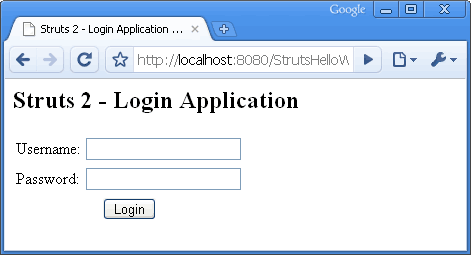
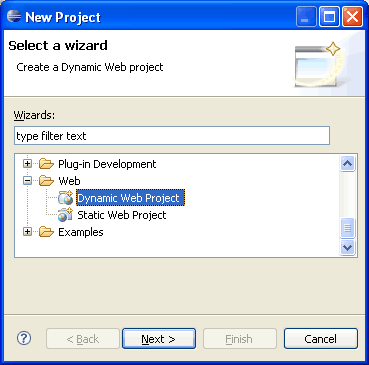
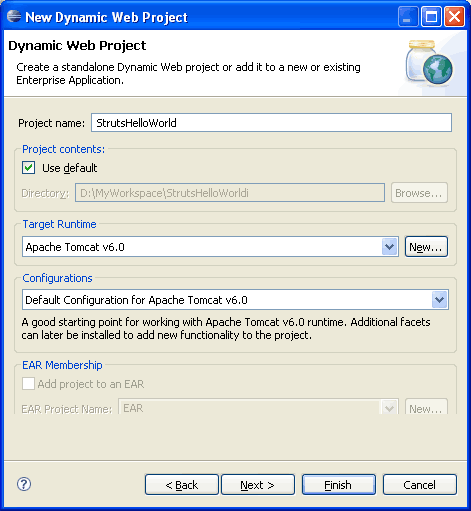
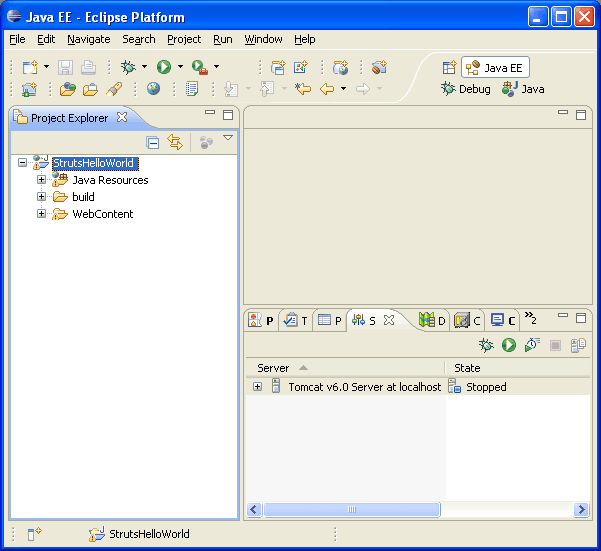
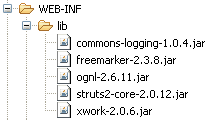
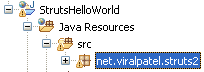
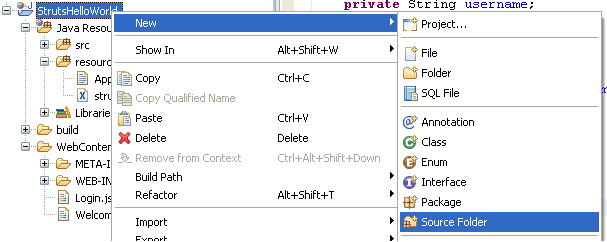
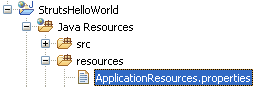
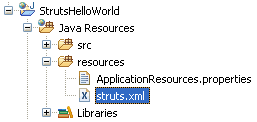
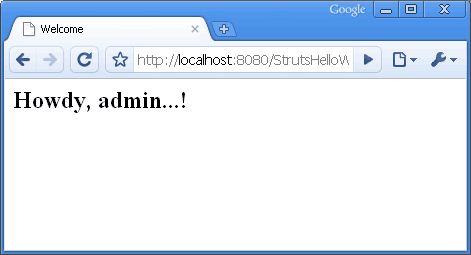
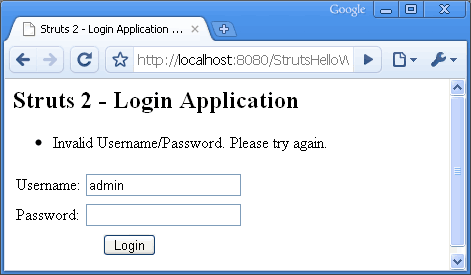

Nice work dude …. keep it up… :) .. write some good post regarding PHP-MySQl also
Hi Gaurav, Thanks a lot for comment. I will sure try to write something on that too.
yes VIRal very good work nice approach followed……………..
still there is one problem viral when i am running the application it is showing http 404 error
please reply dear
@atif, have you specified welcome file in your web.xml? Please specify Login.jsp as welcome file in web.xml.
ya i have given the welcome file as login.jsp and the problem has been sorted out when i used tomcat 6.X
thanks for the reply
hi i implemented all d codes given above but when i start the server it gives
HTTP Status 404 –
——————————————————————————–
type Status report
message
description The requested resource () is not available.
@jawahar – Can you check if following code is present in your web.xml file.
<welcome-file-list> <welcome-file>Login.jsp</welcome-file> </welcome-file-list>I too have the same problem and i have the \
Login.jsp
/ too .. @Viral Patel
Also check if there is an action class specified in your struts.xml
Fo eg
/index.jsp
Here index.jsp is the first page. Try this had an similar error. It got resolved by this
ya its there viral and don know why its not coming……….
ya i checked its there but its not coming yar……
ya viral its there but its not coming………..
@jawahar – I will suggest you to check the source code properly. Download the source code of above tutorial and try to run it and see if everything is working well.
i recreated the project again it run successfully ………..i think some were went wrong………great work yarrrrrr………keep…….up the tempo………..
i have one doubt viral the following code in Login.jsp ………
y we put login.action …..y i m asking this ? means in struts.xml we mentioned name as “login” only thats y.
Hey Patel
I am also getting the resource not found error. I have made the project again & downloaded your code…what could be the other reason???
Thanks
hi patel
as i am new to struts give some more stuffs on that ur starter helps me a lot…….
thanks
Hi Viral
I downloaded the project & trying to run but I am having the same error which jawahar & ali were having. How can I remove that error & run the project successfully?
Thanks
Sadia
@Sadia – Check the server logs when the server starts. There must be some exception coming in there. Once reason I can think of is that some required jar file is missing or due to version difference there must be a ClassNotFound exception.
please add the commons-fileupload-1.2.1.jar file to the lib folder and try again.
Add commons-io and commons-fileupload jars
I’m getting a parsing error in web.xml :
Struts2 Application
struts2
org.apache.struts2.dispatcher.FilterDispatcher
struts2
/*
Login.jsp
The exception is :
SEVERE: End event threw exception
java.lang.reflect.InvocationTargetException
at sun.reflect.NativeMethodAccessorImpl.invoke0(Native Method)
at sun.reflect.NativeMethodAccessorImpl.invoke(NativeMethodAccessorImpl.java:39)
at sun.reflect.DelegatingMethodAccessorImpl.invoke(DelegatingMethodAccessorImpl.java:25)
at java.lang.reflect.Method.invoke(Method.java:592)
at org.apache.tomcat.util.IntrospectionUtils.callMethod1(IntrospectionUtils.java:928)
at org.apache.tomcat.util.digester.SetNextRule.end(SetNextRule.java:193)
at org.apache.tomcat.util.digester.Rule.end(Rule.java:229)
at org.apache.tomcat.util.digester.Digester.endElement(Digester.java:1138)
at com.sun.org.apache.xerces.internal.parsers.AbstractSAXParser.endElement(AbstractSAXParser.java:633)
at com.sun.org.apache.xerces.internal.impl.XMLDocumentFragmentScannerImpl.scanEndElement(XMLDocumentFragmentScannerImpl.java:1241)
at com.sun.org.apache.xerces.internal.impl.XMLDocumentFragmentScannerImpl$FragmentContentDispatcher.dispatch(XMLDocumentFragmentScannerImpl.java:1685)
at com.sun.org.apache.xerces.internal.impl.XMLDocumentFragmentScannerImpl.scanDocument(XMLDocumentFragmentScannerImpl.java:368)
at com.sun.org.apache.xerces.internal.parsers.XML11Configuration.parse(XML11Configuration.java:834)
at com.sun.org.apache.xerces.internal.parsers.XML11Configuration.parse(XML11Configuration.java:764)
at com.sun.org.apache.xerces.internal.parsers.XMLParser.parse(XMLParser.java:148)
at com.sun.org.apache.xerces.internal.parsers.AbstractSAXParser.parse(AbstractSAXParser.java:1242)
at org.apache.tomcat.util.digester.Digester.parse(Digester.java:1642)
at org.apache.catalina.startup.ContextConfig.applicationWebConfig(ContextConfig.java:365)
at org.apache.catalina.startup.ContextConfig.start(ContextConfig.java:1072)
at org.apache.catalina.startup.ContextConfig.lifecycleEvent(ContextConfig.java:261)
at org.apache.catalina.util.LifecycleSupport.fireLifecycleEvent(LifecycleSupport.java:119)
at org.apache.catalina.core.StandardContext.start(StandardContext.java:4377)
at org.apache.catalina.core.ContainerBase.start(ContainerBase.java:1045)
at org.apache.catalina.core.StandardHost.start(StandardHost.java:722)
at org.apache.catalina.core.ContainerBase.start(ContainerBase.java:1045)
at org.apache.catalina.core.StandardEngine.start(StandardEngine.java:443)
at org.apache.catalina.core.StandardService.start(StandardService.java:516)
at org.apache.catalina.core.StandardServer.start(StandardServer.java:710)
at org.apache.catalina.startup.Catalina.start(Catalina.java:593)
at sun.reflect.NativeMethodAccessorImpl.invoke0(Native Method)
at sun.reflect.NativeMethodAccessorImpl.invoke(NativeMethodAccessorImpl.java:39)
at sun.reflect.DelegatingMethodAccessorImpl.invoke(DelegatingMethodAccessorImpl.java:25)
at java.lang.reflect.Method.invoke(Method.java:592)
at org.apache.catalina.startup.Bootstrap.start(Bootstrap.java:289)
at org.apache.catalina.startup.Bootstrap.main(Bootstrap.java:414)
Caused by: java.lang.IllegalArgumentException: Filter mapping specifies an unknown filter name struts
at org.apache.catalina.core.StandardContext.addFilterMap(StandardContext.java:2275)
… 35 more
Feb 11, 2010 4:07:40 PM org.apache.catalina.startup.ContextConfig applicationWebConfig
SEVERE: Parse error in application web.xml file at jndi:/localhost/StrutsWebApp/WEB-INF/web.xml
java.lang.IllegalArgumentException: Filter mapping specifies an unknown filter name struts
at org.apache.tomcat.util.digester.Digester.createSAXException(Digester.java:2806)
at org.apache.tomcat.util.digester.Digester.createSAXException(Digester.java:2832)
at org.apache.tomcat.util.digester.Digester.endElement(Digester.java:1141)
at com.sun.org.apache.xerces.internal.parsers.AbstractSAXParser.endElement(AbstractSAXParser.java:633)
at com.sun.org.apache.xerces.internal.impl.XMLDocumentFragmentScannerImpl.scanEndElement(XMLDocumentFragmentScannerImpl.java:1241)
at com.sun.org.apache.xerces.internal.impl.XMLDocumentFragmentScannerImpl$FragmentContentDispatcher.dispatch(XMLDocumentFragmentScannerImpl.java:1685)
at com.sun.org.apache.xerces.internal.impl.XMLDocumentFragmentScannerImpl.scanDocument(XMLDocumentFragmentScannerImpl.java:368)
at com.sun.org.apache.xerces.internal.parsers.XML11Configuration.parse(XML11Configuration.java:834)
at com.sun.org.apache.xerces.internal.parsers.XML11Configuration.parse(XML11Configuration.java:764)
at com.sun.org.apache.xerces.internal.parsers.XMLParser.parse(XMLParser.java:148)
at com.sun.org.apache.xerces.internal.parsers.AbstractSAXParser.parse(AbstractSAXParser.java:1242)
at org.apache.tomcat.util.digester.Digester.parse(Digester.java:1642)
at org.apache.catalina.startup.ContextConfig.applicationWebConfig(ContextConfig.java:365)
at org.apache.catalina.startup.ContextConfig.start(ContextConfig.java:1072)
at org.apache.catalina.startup.ContextConfig.lifecycleEvent(ContextConfig.java:261)
at org.apache.catalina.util.LifecycleSupport.fireLifecycleEvent(LifecycleSupport.java:119)
at org.apache.catalina.core.StandardContext.start(StandardContext.java:4377)
at org.apache.catalina.core.ContainerBase.start(ContainerBase.java:1045)
at org.apache.catalina.core.StandardHost.start(StandardHost.java:722)
at org.apache.catalina.core.ContainerBase.start(ContainerBase.java:1045)
at org.apache.catalina.core.StandardEngine.start(StandardEngine.java:443)
at org.apache.catalina.core.StandardService.start(StandardService.java:516)
at org.apache.catalina.core.StandardServer.start(StandardServer.java:710)
at org.apache.catalina.startup.Catalina.start(Catalina.java:593)
at sun.reflect.NativeMethodAccessorImpl.invoke0(Native Method)
at sun.reflect.NativeMethodAccessorImpl.invoke(NativeMethodAccessorImpl.java:39)
at sun.reflect.DelegatingMethodAccessorImpl.invoke(DelegatingMethodAccessorImpl.java:25)
at java.lang.reflect.Method.invoke(Method.java:592)
at org.apache.catalina.startup.Bootstrap.start(Bootstrap.java:289)
at org.apache.catalina.startup.Bootstrap.main(Bootstrap.java:414)
Caused by: java.lang.IllegalArgumentException: Filter mapping specifies an unknown filter name struts
at org.apache.catalina.core.StandardContext.addFilterMap(StandardContext.java:2275)
at sun.reflect.NativeMethodAccessorImpl.invoke0(Native Method)
at sun.reflect.NativeMethodAccessorImpl.invoke(NativeMethodAccessorImpl.java:39)
at sun.reflect.DelegatingMethodAccessorImpl.invoke(DelegatingMethodAccessorImpl.java:25)
at java.lang.reflect.Method.invoke(Method.java:592)
at org.apache.tomcat.util.IntrospectionUtils.callMethod1(IntrospectionUtils.java:928)
at org.apache.tomcat.util.digester.SetNextRule.end(SetNextRule.java:193)
at org.apache.tomcat.util.digester.Rule.end(Rule.java:229)
at org.apache.tomcat.util.digester.Digester.endElement(Digester.java:1138)
… 27 more
It gives a Parse error in application web.xml file at jndi:/localhost/StrutsWebApp/WEB-INF/web.xml
java.lang.IllegalArgumentException: Filter mapping specifies an unknown filter name struts2
Thanks,
mizo
Hi
I just used your source file to recreate the project. But whatever I do I am getting some errors like,
SEVERE: Dispatcher initialization failed and
SEVERE: Exception starting filter struts2
I have used these jars from strtus 2.1.8.1 zip
commons-fileupload-1.2.1.jar
commons-io-1.3.2.jar
commons-logging-1.0.4.jar
freemarker-2.3.15.jar
ognl-2.7.3.jar
struts2-core-2.1.8.1.jar
xwork-2.0.7.jar
Can someone help me out from this.
Hi,
I am using eclipse 3.4, and struts2.1.8.1 verison , does difference in the versions of jar files cause some problems.
Looking forward to the replies.
Thanks in advance.
hi viral
can u please help me out
initially my struts2 project was running fine but now such an error comes up in eclipse:
Classpath entry E:/My_Folders/MyProj/eclipse/HelloWorld/WebContent/WEB-INF/lib/commons-logging-1.0.4.jar will not be exported or published. Runtime ClassNotFoundExceptions may result.
what is the reason?
Hi viral,
Thanks for your application.
I am able to run the app. When i enter username and password.
in the loginaction class you have mention this.username and this.password.
actually those variables are null and I am geeting a nullpoint exception.
Actually i have worked on spring MVC.
there we use UIBean to get the variables from jsp page. But I dont know how you are able to get here.
Please explain ASAP.
regards,
Jagadish
Hi Viral,
does it matter what lib package of struts2 are you importing to this project ? I mean theoratically the latest version of struts2 – lib should work if I import. But as you mentioned I am getting error log saying – no class found filterdispatcher. I am sure this is due to version mismatch of jar files of struts2., But logically the latest version should be good right ?
Hi Viral,
I copied u r code and tried i got 404 exception. Then i tried by downloading the source code what u have given. Then also I got 404 exception.
This is the log what i got, can u please guess whats the problem i made.
Mar 12, 2010 11:32:48 AM org.apache.catalina.core.AprLifecycleListener lifecycle
Event
INFO: The Apache Portable Runtime which allows optimal performance in production
environments was not found on the java.library.path: D:\Tomcat 5.5\bin;.;C:\WIN
DOWS\system32;C:\WINDOWS;C:\WINDOWS\system32;C:\WINDOWS;C:\WINDOWS\System32\Wbem
;C:\Program Files\MySQL\MySQL Server 5.0\bin;C:\Program Files\Common Files\Telec
a Shared;C:\Program Files\Microsoft SQL Server\80\Tools\BINN;C:\Program Files\Mi
crosoft SQL Server\80\Tools\Binn\;C:\Program Files\Microsoft SQL Server\90\Tools
\binn\
Mar 12, 2010 11:32:48 AM org.apache.coyote.http11.Http11BaseProtocol init
INFO: Initializing Coyote HTTP/1.1 on http-8080
Mar 12, 2010 11:32:48 AM org.apache.catalina.startup.Catalina load
INFO: Initialization processed in 531 ms
Mar 12, 2010 11:32:48 AM org.apache.catalina.core.StandardService start
INFO: Starting service Catalina
Mar 12, 2010 11:32:48 AM org.apache.catalina.core.StandardEngine start
INFO: Starting Servlet Engine: Apache Tomcat/5.5.12
Mar 12, 2010 11:32:48 AM org.apache.catalina.core.StandardHost start
INFO: XML validation disabled
Mar 12, 2010 11:32:49 AM com.opensymphony.xwork2.util.logging.commons.CommonsLog
ger info
INFO: Parsing configuration file [struts-default.xml]
Mar 12, 2010 11:32:49 AM org.apache.catalina.core.StandardContext start
SEVERE: Error filterStart
Mar 12, 2010 11:32:49 AM org.apache.catalina.core.StandardContext start
SEVERE: Context [/helloworld] startup failed due to previous errors
Mar 12, 2010 11:32:49 AM org.apache.coyote.http11.Http11BaseProtocol start
INFO: Starting Coyote HTTP/1.1 on http-8080
Mar 12, 2010 11:32:49 AM org.apache.jk.common.ChannelSocket init
INFO: JK: ajp13 listening on /0.0.0.0:8009
Mar 12, 2010 11:32:49 AM org.apache.jk.server.JkMain start
INFO: Jk running ID=0 time=0/15 config=null
Mar 12, 2010 11:32:49 AM org.apache.catalina.storeconfig.StoreLoader load
INFO: Find registry server-registry.xml at classpath resource
Mar 12, 2010 11:32:49 AM org.apache.catalina.startup.Catalina start
INFO: Server startup in 1437 ms
Mar 12, 2010 11:33:22 AM com.opensymphony.xwork2.util.logging.commons.CommonsLog
ger info
INFO: Parsing configuration file [struts-default.xml]
Mar 12, 2010 11:33:23 AM org.apache.catalina.core.StandardContext start
SEVERE: Error filterStart
Mar 12, 2010 11:33:23 AM org.apache.catalina.core.StandardContext start
SEVERE: Context [/helloworld] startup failed due to previous errors
Regards,
Vinayagam
opss.s… i can’t imagine how can you post a tutorial with too many errors
Good work Viral it is very helpful
Hi Viral , i could not able to view the 3 rd part of the struts example(Part 3: Struts 2 Validation Framework Tutorial with Example). please re upload
Hi Viral
Is your tutorial on Struts 1.*, Creating Struts application in Eclipse finished or does it missing some pages?
If yes, do you plan to finish it or should I look somewhere else, and in that case do you have any tips for me?
I’m interested in tutorials about Struts 1.2.9 with Eclipse
Cheers
Hi Viral,
Thanks for the tutorial, however I’m running into two issues.
1.) Eclipse is showing the error “Can not find the tab library descriptor for “/struts-tags”
The error appears in both Login.jsp and Welcome.jsp. My WEB-INF/lib contains the following jars; commons-collections-2.1.jar, commons-logging.1.0.4.jar, commons.logging-api-1.1.jar, freemarker-2.3.8.jar, spring-core-2.0.5.jar, and xwork-2.0.7.jar
2.) When I start the app, I receive the following stack trace:
java.lang.ClassNotFoundException: org.apache.struts2.dispatcher.FilterDispatcher
at org.apache.catalina.loader.WebappClassLoader.loadClass(WebappClassLoader.java:1387)
at org.apache.catalina.loader.WebappClassLoader.loadClass(WebappClassLoader.java:1233)
at org.apache.catalina.core.ApplicationFilterConfig.getFilter(ApplicationFilterConfig.java:249)
at org.apache.catalina.core.ApplicationFilterConfig.setFilterDef(ApplicationFilterConfig.java:397)
at org.apache.catalina.core.ApplicationFilterConfig.(ApplicationFilterConfig.java:108)
at org.apache.catalina.core.StandardContext.filterStart(StandardContext.java:3800)
at org.apache.catalina.core.StandardContext.start(StandardContext.java:4450)
at org.apache.catalina.core.ContainerBase.start(ContainerBase.java:1045)
at org.apache.catalina.core.StandardHost.start(StandardHost.java:722)
at org.apache.catalina.core.ContainerBase.start(ContainerBase.java:1045)
at org.apache.catalina.core.StandardEngine.start(StandardEngine.java:443)
at org.apache.catalina.core.StandardService.start(StandardService.java:516)
at org.apache.catalina.core.StandardServer.start(StandardServer.java:710)
at org.apache.catalina.startup.Catalina.start(Catalina.java:583)
at sun.reflect.NativeMethodAccessorImpl.invoke0(Native Method)
at sun.reflect.NativeMethodAccessorImpl.invoke(Unknown Source)
at sun.reflect.DelegatingMethodAccessorImpl.invoke(Unknown Source)
at java.lang.reflect.Method.invoke(Unknown Source)
at org.apache.catalina.startup.Bootstrap.start(Bootstrap.java:288)
at org.apache.catalina.startup.Bootstrap.main(Bootstrap.java:413)
I followed the tutorial step-by-step to ensure I was doing everything right, and then decided to give your code a try (in case I missed something) and that didn’t work either.
Thanks, and I really appreciate your efforts!
Chris
thanks dude !!! it worked !!!
you choice version struts struts2-core-2.1.6.jar,xwork-2.1.2.jar!
if error then you choice version!
tutorial is good!
hi Chris,
the jar files which you have added in the folder is not right.,
plz check:
1.Commons-logging-1.0.4.jar
2.freemarker-2.3.15.jar
3.ognl-2.7.3.jar
4.struts2-core-2.1.8.1.jar
5.xwork-core-2.1.6.jar
meen, thanks that worked!
Great Work !!
i’m getting http status 404 error
i’m using jboss v4.2
please help me to rectify the problem
its working now… thanks a lot for this good tutorial
Hi Viral,
I am getting the following error. I have checked that i have all the jar files as required in the application.
May 13, 2010 4:34:51 PM org.apache.catalina.core.AprLifecycleListener init
INFO: The APR based Apache Tomcat Native library which allows optimal performance in production environments was not found on the java.library.path: C:\Program Files\Java\jre6\bin;.;C:\WINDOWS\Sun\Java\bin;C:\WINDOWS\system32;C:\WINDOWS;C:/Program Files/Java/jre6/bin/client;C:/Program Files/Java/jre6/bin;C:\oracle\ora92\bin\;C:\Program Files\Oracle\jre\1.1.8\bin\;C:\WINDOWS\system32;C:\WINDOWS;C:\WINDOWS\System32\Wbem;C:\Program Files\Microsoft SQL Server\80\Tools\BINN;D:\JDK\bin;D:\apache-maven-2.1.0\bin;C:\Program Files\Windows Imaging\
May 13, 2010 4:34:51 PM org.apache.coyote.http11.Http11Protocol init
INFO: Initializing Coyote HTTP/1.1 on http-8080
May 13, 2010 4:34:51 PM org.apache.catalina.startup.Catalina load
INFO: Initialization processed in 346 ms
May 13, 2010 4:34:51 PM org.apache.catalina.core.StandardService start
INFO: Starting service Catalina
May 13, 2010 4:34:51 PM org.apache.catalina.core.StandardEngine start
INFO: Starting Servlet Engine: Apache Tomcat/6.0.26
May 13, 2010 4:34:51 PM org.apache.catalina.startup.HostConfig deployDescriptor
INFO: Deploying configuration descriptor host-manager.xml
May 13, 2010 4:34:51 PM org.apache.catalina.startup.HostConfig deployDescriptor
INFO: Deploying configuration descriptor manager.xml
May 13, 2010 4:34:51 PM org.apache.catalina.startup.HostConfig deployWAR
INFO: Deploying web application archive StrutsHelloWorld.war
May 13, 2010 4:34:52 PM com.opensymphony.xwork2.config.providers.XmlConfigurationProvider register
INFO: Parsing configuration file [struts-default.xml]
May 13, 2010 4:34:52 PM com.opensymphony.xwork2.config.providers.XmlConfigurationProvider register
INFO: Parsing configuration file [struts-plugin.xml]
May 13, 2010 4:34:52 PM com.opensymphony.xwork2.config.providers.XmlConfigurationProvider register
INFO: Parsing configuration file [struts.xml]
May 13, 2010 4:34:52 PM org.apache.struts2.config.Settings getLocale
WARNING: Settings: Could not parse struts.locale setting, substituting default VM locale
May 13, 2010 4:34:52 PM org.apache.struts2.config.BeanSelectionProvider register
INFO: Loading global messages from ApplicationResources
May 13, 2010 4:34:52 PM org.apache.struts2.spring.StrutsSpringObjectFactory
INFO: Initializing Struts-Spring integration…
May 13, 2010 4:34:52 PM org.apache.struts2.spring.StrutsSpringObjectFactory
SEVERE: ********** FATAL ERROR STARTING UP STRUTS-SPRING INTEGRATION **********
Looks like the Spring listener was not configured for your web app!
Nothing will work until WebApplicationContextUtils returns a valid ApplicationContext.
You might need to add the following to web.xml:
org.springframework.web.context.ContextLoaderListener
May 13, 2010 4:34:52 PM org.apache.catalina.core.StandardContext filterStart
SEVERE: Exception starting filter struts2
java.lang.NullPointerException
at com.opensymphony.xwork2.spring.SpringObjectFactory.getClassInstance(SpringObjectFactory.java:189)
at com.opensymphony.xwork2.config.providers.XmlConfigurationProvider.verifyResultType(XmlConfigurationProvider.java:479)
at com.opensymphony.xwork2.config.providers.XmlConfigurationProvider.addResultTypes(XmlConfigurationProvider.java:450)
at com.opensymphony.xwork2.config.providers.XmlConfigurationProvider.addPackage(XmlConfigurationProvider.java:407)
at com.opensymphony.xwork2.config.providers.XmlConfigurationProvider.loadPackages(XmlConfigurationProvider.java:239)
at org.apache.struts2.config.StrutsXmlConfigurationProvider.loadPackages(StrutsXmlConfigurationProvider.java:111)
at com.opensymphony.xwork2.config.impl.DefaultConfiguration.reload(DefaultConfiguration.java:152)
at com.opensymphony.xwork2.config.ConfigurationManager.getConfiguration(ConfigurationManager.java:52)
at org.apache.struts2.dispatcher.Dispatcher.init_PreloadConfiguration(Dispatcher.java:395)
at org.apache.struts2.dispatcher.Dispatcher.init(Dispatcher.java:452)
at org.apache.struts2.dispatcher.FilterDispatcher.init(FilterDispatcher.java:205)
at org.apache.catalina.core.ApplicationFilterConfig.getFilter(ApplicationFilterConfig.java:295)
at org.apache.catalina.core.ApplicationFilterConfig.setFilterDef(ApplicationFilterConfig.java:422)
at org.apache.catalina.core.ApplicationFilterConfig.(ApplicationFilterConfig.java:115)
at org.apache.catalina.core.StandardContext.filterStart(StandardContext.java:3838)
at org.apache.catalina.core.StandardContext.start(StandardContext.java:4488)
at org.apache.catalina.core.ContainerBase.addChildInternal(ContainerBase.java:791)
at org.apache.catalina.core.ContainerBase.addChild(ContainerBase.java:771)
at org.apache.catalina.core.StandardHost.addChild(StandardHost.java:546)
at org.apache.catalina.startup.HostConfig.deployWAR(HostConfig.java:905)
at org.apache.catalina.startup.HostConfig.deployWARs(HostConfig.java:740)
at org.apache.catalina.startup.HostConfig.deployApps(HostConfig.java:500)
at org.apache.catalina.startup.HostConfig.start(HostConfig.java:1277)
at org.apache.catalina.startup.HostConfig.lifecycleEvent(HostConfig.java:321)
at org.apache.catalina.util.LifecycleSupport.fireLifecycleEvent(LifecycleSupport.java:119)
at org.apache.catalina.core.ContainerBase.start(ContainerBase.java:1053)
at org.apache.catalina.core.StandardHost.start(StandardHost.java:785)
at org.apache.catalina.core.ContainerBase.start(ContainerBase.java:1045)
at org.apache.catalina.core.StandardEngine.start(StandardEngine.java:443)
at org.apache.catalina.core.StandardService.start(StandardService.java:519)
at org.apache.catalina.core.StandardServer.start(StandardServer.java:710)
at org.apache.catalina.startup.Catalina.start(Catalina.java:581)
at sun.reflect.NativeMethodAccessorImpl.invoke0(Native Method)
at sun.reflect.NativeMethodAccessorImpl.invoke(Unknown Source)
at sun.reflect.DelegatingMethodAccessorImpl.invoke(Unknown Source)
at java.lang.reflect.Method.invoke(Unknown Source)
at org.apache.catalina.startup.Bootstrap.start(Bootstrap.java:289)
at org.apache.catalina.startup.Bootstrap.main(Bootstrap.java:414)
May 13, 2010 4:34:52 PM org.apache.catalina.core.StandardContext start
SEVERE: Error filterStart
May 13, 2010 4:34:52 PM org.apache.catalina.core.StandardContext start
SEVERE: Context [/StrutsHelloWorld] startup failed due to previous errors
May 13, 2010 4:34:52 PM org.apache.catalina.loader.WebappClassLoader clearThreadLocalMap
SEVERE: A web application created a ThreadLocal with key of type [com.opensymphony.xwork2.ActionContext.ActionContextThreadLocal] (value [com.opensymphony.xwork2.ActionContext$ActionContextThreadLocal@6355dc]) and a value of type [com.opensymphony.xwork2.ActionContext] (value [com.opensymphony.xwork2.ActionContext@19a029e]) but failed to remove it when the web application was stopped. To prevent a memory leak, the ThreadLocal has been forcibly removed.
May 13, 2010 4:34:52 PM org.apache.catalina.loader.WebappClassLoader clearThreadLocalMap
SEVERE: A web application created a ThreadLocal with key of type [null] (value [com.opensymphony.xwork2.inject.ContainerImpl$10@126f827]) and a value of type [com.opensymphony.xwork2.inject.InternalContext[]] (value [[Lcom.opensymphony.xwork2.inject.InternalContext;@16dfa45]) but failed to remove it when the web application was stopped. To prevent a memory leak, the ThreadLocal has been forcibly removed.
Pls help me in this regard
Thanks a lot. quick response will be highly appreciated.
The tutorial seems nice and simple. However, something is missing – I am getting 404 when running this application.
I use Eclipse. All files in the places described in this tutorial and all files contain what described in this tutorial. So Eclipse does not show any error in the code, or missing file. The server is working just fine for other appications (projects) that I had created in Eclipse, including some projects on Spring.
The error is about being unable to load some files from particular jar file:
Unable to load configuration….
blah-blah-blah…
…/workspace/.metadata/.plugins/org.eclipse.wst.server.core/tmp0/wtpwebapps/StrutsHelloWorld/WEB-INF/lib/struts2-core-2.1.8.1.jar!/struts-default.xml
Any advice?
This code works perfect unlike other tutorials where half of the instructions are missing. Thanks for an elaborate one. I too got an error on resource not found which was solved by adding commons-fileupload-1.2.1.jar and commons-io-1.3.2.jar to the WEB-INF/lib. Thanks Viral again.
Thanks to Viral Patel. I learned a lot about Struts. As Shrinivasan Neelamegam saidl, I also got an error “The requested resource (/StrutsHelloWorld) is not available.” But after adding commons-fileupload-1.2.1.jar and commons-io-1.3.2.jar to the WEB-INF –> lib folder I overcame that. Thanks a lot Viral. Cheers!!! :)
For people getting the 404 error. I was getting this same error and when I checked the tomcat logs I realized I had an exception on loading spring classes when I didn’t even use spring. If found out that this happened because I got lazy including ONLY the mentioned .jars and included them all on the /lib folder.
When the above procedure is done, the server will automatically search for files used to configure those jars and since they don’t exist because we haven’t defined them you will probably get a nullpointer exception. Bottom line, erase all jars you don’t need from WebContent/WEB-INF/lib/ and only leave the ones Viral mentioned (this solved the problem for me):
– commons-logging-1.0.4.jar
– freemarker-2.3.8.jar
– ognl-2.6.11.jar
– struts2-core-2.0.12.jar
– xwork-2.0.6.jar
Great tutorial, thenx!!
I had the same problem, you have to include:
commons-fileupload-1.2.1.jar
commons-io-1.3.2.jar
files to the WEB-INF/lib for application to run :)
good tut!
After clicking the login button, I am getting error as follows,
HTTP Status 500 –
——————————————————————————–
type Exception report
message
description The server encountered an internal error () that prevented it from fulfilling this request.
exception
java.lang.NoSuchMethodException: net.viralpatel.struts2.LoginAction.authenticate()
java.lang.Class.getMethod(Unknown Source)
what is the mistake??
can anyone clarify me?
I was using Tomcat6.0 and JDK1.6. There are some errors like jar file are missing. Please make sure below jars are present in WEB-INF/lib of your application:
commons-collections-3.1.jar
commons-fileupload-1.2.2.jar
commons-io-2.0.1.jar
commons-lang-2.5.jar
commons-logging-1.1.1.jar
freemarker-2.3.16.jar
javassist-3.11.0.GA.jar
ognl-3.0.1.jar
struts2-core-2.2.3.1.jar
xwork-core-2.2.3.1.jar
Also, I was getting below exception:
java.lang.NoSuchMethodException: net.viralpatel.struts2.LoginAction.authenticate()
Reason behind this is, there is no authenticate() method in LoginAction.
So in struts.xml instead of authenticate, it should be execute. execute method is present in LoginAction.
I found one more error in Login.jsp in below line:
action mentioned in above line should match entries in struts.xml.
In struts.xml, action is mentioned as login. so better change action=”login.action” to action=”login” in Login.jsp
All above steps will clear of the errors you face and you can run app with smile :-)
You cannot miss this line in struts.xml file. I made it work just by adding this line to struts.xml file.
HTTP Status 404 – /StrutsHelloWorld/
——————————————————————————–
type Status report
message /StrutsHelloWorld/
description The requested resource (/StrutsHelloWorld/) is not available.
——————————————————————————–
i am getting this when i run the above example. i dont know why. is there any problem in my tomcat?
plz help me
hello Viral
thanx a lot, ur tutorial solve my problem, i am new to learn java technology
stay blessed…
Thank You,
that was very nice……
although it shows some stupid error…
The requested resource () is not available.
but is shows error..
The requested resource () is not available.
i also tried with the downloaded source.
HTTP Status 404 – There is no Action mapped for namespace / and action name .
type Status report
message There is no Action mapped for namespace / and action name .
description The requested resource (There is no Action mapped for namespace / and action name .) is not available.
please let me know why this error is coming. I dint modify anything from above code.
hiiiiiiiii
please make the statement as public class loginAction extends ActionSupport
reply me urgently ask me any problem if you have about struts2.0
/Login/LoginAssitancestep1.jsp
when i am deploy and run it in browser at that time when click on button, the button action name is “LoginAssi1.action” but in url it will show the folder name after Project name. like in this way
“http://localhost:15789/MF_SSOWEB/Login/LogAssi1.action”
how to remove “/Login” from the url………i want “http://localhost:15789/MF_SSOWEB/LogAssi1.action” in this only for in this what i can do………
if u know plz reply me……………..
my mail id is
“[email protected]”
@vara: Check your struts.xml. In <package> tag does the namespace is “Login”? If so then change it to namespace=”/”. Hope this will work.
ya, i can try for it, but no use. in the url again “http://localhost:15789/MF_SSOWEB/Login/LogAssi1.action” came in this way. if remove “/Login” from the url it will came. now it will came, what is the problem in my code.
struts.xml:
/Registration/Registration.jsp
/Registration/Success.jsp
/Registration/Registration.jsp
/campagainplan/ProductPortal.jsp
/Login/Login.jsp
/Login/LoginAssitancestep1.jsp
/Login/LoginAssistancestep2.jsp
/Login/LoginAssitancestep1.jsp
/Login/LoginAssistancestep3.jsp
/Login/LoginAssistancestep2.jsp
/Login/LoginAssiEmail.jsp
/Login/LoginAssistancestep2ForgotPass.jsp
/Login/LoginAssiEmail.jsp
/Login/LoginAssiStep4.jsp
/Login/LoginAssistancestep2ForgotPass.jsp
/Login/Login.jsp
/Login/LoginAssistancestep3.jsp
/Login/ForgotPasswordComplete.jsp
/Login/LoginAssiStep4.jsp
/Login/Login.jsp
deploy?path=/home/varaprasads/NetBeansProjects/MF_SSOWEB/build/web&name=MF_SSOWEB&force=true failed on GlassFish v3 (2)
/home/varaprasads/NetBeansProjects/MF_SSOWEB/nbproject/build-impl.xml:695: The module has not been deployed.
i got the above error at the time of deploy………….what i can do for remove the error………….
hi Viral,
I am very new to Struts and Just have Idea of MVC. I was trying to develop the sturts application you have explained here. But unfortunately I m getting some exceptions here. Please look into it and help me.
Here is the Exception stack trace,
17 Jul, 2010 7:38:35 PM org.apache.catalina.core.AprLifecycleListener init
SEVERE: Dispatcher initialization failed
at com.opensymphony.xwork2.config.ConfigurationManager.getConfiguration(ConfigurationManager.java:58)
Caused by: Unable to load bean: type:org.apache.struts2.dispatcher.multipart.MultiPartRequest class:org.apache.struts2.dispatcher.multipart.JakartaMultiPartRequest – bean – jar:file:/C:/Workspace/.metadata/.plugins/org.eclipse.wst.server.coreCaused by: java.lang.ClassNotFoundException: org.apache.commons.fileupload.RequestContext
Caused by: java.lang.NoClassDefFoundError: org/apache/commons/fileupload/RequestContext
Caused by: java.lang.ClassNotFoundException: org.apache.commons.fileupload.RequestContext
17 Jul, 2010 7:38:37 PM org.apache.catalina.core.StandardContext start
SEVERE: Error filterStart
17 Jul, 2010 7:38:37 PM org.apache.catalina.core.StandardContext start
SEVERE: Context [/StrutsHelloWorld] startup failed due to previous errors
The problem has been resolved now.
I have included commons-fileupload-1.2.1.jar in the WEB-INF/lib folder. After that it sarted working.
Thanks to Viral for a simple explanation.
Now I am facing new problem. Once I clicked the “Login” button in the Login.jsp page after entering the username and password, it does not redirect the page to either Welcome.jsp or Login.jsp. it does not show me the warning either, if at all I am entering the wrong username and password.
Here is the exception stack trace,
18 Jul, 2010 11:38:58 AM org.apache.tomcat.util.digester.SetPropertiesRule begin
WARNING: [SetPropertiesRule]{Server/Service/Engine/Host/Context} Setting property ‘source’ to ‘org.eclipse.jst.jee.server:StrutsHelloWorld’ did not find a matching property.
18 Jul, 2010 11:38:58 AM org.apache.coyote.http11.Http11Protocol init
INFO: Initializing Coyote HTTP/1.1 on http-8080
18 Jul, 2010 11:38:58 AM org.apache.catalina.startup.Catalina load
INFO: Initialization processed in 801 ms
18 Jul, 2010 11:38:58 AM org.apache.catalina.core.StandardService start
INFO: Starting service Catalina
18 Jul, 2010 11:38:58 AM org.apache.catalina.core.StandardEngine start
INFO: Starting Servlet Engine: Apache Tomcat/6.0.28
18 Jul, 2010 11:38:59 AM com.opensymphony.xwork2.util.logging.commons.CommonsLogger info
INFO: Parsing configuration file [struts-default.xml]
18 Jul, 2010 11:38:59 AM com.opensymphony.xwork2.util.logging.commons.CommonsLogger info
INFO: Unable to locate configuration files of the name struts-plugin.xml, skipping
18 Jul, 2010 11:38:59 AM com.opensymphony.xwork2.util.logging.commons.CommonsLogger info
INFO: Parsing configuration file [struts-plugin.xml]
18 Jul, 2010 11:38:59 AM com.opensymphony.xwork2.util.logging.commons.CommonsLogger info
INFO: Parsing configuration file [struts.xml]
18 Jul, 2010 11:38:59 AM com.opensymphony.xwork2.util.logging.commons.CommonsLogger info
INFO: Loading global messages from ApplicationResources
18 Jul, 2010 11:38:59 AM org.apache.coyote.http11.Http11Protocol start
INFO: Starting Coyote HTTP/1.1 on http-8080
18 Jul, 2010 11:38:59 AM org.apache.jk.common.ChannelSocket init
INFO: JK: ajp13 listening on /0.0.0.0:8009
18 Jul, 2010 11:38:59 AM org.apache.jk.server.JkMain start
INFO: Jk running ID=0 time=0/26 config=null
18 Jul, 2010 11:38:59 AM org.apache.catalina.startup.Catalina start
INFO: Server startup in 1608 ms
Can anyone please help me out in this case.. I cant sort it out this time.
awesome awesome…
Thanks to Viral and Sas…
M a lazy fellow, I added all the jar files.. and was dealing wd the errors as ppl abve
nice tutorial
Me Likes…
Hello Viral,
I am trying same tut in eclipse. I’ve included the .jar files you have said.
But m still getting the same problem as that of ‘Chris’ – “Can not find the tab library descriptor for “/struts-tags” in both Login.jsp and Welcome.jsp. I’ve included ‘servlet-2.3.jar’ extra.
Please help….
Thanks.
I followed this tutorial. when i click the submit button it doesn’t go to the welcome.jsp page.
it gives the following error message.
type Status report
message There is no Action mapped for namespace / and action name login.
my folder structure is same as above.
description The requested resource (There is no Action mapped for namespace / and action name login.) is not available.
Sorry. I have made a mistake.
Error message is
Status report
message There is no Action mapped for namespace / and action name login.
description The requested resource (There is no Action mapped for namespace / and action name login.) is not available.
in struts.xml file do this
remove method= authenticate. also in jsp files give space between ” and % you can run program
HTTP Status 404 – /StrutsHelloWorld/
——————————————————————————–
type Status report
message /StrutsHelloWorld/
description The requested resource (/StrutsHelloWorld/) is not available.
——————————————————————————–
i am getting this when i run the above example. i dont know why. is there any problem in my tomcat?
plz help me
Thx for the tutorial. It would be even greater if i could run it ;)
I have the exactly same problem using Tomcat 7.
Is there a solution to this?
Can anyone tell me?
hi patel
i can’t understand the u have given name in struts.xml ,”login” and “form action=”login.action” method=”post”” in login.jsp.
i m little bit confused to understand this naming convention.
pls help me.
hello viral,
i have solved the problem but still not understand the naming convention u have given .
i m a beginner for struts plz. helm me.
i also have some problems like dilini
the title that read from applicationresources cannot shown and
when i click the submit button it doesn’t go to the welcome.jsp page.
it gives the following error message.
type Status report
message There is no Action mapped for namespace / and action name login.
my folder structure is same as above.
description The requested resource (There is no Action mapped for namespace / and action name login.) is not available.
thanks
I am using Tomcat 7 and had to add the following jars to my WEB-INF\lib folder:
Commons-logging-1.0.4.jar
commons-fileupload-1.2.1.jar
commons-io-1.3.2.jar
freemarker-2.3.16.jar
javassist-3.7.ga.jar
ognl-3.0.jar
struts2-core-2.2.1.jar
xwork-core-2.2.1.jar
Many thanks for the tutorial. Really appreciate your work!
I cannot run it. Here’s what I get why I try to run it on server
Oct 8, 2010 10:34:02 AM org.apache.catalina.core.AprLifecycleListener init
INFO: The APR based Apache Tomcat Native library which allows optimal performance in production environments was not found on the java.library.path: C:\Program Files\Java\jre6\bin;.;C:\WINDOWS\Sun\Java\bin;C:\WINDOWS\system32;C:\WINDOWS;C:/Program Files/Java/jre6/bin/client;C:/Program Files/Java/jre6/bin;C:\WINDOWS\system32;C:\WINDOWS;C:\WINDOWS\System32\Wbem;C:\Program Files\Intel\DMIX;C:\Program Files\Java\jdk1.6.0_20\bin;C:\Program Files\Liquid Technologies\Liquid XML Studio 2010\XmlDataBinder8\Redist8\cpp\win32\bin;C:\Program Files\CVSNT\
Oct 8, 2010 10:34:02 AM org.apache.tomcat.util.digester.SetPropertiesRule begin
WARNING: [SetPropertiesRule]{Server/Service/Engine/Host/Context} Setting property ‘source’ to ‘org.eclipse.jst.jee.server:StrutsJatra’ did not find a matching property.
Oct 8, 2010 10:34:02 AM org.apache.coyote.http11.Http11Protocol init
INFO: Initializing Coyote HTTP/1.1 on http-8080
Oct 8, 2010 10:34:02 AM org.apache.catalina.startup.Catalina load
INFO: Initialization processed in 429 ms
Oct 8, 2010 10:34:02 AM org.apache.catalina.core.StandardService start
INFO: Starting service Catalina
Oct 8, 2010 10:34:02 AM org.apache.catalina.core.StandardEngine start
INFO: Starting Servlet Engine: Apache Tomcat/6.0.29
Oct 8, 2010 10:34:02 AM org.apache.catalina.core.StandardContext filterStart
SEVERE: Exception starting filter struts2
java.lang.ClassNotFoundException: org.apache.struts2.dispatcher.FilterDispatcher
at org.apache.catalina.loader.WebappClassLoader.loadClass(WebappClassLoader.java:1645)
at org.apache.catalina.loader.WebappClassLoader.loadClass(WebappClassLoader.java:1491)
at org.apache.catalina.core.ApplicationFilterConfig.getFilter(ApplicationFilterConfig.java:269)
at org.apache.catalina.core.ApplicationFilterConfig.setFilterDef(ApplicationFilterConfig.java:422)
at org.apache.catalina.core.ApplicationFilterConfig.(ApplicationFilterConfig.java:115)
at org.apache.catalina.core.StandardContext.filterStart(StandardContext.java:4001)
at org.apache.catalina.core.StandardContext.start(StandardContext.java:4651)
at org.apache.catalina.core.ContainerBase.start(ContainerBase.java:1045)
at org.apache.catalina.core.StandardHost.start(StandardHost.java:785)
at org.apache.catalina.core.ContainerBase.start(ContainerBase.java:1045)
at org.apache.catalina.core.StandardEngine.start(StandardEngine.java:445)
at org.apache.catalina.core.StandardService.start(StandardService.java:519)
at org.apache.catalina.core.StandardServer.start(StandardServer.java:710)
at org.apache.catalina.startup.Catalina.start(Catalina.java:581)
at sun.reflect.NativeMethodAccessorImpl.invoke0(Native Method)
at sun.reflect.NativeMethodAccessorImpl.invoke(Unknown Source)
at sun.reflect.DelegatingMethodAccessorImpl.invoke(Unknown Source)
at java.lang.reflect.Method.invoke(Unknown Source)
at org.apache.catalina.startup.Bootstrap.start(Bootstrap.java:289)
at org.apache.catalina.startup.Bootstrap.main(Bootstrap.java:414)
Oct 8, 2010 10:34:02 AM org.apache.catalina.core.StandardContext start
SEVERE: Error filterStart
Oct 8, 2010 10:34:02 AM org.apache.catalina.core.StandardContext start
SEVERE: Context [/StrutsJatra] startup failed due to previous errors
hi viral ur tutorial is very simple and understandaable .. i exactly folowed ur steps but am getting the following error.. plz any1 help
WARNING: No configuration found for the specified action: ‘login.action’ in namespace: ”. Form action defaulting to ‘action’ attribute’s literal value.
Oct 21, 2010 5:20:15 PM org.apache.struts2.components.Form evaluateExtraParamsServletRequest
WARNING: No configuration found for the specified action: ‘login.action’ in namespace: ”. Form action defaulting to ‘action’ attribute’s literal value.
Oct 21, 2010 5:20:24 PM org.apache.struts2.dispatcher.Dispatcher serviceAction
SEVERE: Could not find action or result
There is no Action mapped for namespace / and action name login. – [unknown location]
at com.opensymphony.xwork2.DefaultActionProxy.prepare(DefaultActionProxy.java:186)
at org.apache.struts2.impl.StrutsActionProxyFactory.createActionProxy(StrutsActionProxyFactory.java:41)
at java.lang.Thread.run(Thread.java:595)
Oct 21, 2010 5:21:46 PM org.apache.struts2.components.Form evaluateExtraParamsServletRequest
WARNING: No configuration found for the specified action: ‘login.action’ in namespace: ”. Form action defaulting to ‘action’ attribute’s literal value.
Oct 21, 2010 5:21:46 PM org.apache.struts2.components.Form evaluateExtraParamsServletRequest
WARNING: No configuration found for the specified action: ‘login.action’ in namespace: ”. Form action defaulting to ‘action’ attribute’s literal value.
Oct 21, 2010 5:21:54 PM org.apache.struts2.dispatcher.Dispatcher serviceAction
SEVERE: Could not find action or result
There is no Action mapped for namespace / and action name login. – [unknown location]
at com.opensymphony.xwork2.DefaultActionProxy.prepare(DefaultActionProxy.java:186)
at org.apache.struts2.impl.StrutsActionProxyFactory.createActionProxy(StrutsActionProxyFactory.java:41)
at java.lang.Thread.run(Thread.java:595)
A very useful and easy to understand tutorial.
It has increased my knowledge horizion to no extent.
Kudos to Viral.
Thanks
Hello Viral
I am kind of stuck here, I have tried first following your instructions and then even tried downloading and running your code. I am using following JARs:
commons-fileupload-1.2.1
commons-io-1.3.2
commons-logging-1.0.4
freemarker-2.3.16
ognl-3.0
struts2-core-2.2.1
xwork-core-2.2.1
and running on Tomacat6 server using JDK1.6.0_20
I am getting following exception
SEVERE: Dispatcher initialization failed
java.lang.RuntimeException: java.lang.reflect.InvocationTargetException
at org.apache.catalina.startup.Bootstrap.main(Bootstrap.java:413)
Caused by: java.lang.reflect.InvocationTargetException
Caused by: java.lang.ExceptionInInitializerError
… 46 more
Caused by: java.lang.IllegalArgumentException: Javassist library is missing in classpath! Please add missed dependency!
… 47 more
Caused by: java.lang.ClassNotFoundException: javassist.ClassPool
… 47 more
can you please help on the same.
Regards
the error got resolved after adding javassist-3.7.ga.jar
thanks for the tutorial!
I have a problem when i run my StrutsHelloWorld i am getting a error that
type Status report
message There is no Action mapped for namespace / and action name login.
description The requested resource (There is no Action mapped for namespace / and action name login.) is not available.
after clicking the login button.plz help
Well Explained tutorial. Kudos for the good work
Very very ve……..ry useful doccument. I have been fighting since long time to get my sample struts2 application working through Eclipse. Searched number of pages, tried, copy-pasted number of demos but didn’t find anything as useful as this one. Thanks a lot man! Just followed the steps (truely clear and complete description… you get one more point for that) and wo…… my (??? :P ) demo started working!!!
also get 404 not found error, however get it fixed by removing spaces in web.xml file(which may occur during copy and past).
thanks for the tutorial, Excellent article.
hey virpal,
i just followed these steps a to z ,but still i m getting error like the requested resource(StrutshelloWorld) is not available………i checked all the jars also……pls help me……..
very nice tutorial……………….thanx
The 404 error happens when you have missing .jar files… specifically,
commons-fileupload-1.2.2.jar
and
commons-io-1.3.jar
(The version number may vary)
This differs depending on the apache tomcat installation you have. Some will not get an error. If using the specific Windows 32 bit Tomcat, then you will need to drop these two jars into your WEB-INF directory, they are not automatically included with the Windows Tomcat download.
Viral, thanks for such a writeup. I would recommend to all my friends. This is the best
@Ghanashyam – Thanks for the kind words :) I am glad these tutorials are helpful to you.
grasshopper,
Thanks for listing the jars, worked like a charm.
I seek not to know the answers, but to understand the questions.
Caine “Kung Fu”
It’s a great job. keep up
just need to add
commons-fileupload-1.2.1.jar
to WEB-INF/lib
About the 404 error. I needed to add javassist.jar. Then it went fine. But the console of tomcat startup has lot of errors. I don’t really understand what they mean? But here are they:
a) WARNING: Could not create JarEntryRevision for [jar:file:/C:/Environment/Workspace/.metadata/.plugins/org.eclipse.wst.server.core/tmp0/wtpwebapps/StrutsHelloWorld/WEB-INF/lib/struts2-core-2.2.1.1.jar]!
b) WARNING: No configuration found for the specified action: ‘login’ in namespace: ”. Form action defaulting to ‘action’ attribute’s literal value. : On this, Does it have to do with
, because in struts.xml it is different,->login.action
Any suggestions Viral?
But anyway good tutorial and thanks a lot!
Hi viral sir,i use netbeans 6.9.1 to run this example but applicationresources.properties file values is not getting into the application.so plz clarify my doubt.
@Sriram – The IDE doesn’t have to do anything with the application flow. Check if you have properly define constant
struts.custom.i18n.resourcesin your struts.xml as discussed in above example.HTTP Status 404 –
——————————————————————————–
type Status report
message
description The requested resource () is not available.
——————————————————————————–
Apache Tomcat/6.0.29
for 404 error
download and include in lib the jar xwork-2.1.6.jar
try start but got errors
SEVERE: Dispatcher initialization failed
java.lang.RuntimeException: java.lang.reflect.InvocationTargetException
at org.apache.catalina.startup.Bootstrap.start(Bootstrap.java:289)
at org.apache.catalina.startup.Bootstrap.main(Bootstrap.java:414)
Caused by: java.lang.reflect.InvocationTargetException
… 32 more
Caused by: java.lang.ExceptionInInitializerError
at com.opensymphony.xwork2.ognl.OgnlValueStackFactory.setContainer(OgnlValueStackFactory.java:85)
… 37 more
Caused by: java.lang.IllegalArgumentException: Javassist library is missing in classpath! Please add missed dependency!
at ognl.OgnlRuntime.(OgnlRuntime.java:165)
… 38 more
Caused by: java.lang.ClassNotFoundException: javassist.ClassPool
at org.apache.catalina.loader.WebappClassLoader.loadClass(WebappClassLoader.java:1680)
… 38 more
11.04.2011 11:50:54 org.apache.catalina.core.StandardContext filterStart
SEVERE: Exception starting filter struts2
java.lang.reflect.InvocationTargetException – Class: com.opensymphony.xwork2.inject.ContainerImpl$MethodInjector
File: ContainerImpl.java
Method: inject
Line: 295 – com/opensymphony/xwork2/inject/ContainerImpl.java:295:-1
at org.apache.struts2.dispatcher.Dispatcher.init(Dispatcher.java:428)
at org.apache.struts2.dispatcher.FilterDispatcher.init(FilterDispatcher.java:190)
pls help…
tnx for any advices
Tutorial is Awsome,
But the i could not get application to run , Viral , please help
Below is the Error i get
HTTP Status 404 – There is no Action mapped for namespace / and action name login.
——————————————————————————–
type Status report
message There is no Action mapped for namespace / and action name login.
description The requested resource (There is no Action mapped for namespace / and action name login.) is not available.
——————————————————————————–
Apache Tomcat/5.5.17
@Vishnu – Please check if there is some other exception in error log. 404 error comes only when all the Struts library are not loaded properly due to issues such as missing jar files, incompatible class files, configuration issues etc.
Hi
i m very new to Struts
i did everything as per ur instruction but now i m getting the below error
can u plz suggest me how i ll overcome from this error
this is my folder structure –
HTTP Status 404 – /StrutsHelloWorld/Login.jsp
——————————————————————————–
type Status report
message /StrutsHelloWorld/Login.jsp
description The requested resource (/StrutsHelloWorld/Login.jsp) is not available.
——————————————————————————–
Apache Tomcat/
plz help me
tnx
Hi All. First of all a good introduction to Struts2 and a simple app. I was facing some issues which was resolved as below.
1. LabelNames not Appearing properly:
Keep your struts.xml in WEB-INF/Classes folder. Create a folder called classes in WEB-INF and put your struts.xml there. Keep your ApplicationResources.properties in resources folder as mentioned. The labels will default.
2. Namespace error:
Just enter your package name as created in the src folder, no need of namespace tag.
Hi,
I’m new to Struts2. While trying to build, I’m getting the following errors.. please help..
1.com.opensymphony cannot be resolved…
2. ActionSupport cannot be resolved
3. Cannot find the tag library desscriptor for /Struts-tags
Thank you.
Prasanna
I imported the source code form this site and I get the following error.I’m running apache tomcat 7.0.8:
Please assist
type Status report
message
description The requested resource () is not available.
Plz help me,
i tried everything but always get error code 404 requested Resource not available.
i am stuck with it, wheneve i import other’s struts wars ,they run fine but not able to run any newly created struts projects
thanks.
Hi, I have the same error:
HTTP Status 404 –
——————————————————————————–
type Status report
message
description The requested resource () is not available.
——————————————————————————–
Apache Tomcat/7.0.11
I don’t understand, where is the problem,
thank you!
Hi Viral,
Many thanks for this great tutorial.
Btw, the source code which you posted has an error.
In “struts.xml” file, you specified method as “authenticate()”
but in LoginAction.java you set default method “execute()” which causes a problem if user clicks “Login” button.
Regards,
Hello,
When I followed the procedure mentioned above, I got the 404 error.
I’m using Tomcat 6 and had added all the jars from struts 2.2.3.
Below are the problems I faced :-
1. I removed all the jars and added only the 5 jars mentioned above but got the same error again.
After going through the server log, I started adding the missing jar mentioned in the log and finally ran the program successfully.
Below is the list of jars besides the 5 mentioned above I had to add :-
1. commons-fileupload-1.2.2
2.commons-io-2.0.1
3.commons-lang-2.5
4.javassist-3.11.0.GA
2] Also the above screen doesn’t show our action class extending ActionSupport and importing the related package for it though it is mentioned in the source code.
3] I was bit confused regarding the position of struts.xml file as to whether I should put it under WebContent. But the above mapping works fine.
And thank you so much for posting this fabulous tutorial.
Cheers,
Pramod
this is why i hate java web development. so many exceptions for proper configuration( not for a real coding – – +). horrible configuration. and not working ..not working.. because of whatever mistake or something wrong in a configuration!
in your UserImage.jsp, I’m having a strange problem…
this does not work..
But..
it works! what’s the problem with me??
sorry. posting again..
in the UserImage.jsp, I’m having a strange problem…
this does not work..
…action=”userImage” method=…..
But..
…action=”userImage.action” method=…..
it works! what’s the problem with me??
I followed this tutorial and I’m getting the following error:
SEVERE: Exception sending context initialized event to listener instance of class org.springframework.web.context.ContextLoaderListener
org.springframework.beans.factory.BeanDefinitionStoreException: IOException parsing XML document from ServletContext resource [/WEB-INF/applicationContext.xml]; nested exception is java.io.FileNotFoundException: Could not open ServletContext resource [/WEB-INF/applicationContext.xml]
Caused by: java.io.FileNotFoundException: Could not open ServletContext resource [/WEB-INF/applicationContext.xml]
at org.springframework.web.context.support.ServletContextResource.getInputStreamWhy is it asking for a applicationContext.xml??? Please help..
While copying jar files to your lib folder just copy only following jar files..
commons-logging-1.0.4.jar
freemarker-2.3.8.jar
ognl-2.6.11.jar
struts2-core-2.0.12.jar
xwork-2.0.6.jar
Don’t copy entire lib folder that you have downloaded from Apache Struts2 JAR files
I am getting this error :
type Exception report
message
description The server encountered an internal error () that prevented it from fulfilling this request.
exception
org.apache.tiles.impl.CannotRenderException: ServletException including path ‘/BaseLayout.jsp’.
org.apache.tiles.impl.BasicTilesContainer.render(BasicTilesContainer.java:680)
org.apache.tiles.impl.BasicTilesContainer.render(BasicTilesContainer.java:633)
Thanks a lot for such a descriptive error free tutorial.. i have tried it and it worked properly in the first attempt itself…
Was this page hacked yesterday. I was following this tutorial and yesterday when i opened up this page, it gave a page with a message and then redirected to youtube.
Thanks for bringing back the page. Its unfortunate there are losers out there who have nothing better to do than hack a tutorial page.
Your tutorial is quite good. Thanks for the effort and keep up the good work
@Jaseer – Yes unfortunately the blog was hacked. We are back again after certain precautionary measures :-)
i am beginer in struts2 so i am not unable to execute your example in eclipse
i found 404 error , how would we predict.
@naveen – Check the server logs and see if you getting any other exception. Generally this error is due to problem in dependencies (correct jar files and version). Check the server logs.
these errors comming when i execute this one
type Exception report
message
description The server encountered an internal error () that prevented it from fulfilling this request.
exception
org.apache.jasper.JasperException: /Login.jsp(4,1) Page directive: illegal to have multiple occurrences of contentType with different values (old: text/html; charset=ISO-8859-1, new: text/html; charset=UTF-8)
org.apache.jasper.compiler.DefaultErrorHandler.jspError(DefaultErrorHandler.java:40)
org.apache.jasper.compiler.ErrorDispatcher.dispatch(ErrorDispatcher.java:407)
org.apache.jasper.compiler.ErrorDispatcher.jspError(ErrorDispatcher.java:236)
org.apache.jasper.compiler.Validator$DirectiveVisitor.visit(Validator.java:132)
org.apache.jasper.compiler.Node$PageDirective.accept(Node.java:608)
org.apache.jasper.compiler.Node$Nodes.visit(Node.java:2361)
org.apache.jasper.compiler.Node$Visitor.visitBody(Node.java:2411)
org.apache.jasper.compiler.Node$Visitor.visit(Node.java:2417)
org.apache.jasper.compiler.Node$Root.accept(Node.java:495)
org.apache.jasper.compiler.Node$Nodes.visit(Node.java:2361)
org.apache.jasper.compiler.Validator.validateDirectives(Validator.java:1723)
org.apache.jasper.compiler.Compiler.generateJava(Compiler.java:182)
org.apache.jasper.compiler.Compiler.compile(Compiler.java:347)
org.apache.jasper.compiler.Compiler.compile(Compiler.java:327)
org.apache.jasper.compiler.Compiler.compile(Compiler.java:314)
org.apache.jasper.JspCompilationContext.compile(JspCompilationContext.java:592)
org.apache.jasper.servlet.JspServletWrapper.service(JspServletWrapper.java:317)
org.apache.jasper.servlet.JspServlet.serviceJspFile(JspServlet.java:313)
org.apache.jasper.servlet.JspServlet.service(JspServlet.java:260)
javax.servlet.http.HttpServlet.service(HttpServlet.java:717)
org.apache.struts2.dispatcher.FilterDispatcher.doFilter(FilterDispatcher.java:415)
note The full stack trace of the root cause is available in the Apache Tomcat/6.0.29 logs.
Hi,
I have followed these steps and it actually worked. but when i try to run it again im getting following problem.
HTTP Status 404 – /StrutsHelloWorld/
——————————————————————————–
type Status report
message /StrutsHelloWorld/
description The requested resource (/StrutsHelloWorld/) is not available.
——————————————————————————–
Apache Tomcat/6.0.20
Please help.
Hi,
I am unable to get the key values from ApplicationResource file.Not sure what is the probelm
could u pls help ?
Thanks,
Neha
I am new to Struts2, and tried to make this tutorial work using MyEclipse 9.1. I set up a Web app, then added Struts2 to it. I am also using Maven2, which I added via the wizard.
I am getting a compile error in Login.jsp for line2, which is the taglib for /struts-tags.
I am missing something basic as far as how the Eclipse setup with Maven differs from how the tutorial is laid out. For example, under WebRoot – WEB-INF is an empty directory ‘lib’ and the files struts-bean.tld, struts-config.xml, struts-html,tld, struts-logic.tld, struts-nested.tld, struts-tiles.tld, validator-rules.xml, and web.xml.
Any help for a Java Web newbie would be greatly appreciated.
Thanks,
mitch
Hello, I read your Struts 2 post and I like it. I already know Struts1. In that I follow same method. Then,my question is that, What is the difference between Struts1 and Struts 2 ?
please tell me what are the jar files we are using in struts 2 application….. kindly tell me total jar files …list…thanking you …
–sai—
Nice example. What is missing is the session management.
You can directly go to /Welcome.jsp without being logged in.
Thanks a lot…
Thank you very much for this.
I have never used struts before, and have had little / no success with other tutorials I have tried.
This one was great, well explained and concise.
Great work!
one of the best for a beginner.thanx for the help
Thanks for this article.Through this article i entered to struts2 world.
Hi,
Where should I place my tld files in the above example
You dont have to worry about the tld files in this above example
it will be automatically taken..
is very good to learn from this link because it satisfies all the requirement which is needed by java leaerners
Thanks a lot!!!
Finally a good tutorial…
Thank you for the great tutorial. It works fine with me. But I got the warning for this line:
The warning is: Package default extends undefined package struts-default.
I believe I have the same package structures and my IDE is MyEclipse.
Hi Viral, Its nice blog to start with. I am getting following error.
I am using Eclipse Indigo, Tomcat 7.0.23, Struts 2.3.1.
Please let me know if you have any solution. Regards.
HTTP Status 500 –
——————————————————————————–
type Exception report
message
description The server encountered an internal error () that prevented it from fulfilling this request.
exception
java.lang.NullPointerException
	org.apache.struts2.impl.StrutsActionProxy.getErrorMessage(StrutsActionProxy.java:69)
	com.opensymphony.xwork2.DefaultActionProxy.prepare(DefaultActionProxy.java:185)
org.apache.struts2.impl.StrutsActionProxy.prepare(StrutsActionProxy.java:63)
note The full stack trace of the root cause is available in the Apache Tomcat/7.0.23 logs.
——————————————————————————–
Apache Tomcat/7.0.23
Nikhil , I am facing the same problem you have mentioned, did you find any solution, pls let me know, you can mail me in [email protected]
Sorry I forgot to mention that, Application runs fine and show the Login page, but I cant see the “Login” written on the button on Login.jsp page, first. And second, when I click on the button, in both the cases i.e. wrong credentials and correct credentials, I am getting the above mentioned error message i.e. HTTP Status 500 –.
Thanks nice tutorial.
I had to include 9 libs from the struts framework to make it work: io, fileupload, javassist and common lang.
nice tutorial
This is a nice tutorial, But I got below Issue.
java.lang.NoSuchMethodException: net.viralpatel.struts2.LoginAction.authenticate()
Please help me to sort out this issue.
Regards
Prabath
coz ur class LoginAction do not have any method named authenticate() and u are trying to call such method.
Check the method name.
Try exactly the same approach as described above.It will work fine!
Thanks,
Ashish
Thanks for your reply Ashish
I have not created such a method. I just deployed the sources attached to this article. But such a method is defined in struts.xml. Pls help me to sort out out this issue
Thanks
Prabath
Buddy if u have done exactly the same as mentioned in this article, then u just need to remove “method=”authenticate” only this line from
which is present in the Struts.xml.
Cos the thing is execute() method is the default method which will get executed, and u have mentioned explicitly “authenticate” even tough the method in the Action Class is execute.
Else, u can make the method in the Action Class as authenticate.
Anything will work for sure:) …
Lemme know if this resolve ur problem …
Thanks,
Ashish
please write tutorial about Struts with hibernate and Spring .. thanks alot..
@Ijaz – Here’s the tutorial you looking for: Struts 2 + Hibernate 3 + MySQL + Eclipse Tutorial
Hi Viral Patel,
Thanks a lot for building this wonderful tutorial – great work……
I am new to struts2, i tried the above example, I am able to get the login page succesfully running
when i enter the user id and pwd I get the below error
And in the server startup I get warnigns
WARNING: No configuration found for the specified action: ‘login.action’ in namespace: ‘/’. Form action defaulting to ‘action’ attribute’s literal value.
Note: I verified struts.xml
Welcome.jsp
Login.jsp
Login.jsp
Pls let me know where i am missing out…. thnx in advance…
Regards
Arun
Hi Arun,
Were you able to solve this issue? I’m facing exactly the same one.
Regards,
-Angel
Please give more details about the error you getting.
After clicking “run as server” it is showing an error “main class not found.Program will exit.” Any Help?
HTTP Status 404 – /StrutsHelloWorld/
——————————————————————————–
type Status report
message /StrutsHelloWorld/
description The requested resource (/StrutsHelloWorld/) is not available.
——————————————————————————–
Apache Tomcat/6.0.14
um, last problem sorted out now this one . any help?? I have set the workspace as d:\project\workspace
I am getting 404 error
If I remove the web.xml file and rename login.jsp as index.jsp than porject is excuting and generating error list related to absence of filter dispatcher
but with web.xml file in WEB-INF when I run the project it says resource not found 404 error
um what should I do ?
I am using struts 2.3.1 and tomcat 6
Thanks for the nice article. I am new to struts. and I m upgrading struts to 1.3.10., I am getting below message on apache console
INFO: Initializing composable request processor for module prefix ”
Jan 17, 2012 8:04:34 PM org.apache.struts.chain.commands.servlet.CreateAction createAction
INFO: Initialize action of type: com.technia.ncm.actions.CheckCodeAction
Cld you please help on this.
Hi, i am trying to run my first project in struts, but its not running.
Everytime i get the 404 error. I have the welcome page in my web.xml file. But still not working
Hi Bhaskar,
the 404 error comes when the server is running fine, but the code is not able to find the page which was requested.
If this error you are getting @ the startup then there is some problem with your login.jsp page.
Have a check if in your web.xml page the is login.jsp or in that case the page which u want to get called.
Thanks,
Ashish
hi,
i am not getting any errors but my programming is not running
This shouldn’t happen if you had done exactly the same as mentioned in this tutorial. please check if your tomacat server is in running mode/ configured properly
I am getting this error
SEVERE: Exception starting filter struts2
java.lang.ClassNotFoundException: org.apache.struts2.dispatcher.FilterDispatcher
at org.apache.catalina.loader.WebappClassLoader.loadClass(WebappClassLoader.java:1358)
Jan 26, 2012 6:46:21 PM org.apache.catalina.core.StandardContext start
INFO: Server startup in 734 ms
Please check if all the required JAR files are present in WEB-INF/lib folder and the same added to project’s classpath.
Hi guys.. I got ‘resource not found error’.. wat i do..
I am getting this error ,
“There is no Action mapped for namespace / and action name add”.
Hi all!
I made the tutorial but when I run the application ( http://localhost:8080/StrutsHelloWorld/ ) I see the message “The requested resource (/StrutsHelloWorld/) is not available.”:
Estado HTTP 404 – /StrutsHelloWorld/
——————————————————————————–
type Informe de estado
mensaje /StrutsHelloWorld/
descripción El recurso requerido (/StrutsHelloWorld/) no está disponible.
——————————————————————————–
Apache Tomcat/7.0.25
I’m ussing:
struts-2.3.1.2
apache-tomcat-7.0.25
does anyone know fix this problem?
Thanks,
Your tomcat server is not started. Please start it and try again.
Nice article. Well explained with simplicity.
had to add a few jar files to the lib folder to fix start-up errors… other than that it works perfect
below are the files in my lib folder: (the version numbers could be different based on the struts package version)
commons-fileupload-1.2.2.jar
commons-io-2.0.1.jar
commons-lang-2.5.jar
commons-logging-1.1.1.jar
freemarker-2.3.18.jar
javassist-3.11.0.GA.jar
ognl-3.0.4.jar
struts2-core-2.3.1.2.jar
xwork-core-2.3.1.2.jar
Thanks for this tutorial… and thanks Sajeesh… it ran perfectly after following Sajeesh
hi viral,
Thanks for this tutorial . I am getting the error:
Please Help….
thank you for this wonderful explanatory tutorial… i did as you told… but when i run my application, the page is showing the following
HTTP Status 404 –
——————————————————————————–
type Status report
message
description The requested resource () is not available.
——————————————————————————–
Apache Tomcat/6.0.29
what might be wrong??
the jar files i used are:
commons-logging-1.1.1.jar
freemarker-2.3.18.jar
ognl-2.6.11.jar
struts2-core-2.3.1.2.jar
xwork-2.1.3.jar
pls help me with this issue…
thanks
Der is no dynamic web project option when i click for new projects….what to do…i downloaded eclipse indigo/…..:/
You must have downloaded Eclipse for Java. You need Eclipse for JavaEE. Or else try to install WTP plugin in your eclipse.
Hello Viral Patel, Can you help me? : (
20-feb-2012 0.52.13 org.apache.catalina.core.StandardContext filterStart
GRAVE: Exception starting filter struts2
java.lang.ClassNotFoundException: org.apache.struts2.dispatcher.FilterDispatcher
at org.apache.catalina.loader.WebappClassLoader.loadClass(WebappClassLoader.java:1680)
at org.apache.catalina.loader.WebappClassLoader.loadClass(WebappClassLoader.java:1526)
…….
…….
20-feb-2012 0.52.17 com.opensymphony.xwork2.util.logging.commons.CommonsLogger error
GRAVE: Dispatcher initialization failed
Unable to load configuration. – action – file:/home/trattino/workspace2/.metadata/.plugins/org.eclipse.wst.server.core/tmp0/wtpwebapps/app03a/WEB-INF/classes/struts.xml:49:61
at com.opensymphony.xwork2.config.ConfigurationManager.getConfiguration(ConfigurationManager.java:69)
at org.apache.struts2.dispatcher.Dispatcher.init_PreloadConfiguration(Dispatcher.java:390)
………
……..
Now, I have imported your project in eclipse and i have tryed with same libraries that use you in the project but when start apache of Eclipse, i get this Exception:
20-feb-2012 19.41.03 org.apache.catalina.core.AprLifecycleListener init
INFO: The APR based Apache Tomcat Native library which allows optimal performance in production environments was not found on the java.library.path: /usr/lib/jvm/java-6-sun-1.6.0.26/jre/lib/i386/client:/usr/lib/jvm/java-6-sun-1.6.0.26/jre/lib/i386:/usr/lib/jvm/java-6-sun-1.6.0.26/jre/../lib/i386:/usr/lib/jvm/java-6-sun-1.6.0.26/jre/lib/i386/client:/usr/lib/jvm/java-6-sun-1.6.0.26/jre/lib/i386::/usr/java/packages/lib/i386:/lib:/usr/lib
20-feb-2012 19.41.04 org.apache.tomcat.util.digester.SetPropertiesRule begin
AVVERTENZA: [SetPropertiesRule]{Server/Service/Engine/Host/Context} Setting property ‘source’ to ‘org.eclipse.jst.jee.server:StrutsHelloWorld’ did not find a matching property.
20-feb-2012 19.41.04 org.apache.coyote.http11.Http11Protocol init
INFO: Initializing Coyote HTTP/1.1 on http-8080
20-feb-2012 19.41.04 org.apache.catalina.startup.Catalina load
INFO: Initialization processed in 1222 ms
20-feb-2012 19.41.04 org.apache.catalina.core.StandardService start
INFO: Starting service Catalina
20-feb-2012 19.41.04 org.apache.catalina.core.StandardEngine start
INFO: Starting Servlet Engine: Apache Tomcat/6.0.35
20-feb-2012 19.41.05 org.apache.catalina.core.StandardContext filterStart
GRAVE: Exception starting filter struts2
java.lang.NoClassDefFoundError: javax/servlet/Filter
at java.lang.ClassLoader.defineClass1(Native Method)
at java.lang.ClassLoader.defineClassCond(ClassLoader.java:631)
at java.lang.ClassLoader.defineClass(ClassLoader.java:615)
………………..
………………..
I have done exactly accordint to tutorial and this is the result – what to do ?
org.apache.jasper.JasperException: An exception occurred processing JSP page /Login.jsp at line 10
line 10 is <s:actionerror /
Eclipse just keep crashing when I created the resources folder.
Here is the logs:
Problems occurred while refreshing local changes
Problems occurred while refreshing local changes
Errors occurred while refreshing resources with the local file system.
The project description file (.project) for ‘ENTJAVA_PROJ’ is missing. This file contains important information about the project. The project will not function properly until this file is restored.
help please
i got problem in welcome.jsp and index.jsp. it says “can not find the tag library descriptor for /struts-tags”. why?
Please advice for the following server log….
Feb 29, 2012 12:05:14 AM org.apache.catalina.core.AprLifecycleListener init
INFO: The APR based Apache Tomcat Native library which allows optimal performance in production environments was not found on the
at java.util.concurrent.ThreadPoolExecutor$Worker.runTask(ThreadPoolExecutor.java:886)
at java.util.concurrent.ThreadPoolExecutor$Worker.run(ThreadPoolExecutor.java:908)
at java.lang.Thread.run(Thread.java:662)
Caused by: java.lang.IllegalArgumentException: Javassist library is missing in classpath! Please add missed dependency!
at ognl.OgnlRuntime.(OgnlRuntime.java:168)
… 32 more
Caused by: java.lang.ClassNotFoundException: javassist.ClassPool
at org.apache.catalina.loader.WebappClassLoader.loadClass(WebappClassLoader.java:1676)
INFO: Server startup in 4797 ms
I can’t run this program iam getting
HTTP Status 404 –
——————————————————————————–
type Status report
message
description The requested resource () is not available.
Error please help me to solve this problem.
I have checked i copied
commons-logging-1.1.1.jar
freemarker-2.3.18.jar
ognl-3.0.4.jar
struts2-core-2.3.1.2.jar
xwork-2.0.4.jar
files and i set the class path also. but still iam getting same error
HTTP Status 404 –
——————————————————————————–
type Status report
message
description The requested resource () is not available.
iam using tomcat 6.0,java jdk1.6.0_23, eclipse 3.1
Hi,
You need to copy few more jars to make it work. Ensure that u got the below libs in ur class path.
commons-fileupload-1.2.1.jar
commons-io-1.3.2.jar
commons-logging-1.0.4.jar
commons-lang-2.3.jar
ognl-3.0.jar
commons-logging-api-1.1.jar
struts2-core-2.2.1.1.jar
freemarker-2.3.16.jar
xwork-core-2.2.1.1.jar
javassist-3.14.0-GA.jar
log4j-1.2.16.jar
this solution works!! thanks
i added all your jar files in my project. but it is showing some errors in .jsp files…..
like “can not find the tag library descriptor for struts tags”…
please tell me how to rectify…
Thanks in advance..
when i run this application i get the following error
The requested resource () is not available
type Status report
message /StrutsHelloWorld/index.jsp
description The requested resource (/StrutsHelloWorld/index.jsp) is not available.
——————————————————————————–
Apache Tomcat/6.0.10
any body post the answer please……… I’m the beginner for the Struts2
Hi,
I followed every step correctly. But I’m getting the 404 error:
The requested resource (/StrutsHelloWorld/index.jsp) is not available.
Why this error is coming?
Somebody reply to this comment please….
Hi..
Check your web.xml file in that you have must write filter dispeture teg….
For those having problems with the – 404 Not Found error – or the ”resource not available’.
Go to your web.xml file and check that the path for each of your files (.jsp,.html,.xml…) is complete.
For example i had his in my web.xml and sruts.xml:
Struts2 Application
struts2
org.apache.struts2.dispatcher.FilterDispatcher
struts2
/*
Login.jsp <—Here is the error
struts.xml
Welcome.jsp
Login.jsp<—Here is another error
————————
The source path for the files is ‘WebContent’, but my files are actually inside “WebContent/WEB-INF/” so I had to prefix /WEB-INF/ before each file, this way:
/WEB-INF/Login.jsp
struts.xml
Welcome.jsp
/WEB-INF/Login.jsp
This way each file is accesed correctly.
Hope this helps everyone.
Even i got the same error… But it got resolved after i added the 5 jar files(you can get them seperately at findjar.com) mentioned in things we need. See if you have these jar files in the lib folder under WEB-INF, or else add these files by selecting them, drag and drop it on to the lib folder in the eclipse and give copy these files in the dialog box that appears. This should make it work.
I need struts programme for login and checking the details in database followed by mvc-2
Hello,
Sir we are working on some project. that project requirement of SOAP and Rest webservices.
So we dont know how to use and consume . this webservices of wiziq website in java.
So can you pls helps us. and send me code with video or tutorial
Thanks
Satish
I tried to run this example with Struts v2.3.1.2 and got lots of exceptions (some of which were mentioned here already), until I had added a few more jar files so my lib folder looks like this:
– commons-fileupload
– commons-io
– commons-lang
– commons-logging
– freemarker
– javassist
– ognl
– struts2-core
– xwork-core
Hope this helps.
Cheers
Harald
Hi,
will you please send me struts2 more examples.
Thanks in advance
and struts2 examples giving deployment error in jboss4.2.3
Regrads
Ranveer
Hello friend
above code run successfully but when i submitted wrong username or password it doesn’t display error message in login.jsp page
please tell me the reason
and if possible please send more example on my email -id on which i develop struts application
thankin you
regards
rahul
I have the same problem as Rahul. I do not get the error message when i inser wrong user/pass.
Can you please help?
Thanks. Ed.
Hi….
If possible then create new error page and in that write that error message….also in struts.xml give reference that error page it should work properly…..
This example works fine. But it has some errors when i run it on RAD WAS 6.1
Its loads the login page fine. but on submitting it shows Error: File not found /loginAction.
When i coorected the few things in struts.xml, removing the namespace in package, and correcting the action name it worked fine.
/Welcome.jsp
/Login.jsp
Also in Login.jsp , change to this
then the example works fine.
Hi Dev,
Please tell me what did you change to wotk it?
Control is not going to action class? also I am not getting Resource file values on login.jsp?
Please help me.
Regards,
Sandy
pls send full coding for structs CRUD coding
hi, I also get the same problem from the rest. I get “the requested resource is not available”. I added all the jar files needed and still the same. been like this since 3 days ago.
Does this attribute action have to end with .action?
Hi…yes you have to do that….
Howdy, …! is not working… I tried making it work but the username is never printed.. I just get a Welcome
Hello,
I tried implementing the example but got resource not found error, included the above mentioned jars but still the resource not found error is not going. The Login.jsp page is also located in the webContent folder. Cannot figure out what is the issue. Any help will be greatly appreciated.
Thanks in advance.
Sweta
Hi,
I tried the above example.
But its giving an error i.e
You might need to add the following to web.xml:
org.springframework.web.context.ContextLoaderListenerif any one know the solution please help me.
Nice Article. Example does not work though. I placed all the WEB-INF/lib files, still it does not work
let me know what error you are getting. may be i could help you because i deployed the Login application successfully.
Hello, I’m new in struts2.
I follows this tutorial and i have errors.
First of all i use:
-struts-2.0.14-lib
-eclipse indigo 3.7.2
When i try to start Tomcat v7.0 server i recived the error:
SEVERE: Exception starting filter struts2
Unable to load bean: type: class:com.opensymphony.xwork2.ObjectFactory – bean – jar:file:/D:/_java2/.metadata/.plugins/org.eclipse.wst.server.core/tmp0/wtpwebapps/Struts2Test/WEB-INF/lib/struts2-core-2.0.14.jar!/struts-default.xml:30:72
at com.opensymphony.xwork2.config.providers.XmlConfigurationProvider.register(XmlConfigurationProvider.java:208)
at org.apache.struts2.config.StrutsXmlConfigurationProvider.register(StrutsXmlConfigurationProvider.java:101)
at com.opensymphony.xwork2.config.impl.DefaultConfiguration.reload(DefaultConfiguration.java:131)
at com.opensymphony.xwork2.config.ConfigurationManager.getConfiguration(ConfigurationManager.java:52)
at org.apache.struts2.dispatcher.Dispatcher.init_PreloadConfiguration(Dispatcher.java:395)
at org.apache.struts2.dispatcher.Dispatcher.init(Dispatcher.java:452)
at org.apache.struts2.dispatcher.FilterDispatcher.init(FilterDispatcher.java:203)
at org.apache.catalina.core.ApplicationFilterConfig.initFilter(ApplicationFilterConfig.java:273)
at org.apache.catalina.core.ApplicationFilterConfig.getFilter(ApplicationFilterConfig.java:254)
at org.apache.catalina.core.ApplicationFilterConfig.setFilterDef(ApplicationFilterConfig.java:372)
at org.apache.catalina.core.ApplicationFilterConfig.(ApplicationFilterConfig.java:98)
at org.apache.catalina.core.StandardContext.filterStart(StandardContext.java:4584)
at org.apache.catalina.core.StandardContext$2.call(StandardContext.java:5262)
at org.apache.catalina.core.StandardContext$2.call(StandardContext.java:5257)
at java.util.concurrent.FutureTask$Sync.innerRun(FutureTask.java:303)
at java.util.concurrent.FutureTask.run(FutureTask.java:138)
at java.util.concurrent.ThreadPoolExecutor$Worker.runTask(ThreadPoolExecutor.java:886)
at java.util.concurrent.ThreadPoolExecutor$Worker.run(ThreadPoolExecutor.java:908)
at java.lang.Thread.run(Thread.java:662)
Caused by: Bean type class com.opensymphony.xwork2.ObjectFactory with the name xwork has already been loaded by bean – jar:file:/D:/_java2/.metadata/.plugins/org.eclipse.wst.server.core/tmp0/wtpwebapps/Struts2Test/WEB-INF/lib/struts2-core-2.0.12.jar!/struts-default.xml:30:72 – bean – jar:file:/D:/_java2/.metadata/.plugins/org.eclipse.wst.server.core/tmp0/wtpwebapps/Struts2Test/WEB-INF/lib/struts2-core-2.0.14.jar!/struts-default.xml:30:72
at com.opensymphony.xwork2.config.providers.XmlConfigurationProvider.register(XmlConfigurationProvider.java:193)
I have the 5 jars described in the tutorial and all the jars that are indicated in replays.
If i try to deploy in GlassFish 3.1 almost the same error when i try to start server.
After all the server start but when i try to execute application i recived .. resource not found … i supose that problem appear because the server not start properly.
Can anyone help me please?
Thanks.
Hey Sor,
are you sure you have added struts2-core?
I suggest you remove all the jar files and put these once again
commons-fileupload
commons-lang
commons-lang3
commons-logging
commons-logging-api
freemarker
javaassist
ognl
struts2-core
xwork-core
Excellent Article.
Tried very first time & worked.
Thanks a lot. Much Appreciated.
I also needed to create a vanilla applicationContext.xml and download the velocity engine to get this to work in WebSphere 8 on RAD http://velocity.apache.org/download.cgi
Not Work you need to modify it
From where do i get the jar files? I downloaded struts 2.3.4 files archive from apache. I am really new to struts please can you guide me?i have to do a project in struts in two weeks.
Oh thanks! Got the files! Btw i am using eclipse 32 bit and Oracle 9i. While i was setting up the project i was unable to proceed ahead with the apache server , i had to click on create server checkbox and then i was able to proceed ahead. I have another folder calledJavaScript resources also. Some foldfer called Server had also come up intially but then i deleted it to start with a fresh project again.
I have typed the contents of ApplicationResources.properties Its giving me and error saying
Username is not spelled correctly. I just copy pasted your code. Its still giving me an error!
What do i do?
Getting following error
HTTP Status 404 –
type Status report
message
description The requested resource () is not available.
Apache Tomcat/5.5.35
Thanks !! i m Beginner for Struts 2 and I Got this program successful Login .
First I get the error resource not available but after add all of these lib, it worked like a charm.
commons-collections-3.1
commons-fileupload-1.2.2
commons-io-2.0.1
commons-lang-2.4
commons-lang3-3.1
commons-logging-1.1.1
freemarker-2.3.19
javassist-3.11.0.GA
ognl-3.0.5
struts2-core-2.3.4
xwork-core-2.3.4
Hope this helps.
I still get 404 error
Pls help me i am an beginner for structs
Its working for me now.
Thanks Viral for the example.
I dont know how to attach code to this message, that’s I have not attached it.
where do i get these jar files
I dont have
I was work with normal struts with tiles but it will not work
Thanks !!!!
This solution works , Thanks
hi…
i would like to thank you very much for the tutorial, it is good for beginners and now i understand struts clearly and have sight of what MVC is all about.
thank you so much for the tutorial… you are the best!!!
hey guys, need guidance :-
I have a table in my database with fields(2 text boxes and 2 dropdown). And my jsp renders them correctly with respective values. Now What I want is whenever I add any field manually in my database how dynamically I can render it on my jsp using Struts2.
Or simply You can say : the moment I add fields in my database ,it should get reflected in my UI(jsp)….
Do I need to use ajax???? or How should I proceed
it works just fine u just have to include antlr-2.7.2.jar in ur lib folder and
put “/” before login.jsp and welcome.jsp in struts.xml
Thanks !
Hello,
I have written a struts2 application which I have to merge with other struts1 application, which is doing the authentication and tries to open my application with .do url. Can u please help me I have my web.xml as follows
struts2
org.apache.struts2.dispatcher.ng.filter.StrutsPrepareAndExecuteFilter
struts2
/*
FORWARD
REQUEST
thanks in advance,
Padma
Good Work! Worked in the first instance itself. Thanks
FAIL – Deployed application at context path /StrutsApp but context failed to start
F:\JSPDOVELOPMENTS\StrutsApp\nbproject\build-impl.xml:686: The module has not been deployed.
Can you run this project on a Tomcat 5.5 server? Because when I ran your solution on a Tomcat 6 server at home it worked. But at work 5.5 is what I have to work it and it does not work.
Thanks for the help guys!!
I think that this tutorial is of great help for the beginners, however, it should be updated to include all the necessary jar files at one go only so that the beginners do not face problems.
Thanks
Thanks a lot Viral Patel.Your post helped me very well unlike other posts on google which were incomplete and erroneous
im getting this error
Unable to load configuration. – bean – jar:file:/G:/MYPROJECT1/.metadata/.plugins/org.eclipse.wst.server.core/tmp0/wtpwebapps/MyFirstPjt/WEB-INF/lib/struts2-gxp-plugin-2.3.4.1.jar!/struts-plugin.xml:8:162
at com.opensymphony.xwork2.config.ConfigurationManager.getConfiguration(ConfigurationManager.java:69)
at org.apache.struts2.dispatcher.Dispatcher.init_PreloadConfiguration(Dispatcher.java:390)
at org.apache.struts2.dispatcher.Dispatcher.init(Dispatcher.java:437)
at org.apache.struts2.dispatcher.FilterDispatcher.init(FilterDispatcher.java:193)
at org.apache.catalina.core.ApplicationFilterConfig.getFilter(ApplicationFilterConfig.java:221)
at org.apache.catalina.core.ApplicationFilterConfig.setFilterDef(ApplicationFilterConfig.java:302)
at org.apache.catalina.core.ApplicationFilterConfig.(ApplicationFilterConfig.java:78)
at org.apache.catalina.core.StandardContext.filterStart(StandardContext.java:3666)
at org.apache.catalina.core.StandardContext.start(StandardContext.java:4258)
at org.apache.catalina.core.ContainerBase.start(ContainerBase.java:1014)
at org.apache.catalina.core.StandardHost.start(StandardHost.java:736)
at org.apache.catalina.core.ContainerBase.start(ContainerBase.java:1014)
at org.apache.catalina.core.StandardEngine.start(StandardEngine.java:443)
at org.apache.catalina.core.StandardService.start(StandardService.java:448)
at org.apache.catalina.core.StandardServer.start(StandardServer.java:700)
at org.apache.catalina.startup.Catalina.start(Catalina.java:552)
at sun.reflect.NativeMethodAccessorImpl.invoke0(Native Method)
at sun.reflect.NativeMethodAccessorImpl.invoke(Unknown Source)
at sun.reflect.DelegatingMethodAccessorImpl.invoke(Unknown Source)
at java.lang.reflect.Method.invoke(Unknown Source)
at org.apache.catalina.startup.Bootstrap.start(Bootstrap.java:295)
at org.apache.catalina.startup.Bootstrap.main(Bootstrap.java:433)
Caused by: Unable to load bean: type:org.apache.struts2.views.gxp.inject.InjectedObjectContainer class:org.apache.struts2.views.gxp.inject.InjectedObjectContainer – bean – jar:file:/G:/MYPROJECT1/.metadata/.plugins/org.eclipse.wst.server.core/tmp0/wtpwebapps/MyFirstPjt/WEB-INF/lib/struts2-gxp-plugin-2.3.4.1.jar!/struts-plugin.xml:8:162
at com.opensymphony.xwork2.config.providers.XmlConfigurationProvider.register(XmlConfigurationProvider.java:243)
at org.apache.struts2.config.StrutsXmlConfigurationProvider.register(StrutsXmlConfigurationProvider.java:102)
at com.opensymphony.xwork2.config.impl.DefaultConfiguration.reloadContainer(DefaultConfiguration.java:210)
at com.opensymphony.xwork2.config.ConfigurationManager.getConfiguration(ConfigurationManager.java:66)
… 21 more
Caused by: java.lang.ClassNotFoundException: org.apache.struts2.views.gxp.inject.InjectedObjectContainer
at org.apache.catalina.loader.WebappClassLoader.loadClass(WebappClassLoader.java:1438)
at org.apache.catalina.loader.WebappClassLoader.loadClass(WebappClassLoader.java:1284)
at com.opensymphony.xwork2.util.ClassLoaderUtil.loadClass(ClassLoaderUtil.java:152)
at com.opensymphony.xwork2.config.providers.XmlConfigurationProvider.register(XmlConfigurationProvider.java:214)
… 24 more
Sep 19, 2012 10:37:03 PM org.apache.catalina.core.StandardContext filterStart
SEVERE: Exception starting filter struts2
Unable to load configuration. – bean – jar:file:/G:/MYPROJECT1/.metadata/.plugins/org.eclipse.wst.server.core/tmp0/wtpwebapps/MyFirstPjt/WEB-INF/lib/struts2-gxp-plugin-2.3.4.1.jar!/struts-plugin.xml:8:162
at org.apache.struts2.dispatcher.Dispatcher.init(Dispatcher.java:450)
at org.apache.struts2.dispatcher.FilterDispatcher.init(FilterDispatcher.java:193)
at org.apache.catalina.core.ApplicationFilterConfig.getFilter(ApplicationFilterConfig.java:221)
at org.apache.catalina.core.ApplicationFilterConfig.setFilterDef(ApplicationFilterConfig.java:302)
at org.apache.catalina.core.ApplicationFilterConfig.(ApplicationFilterConfig.java:78)
at org.apache.catalina.core.StandardContext.filterStart(StandardContext.java:3666)
at org.apache.catalina.core.StandardContext.start(StandardContext.java:4258)
at org.apache.catalina.core.ContainerBase.start(ContainerBase.java:1014)
at org.apache.catalina.core.StandardHost.start(StandardHost.java:736)
at org.apache.catalina.core.ContainerBase.start(ContainerBase.java:1014)
at org.apache.catalina.core.StandardEngine.start(StandardEngine.java:443)
at org.apache.catalina.core.StandardService.start(StandardService.java:448)
at org.apache.catalina.core.StandardServer.start(StandardServer.java:700)
at org.apache.catalina.startup.Catalina.start(Catalina.java:552)
at sun.reflect.NativeMethodAccessorImpl.invoke0(Native Method)
This tutorial is absolutely working fine. if you get an error message like ”resource not available’ then remove —namespace=”/”— from struts.xml. file. and try it. working fine.
Thanks Viral Patel….
I am getting this error after extending LoginAction from ActionSupport
WARNING: No configuration found for the specified action: ‘login.action’ in namespace: ‘/’. Form action defaulting to ‘action’ attribute’s literal value.
nice …………..it works…
hi ,
am new to struts .
i want to know that the usage of “struts.xml” .
because we are configuring all in the “struts.config.xml”.
so what is the use of that struts.xml file ????
I am trying this application from long time but getting 404 with the following description error please help me
java.lang.NoClassDefFoundError: org/apache/commons/lang3/StringUtils
at com.opensymphony.xwork2.config.providers.XmlConfigurationProvider.register(XmlConfigurationProvider.java:209)
at org.apache.struts2.config.StrutsXmlConfigurationProvider.register(StrutsXmlConfigurationProvider.java:102)
at com.opensymphony.xwork2.config.impl.DefaultConfiguration.reloadContainer(DefaultConfiguration.java:210)
at com.opensymphony.xwork2.config.ConfigurationManager.getConfiguration(ConfigurationManager.java:66)
at org.apache.struts2.dispatcher.Dispatcher.init_PreloadConfiguration(Dispatcher.java:390)
at org.apache.struts2.dispatcher.Dispatcher.init(Dispatcher.java:437)
at org.apache.struts2.dispatcher.ng.InitOperations.initDispatcher(InitOperations.java:74)
at org.apache.struts2.dispatcher.ng.filter.StrutsPrepareAndExecuteFilter.init(StrutsPrepareAndExecuteFilter.java:51)
at org.apache.catalina.core.ApplicationFilterConfig.initFilter(ApplicationFilterConfig.java:277)
at org.apache.catalina.core.ApplicationFilterConfig.getFilter(ApplicationFilterConfig.java:258)
at org.apache.catalina.core.ApplicationFilterConfig.setFilterDef(ApplicationFilterConfig.java:382)
at org.apache.catalina.core.ApplicationFilterConfig.(ApplicationFilterConfig.java:103)
at org.apache.catalina.core.StandardContext.filterStart(StandardContext.java:4650)
at org.apache.catalina.core.StandardContext.startInternal(StandardContext.java:5306)
at org.apache.catalina.util.LifecycleBase.start(LifecycleBase.java:150)
at org.apache.catalina.core.ContainerBase$StartChild.call(ContainerBase.java:1559)
at org.apache.catalina.core.ContainerBase$StartChild.call(ContainerBase.java:1549)
at java.util.concurrent.FutureTask$Sync.innerRun(Unknown Source)
at java.util.concurrent.FutureTask.run(Unknown Source)
at java.util.concurrent.ThreadPoolExecutor.runWorker(Unknown Source)
at java.util.concurrent.ThreadPoolExecutor$Worker.run(Unknown Source)
at java.lang.Thread.run(Unknown Source)
Caused by: java.lang.ClassNotFoundException: org.apache.commons.lang3.StringUtils
at org.apache.catalina.loader.WebappClassLoader.loadClass(WebappClassLoader.java:1711)
at org.apache.catalina.loader.WebappClassLoader.loadClass(WebappClassLoader.java:1556)
… 22 more
I am using
apache-tomcat-7.0.29
struts-2.3.4
i think check all jar fill are there are not .. i think will doing u some content is delete for mapping or related to struts soft ware………….
Looks commons-lang3-3.1.jar file is notcluded, Include this jar file … hopefully it will be resolved
i am getting the below error —HTTP Status 404 – There is no Action mapped for namespace / and action name login.
and also the Username and passwors labels were not displayed on the login.jsp welcome page..
There is no Action mapped for namespace / and action name login. – [unknown location]
at com.opensymphony.xwork2.DefaultActionProxy.prepare(DefaultActionProxy.java:186)
at org.apache.struts2.impl.StrutsActionProxyFactory.createActionProxy(StrutsActionProxyFactory.java:41)
at org.apache.struts2.dispatcher.Dispatcher.serviceAction(Dispatcher.java:494)
at org.apache.struts2.dispatcher.FilterDispatcher.doFilter(FilterDispatcher.java:421)
at org.apache.catalina.core.ApplicationFilterChain.internalDoFilter(ApplicationFilterChain.java:235)
at org.apache.catalina.core.ApplicationFilterChain.doFilter(ApplicationFilterChain.java:206)
at org.apache.catalina.core.StandardWrapperValve.invoke(StandardWrapperValve.java:233)
at org.apache.catalina.core.StandardContextValve.invoke(StandardContextValve.java:191)
at org.apache.catalina.core.StandardHostValve.invoke(StandardHostValve.java:127)
at org.apache.catalina.valves.ErrorReportValve.invoke(ErrorReportValve.java:102)
at org.apache.catalina.core.StandardEngineValve.invoke(StandardEngineValve.java:109)
at org.apache.catalina.connector.CoyoteAdapter.service(CoyoteAdapter.java:293)
at org.apache.coyote.http11.Http11Processor.process(Http11Processor.java:859)
at org.apache.coyote.http11.Http11Protocol$Http11ConnectionHandler.process(Http11Protocol.java:602)
at org.apache.tomcat.util.net.JIoEndpoint$Worker.run(JIoEndpoint.java:489)
at java.lang.Thread.run(Thread.java:722)
Create a folder named “classes” inside WEB-INF and Place your struts.xml file in it.
ensure that the class name entered in web.xml is org.apache.struts2.dispatcher.FilterDispatcher
But how about another page in my application(which is secured & need user login as compulsory) , how can we restrict or redirect user if any user request with random action url or any secured url from our app ?
where to do this ?
You can use HTTP Basic Authentication (http://docs.oracle.com/cd/E19798-01/821-1841/bncck/index.html) or Form Based Authentication (http://docs.oracle.com/javaee/5/tutorial/doc/bncbx.html#bncby) to secure your content. Also you can specify roles in your web.xml and map certain URLs to roles. This is the most basic way of implementing Authentication/Authroization. I would suggest you to check Spring Security framework which has lot of useful features that you can leverage in your application.
Nice Work bro….keep it up
thank u sir. i have successfully run this demo
Hi Harendra,
Could you please help me. I am getting a 404.
It is very nice tutoria and useful for me
thank you.
Hello, I tried to do your very detailed tutorial but the project don’t run because of this error:
“Error 500–Internal Server Error. The Struts dispatcher cannot be found. This is usually caused by using Struts tags without the associated filter.
Struts tags are only usable when the request has passed through its servlet filter, which initializes the Struts dispatcher needed for this tag. – [unknown location]
at org.apache.struts2.views.jsp.TagUtils.getStack(TagUtils.java:60)”
I’m looking for file web.xml but is in the correct directory, and I’m think that is correct:
Struts2 Application
struts2
org.apache.struts2.dispatcher.ng.filter.StrutsPrepareAndExecuteFilter
struts2
/*
Login.jsp
What can be the problem?
Thanks a lot
Hi VP,
I just wanted to check with you as to how i remove struts 1 and then start using struts 2…i tried the steps given but its not working..I have Java 6, i donno if i have installed it correctly..however when i type localhost:8080/ i am getting the tomcal welcome page..
please let me know how to identify if struts, and tomcat is installed correctly..please help me.
Raghotham
seems like you have missed couple of jars I’m using struts2.3.x its asking for
common-fileupload / io/ util /lang
java assist…. to add I’m using tomcat 7
I have uploaded all these .jar files in the application ..
commons-fileupload-1.2.1.jar
commons-io-1.3.2.jar
commons-logging-1.0.4.jar
commons-lang-2.3.jar
ognl-3.0.jar
commons-logging-api-1.1.jar
struts2-core-2.2.1.1.jar
freemarker-2.3.16.jar
xwork-core-2.2.1.1.jar
javassist-3.14.0-GA.jar
log4j-1.2.16.jar
but still I am getting the 404 error..
the requested resource is not available..
Thanks for such a great job..
Please see to it that you have exactly same jar versions mentioned above in the tutorial. Higher versions do not work as the dispatcher fails to initialize. Keep only mentioned jars in Lib directory of your eclipse.
How can we add alert message instead of displaying text(Invalid username/password)
Little gloomy for beginner without downloading the jar files from sample download.
If the jars and the fixes mentioned by the comrades are used the application works fine.
Thanks all.
nice tutorial
i worked with this example but am getting these errors
1.Can not find the tag library descriptor for “/struts-tags”
2.Element type “action” must be followed by either attribute specifications, “>” or “/
>”.
how to add taglib in eclipse for jsp files………..
i tried with this app but am getting 404 error
that is given below.may be am thinking that some additional jars or plug ins are missed…please help wt are that files
ec 28, 2012 4:28:39 PM org.apache.catalina.core.AprLifecycleListener init
INFO: The APR based Apache Tomcat Native library which allows optimal performance in production environments was not found on the java.library.path: C:\Program Files\Java\jre1.6.0\bin;.;C:\Windows\Sun\Java\bin;C:\Windows\system32;C:\Windows;C:/Program Files/Java/jre1.6.0/bin/client;C:/Program Files/Java/jre1.6.0/bin;C:/Program Files/Java/jre1.6.0/lib/i386;D:\app\oracle\product\10.2.0\server\bin;C:\Program Files\PC Connectivity Solution\;C:\Windows\system32;C:\Windows;C:\Windows\System32\Wbem;C:\Windows\System32\WindowsPowerShell\v1.0\;C:\Program Files\Java\jdk1.6.0\bin;D:\oraclexe\app\oracle\product\10.2.0\server\BIN;.;D:\Softwares\eclipse;
Dec 28, 2012 4:28:39 PM org.apache.tomcat.util.digester.SetPropertiesRule begin
WARNING: [SetPropertiesRule]{Server/Service/Engine/Host/Context} Setting property ‘source’ to ‘org.eclipse.jst.jee.server:Struts2HbApp2’ did not find a matching property.
Dec 28, 2012 4:28:39 PM org.apache.tomcat.util.digester.SetPropertiesRule begin
WARNING: [SetPropertiesRule]{Server/Service/Engine/Host/Context} Setting property ‘source’ to ‘org.eclipse.jst.jee.server:Struts2HbApp3’ did not find a matching property.
Dec 28, 2012 4:28:39 PM org.apache.catalina.startup.Catalina load
INFO: Initialization processed in 493 ms
Dec 28, 2012 4:28:39 PM org.apache.catalina.core.StandardService startInternal
INFO: Starting service Catalina
Dec 28, 2012 4:28:39 PM org.apache.catalina.core.StandardEngine startInternal
INFO: Starting Servlet Engine: Apache Tomcat/7.0.0
Dec 28, 2012 4:28:39 PM org.apache.catalina.core.StandardContext filterStart
SEVERE: Exception starting filter Struts2
java.lang.ClassNotFoundException: org.apache.struts2.dispatcher.FilterDispatcher
at org.apache.catalina.loader.WebappClassLoader.loadClass(WebappClassLoader.java:1664)
at org.apache.catalina.loader.WebappClassLoader.loadClass(WebappClassLoader.java:1509)
at org.apache.catalina.core.DefaultInstanceManager.loadClass(DefaultInstanceManager.java:406)
at org.apache.catalina.core.DefaultInstanceManager.loadClassMaybePrivileged(DefaultInstanceManager.java:388)
at org.apache.catalina.core.DefaultInstanceManager.newInstance(DefaultInstanceManager.java:117)
at org.apache.catalina.core.ApplicationFilterConfig.getFilter(ApplicationFilterConfig.java:248)
at org.apache.catalina.core.ApplicationFilterConfig.setFilterDef(ApplicationFilterConfig.java:368)
at org.apache.catalina.core.ApplicationFilterConfig.(ApplicationFilterConfig.java:98)
at org.apache.catalina.core.StandardContext.filterStart(StandardContext.java:4193)
at org.apache.catalina.core.StandardContext.startInternal(StandardContext.java:4792)
at org.apache.catalina.util.LifecycleBase.start(LifecycleBase.java:138)
at org.apache.catalina.core.ContainerBase.startInternal(ContainerBase.java:990)
at org.apache.catalina.core.StandardHost.startInternal(StandardHost.java:772)
at org.apache.catalina.util.LifecycleBase.start(LifecycleBase.java:138)
at org.apache.catalina.core.ContainerBase.startInternal(ContainerBase.java:990)
at org.apache.catalina.core.StandardEngine.startInternal(StandardEngine.java:275)
at org.apache.catalina.util.LifecycleBase.start(LifecycleBase.java:138)
at org.apache.catalina.core.StandardService.startInternal(StandardService.java:424)
at org.apache.catalina.util.LifecycleBase.start(LifecycleBase.java:138)
at org.apache.catalina.core.StandardServer.startInternal(StandardServer.java:648)
at org.apache.catalina.util.LifecycleBase.start(LifecycleBase.java:138)
at org.apache.catalina.startup.Catalina.start(Catalina.java:576)
at sun.reflect.NativeMethodAccessorImpl.invoke0(Native Method)
at sun.reflect.NativeMethodAccessorImpl.invoke(Unknown Source)
at sun.reflect.DelegatingMethodAccessorImpl.invoke(Unknown Source)
at java.lang.reflect.Method.invoke(Unknown Source)
at org.apache.catalina.startup.Bootstrap.start(Bootstrap.java:288)
at org.apache.catalina.startup.Bootstrap.main(Bootstrap.java:415)
Dec 28, 2012 4:28:39 PM org.apache.catalina.core.StandardContext startInternal
SEVERE: Error filterStart
Dec 28, 2012 4:28:39 PM org.apache.catalina.core.StandardContext startInternal
SEVERE: Context [/Struts2HbApp3] startup failed due to previous errors
It was fantastic for a a person who have read “Struts in Action” book…and i guess for beginers also….Thanks a lot…team/person
Hi,
I am getting 404 error when i run the code
Unable to load bean: type:com.opensymphony.xwork2.util.ValueStackFactory class:com.opensymphony.xwork2.ognl.OgnlValueStackFactory – bean – jar:file:/F:/My%20java%20files/StrutsWorkspace/.metadata/.plugins/org.eclipse.wst.server.core/tmp0/wtpwebapps/Struts2exam2/WEB-INF/lib/struts2-core-2.1.6.jar!/struts-default.xml:68:140
at com.opensymphony.xwork2.config.providers.XmlConfigurationProvider.register(XmlConfigurationProvider.java:208)
at org.apache.struts2.config.StrutsXmlConfigurationProvider.register(StrutsXmlConfigurationProvider.java:101)
at com.opensymphony.xwork2.config.impl.DefaultConfiguration.reload(DefaultConfiguration.java:131)
at com.opensymphony.xwork2.config.ConfigurationManager.getConfiguration(ConfigurationManager.java:52)
at org.apache.struts2.dispatcher.Dispatcher.init_PreloadConfiguration(Dispatcher.java:360)
at org.apache.struts2.dispatcher.Dispatcher.init(Dispatcher.java:403)
at org.apache.struts2.dispatcher.ng.InitOperations.initDispatcher(InitOperations.java:69)
at org.apache.struts2.dispatcher.ng.filter.StrutsPrepareAndExecuteFilter.init(StrutsPrepareAndExecuteFilter.java:48)
at org.apache.catalina.core.ApplicationFilterConfig.getFilter(ApplicationFilterConfig.java:295)
at org.apache.catalina.core.ApplicationFilterConfig.setFilterDef(ApplicationFilterConfig.java:422)
at org.apache.catalina.core.ApplicationFilterConfig.(ApplicationFilterConfig.java:115)
at org.apache.catalina.core.StandardContext.filterStart(StandardContext.java:4001)
at org.apache.catalina.core.StandardContext.start(StandardContext.java:4651)
at org.apache.catalina.core.ContainerBase.start(ContainerBase.java:1045)
at org.apache.catalina.core.StandardHost.start(StandardHost.java:785)
at org.apache.catalina.core.ContainerBase.start(ContainerBase.java:1045)
at org.apache.catalina.core.StandardEngine.start(StandardEngine.java:445)
at org.apache.catalina.core.StandardService.start(StandardService.java:519)
at org.apache.catalina.core.StandardServer.start(StandardServer.java:710)
at org.apache.catalina.startup.Catalina.start(Catalina.java:581)
at sun.reflect.NativeMethodAccessorImpl.invoke0(Native Method)
at sun.reflect.NativeMethodAccessorImpl.invoke(Unknown Source)
at sun.reflect.DelegatingMethodAccessorImpl.invoke(Unknown Source)
at java.lang.reflect.Method.invoke(Unknown Source)
at org.apache.catalina.startup.Bootstrap.start(Bootstrap.java:289)
at org.apache.catalina.startup.Bootstrap.main(Bootstrap.java:414)
Caused by: java.lang.IncompatibleClassChangeError: Implementing class
at java.lang.ClassLoader.defineClass1(Native Method)
at java.lang.ClassLoader.defineClass(Unknown Source)
at java.security.SecureClassLoader.defineClass(Unknown Source)
at org.apache.catalina.loader.WebappClassLoader.findClassInternal(WebappClassLoader.java:2733)
at org.apache.catalina.loader.WebappClassLoader.findClass(WebappClassLoader.java:1124)
at org.apache.catalina.loader.WebappClassLoader.loadClass(WebappClassLoader.java:1612)
at org.apache.catalina.loader.WebappClassLoader.loadClass(WebappClassLoader.java:1491)
at com.opensymphony.xwork2.util.ClassLoaderUtil.loadClass(ClassLoaderUtil.java:139)
at com.opensymphony.xwork2.config.providers.XmlConfigurationProvider.register(XmlConfigurationProvider.java:180)
… 25 more
Can some one help me please
can’t find jar files online
please help
getting this msg:-
Not Found
The requested URL /mirror/apache/dist/struts/library/struts-2.0.14-lib.zip was not found on this server.
very good, but it will be more usefull if explained how the validations.xml elements and parameters works, which jar is responsible for which task in this example so that it will be more easily for beginners to understand.
Anyways nice job and good site.
nice tutorial ,thaks
Nice tutorial – pity it doesn’t work for more than half of us
Very Nice tutorial… Thanks a lot. And one more thing is Some case this will produce some error like invocaion exceptions at that tym we have to add commons-lang3-3.1.jar file and xwork-core-2.1.6.jar.
thanks a lot for the tutorial…but i would like to say it would be much nicer if you have provided a better explanation for dependencies and classpath issues which people keep getting endless errors because of those…
My key names are displayed as label instead of values.
Getting the following error. Please help
SEVERE: Could not find action or result
/HelloWorldStruts2/action?name=y
There is no Action mapped for namespace [/] and action name [action] associated with context path [/HelloWorldStruts2]. – [unknown location]
at com.opensymphony.xwork2.DefaultActionProxy.prepare(DefaultActionProxy.java:185)
at org.apache.struts2.impl.StrutsActionProxy.prepare(StrutsActionProxy.java:63)
at org.apache.struts2.impl.StrutsActionProxyFactory.createActionProxy(StrutsActionProxyFactory.java:39)
at com.opensymphony.xwork2.DefaultActionProxyFactory.createActionProxy(DefaultActionProxyFactory.java:58)
at org.apache.struts2.dispatcher.Dispatcher.serviceAction(Dispatcher.java:534)
at org.apache.struts2.dispatcher.ng.ExecuteOperations.executeAction(ExecuteOperations.java:77)
at org.apache.struts2.dispatcher.ng.filter.StrutsPrepareAndExecuteFilter.doFilter(StrutsPrepareAndExecuteFilter.java:91)
at org.apache.catalina.core.ApplicationFilterChain.internalDoFilter(ApplicationFilterChain.java:243)
at org.apache.catalina.core.ApplicationFilterChain.doFilter(ApplicationFilterChain.java:210)
at org.apache.catalina.core.StandardWrapperValve.invoke(StandardWrapperValve.java:222)
at org.apache.catalina.core.StandardContextValve.invoke(StandardContextValve.java:123)
at org.apache.catalina.authenticator.AuthenticatorBase.invoke(AuthenticatorBase.java:472)
at org.apache.catalina.core.StandardHostValve.invoke(StandardHostValve.java:171)
at org.apache.catalina.valves.ErrorReportValve.invoke(ErrorReportValve.java:99)
at org.apache.catalina.valves.AccessLogValve.invoke(AccessLogValve.java:931)
at org.apache.catalina.core.StandardEngineValve.invoke(StandardEngineValve.java:118)
at org.apache.catalina.connector.CoyoteAdapter.service(CoyoteAdapter.java:407)
at org.apache.coyote.http11.AbstractHttp11Processor.process(AbstractHttp11Processor.java:1004)
at org.apache.coyote.AbstractProtocol$AbstractConnectionHandler.process(AbstractProtocol.java:589)
at org.apache.tomcat.util.net.JIoEndpoint$SocketProcessor.run(JIoEndpoint.java:310)
at java.util.concurrent.ThreadPoolExecutor$Worker.runTask(Unknown Source)
at java.util.concurrent.ThreadPoolExecutor$Worker.run(Unknown Source)
at java.lang.Thread.run(Unknown Source)
Login.jsp and welcome.jsp to lack this statement so you know we’re using struts2 tags.
Hai atlast I created a struts app with the help of this site .thank you very much
Hi,
I am new to Struts. I am getting a 404 error. Not even able to start seeing the basic results. Can Somebody help.
Thanks.
Sachin.
Hi Sachin,
Please add following jars to lib folder
asm-3.3.jar
asm-commons-3.3.jar
asm-tree-3.3.jar
commons-fileupload-1.2.2.jar
commons-io-2.0.1.jar
commons-lang-2.4.jar
commons-lang3-3.1.jar
freemarker-2.3.19.jar
javassist-3.11.0.GA.jar
ognl-3.0.6.jar
struts2-core-2.3.12.jar
xwork-core-2.3.12.jar
Thanks,
Priyesh
thanks priyesh
tks guy :D
later i done work… :D
why i add all lib it have error? but add 5 file jar in example not error???
i don’t understand :-s
take care ;)
Hieee…
Im getting this error
java.lang.RuntimeException: Unable to load bean org.apache.struts2.dispatcher.multipart.MultiPartRequest (jakarta) – [unknown location]
com.opensymphony.xwork2.inject.ContainerBuilder$4.create(ContainerBuilder.java:136)
com.opensymphony.xwork2.inject.ContainerImpl.getInstance(ContainerImpl.java:476)
com.opensymphony.xwork2.inject.ContainerImpl.getInstance(ContainerImpl.java:486)
com.opensymphony.xwork2.inject.ContainerImpl$9.call(ContainerImpl.java:517)
com.opensymphony.xwork2.inject.ContainerImpl.callInContext(ContainerImpl.java:542)
com.opensymphony.xwork2.inject.ContainerImpl.getInstance(ContainerImpl.java:515)
org.apache.struts2.dispatcher.Dispatcher.wrapRequest(Dispatcher.java:697)
org.apache.struts2.dispatcher.FilterDispatcher.prepareDispatcherAndWrapRequest(FilterDispatcher.java:330)
org.apache.struts2.dispatcher.FilterDispatcher.doFilter(FilterDispatcher.java:390)
root cause
Unable to load bean org.apache.struts2.dispatcher.multipart.MultiPartRequest (jakarta) – [unknown location]
org.apache.struts2.config.BeanSelectionProvider$ObjectFactoryDelegateFactory.create(BeanSelectionProvider.java:247)
com.opensymphony.xwork2.inject.ContainerBuilder$4.create(ContainerBuilder.java:134)
com.opensymphony.xwork2.inject.ContainerImpl.getInstance(ContainerImpl.java:476)
com.opensymphony.xwork2.inject.ContainerImpl.getInstance(ContainerImpl.java:486)
com.opensymphony.xwork2.inject.ContainerImpl$9.call(ContainerImpl.java:517)
com.opensymphony.xwork2.inject.ContainerImpl.callInContext(ContainerImpl.java:542)
com.opensymphony.xwork2.inject.ContainerImpl.getInstance(ContainerImpl.java:515)
org.apache.struts2.dispatcher.Dispatcher.wrapRequest(Dispatcher.java:697)
org.apache.struts2.dispatcher.FilterDispatcher.prepareDispatcherAndWrapRequest(FilterDispatcher.java:330)
org.apache.struts2.dispatcher.FilterDispatcher.doFilter(FilterDispatcher.java:390)
note The full stack trace of the root cause is available in the Apache Tomcat/7.0.27 logs.
if i click submit button in my Homepage(register) … im not getting what to do..
pls do reply for this soon…
Thank you for this tutorial
Nice tutorial. Clear and precise. But i think you have missed some of the jars that need to be added for this tutorial to work. Seeing the replies most of them are getting errors because of missing jars.
The jars that should be added are:
asm-3.3.jar
asm-commons-3.3.jar
asm-tree-3.3.jar
commons-fileupload-1.2.2.jar
commons-io-2.0.1.jar
commons-lang-2.4.jar
commons-lang3-3.1.jar
freemarker-2.3.19.jar
javassist-3.11.0.GA.jar
ognl-3.0.6.jar
struts2-core-2.3.12.jar
xwork-core-2.3.12.jar
Thanks,
Priyesh
Had some problems, but adding the correct libs according to Priyesh did the trick. I was first so naive to put all the libraries from struts2 into the lib directory but that caused conflicts.
Hi Viral, Thaks very much. It was very useful
Hi all ,Am getting 404 error like resouce bundle not available.Please help me to sort it out.
Nice Tutorial…
thanx!!!!! it is working with lesser no.f jars!!!!!!!!
SEVERE: Dispatcher initialization failed
com.opensymphony.xwork2.inject.DependencyException: Security manager in use, could not access constructor: org.apache.struts2.util.fs.JBossFileManager(org.apache.struts2.util.fs.JBossFileManager)
at com.opensymphony.xwork2.inject.ContainerImpl$ConstructorInjector.(ContainerImpl.java:334)
at com.opensymphony.xwork2.inject.ContainerImpl$5.create(ContainerImpl.java:311)
at com.opensymphony.xwork2.inject.ContainerImpl$5.create(ContainerImpl.java:307)
at com.opensymphony.xwork2.inject.util.ReferenceCache$CallableCreate.call(ReferenceCache.java:150)
at java.util.concurrent.FutureTask$Sync.innerRun(FutureTask.java:334)
at java.util.concurrent.FutureTask.run(FutureTask.java:166)
at com.opensymphony.xwork2.inject.util.ReferenceCache.internalCreate(ReferenceCache.java:76)
at com.opensymphony.xwork2.inject.util.ReferenceCache.get(ReferenceCache.java:116)
at com.opensymphony.xwork2.inject.ContainerImpl.getConstructor(ContainerImpl.java:607)
at com.opensymphony.xwork2.inject.ContainerBuilder$5.create(ContainerBuilder.java:204)
at com.opensymphony.xwork2.inject.Scope$2$1.create(Scope.java:51)
at com.opensymphony.xwork2.inject.ContainerBuilder$3.create(ContainerBuilder.java:93)
at com.opensymphony.xwork2.inject.ContainerBuilder$7.call(ContainerBuilder.java:487)
at com.opensymphony.xwork2.inject.ContainerBuilder$7.call(ContainerBuilder.java:484)
at com.opensymphony.xwork2.inject.ContainerImpl.callInContext(ContainerImpl.java:584)
at com.opensymphony.xwork2.inject.ContainerBuilder.create(ContainerBuilder.java:484)
at com.opensymphony.xwork2.config.impl.DefaultConfiguration.createBootstrapContainer(DefaultConfiguration.java:323)
at com.opensymphony.xwork2.config.impl.DefaultConfiguration.reloadContainer(DefaultConfiguration.java:221)
at com.opensymphony.xwork2.config.ConfigurationManager.getConfiguration(ConfigurationManager.java:67)
at org.apache.struts2.dispatcher.Dispatcher.init_PreloadConfiguration(Dispatcher.java:429)
at org.apache.struts2.dispatcher.Dispatcher.init(Dispatcher.java:473)
at org.apache.struts2.dispatcher.FilterDispatcher.init(FilterDispatcher.java:193)
at org.apache.catalina.core.ApplicationFilterConfig.initFilter(ApplicationFilterConfig.java:281)
at org.apache.catalina.core.ApplicationFilterConfig.getFilter(ApplicationFilterConfig.java:262)
at org.apache.catalina.core.ApplicationFilterConfig.(ApplicationFilterConfig.java:107)
at org.apache.catalina.core.StandardContext.filterStart(StandardContext.java:4746)
at org.apache.catalina.core.StandardContext.startInternal(StandardContext.java:5399)
at org.apache.catalina.util.LifecycleBase.start(LifecycleBase.java:150)
at org.apache.catalina.core.ContainerBase.addChildInternal(ContainerBase.java:901)
at org.apache.catalina.core.ContainerBase.access$000(ContainerBase.java:133)
at org.apache.catalina.core.ContainerBase$PrivilegedAddChild.run(ContainerBase.java:156)
at org.apache.catalina.core.ContainerBase$PrivilegedAddChild.run(ContainerBase.java:145)
at java.security.AccessController.doPrivileged(Native Method)
at org.apache.catalina.core.ContainerBase.addChild(ContainerBase.java:875)
at org.apache.catalina.core.StandardHost.addChild(StandardHost.java:633)
at org.apache.catalina.startup.HostConfig.deployDescriptor(HostConfig.java:657)
at org.apache.catalina.startup.HostConfig$DeployDescriptor.run(HostConfig.java:1637)
at java.util.concurrent.Executors$RunnableAdapter.call(Executors.java:471)
at java.util.concurrent.FutureTask$Sync.innerRun(FutureTask.java:334)
at java.util.concurrent.FutureTask.run(FutureTask.java:166)
at java.util.concurrent.ThreadPoolExecutor.runWorker(ThreadPoolExecutor.java:1110)
at java.util.concurrent.ThreadPoolExecutor$Worker.run(ThreadPoolExecutor.java:603)
at java.lang.Thread.run(Thread.java:722)
Caused by: java.security.AccessControlException: access denied (“java.lang.reflect.ReflectPermission” “suppressAccessChecks”)
at java.security.AccessControlContext.checkPermission(AccessControlContext.java:366)
at java.security.AccessController.checkPermission(AccessController.java:555)
at java.lang.SecurityManager.checkPermission(SecurityManager.java:549)
at com.opensymphony.xwork2.inject.ContainerImpl$ConstructorInjector.(ContainerImpl.java:330)
… 42 more
Apr 24, 2013 11:50:44 AM org.apache.catalina.core.StandardContext filterStart
SEVERE: Exception starting filter struts2
Security manager in use, could not access constructor: org.apache.struts2.util.fs.JBossFileManager(org.apache.struts2.util.fs.JBossFileManager) – Class: com.opensymphony.xwork2.inject.ContainerImpl$ConstructorInjector
File: ContainerImpl.java
Method:
help me 404 error find
adding this jar files
asm-3.3.jar
asm-commons-3.3.jar
asm-tree-3.3.jar
commons-fileupload-1.2.2.jar
commons-io-2.0.1.jar
commons-lang-2.4.jar
commons-lang3-3.1.jar
commons-logging-1.1.1.jar
freemarker-2.3.19.jar
javassist-3.11.0.GA.jar
ognl-3.0.6.jar
struts2-core-2.3.12.jar
xwork-core-2.3.12.jar
this application is not working showing 404 error
I am facing an error, while I tried to run the above example. I have eclipse-jee-juno-SR1-win32, tomcat 6.0.20, getting following error….
Thank you
hello all
really a very nice and helpful article for struts guy……..
thanks and carry on….
hello everyone, i have an error when submit form
please help me !
HTTP Status 404 – No result defined for action net.viralpatel.contact.view.ContactAction and result input
——————————————————————————–
type Status report
message No result defined for action net.viralpatel.contact.view.ContactAction and result input
description The requested resource (No result defined for action net.viralpatel.contact.view.ContactAction and result input) is not available.
——————————————————————————–
Apache Tomcat/7.0.27
Hi, to all the people who is getting the 404, the jars that should be included are:
commons-fileupload-1.2.2.jar
commons-lang3-3.1.jar
commons-logging-1.1.1.jar
freemarker-2.3.19.jar
javassist-3.11.0.GA.jar
ognl-3.0.6.jar
struts2-core-2.3.14.jar
xwork-core-2.3.14.jar
at least it worked for me.
not bad..
thank for this tutorial…………….viral
Hey, thank you Viral it works…..
Getting exception…
HTTP Status 500 –
——————————————————————————–
type Exception report
message
description The server encountered an internal error that prevented it from fulfilling this request.
exception
java.lang.NullPointerException
org.apache.struts2.impl.StrutsActionProxy.getErrorMessage(StrutsActionProxy.java:69)
com.opensymphony.xwork2.DefaultActionProxy.prepare(DefaultActionProxy.java:185)
org.apache.struts2.impl.StrutsActionProxy.prepare(StrutsActionProxy.java:63)
org.apache.struts2.impl.StrutsActionProxyFactory.createActionProxy(StrutsActionProxyFactory.java:39)
com.opensymphony.xwork2.DefaultActionProxyFactory.createActionProxy(DefaultActionProxyFactory.java:58)
org.apache.struts2.dispatcher.Dispatcher.serviceAction(Dispatcher.java:500)
org.apache.struts2.dispatcher.FilterDispatcher.doFilter(FilterDispatcher.java:434)
note The full stack trace of the root cause is available in the Apache Tomcat/7.0.35 logs.
——————————————————————————–
Apache Tomcat/7.0.35
Can any one discuss about this …..!
HI naresh, Even i am also getting same error all of sudden.. i have been working on my application since 2 years. And now all of sudden when i am trying to write a code likr this …
setShowRecords(getText(“label.ah.button.show”));
action class error… like null pointer exception…. can not resolve getText()…………………..
i dont know why…… instead of doing in action class i am writing a small code in jsp…. in jsp i am loading my property class and usaing that value…
looks like you have some mapping issue please check you struts.xml and jsp once again.
I’ve got exactly the same problem. Did you find any fixes ?
Thanks.. It’s really helpful for beginners.. :) I followed your tutorial and my login application is up and running.. :) Definitely a happy beginning.. Will ask you if I need any help in the further functionaries I am adding in the app..
Thanks and Regards,
Soumi B
Thank you so much for your time and effor for putting up the steps and code for struts2 login application, As a beginner i tried it and i have mu working login application up!!, it brings my intrest and boost me up to practice more…
Thank you a tone.
Aparna
Every time I have to face this problem for this particular example,which is stated above.I am a beginner to sturts,please help me to sort out this problem.
HTTP Status 404 – /Sturts2SumanExample/Login.jsp
my application name is Sturts2SumanExample nd login.jsp is the 1st page..all others are as same as the example
I’m new in JEE.I follow the steps in the tuotrial. I was using weblogic server .
jars using:
-commons-logging-1.1.3
-freemarker-2.3.8
-orgnl-2-6.11
-struts2-core-2.3.15
-xwork-2.o.6
But is not working,this error:
java.lang.NoClassDefFoundError: org/apache/struts2/dispatcher/Dispatcher
at org.apache.struts2.views.jsp.TagUtils.getStack(TagUtils.java:58)
at org.apache.struts2.views.jsp.StrutsBodyTagSupport.getStack(StrutsBodyTagSupport.java:44)
at org.apache.struts2.views.jsp.ComponentTagSupport.doStartTag(ComponentTagSupport.java:48)
at jsp_servlet.__login._jsp__tag0(__login.java:114)
at jsp_servlet.__login._jspService(__login.java:83)
at weblogic.servlet.jsp.JspBase.service(JspBase.java:35)
at weblogic.servlet.internal.StubSecurityHelper$ServletServiceAction.run(StubSecurityHelper.java:227)
at weblogic.servlet.internal.StubSecurityHelper.invokeServlet(StubSecurityHelper.java:125)
at weblogic.servlet.internal.ServletStubImpl.execute(ServletStubImpl.java:292)
at weblogic.servlet.internal.ServletStubImpl.execute(ServletStubImpl.java:176)
at weblogic.servlet.internal.WebAppServletContext$ServletInvocationAction.run(WebAppServletContext.java:3495)
at weblogic.security.acl.internal.AuthenticatedSubject.doAs(AuthenticatedSubject.java:321)
at weblogic.security.service.SecurityManager.runAs(Unknown Source)
at weblogic.servlet.internal.WebAppServletContext.securedExecute(WebAppServletContext.java:2180)
at weblogic.servlet.internal.WebAppServletContext.execute(WebAppServletContext.java:2086)
at weblogic.servlet.internal.ServletRequestImpl.run(ServletRequestImpl.java:1406)
at weblogic.work.ExecuteThread.execute(ExecuteThread.java:201)
at weblogic.work.ExecuteThread.run(ExecuteThread.java:173)
Can anyone help me
Thank You very much, this was really a nice tutorial for beginner on struts 2, i was stuck from 3
day to find some good tutorial and it really helped , thanks again
Needfull Jars
asm-3.3.jar
asm-commons-3.3.jar
asm-tree-3.3.jar
commons-fileupload-1.3.jar
commons-io-2.0.1.jar
commons-lang3-3.1.jar
commons-logging-1.1.3.jar
freemarker-2.3.19.jar
javassist-3.11.0.GA.jar
log4j-1.2.17.jar
ognl-3.0.6.jar
struts2-core-2.3.15.jar
xwork-core-2.3.15.jar
I am trying to get this example “Create Hello World in Struts 2″ using RAD 8 / Websphere 8. I get an error ” Could not find a valid parent module to add to the server”. Googling didn’t throw out any pointers. Any ideas? Thanks.
u cannot run on server without creating ear module when create web project
hi,actully when i runing my login page…it doest go on welcome page…and also not make a classes folder into a web content….so pls give me solution
those jars nor sufficent try
these jars it will work….
asm-3.3.jar
asm-commons-3.3.jar
asm-tree-3.3.jar
commons-fileupload-1.3.jar
commons-io-2.0.1.jar
commons-lang3-3.1.jar
commons-logging-1.1.3.jar
freemarker-2.3.19.jar
javassist-3.11.0.GA.jar
log4j-1.2.17.jar
ognl-3.0.6.jar
struts2-core-2.3.15.jar
xwork-core-2.3.15.jar
but i am geting warning
WARNING: No configuration found for the specified action: ‘login.action’ in namespace: ‘/’. Form action defaulting to ‘action’ attribute’s literal value.
Jul 25, 2013 1:08:36 PM org.apache.struts2.components.ServletUrlRenderer warn
WARNING: No configuration found for the specified action: ‘login.action’ in namespace: ‘/’. Form action defaulting to ‘action’ attribute’s literal value.
please replay
sir I have a problem of installing struts2 pluging in eclipse
so kindly suggest me proper way of instaling plugin of struts 2
Thank you very much, This tutorial very useful for me thank you
if i do the application without internet connection eclipse is not recognizing the DTD(http://struts.apache.org/dtds/struts-2.1.7.dtd) in struts.xml file please help…
Nice tutorial. I understood lots!!!
Thanks!!
Hi,
i try to do as per the above said, but i had a problem error undefined method getText(), even i have import that particular package. i tried even without that line it seems like a error “the requested resource not available Login.jsp”
Im getting this error…
Sep 08, 2013 5:20:59 PM org.apache.catalina.core.AprLifecycleListener init
INFO: The APR based Apache Tomcat Native library which allows optimal performance in production environments was not found on the java.library.path: C:\Program Files\Java\jre7\bin;C:\Windows\Sun\Java\bin;C:\Windows\system32;C:\Windows;C:\oraclexe\app\oracle\product\10.2.0\server\bin;C:\Program Files (x86)\PC Connectivity Solution\;C:\Windows\system32;C:\Windows;C:\Windows\System32\Wbem;C:\Windows\System32\WindowsPowerShell\v1.0\;C:\Program Files\Microsoft\Web Platform Installer\;C:\Program Files (x86)\Microsoft ASP.NET\ASP.NET Web Pages\v1.0\;C:\Program Files (x86)\Windows Kits\8.0\Windows Performance Toolkit\;C:\Program Files\Microsoft SQL Server\110\Tools\Binn\;C:\Program Files\Microsoft SQL Server\110\DTS\Binn\;C:\Program Files (x86)\Microsoft SQL Server\110\Tools\Binn\ManagementStudio\;C:\Program Files (x86)\Microsoft SQL Server\110\Tools\Binn\;C:\Program Files (x86)\Microsoft Visual Studio 10.0\Common7\IDE\PrivateAssemblies\;C:\Program Files (x86)\Microsoft SQL Server\110\DTS\Binn\;C:\Program Files\Java\jdk1.7.0_07\bin;C:\Program Files\Java\jdk1.7.0_07\bin\javaw.exe;.
Sep 08, 2013 5:21:00 PM org.apache.tomcat.util.digester.SetPropertiesRule begin
WARNING: [SetPropertiesRule]{Server/Service/Engine/Host/Context} Setting property ‘source’ to ‘org.eclipse.jst.jee.server:StrutsHelloWorld’ did not find a matching property.
Sep 08, 2013 5:21:03 PM org.apache.coyote.AbstractProtocol init
INFO: Initializing ProtocolHandler [“http-bio-8080”]
Sep 08, 2013 5:21:03 PM org.apache.coyote.AbstractProtocol init
INFO: Initializing ProtocolHandler [“ajp-bio-8009”]
Sep 08, 2013 5:21:03 PM org.apache.catalina.startup.Catalina load
INFO: Initialization processed in 5877 ms
Sep 08, 2013 5:21:03 PM org.apache.catalina.core.StandardService startInternal
INFO: Starting service Catalina
Sep 08, 2013 5:21:03 PM org.apache.catalina.core.StandardEngine startInternal
INFO: Starting Servlet Engine: Apache Tomcat/7.0.42
Sep 08, 2013 5:21:05 PM org.apache.catalina.util.SessionIdGenerator createSecureRandom
INFO: Creation of SecureRandom instance for session ID generation using [SHA1PRNG] took [432] milliseconds.
Sep 08, 2013 5:21:07 PM org.apache.struts2.dispatcher.Dispatcher error
SEVERE: Dispatcher initialization failed
java.lang.RuntimeException: java.lang.reflect.InvocationTargetException
at com.opensymphony.xwork2.inject.ContainerImpl$MethodInjector.inject(ContainerImpl.java:301)
at com.opensymphony.xwork2.inject.ContainerImpl$ConstructorInjector.construct(ContainerImpl.java:438)
at ognl.OgnlRuntime.(OgnlRuntime.java:168)
… 33 more
Caused by: java.lang.ClassNotFoundException: javassist.ClassPool
at org.apache.catalina.loader.WebappClassLoader.loadClass(WebappClassLoader.java:1714)
at org.apache.catalina.loader.WebappClassLoader.loadClass(WebappClassLoader.java:1559)
at java.lang.Class.forName0(Native Method)
Hi viral,
what is the cause of relect invocation target excepion ?
HI,
when I am using struts2-core-2.3.1.2.jar ablove example works file but when I ma using struts2-core-2.3.15.1.jar its giving error
HTTP Status 404 – /StrutsHelloWorld/
type Status report
message /StrutsHelloWorld/
description The requested resource is not available.
——————————————————————————–
Apache Tomcat/7.0.42
404 resource not available is due to error or mistakes in struts.xml or web.xml
Pls help in this case as it is not due to problem in web.xml or struts.xml. I used jars xwork-core-2.3.15.2.jar and struts2-core-2.3.15.2.jar instead of those provided in this tutorial and it fails. Just by replacing the jars with the ones provided here,it works.No other change has been made. Can anyone pls explain the scenerio?
if u get the solution …please post it here…i am facing the same problem.
Thnaks #buchireddy, your solution helped a lot,
Thank you very much…..it is very helpful for me…..and also helpful for every beginer…
Thanks again…
I saved the web.xml file under ‘WebContent/WEB_INFO’ folder but my eclipse keeps showing ‘Error Page’ under the ‘Deployment Descriptor’. When I click on it, web.xml will open up. It doesn’t seem to be a problem while I build the project (no error msg) but after publishing it to the server, I have trouble bring up the Login page. Error msg ‘404, The requested resource (/StrutsHelloWorld2/) is not available’. Please help. BTW, I am using Eclipse Juno, Apache-Tomcat 7 and jdk 1.7.
Very nice tutorial. Helped a lot. Great work viral.
I was getting the same error that most of you got. 404 with SEVERE: Exception starting filter Struts2. As people have mentioned, the tutorial works with the exact jars otherwise you have to import extra jars. Using Camel, I set a dependency for struts 2 and it important the following:
aopalliance-1.0.jar
asm-3.3.jar
asm-commons-3.3.jar
asm-tree-3.3.jar
commons-fileupload-1.3.jar
commons-io-2.0.1.jar
commons-lang3-3.1.jar
commons-logging-1.1.1.jar
freemarker-2.3.19.jar
javassist-3.11.0.GA.jar
ognl-3.0.6.jar
spring-aop-3.0.5.RELEASE.jar
spring-asm-3.0.5.RELEASE.jar
spring-beans-3.0.5.RELEASE.jar
spring-context-3.0.5.RELEASE.jar
spring-core-3.0.5.RELEASE.jar
spring-expression-3.0.5.RELEASE.jar
spring-test-3.0.5.RELEASE.jar
struts2-core-2.3.15.jar
struts2-junit-plugin-2.3.15.jar
xwork-core-2.3.15.jar
My application is working now.
Thank u sir……………
Hi
Thanks for the wonderful Tutorial. I have a doubt on how the variables username and password of LoginAction.java are assigned the values of textfield values in the Login.jsp. I even tried renaming the variables in the java class. Still its logging in successfully
Thanks,
Ramesh
Nice tutorial and worked fine.
Error message is displayed in BLACK color. How to change it in red
I need to implement code(Invalid username or Password) with in Action class it self for my requirement ……can you mail me that code…[email protected]
really great tutorail dude.thnx man
classy example ever … _/\_
Viral, thank you for your posting with kind explanation.
I am new to Struts2 and tried your example after failing my first Hello World example.
However, it’s failing with the same issue.
I tried to replicate the exact steps following yours, but the error I got is as below:
Please correct me where I got wrong…
Thanks again in advance.
================================
HTTP Status 500 – java.lang.ClassNotFoundException: org.apache.jsp.StrutsHelloWorld.Login_jsp
type Exception report
message java.lang.ClassNotFoundException: org.apache.jsp.StrutsHelloWorld.Login_jsp
description The server encountered an internal error that prevented it from fulfilling this request.
exception
org.apache.jasper.JasperException: java.lang.ClassNotFoundException: org.apache.jsp.StrutsHelloWorld.Login_jsp
org.apache.jasper.servlet.JspServletWrapper.getServlet(JspServletWrapper.java:177)
org.apache.jasper.servlet.JspServletWrapper.service(JspServletWrapper.java:369)
org.apache.jasper.servlet.JspServlet.serviceJspFile(JspServlet.java:390)
org.apache.jasper.servlet.JspServlet.service(JspServlet.java:334)
javax.servlet.http.HttpServlet.service(HttpServlet.java:728)
org.apache.tomcat.websocket.server.WsFilter.doFilter(WsFilter.java:51)
root cause
java.lang.ClassNotFoundException: org.apache.jsp.StrutsHelloWorld.Login_jsp
java.net.URLClassLoader$1.run(URLClassLoader.java:366)
java.net.URLClassLoader$1.run(URLClassLoader.java:355)
java.security.AccessController.doPrivileged(Native Method)
java.net.URLClassLoader.findClass(URLClassLoader.java:354)
org.apache.jasper.servlet.JasperLoader.loadClass(JasperLoader.java:132)
org.apache.jasper.servlet.JasperLoader.loadClass(JasperLoader.java:63)
org.apache.jasper.servlet.JspServletWrapper.getServlet(JspServletWrapper.java:172)
org.apache.jasper.servlet.JspServletWrapper.service(JspServletWrapper.java:369)
org.apache.jasper.servlet.JspServlet.serviceJspFile(JspServlet.java:390)
org.apache.jasper.servlet.JspServlet.service(JspServlet.java:334)
javax.servlet.http.HttpServlet.service(HttpServlet.java:728)
org.apache.tomcat.websocket.server.WsFilter.doFilter(WsFilter.java:51)
note The full stack trace of the root cause is available in the Apache Tomcat/7.0.47 logs.
If I refresh the page, I got this message.
With the previous one, the two error messages are toggling:
================================
HTTP Status 500 – /StrutsHelloWorld/Login.jsp (line: 2, column: 40) File “/struts-tags” not found
type Exception report
message /StrutsHelloWorld/Login.jsp (line: 2, column: 40) File “/struts-tags” not found
description The server encountered an internal error that prevented it from fulfilling this request.
exception
org.apache.jasper.JasperException: /StrutsHelloWorld/Login.jsp (line: 2, column: 40) File “/struts-tags” not found
org.apache.jasper.compiler.DefaultErrorHandler.jspError(DefaultErrorHandler.java:42)
org.apache.jasper.compiler.ErrorDispatcher.dispatch(ErrorDispatcher.java:443)
org.apache.jasper.compiler.ErrorDispatcher.jspError(ErrorDispatcher.java:133)
org.apache.jasper.compiler.TagLibraryInfoImpl.(TagLibraryInfoImpl.java:166)
org.apache.jasper.compiler.Parser.parseTaglibDirective(Parser.java:410)
org.apache.jasper.compiler.Parser.parseDirective(Parser.java:475)
org.apache.jasper.compiler.Parser.parseElements(Parser.java:1427)
org.apache.jasper.compiler.Parser.parse(Parser.java:138)
org.apache.jasper.compiler.ParserController.doParse(ParserController.java:242)
org.apache.jasper.compiler.ParserController.parse(ParserController.java:102)
org.apache.jasper.compiler.Compiler.generateJava(Compiler.java:198)
org.apache.jasper.compiler.Compiler.compile(Compiler.java:373)
org.apache.jasper.compiler.Compiler.compile(Compiler.java:353)
org.apache.jasper.compiler.Compiler.compile(Compiler.java:340)
org.apache.jasper.JspCompilationContext.compile(JspCompilationContext.java:646)
org.apache.jasper.servlet.JspServletWrapper.service(JspServletWrapper.java:357)
org.apache.jasper.servlet.JspServlet.serviceJspFile(JspServlet.java:390)
org.apache.jasper.servlet.JspServlet.service(JspServlet.java:334)
javax.servlet.http.HttpServlet.service(HttpServlet.java:728)
org.apache.tomcat.websocket.server.WsFilter.doFilter(WsFilter.java:51)
note The full stack trace of the root cause is available in the Apache Tomcat/7.0.47 logs.
Hi,
I was also running with same problem. I will be really helpful if you could guide me how to fix it if you have resolved it already. Thank you very much.
Thanks, it helped a lot
Thank You So much for explaining in such a simple way.. perfectly running…
Any idea why I am getting the following error when click on the submit button…..Thanks
HTTP Status 404 – There is no Action mapped for namespace [/] and action name [login] associated with context path [/StrutsHelloWorld].
——————————————————————————–
type Status report
message There is no Action mapped for namespace [/] and action name [login] associated with context path [/StrutsHelloWorld].
description The requested resource is not available.
——————————————————————————–
Apache Tomcat/7.0.47
Please help me in solving following problem:
WARNING: No configuration found for the specified action: ‘login’ in namespace: ”. Form action defaulting to ‘action’ attribute’s literal value.
Feb 14, 2014 12:01:57 PM org.apache.struts2.components.Form evaluateExtraParamsServletRequest
The error suggests that Struts 2 couldn’t load your XML configuration. Make sure your struts.xml is inside WEB-INF/classes directory. (The rest of the configuration looks fine.)
Happy Valentine’s Day
Cheers :)
I follow step 2 to build the hello world struts appl. I use
commons-logging-1.1.3.jar
freemarker-2.3.19.jar
ognl-3.0.6.jar
struts2-core-2.3.16.jar
xwork-core-2.3.16.jar
and when I try to run on server glassfish I have error below.Please help
HTTP Status 500 – Internal Server Error
——————————————————————————–
type Exception report
messageInternal Server Error
descriptionThe server encountered an internal error that prevented it from fulfilling this request.
exception
org.apache.jasper.JasperException: The Struts dispatcher cannot be found. This is usually caused by using Struts tags without the associated filter. Struts tags are only usable when the request has passed through its servlet filter, which initializes the Struts dispatcher needed for this tag. – [unknown location]
root cause
The Struts dispatcher cannot be found. This is usually caused by using Struts tags without the associated filter. Struts tags are only usable when the request has passed through its servlet filter, which initializes the Struts dispatcher needed for this tag. – [unknown location]
note The full stack traces of the exception and its root causes are available in the GlassFish Server Open Source Edition 4.0 logs.
For those who have same error as me…
I scratch my head few days and it still didn’t work.
So, I just download the strut2-blank.war from Strut website http://struts.apache.org/download.cgi. , unzip that war and copy all jar file under WEB-INF/lib to the Hello World application and it works .
Viral..Thanks for giving the tutorial. Could you please also update this page to specified, it needs all the jar files from the strut2-blank.war
also if I run the Login Page it give the error
HTTP Status 500 –
——————————————————————————–
type Exception report
message
description The server encountered an internal error that prevented it from fulfilling this request.
exception
java.lang.NullPointerException
org.apache.struts2.impl.StrutsActionProxy.getErrorMessage(StrutsActionProxy.java:69)
com.opensymphony.xwork2.DefaultActionProxy.prepare(DefaultActionProxy.java:185)
org.apache.struts2.impl.StrutsActionProxy.prepare(StrutsActionProxy.java:63)
org.apache.struts2.impl.StrutsActionProxyFactory.createActionProxy(StrutsActionProxyFactory.java:39)
com.opensymphony.xwork2.DefaultActionProxyFactory.createActionProxy(DefaultActionProxyFactory.java:58)
org.apache.struts2.dispatcher.Dispatcher.serviceAction(Dispatcher.java:500)
org.apache.struts2.dispatcher.FilterDispatcher.doFilter(FilterDispatcher.java:434)
note The full stack trace of the root cause is available in the Apache Tomcat/7.0.47 logs.
——————————————————————————–
Apache Tomcat/7.0.47
hi all,
I am facing this issue in my appliation.
Could any one please help:
Error 500–Internal Server Error
The Struts dispatcher cannot be found. This is usually caused by using Struts tags without the associated filter. Struts tags are only usable when the request has passed through its servlet filter, which initializes the Struts dispatcher needed for this tag. – [unknown location]
at org.apache.struts2.views.jsp.TagUtils.getStack(TagUtils.java:60)
at org.apache.struts2.views.jsp.StrutsBodyTagSupport.getStack(StrutsBodyTagSupport.java:52)
at org.apache.struts2.views.jsp.ComponentTagSupport.doStartTag(ComponentTagSupport.java:49)
at jsp_servlet.__login._jsp__tag0(__login.java:114)
at jsp_servlet.__login._jspService(__login.java:83)
at weblogic.servlet.jsp.JspBase.service(JspBase.java:34)
at weblogic.servlet.internal.StubSecurityHelper$ServletServiceAction.run(StubSecurityHelper.java:227)
at weblogic.servlet.internal.StubSecurityHelper.invokeServlet(StubSecurityHelper.java:125)
at weblogic.servlet.internal.ServletStubImpl.execute(ServletStubImpl.java:300)
at weblogic.servlet.internal.ServletStubImpl.execute(ServletStubImpl.java:183)
at weblogic.servlet.internal.WebAppServletContext$ServletInvocationAction.wrapRun(WebAppServletContext.java:3714)
at weblogic.servlet.internal.WebAppServletContext$ServletInvocationAction.run(WebAppServletContext.java:3681)
at weblogic.security.acl.internal.AuthenticatedSubject.doAs(AuthenticatedSubject.java:321)
at weblogic.security.service.SecurityManager.runAs(SecurityManager.java:120)
at weblogic.servlet.internal.WebAppServletContext.securedExecute(WebAppServletContext.java:2277)
at weblogic.servlet.internal.WebAppServletContext.execute(WebAppServletContext.java:2183)
at weblogic.servlet.internal.ServletRequestImpl.run(ServletRequestImpl.java:1454)
at weblogic.work.ExecuteThread.execute(ExecuteThread.java:209)
at weblogic.work.ExecuteThread.run(ExecuteThread.java:178)
I am not able to resolve this issue.
I am getting the following error while making the appliaction:
Could any one please help:
java.lang.NoClassDefFoundError: com/opensymphony/xwork2/util/logging/LoggerFactory
at org.apache.struts2.dispatcher.Dispatcher.(Dispatcher.java:103)
at org.apache.struts2.views.jsp.TagUtils.getStack(TagUtils.java:58)
at org.apache.struts2.views.jsp.StrutsBodyTagSupport.getStack(StrutsBodyTagSupport.java:44)
at org.apache.struts2.views.jsp.ComponentTagSupport.doStartTag(ComponentTagSupport.java:48)
at jsp_servlet.__login._jsp__tag0(__login.java:114)
Truncated. see log file for complete stacktrace
Caused By: java.lang.ClassNotFoundException: com.opensymphony.xwork2.util.logging.LoggerFactory
at weblogic.utils.classloaders.GenericClassLoader.findLocalClass(GenericClassLoader.java:297)
at weblogic.utils.classloaders.GenericClassLoader.findClass(GenericClassLoader.java:270)
at weblogic.utils.classloaders.ChangeAwareClassLoader.findClass(ChangeAwareClassLoader.java:64)
at java.lang.ClassLoader.loadClass(ClassLoader.java:305)
at java.lang.ClassLoader.loadClass(ClassLoader.java:246)
Truncated. see log file for complete stacktrace
I amusing the following jar:
commons-logging-1.0.4.jar
freemarker-2.3.8.jar
ognl-2.6.11.jar
struts2-core-2.3.12.jar
xwork-2.0.6.jar
Web.xml
Struts2 Application
struts2
org.apache.struts2.dispatcher.ng.filter.StrutsPrepareAndExecuteFilter
struts2
/*
Login.jsp
java.lang.IllegalStateException: ContainerBase.addChild: start: org.apache.catal
ina.LifecycleException: Failed to start component [StandardEngine[Catalina].Stan
dardHost[localhost].StandardContext[/StrutsHelloWorld]]
at org.apache.catalina.core.ContainerBase.addChildInternal(ContainerBase
.java:904)
at org.apache.catalina.core.ContainerBase.addChild(ContainerBase.java:87
7)
at org.apache.catalina.core.StandardHost.addChild(StandardHost.java:633)
at org.apache.catalina.startup.HostConfig.deployWAR(HostConfig.java:983)
at org.apache.catalina.startup.HostConfig$DeployWar.run(HostConfig.java:
1660)
at java.util.concurrent.Executors$RunnableAdapter.call(Unknown Source)
at java.util.concurrent.FutureTask$Sync.innerRun(Unknown Source)
at java.util.concurrent.FutureTask.run(Unknown Source)
at java.util.concurrent.ThreadPoolExecutor$Worker.runTask(Unknown Source
)
at java.util.concurrent.ThreadPoolExecutor$Worker.run(Unknown Source)
at java.lang.Thread.run(Unknown Source)
Mar 4, 2014 6:24:00 PM org.apache.catalina.startup.HostConfig deployDirectory
INFO: Deploying web application directory C:\apache-tomcat-7.0.47\webapps\BasicS
trust2ProjectEclipse
Mar 4, 2014 6:24:01 PM org.apache.catalina.startup.HostConfig deployDirectory
INFO: Deploying web application directory C:\apache-tomcat-7.0.47\webapps\docs
Mar 4, 2014 6:24:01 PM org.apache.catalina.startup.HostConfig deployDirectory
INFO: Deploying web application directory C:\apache-tomcat-7.0.47\webapps\exampl
es
Mar 4, 2014 6:24:02 PM org.apache.catalina.startup.HostConfig deployDirectory
INFO: Deploying web application directory C:\apache-tomcat-7.0.47\webapps\host-m
anager
Mar 4, 2014 6:24:02 PM org.apache.catalina.startup.HostConfig deployDirectory
INFO: Deploying web application directory C:\apache-tomcat-7.0.47\webapps\manage
r
Mar 4, 2014 6:24:02 PM org.apache.catalina.startup.HostConfig deployDirectory
INFO: Deploying web application directory C:\apache-tomcat-7.0.47\webapps\ROOT
Mar 4, 2014 6:24:02 PM org.apache.catalina.startup.HostConfig deployDirectory
INFO: Deploying web application directory C:\apache-tomcat-7.0.47\webapps\struts
2HelloWord
Mar 4, 2014 6:24:02 PM org.apache.coyote.AbstractProtocol start
INFO: Starting ProtocolHandler [“http-bio-9999”]
Mar 4, 2014 6:24:02 PM org.apache.coyote.AbstractProtocol start
INFO: Starting ProtocolHandler [“ajp-bio-8009”]
Mar 4, 2014 6:24:02 PM org.apache.catalina.startup.Catalina start
INFO: Server startup in 4548 ms
The requested resource is not available.
KIndly help me…..
Awesome tutorial…i have been trying running struts 2 program from last 10 days.your tutorial helped me get a headstart..thank you
HTTP Status 404 – /StrutsHeloWorld/
what to doo
You should note that “The FilterDispatcher filter is deprecated since Struts version 2.1.3. If you are using latest version of Struts2 ( > 2.1.3) use StrutsPrepareAndExecuteFilter class instead.”
Thank you. Its working fine. Can you please tell me, how to Bean class here.
Hello Viral,
Can you provide me code for CRUD operation without using database and using only sessions in struts2
Hi
I am using these Jars
asm-3.3.1.jar
asm-commons-3.3.1.jar
asm-tree-3.3.jar
commons.logging-1.1.1.jar
commons-fileupload-1.3.jar
commons-io-2.4.jar
commons-lang3-3.0.1.jar
freemarker-2.3.4.jar
ognl-2.3.2.jar
struts2-core-2.3.4.jar
xwork-core-2.3.4.1.jar
I am getting below error when creating this Hello word example any body can help.
SEVERE: Exception starting filter struts2
java.lang.NoClassDefFoundError: ognl/MethodAccessor
at java.lang.ClassLoader.defineClass1(Native Method)
at java.lang.ClassLoader.defineClass(Unknown Source)
at java.security.SecureClassLoader.defineClass(Unknown Source)
at org.apache.catalina.loader.WebappClassLoader.findClassInternal(WebappClassLoader.java:1850)
at org.apache.catalina.loader.WebappClassLoader.findClass(WebappClassLoader.java:890)
at org.apache.catalina.loader.WebappClassLoader.loadClass(WebappClassLoader.java:1354)
at org.apache.catalina.loader.WebappClassLoader.loadClass(WebappClassLoader.java:1233)
at com.opensymphony.xwork2.config.impl.DefaultConfiguration.createBootstrapContainer(DefaultConfiguration.java:284)
at com.opensymphony.xwork2.config.impl.DefaultConfiguration.reloadContainer(DefaultConfiguration.java:205)
at com.opensymphony.xwork2.config.ConfigurationManager.getConfiguration(ConfigurationManager.java:66)
at org.apache.struts2.dispatcher.Dispatcher.init_PreloadConfiguration(Dispatcher.java:390)
at org.apache.struts2.dispatcher.Dispatcher.init(Dispatcher.java:437)
at org.apache.struts2.dispatcher.ng.InitOperations.initDispatcher(InitOperations.java:74)
at org.apache.struts2.dispatcher.ng.filter.StrutsPrepareAndExecuteFilter.init(StrutsPrepareAndExecuteFilter.java:51)
at org.apache.catalina.core.ApplicationFilterConfig.getFilter(ApplicationFilterConfig.java:275)
at org.apache.catalina.core.ApplicationFilterConfig.setFilterDef(ApplicationFilterConfig.java:397)
at org.apache.catalina.core.ApplicationFilterConfig.(ApplicationFilterConfig.java:108)
at org.apache.catalina.core.StandardContext.filterStart(StandardContext.java:3800)
at org.apache.catalina.core.StandardContext.start(StandardContext.java:4450)
at org.apache.catalina.core.ContainerBase.start(ContainerBase.java:1045)
at org.apache.catalina.core.StandardHost.start(StandardHost.java:722)
at org.apache.catalina.core.ContainerBase.start(ContainerBase.java:1045)
at org.apache.catalina.core.StandardEngine.start(StandardEngine.java:443)
at org.apache.catalina.core.StandardService.start(StandardService.java:516)
at org.apache.catalina.core.StandardServer.start(StandardServer.java:710)
at org.apache.catalina.startup.Catalina.start(Catalina.java:583)
at sun.reflect.NativeMethodAccessorImpl.invoke0(Native Method)
at sun.reflect.NativeMethodAccessorImpl.invoke(Unknown Source)
at sun.reflect.DelegatingMethodAccessorImpl.invoke(Unknown Source)
at java.lang.reflect.Method.invoke(Unknown Source)
at org.apache.catalina.startup.Bootstrap.start(Bootstrap.java:288)
at org.apache.catalina.startup.Bootstrap.main(Bootstrap.java:413)
Caused by: java.lang.ClassNotFoundException: ognl.MethodAccessor
at org.apache.catalina.loader.WebappClassLoader.loadClass(WebappClassLoader.java:1387)
at org.apache.catalina.loader.WebappClassLoader.loadClass(WebappClassLoader.java:1233)
… 32 more
Hello, getting crazy over this :(
I keep getting that stupid java.lang.NoClassDefFoundError: javax/servlet/Filter like many, googled it and tried all the solutions I found… does not work.
I am using Eclipse + Tomcat 7.0.54, funny enough the LogFilter Example works, so it seems the issue is with the struts2 filter classes (tried both the old deprecated one and the new one) and has nothing to do with sevlet-api.jar.
I tested it placing the net.viralpatel.servlet.filters.LogFilter as filter class and it starts with no error, but obviously later the app fails to find “/struts-tags”.
I tried to replace the xwork-core-2.3.16.3 with xwork-2.0.4… no luck.
I fear I might need some other jar with this version of struts2 :( I am lost.
I found a workaround. Installed Eclipse Luna for java EE, recreated the application and while it did not work, this time it gave me a more comprehensible error.
turns out it was not the Filter class missing (still cannot understand it was saying classNotFound on that one!), but I had to add other jars, such as commons-lang3, -io, fileupload and javassist.
Luckily from my Luna installation the errors returned the exact class that was missing so I was able to identify the jars and fix the issue.
Great tutorial by the way!
Nice
It’s Nice..But actually Looking for AJAX in Struts2..
Can I ask you for advise? because it has been impossible for me to run the application, I do always get the error HTTP 404 – /StrutsHelloWorld/.
type: status inform
message: /StrutsHelloWorld/
description: the resource is unavailable.
running on apache 7.0.42
struts 2.3.16.3
eclipse Luna
Any advise could be appreciated.
Change the method name to “exectute”
Same problem here. Tired :-/
I am getting this error when i run the page.
HTTP Status 404 – /StrutsHelloWorld/
type Status report
message /StrutsHelloWorld/
description The requested resource is not available.
Hi Viral Patel. Thanks for this tutorial.
I’ve been follow this tutorial steps by steps and I was having some exceptions. I’m using eclipse Luna and struts 2 (struts2-core-2.3.16.3) and Apache Tomcat 8.0.
After of couple of days I found the solution of this problem. There were missing some jar files.
Below are the list of jar files. I hope this help some other users.
Again, thanks for your contribution for beginners like me.
commons-fileupload-1.3.1.jar
commons-io-2.2.jar
commons-lang3-3.1.jar
commons-logging-1.1.3.jar
commons-logging-api-1.1.jar
freemarker-2.3.19.jar
javassist-3.11.0.GA.jar
ognl-3.0.6.jar
struts2-core-2.3.16.3.jar
xwork-core-2.3.16.3.jar
HTTP Status 404 – /Struts2_Hello_World/
——————————————————————————–
type Status report
message /Struts2_Hello_World/
description The requested resource is not available.
——————————————————————————–
Apache Tomcat/7.0.55
Please resolve this issue….I am struck on this for last one months..Please Please
Can you please check your console for the exceptions .
It is woking fine in tomcat 6.. But not in tomcat 7.. Thanks for the sharing the code.. Helped me alot :)
i think there is struts.xml file problem…
only change where Login.jsp to /login.jsp
and Welcome.jsp to /Welcome.jsp
thats it ……it works
I was trying to run this example, but struts couldn’t find the appilcationResources.properties
Until i figured out that the struts.xml
was wrong wrongly defined
Here is the correct way
Welcome.jsp
Login.jsp
Nice example but some mistakes in the welcome.jsp , the exclaimatory marks should be after the closing tag of the s:property and both struts.xml and applicationresources should be present in web-inf/classes folder. This problem ate up my brain guys…so make sure u declare in the same way as told above.
Hi viral,
I have created a web application which is running in tomcat. User logged in successfully and traversing in my site meanwhile some one restarted to tomcat if user clicked to any page so I want to redirect in login page again.
I am using struts2 and jsp
Please help me asap
I getting below given errors while running server. and not able to run this example.
please provide solution
Aug 09, 2015 3:15:09 PM org.apache.catalina.core.StandardContext filterStart
SEVERE: Exception starting filter struts2
java.lang.NoClassDefFoundError: org/apache/commons/lang3/StringUtils
at com.opensymphony.xwork2.config.providers.XmlConfigurationProvider.register(XmlConfigurationProvider.java:213)
at org.apache.struts2.config.StrutsXmlConfigurationProvider.register(StrutsXmlConfigurationProvider.java:102)
at com.opensymphony.xwork2.config.impl.DefaultConfiguration.reloadContainer(DefaultConfiguration.java:240)
at com.opensymphony.xwork2.config.ConfigurationManager.getConfiguration(ConfigurationManager.java:67)
at org.apache.struts2.dispatcher.Dispatcher.getContainer(Dispatcher.java:967)
at org.apache.struts2.dispatcher.Dispatcher.init_PreloadConfiguration(Dispatcher.java:435)
at org.apache.struts2.dispatcher.Dispatcher.init(Dispatcher.java:479)
at org.apache.struts2.dispatcher.ng.InitOperations.initDispatcher(InitOperations.java:74)
at org.apache.struts2.dispatcher.ng.filter.StrutsPrepareAndExecuteFilter.init(StrutsPrepareAndExecuteFilter.java:57)
at org.apache.catalina.core.ApplicationFilterConfig.initFilter(ApplicationFilterConfig.java:278)
at org.apache.catalina.core.ApplicationFilterConfig.getFilter(ApplicationFilterConfig.java:259)
at org.apache.catalina.core.ApplicationFilterConfig.setFilterDef(ApplicationFilterConfig.java:383)
at org.apache.catalina.core.ApplicationFilterConfig.(ApplicationFilterConfig.java:104)
at org.apache.catalina.core.StandardContext.filterStart(StandardContext.java:4650)
at org.apache.catalina.core.StandardContext.startInternal(StandardContext.java:5306)
at org.apache.catalina.util.LifecycleBase.start(LifecycleBase.java:150)
at org.apache.catalina.core.ContainerBase$StartChild.call(ContainerBase.java:1559)
at org.apache.catalina.core.ContainerBase$StartChild.call(ContainerBase.java:1549)
at java.util.concurrent.FutureTask.run(Unknown Source)
at java.util.concurrent.ThreadPoolExecutor.runWorker(Unknown Source)
at java.util.concurrent.ThreadPoolExecutor$Worker.run(Unknown Source)
at java.lang.Thread.run(Unknown Source)
Caused by: java.lang.ClassNotFoundException: org.apache.commons.lang3.StringUtils
at org.apache.catalina.loader.WebappClassLoader.loadClass(WebappClassLoader.java:1714)
at org.apache.catalina.loader.WebappClassLoader.loadClass(WebappClassLoader.java:1559)
… 22 more
Aug 09, 2015 3:15:09 PM org.apache.catalina.core.StandardContext startInternal
SEVERE: Error filterStart
Aug 09, 2015 3:15:09 PM org.apache.catalina.core.StandardContext startInternal
SEVERE: Context [/StrutsHelloWorld] startup failed due to previous errors
Aug 09, 2015 3:15:09 PM org.apache.coyote.AbstractProtocol start
INFO: Starting ProtocolHandler [“http-bio-8080”]
Aug 09, 2015 3:15:09 PM org.apache.coyote.AbstractProtocol start
INFO: Starting ProtocolHandler [“ajp-bio-8009”]
Aug 09, 2015 3:15:09 PM org.apache.catalina.startup.Catalina start
INFO: Server startup in 2965 ms
Regards…
Login.jsp:2:5: No tag library could be found with this URI. Possible causes could be that the URI is incorrect, or that there were errors during parsing of the .tld file.
^—-^
Login.jsp:2:5: No tag library could be found with this URI. Possible causes could be that the URI is incorrect, or that there were errors during parsing of the .tld file.
can any one help to solve this tag library issue ?. even I have changed all jar file version. server : weblog server 12c
I am getting HTTP Status 404
descrption as the requested resource is not available
That is because the jars are updated and hence you may have to add a few more jars to run it.
Please refer http://stackoverflow.com/questions/23421278/exception-starting-filter-struts2-java-lang-classnotfoundexception-org-apache-s
Check the second answer.
Thank you.
Your blog is very useful.
Guys I’m using struts 2.5 for this tutorial example.
Now developer at apache struts have clubbed struts-core and xwork jar files into one struts-core jar file
Also they have moved StrutsPrepareAndExecuteFilter to different package not as described in this tutorial the package is
org.apache.struts2.dispatcher.filter.StrutsPrepareAndExecuteFilter
So I have to correct it in web.xml
But after correcting the same also I was not able run the example.
I have to configure so much of dependencies.
The final minimum configuration of jar files that worked for me on struts 2.5 and apache tomcat 8.0 server is
commons-fileupload-1.3.1.jar
commons-logging-1.1.3.jar
commons-lang3-3.4.jar
freemarker-2.3.23.jar
javassist-3.20.0-GA.jar
log4j-api-2.5.jar
ognl-3.1.4.jar
struts2-core-2.5.jar
The SEO work for this site is great but they failed to update this tutorial.
Kudos Viral,
Very nice work
Can I get some tutorials for struts2 and spring explaining in a simple way with examples