Welcome to Part-6 of 7-part series of Struts2 Framework. In previous part we went through basics of Struts2 Interceptors. Also we created a custom interceptor and integrated it through Struts2 application. It is strongly recommended to go through previous articles in case you new to Struts2 Framework. [sc:Struts2_Tutorials] Today we will see how to do File Upload in Struts2. We will use Struts2 built-in FileUploadInterceptor in our example to upload the file. The Struts 2 File Upload Interceptor is based on MultiPartRequestWrapper, which is automatically applied to the request if it contains the file element.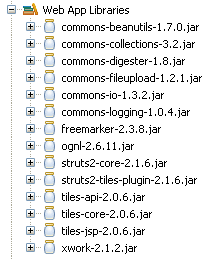

ContentType and FileName. For example if the file attribute in action file is 
 Image Upload Screen in case of error
  Image Upload Screen on success
Required JAR file
Before we start, we need to make sure commons-io.jar file is present in the classpath. Following are the list of required Jar files.
Getting Started
In order to add file upload functionality we will add an action class FileUploadAction to our project. Create fileFileUploadAction.java in package net.viralpatel.struts2.
FileUploadAction.javapackage net.viralpatel.struts2;
import java.io.File;
import javax.servlet.http.HttpServletRequest;
import org.apache.commons.io.FileUtils;
import org.apache.struts2.interceptor.ServletRequestAware;
import com.opensymphony.xwork2.ActionSupport;
public class FileUploadAction extends ActionSupport implements
ServletRequestAware {
private File userImage;
private String userImageContentType;
private String userImageFileName;
private HttpServletRequest servletRequest;
public String execute() {
try {
String filePath = servletRequest.getSession().getServletContext().getRealPath(“/”);
System.out.println("Server path:" + filePath);
File fileToCreate = new File(filePath, this.userImageFileName);
FileUtils.copyFile(this.userImage, fileToCreate);
} catch (Exception e) {
e.printStackTrace();
addActionError(e.getMessage());
return INPUT;
}
return SUCCESS;
}
public File getUserImage() {
return userImage;
}
public void setUserImage(File userImage) {
this.userImage = userImage;
}
public String getUserImageContentType() {
return userImageContentType;
}
public void setUserImageContentType(String userImageContentType) {
this.userImageContentType = userImageContentType;
}
public String getUserImageFileName() {
return userImageFileName;
}
public void setUserImageFileName(String userImageFileName) {
this.userImageFileName = userImageFileName;
}
@Override
public void setServletRequest(HttpServletRequest servletRequest) {
this.servletRequest = servletRequest;
}
}
Code language: Java (java)private File userImage;-> This will store actual uploaded Fileprivate String userImageContentType;-> This string will contain the Content Type of uploaded file.private String userImageFileName;-> This string will contain the file name of uploaded file.
private File uploadedFile, the content type will be uploadedFileContentType and file name uploadedFileFileName. Also note in above action class, we have implemented interface org.apache.struts2.interceptor.ServletRequestAware. This is to get servletRequest object. We are using this path to save the uploaded file in execute() method. We have used FileUtil.copyFile() method of commons-io package to copy the uploaded file in root folder. This file will be retrieved in JSP page and displayed to user.The JSPs
Create two JSP file in WebContent folder. UserImage.jsp will display a form to user to upload image. On submit, the file will be uploaded and saved on server. User will be sent to SuccessUserImage.jsp file where File details will be displayed. Copy following code into it. UserImage.jsp<%@ page contentType="text/html; charset=UTF-8"%>
<%@ taglib prefix="s" uri="/struts-tags"%>
<html>
<head>
<title>Upload User Image</title>
</head>
<body>
<h2>Struts2 File Upload & Save Example</h2>
<s:actionerror />
<s:form action="userImage" method="post" enctype="multipart/form-data">
<s:file name="userImage" label="User Image" />
<s:submit value="Upload" align="center" />
</s:form>
</body>
</html>
Code language: HTML, XML (xml)<%@ page contentType="text/html; charset=UTF-8"%>
<%@ taglib prefix="s" uri="/struts-tags"%>
<html>
<head>
<title>Success: Upload User Image</title>
</head>
<body>
<h2>Struts2 File Upload Example</h2>
User Image: <s:property value="userImage"/>
<br/>
Content Type: <s:property value="userImageContentType"/>
<br/>
File Name: <s:property value="userImageFileName"/>
<br/>
Uploaded Image:
<br/>
<img src="<s:property value="userImageFileName"/>"/>
</body>
</html>
Code language: HTML, XML (xml)Struts.xml entry
Add following entry for FileUploadAction class to struts.xml file.<action name="userImage"
class="net.viralpatel.struts2.FileUploadAction">
<interceptor-ref name="fileUpload">
<param name="maximumSize">2097152</param>
<param name="allowedTypes">
image/png,image/gif,image/jpeg,image/pjpeg
</param>
</interceptor-ref>
<interceptor-ref name="defaultStack"></interceptor-ref>
<result name="success">SuccessUserImage.jsp</result>
<result name="input">UserImage.jsp</result>
</action>
Code language: HTML, XML (xml)- struts.messages.error.uploading – error when uploading of file fails
- struts.messages.error.file.too.large – error occurs when file size is large
- struts.messages.error.content.type.not.allowed – when the content type is not allowed
That’s All Folks
Compile and Execute the project in eclipse and goto link http://localhost:8080/StrutsHelloWorld/UserImage.jsp Image Upload Screen Image Upload Screen in case of error
 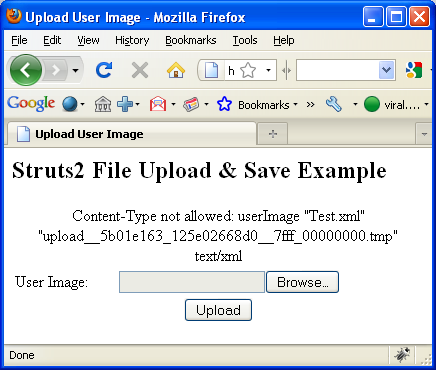 Image Upload Screen on success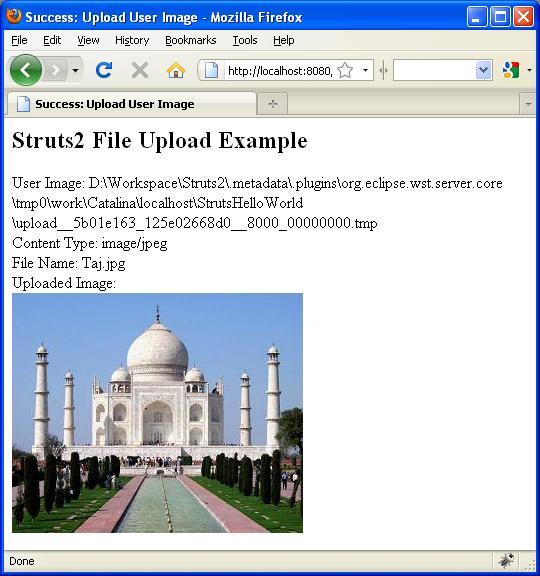
hi viral one help can you autocompleter example in Struts2
hi viral one help can you post autocompleter example in Struts2
I am new to struts 2.This is really a very good example….It helped me a lot….Thanks….
Question : How to store the File in the database(Like Oracle) ??? Can you please provide the code for it???
Thanks in advance….
I am thankful to viral for help me in struts2
Hello! Thanks for this tutorial, it was very helpful. I have one problem. When my form is loaded, it needs some dynamic data to be loaded from my DB(some selects, and labels). It works great if I don’t upload wrong file types, but when I try to upload a different kind of file, it doesn’t load the dynamic data. If I redirect to the action, it works fine, but then it doesn’t show the error message, this is my struts.xml, as you can see, it uses wildcards to handle method invocation:
newTicket.jsp
/WEB-INF/HelpDeskForms/segResponder.jsp
/WEB-INF/HelpDeskForms/segRequester.jsp
/WEB-INF/HelpDeskForms/segAdmSup.jsp
/WEB-INF/HelpDeskForms/newTicket.jsp
/WEB-INF/HelpDeskForms/detRequester.jsp
unassignedByAreaTicket
postCreateTicket
………..
Hi,,, Thanks for the article….
But im not getting output… It says…
userImageFileName is null
and giving NullpointerException
Any extra code to write than you have given above..
I think no but wat is the reason why its giving NullPointerException…….?
Plz… Thanks in advance….
System.out.println(“user Image :” + userImage);
System.out.println(“user Image Name:” + userImageFileName);
Both are returning null so
File fileToCreate = new File(filePath, getUserImageFileName());
returning NullPointerException
any help plz….
Hi,
The error you have faced – “I have problem with String filePath = servletRequest.getSession().getServletContext().getRealPath(“/”); .It allways return null .And I get a java.lang.NullPointerException
plz I need your help”
can be resolved by adding the following interceptor in your struts.xml since the file upload action you are calling doesnt call the servlet class at that instance.
Interceptor:
example below is the one used in my application
application/vnd.ms-excel
<!– 10240 10KB –>
2097152
fileUpload.def
Footer.jsp
try to remove the interceptors, this works for me. but its weird… :)
I am really enjoying this tutorial!!! Great job.
Everything is working for me using jboss; however, I noticed that servletRequest.getRealPath…
is coming up with a deprecation message.
What is the replacement for this?
Thanks again!
@swag01: Thanks for pointing out this. ServletRequest.getRealPath() method has been deprecated as the same method is available in
javax.servlet.ServletContextinterface.Thanks Viral;
I made the corrections to the FileUploadAction.java (It didn’t like the @override so I commented that out too):
If you want to update your code with the changes, I am fine.
//src
@swag01 – Thanks for the source code. I have updated the above java code and removed call to deprecated method.
Thanks Viral;
Where is the uploded image file?
The tmp file is not there any more as shown on SuccessUserImage.jsp:
User Image: D:\share\workspaceStruts2\.metadata\.plugins\org.eclipse.wst.server.core\tmp0\work\Catalina\localhost\Struts2HelloWorld\upload_4fc01309_12a30f1701e__8000_00000011.tmp
Thanks again!
dWang
thanks a lot mr.viral patel.
ur tutorial helped well to learn struts2.0.
ur struts.xml file donot works.
plz kindly send some guide line
For the ServletRequest.getRealPath() deprecation I resolved with:
servlet-api.jar
and
String filePath = servletRequest.getSession().getServletContext().getRealPath(“/”);
hi.
i have a problem with changing displayed message.
my mean is when i override the messages when file size is over than my specified size like as below :
struts.messages.error.file.too.large=Uploaded file was too large.
in my two file
ApplicationResource.properties , ApplicationResource_fr.properties
only english or default message be displayed and if changing my locale it has not any effect.
hi im new to struts2.i have to write validation for file upload field.can any one help me
hi im new to struts2.i have to write validation for file upload field.can any one help me………………
hi
Swathi,
please refere the previous post (Struts2 Validation Framework Tutorial with Example
)..if u dont just reply i will give you the code.
Regards,
[email protected]
i am impressed in the first visit.
hope it will solve all my problem related asynchronously file upload.
At last I can solve the question and errors using your valuable Tiles Example after 4 hours st\ruggle against the incomplete articles and codes posted to Korean Websites by my people. Thank you! Pls post the more examples….. .
any one help how to attach file and store that file in database with example
@Shiva – check a similar example in Spring MVC to store / retrieve file in database : http://viralpatel.net/tutorial-save-get-blob-object-spring-3-mvc-hibernate/
I have problem with String filePath = servletRequest.getSession().getServletContext().getRealPath(“/”); .It allways return null .And I get a java.lang.NullPointerException
plz I need your help
Yes, I also have that same problem with String filePath = servletRequest.getSession().getServletContext().getRealPath(“/”); .It allways return null .And I get a java.lang.NullPointerException
plz I need your help
hii kannan pay attention to FileUploadAction class :you have just to copy as its write here and its work very well.Good luck .
Hi,
Can you help to debug the following error in my eclipse deployment. I have downloaded he source code and added the binaries as mentioned here.
I’m getting the following warning
WARNING: No configuration found for the specified action: ‘userImage’ in namespace: ”. Form action defaulting to ‘action’ attribute’s literal value.
Oct 14, 2011 3:14:57 PM org.apache.struts2.dispatcher.Dispatcher getSaveDir
INFO: Unable to find ‘struts.multipart.saveDir’ property setting. Defaulting to javax.servlet.context.tempdir
and the page gives following error
HTTP Status 404 – /StrutsHelloWorld/userImage
——————————————————————————–
type Status report
message /StrutsHelloWorld/userImage
description The requested resource (/StrutsHelloWorld/userImage) is not available.
Hi Pradeep,
For testing,In web.xml instedof Login.jsp update it to UserImage.jsp and test updaload process.
Thanks so much Viral, with your tutorial, it help me to study struts2 very quick. Thank you very much
the program is working fine. but pls tell me where the file is getting uploaded in the server. pls tell me how to change the file path where i upload the file in the server. thanks in advance. you are doing a great job.
Hi,viral this was a very nice tute..one help i need ,actually needs to design a dojo tree with the help of json and this json should be from action class of struts 2.can u help me out…sa soon as posible…thanks
Its Fine tutorial But i want to save that image to mysql database can u help me with the code
thank u it helped me lot
Hi…I got the output expect for one thing….The image is not getting displayed on the success page.Actually the upload______________ ,.tmp gets saved in that path specified but gets removed at some point of time and I can also see this msg in the console
“INFO: Removing file userImage S:\Java J2EE\workspace\.metadata\.plugins\org.eclipse.wst.server.core\tmp0\work\Catalina\localhost\StrutsHelloWorld\upload__26c8c9ec_135c27471c0__8000_00000000.tmp
”
So as it gets removed ,there is no image for it to display.Kindly help me…
thank this demo is really good for me
This works only if we have
in UserImage.jsp
i want to upload a txt,doc,png,gifand jpeg file all file are upload differert operation please provide me code of that process.
Hi Sir, when I try to upload a image through given source i got following error help me………
javax.servlet.ServletException: Filter execution threw an exception
root cause
java.lang.NoClassDefFoundError: org/apache/commons/io/output/DeferredFileOutputStream
org.apache.commons.fileupload.disk.DiskFileItemFactory.createItem(DiskFileItemFactory.java:199)
org.apache.commons.fileupload.FileUploadBase.parseRequest(FileUploadBase.java:361)
org.apache.struts2.dispatcher.multipart.JakartaMultiPartRequest.parse(JakartaMultiPartRequest.java:90)
org.apache.struts2.dispatcher.multipart.MultiPartRequestWrapper.(MultiPartRequestWrapper.java:73)
org.apache.struts2.dispatcher.Dispatcher.wrapRequest(Dispatcher.java:698)
org.apache.struts2.dispatcher.FilterDispatcher.prepareDispatcherAndWrapRequest(FilterDispatcher.java:334)
org.apache.struts2.dispatcher.FilterDispatcher.doFilter(FilterDispatcher.java:394)
root cause
java.lang.ClassNotFoundException: org.apache.commons.io.output.DeferredFileOutputStream
org.apache.catalina.loader.WebappClassLoader.loadClass(WebappClassLoader.java:1678)
org.apache.catalina.loader.WebappClassLoader.loadClass(WebappClassLoader.java:1523)
org.apache.commons.fileupload.disk.DiskFileItemFactory.createItem(DiskFileItemFactory.java:199)
org.apache.commons.fileupload.FileUploadBase.parseRequest(FileUploadBase.java:361)
org.apache.struts2.dispatcher.multipart.JakartaMultiPartRequest.parse(JakartaMultiPartRequest.java:90)
org.apache.struts2.dispatcher.multipart.MultiPartRequestWrapper.(MultiPartRequestWrapper.java:73)
org.apache.struts2.dispatcher.Dispatcher.wrapRequest(Dispatcher.java:698)
org.apache.struts2.dispatcher.FilterDispatcher.prepareDispatcherAndWrapRequest(FilterDispatcher.java:334)
org.apache.struts2.dispatcher.FilterDispatcher.doFilter(FilterDispatcher.java:394)
note The full stack trace of the root cause is available in the Apache Tomcat/7.0.21 logs.
s’il vous plait comment faire pour recuperer l’extention de l’image charger
c bon c le champ userImageContentType qui definie l’extension
Hi Viral,
Thanks for this tutorial it helped me lot. But I want to save image in MySql DB and show it on webpage so do you have any tutorial of saving the image in BLOB format and retrieving it. I want this in struts 2 framework only…not in spring / hybernate..
Best Regards,
Vishal Kshirsagar.
hi sir this is sreenu , iam complete in mca 2012 batch my problam is how to use multepull jsp
using singlesite …..
Hi…can somebody tell me why the image is not displayed for some reason..I see it with a cross red symbol..in my console I can an INFO: saying removed file from that path …blah…/ that long file name…whats the reason?
Hi….
I have uploaded my file using struts2 interceptor in a specific folder,but problem is that the file name get saved with upload__421b43ec_138b840f6aa__7ff0_00000001.tmp
can somebody tell me why that’s so????
any help will be appreciated.!!!!
how many jars i need for this File upload example
Thank you
while am writting this line
String filePath = request.getSession().getServletContext().getRealPath(“/”);
am getting the error as illegeal charecter can any one help me
Does this work? Because i don’t think it should as the:
<img src="”/>
is referring to which path?
if it’s the real path then i don’t think it’s able to refer to the physical path eg. “C:\struts2\fileupload\userimage.jpg”
hi
its really help full, i m uesing same example but when i m uploading big image that time error msg coming two times.
it should be one time only………..
Hello, I am trying to use file-upload example to upload swf file using struts2 but it is givign me 404 error. It is working for other video fiels and pdf but not for swf files…please help…
Can anyone please tell me how to upload multiple files using a single file tag in structs2
Dear,
my entire application depends on file upload where it uses struts 2 file upload as suggested all steps are followed and it’s working fine in my local(windows) environment while it’s not working in my test(linux) environment.
it gives null pointer exception. File object is null in action class.
userImageFileName null please help me?
Getting big Null Pointer Exception at line:
fileToCreate = new File(filePath, this.htmlFileName);
However userImage value in debug mode is :
“D:XYZ\workspace_4\.metadata\.plugins\org.eclipse.wst.server.core\tmp0\work\Catalina\localhost\HTMLToJSP\upload__1d70e13a_13b8a3f0bbd__8000_00000000.tmp”
I got that null issue all the time using glassfish 3.1.2
I switched to tomcat server and it worked fine.
I just changed server to glassfish 3.1.2.1 version and it also worked fine..
I think the issue was with the server.
Just to let u know.. Cheers..
i have executed it …with the code ..
the problem is when i execute the UserImage.jsp after giving every details
and when i click on submit button ,then it goes to SuccessUserImage where it dosnt gives the oproper output …evry fields is empty …(NO OUTPUT)
SOME1 plz help me,,,,,,,
when I am Giving Image file It Is working, but when i am not giving any image, it is not showing error message in UserImage.jsp, But it is returning the UserImage.jsp..
Plz tell me how to show error message in UserImage.jsp
Thanx In Advance
where is photo after upload fie?
I am getting the filename, contentType empty, and having null exception at
File filetocreate = new File(filepath, fileName)
fileName value is null in the action.
thought the filename gets uploaded and displays the file name in jsp file.
Oh Just solve the filename null axception in the action.
the solution is:
whatever you name your file variable, let say
privare File fileUpload;
the ContentType and FileName should be prefixed by the “fileUpload” like below:
private String fileUploadContentType;
private String fileUploadFileName
hope this will help those who are having same problem
Hi Viral –
Have one doubt , is it is possible to configure file upload maximumSize value by programatically. because I have to configure different fileupload maxSize limit for different roles ( users ).
If yes please give some ideas.
Is it is possible to override fileUpload interceptor .
I want the file to be saved in the directory with a seperate file extension.Like if i uploaded a .jpeg or .gif file i want both to be saved in .jpeg format.Is it possible??How?
Thanks Viral,
Very good tutorial.
Joe.
Thank you for sharing code this work for me
I have 1 question how to change by default the path of image upload?
how can i change the path of saved file???or can i save the uploaded file into folder of my application??
When i run your above code , i get the follwoing error :
The type UploadFile must implement the inherited abstract method ServletRequestAware.setServletRequest(HttpServletRequest
I need ur help urgent !
Thanks,
Sanjoy Roy
thanks for this tutoriel, how can i adapt the code in order to upload other file (pdf,txt,…)?
hi.its very helpful tutorial…Thanks Viral….
was is such a big deal to upload those da*n JARs ?
not working for me
@Viral : thanks for great tutorials …
please also update source code which has been given for download.
thanx for this tutorial and please give tutorials for downloading a file.
Sir, is it possible to upload video or audio file using this ???
what i need to do this ?please help me its urgent
Regards
vikrant Deshmukh
Please help if the file size is larger.
I am getting no action defined error.
Hi everyone,
Can anyone tell me how to fix “content type not allowed” error.
sir plz tell me where to get the jar files in tiles project
Hi ,
If I use some other names like filepath and copied file instead of userImage and userImageFileName then why my program is not working.Do there is any connection with the names in the action class and the interceptors.I have used the same names in the jsps also.
hi sir .
String filePath = servletRequest.getSession().getServletContext().getRealPath(“/”);
here i want to save location in my project files how can i set this path
i want “WebContent/” like This
And
i don’t want to this type of locations “E:/myphotos/”
thanks
did u solve this problem as i want same thing to do in my project
good tutorial
Hi,
Am getting images from the database and storing all the images in a filepath( request.getSession().getServletContext().getRealPath). Now am having all the images in the filepath.
Then am getting the images from filepath to
private File[] filelist;
Now am trying to display the filelist in JSP:
<img src="”/>
Output in browser is am getting the filepath of all the images(i can iterate) but images are not loading.
If i put the tag in and click on the link its displaying “The address wasn’t understood”.If i enter the link the slash “/” is changing and the image in displaying.
<a href="”/>
<img src="”/>
In Firebug its showing “Could not load image”.
I may be wrong in displaying the image so please help how to load the image in JSP.
s iterator property is not displaying in the comment..
actually am iteration using filelist[] where am having all the images from the filepath.And using s propery am trying to display the image.
Thanks a lot for the great tutorials.
I have created a FileUpload function. Everything is working fine locally. I have uploaded on production. The interceptor intercepting the docx file.
Following is the code in struts.xml
104857600
text/plain,application/vnd.openxmlformats-officedocument.wordprocessingml.document
I will appreciate any advise.
Thanks, nice post
Good example…..thanks to the author..Keep up the great work u’re doing!
how can i store image in web project folder like project name/webcontent/upload
I tried the code for file upload but it replies
“java.lang.NullPointerException”
How to solve this?
Very Nice and thanks for share to a useful this post
I upload my image successfully
Thanks for share