Java Properties files are amazing resources to add information in Java. Generally these files are used to store static information in key and value pair. Things that you do not want to hard code in your Java code goes into properties files. Although there are multiple ways of loading properties file, I will be focusing on loading the resource bundle files from class path resources. There are advantages of adding properties files in the classpath: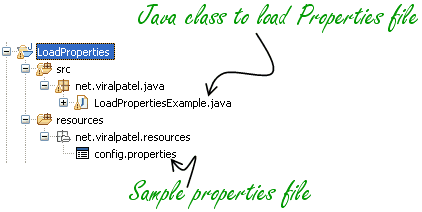
 The full Java code for testing
- The properties files became a part of the deployable code (e.g. JAR file) making it easy to manage.
- Properties files can be loaded independent of the path of source code.
net.viralpatel.resources. net/viralpatel/resources/config.properties To load properties file using Classloader, use following code:Code language: Java (java)hello.world=Hello World
this.getClass()
		.getResourceAsStream("/some/package/config.properties");
Code language: Java (java)loadProps1().private Properties configProp = new Properties();
...
public void loadProps1() {
InputStream in = this.getClass().getResourceAsStream("/net/viralpatel/resources/config.properties");
try {
configProp.load(in);
} catch (IOException e) {
e.printStackTrace();
}
}
Code language: Java (java)this.getClass()
.getClassLoader()
.getResourceAsStream("some/package/config.properties");
Code language: Java (java)loadProps2().private Properties configProp = new Properties();
public void loadProps2() {
InputStream in = this.getClass().getClassLoader().getResourceAsStream("net/viralpatel/resources/config.properties");
try {
configProp.load(in);
} catch (IOException e) {
e.printStackTrace();
}
}
Code language: Java (java) The full Java code for testing
package net.viralpatel.java;
import java.io.IOException;
import java.io.InputStream;
import java.util.Properties;
import java.util.ResourceBundle;
public class LoadPropertiesExample {
private Properties configProp = new Properties();
public static void main(String[] args) {
LoadPropertiesExample sample = new LoadPropertiesExample();
sample.loadProps2();
sample.sayHello();
}
public void loadProps1() {
InputStream in = this.getClass().getResourceAsStream("/net/viralpatel/resources/config.properties");
try {
configProp.load(in);
} catch (IOException e) {
e.printStackTrace();
}
}
public void loadProps2() {
InputStream in = this.getClass().getClassLoader().getResourceAsStream("net/viralpatel/resources/config.properties");
try {
configProp.load(in);
} catch (IOException e) {
e.printStackTrace();
}
}
public void sayHello() {
System.out.println(configProp.getProperty("hello.world"));
}
}
Code language: Java (java)


Such a long article for so simple thing.
Interesante aqui te dejo mis dos Blogs. Aqui encontraras cosas tambien muy interesantes:
http://viviendoconjavaynomoririntentandolo.blogspot.com
http://frameworksjava2008.blogspot.com
Saludos.
Asking the class itself for resources seems weird to me. Is there any way to get that by asking the System or by other API not connected to the class you are using it in?
Hi..
To load the property file in Java I think, it is very easy to do it. It will come in the form of directory when you are downloading this files..
In Java 6 updated version, every properties class have been existed, take help form there to fulfil the requirements….
Simple method to load properties file.
Properties props = new Properties();
props.load(new FileInputStream(“config.properties”));
String value = props.getProperty(“prop1”);
System.out.println(value);
System.out.println(props.entrySet());
Thank you Muski .. useful one :)
Thanks man,
awesome post.
helped me in reading the properties file outside the jar file.
Thanks again
Hi Viral,
NIce post. HOw do store some modified properties to the file in the same package as you mentioned. I used FileOutputstream, but it creates a new properties file elsewhere..i want the same properties file to contain the modified values…i am goign berserk with this…
Thanks Dude
Very good Post.
I was struggling like anything.
My problem was to load dataset file from resource folder (in DBUnit)
return new FlatXmlDataSetBuilder().build(this.getClass().getResourceAsStream(“/dataset.xml”));
thanks again;
Could you tell me how to include the properties file path in my manifest? my properties file is in the resources folder. I need to include this in the class path of the JAR file, so that if any user wants they can modify the properties file externally and it will reflect in the JAR file
Very good, thanks
This is very useful and very easy to understand. Thanks a lot… LOL
Nice post. But I have to mantain a properties file out of MyProject.war file. In my environment I have a deploy directory to put the MyProject.war file, a log directory and a conf directory to put configuration.properties file. Using this good suggenstion configuration.properties file is embedded in MyProject.war file. Any Advice?
I have found it very helpful.
Thanks for posting.
hi ,
how to use the same properties file(net/viralpatel/resources/config.properties) into jsp page using jquery.
can we write multiple sql queries in properties file…? if yes then how to retrieve a single out of them.
Please reply asap
Hi,
Nice tutorial.
One potential issue that i observe here is that the name of the properties files has been hard coded in the code. you could get away by using -D option in the command line.
Isa
Thanks. This cleared my confusion.
Hello !
I tried in Eclipse your code and gives:
Exception in thread “main” java.lang.NullPointerException
at java.util.Properties$LineReader.readLine(Unknown Source)
at java.util.Properties.load0(Unknown Source)
at java.util.Properties.load(Unknown Source)
at com.ion.ysura.garage.LoadPropertiesExample.loadProps2(LoadPropertiesExample.java:30)
at com.ion.ysura.garage.LoadPropertiesExample.main(LoadPropertiesExample.java:14)
Can you help?
Sorry !
I fixed it !!
Do not start the path with /.
Do as:
prop.load(OpenGarage.class.getClassLoader().getResourceAsStream(“com/ion/ysura/garage/resources/config.properties”));
Good examples !!
This approach doesn’t work if the properties file is outside the jar…
Nice explanation dude , u made it like a piece of cake.
I found an interesting explanation here also , this guy explained in a funny way or i shud say comic way dats what he had given the title.
Thankx ! The snapshot of eclipse showed me something i was really missing!
Great Article
Hi,
Read from properties file with hard-code, everything works fine but when I introduce framework ,it gives null pointer exception why?
//Hard code
public class tt {
public static void main(String[] args) throws IOException {
Properties CONFIG= new Properties();
FileInputStream ip = new FileInputStream(System.getProperty(“user.dir”)+”//src//com//app//config/config.properties”);
CONFIG.load(ip);
System.out.println(System.getProperty(“user.dir”));
System.out.println(CONFIG.getProperty(“url_dbname”));
}
}
Try to read following code from properties file, generate null point exception.
Please help and thanks in advance.
public class Test_Login extends TestBase {
public static void main(String[] args) throws SQLException {
String dburl=”jdbc:mysql://localhost:”;
String port=”3306″;
String dbname=”/test”;
String username=”root”;
String password=” root”;
Connection conn=null;
PreparedStatement pstmt=null;
ResultSet rs=null;
System.out.println(“establish connection db first test”);
try {
Class.forName(CONFIG.getProperty(“Db_driver”)).newInstance();
} catch (InstantiationException | IllegalAccessException
| ClassNotFoundException e) {
// TODO Auto-generated catch block
e.printStackTrace();
}
conn=DriverManager.getConnection(dburl+port+dbname, username,password);
}
}
Could you please give your comment on this question on StackOverflow?
http://stackoverflow.com/questions/23854130/eclipse-java-file-fileinputstream-vs-input-stream-when-loading-font-file
You see, this (as you suggested) works:
but this doesn’t (neither in Eclipse nor in runnable JAR)
In if I understood you post correctly the other option should work as well?
Where did I go wrong?
such a simple explanation is very easy to understand.Thanx a lot man.
Thanks a lot! Your explanation was the first one I could find that actually spelled out how to get Class.getResource(foo) working in Eclipse. I haven’t read through all the comments, so I may be repeating things: this technique works for anything you want loaded into a Java application in a non path-dependent way. I am using it to load an ICC color table, for instance.
Can i achieve localization ?
Thanks for sharing a good example.
Can you please share about “how to update property file inside a jar” ?
Writing back is little difficult when file is inside the jar. I tried it using below code but can not achive it.
this work fine when file is outside the jar.
Thanks for the blog
I tried your example and I keep getting a null returned in the stream. I’m using RAD 8.5 and WAS 8.5. My properties file is under my Resources java project which is at the same level as the calling method:
* EmailPrefJava
->Java Source
->com.usb.emailpref.util
->GenericPropertyManager.java
->Public GenericPropertyManager
InputStream inputstream = this.getClass().getResourceAsStream(“/local/projects/emailpreferences/properties/emailpref.properties”);
* Resources
->Local
->projects.emailpreferences.properties
->emailpref.properties
I’ve tried the following:
1) removing the leading slash from the path,
2) prefacing the path with “/Resources”,
3) removing all the folder references and leaving just the properties file name,
4) changing “projects/emailpreferences/properties” to “projects.emailpreferences.properties”
5) replaced the relative path with a direct path “d:\\projects\emailpreferences\properties” (and the file does exist there).
The reason I don’t use the direct path is we have to move the properties files into the app’s EAR and now need to reference it from there.
I’d really appreciate your help. Your’s is the closest example I’ve found of what we need.
This one isn’t working in my case.
I have a properties file called ‘smsConfig.properties’ inside a folder called ‘config’ which is located out of outside the source folder.
Could someone plez help me on this.