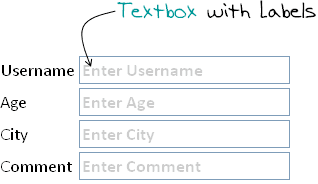
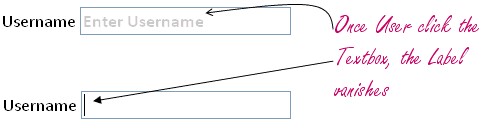
In one of my previous article about Change Form Textbox Style on Focus, we discussed about Usability and HCI issues. Slight change in web pages/input forms can increase user experience. Nowadays, it has became a common practice to give user labels on fields that they are editing. For example, if you see Google’s custom search textbox in any website, most of them will have a Google’s Logo in background and when user clicks on Textbox, the logo disappears. Thus we can create an input form with labels in background of textboxes. When user select the textboxes, the labels disappear enabling user to edit the textbox. Let us see how can we use JavaScript/jQuery to achieve this.
Step 1: The HTML
We will use following simple HTML Form. Create an HTML file and Copy and paste following code.
Notice that while defining each text fields, we have provided title attribute. The text that is displayed on background of textbox is taken from the Title attribute. So generally the title attribute should be like “Enter Email Address” or “Type Address”.
Step 2: The CSS
Copy following CSS in your HTML file. You may want to include a separate CSS file for this.
The above CSS class is applied to the Textbox when user has not entered anything in it. Once the user starts typing in Textbox the CSS class is removed.
Step 3: The JavaScript
We are almost done with our implementation. Only thing left is the JavaScript code that actually add and remove css to textboxes.
The above code is straight forward. For each textbox in the webpage, we hook handler function to events focus and blur. When Textbox is focused, check if the value is same as Title. If so, then remove the background label css and let user edit the value in textbox. And while blur event(focus lost), check the value: if user has not entered anything, set the background css again.
Hi Nick, The code looks fine to me. The error you are getting is because some object has not been initialized properly. Can you confirm if you have included jQuery javascript file in your code? You must have something like following in your html:
This is a good start, but could use some polishing. I added a check to see if the title attribute exists for field and added an onsubmit check to be sure we don’t submit default text.
It’d also be nice to use it on textareas, which shouldn’t be too hard.
Hi, Viral It’s working fine with the form that load with in the same page but when I’m loading a form through Ajax in a particular div tag t his won’t work with the dynamically loaded forms. Is their any way to works also with dynamically loaded form?
Great! It is straightforward. I just wonder why it doesnt work if I am putting the script on an external source or even putting it on the tag. It only works when the script is positioned before the tag.
Hey everyone, here is one I made that handles Password inputs as well, and also ignores text boxes with no Title attribute. You can’t change input types dynamically with all browsers so instead I show and hide two different inputs. You need one with ID Password and another with ID PasswordDummy, For clients with no javascript, best to set PasswordDummy to display:none initially.
Enjoy.
[CODE=”js”]
$(‘input’).each(function() {
if (this.id == ‘Password’) { // Handle Password differently – it only gets an onblur, in which it gies invisible and activates the PasswordDummy if it is empty
// if its blank, make it invisible and Dummy visible if (this.value == ”) { $(this).hide(); $(“#PasswordDummy”).show(); } else { $(this).show(); $(“#PasswordDummy”).hide(); }
Hi, I’am a asp.net user and I want to say someting about your code.Firstly I appreciate you for your simple and chic code.I have been using it very well.But I want to add some missing code(according to me :)).My Code :
Of Course that’s your code,not mine.But I added oneline,why? After the same page loading, the value of textbox continue to stand in the textBox.What will be doing is to prevent this problem. So now, after the page loading your code works very well!
Won’t this be an issue when you need to validate required fields, though? If the user submits a form without entering anything, it will submit that default text as the value, so then it won’t properly recognize that the user didn’t fill out the required field. How do you get around this?
Hi Prateek, jQuery does provide live events which can be used to map events to any current and future element, but unfortunately live() does not provide any create method which can be used to handle new element creation. So for now the simplest solution (without adding any additional plugin) would be to wrap above javascript in some function() { } and call it everytime a new element is added.
can anyone tell me, how I can disply ” division of two combobox values and then multiplying the answer with the a contant number” in a texbox in nuace PDF professional 5.
So you cannot put the javascript in the header section or else it won’t work. Javascript has to be below the form for this to work. It wasn’t working for me at first then i checked the source of online demo and saw that javascript was at the end after Is there any way to make this work by having javascript in the header?
hai friend do u have code for watermarking text box using ajax in jsp ma…pls reply dawhich is i will entermy emp id if pan is there….in database i want the pan and dob text box to be enabled..which is disabled state….otherwise…dob and doj have to be enabled
Nice article. I use placeholder attribute as mentioned by Agung Setiawan. The difference is that it disappears when you start typing and not on click. It also saves a lot of code.
This is a good start, but could use some polishing. I added a check to see if the title attribute exists for field and added an onsubmit check to be sure we don’t submit default text.
It’d also be nice to use it on textareas, which shouldn’t be too hard.
Very important information. This is very useful for me to apply on my web for more optimal results. Thanks for sharing and we wait for other quality articles ….
Very important information. This is very useful for me to apply on my web for more optimal results. Thanks for sharing and we wait for other quality articles ….




hi viral..
i use asp.net and want to try your code..
when i run the code, a error message appears “Microsoft JScript runtime error: Object expected”
$('input[type="text"]').each(function() {
	this.value = $(this).attr('title');
	$(this).addClass('text-label');
	$(this).focus(function() {
		if(this.value == $(this).attr('title')) {
			this.value = '';
			$(this).removeClass('text-label');
		}
	});

	$(this).blur(function() {
		if(this.value == '') {
			this.value = $(this).attr('title');
			$(this).addClass('text-label');
		}
	});
});
plz help me
i used this code in asp.net but i didn’t get output….
if any changes required
pls send me the code need to change….
Hi Nick,
The code looks fine to me. The error you are getting is because some object has not been initialized properly. Can you confirm if you have included jQuery javascript file in your code?
You must have something like following in your html:
You can do one thing. Take a look at source code of Online demo and see if you are missing anything in your code.
Very nice Viral! I’m surprised that asp.net doesn’t have this type of control functionality.
This is a good start, but could use some polishing. I added a check to see if the title attribute exists for field and added an onsubmit check to be sure we don’t submit default text.
It’d also be nice to use it on textareas, which shouldn’t be too hard.
Hi, Viral
It’s working fine with the form that load with in the same page but when I’m loading a form through Ajax in a particular div tag t his won’t work with the dynamically loaded forms.
Is their any way to works also with dynamically loaded form?
Hi,
Great! It is straightforward. I just wonder why it doesnt work if I am putting the script on an external source or even putting it on the tag. It only works when the script is positioned before the tag.
I had need this for deperture tracing system
Any ideas on how this could be made to work with a password input?
Hey everyone, here is one I made that handles Password inputs as well, and also ignores text boxes with no Title attribute. You can’t change input types dynamically with all browsers so instead I show and hide two different inputs. You need one with ID Password and another with ID PasswordDummy, For clients with no javascript, best to set PasswordDummy to display:none initially.
Enjoy.
[CODE=”js”]
$(‘input’).each(function() {
if (this.id == ‘Password’) {
// Handle Password differently – it only gets an onblur, in which it gies invisible and activates the PasswordDummy if it is empty
// if its blank, make it invisible and Dummy visible
if (this.value == ”) {
$(this).hide();
$(“#PasswordDummy”).show();
}
else {
$(this).show();
$(“#PasswordDummy”).hide();
}
$(this).blur(function() {
if (this.value == ”) {
$(this).hide();
$(“#PasswordDummy”).show();
}
else {
$(this).show();
$(“#PasswordDummy”).hide();
}
});
}
else if (this.id == ‘PasswordDummy’) {
// Handle Password Dummy differently
this.value = $(this).attr(‘title’);
$(this).addClass(‘text-label’);
$(this).focus(function() {
$(this).hide();
$(“#Password”).show();
$(“#Password”).focus();
});
}
else if ($(this).attr(‘title’) != undefined) {
if (this.value == ”) {
this.value = $(this).attr(‘title’);
$(this).addClass(‘text-label’);
}
$(this).focus(function() {
if (this.value == $(this).attr(‘title’)) {
this.value = ”;
$(this).removeClass(‘text-label’);
}
});
$(this).blur(function() {
if (this.value == ”) {
this.value = $(this).attr(‘title’);
$(this).addClass(‘text-label’);
}
});
}
});
[/CODE]
Hi,
I’am a asp.net user and I want to say someting about your code.Firstly I appreciate you for your simple and chic code.I have been using it very well.But I want to add some missing code(according to me :)).My Code :
Of Course that’s your code,not mine.But I added oneline,why?
After the same page loading, the value of textbox continue to stand in the textBox.What will be doing is to prevent this problem. So now, after the page loading your code works very well!
i have a problem where i call the java script in textbox using .net. pls give me a solution.
this field label only for input text
like :- Enter user name (for input field)
how can i use in password field i change “text” field in password
it not working
what should i do
plz help as soon as possible
Won’t this be an issue when you need to validate required fields, though? If the user submits a form without entering anything, it will submit that default text as the value, so then it won’t properly recognize that the user didn’t fill out the required field. How do you get around this?
it doesn’t work when we dynamically add the textbox on click of the add-more button. please provide a solution for this.
Hi Prateek,
jQuery does provide live events which can be used to map events to any current and future element, but unfortunately
live()does not provide any create method which can be used to handle new element creation. So for now the simplest solution (without adding any additional plugin) would be to wrap above javascript in somefunction() { }and call it everytime a new element is added.Hi
This tutorial is really useful for me.
I’m just building a Malayalam English online dictionary.
this tutorial really useful for me
Thank you very much :)
Thanks this was helpful.
Could anyone tell me how to add a onsubmit check to make sure default values aren’t submitted?
Many thanks
If anyone needs to add a check on onsubmit:
http://stackoverflow.com/questions/9727032/text-labels-in-textbox-being-passed-onsubmit
hi, all
can anyone tell me, how I can disply ” division of two combobox values and then multiplying the answer with the a contant number” in a texbox in nuace PDF professional 5.
This was really helpful. Thanks
very helpfull
Thanks a lot I place the whole Jquery code inside the
$(document).ready(function(){ your code here });
it work properly
hi viral nice tutorial. how can i use this for tag html:text ?
So you cannot put the javascript in the header section or else it won’t work. Javascript has to be below the form for this to work. It wasn’t working for me at first then i checked the source of online demo and saw that javascript was at the end after Is there any way to make this work by having javascript in the header?
Straight and easy. Thank you!
so you want to add watermark in your tex tbox?
now it is so much easy to do it, just use placeholder attribute inside input tag
ex:
hai friend do u have code for watermarking text box using ajax in jsp ma…pls reply dawhich is i will entermy emp id if pan is there….in database i want the pan and dob text box to be enabled..which is disabled state….otherwise…dob and doj have to be enabled
so you want to add watermark in your tex tbox?
now it is so much easy to do it, just use placeholder attribute inside input tag
ex:
Man, thank you sooooo much! I was trying to use javascript/jquery but I don’t know a lot. you saved me!!
Agung, thanks. Thats a lot easier and basically does the same thing!
Great solution, thanks
Really You made my day.. ..Many Thanks
This post is very nice Post. It is working for me as well.
Thanks you so much Viral
it’s very nice tutorial jquery labeling text box… i’m interesting to use it for my website. thanks
how do i integrate it in one html file
this one is great solution for my doubt
this one is good actuallly i want jquery validation in java
Please tel me suggestion
Hi Viral ,
.Focus and .blur not working on IPAD,
is there any other way to do this.
it’s very nice tutorial jquery labeling text box… i used this in my web site
Nice article. I use placeholder attribute as mentioned by Agung Setiawan. The difference is that it disappears when you start typing and not on click. It also saves a lot of code.
wonderful
it’s nice tutorial, i’ll try this for my website
Hey Viral,
i can’t see the output i.e.
label on textbox…
plz help me…
thanks for sharing .. i like your post ebaout default text label.. and your tutorial very great..
thank his knowledge is very useful for me that still lay ,,
Hopefully useful ya ..
hi all i want to make a simple widget
one text box and submit button
that i integrate many web site so that please give me source code
This is a good start, but could use some polishing. I added a check to see if the title attribute exists for field and added an onsubmit check to be sure we don’t submit default text.
It’d also be nice to use it on textareas, which shouldn’t be too hard.
Thank You I Like This Four You
would it not just be easier to add placeholder?
Very important information. This is very useful for me to apply on my web for more optimal results.
Thanks for sharing and we wait for other quality articles ….
Very important information. This is very useful for me to apply on my web for more optimal results.
Thanks for sharing and we wait for other quality articles ….
thanks for sharing ..
Thanks for the code, i hope it’s work for my pages
thank his knowledge is very useful for me
nice share, thank you. good luck