Database Connection Pooling is a great technique used by lot of application servers to optimize the performance. Database Connection creation is a costly task thus it impacts the performance of application. Hence lot of application server creates a database connection pool which are pre initiated db connections that can be leverage to increase performance. Apache Tomcat also provide a way of creating DB Connection Pool. Let us see an example to implement DB Connection Pooling in Apache Tomcat server. We will create a sample web application with a servlet that will get the db connection from tomcat db connection pool and fetch the data using a query. We will use Eclipse as our development environment. This is not a prerequisite i.e. you may want to use any IDE to create this example.
Step 1: Create Dynamic Web Project in Eclipse
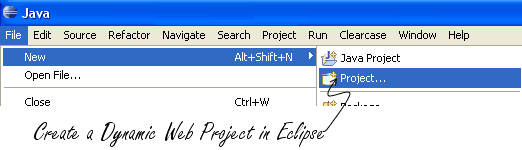
Create a Dynamic Web Project in Eclipse by selecting:
File -> New -> Project… ->Dynamic Web Project.
Step 2: Create context.xml
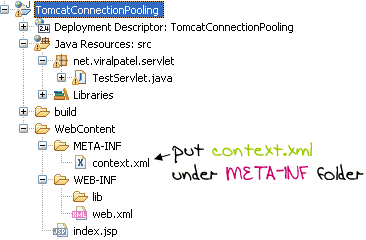
Apache Tomcat allow the applications to define the resource used by the web application in a file called context.xml (from Tomcat 5.x version onwards). We will create a file context.xml under META-INF directory. Copy following content in the context.xml file.
<?xml version="1.0" encoding="UTF-8"?><Context><!-- Specify a JDBC datasource --><Resourcename="jdbc/testdb"auth="Container"type="javax.sql.DataSource"username="DB_USERNAME"password="DB_PASSWORD"driverClassName="oracle.jdbc.driver.OracleDriver"url="jdbc:oracle:thin:@xxx:1525:dbname"maxActive="10"maxIdle="4" /></Context>
Code language:HTML, XML(xml)
In above code snippet, we have specify a database connection pool. The name of the resource is jdbc/testdb. We will use this name in our application to get the data connection. Also we specify db username and password and connection URL of database. Note that I am using Oracle as the database for this example. You may want to change this Driver class with any of other DB Providers (like MySQL Driver Class).
Step 3: Create Test Servlet and WEB xml entry
Create a file called TestServlet.java. I have created this file under package: net.viralpatel.servlet. Copy following code into it.
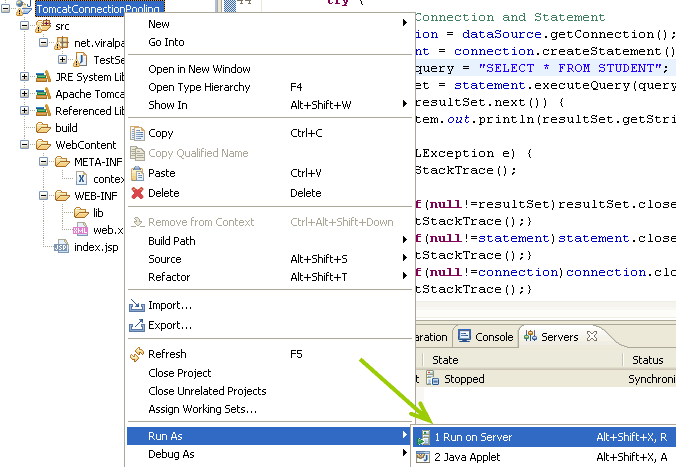
Now Run the web application in Tomcat using Eclipse (Alt + Shift + X, R). You will be able to see the result of the query executed. Thus this way we can create a database pool in Tomcat and get the connections from it.
org.apache.tomcat.dbcp.dbcp.SQLNestedException: Cannot load JDBC driver class ‘com.mysql.jdbc.Driver’ at org.apache.tomcat.dbcp.dbcp.BasicDataSource.createDataSource(BasicDataSource.java:1136) at org.apache.tomcat.dbcp.dbcp.BasicDataSource.getConnection(BasicDataSource.java:880) at TestServlet.doGet(TestServlet.java:42) at javax.servlet.http.HttpServlet.service(HttpServlet.java:617) at javax.servlet.http.HttpServlet.service(HttpServlet.java:717) at org.apache.catalina.core.ApplicationFilterChain.internalDoFilter(ApplicationFilterChain.java:290) at org.apache.catalina.core.ApplicationFilterChain.doFilter(ApplicationFilterChain.java:206) at org.apache.catalina.core.StandardWrapperValve.invoke(StandardWrapperValve.java:233) at org.apache.catalina.core.StandardContextValve.invoke(StandardContextValve.java:191) at org.apache.catalina.core.StandardHostValve.invoke(StandardHostValve.java:127) at org.apache.catalina.valves.ErrorReportValve.invoke(ErrorReportValve.java:102) at org.apache.catalina.core.StandardEngineValve.invoke(StandardEngineValve.java:109) at org.apache.catalina.connector.CoyoteAdapter.service(CoyoteAdapter.java:298) at org.apache.coyote.http11.Http11Processor.process(Http11Processor.java:852) at org.apache.coyote.http11.Http11Protocol$Http11ConnectionHandler.process(Http11Protocol.java:588) at org.apache.tomcat.util.net.JIoEndpoint$Worker.run(JIoEndpoint.java:489) at java.lang.Thread.run(Unknown Source) Caused by: java.lang.ClassNotFoundException: com.mysql.jdbc.Driver at java.net.URLClassLoader$1.run(Unknown Source) at java.security.AccessController.doPrivileged(Native Method) at java.net.URLClassLoader.findClass(Unknown Source) at java.lang.ClassLoader.loadClass(Unknown Source) at java.lang.ClassLoader.loadClass(Unknown Source) at java.lang.ClassLoader.loadClassInternal(Unknown Source) at java.lang.Class.forName0(Native Method) at java.lang.Class.forName(Unknown Source) at org.apache.tomcat.dbcp.dbcp.BasicDataSource.createDataSource(BasicDataSource.java:1130) … 16 more
I repeat your code but I don’t know what is wrong.. java.lang.NullPointerException paquete.TestServlet.doGet(TestServlet.java:40) javax.servlet.http.HttpServlet.service(HttpServlet.java:690) javax.servlet.http.HttpServlet.service(HttpServlet.java:803)
note The full stack trace of the root cause is available in the Apache Tomcat/5.5.23 logs.
rg.apache.tomcat.dbcp.dbcp.SQLNestedException: Cannot load JDBC driver class ‘com.mysql.jdbc.Driver’ at org.apache.tomcat.dbcp.dbcp.BasicDataSource.createConnectionFactory(BasicDataSource.java:1429) at org.apache.tomcat.dbcp.dbcp.BasicDataSource.createDataSource(BasicDataSource.java:1371) at org.apache.tomcat.dbcp.dbcp.BasicDataSource.getConnection(BasicDataSource.java:1044) at net.viralpatel.servlet.TestServlet.doGet(TestServlet.java:43) at javax.servlet.http.HttpServlet.service(HttpServlet.java:617) at javax.servlet.http.HttpServlet.service(HttpServlet.java:717) at org.apache.catalina.core.ApplicationFilterChain.internalDoFilter(ApplicationFilterChain.java:290) at org.apache.catalina.core.ApplicationFilterChain.doFilter(ApplicationFilterChain.java:206) at org.apache.catalina.core.StandardWrapperValve.invoke(StandardWrapperValve.java:233) at org.apache.catalina.core.StandardContextValve.invoke(StandardContextValve.java:191) at org.apache.catalina.core.StandardHostValve.invoke(StandardHostValve.java:127) at org.apache.catalina.valves.ErrorReportValve.invoke(ErrorReportValve.java:102) at org.apache.catalina.core.StandardEngineValve.invoke(StandardEngineValve.java:109) at org.apache.catalina.connector.CoyoteAdapter.service(CoyoteAdapter.java:298) at org.apache.coyote.http11.Http11Processor.process(Http11Processor.java:859) at org.apache.coyote.http11.Http11Protocol$Http11ConnectionHandler.process(Http11Protocol.java:588) at org.apache.tomcat.util.net.JIoEndpoint$Worker.run(JIoEndpoint.java:489) at java.lang.Thread.run(Thread.java:595) Caused by: java.lang.ClassNotFoundException: com.mysql.jdbc.Driver at org.apache.catalina.loader.WebappClassLoader.loadClass(WebappClassLoader.java:1680) at org.apache.catalina.loader.WebappClassLoader.loadClass(WebappClassLoader.java:1526) at org.apache.tomcat.dbcp.dbcp.BasicDataSource.createConnectionFactory(BasicDataSource.java:1420) … 17 more
I always found this error g.apache.tomcat.dbcp.dbcp.SQLNestedException: Cannot load JDBC driver class ‘com.mysql.jdbc.Driver’ at org.apache.tomcat.dbcp.dbcp.BasicDataSource.createConnectionFactory(BasicDataSource.java:1429) at org.apache.tomcat.dbcp.dbcp.BasicDataSource.createDataSource(BasicDataSource.java:1371) at org.apache.tomcat.dbcp.dbcp.BasicDataSource.getConnection(BasicDataSource.java:1044) at net.viralpatel.servlet.TestServlet.doGet(TestServlet.java:43) at javax.servlet.http.HttpServlet.service(HttpServlet.java:617) at javax.servlet.http.HttpServlet.service(HttpServlet.java:717) at org.apache.catalina.core.ApplicationFilterChain.internalDoFilter(ApplicationFilterChain.java:290) at org.apache.catalina.core.ApplicationFilterChain.doFilter(ApplicationFilterChain.java:206) at org.apache.catalina.core.StandardWrapperValve.invoke(StandardWrapperValve.java:233) at org.apache.catalina.core.StandardContextValve.invoke(StandardContextValve.java:191) at org.apache.catalina.core.StandardHostValve.invoke(StandardHostValve.java:127) at org.apache.catalina.valves.ErrorReportValve.invoke(ErrorReportValve.java:102) at org.apache.catalina.core.StandardEngineValve.invoke(StandardEngineValve.java:109) at org.apache.catalina.connector.CoyoteAdapter.service(CoyoteAdapter.java:298) at org.apache.coyote.http11.Http11Processor.process(Http11Processor.java:859) at org.apache.coyote.http11.Http11Protocol$Http11ConnectionHandler.process(Http11Protocol.java:588) at org.apache.tomcat.util.net.JIoEndpoint$Worker.run(JIoEndpoint.java:489) at java.lang.Thread.run(Thread.java:595) Caused by: java.lang.ClassNotFoundException: com.mysql.jdbc.Driver at org.apache.catalina.loader.WebappClassLoader.loadClass(WebappClassLoader.java:1680) at org.apache.catalina.loader.WebappClassLoader.loadClass(WebappClassLoader.java:1526) at org.apache.tomcat.dbcp.dbcp.BasicDataSource.createConnectionFactory(BasicDataSource.java:1420) … 17 more
I am finding that after a while, I get “timeouts” on the connections (idle?) … the cannot get a connection. I modified some of the context.xml values, but problem persists. MySQL set to “autoreconnect” … also ensuring that the Connections are being closed in each call….
Hello, I want to know can this pooling be done by reading the data through a property file..??If yes then why go for XML than property files..??? If so a little guidance on how to go with pooling with property file??
org.apache.tomcat.dbcp.dbcp.SQLNestedException: Cannot load JDBC driver class ‘com.mysql.jdbc.Driver’ at org.apache.tomcat.dbcp.dbcp.BasicDataSource.createConnectionFactory(BasicDataSource.java:1429) at org.apache.tomcat.dbcp.dbcp.BasicDataSource.createDataSource(BasicDataSource.java:1371) at org.apache.tomcat.dbcp.dbcp.BasicDataSource.getConnection(BasicDataSource.java:1044) at net.viralpatel.servlet.TestServlet.doGet(TestServlet.java:50) at javax.servlet.http.HttpServlet.service(HttpServlet.java:621) at javax.servlet.http.HttpServlet.service(HttpServlet.java:722) at org.apache.catalina.core.ApplicationFilterChain.internalDoFilter(ApplicationFilterChain.java:305) at org.apache.catalina.core.ApplicationFilterChain.doFilter(ApplicationFilterChain.java:210) at org.apache.catalina.core.StandardWrapperValve.invoke(StandardWrapperValve.java:225) at org.apache.catalina.core.StandardContextValve.invoke(StandardContextValve.java:123) at org.apache.catalina.authenticator.AuthenticatorBase.invoke(AuthenticatorBase.java:472) at org.apache.catalina.core.StandardHostValve.invoke(StandardHostValve.java:168) at org.apache.catalina.valves.ErrorReportValve.invoke(ErrorReportValve.java:98) at org.apache.catalina.valves.AccessLogValve.invoke(AccessLogValve.java:927) at org.apache.catalina.core.StandardEngineValve.invoke(StandardEngineValve.java:118) at org.apache.catalina.connector.CoyoteAdapter.service(CoyoteAdapter.java:407) at org.apache.coyote.http11.AbstractHttp11Processor.process(AbstractHttp11Processor.java:1001) at org.apache.coyote.AbstractProtocol$AbstractConnectionHandler.process(AbstractProtocol.java:585) at org.apache.tomcat.util.net.JIoEndpoint$SocketProcessor.run(JIoEndpoint.java:310) at java.util.concurrent.ThreadPoolExecutor.runWorker(Unknown Source) at java.util.concurrent.ThreadPoolExecutor$Worker.run(Unknown Source) at java.lang.Thread.run(Unknown Source) Caused by: java.lang.ClassNotFoundException: com.mysql.jdbc.Driver at org.apache.catalina.loader.WebappClassLoader.loadClass(WebappClassLoader.java:1711) at org.apache.catalina.loader.WebappClassLoader.loadClass(WebappClassLoader.java:1556) at org.apache.tomcat.dbcp.dbcp.BasicDataSource.createConnectionFactory(BasicDataSource.java:1420) … 21 more
while executing datasource.getConnection it shows the error message
Cannot load JDBC driver class ‘oracle.jdbc.driver.OracleDriver’ at org.apache.tomcat.dbcp.dbcp.BasicDataSource.createDataSource(BasicDataSource.java:766) at org.apache.tomcat.dbcp.dbcp.BasicDataSource.getConnection(BasicDataSource.java:540) at TestServlet.init(TestServlet.java:32) at javax.servlet.GenericServlet.init(GenericServlet.java:212) at org.apache.catalina.core.StandardWrapper.loadServlet(StandardWrapper.java:1160) at org.apache.catalina.core.StandardWrapper.allocate(StandardWrapper.java:805) at org.apache.catalina.core.ApplicationDispatcher.invoke(ApplicationDispatcher.java:656) at org.apache.catalina.core.ApplicationDispatcher.processRequest(ApplicationDispatcher.java:469) at org.apache.catalina.core.ApplicationDispatcher.doForward(ApplicationDispatcher.java:403) at org.apache.catalina.core.ApplicationDispatcher.forward(ApplicationDispatcher.java:301) at org.apache.jasper.runtime.PageContextImpl.doForward(PageContextImpl.java:699) at org.apache.jasper.runtime.PageContextImpl.forward(PageContextImpl.java:670) at org.apache.jsp.index_jsp._jspService(index_jsp.java:83) at org.apache.jasper.runtime.HttpJspBase.service(HttpJspBase.java:98) at javax.servlet.http.HttpServlet.service(HttpServlet.java:803) at org.apache.jasper.servlet.JspServletWrapper.service(JspServletWrapper.java:384) at org.apache.jasper.servlet.JspServlet.serviceJspFile(JspServlet.java:320) at org.apache.jasper.servlet.JspServlet.service(JspServlet.java:266) at javax.servlet.http.HttpServlet.service(HttpServlet.java:803) at org.apache.catalina.core.ApplicationFilterChain.internalDoFilter(ApplicationFilterChain.java:290) at org.apache.catalina.core.ApplicationFilterChain.doFilter(ApplicationFilterChain.java:206) at org.apache.catalina.core.StandardWrapperValve.invoke(StandardWrapperValve.java:228) at org.apache.catalina.core.StandardContextValve.invoke(StandardContextValve.java:175) at org.apache.catalina.core.StandardHostValve.invoke(StandardHostValve.java:128) at org.apache.catalina.valves.ErrorReportValve.invoke(ErrorReportValve.java:104) at org.apache.catalina.core.StandardEngineValve.invoke(StandardEngineValve.java:109) at org.apache.catalina.connector.CoyoteAdapter.service(CoyoteAdapter.java:212) at org.apache.coyote.http11.Http11Processor.process(Http11Processor.java:844) at org.apache.coyote.http11.Http11Protocol$Http11ConnectionHandler.process(Http11Protocol.java:634) at org.apache.tomcat.util.net.JIoEndpoint$Worker.run(JIoEndpoint.java:445) at java.lang.Thread.run(Thread.java:619) Caused by: java.lang.ClassNotFoundException: oracle.jdbc.driver.OracleDriver
to solve the below error, —————Cannot load JDBC driver class ‘oracle.jdbc.driver.OracleDriver’ you can place the mysql-connector.jar or oralce driver jar e.g ojdbc6.jar in lib folder of container/server e.g. Tomcat 6.0\lib\ folder in my case
1. Create the Resource details in Context.xml in /conf/.
2. in Servlet
in inti method.. Context initContext = new InitialContext(); Context envContext = (Context)initContext.lookup(“java:/comp/env”); dataSource = (DataSource)envContext.lookup(“jdbc/WebAppDB”);
in dopost method Connection conn = dataSource.getConnection();
Hi I am trying to set a connectionpool however i am failing.i am getting this error. javax.naming.NameNotFoundException: Name jdbc is not bound in this Context at org.apache.naming.NamingContext.lookup(NamingContext.java:770) at org.apache.naming.NamingContext.lookup(NamingContext.java:153) at Testservlet.init(Testservlet.java:27) at javax.servlet.GenericServlet.init(GenericServlet.java:212) at org.apache.catalina.core.StandardWrapper.loadServlet(StandardWrapper.java:1161) at org.apache.catalina.core.StandardWrapper.allocate(StandardWrapper.java:806) at org.apache.catalina.core.StandardWrapperValve.invoke(StandardWrapperValve.java:129) at org.apache.catalina.core.StandardContextValve.invoke(StandardContextValve.java:175) at org.apache.catalina.core.StandardHostValve.invoke(StandardHostValve.java:128) at org.apache.catalina.valves.ErrorReportValve.invoke(ErrorReportValve.java:102) at org.apache.catalina.core.StandardEngineValve.invoke(StandardEngineValve.java:109) at org.apache.catalina.connector.CoyoteAdapter.service(CoyoteAdapter.java:286) at org.apache.coyote.http11.Http11Processor.process(Http11Processor.java:844) at org.apache.coyote.http11.Http11Protocol$Http11ConnectionHandler.process(Http11Protocol.java:583) at org.apache.tomcat.util.net.JIoEndpoint$Worker.run(JIoEndpoint.java:447) at java.lang.Thread.run(Thread.java:662) java.lang.NullPointerException at Testservlet.doGet(Testservlet.java:39) at javax.servlet.http.HttpServlet.service(HttpServlet.java:690) at javax.servlet.http.HttpServlet.service(HttpServlet.java:803) at org.apache.catalina.core.ApplicationFilterChain.internalDoFilter(ApplicationFilterChain.java:290) at org.apache.catalina.core.ApplicationFilterChain.doFilter(ApplicationFilterChain.java:206) at org.apache.catalina.core.StandardWrapperValve.invoke(StandardWrapperValve.java:233) at org.apache.catalina.core.StandardContextValve.invoke(StandardContextValve.java:175) at org.apache.catalina.core.StandardHostValve.invoke(StandardHostValve.java:128) at org.apache.catalina.valves.ErrorReportValve.invoke(ErrorReportValve.java:102) at org.apache.catalina.core.StandardEngineValve.invoke(StandardEngineValve.java:109) at org.apache.catalina.connector.CoyoteAdapter.service(CoyoteAdapter.java:286) at org.apache.coyote.http11.Http11Processor.process(Http11Processor.java:844) at org.apache.coyote.http11.Http11Protocol$Http11ConnectionHandler.process(Http11Protocol.java:583) at org.apache.tomcat.util.net.JIoEndpoint$Worker.run(JIoEndpoint.java:447) at java.lang.Thread.run(Thread.java:662) can you help me.
This implementation has a fault. When you add Resource tag in the context.xml, the same resource will be loaded for each and every webapp present in the Tomcat webapps folder.
By default, there are 5 applications present in the webapps folder of Tomcat: docs, examples, host-manager, manager and ROOT. If you are setting minIdle/maxIdle to 5, then it would create 5*5+5 Idle database connections, out of 5*5 connections would not be used.
Still a good article for basics of Connection Pooling. :-)
I am using notepad for all java program run. How can i connect jsp file t o mysql database. i dont want coding. but i have more error during run the program. my doubts is we are creating JDBC connection we go to administrator tools connect database and so on…. these procedure is similarly follow for MYSQL tell me clear idea. i have more confuse…..
Above mentioned connection pool tutorial is very nice. Can anyone tell me how I can configure/ initiate above mentioned connection pool during application load, e.g. when my application deploys/ loads first servlet, connection properties (url, user, password, db name) will be taken from web page and creates a connection pool, Is it possible by this methodology (using tomcat dbcp)?
I am not able to get a connection from my pool. When i set the maxactive to 1, i see 14 connections created in oracle under the machine name. While using ds.getconnection(), i don’t get more than one connection. I have added the pooling connection details to tomcat’s context.xml. in th is way the connection pool is available to all applications.
My issues is i see connections getting created, but when calling getconnection(), i don’t see any connection being given from the pool.
First I would like to thankyou for explaining java concepts in very simple way. I am a regular follow of your blog and learnt alot from you. You have given a simple example i was looking for connection pooling.
The whole idea of connection pooling is that when application startsup a pool of connection is created. When we want to interact with the database we get a connection from pool and upon completing we return that connection to the pool i.e. we never close the connection.


Great article, exactly what I was looking for! Thanks!
excellent work
where do you add the index.jsp?
I’m getting this error in Eclipse:
org.apache.tomcat.dbcp.dbcp.SQLNestedException: Cannot load JDBC driver class ‘com.mysql.jdbc.Driver’
at org.apache.tomcat.dbcp.dbcp.BasicDataSource.createDataSource(BasicDataSource.java:1136)
at org.apache.tomcat.dbcp.dbcp.BasicDataSource.getConnection(BasicDataSource.java:880)
at TestServlet.doGet(TestServlet.java:42)
at javax.servlet.http.HttpServlet.service(HttpServlet.java:617)
at javax.servlet.http.HttpServlet.service(HttpServlet.java:717)
at org.apache.catalina.core.ApplicationFilterChain.internalDoFilter(ApplicationFilterChain.java:290)
at org.apache.catalina.core.ApplicationFilterChain.doFilter(ApplicationFilterChain.java:206)
at org.apache.catalina.core.StandardWrapperValve.invoke(StandardWrapperValve.java:233)
at org.apache.catalina.core.StandardContextValve.invoke(StandardContextValve.java:191)
at org.apache.catalina.core.StandardHostValve.invoke(StandardHostValve.java:127)
at org.apache.catalina.valves.ErrorReportValve.invoke(ErrorReportValve.java:102)
at org.apache.catalina.core.StandardEngineValve.invoke(StandardEngineValve.java:109)
at org.apache.catalina.connector.CoyoteAdapter.service(CoyoteAdapter.java:298)
at org.apache.coyote.http11.Http11Processor.process(Http11Processor.java:852)
at org.apache.coyote.http11.Http11Protocol$Http11ConnectionHandler.process(Http11Protocol.java:588)
at org.apache.tomcat.util.net.JIoEndpoint$Worker.run(JIoEndpoint.java:489)
at java.lang.Thread.run(Unknown Source)
Caused by: java.lang.ClassNotFoundException: com.mysql.jdbc.Driver
at java.net.URLClassLoader$1.run(Unknown Source)
at java.security.AccessController.doPrivileged(Native Method)
at java.net.URLClassLoader.findClass(Unknown Source)
at java.lang.ClassLoader.loadClass(Unknown Source)
at java.lang.ClassLoader.loadClass(Unknown Source)
at java.lang.ClassLoader.loadClassInternal(Unknown Source)
at java.lang.Class.forName0(Native Method)
at java.lang.Class.forName(Unknown Source)
at org.apache.tomcat.dbcp.dbcp.BasicDataSource.createDataSource(BasicDataSource.java:1130)
… 16 more
Hi machaa,
It cannot find the mysql.jar file. so you put mysql.jar on your web-inf/lib directory.
I had done this but its show same error
what the reason
right click on ‘lib’ and click on ‘build path’>’configure build path’
Excellent job … “Programming made easy” …
— Sreedhar Siliveri
to solve problem with “cannot load class”:
http://forums.sun.com/thread.jspa?threadID=5381419
context.xml
Resource name=”jdbc/orclPool”
auth=”Container”
type=”oracle.jdbc.pool.OracleDataSource”
url=”jdbc:oracle:thin:@host:1521:orcl”
factory=”oracle.jdbc.pool.OracleDataSourceFactory”
user=”user”
password=”pass”
connectionCachingEnabled=”true”
connectionCacheName=”orclConnCash”
connectionCacheProperties=”{MinLimit=0, MaxLimit=5, InitialLimit=3, connectionWaitTimeout=10}”
I repeat your code but I don’t know what is wrong..
java.lang.NullPointerException
paquete.TestServlet.doGet(TestServlet.java:40)
javax.servlet.http.HttpServlet.service(HttpServlet.java:690)
javax.servlet.http.HttpServlet.service(HttpServlet.java:803)
note The full stack trace of the root cause is available in the Apache Tomcat/5.5.23 logs.
Hi Mike,
Did you managed to resolve nullpointer exception now?if so can you give me solution..iam facing same error..doGet throwing null
there is no instruction for index.jsp.. please let us know how to create it
Very good explanation of connection pooling with example..Thanks !
its very easy to understand for learners new to this topic .thank u very much.
Thanks,
I spent hours trying to make it works.
With this one – it took me minutes. :-)
it show
rg.apache.tomcat.dbcp.dbcp.SQLNestedException: Cannot load JDBC driver class ‘com.mysql.jdbc.Driver’
at org.apache.tomcat.dbcp.dbcp.BasicDataSource.createConnectionFactory(BasicDataSource.java:1429)
at org.apache.tomcat.dbcp.dbcp.BasicDataSource.createDataSource(BasicDataSource.java:1371)
at org.apache.tomcat.dbcp.dbcp.BasicDataSource.getConnection(BasicDataSource.java:1044)
at net.viralpatel.servlet.TestServlet.doGet(TestServlet.java:43)
at javax.servlet.http.HttpServlet.service(HttpServlet.java:617)
at javax.servlet.http.HttpServlet.service(HttpServlet.java:717)
at org.apache.catalina.core.ApplicationFilterChain.internalDoFilter(ApplicationFilterChain.java:290)
at org.apache.catalina.core.ApplicationFilterChain.doFilter(ApplicationFilterChain.java:206)
at org.apache.catalina.core.StandardWrapperValve.invoke(StandardWrapperValve.java:233)
at org.apache.catalina.core.StandardContextValve.invoke(StandardContextValve.java:191)
at org.apache.catalina.core.StandardHostValve.invoke(StandardHostValve.java:127)
at org.apache.catalina.valves.ErrorReportValve.invoke(ErrorReportValve.java:102)
at org.apache.catalina.core.StandardEngineValve.invoke(StandardEngineValve.java:109)
at org.apache.catalina.connector.CoyoteAdapter.service(CoyoteAdapter.java:298)
at org.apache.coyote.http11.Http11Processor.process(Http11Processor.java:859)
at org.apache.coyote.http11.Http11Protocol$Http11ConnectionHandler.process(Http11Protocol.java:588)
at org.apache.tomcat.util.net.JIoEndpoint$Worker.run(JIoEndpoint.java:489)
at java.lang.Thread.run(Thread.java:595)
Caused by: java.lang.ClassNotFoundException: com.mysql.jdbc.Driver
at org.apache.catalina.loader.WebappClassLoader.loadClass(WebappClassLoader.java:1680)
at org.apache.catalina.loader.WebappClassLoader.loadClass(WebappClassLoader.java:1526)
at org.apache.tomcat.dbcp.dbcp.BasicDataSource.createConnectionFactory(BasicDataSource.java:1420)
… 17 more
Thanks a lot, this article is very usefull
Great article, thanks a lot
Greate Good Work ,,,,,Thanks
anybody can tel me how to connect struts with oracle.. please tel me..
I always found this error
g.apache.tomcat.dbcp.dbcp.SQLNestedException: Cannot load JDBC driver class ‘com.mysql.jdbc.Driver’
at org.apache.tomcat.dbcp.dbcp.BasicDataSource.createConnectionFactory(BasicDataSource.java:1429)
at org.apache.tomcat.dbcp.dbcp.BasicDataSource.createDataSource(BasicDataSource.java:1371)
at org.apache.tomcat.dbcp.dbcp.BasicDataSource.getConnection(BasicDataSource.java:1044)
at net.viralpatel.servlet.TestServlet.doGet(TestServlet.java:43)
at javax.servlet.http.HttpServlet.service(HttpServlet.java:617)
at javax.servlet.http.HttpServlet.service(HttpServlet.java:717)
at org.apache.catalina.core.ApplicationFilterChain.internalDoFilter(ApplicationFilterChain.java:290)
at org.apache.catalina.core.ApplicationFilterChain.doFilter(ApplicationFilterChain.java:206)
at org.apache.catalina.core.StandardWrapperValve.invoke(StandardWrapperValve.java:233)
at org.apache.catalina.core.StandardContextValve.invoke(StandardContextValve.java:191)
at org.apache.catalina.core.StandardHostValve.invoke(StandardHostValve.java:127)
at org.apache.catalina.valves.ErrorReportValve.invoke(ErrorReportValve.java:102)
at org.apache.catalina.core.StandardEngineValve.invoke(StandardEngineValve.java:109)
at org.apache.catalina.connector.CoyoteAdapter.service(CoyoteAdapter.java:298)
at org.apache.coyote.http11.Http11Processor.process(Http11Processor.java:859)
at org.apache.coyote.http11.Http11Protocol$Http11ConnectionHandler.process(Http11Protocol.java:588)
at org.apache.tomcat.util.net.JIoEndpoint$Worker.run(JIoEndpoint.java:489)
at java.lang.Thread.run(Thread.java:595)
Caused by: java.lang.ClassNotFoundException: com.mysql.jdbc.Driver
at org.apache.catalina.loader.WebappClassLoader.loadClass(WebappClassLoader.java:1680)
at org.apache.catalina.loader.WebappClassLoader.loadClass(WebappClassLoader.java:1526)
at org.apache.tomcat.dbcp.dbcp.BasicDataSource.createConnectionFactory(BasicDataSource.java:1420)
… 17 more
Plz help me
thnx lot its really very help full
I am finding that after a while, I get “timeouts” on the connections (idle?) … the cannot get a connection. I modified some of the context.xml values, but problem persists. MySQL set to “autoreconnect” … also ensuring that the Connections are being closed in each call….
Ideas?
Hello,
I see the value of having a Tomcat server with database poling, but can I connect to the tomcat from php running on apache on a different box?
If so, how would I connect from php apache to this remote tomcat server to obtain a databsae connection?
Hello,
I want to know can this pooling be done by reading the data through a property file..??If yes then why go for XML than property files..???
If so a little guidance on how to go with pooling with property file??
List out what are all the .jar files i have to put in lib folder for this example
Halo, Viralpatel.
I just wonder about your example. How i know the connection pool are used?
And how i reuse that connection from pool?
Thank you.
org.apache.tomcat.dbcp.dbcp.SQLNestedException: Cannot load JDBC driver class ‘com.mysql.jdbc.Driver’
at org.apache.tomcat.dbcp.dbcp.BasicDataSource.createConnectionFactory(BasicDataSource.java:1429)
at org.apache.tomcat.dbcp.dbcp.BasicDataSource.createDataSource(BasicDataSource.java:1371)
at org.apache.tomcat.dbcp.dbcp.BasicDataSource.getConnection(BasicDataSource.java:1044)
at net.viralpatel.servlet.TestServlet.doGet(TestServlet.java:50)
at javax.servlet.http.HttpServlet.service(HttpServlet.java:621)
at javax.servlet.http.HttpServlet.service(HttpServlet.java:722)
at org.apache.catalina.core.ApplicationFilterChain.internalDoFilter(ApplicationFilterChain.java:305)
at org.apache.catalina.core.ApplicationFilterChain.doFilter(ApplicationFilterChain.java:210)
at org.apache.catalina.core.StandardWrapperValve.invoke(StandardWrapperValve.java:225)
at org.apache.catalina.core.StandardContextValve.invoke(StandardContextValve.java:123)
at org.apache.catalina.authenticator.AuthenticatorBase.invoke(AuthenticatorBase.java:472)
at org.apache.catalina.core.StandardHostValve.invoke(StandardHostValve.java:168)
at org.apache.catalina.valves.ErrorReportValve.invoke(ErrorReportValve.java:98)
at org.apache.catalina.valves.AccessLogValve.invoke(AccessLogValve.java:927)
at org.apache.catalina.core.StandardEngineValve.invoke(StandardEngineValve.java:118)
at org.apache.catalina.connector.CoyoteAdapter.service(CoyoteAdapter.java:407)
at org.apache.coyote.http11.AbstractHttp11Processor.process(AbstractHttp11Processor.java:1001)
at org.apache.coyote.AbstractProtocol$AbstractConnectionHandler.process(AbstractProtocol.java:585)
at org.apache.tomcat.util.net.JIoEndpoint$SocketProcessor.run(JIoEndpoint.java:310)
at java.util.concurrent.ThreadPoolExecutor.runWorker(Unknown Source)
at java.util.concurrent.ThreadPoolExecutor$Worker.run(Unknown Source)
at java.lang.Thread.run(Unknown Source)
Caused by: java.lang.ClassNotFoundException: com.mysql.jdbc.Driver
at org.apache.catalina.loader.WebappClassLoader.loadClass(WebappClassLoader.java:1711)
at org.apache.catalina.loader.WebappClassLoader.loadClass(WebappClassLoader.java:1556)
at org.apache.tomcat.dbcp.dbcp.BasicDataSource.createConnectionFactory(BasicDataSource.java:1420)
… 21 more
how to rectify this problem
Thanks
after a long time I have tried connection pooling…. and it working great.
while executing datasource.getConnection it shows the error message
Cannot load JDBC driver class ‘oracle.jdbc.driver.OracleDriver’
at org.apache.tomcat.dbcp.dbcp.BasicDataSource.createDataSource(BasicDataSource.java:766)
at org.apache.tomcat.dbcp.dbcp.BasicDataSource.getConnection(BasicDataSource.java:540)
at TestServlet.init(TestServlet.java:32)
at javax.servlet.GenericServlet.init(GenericServlet.java:212)
at org.apache.catalina.core.StandardWrapper.loadServlet(StandardWrapper.java:1160)
at org.apache.catalina.core.StandardWrapper.allocate(StandardWrapper.java:805)
at org.apache.catalina.core.ApplicationDispatcher.invoke(ApplicationDispatcher.java:656)
at org.apache.catalina.core.ApplicationDispatcher.processRequest(ApplicationDispatcher.java:469)
at org.apache.catalina.core.ApplicationDispatcher.doForward(ApplicationDispatcher.java:403)
at org.apache.catalina.core.ApplicationDispatcher.forward(ApplicationDispatcher.java:301)
at org.apache.jasper.runtime.PageContextImpl.doForward(PageContextImpl.java:699)
at org.apache.jasper.runtime.PageContextImpl.forward(PageContextImpl.java:670)
at org.apache.jsp.index_jsp._jspService(index_jsp.java:83)
at org.apache.jasper.runtime.HttpJspBase.service(HttpJspBase.java:98)
at javax.servlet.http.HttpServlet.service(HttpServlet.java:803)
at org.apache.jasper.servlet.JspServletWrapper.service(JspServletWrapper.java:384)
at org.apache.jasper.servlet.JspServlet.serviceJspFile(JspServlet.java:320)
at org.apache.jasper.servlet.JspServlet.service(JspServlet.java:266)
at javax.servlet.http.HttpServlet.service(HttpServlet.java:803)
at org.apache.catalina.core.ApplicationFilterChain.internalDoFilter(ApplicationFilterChain.java:290)
at org.apache.catalina.core.ApplicationFilterChain.doFilter(ApplicationFilterChain.java:206)
at org.apache.catalina.core.StandardWrapperValve.invoke(StandardWrapperValve.java:228)
at org.apache.catalina.core.StandardContextValve.invoke(StandardContextValve.java:175)
at org.apache.catalina.core.StandardHostValve.invoke(StandardHostValve.java:128)
at org.apache.catalina.valves.ErrorReportValve.invoke(ErrorReportValve.java:104)
at org.apache.catalina.core.StandardEngineValve.invoke(StandardEngineValve.java:109)
at org.apache.catalina.connector.CoyoteAdapter.service(CoyoteAdapter.java:212)
at org.apache.coyote.http11.Http11Processor.process(Http11Processor.java:844)
at org.apache.coyote.http11.Http11Protocol$Http11ConnectionHandler.process(Http11Protocol.java:634)
at org.apache.tomcat.util.net.JIoEndpoint$Worker.run(JIoEndpoint.java:445)
at java.lang.Thread.run(Thread.java:619)
Caused by: java.lang.ClassNotFoundException: oracle.jdbc.driver.OracleDriver
previously it was showing error OracleDriver not found even after paste the oracle14.zar as i am using 10g ……
but when I added the the extenal zar file it works ……
thatnks anyway
Great article men. Thanks. It was easy.
Hi Moriak,
Are u able to run the above program successfully.
Regards,
Nice post. Thanks
Context envContext = (Context)initContext.lookup(“java:/comp/env”);
what does this Lookup “java:/comp/env” means.. what is the use of this property.
Hi Dear,
Could you please share the complete code ASAP?
Regards,
Beautiful, You explained stuff in very simplified, coherent way. lovely
to solve the below error,
—————Cannot load JDBC driver class ‘oracle.jdbc.driver.OracleDriver’
you can place the mysql-connector.jar or oralce driver jar e.g ojdbc6.jar
in lib folder of container/server e.g. Tomcat 6.0\lib\ folder in my case
For MS SQL Server with Eclipse , the steps below,
1. Create the Resource details in Context.xml in /conf/.
2. in Servlet
in inti method..
Context initContext = new InitialContext();
Context envContext = (Context)initContext.lookup(“java:/comp/env”);
dataSource = (DataSource)envContext.lookup(“jdbc/WebAppDB”);
in dopost method
Connection conn = dataSource.getConnection();
It will work with eclipse :)
Very informative. Thanks.
Thanks. Great article, very informative and simple.
Explained and demonstrated well…all the very best..
when i use context.xml in meta-inf folder tomcat is throwing an error. Can anyone suggest me how to work about.
Thank you in advance.
Hi there…
I just loved this article. It has been like a life saver for me.
Hi
I am trying to set a connectionpool however i am failing.i am getting this error.
javax.naming.NameNotFoundException: Name jdbc is not bound in this Context
at org.apache.naming.NamingContext.lookup(NamingContext.java:770)
at org.apache.naming.NamingContext.lookup(NamingContext.java:153)
at Testservlet.init(Testservlet.java:27)
at javax.servlet.GenericServlet.init(GenericServlet.java:212)
at org.apache.catalina.core.StandardWrapper.loadServlet(StandardWrapper.java:1161)
at org.apache.catalina.core.StandardWrapper.allocate(StandardWrapper.java:806)
at org.apache.catalina.core.StandardWrapperValve.invoke(StandardWrapperValve.java:129)
at org.apache.catalina.core.StandardContextValve.invoke(StandardContextValve.java:175)
at org.apache.catalina.core.StandardHostValve.invoke(StandardHostValve.java:128)
at org.apache.catalina.valves.ErrorReportValve.invoke(ErrorReportValve.java:102)
at org.apache.catalina.core.StandardEngineValve.invoke(StandardEngineValve.java:109)
at org.apache.catalina.connector.CoyoteAdapter.service(CoyoteAdapter.java:286)
at org.apache.coyote.http11.Http11Processor.process(Http11Processor.java:844)
at org.apache.coyote.http11.Http11Protocol$Http11ConnectionHandler.process(Http11Protocol.java:583)
at org.apache.tomcat.util.net.JIoEndpoint$Worker.run(JIoEndpoint.java:447)
at java.lang.Thread.run(Thread.java:662)
java.lang.NullPointerException
at Testservlet.doGet(Testservlet.java:39)
at javax.servlet.http.HttpServlet.service(HttpServlet.java:690)
at javax.servlet.http.HttpServlet.service(HttpServlet.java:803)
at org.apache.catalina.core.ApplicationFilterChain.internalDoFilter(ApplicationFilterChain.java:290)
at org.apache.catalina.core.ApplicationFilterChain.doFilter(ApplicationFilterChain.java:206)
at org.apache.catalina.core.StandardWrapperValve.invoke(StandardWrapperValve.java:233)
at org.apache.catalina.core.StandardContextValve.invoke(StandardContextValve.java:175)
at org.apache.catalina.core.StandardHostValve.invoke(StandardHostValve.java:128)
at org.apache.catalina.valves.ErrorReportValve.invoke(ErrorReportValve.java:102)
at org.apache.catalina.core.StandardEngineValve.invoke(StandardEngineValve.java:109)
at org.apache.catalina.connector.CoyoteAdapter.service(CoyoteAdapter.java:286)
at org.apache.coyote.http11.Http11Processor.process(Http11Processor.java:844)
at org.apache.coyote.http11.Http11Protocol$Http11ConnectionHandler.process(Http11Protocol.java:583)
at org.apache.tomcat.util.net.JIoEndpoint$Worker.run(JIoEndpoint.java:447)
at java.lang.Thread.run(Thread.java:662)
can you help me.
How to implement connection pooling in core java applications?
This implementation has a fault. When you add Resource tag in the context.xml, the same resource will be loaded for each and every webapp present in the Tomcat webapps folder.
By default, there are 5 applications present in the webapps folder of Tomcat: docs, examples, host-manager, manager and ROOT. If you are setting minIdle/maxIdle to 5, then it would create 5*5+5 Idle database connections, out of 5*5 connections would not be used.
Still a good article for basics of Connection Pooling. :-)
Thanks a lot!!, very useful
The lookup string “java:/comp/env” should be “java:comp/env”. Except this every thing works smoothly.
Very good article …..keep up the good work..!!!
Very nice. Thanks, but your code is not thread safe. Connection and Statement should be declared locally.
Hi
Your tutorial is very nice.keep it up
Respected Sir,
I am using notepad for all java program run. How can i connect jsp file t o mysql database. i dont want coding. but i have more error during run the program. my doubts is we are creating JDBC connection we go to administrator tools connect database and so on…. these procedure is similarly follow for MYSQL tell me clear idea. i have more confuse…..
Above mentioned connection pool tutorial is very nice.
Can anyone tell me how I can configure/ initiate above mentioned connection pool during application load, e.g. when my application deploys/ loads first servlet, connection properties (url, user, password, db name) will be taken from web page and creates a connection pool, Is it possible by this methodology (using tomcat dbcp)?
Great article, but is missing the source to index.jsp
Hi
Great tutorial, Will this work with JBOSS as well, Thanks
where is index.jsp file…….
I am not able to get a connection from my pool. When i set the maxactive to 1, i see 14 connections created in oracle under the machine name. While using ds.getconnection(), i don’t get more than one connection. I have added the pooling connection details to tomcat’s context.xml. in th is way the connection pool is available to all applications.
My issues is i see connections getting created, but when calling getconnection(), i don’t see any connection being given from the pool.
How to implement connection pooling in core java application? for stand alone application.
I am not able for understand why you used context.xml file under meta -INF, and programing of step 4 pls tell me in detail of all process
Thanks for the article, Viral.
Hi Viral,
First I would like to thankyou for explaining java concepts in very simple way.
I am a regular follow of your blog and learnt alot from you. You have given a simple example i was looking for connection pooling.
The whole idea of connection pooling is that when application startsup a pool of connection is created. When we want to interact with the database we get a connection from pool and upon completing we return that connection to the pool i.e. we never close the connection.
Here in your are closing the connection.
Please expalin.
Awaiting you reply…!
Thanks & Regards,
Arpit
Its not closing database connection, while invoke the close. It return to pool connection
Can you please explain what is connection pooling?
I get a 404 error when I run this. I have followed your example exactly. Please see this post for the details:
http://stackoverflow.com/questions/25518074/tomcat-connection-pooling-issue-after-following-tutorial
Your help is greatly appreciated.
Regards,
Glyn
Context envContext = (Context)initContext.lookup(“java:/comp/env”); in this why you use “java:/comp/env” ? may i copy as it is……?
Hi,
What if i don’t close resultset and statement and only close connection ?
would it hamper the connection pooling or connection.
can you please exact definition of connection pooling?
I am not getting Context envContext = (Context)initContext.lookup(“java:/comp/env”); line ?can you explain this line
Why v need to include web.xml file in webinfo inside the lib folder