Lot of webdesigners uses rounded corner tables and divs to display information on the webpage. Not only it looks sleek but also eye appealing. The problem with coding such DIVs is that there is no standard way of rounding off the corners available in CSS (till now). Designers overcome this problem by using corner images to display around a DIV to make it look rounded. But this approach is not always advisable as it makes the code tedious. There are lot of code snippets around to create rounded corner DIVs using images. But here is a simple CSS technique of rounding off the corners of the DIV using some css attributes. This technique will work in Firefox, Safari, Chrome and any other CSS3-compatible browser. This technique will not work in Internet Explorer. Add following CSS attributes to your element to make its corner round.
So it looks like your examples are images, instead of rendering the actual rounded corners. What does this look like when rendered in IE. You should put a link to an example page so users can quickly view in different browsers.
@Brandon: Thanks for the comment. I have added the Demo link at the end.
@John: I have already mentioned that this technique will works only in CSS3-compatible browser and will not work in Internet Explorer. Also have added Demo page link so that you can check this in different browser.
@Liam, Although being most used browser, IE some how is frustrating for web developers :).. I have always a hard time keeping things compatible with IE..
hey can you help me about the javascript .. coz im realy suck to understand about java..help me guys.. i dont know how to perform all the codes and how to execute some codes
hey can you help me about the javascript .. coz im realy suck to understand about java..help me i dont know how to perform all the codes and how to execute some codes
I’m just getting into webdev and was wondering if you could give me some help when it comes to css3 border radius. I just can’t seem to find any material online that addresses the look I’m after.
Basically I have 2 sections which form an L shape. My question is how could I make the inner bottom left corner of the L curved? I know how to make corners curve inwards as it were but in this problem I’d like one to curve outwards to smoothly meet the adjoining egde .. best way for you to visualise this is look at the way your thumb meets the side of your hand with a webbed effect …. I hope you can understand what I’m on about.
I came accross below link and the solution works in all browsers including IE. supports FF, Chrome, Safari, IE6, IE7, IE8 (Os doesn’t matter).. http://www.htmlremix.com/css/curved-corner-border-radius-cross-browser add below lines to your style and place “border-radius.htc” in root directory.(download from above link) { border: 1px solid #d7d7d7; -moz-border-radius: 11px; -webkit-border-radius: 11px; border-radius: 11px; behavior: url(border-radius.htc); }
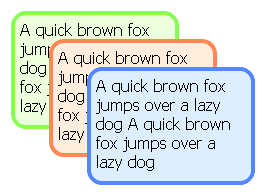




So it looks like your examples are images, instead of rendering the actual rounded corners. What does this look like when rendered in IE. You should put a link to an example page so users can quickly view in different browsers.
Yep it does exactly seem encouraging when your examples are ALL images
ok now checked this !
works exactly as expected !
that is it DOES NOT work in IE
ok just checked it out
as suspected does not work in IE
@Brandon: Thanks for the comment. I have added the Demo link at the end.
@John: I have already mentioned that this technique will works only in CSS3-compatible browser and will not work in Internet Explorer. Also have added Demo page link so that you can check this in different browser.
Guys do you know when gonna decide Microsoft that IE will use CSS3?
A great tutorial, i would deffinately use this if IE accepted it as well, IE is so frustrating to work with!
@Liam, Although being most used browser, IE some how is frustrating for web developers :).. I have always a hard time keeping things compatible with IE..
This script is not working on IE(Internet Explorer)
Yeah – it says that in the article man.
This script is not working on IE(Internet Explorer). Plz keep a script for IE.
@ all : Claims IE compatibility : http://code.google.com/p/curved-corner/
These scripts aren’t supposed to work for IE. They’re using CSS extensions specific to Webkit and Gecko. They aren’t official CSS standards.
hey can you help me about the javascript .. coz im realy suck to understand about java..help me guys.. i dont know how to perform all the codes and how to execute some codes
.. for browser compatible rounded corner visit this page : http://ashko.blogspot.com/2008/05/just-simple-css-code-of-7-lines-for.html
Try this! with transparent gif for rounded corners effect.
Corner without images
.round-corner {
width:430px;
height:155px;
border:1px solid red;
margin:5px 0 10px 0;
padding:10px;
float:left;
/*-moz-border-radius-topleft: 10px;
-webkit-border-top-left-radius: 10px;*/
-moz-border-radius:8px;
-webkit-border-radius:8px;
-khtml-border-radius:8px;
-o-border-radius:8px;
}
you rounded corners by css is not working ie6
The corner radius issue of IE gonna solve.
http://kbala.com/ie-9-supports-corner-radius/
hey can you help me about the javascript .. coz im realy suck to understand about java..help me i dont know how to perform all the codes and how to execute some codes
great! thank you.
#box-round{
-moz-border-radius:8px;
-o-border-radius:8px;
-khtml-border-radius:8px;
webkit-border-radius:8px;
border:#FF0000 1px solid;
}
Dear,
I test it but it is not working in IE9. Can you please give me help for IE9.
Thank you :)
thanks a lot , very easy and effective. mostly people do it with images that is not good thanks again
not working in ie
use htc file for batter result in ie below 9 version
Thanks a lot…..
Thank you…It’s working in both IE and Firefox
hey it works aw some.. love it.
its not work in ASP 2008
Hi there everyone,
I’m just getting into webdev and was wondering if you could give me some help when it comes to css3 border radius. I just can’t seem to find any material online that addresses the look I’m after.
Basically I have 2 sections which form an L shape. My question is how could I make the inner bottom left corner of the L curved? I know how to make corners curve inwards as it were but in this problem I’d like one to curve outwards to smoothly meet the adjoining egde .. best way for you to visualise this is look at the way your thumb meets the side of your hand with a webbed effect …. I hope you can understand what I’m on about.
Any advice is much appreciated – Thanks!
I came accross below link and the solution works in all browsers including IE.
supports FF, Chrome, Safari, IE6, IE7, IE8 (Os doesn’t matter)..
http://www.htmlremix.com/css/curved-corner-border-radius-cross-browser
add below lines to your style and place “border-radius.htc” in root directory.(download from above link)
{ border: 1px solid #d7d7d7;
-moz-border-radius: 11px;
-webkit-border-radius: 11px;
border-radius: 11px;
behavior: url(border-radius.htc);
}
I have used this in my website http://www.lic-bangalore.com
-Rajesh A
nice tip..but problem with ie7 and ie8..
Thankx
Respectively Thank You
good website learn for web development
Thebery good atricle for freshers