Listener is one of the most popular technologies used in the J2EE web application. It is part of the Java Servlet as defined in Servlet 2.3 but they have their own specific functionalities. There are two most widely used Servlet Listener i.e. ServletContextListener and HttpSessionListener. Let us create a Servlet Listener that just counts the number of running http sessions and prints the details whenever a session gets created or destroy. We will use Eclipse for developing our application and Apache Tomcat for deploying and running our application.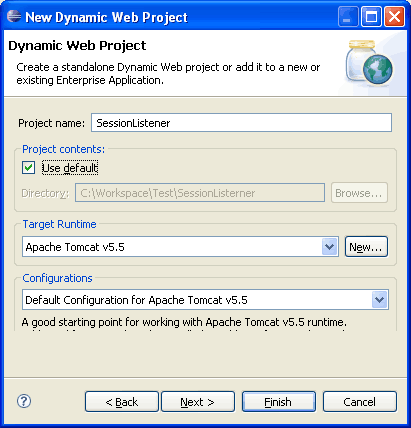
 Starts eclipse and create a new dynamic web project with name SessionListener. Select Target runtime environment. I have selected Apache Tomcat v6.0, you can select any Tomcat version that you have installed. Click on Finish.
 Create a package for Session Listener in your source folder of Project. I have created a package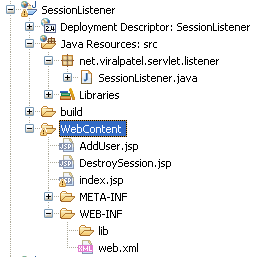
 We will create a small web application to test the functionality of Session Listener. There will be 3 JSP files, index.jsp will display a list of users. These users are stored in a session variable. The AddUser.jsp will add the user in the session variable. And the DestroySession.jsp will invalidate the session. Create three JSPs and copy following content into it.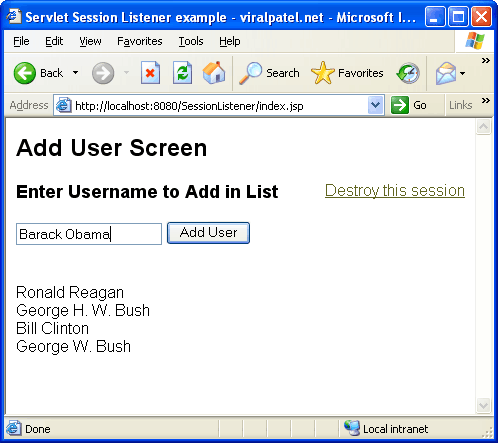
 Once you click Destroy Session, the session gets invalidated and the session count is decremented.
Step 1: Create dynamic web project in Eclipse

Create Dynamic Web Project in Eclipse and name it SessionListener
Step 2: Create package & HTTP Session Listener class

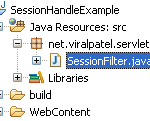
Create package and session listener class
net.viralpatel.servlet.listener. Inside the package, create a Java class file called SessionListener.java. Copy following content into newly created SessionListener class.SessionListener.java
package net.viralpatel.servlet.listener;

import javax.servlet.http.HttpSessionEvent;
import javax.servlet.http.HttpSessionListener;

public class SessionListener implements HttpSessionListener {
	private int sessionCount = 0;

	public void sessionCreated(HttpSessionEvent event) {
		synchronized (this) {
			sessionCount++;
		}

		System.out.println("Session Created: " + event.getSession().getId());
		System.out.println("Total Sessions: " + sessionCount);
	}

	public void sessionDestroyed(HttpSessionEvent event) {
		synchronized (this) {
			sessionCount--;
		}
		System.out.println("Session Destroyed: " + event.getSession().getId());
		System.out.println("Total Sessions: " + sessionCount);
	}
}
Code language: Java (java)javax.servlet.http.HttpSessionListener and override its methods sessionCreated and sessionDestroyed. The sessionCreated() method will be called by the servlet container whenever a new session is created for this application. An object of javax.servlet.http.HttpSessionEvent class is passed as an argument to the sessionCreated method. This object can be used to get the session related information including session ID. In our example we have used a counter sessionCounter which counts the number of live session at any given point of time. Whenever a new session is created, this count gets incremented. The sessionDestroyed() method will be called by the servlet container whenever an existing session is invalidated. We have used this method in our example to decrement the session count and display the ID of session being destroyed.Step 3: Create Http Session Listener entry in Web.xml
Open Web.xml file from WEB-INF directory of your Project and add following entry for listener tag.<listener>
<description>sessionListener</description>
<listener-class>
net.viralpatel.servlet.listener.SessionListener
</listener-class>
</listener>
Code language: HTML, XML (xml)Step 4: Create JSP files for session tracking
 We will create a small web application to test the functionality of Session Listener. There will be 3 JSP files, index.jsp will display a list of users. These users are stored in a session variable. The AddUser.jsp will add the user in the session variable. And the DestroySession.jsp will invalidate the session. Create three JSPs and copy following content into it.
index.jsp
<%@page import="java.util.List"%>
<%@page import="java.util.ArrayList"%>
<html>
<head>
	<title>Servlet Session Listener example - viralpatel.net</title>
</head>
<body>
	<h2>Add User Screen</h2>
<span style="float: right">
<a href="DestroySession.jsp">Destroy this session</a>
</span>
	<form method="post" action="AddUser.jsp">
		<h3>Enter Username to Add in List</h3>
		<input type="text" name="user"/>
		<input type="submit" value="Add User"/>
	</form>

	<%
		List<String> users = (List<String>)session.getAttribute("users");
		for(int i=0; null!=users && i < users.size(); i++) {
			out.println("<br/>" + users.get(i));
		}
	%>
</body>
</html>
Code language: HTML, XML (xml)
AddUser.jsp
<%@page import="java.util.ArrayList"%>
<%@page import="java.util.List"%>
<%
	String username = request.getParameter("user");
	List<String> users = (List<String>)session.getAttribute("users");

	if(null == users) {
		users = new ArrayList<String>();
	}
	users.add(username);
	session.setAttribute("users", users);
	response.sendRedirect("index.jsp");
%>
Code language: Java (java)
DestroySession.jsp
<%
	session.invalidate();
%>
<h2>Session Destroyed successfully.. </h2>
<a href="javascript:history.back()">Click here to go Back</a>
Code language: HTML, XML (xml)
Step 5: Execute the web application
We are done with the coding part of HTTP Session Listener example. Now execute the project by Run -> Run As -> Run on server (shortcut Alt+Shift+X, R). Check the console you will see the output that we print using System.out. Add users and see the list of users added and also check the console output to see the logs for session creation and session count. Once you click Destroy Session, the session gets invalidated and the session count is decremented.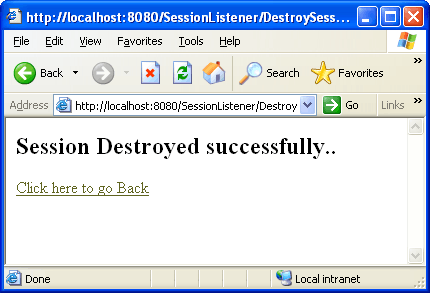



Hi Veeral,
in index.jsp , for the line List user = (List)session.getAttribute(“username”); it says “Type safety: Unchecked cast from Object to List” error. ????
Hi Veeral,
sorry the above comment has been modified …. for the line List user = (List)session.getAttribute(“username”); it says Type safety: Unchecked cast from Object to List” error. ????
Also, in index.jsp you’ve written, List users = (List)session.getAttribute(“users”);
please explain where did we set the attribute “users” and in this jsp file how would the container know that session is an object of HttpSession as in this file we never declared it ….
Sorry if I am being pain, but I am new …
@digant: session is an implicit object defined by container in JSP. You can directly use it in JSP without declaring it. I will suggest you to refer http://java.sun.com/j2ee/tutorial/1_3-fcs/doc/JSPIntro7.html
The user object is set in session in AddUser.jsp
In the sessionDestroyed method do we need to explicity call invalidate method or will it be invalidated automatically. I have a case where even after session being getting destroyed, the servlet gives the same session id.
if users close their browser window,sessions get invalidated automatically..and in that case sessionDestroyed() method never get called..is there ne solution of it??
pls post..as soon as possible..thankx in advance..
What would be the time delay between actual session invalidation and session destruction. Is it always consistent?
very nice and well explained tutorial, thanks a lot man.
SessionListen
when ever i put this code in my web.xml file it give error like
init:
deps-module-jar:
deps-ear-jar:
deps-jar:
library-inclusion-in-archive:
library-inclusion-in-manifest:
compile:
compile-jsps:
Incrementally deploying http://localhost:8084/WWAtlas
Completed incremental distribution of http://localhost:8084/WWAtlas
Incrementally redeploying http://localhost:8084/WWAtlas
Start is in progress…
start?path=/WWAtlas
FAIL – Application at context path /WWAtlas could not be started
G:\Dhiren\workspace\WWAtlas\nbproject\build-impl.xml:706: The module has not been deployed.
BUILD FAILED (total time: 3 seconds)
when i removethis its work fie
pleas any one can give me solutin for that..its very helpful for me.
Thisnt is very much important for us.
There is a huge delay for invoking the sessionDestroyed method. Is there a way to reduce it?
Is the session is automatically created here??
Is there no need of HttpSession session=request.getSession()??
is it necessary to use filters and listeners to handle session?isn’t it possible to set and get attributes procedure?
Thank you for your post!. I could resolve a long pending problem using the listener code sample you presented in this post.
I want to invoke sessionDestroyed method on close of browser tab (or browser )? Please guide me on how to that.How does my servler know that any one of the logged in users has closed browser tabs?
Great! thanks.
complete, concise and thank you
Hi,
What are the areas where we can use SessionListner? Why do we need this? Any real life example would be great.
Please revert.