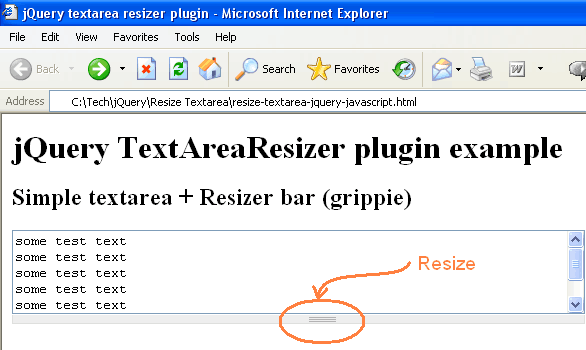
Have you ever used textarea in your UI design to get text from user? (Ofcourse you must) :) You must have specified rows and cols attribute to define the height and width of the textarea, or by using CSS. By whatever mean you create your textarea, the width and height of the textarea is fixed. What if you want your user to change the width and height of the textarea or resize the textarea while she is entering the text? You can simply do this by using following JavaScript. Actually this is a jQuery plugin that lets you resize the textarea at runtime. Let us assume that following is your HTML code:
<html><head><title>jQuery textarea resizer plugin</title><scripttype="text/javascript"src="//code.jquery.com/jquery-latest.js"></script><scripttype="text/javascript"src="jquery.textarearesizer.compressed.js"></script><scripttype="text/javascript">/* jQuery textarea resizer plugin usage */
$(document).ready(function() {
$('textarea.resizable:not(.processed)').TextAreaResizer();
});
</script><styletype="text/css">div.grippie {
background:#EEEEEEurl(grippie.png) no-repeat scroll center 2px;
border-color:#DDDDDD;
border-style:solid;
border-width:0pt1px1px;
cursor:s-resize;
height:9px;
overflow:hidden;
}
.resizable-textareatextarea {
display:block;
margin-bottom:0pt;
width:50%;
height: 30%;
}
</style></head><body><h1>jQuery TextAreaResizer plugin example</h1><h2>Simple textarea + Resizer bar (grippie)</h2><textarearows="5"class="resizable">some test text
some test text
some test text
some test text
some test text
some test text
</textarea></body></html>
Code language:HTML, XML(xml)
In the above code the textarea is made re-sizable by using jQuery plugin. All you have to do is to include jquery.textarearesizer.js in your HTML document where you have the textarea and call .TextAreaResizer(); method.
Hello Viral Patel, thank you for your work. Ist works great with my own WordPress Themes. I have placed the CSS as a separate file, and specified in the header.



Great!, usefull. Thanks!
Thanks for the comment Felix. Feel free to subscribe for RSS feed for more such articles from viralpatel.net :)
Hi there,
I’ll give it a try, sounds very useful :)
Thanks a lot for this jquery plugin.
thank you… working good…
How to block stretch under ff.4x?
http://2.bp.blogspot.com/_mg7ZLoSThok/TB4yIBop31I/AAAAAAAAADQ/xIXtdpYzzI4/s320/resizer_is_displayed_at_div_element.png
Is there any option to have grippie on the right side for horizontal resizing?
Thanks, work great! :)
thank you… working good…good job :)
Hello Viral Patel, thank you for your work. Ist works great with my own WordPress Themes. I have placed the CSS as a separate file, and specified in the header.
nice plugin thanks a lot