Struts display tag library is an open source suite of custom tags that provide high-level web presentation patterns which will work in an MVC model. The library provides a significant amount of functionality while still being easy to use. Displaytag can handle column display, sorting, paging, cropping, grouping, exporting, smart linking and decoration of a table in a customizable XHTML style. In the following example we will see how to dispaly data using display tag and to do pagination and sorting. We will use Eclipse as an IDE for our example.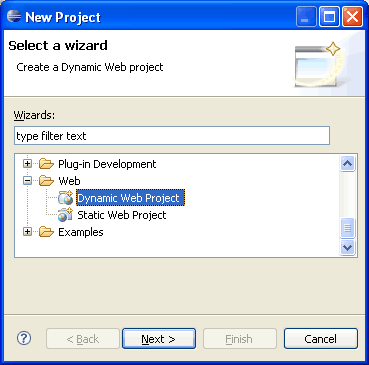
 Following is the list of required JAR files to be added in Java Class Path of your project. Download displaytag JAR files from http://displaytag.sourceforge.net/1.2/download.html.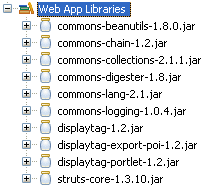

 Copy following content into ForbesData.java file.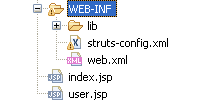
 Copy following content into appropriate files.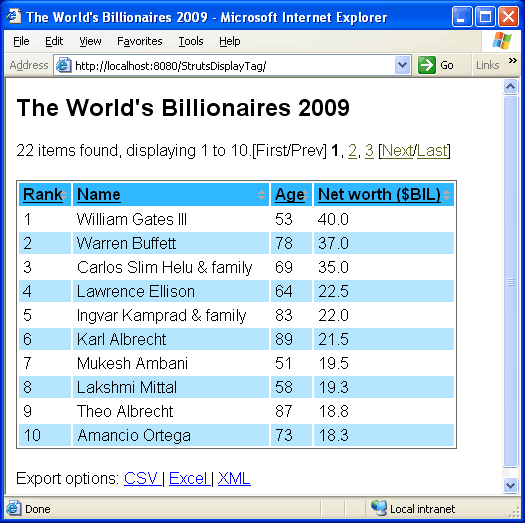

Step 1: Create Eclipse dynamic web project and copy JAR files
Start Eclipse and goto File -> New -> Project -> Dynamic Web Project Following is the list of required JAR files to be added in Java Class Path of your project. Download displaytag JAR files from http://displaytag.sourceforge.net/1.2/download.html.
Step 2: Create Action, Form and Bean class
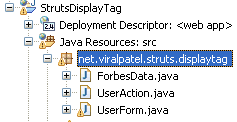
Once the project is created, create 3 java files ForbesData, UserAction and UserForm in package net.viralpatel.struts.displaytag. Copy following content into ForbesData.java file.
package net.viralpatel.struts.displaytag;
import java.util.ArrayList;
public class ForbesData {
private int rank;
private String name;
private int age;
private double netWorth;
public ForbesData() {
}
public ForbesData(int rank, String name, int age, double netWorth) {
this.rank = rank;
this.name = name;
this.age = age;
this.netWorth = netWorth;
}
public ArrayList<ForbesData> loadData() {
ArrayList<ForbesData> userList = new ArrayList<ForbesData>();
userList.add(new ForbesData(1, "William Gates III", 53, 40.0));
userList.add(new ForbesData(2, "Warren Buffett", 78, 37));
userList.add(new ForbesData(3, "Carlos Slim Helu & family", 69, 35));
userList.add(new ForbesData(4, "Lawrence Ellison", 64, 22.5));
userList.add(new ForbesData(5, "Ingvar Kamprad & family", 83, 22));
userList.add(new ForbesData(6, "Karl Albrecht", 89, 21.5));
userList.add(new ForbesData(7, "Mukesh Ambani", 51, 19.5));
userList.add(new ForbesData(8, "Lakshmi Mittal", 58, 19.3));
userList.add(new ForbesData(9, "Theo Albrecht", 87, 18.8));
userList.add(new ForbesData(10, "Amancio Ortega", 73, 18.3));
userList.add(new ForbesData(11, "Jim Walton", 61, 17.8));
userList.add(new ForbesData(12, "Alice Walton", 59, 17.6));
userList.add(new ForbesData(12, "Christy Walton & family", 54, 17.6));
userList.add(new ForbesData(12, "S Robson Walton", 65, 17.6));
userList.add(new ForbesData(15, "Bernard Arnault", 60, 16.5));
userList.add(new ForbesData(16, "Li Ka-shing", 80, 16.2));
userList.add(new ForbesData(17, "Michael Bloomberg", 67, 16));
userList.add(new ForbesData(18, "Stefan Persson", 61, 14.5));
userList.add(new ForbesData(19, "Charles Koch", 73, 14));
userList.add(new ForbesData(19, "David Koch", 68, 14));
userList.add(new ForbesData(21, "Liliane Bettencourt", 86, 13.4));
userList.add(new ForbesData(22, "Prince Alwaleed Bin Talal Alsaud", 54, 13.3));
return userList;
}
public int getRank() {
return rank;
}
public void setRank(int rank) {
this.rank = rank;
}
public String getName() {
return name;
}
public void setName(String name) {
this.name = name;
}
public int getAge() {
return age;
}
public void setAge(int age) {
this.age = age;
}
public double getNetWorth() {
return netWorth;
}
public void setNetWorth(double netWorth) {
this.netWorth = netWorth;
}
}
Code language: Java (java)package net.viralpatel.struts.displaytag;
import java.util.ArrayList;
public class UserForm extends org.apache.struts.action.ActionForm {
private ArrayList<ForbesData> forbesList;
public ArrayList<ForbesData> getForbesList() {
return forbesList;
}
public void setForbesList(ArrayList<ForbesData> forbesList) {
this.forbesList = forbesList;
}
}
Code language: Java (java)package net.viralpatel.struts.displaytag;
import javax.servlet.http.HttpServletRequest;
import javax.servlet.http.HttpServletResponse;
import org.apache.struts.action.Action;
import org.apache.struts.action.ActionForm;
import org.apache.struts.action.ActionForward;
import org.apache.struts.action.ActionMapping;
public class UserAction extends Action {
private final static String SUCCESS = "success";
public ActionForward execute(ActionMapping mapping, ActionForm form,
HttpServletRequest request, HttpServletResponse response)
throws Exception {
UserForm userForm = (UserForm) form;
ForbesData actorData = new ForbesData();
userForm.setForbesList(actorData.loadData());
return mapping.findForward(SUCCESS);
}
}
Code language: Java (java)Step 3: Create JSPs, struts-config.xml and web.xml
Create index.jsp and user.jsp in WebContent folder and struts-config.xml and web.xml in WebContent/WEB-INF folder. Copy following content into appropriate files.
index.jsp
<%@page contentType="text/html"%>
<%@page pageEncoding="UTF-8"%>

<jsp:forward page="userAction.do"/>
Code language: HTML, XML (xml)
user.jsp
<!DOCTYPE HTML PUBLIC "-//W3C//DTD HTML 4.01 Transitional//EN"
"http://www.w3.org/TR/html4/loose.dtd">
<%@taglib uri="http://displaytag.sf.net" prefix="display" %>
<html>
    <head>
        <meta http-equiv="Content-Type" content="text/html; charset=UTF-8">
        <title>The World's Billionaires 2009</title>
        <link href="css/style.css" rel="stylesheet" type="text/css" />
    </head>
    <body>
    <h2>The World's Billionaires 2009 - Forbes List</h2>
        <display:table export="true"  id="data"
        			name="sessionScope.UserForm.forbesList"
        			requestURI="/userAction.do" pagesize="10" >
            <display:column property="rank" title="Rank" sortable="true"   />
            <display:column property="name" title="Name" sortable="true"  />
            <display:column property="age" title="Age" sortable="true"  />
            <display:column property="netWorth" title="Net worth ($BIL)"
            		sortable="true"  />
        </display:table>
    </body>
</html>
Code language: HTML, XML (xml)
struts-config.xml
<?xml version="1.0" encoding="UTF-8" ?>

<!DOCTYPE struts-config PUBLIC
          "-//Apache Software Foundation//DTD Struts Configuration 1.2//EN"
          "http://jakarta.apache.org/struts/dtds/struts-config_1_2.dtd">


<struts-config>
    <form-beans>
        <form-bean name="UserForm"
        	type="net.viralpatel.struts.displaytag.UserForm"/>
    </form-beans>

    <global-exceptions>

    </global-exceptions>

    <global-forwards>
        <forward name="welcome"  path="/Welcome.do"/>
    </global-forwards>

    <action-mappings>
        <action input="/" name="UserForm" path="/userAction"
        	scope="session" type="net.viralpatel.struts.displaytag.UserAction">
            <forward name="success" path="/user.jsp" />
        </action>
        <action path="/Welcome" forward="/welcomeStruts.jsp"/>
    </action-mappings>

    <message-resources parameter="com/vaannila/ApplicationResource"/>

</struts-config>
Code language: HTML, XML (xml)
web.xml
<?xml version="1.0" encoding="UTF-8"?>
<web-app version="2.5" xmlns="http://java.sun.com/xml/ns/javaee"
	xmlns:xsi="http://www.w3.org/2001/XMLSchema-instance"
	xsi:schemaLocation="http://java.sun.com/xml/ns/javaee http://java.sun.com/xml/ns/javaee/web-app_2_5.xsd">
	<servlet>
		<servlet-name>action</servlet-name>
		<servlet-class>
			org.apache.struts.action.ActionServlet
		</servlet-class>
		<init-param>
			<param-name>config</param-name>
			<param-value>/WEB-INF/struts-config.xml</param-value>
		</init-param>
		<init-param>
			<param-name>debug</param-name>
			<param-value>2</param-value>
		</init-param>
		<init-param>
			<param-name>detail</param-name>
			<param-value>2</param-value>
		</init-param>
		<load-on-startup>2</load-on-startup>
	</servlet>
	<servlet-mapping>
		<servlet-name>action</servlet-name>
		<url-pattern>*.do</url-pattern>
	</servlet-mapping>
	<session-config>
		<session-timeout>30</session-timeout>
	</session-config>
	<welcome-file-list>
		<welcome-file>index.jsp</welcome-file>
	</welcome-file-list>
</web-app>
Code language: HTML, XML (xml)
Step 4: Execute the project
We are done with the project. Now execute the project in eclipse or create a WAR file and run it in Tomcat.

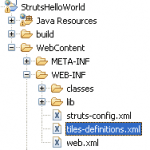
Nice one dude
Application is very helpful and the way what you people explained really good.
At a single shot we can develop the application like making coffee.
Thanks dudes… keep maintain these type of application .
Sateesh
Hi Viral,
I am encountering a problem while running it. When I add the taglib. it shows me an error at the tag where the display tag is used. I am not able to view the output. How can I correct it?
Hi Surabhi, I think you getting the error may be because required JAR files are missing or not properly added. Check the JAR file for Struts display tag and also check the version.
viral sir
how u display in jsp ?22 items found displying 1 to 10 ..where is jsp code ???pls let me know asap
regards
ujjawal
with Ajax:
<!DOCTYPE HTML PUBLIC "-//W3C//DTD HTML 4.01 Transitional//EN" "http://www.w3.org/TR/html4/loose.dtd"> <%@taglib uri="http://displaytag.sf.net" prefix="display" %> <html> <head> <meta http-equiv="Content-Type" content="text/html; charset=UTF-8"> <title>The World\'s Billionaires 2009</title> <link rel="stylesheet" href="css/displaytag.css"> <style media="all" type="text/css"> @import "css/maven-base.css"; @import "css/maven-theme.css"; @import "css/site.css"; @import "css/screen.css"; @import "css/displaytag.css"; </style> <script language=\'javascript\' src="js/jquery.js" type="text/javascript"></script> <script src="js/displayTagAjax.js"></script> </head> <body> <div id="ajxDspId"> <h2>The World\'s Billionaires 2009 - Forbes List</h2> <display:table export="true" id="data" name="sessionScope.UserForm.forbesList" requestURI="/userAction.do" pagesize="10" > <display:column property="rank" title="Rank" sortable="true" /> <display:column property="name" title="Name" sortable="true" /> <display:column property="age" title="Age" sortable="true" /> <display:column property="netWorth" title="Net worth ($BIL)" sortable="true" /> </display:table> </div> </body> </html>i need help – i am using struts 1.2 display tag i am having problem with populating the values from ajax response in the table
thanks
Hi Viral, this looks like an excellent tutorial! Unfortunately I’m using Struts 2. Do you have any advice on how I’d implement this in Struts2?
Thanks!
@Jake, Thanks for the comment.. I will try to write the same article for Struts 2 :)
I have a related question: I keep seeing these HTML/CODE/PHP snippets that are shown in a similar way, with line numbers, odd and even line highlighting etc. My question is: what editor works that way? i’d like to use it also and produce screenshots like that.
can someone reply to [email protected]?
Hi Yosefus,
For adding style sheet like odd even colors to the displaytable, you have to add following CSS classes in the CSS file that you include in JSP.
odd– assigned to the tr tag of all odd numbered data rows
even– assigned to the tr tag of all even numbered data rows
sorted– assigned to the th tag of the sorted column
order1– assigned to the th tag of the sorted column if sort order is ascending
order2– assigned to the th tag of the sorted column if sort order is descending
sortable– assigned to the th tag of a sortable column
Thus your CSS file may have entry like:
.odd {
background-color: white;
}
.even {
background-color: #FFEE88;
}
I am getting the error when I add the taglib for displaytag in user.jsp
JSP Page
I am getting compiletime error as NoClassDefFoundError.
Please help me.
I am using struts-1.2.9.jar
Hi Smita,
For using Displaytag library, you need to include its jar files in classpath. Check if your classpath has these jars:
displaytag-1.2.jar
displaytag-export-poi-1.2.jar
displaytag-portlet-1.2.jar
das
Hi,
I want to add edit/delete link in display:table tag.When i click on the link for particular row (e.g. data for row having name field as ‘smits’ should be displayed on the form) the data should be displayed in text so that i can edit it.
Can you plese give me some sample code for edit and delete row from display:table also from database.
Please help me out
Hi,
Can you please tell me how to use edit and delete link in tag using struts?
Please tell me Asap.
Thanks,
Harshal
Sorry I forgot to mension using display:table tag in struts.
Thanks,
Harshal
Nice Work dude
Hi,
I get an warning when i use the above jsp page .
This works out but gives another problem tag lib not found .
I added all the tag libraries in the class path
i use this in the jsp page
I got this error :
org.apache.jasper.JasperException: The absolute uri: http://displaytag.sf.net cannot be resolved in either web.xml or the jar files deployed with this application
@Majid – Please check the version of displaytag jar you using. Include the correct version. I have used version 1.2 of DisplayTag. You may want to check the correct url in your jar file.
Hi Viral,
Appriciate your help to convert pagination style in
{ First | Prev | 1 2 3 4 | Next | Last }
or
{ First | Prev | (page 1, Item 1-10 ) in select/drop down | Next | Last }.
Simply wann to remove brackets i.e.
[First/Prev] 1, 2, 3, 4 [Next/Last]
@ashish: You can configure the pagination links by changing the property in
displaytag.propertiesfile. For overriding the default properties, you need to create a file calleddisplaytag.propertiesand place it in classpath. And change the property paging.banner.full which by default is:[<a href="{1}" rel="nofollow">First</a>/ <a href="{2}" rel="nofollow">Prev</a>] {0} [ <a href="{3}" rel="nofollow">Next</a>/ <a href="{4}" rel="nofollow">Last </a>]and modify the default value and change it into:
 <a href="{1}" rel="nofollow">First</a> | <a href="{2}" rel="nofollow">Prev</a> |
 {0} |
 <a href="{3}" rel="nofollow">Next</a> | <a href="{4}" rel="nofollow">Last </a>
Check the document at http://displaytag.sourceforge.net/10/configuration.html for more details.
Hope this will resolve the issue.
hii viral
i have included the jar files mentioned but still i am getting this error after deploying it on netbeans
it says:
javax.servlet.ServletException: java.lang.NoClassDefFoundError: org/apache/commons/lang/UnhandledException
java.lang.NoClassDefFoundError: org/apache/commons/lang/UnhandledException
Pls help me out
thanks
@Amit – Check if you have included commons-lang.jar file in your classpath.
Thanks viral…
But i have no idea about the commons-lang.jar…
I have just added the 3 jar files that you have talked about previously related to displaytags.
Could you throw some more light about the commons-lang.jar a little more
Thanks:)
Also i have not added the previous jar files to the path instead just added them to netbeans library. Is the error because of the same?
Thanks:)
Amit – If you check the second screen shot in Step-1, you will see the list of JAR files required for this project. Include all these JARs in your project to work with display tag.
javax.servlet.ServletException: java.lang.NoClassDefFoundError: org/apache/commons/lang/UnhandledException
i add the library common-lang y show that error
How to change the pager style ? want to enter the page no and click go?.
thnks
hey….thanks for the code….How to add Edit Button and check box at each row ??? can u plz give code in struts 2 with the example???
Hi,
Nice job, but in this tutorial u r get an predefined items in the ArrayList object and then u store it session scope(if I’m not wrong)………that’s mean when we fetch some huge data from database dynamically then the session will be heavy…………….can u demonstrate it into request scope with every time when user click the next button every time an sql query fire (with just change the value of ‘LIMIT ‘ dynamically) and give me the next page
Excellent one… is useful verymuch
Nice Job; error free navigated example;
Awesome tutorial, thanks for sharing this piece of code. I think we need more of this lovely example on how to implement pagination and struts.
Great job.
good job dude
the information is really helpful but can you tell me how i can perform pagination in struts2…Since there is no Action mapping in used in Struts2 …i have no clue how i can perform this.
Thank’s a lot!
This was very helpful for me!
Great job
hi amit….just want to know, how to set display tag value in dropdown, or text field etc.
Hi Viral, I am using struts2 to develop portlets to deploy in IBM portal server 6.1 using RAD 7.5. I am using display tags to present list datatypes in JSP. But i can able to display table when the data is in request scope. I want to get values from session and display in table. DT is not reading session scope objects. Can you please help me out in finding the solution?
1.when i export excel file, title of the column in the excel should need background colour cells excel sheet.
2. i don’t to display no item found when table is empty.
can any help me sloving this issue.
thank you
I AM DOWNLOAD THE EXCEL SHEET I AM GET THE BELOW EXCEPTION. CAN ANY ONE FACED THIS KIND OF ISSUE………
javax.servlet.ServletException: org/apache/poi/hssf/usermodel/HSSFWorkbook
THANK YOU.
Does pagination only extract records (for exmaple, from a database) during navigation time when the user is clicking on the forward / backward / first / last buttons or does displaytag need to load the entire list of data (in memory) once the UI page is rendered?
If I have a search screen and the user mistakingly created a search filter that returns thousands of records, I’d hate to load that amount of data in memory. What I would like to do is display only a small subset of data returned from the search result and extracts the next subset depending on the user navigation/pagination. Is this how displaytag works?
Viral: Is it possible to add an image, a link and 2 different types of text to a single column using
display tags? I really appreciate your help in this. Thanks.
So I want to display an 4 properties on an Object in one column rather than a single property as shown in the example given, Thanks
Meera
Hi,
This stuff is really helpful for display tag usage.
But I have some different scenario for the display tag which is as below.
I am using an AJAX to call the internal .jsp pages inside one template .jsp page,
And I am using display tag inside the inner page for displaying list and using export functionality of display tag.
But my problem with display tag is I am not able to use sort functionality due to AJAX.
Can anybody tell me how I should call JavaScript function from display tag for sorting functionality?
Thanks in advance,
Manoj Nikam.
hi friends…. can you use dispalytag in struts2 version. if it’s possible means..reply
Kumar,
I just got this working with Struts 2 myself. So it is possible. The main differences are on the user.jsp page and for me my Contacts class.
I actually started with the tutorial Viral posted on using Hibernate with Struts 2:
http://viralpatel.net/tutorial-struts2-hibernate-example-eclipse/
I added the jar files listed here that were not already present, then
I had to change the Contacts class so it was Comparable (required for sorting)
public class Contact implements Serializable, Comparable { …
Then instead of name=”sessionScope.UserForm.forbesList” I used the list of contacts I pulled from a database using hibernate listContacts. This is made available from the ContactAction which is specified in my struts.xml file when I call this .jsp file. Then I list an action in the requestURI=”” I just used index since that was my action that called this page.
That is all I remember changing here. Hope this helps.
Steven
Oh…and i changed the properties on the display:column tags to match my contacts class. But i suppose you guessed that already.
Steven
Hi Viral,
Firstly i thank u for the work u’ve done and its very useful for the learners and beginners like me. I just need one clarification from u. are the jar files which u’ve mentioned are suffficient to run this program or anything else to be added. I’m using struts frame work, and i couldn’t get the data it’s showing that nothing found to be displayed. Can u tell y exactly this problem is coming
Can you explain how to pass parameters through the href tag of Displaytag?
Thanking you sir!
hi viral i want to display data horizontally like here data is coming in form of table like
SNO. Question Solution Version
I want to display data like :
SNO.
Qusetion :
Solution :
Version :
How can i achieve this output through display tag.
my mail id : [email protected]
Viral i want to display data like in this form with help of displaytag :
Rank : 1
Name : Bill gats
Age : 58
Rank : 2
Name : Waren Buffet
Age : 68
Good, Keep writing more
Nithya
http://www.liveyourdreamsindia.com
This tutorial helped me a lot, now my aplication works fine wit displaytag.
Good job.
Hi canone copy and paste the working source code so that it can be used for further re-usability.i need a consolidate version./…please help
Hi ,can any body please let me know how to pass one reference variable using display tag when calling javascript method,Here my code is like:-
——–>Here if i’ll do like this i used to get always 1st row Value.Even tried removing ” mark also but that time my javascript method not able to call.Somebody could help me to work out.
Hello,
Can anyone tell me how to dynamically add a style to the column based on some condition. I have seen addRowClass() method and overridden in the decorator but the style is added to the whole row and not to the corresponding cell. Can anyone tell me how to solve this?
iam getting Nothing found to display please suggest what should be done
Hi,
Someone please help me on showing items in grid format than list.
it create table rows and columns and thus generate list view.
Thanks a lot,
Bhupesh
can you please let me hos to implement same in struts2 only
<display:table export="true" id="data"
13 name="sessionScope.UserForm.forbesList"
14 requestURI="/userAction.do" pagesize="10"
Please explain me how to define this in Struts2, we have not used Form in struts 2
Hi Viral, this looks like an excellent tutorial, and i am able to in struts 1, Unfortunately I’m using Struts 2. Do you have any advice on how I’d implement this in Struts2?
Please i am glad if you have any answer
Thanks!
Please help me on struts2, i am not able to get anything in struts2 even it doesnt show any error also and also nothing displaying, please give 1 example,
Is any body looking my post
Hi
Thanks for the nice post. i have a different requirement. Display tag loads all the records from the database and then displays it. If i have around 10,000 records and it takes lot of time for each hit using display tag. Is there any thing like loading the configured page size records only each time.
Hi Viral,
I am using display:table and display:column to display reports fetched from database.
Please let me know how to set width to the display:column ? I tried using style: width.. but it does not work.
Thanks in advance.
Did you get any solution for specifying column width. I am facing the same problem?
Hi viral
I am getting folllowing exception <input [ServletException in:/desktop/polaris_manage_component.jsp] org/apache/commons/beanutils/NestedNullException'
folllowing is my code
component is list of ComponentBean and it has compDesc as attribute
Thanks Viral… SuperB code…. Kekkkkkkkkkkkkkkkkaaaaaaaaaaaaaaaaaaaaaaaaaaaaaa
Hi Viral,
Nice tutorial.
I have added checkbox in each row and i want when user click on checkbox that row shud b highlighted.Can u help me out in this?
Hi viral, i am trying to add a button to each row and if user clicks on button i want the values in the clicked row.
Please help me how to do it.
THanks in advance
Viral, Thank you for the selfless work that you do. I am having proble displaying the first page applying the css properties. But after I click the next botton, the properties are then applied. The first time the report is displayed it plain with no font or color applied but afer clicking on the pagination, then the report begin to appear correctly apply in the css properties. Any idea what I am doing wrong.?
Viral, At first display, the report does not apply css properties until after clicking on the pagination images. Any idea of what I am doing wrong.
Thank you in advance
Hi, I have followed your instructions exactley and I have all the appropriate jars in my projects classpath however, I am getting an exception when I try and run it on my server. Can you please tell me what I am missing thanks the exception is below. I have all the struts jars in my classpath as well but it says the org.apache.struts.action.ActionServlet class is not found how can that be when I have the struts jar in my project?
Feb 6, 2011 4:27:26 PM org.apache.catalina.core.AprLifecycleListener init
INFO: The APR based Apache Tomcat Native library which allows optimal performance in production environments was not found on the java.library.path: Feb 6, 2011 4:27:27 PM org.apache.tomcat.util.digester.SetPropertiesRule begin
WARNING: [SetPropertiesRule]{Server/Service/Engine/Host/Context} Setting property ‘source’ to ‘org.eclipse.jst.jee.server:pagertaglibtest’ did not find a matching property.
/.metadata/.plugins/org.eclipse.wst.server.core/tmp0/wtpwebapps/struts-examples-1.3.10.1/WEB-INF/lib/struts-core-1.3.10.jar!/org/apache/struts/chain/chain-config.xml
SEVERE: Servlet /StrutsDisplayTag threw load() exception
java.lang.ClassNotFoundException: org.apache.struts.action.ActionServlet
Feb 6, 2011 4:27:28 PM org.apache.coyote.http11.Http11Protocol start
Feb 6, 2011 4:27:30 PM org.apache.catalina.core.ApplicationDispatcher invoke
how to add buttons using display tags(like view ,edit to view/edit the particular record of the pagination)
Hey,
I need to pass the value of display tag column to a javascript function without using JSTL.Is there any alternative?
by using javascritp or jquery its possible
Hi,
This is working very nice. But i have small problem i am using displaytag for search when i load search page first time list is empty that time display tag is showing nothing to disply and that too i have 3 different results of lists r there. that time it is showng 3 times nothing to display.
thank u very much viral…
hello if I apply header and footer to the webpage the export feature does not work. Looks like the header interjects with the display tag export feature. I am talking about the header for the webpage and not to the table columns. I am wokring with Eclipse IDE and using struts2
hello again also my display tag pagination project at least more than 10 display columns are with no data(null) and I do not want to show those columns in the display.
I am using a list and method from actions class in the jsp page. again my project is in struts2 and works fine without header applied using directive. But shows all columns including the ones with no data empty. I want to hide those columns from display.
Nice one .
How i can implement the pagination using ajax tag for the above example.
can u suggest me…….
Hi,
Can any one help to do the fixedheader(header should not scroll) with display:table?
Please provide me the sample code.
Thanks & Regards,
Hari
Hi,
when we call second page then it show error.
how can we resolve it.
First time–http://localhost:8080/PaginationApplication/
Second time–http://localhost:8080/login.do?d-1485-p=2
and not access the data.
i got error like this when i tried to run this code HTTP Status 404 –
——————————————————————————–
type Status report
message
description The requested resource () is not available.
——————————————————————————–
Apache Tomcat/7.0.26
please tell me what to do
viral plz help me
i wanted the code for display tags with ajax in struts2.. plz can u hlp me out?
Header is not coming while downloading the data, how can it possible.
is showing error
Can not find the tag library descriptor for “http://displaytag.sf.net”
help me
Can you tell me what needs to be done for duplicate submission in display tag?
If I want to have in ROW WISE format will it be possible with the display tag?…
while running the page it shows 404 exception what i have to do.any body help mee
Hey i am trying to do the same in the spring mvc but not able to export the table in the pdf or excel . Could you pleas upload the display tag example with spring mvc 3 . Thanks!!!
I am getting below exception:
java.lang.ClassNotFoundException: org.displaytag.tags.TableTagExtraInfo
I have checked this class in displaytag.jar its present and also changed jar But still getting same exception.
Any help would be appreciated..
Hi sir
I am Ramsuhsil Patel work at post of AOSE.
really pagination trips is very easy.
i am trying to fix the title while scrolling still i didn’t get the result if you have solution please replay me its urgent.because i don’t want the pagination.
Thanks,
Aravindh
To Give the coluimn width use the display table css property or u need to give it for single table just use style attribute in displayu:column tag
Mar 1, 2013 5:31:07 PM org.apache.catalina.core.AprLifecycleListener init
INFO: The APR based Apache Tomcat Native library which allows optimal performance in production environments was not found on the java.library.path: C:\Program Files\Java\jre6\bin;.;C:\WINDOWS\Sun\Java\bin;C:\WINDOWS\system32;C:\WINDOWS;C:/Program Files/Java/jre6/bin/client;C:/Program Files/Java/jre6/bin;C:/Program Files/Java/jre6/lib/i386;C:\Program Files\Documentum\Shared;C:\WINDOWS\system32;C:\WINDOWS;C:\WINDOWS\System32\Wbem;C:\Program Files\Microsoft SQL Server\90\Tools\binn\;C:\Program Files\Java\jdk1.6.0_18\bin;C:\ANT_HOME\bin;C:\Program Files\Java\jdk1.6.0_18\bin;D:\eclipse;
Mar 1, 2013 5:31:08 PM org.apache.tomcat.util.digester.SetPropertiesRule begin
WARNING: [SetPropertiesRule]{Server/Service/Engine/Host/Context} Setting property ‘source’ to ‘org.eclipse.jst.jee.server:MyPaginStrutsDemo’ did not find a matching property.
Mar 1, 2013 5:31:08 PM org.apache.coyote.http11.Http11Protocol init
INFO: Initializing Coyote HTTP/1.1 on http-8080
Mar 1, 2013 5:31:08 PM org.apache.catalina.startup.Catalina load
INFO: Initialization processed in 859 ms
Mar 1, 2013 5:31:08 PM org.apache.catalina.core.StandardService start
INFO: Starting service Catalina
Mar 1, 2013 5:31:08 PM org.apache.catalina.core.StandardEngine start
INFO: Starting Servlet Engine: Apache Tomcat/6.0.36
Mar 1, 2013 5:31:08 PM org.apache.catalina.loader.WebappClassLoader validateJarFile
INFO: validateJarFile(D:\My Eclipse\.metadata\.plugins\org.eclipse.wst.server.core\tmp0\wtpwebapps\MyPaginStrutsDemo\WEB-INF\lib\servlet-api.jar) – jar not loaded. See Servlet Spec 2.3, section 9.7.2. Offending class: javax/servlet/Servlet.class
Mar 1, 2013 5:31:09 PM org.apache.coyote.http11.Http11Protocol start
INFO: Starting Coyote HTTP/1.1 on http-8080
Mar 1, 2013 5:31:09 PM org.apache.jk.common.ChannelSocket init
INFO: JK: ajp13 listening on /0.0.0.0:8009
Mar 1, 2013 5:31:09 PM org.apache.jk.server.JkMain start
INFO: Jk running ID=0 time=0/93 config=null
Mar 1, 2013 5:31:09 PM org.apache.catalina.startup.Catalina start
INFO: Server startup in 1095 ms
Mar 1, 2013 5:31:11 PM org.apache.catalina.core.ApplicationDispatcher invoke
SEVERE: Servlet.service() for servlet jsp threw exception
java.lang.ClassNotFoundException: org.apache.commons.lang.UnhandledException
at org.apache.catalina.loader.WebappClassLoader.loadClass(WebappClassLoader.java:1680)
at org.apache.catalina.loader.WebappClassLoader.loadClass(WebappClassLoader.java:1526)
at java.lang.Class.getDeclaredConstructors0(Native Method)
at java.lang.Class.privateGetDeclaredConstructors(Unknown Source)
at java.lang.Class.getConstructor0(Unknown Source)
at java.lang.Class.newInstance0(Unknown Source)
at java.lang.Class.newInstance(Unknown Source)
at java.beans.Introspector.instantiate(Unknown Source)
at java.beans.Introspector.findExplicitBeanInfo(Unknown Source)
at java.beans.Introspector.(Unknown Source)
at java.beans.Introspector.getBeanInfo(Unknown Source)
at org.apache.jasper.compiler.Generator$TagHandlerInfo.(Generator.java:3911)
at org.apache.jasper.compiler.Generator$GenerateVisitor.getTagHandlerInfo(Generator.java:2174)
at org.apache.jasper.compiler.Generator$GenerateVisitor.visit(Generator.java:1632)
at org.apache.jasper.compiler.Node$CustomTag.accept(Node.java:1530)
at org.apache.jasper.compiler.Node$Nodes.visit(Node.java:2361)
at org.apache.jasper.compiler.Node$Visitor.visitBody(Node.java:2411)
at org.apache.jasper.compiler.Node$Visitor.visit(Node.java:2417)
at org.apache.jasper.compiler.Node$Root.accept(Node.java:495)
at org.apache.jasper.compiler.Node$Nodes.visit(Node.java:2361)
at org.apache.jasper.compiler.Generator.generate(Generator.java:3461)
at org.apache.jasper.compiler.Compiler.generateJava(Compiler.java:231)
at org.apache.jasper.compiler.Compiler.compile(Compiler.java:354)
at org.apache.jasper.compiler.Compiler.compile(Compiler.java:334)
at org.apache.jasper.compiler.Compiler.compile(Compiler.java:321)
at org.apache.jasper.JspCompilationContext.compile(JspCompilationContext.java:592)
at org.apache.jasper.servlet.JspServletWrapper.service(JspServletWrapper.java:328)
at org.apache.jasper.servlet.JspServlet.serviceJspFile(JspServlet.java:313)
at org.apache.jasper.servlet.JspServlet.service(JspServlet.java:260)
at javax.servlet.http.HttpServlet.service(HttpServlet.java:717)
at org.apache.catalina.core.ApplicationFilterChain.internalDoFilter(ApplicationFilterChain.java:290)
at org.apache.catalina.core.ApplicationFilterChain.doFilter(ApplicationFilterChain.java:206)
at org.apache.catalina.core.ApplicationDispatcher.invoke(ApplicationDispatcher.java:646)
at org.apache.catalina.core.ApplicationDispatcher.processRequest(ApplicationDispatcher.java:436)
at org.apache.catalina.core.ApplicationDispatcher.doForward(ApplicationDispatcher.java:374)
at org.apache.catalina.core.ApplicationDispatcher.forward(ApplicationDispatcher.java:302)
at org.apache.struts.action.RequestProcessor.doForward(RequestProcessor.java:1085)
at org.apache.struts.action.RequestProcessor.processForwardConfig(RequestProcessor.java:398)
at org.apache.struts.action.RequestProcessor.process(RequestProcessor.java:241)
at org.apache.struts.action.ActionServlet.process(ActionServlet.java:1196)
at org.apache.struts.action.ActionServlet.doGet(ActionServlet.java:414)
at javax.servlet.http.HttpServlet.service(HttpServlet.java:617)
at javax.servlet.http.HttpServlet.service(HttpServlet.java:717)
at org.apache.catalina.core.ApplicationFilterChain.internalDoFilter(ApplicationFilterChain.java:290)
at org.apache.catalina.core.ApplicationFilterChain.doFilter(ApplicationFilterChain.java:206)
at org.apache.catalina.core.ApplicationDispatcher.invoke(ApplicationDispatcher.java:646)
at org.apache.catalina.core.ApplicationDispatcher.processRequest(ApplicationDispatcher.java:436)
at org.apache.catalina.core.ApplicationDispatcher.doForward(ApplicationDispatcher.java:374)
at org.apache.catalina.core.ApplicationDispatcher.forward(ApplicationDispatcher.java:302)
at org.apache.jasper.runtime.PageContextImpl.doForward(PageContextImpl.java:709)
at org.apache.jasper.runtime.PageContextImpl.forward(PageContextImpl.java:680)
at org.apache.jsp.index_jsp._jspService(index_jsp.java:56)
at org.apache.jasper.runtime.HttpJspBase.service(HttpJspBase.java:70)
at javax.servlet.http.HttpServlet.service(HttpServlet.java:717)
at org.apache.jasper.servlet.JspServletWrapper.service(JspServletWrapper.java:388)
at org.apache.jasper.servlet.JspServlet.serviceJspFile(JspServlet.java:313)
at org.apache.jasper.servlet.JspServlet.service(JspServlet.java:260)
at javax.servlet.http.HttpServlet.service(HttpServlet.java:717)
at org.apache.catalina.core.ApplicationFilterChain.internalDoFilter(ApplicationFilterChain.java:290)
at org.apache.catalina.core.ApplicationFilterChain.doFilter(ApplicationFilterChain.java:206)
at org.apache.catalina.core.StandardWrapperValve.invoke(StandardWrapperValve.java:233)
at org.apache.catalina.core.StandardContextValve.invoke(StandardContextValve.java:191)
at org.apache.catalina.core.StandardHostValve.invoke(StandardHostValve.java:127)
at org.apache.catalina.valves.ErrorReportValve.invoke(ErrorReportValve.java:103)
at org.apache.catalina.core.StandardEngineValve.invoke(StandardEngineValve.java:109)
at org.apache.catalina.connector.CoyoteAdapter.service(CoyoteAdapter.java:293)
at org.apache.coyote.http11.Http11Processor.process(Http11Processor.java:861)
at org.apache.coyote.http11.Http11Protocol$Http11ConnectionHandler.process(Http11Protocol.java:606)
at org.apache.tomcat.util.net.JIoEndpoint$Worker.run(JIoEndpoint.java:489)
at java.lang.Thread.run(Unknown Source)
Mar 1, 2013 5:31:11 PM org.apache.catalina.core.ApplicationDispatcher invoke
SEVERE: Servlet.service() for servlet action threw exception
java.lang.ClassNotFoundException: org.apache.commons.lang.UnhandledException
at org.apache.catalina.loader.WebappClassLoader.loadClass(WebappClassLoader.java:1680)
at org.apache.catalina.loader.WebappClassLoader.loadClass(WebappClassLoader.java:1526)
at java.lang.Class.getDeclaredConstructors0(Native Method)
at java.lang.Class.privateGetDeclaredConstructors(Unknown Source)
at java.lang.Class.getConstructor0(Unknown Source)
at java.lang.Class.newInstance0(Unknown Source)
at java.lang.Class.newInstance(Unknown Source)
at java.beans.Introspector.instantiate(Unknown Source)
at java.beans.Introspector.findExplicitBeanInfo(Unknown Source)
at java.beans.Introspector.(Unknown Source)
at java.beans.Introspector.getBeanInfo(Unknown Source)
at org.apache.jasper.compiler.Generator$TagHandlerInfo.(Generator.java:3911)
at org.apache.jasper.compiler.Generator$GenerateVisitor.getTagHandlerInfo(Generator.java:2174)
at org.apache.jasper.compiler.Generator$GenerateVisitor.visit(Generator.java:1632)
at org.apache.jasper.compiler.Node$CustomTag.accept(Node.java:1530)
at org.apache.jasper.compiler.Node$Nodes.visit(Node.java:2361)
at org.apache.jasper.compiler.Node$Visitor.visitBody(Node.java:2411)
at org.apache.jasper.compiler.Node$Visitor.visit(Node.java:2417)
at org.apache.jasper.compiler.Node$Root.accept(Node.java:495)
at org.apache.jasper.compiler.Node$Nodes.visit(Node.java:2361)
at org.apache.jasper.compiler.Generator.generate(Generator.java:3461)
at org.apache.jasper.compiler.Compiler.generateJava(Compiler.java:231)
at org.apache.jasper.compiler.Compiler.compile(Compiler.java:354)
at org.apache.jasper.compiler.Compiler.compile(Compiler.java:334)
at org.apache.jasper.compiler.Compiler.compile(Compiler.java:321)
at org.apache.jasper.JspCompilationContext.compile(JspCompilationContext.java:592)
at org.apache.jasper.servlet.JspServletWrapper.service(JspServletWrapper.java:328)
at org.apache.jasper.servlet.JspServlet.serviceJspFile(JspServlet.java:313)
at org.apache.jasper.servlet.JspServlet.service(JspServlet.java:260)
at javax.servlet.http.HttpServlet.service(HttpServlet.java:717)
at org.apache.catalina.core.ApplicationFilterChain.internalDoFilter(ApplicationFilterChain.java:290)
at org.apache.catalina.core.ApplicationFilterChain.doFilter(ApplicationFilterChain.java:206)
at org.apache.catalina.core.ApplicationDispatcher.invoke(ApplicationDispatcher.java:646)
at org.apache.catalina.core.ApplicationDispatcher.processRequest(ApplicationDispatcher.java:436)
at org.apache.catalina.core.ApplicationDispatcher.doForward(ApplicationDispatcher.java:374)
at org.apache.catalina.core.ApplicationDispatcher.forward(ApplicationDispatcher.java:302)
at org.apache.struts.action.RequestProcessor.doForward(RequestProcessor.java:1085)
at org.apache.struts.action.RequestProcessor.processForwardConfig(RequestProcessor.java:398)
at org.apache.struts.action.RequestProcessor.process(RequestProcessor.java:241)
at org.apache.struts.action.ActionServlet.process(ActionServlet.java:1196)
at org.apache.struts.action.ActionServlet.doGet(ActionServlet.java:414)
at javax.servlet.http.HttpServlet.service(HttpServlet.java:617)
at javax.servlet.http.HttpServlet.service(HttpServlet.java:717)
at org.apache.catalina.core.ApplicationFilterChain.internalDoFilter(ApplicationFilterChain.java:290)
at org.apache.catalina.core.ApplicationFilterChain.doFilter(ApplicationFilterChain.java:206)
at org.apache.catalina.core.ApplicationDispatcher.invoke(ApplicationDispatcher.java:646)
at org.apache.catalina.core.ApplicationDispatcher.processRequest(ApplicationDispatcher.java:436)
at org.apache.catalina.core.ApplicationDispatcher.doForward(ApplicationDispatcher.java:374)
at org.apache.catalina.core.ApplicationDispatcher.forward(ApplicationDispatcher.java:302)
at org.apache.jasper.runtime.PageContextImpl.doForward(PageContextImpl.java:709)
at org.apache.jasper.runtime.PageContextImpl.forward(PageContextImpl.java:680)
at org.apache.jsp.index_jsp._jspService(index_jsp.java:56)
at org.apache.jasper.runtime.HttpJspBase.service(HttpJspBase.java:70)
at javax.servlet.http.HttpServlet.service(HttpServlet.java:717)
at org.apache.jasper.servlet.JspServletWrapper.service(JspServletWrapper.java:388)
at org.apache.jasper.servlet.JspServlet.serviceJspFile(JspServlet.java:313)
at org.apache.jasper.servlet.JspServlet.service(JspServlet.java:260)
at javax.servlet.http.HttpServlet.service(HttpServlet.java:717)
at org.apache.catalina.core.ApplicationFilterChain.internalDoFilter(ApplicationFilterChain.java:290)
at org.apache.catalina.core.ApplicationFilterChain.doFilter(ApplicationFilterChain.java:206)
at org.apache.catalina.core.StandardWrapperValve.invoke(StandardWrapperValve.java:233)
at org.apache.catalina.core.StandardContextValve.invoke(StandardContextValve.java:191)
at org.apache.catalina.core.StandardHostValve.invoke(StandardHostValve.java:127)
at org.apache.catalina.valves.ErrorReportValve.invoke(ErrorReportValve.java:103)
at org.apache.catalina.core.StandardEngineValve.invoke(StandardEngineValve.java:109)
at org.apache.catalina.connector.CoyoteAdapter.service(CoyoteAdapter.java:293)
at org.apache.coyote.http11.Http11Processor.process(Http11Processor.java:861)
at org.apache.coyote.http11.Http11Protocol$Http11ConnectionHandler.process(Http11Protocol.java:606)
at org.apache.tomcat.util.net.JIoEndpoint$Worker.run(JIoEndpoint.java:489)
at java.lang.Thread.run(Unknown Source)
Mar 1, 2013 5:31:11 PM org.apache.catalina.core.StandardWrapperValve invoke
SEVERE: Servlet.service() for servlet jsp threw exception
java.lang.ClassNotFoundException: org.apache.commons.lang.UnhandledException
at org.apache.catalina.loader.WebappClassLoader.loadClass(WebappClassLoader.java:1680)
at org.apache.catalina.loader.WebappClassLoader.loadClass(WebappClassLoader.java:1526)
at java.lang.Class.getDeclaredConstructors0(Native Method)
at java.lang.Class.privateGetDeclaredConstructors(Unknown Source)
at java.lang.Class.getConstructor0(Unknown Source)
at java.lang.Class.newInstance0(Unknown Source)
at java.lang.Class.newInstance(Unknown Source)
at java.beans.Introspector.instantiate(Unknown Source)
at java.beans.Introspector.findExplicitBeanInfo(Unknown Source)
at java.beans.Introspector.(Unknown Source)
at java.beans.Introspector.getBeanInfo(Unknown Source)
at org.apache.jasper.compiler.Generator$TagHandlerInfo.(Generator.java:3911)
at org.apache.jasper.compiler.Generator$GenerateVisitor.getTagHandlerInfo(Generator.java:2174)
at org.apache.jasper.compiler.Generator$GenerateVisitor.visit(Generator.java:1632)
at org.apache.jasper.compiler.Node$CustomTag.accept(Node.java:1530)
at org.apache.jasper.compiler.Node$Nodes.visit(Node.java:2361)
at org.apache.jasper.compiler.Node$Visitor.visitBody(Node.java:2411)
at org.apache.jasper.compiler.Node$Visitor.visit(Node.java:2417)
at org.apache.jasper.compiler.Node$Root.accept(Node.java:495)
at org.apache.jasper.compiler.Node$Nodes.visit(Node.java:2361)
at org.apache.jasper.compiler.Generator.generate(Generator.java:3461)
at org.apache.jasper.compiler.Compiler.generateJava(Compiler.java:231)
at org.apache.jasper.compiler.Compiler.compile(Compiler.java:354)
at org.apache.jasper.compiler.Compiler.compile(Compiler.java:334)
at org.apache.jasper.compiler.Compiler.compile(Compiler.java:321)
at org.apache.jasper.JspCompilationContext.compile(JspCompilationContext.java:592)
at org.apache.jasper.servlet.JspServletWrapper.service(JspServletWrapper.java:328)
at org.apache.jasper.servlet.JspServlet.serviceJspFile(JspServlet.java:313)
at org.apache.jasper.servlet.JspServlet.service(JspServlet.java:260)
at javax.servlet.http.HttpServlet.service(HttpServlet.java:717)
at org.apache.catalina.core.ApplicationFilterChain.internalDoFilter(ApplicationFilterChain.java:290)
at org.apache.catalina.core.ApplicationFilterChain.doFilter(ApplicationFilterChain.java:206)
at org.apache.catalina.core.ApplicationDispatcher.invoke(ApplicationDispatcher.java:646)
at org.apache.catalina.core.ApplicationDispatcher.processRequest(ApplicationDispatcher.java:436)
at org.apache.catalina.core.ApplicationDispatcher.doForward(ApplicationDispatcher.java:374)
at org.apache.catalina.core.ApplicationDispatcher.forward(ApplicationDispatcher.java:302)
at org.apache.struts.action.RequestProcessor.doForward(RequestProcessor.java:1085)
at org.apache.struts.action.RequestProcessor.processForwardConfig(RequestProcessor.java:398)
at org.apache.struts.action.RequestProcessor.process(RequestProcessor.java:241)
at org.apache.struts.action.ActionServlet.process(ActionServlet.java:1196)
at org.apache.struts.action.ActionServlet.doGet(ActionServlet.java:414)
at javax.servlet.http.HttpServlet.service(HttpServlet.java:617)
at javax.servlet.http.HttpServlet.service(HttpServlet.java:717)
at org.apache.catalina.core.ApplicationFilterChain.internalDoFilter(ApplicationFilterChain.java:290)
at org.apache.catalina.core.ApplicationFilterChain.doFilter(ApplicationFilterChain.java:206)
at org.apache.catalina.core.ApplicationDispatcher.invoke(ApplicationDispatcher.java:646)
at org.apache.catalina.core.ApplicationDispatcher.processRequest(ApplicationDispatcher.java:436)
at org.apache.catalina.core.ApplicationDispatcher.doForward(ApplicationDispatcher.java:374)
at org.apache.catalina.core.ApplicationDispatcher.forward(ApplicationDispatcher.java:302)
at org.apache.jasper.runtime.PageContextImpl.doForward(PageContextImpl.java:709)
at org.apache.jasper.runtime.PageContextImpl.forward(PageContextImpl.java:680)
at org.apache.jsp.index_jsp._jspService(index_jsp.java:56)
at org.apache.jasper.runtime.HttpJspBase.service(HttpJspBase.java:70)
at javax.servlet.http.HttpServlet.service(HttpServlet.java:717)
at org.apache.jasper.servlet.JspServletWrapper.service(JspServletWrapper.java:388)
at org.apache.jasper.servlet.JspServlet.serviceJspFile(JspServlet.java:313)
at org.apache.jasper.servlet.JspServlet.service(JspServlet.java:260)
at javax.servlet.http.HttpServlet.service(HttpServlet.java:717)
at org.apache.catalina.core.ApplicationFilterChain.internalDoFilter(ApplicationFilterChain.java:290)
at org.apache.catalina.core.ApplicationFilterChain.doFilter(ApplicationFilterChain.java:206)
at org.apache.catalina.core.StandardWrapperValve.invoke(StandardWrapperValve.java:233)
at org.apache.catalina.core.StandardContextValve.invoke(StandardContextValve.java:191)
at org.apache.catalina.core.StandardHostValve.invoke(StandardHostValve.java:127)
at org.apache.catalina.valves.ErrorReportValve.invoke(ErrorReportValve.java:103)
at org.apache.catalina.core.StandardEngineValve.invoke(StandardEngineValve.java:109)
at org.apache.catalina.connector.CoyoteAdapter.service(CoyoteAdapter.java:293)
at org.apache.coyote.http11.Http11Processor.process(Http11Processor.java:861)
at org.apache.coyote.http11.Http11Protocol$Http11ConnectionHandler.process(Http11Protocol.java:606)
at org.apache.tomcat.util.net.JIoEndpoint$Worker.run(JIoEndpoint.java:489)
at java.lang.Thread.run(Unknown Source)
Please check the file and mail me where is the wrong thing i am doing….please its urgent
Error(5): “http://displaytag.sf.net” is not a registered TLD namespace what ican do
Please provide me sample code for delete and update links for each record in the pagination
Hello Viral,
We have struts 1.2 application and we are tring to create an editable gird to get and save values back to database. Display is coming fine but values are not going back to action form on save.
Could you please help.
Thanks,
Rajendra.
Hi Patel,
Your blog is cool.. !!
I have one question regding the usage of display tag lib for pagination.The search data gets appended while we navigate form page 1 to page-N to the URL.How to avoid this?
Hi,
I want to use two display tag libraries for two tables at a time in a single jsp.
Am using struts1. But, i face a problem on two export options.
Can u please find a solution and Forward to me.
Hi ,
I’m trying to sort the data in the display table based on the column name.But the column name retrieved from the below code
ParamEncoder pe = new ParamEncoder(view.getViewId());
String sortColumnParam = pe.encodeParameterName(TableTagParameters.PARAMETER_SORT);
String sortColumn = request.getParameter(sortColumnParam);
That is the value of the sort column is Null. Please let me know hoe to resolve this issue
Hi Viral,
I am using display table in spring mvc application. In controller I set the List in sessionscope.
In jsp i m using like <display:table id="item" name="sessionScope.catList" cellspacing="10" cellpadding="10"
Problem is when click next or last it is showing 'Nothing found to display"
But data is there. can you please help me.
thanks,
Raju
Hi Viral,
We are using Spring MVC with display tag to show lists in tabular form, my pagination works perfect, but for sorting we are using external sort property in display tag, and when we click on any column header in table, it’s always redirecting to page 1 after sort; when we are in page 1 that’s not the issue, but when we navigate to page 4 for example, its is redirecting to page1 after sort, I gone through the request and when we sort, the page number is not present in the request; could you please suggest me some solution to the above problem;
What if I want to change the css of display-tag is it possible??
hello,
I have implemented this successfully in my project but facing a small problem.
lets say my display:column is something like :
I have arround 900 records to display and implemented pagination also.
Now my question is while scrolling i want to fix/Freeze the header …just like we do in excel. Is there any way to do this ?
viralpatel nice tutorial,,,
plz send me this project code plz……..
please tell me how to change the css of the previous and next buttons.
Example is good please send me the source code which contains pagination, please
Viral if my Object size is too large say 5000 book objects than java throws outofmemory exception
Because display tag library loads all object first time(Eager loading) and then apply Pagination….if you have solution pls tell me Thnx in advance…
hi,
I have the same question, do you get the answer? help please!
regards
please send me the code
Great example, can you please send me the project and the jars links where got them from?
Thanks.
why you didn’t include source file bro :(
Trillions of Thanks to u for ur great efforts.
Keep posting n keep helping :) :)
Hello Viral Sir,
Its a Really great job done by You .
If you don’t mind will you please send me the full code of Pagination Project
Hello Viral Sir,
We need the source code of StrutsDisplayTag.
It is very necessary to us.
Because we have so many errors.
That’s why we need code sir.
So please as early as possible upload the full code of the project.
Friend, do you indicate in the tutorial, but when I run it shows “HTTP Status 503 – Servlet action is not available at this time” and I made sure if running other examples and work normally. There’s something extra we need to do?
Great Jobs,
Please send the code.
please tell me how to change the next pre buttion styles
I m not getting output of this code please help me out…. I got an error like..
The requested resource (/strutsPagination/) is not available.
I have an error in <display:column tag in sorting the values are not sorted in well manner ,
kindly request you to guide me
Hi Viral,
I want to display 100 , 100 items at a time after each hunder the next button should get enabled or disabled based on the presence of next record.
e.g : i have 130 records on first instance i want to fetch 100 records and display so the next button should get enable as next 30 record is there. on click of next record from 101 to 130 will
get fetch and display with disabled next button.
Need help on this as i am on a way with an implementation.
Thanks
Ajit
did you get any solution for your question. im looking for the same approach Ajit
i am getting error here
please help me how to resolve it
How would i add an id to each cell element in your example?
Hi sir,
i want source code because we are getting errors while executing the application.
i asked you to send the code.but still i didnt get into my mail
Hi Viral,
I am a newbie.In my index.jsp page I am using Record adding and record display through display table.When index.jsp page is getting loaded display table giving message nothing found to display.After I add a record the display table is displayed with all the records.
I want display table to get displayed on index.jsp page load.Please help.using struts2.
Thanks
Raichand Ray
Hi. Is there a way to modify the pagination bar and show it like pages 1 of 4 then 2 of 4, 3 of 4 and so on?