Reporting tools have became so pervasive today that a lot of applications around today’s IT world has these types of tools that reports a lot of complex data in a simple and understandable way. Pie charts, Bar graph, Line charts have became a standard way of representing data in a good and understandable way. There are lots of Reporting tools available that can be leverage to create such kind of charts. Google Chart API is one of such online tool that can be used to generate complex charts for visual data representation.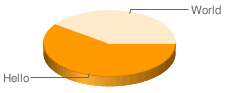
 Two dimensional pie chart.
 Concentric pie charts.
 Vertical bar chart, with stacked bars.
 Horizontal bar chart, with grouped bars.
 Line charts of type ls are also known as sparklines.
 For charts of type lxy, a pair of data sets is required for each line.


What is Google Chart API?
The Google Chart API is an extremely simple tool that lets you easily create a chart from some data and embed it in a webpage. You embed the data and formatting parameters in an HTTP request, and Google returns a PNG image of the chart. Many types of chart are supported, and by making the request into an image tag you can simply include the chart in a webpage. Google had created these API’s for their internal use to generate charts in applications like finance. But soon they realised these API’s will be of great use and hence they launched Google Chart API.Supported Charts
Currently following are the charts that are being supported by Google Charts API.- Line Chart
- Pie Chart
- Bar Chart
- Radar Chart
- Venn Diagrams
- Scatter Plots
- Sparklines
- Maps
- Google-o-meter
- QR Codes
How does it works?
Google Chart API works by sending a HTTP request using URL. All what we have to do is to create a URL that specifies all arguments and other information and send it using HTTP. Google Chart will return us the image of the Chart that we requested.Live Examples
Following are few examples in each of the Chart types that you can generate using Google Chart APIs.Pie Chart
Hello World Pie Chart.Code language: HTML, XML (xml)http://chart.apis.google.com/chart?cht=p3&chd=t:60,40&chs=250x100&chl=Hello|World
 Two dimensional pie chart.
Code language: HTML, XML (xml)http://chart.apis.google.com/chart?cht=p&chd=s:Uf9a&chs=200x100&chl=January|February|March|April
Concentric pie charts.Code language: HTML, XML (xml)http://chart.apis.google.com/chart?cht=pc&chd=s:Helo,Wrld&chs=200x100
Bar Charts
Horizontal bar chart, with stacked bars.Code language: HTML, XML (xml)http://chart.apis.google.com/chart?cht=bhs&chs=200x125&chd=s:ello&chco=4d89f9
Vertical bar chart, with stacked bars.Code language: HTML, XML (xml)http://chart.apis.google.com/chart?cht=bvs&chs=200x125&chd=t:10,50,60,80,40|50,60,100,40,20&chco=4d89f9,c6d9fd&chbh=20&chds=0,160
Horizontal bar chart, with grouped bars.Code language: HTML, XML (xml)http://chart.apis.google.com/chart?cht=bhg&chs=200x125&chd=s:el,or&chco=4d89f9,c6d9fd
Line Charts
Chart of type LC.Code language: HTML, XML (xml)http://chart.apis.google.com/chart?cht=lc&chs=200x125&chd=t:40,60,60,45,47,75,70,72
Line charts of type ls are also known as sparklines.Code language: HTML, XML (xml)http://chart.apis.google.com/chart?chs=200x125&cht=ls&chco=0077CC&chd=t:27,25,60,31,25,39,25,31,26,28,80,28,27,31,27,29,26,35,70,25
For charts of type lxy, a pair of data sets is required for each line.Code language: HTML, XML (xml)http://chart.apis.google.com/chart?cht=lxy&chs=200x125&chd=t:10,20,40,80,90,95,99|20,30,40,50,60,70,80|-1|5,25,45,65,85&chco=3072F3,ff0000,00aaaa&chls=2,4,1&chm=s,FF0000,0,-1,5|s,0000ff,1,-1,5|s,00aa00,2,-1,5
Venn diagrams
Code language: HTML, XML (xml)http://chart.apis.google.com/chart?cht=v&chs=200x100&chd=t:100,80,60,30,25,20,10
Scatter plots
Code language: HTML, XML (xml)http://chart.apis.google.com/chart?cht=s&chd=t:12,87,75,41,23,96,68,71,34,9|98,60,27,34,56,79,58,74,18,76|84,23,69,81,47,94,60,93,64,54&chxt=x,y&chxl=0:|0|20|30|40|50|60|70|80|90|10|1:|0|25|50|75|100&chs=200x125
Radar charts
Code language: HTML, XML (xml)http://chart.apis.google.com/chart?cht=r&chs=200x200&chd=t:10,20,30,40,50,60,70,80,90
Code language: HTML, XML (xml)http://chart.apis.google.com/chart?cht=r&chs=200x200&chd=t:77,66,15,0,31,48,100,77|20,36,100,2,0,100&chco=FF0000,FF9900&chls=2.0,4.0,0.0|2.0,4.0,0.0&chxt=x&chxl=0:|0|45|90|135|180|225|270|315&chxr=0,0.0,360.0
Code language: HTML, XML (xml)http://chart.apis.google.com/chart?cht=rs&chs=200x200&chd=s:voJATd9v,MW9BA9&chco=FF0000,FF9900&chls=2.0,4.0,0.0|2.0,4.0,0.0&chxt=x&chxl=0:|0|45|90|135|180|225|270|315&chxr=0,0.0,360.0&chg=25.0,25.0,4.0,4.0&chm=B,FF000080,0,1.0,5.0|B,FF990080,1,1.0,5.0|h,0000FF,0,1.0,4.0|h,3366CC80,0,0.5,5.0|V,00FF0080,0,1.0,5.0|V,008000,0,5.5,5.0|v,00A000,0,6.5,4
Maps
Code language: HTML, XML (xml)http://chart.apis.google.com/chart?cht=t&chs=440x220&chd=s:_&chtm=world
Code language: HTML, XML (xml)http://chart.apis.google.com/chart?cht=t&chs=440x220&chd=t:0,100,50,32,60,40,43,12,14,54,98,17,70,76,18,29&chco=FFFFFF,FF0000,FFFF00,00FF00&chld=DZEGMGAOBWNGCFKECGCVSNDJTZGHMZZM&chtm=africa&chf=bg,s,EAF7FE
Google-o-meters
Code language: HTML, XML (xml)http://chart.apis.google.com/chart?chs=225x125&cht=gom&chd=t:70&chl=Hello


Can you make more examples with labels on the axis? I can’t seem to figure it out. I want to do line charts and label the x & y axis.
Hi Sun,
For adding labels to axis, you can use chxt and chxl parameters. For example to add labels to line chart following URL can be used.
Refer http://code.google.com/apis/chart/labels.html#axis_labels for more details.
how to create a line chart using google charts.I want to create a chart which value is more than 100 like http://chart.apis.google.com/chart?cht=lc&chs=200×125&chd=t:150,130,250,150,147,245,140,212 but google is not working.So can any one tell me how can i create this chart ??????
Hi Mr.Think,
Google Chart API will take input points less than or equal to 100. In your case you are trying to give values greater than 100 as you mention.
I will suggest you to convert your values in percentage values % and than pass it in URL.
For example if your input set is (50,90,120,150,80,95) than you can convert these values into %. Simplest way is to treat 150 as 100 and convert rest of the values accordingly.
I know this sounds weird but it is pure math.. This is nt the only way to convert these values between 100 ranges. We have not considered Minimum value from the list. But this will work..
Let me know if it works for you.
Viral,
I’m trying to graph a line chart with at least 9 bars and a label for each bar (the label could also run over the bar). Can the x axis be extended to accomodate the width I require to display all the bars?
Thanks for such a great tool!
Neema
Figured it out, Thanks!
Please tell me if there is any command which could be run on command line so that the bar graph is displayed
Thank u! I got what I want! :D
How can I plot line graph using data from excel file?
How can we send array of values dynamically as parameters? Now you are passing hard coded values..? Looking forward for your response.
Thanks a lot for this post….u save my day…
nice 1. I have another example to Draw Pie charts clustering on Google Maps, please visit http://www.etechpulse.com/2013/07/how-to-create-chart-on-google-maps.html
Thanks
hi, i want to have bar,line,column and pie chart in a single page with different data for eg. pie chart has data regarding total votes ina city where as line chart must have vote share for all political parties in a city . hence,
pie chart- total votes & city name
line chart- political party, votes and city name
bar graph – previous votes vs current votes
column graph – age of population and their votes.
thank you in advance. please any idea regarding this requirement .
all graphs must load at a time.
hi, i want to have bar,line,column and pie chart in a single page with different data for eg. pie chart has data regarding total votes ina city where as line chart must have vote share for all political parties in a city . hence,
pie chart- total votes & city name
line chart- political party, votes and city name
bar graph – previous votes vs current votes
column graph – age of population and their votes.
thank you in advance. please any idea regarding this requirement .
all graphs must load at a time.
thank you so much nice
Please note that it is deprecated in 2012 and Google can withdraw it without notice.