When a web browser is pointed to a directory on your web site which does not have an index.html file (or any other index file) in it, the files in that directory can be listed on a web page.
Let us see few snippets that can be added in htaccess file to allow or avoid directory listing in apache server.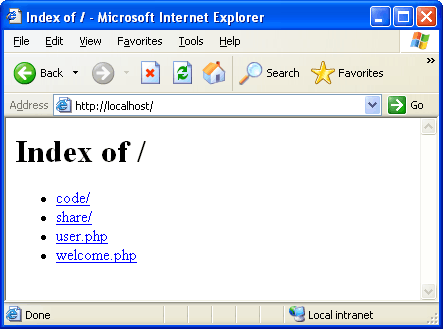
 To disable or prevent the directory access add following line in your .htaccess file. If user points the browsers to a directory which does not have index file then in this case 403 error will be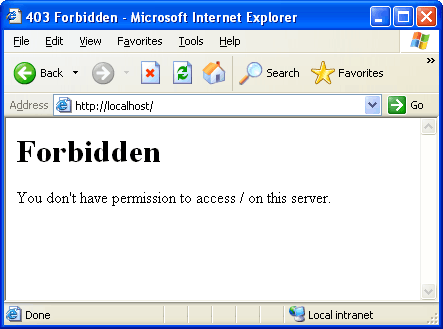
 To remove the fancy directory listing or to display normal directory listing, use -FancyIndex.
Enable / Disable directory Listing
To allow a web server to produce a directory listing, whenever you point a directory without index file. Add following line in your .htaccess file.Code language: HTML, XML (xml)Options +Indexes # or # IndexIgnore *
 To disable or prevent the directory access add following line in your .htaccess file. If user points the browsers to a directory which does not have index file then in this case 403 error will be
Following is the error page that gets displayed when we try to access any directory without index file.Code language: HTML, XML (xml)Options -Indexes

Change Listing style
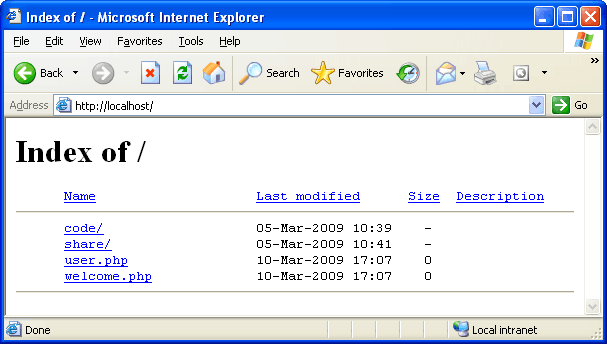
You may want to display other details while showing the directory listing. This includes file icons, file size, modification date and more. This can be done by adding fancy style to your htaccess file. Add following snippet in .htaccess file.Code language: HTML, XML (xml)IndexOptions +FancyIndexing
 To remove the fancy directory listing or to display normal directory listing, use -FancyIndex.
Code language: HTML, XML (xml)IndexOptions -FancyIndexing
Ignore files with specific extension
It may happen that you may need to ignore certain files to get displayed in directory listing. This can be achieved using IndexIgnore directive in .htaccess file. Following snippet will not display .zip and .txt file in directory listing.Code language: HTML, XML (xml)IndexIgnore *.zip *.txt
Modify Index File
It is possible to change the default index file from index.html (index.php, index.jsp …) to any other file. Following line will change the index file to Home.html.Code language: HTML, XML (xml)DirectoryIndex Home.html




this is really helpful details
Is there a way to disable all browsing all directories except one?
For example, after applying “Options -Indexes”, can I create a rule to list items inside the ‘/pdf’ folder?
Thanks.
Hi Ricardo,
There is a way to achieve this. If you want to disable directory listing in a folder and all its subfolders except one subfolder say /pdf. You have to create .htaccess file in root folder and the code to disable directory access:
Options -Indexes. And then create another .htaccess file in the subfolder /pdf and add code to allow directory listing in it:Options +Indexes.Awesome! It worked perfectly!
Thanks Viral!
Thanks Viral, I was looking for a solution for what Ricardo asked, and yours worked perfectly. Thanks! :)
The IndexIgnore * line seems to cause the whole thing not to work. This line tells the server to ignore all files in the directory listing. When I took out that line, I was able to see the directory properly.
Thanks!
Great! thanks!
Nice mate.. :)
That’s very good information.
But, is there a way to set these listing permissions per directory, instead of document root?
Thanks..
Vas
OK, I see the answer above.. :)
When I took out that line, I was able to see the directory properly.
I have a problem in directory listing in http://3idiots.mobi/Downloads/ it doesn’t show a single file in the folder. I have updated .htaccess file and pasted Options +Indexes. then also it is showing blank page. What should i have to do.
Thank You
Got this to work where you deny public access but allows internal processes. Place this in the htaccess of the folder you want to restrict access to:
order deny,allow
deny from all
Thank you very much mate!
hi mate,
im using Clipbucket for a music site im building now clipbucket has like tons of Stuff in httacess file and the bulk of it’s stopping anyone from doing stuff they shouldn’t using scripts in url Ect exploits and it also blocks access to pages that clipbucket doesn’t use in it’s script this also means every folder i add on to the site Will not work, How would i block everything else or keep it the same i guess yet still allow access to Say /Forum or any extra folders i tack onto my domain, ? thanks in advance
I added a new line ‘Options -Indexes’ in each .htaccess files,but the directories still display on browser. Can anybody give some more suggests? Thanks very much. [email protected] is my address.Hoping for that…
Cheers – took a while to track this down!
Hi guys
I have the same problem with a folder of my website.
I wrote the “Options -Indexes” in the root folder’s htaccess
and “Options +Indexes” in the folder /download (where I want all files to be listed)
The website works fine, but I get an error 500 while accessing to the /download folder
I’m hosted by OVH, but I can’t read anything about that in their forums
Thanks a lot !
Have a nice day
THANK YOU !!!!!!!!!!!!!!!!!!!!!!!!!!!!!!!!
I have a problem, I need to protect some folder in my web through validation, i created an .htaccess and put it in this folder but this dissapear of my navigation tree , what is the the way that this folder appear again? but keeping the validation through user/passwd
It’s really helpful for me, Thanks:)
Hello everyone.
I got directory browsing working on my website.
I get a broken picture icon next the directories and files.
Here is the link:
http://www.newporttimesharesrus.com/websites/
I put this code in the .htacces file
Options +Indexes
IndexOptions +FancyIndexing
It does not do the job.
Can anyone help.
[email protected]
Thank you very much. This tutorial was very helpful.
I was looking for the function that prevented access to directories of my website.
nice
fine
Hi,
I have an issue.
I need to prevent DIRECT access to all .swf files in “localhost/mysite/sitesong/” directory [http://localhost/mysite/sitesong/abc.swf] but it should be able to be accessed if localhost/mysite/song.php is linking it inside tag.
For this, the following code is added in /sitesong/.htaccess file
This code works for the Firefox and Chrome browser but in IE, though the .swf file is prevented from directly accessed but /song.php also is unable to access the swf files.
Any help would be appreciated.
Thanks! Works like a charm! No more access to folders. (:
Thanks!! really helpful.
How to allow directory access for all by htaccess?
thanks a lot really helpful to me
Thank you! This was very useful.
Useful post thanks
Thank a lot! This was really helpful.
I am using a hosting service at bluehost and there
AddHandler application/x-httpd-php .html .htm
seems to work.
Thanks, its really a good job…….
I was using Options -Indexes but i got 404 error….. i am also hiding the extension of the page ….
very useful content. thank you…
why this htaccess not working under my svn path and using full path
still displaying indexing even after placed htaccess in project1
http://IP/var/www/html/svn/project1/
Thanks bro, it really helped me well….
I want don’t to index robots.txt, sitemap.xml and some specific pages. Will you tell me, how can I do it through htaccess? Any suggestion will be appreciated; thanks in advance.
How to Directory access for all htaccess?
Hello Admin,
I have a .bar website and I added ‘Options -Indexes’ in .htaccess file but still my all inner directory access by anyone. Can you please tell me what should I do for disable inner directory.
Waiting for your reply!
thank’s, It’s very use bale tutorial
Pretty Nice but i was searching something better like i want a user may not access my site while he get it to be download through some tools like httrack or something else how can i stop user like that
he downloads the whole design and everything
Thanks a lot, this helped a ton. With this i was able to forbid the directory browsing..
Great Tutorial. Thanks for sharing
It was realy useful, Thanks
in the allow part some say it is not the website IP but the Localserver ip. what is the difference ?
It was quite handy. need to make some changes in my code
Hello all.
I have been using any possible code to restrict access to my .php root files but non seem to work. if they do they limit to access completely
Order Allow,Deny
Deny from all
Allow from xx.xx.xxx.xxx
I have replaced X with my IP but not working
Very helpful post for me.
It works on me. Thanks for this great article