[ad name=”AD_INBETWEEN_POST”] A good web design involves the better user interaction and ability to fetch the data in a better way. For fetching user data, you may have to create a form wherein user can add multiple entries and submit them simultaneously. Thus for this you will need a way to add or remove fields dynamically into the HTML page. In my previous article, I had discussed about the way one can add dynamic form components into the web page. In this article we will create a user interface where user can add/delete multiple rows in a form using JavaScript. First check the user interface. 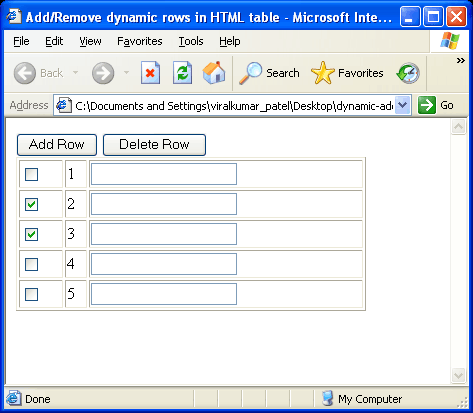
 In this example, we have created a table which will display our html components. On pressing Add Row, a dynamic row will be created and added in the table. And on selecting the checkbox and pressing Delete Row, the row will be removed. Following is the source.
 In this example, we have created a table which will display our html components. On pressing Add Row, a dynamic row will be created and added in the table. And on selecting the checkbox and pressing Delete Row, the row will be removed. Following is the source.
Code
<HTML>
<HEAD>
	<TITLE> Add/Remove dynamic rows in HTML table </TITLE>
	<SCRIPT language="javascript">
		function addRow(tableID) {

			var table = document.getElementById(tableID);

			var rowCount = table.rows.length;
			var row = table.insertRow(rowCount);

			var cell1 = row.insertCell(0);
			var element1 = document.createElement("input");
			element1.type = "checkbox";
			element1.name="chkbox[]";
			cell1.appendChild(element1);

			var cell2 = row.insertCell(1);
			cell2.innerHTML = rowCount + 1;

			var cell3 = row.insertCell(2);
			var element2 = document.createElement("input");
			element2.type = "text";
			element2.name = "txtbox[]";
			cell3.appendChild(element2);


		}

		function deleteRow(tableID) {
			try {
			var table = document.getElementById(tableID);
			var rowCount = table.rows.length;

			for(var i=0; i<rowCount; i++) {
				var row = table.rows[i];
				var chkbox = row.cells[0].childNodes[0];
				if(null != chkbox && true == chkbox.checked) {
					table.deleteRow(i);
					rowCount--;
					i--;
				}


			}
			}catch(e) {
				alert(e);
			}
		}

	</SCRIPT>
</HEAD>
<BODY>

	<INPUT type="button" value="Add Row" onclick="addRow('dataTable')" />

	<INPUT type="button" value="Delete Row" onclick="deleteRow('dataTable')" />

	<TABLE id="dataTable" width="350px" border="1">
		<TR>
			<TD><INPUT type="checkbox" name="chk"/></TD>
			<TD> 1 </TD>
			<TD> <INPUT type="text" /> </TD>
		</TR>
	</TABLE>

</BODY>
</HTML>
Code language: JavaScript (javascript)Online Demo
Click here.Add/Remove rows from table having Drop Down List
What if my table has a selectbox or drop down list and I want to implement add/remove row functionality? A lot of people asked me this question (you can check comment section), so I thought to update this article and add one more case. Adding / Removing rows in a table having drop down list. Following is the code:<HTML>
<HEAD>
<TITLE> Add/Remove dynamic rows in HTML table </TITLE>
<SCRIPT language="javascript">
function addRow(tableID) {
var table = document.getElementById(tableID);
var rowCount = table.rows.length;
var row = table.insertRow(rowCount);
var colCount = table.rows[0].cells.length;
for(var i=0; i<colCount; i++) {
var newcell = row.insertCell(i);
newcell.innerHTML = table.rows[0].cells[i].innerHTML;
//alert(newcell.childNodes);
switch(newcell.childNodes[0].type) {
case "text":
newcell.childNodes[0].value = "";
break;
case "checkbox":
newcell.childNodes[0].checked = false;
break;
case "select-one":
newcell.childNodes[0].selectedIndex = 0;
break;
}
}
}
function deleteRow(tableID) {
try {
var table = document.getElementById(tableID);
var rowCount = table.rows.length;
for(var i=0; i<rowCount; i++) {
var row = table.rows[i];
var chkbox = row.cells[0].childNodes[0];
if(null != chkbox && true == chkbox.checked) {
if(rowCount <= 1) {
alert("Cannot delete all the rows.");
break;
}
table.deleteRow(i);
rowCount--;
i--;
}
}
}catch(e) {
alert(e);
}
}
</SCRIPT>
</HEAD>
<BODY>
<INPUT type="button" value="Add Row" onclick="addRow('dataTable')" />
<INPUT type="button" value="Delete Row" onclick="deleteRow('dataTable')" />
<TABLE id="dataTable" width="350px" border="1">
<TR>
<TD><INPUT type="checkbox" name="chk"/></TD>
<TD><INPUT type="text" name="txt"/></TD>
<TD>
<SELECT name="country">
<OPTION value="in">India</OPTION>
<OPTION value="de">Germany</OPTION>
<OPTION value="fr">France</OPTION>
<OPTION value="us">United States</OPTION>
<OPTION value="ch">Switzerland</OPTION>
</SELECT>
</TD>
</TR>
</TABLE>
</BODY>
</HTML>
Code language: JavaScript (javascript)addRow() method in above code. I have edited this piece of code from our previous example. The addRow() method iterates through all the columns and copy the content of 1st column to new column. This way a new row is created which is exact copy of 1st row. Also the switch{} case in the code make sure that the value are not copied as it is. For example, if you have entered text “abc” in textbox of 1st row and you press Add Row button, the new row will be added and the textbox of this new row will have value “abc”. So to make sure the values are not copied, we have added the switch{} code. You may want to comment the switch{} code if the copying of the values in newly added row if desired to you.Online Demo
Click here.Getting Submitted Form Values in PHP
The main purpose of above code is to take input from user and persist it in database. Hence we may want to submit the above form and fetch its values in PHP to store the data in database. If you notice we have multiple input textboxes with the same name. So in order to get these values in PHP request parameter, we need to modify our HTML. We need to append [] at the end of name of each input boxes including select box. Thus our textbox definition:<INPUT type="text" name="txt">
Code language: HTML, XML (xml)<INPUT type="text" name="txt[]">
Code language: HTML, XML (xml)<INPUT type="checkbox" name="chk[]"/>
<SELECT name="country[]">
<OPTION value="in">India</OPTION>
<OPTION value="de">Germany</OPTION>
<OPTION value="fr">France</OPTION>
<OPTION value="us">United States</OPTION>
<OPTION value="ch">Switzerland</OPTION>
</SELECT>
Code language: HTML, XML (xml)<?php
$chkbox = $_POST['chk'];
$txtbox = $_POST['txt'];
$country = $_POST['country'];
foreach($txtbox as $a => $b)
echo "$chkbox[$a] - $txtbox[$a] - $country[$a] <br />";
?>
Code language: PHP (php)



Hello,
Please add your site at http://www.sweebs.com. Sweebs.com is a place where other people can find you among the best sites on the internet!
Its just started and we are collecting the best found on the net! We will be delighted to have you in the sweebs listings.
Regards
Kris
Thanks for this code, it came in handy.
A note for everyone else.
If you enclose a in a and try to set the innerHTML of the div to something else, it will not work in IE, but will in all other browsers.
Thank you Samir for valuable comment.
how do i display my entry?
Hi Erick,
I am not sure if I get you, but do you mean to display a cell element?
hi…i have a table with header and row of input. i want to insert new row when user click on Add More Item button. Have tried above code but not working. No javascript error but no row inserted, need your advise
hey.. superb code!! but how to call function on generated rows, for eg : onblur so on??
The row id can’t refresh.
I am trying to adapt your code so that this page
http://www.whatsfordinner.net/meals.html
on my site includes checkboxes so that suggested meals can be removed (and later replaced with other meals, but one step at a time). How can I reach you so that I can clarify a part of your code that I don’t understand?
@Jean: You can send me email at viralpatel [dot] net [at] gmail [dot] com.
Hey Viral,
Thank u very much..
I am having exact need for the same and i got it. AMAZE !!!
But I am having a problem.. I am using servlets and jsps in my application. Now can u suggest me any way by which i can get the values of those text boxes(which are dynamically generated by clicking ADD ROW) and i can enter those values in the database after clicking on submit button in the end !!!
Hoping for ur favorable reply…
Thanking You..
Hi Mihir,
You can get the values of textboxes generated dynamically by calling request.getParameterValues() method in your JSP/Servlet.
Suppose the name of the textboxes that you generate is “txtAddress” then you can just call
String [] addresses = request.getParameterValues("txtAddress");Hope this will solve your query.
Hey Viral,
Thanks for replying.. but its still not working… i think when we create elements at that time with declaring the type can we give a name to that element ?
I mean in a form the name of textfield is \"design\" and when we are creating a new textfield using createElement() at that time can we give name to that element ?
Hi Mihir,
You can add name to the newly added field by using setAttribute() method. For example:
element.setAttribute("name", "txtAddress");Once you provide the name to newly created element, it can be accessed from JSP by calling getParameterValues().
its still not done …. values of form are not stored in string[ ] ….
are u sure this is the way to get all values ….???
cos wen i check string[ ] it shows empty array ….
Hi Mihir,
I have using the same code and it is working for me.
Following is the JSP code that gets the request parameters and prints them.
<h2>Address</h2>
<%
	String [] addr = request.getParameterValues("txtAddr");
	for(int i=0; addr != null && i < addr.length; i++) {
		out.println(addr[i] + "</br>");
	}
%>
I hope this helps and solves your problem.
this is a nice article …..keep it up
hye viral,
thanks for the helpful article of yours, been searching this for days. 10q.
now i’m able to add the rows, but i’m not sure on how to save those values in the dynamically added rows into the database.
can you please help me out in this…
*the question might sound same like mihir’s question, but i still dont understand the way that you have explained above as i’m just a beginner in programming.
thanking you in advance.
Hi Minie,
For adding these dyanmic generated records to the database, you have to write a server side code in any server side scripting language like JSP, PHP or ASP. And you have to iterate through request to get all the values and then you can insert these values to the database.
If you are still struggling to understand, send me an email at viralpatel [dot] net [at] gmail [dot] com.
hey viral
good job done
but i have a problem
In my table i have columns that has a drop down menu and i need to add it
do i require any server side programming
if yes plz send me the codes
else
send me the codes
in the code part when a element is created i have used “select” in place of “input”
and “name” in place of type.
hey viral
Good job.
It helped me a lot.
But i have the same problem that Rakesh had.
In my table i have columns that has a drop down menu .How to make this column repeated.
Also in [element2.type = \"text\"; ] it is taking only text and checkbox. For date and number type this doesnt work
How to make the fields with date and number type repeated.
Also i want a Date field in my column such that when i click that column calender is pop up.how to do that
Hi Rakesh / Raj, I have updated the article and added the case where a table will have drop down list. Check the code and let me know if you have any doubt.
Hi Viral,
Thanks a ton for your help.
Its working fine.
Still if i change the type of the column to number or date.this doesnt work.
Also when i delete the row the Sr No. of rows is not refreshed.
how to do this thing?
Also how to populate a calaneder in the date field?
Hi viral,
Thanks a ton for your help.
This is working file.
But still i have a problem that when i change the column type to number or date this doesnt work.
Also the Sr. No. of the rows is not refreshed when we delete a row.
Please look into this.
Thanks
Hi Raj,
I dont get you. How can you change column type in HTML table to number or date!!! I think you are using some calender control in your table and you want to replicate it!. If you learn simple DOM manipulation it will be easy for you to implement such requirements. I will suggest you first to do some handson on JS DOM. This may help you.
Hi Viral,
I use your code and this is what i looking for. But I have question, Is\\\’t possible to Add additional Drop down after you select the first drop down the second drop down filled the cities? For example if you select \\"United States\\" all Cities under United Sates must filled the second drop down. Thanks in advance.
hi Very nice
i\\\’m using this code.. but i want one more sol.how to get (Click button)dyamic table row value..
Hi Viral ,
i wanted to say that when i delete a row the Serial no. of all the rows are not refreshed.
For e.g if Sr.no. are 1,2,3,4,5,6,7,8,9 and i delete the 5th row then the serial no. should be from 1 to 8 but the sr.no.that comes on the html atre 1.2.3.4.6.7.8,9.
How to modify the delRow method for this
hey thankyou so much keep the good work
hello Viral,
Nice work. thanks for uploading code like this. but i have a problem that how can i use this code in PHP. plz reply. thx.
bye
hello Viral,
its have not a heae line like the below:-
Item qty
————–
a 1
b 2
if possible please add the head line.
Best Regards,
Vilart
hey thanks i have ued your code so it was very use full to me.
I tried the code and deployed it in tomcat server using eclipse IDE
The code doesnt work.
It shows no error but no action takes place.
Can anyone help me solve the problem?
var rownumber = -1;
function addRow(event, tableID) {
var srcElem = document.all ? event.srcElement : event.target;
while(srcElem.tagName != “TR”)
{
srcElem = srcElem.parentNode;
}
rownumber=srcElem.rowIndex;
var table = document.getElementById(tableID);
var count = document.getElementsByName(“country”);
var rowCount = table.rows.length;
var colCount = table.rows[rowCount-1].cells.length;
if(rowCount==rownumber+1)
{
//FOR LOOP CODE.
}
delete record. in if condication
document.ff.chk.checked=false;
Hey Viral,
Great work, I’m wondering if it applies a unique field id to each new field row created as im trying to find a new solution for a form i have that submits to a database and my current way seems to stop at 9 entries for some reason, any help or advice is greatly appreciated.
Hi Viral,
Your code helped me a lot. I’m creating dynamic rows in a table with 4 different columns namely : Description, Name, Size, Option. The code is shown below
<form name=”myform” action=” ” method=”POST”>
No.
D
Field Description
Field Name
Field Type
Size
Option
var TABLE_NAME = ‘myTable’;
var ROW_BASE = 0;
var hasLoaded = false;
var flag = false;
window.onload=fillInRows;
function fillInRows()
{
hasLoaded = true;
}
// myRowObject is an object for storing information about the table rows
function myRowObject(one, two, three, four, five, six, seven)
{
this.one = one;
this.two = two;
this.three = three;
this.four = four;
this.five = five;
this.six = six;
this.seven = seven;
}
/*
* addRowToTable
* Inserts at row ‘num’, or appends to the end if no arguments are passed in. Don’t pass in empty strings.
*/
function addRowToTable(num)
{
if (hasLoaded) {
var tbl = document.getElementById(TABLE_NAME);
var nextRow = tbl.tBodies[0].rows.length;
var iteration = nextRow + ROW_BASE;
if (num == null) {
num = nextRow;
} else {
iteration = num + ROW_BASE;
}
// add the row
var row = tbl.tBodies[0].insertRow(num);
// requires classes named classy0 and classy1
row.className = ‘classy’ + (iteration % 2);
//This whole section can be configured
//left cell
var cellLeft = row.insertCell(0);
var textNode = document.createTextNode(iteration);
cellLeft.appendChild(textNode);
//Right cell
var cellRight1 = row.insertCell(1);
var el1 = document.createElement(‘input’);
el1.setAttribute(‘type’, ‘checkbox’);
el1.name = ‘d’ + iteration;
el1.id = ‘d’ + iteration;
cellRight1.appendChild(el1);
var cellRight2 = row.insertCell(2);
var el2 = document.createElement(‘input’);
el2.setAttribute(‘type’, ‘text’);
el2.setAttribute(‘name’, ‘fd’ + iteration);
el2.setAttribute(‘size’, ’25’);
cellRight2.appendChild(el2);
var cellRight3 = row.insertCell(3);
var el3 = document.createElement(‘input’);
el3.type = ‘text’;
el3.name = ‘fn’ + iteration;
el3.id = ‘fn’ + iteration;
el3.size = ’25’;
cellRight3.appendChild(el3);
var cellRight4 = row.insertCell(4);
var el4 = document.createElement(‘select’);
el4.name = ‘ft’ + iteration;
el4.id = ‘ft’ + iteration;
el4.options[0] = new Option(‘Text’);
el4.options[1] = new Option(‘Radio’);
el4.options[2] = new Option(‘Textarea’);
el4.options[3] = new Option(‘Checkbox’);
el4.options[4] = new Option(‘Button’);
el4.options[5] = new Option(‘Drop-downList’)
cellRight4.appendChild(el4);
var cellRight5 = row.insertCell(5);
var el5 = document.createElement(‘input’);
el5.type = ‘text’;
el5.name = ‘sz’ + iteration;
el5.id = ‘sz’ + iteration;
el5.size = ‘5’;
cellRight5.appendChild(el5);
var cellRight6 = row.insertCell(6);
var el6 = document.createElement(‘input’);
el6.type = ‘text’;
el6.name = ‘op’ + iteration;
el6.id = ‘op’ + iteration;
el6.size = ‘5’;
cellRight6.appendChild(el6);
// Pass in the elements you want to reference later
// Store the myRow object in each row
row.myRow = new myRowObject(textNode,el2, el1, el3, el4, el5, el6);
}
rowCount();
}
function rowCount()
{
var oRows = document.getElementById(‘myTable’).getElementsByTagName(‘tr’);
var iRowCount = oRows.length;
iRowCount = iRowCount – 1;
//alert(‘Your table has ‘ + iRowCount + ‘ rows.’);
}
// this entire function is affected by myRowObject settings
// If there isn’t a checkbox in your row, then this function can’t be used.
function reorderRows(tbl, startingIndex)
{
if (hasLoaded) {
if (tbl.tBodies[0].rows[startingIndex]) {
var count = startingIndex + ROW_BASE;
//alert(‘:)’ + startingIndex + ‘.’);
//alert(tbl.tBodies[0].rows.length + ‘.’);
//var max_rows=tbl.tBodies[0].rows.length;
for (var i=startingIndex; i<=tbl.tBodies[0].rows.length; i++) {
// next line is affected by myRowObject settings
tbl.tBodies[0].rows[i].myRow.one.data = count; // text
//next line is affected by myRowObject settings
tbl.tBodies[0].rows[i].myRow.two.name = INPUT_NAME_PREFIX + count; // input text
//requires class named classy0 and classy1
tbl.tBodies[0].rows[i].className = ‘classy’ + (count % 2);
count++;
}
}
}
}
function deleteRows(rowObjArray)
{
if (hasLoaded) {
for (var i=0; i<rowObjArray.length; i++) {
var rIndex = rowObjArray[i].sectionRowIndex;
rowObjArray[i].parentNode.deleteRow(rIndex);
}
}
}
function deleteChecked()
{
if (hasLoaded) {
var checkedObjArray = new Array();
var cCount = 0;
var tbl = document.getElementById(TABLE_NAME);
for (var i=0; i 0) {
deleteRows(checkedObjArray);
rowCount();
reorderRows(tbl,1);
}
}
}
My question is how to retain the table and the elements in it even after I click submit button (as the page gets refreshed).Please help it is urgent. Also some code might be helpful.
Thanks,
SHRI
I want to retain html table data which has been added dynamically even when the page reloads
@craig
Please check your code of persisting records in database. There must be some bug in that only.
@Shri
I assume you have written your backend code in PHP. While submitting the records to script to persist it, you can save these in an array and put the array in request. When the page is again loaded, you can iterate through this array and create table based on the entries.
Hi Viral,
Your code is very helpful ! I wanted to ask you how I can get values from text boxes in PHP
(how to pass these values form java script to php) ?
Thanks a lot !
Hi Viral, thank you for your tutorial!
But i have a question, do you know if it is possible to insert a row in a table inside another table?
If it is possible, how can i do this? Thank You!
Viral –
This code has been extremely helpful. I’m trying to modify it so that when I add a new row, it will update the element name (e.g., the first line of the table gets stored in a form array called line1[], the secon row goes to line2[]).
I’m using the newcell.childNodes[0].setAttribute(“name”,”line”+rowCount+”[]”); to set the name.
FOr the checkbox and the text element, it updates the name to “line#” where # is the row numner. However, for the select box, it doesn’t seem to do this.
My back end test code is a simpl PHP script that iterates throw the lines and prints out the array of values. All of the values of the select box end up in the line1 array.. ANy ideas??
Modified code:
function addRow(tableID) {
var table = document.getElementById(tableID);
var rowCount = table.rows.length;
var row = table.insertRow(rowCount);
var colCount = table.rows[1].cells.length;
document.testForm.totalRows.value=totRows;
for(var i=0; i<colCount; i++) {
var newcell = row.insertCell(i);
newcell.innerHTML = table.rows[1].cells[i].innerHTML;
newcell.childNodes[0].name=”line”+rowCount+”[]”;
switch(newcell.childNodes[0].type) {
case “text”:
newcell.childNodes[0].value = “”;
break;
case “checkbox”:
newcell.childNodes[0].checked = false;
break;
case “select-one”:
newcell.childNodes[0].selectedIndex = 0;
break;
}
}
}
function deleteRow(tableID) {
try {
var table = document.getElementById(tableID);
var rowCount = table.rows.length;
for(var i=0; i<rowCount; i++) {
var row = table.rows[i];
var chkbox = row.cells[0].childNodes[0];
if(null != chkbox && true == chkbox.checked) {
if(rowCount <= 1) {
alert(“Cannot delete all the rows.”);
break;
}
table.deleteRow(i);
rowCount–;
i–;
}
}
}catch(e) {
alert(e);
}
}
India
Germany
France
United States
Switzerland
And here’s the output:
Total Rows:3
Line: 1
Array ( [0] => 111 [1] => in [2] => de [3] => fr )
Line: 2
Array ( [0] => 222 )
Line: 3
Array ( [0] => 333 )
Any help would be appreciated!
Nice code, thanks it helped
Hai….How can I have a script program is applied in the form of PHP and MySQL?
How can we incorporate DynaActionForm with this?
Thanks a lot for the code..
@ocef: I have updated the tutorial and added details for fetching these values in PHP.
@850t: You can use normal ActionForm in Struts to get these dynamically row values. You can have String Array of attributes (String [] countries) in your ActionForm and the values will be filled by ActionServlet.
@Prashanth: You welcome :)
Hi Viral,
That is an amazing piece of code. Gr8 work done. I just thought of writing to you as I have a doubt. It would be great if you could advice me as to what to do or any help.
I am able to add the rows and delete it. However how do i validate the dynamically created rows.
What I did was i used the text field name to be validate. However if the number of rows are 5 and if the row one has a value, and other rows empty, it doesnt validate.
So the doubt is how do i validate all the dynamically createdfields.
I would appreciate u r help.
realy great I have added it in my digg
But how to validate that user must have to enter all data in the first example.
Hi Viral,
Thanks a lot for this code. its very useful.
I have little different requirement. i have four rows in my table and when user click on Add button. table should be extended by these four rows. at one time i want to copy four rows and append at the end of table.
is that possible? if yes could you please share the code with me?
And also i want to know if there is any way to preserve the attributes of the copied rows. New created rows should have same attributes (class, align, style) which was there for the existing rows. Any help regarding this will be really helpful. And you can ignore my first request. i am able to achieve it.
nice post
reallu nice post…
Hey Hello,
Thank u very much, this is very nice article.. keep sending this kind of gud articles :):):):)
Hey Viral nice code it really helped but der is one problem…
when i try to alert (newcell.childNodes[0].type) this in case of it says undefined…
actually i tried giving name newcell.childNodes[0].name = “text”+cnt;
it worked for text and checkbox but for select-one it says undefined…. and i was’nt able to name my any solution for this….???
Please mail me da solution if possible…. @ [email protected]…..
thnx a ton…
Dear your work is good can u help me out if I plan to generate test box on tab key press event .. no issue there will be button for submit all data … if u can that willl be great …………. wating for replay
regards
Alankar
Hey Viral,
Seriously nice work man.
But I have been stuck @ one place and I am hoping that you can help me out.
The place I’m stuck @ is when passing the array to the next page.
My coding is as follows.
and the addrow button has the exact coding of yours. just the name has been changed.
I have tried the two following methods to display the debit[] array in the next page.
$txtbox = $_POST[‘debit’];
while (list($a, $b) = each($txtbox)) {
echo “Key: $a; Value: $b\n”;
}
foreach ($txtbox as $key => $value) {
echo “Key: $key; Value: $value\n”;
}
the problem is both the methods will display only the value @ arrayname[0] .
the first index is only being displayed.
can you please help me out.
Viral, Nice work.
Can you please tell me how can I add a Click event to the dynamically added control in the new row(ex: checkbox/button onclick or dropdown on change) ? Thanks in advance.
Hi Taraka, Thanks for the comment.
I think it is easy to attach an event with any of the dynamic component. You just have to assign a handler function to ‘onclick’ event handle. For example for newly created button, we add event as follow:
var element1 = document.createElement(“input”);
element1.type = “checkbox”;
element1.onclick = functionHandler;
function functionHandler() {
…
}
Great… It’s good..
Thnaks
Thnaks
Thanks for your great work. This saved a lot of time and works really well. I do have a question about how to get the “Add Row” to function as expected if I have a header row. I know one of the “0” need to be different but not sure which one. Any help would be appreciated. Thanks.
@cmorr, Just try to add Header row in your table and that should work. Check one of the above example. I have added the header row and it is working fine.
If we populate the dropdown with values from the database and are using EL ,jstl tags along with form:select and spring:bind tags how do we add multiple rows of dropdown lists dynamically on clicking the add row button with the values populated using javascript.
Tanx viral ur article helped me a lot….
Great man great,,,thanks
Hi
Great article
Thanx
hi Viral,
I find nice in your article that exactly help my need, but I have problem on how to validate textbox if it is empty?
Please Help…Thanks in advance.
hi viral,
Ive got no idea on how to save the inputs to the database in asp c#.
please help….
great work, how do i get the value of these elements in table from code behind.i’m using ur code in vb.net 2003.
Great work.
@RK, Thanks….
hai Viral Patel…. thanks for the code, very easy to understand…. i got 2 question…
1 – how if u don’t want to use checkbox, only use Delete Row button ?
2 – how can i add to database in below PHP code? coz if i use below code to insert 3 data, only 1st data will insert .
————————————————————————————–
$date4=date(‘Y-m-d’,strtotime($_POST[‘Reg_ReceiptDt’]));
$Payment_Mode = $_POST[‘Payment_Mode’];
$No_DocPayment = $_POST[‘No_DocPayment’];
$Amount = $_POST[‘Amount’];
foreach($No_DocPayment as $a => $b)
$insertSQL = sprintf(“INSERT INTO LTG_Payment (IC_NO, Reg_ReciptNo, Reg_ReciptDt, Payment_Mode, Amount, No_DocPayment) VALUES (%s, %s, %s, %s, %s, %s)”,
GetSQLValueString($_POST[‘IC_NO’], “text”),
GetSQLValueString($_POST[‘Reg_ReceiptNo’], “text”),
GetSQLValueString($date4, “date”),
GetSQLValueString($Payment_Mode[$a], “text”),
GetSQLValueString($Amount[$a], “double”),
GetSQLValueString($No_DocPayment[$a], “text”));
mysql_select_db($database_conn, $conn);
$Result1 = mysql_query($insertSQL, $conn) or die(mysql_error());
——————————————————————————————————–
thanks for your help !!!
Hi VP,
Unfortunately copying rows with columns doesn’t work on Firefox. On IE, the element is called “select-one”, but on Firefox it is undefined! I added a “case” to catch undefined & set selectedIndex, but it didn’t work.
Any suggestions?
Scott. :)
Ah! Just needed to ignore some whitespace nodes. I achieved this by applying the switch statement to ALL the child nodes:
for (var j = 0; j < newcell.childNodes.length; j++)
{
switch (newcell.childNodes[j].type) {
case "text":
…
}
Scott. :)
hi viral,
thanx for the tutorial.
i have been implementing this for my applications. but now i have some problem.
1- i want to add two or more check boxes in a row.( for several purposes otherthan deleting row), but it does not work.
2- for adding a table inside a row and then adding multiple rowes is not working
please help if you are free today. i need it urgently. thanx for your help.
hi viral,
here i am adding my requirement
1
and if possible add comments inthe javascript part. sothat we can modify the code according to ours. it will be handy also.
ITs really great ! . Its helpful for me . I want to know how to delete a entire a row at a strech?
I am having the same problem as Dileep- only the first index is being displayed.
Hey Viral,
Seriously nice work man.
But I have been stuck @ one place and I am hoping that you can help me out.
The place I’m stuck @ is when passing the array to the next page.
My coding is as follows.
and the addrow button has the exact coding of yours. just the name has been changed.
I have tried the two following methods to display the debit[] array in the next page.
$txtbox = $_POST[‘debit’];
while (list($a, $b) = each($txtbox)) {
echo “Key: $a; Value: $b\n”;
}
foreach ($txtbox as $key => $value) {
echo “Key: $key; Value: $value\n”;
}
the problem is both the methods will display only the value @ arrayname[0] . the first index is only being displayed. can you please help me out.
I was using this method and ran into a debugging issue while deep into some code.
I found the fix so, so here a bit of info that might help someone out who runs into this problem…
Rather that receiving full arrays of data, I would only get the first item, even though the javascript created the form properly. I even did an alert() test to give the input object name, and it was copying over properly, so I was a bit perplexed as to why I had a problem getting values out of it.
It turns out the problem has to do with nesting tables. I had the form spanning across multiple tables (for visual formatting), and it broke the ability to retrieve multiple values for the form. I had a little trick I liked to use, putting the tag between a and tag to suppress a false newline (probably deprecated anyways) and I think that this (aside from being in bad form) caused a DOM nesting problem.
I was able to get around it by moving the and tags outside the outermost table and all was well. I was still able to use multiple tables inside the Form, including the dynamic auto-resizing one, and all is well now. Multiple values still pass to arrays in my PHP script.
By the way, with an unlimited possible number rows in the form, I imagine a person could overflow the POST method. Does anyone know what the maximum amount of data that a request can handle is?
Brian
brian,
Please share more details how you solved the table problem, where only first row is displayed.
Articles posted are very helpfull and gr8…thanks a lot for all
Viral, Great job!!!
If anyone has a similar problem of multiple tables and only first row being read. Please share the solution. It would be a great help. Looking forward.
Brian your solution to the first index display is not clear. I have the same issue. Anyone in the forum has a categorical answer to this. I tried debugging it but no good.
Dileep and Nathan had the same issue too. Were you able to resolve?
James.
“Only first row being displayed….”
I discovered that this issue is with firefox only. The code works well in IE.
If anyone has a work around for FF please share.
hi viral;
am developing a program in javascript it actually gives total as its output .
i used above mentioned code to generate rows automatically. Now the actual thing:
when i started developing this program i used addAll() function to add the amounts that are present in the first table [and the thing is rows were created manually].
it was working fine.
but after i have started generating rows dynamically the addAll() function is not working. can u help me out please?
code is given below:
function addAll(){
var frm = document.f;
var total = 0;
for(var k=0;k<frm.num.length;k++)
{
total+=parseInt(frm.num[k].value);
}
frm.tot.value=total;
}
function addAllFinal(){
a = Number(document.f.txttotal.value);
b = Number(document.f.txtservicetax.value);
c = Number(document.f.txtedutax.value);
d = Number(document.f.txthighedutax.value);
e = Number(document.f.txtoctroi.value);
f=a+b+c+d+e;
document.f.txtgrandtotal.value = f;
}
function addRow(tableID){
var table = document.getElementById(tableID);
var rowCount = table.rows.length;
var row = table.insertRow(rowCount);
var cell1 = row.insertCell(0);
var element1 = document.createElement("input");
element1.type = "checkbox";
cell1.appendChild(element1);
var cell2 = row.insertCell(1);
cell2.innerHTML = rowCount + 1;
var cell3 = row.insertCell(2);
var element2 = document.createElement("input");
element2.type = "text";
element2.size = "50";
element2.maxlength = "50";
cell3.appendChild(element2);
var cell4 = row.insertCell(3);
var element3 = document.createElement("input");
element3.type = "text";
element3.size = "5";
element3.maxlength = "5";
cell4.appendChild(element3);
var cell5 = row.insertCell(4);
var element4 = document.createElement("input");
element4.type = "text";
element4.size = "5";
element4.maxlength = "5";
cell5.appendChild(element4);
var cell6 = row.insertCell(5);
var element5 = document.createElement("input");
element5.type = "text";
element5.value = "00.00";
element5.onblur = "if(!is NAN(this.value)) this.value = '00.00'";
element5.onchange = "addAll()";
cell6.appendChild(element5);
}
function deleteRow(tableID){
try{
var table = document.getElementById(tableID);
var rowCount = table.rows.length;
for(var i=0;i<rowCount;i++){
var row = table.rows[i];
var chkbox = row.cells[0].childNodes[0];
if(null != chkbox && true == chkbox.checked){
table.deleteRow(i);
rowCount–;
i–;
}
}
}
catch(e){
alert(e);
}
}
Your Order No.
dated
.
Sr.No.
Description
quantity
Rate
Amount
1
The thing is that my next calculation is working fine but the first table is not.
please help me out.
Hi,
I seriously find this article specially useful for me and is implementing your codes in my application now.
But recently I am facing a problem using your above codes with dojo text boxes. I am able to add new rows with the text boxes in it but however all the dojo properties in the text boxes of the first roll is not being copied to the next cell.
I have a date text box, text area, currency text box and select filter in the respective cells of a table.
Not sure if you are familiar with dojo but please do advise, thank you.
Hi Viral,
This is very nice. But want this to be done using select tag. My requirement is as below.
1. I want to add/delete date values(MM-DD-YYYY)
2. As I add a new date, the list should expand and as I delete date the list should reduce.
3. Right now I can do this. But I want these(dynamically) added values to retain even after submit.
4. how can I do load/store values in select box using web server. I want use entered dates to store in to a data base and then to load them to web page whenever web page is accessed.
Thanks in advance.
hello.. I would like to ask something, I am using something similar with these dynamic forms and I am currently having a problem using a back button.
Ok here’s the situation,
I have a page which contains the dynamic form and a submit button below that page.
When you hit the submit button you will be redirected to a confirmation page which all elements are set to disabled mode (not editable), on the bottom of this page I have a back and confirm button.
When the user hit the “BACK” button, it will be redirected to the previous page, the problem is it doesn’t remember other added rows, it only shows the content of a single row which is declared in the code.
help please.. :)
I used history.go(-1) function.
I will post the solution if ever I solved the problem.
Guys help me please.. :)
Thanks in advance. :)
Hi Batobalani, Did you solve the problem? I have the same requirement.
Best Regards
Hi Viral,
Thanks for giving this code which I was looking for. But I am having another requirement. I am also including a textarea in the form. In the textarea, I am doing a maximum char validation and hence calling a function “onkeypress=”maxLim()” from the textarea. Now I want to call this function from all the newly added textareas in the new rows. So Where and how should I express this function in the addRow?
Appreciate your reply.
Hi Ratnadeep,
You can use setAttribute() method on newly created textarea to set onkeypress property to maxLim() method. For example:
Hope this will work.
Thanks a lot for the tutorial :)
dynamic text boxes genareted properly but , value not echo,
and my big problem is ,
how to submit these values in database by inset query.
thanks a lot for this article
i was looking 4 sm thing lyk this only for my ui..
I have a table with one row
each row has two columns
column 1 contains one hidden variable and one checkbox
column 2 contains a texbox.
I have used the similar code as above. However, when the delete row method is invoked, it states undefined for the checkbox, Also it is unable to locate the checked property.
In my case the cell0 child node 1 contains the checkbox
how to do griedview in php which easily done in asp.net i know in asp.net but that thing hw done in php please help me like edit and save in gried or table
Hey you code is great.
But a need limit the rows to 5, ¿how do this?
I try adding if (rowCount >= 5) break;
But a probles is when delete one row and renew adding
please helpme.
Thanks.
Hi Viral,
The article is really very helpful. The one thing that I am facing a problem with is that I am adding a text box with a browse button i.e type “file” dynamically and I want to associate a onChange event with that. But the event is called when the text is placed on the html file , even before the value of text changes.
var element2 = document.createElement(“input”);
element2.name = “data1”
element2.id = “data1”
element2.type = “file”;
element2.onChange = validate();
The validate function gets called as the text is placed on the html form and not when the value of the text box changes ..
Please help!!!
It is really urgent.
Regards
Richa
Plz give me the code specified above in php..
Any on plz give me the php format…
hi viral please help regardin this BUG , deletrow () function with works only in IE but not in Mozilla Fire fox please give me the solution
hi viral the genius,
im having some sort of problems. the code above is very very good and very easy to understand. now, please help with my project, i want to retain the values that i have encoded in the table everytime i run the program. where can i save those info. and how can i edit the info and still rretain the vales. please help me. im begging you. i need to pass the project on march 24, 2010 and im still stuck with your code. i dont know what to do. im a beginner. please help me..
i forgot to tell you, i have three tables, the TABLE.jsp, ADD.jsp, and EDIT.jsp. This is what the program should be.
when i click the add button in the TABLE.jsp, it will go to the ADD.jsp window and has 2 input textboxes and when i click save button it will go to the TABLE.jsp and put the values in the table.
It is also the same in the EDIT.jsp. Thank you. PLEASE HELP ME..
Hi Can some one help me how to add the excel sheet copied columns on to my html page using Java script…clearly i will have the same layout (added textboxes on the HTML page to create the excel layout)of the excel sheet on my html page..once user copies some 20 rows and 10 columns frm the excel sheet i need to paste them on the html page textboxes. Please help me…
Viral Thx for the code..
It’s Really Works..
Hi,
First, thanks alot for the code, but there is this issue connected to the “Add/Remove rows from table having Drop Down List”, If I press submit and there is an empty row or something fro which I have a handler , after submit, remaining in the same page means losing the rows I have added before. Cand you give me an advice about this ?
Thanks,
Emil
Hi, great script and great for sharing, working perfefect in IE but not working in FF.
In FF it only displayes or inserts the first row. In FF like this
array ( ‘sID’ => ‘7’, ‘x’ => ’41’, ‘y’ => ’10’, ‘txt’ => array ( 0 => ‘_’, ), ‘country’ => array ( 0 => ‘in’, ), )
In IE like this
array ( ‘sID’ => ‘7’, ‘txt’ => array ( 0 => ‘_’, 1 => ”, 2 => ”, ), ‘country’ => array ( 0 => ‘in’, 1 => ‘in’, 2 => ‘in’, ), ‘x’ => ’16’, ‘y’ => ’16’, )
Any ideea on this???
Hi Viral,
I am developing online shopping cart. In that I have used your java script to add more rows on requirement. I am facing problem. The Problem is that by using your script i am able to add more rows dynamically, but i want to insert the value of fields in the database using PHP. can you please help with the script to insert data in the database.
Hi Viral,
I have problem in setting CssClass.
Code i used is working fine Mozilla, but not in IE.
var el = document.createElement(‘input’);
el.setAttribute(‘class’, ‘bstextbox’);
Can you please help me in solving this issue.
good demo
can you use this method in symfony project to add embed form dynamically ??
Anyone else have the problem where the new dynamic rows appear on the page, but when you “view source” they aren’t in the HTML, thus don’t get sent through to the action handler when you submit the form?
I’m doing:
foreach ($_POST as $var => $value)
{
echo “var = “.$var.”, value = “.$value.print_r($value,true).””;
}
But I can only see data from the FIRST ROW, not from any of the dynamic rows.
What’s the secret? I’m using FireFox if that matters.
Figured out the secret, in the Javascript code the new cell elements must have NAMES.
Example. (notice the del[])
var cell1 = row.insertCell(0);
var element1 = document.createElement(“input”);
element1.type = “checkbox”;
element1.name = “del[]”;
cell1.appendChild(element1);
i have used your code and it works fine ….until i used it in some php manipulations…..
the problem is.. —>when i use this code to place my RETRIEVE data’s in my MYSQL the buttons wont work….please help me.. how to fix this? thanks
He this code rocks!!!!
It really works GRT
Superb code Viral …..helped me alot ….
thanks :)
@smita: you welcome :)
Hii Viral,
Thanks alot for the code…
how about if i input date??
Hi Viral.
Nice code.. I tried it and it is working fine with me..
But I’ve a doubt..
I want the data entered in the textboxes to be saved in the database..
I’ve performed the connection to the database and have also given the insert query..
The difficulty is that I dont know how to put the values in the database..
For eg, INSERT INTO table_name VALUES (‘”+records[i]+”‘);
records[] include the array of data to be entered..
Also, the column names are generated at run time using Metadata..
Could you tell me where am I wrong or what am I missing?
How do i add rows in a asp.net DataGrid control using client side script ?
hi,
i wrote java script add/delete code. its working fine in IE, but when i try on this piece of code on Mozilla, i wont work how to run on different browser, if u have solution give it 2 me
Thanks in Advance
Can this be implemented using asp textbox?
Also do you have sample of asp.net wizard control?
Hi Viral,
I have a requirement that in a jsp, I display some rows of data. There is a dropdown for a number.When i call the onchange() event, i want to display exactly that many rows on my jsp.
Any bright ideas/ code snippets??
Hi Vikram very nice example….
has any one figured out the problem with Firefox only displaying the first row data in DB
Can any one please tell me how can i do javascript validation on dynamically created elements.
Thanks for this its really helpful to me. thanks again
how can i submit i try modify code to
Select
Sr. No.
Value
1
but ajaxPost.php is not show somting how can I mix it
i never coding whit ajax but i need learn more
ajaxPost.php
$b)
// echo “$chkbox[$a] – $txtbox[$a] – $country[$a] “;
?>
How do you read the php script in asp code when submitted
hi
i have a problem with a date picker. i implemented a date picker function using yua code and all th other text boxes are all added dynamically but the date picker is also added but i cannot capture the value selected.i fi select the date, it changes the frist records date. so how do you make the calendar function know it is picking a an array of dates??
great code,u solved my problem
thanks,keep it up
Good afternoon
I’m trying the code but I face problem when I included the header with the menu list (it only add the textbox and the checkbox without the menu list when I click on Add row). Another thing I need to know how to pass the value to another page after adding the new row.
Your cooperation is appreciated
darksky
Hey man thnx for help..
But i am using struts 2 will i be able to get values from bean to action? and
i have a row which has 3 differnt columns of date whe n i run this code i couldnt access the calendar.. hw to get rid of that,,, ny 1 plz help will be highly appriciative as i am stuck ;)
Somebody plz tell me how were u able to invoke Fetchrequest.php with submit button? Setting onclick function don’t seem to work as php is a server side scripting lang.
hi viral,
I am very new to struts and java script,i would like to know the code for
1. The form contains username,password,phonenumand one textbox,where i need to enter the number of phone num i hav.
suppose if i enter 3 in that and press add button then i need to generate 3 phonenumber labels,textboxes and one checkbox.
like chechbox label texbox
[] phone1 [ ]
[] phone2 [ ]
[] phone3 [ ]
how i need to generate this
Your cooperation is appreciated
Hello viral,
If i want to add 5 rows at once.. what modifications do i need to make.? also how to update the row id incase of deleting 1 or more selected rows?
Hello Viral,
I used the code above and it works fine. I have another related problem though that I would greatly appreciate if you assisted.
I have a table with 3 columns and n rows that are populated dynamically from the database. The first two columns have text and the last column has checkboxes. I want to implement a procedure that will access the checkboxes i.e. chkbox = row.cells[2].childNodes[0] and check the checkboxes once the user clicks a button “select all rows” i.e. chkbox.checked = true.
There are no errors thrown but it is still not working…HELP!! :-(
Hi Viral,
The code is very useful. I’m just new here in jsp and I’m trying to research on some tips. Anyway, I just want to ask. What If I added command button on each row then if I click 1 of the added command button, it will show the text in that particular row?
Thanks in advance
What if i want to delete entire column from the table..
Nice work man :)
how can u put the value into the database? it can retrieve only 1st row :( anyone could help on this issue?
thanks in advance
function addRow(){
var tbody = document.getElementById(“mapping_row”).getElementsByTagName(“tbody”)[0];
var w = document.getElementById(‘pals_org_id’).selectedIndex;
var selected_text = document.getElementById(‘pals_org_id’).options[w].text;
for(var i =0; i < document.mainForm.elements.length; i++)
{
var type = document.mainForm.elements[i].type;
if(type=="hidden")
{
if(document.mainForm.elements[i].value == document.getElementById('pals_org_id').value)
{
return;
}
}
}
document.getElementById('mappingMessage').style.display = 'block';
var htmlText = '’+selected_text+ ‘ Login ID ‘;
htmlText = htmlText + ”;
htmlText = htmlText + ”;
var row = document.createElement(“tr”);
var newtd = document.createElement(“td”);
newtd.innerHTML=htmlText;
row.appendChild(newtd);
tbody.appendChild(row);
}
hi viral
how to save this row values in database
How can I edit and update row from grid ? Can anyone have that code in JavaScript . I.e currently we are adding and deleting rows.
Thanks
Vinit
hello viral, how can I put the data in rows to a database? please help i really need it. please please please.
thanks!
Hi
I found a similar code and have adapted it somewhat because I’m actually using it for a navigation bar on a table-based page. Only thing I haven’t worked out how to do is to add a row and specify more stuff for the generated cells. I need to be able to specify stuff like background color, font, font size, etc. i also need the cells to have links in them. it would be easier if i could somehow get it to load a pre-created table row from another page (like an iFrame). i dont know how javascript works, i have had to work out what each bit of the code does so that i could edit it. so far i have the following:
function addRow()
{
var _table = document.getElementById(‘table1’).insertRow(1);
var cell0 = _table.insertCell(0);
var cell1 = _table.insertCell(1);
cell0.innerHTML = ‘New Cell1’;
cell1.innerHTML = ‘New Cell2’;
}
function addRow2()
{
var _table = document.getElementById(‘table1’).insertRow(1);
var cell0 = _table.insertCell(0);
var cell1 = _table.insertCell(1);
cell0.innerHTML = ‘Navi1’;
cell1.innerHTML = ‘Navi2’;
}
function removeRow(rows)
{ var _row = rows.parentElement.parentElement;
document.getElementById(‘table1’).deleteRow(1);
}
thats in the head, and the rest is a table in the body
Row1 cell1
Row1 cell2
sorry the body part didnt show as coding because this site just loaded it as a table (which it is). how do i put code into this page?
<!–this is in the body (it's just a table)
Row1 cell1
Row1 cell2
end of the table–>
here the solution how to inset the multiple value in 1 query :)
below is the declaration of the input text from your inset page.
$rowcount = $_POST[‘rowcount’];
$chkbox = $_POST[‘chk’];
$txtbox = $_POST[‘txt’];
$country = $_POST[‘country’];
here is limit for your Primary Key (inset Value)
$limit = count($txtbox);
//echo “”.$_POST[‘rowcount’].””;
for($i=0; $i $b)
{
//echo “$chkbox[$a] – $txtbox – $country[[$a] “;
$query = ” INSERT INTO tablename (—–,——) values (‘”.$txtbox.”‘, ‘”.$country[$a].””)”;
mysql_query($query,$connection);
}
echo “You have succesffully Updated your work experiences “;
do let me know if you all still cannot insert the value :)
I am using Joomla and an extension called RSFormsPro which doies not allow me to add new rows for my fields. Who can help me with getting this to work with RSFormsPro?
Thanks.
Keep writing, its nice.
How Can we do the same in Jquery?
Thanks
hey its really very useful
hi, i like the demo above but how we can save in microsoft access database?
Hi Viral,
I want to have a starting row always and it can not be deleted. There should be a “+” & “-” button beside the row and after that I want to add a row everytime I’ll click on a “+” button beside each row, or delete any row by clicking on the “-” button. and the “+” & “-” button will be created or deleted beside every row.
You have a nice blog.Good luck.. :)
how i refresh the rows, if a row or many rows has been deleted.
Please help me with this.
When a row or multiple rows is deleted, i want that all the ID and name to be update.
How i do that.
Hi Viral,
Seems the input type that you created by JS are not in tag, so it will not submitted,
or you have a full code that show us how that form submitted with tag ?
Cheers,
Faisal
How can a perl script read the data (much like you have have php script picking up the information)
Let me know
THanks
Hi Viral,
your code fruitful for the me ..but i am not able to get the values dynamic created controls BY Classic ASP, Please help me to find out
I,ve done the same thing as you told i.e putting [ ] after the names. When i hit the submit button, I am getting in the other form, i’m getting only the first value, and moreover it is showing that the array length is 1.
I
Thanks a lot.
This helped a lot. Yes – a lot!
Could you please help on a little thing…
What I am doing is… I am using Autocomplete on the first textfield in the row.
I have successfully toggled the id of that field so all fields get a unique id for the jquery autocomplete to work as below
newcell.innerHTML = table.rows[1].cells[i].innerHTML.replace(‘id=”exampassed1″‘, ‘id=”exampassed’+rowCount+'”‘);
where exampassed1 is the first field present on pageload – the one which is copied…
now I am getting the fields properly but the autocomplete is not working… :(
seems like jquery needs these to be present on pageload… any chance we can poke the jquery to tell that we have added a new field…
many thanks!
Hello,
Great Code…! Thanks i get a lot of ease from this…! Thanks again..!
hi viral,
good morning…
very good coding u done…
thanks u r helping students like me…by u r idea..
i m doing a Pathalogy Lab managment project for tybcs year2010-2011
but i have a problem as how i can add the checkboxes which takes the value from database & shows the no of corresponding checkboxes into the current form only.ie in second column only.
i m doing it in jsp with oracal as database.
please help me as early as possible….
what is the difference between Arrays.sort() and Collections.sort()
In Real Time which sorting technique is used and also searching
how to get values in the textbox…..plz reply me
Thanks a lot… I really help me on my study.
But, how about if I need to place more than one table in a form? Since it will create a same name for each control in tables. And if click the add new row button on table two, it will add a new row to table one or a table that has a name described in the js file.
Would you please give help again with this? Please email me if you would.
Hey Viral, nice script!
It is exactly what i was looking for!
Thanks a lot for the post!
Hi Viral,
How can i change the first code to get the name of the input like name=”text[ ]”?
Thanks!
Want to develop a php script to generate report having option pdf,xls and csv using php mysql.
Help….
Hello,
Your code is great!!
But No multiple values getting stores for diffrent text boxes..Solution is needed
Hi viral,
This is definately a very useful tutorial. One part I am puzzled with is how do I read the data in the dynamic elements created.
Suppose I only want to be able to delete the row if the conent text does not equal “Testing”. Basically I am having diffculty trying to read the value in the dynamically created rows.
Please help
regards
Shuel
thnx..nice code..
but i have one doubt…
assume that i created dynamically three rows but how to store the values in db, i m using form bean and how to get these values dynamically…plz explain..
sir plz send me insert code how can insert value into database
when i add more rows then value should be add into database
thanks for this nice code
hi viral would you kindly give me some instructions on how to process computation on each row of the table(using javascript) if not PHP..Im currently making a purchase order..Although I have a code it only computes the first row of the table..any help is appreciated..thanks
@Billy – I am not sure what kind of computation you intended to do. You may have a look to this tutorial http://viralpatel.net/sum-html-textbox-values-using-jquery-javascript/ where the sum is performed for all the values.
This code doesnt work on IE.
Any help plz?
Thx!
Thank you so much it is very very helpful
hi,
am trying this code. its working good. But am trying to validate the form using javascript i get error. how to validate these type of dynamic forms? and how to give the name for particular filed in dynamic? Please any one give me a solution.
Thanks
muthu
HI Viral
Thx u, that code is i need ^_^
How to add events and assign functions to dynamically created rows in a table.
I am trying to populate a textbox in the same row as the drop down list with the selected value and i just cant figure it out coul you please show ho to do this
Hi Viral,
This is my HTML code:
1
This is my Servlet coding:-
try {
String[] nam = request.getParameterValues(“add”);
out.println(nam.length + “”);
for(int i = 0; i < nam.length; i++){
out.println(nam[i] + "”);
}
}catch(Exception ex){
out.println(ex);
}
This coding shows my java.lang.NullPointerException.
Please help me how to get data submitted by this form on my Servlet Page.
Thanks
Shams
Thanks Viral
I have done it. I just added
element2.name = “add”;
in javascript coding.
Thanks for this post
Shams
Hi,
Its not working for keep on click Add Row button and keep on click Delete Row, its some times two rows deleted….
Thanks,
bhushanam.
Thanks for the code; it simply reduced my work
hi viral,
this tutorial was truely helpful, cos of this i was inspired to go through entire html dom tutorial of w3schools, all thanks to your tutorial. i tried to play around with this code and got stuck. pls help me solve it. what i did is, i included …. before the input as header for each column. now when i try to add row, nothing happens, i tried using 2 for loops, one for row another for column, i could get a single cell but, nothing appeared within it(no chkbox, no text field nothng) and only one cell appeared below the checkbox. code of for loop is as below:
pls point out where am i going wrong..
thanks a ton
hey viral,
i found the solution, thanks for the tutorial,
for ppl who have issue similar to me, in the code it is rows[0] within for loop, i changed it as below.
newcell.innerHTML = table.rows[1].cells[i].innerHTML;
please ignore my last comment. i was trying in entirely different direction using two for loops using 2 dimension array logic ha ah ahaha…
thanks viral once again..
Hi Viral,
Great Script and tutorial !
I have a question and any help is greatly appreciated:
Let’s say three rows are populated with data.
when the “Reset” button is clicked, the event deletes only the first row data and leaves the succeeding rows data intact.
How do I ensure that all data is flushed upon hitting “Reset” button?
Thanks in advance.
Thanks a lot Viral!! This solution helped me a lot!!
_hi
_thank for your tutorial. how would i be able to submit several rows at once using php with the rows having been added using javascript?
@slim – check the above example of getting values in PHP
thanks for the great code
But can’t add the more values in database.
plz help
hiiiii
your code is nice but I’m not getting how to store the field values into the database using this code.
The main problem is how to insert the multiple values into the database using text box.
I’ve created a table called “STOOL” in that there are 7 field namely “AUTHOR,ARTICLE,JOURNAL,IMPACT_FACTOR,ABSTRACT,ADDRESS and YEAR”
Here if suppose more than 1 author published the same article how to insert the more than one author name into the database????????????
using text box after pressing the submit button it should store in database.
CAN ANY ONE GIVE THE CODE FOR THIS PROBLEM PLZ…………-:(
Hi Viral,
I have a set of radio buttons ( for Yes and No ) and let’s say one of the buttons is checked.
When a new row is added, the checked button shows up in the new row.
By default, neither Yes nor No is checked.
Please look at the example code below:
In the addRow method, I have added the type ‘radio’ to the switch:
switch(newcell.childNodes[0].type) {
case “text”:
newcell.childNodes[0].value = “”;
break;
case “checkbox”:
newcell.childNodes[0].checked = false;
break;
case “select-one”:
newcell.childNodes[0].selectedIndex = 0;
break;
case “textarea”:
newcell.childNodes[0].value = “”;
break;
case “radio”:
newcell.childNodes[0].checked = false;
break;
}
and here’s the html markup for the radio buttons:
Yes
No
Inspite of adding the type radio and disabling any checked radio-buttons, the buttons carry over their checked status to the next row.
Can you please let me know of a way to resolve this issue.
Appreciate your help and thanks in advance.
Keep up the great work :-)
Oh Boy – seems like the html markup is not going thru. I’ll try again with < and >:
<td >Yes<input id=”b1″ type=”radio” name=”decider[]” value=”y” />
No<input id=”b2″ type=”radio” name=”decider[]” value=”n” />
</td>
I hope this one goes thru.
Please helps me regarding validation of “Add/Remove rows from table having Drop Down List”
2nd one.
If i add button is clicked I can validate only first id.
I want mandatory of all added rows.
Please helps me
Many thanks
hi,
i am trying to add input type file dynamically but i not able to do this using this script
Hi
great job its more help full to me but
the above code is not correct to my my requirements please help any one
1) sr.no is not properly assigned ,2nd valued row is not coming.directly 3rd row is coming after 1st row.
2)when ever i delete the any row the sr.no should not be rearranged
hi
i used your js script to add/remove elements thank you for this post it was very helpfull
but i have a problem to modify it
in fact i’d like to be able to add a row in the midle of the table
for exemple i create line 1,2,3
and the i’d like to add a line between the line 2 and the line 3
can you please help me doing this
thank you
regards
Hi,
I need your help in one issue which i am facing.
Assume i have a 10 rows in one table in my jsp.
Each row has a set of 3(Up,Down,NA) radio buttons.User’s can select each radio button in a row and there is a submit button at the bottom.
At the click of the submit button i need to update all the rows for which there is a change in the radio button value.
I know how to update one row at a time, but how do i update only those which are selected.
Hope you to get a reply from you.
please let me know if you need more information.
Regards,
Irfan
i want to append written comments, like how we write status or comments in facebook and in thi s site,to existing jsp file.
and the file should append contents and not replace them.
Has anyone use this successfuly using jquey ui autocomplete? autocomplete code works fine on first row, but when you add a new row autocomplete doesnt work. what i’ve read so far, its seems like autocomplete code should be called when adding the new row, the thing is im not quite sure how to do this….. thanks..
Hi,
Thanks for your excellent tutorial, i always find it better to loop from the row count downwards because then you can get rid of the rowcount– and the i–.
for (i = rowCount – 1; i > -1; i–)
{
var myRow = myTable.rows[i];
var myCheckBox = myRow.cells[0].childNodes[0];
if (myCheckBox.checked)
{
myTable.deleteRow(i);
}
}
This is a great article. However, I have a question. can’t you simply use createElement and appendElement with a specific innerHTML?
Tnx
Thanks for your nice example
Hi Viral,
Thanks for your code. I have names for input as follows:
Now, when I submit the form in firefox/chrome only the first row is sent through the POST variable whereas, when i submit the form in IE, all rows are passed.
What could be the problem?
Thanks in advance
Is there any way to add an input box where the user specifies the amount of rows he wants to add? The default value can be 1 so that clicking on add row would default to adding 1 row.
Hi Viral,
how can I add the ability for a user to enter a number and that will in turn add the amount of rows? If user enters 5 and clicks on add row, it should be 5 rows.
Regards
Gino
Please disregard. I figured it out.
PS: Apologies for the 2x post.
Gino
Hi viral,
The code given by you was superb. Since am very new to this Javascript/html, it helped me a lot. i have one problem while using this code, after creating a table if i am clicking on referesh/back button, the created table is gone. but i need it to be a static one. Could you please help me how to display a dynamic table in static manner.
Hello Sir,
First Of all Thanks For This Much Nice Code On Dynamic Row Creation And Input box Creation.
I Modify Your Code As I Wont Three Input Box In One Row Ex. (no, ContactNm, Number )
Now Problem Is That I Want To Get Value Of All The Text Box (Approx 20 25 Rows)
I Tried A lot To Ge Value Using Following Code But Failed.
I hope You Will Help Me.
If Possible Send Me Mail As I Am Just New To This Field
And I Have To Complete My Work In Fix Time.
Please Note That I Have Changed JS code So Check It Properly.
Thanks A Lot.
My Code:(Also Yours)
Well Done Viral.. Saved me lots of time!! Thanks and God bless!!
Hi,
You know you just saved me a lot of time. I just started using javascript and i was really lost in all the tutos for creating tables and datagrids. But your code is really easy to understand and I am really grateful to you.
Aany
Hi Viral,
how do we validate a form(dynamic table of rows) using javascript,if you could provide that tutorial it would be great
Hi
This above code is nice and thanks for that. But I am not able to enter date in a text box by calender which is available near to text box. Please help me out.. very urgent.
Thanks
Prabakaran K.
Dear Viral;
Thanks for nice script . I used it for dynamic data entery purpose however i have one problem. My first field is text box with a counter . I want that every time user add a row the new row’s first text box come with updated counter value .
Thanks
I used for Dynamic Add Row in Javascript ,How Can Get Value in Database and assined Value in Multipel Row in Text box or Dropdown
thank you for the script! 100% useful
This is awesome.
Thank you.
how can you add radiobuttons ??-.. when i use the same name for the array obviously all of the radiobuttons get modified.. how can this be done?
Hi Viral this is a very good Tutorial for begineer like me .i just want to know how to validate this Dynamically added Gridview in Jsp page? please provide me any sample code for that!
Thanks in Advance
Hi viral,
This is great code man.
But i”m stuck at php side. I copied the code exactly posted by you. When I submit the form form html, In php I get the values only for the first row and not for the values of the row added dynamically. I saw, some one faced similary problem and then he solved the problem after added a name attribute for the new element. Though It seems the name is already there for the newly created form elements. I tried all but not successful.
Can you please help me out
Thanx the code was superb…but please tell me I want to add cells of specific size because my table has textbox of specific size inserted in a cell based on the data it will hold.Please how to do this.Thanks in advance.
This code only works in Firefox and does not work in IE
This code too works for the IE i have tried it in my application
Just saying thanks. Helped me a lot.
I am Brazillian. How I get all values of table?
thanks a lot, it’s really a good code working well,.
can you please provide us the way to access the dynamically generated row data in jsp, Thanks in advance.
how can I set the size of a text input within a new row?
its really good code, i used it for diffrent requirement thanks…. a … lot
I LOVE YOU! Thanks for this tutorial!
It does not colspan
Hi…nice code…I am using this code…but can we add the elements of new rows in an array?
Actually I use this code and generate 5 rows…then I call a form action and validate the contents of rows..but when validation fails then I m redirecting to same page….during this time the dynamically created rows are not preserved(also the values that I put in text boxes)…How can I preserve these controls…any suggestions?
Good one ,nice tutorial…. :-)
Hi Viral,
I am using your example for a program I am working on. I encountered a problem, and I am hoping you could assist. For the dynamic drop-down list, how can I tweak the code so that I can have multiple drop-downs? My program has 2 drop-downs, and 1 textbox. I don’t think the switch method would work because I need the two drop-downs to have different element name. Below is a snippet of what I have.
Hi Loi Le,
The above javascript works for any number of select boxes. You just have to add these select boxes in your html table and the js will automatically render it to the newly added row. See here is example where two select boxes are rendered: http://jsbin.com/ugivef/edit#javascript,html,live
Viral,
Thanks for the quick reply. I understand that the switch will create multiple drop-down. My problem is assigning different names for each drop-down so that I can insert the values into a database. I am programming in coldfusion (no knowledge of asp or php). The switch method would assign the same name for all drop-downs. The 1st snippet below shows how I assign the name. If I have two drop-downs, they would both be called pubNumX. Is there another way to insert multiple drop-downs without using the switch? The second snippet is what I’m trying, but it doesn’t work. Thank you for your time and assistance.
snippet 1:
*******************************
Snippet 2:
I’m also facing this problem! Can anyone solve it?!
Thank you very much for the line of code! A huge time saver! Is there any way to allow the selection to populate into another box. For instance… If I select Sweden from the box then a link will popup for me to select.
how can I retain that dynamically created text boxes’ values on button click?
thanks in advance,
demo
just like this. last column of my row contains the add more and delete buttons.
on clicking add more, a new row with these buttons should come up and remember that buttons from earlier row should get removed.
Thank you very much for your code.
Hi,How to generate multiline textbox or textarea using javascript and add or remove it dynamically
I tried but it is not working in IE
patel,
thx alot for your helpful script.
wish you always success in every of your activities.
rgds,
maman
I just want thanks and Happy new year to you, Viral..its just amazing and simple code.. I have encountered a problem here while I want of insert the value of the multiple text field to Mysql table only first text value is inserted while checkbox field is inserted as “on”, Please help to insert all the text field value I want. I think there is problem with for each statement.. thanks and a great year ahead
Good Evening
Which is very use full for me but i want that rows datas should be insert in sql table..Am trying but i had to insert the first records values only..
dynamically adding of rows in a table is working fine.. but i want to delete the rows without the help of checkboxes. i mean i want to delete the last row which was previously added. could u pls help me out in this approach as i’m new bie in javascript.
How To Add/Remove rows from table having Drop Down List, that have the values retrieving from database
hi viral,
thanks for the useful code.
I would like to add header row for each column. can you help me how to add it?
thanks a million for the code
hi viral
i m having the problem with this code when i click on addrow button a row is added but i have to go back to see it .and on clicking any other button (say submit) these are deleted .please help me .its urgent.
@Harry: I didn’t get you. What do you mean by go back to see it? Also by clicking submit button, the page gets submitted to server side code. So you need to take care of painting the fields back when the page gets reloaded.
Hi Viral,
I have multiple rows in a table where each rows contains a delete button and a check box. Now i want to delete particular row when the user checks the checkbox field and click the delete button on that particular row. I tried your code (deleterow(datatable)) but it just delete the selected checkbox row when i used to click delete button on some another row. Please help me out…
this code is great, is there a way to use the checkbox to tell the the “add row” button to insert the new row after the checkbox instead of at the end of the table?
foreach($txtbox as $a => $b) echo “$chkbox[$a] – $txtbox[$a] – $country[$a] “; code is returning only one row. it is not returing more than one row.
any solution ?
Thanks for the bit about inserting table rows with Javascript. Super helpful!
Thanks For the help It is very Useful code and working 100% correctly
but some people need change the id and name also for this i make a change in the script take a look on the code
Add/Remove dynamic rows in HTML table
India
Germany
France
United States
Switzerland
Thanks
Hi,
I used the 2nd javascript function which has dropdowns, I have an issue with classic asp page
Issue is when user enter information into table and click submit user navigates to summary page, so if user wants to update then user navigates back to the entry page. Till here its working fine but except table data not able to navigate back to the entry page. help me how to achieve this.
Thanks in advance
if i want to insert to database and edit data ?
what should i do? Help me please
Hi…code is nice…but not able to save the data of new row generated…please help……I used the lat code for the drop down…..
Hi…This is my code which I have applied for inserting values to database….hope it will help someone, bcz I can see many are facing the problem of entering the data to db……
Thank a lot :)
This is the easy way to insert multiple row into the table
$chkbox = $_POST[‘chk’];
$txtbox = $_POST[‘txt’];
$country = $_POST[‘country’];
$chkcount = count($txtbox);
for($i=0; $i<$chkcount; $i++)
{
echo " $txtbox[$i] – $country[$i] “;
$sql = “INSERT INTO country (name, country)
VALUES (‘$txtbox[$i]’ , ‘$country[$i]’)”;
if (mysqli_query($conn, $sql)) {
//echo “Registro guardado exitosamente.”;
} else {
echo “Error: ” . $sql . “” . mysqli_error($conn);
}
}
Yo , perfect, but i d just a question:
Uf I want to use Ajax to send data, there’s a probleme;
I can’t solve that:
$(this).serialize(); -> return only the first ROW
Any Ideas ?
$(document).ready( function() {
$(‘form.TABLE’).submit( function(e) {
e.preventDefault(); // on empeche l’envoi du formulaire par le navigateur
//var datas = $(eval(this)).serialize();
var datas = $(this).serialize();
$.ajax({
type: ‘POST’,
url: $(this).attr(‘action’),
data: datas, // sélection des champs à envoyer
success: function(msg) {
alert(‘success : ‘+datas);
}
});
});
Hi,
I want to create multiple rows unlike creating a single row everytime. so I kept a dropdown with 1,2, 3,4,..8 By selecting a value must create that many rows… i Tried out but getting rows evrytime i selected without deleting previous rows … can any one sort out plz
here is the code
Sri: Your requirement is quite simple. Just call
addRow(tableID)method number of times you want to add rows. For example:Thanks, this is very helpfull!
Hi Viral
Thanks for such a great article. However I would love to know how to populate the dropdown box with the values from MySql db.
I followed your code and I can add and delete rows. I am using perl, not php and I need to know how to get the form data into my cgi script to insert into the db. I can only retrieve the data in the first row.
nice post.but instead of php i am using asp.net can you help me how to get the same functionality using asp.net
Hi Guys,
i thought this works fine compare to the above code.
Select
Sr.No
Value
thanks..
any body plzz tell me how to take values of added to row and store it to database
Sir,
I am trying to delete row dynamically. same code I used. But i want to provide image instead of check box to delete row.on that image click i want to delete row. please help me.
Hi Abhang,
Did you find a solution to your issue? I am in a similar bind. I need to delete the row when user clicks on a button. The button is dynamically created, so has an onclick event attached to it. I am finding it hard to check which button was clicked.
Thanks
Samir
Based in article code, I wrote similar functions for addRow (addPhoneRow in my case) and deleteRow (deletePhoneRowI). addPhoneRow function adds a row with a button for delete the same row. In similar way you can do an image. Hope this help!
I am using this code but i couldn’t save this value into DB.
I have dynamic table with static header. But after user enter values the form redirects to different page where it saves to DB. It is not getting value over there. Here is my snippet code.
$entry_quantity = $_POST[“quantity0”];
$entry_sku = $_POST[“sku0”];
$entry_description = $_POST[“description0”];
$entry_priceeach = $_POST[“priceeach0”];
$entry_amount = $_POST[“amount0″];
if ($entry_amount != ”)
{
$entry_tax = $_POST[“entry_taxable0″]==”Yes”?($entry_amount * $SETTING_tax_rate):”0.00″;
$entry_lcd = $_POST[“entry_lcd0”];
if ($entry_lcd == “0”){$entry_lcd = “0.00”;}
if ($entry_lcd == “4”){$entry_lcd = $_REQUEST[“entry_taxable0″]==”Yes”?($entry_amount * $SETTING_LCD_ABOVE4):”0.00″;}
if ($entry_lcd == “15”){$entry_lcd = $_REQUEST[“entry_taxable0″]==”Yes”?($entry_amount * $SETTING_LCD_ABOVE15):”0.00″;}
if ($entry_lcd == “35”){ $entry_lcd = $_REQUEST[“entry_taxable0″]==”Yes”?($entry_amount * $SETTING_LCD_ABOVE35):”0.00″;}
}
foreach($entry_quantity as $a => $b)
{
$entry_quantity = $entry_quantity[$a];
$entry_sku = $entry_sku[$a];
$entry_description = $entry_description[$a];
$entry_priceeach = $entry_priceeach[$a];
$entry_amount = $entry_amount[$a];
$entry_tax =$entry_tax[$a];
$entry_lcd = $entry_lcd[$a];
echo “$entry_quantity[$a] – $entry_sku[$a] – $entry_description[$a] – $entry_tax[$a] – $entry_lcd[$a] “;
}
The first code is exactly that for which I have been searching for some time. It works superbly! However, I need to know what your policies are regarding its use.
Allow me to elaborate. I am part of the tech support team for an entity which provides various online form building solutions to our clients, some of whom are large corporations. So, I was wondering if it would be okay to incorporate edited versions of the script as part of some of the solutions we give on our forum, without any compensation to you, other than an attribution like: “Based on a script by Viral Patel at http://viralpatel.net/dynamically-add-remove-rows-in-html-table-using-javascript/” or something along those lines.
Looking forward to hearing from you.
No issues :) Feel free to use the code.
We really appreciate that.
Thanks :)
hi viral
your code is very help full me to create form controls dynamically but, i am using jsp and mysql so now i have problem to get value of select box and text boxt to for storing it into database using jsp code….:-(
plz help me as early as possible….
actually my project is on hospital mgmt and i am creating dynamic drop box in medicine given form where name of medicine come from database and as click on add button new drop box will be added on from and its data is also come from the same table..
now value of 1 drop box and 2nd drop box is want to store into table so how can i do it with using jsp code
plz reply me as soon as possible…..
Thank you so much for providing this information , you don’t know what you have done for me.
I am searching for such type of pattern and your pattern tempt me.Thanks a lot again ….
My code is working fine but my table has heading rows when I am trying to save dynamic rows value into DB. It is calculating table header row as one row I don’t know how to neglect that. In javascript when i am trying to store the value in hidden field but there also it count table header as one row. i want to get count without header row, so that i can store values in db of dynamically created rows only.
Thanks,
hi,
i have declared my row columns as like below
<input style="width: 75px;height: 20px;margin-left: -2px;margin-bottom: 15px;padding: 0px 3px 0px 0px;font: 16px 'Lucida Grande', arial, sans-serif;" name="quantity0[]" type="text" id="quantity0" value="”>
how can i take this value after postback to another page. i have 2 rows value how can i get the values and insert into db in next page. please resolve this issue
hi,
how can i make your example which prevent duplicates while entering data in a row.
Hi ,
I’m facing an issue in the dynamic row creation using above said javascript example.
I’m able to add row and able to delete a row.But i’m not able to assign a name/id for the newly created control in the new row.
Pl let me know how to assign a name to newly created cell..
Thanks,
Ramesh.
How to incorporate autocomplete feature in Text field for new rows ??
Pls help….
How can we pass dynamic form values to another page?
Hello,
My table has headers too ,i want to keep headers but ur code not working for headers .
Any solution to change in your code so that it will work for my table too.
thanks,
Muzeeb
Dear friends I found the above code regarding “Add/Remove rows from table having Drop Down List” helpful…but I need to change it…..I want to add the Add row button and Delete button in the same row of input box and combo box and while clicking the add row button the entire row should be inserted including buttons and each time an Add row button is clicked that button should be disabled automatically(and this disabling the button is what i m not able to do) …kindly help me in this regard…I will be thank full to u guys…
This is really really great article.
However can me guide how to populate text field based on selection of dropdown box with the values from MySql db. Also want to put validation on dynamic filed.
I found one code which will work for single row I mean if variable is txt not txt[].
For example if I want to pull data from mysql based on Count selection and display it in text box
Please guide me.
Nice article,Add is working .Thanks a lot……
Viral –
This code is excellent. But… as of yet, I can’t put it to use in my project. I want one of the fields in my table to be a date field. This date field uses a jquery datepicker.
Right now I am inserting the
$(‘#date1’).datepicker();pass
line above all your . The first row picks up datepicker just fine. But new rows will not pick up the datepicker. The date shows in all rows, but the datepicker calendar itself will not show up in any row except row 1.
How do I remedy this?
Where should I place
$(‘#date1’).datepicker();pass
within your code structure?
Thank you – Pavilion
hey what a nice and best tutorial
thank bundle o fthnk dudyyyyyyy
A very nice example, many thanks for showing me a way forward
hey I tried using this in my jsp-servlet web application.
It works fine on jsp but I am not able to receive multiple values of textbox in servlet.
I tried using this –> String[] words = request.getParameterValues(“txt[]”);
but only single value is received by the servlet. Can you please tell how this can be done.
Thanks
This is not working on firefox and google chrome.It is not getting values from dynamic created text box. can anyone help me please?
hi! how to save the data input in dynamic row ? plz help.. need to save in my db..
thanks godbless!
I SUUUPER LOVE IT! THANK YOU SO MUCH FOR SHARING THIS VERY USEFUL CODES!!! THIS IS WHAT EXACTLY I NEED! THANKS AND GOD BLESS!!!
thanks a lot dude.
this definitely saved my time.
How i can incress text box width?
Thanks for the code !!! very useful
I have a question –
I want to know if it’s possible to make it automatic
I want to add a line with time stamp every time my controller gets interrupt.
so I will get something like “LOG” file .
is it possible? what do I need to change to make it happened?
Thanks ,
Hi friends this block is very nice but my requirement is like when i click plus button i need to add dynamic date fields also can u help me
thanks in advance,
raghu
hey really nice post for beginners
thx viral
this is good……….but dont use it …….there r many better way to do this simpler than this
Yes there are different ways of doing this. Can you be more specific and list down some of them so that others can get benefited?
Hi viral
By your code above i am bale to generate the table dynamically
But i was more interested in populating the rows via SQLite database in HTML5
by using innerHtml content i m able to show the database content in the jsp page itself but i wanted to design it in tabular form which i am unable to do as number of rows are getting inserted in random manner or the content is not getting displayed. and so on .
here is my javascript
var results = document.getElementById(‘results’);
var id = document.getElementById(‘id’);
var firstName = document.getElementById(‘firstName’);
var lastName = document.getElementById(‘lastName’);
var phone = document.getElementById(‘phone’);
var createStatement = “CREATE TABLE IF NOT EXISTS Details (id INTEGER PRIMARY KEY AUTOINCREMENT, firstName TEXT, lastName TEXT, phone TEXT)”;
var selectAllStatement = “SELECT * FROM Details”;
var insertStatement = “INSERT INTO Details (firstName, lastName, phone) VALUES (?, ?, ?)”;
var updateStatement = “UPDATE Details SET firstName = ?, lastName = ?, phone = ? WHERE id = ?”;
var deleteStatement = “DELETE FROM Details WHERE id=?”;
var dropStatement = “DROP TABLE Details”;
// 4 parameters : DatabaseName ,version , Description , size (default size is
// 5MB)
var db = openDatabase(“AddressBook”, “1.0”, “Address Book”, 200000);
var dataset;
createTable();
function onError(tx, error) {
alert(error.message);
}
/**
* This function shows the reord in the page itself as the user clicks insert
* button
*/
function showRecords() {
results.innerHTML = ”;
// This function needs a single argument, which is a function that takes
// care of actually executing the query
db.transaction(function(tx) {
tx.executeSql(selectAllStatement, [], function(tx, result) {
dataset = result.rows;
for ( var i = 0, item = null; i < dataset.length; i++) {
item = dataset.item(i);
results.innerHTML += '’ + item[‘lastName’] + ‘ , ‘
+ item[‘firstName’]
+ ‘ edit ‘
+ ‘delete‘;
}
});
});
}
/**
* created a SQLite database table
*/
function createTable() {
db.transaction(function(tx) {
// executes the query
tx.executeSql(createStatement);
});
}
/**
* insert the record in the DB table using typical SQL insert statement
*/
function insertRecord() {
db.transaction(function(tx) {
tx.executeSql(insertStatement, [ firstName.value, lastName.value,
phone.value ], loadAndReset, onError);
});
}
/**
* Loads the record back to the form for updation
*
* @param i
*/
function loadRecord(i) {
var item = dataset.item(i);
firstName.value = item[‘firstName’];
lastName.value = item[‘lastName’];
phone.value = item[‘phone’];
id.value = item[‘id’];
}
/**
* Updated the user record by executing update statement
*/
function updateRecord() {
db.transaction(function(tx) {
tx.executeSql(updateStatement, [ firstName.value, lastName.value,
phone.value, id.value ], loadAndReset, onError);
});
}
/**
* Delete a particular row from the database table with the specified Id
*
* @param id
*/
function deleteRecord(id) {
db.transaction(function(tx) {
tx.executeSql(deleteStatement, [ id ], showRecords, onError);
});
resetForm();
}
/**
* Drops the Database table.
*/
function dropTable() {
db.transaction(function(tx) {
tx.executeSql(dropStatement, [], showRecords, onError);
});
resetForm();
}
/**
* Resets the forms after the user submit one record and calls the showRecord
* method to display the record on page
*/
function loadAndReset() {
// resetForm();
showRecords();
}
/**
* Resets the form fields and makes blank.
*/
function resetForm() {
firstName.value = ”;
lastName.value = ”;
phone.value = ”;
id.value = ”;
}
here is my jsp code
Web SQL -SQLite
HTML5 do support SQLite inherently which lets us to persist
user data in a SQL structure.
There are three core methods used for database operations.
openDatabase :This method creates the database
object either using existing database or creating new one.
transaction :This method give us the ability to
control a transaction and performing either commit or rollback
based on the situation.
executeSql:This method is used to execute actual
SQL query.
NOTE : Currently,Web SQL Database will work in latest version of
Safari, Chrome and Opera.
First name: Last name: Phone:
Reset Form
Update
Insert
Drop Table
Please help me out in doing so . Thank you
Hi, I’m a novice here, but am trying to implement your fantastic script into my page. Everything is working so far… but how would you go about sending it to your e-mail address?
Can you give me an example based on your code?
$b)
echo “$chkbox[$a] – $txtbox[$a] – $country[$a] “;
?>
Thanks for you help.
Ali
Hi.very nice script.tnx.
i use it in my page and everything goes right! tnx again
This is a great tutorial and fits my needs very well. There’s just one catch:
What is a possible work-around if this form is inside form tags already? I am using this method to increase data rows in a table within a larger form.
Thanks very much for your code!
I’m not very familiar with the dynamic content, and i have trouble collecting data.
I can only get the last row.
Can you help me?
i could resolve the problem!
thanks for the webpage!
moltes gràcies!
This examples looks good…but how can I do to insert into my database multiple rows?..any ideas
thanx alot for the code VP…:)
Is there a way to also add columns with the dropdown box inside?
thanks a lot for the code……Apprec
Hi guys
Can anyone provide me this below code in classic asp
$b)
echo “$chkbox[$a] – $txtbox[$a] – $country[$a] “;
?>
thanks
Hi!
Thy the tutorial. But i have a question.
How can i add different id for te new row’s text and select fields?
For example:
In the first row i had:
etc.
And the next row i wanna like this:
And all the ne rows wanna change the id like this
Thanx a lot!
Sorrx but when I send the program deleted my lines
so:
first row:
select id=xy_1, input id=qz_1 etc
next row, when i add a new:
select id=xy_2input id=qz_2
etc…
How to get the size of the cells (width) in the previous row to the newly added row?
Hi,
I have to add text box on click of a radio button in spring. I am able to do so with your code which you have given above. But How will I bind the data to this dynamic text box?
Thanks … it is what i really want…
keep it up..
vivek
how to define function for input control dynamically.
how to define javascript function for textbox dynamically….
Excellent examples!! Question: How do I maintain my styles to the new row? The Add Row function works good, but it doesn’t seem to maintain my styles. Any input is appreciated.
Thanks!
Thanks for your so much effort. Keep it up.
Hi guys,
I need a function that automatically creates a button in the last . I also need to make this button can delete its row when clicked. is it possible?
Thanks to all
Thanks for that great example but ” Add/Remove rows from table having Drop Down List ” worked only with IE not working with FIREFOX and CHROME
Problem description:
With FIREFOX and CHROME Adding a row with method
newcell.innerHTML = table.rows[0].cells[i].innerHTML;
created a new row with a dropdown list object type “udefined ” ???? instead of “select-one” when using IE
then following step failed
case “select-one”:
newcell.childNodes[0].selectedIndex = 0;
break;
and attempt to setup to a value >0 failed with command like
newcell.childNodes[0].selectedIndex = 2 ;
as the created object is probably not recognized correctly …
Therefore currently I can’t use this example outside IE
Read lot of stuff about innerHTML and table but can’t found any workaround unless rewrite
with method avoiding innerHtml….
Welcome if anybody went through the same issue and has a workaround to propose
Thanks
Christian
Hi lejallec, I am also facing the same kind of problem. Can u please tell me how can i add and delete rows which are having dropdown without InnerHTML in CrossBrowser.
Awesome..made my day!! :)
I add two new row, i do now want to post blank. how to add validation in the added two rows
Thanks alot!!!!!!!!!!!!!!!!!!!!!!1
where is the tableID
can u pls give detail steps.
Really nice article.
but i have a question. How to add css styling to newly added row?
Thank u
currently i am trying to create a dynamic table which consist 2 column name amount when i select a name from ddl n clickon add button its add the user in row and show the RESULTAMOUNT in amount cell
i want when i add user then it shows RESULTAMOUNT=totalamount/totalrow
in each
i am getting last result
i want the data like this
total amount=100
name—————–Amount—-
john——————25——
neo——————25——-
nets——————25—–
seo——————-25—–
if i again add new row then it again splits 100/5 and update all cells
please help me
Nice Article…. :)
I have one question, How to pass the control/focus on newly added dynamic row?
Thanks
Kavita
Thanks a lot for this. This solved my problem. God bless you!
if i have to insert an image in one cell , then how will i do that .
and also on clicking that image a javascript function is called
Nice article
Can I ask you please ?
Thanks alot for your info. I was searching this kindda code finally you helped me.
keep up the gud work
good jop
foreach($txtbox as $a => $b)
echo “$chkbox[$a] – $txtbox[$a] – $country[$a] “;
For this line, I can only get the values from first row only, is there anything I missed?
thanks allot …. this was very useful for me .
thanx bro….it helped me a lot
plz can u send me a code to insert data from textbox which are inserted into the row which is added using JS for multiple lines m not getting how to do. Using ASP I want to insert data into my database
I need to add two date fields which are basically jquery elements as i click add record please do guide me as to how i can achieve that.
Wow thank you!
You saved me a hell of a lot head aches and time.
regards,
Derk
Thank you. Great example.
i am getting this error Invalid argument supplied for foreach()
in the php code
Please help.
Thanks a lot for this. This solved my problem.
good jop !!!
thanks
thanks dude.
Got the JSP part working. Can any one help me with how to submit these Form Values in Java?
hi,
Can we also insert values of multiple drop down list instead of single drop down list.
Here is my code..
SNO
Name
Drop Down
1
Volvo
Saab
Opel
Audi
m not able to extract values of different drop down list for different persons.
help me..
Thanks in advance.
viral. . . y on the adding row(the one without dropdown list) is only displaying the first row. the othera arent fetched from the array. . . help please. . .
This code is quite useless until a fix was posted by Kane on 11th April 2010. The problem is that the code as posted by Viral only reads the first row, all subsequent rows are ignored, so the dynamic data is neither displayed by the foreach echo loop, nor is it transferrable to a database.
Kane’s fix adds an extra line to each cell’s definition in the Javascript, that names the cells in each new row as it is added, thus labelling the new-row data so that it can be read and processed by server-side code.
Viral – I think after the many comments here pointing out that your code doesn’t work, you should by now have the courtesy (and maturity!) to acknowledge the error in your code, thank Kane for providing a fix, and correct your original post!
Then this would be a handy little utility. As it stands though, it’s completely broken and so a quite useless waste of people’s time. That’s not a good look for you.
I know its been a while but the code in this page still gives me the value of one input after submitting so how can I fix it?
Pleased to see you’ve corrected your code – I’m sure a lot more people will find it a very useful addition to their code libraries now, so well done!
hi ur code which u have given is excellent but i have few problems kindly help me to solve it .
1. i have added 3 rows and entered the data when i submit the data only one row is shown in the .php file
2. send me the correct .php code
3.can it possible to add 3-4 column of value tabs.
Is it possible for add a row in between a existing row ? When you check a row insert a new row above or below with a separate button ?
thx in advanced
Its a great script
when i post these data using jquery my $_REQUEST[ ‘ ‘ ] variable not showing the value in PHP.. what is the reason behind it. dunno????
Great info…thx bro
My Opinion for:
Add/Remove rows from table having Drop Down List
-in this part
It is not anymore needed because every time you copy an html element, it is by default has
no initial value in it.. Unless you specified so.
Hi, thank you so much for your tutorial. May I ask you a question?
If I have a HTML code like above, which line of the Javascript should be changed so that when the user clicks add row, there will be 3 textbox insert into the table. Can you please advise on this? Thanks a lot.
This is fantastic, you’ve saved me a lot of time. One quick question, The add row function doesn’t work if I add a title (headings) to the table, the first example you quote above which has headings to the columns doesn’t work for me either. When I click add row I just get blank lines added. Any advice?
thanks a lot…………………
Can you help me with adding rows dynamically. I have the rows adding but can not get the values to post. My code is below.
Great job.
Awesome coding, keep it up! I have a question about your first example. Considering
var row = table.insertRow(rowCount); …insertRow(0) is typically where you specify where you want to place the row in the table. I have a table populated with previous information in categories, father rows with sons under them. I need to place my new row under the correct father, which is choosen with a user drop down. The father rows and the drop down options have matching ids. Any idea?
The form will send an empty checkbox as…
I am try to add a date picker to my “row”
Is it possible to add a click event for the calendar widget?
Thank you
good post anyone can easily learn through this post
thank
thank you
Thanks a lot. It helped me a lot.
one more help please let me know the javascript code to upload attachfile in one page and pass it to next page have to download this attachment. The storing and retreiving this attachment for dynamic addition of rows and also values of the controls of each row to store in one page and retrieve it in next page. This would really help me a lot. Thanks in advance.
Thanks dear ……ur awesome
Great!!
Thanks :)
Thanks :)
Add/Remove dynamic rows in HTML table
function addRow(tableID) {
var table = document.getElementById(tableID);
var rowCount = table.rows.length;
var row = table.insertRow(rowCount);
var colCount = table.rows[0].cells.length;
for(var i=0; i<colCount; i++) {
var newcell = row.insertCell(i);
newcell.innerHTML = table.rows[0].cells[i].innerHTML;
//alert(newcell.childNodes);
switch(newcell.childNodes[0].type) {
                    case "text":
                            newcell.childNodes[0].value = "";
                            break;
                    case "checkbox":
                            newcell.childNodes[0].checked = false;
                            break;
                    case "select-one":
                            newcell.childNodes[0].selectedIndex = 0;
                            break;
                }
}
}
function deleteRow(tableID) {
try {
var table = document.getElementById(tableID);
var rowCount = table.rows.length;
for(var i=0; i<rowCount; i++) {
var row = table.rows[i];
var chkbox = row.cells[0].childNodes[0];
if(null != chkbox && true == chkbox.checked) {
if(rowCount <= 1) {
alert("Cannot delete all the rows.");
break;
}
table.deleteRow(i);
rowCount–;
i–;
}
}
}catch(e) {
alert(e);
}
}
India
Germany
France
United States
Switzerland
Hey can anyone point me how to add delete rows containing cascade dropdown list.
hi.. can u help me out?
In
Dynamically Add/Remove rows in HTML table using JavaScript ,
i need a next button
and when i click tat it should display the table again??
pls help me ou t
Thank you Patel, the code is really very useful.
I thought after removing rows in deleteRow function, a “renumbering loop” would be nice.
rowCount = table.rows.length;
for(var i=0; i<rowCount; i++)
{
var row = table.rows[i];
row.cells[1].innerHTML = i + 1;
}
Hi Viral,
One more Nice Artical from so many.In above example you have shown how we can read values in PHP from multiple rows added there. But what if I want to read the same values in Spring controller through AJAX call. Please suggest.
i need to dispaly like this dynamically
CB xxx M 06/06/2012
CB xx M 05/10/1986
I need two buttons and one to addSubscriber and another to addDependent
on clicking on addSubscriber i need to add both subscriber & dependent as mentioned above . and addDependent should add the dependent to the subscriber
Could you please tell how to proceed
Hi, thanks for the post.
Could anyone plz help me to put the values into database from the dynamically added rows???
I am stuck with this.. Need urgent help…
Regards,
Arafat
Whene ever i am trying to add a row which have combo box the size of the combo box change in the next row any solution would be of great help
sir mine php code is not working.. my dynamic row data is not being saved to the database.
please help….
how to read parametar by servlet
how ca i put it into database?????
How can i delete the row also from the database? Please help!!!
Thanks in advance!!!!!!
thanks man
really this code help me lot.
u r grrrrraaaaatttteeeee man
thanks alot
im looking for this from 3days.i luv dis guy ummmammamaaaaa
Hi,
I am beginner to PHP.
It is very useful. thanxs a lot.
When I insert into database. The last value only storing into database.
Please give me the solution……..
Thanx,
Vishnu
please tell me how to display an existing excel sheet as web page which is editable
using java
This code is not a complete one.
when the row is deleted, there will be a problem with indexes.
below are the steps:
1. create a global variable – counter.
2. when ever the row is added, increment the counter value.
3. when ever the row is deleted, decrement the counter value and assign back the indexes
var LWCOUNTER = 0;
function addgoalRow(tableID) {
var table = document.getElementById(tableID);
var row = table.insertRow(table.rows.length);
LWCOUNTER = LWCOUNTER + 1;
………………………………………………..
function delgoalRow(tableID)
var n=0;// assumes ID numbers start at zero
………………………………….
if (chkBox.checked) {
table.deleteRow(n+1);
LWCOUNTER–;
}else{
chkBox.id = ‘lastWeekGoals[‘+n+’].isChecked’;
chkBox.name = ‘lastWeekGoals[‘+n+’].isChecked’;
++n;
………………………………………………………….
Any one wants the full code send an email to [email protected]
This Week’s GoalsDue Date
awesome…..thanks for this code….but can u tell me how to convert the html, css template in to the WordPress theme. Have you work on it.
If anyone is having trouble with this script miscounting and you want it to ignore or other this might help. I have noticed your demo also has this problem… this should fix it.
Notice the tags wrap around the tags that you need counting. Also name=”txtbox[]” is excluded on the first row so that needs to go in manually.
EDIT:
If anyone is having trouble with this script miscounting and you want it to ignore the
tags or other this might help. I have noticed your demo also has this problem… this should fix it.
Notice the
tags wrap around the tags that you need counting. Also name=”txtbox[]” is excluded on the first row so that needs to go in manually.
how to store data in dynamically generated rows…pls help me…
I get :
Warning: Invalid argument supplied for foreach() in C:\xampp\htdocs\shipping\test2.php on line 6
which obviously points to the foreach() statement:
$b)
echo “$chkbox[$a] – $txtbox[$a] – $country[$a] “;
?>
can you tell me how to edit contents of this table
your program gives wrong output in PHP … for the checkboxes …
i.e. if I check .. .checkbox in row 2 … it shows checkbox in row 1 is checked .. which is wrong.
Great Javascript Code guy ! Thanks.
It is very useful to me.
Thanks a lot…. :-)
I done it in php. That run successfully.
Thanks a lot…. i have question how to make the script (java) to see if it a row it is empty from dinamic drop sorry for mai eng
I have a problem with JavaScript dynamic input fields. I have three fields, one with a number and two with a & b. My problem is displaying the b input field under the a input field.
Sample table
1
a. b.
Thanks for the code.. it was helpful…. i am having problem adding the heading s to the column and add row isnt working if i have first column.
Please reply me as soon as possible.
You have an error in your first example, the rows added have a text input instead of a checkbox!
hi can any one help me … i want to add row when this row is added it has a button save ..
when i click on save button textbox disaapear and edit and remove button appear
first row it work correct but in next row it update first row when i add new row
thx in advance
the first line is the table header and it gets repeated again and again after i press the add row button
Hi Viral.
Great work for superb code you provide to others. Well, just quick question, I would like to extend your code (Add/Remove dynamic rows in HTML table).
How would I make it on the first column row to display one input text as it is now(no changes needed on that), but on second and third column row input text to display and be able to add/remove rows on two columns only. When first column row is added/removed should remove all second and third column rows.
Thanks.
Snippet Below:
Add/Remove dynamic rows in HTML table
1
1
hi can anyone help me . i want to change id value for text field in dynamic rows.
Nice & useful Tutorial..
Can you let me know how to add table rows in Top – Down order(i.e the newly added elements should come first)..
hi… tis code is working properly for me.. thanks a lot..
in tis i want to add one more feature… i want to add insert row with link option. i tried out 1st example. in tat i dnd na hw to insert row wit ling option. e.g: file upload link option in all rows while inserting
hi I am in urgent need of code .I need a code in such a way that you if click on add it will add a row and if you delete a row a row should be deleted ,Also there are check boxes next to it and this code has to be added in .js file .Pls send me the code if you want I can show you the screenshot of that screen but pls email me .I have deadline in 24 hrs.
hi there guyz, i m a newbie here i wana help in getting a table in which i can add multiple rows by selecting number of rows from a selection list. and there is a problem when i insert the clones of a row in database then it shows the record of only first row.
Add Row
Delete Row
any guru here
why just first row that i can get ??
are there something wrong with my code?
I want to show inserted data in html table using asp.net c#… Cn u help me out………..?
in the first row i have select option
which the option is got from database
select
<option value="”>
and i have to send the row number to another fuction
like this
i have to add txthint1,txthint2,txthint3
and
thisvalue,i which i is the number of row
how can i do that… please help me
i am using php
how to call a function from appended child i am trying to define parameter like
element6.onkeyup=”calcu()”;
in
var element6 = document.createElement(“input”);
element6.type=”text”;
element6.size=”20″;
element6.id=rowcount;
element6.onkeyup=”calcu()”;
cell6.appendChild(element6);
but it is not working provide a solution asap i am in urgent need.
thanks in advance
if after all of the contents in the empty field, how ways to save data that is in the content of
This examples looks good…but how can I do to insert into my database multiple rows?..any ideas
It’s urgent Reply me ASAP
can u tell me how to fetch the values of the dynamically generated form using the java script.
I need to add a row where values from previous row is not copied. Even if values are specified in the 1st row, the values should not be showing in the newly added row.
Please help ASAP. Very urgent
How to get table values in asp.net
it’s too difficult to get those values
Thanks in Advance
Hi, I trying use your code to add rows. And I get error:
Uncaught TypeError: Cannot read property ‘rows’ of null
How to resolve that?
I need the numbers should be in sequence after deleted some rows… Please assist…Thanks in Adv….
Panda
How can i insert rows in a table in javascript using timing Events like setInterval() and setTimeout()
Hi viral,
i am trying to fetch data generated dynamically and store in mysql database
using jsp.
i am able to create dynamic rows with textboxes how can i store it in database??
please help me out as soon as possible
thnks best regards
waseem
hai viral
In this “Dynamically Add/Remove rows in HTML table using JavaScript”:
Add Three more column like Rate and quantity and multiple value placed in price column.
important: the country column value fetch from mysql using php.
plz help.
hi viral
i need small invoice page items are fetch from data base,add more item row dynamically like above articles.
plz help me
hello,
Please help me for adding the calender in dynamically added row in html using java script
i have prepared image of my que how can i upload my image on this site pls help….
how to receive a data after submitting using jsp
Really Great code…!! helped me a lott….!!
hi,
can i know how we can get the content of the specific deleted cell?
Works simple and easy to follow. Thank you, this is exactly what I was looking for!
Best wishes
hi I tried using the code but few hours everything was working fine but after some time the delete functionality is not working I know it sounds strange but can you please help.
I just copied the whole code and then build my application
thanks
Viral,
Your add/delete rows program is not working correctly.
When you click add row, it adds
hi Viral,
For this, Add/Remove rows from table having Drop Down List example above….
Please tell me how to take and pass the values of textbox and dropdown list value to another servlet/jsp.
Please help me with the code.
thsi working alone, buy if you paste this into
NOT WORKING!!!!!!
hi i am using this code its working fine but i use date picker in it first row working with datepicker is well 2nd row can not accept datepicker class
Same like me. how to solve for 2nd..3rd.row.. not working
Hi Viral,thank s for your help. my requirement is first with out showing empty row only when pressed the ADD Row button it needs to display. Thanks Sudhakar.
Thanks for this nice demo, exactly what I was looking for :)
thanks nice demo,my requirement is for row I kept some java script function which will perform some mathematical function which should be applicable for the newly added rows..my code will look like this.
Priya Multispeciality Hospital
jQuery(function(){
var counter = 1;
jQuery(‘a.add-author’).click(function(event){
event.preventDefault();
counter++;
var newRow = jQuery(”);
jQuery(‘table.authors-list’).append(newRow);
});
});
function calculate()
{
var unit_cost = document.calc.unit_cost.value;
var quantity =document.calc.quantity.value;
var tax= document.calc.tax.value ;
var total= document.calc.total.value ;
document.calc.total.value=(parseInt(unit_cost) * parseInt(quantity)) + parseInt(tax);
}
${msg}
Add Drug
Medicine Code
Medicine Name
Exp Date
Unit Cost
Quantity
Tax
Total
Options
+
Add Drug
Hie
i have added several cells and their corresponding cases in that switch statement, but when i click the add row button it shows that its adding the rows but nothing is visible, its only my Div tag that expanding, where could i be wrong. Here’s the source code
function addRow(cur) {
try{
var current = cur;
while ( current.tagName !=”TABLE” )
{
//alert(current.id);
current=current.parentElement;
}
//alert(“id”+current.id);
var table = document.getElementById(current.id);
var rowCount = table.rows.length;
var row = table.insertRow(rowCount);
var colCount = table.rows[0].cells.length;
alert(“cols”+colCount);
for(var i=0; i<colCount; i++) {
var newcell = row.insertCell(i);
newcell.innerHTML = table.rows[0].cells[i].innerHTML;
//alert(newcell.childNodes);
/*switch(newcell.childNodes[0].type) {
case "text":
newcell.childNodes[0].value = "";
break;
case "checkbox":
newcell.childNodes[0].checked = false;
break;
case "select-one":
newcell.childNodes[0].selectedIndex = 0;
break;
}*/
}
}
catch(r)
{
alert(r.message);
}
}
please help this code..on click delete img,row should get delete and on blur every 4th child text box ,next row should be created
Hello
How keeping values in the table form after submit button on same page ?
Thanks from France!
Zaa
Thanks for code!
How to display 4 empty rows with the add button under the table ? Thanks a lot !
can you help me to insert dynamic row data to database???i want PHP cording for insert data
i want to do autopopulate for added rows not happening please help.its happening for only one row
i want to do autopopulate for added rows for first row its happening only one row but not happening for newley added rows please help.Below code iam posting
<link rel="stylesheet" type="text/css" href="/content/images/Button.css” />
<link rel="stylesheet" type="text/css" href="/content/images/states.css” />
var customarray123 = new Array();
function addRow(tableID) {
var table = document.getElementById(tableID);
var rowCount = table.rows.length;
var row = table.insertRow(rowCount);
var cell1 = row.insertCell(0);
var element1 = document.createElement(“input”);
element1.type = “checkbox”;
element1.name=”chkbox[]”;
cell1.appendChild(element1);
var cell2 = row.insertCell(1);
cell2.innerHTML = rowCount + 1;
var cell3 = row.insertCell(2);
var element2 = document.createElement(“input”);
element2.type = “text”;
element2.name = “txtbox[]”;
cell3.appendChild(element2);
var cell4 = row.insertCell(3);
var element3 = document.createElement(“input”);
element3.type = “text”;
element3.name = “txtbox[]”;
cell4.appendChild(element3);
var cell5 = row.insertCell(4);
var element4 = document.createElement(“input”);
element4.type = “text”;
element4.name = “txtbox[]”;
cell5.appendChild(element4);
var cell6 = row.insertCell(5);
var element5 = document.createElement(“input”);
element5.type = “text”;
element5.name = “txtbox[]”;
cell6.appendChild(element5);
}
<%
String sTemp="";
if(projnums!=null)
{
for (int index = 0; index
customarray123[] = “”;
function sample()
{
var v = document.getElementById(“ProjectNumberId”).value;
alert(v);
}
//Added code for FM_Time sheet starts
function getProjectDetails(projectNumber)
{
var selecteTOObj = document.getElementById(“ProjectNumberId”);
if(selecteTOObj!=undefined)
{
var toSelectedEID = selecteTOObj.value;
alert(toSelectedEID);
var url = ‘getSelectprojectDetails.action?projectNumber=’+toSelectedEID;
alert(url);
var vehicleTestOwnerHttpReq;
vehicleTestOwnerHttpReq = getAjaxHttpRequest();
vehicleTestOwnerHttpReq.onreadystatechange = function() {
if(vehicleTestOwnerHttpReq.readyState == 4) {
if(vehicleTestOwnerHttpReq.status == 200) {
var textResponse = vehicleTestOwnerHttpReq.responseText;
document.getElementById(‘showNVHTestOwnerRelatedData’).innerHTML = textResponse;
} else
{
document.getElementById(‘showNVHTestOwnerRelatedData’).innerHTML = “Error while loading NVH Requests”;
}
}
};
vehicleTestOwnerHttpReq.open(“GET”,url,true);
vehicleTestOwnerHttpReq.send(null);
}
}
//Added code for FM_Time sheet ends
1
var obj = new actb(document.getElementById(‘ProjectNumberId’),customarray123);
<!– –>
Gracias me sirvió mucho
Hello Wonderful Article,it helped me a lot…But how to add this dynamically added row into the database using JDBC Servlets…Please help me out with this issue…
I want to add “id” for the input text . How do i add?
thanks for all ……this is really very helpful for my type of beginers
Hi,
post is very helpful, but in your Demos button Delete is not working.
BR
Many thanks for the code but found an error! :)
You shouldn’t use any space or newline between and because now newcell.childNodes[0].type returns “undefined” because first childNode in cell of OPTION is text!
SOLUTION:
hii….how would you save the data of dynamically generated rows in database????
how to save the dynamically genrated row in database?
Thanks! This was very helpful!
Thanks bro this is very very very very helpful
how to save get and save this data in database
how to insert data in database table ?
And hoe to get data in viable And display it…?
Rply fast
Here is a complete code with database and working fine.
Add/Remove dynamic rows in HTML table
function addRow(tableID) {
var table = document.getElementById(tableID);
var rowCount = table.rows.length;
var row = table.insertRow(rowCount);
var colCount = table.rows[0].cells.length;
for(var i=0; i<colCount; i++) {
var newcell = row.insertCell(i);
newcell.innerHTML = table.rows[1].cells[i].innerHTML;
//alert(newcell.childNodes);
switch(newcell.childNodes[0].type) {
case "text":
newcell.childNodes[0].value = "";
break;
case "checkbox":
newcell.childNodes[0].checked = false;
break;
case "select-one":
newcell.childNodes[0].selectedIndex = 0;
break;
}
}
}
function deleteRow(tableID) {
try {
var table = document.getElementById(tableID);
var rowCount = table.rows.length;
for(var i=0; i<rowCount; i++) {
var row = table.rows[i];
var chkbox = row.cells[0].childNodes[0];
if(null != chkbox && true == chkbox.checked) {
if(rowCount <= 2) {
alert("Cannot delete all the rows.");
break;
}
table.deleteRow(i);
rowCount–;
i–;
}
}
}catch(e) {
alert(e);
}
}
Item
Quantity
Cost
<OPTION value=”in”>India
<?php
$con=mysql_connect('localhost','root','');
// Check connection
if (mysql_errno())
{
echo "Failed to connect to mysql: " . mysql_connect_error();
}
mysql_select_db("MNR");
$result = mysql_query("SELECT * FROM inventory");
while($row = mysql_fetch_assoc($result))
{
$pid=$row['ItemID'];
$name=$row['Item_Name'];
// print "$fn\n”;
echo “$name”;
}
?>
$value)
{
$item = $_POST[“item”][$key];
$price = $_POST[“cost”][$key];
$qty = $_POST[“qty”][$key];
//$total=$price*$qty;
// $d= $_POST[‘item’];
$cartage=20;
$rows=$_POST[“item”][$key];
$total=($cartage/$rows);
$con=mysql_connect(‘localhost’,’root’,”);
// Check connection
if (mysql_errno())
{
echo “Failed to connect to mysql: ” . mysql_connect_error();
}
mysql_select_db(“MNR”);
$query = “INSERT INTO purchasedetail(ItemCode,Quantity,UnitCost,Total) VALUES(‘$item’,’$qty’,’$price’,’$total’)”;
if (!mysql_query($query))
{
die(‘Error: ‘ . mysql_error($con));
}
}}
?>
function addRow(tableID) {
var table = document.getElementById(tableID);
var rowCount = table.rows.length;
var row = table.insertRow(rowCount);
var colCount = table.rows[0].cells.length;
for(var i=0; i<colCount; i++) {
var newcell = row.insertCell(i);
newcell.innerHTML = table.rows[0].cells[i].innerHTML;
//alert(newcell.childNodes);
switch(newcell.childNodes[0].type) {
case "text":
newcell.childNodes[0].value = "";
break;
case "checkbox":
newcell.childNodes[0].checked = false;
break;
case "select-one":
newcell.childNodes[0].selectedIndex = 0;
break;
}
}
}
function deleteRow(tableID) {
try {
var table = document.getElementById(tableID);
var rowCount = table.rows.length;
for(var i=0; i<rowCount; i++) {
var row = table.rows[i];
var chkbox = row.cells[0].childNodes[0];
if(null != chkbox && true == chkbox.checked) {
if(rowCount <= 1) {
alert("Cannot delete all the rows.");
break;
}
table.deleteRow(i);
rowCount–;
i–;
}
}
}catch(e) {
alert(e);
}
}
Sl no
Item Name
Item Code
Description
Qty
Unit Price
Total
${sessionScope.item_code}
${sessionScope.description}
${sessionScope.unit_price}
Hi Viral,
Is there any way to create dynamic tables as like adding new rows to table.
Thanks
Vanisree
hi, I am also working on dynamically adding table row using jsp, but i am getting one exception in that : whenever in a table there is only one row and i submit, it trough’s an error , but works fine when i add row that means when there’s total 2 row in a table.
can anybody help me resolve this issue …
Hi .. .U r tutorial is helping alot . . . i need the code to fetch the data in database from added and deleted text boxes using servlet or jsp plz help me out
Dear, Viral!
Thanks a lot for posting really great tutorials. I’m trying to apply your tutorial titled ‘Add/Remove rows from table having Drop Down List’, and I wonder how to save or insert the data from the table into mysql database. I hope you’d be able to explain here. Thanks a lot :)
You should clean the code it is not clear and difficult to read
e.g. variable names, blank lines, bad indentation (try/catch), html tags uppercase
Please is there a way I could restrict the maximum number of rows allowed, disable the add buttom if maximum is reached
This is a beautiful tutorial, please how can i restrict the number of rows that can be add, disable the add button if maximum is reached.
Thanks
when I use This code ,it work perfet. A small pity for me is when i submit rows data to a php , it’s no problem,but when i use broser backspace to javascirpt code page again (not refresh), all rows disappear,only left one. so can these be remenber?
hope you reply ,thks lots!
how to add this dynamic data into database using java servlet?
it’s very helpful thank you so much :D
need help in making form elements unique for Ex
—->Array[0]–>india
—–>Array[1]–>india
Is there a way to determine if one of the rows has multiple column spans in the first td. If it does I need to change the cell index.
very useful code…
hi,
can you put the header of the table also?
Add row Delete
———————————————–
S.# Name Age City Country
———————————————–
1 patel 22 dehli india
————————————————
thanks
Hi nad. Did you know how to make this script work with header in the table?
This script doesn´t work when I try to delete a row.
Thanks in advance!
hi!..
how to add a multi row into the database?
how to save in the database?
Dear Viral Patel,
Thanks for your coding. And its works in that way. But i wants to control the # of fields to be created like to say i wants just only 5 text boxes, 5 check boxes and 5 drop down list( basically i can possible to create 5 only and then, nothing much even though i press add items more than that).
Is that possible?
Thanks.
What does this line mean?
Sorry new to php
Can you help me please, I’m using bootstrap and I am getting frustrated.
Great!!!!
Hi Patel,
Thanks for sharing the code.Using your code I am trying to submit the form.jsp to another insert.jsp. Can you please help me out with code.
1) How I can fetch the data of dynamically created text boxes from form.jsp to insert.jsp.
2) Want to get name of employee from database by onBlur function sendInfo() on ttm_id textbox
My code is as follow in form.jsp (javascript)
function addRow(tableID) {
var table = document.getElementById(tableID);
var rowCount = table.rows.length;
var row = table.insertRow(rowCount);
alert(“rowCount = ” + rowCount);
var cell1 = row.insertCell(0);
cell1.style.borderColor = “transparent”;
var element1 = document.createElement(“input”);
element1.type = “checkbox”;
element1.name=”chkbox”;
cell1.appendChild(element1);
var cell2 = row.insertCell(1);
cell2.setAttribute(“align”,”center”);
cell2.style.borderColor = “transparent”;
var element2 = document.createElement(“input”);
element2.type = “text”;
element2.disabled = “true”;
element2.style.backgroundColor=”transparent”;
element2.name = “ttm_slno[[]”;
element2.size = “5”;
element2.style.borderColor = “transparent”;
element2.style.textAlign = “center”;
element2.value = rowCount + 1;
cell2.appendChild(element2);
var cell3 = row.insertCell(2);
cell3.setAttribute(“align”,”center”);
cell3.style.borderColor = “transparent”;
var element3 = document.createElement(“input”);
element3.type = “text”;
element3.name = “ttm_id[]”;
element3.size = “10”;
element3.maxLength = “10”;
element3.style.textAlign = “center”;
//element3.onBlur = sendInfo();
cell3.appendChild(element3);
var cell4 = row.insertCell(3);
cell4.setAttribute(“align”,”center”);
cell4.style.borderColor = “transparent”;
var element4 = document.createElement(“input”);
element4.type = “text”;
element4.name = “ttm_name[]”;
element4.size = “25”;
element4.maxLength = “25”;
element4.style.textTransform = “uppercase”;
cell4.appendChild(element4);
}
insert.jsp
<%
if(ttm_id != null) {
for(int i=0;i
<input type="text" name="ttm_slno" value= "” size=”5″ readonly=”readonly”
style=”border-color:transparent; text-align:center;”/>
<input type="text" size="7" name="ttm_id" value="” readonly=”readonly”
style=”border-color:transparent; text-align:center;”/>
<input type="text" size="25" name="ttm_name" value="” readonly=”readonly”
style=”text-transform: uppercase; border-color:transparent; text-align:center;”/>
Hello,
I am very interested in this. Thanks for the tutorial.
Furthermore, I have some problem with it. I want to make a select (dropdown) using Select2 (styling plugins). However, I got my select2 didn’t work, the 2nd till the last row somehow became un-clickable.
Then I realise, select2 won’t work for dynamically generated select. Do you have a workaround that works?
Thanks.
how to add or delete row based on data passed from json file
Why I can not set
It doesn’t enter switch case “select-one”
Thanks for sharing
I want to ask what if there checkboxnya in the tablet and connect to the MySQL database
I was trying to add SERIAL NO in 2nd script which has dropdown box/select box. but after adding it, remove button doesn’t work . Would you please tell me how to add a SERIAL NO in 2nd script. I am newbie and learning. Thanks.
Hi, Thanks for sharing this wonderful code.
I am having a table with th and the first tr is having some static data and the second tr is the form fields. I am able to add new tr with form fields, but there are 2 problems. (1st) The drop down list in the new added tr is not working (I am using select2 jquery plugin : https://github.com/select2/select2) (2nd) I can not remove the newly added tr. Can you help me, please? Thanks.
thanks for sharing; FAQ: How can I take this values and send it into the email body.
i am trying to make CGPA calculator this is my code i want to create a same table when the user press the add semester add button and how can i save these data in an array to for calculation
CGPA calculator
Semester
function addRow(tableID) {
var table = document.getElementById(tableID);
var rowCount = table.rows.length;
var row = table.insertRow(rowCount);
var cell1 = row.insertCell(0);
cell1.innerHTML = rowCount ++;
var cell2 = row.insertCell(1);
var element1 = document.createElement(“input”);
element1.name=”text[]”;
element1.type = “text”;
cell2.appendChild(element1);
var cell3 = row.insertCell(2);
var element2 = document.createElement(“input”);
element2.type = “text”;
element2.name = “txtbox[]”;
cell3.appendChild(element2);
var cell3 = row.insertCell(3);
var element3 = document.createElement(“input”);
element3.type = “text”;
element3.name = “txtbox[]”;
cell3.appendChild(element3);
}
Course Code/Course Title
Letter Grade Course Unit
1
Hi,
your article is very effective.
I am newbie in php. for this part i was struglling alott and ur code made my day just like a cup of icecream :)
You saved my day…Thank you so much.
hello viral…superb post and it helps me lot..can you let me know how to add text box values to third box even we add new row and it follows the same
this code is very helpful but how I store the values of textboxes in database using jsp..??
Sir, i’m click on add new row then it create exact copy of previous row….but when i’m feching data from database it shows data on only first row. please help me
is it possible to enter four different rows four different column using java script
can you pls tell editrow for the code
If I want to get all values from the added rows into another java script function then what code needed?
Suppose I have added 3 rows. And after that if I click a button like submit then how to get all the added values in a script function.
I tried doing this example and to add data from rows to an excel file but it gives me error
HTTP Status 500 –
type Exception report
message
description The server encountered an internal error that prevented it from fulfilling this request.
exception
java.lang.NullPointerException
testServelet.Export2.doPost(Export2.java:33)
javax.servlet.http.HttpServlet.service(HttpServlet.java:647)
javax.servlet.http.HttpServlet.service(HttpServlet.java:728)
note The full stack trace of the root cause is available in the Apache Tomcat/7.0.37 logs.
Apache Tomcat/7.0.37
and the code is:-
Add/Remove dynamic rows in HTML table
function addRow(tableID) {
var table = document.getElementById(tableID);
var rowCount = table.rows.length;
var row = table.insertRow(rowCount);
var cell1 = row.insertCell(0);
cell1.innerHTML = rowCount ;
var cell2 = row.insertCell(1);
var element1 = document.createElement(“input”);
element1.type = “text”;
element1.name=”txt[]”;
cell2.appendChild(element1);
var cell3 = row.insertCell(2);
var element2 = document.createElement(“input”);
element2.type = “number”;
element2.name = “ssn[]”;
cell3.appendChild(element2);
var cell4 = row.insertCell(3);
var element3 = document.createElement(“input”);
element3.type = “text”;
element3.name = “ds[]”;
cell4.appendChild(element3);
var cell5 = row.insertCell(4);
var element4 = document.createElement(“input”);
element4.type = “text”;
element4.name = “dp[]”;
cell5.appendChild(element4);
}
function deleteRow(tableID) {
try {
var table = document.getElementById(tableID);
var rowCount = table.rows.length;
for(var i=0; i<rowCount; i++) {
var row = table.rows[i];
var chkbox = row.cells[0].childNodes[0];
if(null != chkbox && true == chkbox.checked) {
table.deleteRow(i);
rowCount–;
i–;
}
}
}catch(e) {
alert(e);
}
}
Sr no.
Name
SSN
Designation
Department
1
package testServelet;
import java.io.IOException;
import java.io.PrintWriter;
import javax.servlet.ServletException;
import javax.servlet.annotation.WebServlet;
import javax.servlet.http.HttpServlet;
import javax.servlet.http.HttpServletRequest;
import javax.servlet.http.HttpServletResponse;
@SuppressWarnings(“serial”)
@WebServlet(“/Export2”)
public class Export2 extends HttpServlet {
String[] ssn;
String[] sn;
String[] n;
String[] des;
String[] dep;
public void doPost(HttpServletRequest req, HttpServletResponse res) throws ServletException, IOException
{
PrintWriter out=res.getWriter();
out.println(“”);
out.println(“”);
String ssn1= req.getParameter(“ssn”);
String n1= req.getParameter(“name”);
String ds1= req.getParameter(“ds”);
String dp1= req.getParameter(“dp”);
for(int i=0;i<=10;i++)
{
sn[i] = req.getParameter("cell1");
n[i] = req.getParameter("txt[i]");
ssn[i] = req.getParameter("ssn[i]");
des[i]= req.getParameter("ds[i]");
dep[i] =req.getParameter("dp[i]");
}
out.println("”);
out.println(“”);
out.println(“”);out.println(“Sr. No”);out.println(“”);
out.println(“”);out.println(“Name”);out.println(“”);
out.println(“”);out.println(“SSN”);out.println(“”);
out.println(“”);out.println(“Designaion”);out.println(“”);
out.println(“”);out.println(“Department”);out.println(“”);
out.println(“”);
out.println(“”);out.println(“0”);out.println(“”);
out.println(“”);out.println(ssn1);out.println(“”);
out.println(“”);out.println(n1);out.println(“”);
out.println(“”);out.println(ds1);out.println(“”);
out.println(“”);out.println(dp1);out.println(“”);
out.println(“”);
for(int i=1;i<=10;i++)
{
out.println("”);
out.println(“”);out.println(sn[i]);out.println(“”);
out.println(“”);out.println(n[i]);out.println(“”);
out.println(“”);out.println(ssn[i]);out.println(“”);
out.println(“”);out.println(des[i]);out.println(“”);
out.println(“”);out.println(dep[i]);out.println(“”);
out.println(“”);
}
out.println(“”);
res.setContentType(“application/vnd.ms-excel”);
res.setHeader(“Content-Disposition”, “inline; filename= Employee.xls”);
out.println(“”);
out.println(“”);
}
}
Hi.. when drag and drop action completes i should get each cell index of datatable and how to save each cell index into database using jsp. any idea..
Is there a way to clone the data-title or class attributed to the div elements that are dynamically added?
Is there a way to clone the data-title or class attributes of the original elements?
hi,
when i am click on add button, table heading should be display instant of table row data.
so what is the problem can u help me out?
function addRow(datatable) {
var table = document.getElementById(“datatable”);
var rowCount = table.rows.length;
var row = table.insertRow(rowCount);
var colCount = table.rows[0].cells.length;
for(var i=0; i<colCount; i++) {
var newcell = row.insertCell(i);
newcell.innerHTML = table.rows[0].cells[i].innerHTML;
//alert(newcell.childNodes);
switch(newcell.childNodes[0].type) {
case "text":
newcell.childNodes[0].value = "";
break;
case "checkbox":
newcell.childNodes[0].checked = false;
break;
case "select-one":
newcell.childNodes[0].selectedIndex = 0;
break;
}
}
}
Thnks for the post .. Helped in understanding the concept
Hi.
Thanks for this wonderful article…!!!
While submitting , i need to save this data to an array.
Can anyone help me out to achieve the same using javascript/jquery..?
Thanks in Advance.!
can you pride the jquery version of this?
can you provide the jquery version of this?
Hi Mr Patel,
I’m having issue to display POST data for the date type of field. The input data is 28/11/1978 but it just appear 8 and it is happen for the added row means second row upward
Thank you very much nice efforts taken by you.. :)
thanks viralpatel for this code
Modified code to refresh row numbers after delete
function deleteRow(tableID) {
try {
var table = document.getElementById(tableID);
var rowCount = table.rows.length;
for (var i = 0; i < rowCount; i++) {
var row = table.rows[i];
var chkbox = row.cells[0].childNodes[0];
if (null != chkbox && true == chkbox.checked) {
table.deleteRow(i);
for (var j = i; j < rowCount; j++) {
var nextRow = table.rows[j];
if (document.body.contains(nextRow)) {
nextRow.cells[1].innerHTML -= 1;
}
}
rowCount–;
i–;
}
}
} catch (e) {
alert(e);
}
}
hi…can u give me code for inserting into db..sy dah buat tapi input yg masuk same..row add but input at databse same…please help me
Delete don’t working in this coding …..so this coding do right now…
how i post this values to database
Can we change the value of child node. For examle one of the table field is sequence number in my code and I want to generate a incremented value for that field. Is it possible with this code. thanks
this is a great example.
However, how can i handle INPUT with multiple file option?
i am stuck with the array, when i add new row(s). the file array cant not be seperated per row.
please help!
Hi Viral!!
That is a superb code I had been looking for one of my pages.
Need further small help from you.
I am able to extract and store the variables from dynamic rows in the database. Now I need to make an edit form for the same form. How do I add the rows I saved in the database so that the user can edit or delete them?
Thanks
Thanks for sharing
var cell3 = row.insertCell(2);
var element2 = document.createElement(“input”);
element2.type = “text”;
element2.name = “txtbox[]”;
cell3.appendChild(element2);
— With the help of this we create a column —-
but how i get the data by query(means with the help of this code we create a select box) but in the select box we want to get data by the query so how to or where is put the query in this code..
plz help me
Hi can you help me solve this job
Write a JavaScript function to print any shape 20 times on your page and to choose the shape location on your page at random.
This is the easy way to insert multiple row into the table
$chkbox = $_POST[‘chk’];
$txtbox = $_POST[‘txt’];
$country = $_POST[‘country’];
$chkcount = count($txtbox);
for($i=0; $i<$chkcount; $i++)
{
echo " $txtbox[$i] – $country[$i] “;
$sql = “INSERT INTO country (name, country)
VALUES (‘$txtbox[$i]’ , ‘$country[$i]’)”;
if (mysqli_query($conn, $sql)) {
//echo “Registro guardado exitosamente.”;
} else {
echo “Error: ” . $sql . “” . mysqli_error($conn);
}
}
Great code, works for me to add and delete.
However I want to copy the information onto the new row. Like if I have “ABC” in cell 1 of first row I would like it to be copied over to the new row.
I did comment the Switch{}, but it still don’t work. I also saw a post about HTML values not being copied unless you specify them. So how do I specify them.
Delete function not working working only add nicely .give any easyway to edit and delete by javascript. I have but all is lengthy code i want short code.if you give quickly it will be better for me.afterall nice ur code from arup