Let us see how to create a simple application using JavaServer Faces or JSF framework in Eclipse IDE. First let us see what are the tools required to create our hello world JSF application.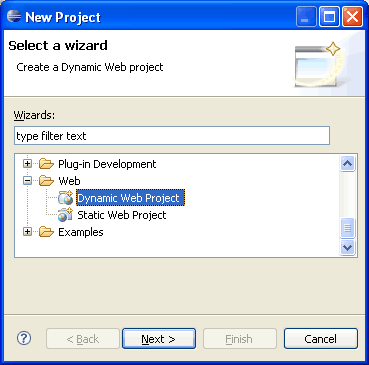
 Select Dynamic Web application and click Next.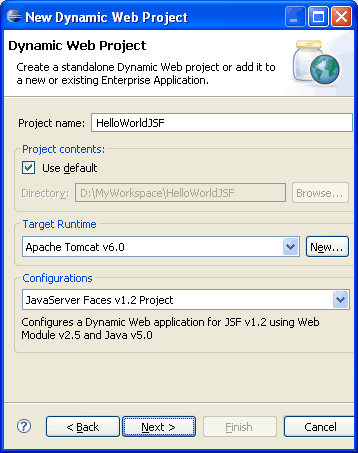
 Write the name of the project HelloWorldJSF. Once this is done, select the target runtime environment (e.g. Apache Tomcat v6.0). This is to run the project inside Eclipse environment. In configuration select JavaServer Faces v1.2 Project and press Next.
[ad#blogs_content_inbetween]
Write the name of the project HelloWorldJSF. Once this is done, select the target runtime environment (e.g. Apache Tomcat v6.0). This is to run the project inside Eclipse environment. In configuration select JavaServer Faces v1.2 Project and press Next.
[ad#blogs_content_inbetween] 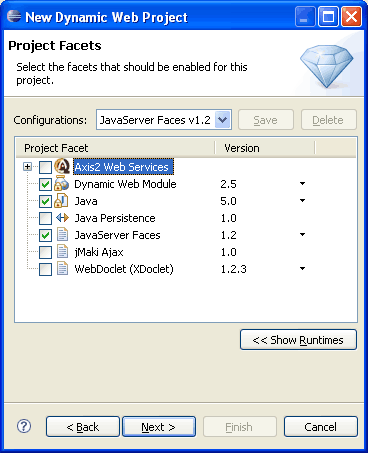
 On Project Facets window, select Java 5 and JSF 1.2 and press Next. Skip Web module window and press Next.
  Select JSF component library. Click New in Component Libraries and add jstl.jar, jsf-api.jar and jsf-impl.jar. In URL Mapping Patterns add /faces/* and then click Finish. Once the project is created, you can see its structure in Project Explorer.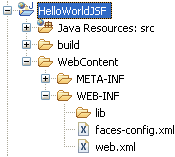

Step 4: Modify faces-config.xml file Open faces-config.xml from WebContent -> WEB-INF folder and copy following content into it.
- JDK 1.5 above (download)
- Tomcat 5.x above or any other container (Glassfish, JBoss, Websphere, Weblogic etc) (download)
- Eclipse 3.2.x above (download)
- Sun Reference Implementation of JSF: (download). Following are the list of JAR files required for this application.
- jsf-impl.jar
- jsf-api.jar
- jstl.jar
- common-logging.jar
- common-beanutils.jar
- common-collections.jar
- common-chain.jar
- common-digester.jar
Step 1: Create Dynamic Web project
Open Eclipse and goto File -> New -> Project and select Dynamic Web Project in the New Project wizard screen. Select Dynamic Web application and click Next.
  Write the name of the project HelloWorldJSF. Once this is done, select the target runtime environment (e.g. Apache Tomcat v6.0). This is to run the project inside Eclipse environment. In configuration select JavaServer Faces v1.2 Project and press Next.
[ad#blogs_content_inbetween]
Write the name of the project HelloWorldJSF. Once this is done, select the target runtime environment (e.g. Apache Tomcat v6.0). This is to run the project inside Eclipse environment. In configuration select JavaServer Faces v1.2 Project and press Next.
[ad#blogs_content_inbetween]  On Project Facets window, select Java 5 and JSF 1.2 and press Next. Skip Web module window and press Next.
 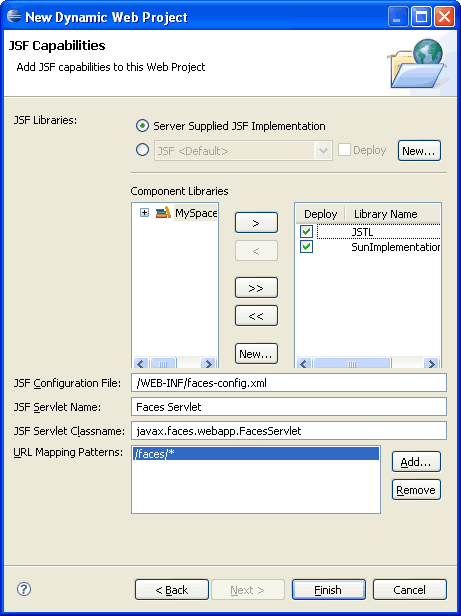 Select JSF component library. Click New in Component Libraries and add jstl.jar, jsf-api.jar and jsf-impl.jar. In URL Mapping Patterns add /faces/* and then click Finish. Once the project is created, you can see its structure in Project Explorer.
Step 2: Create Package and Managed bean
Create a package net.viralpatel.jsf.helloworld in the source folder and create a Java file UserBean.java. Copy following content into UserBean.java.package net.viralpatel.jsf.helloworld;
public class UserBean {
private int id;
private String name;
//Action method to add user
public String addUser() {
return "success";
}
public int getId() {
return id;
}
public void setId(int id) {
this.id = id;
}
public String getName() {
return name;
}
public void setName(String name) {
this.name = name;
}
}
Code language: Java (java)Step 3: Create JSP files
Create two JSP files: AddUser.jsp and ListUser.jsp in WebContent folder. Copy following content in each of these files.AddUser.jsp
[ad#blogs_content_inbetween]<%@taglib uri="http://java.sun.com/jsf/core" prefix="f"%>
<%@taglib uri="http://java.sun.com/jsf/html" prefix="h"%>
<html>
<head>
<title>Add New User Form</title>
</head>
<body>
<f:view>
<p>
<h:message id="errors" for="User_ID" style="color:red"/>
</p>
<h:form>
<h:panelGrid border="1" columns="2">
<h:outputText value="ID"></h:outputText>
<h:inputText id="User_ID" value="#{userBean.id}" required="true">
<f:validateLongRange minimum="1" maximum="500"/>
</h:inputText>
<h:outputText value="Name"></h:outputText>
<h:inputText value="#{userBean.name}"></h:inputText>
<h:commandButton action="#{userBean.addUser}"
value="Add Customer"></h:commandButton>
</h:panelGrid>
</h:form>
</f:view>
</body>
</html>
Code language: HTML, XML (xml)ListUser.jsp
<%@taglib uri="http://java.sun.com/jsf/core" prefix="f"%>
<%@taglib uri="http://java.sun.com/jsf/html" prefix="h"%>

<html>
<head>
	<title>List of Users</title>
</head>
<body>
<f:view>
	<h:form>
		<h:outputText value="User #{userBean.name} is added successfully.">
		</h:outputText>
	</h:form>
</f:view>
</body>
</html>
Code language: HTML, XML (xml)
Step 4: Modify faces-config.xml file Open faces-config.xml from WebContent -> WEB-INF folder and copy following content into it.<?xml version="1.0" encoding="UTF-8"?>
<faces-config xmlns="http://java.sun.com/xml/ns/javaee"
xmlns:xsi="http://www.w3.org/2001/XMLSchema-instance"
xsi:schemaLocation="http://java.sun.com/xml/ns/javaee http://java.sun.com/xml/ns/javaee/web-facesconfig_1_2.xsd"
version="1.2">
<managed-bean>
<managed-bean-name>userBean</managed-bean-name>
<managed-bean-class>
net.viralpatel.jsf.helloworld.UserBean
</managed-bean-class>
<managed-bean-scope>session</managed-bean-scope>
</managed-bean>
<navigation-rule>
<display-name>AddUser</display-name>
<from-view-id>/AddUser.jsp</from-view-id>
<navigation-case>
<from-outcome>success</from-outcome>
<to-view-id>/ListUser.jsp</to-view-id>
</navigation-case>
</navigation-rule>
</faces-config>
Code language: HTML, XML (xml)Step 5: Execute and run the project
Final step is to execute the project and view it in browser.
For this, right click on Project Name in Project Explorer -> Run As -> Run on Server (Shortcut Alt+Shift+X, R).
[ad#blogs_content_inbetween] 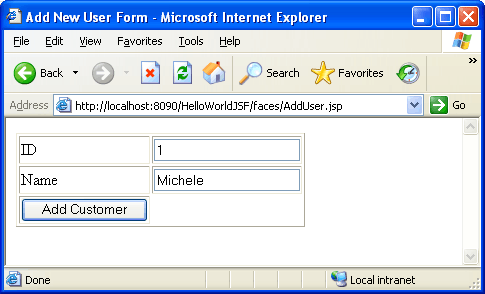
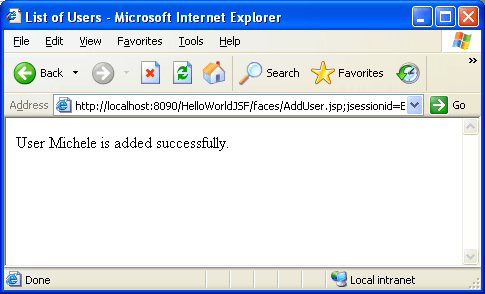
 Once you enter ID and Username and press Add User, following success screen will appear.
 Download complete WAR file with source
Download WAR with Source (1.48 MB) Next >> JavaServer Faces JSF Validation Tutorial: Error Handling in JSF.
<?xml version="1.0" encoding="UTF-8"?>
<faces-config xmlns="http://java.sun.com/xml/ns/javaee"
xmlns:xsi="http://www.w3.org/2001/XMLSchema-instance"
xsi:schemaLocation="http://java.sun.com/xml/ns/javaee http://java.sun.com/xml/ns/javaee/web-facesconfig_1_2.xsd"
version="1.2">
<managed-bean>
<managed-bean-name>userBean</managed-bean-name>
<managed-bean-class>
net.viralpatel.jsf.helloworld.UserBean
</managed-bean-class>
<managed-bean-scope>session</managed-bean-scope>
</managed-bean>
<navigation-rule>
<display-name>AddUser</display-name>
<from-view-id>/AddUser.jsp</from-view-id>
<navigation-case>
<from-outcome>success</from-outcome>
<to-view-id>/ListUser.jsp</to-view-id>
</navigation-case>
</navigation-rule>
</faces-config>





Very simple and ease to follow.
Many thanks
Thanks for the comment Jide. :)
The last screen shot of the browser still has AddUser.jsp as the URL instead of ListUser.jsp. This creates confusion.
Hi Navier,
JSF uses internal FORWARD instead of REDIRECT to navigate to the success page. Hence the URL will not get changed.
Well, it uses forward “by default”. Just add a “redirect” tag to your navigation handler in faces-config.xml and there you are …. No more confusion (but you loose requestMap parameters, in case you use them or FacesMessages).
Eduard
Very good example Viral.. helped me to understand jsf..
Thanks for the comment Nishant. You may want to subscribe your email for the Articles.
This helped me for executing my first JSF program. Thanks for your work.
hiiii viral great example .. i understood well bt wanna know more abt jsf..
could u jst forward me one simple application using jsf ..
Thanks
Hi Viral.. Great example for the beginners.
Thanks,
Rajan
hi dude, its nice example….. really impressive…..
Thanks, this article is very useful.
Hi Viral,
What is better, jsf RI or Apache’s myfaces?
You have used jsf api nad impl jars
Is it better than myfaces api and impl jars?
what are the advantages and disadvantages?
:)
Hi Sharon,
JSF is a specification provided by SUN and you will find a number of implementations of JSF and one of such implementation is from Apache called MyFaces. Although in above example I have used JSF just to show a basic example, it may be useful to use MyFaces in your early stage of development. MyFaces provides lots of components that can be easily integrated with application.
If you are learning JSF for first time and just wants to know the life cycle of JSF application, then the reference implementation is quite useful. But if you are developing a full fledged application then you must use MyFaces.
Hope this answers you queries. :)
thank you so much :)
Hi,
I keep getting this warning on the JSP code, “userBean can not be resolved”. Can someone please tell me what I am doing wrong. The error log says
rg.apache.catalina.loader.StandardClassLoader@601bb1
javax.faces.webapp.FacesServlet
java.lang.ClassNotFoundException: javax.faces.webapp.FacesServlet
at org.apache.catalina.loader.WebappClassLoader.loadClass(WebappClassLoader.java:1387)
at org.apache.catalina.loader.WebappClassLoader.loadClass(WebappClassLoader.java:1233)
at org.apache.catalina.core.StandardWrapper.loadServlet(StandardWrapper.java:1095)
at org.apache.catalina.core.StandardWrapper.load(StandardWrapper.java:993)
at org.apache.catalina.core.StandardContext.loadOnStartup(StandardContext.java:4149)
at org.apache.catalina.core.StandardContext.start(StandardContext.java:4458)
at org.apache.catalina.core.ContainerBase.start(ContainerBase.java:1045)
at org.apache.catalina.core.StandardHost.start(StandardHost.java:722)
at org.apache.catalina.core.ContainerBase.start(ContainerBase.java:1045)
at org.apache.catalina.core.StandardEngine.start(StandardEngine.java:443)
at org.apache.catalina.core.StandardService.start(StandardService.java:516)
at org.apache.catalina.core.StandardServer.start(StandardServer.java:710)
at org.apache.catalina.startup.Catalina.start(Catalina.java:583)
at sun.reflect.NativeMethodAccessorImpl.invoke0(Native Method)
at sun.reflect.NativeMethodAccessorImpl.invoke(NativeMethodAccessorImpl.java:39)
at sun.reflect.DelegatingMethodAccessorImpl.invoke(DelegatingMethodAccessorImpl.java:25)
at java.lang.reflect.Method.invoke(Method.java:585)
at org.apache.catalina.startup.Bootstrap.start(Bootstrap.java:288)
at org.apache.catalina.startup.Bootstrap.main(Bootstrap.java:413)
Nov 10, 2009 4:26:40 PM org.apache.catalina.core.StandardContext loadOnStartup
SEVERE: Servlet /LibraryWebTest threw load() exception
java.lang.ClassNotFoundException: javax.faces.webapp.FacesServlet
at org.apache.catalina.loader.WebappClassLoader.loadClass(WebappClassLoader.java:1387)
at org.apache.catalina.loader.WebappClassLoader.loadClass(WebappClassLoader.java:1233)
at org.apache.catalina.core.StandardWrapper.loadServlet(StandardWrapper.java:1095)
at org.apache.catalina.core.StandardWrapper.load(StandardWrapper.java:993)
at org.apache.catalina.core.StandardContext.loadOnStartup(StandardContext.java:4149)
at org.apache.catalina.core.StandardContext.start(StandardContext.java:4458)
at org.apache.catalina.core.ContainerBase.start(ContainerBase.java:1045)
at org.apache.catalina.core.StandardHost.start(StandardHost.java:722)
at org.apache.catalina.core.ContainerBase.start(ContainerBase.java:1045)
at org.apache.catalina.core.StandardEngine.start(StandardEngine.java:443)
at org.apache.catalina.core.StandardService.start(StandardService.java:516)
at org.apache.catalina.core.StandardServer.start(StandardServer.java:710)
at org.apache.catalina.startup.Catalina.start(Catalina.java:583)
at sun.reflect.NativeMethodAccessorImpl.invoke0(Native Method)
at sun.reflect.NativeMethodAccessorImpl.invoke(NativeMethodAccessorImpl.java:39)
at sun.reflect.DelegatingMethodAccessorImpl.invoke(DelegatingMethodAccessorImpl.java:25)
at java.lang.reflect.Method.invoke(Method.java:585)
at org.apache.catalina.startup.Bootstrap.start(Bootstrap.java:288)
at org.apache.catalina.startup.Bootstrap.main(Bootstrap.java:413)
Nov 10, 2009 4:26:40 PM org.apache.catalina.core.ApplicationContext log
INFO: Marking servlet Faces Servlet as unavailable
Nov 10, 2009 4:26:40 PM org.apache.catalina.core.ApplicationContext log
SEVERE: Error loading WebappClassLoader
delegate: false
repositories:
/WEB-INF/classes/
———-> Parent Classloader:
org.apache.catalina.loader.StandardClassLoader@601bb1
javax.faces.webapp.FacesServlet
java.lang.ClassNotFoundException: javax.faces.webapp.FacesServlet
at org.apache.catalina.loader.WebappClassLoader.loadClass(WebappClassLoader.java:1387)
at org.apache.catalina.loader.WebappClassLoader.loadClass(WebappClassLoader.java:1233)
at org.apache.catalina.core.StandardWrapper.loadServlet(StandardWrapper.java:1095)
at org.apache.catalina.core.StandardWrapper.load(StandardWrapper.java:993)
at org.apache.catalina.core.StandardContext.loadOnStartup(StandardContext.java:4149)
at org.apache.catalina.core.StandardContext.start(StandardContext.java:4458)
at org.apache.catalina.core.ContainerBase.start(ContainerBase.java:1045)
at org.apache.catalina.core.StandardHost.start(StandardHost.java:722)
at org.apache.catalina.core.ContainerBase.start(ContainerBase.java:1045)
at org.apache.catalina.core.StandardEngine.start(StandardEngine.java:443)
at org.apache.catalina.core.StandardService.start(StandardService.java:516)
at org.apache.catalina.core.StandardServer.start(StandardServer.java:710)
at org.apache.catalina.startup.Catalina.start(Catalina.java:583)
at sun.reflect.NativeMethodAccessorImpl.invoke0(Native Method)
at sun.reflect.NativeMethodAccessorImpl.invoke(NativeMethodAccessorImpl.java:39)
at sun.reflect.DelegatingMethodAccessorImpl.invoke(DelegatingMethodAccessorImpl.java:25)
at java.lang.reflect.Method.invoke(Method.java:585)
at org.apache.catalina.startup.Bootstrap.start(Bootstrap.java:288)
at org.apache.catalina.startup.Bootstrap.main(Bootstrap.java:413)
Nov 10, 2009 4:26:40 PM org.apache.catalina.core.StandardContext loadOnStartup
SEVERE: Servlet /JSFTest threw load() exception
java.lang.ClassNotFoundException: javax.faces.webapp.FacesServlet
at org.apache.catalina.loader.WebappClassLoader.loadClass(WebappClassLoader.java:1387)
at org.apache.catalina.loader.WebappClassLoader.loadClass(WebappClassLoader.java:1233)
at org.apache.catalina.core.StandardWrapper.loadServlet(StandardWrapper.java:1095)
at org.apache.catalina.core.StandardWrapper.load(StandardWrapper.java:993)
at org.apache.catalina.core.StandardContext.loadOnStartup(StandardContext.java:4149)
at org.apache.catalina.core.StandardContext.start(StandardContext.java:4458)
at org.apache.catalina.core.ContainerBase.start(ContainerBase.java:1045)
at org.apache.catalina.core.StandardHost.start(StandardHost.java:722)
at org.apache.catalina.core.ContainerBase.start(ContainerBase.java:1045)
at org.apache.catalina.core.StandardEngine.start(StandardEngine.java:443)
at org.apache.catalina.core.StandardService.start(StandardService.java:516)
at org.apache.catalina.core.StandardServer.start(StandardServer.java:710)
at org.apache.catalina.startup.Catalina.start(Catalina.java:583)
at sun.reflect.NativeMethodAccessorImpl.invoke0(Native Method)
at sun.reflect.NativeMethodAccessorImpl.invoke(NativeMethodAccessorImpl.java:39)
at sun.reflect.DelegatingMethodAccessorImpl.invoke(DelegatingMethodAccessorImpl.java:25)
at java.lang.reflect.Method.invoke(Method.java:585)
at org.apache.catalina.startup.Bootstrap.start(Bootstrap.java:288)
at org.apache.catalina.startup.Bootstrap.main(Bootstrap.java:413)
Nov 10, 2009 4:26:40 PM org.apache.catalina.core.ApplicationContext log
INFO: Marking servlet Faces Servlet as unavailable
Nov 10, 2009 4:26:40 PM org.apache.catalina.core.ApplicationContext log
SEVERE: Error loading WebappClassLoader
delegate: false
repositories:
/WEB-INF/classes/
———-> Parent Classloader:
org.apache.catalina.loader.StandardClassLoader@601bb1
javax.faces.webapp.FacesServlet
java.lang.ClassNotFoundException: javax.faces.webapp.FacesServlet
at org.apache.catalina.loader.WebappClassLoader.loadClass(WebappClassLoader.java:1387)
at org.apache.catalina.loader.WebappClassLoader.loadClass(WebappClassLoader.java:1233)
at org.apache.catalina.core.StandardWrapper.loadServlet(StandardWrapper.java:1095)
at org.apache.catalina.core.StandardWrapper.load(StandardWrapper.java:993)
at org.apache.catalina.core.StandardContext.loadOnStartup(StandardContext.java:4149)
at org.apache.catalina.core.StandardContext.start(StandardContext.java:4458)
at org.apache.catalina.core.ContainerBase.start(ContainerBase.java:1045)
at org.apache.catalina.core.StandardHost.start(StandardHost.java:722)
at org.apache.catalina.core.ContainerBase.start(ContainerBase.java:1045)
at org.apache.catalina.core.StandardEngine.start(StandardEngine.java:443)
at org.apache.catalina.core.StandardService.start(StandardService.java:516)
at org.apache.catalina.core.StandardServer.start(StandardServer.java:710)
at org.apache.catalina.startup.Catalina.start(Catalina.java:583)
at sun.reflect.NativeMethodAccessorImpl.invoke0(Native Method)
at sun.reflect.NativeMethodAccessorImpl.invoke(NativeMethodAccessorImpl.java:39)
at sun.reflect.DelegatingMethodAccessorImpl.invoke(DelegatingMethodAccessorImpl.java:25)
at java.lang.reflect.Method.invoke(Method.java:585)
at org.apache.catalina.startup.Bootstrap.start(Bootstrap.java:288)
at org.apache.catalina.startup.Bootstrap.main(Bootstrap.java:413)
Nov 10, 2009 4:26:40 PM org.apache.catalina.core.StandardContext loadOnStartup
SEVERE: Servlet /HelloWorldJSF threw load() exception
java.lang.ClassNotFoundException: javax.faces.webapp.FacesServlet
at org.apache.catalina.loader.WebappClassLoader.loadClass(WebappClassLoader.java:1387)
at org.apache.catalina.loader.WebappClassLoader.loadClass(WebappClassLoader.java:1233)
at org.apache.catalina.core.StandardWrapper.loadServlet(StandardWrapper.java:1095)
at org.apache.catalina.core.StandardWrapper.load(StandardWrapper.java:993)
at org.apache.catalina.core.StandardContext.loadOnStartup(StandardContext.java:4149)
at org.apache.catalina.core.StandardContext.start(StandardContext.java:4458)
at org.apache.catalina.core.ContainerBase.start(ContainerBase.java:1045)
at org.apache.catalina.core.StandardHost.start(StandardHost.java:722)
at org.apache.catalina.core.ContainerBase.start(ContainerBase.java:1045)
at org.apache.catalina.core.StandardEngine.start(StandardEngine.java:443)
at org.apache.catalina.core.StandardService.start(StandardService.java:516)
at org.apache.catalina.core.StandardServer.start(StandardServer.java:710)
at org.apache.catalina.startup.Catalina.start(Catalina.java:583)
at sun.reflect.NativeMethodAccessorImpl.invoke0(Native Method)
at sun.reflect.NativeMethodAccessorImpl.invoke(NativeMethodAccessorImpl.java:39)
at sun.reflect.DelegatingMethodAccessorImpl.invoke(DelegatingMethodAccessorImpl.java:25)
at java.lang.reflect.Method.invoke(Method.java:585)
at org.apache.catalina.startup.Bootstrap.start(Bootstrap.java:288)
at org.apache.catalina.startup.Bootstrap.main(Bootstrap.java:413)
Nov 10, 2009 4:26:40 PM org.apache.coyote.http11.Http11Protocol start
Thanks
Hi Viral.
This is karuna from ULM..Hope you remember me!.i have to build a small application in JSF. I just went through your tutorial.I did not know that you have good knowledege in JSF too.Good job..probably you can help me out in building the small application in JSF. Will discuss with u my requirements soon!!!
thanks
Hi karuna, Nice to hear from you. Let me know if you need my help in JSF.
hello viral
same problem i am having when i run the application
HTTP Status 404 – /HelloWorldJSF/
type Status report
message /HelloWorldJSF/
description The requested resource (/HelloWorldJSF/) is not available.
Apache Tomcat/6.0.18
Reply Me plz…. as soon as possible
Hi Viral,
While running your example, I am also getting the same error as Viv… You have any clue what the issue could be?
Thanks in advance. :)
Hi Neo
The reason you keep getting the error as Viv is that the app cant find the class ‘ javax.faces.webapp.FacesServlet’. In another word it cant find the class javax.faces.webapp.FacesServlet within the jar file jsf-api.jar. What you can try is to go into the JSF Capacities window to make sure you setup the Libraries to include the jsf-api.jar.
Hope it helps.
Hey Viral,
Great job man.
Can you help me with a tutorial that combines JPA and JSF capabilities, or rather if you can help me with JPA tutorial , it will be great..
great for tutorial, I am from Peru, and read this, for me excellent the kind of explanation
When i run your application from eclipse ganemade version i am getting following error.
INFO: JSF1027: [HelloWorldJSF] The ELResolvers for JSF were not registered with the JSP container.
2010-04-01 12:01:03.606 NOTIFICATION J2EE JSP-0008 Unable to dispatch JSP Page : Exception:oracle.jsp.parse.JspParseException: /AddUser.jsp: Line # 9,
Error: Unable to instantiate tag: f:view (class: null) Make sure that the tag class is available and that the tag library containing the class is not excluded from this application.
2010-04-01 12:04:45.529 NOTIFICATION J2EE JSP-0008 Unable to dispatch JSP Page : Exception:oracle.jsp.parse.JspParseException: /AddUser.jsp: Line # 9,
Error: Unable to instantiate tag: f:view (class: null) Make sure that the tag class is available and that the tag library containing the class is not excluded from this application.
please help me
nice contents.
thank you.
Nice quick start guide…I’ve always used Spring MVC and new to JSF now..Do you have an example on how to integrate Facelets with this?
it is so simple and very easy for me to understand the jsf now
Thanks
hiiiiii,
dear thanks for a marvelous guidelines,,,,,,,,,,
You have any clue what the issue could be?
Thanks in advance. :)
hiiiiiiiii
dear thanks …its very simple and easy to understand …am new to jsf i have one doubt
in some examples i saw some jsp file and jspx files …why they are used jspx file ? when we have to use jspx?
thanks in advance…..
and one more doubt viral. is it possible to combine tiles with jsf
works fine dude.
IT !!!!!!!!!!!!!!!!!! NICE TUTORIAL FOR BEGINNERS!!!!!!!!!!!!!!!!!
hi
i create app by ur tuto..
bt wn i run i getting error
like Facescontext not find..
so give me the solution…
i add this code in web.xml bt i cant run again
com.sun.faces.config.ConfigureListener
so give me the solution..
Very good tutorial . Keep on posting this kind of tutorials .
Helped me a lot . Thanks Viral Patel
thanks viral
nice post for newbies
thanks so much
Simpel and an excellent example for a starter like myself. Apprecaite your work Mr. Patel.
Iftikhar
thanks for ever viral ,Very good tutorial
Hi,
when I run your example I got this error :
org.apache.jasper.JasperException: An exception occurred processing JSP page /AddUser.jsp at line 9
6: Add New User Form
7:
8:
9:
10:
11:
12:
can you please help me
I am getting the error at
and while running its saying that
Hi Viral,
Thanks for such a good sample JSF application..
I followed all the steps provided by you but still getting some error.
When I hit the below URL, I can see jsp in browser..
http://localhost:8080/MyJsfProject/faces/AddUser.jsp
But when I run the project by run –> run on server, it throws the following exception..I have put all required jars in lib folder of my project..
message
description The server encountered an internal error () that prevented it from fulfilling this request.
exception
org.apache.jasper.JasperException: An exception occurred processing JSP page /AddUser.jsp at line 9
6: Add New User Form
7:
8:
9:
10:
11:
12:
Stacktrace:
org.apache.jasper.servlet.JspServletWrapper.handleJspException(JspServletWrapper.java:521)
org.apache.jasper.servlet.JspServletWrapper.service(JspServletWrapper.java:412)
org.apache.jasper.servlet.JspServlet.serviceJspFile(JspServlet.java:313)
org.apache.jasper.servlet.JspServlet.service(JspServlet.java:260)
javax.servlet.http.HttpServlet.service(HttpServlet.java:717)
root cause
javax.servlet.ServletException: javax.servlet.jsp.JspException: Cannot find FacesContext
org.apache.jasper.runtime.PageContextImpl.doHandlePageException(PageContextImpl.java:865)
org.apache.jasper.runtime.PageContextImpl.handlePageException(PageContextImpl.java:794)
org.apache.jsp.AddUser_jsp._jspService(AddUser_jsp.java:99)
org.apache.jasper.runtime.HttpJspBase.service(HttpJspBase.java:70)
javax.servlet.http.HttpServlet.service(HttpServlet.java:717)
org.apache.jasper.servlet.JspServletWrapper.service(JspServletWrapper.java:388)
org.apache.jasper.servlet.JspServlet.serviceJspFile(JspServlet.java:313)
org.apache.jasper.servlet.JspServlet.service(JspServlet.java:260)
Please guide…
Thanks in advance,
Neeraj
Thank you very much it helped a lot.
HTTP Status 404 – /HelloWorldJSF/
——————————————————————————–
type Status report
message /HelloWorldJSF/
description The requested resource (/HelloWorldJSF/) is not available.
——————————————————————————–
Apache Tomcat/7.0.26
i am getting this error when i run this program pls help me !!! and pls help me to understand the concept !!! pls reply as soon as possible!!! waiting for ur reply
i get the same error. any luck? did u get any answer?
Nice info…..:)
Hi Viral,I am unable the run the above example.I am not sure where to store addUser.jsp and listUser.jsp.I tried creating /faces folder under Web content and tried running the addUser.jsp but i got the error “user can not be found /addUser.jsp. I am using Rational Application Developer v 7.
Please help me out.
Kiran
hi
Please check I am not able to download war file
thanks
Great Tutorial !
Where should I place the 4 common jars?????
hi
I’ve a question when create jsp file , there are many choices
when i select first one:JSP with html markup and default view setup
it is work good but when i select 2nd or 3rd choice
it is run but the text only appear and any jsf component not display
and if i used EL error will occur
can you explain me why and what is the difference between choices?
in the userlist.jsp –
how would i display a list of real users? I know the example is setup to add a single user, but if i changed the bean to a collection for storage.
This example is very easy to understand.Thanks :)
hello,
i am not able to run the application and getting the error..
HTTP Status 404 – /HelloWorldJSF/
——————————————————————————–
type Status report
message /HelloWorldJSF/
description The requested resource (/HelloWorldJSF/) is not available.
——————————————————————————–
Apache Tomcat/7.0.26
waiting for your reply.
HTTP Status 404 – /HelloWorldJSF/
i am getting this error when i run the application.
type Status report
message /HelloWorldJSF/
description The requested resource (/HelloWorldJSF/) is not available.
Apache Tomcat/6.0.18
waiting for your reply
check your Web.xml file like any incorrect syntax capital or small letter of class name or many more in .xml file
Your HelloWorldJSF application is not working with url http://localhost:8080/HelloWorldJSF/faces/AddUser.jsp on my machine.
This error is coming on console
java.lang.ClassNotFoundException – javax.servlet.jsp.jstl.core.Config
Hi Viral,
Is there mapping between web.xml and faces-config.xml file.If i run this app as run on server iam getting an error.But if run using this url iam able to see the o/p.http://localhost:8080/HelloWorldJSF/faces/AddUser.jsp
Hi Friends,
if u add the below line in web.xml,I think u ll see the result
faces/AddUser.jsp
instead of “faces/AddUser.jsp”
In web.xml just put this:
*.jsp
Thanks varsha your line of code is useful now I can able to run my Program.
Hi,
My index.jsp has,
http://localhost:8092/PMOfinal/faces/index.jsp – works fine in Chrome, Mozilla. But in IE, it is plain – without style. Seems like IE is looking for http://localhost:8092/PMOfinal/faces/styles/blue_page.css
Can u help me in getting rid of this issue – a common solution to all browser.
Will the below mentioned steps work out for JSF project development in eclipse?
http://goanswered.com/index.php/196/what-are-the-basic-steps-to-create-jsf-application-in-eclipse
thanks.. it was useful for me
do i need to set environmental variables for jdk and jre ???
For compilation, you’ll need environment variable set to JDK. So set
JAVA_HOMEto directory where JDK is installed.HTTP STATUS –>404 NOT FOUND Error…
waiting for u r reply….
Add all the jars in WEB-INF/lib
jsf-impl.jar
jsf-api.jar
jstl.jar
commons-logging.jar
commons-beanutils.jar
commons-collections.jar
commons-chain.jar
commons-digester.jar
commons-codec-1.6.jar
add then add it to the build path..
It Works!!!!!!!!!!!!!
Yes, it works, thx:)
if you add the jars it is not necassary to change anything else
i don’t know what is the problem, please help…
24-01-2013 07:15:25 PM org.apache.catalina.core.AprLifecycleListener init
INFO: La biblioteca nativa de Apache Tomcat basada en ARP que permite un rendimiento óptimo en entornos de desarrollo no ha sido hallada en java.library.path: /usr/lib/jvm/java-6-oracle/jre/lib/amd64/server:/usr/lib/jvm/java-6-oracle/jre/lib/amd64:/usr/lib/jvm/java-6-oracle/jre/../lib/amd64:/usr/java/packages/lib/amd64:/usr/lib64:/lib64:/lib:/usr/lib
24-01-2013 07:15:25 PM org.apache.tomcat.util.digester.SetPropertiesRule begin
ADVERTENCIA: [SetPropertiesRule]{Server/Service/Engine/Host/Context} Setting property ‘source’ to ‘org.eclipse.jst.jee.server:HelloWorldJSF’ did not find a matching property.
24-01-2013 07:15:25 PM org.apache.coyote.http11.Http11Protocol init
INFO: Inicializando Coyote HTTP/1.1 en puerto http-8081
24-01-2013 07:15:25 PM org.apache.catalina.startup.Catalina load
INFO: Initialization processed in 418 ms
24-01-2013 07:15:25 PM org.apache.catalina.core.StandardService start
INFO: Arrancando servicio Catalina
24-01-2013 07:15:25 PM org.apache.catalina.core.StandardEngine start
INFO: Starting Servlet Engine: Apache Tomcat/6.0.26
24-01-2013 07:15:25 PM org.apache.catalina.core.StandardContext addApplicationListener
INFO: El escuchador “org.apache.myfaces.webapp.StartupServletContextListener” ya está configurado para este contexto. La definición duplicada ha sido ignorada.
24-01-2013 07:15:25 PM org.apache.myfaces.webapp.StartupServletContextListener dispatchInitializationEvent
INFO: Checking for plugins:org.apache.myfaces.FACES_INIT_PLUGINS
24-01-2013 07:15:25 PM org.apache.myfaces.shared_impl.config.MyfacesConfig getBooleanInitParameter
INFO: No context init parameter ‘org.apache.myfaces.RENDER_CLEAR_JAVASCRIPT_FOR_BUTTON’ found, using default value false
24-01-2013 07:15:25 PM org.apache.myfaces.shared_impl.config.MyfacesConfig getBooleanInitParameter
INFO: No context init parameter ‘org.apache.myfaces.RENDER_HIDDEN_FIELDS_FOR_LINK_PARAMS’ found, using default value false
24-01-2013 07:15:25 PM org.apache.myfaces.shared_impl.config.MyfacesConfig getBooleanInitParameter
INFO: No context init parameter ‘org.apache.myfaces.SAVE_FORM_SUBMIT_LINK_IE’ found, using default value false
24-01-2013 07:15:25 PM org.apache.myfaces.shared_impl.config.MyfacesConfig getBooleanInitParameter
INFO: No context init parameter ‘org.apache.myfaces.READONLY_AS_DISABLED_FOR_SELECTS’ found, using default value true
24-01-2013 07:15:25 PM org.apache.myfaces.shared_impl.config.MyfacesConfig getBooleanInitParameter
INFO: No context init parameter ‘org.apache.myfaces.RENDER_VIEWSTATE_ID’ found, using default value true
24-01-2013 07:15:25 PM org.apache.myfaces.shared_impl.config.MyfacesConfig getBooleanInitParameter
INFO: No context init parameter ‘org.apache.myfaces.STRICT_XHTML_LINKS’ found, using default value true
24-01-2013 07:15:25 PM org.apache.myfaces.shared_impl.config.MyfacesConfig getLongInitParameter
INFO: No context init parameter ‘org.apache.myfaces.CONFIG_REFRESH_PERIOD’ found, using default value 2
24-01-2013 07:15:25 PM org.apache.myfaces.shared_impl.config.MyfacesConfig getBooleanInitParameter
INFO: No context init parameter ‘org.apache.myfaces.VIEWSTATE_JAVASCRIPT’ found, using default value false
24-01-2013 07:15:25 PM org.apache.myfaces.shared_impl.config.MyfacesConfig createAndInitializeMyFacesConfig
INFO: Tomahawk jar not available. Autoscrolling, DetectJavascript, AddResourceClass and CheckExtensionsFilter are disabled now.
24-01-2013 07:15:25 PM org.apache.myfaces.shared_impl.config.MyfacesConfig createAndInitializeMyFacesConfig
INFO: Starting up Tomahawk on the RI-JSF-Implementation.
24-01-2013 07:15:25 PM org.apache.myfaces.shared_impl.config.MyfacesConfig createAndInitializeMyFacesConfig
INFO: Starting up Tomahawk on the MyFaces-JSF-Implementation
24-01-2013 07:15:25 PM org.apache.myfaces.shared_impl.config.MyfacesConfig createAndInitializeMyFacesConfig
GRAVE: Both MyFaces and the RI are on your classpath. Please make sure to use only one of the two JSF-implementations.
24-01-2013 07:15:25 PM org.apache.myfaces.config.FacesConfigurator feedStandardConfig
INFO: Reading standard config META-INF/standard-faces-config.xml
24-01-2013 07:15:25 PM org.apache.myfaces.config.FacesConfigurator feedWebAppConfig
INFO: Reading config /WEB-INF/faces-config.xml
24-01-2013 07:15:25 PM org.apache.myfaces.config.FacesConfigurator startLib
INFO: Starting up MyFaces-package : myfaces-api in version : 1.2.9 from path : file:/home/renato/workspaceInfo/.metadata/.plugins/org.eclipse.wst.server.core/tmp0/wtpwebapps/HelloWorldJSF/WEB-INF/lib/myfaces-api-1.2.9.jar
24-01-2013 07:15:25 PM org.apache.myfaces.config.FacesConfigurator startLib
INFO: Starting up MyFaces-package : myfaces-impl in version : 1.2.9 from path : file:/home/renato/workspaceInfo/.metadata/.plugins/org.eclipse.wst.server.core/tmp0/wtpwebapps/HelloWorldJSF/WEB-INF/lib/myfaces-impl-1.2.9.jar
24-01-2013 07:15:25 PM org.apache.myfaces.config.FacesConfigurator startLib
INFO: MyFaces-package : tomahawk not found.
24-01-2013 07:15:25 PM org.apache.myfaces.config.FacesConfigurator startLib
INFO: MyFaces-package : tomahawk12 not found.
24-01-2013 07:15:25 PM org.apache.myfaces.config.FacesConfigurator startLib
INFO: MyFaces-package : tomahawk-sandbox not found.
24-01-2013 07:15:25 PM org.apache.myfaces.config.FacesConfigurator startLib
INFO: MyFaces-package : tomahawk-sandbox12 not found.
24-01-2013 07:15:25 PM org.apache.myfaces.config.FacesConfigurator startLib
INFO: MyFaces-package : tomahawk-sandbox15 not found.
24-01-2013 07:15:25 PM org.apache.myfaces.config.FacesConfigurator startLib
INFO: MyFaces-package : myfaces-orchestra-core not found.
24-01-2013 07:15:25 PM org.apache.myfaces.config.FacesConfigurator startLib
INFO: MyFaces-package : myfaces-orchestra-core12 not found.
24-01-2013 07:15:25 PM org.apache.myfaces.config.FacesConfigurator startLib
INFO: MyFaces-package : trinidad-api not found.
24-01-2013 07:15:25 PM org.apache.myfaces.config.FacesConfigurator startLib
INFO: MyFaces-package : trinidad-impl not found.
24-01-2013 07:15:25 PM org.apache.myfaces.config.FacesConfigurator startLib
INFO: MyFaces-package : tobago not found.
24-01-2013 07:15:25 PM org.apache.myfaces.config.FacesConfigurator startLib
INFO: MyFaces-package : commons-el not found.
24-01-2013 07:15:25 PM org.apache.myfaces.config.FacesConfigurator startLib
INFO: MyFaces-package : jsp-api not found.
24-01-2013 07:15:25 PM org.apache.myfaces.shared_impl.util.LocaleUtils toLocale
ADVERTENCIA: Locale name in faces-config.xml null or empty, setting locale to default locale : es_BO
24-01-2013 07:15:26 PM org.apache.myfaces.config.FacesConfigurator handleSerialFactory
INFO: Serialization provider : class org.apache.myfaces.shared_impl.util.serial.DefaultSerialFactory
24-01-2013 07:15:26 PM org.apache.myfaces.webapp.AbstractFacesInitializer initFaces
INFO: ServletContext ‘/home/renato/workspaceInfo/.metadata/.plugins/org.eclipse.wst.server.core/tmp0/wtpwebapps/HelloWorldJSF/’ initialized.
24-01-2013 07:15:26 PM org.apache.myfaces.webapp.StartupServletContextListener dispatchInitializationEvent
INFO: Checking for plugins:org.apache.myfaces.FACES_INIT_PLUGINS
24-01-2013 07:15:26 PM com.sun.faces.config.ConfigureListener contextInitialized
INFO: Inicializando Mojarra 2.0.1 (FCS b02) para el contexto ‘/HelloWorldJSF’
24-01-2013 07:15:26 PM com.sun.faces.config.ConfigManager initialize
INFO: Unsanitized stacktrace from failed start…
java.lang.UnsupportedOperationException
at javax.faces.application.Application.getResourceHandler(Application.java:286)
at com.sun.faces.config.processor.ApplicationConfigProcessor.setResourceHandler(ApplicationConfigProcessor.java:751)
at com.sun.faces.config.processor.ApplicationConfigProcessor.process(ApplicationConfigProcessor.java:309)
at com.sun.faces.config.processor.AbstractConfigProcessor.invokeNext(AbstractConfigProcessor.java:113)
at com.sun.faces.config.processor.LifecycleConfigProcessor.process(LifecycleConfigProcessor.java:115)
at com.sun.faces.config.processor.AbstractConfigProcessor.invokeNext(AbstractConfigProcessor.java:113)
at com.sun.faces.config.processor.FactoryConfigProcessor.process(FactoryConfigProcessor.java:222)
at com.sun.faces.config.ConfigManager.initialize(ConfigManager.java:335)
at com.sun.faces.config.ConfigureListener.contextInitialized(ConfigureListener.java:219)
at org.apache.catalina.core.StandardContext.listenerStart(StandardContext.java:3972)
at org.apache.catalina.core.StandardContext.start(StandardContext.java:4467)
at org.apache.catalina.core.ContainerBase.start(ContainerBase.java:1045)
at org.apache.catalina.core.StandardHost.start(StandardHost.java:785)
at org.apache.catalina.core.ContainerBase.start(ContainerBase.java:1045)
at org.apache.catalina.core.StandardEngine.start(StandardEngine.java:443)
at org.apache.catalina.core.StandardService.start(StandardService.java:519)
at org.apache.catalina.core.StandardServer.start(StandardServer.java:710)
at org.apache.catalina.startup.Catalina.start(Catalina.java:581)
at sun.reflect.NativeMethodAccessorImpl.invoke0(Native Method)
at sun.reflect.NativeMethodAccessorImpl.invoke(NativeMethodAccessorImpl.java:39)
at sun.reflect.DelegatingMethodAccessorImpl.invoke(DelegatingMethodAccessorImpl.java:25)
at java.lang.reflect.Method.invoke(Method.java:597)
at org.apache.catalina.startup.Bootstrap.start(Bootstrap.java:289)
at org.apache.catalina.startup.Bootstrap.main(Bootstrap.java:414)
24-01-2013 07:15:26 PM org.apache.catalina.core.StandardContext listenerStart
GRAVE: Excepción enviando evento inicializado de contexto a instancia de escuchador de clase com.sun.faces.config.ConfigureListener
com.sun.faces.config.ConfigurationException: CONFIGURATION FAILED! null
at com.sun.faces.config.ConfigManager.initialize(ConfigManager.java:354)
at com.sun.faces.config.ConfigureListener.contextInitialized(ConfigureListener.java:219)
at org.apache.catalina.core.StandardContext.listenerStart(StandardContext.java:3972)
at org.apache.catalina.core.StandardContext.start(StandardContext.java:4467)
at org.apache.catalina.core.ContainerBase.start(ContainerBase.java:1045)
at org.apache.catalina.core.StandardHost.start(StandardHost.java:785)
at org.apache.catalina.core.ContainerBase.start(ContainerBase.java:1045)
at org.apache.catalina.core.StandardEngine.start(StandardEngine.java:443)
at org.apache.catalina.core.StandardService.start(StandardService.java:519)
at org.apache.catalina.core.StandardServer.start(StandardServer.java:710)
at org.apache.catalina.startup.Catalina.start(Catalina.java:581)
at sun.reflect.NativeMethodAccessorImpl.invoke0(Native Method)
at sun.reflect.NativeMethodAccessorImpl.invoke(NativeMethodAccessorImpl.java:39)
at sun.reflect.DelegatingMethodAccessorImpl.invoke(DelegatingMethodAccessorImpl.java:25)
at java.lang.reflect.Method.invoke(Method.java:597)
at org.apache.catalina.startup.Bootstrap.start(Bootstrap.java:289)
at org.apache.catalina.startup.Bootstrap.main(Bootstrap.java:414)
Caused by: java.lang.UnsupportedOperationException
at javax.faces.application.Application.getResourceHandler(Application.java:286)
at com.sun.faces.config.processor.ApplicationConfigProcessor.setResourceHandler(ApplicationConfigProcessor.java:751)
at com.sun.faces.config.processor.ApplicationConfigProcessor.process(ApplicationConfigProcessor.java:309)
at com.sun.faces.config.processor.AbstractConfigProcessor.invokeNext(AbstractConfigProcessor.java:113)
at com.sun.faces.config.processor.LifecycleConfigProcessor.process(LifecycleConfigProcessor.java:115)
at com.sun.faces.config.processor.AbstractConfigProcessor.invokeNext(AbstractConfigProcessor.java:113)
at com.sun.faces.config.processor.FactoryConfigProcessor.process(FactoryConfigProcessor.java:222)
at com.sun.faces.config.ConfigManager.initialize(ConfigManager.java:335)
… 16 more
24-01-2013 07:15:26 PM org.apache.catalina.core.StandardContext start
GRAVE: Error listenerStart
24-01-2013 07:15:26 PM org.apache.catalina.core.StandardContext start
GRAVE: Falló en arranque del Contexto [/HelloWorldJSF] debido a errores previos
24-01-2013 07:15:26 PM com.sun.faces.config.ConfigureListener contextDestroyed
GRAVE: Unexpected exception when attempting to tear down the Mojarra runtime
java.lang.IllegalStateException: La aplicación no se ha inicializado correctamente durante el inicio, no se encuentra la fábrica: javax.faces.application.ApplicationFactory
at javax.faces.FactoryFinder$FactoryManager.getFactory(FactoryFinder.java:804)
at javax.faces.FactoryFinder.getFactory(FactoryFinder.java:306)
at com.sun.faces.config.InitFacesContext.getApplication(InitFacesContext.java:104)
at com.sun.faces.config.ConfigureListener.contextDestroyed(ConfigureListener.java:305)
at org.apache.catalina.core.StandardContext.listenerStop(StandardContext.java:4011)
at org.apache.catalina.core.StandardContext.stop(StandardContext.java:4615)
at org.apache.catalina.core.StandardContext.start(StandardContext.java:4512)
at org.apache.catalina.core.ContainerBase.start(ContainerBase.java:1045)
at org.apache.catalina.core.StandardHost.start(StandardHost.java:785)
at org.apache.catalina.core.ContainerBase.start(ContainerBase.java:1045)
at org.apache.catalina.core.StandardEngine.start(StandardEngine.java:443)
at org.apache.catalina.core.StandardService.start(StandardService.java:519)
at org.apache.catalina.core.StandardServer.start(StandardServer.java:710)
at org.apache.catalina.startup.Catalina.start(Catalina.java:581)
at sun.reflect.NativeMethodAccessorImpl.invoke0(Native Method)
at sun.reflect.NativeMethodAccessorImpl.invoke(NativeMethodAccessorImpl.java:39)
at sun.reflect.DelegatingMethodAccessorImpl.invoke(DelegatingMethodAccessorImpl.java:25)
at java.lang.reflect.Method.invoke(Method.java:597)
at org.apache.catalina.startup.Bootstrap.start(Bootstrap.java:289)
at org.apache.catalina.startup.Bootstrap.main(Bootstrap.java:414)
24-01-2013 07:15:26 PM org.apache.myfaces.webapp.StartupServletContextListener dispatchInitializationEvent
INFO: Checking for plugins:org.apache.myfaces.FACES_INIT_PLUGINS
24-01-2013 07:15:26 PM org.apache.myfaces.config.annotation.DefaultLifecycleProviderFactory getLifecycleProvider
INFO: No ExternalContext using fallback LifecycleProvider.
24-01-2013 07:15:26 PM org.apache.myfaces.config.annotation.DefaultLifecycleProviderFactory getLifecycleProvider
INFO: Using LifecycleProvider org.apache.myfaces.config.annotation.AllAnnotationLifecycleProvider
24-01-2013 07:15:26 PM org.apache.myfaces.webapp.StartupServletContextListener dispatchInitializationEvent
INFO: Checking for plugins:org.apache.myfaces.FACES_INIT_PLUGINS
24-01-2013 07:15:26 PM org.apache.catalina.loader.WebappClassLoader clearThreadLocalMap
GRAVE: A web application created a ThreadLocal with key of type [java language=”.lang.ThreadLocal”][/java] (value [java language=”.lang.ThreadLocal@ee31e33″][/java]) and a value of type [org.apache.myfaces.config.RuntimeConfig] (value [org.apache.myfaces.config.RuntimeConfig@60d3ade7]) but failed to remove it when the web application was stopped. To prevent a memory leak, the ThreadLocal has been forcibly removed.
Well yeah!
Thats what I hate about Java.
You want s.th. to work and you have to sew your own patchwork together.
A library here, a library there…….
sucks and I have to learn it for the job…. why didn’t oracle just kill java…..
Wow, truly an idiotic statement. Perhaps you should look for another job within your skill set. Whatever that is.
Hi I have all jar files in my lib folder but still i am getting
SEVERE: Error configuring application listener of class com.sun.faces.config.ConfigureListener
java.lang.ClassNotFoundException: com.sun.faces.config.ConfigureListener
at org.apache.catalina.loader.WebappClassLoader.loadClass(WebappClassLoader.java:1714)
at org.apache.catalina.loader.WebappClassLoader.loadClass(WebappClassLoader.java:1559)
at org.apache.catalina.core.DefaultInstanceManager.loadClass(DefaultInstanceManager.java:527)
at org.apache.catalina.core.DefaultInstanceManager.loadClassMaybePrivileged(DefaultInstanceManager.java:509)
at org.apache.catalina.core.DefaultInstanceManager.newInstance(DefaultInstanceManager.java:137)
at org.apache.catalina.core.StandardContext.listenerStart(StandardContext.java:4733)
at org.apache.catalina.core.StandardContext.startInternal(StandardContext.java:5291)
at org.apache.catalina.util.LifecycleBase.start(LifecycleBase.java:150)
at org.apache.catalina.core.ContainerBase$StartChild.call(ContainerBase.java:1559)
at org.apache.catalina.core.ContainerBase$StartChild.call(ContainerBase.java:1549)
at java.util.concurrent.FutureTask$Sync.innerRun(FutureTask.java:303)
at java.util.concurrent.FutureTask.run(FutureTask.java:138)
at java.util.concurrent.ThreadPoolExecutor$Worker.runTask(ThreadPoolExecutor.java:886)
at java.util.concurrent.ThreadPoolExecutor$Worker.run(ThreadPoolExecutor.java:908)
at java.lang.Thread.run(Thread.java:662)
java.util.MissingResourceException: Can’t find bundle for base name javax.faces.Messages, locale en_US
Hi,
I am getting this error on running this code on server
This given me a lot of happies, I did a small mistake, by the help of your site I resolved it.
*****************************************************Thank you.**********************************
Succesfulli executed ………***********************
I got good tutorial…..
excellent example !…keep posting thanks
Can anybody explain me the flow step by step?
Hello VP,
I have googled on the following error and found that i need to remove previous old version jstl tags or remove from lib folder. i have tried out options found on net.., but still unable to solve..,
Please help to resolve the exception..!!
Have gone thru these links
http://www.coderanch.com/t/213759/JSF/java/Error-JSF-custom-tag
and
https://community.jboss.org/thread/221863?start=15&tstart=0
https://forums.oracle.com/thread/1721061
Also i have mojarra-2.1.6-FCS user library installed
Servlet.service() for servlet [jsp] in context with path [/HelloWorldJSF] threw exception [java 1=”Cannot” 2=”find” 3=”FacesContext” language=”.lang.RuntimeException:”][/java] with root cause
java.lang.RuntimeException: Cannot find FacesContext
I am getting these following errors:
from the WAR file downloaded from your site:
Nov 18, 2013 5:23:23 PM com.sun.faces.renderkit.html_basic.HtmlBasicRenderer getForComponent
WARNING: Unable to find component with ID ‘User_ID’ in view.
from my own helloworld program:
Nov 18, 2013 5:26:20 PM org.apache.myfaces.shared_impl.renderkit.html.HtmlMessageRendererBase renderMessage
SEVERE: Could not render Message. Unable to find component ‘User_ID’ (calling findComponent on component ‘errors’). If the provided id was correct, wrap the message and its component into an h:panelGroup or h:panelGrid.
Nov 18, 2013 5:26:20 PM org.apache.myfaces.config.annotation.DefaultLifecycleProviderFactory getLifecycleProvider
INFO: Using LifecycleProvider org.apache.myfaces.config.annotation.TomcatAnnotationLifecycleProvider
Nov 18, 2013 5:26:20 PM org.apache.myfaces.config.annotation.TomcatAnnotationLifecycleProvider newInstance
INFO: Creating instance of net.viralpatel.jsf.helloworld.UserBean
Nov 18, 2013 5:26:20 PM org.apache.myfaces.shared_impl.renderkit.html.HtmlGridRendererBase renderChildren
WARNING: PanelGrid j_id_jsp_1918625525_2:j_id_jsp_1918625525_3 has not enough children. Child count should be a multiple of the columns attribute.
Please help.
Thanks.
HTTP Status 404 – /HelloWorldJSF/
——————————————————————————–
type Status report
message /HelloWorldJSF/
description The requested resource (/HelloWorldJSF/) is not available.
Hi Viral,
Please respond to this error.Many people asked about this.But you were not responding..
In faces-config.xml file i am getting the error as
cvc-complex-type.2.4.b: The content of element ‘managed-bean’ is not complete. One of ‘{http://java.sun.com/xml/ns.javaee”:managed-bean-class}’ is expected
What does this mean and how can i rectify this……(:
Hello Sir,
iam getting the error like
how to solve [org.apache.myfaces.shared_impl.config.MyfacesConfig] Both MyFaces and the RI are on your classpath. Please make sure to use only one of the two JSF-implementations. in eclipse
please help me
Hi i know the basic of java
and i dont know what is the next step
can i learn jsf now ?
Thanks for greate tutorial .
Nice tutorial .Thanks for these tutorial .Keep it up with some more tutorial like it.
It is very very simple and sample program
Great work..Thanks Viral
HTTP Status 404 – /HelloWorldJSF/
——————————————————————————–
type Status report
message /HelloWorldJSF/
description The requested resource (/HelloWorldJSF/) is not available.
Hi Viral,
Please respond to this error.Many people asked about this.But you were not responding..
Thank you Viral for such a great tutorial.