AutoSys is used for defining, scheduling and monitoring jobs. These jobs can be a UNIX script, java program or any other program which can be invoked from shell. Before starting we assume that user has already setup an AutoSys environment. This environment consists of autosys server and autosys client.
The event server is a AutoSys database which stores all system information and events as well as all job, monitor, and report definitions. Sometimes this database is also called as a data server, which actually describes a server instance. That is, it is either a UNIX or Windows process, and it is associated data space (or raw disk storage), that can include multiple databases or tablespaces.
Event Processor
This is main component of the autosys system. This processes all the events it reads from dataserver. The event processor is the program, running either as a UNIX process or as a Windows service that actually runs AutoSys. It schedules and starts jobs. When you start the event processor it continually scans the database for events to be processed. When it finds one, it checks whether the event satisfies the starting conditions for any job in the database.
[ad#blogs_content_inbetween]
Remote Agent
On a UNIX machine, the remote agent is a temporary process started by the event processor to perform a specific task on a remote (client) machine. On a Windows machine, the remote agent is a Windows service running on a remote (client) machine that is directed by the event processor to perform specific tasks.
The remote agent starts the command specified for a given job, sends running and completion information about a task to the event server, then exits. If the remote agent is unable to transfer the information, it waits and tries again until it can successfully communicate with the database.
Basic functionality of AutoSys
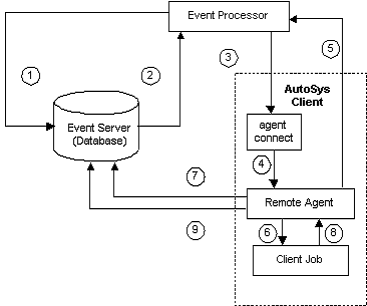
Below is the diagram which explains the basic functionality, please check the explanation.
Explanation
1. The event processor scans the event server for the next event to process. If no event is ready, the event processor scans again in five seconds.
2. The event processor reads from the event server that an event is ready. If the event is a STARTJOB event, the job definition and attributes are retrieved from the Event Server, including the command and the pointer (full path name on the client machine) to the profile file to be used for the job. In addition, for jobs running on Windows machines, the event processor retrieves from the database the user IDs and passwords required to run the job on the client machine.
3. The event processor processes the event. If the event is a STARTJOB, the event processor attempts to establish a connection with the remote agent on the client machine, and passes the job attributes to the client machine.
The event processor sends a CHANGE_STATUS event marking in the event server that the job is in STARTING state.
4. On a UNIX machine, the inetd invokes the remote agent. On a Windows machine, the remote agent logs onto the machine as the user defined as the job’s owner, using the user IDs and passwords passed to it from the event processor.
5. The remote agent sends an acknowledgment back to the event processor indicating that it has received the job parameters. The socket connection is terminated. At this point, the event processor resumes scanning the event server database, looking for events to process.
6. The remote agent starts a process and executes the command in the job definition.
7. The remote agent issues a CHANGE_STATUS event marking in the event server that the job is in RUNNING state.
8. The client job process runs to completion, then returns an exit code to the remote agent and quits.
[ad#blogs_content_inbetween]
Defining autosys job
There are various parameters to define autosys job. Starting from profile, timezone, start time, starting condition and so on. There are the two methods you can use to create job definitions:
1. Using the AutoSys Graphical User Interface (GUI).
2. Using the AutoSys Job Information Language (JIL) through a command-line interface. In this tutorial we will use JIL language to create autosys jobs. JIL stands for Job Information Language. Using this you can instruct autosys to save job definitions. This information saved in autosys database. You can also create a jil file which contains job definition. You can then pass this jil file to autosys. Essential attributes for defining job
1. Job Name
JIL Keyword : insert_job. Name used to identify the job.
2. Job Type
a. JIL Keyword : job_type. The job type is one of job types: command (c), file watcher (f) or box (b).
3. Owner
a. JIL Keyword : owner The job owner specifies whose user ID the command will be run under on the client machine. This attribute is automatically set to the user who invoked jil or the GUI to define the job, and cannot be changed except by the edit superuser. Other job attributes: 1. command: The command attribute can be the name of any command, executable, UNIX shell script or batch file, and its arguments.
2. machine: This attribute specifies the client machine on which the command should be run.
3. date_condition: The start date/time dependencies attribute is a toggle, which specifies whether or not there are date, time, or both, conditions required for starting the job.
4. days_of_week: The days of the week attribute specifies the days on which the job should be run. Sample jil file for command job echoJob.jil
insert_job:echoJob
machine:unixMachine
owner:username
command:echo “Hello this is command job”
Code language:HTML, XML(xml)
To add this job in atosys db. Run following command from unix:
jil < echoJob.jil
Code language:HTML, XML(xml)
This command will add “echoJob” job to autosys databse.
Autosys is from CA , You will not get any freeware or evaluation edition of autosys. But you have do the autosys features in CRON by writing your own components like autosys.
Hi, This Site is nice.I am having a doubt..can you please clarify..Actually there is a box job A which is in Success state,and the customer asked to Forcestart the job..As it is been Forcestarted the first job A is in running state,job B is in SU state,job C,D,E are in Active state..can you please explain me why the 3 jobs are in Active state and again as customer ran the jobs manually and asked us to kill the job and mark it as Success…And we did it the 3 jobs C,D,E are in INACTIVE state…can you please clarify my doubt…
And a suggestion is in your next edition if you can explain about Box Job Logic and the scenarios….It will be very useful to all the people like me……
Sorry I was not able to respond you on time. To answer your qn, if you want to create and manage autosys job there are different ways in my post I have already given different ways. And those are very effective. As per my understanding there is no such java API to create these jobs, but yes you can easily create one API which will read job spec and create autosys job accordingly.
Hi Krishna, When we create a job as a part of Autosys box then the job status heavily depends on box status. If you start a box that will make all of the jobs inside box active that means ready to run. These jobs will start as per their start condition. If we take the example that you have given, then job A is in running condition which is force started (assuming A is box name), job B is in status Success because it completed successfully, and remaining jobs C,D,E are in active state because those are part of the Box which is in running state. Now when you kill the box the active jobs becomes inactive because they are part of the Autosys box which was killed.
And remember you cannot change the status of any job to ACTIVE. This is not permitted. Although you can set following status. RUNNING, STARTING, SUCCESS, FAILURE, INACTIVE, and TERMINATED. Imp: Changing the status to RUNNING doesn’t start the job.
We had problem with one of our autosys jobs, even though the conditions were met the job did not start. so we forcestarted . Could someone advise what the problem would be.
Below is the event status:
Job Name Last Start Last End ST Run Pri/Xit ________________________________________________________________ ____________________ ____________________ __ _______ ___
au_cba_fc04_498_ds_11_pfca_file_flg_chk_f 09/09/2009 00:30:36 09/09/2009 01:57:57 SU 6324888/1
Apart from starting conditions does it have any job dependencies . If yes then can you chk if the dependent jobs gone to success if no can you paste the jil over here.
I have a question regarding mutually exclusive conditions. There are two sets of jobs (around 12 in each set) that need to be run in mutually exclusive mode. Can I define a box for each set and set the condition of not running at the box level?
hi, I installed unicentre autosys job management tool. But i was enable to create a database while installation. I have sql server 2000 sp4 and autosys is 4.5.1 version can you please help me regarding this.
Hi…I want to configure the dual event server in autosys and configure the event processor and install the remote agent. Please let me know how to define the priority for the job.
I ahve one question: I have 2 jobs, job A and JOb B. Job B will start on success of JOb A. Now if I forece start the Job A then after completion of JOb A, Job B will be executed or not ?
Hi All, I have installed the autosys client on windows 2008 server(server name = ARC). I created a local account (user = autosysuser) and gave the required permissions to login remotely. I can remotely login and execute my job. But when I run from autosys it fails with an error “No authentication performed”. In the JIL i have mentioned owner: autosysuser@ARC. What are the permissions/policies do I need to set for this local account?
Can any one tell me how to generate a .csv file from an autosys job? i.e. a job will execute some set of comands and the output should be in .csv file.
Yes , you could do that in two ways. 1. using jil update_job : start_times: “01:00,04:00” days_of_week: “th,fr” 2.Changing the job definition using GUI
HiAkhil, My name is Sunny Dsouza . I have a query on batch Monitoring on Autosys .Supposing we have a batch that is running date 22/10/2018 and we have few below jobs running every day what happens the the next day 23/10/2018 batch ?
Jobs are A =>B=> C=>D,E its now next day 23/10/2018 . will JOB A kick off ?
If an autosys backup job has failed/terminated ,what should we set the status of that job so it can run at its next schedule cycle? Can we restart a production job if it has failed/yerminated?Also in the JIL what des max run time, Min run time before alarm and terminate job if run time exceeds xyz hours means?
Is it possible to change the status of an autosys job based on a return status code obtained from the command that the autosys job executes. For e.x., an autosys job calls a batch script which executes a sql command. we get a status code of 0 or errno when sql command is executed and the batch script will complete successfully. So can we change the autosys job status to SU if status code returned is 0, and FA if errno.
I currently have autosys submitting jobs to a peoplesoft server residing on one machine. I have now added a second peoplesoft server residing on a different machine. Is there a way to have autosys submit a job to either machine based on the fact that one or the other is down. Basically a failover situation, I can get this to work in peoplesoft manually, but autosys only submits to the first machine and stays queued on peoplesoft side if it’s down. I did notice in the command parms that only the first machine name is entered. Is there a way to put both machine names in so that it checks both servers to see if they are available and sends work to the one that is.
Nice article. We have an autosys batch job runing on our Windows 2008 Production servers. We would like to move the job to run from a new servers..what all things we need to do for making it to happend.
Please reply as soon as possible since we are struggling with this.
Can I put more than one jobs ON ICE via sendevent? I mean in a single command can I put more than one jobs ON ICE?? Also, does ‘sendevent’ work in a UNIX shell script ?
I have a doubt on autosys JIL scheduling. The requirement as below. Have 2 jobs,one is running in US time zone and another in Singapore time zone and both are running in different instance . Requirement is on Success of Singapore job , the US job will trigger.Though i am aware i have to put condition like on US jJIL as condition:S(Singapore job) but it won’t solve the requirement as both are running in different instance, please do let me know what additional parameter is needed to solve the requirement.
Can I have two events handled by a single SENDEVENT command? Or is it possible to set 2 global variables in a single SENDEVENT command?If not is it possible to have 2 SENDEVENT command on a job ? Please help. Thanks in advance
Is it possible to define time for a job which is inside the box for which time has already defined ? for eg. suppose there is a box Box1 which has run time defined as 10:00 and contains two jobs job1 and job2, consider if time for job2 has defined as 12:00. can we do like this ? if yes then what will be expected behavior?
We can HOLD or OFF hold all jobs same time, To hold it you need to create one sendevent job and test file which conatain all jobs with sendevent command.
Has anyone worked on job dependencies across instances? The one in which we use the caps char “^” to define a condition if a job has dependency on another job in a different instance? Need some help on it.
Job A on Instance X Job B on instance Y Condition on job A: s(B^Y) Need some info on this
Can we have a condition like ‘not running’ in autosys job I have a requirement –> in one of the job the condition should be if previous job doesn’t run at 7pm, then run the present job.
Can some one say how to extract active Jobs email id? I know it can be sone through extracting JIL and from there. Is there anyway it can be done directly?
I get the following error: CHASE 09/29/2013 04:13:07 0 PD 09/29/2013 04:13:15
I have checked the remote agent process and its up and running, I also issued a autosttaus command to see whats the status of the job in the eventsystem,
can some one please explain why this error occurs and how to fix it. I’d appreciate a detail explaination.
I get the following error: CHASE 09/29/2013 04:13:07 0 PD 09/29/2013 04:13:15
I have checked the remote agent process and its up and running, I also issued an autostatus command to see whats the status of the job in the eventsystem,
can some one please explain why this error occurs and how to fix it. I’d appreciate a detail explaination. Also,would like to know how to start a remote agent. I mean,do we need to have a process running on the remote machine where the actual shell script is executed ?
I have defined box B1 which has two jobs J1 and J2. If I force start the box B1, the job J1 didn’t run. Both the job status just changed to Activated. But if I force the jobs individual, the job runs successfully. Can anyone please tell me is this because of any configure issue in JIL and which attribute must be included.
Need to know if there are classes held for autosys as me and my team would like to learn about autosys, job scheduling and agent installation. So let me know more about it
If a job is in a RUNNING status, if it is put ON ICE, will the job complete then go into the on-ice status? Also, if the job is a .bat file and runs on another machine… so autosys shows status of SUCCESS, but the job is still running on another server, if put on ice at that point, will job in background continue running?
Hello All, I am a new bee in DEVOPS. I have limited knowldge about autosys. I am looking at automating the job to put on ON ICE, ON OFF state from an external tool which is runnng on unix m/c. I came to know there is a JIL language to do this. can any one help me how to script this and test ? It would be great if there is any sample code for this.
Hi, I am a beginner and keen to learn Autosys, Could you pls guide me where should I practice Autosys commands? Is there a unix or windows server for practice?
Hi Could you please list out the GUI availble to connect to autosys . as I am using Humming bird excced tool till now. But from 1 month i am unable to connect to Hummin bird excced . Please help me
Will a job which is not part of any box job go to Activated state if the starting conditions are not met? Suppose a job A has start time: 4:00, and also dependency on success of Job B. At 4:00, Job B is still running, will the Job A go to activated state or it will remain in SU status(of previous day’s run).
We have some scheduled Job’s in AutoSys. As and when the command got executed it is returning sucess even though the script returned some errors. Is there any way in AutoSys to put the return code based on the execution of the script…Please help me..
Can one set a limit on how many concurrent jobs within a box be run? I have more than 100 jobs within a box, they don’t have dependency among each other. The problem is that our system cannot handle too many concurrent jobs at once, so I need to put a limit of the number of the jobs run within the box.
Cannot find any information for this from the manual.
Could you please assist me to debug the issue, shell script has the nohup java classname &. If it is executed manually it create java process but it is executed from autosys it does not create java process. echo path and class path in both ways but it is same. Please what are all other possible ways.
we installed autosys on a windows machine. i am able to generate the job statistics report from the autosys console. but i need it from the command line. i tried autorep command, but it is giving the report for a particular job or for a particular pattern of the job. i need the report for all the jobs.
I have a question. Can anyone please reply? I have an autosys box ‘A’ scheduled to start at 9a.m and it has a command job ‘a’.
If the box A is started,the command job ‘a’ will run and it will trigger a connection to JMS Queue. The command job ‘a’ will always be in running ‘RU’ mode, since the process keeps the thread always active to consume messages.
My problem is 1. When the box job is scheduled to start at 9 am, it is not force-starting the command job. Is it because the command job is in Running mode? If yes, How to force the autosys to force-start the job even if it is running? 2. The box job is restarting at 9 am, but the command jobs aren’t. So the Run/Entry Ids are different for Box and Command jobs. Please help to resolve this issue.
Hi, I know it is a very delayed response; just a thought I have on this is that can we not have another job that will KILL the current running command job ‘a’, so that the connection to the JMS Queue is closed for a moment and then call the command job ‘a’ which will re-establish the connection to JMS Queue.
the another solution is to do it this way. We had a similar kind of problem with a job connecting to IBM WebSphere. We created a batch script that will ping IBM MQ and checks if connection is fine else it will call the command job to establish the connection to MQ
can someone please let me know how to create a shell script to onhold and offhold few autosys jobs at particular time? to be achieved: 1) to sleep if the job is running and once the job is success it should be onhold at say 5:00hrs 2) to off hold the same job at 10:00 hrs
Hello All, Require bit clarification on below process. Consider there is box job which is running on Saturday 5:00AM.We kept it on-hold on friday and taking it off hold on Sunday. What would be the status of the job after off holding it? Will it start running?





Hi,
Can you suggest some AutoSys freeware? I would want to try it.
Thanks
Vinod
Autosys is from CA , You will not get any freeware or evaluation edition of autosys. But you have do the autosys features in CRON by writing your own components like autosys.
Hi Hanumanth,
This is a good article. Much appreciated!!
Could you please let me know if there’s any java api which can create & control autosys jobs?
Thanks,
Geeya
Hi,
This Site is nice.I am having a doubt..can you please clarify..Actually there is a box job A which is in Success state,and the customer asked to Forcestart the job..As it is been Forcestarted the first job A is in running state,job B is in SU state,job C,D,E are in Active state..can you please explain me why the 3 jobs are in Active state and again as customer ran the jobs manually and asked us to kill the job and mark it as Success…And we did it the 3 jobs C,D,E are in INACTIVE state…can you please clarify my doubt…
And a suggestion is in your next edition if you can explain about Box Job Logic and the scenarios….It will be very useful to all the people like me……
Thanks
Krishna
Hi Geeya,
Sorry I was not able to respond you on time. To answer your qn, if you want to create and manage autosys job there are different ways in my post I have already given different ways. And those are very effective. As per my understanding there is no such java API to create these jobs, but yes you can easily create one API which will read job spec and create autosys job accordingly.
Hi Krishna,
When we create a job as a part of Autosys box then the job status heavily depends on box status. If you start a box that will make all of the jobs inside box active that means ready to run. These jobs will start as per their start condition.
If we take the example that you have given, then job A is in running condition which is force started (assuming A is box name), job B is in status Success because it completed successfully, and remaining jobs C,D,E are in active state because those are part of the Box which is in running state.
Now when you kill the box the active jobs becomes inactive because they are part of the Autosys box which was killed.
And remember you cannot change the status of any job to ACTIVE. This is not permitted. Although you can set following status. RUNNING, STARTING, SUCCESS, FAILURE, INACTIVE, and TERMINATED.
Imp: Changing the status to RUNNING doesn’t start the job.
Hanumant.
We had problem with one of our autosys jobs, even though the conditions were met the job did not start. so we forcestarted . Could someone advise what the problem would be.
Below is the event status:
Job Name Last Start Last End ST Run Pri/Xit
________________________________________________________________ ____________________ ____________________ __ _______ ___
au_cba_fc04_498_ds_11_pfca_file_flg_chk_f 09/09/2009 00:30:36 09/09/2009 01:57:57 SU 6324888/1
Status/[Event] Time Ntry ES ProcessTime Machine
————– ——————— — — ——————— —————————————-
STARTING 09/09/2009 00:30:27 1 PD 09/09/2009 00:30:36 syd0498
RUNNING 09/09/2009 00:30:36 1 PD 09/09/2009 00:31:02 syd0498
[JOB_ON_HOLD] 09/09/2009 01:47:41 0 PD 09/09/2009 01:47:54 syd0498
[*** ALARM ***]
JOBNOT_ONICEHOLD 09/09/2009 01:47:53 0 PD 09/09/2009 01:48:01 syd0498
INACTIVE 09/09/2009 01:49:15 0 PD 09/09/2009 01:49:24
SUCCESS 09/09/2009 01:57:57 1 PD 09/09/2009 01:58:05
[JOB_ON_HOLD] 09/09/2009 05:13:19 0 PD 09/09/2009 05:13:35 syd0498
INACTIVE 09/09/2009 05:14:44 0 PD 09/09/2009 05:14:53
[JOB_ON_HOLD] 09/10/2009 05:40:31 0 PD 09/10/2009 05:40:39 syd0498
INACTIVE 09/10/2009 05:42:06 0 PD 09/10/2009 05:42:17
[FORCE_STARTJOB] 09/10/2009 05:53:00 0 PD 09/10/2009 05:53:08 syd0498
Apart from starting conditions does it have any job dependencies . If yes then can you chk if the dependent jobs gone to success if no can you paste the jil over here.
Hi
I have a question regarding mutually exclusive conditions. There are two sets of jobs (around 12 in each set) that need to be run in mutually exclusive mode. Can I define a box for each set and set the condition of not running at the box level?
Would appreciate a response.
thx
Jay
Hi,
I am trying to validate the jil file programmatically. I plan to use the SDK provided by Autosys. Is CA provide any SDK for this?
Another thing : What is Jil syntax checker or Jil verifier or Jil validator? Where is it available in autosys?
Regards,
Siva
hi,
I installed unicentre autosys job management tool.
But i was enable to create a database while installation.
I have sql server 2000 sp4 and autosys is 4.5.1 version can you please help me regarding this.
Thank you
How can you perform batch testing using autosys. Especially Batch testing for data validation using SQL on TOAD.
hi rahul where you get freeware autosys tool?
Suggest me a complete autosys tutorial..
I need to put multiple jobs (same server/different server) on ice.please let me know the procedure to do so.
good information about AutoSys Job Scheduler. Nice Work
Hi…I want to configure the dual event server in autosys and configure the event processor and install the remote agent. Please let me know how to define the priority for the job.
This mateial is good for the beginners of the Auto Sys
Hi,
can we change the status of running job to inactive ?
You can not change the running job to Inactive.
Sanjay,
If you want you to run an Inactive job. you can FORCES_START it.
Thanks Sathiya and Murthy.
can we use sendevent command in command property?If yes please provide syntax for it.
how to use sendevent command in command properties?
can anyone tell me whats the exit code 130 in autosys mean?
can any please tell…what for override_job: ?
can anyone explain advantages of using Autosys over maestro?
Hi,
First of all, Thanks for such good article.
I ahve one question: I have 2 jobs, job A and JOb B. Job B will start on success of JOb A. Now if I forece start the Job A then after completion of JOb A, Job B will be executed or not ?
Thanks & Regards,
Devang
Nice Article.Give some more examples and trouble shooting on autosys.
Thanx
Hi,
Can anyone suggest me how to schedule an autosys job in windows?
kala
@Devang
After completion of Job A job B will get started.
Hi All,
I have installed the autosys client on windows 2008 server(server name = ARC). I created a local account (user = autosysuser) and gave the required permissions to login remotely. I can remotely login and execute my job. But when I run from autosys it fails with an error “No authentication performed”. In the JIL i have mentioned owner: autosysuser@ARC. What are the permissions/policies do I need to set for this local account?
Can any one tell me how to generate a .csv file from an autosys job? i.e. a job will execute some set of comands and the output should be in .csv file.
Is there any method in autosys jil definition to run same job at different times on different days?
Yes , you could do that in two ways.
1. using jil update_job :
start_times: “01:00,04:00”
days_of_week: “th,fr”
2.Changing the job definition using GUI
HiAkhil, My name is Sunny Dsouza . I have a query on batch Monitoring on Autosys .Supposing we have a batch that is running date 22/10/2018 and we have few below jobs running every day what happens the the next day 23/10/2018 batch ?
Jobs are A =>B=> C=>D,E
its now next day 23/10/2018 . will JOB A kick off ?
If an autosys backup job has failed/terminated ,what should we set the status of that job so it can run at its next schedule cycle? Can we restart a production job if it has failed/yerminated?Also in the JIL what des max run time, Min run time before alarm and terminate job if run time exceeds xyz hours means?
Thanks
Mohd
Is it possible to change the status of an autosys job based on a return status code obtained from the command that the autosys job executes.
For e.x., an autosys job calls a batch script which executes a sql command. we get a status code of 0 or errno when sql command is executed and the batch script will complete successfully. So can we change the autosys job status to SU if status code returned is 0, and FA if errno.
Superb.. wow, great
I currently have autosys submitting jobs to a peoplesoft server residing on one machine. I have now added a second peoplesoft server residing on a different machine. Is there a way to have autosys submit a job to either machine based on the fact that one or the other is down. Basically a failover situation, I can get this to work in peoplesoft manually, but autosys only submits to the first machine and stays queued on peoplesoft side if it’s down. I did notice in the command parms that only the first machine name is entered. Is there a way to put both machine names in so that it checks both servers to see if they are available and sends work to the one that is.
need autosys material and pdf ..
how to get the status of the job in JIL file and how to call the FORCE START JOB if the status of another job is SUCCESS.
Good Article for beginners….
Dear author,
This article is really helpful.
This site was helpful, Thanks so much…
Could you please upload any video tutorial when you have some time, this will be much more useful.
Regards,
Bose
Nice article.
We have an autosys batch job runing on our Windows 2008 Production servers. We would like to move the job to run from a new servers..what all things we need to do for making it to happend.
Please reply as soon as possible since we are struggling with this.
In R11.3, how do I open a command prompt? I am used to command line in xterm.
very nice artile.. for basic command …….
what is meaning of refresh dependencies
Can a Autosys File Watcher watch for a file on a server other then the autosys client server ?
Can I put more than one jobs ON ICE via sendevent?
I mean in a single command can I put more than one jobs ON ICE??
Also, does ‘sendevent’ work in a UNIX shell script ?
Please tell me in steps how to schedule a job
Hi All,
I have a doubt on autosys JIL scheduling. The requirement as below. Have 2 jobs,one is running in US time zone and another in Singapore time zone and both are running in different instance .
Requirement is on Success of Singapore job , the US job will trigger.Though i am aware i have to put condition like on US jJIL as condition:S(Singapore job) but it won’t solve the requirement as both are running in different instance, please do let me know what additional parameter is needed to solve the requirement.
Thanks in advance.
Can I have two events handled by a single SENDEVENT command? Or is it possible to set 2 global variables in a single SENDEVENT command?If not is it possible to have 2 SENDEVENT command on a job ? Please help.
Thanks in advance
Is it possible to define time for a job which is inside the box for which time has already defined ? for eg.
suppose there is a box Box1 which has run time defined as 10:00 and contains two jobs job1 and job2, consider if time for job2 has defined as 12:00.
can we do like this ?
if yes then what will be expected behavior?
We could, but such case we create one more Box with job2 runs at 12:00 clock instead of keeping same box
Hi Tinshuk Singh ,
The Box 1 will kick OFF at 10:00 & the jobs inside the box will wait until its conditions are meet , the job2 will kick off at 12:00
Can we able to hold all the job in autosys in the same time.. if yes can u explain how..
We can HOLD or OFF hold all jobs same time, To hold it you need to create one sendevent job and test file which conatain all jobs with sendevent command.
hi guys
Has anyone worked on job dependencies across instances? The one in which we use the caps char “^” to define a condition if a job has dependency on another job in a different instance? Need some help on it.
Job A on Instance X
Job B on instance Y
Condition on job A: s(B^Y)
Need some info on this
Hi Urvashi,
Job A on Instance X
Job B on instance Y
Condition on job A: s(B^Y)
The above condition is absolutely correct. Please let me know what query do you have..
Thanks
Can we have a condition like ‘not running’ in autosys job
I have a requirement –> in one of the job the condition should be if previous job doesn’t run at 7pm, then run the present job.
yes, we have a condition “Not Running”
condition: n(job)
Condition will satisfy all job status exceptrunning.
Hi,
Can some one say how to extract active Jobs email id? I know it can be sone through extracting JIL and from there. Is there anyway it can be done directly?
Hi
I get the following error:
CHASE 09/29/2013 04:13:07 0 PD 09/29/2013 04:13:15
I have checked the remote agent process and its up and running, I also issued a autosttaus command to see whats the status of the job in the eventsystem,
can some one please explain why this error occurs and how to fix it.
I’d appreciate a detail explaination.
thanks
Hi
I get the following error:
CHASE 09/29/2013 04:13:07 0 PD 09/29/2013 04:13:15
I have checked the remote agent process and its up and running, I also issued an autostatus command to see whats the status of the job in the eventsystem,
can some one please explain why this error occurs and how to fix it.
I’d appreciate a detail explaination.
Also,would like to know how to start a remote agent. I mean,do we need to have a process running on the remote machine where the actual shell script is executed ?
thanks
Can we put all the jobs in a box ONICE by just giving the Box name?
Viral,
What are best practice server component requirements (CPU, RAM, disk space, etc) we would need to build to efficiently run 5000 simultaneous jobs?
Raj
If it possible to set a starting condition below
RU(JobA) & S(JobB)
SO basically i want a job to trigger if and only if job A is still in Running and job B is in success
Hi,
I have defined box B1 which has two jobs J1 and J2. If I force start the box B1, the job J1 didn’t run. Both the job status just changed to Activated. But if I force the jobs individual, the job runs successfully. Can anyone please tell me is this because of any configure issue in JIL and which attribute must be included.
Hi Sneha,
you shouldn’t put any starting time condition like “start_times:” for job “J1” inside the box “B1”
ex:
JIL for box:
job_name: B1
job_type: b
date_condision: 1
days_of_week: all
start_times: “10:00”
timezone: India
JIL for job J1
job_name: J1
job_type: c
box_name: B1
command: sleep 100
permission: wx, mx
owner: haja
machine: localhost
timezone: India
JIL for job J2
job_name: J2
job_type: c
box_name: B1
command: sleep 100
permission: wx, mx
conditiond: s(J1)
owner: haja
machine: localhost
timezone: India
Thanks, that helped :)
Hi,
We don’t have access to autosys server and we have only GUI access.
i wanted to know how to create JIL file in autosys server
Need to know if there are classes held for autosys as me and my team would like to learn about autosys, job scheduling and agent installation. So let me know more about it
Do we have any simulator for autosys, so that we can practise at home…
it will be very helpful for me to create jil and do r n d on that…
Thanks in advanced…
Hi Viral,
I have a requirement to migrate Windows & Unix jobs to Autosys. May I know the process and steps to implement this migration?
We are running a web URL using the autosys jobs. Now we are getting always the success state even though we got errors in the application.
How can we assign the return code from web application to the autosys job exit code ?
Am a newbie and didn’t done through the documentation much..
Any inputs highly appreciated..
Hi,
Is there a way to add a new calendar date using JIL?
Hi,
Is it possible to assign or submit multiple jobs to the multiple instances of remote agent running on client server?
Rgds,
Vasu.
Is there any command to check any jobs scheduled date/time?
autorep -j -d
Can I use a sendevent command to change a RUNNING filewatcher job to INACTIVE. Will it have an issues at the backgroud?
you can put as inactive but job will be running in back ground
If a job is in a RUNNING status, if it is put ON ICE, will the job complete then go into the on-ice status? Also, if the job is a .bat file and runs on another machine… so autosys shows status of SUCCESS, but the job is still running on another server, if put on ice at that point, will job in background continue running?
Hello All,
I am a new bee in DEVOPS. I have limited knowldge about autosys. I am looking at automating the job to put on ON ICE, ON OFF state from an external tool which is runnng on unix m/c. I came to know there is a JIL language to do this. can any one help me how to script this and test ? It would be great if there is any sample code for this.
Thanks in advance.
Hi, I am a beginner and keen to learn Autosys, Could you pls guide me where should I practice Autosys commands? Is there a unix or windows server for practice?
Hi,
can any one help me to launch autosys GUI from unix server
Where to download autosys software from .
How can I move a box from test autosys into production autosys using JIL?
change the machine name , instead of autosys(test) to Prod Autosys.then insert the jil into prod server.
Hi
Could you please list out the GUI availble to connect to autosys . as I am using Humming bird excced tool till now. But from 1 month i am unable to connect to Hummin bird excced . Please help me
Is Autosys having any Java API ? If yes then can you please point me to it ?
Thanks
is it possible to make a script through which ticket gets auto resolved once the job is marked to success?? if yes, please help
Will a job which is not part of any box job go to Activated state if the starting conditions are not met? Suppose a job A has start time: 4:00, and also dependency on success of Job B. At 4:00, Job B is still running, will the Job A go to activated state or it will remain in SU status(of previous day’s run).
it will be active state only and waiting for job b to get complete
Hi,
We have some scheduled Job’s in AutoSys. As and when the command got executed it is returning sucess even though the script returned some errors. Is there any way in AutoSys to put the return code based on the execution of the script…Please help me..
How to practice Autosys in Home Environment..??
I need to create a command job which will run on weekend only if weekend appears on monthend
Can one set a limit on how many concurrent jobs within a box be run? I have more than 100 jobs within a box, they don’t have dependency among each other. The problem is that our system cannot handle too many concurrent jobs at once, so I need to put a limit of the number of the jobs run within the box.
Cannot find any information for this from the manual.
Could you please assist me to debug the issue, shell script has the nohup java classname &.
If it is executed manually it create java process but it is executed from autosys it does not create java process.
echo path and class path in both ways but it is same. Please what are all other possible ways.
we installed autosys on a windows machine. i am able to generate the job statistics report from the autosys console. but i need it from the command line. i tried autorep command, but it is giving the report for a particular job or for a particular pattern of the job. i need the report for all the jobs.
I have a question – Suppose A job is showing success in logs but Autosys Status is Still RU instead of SU , what can be the issue ?
It could be the issue just with the rendering on the GUI otherwise you are not looking at the correct group’s job’s logs
does the below effect the autosys jobs:
insert_job: b
changed to ->
insert_job: BOX
Both staement syas that is is box joob but previously it was b now NOW so will it make any difference
I have a question. Can anyone please reply?
I have an autosys box ‘A’ scheduled to start at 9a.m and it has a command job ‘a’.
If the box A is started,the command job ‘a’ will run and it will trigger a connection to JMS Queue. The command job ‘a’ will always be in running ‘RU’ mode, since the process keeps the thread always active to consume messages.
My problem is
1. When the box job is scheduled to start at 9 am, it is not force-starting the command job. Is it because the command job is in Running mode? If yes, How to force the autosys to force-start the job even if it is running?
2. The box job is restarting at 9 am, but the command jobs aren’t. So the Run/Entry Ids are different for Box and Command jobs.
Please help to resolve this issue.
Hi,
I know it is a very delayed response; just a thought I have on this is that can we not have another job that will KILL the current running command job ‘a’, so that the connection to the JMS Queue is closed for a moment and then call the command job ‘a’ which will re-establish the connection to JMS Queue.
the another solution is to do it this way. We had a similar kind of problem with a job connecting to IBM WebSphere. We created a batch script that will ping IBM MQ and checks if connection is fine else it will call the command job to establish the connection to MQ
can someone please let me know how to create a shell script to onhold and offhold few autosys jobs at particular time?
to be achieved:
1) to sleep if the job is running and once the job is success it should be onhold at say 5:00hrs
2) to off hold the same job at 10:00 hrs
Hello guys
I Would like to know in autosys what is the command for checking the functional ID status
is it
su for a particular job-name
I want to know in details every element of JIL.
Event Server
The event server is a AutoSys database which stores all…
It should be “an AutoSys” not “a AutoSys” .
Can we automate autosys jobs for testing purpose by using Selenium or any other tools?
Hello all,
How to migrate sql job to Autosys schedule system, please give me simple and reliable way. Thank you all.
How to avoid to print debug statement in .out log file
Hello All,
Require bit clarification on below process. Consider there is box job which is running on Saturday 5:00AM.We kept it on-hold on friday and taking it off hold on Sunday. What would be the status of the job after off holding it? Will it start running?