[ad name=”AD_INBETWEEN_POST”]Servlet Filters are the latest components that are added in Servlet 2.3 specifications. These filters are used basically for intercepting and modifying requests and response from server. Consider a scenario where you want to check session from the every users request and if it is valid then only you want to let the user access the page. You can acheive this by checking sessions on all the servlet pages (or JSP pages) which users queries or you can do this by using Filter. Let us create a Servlet Filter that just prints the clients ip address and date time. This is just to log users who are accessing the application. We we use Eclipse for developing our application and Apache Tomcat for deploying and running our application.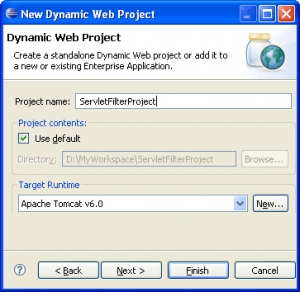
 Starts eclipse and create a new dynamic web project with name ServletFilterProject. Select Target runtime environment. I have selected Apache Tomcat v6.0, you can select any Tomcat version that you have installed. Click on Finish.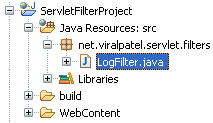
 Create a package for Servlet Filters in your source folder of Project. I have created a package net.viralpatel.servlet.filters. Inside the package, create a Java class file called LogFilter.java.
Step 1: Create dynamic web project in Eclipse.
 Starts eclipse and create a new dynamic web project with name ServletFilterProject. Select Target runtime environment. I have selected Apache Tomcat v6.0, you can select any Tomcat version that you have installed. Click on Finish.
Step 2: Create package & Servlet Filter class.
 Create a package for Servlet Filters in your source folder of Project. I have created a package net.viralpatel.servlet.filters. Inside the package, create a Java class file called LogFilter.java.
Step 3: Writting Servlet Filter class code.
Modify the LogFilter class and add following code into it.package net.viralpatel.servlet.filters;
import java.io.IOException;
import java.util.Date;
import javax.servlet.Filter;
import javax.servlet.FilterChain;
import javax.servlet.FilterConfig;
import javax.servlet.ServletException;
import javax.servlet.ServletRequest;
import javax.servlet.ServletResponse;
import javax.servlet.http.HttpServletRequest;
public class LogFilter implements Filter {
public void doFilter(ServletRequest req, ServletResponse res,
FilterChain chain) throws IOException, ServletException {
HttpServletRequest request = (HttpServletRequest) req;
//Get the IP address of client machine.
String ipAddress = request.getRemoteAddr();
//Log the IP address and current timestamp.
System.out.println("IP "+ipAddress + ", Time "
+ new Date().toString());
chain.doFilter(req, res);
}
public void init(FilterConfig config) throws ServletException {
//Get init parameter
String testParam = config.getInitParameter("test-param");
//Print the init parameter
System.out.println("Test Param: " + testParam);
}
public void destroy() {
//add code to release any resource
}
}
Code language: Java (java)Step 4: Create Servlet Filter Mapping in Web.xml
Open web.xml file from WEB-INF directory of your Project and add following entry for filter tag.<filter>
<filter-name>LogFilter</filter-name>
<filter-class>
net.viralpatel.servlet.filters.LogFilter
</filter-class>
<init-param>
<param-name>test-param</param-name>
<param-value>This parameter is for testing.</param-value>
</init-param>
</filter>
<filter-mapping>
<filter-name>LogFilter</filter-name>
<url-pattern>/*</url-pattern>
</filter-mapping>
Code language: HTML, XML (xml)

Thanks for this guide! It made it VERY easy to get a quick servlet filter up and running to play around!
Thanks for a simple yet illustratice explaination
Excelent!!! it’s very usefull.
thanks…
Uh, for the neophyte, what if after setting up this project, entering the code, etc. the launch (http://localhost:8080/ServletFilterProject/) produces only a 404? (Eclipse 3.3.2, WST 2.0.2)
Hi Russell,
I am not sure about the error, but it seems that something is wrong hence your browser is not able to get anything (resource not found!!). Can you try running http://localhost:8080 and check what is coming? Also check if your context root is properly set.
thank you viral,
it is ery easy and helpful for me.
@balveer: you welcome. feel free to bookmark this site or registered your email to get articles via email :)
Thanks, this was quite useful. I think I know what problem Russell was encountering:
The package is set to \"net.viralpatel.servlet.filters\" but in the mapping it\’s trying to find the class \"net.viralpatel.servlet.filter.LogFilter\". If you go into web.xml and add an s to \"filter\" so that it says \"net.viralpatel.filters.LogFilter\" then you should actually get a printout in the console. Otherwise it\’ll throw class not found exception.
Nice article.
You may wanted to check some similar articles below:
http://www.tech-freaks.in/Java-Programming/JSP-Servlets/jsp-servlet-workshop.html
http://www.stage3.tech-freaks.in/Java-Programming/JSP-Servlets/eclipse-tomcat-integration.html
It’s so nice to find simple blogs that are easy to understand. Nice job, Viral. I will be looking through the remainder of your blogs in hopes to learn more techniques.
@TechGirl, thanks for the comment… feel free to go through articles and also comment or send suggestions if you have any.
I am unable to find any such option on menu bar.
i have options file->new->project,package class,interface,enum,annotations,source folder,folder,file,untitled text file,junit test case but there is no option from where i can make jsp/servlet file
Hi Namrata,
Can you tell me the version of Eclipse you using? Also you must use J2EE perspective while working in this web application.
I did exactly what you said,but i got the following error-
HTTP Status 404
description :The requested resource () is not available.
Very Useful Example………………………….
Thanks Viral, I know you are a Pro.
@Shyamshara – Thanks for the comment
Remember that a Filter is an interface component, and not a Servlet, so in order for it to render output to the browser, you will want to map it to a Servlet. The reason you will get a requested resource is not available 404, is because there is either no welcome-file-list setup, or you don’t have a servlet mapped to the filter. Viral, this is a great example, but I’m pretty sure you did not post your web.xml in its entirety.
Hi Viral,
Similar to what Russell Bateman wrote on 27 April, 2009, 21:28, I get the following along with HTTP Status 404 from Eclipse console:
Jan 22, 2010 12:27:20 PM org.apache.tomcat.util.digester.Digester endElement
WARNING: No rules found matching ‘Server/Service/Engine/Host/Content’.
Jan 22, 2010 12:27:20 PM org.apache.tomcat.util.digester.SetPropertiesRule begin
WARNING: [SetPropertiesRule]{Server/Service/Engine/Host/Context} Setting property ‘source’ to ‘org.eclipse.jst.j2ee.server:ADCDemo’ did not find a matching property.
Jan 22, 2010 12:27:20 PM org.apache.tomcat.util.digester.SetPropertiesRule begin
WARNING: [SetPropertiesRule]{Server/Service/Engine/Host/Context} Setting property ‘source’ to ‘org.eclipse.jst.jee.server:ServletFilterProject’ did not find a matching property.
Jan 22, 2010 12:27:20 PM org.apache.catalina.core.AprLifecycleListener init
INFO: The APR based Apache Tomcat Native library which allows optimal performance in production environments was not found on the java.library.path: C:\Program Files\Java\jre6\bin;.;C:\WINDOWS\Sun\Java\bin;C:\WINDOWS\system32;C:\WINDOWS;C:/Program Files/Java/jre6/bin/client;C:/Program Files/Java/jre6/bin;C:\WINDOWS\system32;C:\WINDOWS;C:\WINDOWS\System32\Wbem;C:\Program Files\ATI Technologies\ATI.ACE\Core-Static;C:\Program Files\Apache Software Foundation\Tomcat 6.0;C:\Program Files\Java\jre6;C:\Program Files\Java\jdk1.6.0_16
Jan 22, 2010 12:27:20 PM org.apache.coyote.http11.Http11Protocol init
INFO: Initializing Coyote HTTP/1.1 on http-8080
Jan 22, 2010 12:27:20 PM org.apache.catalina.startup.Catalina load
INFO: Initialization processed in 270 ms
Jan 22, 2010 12:27:20 PM org.apache.catalina.core.StandardService start
INFO: Starting service Catalina
Jan 22, 2010 12:27:20 PM org.apache.catalina.core.StandardEngine start
INFO: Starting Servlet Engine: Apache Tomcat/6.0.18
Jan 22, 2010 12:27:21 PM org.apache.catalina.core.StandardContext filterStart
SEVERE: Exception starting filter LogFilter
java.lang.ClassNotFoundException: net.viralpatel.servlet.filter.LogFilter
at org.apache.catalina.loader.WebappClassLoader.loadClass(WebappClassLoader.java:1387)
at org.apache.catalina.loader.WebappClassLoader.loadClass(WebappClassLoader.java:1233)
at org.apache.catalina.core.ApplicationFilterConfig.getFilter(ApplicationFilterConfig.java:249)
at org.apache.catalina.core.ApplicationFilterConfig.setFilterDef(ApplicationFilterConfig.java:397)
at org.apache.catalina.core.ApplicationFilterConfig.(ApplicationFilterConfig.java:108)
at org.apache.catalina.core.StandardContext.filterStart(StandardContext.java:3709)
at org.apache.catalina.core.StandardContext.start(StandardContext.java:4363)
at org.apache.catalina.core.ContainerBase.start(ContainerBase.java:1045)
at org.apache.catalina.core.StandardHost.start(StandardHost.java:719)
at org.apache.catalina.core.ContainerBase.start(ContainerBase.java:1045)
at org.apache.catalina.core.StandardEngine.start(StandardEngine.java:443)
at org.apache.catalina.core.StandardService.start(StandardService.java:516)
at org.apache.catalina.core.StandardServer.start(StandardServer.java:710)
at org.apache.catalina.startup.Catalina.start(Catalina.java:578)
at sun.reflect.NativeMethodAccessorImpl.invoke0(Native Method)
at sun.reflect.NativeMethodAccessorImpl.invoke(Unknown Source)
at sun.reflect.DelegatingMethodAccessorImpl.invoke(Unknown Source)
at java.lang.reflect.Method.invoke(Unknown Source)
at org.apache.catalina.startup.Bootstrap.start(Bootstrap.java:288)
at org.apache.catalina.startup.Bootstrap.main(Bootstrap.java:413)
Jan 22, 2010 12:27:21 PM org.apache.catalina.core.StandardContext start
SEVERE: Error filterStart
Jan 22, 2010 12:27:21 PM org.apache.catalina.core.StandardContext start
SEVERE: Context [/ServletFilterProject] startup failed due to previous errors
Jan 22, 2010 12:27:21 PM org.apache.coyote.http11.Http11Protocol start
INFO: Starting Coyote HTTP/1.1 on http-8080
Jan 22, 2010 12:27:21 PM org.apache.jk.common.ChannelSocket init
INFO: JK: ajp13 listening on /0.0.0.0:8009
Jan 22, 2010 12:27:21 PM org.apache.jk.server.JkMain start
INFO: Jk running ID=0 time=0/16 config=null
Jan 22, 2010 12:27:21 PM org.apache.catalina.startup.Catalina start
INFO: Server startup in 213 ms
Any help?
Thanks
Hi George, There was a type error in my web.xml. I have updated the code. Here is the change.
I have changed net.viralpatel.servlet.filter.LogFilter to net.viralpatel.servlet.filters.LogFilter.
Hi,
How does the tomcat servlet initialization code know the classpath for net.viralpatel.servlet.filters.LogFilter? I am getting a class loader error, even thought the class is under web/app/WEB-INF/classes directory.
Thanks,
Hi Viral,
Yes! Silly of me that I was doing Cut n Paste the code. If I was to type I would have noticed the small typo (Missing s in filter(s)).
Amazing but always true – the devil is in the details…LOL
Then as Brian wrote on 19 December, 2009, 10:43:
“Remember that a Filter is an interface component, and not a Servlet, so in order for it to render output to the browser, you will want to map it to a Servlet.” it still has a reason to tgrow a 404.
But as it prints in the console it’s OK for now.
I will try writting some code now to build some experience as I am new to Http Sessions and have to learn, so I later come up with more constructive questions..
Thanks for the quick reply (and the correction to the listing..)
George
Nice article.Thanks
Hi Viral,
What a good job u’ve done. I have something to ask you. This example is ok when I run the first time, but when I run the second time, I didn’t get the IP as well as the time. I guess the problem because of there’s nothing in destroy method, and we need to put something there to run example again, is that right? (when I close my eclipse and open again and run the example again, then it’s ok). Thank you very much for your article and look forward to hearing from your answer. Thanks a lot
Hi Viral ,
First of i am thanking you to give nice example. And I want to ask one questions .
where r u from?? Gujarat??
String str = request.getParameter(“firstname”);
if i m including these line in Servlet Filter then it is not catching the parameter
but, if i m using these
String str = req.getRemoteAddr();
then its catching IP address…….these is correct…but wat abut request.getparameter(“firstname”)
Note: I m not talking abut servlet file……i m talking abut servlet filter.
Please suggest me sum help soon..
it’s a great work !!!
Thanks for ever
Hi Viral,
Great article my friend, very simple and explanatory. I’m glad I’ve found such good material on this filter subject.
Keep up the good job!
Thank you very much for posting this.helped very much
Very new to all this… I get the 404 error as mentioned. “The requested resource (/ServletFilterProject/WEB-INF/web.xml) is not available.” Does anyone have the web.xml showing how to map the filter to a servlet, or is this not the problem.
HERE IS MY WEB.XML
ServletFilterProject
index.html
index.htm
index.jsp
default.html
default.htm
default.jsp
LogFilter
com.documentum.servlet.filters.LogFilter
test-param
This parameter is for testing.
LogFilter
/*
I’m also using the Helios release of Eclipse
Thanks,
Joe
Viral, You are cool and your articles were excellent….You are sharing what you know to others and eager to help others, thats makes you special man…
can u please guide me how can i itegrate developed web screens using filters….i need to integrate screens . what is is the processs please give details ,how can i star for that…..
Simply good…
404 error, in web.xml i have mentioned wel come page list …any solution ?
Nice and simple to understand ! Thanks
nice tut!,but we can make this logic using servlets itself i guess.So,wats the main diff b/w filters and servlets?
thanks for the nice example…. good one to get servlet filter running
sir
i am doing project about grammer check for open soures.so how do i use the daniel package in java.pls give me a simple example.
Thanks
thanx for steping
Simply, Effective, Understandable.
Thanks Viral.
Thnx a lot !
It’s good to share the ideas!
thanx for good ex
Thanks For This Article On Servelet Filters..
thanks 4 this example
really great piece of information thanks!
Thanks .. it really helped. :)
Now , i want to restrict access to my servlet / resource based on user IP address …
Can you help me out ???
i use Netbeans 7.2 and Apache Tomcat 7.0.27, i’m done sample article, It no error, but it not include Servlet Filter . Can u help me, please?
Can u send the complete web.xml for this particular program….
I’m getting 404 error
Really easy to follow ur steps
Can i get the reply pl
Thanks a lot! very usefull !
Hi Viral,
When I execute this for the first time, the IP and Time are printing. But when I run it from the second time onwards, the doFilter sysouts do not print. Please help.
thanku so much
Hi ,
Please help me to solve the below problem ,
SessionValidator
com.tecnotree.filters.SessionValidator
SessionValidator
/ProjectMng/*
SessionValidator Filter is not calling
if i changed the /* then Filter is getting called
Please let me konw why the filter is not calling for the /ProjectMng/*
Thanks a lot. I am a big fan of your’s
I want to handle cache for my static domain. It only delivers *.js,*.css and images. I want to set expiry header for that. (i.e ; static.domain.com) i can set expiry header for (www.domain.com) . My application is in java and running on tomcat 7. do you have any idea about that?
Nice
can i apply a single filter on a group of jsp using single mapping in web.xml .
Thanks for the filter example. Simple but good starting point
Please explain what is the use of FilterChain and what chain.doFilter will do.
Thank you. This worked :)
Hi Viral,
Its Great…but got
output like this..
IP Adress=127.0.0.1
IP 127.0.0.1, Time Mon Nov 11 12:57:07 IST 2013
Test Param: This parameter for testing
But Shows loop back address(i.e.127.0.0.1) instead of my PC’s IP address,
plz provide solution.
Thanks & Regards..
java.net.InetAddress.getLocalHost().getHostAddress();
hi,
I have one question, is it possible to implement all the client side validations we do with javascript in filters ? Because at times, we do face issues with the javascript.
i am not able to get it fully but okay!
thank you for giving me solution. this is very helpfull to me . and i accept that i learn so much things from this site.
Thank you. Very clear tutorial. It help me saving a lot of time.
please provide an appropriate example for netbeans ide also
thanks!!. That was pretty much clear and gave me a break through in understanding ServletFilters
Your code gives me a 404 error. I posted it at stackoverflow. Please help.
https://stackoverflow.com/questions/23859208/simple-servlet-filter-is-not-working-error-404
Hi ,
i’m new to spring. i have to servlet filter in spring mvc. frame work. if you any sample source code , Please post here
I am creating a project where I have a login screen, which is used for user to login into the
Application.after login if iam trying to open the same page in next tab it has to show the already login page to that what code has to write
Try with java script.
can u give any suggetions for the above requirement
thank you
Can we add more than 1 filter to a servlet or a jsp page
a good tutorial,
Viral Patel, if you don’t mind, this is a code snippet that illustrate a real world example of servlet filters, http://fivesnippets.blogspot.com/2014/08/servlet-filter-for-ddos-spam-etc.html
I FOUND
HTTP Status 404 – /SampleWebApp/WEB-INF/classes/LogFilter.java
I did this, but now eclipse can’t find main servlet :\
They say if it can’t be explained in simple words, you do not know the concept.
Simple, easy and awesome.
How to implement custom filter using annotations ?
Hello there,
The cod is not executing.
It shows the error as-
HTTP Status 403-/ServletFilterProject/
type : Status report
message: /ServletFilterProject/
description: The requested resource is not available.
Plz help :(