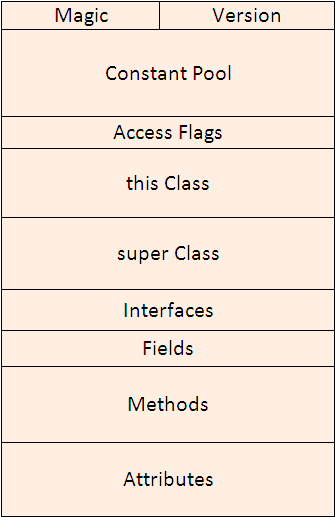
In previous tutorial Java Virtual Machine, An inside story…, we saw some basic of internals of JVM and how it is divided into different components that helps in execution of Java byte code. Java Byte code as we saw is packed in a file called class file (with .class extension). In this tutorial let us see the internals of a class file. How the data is being written in a class file and the class file format. Let us see first the Diagrammatic representation of a Java Class file.
Java Class File structure
A Java class file is consist of 10 basic sections:
Magic Number: 0xCAFEBABE
Version of Class File Format: the minor and major versions of the class file
Constant Pool: Pool of constants for the class
Access Flags: for example whether the class is abstract, static, etc.
This Class: The name of the current class
Super Class: The name of the super class
Interfaces: Any interfaces in the class
Fields: Any fields in the class
Methods: Any methods in the class
Attributes: Any attributes of the class (for example the name of the sourcefile, etc.)
You can remember the 10 sections with some funny mnemonic: My Very Cute Animal Turns Savage In Full Moon Areas. Above diagram depicts that a Java Class file is divided into different components such as magic, version, constant pool, access flags, this class, super class, interfaces, fields, methods, and attributes. The length of the Java class is not known before it gets loaded. There are variable length sections such as constant pool, methods, attributes etc. These sections are organized in such a way that they are prefaced by their size or length. This way JVM knows the size of variable length sections before actually loading them. The data written in a Class file is kept at one byte aligned and is tightly packed. This helps in making class file compact. The order of different sections in a Java Class file is strictly defined so that the JVM knows what to expect in a Class file and in which order it is loading different components. Let us check each and every component of a Class file in detail.
Magic number
Magic number is used to uniquely identify the format and to distinguish it from other formats. The first four bytes of the Class file are 0xCAFEBABE. The history of this magic number was explained by James Gosling: “We used to go to lunch at a place called St Michael’s Alley. According to local legend, in the deep dark past, the Grateful Dead used to perform there before they made it big. It was a pretty funky place that was definitely a Grateful Dead Kinda Place. When Jerry died, they even put up a little Buddhist-esque shrine. When we used to go there, we referred to the place as Cafe Dead. Somewhere along the line it was noticed that this was a HEX number. I was re-vamping some file format code and needed a couple of magic numbers: one for the persistent object file, and one for classes. I used CAFEDEAD for the object file format, and in grepping for 4 character hex words that fit after “CAFE” (it seemed to be a good theme) I hit on BABE and decided to use it. At that time, it didn’t seem terribly important or destined to go anywhere but the trash-can of history. So CAFEBABE became the class file format, and CAFEDEAD was the persistent object format. But the persistent object facility went away, and along with it went the use of CAFEDEAD – it was eventually replaced by RMI.”
Version of Class file
The next four byte of the class file contains major and minor version numbers. This number allows the JVM to verify and identify the class file. If the number is greater than what JVM can load, the class file will be rejected with error java.lang.UnsupportedClassVersionError. You can find class version of any Java class file using javap command line utility. For example:
javap -verbose MyClass
Consider we have a sample Java class:
publicclassMain{
publicstaticvoidmain(String [] args){
int my_integer = 0xFEEDED;
}
}
Code language:Java(java)
We compile this class using javac Main.java command and create class file. Now execute following command to see the major and minor version of class file.
C:\>javap -verbose Main
Compiled from "Main.java"publicclassMainextendsjava.lang.ObjectSourceFile: "Main.java"
minorversion: 0
majorversion: 50
...
Code language:Java(java)
Below is the list of Major versions and corresponding JDK version of class file.
Major Version
Hex
JDK version
51
0x33
J2SE 7
50
0x32
J2SE 6.0
49
0x31
J2SE 5.0
48
0x30
JDK 1.4
47
0x2F
JDK 1.3
46
0x2E
JDK 1.2
45
0x2D
JDK 1.1
Constant Pool
All the constants related to the Class or an Interface will get stored in the Constant Pool.The constants includes class names, variable names, interface names, method names and signature, final variable values, string literals etc. The constants are stored as a variable length array element in the Constant pool. The arrays of constants are preceded by its array size, hence JVM knows how many constants it will expect while loading the class file. In above diagram, the portion represented in green contains the size of the array. Within each array elements first byte represents a tag specifying the type of constant at that position in the array. In above diagram the portion in orange represent the one-byte tag. JVM identifies the type of the constant by reading one-byte tag. Hence if one-byte tag represents a String literal then JVM knows that next 2 bytes represents length of the String literal and rest of the entry is string literal itself. You can analyse the Constant Pool of any class file using javap command. Executing javap on above Main class, we get following symbol table.
The constant pool has 15 entries in total. Entry #1 is Method public static void main; #2 is for integer value 0xFEEDED (decimal 16707053). Also we have two entries #3 and #4 which corresponds to this class and super class. Rest is the symbol table storing string literals.
Access flags
Access flags follows the Constant Pool. It is a two byte entry that indicates whether the file defines a class or an interface, whether it is public or abstract or final in case it is a class. Below is a list of some of the access flags and their interpretation.
Flag Name
Value
Interpretation
ACC_PUBLIC
0x0001
Declared public; may be accessed from outside its package.
ACC_FINAL
0x0010
Declared final; no subclasses allowed.
ACC_SUPER
0x0020
Treat superclass methods specially when invoked by the invokespecial instruction.
ACC_INTERFACE
0x0200
Is an interface, not a class.
ACC_ABSTRACT
0x0400
Declared abstract; may not be instantiated.
this Class
This Class is a two byte entry that points to an index in Constant Pool. In above diagram, this class has a value 0x0007 which is an index in Constant Pool. The corresponding entry that is pointed by this class Constant_pool[this_class] in Constant pool has two parts, first part is the one-byte tag that represents the type of entry in constant pool, in this case it is Class or Interface. In above diagram this is shown in orange color. And second entry is two-byte having index again in Constant pool. This above diagram, two byte contain value 0x0004. Thus it points to Constant_poo [0x0004] which is the String literal having name of the interface or class.
super Class
Next 2 bytes after This Class is of Super Class. Similar to this class, value of two bytes is a pointer that points to Constant pool which has entry for super class of the class.
Interfaces
All the interfaces that are implemented by the class (or interface) defined in the file goes in Interface section of a class file. Starting two byte of the Interface section is the count that provides information about total number of interfaces being implemented. Immediately following is an array that contains one index into the constant pool for each interface implemented by class.
Fields
A field is an instance or a class level variable (property) of the class or interface. Fields section contains only those fields that are defined by the class or an interface of the file and not those fields which are inherited from the super class or super interface. First two bytes in Fields section represents count: that is the total number of fields in Fields Section. Following the count is an array of variable length structure one for each field. Each element in this array represent one field. Some information is stored in this structure where as some information like name of the fields are stored in Constant pool.
Methods
The Methods component host the methods that are explicitly defined by this class, not any other methods that may be inherited from super class. First two byte is the count of the number of methods in the class or interface. The rest is again a variable length array which holds each method structure. Method structure contains several pieces of information about the method like method argument list, its return type, the number of stack words required for the method’s local variables, stack words required for method’s operand stack, a table for exceptions, byte code sequence etc.
Attributes
Attribute section contains several attribute about the class file, e.g. one of the attribute is the source code attribute which reveals the name of the source file from which this class file was compiled. First two bytes in Attribute section is count of the number of attributes, followed by the attributes themselves. The JVMs will ignore any attributes they don’t understand. Let me know your comments and suggestions about this tutorial.
I really liked your simple way of explaining the whole ClassFile structure! I’ve been reading SUN’s specification throu Tim and Frank book titled “The java virtual machine specification” for two days and honestly, I kept flipping back and forth to remember what’s the connection. Here the connection is really obvious ! Thanks
Thanks Maha for the comment… In this tutorial I tried to explain everything in a very simple language so that it is easy for everyone to understand it. Do read more on this blog. Hope you will like it.
Hi Anupriya, For decompiling any Java Class, you can use lots of Decompilers available freely. One such decompiler is JAD http://www.kpdus.com/jad.html
I found that there are two type of statements that involve in branching – flow control instructions and the switch instructions (table switch and lookup switch).
I am able to decompile most of the bytecode except in detecting loops. What are the rules to detect loops in the code attribute instructions for a method? I tried to identify by patterns but gave up. Every compiler can generate it’s code in different ways.
Any pointers would also be very helpful… Also, is it very math intensive?
Excellent articles (both of the articles) You have explained such a complicated thing in such an easy way. Fantastic Job. Thanks and Best Wishes Shahab
 Above diagram depicts that a Java Class file is divided into different components such as magic, version, constant pool, access flags, this class, super class, interfaces, fields, methods, and attributes. The length of the Java class is not known before it gets loaded. There are variable length sections such as constant pool, methods, attributes etc. These sections are organized in such a way that they are prefaced by their size or length. This way JVM knows the size of variable length sections before actually loading them. The data written in a Class file is kept at one byte aligned and is tightly packed. This helps in making class file compact. The order of different sections in a Java Class file is strictly defined so that the JVM knows what to expect in a Class file and in which order it is loading different components. Let us check each and every component of a Class file in detail.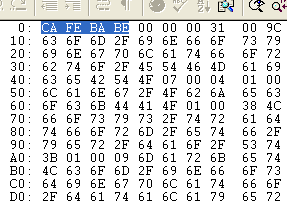
 The history of this magic number was explained by James Gosling: “We used to go to lunch at a place called St Michael’s Alley. According to local legend, in the deep dark past, the Grateful Dead used to perform there before they made it big. It was a pretty funky place that was definitely a Grateful Dead Kinda Place. When Jerry died, they even put up a little Buddhist-esque shrine. When we used to go there, we referred to the place as Cafe Dead. Somewhere along the line it was noticed that this was a HEX number. I was re-vamping some file format code and needed a couple of magic numbers: one for the persistent object file, and one for classes. I used CAFEDEAD for the object file format, and in grepping for 4 character hex words that fit after “CAFE” (it seemed to be a good theme) I hit on BABE and decided to use it. At that time, it didn’t seem terribly important or destined to go anywhere but the trash-can of history. So CAFEBABE became the class file format, and CAFEDEAD was the persistent object format. But the persistent object facility went away, and along with it went the use of CAFEDEAD – it was eventually replaced by RMI.”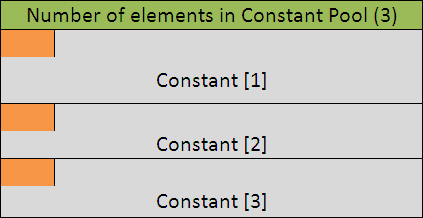
 The constants are stored as a variable length array element in the Constant pool. The arrays of constants are preceded by its array size, hence JVM knows how many constants it will expect while loading the class file. In above diagram, the portion represented in green contains the size of the array. Within each array elements first byte represents a tag specifying the type of constant at that position in the array. In above diagram the portion in orange represent the one-byte tag. JVM identifies the type of the constant by reading one-byte tag. Hence if one-byte tag represents a String literal then JVM knows that next 2 bytes represents length of the String literal and rest of the entry is string literal itself. You can analyse the Constant Pool of any class file using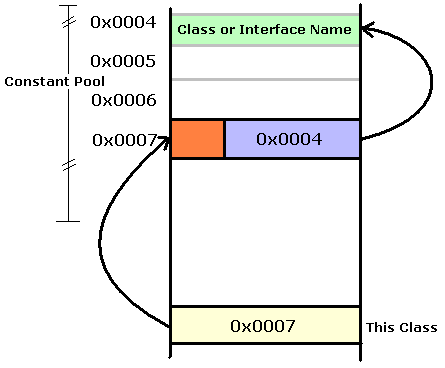
 This Class is a two byte entry that points to an index in Constant Pool. In above diagram, this class has a value 0x0007 which is an index in Constant Pool. The corresponding entry that is pointed by this class Constant_pool[this_class] in Constant pool has two parts, first part is the one-byte tag that represents the type of entry in constant pool, in this case it is Class or Interface. In above diagram this is shown in orange color. And second entry is two-byte having index again in Constant pool. This above diagram, two byte contain value 0x0004. Thus it points to Constant_poo [0x0004] which is the String literal having name of the interface or class.






I really liked your simple way of explaining the whole ClassFile structure! I’ve been reading SUN’s specification throu Tim and Frank book titled “The java virtual machine specification” for two days and honestly, I kept flipping back and forth to remember what’s the connection. Here the connection is really obvious ! Thanks
Thanks Maha for the comment…
In this tutorial I tried to explain everything in a very simple language so that it is easy for everyone to understand it.
Do read more on this blog. Hope you will like it.
Hi viral,
can u please help me decompilation of class files?
Where should i start from?
Hi Anupriya,
For decompiling any Java Class, you can use lots of Decompilers available freely.
One such decompiler is JAD http://www.kpdus.com/jad.html
Hope this will solve your query.
Hi Viral,
I found that there are two type of statements that involve in branching – flow control instructions and the switch instructions (table switch and lookup switch).
I am able to decompile most of the bytecode except in detecting loops. What are the rules to detect loops in the code attribute instructions for a method? I tried to identify by patterns but gave up. Every compiler can generate it’s code in different ways.
Any pointers would also be very helpful… Also, is it very math intensive?
Thanks,
Keshavan
Hi
Could some one please tell me how to get the goto branch address in java bytecode
Thanks
thx for this tutorial..
I have read some article about Java class file format. This is the only one taught me what Java class file format is . Thank you very much.
its really interesting and understandable. i really like the simple way u explained! thumbs up :)
Really hats off…..Excellent and really helpful tech notes….
really mind blowing for ur explanation it helped me a lot………. thank u
HATS OFF VIRAL!
Fantastic article. Never knew so many things about class file.
Excellent articles (both of the articles)
You have explained such a complicated thing in such an easy way. Fantastic Job.
Thanks and Best Wishes
Shahab
Very very helpful. Complicated topics in an easily understood format. thanks and best wishes.
I have some doubts.
how jvm interprets obfuscated byte codes?.
it help me a lot,thanks.
very good explanation
I think Entry #1 is not a Method public static void main; but it is constructor of java.lang,Object