Apache Struts has changed the way we develop a Web application. Since its inception as an MVC architecture, Struts has been extensively used in J2EE world to develop robust, extendable and effective web applications.
Introduction to Struts Validation Framework
[ad name=”AD_INBETWEEN_POST”] One of the important features of Struts framework is Struts Validation framework that performs validation on incoming form data. Validation framework was introduced by David Winterfeldt as an external plugin to Struts framework. It’s functionality has since been split so that validator can serve as the basis for a independant component and is now part of Jakarta Commons. The Struts framework’s simple validation interface alleviates much of the headache associated with handling data validation, allowing you to focus on validation code and not on the mechanics of capturing data and redisplaying incomplete or invalid data. In order to do form validation without Validator framework, one has to use validate() method of the form bean (ActionForm class) to perform this task. Also one has to handle error messages during manual validation. Lot of fields that we validate require same logic to validate them, hence code is unneccessarily duplicated (if not managed properly). Validation framework comes with set of useful routines to handle form validation automatically and it can handle both server side as well as client side form validation. If certain validation is not present, you can create your own validation logic and plug it into validation framework as a re-usable component. Validator uses two XML configuration files to determine which validation routines should be installed and how they should be applied for a given application, respectively. The first configuration file, validator-rules.xml, declares the validation routines that should be plugged into the framework and provides logical names for each of the validations. The validator-rules.xml file also defines client-side JavaScript code for each validation routine. Validator can be configured to send this JavaScript code to the browser so that validations are performed on the client side as well as on the server side. The second configuration file, validation.xml, defines which validation routines should be applied to which Form Beans. The definitions in this file use the logical names of Form Beans from the struts-config.xml file along with the logical names of validation routines from the validator-rules.xml file to tie the two together. Using the Validator framework involves enabling the Validator plug-in, configuring Validator’s two configuration files, and creating Form Beans that extend the Validator’s ActionForm subclasses. The following sections explain in detail how to configure and use Validator.
Create a Struts project
Create a struts web application project. I assume you have working environment set for a Struts project. If not then go through the tutorial: Creating Struts application using Eclipse and create a struts project.
Create Form Beans
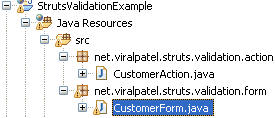
Create a form bean in your project called CustomerForm and copy following code in it.
We will use this validator plugin to validate this form. Note that the form bean is extended from class ValidatorForm and not ActionForm as we generally do in Struts project.
Add Validator Plug-in in struts-config.xml
In order to use Validator in our project we need to configure it in struts-config.xml file. For this add following code in your struts-config.xml file.
This definition tells Struts to load and initialize the Validator plug-in for your application. Upon initialization, the plug-in loads the comma-delimited list of Validator config files specified by the pathnames property. Each config file’s path should be specified by use of a Web application-relative path, as shown in the previous example.
Define validations for the form
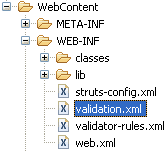
Create a file validation.xml in your applications WEB-INF directory. And copy following content in it.
In the above xml file, we have defined the rules for form validation. Note that we are validating form CustomerForm and the fields being validated are name, age, telephone and email. <field> tag defines the validation for a property of form. We can specify different rules like required, integer, email, intRange, mask etc in depends attribute of field tag.. Also you can define constants that can be reused in the validation xml using global constants tag.
Struts-config.xml entry for the action
Following is the entry in struts-config.xml file which maps the Action to our Validator form.
Struts validation framework uses externalization of the error messages. The messages are stored in a property file (ApplicationResource.properties) and are referred by the key values. Copy following in your ApplicationResource.properties (or MessageResource.properties).
label.name= Name
label.email= Email
label.telephone= Telephone
label.age= Age
# general error msgs
errors.header=<fontsize="2"><UL>
errors.prefix=<LI><spanstyle="color: red">
errors.suffix=</span></LI>
errors.footer=</UL></font>
errors.invalid={0} is invalid.
errors.maxlength={0} can not be greater than {1} characters.
errors.minlength={0} can not be less than {1} characters.
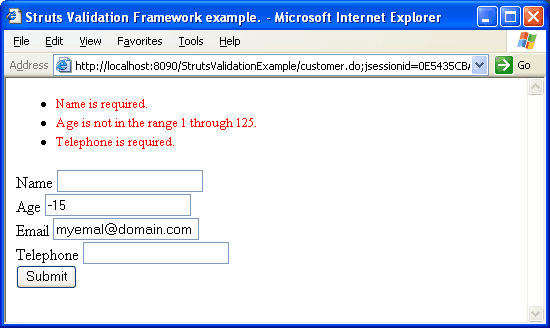
errors.range={0} is not in the range {1} through {2}.
errors.required={0} is required.
errors.byte={0} must be an byte.
errors.date={0} is not a date.
errors.double={0} must be an double.
errors.float={0} must be an float.
errors.integer={0} must be an integer.
errors.long={0} must be an long.
errors.short={0} must be an short.
Code language:HTML, XML(xml)
Create JSP to display the form
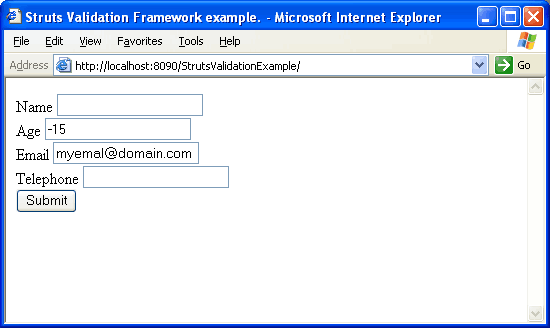
Create a JSP file called index.jsp and copy following content in it.
We are done with our application. Now execute it from any web container (Tomcat in my case) and open in browser. Enter any invalid value in the form and press submit. Post your comments / doubts on this tutorial.
Hi JJ, CustomerAction class file is a normal implementation of Action class that does not have anything special in it. The error handling is done using Validation framework. CustomerAction class will not be invoked in case of any validation errors.
Hi Neeraj, Can you give the list of the jars that you have used in the project. Check struts-validation jar and struts.jar file. Open these jars and see if the class ValidatorResources is available. I am very sure the problem is with the jar only.
sorry , in my system same this program generate different result it’s print the welcome statement which is wrote in MessageResource.properties file . ? why this msg is shown ? now what can I do .?
first: when i use in my project it will create lots of js code in my html page code .Can it only create the js which is i defined in the validate.xml,for example i defined “ ” ,it only create the required js.
second : when i use validation in service and validate is failed ,how my client html field onfoucs . for example html field ,when the user is validate failed ,how can on focus
@marken, The javascript code that is being generated by Struts is not very configurable. When we use tag , it generates all those javascript. You may want to disable client side validation by removing this tag altogether.
As I said, I am not aware of any mechanism provided by Struts to call onfocus of element if validation fails.
I will suggest to use Struts validation for server side validation.
I have got the exception while doing the validation please give me suggestion
javax.servlet.jsp.JspException: Missing message for key “label.name” at org.apache.struts.taglib.bean.MessageTag.doStartTag(MessageTag.java:297) at org.apache.jsp.actionform.index_jsp._jspx_meth_bean_005fmessage_005f0(index_jsp.java:195) at org.apache.jsp.actionform.index_jsp._jspx_meth_html_005fform_005f0(index_jsp.java:126) at org.apache.jsp.actionform.index_jsp._jspService(index_jsp.java:88) at org.apache.jasper.runtime.HttpJspBase.service(HttpJspBase.java:70) at javax.servlet.http.HttpServlet.service(HttpServlet.java:803) at org.apache.jasper.servlet.JspServletWrapper.service(JspServletWrapper.java:393) at org.apache.jasper.servlet.JspServlet.serviceJspFile(JspServlet.java:320) at org.apache.jasper.servlet.JspServlet.service(JspServlet.java:266) at javax.servlet.http.HttpServlet.service(HttpServlet.java:803) at org.apache.catalina.core.ApplicationFilterChain.internalDoFilter(ApplicationFilterChain.java:290) at org.apache.catalina.core.ApplicationFilterChain.doFilter(ApplicationFilterChain.java:206) at org.apache.catalina.core.StandardWrapperValve.invoke(StandardWrapperValve.java:233) at org.apache.catalina.core.StandardContextValve.invoke(StandardContextValve.java:175) at org.apache.catalina.core.StandardHostValve.invoke(StandardHostValve.java:128) at org.apache.catalina.valves.ErrorReportValve.invoke(ErrorReportValve.java:102) at org.apache.catalina.core.StandardEngineValve.invoke(StandardEngineValve.java:109) at org.apache.catalina.connector.CoyoteAdapter.service(CoyoteAdapter.java:263) at org.apache.coyote.http11.Http11Processor.process(Http11Processor.java:844) at org.apache.coyote.http11.Http11Protocol$Http11ConnectionHandler.process(Http11Protocol.java:584) at org.apache.tomcat.util.net.JIoEndpoint$Worker.run(JIoEndpoint.java:447) at java.lang.Thread.run(Unknown Source)
Hi Madhu, Thanks for the comment. The above example does the server side validation as well. Please comment out the following code to check server side validation:
Hi, I am new to validation and have the following doubts.
1. The jsp file that you mentioned above – is it ‘index.jsp’ or ‘customer.jsp’ 2. What should be there in index.jsp : in this part in place of “login” Kindly help.
@namrata, The above JSP will be called index.jsp. Customer.jsp will be a dummy JSP to display success message. You can have following content in Customer.jsp
Hi, My code is finally up and running. Sorry for bombarding you with so many queries :). When I enter the correct values, the result is a success and the correct jsp is displayed. But, when I enter the wrong value, the result is a failure and again index.jsp is displayed … right?? The errors etc are not getting displayed. What could be the problem?
I have done same done the same code for login page. In the username filed, I have set two constraints which are not null and do not allow special char. When I executed, I am got only username is required for required attribute. but mask msg is not come, if entered special char. my validation.xml code is here. Please correct me, if i did any wrong.
@Richard: My answer to that question will be Yes. You can use Validator without using Struts. There is an example source in validator’s repository. I hope this helps.
hello viral this tutorial has helped me a lot… I just wanted to know in jsp file what is “/customer” in ..is it a servlet?? also I m using Netbeans6.8 and glassfish v3 server why it is not compiling?? is it neccessary to use tomcat server?….kindly reply.. Regards Neelam
@Neelam: The value “/customer” in index.jsp is action mapping. Note that in struts-config.xml we have defined action CustomerAction with path=”/customer”. This is mapped in JSP form using <html:form action=”/customer”>
You must check the dependencies that you have in your project. The above example was created using Eclipse with Tomcat so it has Tomcat jars in dependencies. You may want to remove this and add Glassfish dependencies.
thankyou so much for your reply…. I have heared that Glassfish doesn’t have any control over Struts code ..is it true…b’coz I have addedd glassfish jars but its still not working… what I should do? do you have same example made in netbeans and glssfish…or can you give any tutorials related to this… please help thanx and regards
@Neelam: You have to add all the jar files including struts jars in your project in order to compile without error. Glassfish is just a container that can run your servlet/j2ee code. To run a struts project you still will need struts jars.
Hi Viral i have tried this example….it shows error when i made any invalid entry like name is required etc….but when all the entries are valid it shows following error exception
javax.servlet.ServletException: Servlet execution threw an exception
hi, is there anyway to short circuit the errors? That is, if there is any error with the first field. It should display the first field is required, and stop validating other fields.
We have a large website that uses struts 1.2.9 with validation. We found testing the server side validation, the errors are returned but the fields which are not html tagged on the screen are lost because we use request scope. Is there a way to direct the form validation to the action class to reload the form bean? Since we have large number of classes, would like to keep from having to do a large number of changes in each action class.
dear Viral I want to write a rule for user’s password with some rules, like password should have one special character,One capital letter,one small letter and length should not less than 8 and more than 15. Please help
hi Viral, i have some problem you are displaying all the errors together what if i want to display the error in front of the field which cause the error means what is to be given in the property attribute of the tag.
and second how we can perform client side validation
when i submit all bean property goes to success.jsp but the validation part is not working. plug in rules& validation.xml are added.
eclipse & tomcat6.0 i am using. errors on console after submit —->
ug 19, 2010 4:42:49 PM org.apache.struts.validator.ValidatorForm validate SEVERE: org.apache.struts.validator.FieldChecks.validateRequired(java.lang.Object, org.apache.commons.validator.ValidatorAction, org.apache.commons.validator.Field, org.apache.struts.action.ActionErrors, javax.servlet.http.HttpServletRequest) org.apache.commons.validator.ValidatorException: org.apache.struts.validator.FieldChecks.validateRequired(java.lang.Object, org.apache.commons.validator.ValidatorAction, org.apache.commons.validator.Field, org.apache.struts.action.ActionErrors, javax.servlet.http.HttpServletRequest) at org.apache.commons.validator.ValidatorAction.loadValidationMethod(ValidatorAction.java:627) at org.apache.commons.validator.ValidatorAction.executeValidationMethod(ValidatorAction.java:557) at org.apache.commons.validator.Field.validateForRule(Field.java:827) at org.apache.commons.validator.Field.validate(Field.java:906) at org.apache.commons.validator.Form.validate(Form.java:174) at org.apache.commons.validator.Validator.validate(Validator.java:367) at org.apache.struts.validator.ValidatorForm.validate(ValidatorForm.java:110) at org.apache.struts.action.RequestProcessor.processValidate(RequestProcessor.java:950) at org.apache.struts.action.RequestProcessor.process(RequestProcessor.java:207) at org.apache.struts.action.ActionServlet.process(ActionServlet.java:1196) at org.apache.struts.action.ActionServlet.doPost(ActionServlet.java:432) at javax.servlet.http.HttpServlet.service(HttpServlet.java:637) at javax.servlet.http.HttpServlet.service(HttpServlet.java:717) at org.apache.catalina.core.ApplicationFilterChain.internalDoFilter(ApplicationFilterChain.java:290) at org.apache.catalina.core.ApplicationFilterChain.doFilter(ApplicationFilterChain.java:206) at org.apache.catalina.core.StandardWrapperValve.invoke(StandardWrapperValve.java:233) at org.apache.catalina.core.StandardContextValve.invoke(StandardContextValve.java:191) at org.apache.catalina.core.StandardHostValve.invoke(StandardHostValve.java:128) at org.apache.catalina.valves.ErrorReportValve.invoke(ErrorReportValve.java:102) at org.apache.catalina.core.StandardEngineValve.invoke(StandardEngineValve.java:109) at org.apache.catalina.connector.CoyoteAdapter.service(CoyoteAdapter.java:293) at org.apache.coyote.http11.Http11Processor.process(Http11Processor.java:849) at org.apache.coyote.http11.Http11Protocol$Http11ConnectionHandler.process(Http11Protocol.java:583) at org.apache.tomcat.util.net.JIoEndpoint$Worker.run(JIoEndpoint.java:454) at java.lang.Thread.run(Unknown Source)
Viral its a diff. problem — when i am connected to the NET the code works fine …. i have given the URI of jsp html & bean tld of ” WEB-INF ” so what should i do to work at a stand alone system.
Hi friends I have executed above login application. These are the errors I got. exception
org.apache.jasper.JasperException: javax.servlet.ServletException: javax.servlet.jsp.JspException: ValidatorResources not found in application scope under key “org.apache.commons.validator.VALIDATOR_RESOURCES” root cause javax.servlet.ServletException: javax.servlet.jsp.JspException: ValidatorResources not found in application scope under key “org.apache.commons.validator.VALIDATOR_RESOURCES” org.apache.jasper.runtime.PageContextImpl.doHandlePageException(PageContextImpl.java:850) root cause javax.servlet.jsp.JspException: ValidatorResources not found in application scope under key “org.apache.commons.validator.VALIDATOR_RESOURCES” org.apache.struts.taglib.html.JavascriptValidatorTag.renderJavascript(JavascriptValidatorTag.java:373) Could u plz help me to solve these errors……. Thankz in advance.
When I ran this program I got an error mentioning….java.lang.NullPointerException: Depends string “required” was not found in validator-rules.xml. please tell me what I need do now?
I’ve tried to execute this Struts validator example:
But when running on server, its giving the below error:
Feb 4, 2011 12:23:15 AM org.apache.catalina.core.AprLifecycleListener init INFO: The APR based Apache Tomcat Native library which allows optimal performance in production environments was not found on the java.library.path: C:\Program Feb 4, 2011 12:23:16 AM org.apache.tomcat.util.digester.SetPropertiesRule begin WARNING: [SetPropertiesRule]{Server/Service/Engine/Host/Context} Setting property ‘source’ to ‘org.eclipse.jst.jee.server:StrutsValidationExample’ did not find a matching property. Feb 4, 2011 12:23:16 AM org.apache.coyote.http11.Http11Protocol init INFO: Initializing Coyote HTTP/1.1 on http-8000 Feb 4, 2011 12:23:16 AM org.apache.catalina.startup.Catalina load INFO: Initialization processed in 942 ms java.lang.NoClassDefFoundError: org/apache/commons/validator/ValidatorResourcesInitializer at org.apache.catalina.startup.Bootstrap.main(Bootstrap.java:414) Caused by: java.lang.ClassNotFoundException: org.apache.commons.validator.ValidatorResourcesInitializer at org.apache.catalina.loader.WebappClassLoader.loadClass(WebappClassLoader.java:1491) … 22 more Feb 4, 2011 12:23:22 AM org.apache.catalina.core.StandardContext loadOnStartup SEVERE: Servlet /StrutsValidationExample threw load() exception java.lang.ClassNotFoundException: org.apache.commons.validator.ValidatorResourcesInitializer at org.apache.struts.validator.ValidatorPlugIn.initResources(ValidatorPlugIn.java:224) SEVERE: Servlet.service() for servlet jsp threw exception java.lang.NoSuchMethodError: org.apache.commons.validator.ValidatorResources.get(Ljava/util/Locale;Ljava/lang/Object;)Lorg/apache/commons/validator/Form; at org.apache.tomcat.util.net.JIoEndpoint$Worker.run(JIoEndpoint.java:489)
I m getting the below error.Plz help me SEVERE: Servlet.service() for servlet jsp threw exception javax.servlet.jsp.JspException: ValidatorResources not found in application scope under key “org.apache.commons.validator.VALIDATOR_RESOURCES” at org.apache.struts.taglib.html.JavascriptValidatorTag.renderJavascript(JavascriptValidatorTag.java:373) at java.lang.Thread.run(Thread.java:619)
I also getting the ValidatorResources not found – error, and nothing I have done so far seems to make this go away. I am using a struts 1.2 with commons-validator-1.3.1.jar hope this doesn’t mess things up for me. Pls help if possible.
Thanks… Good Explanation.. But I would like to know the meaning of this line. “<html:javascript formName="CustomerForm" " . That is Any javascript is written or it will taken from xml file?
i am working the struts validation for login page. I am not able to test the password consecutive. can you please help me how to test password consecutive.
Like:- Admin123 is correct password AAdmin123 in not correct
Hello!! I tried to excute the thing, but the things are not working. One thing i want to ask is that ypu ahve mentioned about the validation-rules.xml. But you ahve not given any code for this xml file. SO can you plaes brief me about this validation-rules.xml . Thanks in advance.
Hi Sir, This example is good & easy to understand. But, where is the CustomerAction.java file? How to write that? Which logic has to implement in that?
I was wondering about this line “”, you put it into the code but you are not using it at all. By other hand, javascript code should be included into tags, i say “should” and not “must” because is not really mandatory but including javascript this way is just a matter of order. Back to the topic, that javascript line allows you to do the validation before the data is send to the server, so this saves you time and bandwidth, to use it you must add an event to your form, on the sample jsp code just put the form line like this: , so now instead of get some messages on the page body the messages will appear in a pop-up warning window
thank for ur all time support..! Sir i have follow u but I am not get any proper result. I am using struts1.1,jsp,springhibernateDao….when i cilck on submit it will generate not null error from hbm.xml file and if i changes in DB so it will add null value but not show any error
@Deboleena: You will get validator-rules.xml along with Struts 1.1 distribution. Download is from Struts website along with other required Jar files. For example: here’s the source code for validator-rules.xml from Struts source.
dear frnds , if u found warning Resource your properties file name_en_US something then u have mistake something like 1) we did not keep properties file in classes folder. 2) …
…
and
in action tag attributes value and html form action value does not same then this happen. or remove after that solve ur problem
I am getting exception when submitting the form.can anyone help… In console:
SEVERE: org.apache.struts.validator.FieldChecks.validateRequired(java.lang.Object, org.apache.commons.validator.ValidatorAction, org.apache.commons.validator.Field, org.apache.struts.action.ActionMessages, org.apache.commons.validator.Validator, javax.servlet.http.HttpServletRequest)
org.apache.commons.validator.ValidatorException: org.apache.struts.validator.FieldChecks.validateRequired(java.lang.Object, org.apache.commons.validator.ValidatorAction, org.apache.commons.validator.Field, org.apache.struts.action.ActionMessages, org.apache.commons.validator.Validator, javax.servlet.http.HttpServletRequest)
	at org.apache.commons.validator.ValidatorAction.loadValidationMethod(ValidatorAction.java:627)
	at org.apache.commons.validator.ValidatorAction.executeValidationMethod(ValidatorAction.java:557)
	at org.apache.commons.validator.Field.validateForRule(Field.java:811)
	at org.apache.commons.validator.Field.validate(Field.java:890)
	at org.apache.commons.validator.Form.validate(Form.java:174)
	at org.apache.commons.validator.Validator.validate(Validator.java:367)
	at org.apache.struts.validator.ValidatorForm.validate(ValidatorForm.java:112)
	at org.apache.struts.action.RequestProcessor.processValidate(RequestProcessor.java:921)
	at org.apache.struts.action.RequestProcessor.process(RequestProcessor.java:206)
	at org.apache.struts.action.ActionServlet.process(ActionServlet.java:1164)
	at org.apache.struts.action.ActionServlet.doPost(ActionServlet.java:415)
	at javax.servlet.http.HttpServlet.service(HttpServlet.java:637)
	at javax.servlet.http.HttpServlet.service(HttpServlet.java:717)
	at org.apache.catalina.core.ApplicationFilterChain.internalDoFilter(ApplicationFilterChain.java:290)
	at org.apache.catalina.core.ApplicationFilterChain.doFilter(ApplicationFilterChain.java:206)
	at org.apache.catalina.core.StandardWrapperValve.invoke(StandardWrapperValve.java:233)
	at org.apache.catalina.core.StandardContextValve.invoke(StandardContextValve.java:191)
	at org.apache.catalina.core.StandardHostValve.invoke(StandardHostValve.java:128)
	at org.apache.catalina.valves.ErrorReportValve.invoke(ErrorReportValve.java:102)
	at org.apache.catalina.core.StandardEngineValve.invoke(StandardEngineValve.java:109)
	at org.apache.catalina.connector.CoyoteAdapter.service(CoyoteAdapter.java:286)
	at org.apache.coyote.http11.Http11Processor.process(Http11Processor.java:845)
	at org.apache.coyote.http11.Http11Protocol$Http11ConnectionHandler.process(Http11Protocol.java:583)
	at org.apache.tomcat.util.net.JIoEndpoint$Worker.run(JIoEndpoint.java:447)
	at java.lang.Thread.run(Unknown Source)
Jun 14, 2013 4:17:53 PM org.apache.struts.action.RequestProcessor processActionCreate
SEVERE: No action instance for path /customer could be created
java.lang.ClassCastException: validationform.CustomerForm cannot be cast to org.apache.struts.action.Action
	at org.apache.struts.action.RequestProcessor.processActionCreate(RequestProcessor.java:282)
	at org.apache.struts.action.RequestProcessor.process(RequestProcessor.java:220)
	at org.apache.struts.action.ActionServlet.process(ActionServlet.java:1164)
	at org.apache.struts.action.ActionServlet.doPost(ActionServlet.java:415)
	at javax.servlet.http.HttpServlet.service(HttpServlet.java:637)
	at javax.servlet.http.HttpServlet.service(HttpServlet.java:717)
	at org.apache.catalina.core.ApplicationFilterChain.internalDoFilter(ApplicationFilterChain.java:290)
	at org.apache.catalina.core.ApplicationFilterChain.doFilter(ApplicationFilterChain.java:206)
	at org.apache.catalina.core.StandardWrapperValve.invoke(StandardWrapperValve.java:233)
	at org.apache.catalina.core.StandardContextValve.invoke(StandardContextValve.java:191)
	at org.apache.catalina.core.StandardHostValve.invoke(StandardHostValve.java:128)
	at org.apache.catalina.valves.ErrorReportValve.invoke(ErrorReportValve.java:102)
	at org.apache.catalina.core.StandardEngineValve.invoke(StandardEngineValve.java:109)
	at org.apache.catalina.connector.CoyoteAdapter.service(CoyoteAdapter.java:286)
	at org.apache.coyote.http11.Http11Processor.process(Http11Processor.java:845)
	at org.apache.coyote.http11.Http11Protocol$Http11ConnectionHandler.process(Http11Protocol.java:583)
	at org.apache.tomcat.util.net.JIoEndpoint$Worker.run(JIoEndpoint.java:447)
	at java.lang.Thread.run(Unknown Source)
HI Viral, I am able to get the server side validation but in client side validation i am not getting pop-up message.Please comment on it.Thanks in Advance.

 Post your comments / doubts on this tutorial.

please provide struts 1.2 server side and client side validation
Hi I read about this CustomerAction but I don’t see any codes for that. Can anyone enlighten me? Thanks
Hi JJ,
CustomerAction class file is a normal implementation of Action class that does not have anything special in it. The error handling is done using Validation framework. CustomerAction class will not be invoked in case of any validation errors.
Simple & to the point.
Good article for the beginners.
Very good I leaned jar file creation in one shot
Hi All,
actually when i run this application , i got this exception
java.lang.NoClassDefFoundError: org/apache/commons/validator/ValidatorResources
i loaded all necessary jar file but couldnot solve this problem can anyone tell me why this happening.
Thanks
Hi Neeraj,
Can you give the list of the jars that you have used in the project. Check struts-validation jar and struts.jar file. Open these jars and see if the class ValidatorResources is available. I am very sure the problem is with the jar only.
THANKS,
I was vary confuse about this .
sorry ,
in my system same this program generate different result it’s print the welcome statement which is wrote in MessageResource.properties file . ?
why this msg is shown ?
now what can I do .?
good.thank u.i like very much for this site
Thanks for the comment Thangeswaran. :) Feel free to subscribe for Email or RSS feed and get the latest articles.
Hi all
Actually when i run this application i got the errors like this..Could u please help me out in solving this error.
org.apache.jasper.JasperException: org.apache.commons.validator.ValidatorResources.get(Ljava/util/Locale;Ljava/lang/Object;)Lorg/apache/commons/validator/Form;
org.apache.jasper.servlet.JspServletWrapper.handleJspException(JspServletWrapper.java:460)
org.apache.jasper.servlet.JspServletWrapper.service(JspServletWrapper.java:355)
org.apache.jasper.servlet.JspServlet.serviceJspFile(JspServlet.java:329)
org.apache.jasper.servlet.JspServlet.service(JspServlet.java:265)
javax.servlet.http.HttpServlet.service(HttpServlet.java:803)
root cause
javax.servlet.ServletException: org.apache.commons.validator.ValidatorResources.get(Ljava/util/Locale;Ljava/lang/Object;)Lorg/apache/commons/validator/Form;
org.apache.jasper.runtime.PageContextImpl.doHandlePageException(PageContextImpl.java:841)
org.apache.jasper.runtime.PageContextImpl.handlePageException(PageContextImpl.java:774)
org.apache.jsp.customer_jsp._jspService(customer_jsp.java:99)
org.apache.jasper.runtime.HttpJspBase.service(HttpJspBase.java:98)
javax.servlet.http.HttpServlet.service(HttpServlet.java:803)
org.apache.jasper.servlet.JspServletWrapper.service(JspServletWrapper.java:331)
org.apache.jasper.servlet.JspServlet.serviceJspFile(JspServlet.java:329)
org.apache.jasper.servlet.JspServlet.service(JspServlet.java:265)
javax.servlet.http.HttpServlet.service(HttpServlet.java:803)
root cause
java.lang.NoSuchMethodError: org.apache.commons.validator.ValidatorResources.get(Ljava/util/Locale;Ljava/lang/Object;)Lorg/apache/commons/validator/Form;
org.apache.struts.taglib.html.JavascriptValidatorTag.doStartTag(JavascriptValidatorTag.java:316)
org.apache.jsp.customer_jsp._jspx_meth_html_005fjavascript_005f0(customer_jsp.java:132)
org.apache.jsp.customer_jsp._jspService(customer_jsp.java:85)
org.apache.jasper.runtime.HttpJspBase.service(HttpJspBase.java:98)
javax.servlet.http.HttpServlet.service(HttpServlet.java:803)
org.apache.jasper.servlet.JspServletWrapper.service(JspServletWrapper.java:331)
org.apache.jasper.servlet.JspServlet.serviceJspFile(JspServlet.java:329)
org.apache.jasper.servlet.JspServlet.service(JspServlet.java:265)
javax.servlet.http.HttpServlet.service(HttpServlet.java:803)
hi all
i have 1problem,when the validate framework send message to client ,how can i make the form element() onfocus
Hi Marken, I guess Struts does not provide any mechanism for focusing the element having error.
hi Viral Patel ,i have some questions
first: when i use in my project
it will create lots of js code in my html page code .Can it only create the js which is i defined in
the validate.xml,for example i defined “ ” ,it only create the required js.
second : when i use validation in service and validate is failed ,how my client html field onfoucs . for example html field ,when the user is validate failed ,how can on focus
@marken, The javascript code that is being generated by Struts is not very configurable. When we use tag
As I said, I am not aware of any mechanism provided by Struts to call onfocus of element if validation fails.
I will suggest to use Struts validation for server side validation.
i want a simple example using struts and mysql..
I have got the exception while doing the validation please give me suggestion
javax.servlet.jsp.JspException: Missing message for key “label.name”
at org.apache.struts.taglib.bean.MessageTag.doStartTag(MessageTag.java:297)
at org.apache.jsp.actionform.index_jsp._jspx_meth_bean_005fmessage_005f0(index_jsp.java:195)
at org.apache.jsp.actionform.index_jsp._jspx_meth_html_005fform_005f0(index_jsp.java:126)
at org.apache.jsp.actionform.index_jsp._jspService(index_jsp.java:88)
at org.apache.jasper.runtime.HttpJspBase.service(HttpJspBase.java:70)
at javax.servlet.http.HttpServlet.service(HttpServlet.java:803)
at org.apache.jasper.servlet.JspServletWrapper.service(JspServletWrapper.java:393)
at org.apache.jasper.servlet.JspServlet.serviceJspFile(JspServlet.java:320)
at org.apache.jasper.servlet.JspServlet.service(JspServlet.java:266)
at javax.servlet.http.HttpServlet.service(HttpServlet.java:803)
at org.apache.catalina.core.ApplicationFilterChain.internalDoFilter(ApplicationFilterChain.java:290)
at org.apache.catalina.core.ApplicationFilterChain.doFilter(ApplicationFilterChain.java:206)
at org.apache.catalina.core.StandardWrapperValve.invoke(StandardWrapperValve.java:233)
at org.apache.catalina.core.StandardContextValve.invoke(StandardContextValve.java:175)
at org.apache.catalina.core.StandardHostValve.invoke(StandardHostValve.java:128)
at org.apache.catalina.valves.ErrorReportValve.invoke(ErrorReportValve.java:102)
at org.apache.catalina.core.StandardEngineValve.invoke(StandardEngineValve.java:109)
at org.apache.catalina.connector.CoyoteAdapter.service(CoyoteAdapter.java:263)
at org.apache.coyote.http11.Http11Processor.process(Http11Processor.java:844)
at org.apache.coyote.http11.Http11Protocol$Http11ConnectionHandler.process(Http11Protocol.java:584)
at org.apache.tomcat.util.net.JIoEndpoint$Worker.run(JIoEndpoint.java:447)
at java.lang.Thread.run(Unknown Source)
Nice work. Keep it up.
The article was very good. It worked at the first instance for me.
The validations mentioned in this example are only client side, not server side.
Hi Madhu, Thanks for the comment.
The above example does the server side validation as well. Please comment out the following code to check server side validation:
Hi,
I am new to validation and have the following doubts.
1. The jsp file that you mentioned above – is it ‘index.jsp’ or ‘customer.jsp’
2. What should be there in index.jsp :
in this part in place of “login”
Kindly help.
Hi,
I am getting the following error when I run. What exactly are we supposed to have in the index.jsp and customer.jsp files.
javax.servlet.ServletException: javax.servlet.jsp.JspException: Cannot find ActionMappings or ActionFormBeans collection
org.apache.jasper.runtime.PageContextImpl.doHandlePageException(PageContextImpl.java:850)
org.apache.jasper.runtime.PageContextImpl.handlePageException(PageContextImpl.java:779)
org.apache.jsp.index_jsp._jspService(index_jsp.java:102)
org.apache.jasper.runtime.HttpJspBase.service(HttpJspBase.java:70)
javax.servlet.http.HttpServlet.service(HttpServlet.java:803)
org.apache.jasper.servlet.JspServletWrapper.service(JspServletWrapper.java:374)
org.apache.jasper.servlet.JspServlet.serviceJspFile(JspServlet.java:337)
org.apache.jasper.servlet.JspServlet.service(JspServlet.java:266)
javax.servlet.http.HttpServlet.service(HttpServlet.java:803)
@namrata, The above JSP will be called index.jsp. Customer.jsp will be a dummy JSP to display success message. You can have following content in Customer.jsp
“Cannot find ActionMappings or ActionFormBeans collection”
This problem is still there. Could you help me with this!!
Hi, the problem got fixed. I had the wrong web.xml. But now my problem is similar to that of Tarun.
Missing message for key “label.username”
I have not used this anywhere…
Could you also provide the validator-rules.xml file?
Hi,
My code is finally up and running. Sorry for bombarding you with so many queries :).
When I enter the correct values, the result is a success and the correct jsp is displayed. But, when I enter the wrong value, the result is a failure and again index.jsp is displayed … right?? The errors etc are not getting displayed. What could be the problem?
Unfortunately, now it is giving this error :(
exception
org.apache.jasper.JasperException: java.lang.NullPointerException
org.apache.jasper.servlet.JspServletWrapper.handleJspException(JspServletWrapper.java:522)
org.apache.jasper.servlet.JspServletWrapper.service(JspServletWrapper.java:416)
org.apache.jasper.servlet.JspServlet.serviceJspFile(JspServlet.java:337)
org.apache.jasper.servlet.JspServlet.service(JspServlet.java:266)
javax.servlet.http.HttpServlet.service(HttpServlet.java:803)
root cause
java.lang.NullPointerException
org.apache.struts.taglib.html.JavascriptValidatorTag.renderJavascript(JavascriptValidatorTag.java:367)
org.apache.struts.taglib.html.JavascriptValidatorTag.doStartTag(JavascriptValidatorTag.java:349)
org.apache.jsp.index_jsp._jspx_meth_html_005fjavascript_005f0(index_jsp.java:141)
org.apache.jsp.index_jsp._jspService(index_jsp.java:92)
org.apache.jasper.runtime.HttpJspBase.service(HttpJspBase.java:70)
javax.servlet.http.HttpServlet.service(HttpServlet.java:803)
org.apache.jasper.servlet.JspServletWrapper.service(JspServletWrapper.java:374)
org.apache.jasper.servlet.JspServlet.serviceJspFile(JspServlet.java:337)
org.apache.jasper.servlet.JspServlet.service(JspServlet.java:266)
javax.servlet.http.HttpServlet.service(HttpServlet.java:803)
I’m often searching for brand-new articles in the WWW about this matter. Thankz!
hi jj
can u tel this is serverside validation or client side validation …plz i am confused
@shijuk, This example shows both the server as well as client side validation.
Hi Viral,
This article is really very nice, simple and well written.
Thanks and Good Luck for future articles.
Hi VP
I have done same done the same code for login page. In the username filed, I have set two constraints which are not null and do not allow special char. When I executed, I am got only username is required for required attribute. but mask msg is not come, if entered special char.
my validation.xml code is here.
Please correct me, if i did any wrong.
Advance thanks
RJ
mask
^[0-9a-zA-Z]*S
I am new to the validator use. My question is whether you can use the validator without struts. If yes how can I do it?
@Richard: My answer to that question will be Yes. You can use Validator without using Struts. There is an example source in validator’s repository. I hope this helps.
I actually have a problem like Thulasiram one but client side :
The error :
Error 500: org/apache/commons/validator/ValidatorResources.get(Ljava/util/Locale;Ljava/lang/Object;)Lorg/apache/commons/validator/Form;
appears in my browser when I try to reach the jsp (BEFORE filling the form). Do you have any idea?
Ok I updated my commons_validator.jar and it works fine…
hello viral
this tutorial has helped me a lot…
I just wanted to know in jsp file what is “/customer” in ..is it a servlet?? also I m using Netbeans6.8 and glassfish v3 server why it is not compiling?? is it neccessary to use tomcat server?….kindly reply..
Regards
Neelam
@Neelam: The value “/customer” in index.jsp is action mapping. Note that in struts-config.xml we have defined action CustomerAction with path=”/customer”. This is mapped in JSP form using <html:form action=”/customer”>
You must check the dependencies that you have in your project. The above example was created using Eclipse with Tomcat so it has Tomcat jars in dependencies. You may want to remove this and add Glassfish dependencies.
thankyou so much for your reply….
I have heared that Glassfish doesn’t have any control over Struts code ..is it true…b’coz I have addedd glassfish jars but its still not working…
what I should do?
do you have same example made in netbeans and glssfish…or can you give any tutorials related to this…
please help
thanx and regards
@Neelam: You have to add all the jar files including struts jars in your project in order to compile without error. Glassfish is just a container that can run your servlet/j2ee code. To run a struts project you still will need struts jars.
how much validate in used in xml. And given list of Event && Properties all the comtrol use in asp.net.
Regards
Gopal
hi ,
i have try this source code, but why my message doesn’t appear…can anyone help me.
tq
Hi Viral
i have tried this example….it shows error when i made any invalid entry like name is required etc….but when all the entries are valid it shows following error
exception
javax.servlet.ServletException: Servlet execution threw an exception
root cause
java.lang.NoSuchMethodError: org.apache.struts.config.ForwardConfig.getContextRelative()Z
org.apache.struts.tiles.TilesRequestProcessor.processForwardConfig(TilesRequestProcessor.java:302)
org.apache.struts.action.RequestProcessor.process(RequestProcessor.java:232)
org.apache.struts.action.ActionServlet.process(ActionServlet.java:1913)
org.apache.struts.action.ActionServlet.doPost(ActionServlet.java:462)
javax.servlet.http.HttpServlet.service(HttpServlet.java:637)
javax.servlet.http.HttpServlet.service(HttpServlet.java:717)
I have created CustomerAction.java also.
hi,
is there anyway to short circuit the errors?
That is, if there is any error with the first field. It should display the first field is required, and stop validating other fields.
thanks.
We can do the same in Struts 2,
by using shortCircuit=”true”.
is there any such attribute in struts 1 validation.xml
We have a large website that uses struts 1.2.9 with validation. We found testing the server side validation, the errors are returned but the fields which are not html tagged on the screen are lost because we use request scope. Is there a way to direct the form validation to the action class to reload the form bean? Since we have large number of classes, would like to keep from having to do a large number of changes in each action class.
this site help us more
we need action form
dear Viral
I want to write a rule for user’s password with some rules, like password should have one special character,One capital letter,one small letter and length should not less than 8 and more than 15.
Please help
Viral,
How can I validate double byte characters (like Japanese chars) using validator?. Thanks in advance.
hi Viral,
i have some problem
you are displaying all the errors together
what if i want to display the error in front of the field which cause the error
means what is to be given in the property attribute of the tag.
and second how we can perform client side validation
thanks..
Here’s how I did password validation:
I want to know the flow of this example. I tried this i m not getting the output. so please help me.
when i submit all bean property goes to success.jsp but the validation part is not working.
plug in rules& validation.xml are added.
eclipse & tomcat6.0 i am using.
errors on console after submit —->
ug 19, 2010 4:42:49 PM org.apache.struts.validator.ValidatorForm validate
SEVERE: org.apache.struts.validator.FieldChecks.validateRequired(java.lang.Object, org.apache.commons.validator.ValidatorAction, org.apache.commons.validator.Field, org.apache.struts.action.ActionErrors, javax.servlet.http.HttpServletRequest)
org.apache.commons.validator.ValidatorException: org.apache.struts.validator.FieldChecks.validateRequired(java.lang.Object, org.apache.commons.validator.ValidatorAction, org.apache.commons.validator.Field, org.apache.struts.action.ActionErrors, javax.servlet.http.HttpServletRequest)
at org.apache.commons.validator.ValidatorAction.loadValidationMethod(ValidatorAction.java:627)
at org.apache.commons.validator.ValidatorAction.executeValidationMethod(ValidatorAction.java:557)
at org.apache.commons.validator.Field.validateForRule(Field.java:827)
at org.apache.commons.validator.Field.validate(Field.java:906)
at org.apache.commons.validator.Form.validate(Form.java:174)
at org.apache.commons.validator.Validator.validate(Validator.java:367)
at org.apache.struts.validator.ValidatorForm.validate(ValidatorForm.java:110)
at org.apache.struts.action.RequestProcessor.processValidate(RequestProcessor.java:950)
at org.apache.struts.action.RequestProcessor.process(RequestProcessor.java:207)
at org.apache.struts.action.ActionServlet.process(ActionServlet.java:1196)
at org.apache.struts.action.ActionServlet.doPost(ActionServlet.java:432)
at javax.servlet.http.HttpServlet.service(HttpServlet.java:637)
at javax.servlet.http.HttpServlet.service(HttpServlet.java:717)
at org.apache.catalina.core.ApplicationFilterChain.internalDoFilter(ApplicationFilterChain.java:290)
at org.apache.catalina.core.ApplicationFilterChain.doFilter(ApplicationFilterChain.java:206)
at org.apache.catalina.core.StandardWrapperValve.invoke(StandardWrapperValve.java:233)
at org.apache.catalina.core.StandardContextValve.invoke(StandardContextValve.java:191)
at org.apache.catalina.core.StandardHostValve.invoke(StandardHostValve.java:128)
at org.apache.catalina.valves.ErrorReportValve.invoke(ErrorReportValve.java:102)
at org.apache.catalina.core.StandardEngineValve.invoke(StandardEngineValve.java:109)
at org.apache.catalina.connector.CoyoteAdapter.service(CoyoteAdapter.java:293)
at org.apache.coyote.http11.Http11Processor.process(Http11Processor.java:849)
at org.apache.coyote.http11.Http11Protocol$Http11ConnectionHandler.process(Http11Protocol.java:583)
at org.apache.tomcat.util.net.JIoEndpoint$Worker.run(JIoEndpoint.java:454)
at java.lang.Thread.run(Unknown Source)
Viral its a diff. problem — when i am connected to the NET the code works fine …. i have given the URI of jsp html & bean tld of ” WEB-INF ” so what should i do to work at a stand alone system.
pls help. Thank in advance.
Hi Viral,
Can you please tell me where to put properties file in our application..
Thanx in advance..
hi suhasini,,,,make a source folder on Java Resources and create a new file with the name applicationresources.properties in it,,,,,thats it.
the property file put always in under web-inf floder
rama
properties file put under src
Hi friends
I have executed above login application. These are the errors I got.
exception
org.apache.jasper.JasperException: javax.servlet.ServletException: javax.servlet.jsp.JspException: ValidatorResources not found in application scope under key “org.apache.commons.validator.VALIDATOR_RESOURCES”
root cause
javax.servlet.ServletException: javax.servlet.jsp.JspException: ValidatorResources not found in application scope under key “org.apache.commons.validator.VALIDATOR_RESOURCES”
org.apache.jasper.runtime.PageContextImpl.doHandlePageException(PageContextImpl.java:850)
root cause
javax.servlet.jsp.JspException: ValidatorResources not found in application scope under key “org.apache.commons.validator.VALIDATOR_RESOURCES”
org.apache.struts.taglib.html.JavascriptValidatorTag.renderJavascript(JavascriptValidatorTag.java:373)
Could u plz help me to solve these errors…….
Thankz in advance.
thanks
hello sir,
this example is very good, but u explain different validations,
I am getting Error :– Exception creating bean of class CustomerForm.
Please help
When I ran this program I got an error mentioning….java.lang.NullPointerException: Depends string “required” was not found in validator-rules.xml.
please tell me what I need do now?
I’ve tried to execute this Struts validator example:
But when running on server, its giving the below error:
Feb 4, 2011 12:23:15 AM org.apache.catalina.core.AprLifecycleListener init
INFO: The APR based Apache Tomcat Native library which allows optimal performance in production environments was not found on the java.library.path: C:\Program Feb 4, 2011 12:23:16 AM org.apache.tomcat.util.digester.SetPropertiesRule begin
WARNING: [SetPropertiesRule]{Server/Service/Engine/Host/Context} Setting property ‘source’ to ‘org.eclipse.jst.jee.server:StrutsValidationExample’ did not find a matching property.
Feb 4, 2011 12:23:16 AM org.apache.coyote.http11.Http11Protocol init
INFO: Initializing Coyote HTTP/1.1 on http-8000
Feb 4, 2011 12:23:16 AM org.apache.catalina.startup.Catalina load
INFO: Initialization processed in 942 ms
java.lang.NoClassDefFoundError: org/apache/commons/validator/ValidatorResourcesInitializer
at org.apache.catalina.startup.Bootstrap.main(Bootstrap.java:414)
Caused by: java.lang.ClassNotFoundException: org.apache.commons.validator.ValidatorResourcesInitializer
at org.apache.catalina.loader.WebappClassLoader.loadClass(WebappClassLoader.java:1491)
… 22 more
Feb 4, 2011 12:23:22 AM org.apache.catalina.core.StandardContext loadOnStartup
SEVERE: Servlet /StrutsValidationExample threw load() exception
java.lang.ClassNotFoundException: org.apache.commons.validator.ValidatorResourcesInitializer
at org.apache.struts.validator.ValidatorPlugIn.initResources(ValidatorPlugIn.java:224)
SEVERE: Servlet.service() for servlet jsp threw exception
java.lang.NoSuchMethodError: org.apache.commons.validator.ValidatorResources.get(Ljava/util/Locale;Ljava/lang/Object;)Lorg/apache/commons/validator/Form;
at org.apache.tomcat.util.net.JIoEndpoint$Worker.run(JIoEndpoint.java:489)
Please provide Your example code for download . so that Fresher can understand easily
I m getting the below error.Plz help me
SEVERE: Servlet.service() for servlet jsp threw exception
javax.servlet.jsp.JspException: ValidatorResources not found in application scope under key “org.apache.commons.validator.VALIDATOR_RESOURCES”
at org.apache.struts.taglib.html.JavascriptValidatorTag.renderJavascript(JavascriptValidatorTag.java:373)
at java.lang.Thread.run(Thread.java:619)
I also getting the ValidatorResources not found – error, and nothing I have done so far seems to make this go away.
I am using a struts 1.2 with commons-validator-1.3.1.jar hope this doesn’t mess things up for me. Pls help if possible.
Thanks… Good Explanation.. But I would like to know the meaning of this line. “<html:javascript formName="CustomerForm" " . That is Any javascript is written or it will taken from xml file?
i am working the struts validation for login page. I am not able to test the password consecutive.
can you please help me how to test password consecutive.
Like:- Admin123 is correct password
AAdmin123 in not correct
Regards,
Pitch
Hello!!
I tried to excute the thing, but the things are not working. One thing i want to ask is that ypu ahve mentioned about the validation-rules.xml. But you ahve not given any code for this xml file. SO can you plaes brief me about this validation-rules.xml . Thanks in advance.
i m getting http:status404 exception that the application cannot receive the Servlet action .
kindly help me .
Thanks in advance.
Hi Sir,
This example is good & easy to understand.
But, where is the CustomerAction.java file?
How to write that? Which logic has to implement in that?
Thanks & Regards,
Satya.
i m getting the following error.. reply fast.
A form must be defined in the Commons Validator configuration when dynamicJavascript=”true” is set.
also i want to show the error msgs in an alert box.
Hi,
I am new to struts.. Can you please provide the CustomerAction class and customer.jsp files..
Hi,
I was wondering about this line “”, you put it into the code but you are not using it at all. By other hand, javascript code should be included into tags, i say “should” and not “must” because is not really mandatory but including javascript this way is just a matter of order. Back to the topic, that javascript line allows you to do the validation before the data is send to the server, so this saves you time and bandwidth, to use it you must add an event to your form, on the sample jsp code just put the form line like this: , so now instead of get some messages on the page body the messages will appear in a pop-up warning window
i want validation message time display……..image……..means…..for example……..wrong means ” X” this symbol………….right means “-/”
Can you plz send me an example of validator action form
thank for ur all time support..!
Sir i have follow u but I am not get any proper result.
I am using struts1.1,jsp,springhibernateDao….when i cilck on submit it will generate not null error from hbm.xml file and if i changes in DB so it will add null value but not show any error
Hi
Thank you for everything good example.
i followu but
org.apache.jasper.JasperException: An exception occurred processing JSP page /index.jsp at line 10
7:
8:
9:
10:
11:
12:
13: why this is exception
thank u
Sorry
type Exception report
message An exception occurred processing JSP page /index.jsp at line 10
description The server encountered an internal error that prevented it from fulfilling this request.
exception
org.apache.jasper.JasperException: An exception occurred processing JSP page /index.jsp at line 10
7:
8:
9:
10:
11:
12:
13:
html:javascript formName=”CustomerForm” exception
Good tutorial!!…but, which version of struts are you using??
Thanks for sharing your knowledge.
Best Regards
You can point the validator-rules to /org/apache/struts/validator/validator-rules.xml instead.
You have not written what to put in validator-rules.xml
Please expalin that.
@Deboleena: You will get validator-rules.xml along with Struts 1.1 distribution. Download is from Struts website along with other required Jar files. For example: here’s the source code for validator-rules.xml from Struts source.
where is code for action form
i think the post is incomplete
Hi Pushpendra, This post is in continuation of Struts Hello World article. The code for Action class is in that article.
good eve sir
this app gives warning org.apache.struts.util.PropertyMessageResource loadlocal
Resource ApplicationResources not found
pls help me!
dear frnds ,
if u found warning Resource your properties file name_en_US something then u have
mistake something like
1) we did not keep properties file in classes folder.
2)
…
…
and
in action tag attributes value and html form action value does not same then this happen.
or remove
after that solve ur problem
It works fine for me……………………………….
I am getting exception when submitting the form.can anyone help…
In console:
Action cannot be of type ActionForm in the ActionMapping in struts-config.xml file
whats the purpose of validator-rules.xml while validating a form in struts
I have already (extended myform Class with ActionForm Class) at that situation how can i validate email id….which enter by user………..
some more details of above code
HI Viral,
I am able to get the server side validation but in client side validation i am not getting pop-up message.Please comment on it.Thanks in Advance.
Hi Viral,
I want to make one reusable component for validation which can be plugged in with any framework.Can you suggest any idea please.
Thanks for sharing your knowledge.
Best Regards
Very good Post thanks for sharing this.
Thank u so much..
where does validator-rules.xml is defined?
Thanks in adavance..