It is a compression format created by Jean-Loup Gailly and Mark Adler. Version 0.1 was first publicly released on October 31, 1992. GZIP is based on the DEFLATE algorithm, which is a combination of LZ77 and Huffman coding. DEFLATE was intended as a replacement for LZW and other patent-encumbered data compression algorithms which, at the time, limited the usability of compress and other popular archivers.
How does it helps in improving performance of my web page?
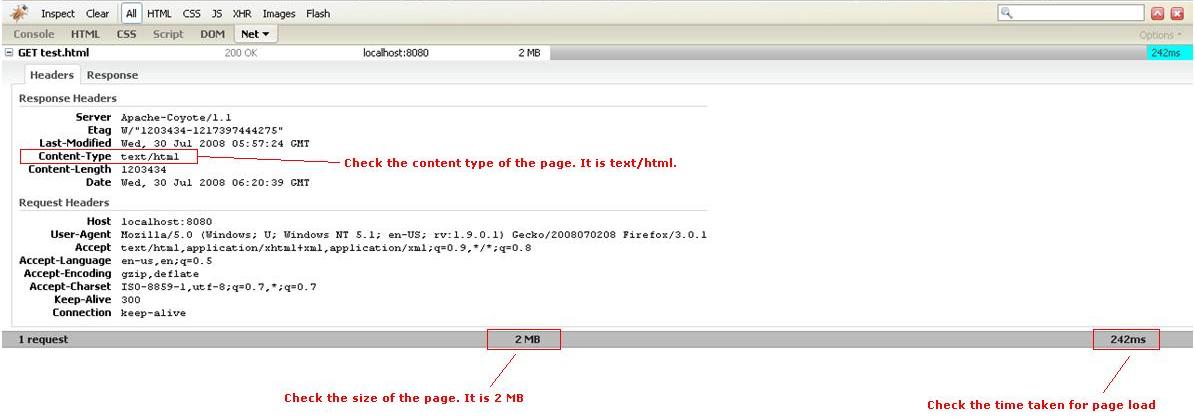
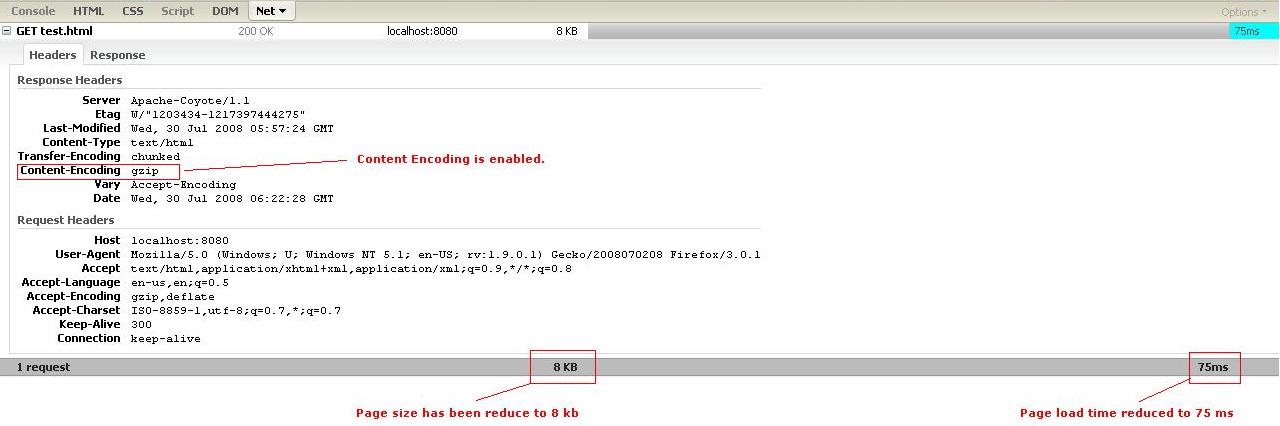
Modern browser like Internet Explorer, Firefox, Opera etc supports gzip compressed content. These browsers are capable of uncompressing gzip data into plain text. Servers like Apache, Tomcat, JBoss etc supports gzip compression too. Hence if gzip is enabled in such servers, the response if first compressed and then send to client. Hence this increase performance by many folds.
How to enable GZIP in my tomcat server?
Here is how to enable GZIP compression on Tomcat: edit file /conf/server.xml and add to the HTTP Connector configuration something like this:
He dude, why do you wanna do compression on tomcat/coyote.. most of the people ,when they go production, put the tomcat behind an apache or lighttpd or nginix , as a cluster why not the actual webserver do the compression..tomcat compresses in java….while these web servers do it natively..thus much faster and production suitable.
Thanks Aditiya for the comment… Definitely Apache server can be used that can do this.. But sometime back, I wanted to use only Tomcat and hence this code.
I have modified the server.xml conf file to set the \"compression\" properties as specified above in the connector tag.
I have tested this in FireFox in which I am able to notice the difference in the size. But When tested in the IE7 there is no difference in the size of the page. Can anyone explain me how to figure out the issue with IE7.
Hi Sateesh, Use some plugins for IE to check HTTP Header and see if the CONTENT-ENCODING is GZIP. You can use http://www.debugbar.com/download.php to check this.
I had installed the debugger and checked for the output and not found the Content-Encoding, but seen Transfer-Encoding for which the value is \"chunked\". In IE I noticed the size is 6030 bytes but in FF it is 1519 bytes.
I turned off the Compression and verified the output. The size is same in IE and FF (6030 bytes). Now the Transfer-Encoding header was vanished. Can you kindly let me know why the gzip is not working in IE and how to initialize the compression in IE.
I turned on tomcat compression, but I require a java client to get the result that is returned and decompress the data in the client. I have tried to use GZipInputStream, but I get IOException: GZip trailer. Can any one help? Ignoring this block is not an option.
But I am also facing the IE problem that the response is not compressed. I installed the debug bar and checked. No ‘CONTENT-ENCODING : GZIP’ in the response. Also the response size is the same with/without the compression.
Where can I find info on how a client can UNCOMPRESS this data? All these articles/topics assume the server is hit from a browser. The browser handles uncompressing the data automatically. I’m not hitting my server from a browser. I’m using another client program.
I am using WAS5.1 and J2EE 1.4. I want to use GZip compression in my Struts application. I am able to use this compression for .jsp and .html file. Once I configure GZip compression for (/*) patten, it gives below exception.
I am able to used GZip compression for struts application in Tomcat environment, but it does not work for Struts action in WAS5.1.
================================== [12/3/09 14:32:00:216 IST] 5a8b8c0a WebGroup E SRVE0026E: [Servlet Error]-[]: java.lang.ClassCastException at com.ibm.ws.cache.servlet.CacheProxyResponse.isCommitted(CacheProxyResponse.java(Compiled Code)) at com.ibm.ws.webcontainer.webapp.WebAppRequestDispatcher.forward(WebAppRequestDispatcher.java(Compiled Code)) at org.apache.struts.action.RequestProcessor.doForward(RequestProcessor.java:1069) at org.apache.struts.action.RequestProcessor.processForwardConfig(RequestProcessor.java:455) at org.apache.struts.action.RequestProcessor.process(RequestProcessor.java:279) ==================================
I have turned On the compression on my tomcat server. Below is the setting of my server.xml
And it works on all js files, except ext-all.js file which is around ~650KB, and this file is my main intention of of turning ON the compression. Is there any upper limit on the size of the file to be compressed?
@Agus: There is no upper limit on size for compression. Check the mime type that you have specified in server.xml. Is it application/x-javascript? Also try to refresh and clear cache to see if the browser is not serving the js from cache.
Hi, I have enable gzip compression in server.xml inside tomcat using the following code
When i check the Firebug-> Under Net->All ..the response header is showing the encoding type as gzip but when i Analyse my we page in yahoo YSlow or Google PageSpeed its listing all the js files and css files are not compressed using gzip
I want to know how much difference in size and time it took end to end. Is there any software I can use. I am using chrome debugger; it does not show any difference under network tab.
Hi, I have enable gzip compression in server.xml inside tomcat 6.0 using the following code
When i check the Firebug-> Under Net->All ..the response header is showing the only html pages as encoding type as gzip but i used YSlow and firebug in that all the js files and css files are not compressed .it not showing the gzip in response header for all js and css files…
could you Please provide some suggestions.I need to do the gzip for js and css files also…
Hi viral, Thanks for this nice post, i really like all post related to java, and i always found all the post help me. Thanks a lot. and keep posting. Thanks.
I have added the lines and still it doesn’t work. I get “Transfer-encoding:gzip” but no “Content-encoding”. Please guide me at the earliest. Thanks in advance.
Hi Viral, I am having problems implementing compression in my Tomcat 6.0.35. I use Apache 2.2 as front end. The following is from catalina.2015-01-22.log: Jan 22, 2015 12:07:34 PM org.apache.catalina.core.AprLifecycleListener init INFO: Loaded APR based Apache Tomcat Native library 1.1.32. Jan 22, 2015 12:07:34 PM org.apache.catalina.core.AprLifecycleListener init INFO: APR capabilities: IPv6 [true], sendfile [true], accept filters [false], random [true]. Jan 22, 2015 12:07:34 PM org.apache.catalina.startup.SetAllPropertiesRule begin WARNING: [SetAllPropertiesRule]{Server/Service/Connector} Setting property ‘maxhttpheadersize’ to ‘8192’ did not find a matching property. Jan 22, 2015 12:07:34 PM org.apache.catalina.startup.SetAllPropertiesRule begin WARNING: [SetAllPropertiesRule]{Server/Service/Connector} Setting property ‘maxthreads’ to ‘150’ did not find a matching property. Jan 22, 2015 12:07:34 PM org.apache.catalina.startup.SetAllPropertiesRule begin WARNING: [SetAllPropertiesRule]{Server/Service/Connector} Setting property ‘minsparethreads’ to ’25’ did not find a matching property. Jan 22, 2015 12:07:34 PM org.apache.catalina.startup.SetAllPropertiesRule begin WARNING: [SetAllPropertiesRule]{Server/Service/Connector} Setting property ‘maxsparethreads’ to ’75’ did not find a matching property. Jan 22, 2015 12:07:34 PM org.apache.catalina.startup.SetAllPropertiesRule begin WARNING: [SetAllPropertiesRule]{Server/Service/Connector} Setting property ‘enablelookups’ to ‘false’ did not find a matching property. Jan 22, 2015 12:07:34 PM org.apache.catalina.startup.SetAllPropertiesRule begin WARNING: [SetAllPropertiesRule]{Server/Service/Connector} Setting property ‘redirectport’ to ‘8443’ did not find a matching property. Jan 22, 2015 12:07:34 PM org.apache.catalina.startup.SetAllPropertiesRule begin WARNING: [SetAllPropertiesRule]{Server/Service/Connector} Setting property ‘acceptcount’ to ‘100’ did not find a matching property. Jan 22, 2015 12:07:34 PM org.apache.catalina.startup.SetAllPropertiesRule begin WARNING: [SetAllPropertiesRule]{Server/Service/Connector} Setting property ‘connectiontimeout’ to ‘20000’ did not find a matching property. Jan 22, 2015 12:07:34 PM org.apache.catalina.startup.SetAllPropertiesRule begin WARNING: [SetAllPropertiesRule]{Server/Service/Connector} Setting property ‘disableuploadtimeout’ to ‘true’ did not find a matching property. Jan 22, 2015 12:07:34 PM org.apache.catalina.startup.SetAllPropertiesRule begin WARNING: [SetAllPropertiesRule]{Server/Service/Connector} Setting property ‘compressionminsize’ to ‘2048’ did not find a matching property. Jan 22, 2015 12:07:34 PM org.apache.catalina.startup.SetAllPropertiesRule begin WARNING: [SetAllPropertiesRule]{Server/Service/Connector} Setting property ‘nocompressionuseragents’ to ‘gozilla, traviata’ did not find a matching property. Jan 22, 2015 12:07:34 PM org.apache.catalina.startup.SetAllPropertiesRule begin WARNING: [SetAllPropertiesRule]{Server/Service/Connector} Setting property ‘compressablemimetype’ to ‘text/html,text/xml’ did not find a matching property. Jan 22, 2015 12:07:34 PM org.apache.tomcat.util.net.NioSelectorPool getSharedSelector INFO: Using a shared selector for servlet write/read Jan 22, 2015 12:07:34 PM org.apache.coyote.http11.Http11NioProtocol init INFO: Initializing Coyote HTTP/1.1 on http-8080 Jan 22, 2015 12:07:34 PM org.apache.coyote.ajp.AjpAprProtocol init INFO: Initializing Coyote AJP/1.3 on ajp-8009 Jan 22, 2015 12:07:34 PM org.apache.catalina.startup.Catalina load INFO: Initialization processed in 588 ms Jan 22, 2015 12:07:34 PM org.apache.catalina.core.StandardService start INFO: Starting service Catalina Jan 22, 2015 12:07:34 PM org.apache.catalina.core.StandardEngine start INFO: Starting Servlet Engine: Apache Tomcat/6.0.35 Jan 22, 2015 12:07:34 PM org.apache.catalina.startup.HostConfig deployDescriptor INFO: Deploying configuration descriptor host-manager.xml Jan 22, 2015 12:07:34 PM org.apache.catalina.startup.HostConfig deployDescriptor INFO: Deploying configuration descriptor manager.xml Jan 22, 2015 12:07:34 PM org.apache.catalina.startup.HostConfig deployWAR INFO: Deploying web application archive pager-taglib-2.0.war Jan 22, 2015 12:07:34 PM org.apache.catalina.startup.HostConfig deployDirectory INFO: Deploying web application directory DentistReferralCenter Jan 22, 2015 12:07:34 PM org.apache.catalina.startup.HostConfig deployDirectory INFO: Deploying web application directory docs Jan 22, 2015 12:07:34 PM org.apache.catalina.startup.HostConfig deployDirectory INFO: Deploying web application directory ROOT Jan 22, 2015 12:07:35 PM org.apache.coyote.http11.Http11NioProtocol start INFO: Starting Coyote HTTP/1.1 on http-8080 Jan 22, 2015 12:07:35 PM org.apache.coyote.ajp.AjpAprProtocol start INFO: Starting Coyote AJP/1.3 on ajp-8009 Jan 22, 2015 12:07:35 PM org.apache.catalina.startup.Catalina start INFO: Server startup in 497 ms Can you help with this SetAllPropertiesRule error? Thanks.
How can we do it at application level. Our tomcat server hosts many application. I don’t know how the behaviour or other applications will be. So, I want to enable gzip compression at web app level. How can we do it?
with compression=on and mimetypes set, shouldn’t tomcat NOT compress with accept-encoding: identity accept-encoding’: ‘gzip;q=0,deflate,sdch accept-encoding’: ‘gzip;q=0,deflate,sdch or no accept-encoding header
This doesn’t make sense.. If apache is over the top of tomcat.. How would it know that it needs to compress anything in the http stream? I am running a tomcat instance with Apache over the top of it, and an apache proxy in front of that. If I were to enable compression on the proxy server at the front. It’s not going to know what objects in the http stream need to be compressed? Right? If I enable compression at the tomcat layer. I would have to have proper proxy configs in place to support this too? No? I think this is a very complex answer and that it’s not as simple and would love some expert opinions.
Add all below list of type to enable compression on images as well text/html,text/xml,text/plain,text/css,text/javascript,application/javascript,image/png,image/png,image/jpeg, image/webp




He dude, why do you wanna do compression on tomcat/coyote..
most of the people ,when they go production, put the tomcat behind an apache or lighttpd or nginix , as a cluster
why not the actual webserver do the compression..tomcat compresses in java….while these web servers do it natively..thus much faster and production suitable.
from somewhere on internet:
this could certainly be useful if you are running Tomcat standalone, and using apache compression is simply unavailable.
http://saloon.javaranch.com/cgi-bin/ubb/ultimatebb.cgi?ubb=get_topic&f=56&t=003260
anyways gud job.
cheers
Aditya
Thanks Aditiya for the comment…
Definitely Apache server can be used that can do this.. But sometime back, I wanted to use only Tomcat and hence this code.
anyways. thanks for the info :)
Cheers,
Viral
Can anyone help me?????
I have modified the server.xml conf file to set the \"compression\" properties as specified above in the connector tag.
I have tested this in FireFox in which I am able to notice the difference in the size. But When tested in the IE7 there is no difference in the size of the page. Can anyone explain me how to figure out the issue with IE7.
Hi Sateesh,
Use some plugins for IE to check HTTP Header and see if the CONTENT-ENCODING is GZIP. You can use http://www.debugbar.com/download.php to check this.
Thanks Viral for your help.
I had installed the debugger and checked for the output and not found the Content-Encoding, but seen Transfer-Encoding for which the value is \"chunked\". In IE I noticed the size is 6030 bytes but in FF it is 1519 bytes.
I turned off the Compression and verified the output. The size is same in IE and FF (6030 bytes). Now the Transfer-Encoding header was vanished. Can you kindly let me know why the gzip is not working in IE and how to initialize the compression in IE.
Thanks in advance.
I turned on tomcat compression, but I require a java client to get the result that is returned and decompress the data in the client. I have tried to use GZipInputStream, but I get IOException: GZip trailer. Can any one help? Ignoring this block is not an option.
Hi Dear,
I have enabled this option but after that web page is opening without compress mode, please help…?
@Lovelesh – Make sure you also add the mime types for javascript and css. My tomcat wasn’t compressing those until I added these mimetypes:
text/html,text/xml,text/plain,text/css,text/javascript
Hi Ashish, thanks for reply.
I have added as given your reply but it is still working with unzip mode: I am adding here code please review:
“”
..please help
Hi all,
Now i would like to compress the javascript and css files in tomcat 6.0.20 (windows vista),
1. Moidified server.xml like this:
2. then test it in firefox 3.5, but i seem doesn’t work, why?
Can you help me?
Thanks in advance!
1. Moidified server.xml like this:
..Connector port=”8080″ protocol=”HTTP/1.1″
connectionTimeout=”20000″
redirectPort=”8443″
compression=”on”
compressionMinSize=”2048″
noCompressionUserAgents=”gozilla, traviata”
compressableMimeType=”text/html,text/xml,text/plain,text/javascript,text/css”
…
Thanks guys,
This function is working fine!
It’s my problem: I should clear firefox recent history first and then test it.
Best regards!
Hi all,
Really a nice and useful article.
But I am also facing the IE problem that the response is not compressed. I installed the debug bar and checked. No ‘CONTENT-ENCODING : GZIP’ in the response. Also the response size is the same with/without the compression.
Any idea?
Hi Viral,
i got the same problem like Muiz, the same configuration and Tomcat doesn’t do gzip. any Ideas??
@rasha, @choesang: Generally the problem that you are facing is due to browser cache issue. Clear your browser cache and try again.
Simply, IE is not a browser..
Definitely, IE is not a web browser
Where can I find info on how a client can UNCOMPRESS this data? All these articles/topics assume the server is hit from a browser. The browser handles uncompressing the data automatically. I’m not hitting my server from a browser. I’m using another client program.
Thanks,
Worked like a charm!
..Connector port=”8080″ protocol=”HTTP/1.1″
connectionTimeout=”20000″
redirectPort=”8443″
compression=”on”
compressionMinSize=”2048″
noCompressionUserAgents=”gozilla, traviata”
compressableMimeType=”text/html,text/xml,text/plain,text/javascript,text/css”
Hi,
Thanks in advance.
I am using WAS5.1 and J2EE 1.4.
I want to use GZip compression in my Struts application.
I am able to use this compression for .jsp and .html file.
Once I configure GZip compression for (/*) patten, it gives below exception.
I am able to used GZip compression for struts application in Tomcat environment, but it does not work for Struts action in WAS5.1.
==================================
[12/3/09 14:32:00:216 IST] 5a8b8c0a WebGroup E SRVE0026E: [Servlet Error]-[]: java.lang.ClassCastException
at com.ibm.ws.cache.servlet.CacheProxyResponse.isCommitted(CacheProxyResponse.java(Compiled Code))
at com.ibm.ws.webcontainer.webapp.WebAppRequestDispatcher.forward(WebAppRequestDispatcher.java(Compiled Code))
at org.apache.struts.action.RequestProcessor.doForward(RequestProcessor.java:1069)
at org.apache.struts.action.RequestProcessor.processForwardConfig(RequestProcessor.java:455)
at org.apache.struts.action.RequestProcessor.process(RequestProcessor.java:279)
==================================
Let me know if you need some more details.
Hi Viral,
I have turned On the compression on my tomcat server. Below is the setting of my server.xml
And it works on all js files, except ext-all.js file which is around ~650KB, and this file is my main intention of of turning ON the compression. Is there any upper limit on the size of the file to be compressed?
@Agus: There is no upper limit on size for compression. Check the mime type that you have specified in server.xml. Is it application/x-javascript? Also try to refresh and clear cache to see if the browser is not serving the js from cache.
Hi Viral,
That’s strange my ext-all.js is not compressed at all.
Above is the connector settings I have on server.xml. Thank you very much for you help.
port=”8180″ maxHttpHeaderSize=”8192″ address=”192.168.1.83″
maxThreads=”150″ minSpareThreads=”25″ maxSpareThreads=”75″
enableLookups=”false” redirectPort=”9543″ acceptCount=”150″
connectionTimeout=”20000″ disableUploadTimeout=”true”
compression=”on” compressionMinSize=”12000″ noCompressionUserAgents=”gozilla,traviata”
compressableMimeType=”text/html,text/xml,text/css,text/javascript,application/x-javascript”
May I know how to post the code here?
Nice tutorial, I like most of your blogs. Here’s another tutorial that explains how to enable gzip compression http://www.servletworld.com/tomcat/enable-tomcat-gzip-compression.html
I have the same problem with Agus.
some of my .js files are gzipped, but some are not.
wierd
Maybe it will be better to wrap your JS declaration into compressing tag like that
<g:compress>
<script type=”text/javascript” src=”common.js”/>
<script type=”text/javascript” src=”closure/goog/base.js”/>
</script>
</g:compress>
using Granule tag library from http://code.google.com/p/granule/
Is there any way to set these configurations in WEB-INF/web.xml?
Thanx!
Thanks for your help my website responding like a speed of light…thanks a ton..
If i use text/javascript then its not working i want to use compressed content of css,js.
Does Tomcat support is supported for IE7? If there are any special settings that we need to make in IE7, please share. Thanks
Hi,
I have enable gzip compression in server.xml inside tomcat using the following code
When i check the Firebug-> Under Net->All ..the response header is showing the encoding type as gzip but when i Analyse my we page in yahoo YSlow or Google PageSpeed its listing all the js files and css files are not compressed using gzip
Please provide some suggestion.
How do I verify size after I enable compression, I cannot identify the difference with human eye.
I want to know how much difference in size and time it took end to end. Is there any software I can use. I am using chrome debugger; it does not show any difference under network tab.
Thank you very much Viral.
Hi,
I have enable gzip compression in server.xml inside tomcat 6.0 using the following code
When i check the Firebug-> Under Net->All ..the response header is showing the only html pages as encoding type as gzip but i used YSlow and firebug in that all the js files and css files are not compressed .it not showing the gzip in response header for all js and css files…
could you Please provide some suggestions.I need to do the gzip for js and css files also…
Hi viral, thanks for share how to enable Gzip compression in Tomcat server, But i need tutorials for blogger platform, can you help me?
regard,
rian
Hi viral,
Thanks for this nice post, i really like all post related to java, and i always found all the post help me. Thanks a lot. and keep posting. Thanks.
hi viral,
content-encoding is gzip but why the transfer-encoding is chunked after gzip compression.
Great article, this helped me troubleshoot a compression issue, it looks like Apache’s HttpClient library doesn’t handle compression natively.
You should also note that “force” is a good troubleshooting option for the compression value in lieu of “on”
I have added the lines and still it doesn’t work. I get “Transfer-encoding:gzip” but no “Content-encoding”. Please guide me at the earliest. Thanks in advance.
i need audio compresor script
Hi Viral,
I am having problems implementing compression in my Tomcat 6.0.35. I use Apache 2.2 as front end. The following is from catalina.2015-01-22.log:
Jan 22, 2015 12:07:34 PM org.apache.catalina.core.AprLifecycleListener init
INFO: Loaded APR based Apache Tomcat Native library 1.1.32.
Jan 22, 2015 12:07:34 PM org.apache.catalina.core.AprLifecycleListener init
INFO: APR capabilities: IPv6 [true], sendfile [true], accept filters [false], random [true].
Jan 22, 2015 12:07:34 PM org.apache.catalina.startup.SetAllPropertiesRule begin
WARNING: [SetAllPropertiesRule]{Server/Service/Connector} Setting property ‘maxhttpheadersize’ to ‘8192’ did not find a matching property.
Jan 22, 2015 12:07:34 PM org.apache.catalina.startup.SetAllPropertiesRule begin
WARNING: [SetAllPropertiesRule]{Server/Service/Connector} Setting property ‘maxthreads’ to ‘150’ did not find a matching property.
Jan 22, 2015 12:07:34 PM org.apache.catalina.startup.SetAllPropertiesRule begin
WARNING: [SetAllPropertiesRule]{Server/Service/Connector} Setting property ‘minsparethreads’ to ’25’ did not find a matching property.
Jan 22, 2015 12:07:34 PM org.apache.catalina.startup.SetAllPropertiesRule begin
WARNING: [SetAllPropertiesRule]{Server/Service/Connector} Setting property ‘maxsparethreads’ to ’75’ did not find a matching property.
Jan 22, 2015 12:07:34 PM org.apache.catalina.startup.SetAllPropertiesRule begin
WARNING: [SetAllPropertiesRule]{Server/Service/Connector} Setting property ‘enablelookups’ to ‘false’ did not find a matching property.
Jan 22, 2015 12:07:34 PM org.apache.catalina.startup.SetAllPropertiesRule begin
WARNING: [SetAllPropertiesRule]{Server/Service/Connector} Setting property ‘redirectport’ to ‘8443’ did not find a matching property.
Jan 22, 2015 12:07:34 PM org.apache.catalina.startup.SetAllPropertiesRule begin
WARNING: [SetAllPropertiesRule]{Server/Service/Connector} Setting property ‘acceptcount’ to ‘100’ did not find a matching property.
Jan 22, 2015 12:07:34 PM org.apache.catalina.startup.SetAllPropertiesRule begin
WARNING: [SetAllPropertiesRule]{Server/Service/Connector} Setting property ‘connectiontimeout’ to ‘20000’ did not find a matching property.
Jan 22, 2015 12:07:34 PM org.apache.catalina.startup.SetAllPropertiesRule begin
WARNING: [SetAllPropertiesRule]{Server/Service/Connector} Setting property ‘disableuploadtimeout’ to ‘true’ did not find a matching property.
Jan 22, 2015 12:07:34 PM org.apache.catalina.startup.SetAllPropertiesRule begin
WARNING: [SetAllPropertiesRule]{Server/Service/Connector} Setting property ‘compressionminsize’ to ‘2048’ did not find a matching property.
Jan 22, 2015 12:07:34 PM org.apache.catalina.startup.SetAllPropertiesRule begin
WARNING: [SetAllPropertiesRule]{Server/Service/Connector} Setting property ‘nocompressionuseragents’ to ‘gozilla, traviata’ did not find a matching property.
Jan 22, 2015 12:07:34 PM org.apache.catalina.startup.SetAllPropertiesRule begin
WARNING: [SetAllPropertiesRule]{Server/Service/Connector} Setting property ‘compressablemimetype’ to ‘text/html,text/xml’ did not find a matching property.
Jan 22, 2015 12:07:34 PM org.apache.tomcat.util.net.NioSelectorPool getSharedSelector
INFO: Using a shared selector for servlet write/read
Jan 22, 2015 12:07:34 PM org.apache.coyote.http11.Http11NioProtocol init
INFO: Initializing Coyote HTTP/1.1 on http-8080
Jan 22, 2015 12:07:34 PM org.apache.coyote.ajp.AjpAprProtocol init
INFO: Initializing Coyote AJP/1.3 on ajp-8009
Jan 22, 2015 12:07:34 PM org.apache.catalina.startup.Catalina load
INFO: Initialization processed in 588 ms
Jan 22, 2015 12:07:34 PM org.apache.catalina.core.StandardService start
INFO: Starting service Catalina
Jan 22, 2015 12:07:34 PM org.apache.catalina.core.StandardEngine start
INFO: Starting Servlet Engine: Apache Tomcat/6.0.35
Jan 22, 2015 12:07:34 PM org.apache.catalina.startup.HostConfig deployDescriptor
INFO: Deploying configuration descriptor host-manager.xml
Jan 22, 2015 12:07:34 PM org.apache.catalina.startup.HostConfig deployDescriptor
INFO: Deploying configuration descriptor manager.xml
Jan 22, 2015 12:07:34 PM org.apache.catalina.startup.HostConfig deployWAR
INFO: Deploying web application archive pager-taglib-2.0.war
Jan 22, 2015 12:07:34 PM org.apache.catalina.startup.HostConfig deployDirectory
INFO: Deploying web application directory DentistReferralCenter
Jan 22, 2015 12:07:34 PM org.apache.catalina.startup.HostConfig deployDirectory
INFO: Deploying web application directory docs
Jan 22, 2015 12:07:34 PM org.apache.catalina.startup.HostConfig deployDirectory
INFO: Deploying web application directory ROOT
Jan 22, 2015 12:07:35 PM org.apache.coyote.http11.Http11NioProtocol start
INFO: Starting Coyote HTTP/1.1 on http-8080
Jan 22, 2015 12:07:35 PM org.apache.coyote.ajp.AjpAprProtocol start
INFO: Starting Coyote AJP/1.3 on ajp-8009
Jan 22, 2015 12:07:35 PM org.apache.catalina.startup.Catalina start
INFO: Server startup in 497 ms
Can you help with this SetAllPropertiesRule error?
Thanks.
How can we do it at application level. Our tomcat server hosts many application. I don’t know how the behaviour or other applications will be. So, I want to enable gzip compression at web app level. How can we do it?
Thanks for this trick! it works fine!
with compression=on and mimetypes set, shouldn’t tomcat NOT compress with
accept-encoding: identity
accept-encoding’: ‘gzip;q=0,deflate,sdch
accept-encoding’: ‘gzip;q=0,deflate,sdch
or no accept-encoding header
So…
This doesn’t make sense.. If apache is over the top of tomcat.. How would it know that it needs to compress anything in the http stream?
I am running a tomcat instance with Apache over the top of it, and an apache proxy in front of that. If I were to enable compression on the proxy server at the front. It’s not going to know what objects in the http stream need to be compressed? Right?
If I enable compression at the tomcat layer. I would have to have proper proxy configs in place to support this too? No?
I think this is a very complex answer and that it’s not as simple and would love some expert opinions.
Add all below list of type to enable compression on images as well
text/html,text/xml,text/plain,text/css,text/javascript,application/javascript,image/png,image/png,image/jpeg, image/webp
Somme correction by attribute name -> must be “compressibleMimeType” but not “compressableMimeType”
https://tomcat.apache.org/tomcat-8.0-doc/config/http.html
Will it work in liberty server?